
Leading EDGE COMPUTING
Manual Rev.: 0.1 preliminary
Revision Date: March 29, 2019
Part No: 50-xxxxx-1000
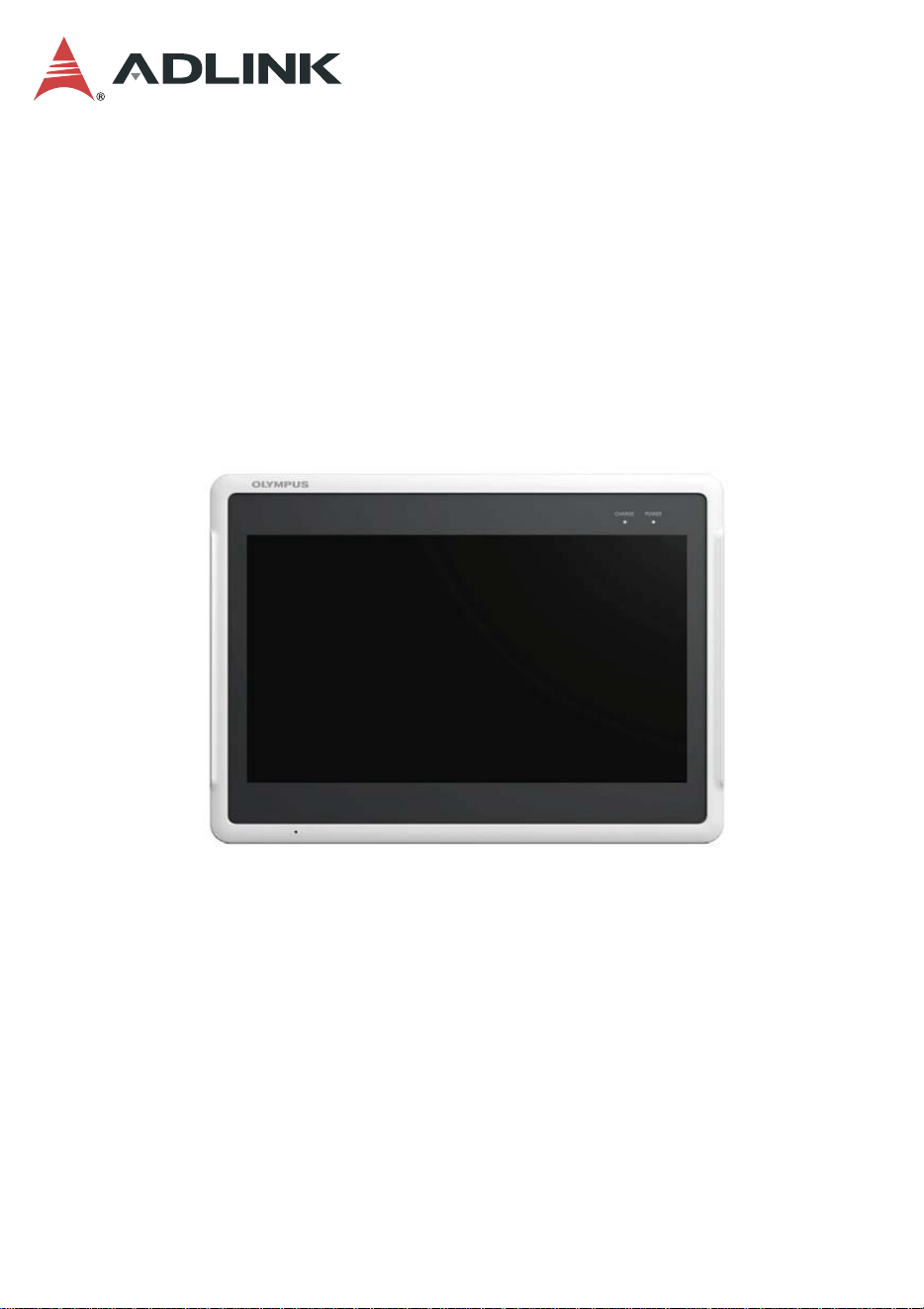
Bayer Salient 11.6”
Tablet
User’s Manual
Preliminary
ii Revision History
Leading EDGE COMPUTING
Revision History
Revision Release Date Description of Change(s)
0.1 29/03/2019 Preliminary release
Preliminary

Preface iii
Bayer Salient
Preface
Copyright © 2019 ADLINK Technology Inc.
This document contains proprietary information protected by copy-
right. All rights are reserved. No part of this manual may be repro-
duced by any mechanical, electronic, or other means in any form
without prior written permission of the manufacturer.
Disclaimer
The information in this document is subject to change without prior
notice in order to improve reliability, design, and function and does
not represent a commitment on the part of the manufacturer.
In no event will the manufacturer be liable for direct, indirect, spe-
cial, incidental, or consequential damages arising out of the use or
inability to use the product or documentation, even if advised of
the possibility of such damages.
Environmental Responsibility
ADLINK is committed to fulfill its social responsi-
bility to global environmental preservation
through compliance with the European Union's
Restriction of Hazardous Substances (RoHS)
directive and Waste Electrical and Electronic
Equipment (WEEE) directive. Environmental
protection is a top priority for ADLINK. We have
enforced measures to ensure that our products,
manufacturing processes, components, and raw
materials have as little impact on the environment as possible.
When products are at their end of life, our customers are encour-
aged to dispose of them in accordance with the product disposal
and/or recovery programs prescribed by their nation or company.
Preliminary
iv Preface
Leading EDGE COMPUTING
Trademarks
Product names mentioned herein are used for identification pur-
poses only and may be trademarks and/or registered trademarks
of their respective companies.
Conventions
Take note of the following conventions used throughout this
manual to make sure that users perform certain tasks and
instructions properly.
NOTE:
NOTE:
Additional information, aids, and tips that help users perform
tasks.
CAUTION:
Information to prevent minor physical injury, component dam-
age, data loss, and/or program corruption when trying to com-
plete a task.
WARNING:
Information to prevent serious physical injury, component
damage, data loss, and/or program corruption when trying to
complete a specific task.
Preliminary

Preface v
Bayer Salient
CE Warning Statement
Federal Communication Commission Interference Statement
FCC Statement:
This device complies with part 15 of the FCC Rules. Operation is subject to the
followingtwoconditions:
(1) This device may not cause harmful interference, and
(2) this device must accept any interference received, including interference that may
cause undesired operation. This equipment has been tested and found to comply with
the limits for a Class B digital device, pursuant to part 15 of the FCC Rules. These limits
are designed to provide reasonable protection against harmful interference in a
residential installation. This equipment generates, uses and can radiate radio frequency
energy and, if not installed and used in accordance with the instructions, may cause
harmful interference to radio communications. However, there is no guarant ee that
interference will not occur in a particular installation. If this equipment does
causeharmful interference to radio or television reception, which can be determined by
turning the equipment off and on, the user is encouraged to try to correct the
interference by one or more of the following measures:
—Reorient or relocate the receiving antenna.
—Increase the separation between the equipment and receiver.
—Connect the equipment into an outlet on a circuit different from that to which the
receiver is connected.
—Consult the dealer or an experienced radio/TV technician for help. Caution: Any
changes or modifications not expressly approved by the party responsible for
compliance could void the user's authority to operate the equipment. This equipment
complies with FCC radiation exposure limits set forth for an uncontrolled environm
ent. This transmitter must not be co- located or operating inconjunction with any other
antenna or transmitter.
WARNING:
This is a Class B product. In a domestic environment this
product may cause radio interference in which case the user
may be required to take adequate measures.
Preliminary
vi Preface
Leading EDGE COMPUTING
FCC RF Radiation Exposure Statement
This equipment complies with FCC RF radiation exposure limits
set forth for an uncontrolled environment for body-worn configura-
tion in direct contact to the phantom.
This device complies with FCC radiation exposure limits set forth
for an uncontrolled environment.
CAUTION:
Any changes or modifications not expressly approved by the
grantee of this device could void the user's authority to oper-
ate the equipment.
This device and its antenna(s) must not be co-located or
operating in conjunction with any other antenna or transmitter.
End-users and installers must be provided with antenna
installation instructions and transmitter operating conditions
for satisfying RF exposure compliance.
For product available in the USA/Canada market, only chan-
nel 1~11 can be operated. Selection of other channels is not
possible.
Preliminary

Table of Contents vii
Bayer Salient
Table of Contents
Revision History...................................................................... ii
Preface.................................................................................... iii
List of Figures ........................................................................ ix
List of Tables.......................................................................... xi
1 Introduction ........................................................................ 1
1.1 Overview.............................................................................. 1
1.2 Features............................................................................... 1
1.3 Specifications....................................................................... 2
1.4 Package Contents ............................................................... 4
1.5 Product Layout..................................................................... 5
2 Getting Started ................................................................... 7
2.1 Turning the Tablet On/Off.................................................... 7
3 External Connections ........................................................ 9
3.1 USB Port.............................................................................. 9
3.2 HDMI Display Output........................................................... 9
4 Care and Maintenance..................................................... 11
Important Safety Instructions.............................................. 13
Getting Service...................................................................... 15
Preliminary

viii Table of Contents
Leading EDGE COMPUTING
Preliminary
This page intentionally left blank.


xList of Figures
Leading EDGE COMPUTING
This page intentionally left blank.
Preliminary


xii List of Tables
Leading EDGE COMPUTING
This page intentionally left blank.
Preliminary

Introduction 1
Bayer Salient
1 Introduction
1.1 Overview
The Bayer Salient 11.6” Tablet is an EN 60950-1 certified control
tablet with high performance computing and versatile features.
The Salient features a Intel Atom® x5-E3940 system-on-chip, P-
CAP multi-touch panel with 1366 x 768 resolution, 64GB of
onboard storage, 2x USB 3.0, 1x HDMI 1.4 output, Wi-Fi and Blue-
tooth connectivity, and power status LED.
1.2 Features
X Intel Atom® x5-E3940 process
or SoC, 1.8 GHz
X 11.6” P-CAP multi-touch panel with 1366 x 768 resolution
X 64GB onboard storage
X 2x USB 3.0, 1x HDMI 1.4 output
X WLAN: IEEE 802.11 a/b/g/n
X WPAN: Bluetooth 4.1
X Power status LED
X DC power input: 19V/3.43A (via AC adapter)
Preliminary
2Introduction
Leading EDGE COMPUTING
1.3 Specifications
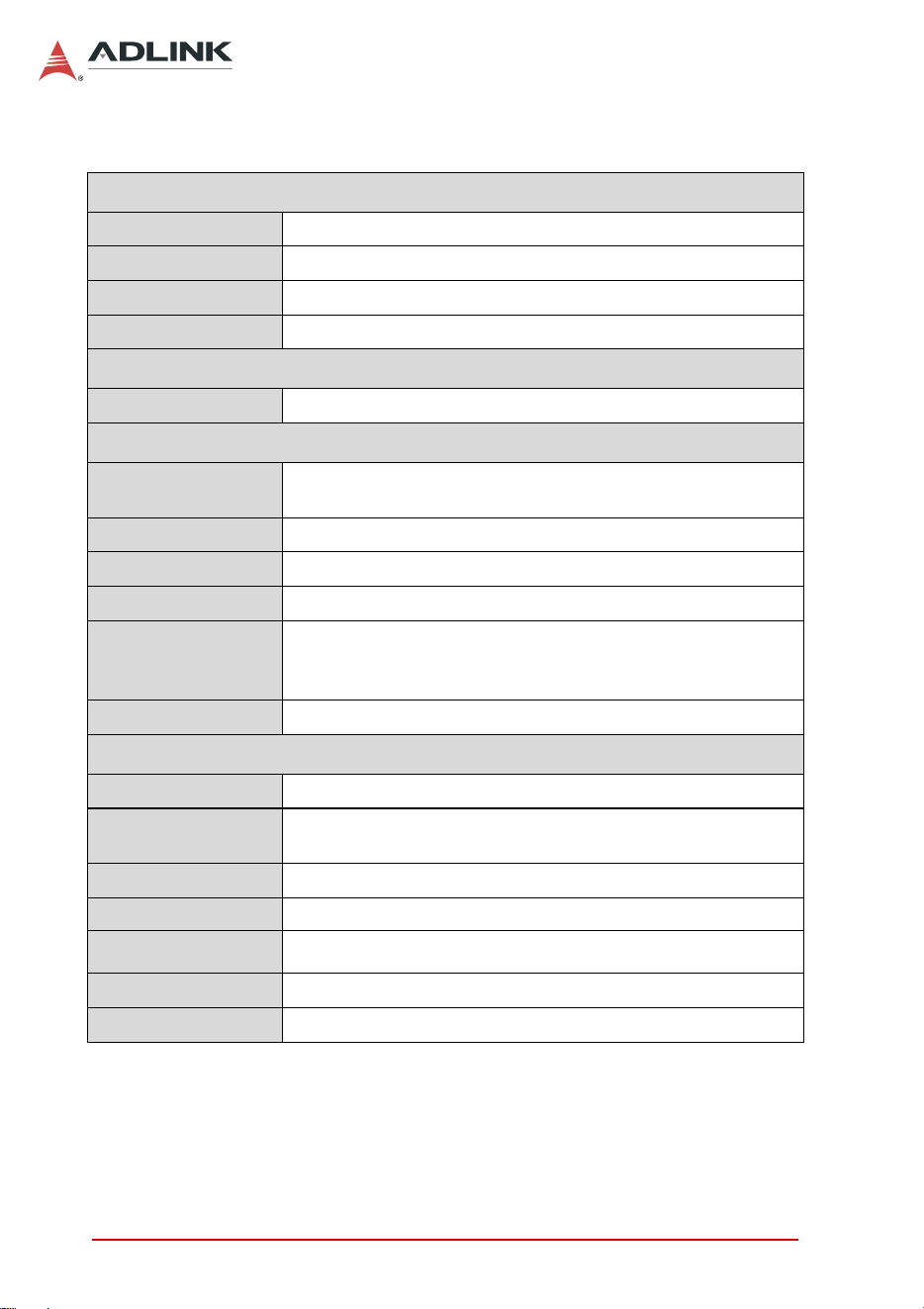
Display
LCD Size 11.6” 16:9 color TFT-LCD
Max. Resolution 1366 x 768 262K colors
Luminance 250 cd/m
2
(typical)
Viewing Angle 178° horizontal, 178° vertical (typical)
Touchscreen
11.6” Touchscreen P-CAP multi-touch panel
System
CPU
Intel Atom® x5-E3940 Processor, 4 cores, 2M Cache, up
to 1.80 GHz, 9.5W TDP
Memory Onboard DRAM, 4GB DDR3L up to 1866 MT/s
Graphics Intel® HD Graphics 500
Storage M.2 64GB SSD
Power Supply
FSP065-RBBN3 AC-to-DC adapter
Input: 100-240VAC, 1.5A, 50-60Hz
Output: 19VDC, 3.43A
OS Ubuntu (customer provided, TBD)
I/O Ports
USB 2x USB 3.0 Type A (supports USB 2.0)
HDMI
1x Standard HDMI connector support HDMI 1.4
(3840x2160 @30Hz)
Speaker 1x speaker
Internal Antenna 2x internal antenna for Wi-Fi/Bluetooth
Buttons 1x power on/off
DC Input 1x DC jack for 19V/3.43A DC in
LEDs 1x LED for power status
Table 1-1: Bayer Salient Tablet Specifications
Preliminary
Introduction 3
Bayer Salient
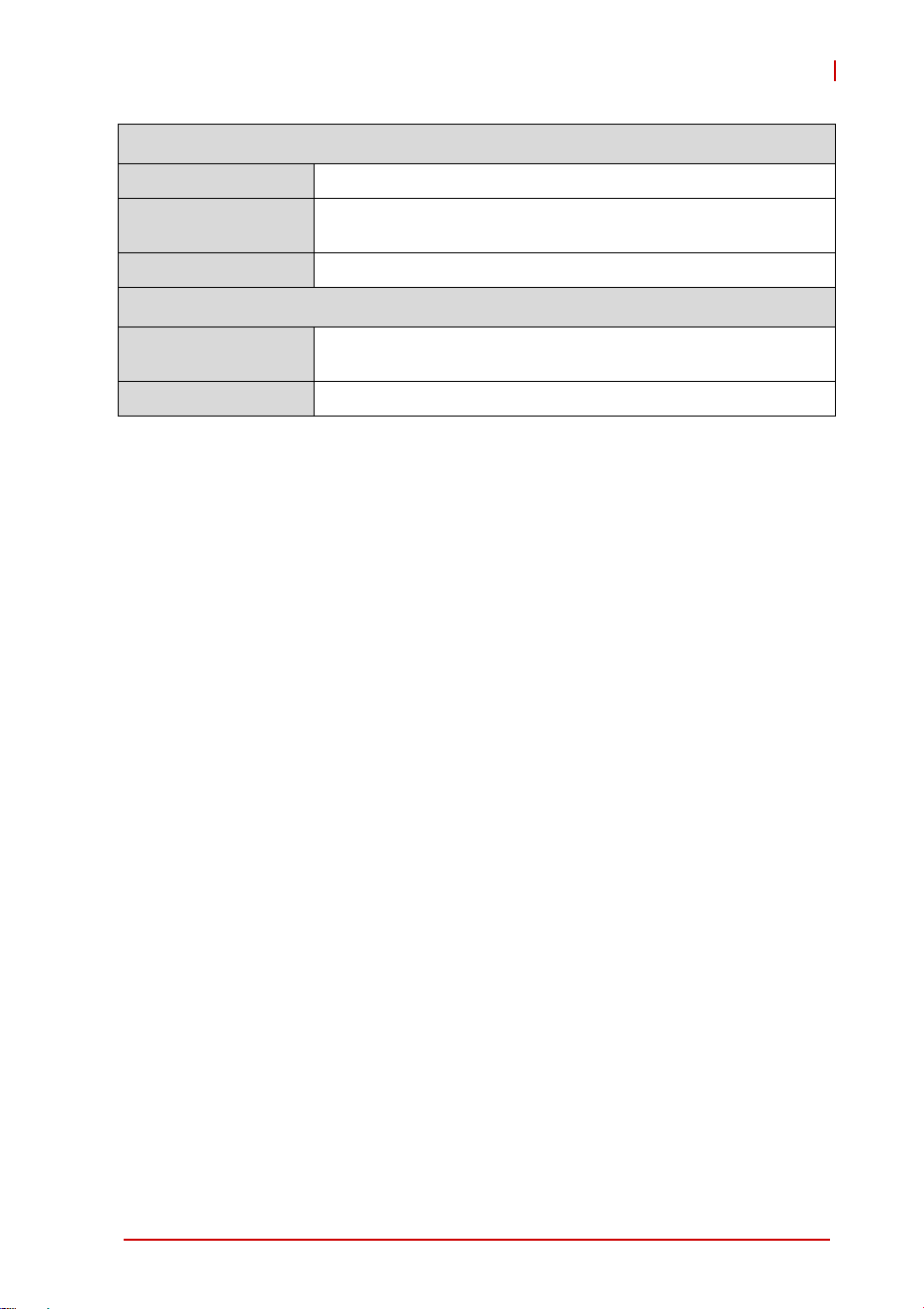
Chassis
Cooling Passive thermal solution
DC Power Input
Connector
Standard DC connector for 19V/3.43A
Dimensions 296(W) x 217(H) x 24.1(D) mm
Environmental/Certifications
Operating
Temperature
0°C to 35°C
Standards EN 60950-1
Table 1-1: Bayer Salient Tablet Specifications
Preliminary
4Introduction
Leading EDGE COMPUTING
1.4 Package Contents
Please check that your package contains the items below. If you
discover damaged or missing items, please contact your vendor.
X 1x Bayer Salient 11.6” Tablet
X 1x AC-DC power adapter
X 1x power cord
WARNING:
DO NOT install or apply power to equipment that is damaged
or if there is missing/incomplete equipment. Retain the ship-
ping carton and packing materials for inspection. Please con-
tact your ADLINK dealer/vendor immediately for assistance.
Obtain authorization from your dealer before returning any
product to ADLINK.
Preliminary
Introduction 5
Bayer Salient
1.5 Product Layout
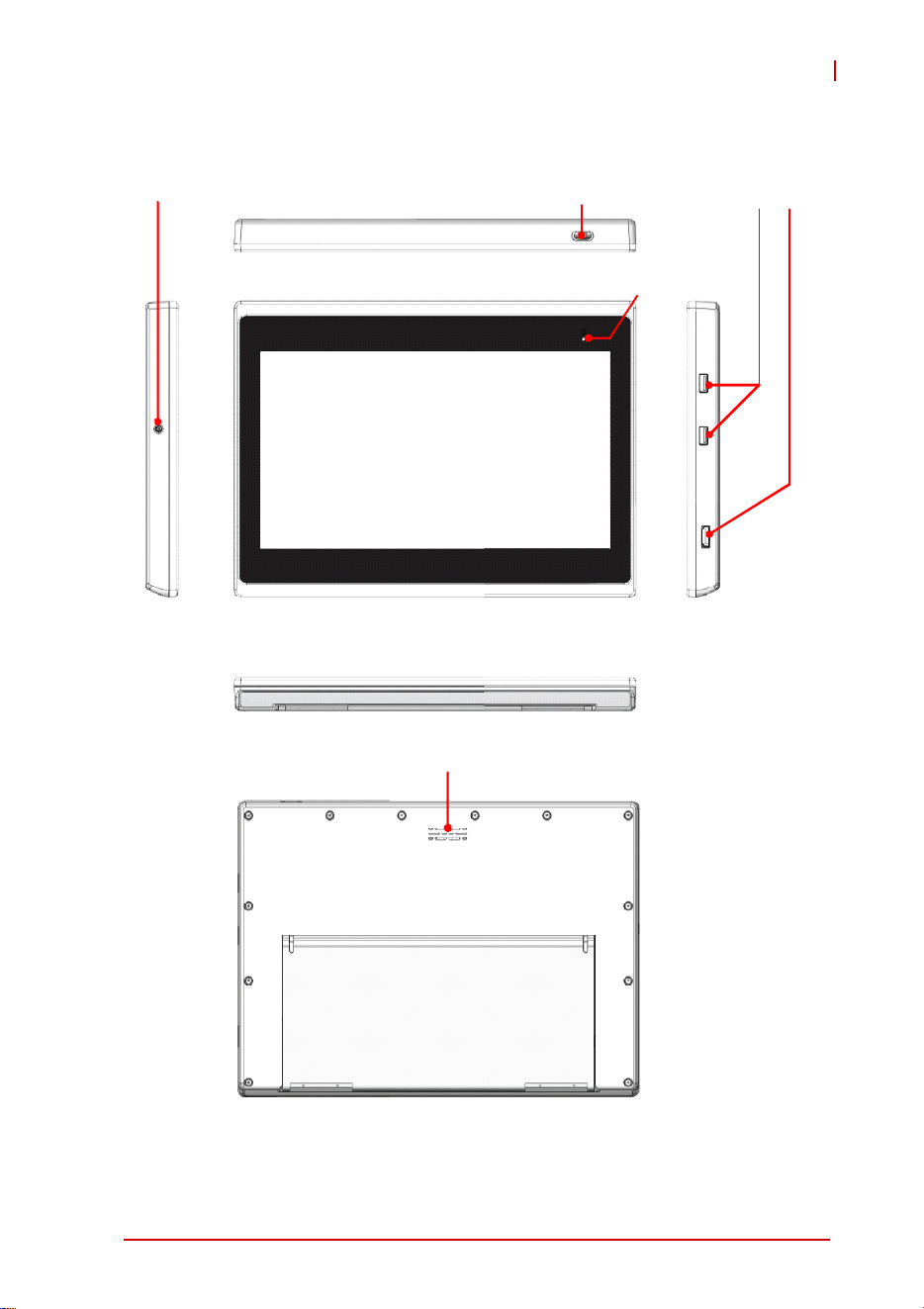
Figure 1-1: Bayer Salient Tablet Layout
Power Button
USB 3.0 HDMI
DC Input
Power LED
Speaker
Preliminary
6Introduction
Leading EDGE COMPUTING
Power Status LED
Table 1-2: Bayer Salient Power Status LED Description
LED Color Status
Power
Green System On
Warm White Standby
Off System Off
Preliminary

Getting Started 7
Bayer Salient
2 Getting Started
2.1 Turning the Tablet On/Off
Turning On
Press and hold the power switch for 1 seconds until the green
power status LED indicator turns on.
Turning Off
To perform a forced shut down, hold the power button down for 4
seconds.
Standby
To manually put the tablet into standby mode, briefly press the
power button. The display will turn off and the power status LED
will change to warm white after a few seconds.
To wake the tablet from Standby, tap the touchscreen or briefly
press the power button.
Preliminary

8 Getting Started
Leading EDGE COMPUTING
This page intentionally left blank.
Preliminary

External Connections 9
Bayer Salient
3 External Connections
The Bayer Salient has a USB 3.0 port, an HDMI display output on
the right side of the tablet (see Figure 1-1: Bayer Salient Tablet
Layout on page 5).
3.1 USB Port
To connect a USB device to the tablet, such as a flash drive or
external storage, use the USB 3.0 port (Type A) on the upper right
side of the tablet. To access the connector, use your fingernail to
open the protective cover. Fully close the cover to maintain IP54
protection for the tablet.
3.2 HDMI Display Output
The HDMI (Type A) port is located on the lower right side of the
tablet. To access the connector, use your fingernail to open the
protective cover. Fully close the cover to maintain IP54 protection
for the tablet.
Preliminary

10 External Connections
Leading EDGE COMPUTING
This page intentionally left blank.
Preliminary

Care and Maintenance 11
Bayer Salient
4 Care and Maintenance
X Avoid exposure to excessive moisture and extreme temper-
atures.
X Avoid exposure to direct sunlight or strong ultraviolet light
for extended periods of time.
X Do not place anything on top of your tablet or drop objects
on your tablet.
X Do not drop your tablet or subject it to severe shock.
X Do not subject your tablet to sudden and severe tempera-
ture changes. This may result in moisture condensation
inside the unit and subsequent damage. In the event of
moisture condensation, allow your tablet to dry out com-
pletely before powering it on.
X Avoid touching it with sharp objects to prevent scratches.
X Use a soft, lint-free cloth to clean the screen and the exte-
rior of your device.
X Never attempt to disassemble, repair or make any modifica-
tions to your device. Disassembly, modification or any
attempt at repair could cause damage to your device and
even bodily injury or property damage and will void the war-
ranty.
X Do not store or carry flammable liquids, gases or explosive
materials in the same compartment as your device, its parts
or accessories.
Preliminary

12 Care and Maintenance
Leading EDGE COMPUTING
This page intentionally left blank.
Preliminary

Important Safety Instructions 13
Bayer Salient
Important Safety Instructions
For user safety, please read and follow all instructions,
WARNINGS, CAUTIONS, and NOTES marked in this manual and
on the associated equipment before handling/operating the
equipment.
X Read these safety instructions carefully.
X Keep this user’s manual for future reference.
X Read the specifications section of this manual for detailed
information on the operating environment of this equipment.
X To avoid electrical shock and/or damage to equipment:
Z Keep equipment away from water or liquid sources;
Z Keep equipment away from high heat or high humidity;
X Never attempt to fix the equipment. Equipment should only
be serviced by qualified personnel.
X Equipment must be serviced by authorized technicians
when:
Z The power cord or plug is damaged;
Z Liquid has penetrated the equipment;
Z It has been exposed to high humidity/moisture;
Z It is not functioning or does not function according to the
user’s manual;
Z It has been dropped and/or damaged; and/or,
Z It has an obvious sign of breakage.
X Do not use a battery other than one approved for your
device.
WARNING:
Risk of explosion if battery is replaced with one of an incorrect
type. Dispose of used batteries appropriately.
Preliminary

14 Important Safety Instructions
Leading EDGE COMPUTING
X Do not use an AC adapter other than one approved for your
device. Use of another type of AC adapter may result in
malfunction and/or danger.
Z Do not use the AC adapter in a high moisture environ-
ment. Never touch the AC adapter when your hands or
feet are wet.
Z Allow adequate ventilation around the AC adapter when
using it to operate the device or charge the battery. Do
not cover the AC adapter with paper or other objects that
will reduce cooling. Do not use the AC adapter while it is
inside a carrying case.
Z Connect the AC adapter to a proper power source. The
voltage and grounding requirements are found on the
product case and/or packaging.
Z Do not use the AC adapter if the cord becomes dam-
aged.
Z Do not attempt to service the adapter. There are no user
serviceable parts inside. Replace the unit if it is damaged
or exposed to excess moisture.
Preliminary

Getting Service 15
Bayer Salient
Getting Service
Ask an Expert: http://askanexpert.adlinktech.com
ADLINK Technology, Inc.
9F, No.166 Jian Yi Road, Zhonghe District
New Taipei City 235, Taiwan
Tel: +886-2-8226-5877
Fax: +886-2-8226-5717
Email: [email protected]
Ampro ADLINK Technology, Inc.
5215 Hellyer Avenue, #110
San Jose, CA 95138, USA
Tel: +1-408-360-0200
Toll Free: +1-800-966-5200 (USA only)
Fax: +1-408-360-0222
Email: [email protected]
ADLINK Technology (China) Co., Ltd.
300 Fang Chun Rd., Zhangjiang Hi-Tech Park
Pudong New Area, Shanghai, 201203 China
Tel: +86-21-5132-8988
Fax: +86-21-5132-3588
Email: market@adlinktech.com
ADLINK Technology GmbH
Hans-Thoma-Strasse 11
D-68163 Mannheim, Germany
Tel: +49-621-43214-0
Fax: +49-621 43214-30
Email: [email protected]
Please visit the Contact page at www.adlinktech.com for information
on how to contact the ADLINK regional office nearest you.
Preliminary