INSTRUCTION
MANUAL
Please read all the instructions completely before use
and save this manual for future reference.

This page left blank intentionally.
CC Pocket Radio
3
UNPACKING
The box should contain the CC Pocket Radio, earbuds,
FM wire antenna, and this manual. If anything is missing
or damaged please contact C. Crane immediately. We
recommend you keep the box in the unlikely event your
radio needs to be serviced.
Owners Record
CAUTION
• Before turning the unit on, set your volume control to a low
setting.
• Slowly increase the sound until you can hear it comfortably
and clearly without distortion.
• Long-term exposure to loud sounds may cause hearing
damage.
It is best to avoid high volume levels when using
headphones/earbuds, especially for extended periods.
FOR YOUR FUTURE REFERENCE:
Serial No. (Found inside battery compartment):
Date of purchase/Name & address of dealer:

CC Pocket Radio
4
READ BEFORE OPERATING EQUIPMENT. SAVE THESE
INSTRUCTIONS.
1. Read and understand all safety and operating instructions
before the radio is operated.
2. Heat: Never put the radio in direct sunlight in an
unventilated area or behind glass like a car's interior.
The appliance should be away from heat sources such as
radiators, heat registers, stoves, or other appliances that
produce heat.
3. If the radio is left unattended and unused for long periods
of time, remove the batteries. The batteries may leak and
damage furniture or your radio.
4. The user should not attempt to service the appliance
beyond that described in the operating instructions.
All other servicing should be referred to qualied
service personnel.
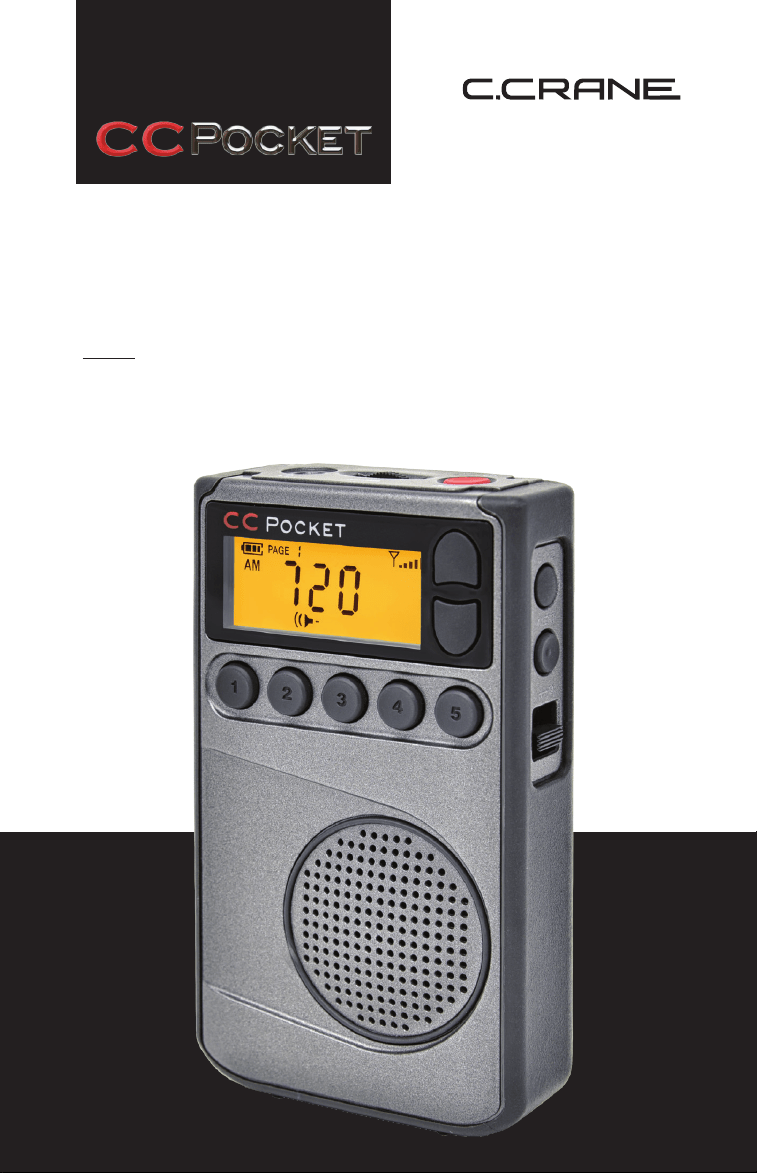
The CC Pocket radio uses the latest in digital chip technology
along with our own techniques developed at C. Crane. It is
able to bring in a weak FM station better than perhaps any
other pocket radio. The button layout is easy to understand
for basic use. It is different than other radios because some
of the features can be changed by reading the manual and
using multiple button presses to change them.
On AM, overload from a strong local station has been a
problem since the dawn of radio. The CC Pocket may be able
to shut out the offending station perhaps like no other radio
you have owned.
If you have any question about your radio, please give us a
call or check out: ccrane.com.
Introduction/Safety Instructions

CC Pocket Radio
5
Owners Record
Introduction/Safety Instructions
Installing the Batteries
Display Screen ldentication
Power Button/Sleep Timer
Earphone Jack/External FM Antenna
Setting the Volume
Tuning Buttons
Saving a Station to Memory
Listening with Speaker
Change Bands and Memory Pages
Changing Display/Weather Alert
Lock Switch
Earphone/ Speaker Switch
Removing the Belt Clip
Battery Compartment
Setting the Clock
Setting the Alarm
Disable Beep Sound
Designate Frequency or Clock While Listening
Activate 9 or 10 kHz AM Tuning
Disable the Display for Better Reception
Activate 1 kHz AM Tuning Steps
Activate Narrow AM Filters
Reset to Factory Defaults
Steps for Setting, Activating and De-Activating
the Weather Alert
Troubleshooting Guide
Specications
Table of Contents
03
04
06
07
08
08
08
08
08
09
09
10
10
10
10
11
11
12
12
13
13
13
14
14
14
14
15
18
CC Pocket Radio
6
INSTALLING THE BATTERIES
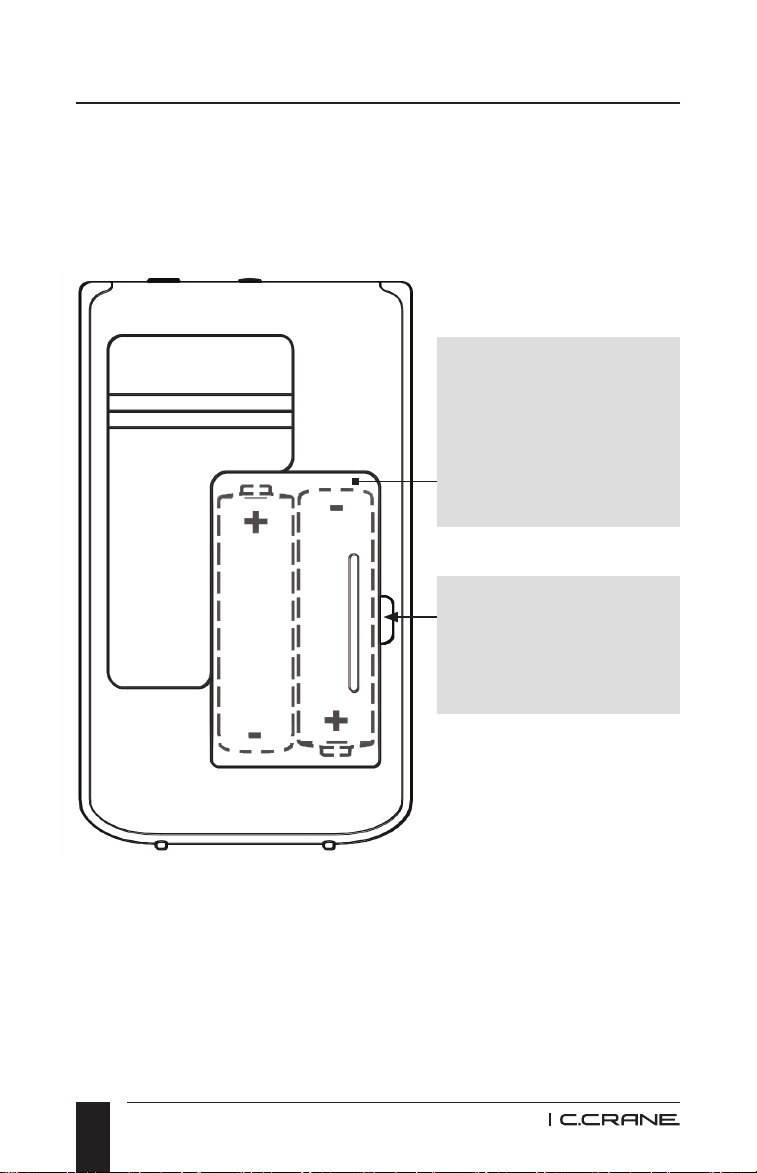
1. Position the radio face down on a soft surface to protect it.
2. Remove the battery cover using your ngernail or small
tool. Press and lift the area indicated below.
3. Insert the two (2) “AA” Alkaline or Rechargeable (NiMH)
batteries into the compartment as indicated. (Do not use
Lithium batteries). Be sure the negative (-) end of each
battery is against the spring.
4. Replace the battery cover. You are now ready to operate
your radio.
Getting Started
Insert two (2)
“AA” Alkaline or
Rechargeable
(NiMH) batteries.
(Do not use
Lithium batteries).
To open battery
compartment, push
in direction of arrow
and lift.
CC Pocket Radio
7
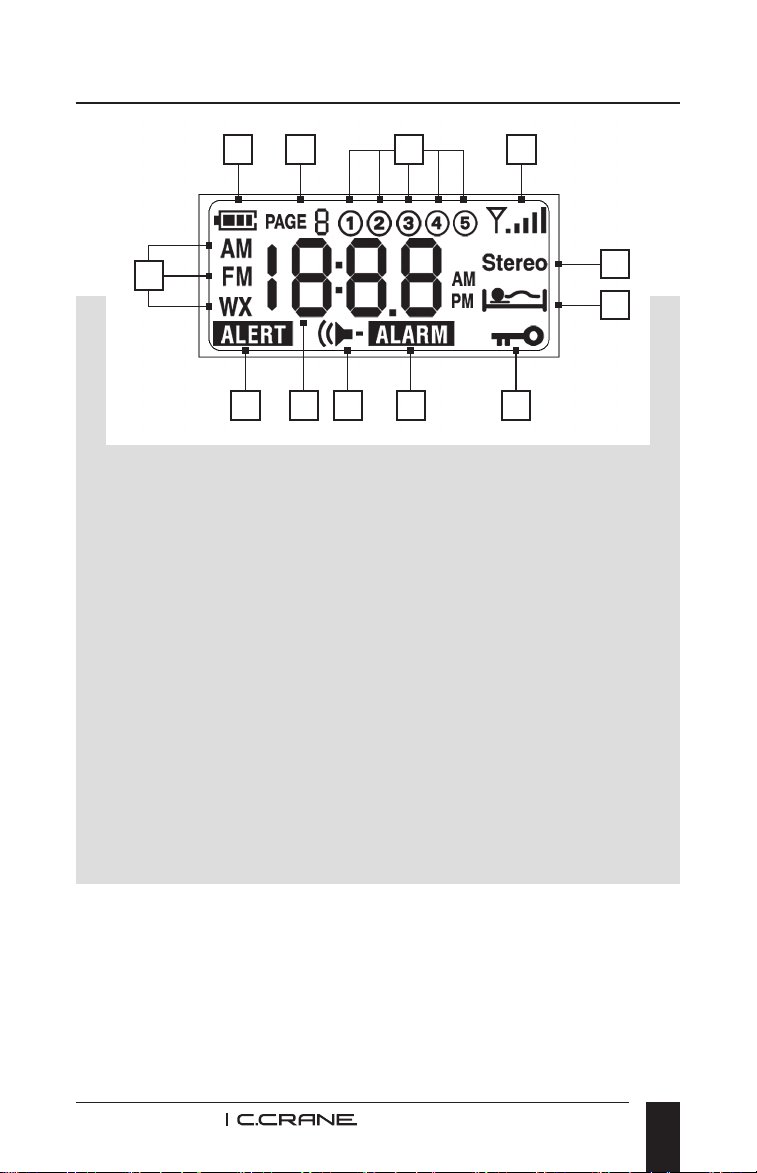
Display Screen Indentication
L
DBA C
IH GF
K
J
E
A. Battery Icon
B. Page number (for station memories)
C. Station memories 1 - 5
D. Reception Signal Strength
E. Band Indicator (AM, FM, Weather)
F. Frequency/Time
G. Speaker is Activated
H. Alert is Activated
I. Alarm is Activated
J. Stereo FM Reception
K. Sleep Timer is Activated
L. Lock Switch is Activated (buttons are disabled)
CC Pocket Radio
8
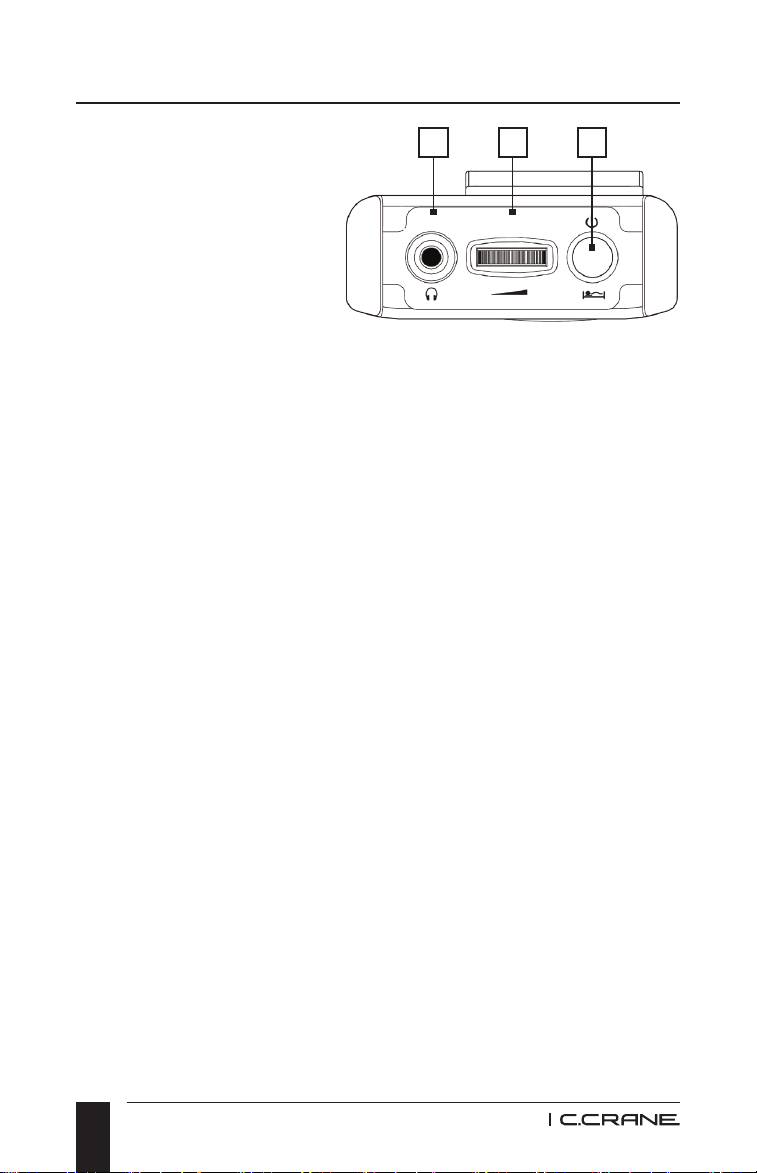
1. POWER BUTTON /
SLEEP TIMER
To turn the radio "ON"
just press the red
button. To use the
Sleep Timer, press
and hold the red
button. The Sleep
Timer will automatically
shut off the radio after the set amount of time expires.
The display will cycle through minutes 90, 60, 30, 15,
120, and OFF. Release the power button to activate the
sleep setting you desire. The radio will remember your last
Sleep Timer setting the next time you activate it.
2. EARPHONE JACK / EXTERNAL FM ANTENNA JACK
To listen using earphones, adjust the switch on the left side
of the radio to "Stereo" or "Mono" position. When earphones
are plugged in, they become an external antenna for FM,
even when the side switch is in speaker mode. The included
external FM wire antenna will also connect to this jack for
even better reception in speaker mode.
3. VOLUME CONTROL
Rotate to adjust volume. The volume control uses a
non-stop rotary dial which may require multiple turns to
receive the desired volume level.
4. TUNING BUTTONS (SEE ILLUSTRATION PAGE 9)
Press once quickly to tune to the next frequency
increment. Press and hold for 1-second to automatically
tune to the next strong station. Hold continuously to cycle
through the whole band.
TOP VIEW
Radio Identication
2 3 1
CC Pocket Radio
9
Radio Identication
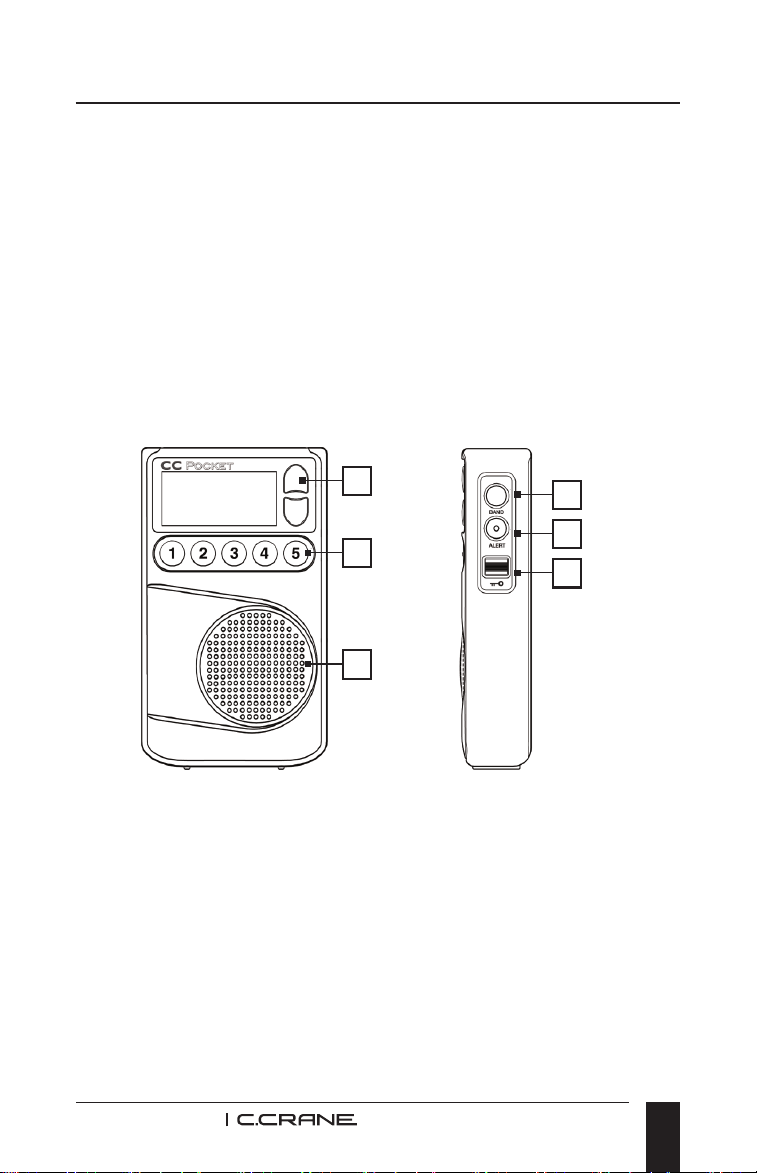
5. STATION MEMORY BUTTONS 1-5 (SEE ILLUSTRATION
PAGE 9)
Save your favorite stations to memory buttons. To save a
station, press and hold any memory button for 2-seconds
while the station is playing. To play a saved station, press
the same button once quickly.
6. SPEAKER
To enable speaker, adjust the switch on the left side of
the radio to the "Speaker'' position. The Speaker icon will
show on the display.
FRONT VIEW RIGHT SIDE VIEW
4
7
8
9
5
6
7. CHANGE BANDS AND MEMORY PAGES
Quickly press and release the BAND button to cycle
between FM, AM, and Weather.
The BAND button can also be used to access station
memory pages. This gives you 20 additional presets each
for AM and FM. Press and hold the BAND button for 2
seconds to change page numbers, press any memory
button 1-5 to select the Page number that you desire.
Each page can hold ve additional station memories.

CC Pocket Radio
10
Radio Identication
8. CHANGE DISPLAY / WEATHER ALERT BUTTON
While listening to the radio, press the ALERT button
once to view the frequency or time. To activate the NOAA
Weather Alert, press and hold this button for more than
3 seconds. Continue holding to select how long the alert
will be activated for (4hr, 8hr, and 16hr). Release the
button to make your selection. See page 14 for step by
step instructions.
9. LOCK SWITCH
Slide the switch up to disable all buttons. Slide the switch
down to enable all buttons.
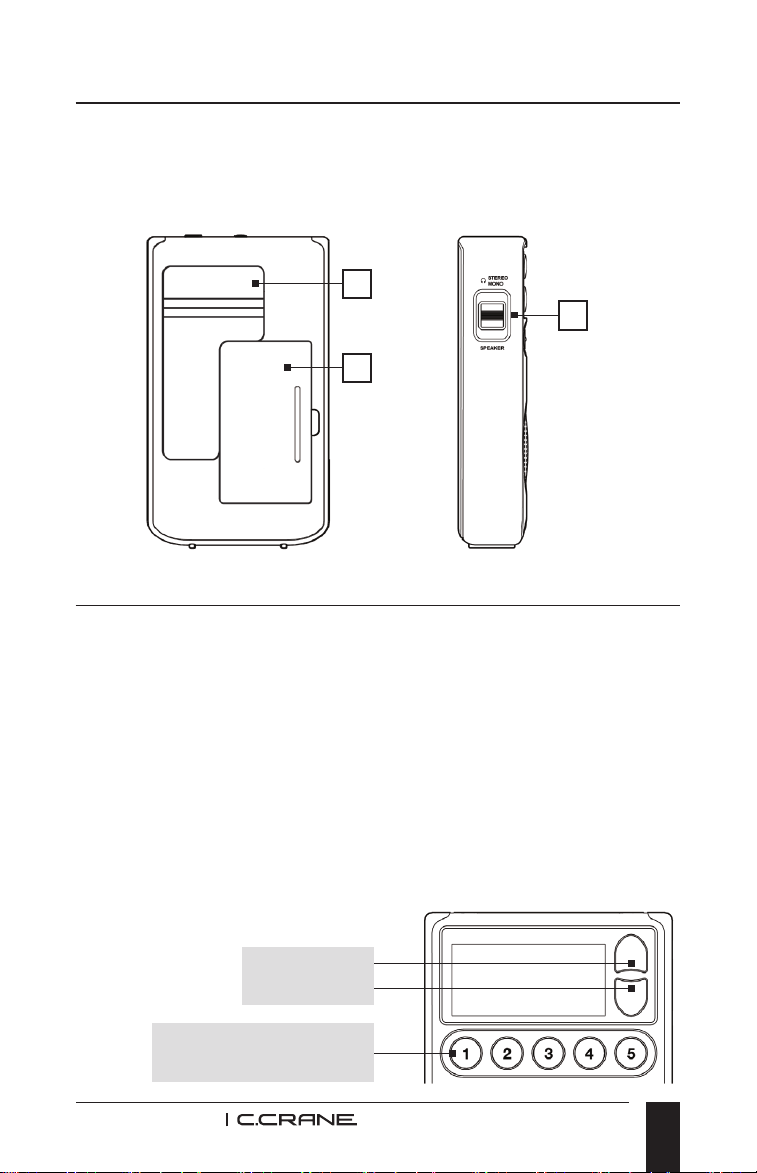
10. EARPHONE / SPEAKER SWITCH
STEREO (TOP POSITION): This position is for listening
to FM Stereo radio using headphones. While in this
position, the speaker will be disabled. AM and WX bands
will play normally.
MONO (MIDDLE POSITION): This position is for listening
to FM Mono radio using headphones. Typically, FM Mono
will have better reception than FM Stereo.
SPEAKER (BOTTOM POSITION): This position is for
listening to AM, FM, or WX using the speaker. While in
this position, the headphone jack will be disabled.
11. BELT CLIP
To remove the belt clip unscrew the two screws on the
back of the clip.
CC Pocket Radio
11
Radio Identication / Radio Setup
12. BATTERY COMPARTMENT
Requires two (2) “AA” Alkaline or Rechargeable (NiMH)
batteries.
BACK VIEW LEFT SIDE VIEW
11
12
10
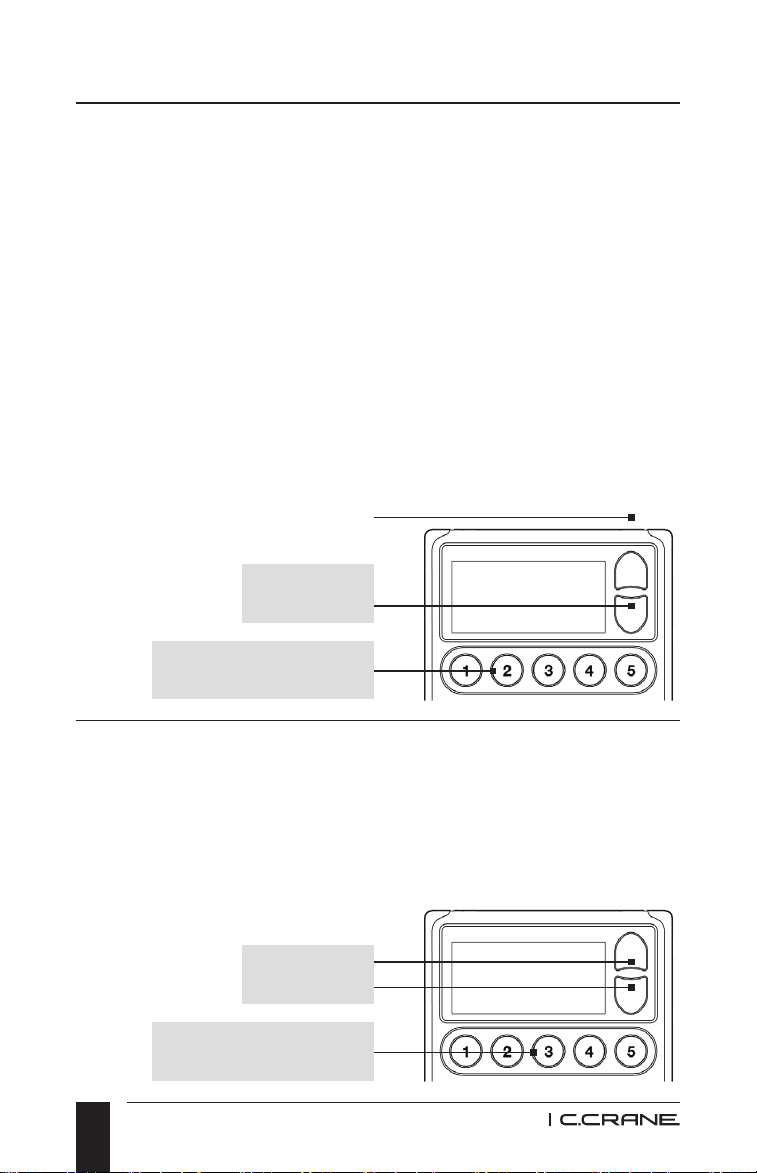
SETTING THE CLOCK
1. With the power OFF, press and hold memory button #1 for
two seconds. Release.
2. While the Hour is ashing, press the Up or Down Tuning
buttons until the hour and AM/PM time is correct.
3. Press and release memory button #1 to adjust the
minutes. Cycle minutes using the Up or Down
Tuning buttons.
4. Press and release memory button #1 again after the time
is set correctly.
Up/Down
Memory Button #1
CC Pocket Radio
12
Radio Setup
SETTING THE ALARM
1. With the power OFF, press and hold memory button #2 for
two seconds. Release.
2. While the Hour is ashing, press the Up or Down Tuning
buttons until the hour and AM/PM time is correct.
3. Press and release memory button #2 to adjust the
minutes. Cycle minutes using the Up or Down
Tuning buttons.
4. Press and release memory button #2 again after the time
is set correctly. When the alarm engages, it will beep for 2
minutes or until the Power button is pressed and released.
To disable the alarm, with the power OFF, press and hold
memory button #2 for two seconds.
Up/Down
Up/Down
Memory Button #2
Memory Button #3
DISABLE BEEP SOUND
1. With the power OFF, press and hold memory button #3 for
two seconds. All beeps are disabled except ALARM and
WX ALERT.
2. Repeat sequence to enable beep again.
CC Pocket Radio
13
Radio Setup
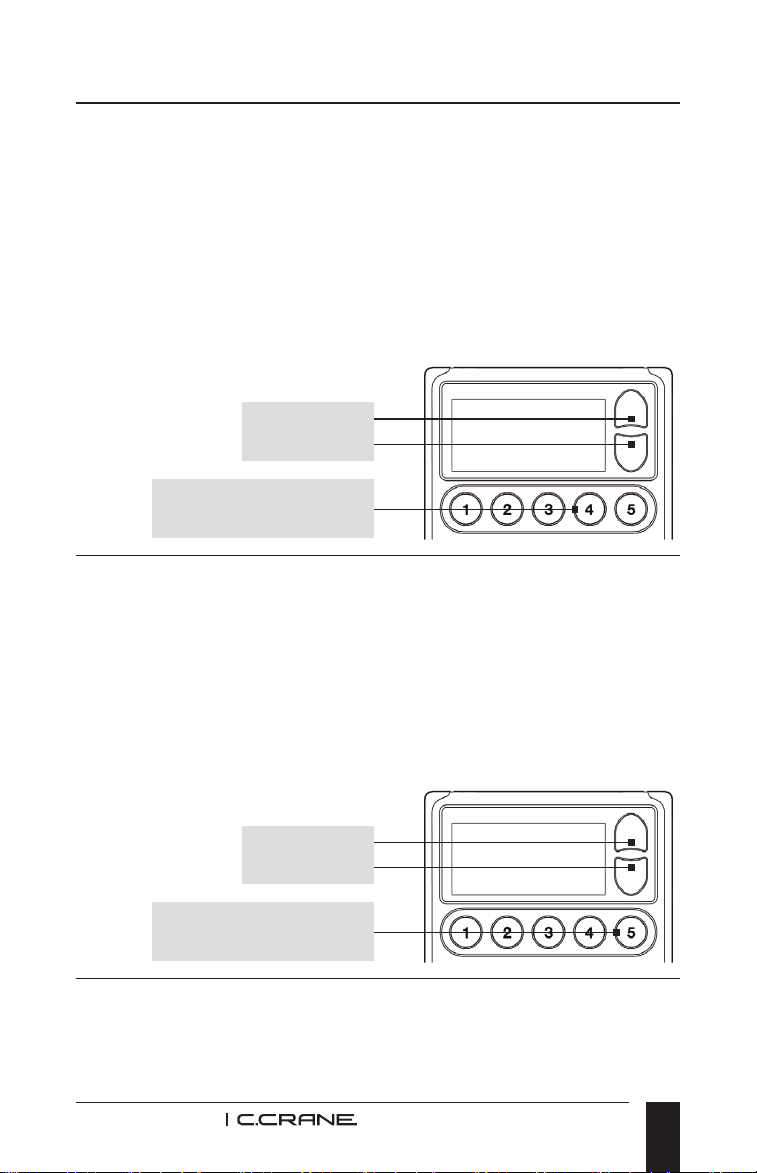
Up/Down
Up/Down
Memory Button #4
Memory Button #5
DESIGNATE FREQUENCY OR CLOCK WHILE LISTENING
TO THE RADIO
1. With the power OFF, press and hold memory button #4 for
two seconds. “C” will appear on the screen indicating that
the Clock will show while listening to radio.
2. Repeat sequence to display Frequency instead. “F” will
appear on the screen to indicate that the Frequency will
show when listening to the radio.
ACTIVATE 9 OR 10 KHZ AM TUNING (ALSO EXPANDS
FM BAND)
1. With the power OFF, press and hold memory button #2
and #5 at the same time for 10 seconds to activate 9 kHz
AM tuning mode. This will also expand the FM band from
76 MHz to 108 MHz.
2. Repeat sequence to switch back to 10 kHz AM tuning and
regular FM coverage.
DISABLE DISPLAY SCREEN
Quickly press memory buttons #1 and #5 at the same time
while listening to your desired AM station. NOTE: This is

CC Pocket Radio
14
used to improve AM radio reception. Once activated, if any
button is pressed, the display screen will turn “ON” again. To
keep display OFF after disabling, we recommend setting the
lock switch. See page 10.
ACTIVATE 1 KHZ AM TUNING STEPS
Quickly press memory buttons #1 and #4 at the same time
while listening to your desired AM station. Press again to
return to normal (10 kHz) tuning. NOTE: This setting can
tune AM stations that are slightly off frequency for various
reasons. Tuning 1 kHz higher or lower than the actual station
frequency may help improve reception.
ACTIVATE NARROW AM FILTERS
There are 3 narrow AM lters. Quickly press memory buttons
#1 and #3 at the same time while listening to your desired AM
station for narrow tuning. Press again for wide tuning. Press
once more to return to normal tuning. NOTE: These
settings are helpful to eliminate unwanted noise or adjacent
overlapping stations. Narrow AM (2.5 kHz) may work best for
voice. The wide (6 kHz) tuning is best for music. The normal
tuning (4 kHz) is usually good for both.
RESET TO FACTORY DEFAULTS
With power OFF, press and hold memory buttons #1 and #5
until you hear 4 beeps, a pause and two more beeps.
STEPS FOR SETTING, ACTIVATING AND DE-ACTIVATING
THE WEATHER ALERT
1. Turn the radio on by pressing and releasing the red power
button (on top of the radio).
2. Press and release the Band button (top button on right
side of the radio) until WX shows on the display.
Radio Setup

CC Pocket Radio
15
Radio Setup
Troubleshooting Guide
3. Change the channel with the Up or Down tuning buttons
until you hear your local NOAA Weather Broadcast.
4. Press and hold the Alert button (second button on the right
side of the radio) until the desired hours of monitoring (4hr,
8hr or 16hr) are selected.
NOTE: While the weather alert is activated, AM and FM
will be disabled until it is de-activated. The display light will
ash once every few seconds to remind you that the NOAA
Weather Alert is “ON”.
5. When NOAA issues a weather alert, the radio will
continuously beep.
6. Press and release the Power Button to listen to the
weather broadcast.
7. To de-activate the Weather Alert, press and hold the Alert
button for 3 seconds.
THE CC POCKET WILL NOT TURN ON AND NONE OF
THE BUTTONS WORK:
The Lock Switch, located on the right side of the radio under
the ALERT button, is in the up position. Push the switch down
to release the lock and resume normal operation of the radio.
(Please see Lock Switch on page 10).
MY RADIO SHUTS OFF AFTER JUST A FEW SECONDS:
Low batteries can cause this situation. Replace them with a
new set of batteries.

CC Pocket Radio
16
Troubleshooting Guide
STATIONS WON’T HOLD IN MEMORY:
The memory button settings are being overwritten. When
recalling a station from memory, if you hold the memory
button down too long it will program the current station over
your previously stored station. To recall a station that has
been stored in memory, always press and release the button
quickly. To program a new station into memory, tune to the
desired station and then press and hold the memory button
for two seconds until you hear a beep.
THE AM RECEPTION IS POOR:
You may need to rotate your pocket radio until the reception
is best. Many buildings that use brick, metal, or stucco
can absorb or reect the AM signal. Computers and other
electronic equipment, including uorescent lights, can cause
noise that interferes with your AM reception. Move the radio
to a different place to see if that helps. Additional noise may
affect a weak signal. See page 14 (Activate Narrow AM
Filters) for radio settings that may improve your AM reception.
POOR RECEPTION ON FM AND WEATHER BAND:
The CC Pocket can use its internal antenna, the included
external wire antenna, or headphones as an antenna for
FM and the Weather bands. To improve reception of these
bands, try various orientations of the headphone or antenna
wire to obtain the strongest signal.
BATTERY POWER LEVEL INDICATOR
DOESN’T SHOW FULL CHARGE WHEN USING
RECHARGEABLE BATTERIES:
Rechargeable batteries will not show a full charge on
your radios display. The CC Pocket is calibrated to read
the charge of your alkaline batteries, which is 1.5 volts at
full charge.

CC Pocket Radio
17
Rechargeable batteries, however, are fully charged at just
1.25 volts, and so your radio will show a partial charge even
if the rechargeable batteries have been fully charged. We do
not recommend using Lithium batteries in our products.
MY RADIO IS STUCK ON THE WEATHER BAND AND I
CAN’T CHANGE TO FM OR AM:
The Weather Alert has been activated. Turn the Weather
Alert off by holding the ALERT button for three seconds until
“OFF” is displayed. See page 14. Then press and release the
BAND button to change to FM or AM.
MY RADIO WAS WORKING ON AM BUT NOW IT WILL
NOT TUNE TO MY FAVORITE AM STATION CLEARLY:
It is possible that the tuning step has been changed from 10
kHz (used in the US) to 9 kHz (used in other countries such
as the UK) tuning. To change this back to 10 kHz, power off
the radio then hold memory buttons #2 and #5 at the same
time for 10 seconds until 10 is displayed. See page 13.
THE RADIO IS TURNED ON BUT THERE IS NO AUDIO
COMING FROM THE SPEAKER:
Check the switch on the left side of the Earphone/Speaker
Switch and make sure the switch is down and set to Speaker.
If the switch was up, the radio was playing audio through the
Earphone Jack. See page 10.
Troubleshooting Guide

CC Pocket Radio
18
FREQUENCY COVERAGE:
FM Band: 87.5 - 108 MHz (Regular Mode).
FM Band: 76 - 108 MHz (Expanded Mode - See page 13).
AM Band: 520 - 1710 kHz.
WEATHER BAND:
Channel 1: 162.400 MHz
Channel 2: 162.425 MHz
Channel 3: 162.450 MHz
Channel 4: 162.475 MHz
Channel 5: 162.500 MHz
Channel 6: 162.525 MHz
Channel 7: 162.550 MHz
POWER SOURCE:
Batteries: (2) “AA” Alkaline or Rechargeable (NiMH). Do not
use Lithium batteries.
NOTE: Lithium batteries can register at 1.8 volts. Using
Lithium batteries that register higher than 1.6 volts can
cause damage to the radio.
POWER CONSUMPTION:
30 -100 mA DC (depending on headphone or speaker
usage).
AUDIO:
Speaker: 1.25”, 8 Ohm, 0.5 Watts.
3.5mm Stereo headphone jack.
ANTENNA:
FM and Weather Band: Built-in antenna, External Wire
Antenna, or Headphones/Earbuds.
AM Band: Built-in Ferrite Bar.
Specications

CC Pocket Radio
19
Specications
DIMENSIONS:
2.5” W x 4.25” H x 0.9” D.
WEIGHT:
Approximately 3.5 ounces without batteries.
WARRANTY:
1-Year Limited Warranty.
NOTE: Specications are subject to change without notice.

MODEL: CCPOCKET
U.S. Patent D719,130 S
THIS DEVICE COMPLIES WITH PART 15 OF THE FCC
RULES. OPERATION IS SUBJECT TO THE FOLLOWING
TWO CONDITIONS;
1. THIS DEVICE MAY NOT CAUSE HARMFUL
INTERFERENCE, AND
2. THIS DEVICE MUST ACCEPT ANY INTERFERENCE
RECEIVED, INCLUDING INTERFERENCE THAT MAY
CAUSE UNDESIRED OPERATION.
NOTICE: Any changes or modications not expressly
approved by the party responsible for compliance could
void the user’s authority to operate the equipment.
Copyright © 2024 C. Crane. All rights reserved. No part of this booklet may
be reproduced, in any form or means whatsoever, without permission in
writing from C. Crane. (Ver 4)
172 Main Street
Fortuna, CA 95540-1816
Phone: 1-800-522-8863 | Web: ccrane.com