
USB Fast charge tester
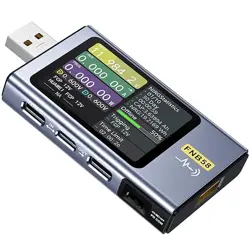
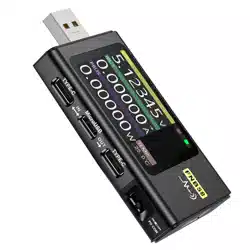
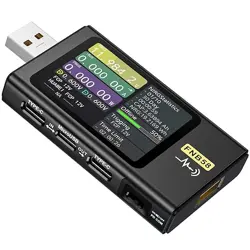
FNB58

Catalog
1、Versions and Updates 01
2、Overview 01
3、Safety precautions 01
5、Structure appearance 03
6、Technical index 04
4.0.1 Voltage and Current 02
4.0.2 Fast charge trigger 03
4.0.3 Wire identification class 02
4.0.4 Miscellaneous 03
4、Performance description 02
7.0.1 Concise page 05
7.0.2 monitoring page 05
7.0.3 Waveform page 06
7.0.4 Application page 06
7、 Main page 05

8.0.1 Automatic detection 07
8.0.2 PD Trigger 07
8.0.3 QC 2.0 Trigger 08
8.0.4 QC 3.0 Trigger 08
8.0.5 FCP Trigger 08
8.0.6 SCP Trigger 09
8.0.7 AFC Trigger 09
8.0.8 VOOC/WARP Trigger 09
8.0.9 SVOOC 1.0/SVOOC 2.0 Trigger 09
8、Fast Charge 06
10.0.1Cable resistance detection 11
10.0.2 PD Listener 12
10.0.3 PD Converter 13
10.0.4 USB-C-E-Marker 13
10.0.5 Read DASH cable 14
10、Toolbox 11
9.0.1 Energy statistics 09
9.0.2 Battery capacity calculation 10
9.0.3 Offline recording 10
9、Energy statistics 09

12、Upgrade firmware instructions 17
11.0.1 General 16
11.0.2 Record 16
11.0.3 Trigger 17
11.0.4 System 17
11.0.5 About 17
11、Settings 15
10.0.6 Soft DASH Cable 14
10.0.7Soft APPLE 2.4A accelerator 15

1、Versions and Updates
As instrument products have many functions and frequent software andhardware
updates, the manual may be updated at any time,please be aware.Please get the latest
update information on the official website.
2、Overview
The FNB58USB tester is a high-reliability, high-safety USB voltage andcurrent
detection meter and a mobile communication terminal fast chargingtrigger.It has a
2.0-inch full-color ultra-wide viewing angle TFT LCD display, integrated USB-A,
Micro-USB, Type-C interface. Use external 16-bit ADC, PD protocol physical chip. It can
be used to measure the power supply or power consumption of products such as USB
interfaces, mobile phone chargers, and U disks; it can be used to measure the charging
power of mobile phones and the input and output of mobile power supplies; it can be
used to test the fast charging protocol of chargers.
This instruction manual includes relevant safety information,warningtips and
solutions to common abnormal situations. Please read the relevantcontent carefully
and strictly abide by all warnings and precautions.
3、 Safety precautions
● Do not connect the monitoring interface to a power supply exceeding 28V;
● Do not connect the PC connection port to a power source exceeding 16v;
● Only one pair of monitoring interfaces (one input port,one outputport) can work at
the same time. When there is a pair of monitoringinterfaces working, it is forbidden
to connect to the equipment onother monitoring interfaces. (Except the PC
connection port, the PCport can be connected to an external power supply)
● When using the fast charge trigger module,please do not connect equipment that
cannot withstand high voltage to any monitoring interface;
● After using the PD trigger/monitor/conversion/read E-Marker cablefunction,please
turn the PD communication switch in the lower rightcorner back to the OFF position;
● Do not charge the phone after the fast charge is triggered, Therefore,the phone is
damaged,the manufacturer is not responsible for any damage to the phone.
1

4、 Performance description
1.The highest six-digit display of voltage,current and power,the highestresolution is
0.00001 (V/A/W).
2.10 sets of switchable capacity,power,and time statistics;
3.l set of voltage and current curve records,maximum support 9 hours
4.Support low-speed waveform (voltage,current,D+,D-) drawing,2sps->100sps
sampling rate;
5.Support high-speed ripple (voltage,AC coupling)drawing,up to 4Mspssampling
rate;
4.0.1 Voltage and Current
1.QC2.0,QC3.0 trigger;
2.Huawei FCP,SCP trigger;
3.Samsung AFC trigger;
4.PD2.0/3.0 Trigger;
5.VOOC/WARP Trigger;
6. SuperVOOC 1.0/Super VOOC 2.0Trigger;
7.The above protocols all support automatic monitoring
8.MTK-PE automatic detection;
9.Support QC2.O->PD2.0 protocol conversion;
10.Support a maximum of 24 hours for a limited time
trigger,andautomatically close the trigger when the
time comes
4.0.2 Fast charge trigger
1.The internal resistance measurement of the wire by the differential pressure
method;
2.E-Marker Cable chip reading; 3.DASH Cable data reading;
4.0.3 Wire identification class
l.Record of startup time;
2.Onboard temperature measurement;
3.Gravity sensor,automatically switch
the display direction;
4.PD monitor;
5.Analog DASH cable;
6.Apple 2.4A acceleration;
4.0.4 Miscellaneous
2
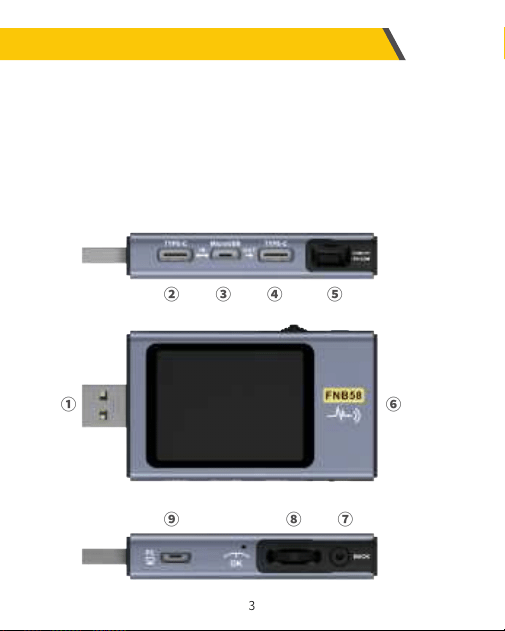
5、Structure appearance
l.Input monitoring port: USB-A,5-PIN male;
2.Input monitoring port: TYPE-C,24-PIN female socket;
3.Input monitoring port: Micro-USB,5-PIN female socket;
4.output monitoring port: TYPE-C,24-PINfemale socket;
5.PD communication switch;
6.output monitoring port: USB-A,5-PINfemale;
7.touch switch: BACK button;
8.Multi-function switches: left button,middle button,rightbutton;
9.PC connection port: Micro-USB,5-PIN female socket
①
② ③ ④ ⑤
⑥
⑦⑧⑨
3
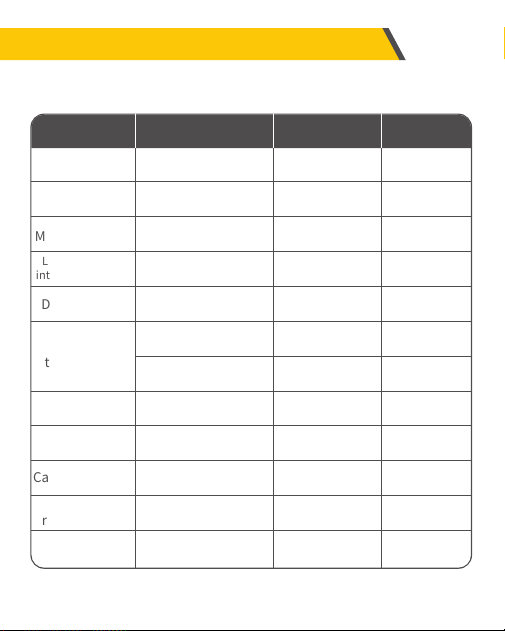
6、Technical index
Accuracy:±(a%(‰)reading + number of words)
Monitor voltage
Monitor current
Monitor current
D+/D- voltage
Capacity
Energy used
Cable resistance
Record time
Index
4~28V
0~7A
0~120W
0~9999.9Ω
0~3.3V
℃
℉
0~9999.99Ah
0~9999.99Wh
0~9999.9Ω
99d23h59min59s
99d23h59min59s
0.00001V
0.00001A
0.00001W
0.0001Ω
0.001V
1℃
1℉
0.00001Ah
0.00001Wh
0.0001Ω
1s
1s
Resolution
±(0.2‰+2)
±(0.5‰+2)
±(0.5‰+2)
±(0.5‰+2)
±(1.0%+2)
±(1.2%+3)
±(1.2%+4)
Accuracy
Range
Equipment
temperature
Equipmnt
running time
Load equivalent
internal resistance
4
7、Main page
●Except for special instructions,the left and right buttons switchpages/menus,the
middle button confirms,and the BACK button cancels/returns.
●Long press the BACK button to turn off the screenbacklight,all pages are valid.
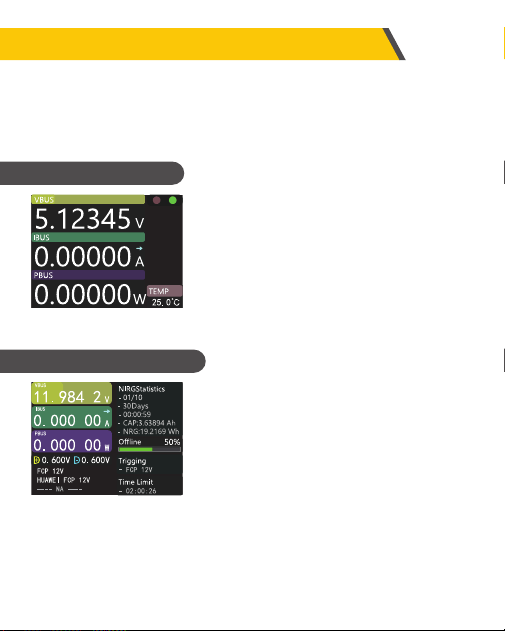
●Only the three key parameters of voltage,current
and power are displayed,indicates the direction of
current.
●Middle-click to toggle between Run and Pause.
●Temperature display (onboard temperature).
7.0.1 Concise page
●previous group
●next group
●Start recording offline
●Clear offline records
●Start the time limit
Press the middle button to enter
the recallable function menu
7.0.2 monitoring page
5
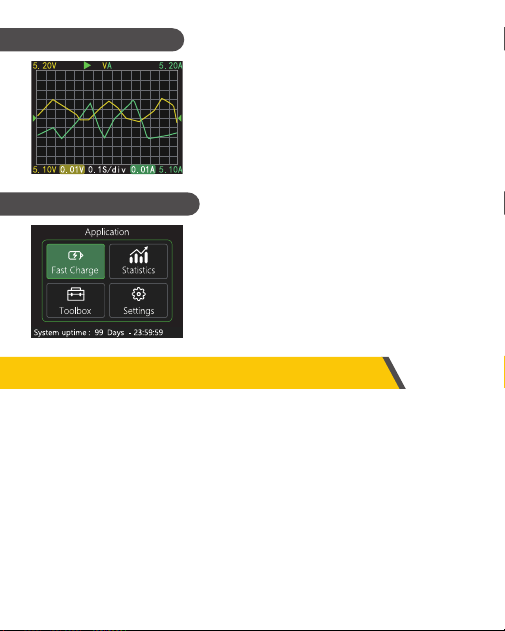
●Long press the left button: time base minus.
●Long press the right button: time base plus
●Click the middle button: start/pause drawing the
curve.
●Long press the middle button: switch modes.
7.0.3 Waveform page
7.0.4 Application page
8、Fast Charge
In the application interface, press the middle button to enter the fast charging
application. When entering the fast charging application, a warning will pop up. Please
read carefully and press the middle button to confirm the entry.
After entering, use the left and right keys to select options as follows:
1.Automatic detection
2.PD Trigger
3.QC2.0
4.QC3.0
5.FCP
6.SCP
7.AFC
8.VOOC/WARP
9.SVOOC 1.0
10.SVOOC 2.0
●Fast Charge
●Statistics
●Toolbox
●Settings
Application
6
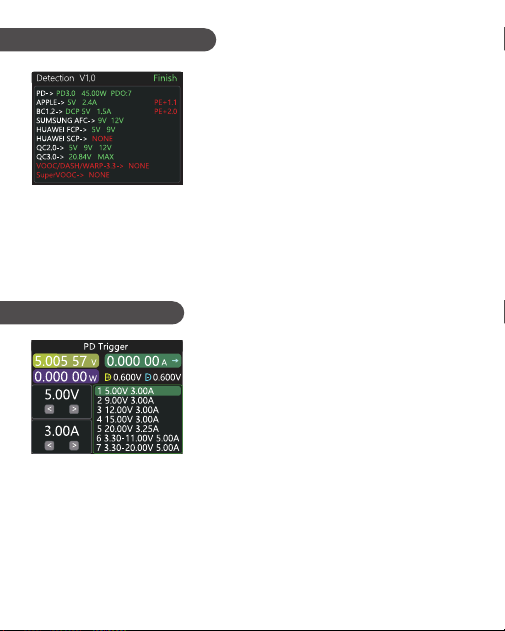
●In this mode, The meter tries to trigger various
protocols in turn, Display the test results on the
screen,Red is not supported,Green issupport, In
the process of testing, Such as measuring PD
chargers,It is normal to restart and continue testing.
●During the test, it is forbidden toconnect to any equipment at the back end.
●It does not respond to any key operation during the test. If you wantto exit during the
test,please unplug the meter directly.
●After the testis completed,click the middle button to start the test again; click theBACK
button to return to the previous page.
8.0.1Automatic detection
●Switch the PD communication switch to ON to enter
the PD protocol trigger mode. After exiting the PD
trigger, please switch the PD communication switch
to OFF.
●Press the middle button to select the adjustment
window (the window border turns green).
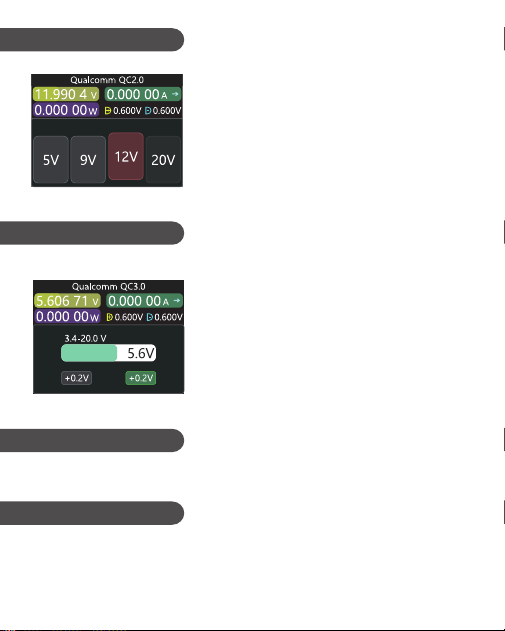
8.0.2 PD Trigger
In the fast charging interface, select automatic
detection and press the middle button to enter
In the fast charge interface, select PD trigger
and press the middle button to enter
●Take the picture as an example, the picture shows a charger sending a message, a total
of 7 files, its the 1st, 2nd, 3rd, 4th, and 5th gears are fixed voltage gears, currently
adjustable the window is gear adjustment, you can select the gear by the left and right
keys, such as when in the voltage/current window, the voltage/current can be adjusted.
●Click BACK to pop up the exit/return menu selection window.
(The actual number of functional
files of the product shall prevail)
7
8.0.3 QC 2.0 Trigger
8.0.4 QC 3.0 Trigger
8.0.5 FCP Trigger
The operation method is the same as QC2.0 trigger.
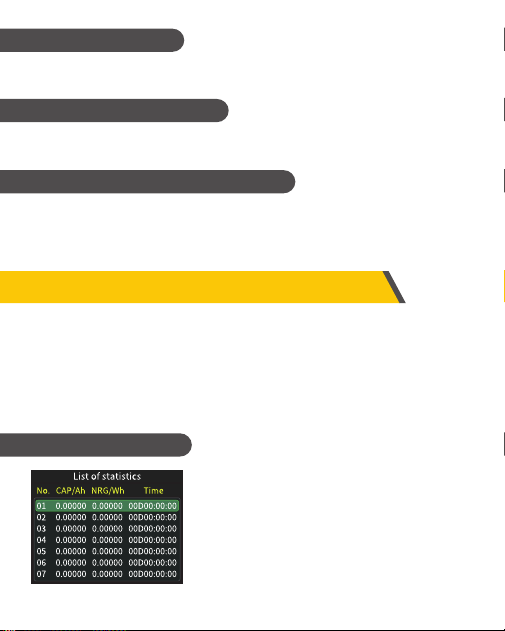
●In QC2.0 trigger mode,use the left and right
keys to select the triggervoltage,click the
middle button to confirm the trigger voltage,
and click BACK to pop up the exit/return menu
selection window.
In the fast charge interface, select QC2.0 and
press the middle button to enter
●In QC3.0 trigger mode, use the left and right
keys to decrease/increase Add trigger voltage,
click BACK to pop up the exit/return menu
Single selection window.
●Press the left/right button to quickly
decrease/increase the voltage.
In the fast charge interface, select QC3.0 and
press the middle button to enter
8.0.6 SCP Trigger
The operation mode is the same as QC3.0 trigger
8
8.0.8 VOOC/WARP Trigger
The operation mode is the same as QC3.0 trigger
8.0.9 SVOOC 1.0/SVOOC 2.0 Trigger
8.0.7 AFC Trigger
The operation method is the same as QC2.0 trigger.
Supervooc requires a load greater than 500mA on the back end todeceive,And
SuperVooc only has a voltage of 10.5V, Therefore,you canonly press BACK to return
/exit the page ,and there is no otheroperation.
In the application interface, select energy statistics and press the middle button to
enter the statistics page. The function options are as follows, and the left and right
buttons are used to select Press the middle button to enter each function option
9、Energy statistics
●Energy Statistics (Statistics List)
●Battery capacity calculation (calculate battery capacity)
●Offline record (view offline record curve)
9.0.1 Energy statistics
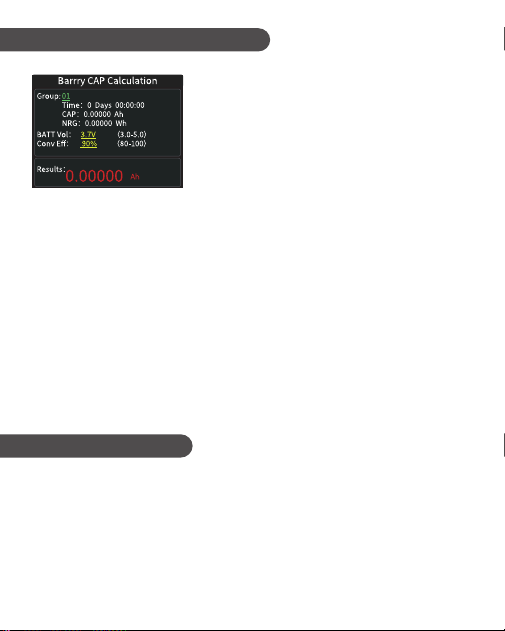
●From left to right are the group number, capacity,
energy, the selected The group is displayed in
green, and time is the statistical time.
●Press the left and right keys to switch the group
number, press the middle key to choose to set it as
"record Record/Clear".
9
After pressing the middle button to enter, press the middle button
again to select "Start Offline Recording/Clear Offline Recording"
9.0.3 Offline recording
9.0.2 Battery capacity calculation
1. Set the battery voltage and energy conversion
efficiency to calculate the battery capacity. Click
the middle button to move the green color among
the three items of group number, battery voltage
and conversion efficiency. Which item is green,
and the value of which item can be changed by
clicking the left/right button. Each item is
explained below.
2. The group number is the statistical group selected for calculation. The instrument
can be selected from 1-10 groups. The time, capacity and energy are counted and
displayed in order from top to bottom on the right side of the selected group
number.
3. The battery voltage, the default is 3.7V, this parameter can be selected from 3.0-5.0V,
the actual value please refer to the relevant information.
4. Conversion efficiency is energy conversion efficiency, the default is 90%, this
parameter can be selected from 80%-100%, the actual value should be set according
to the actual conversion efficiency of the battery.
5. The red letter is the calculation result. If you want to get the result in mAh, please
convert it by x1000
10
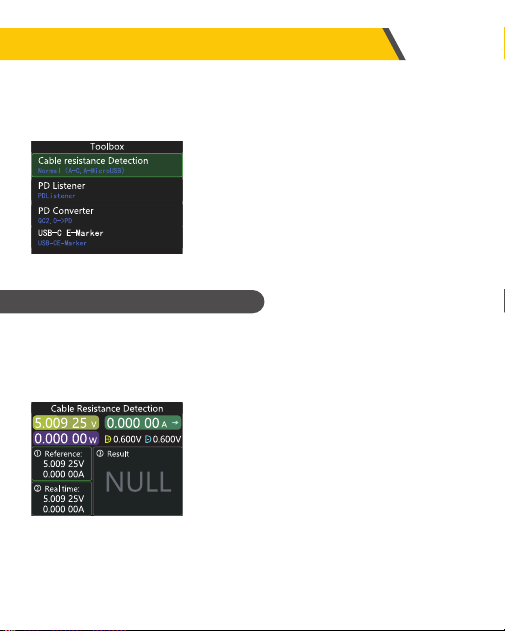
Measurement steps
1. Connection method: charger + FNB58 + constant
current load (the current is adjusted to about
0.5-1A), press the middle button to record the
reference value.
2. Connection method: charger + cable + FNB58 +
constant current load (the current should be
adjusted to about 0.5-1A, which should be similar to the current when the reference
value was recorded), the system automatically calculates the internal resistance of the
cable.
FNB58 uses the differential pressure method to measure the internal resistance of
the cable, which needs to be used with a constant current load.
Click the middle button: use the current voltage and current value as the reference
value.
10、Toolbox
In the application interface, select the toolbox and press the middle button to
enter the toolbox page. The function options are as follows. Select the left and
right buttons and press the middle button to enter each function option.
●Cable resistance detection
●PD listener
●PD converter
●USB-C electronic label (e-marker detection)
●Read DASH cable
●Simulated DASH
●Analog APPLE 2.4A
10.0.1Cable resistance detection
11
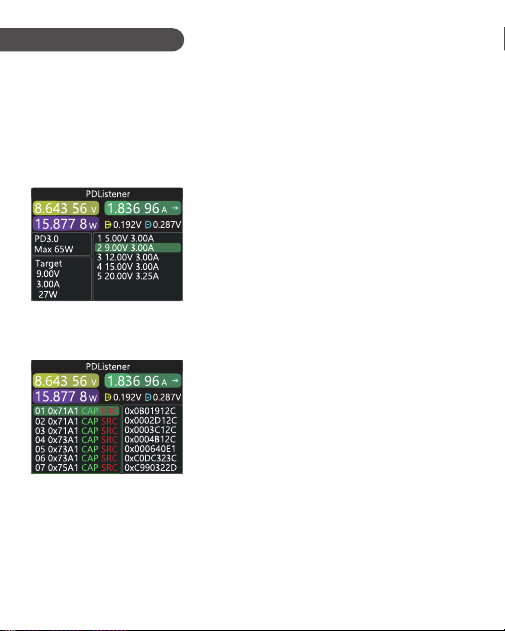
10.0.2 PD Listener
When using PD listener,Need to turn the PD communication switchtoON,And use a
power supply not greater than 16V (usually 5V) and a Micro-USB cable,Connect the PC
online port,Provide external power.
Use the PD listener function,Need 2 C-C cables,Connect the chargerand PD electrical
appliances from the Type-CIN interface and Type-COUTinterface respectively.When
the connection is normal and the PD protocoltriggered by the PD consumer is
captured,The page is represented asshown below.
Note:
1 Open the settings menu -> trigger -> block PDCRC, you can turnoffthe monitoring of
CRC.
2 For the meaning of various messages in the PD protocol, pleasereferto the relevant
information..
The figure below,The charger is a 65W PD charging head,The currentPD appliance
chooses the second gear,Trigger the target voltage 9V,Maximum current 3A.
When the PD charger cannot be powered,Because
the C-C cablehas only one-sided CC,And the 2 CCs
are not connected,So you can flipone of the C-C
cable connectors,Solve the problem.
12

●This function is used for only QC2.0 charger, But want to supply power to
PDappliances.
●Before use, Switch the PD communication switch to ON, Then enter the PDprotocol
conversion mode,after entering,Plug in PD appliances, You can performPD fast
charge.
●In this mode,C1ick the middle button and use the left and right buttons tochange the
maximum power of packets sent by the PD.When changing power,Becareful not to
exceed the charger power to avoid unnecessary damage.Afterchanging the power,
you must click the middle button to confirm.
●Set 5v when no device is connected,Avoid high-voltage damage to mobilephones
that do not support high-voltage when plugged in.
●QC2.0 only B type charger supports 20v trigger, So when the PD appliancerequests
20V voltage, The tester will detect whether the charger successfullytriggers
QC2.0-20V,If it does not reach 20V, The tester will cancel the 20V gear,And resend the
Caps broadcast.
E-Marker cable refers to a cable with an E-Marker chip in the Type-C interface,If the
interface does not contain E-Marker chip, The packets from thePD charging head cannot
exceed 3A current, And only use the E-Marker cable to trigger the PD protocol, The
current can exceed 3A.
When using the USB-C electronic label,Except that the Type-C interface cannot be used
for power supply,PC port,USB-A,Micro-USB interface can all be usedforpowersup-
ply.The PD communication switch needs to be turned ON.
10.0.3 PD Converter
10.0.4 USB-C-E-Marker
13
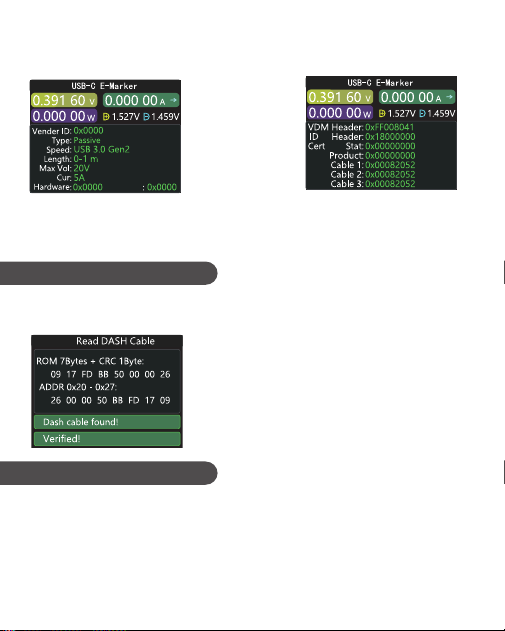
The two pictures above,The picture shows the parsed data,The secondpicture is the
original data,Users can consult the relevant informationof the PD agreement by
themselves,Do your.
●This function is used without DASH cable.
●The USB-A head of the DASH cable will have one more data pin thantheordinary
USB-A data cable.And one more chip,Used to identify and startVOOC/WARP flash
charge.
After entering this function,From the output
Type-C interface,Plug in thecable,You can
read the message,As shown below:
Click the middle button to
switch to the figure below:
Enter this function,Plug in the DASH cable,You can read the chip-related data,As shown
below:
10.0.5 Read DASH cable
10.0.6 Soft DASH Cable
14
●If,The phone normally needs to use a USB-A->Type-C DASH cable,Butthere is no such
thread in hand,Only FNB48 tester and a C-C cable,Butwantto trigger VOOC/WARP
flash charge,At this time, the function of simulating DASH cable can be started,And
use the C-C cable to connecttothe phone, You can perform VOOC/WARP flash
charging.
Note: Since this method does not use the original data cable forcharging, The
charging power is largely affected by the C-C line,If theimpedance of the C -C
line is high,Then the charging power will be reduced a lot.
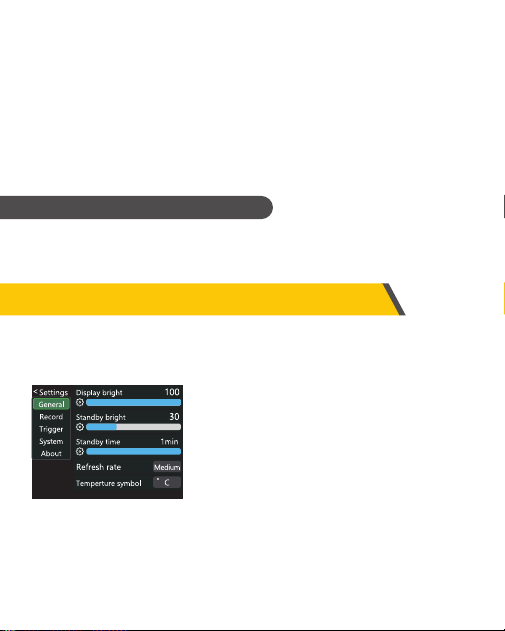
●General ● Record ● Trigger ● System ● About
10.0.7 Soft APPLE 2.4A accelerator
11、Settings
In the application interface, select the toolbox and press the middle button to enter the
toolbox page. The function options are as follows. Select the left and right buttons and
press the middle button to enter each function option.
When the Apple device detects that the charging head D+ and D- are2.7V,To charge at
5V-2.4A,This function sets D+ and D- to 2.7V.
15

11.0.1 General
11.0.2 Record
●Display brightness:Set the screen brightness, the adjustable range is 1-100.
●Standby brightness:Set the standby screen brightness,Adjustable range 0-100
level, whensetto 0,Enter the standby state and turn off the screen directly.
●Standby time:Set the standby time, the last time you operate the button to
starttiming,Reach the standby time,Enter the standby state
●Refresh rate: select slow-medium-fast.
●Temperature symbol:The onboard temperature can be displayed as°C/℉.
●Language:Currently only Chinese/English is supported. Due to the charactersizep-
roblem, English will be displayed in the Chinese system, which is anormalphenom-
enon.
●Gravity direction recognition:Turn on to automatically rotate the screen.
●Boot page:Turn on/off the boot page.
●Key Tone: Turn on/off the key tone.
Left and right keys to select and press the middle key to enter various function
options.
●Curve recording time:Set the recording time of the voltage and current curve,Max-
imum9hours,Set to no time record.Every time you change the configuration,the-
curve will be cleared to 0.
●Statistical current threshold:When the current ≥ the threshold,To carry out
statistics on capacity, energy, and time,Setting range 0-7A.
●Energy statistics time:Set to no time,No time limit,Until the statistics reach the
maximumvalue. After setting the time,When the statistical time reachestheset
value, the statistics will automatically stop.
●Clear all records:Clear all recorded data,Including offline curves,Energy statistics.
Left and right keys to select and press the middle key to enter various function
options.
16

11.0.3 Trigger
1. Open the host computer software
2. When the meter is off, press the middle button, use the data cable with data
transmission to connect to the PC online port, and the computer displays the main
page of the host computer software, which means the connection is successful.
3. Click System--Click Folder--Select Firmware.
4. Click the upgrade symbol to start the firmware upgrade. After the upgrade is
completed, the meter will automatically restart and enter the main interface.
11.0.4 System
Factory reset.
11.0.5 About
Check the version number and other related information.
12、Upgrade firmware instructions
●Trigger time:Set the time to manually trigger the protocol.
●Monitor mask PD CRC:After opening,When PD is monitoring,CRC messages can be
masked,Off by default.
●Boot simulation DASH:After it is turned on, turn on the analog DASH cable function
atboot,which is turned off by default
●Boot analog Apple 2.4A accelerator:After opening,Turn on the Apple 2.4A
acceleration function whenbooting,Off by default.
Left and right keys to select and press the middle key to enter various function
options.
17

Manufacturer
Shenzhen FNIRSI Technology Co., Ltd
Address
8th Floor, West of Building C, Weihuada Industrial Park,Dalang Street,
Longhua District, Shenzhen,Guangdong Province
Contact details
0755-83242477
Website
www.fnirsi.cn
Production information