BM008
V1.0
User Manual
Welcome to UNIWA BM008
This is a handheld Bluetooth walkie-talkie microphone
that can pair with smart walkie-talkies, vehicle
walkie-talkies, smartphones, and tablet pc. It allows for
PTT, SOS and volume control. It is compatible with PoC
walkie-talkie applications such as Zello, Pocstars, and
RealPTT. Suitable for various scenarios including
construction, security, elderly care, restaurant ordering,
logistics, and property management, it provides an
efficient and convenient real-time wireless
communication solution, improving communication
efficiency and collaboration convenience.
Table of Contents
1. WARNING.................................................................................................02
2. Packing List..........................................................................................03
4. Function Overview..........................................................................03
5. Battery Installation.........................................................................04
6. Pairing Instructions........................................................................06
- 1. App Download and Login..........................................06
- 2. Bluetooth Pairing and Usage.................................06
7. Buttons & Indicator Function Table.....................................07
- 1. Button Function.................................................................07
- 2. Indicator Function..........................................................08
8. Product Specifications................................................................08
- 1. Basic Information............................................................08
- 2. Hardware.............................................................................09
- 3. I/O Interfaces....................................................................09
- 4. Network & Connectivity.............................................09
- 5. Accessories..........................................................................10
9. Troubleshooting..................................................................................11
• This device is not waterproof; do not immerse it in your
hands.
• disposal of a battery into fire or a hot oven, or
mechanically crushing or cutting of a battery, that can
result in an explosion; leaving a battery in an extremely
high temperature surrounding environment that can
result in an explosion or the leakage of flammable
liquid or gas; a battery subjected to extremely low air
pressure that may result in an explosion or the leakage
of flammable liquid or gas.
• Avoid holding the speaker close to your ear while the
device is operating to prevent hearing damage from
high volume. Adjust the volume to a suitable level for
your environment.
• Please obey local traffic regulations during use to
prevent traffic accidents.
• People wearing pacemakers or other electronic
medical devices should maintain a certain distance
from the device (recommended ≥10cm) to prevent
electromagnetic interference with the device's normal
operation.
• If the device malfunctions (e.g., no sound, inability to
charge, abnormal Bluetooth connection), do not
attempt to repair it yourself. Contact official
after-sales service or a professional for assistance.
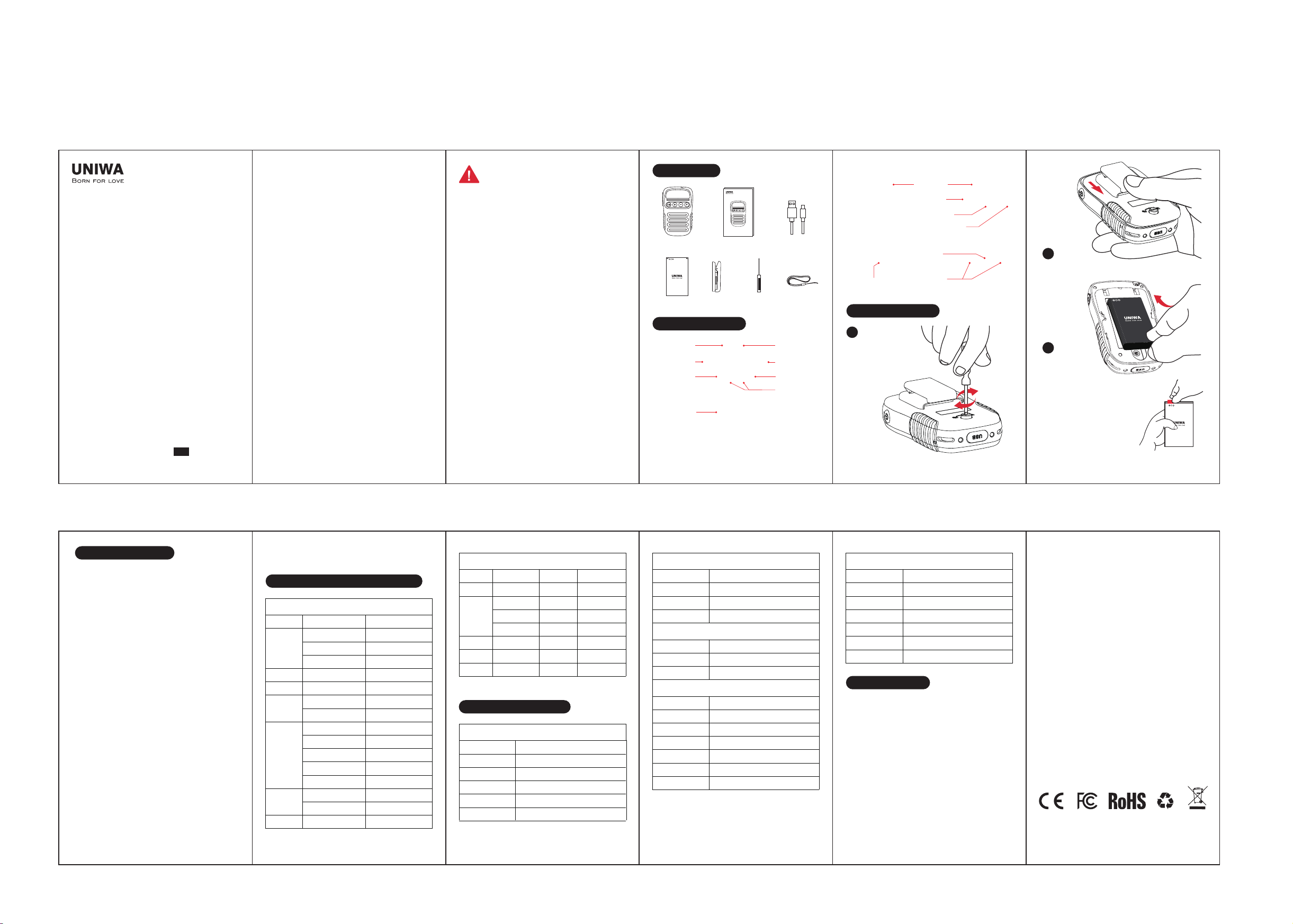
Slide the back cover down to open it as figure shown.
Note: Before installing the
battery, be sure to remove
the insulating tape on the
battery contacts.
01 02 03 04 05
0706 08 09 10 11
Packing List
Function Overview
Battery Installation
Buttons & Indicator Function Table
Pairing Instructions
Copyright@ 2026 Shenzhen Cwell Electronic Technology Co., Ltd.
LED Indicator
Channel key
Speaker
Back clip
Lanyard
Hole
Type-C
Port
SOS Button
Earphone Jack
Dock
Contacts
Fixing Screws
P Key
Power ButtonPTT Key
MIC
Volume +/-
2
Install the battery
into the device.
3
Use the small screwdriver
included in the package
to loosen the screws.
1
UNIWA BM008 has been successfully adapted to three
public network walkie-talkie apps: Zello, Pocstars, and
RealPTT. The steps are as follows:
1. App Download and Login
Download and install any one of the three apps from
the app store of your smartphone, smart walkie-talkie,
or tablet pc, or from the corresponding app's official
website, and log in to your account.
Account and Pricing Information:
• Zello (Starter Version) is free; you can register by
yourself.
• Pocstars (Trial Account) can be obtained by
scanning the QR code on the trial card inside
product package.
• RealPTT is a paid version.
2. Bluetooth Pairing and Usage
- Press and hold the BM008 power button for 3
seconds. The indicator light will flash, indicating the
device is in pairing mode.
- Turn on Bluetooth on your phone/smart
walkie-talkie/tablet pc, search for and connect to
"BM008".
- After pairing, you can use the Bluetooth microphone
normally.
For detailed instructions, please refer to the
video tutorial: https://youtu.be/_wdBoYBj-N8
Note:
For compatibility with other walkie talkie apps,
Any Changes or modifications not expressly approved by the
party responsible for compliance could void the user's
authority to operate the equipment.
This device complies with part 15 of the FCC Rules. Operation is
subject to the following two conditions: (1) This device may not
cause harmful interference, and (2) this device must accept any
interference received, including interference that may cause
undesired operation.
Note: This equipment has been tested and found to comply with
the limits for a Class B digital device, pursuant to part 15 of the
FCC Rules. These limits are designed to provide reasonable
protection against harmful interference in a residential
installation. This equipment generates, uses and can radiate
radio frequency energy and, if not installed and used in
accordance with the instructions, may cause harmful
interference to radio communications. However, there is no
guarantee that interference will not occur in a particular
installation. If this equipment does cause harmful interference to
radio or television reception, which can be determined by
turning the equipment off and on, the user is encouraged to try
to correct the interference by one or more of the following
measures:
—Reorient or relocate the receiving antenna.
—Increase the separation between the equipment and receiver.
—Connect the equipment into an outlet on a circuit different
from that to which the receiver is connected.
—Consult the dealer or an experienced radio/TV technician for
help.
Troubleshooting
1. BM008 can be found but pairing fails
Clear pairing history: Delete all pairing records for
"BM008" on both the phone and walkie-talkie, turn
Bluetooth off and on again, then search again.
2. No sound received/sound too low
Adjust volume: Press the microphone volume + button to
confirm the app volume is not muted (check both ends).
3. Pairing/app works normally, but pressing
PTT button fails to transmit voice
Check app permissions: Grant the other party's
walkie-talkie app microphone, Bluetooth, and
background running permissions on both the phone and
walkie-talkie (disabling permissions will prevent voice
capture).
Microphone
Battery Lanyard
Mini
ScrewdriverBack Clip
User Manual USB Data Cable
User manual
Button Function
SOS button
V+
V-
Group switch
(CH)
ON/OFF
PTT
Encryption
P
SOS
Group switch page up
Group switch page down
Volume up
Volume down
Turn on
Turn off
Answer the call
Hang up the call
Decline
The next piece of music
One piece of music
Push to Talk
Release to End
Encryption Type
Press and hold for 3 sec
Single click V+
Single click V-
Single click CH
Single click
Single click
Press and hold for 3 sec.
Press and hold for 3 sec.
Single click
Double click
Double click
Double-click the "P" key
Press the P key three times
Push to Talk
Release to End
Enter the group
switching mode
To receive APP command
when radio is on
Accessories
Battery
Back Clip
USB Cable
Lanyard
User Manual
Mini Screwdriver
Charging Dock
*1
*1
*1
*1
*1
*1
Optional
Hardware
Battery
Speaker
Removable 3.7V/1800mAh (BL-10C)
3W/8Ω (108dB)
Buttons
Indicator lights
RGB
PTT button, SOS button, Volume +/- buttons,
Power button, P button, CH button
Network & Connectivity
Bluetooth protocol
BT
Transmission range
Transmission power
Sensitivity
Audio performance
Signal-to-noise ratio
V5.2
HFP, HSP, A2DP, AVRCP, SPP
~10m
CLASS2, 4DBM
-80dBm≤0.1%BER
SBC decoding
≥75dB
I/O Interfaces
3.5mm interface
USB Type-C
Charging contacts
*1
*1
*2
Product Specifications
Basic Information
Model No.
Dimension
Weight
Material
Color
BM008
100.6*61.2*23mm
129g(Includes battery and back clip)
PC Plastics
Black
Power off
BT match
PTT calling
SOS
Fast-blink
green light on
green light on
green light on
green light on
Power off
Low battery
Undercharging
Red light on for 1
seconds then off
Group
switch
Full
charged
Red light on for 1
seconds then off
Fast-blink
Red light on
Green light on for
3 seconds then off
Green light on for
3 seconds then off
Power onPower on
Indicator Function
Description
Function indicator
(green light) (Red light)
Description
Power indicator
WARNING
please send an email to [email protected], and we
will provide you with UNIWA BM008 compatibility file.
FCC ID: 2A8NJ-BM008
Frequency and Power
Bluetooth: 2402-2480MHz(0.26 dBm)
BLE 1M: 2402-2480MHz(-0.01 dBm)
FCC Radiation Exposure Statement:
This equipment complies with FCC radiation exposure limits
set forth for an uncontrolled environment.