Lead
Mercury
Cadmium Chromium(VI)
Component
Name
Casing &
Surface
Circuit board
Power supply
cord
Magnetic ring
Hazardous Substances and Elements
Polybrominated
diphenyl ethers
Polybrominated
biphenyls
Indicates that the content of hazardous substances in all
homogeneous materials of that component is below the
limit specified by standard GB/T26572.
Indicates that in at least one of the homogeneous materials of that
component, the content of hazardous substances exceeds the limit of
standard GB/T26572, but still meets the exemption requirements in
the List of Permitted Restricted Uses.
Precautions Penjelasan Status Kandungan Zat Berbahaya Important Notes & After-sales Service Three Guarantees Certificate
Product Warranty Policy
User Information
Product Information
Repair Record
Non-Warranty Terms
Keep the microphone hole clean; foreign objects blocking or
clogging the hole will impair recording and transcription effects.
This device is not waterproof. Use and store it in dry environments
to avoid moisture and water immersion.
Place the device and mobile phone close together during file
transmission to prevent communication interruption.
The device contains a built-in battery. Do not expose it to
high-temperature environments to prevent battery damage or fire
hazards.
This table is prepared in accordance with the provisions of SJ/T11364.
Note: In parts marked with "×", some special electronic components (such as
high-voltage resistors, ceramic resistors, diodes, etc.) may contain lead ≥0.1%.
In addition, the wire cores in screws and data cables that use high-performance
alloys may also contain lead ≥0.1%. Those components still meet the
exemption provisions in the EU RoHS. Currently, due to global technological
limitations, there is no alternative that can completely replace those
components. However, the exterior parts of the product that can be touched
by users still meet environmentally friendly requirements.
QUICK START GUIDE FOR
HAIEASY AI ASSISTANT
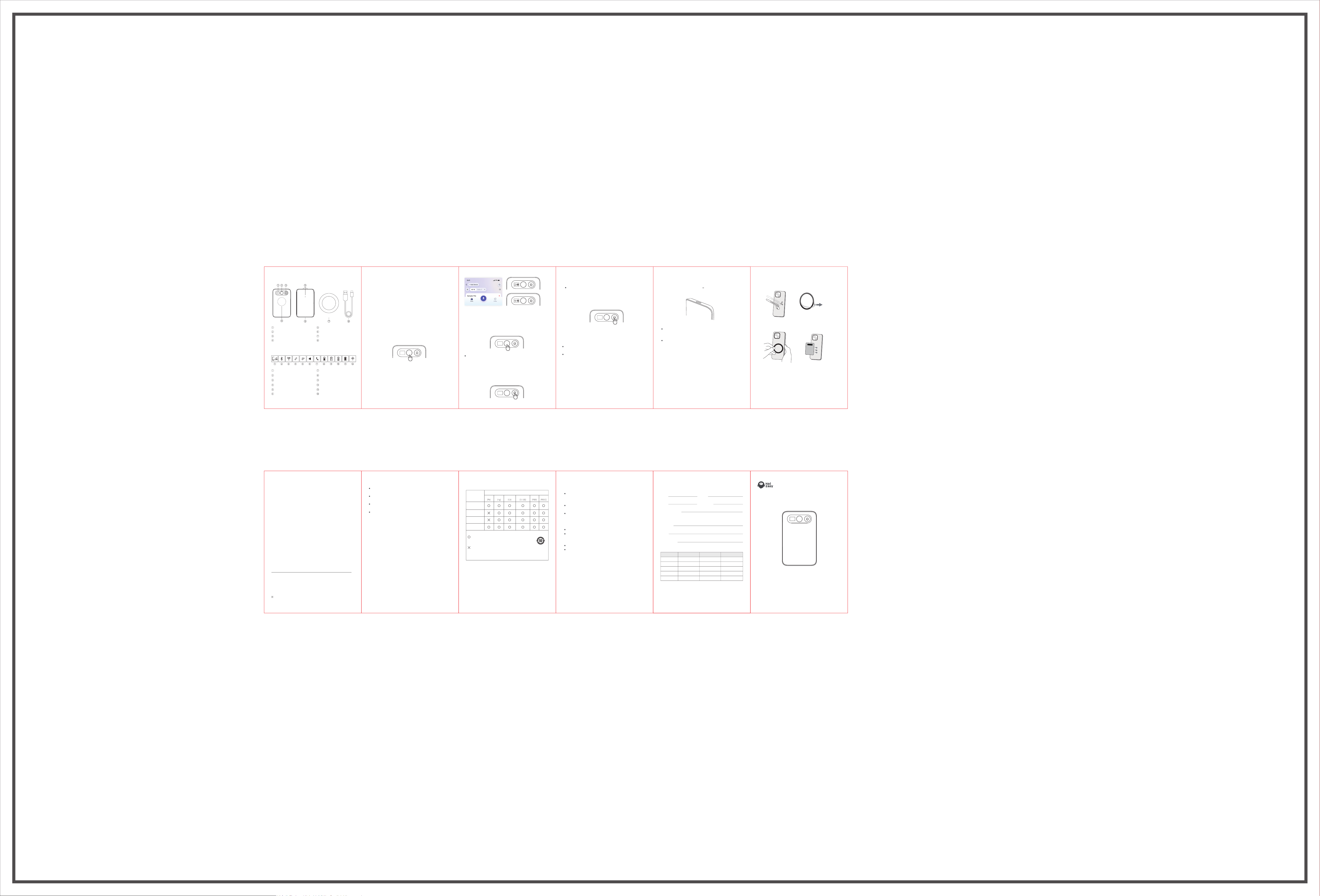
Product Appearance Download the APP
Device Status Indicators
Status Display Screen
Record / Power Button
Recording Mode Switch
NFC Induction Area
Device waiting for pairing
Bluetooth Mode Running
Wi-Fi Mode Running
Connection Succeeded
Connection Disconnected
Enhanced Ambient
Recording Mode
Adaptive Call Recording Mode
Current Battery Indicator
Low Battery, Please Charge
Charging in Progress
Charging Completed
Firmware Upgrading
Microphone
Type-C Port
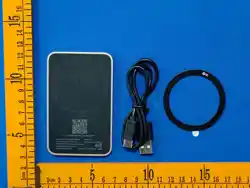
Magnetic Ring
Type-C Charging Cable
Scan the QR code, or search for "HaiEasy" in major app markets.
Download, install, register and log in to the APP to start using HaiEasy
AI Assistant.
Operation Instructions
1. Power on the Device
When using for the first time, short press the circular button in the
middle of the device for about 0.5 seconds to power on, and the screen
will light up. When the device is on standby, short press the circular
button to wake up the device.
2. Pair the Device
When the device is ready for pairing (refer to the illustration), open the
"HaiEasy" APP, tap the icon at the top right corner, and follow the in-app
guide to complete pairing of HaiEasy AI Assistant.
3. Start / Stop Recording
Press and hold the record button for more than 2 seconds, the device will
start recording with a slight vibration. Press and hold the record button
again for more than 2 seconds to stop recording with a slight vibration.
The device supports two recording modes with different recording
effects.
Adaptive Call Recording Mode
Slide the recording mode switch upward to reveal the red mark as shown
in the figure.
The device can record ambient sounds and mobile phone calls.
To record phone calls, attach the device magnetically to the back of your
phone. It is recommended to set the phone volume to 50% or higher.
Recording effects vary on different phone models; adjust the volume
according to actual recording results.
Enhanced Ambient Recording Mode
Slide the recording mode switch downward to reveal the black mark
as shown in the figure. This mode delivers better ambient sound
recording, suitable for meetings, interviews and other scenarios.
The device can be placed flat on a table or held in hand.
4. Sync Recording Files to APP
Open the APP and keep the device connected to sync recording files
to the APP.
Short small audio files: Transfer via Bluetooth for fast and convenient
transmission
Long large audio files: Transfer via Wi-Fi for faster speed
7. Magnetic Ring Usage (Optional)
Direct Adsorption:
If your phone or phone case has built-in magnetic function,
you can attach the device directly without the magnetic ring.
Boost Magnetic Force:
If your phone or phone case has no magnetic function,
follow the steps below:
(1)Clean the back of your phone or case, peel off the adhesive paper of
the magnetic ring
(2)Align the magnetic ring with the central axis on the back of the
phone/case and press to fix it
(3)Attach the magnetic area of the device to the magnetic ring
(4)Lift one corner of the device to remove it; the magnetic ring can stay
attached permanently
Friendly Reminder
Keep the magnetic area away from bank cards, ID cards and other
magnetic-sensitive items to avoid magnetic interference or demagneti-
zation.
Within 7 days from the purchase date: If any quality defect occurs,
you can apply for a full refund according to the invoice price or
exchange for an identical product.
Within 15 days from the purchase date: If any quality defect occurs,
you can exchange for an identical product.
Within 12 months from the purchase date: If any quality defect
occurs, we provide free warranty repair service.
No three guarantees certificate or warranty period expired.
Damage caused by improper use, maintenance or storage as
specified in the manual; man-made damage; disassembly or repair
without official authorization from our company.
Damage caused by force majeure.
Normal discoloration and wear during daily use are not covered
under warranty.
5. Audio Transcription, Summary & Mind Map Generation
After recordings are successfully synced to the APP, you can convert
audio to text on the APP.
Select the target recording file, choose transcription options such as
templates and languages, then wait for the process to finish. Larger files
take longer time to process.
After transcription, you can view text results, abstract summaries and
mind maps in the APP, and export or share the transcribed content with
others. For more functions and operation details, please check inside
the "HaiEasy" APP.
6. Device Charging
When the battery is low, charge the device with a 5V power adapter;
a 5V 1A adapter is recommended.
Pictorial Guide for Using the
Magnetic Ring (Optional)
Magnetic ring
Peel off
the protective
sticker
Name: Phone:
Email:
Contact Address:
Model No:
Color:
Main Unit SN:
Postal Code:
Repair Record Fault Description Acceptance Date Technician Signature
Contact Us
Manufacturer: Zhidian Huirong Technology Development (Beijing) Co., Ltd.
Address: Room 501, 5th Floor, Building 2, Huateng Century Headquarters
Park, Chaoyang District, Beijing
Customer Service: 400-085-5858
Made in China (Manufactured in China)
Images are for reference only, the actual product shall apply.

FCC Statement
This device complies with part 15 of the FCC rules. Operation is subject to the following two cond
itions: (1) this device may not cause harmful interference, and (2) this device must accept any inte
rference received, including interference that may cause undesired operation.
Caution: Changes or modifications not expressly approved by the party responsible for
compliance could void the user’s authority to operate the equipment.
NOTE: This equipment has been tested and found to comply with the limits for a Class B digital d
evice, pursuant to part 15 of the FCC Rules. These limits are designed to provide reasonable prote
ction against harmful interference in a residential installation. This equipment generates uses and c
an radiate radio frequency energy and, if not installed and used in accordance with the instructions,
may cause harmful interference to radio communications. However, there is no guarantee that inte
rference will not occur in a particular installation. If this equipment does cause harmful interferenc
e to radio or television reception, which can be determined by turning the equipment off and on, th
e user is encouraged to try to correct the interference by one or more of the following measures:
‐ Reorient or relocate the receiving antenna.
‐ Increase the separation between the equipment and receiver.
‐ Connect the equipment into an outlet on a circuit different from that to which the receiver is
connected.
‐Consult the dealer or an experienced radio/TV technician for help important announcement
Radiation Exposure Statement
The device has been evaluated to meet general RF exposure requirement. The device can be used
in portable exposure condition without restriction.