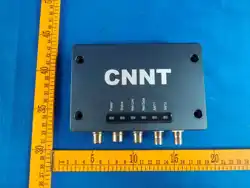

F20H Reader
Instruction Manual
V 1.0
Shenzhen CNNT Technology Co. Ltd.
www.szcnnt-tech.com
1
Preface
This manual is applicable to F20H Reader
Shenzhen CNNT Technology Co. Ltd. reserves the right to correct or modify the
information and explanations in this manual without prior notice.
Shenzhen CNNT Technology Co. Ltd. does not assume any responsibility for
improper use of this manual
2
Safety Instructions
Warning sign
If not operated correctly, it may cause damage to the equipment.
If not operated correctly, it may pose a threat to personnel health.
Pay attention to labeling
If ignored, it may prevent your operation from proceeding smoothly.
If ignored, it may lead to undesirable outcomes.

3
Pre use instructions
Warning:
Before using the F300 reader/writer, please read this document carefully. Improper use may result in
serious personal injury or equipment damage.
To ensure the safety of personnel, please ensure that all antenna positions comply with the regulatory
requirements of the regulatory area.
Unauthorized modification of equipment, as well as the use of spare parts and additional equipment that
have not been approved or recommended by the manufacturer, may cause fire, electric shock, or
personal injury. Such unauthorized operations will exempt the manufacturer from any liability.
The manufacturer shall not be held legally responsible for any inaccuracies, errors, or omissions in the
manual, as well as for any parameters automatically set for the equipment or due to improper use of the
equipment.
Only manufacturers are allowed to repair the equipment.
The use and installation of equipment must comply with national legal requirements and local electrical
regulations.
Effective safety regulations must be followed when operating equipment.
This device is not suitable for places where children are present. To prevent children from coming into
contact with equipment.
The device is only suitable for restricted access areas.
Ensure that the equipment operates under the specified working voltage, temperature, humidity, and
other environmental conditions, otherwise it may cause abnormal operation or permanent damage to the
equipment.
Special advice for pacemaker wearers:
Although the electromagnetic field of this device does not exceed the effective limit, you should
maintain a distance of at least 34 centimeters from the pacemaker and not stay in close
proximity to the device antenna for a long time.
The device must only operate under frequency adjustments approved by its deployment
country.
This manual provides a detailed introduction to the features, installation, debugging, operation, and
troubleshooting steps of the F40L reader/writer.
Only qualified personnel are allowed to perform transportation, installation, commissioning,
and maintenance tasks. National accident prevention regulations must be followed, and
electrical installation must be carried out in accordance with relevant regulations and standards
(such as protective grounding connections, wire cross-sectional area, etc.). When connecting
the power supply, make sure the polarity is correct

4
Warning sign:
FCC Radiation Exposure Statement:
This equipment complies with FCC radiation exposure limits set forth for an uncontrolled
environment. This equipment should be installed and operated with minimum distance 20cm
between the radiator & your body.
FCC Warning
This device complies with Part 15 of the FCC Rules. Operation is subject to the following two
conditions:
(1) This device may not cause harmful interference, and (2) this device must accept any
interference received, including interference that may cause undesired operation.
Note: This equipment has been tested and found to comply with the limits for a Class B digital
device, pursuant to part 15 of the FCC Rules. These limits are designed to provide reasonable
protection against harmful interference in a residential installation. This equipment generates,
uses and can radiate radio frequency energy and, if not installed and used in accordance with
the instructions, may cause harmful interference to radio communications. However, there is no
guarantee that interference will not occur in a particular installation. If this equipment does
cause harmful interference to radio or television reception, which can be determined by turning
the equipment off and on, the user is encouraged to try to correct the interference by one or
more of the following measures:
—Reorient or relocate the receiving antenna.
—Increase the separation between the equipment and receiver.
—Connect the equipment into an outlet on a circuit different from that to which the receiver is
connected.
—Consult the dealer or an experienced radio/TV technician for help.
NOTE 2: Any changes or modifications to this unit not expressly approved by the party
responsible for compliance could void the user's authority to operate the equipment.
5
一 Product Overview
Product Introduction
The F20H reader is an ultra-high frequency RFID reader based on digital signal processing.
And for strict scenarios such as rail transit, it has undergone rigorous testing for EMC, fire
prevention, earthquake resistance, etc. Has strong electromagnetic anti-interference ability and
can ensure reliable reading performance even in high-speed rail transit applications. The F20H
reader/writer can provide multiple communication interfaces to meet various industrial
application needs.
main purpose
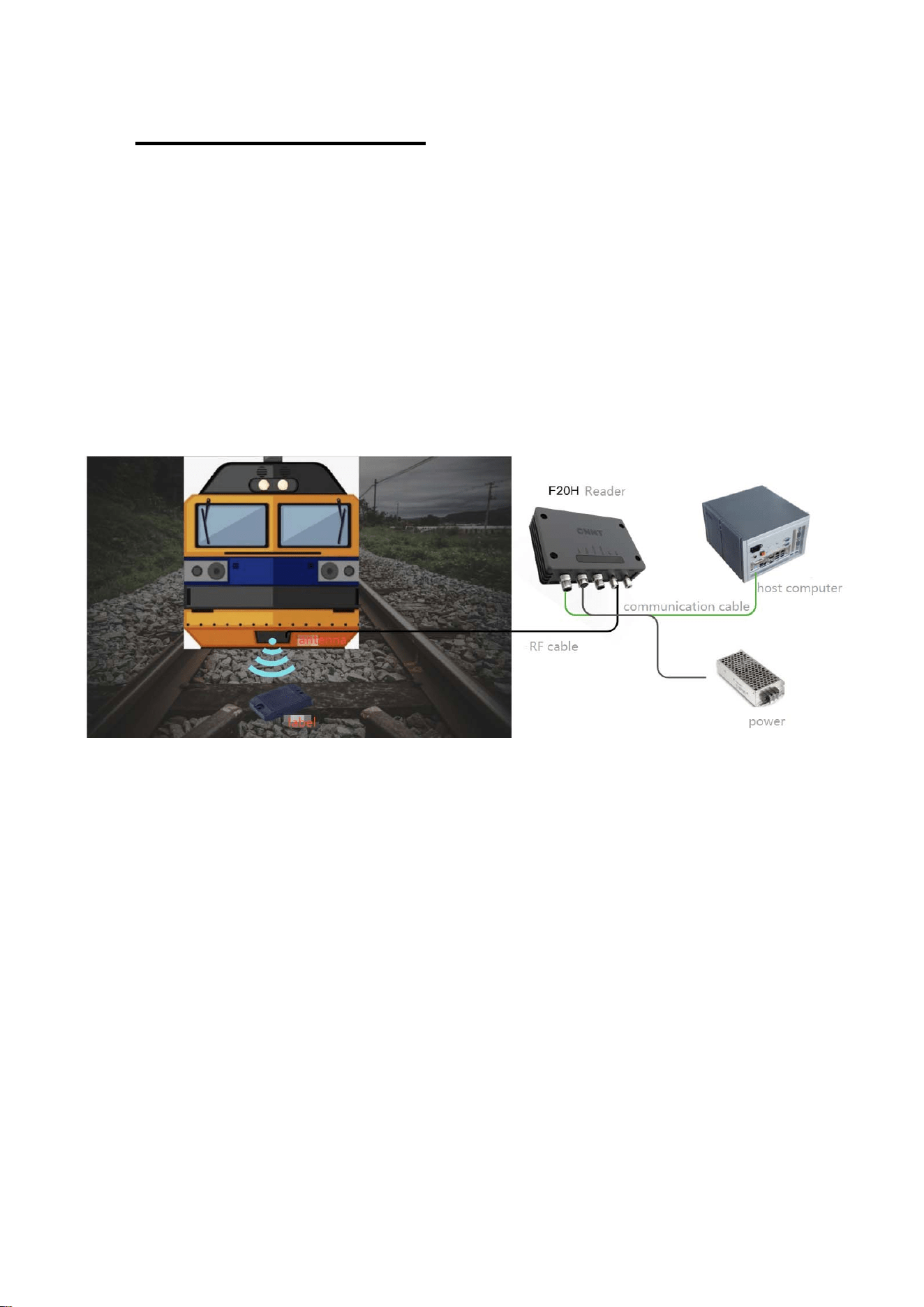
The typical application scenario of F20H reader/writer is shown in the figure, which forms a
positioning subsystem with vehicle antenna, electronic tag, power supply, communication cable,
RF cable, and power cable. The F20H reader is connected to the vehicle antenna through an
RF cable and outputs the microwave signal required for electronic tag operation. The electronic
tag operates by self sensing power supply through microwave excitation signals, and feeds
back the pre stored data inside the tag to the vehicle antenna. The vehicle mounted reader
receives feedback signals from tags through the antenna, identifies tag data in the signal, and
reports it to the application end query host through the communication port.
6
二 Function and performance parameters
Main functions
1.Able to emit the microwave energy required to activate the tag operation;
2.Able to receive tag reflection signals, demodulate and decode them to generate message
information;
3.The frequency and power of the RF carrier signal can be set;
4. Able to communicate with external devices through network or serial ports and report the
read tag data;
5.Equipped with RSSI detection function for tag reflection signal strength;
6.Support internal firmware program upgrades;
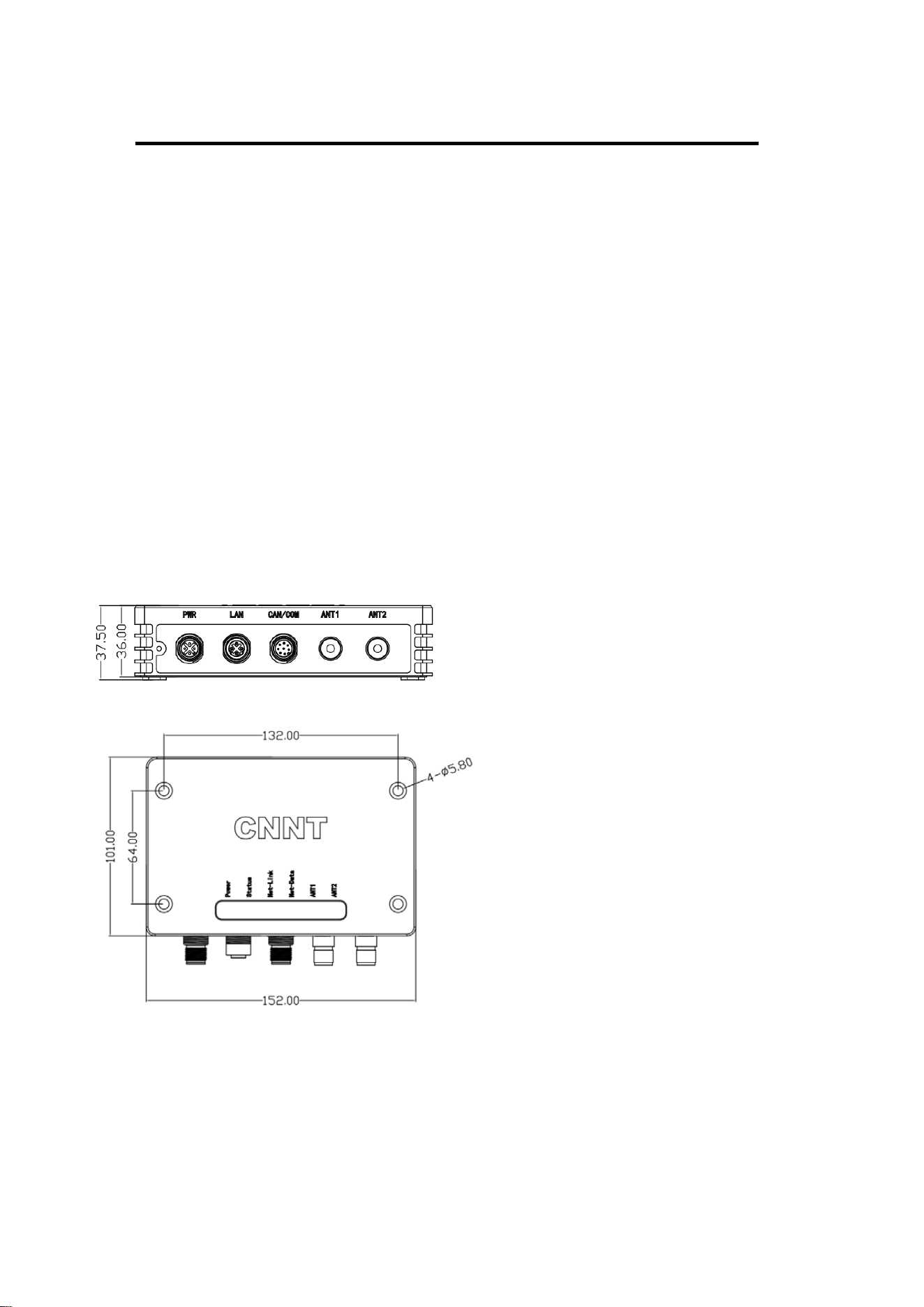
Overall Dimensions
1)Size:152mm X 101mm X 37.5mm;
2)weight:570g;
environmental parameters
1) Working temperature: -25 ℃~+70 ℃;
2) Storage temperature: -40 ℃~+85 ℃;
7
3) Environmental humidity: The monthly average maximum relative humidity is not greater than
95% (the monthly average minimum temperature is 25 ℃), and there is no condensation;
4) Power supply requirement: DC 12V;
RF parameters
1) Working frequency range: 860-960MHz; Supports both frequency hopping and fixed
frequency operating modes
2) RF output power: adjustable from 5dBm to 30dBm (+/-1dBm)
3) Antenna port impedance matching: 50 Ω;
4) Air interface protocol: capable of recognizing tags encoded in ISO18000-6C;
5) Receiver sensitivity: -82dBm;
三 Interface Description
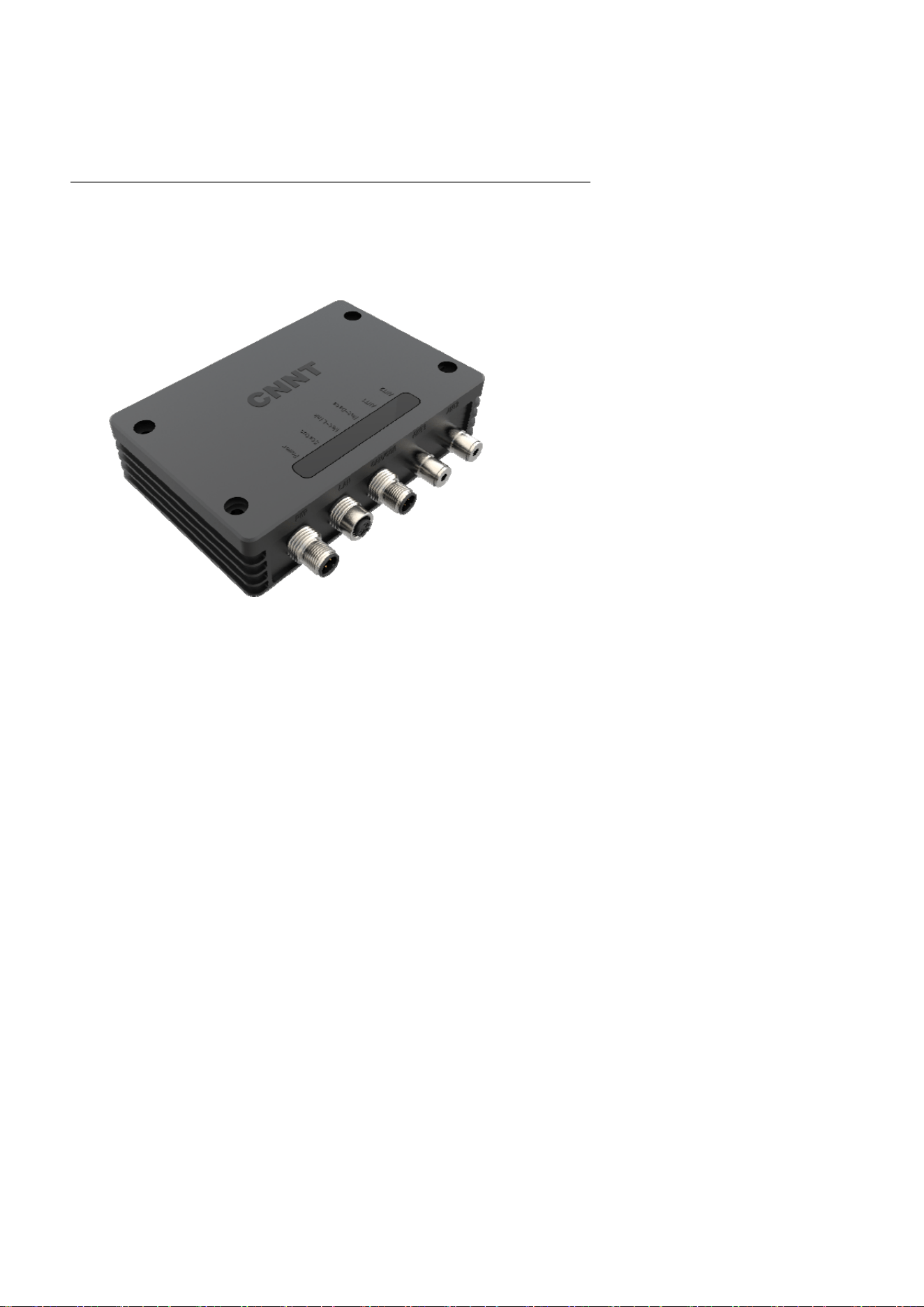
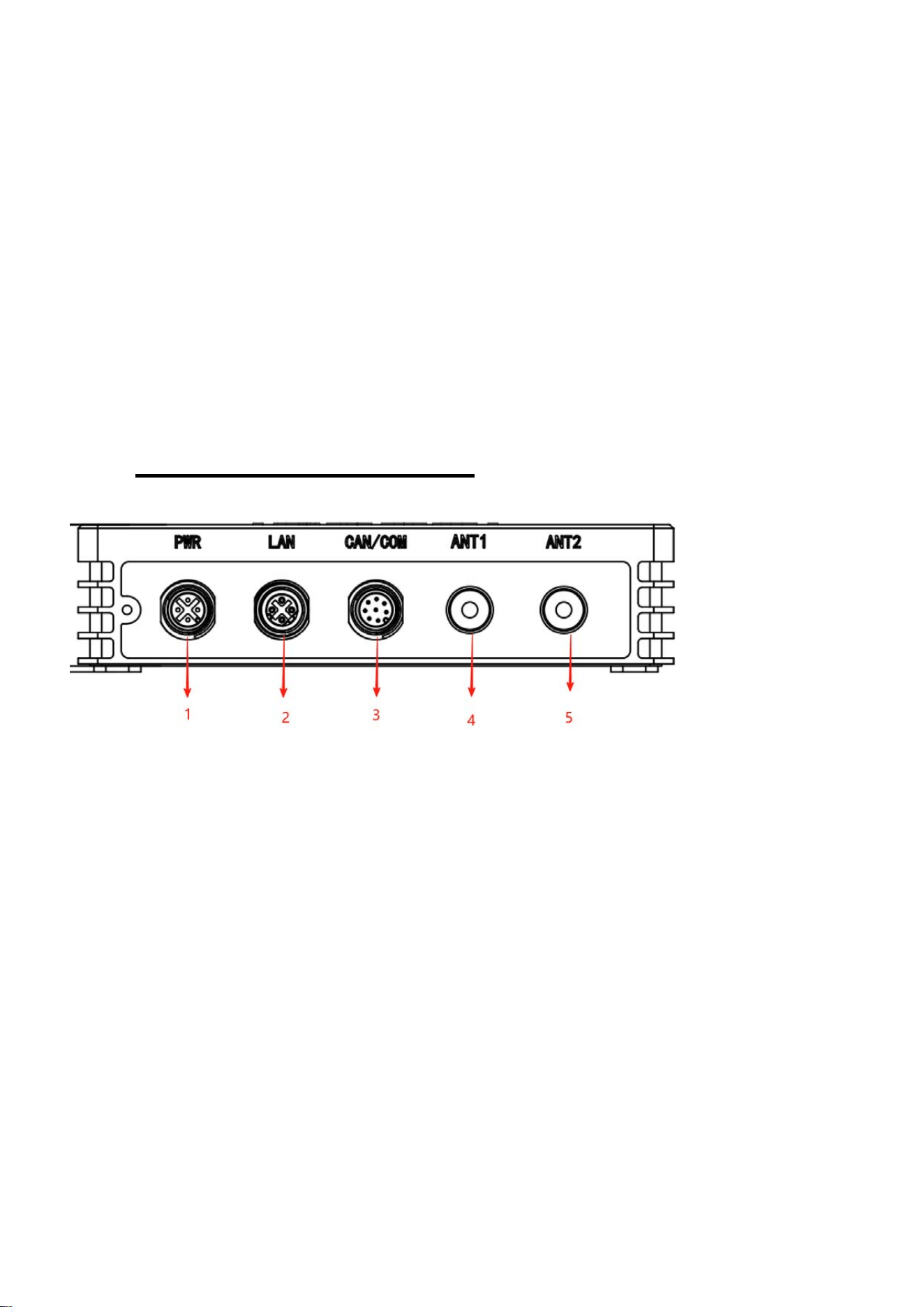
According to the numerical identification in the above figure, they are:
1. PWR, DC power input interface, M12 interface, 4-core, A-code, male socket;
2. LAN,Ethernet interface, M12, 4-core, D-code, female seat
3. CAN/COM, serial port (RS-485), M12 interface, 8-core, A-code, male socket;
4. ANT1,antenna 1 interface, TNC external thread internal needle
5. ANT2,antenna 2 interface, TNC external thread internal needle
8
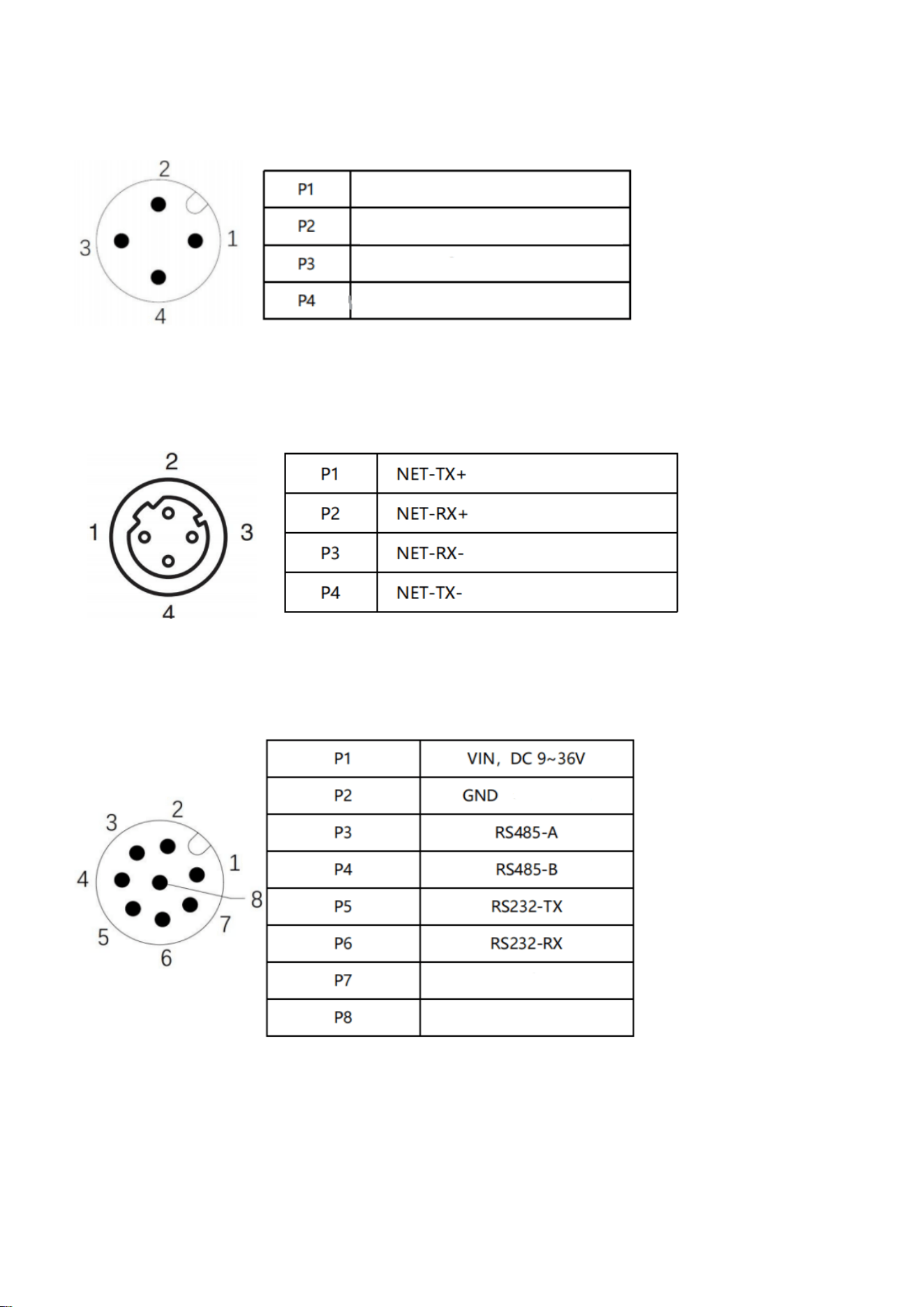
power interface
Ethernet interface
RS-485 interface
Voltage positive pole,DC9~36V
Voltage positive pole,DC9~36V
GND
GND
9
LED indicator light
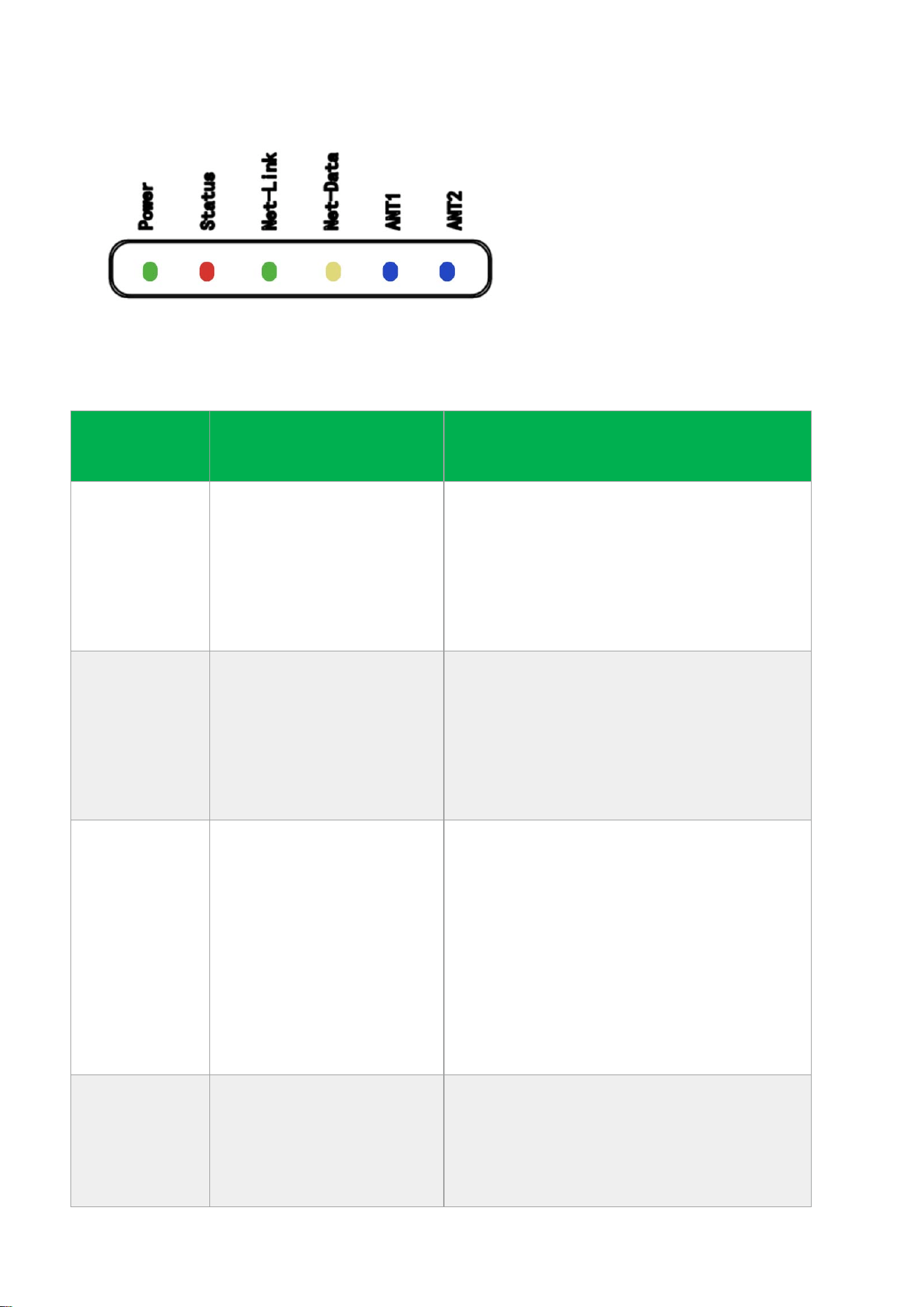
F20H is equipped with 6 LED indicator lights to indicate the working status. The
indicator definitions are as follows:
LED serial
number
LED definition description
1
Power
Power-on indication
When the power supply is normal, the
LED green light stays on continuously
The LED green light goes out when the
power is not connected
2
system
System operation indication
System abnormality: The red LED is
flashing
The system is functioning normally, and
the red LED light is off
3
Ethernet connection
status indication
Ethernet receives external information
indication:
1. The network connection LED green
light is always on;
2.When not connected, the LED green
light will turn off;
Note: Optional functions (supports
some models)
4
Ethernet data status
indication
Ethernet receives external information
indication:
1. The unconnected LED is turned off
2. When receiving external data, the LED
10
yellow light flashes;
3. The yellow LED light remains on when
no data is received;
5
Working status of
antenna 1
ANT1
1. Turn off the amplifier and turn off the
LED blue light;
2. The amplifier is turned on, and the LED
blue light is always on;
3. When the amplifier is turned on and
receives tag data, the blue light flashes
6
Working status of
antenna 1
ANT2
1. Turn off the amplifier and turn off the
LED blue light;
2. The amplifier is turned on, and the LED
blue light is always on;
3. When the amplifier is turned on and
receives tag data, the blue light flashes
四 安装说明
Fixed reader/writer:4*5.8mm screw
PWR:Use M12 A encoded 4-core female straight head cable for external DC 9-36V voltage (red
wire: VCC, black wire: GND)
Warning: Please carefully review the pin definitions to avoid functional
abnormalities caused by incorrect power connections
五 common troubleshooting methods
1) The power on indicator light is not on - check if the power cord is loose or reversed, and if the

11
voltage input is within the range of 9-36V DC.
2) The power light is on but the label cannot be read - check if the communication cable is loose
or damaged, and if the communication connection is successful
3) Failed to obtain firmware version - check if the green light is on, disconnect and reconnect the
device.
If the above issues cannot be resolved, please contact the relevant technical personnel.