109
12
11
13
Low battery
Blinks red every 5 seconds
with Bluetooth for more than five minutes or is out of range
(except when in ANC mode).
Headphones LED
2s
1s
3s
x2
x5
x1
ANC
2s
• Reset to factory settings: Press five times.
暂停/播放:点击 一次
音量加:点击 一次
音量减:点击 一次
上一曲:按住 2秒
下一曲:按住 2秒
通话接听/结束:点击 一次
通话拒接:按住 1秒
激活语音助手:点击 两次
ANC开/关:点击 一次
游戏模式与音乐模式切换:点击 两次
恢复出厂设置:点击 五次
2s
3 4 5 6 72
蓝红灯交替闪
熄灭
红灯常亮
绿灯常亮
红灯隔5秒亮一次
开机/未配对
配对成功/充满电/ANC关
充电中
ANC开
低电量
开机/关机
按住 3秒,开机/关机。
注:开机后,5分钟未与蓝牙设备配对连接,自动关机;
超出有效连接距离,未与蓝牙设备连接,5分钟后自动关机;
开ANC状态下不会自动关机。
音频有线连接口:使用 3.5mm 音频线将耳机连接至设备,
耳机所有按键功能将自动失效,您可通过设备控制媒体播放。
LED Status
Power on/Unpaired
Paired/Fully charged/ANC off
Charging
Alternating red and blue
Off
Solid red
ANC on
Solid green
Indicator LEDs
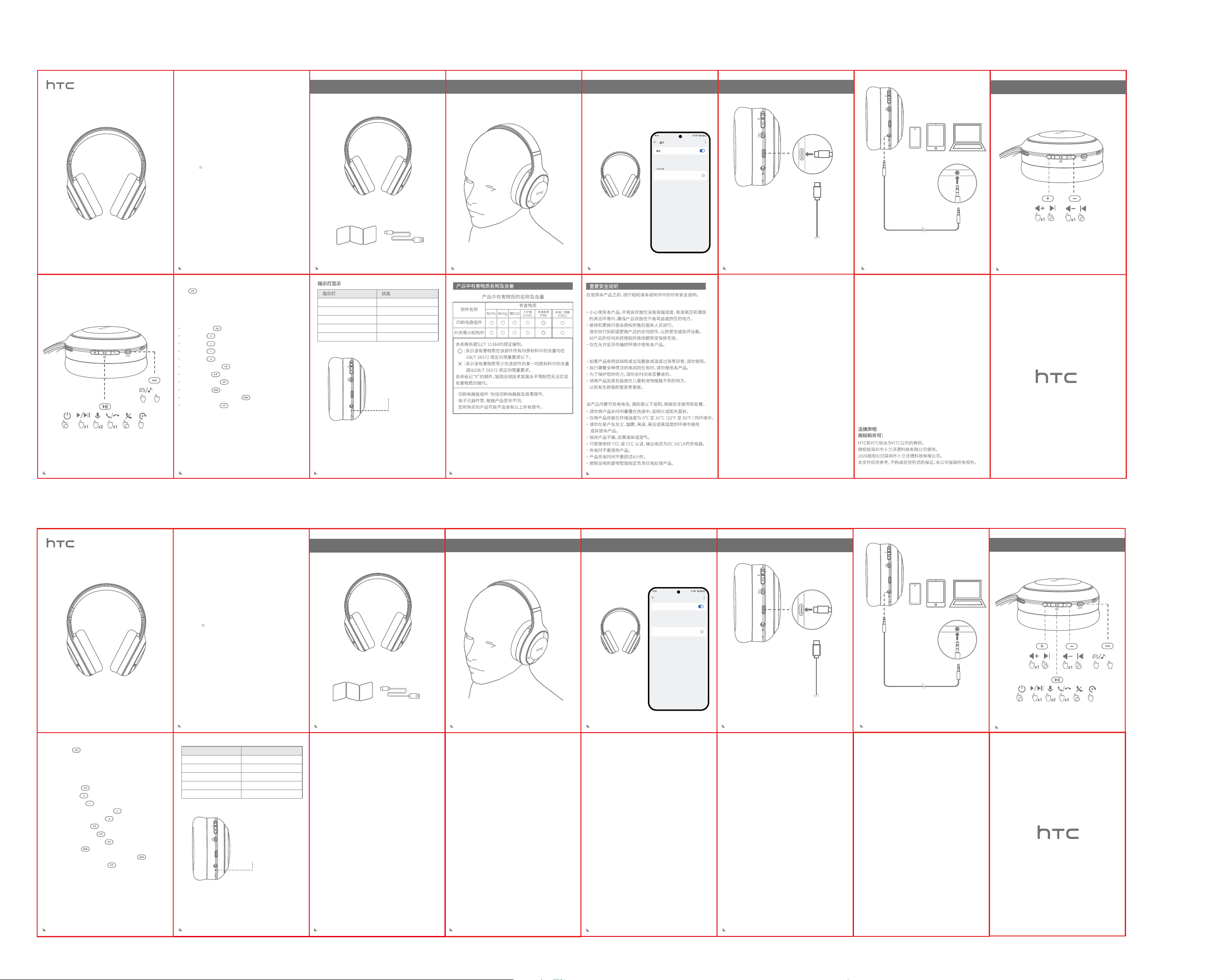
How to put on the headphones
Connect to Bluetooth device Charging
On your device, turn on
Bluetooth and choose to
connect to "HTC HP12".
Quick Start Guide
HTC HP12
Wireless Headphones 12
Product Specifications
Model: HTC HP12
Range: ≈10 m
Version: 6.0
Bluetooth
Diameter: 40 mm
Impedance: 32 Ω
Speaker
Input: 5 V 400 mA
Battery capacity: 500 mAh
Play time (at 50% volume with ANC off): ≈ 58 hrs
Play time (at 50% volume with ANC on): ≈ 32 hrs
Charging time: ≈ 2.5 hrs
Power
10
3
4
5 6
7
2
Connect your headphones to your device using the 3.5 mm
audio cable. All the earphone buttons are disabled automatically.
You can control your media through your device.
Connect your charger to the USB-C port.
x2
x1
ANC
What’s in the box
Quick Start Guide USB-C cable
Headphones
Press and hold for three seconds.
Note: The device will power off automatically if it is not paired
Power on/off
• Play/Pause: Press .
• Volume up: Press .
• Volume down: Press .
• Play previous track: Press and hold for two seconds.
• Play next track: Press and hold for two seconds.
• Answer/End call: Press .
• Reject call: Press and hold for one seconds.
• Activate voice assistant: Press twice.
• Switch between Game and Music modes: Press twice.
Key functions
9
Basic operations
HTC HP12
MY DEVICES
Bluetooth
Bluetooth
快速入门指南
使用前请阅读使用说明书
HTC HP12
头戴式无线蓝牙耳机12
耳机
如何正确佩戴耳机 连接到蓝牙设备 充电
在您的设备上,打开蓝牙
并选择连接到“HTC HP12”。
将您的充电器连接到USB-C端口
快速入门指南 USB-C充电线
物品清单
型号:HTC HP12
蓝牙
范围:≈10m
版本:6.0
喇叭
直径:40mm
阻抗:32Ω
功率
输入:5V 400mA
电池容量:500mAh
音乐播放时间(ANC关):≈58小时(50%音量)
音乐播放时间(ANC开):≈32小时(50%音量)
充电时间:≈2.5小时
蓝牙耳机指示灯
功能操作
产品规格
产品说明书 尺寸:50x75mm 材质:80g书写纸 双面印刷 风琴折
8
2s
基本操作
• ANC on/off: Press .
8
HTC HP12
1s3s
x5
• Use the product with care and store it in a clean environment
that is free from extreme temperature, pressure, and humidity.
Make sure that the product is stored in a location where it
cannot be bent or squeezed.
• Repairs and replacements should only be performed by
authorized after-sales service staff. Do not attempt to
disassemble or replace any part of the product yourself to prevent
injuries or damage to the device. Any unauthorized modification
to the product voids the warranty.
• Only use the product in environments where Bluetooth
transmission is permitted.
General safety instructions
• Do not use the product if it is obviously defective or exhibits
abnormalities such as bulging or excessive heating.
• Do not use the product when performing high-risk tasks that
require your full attention.
• For your hearing protection, do not listen at high volume for
long periods.
• Keep the product and its packaging out of reach of children and
pets to prevent accidents such as swallowing and choking.
Personal safety instructions
Important Safety Instructions
Carefully read all the safety instructions in this document before
using the product.
• Keep the product away from prolonged exposure to heat
sources such as open fires or direct sunlight.
• Only store the product in environments with ambient
temperatures of 0°C to 35°C (32°F to 95°F).
• Do not use or store the product in dust-prone, smoke-prone,
high-temperature, high-pressure, or highly humid environments.
• Keep the product dry and away from liquids or moisture.
• Only use an FCC or CCC-certified charger with an output
voltage of 5 V/1 A DC.
• Do not use the product while charging.
• Do not leave the product charging for longer than eight hours.
• Dispose of the product responsibly according to your local
waste management guidelines.
The product has a built-in rechargeable battery. Read the
following instructions to ensure safe use and disposal.
Battery safety instructions
HTC and the HTC logo are trademarks of HTC Corporation and
used under license by Shenzhen Brands World Technology Co., Ltd.
Copyright © 2026 Shenzhen Brands World Technology Co., Ltd.
All rights reserved.
THIS DOCUMENT IS FOR INFORMATION PURPOSES ONLY AND
DOES NOT CONSTITUTE ANY KIND OF WARRANTY.
Legalnotice
Trademarks and permissions:
• Consult the dealer or an experienced radio/TV technician for help.
*RF warning for Portable device:
The device has been evaluated to meet general RF exposure
requirement. The device can be used in portable exposure
condition without restriction.
Customer Service Email: [email protected]
FCC ID:2BPQF-HTCHP12
FCC Caution:
This device complies with part 15 of the FCC Rules. Operation is
subject to the following two conditions: (1) This device may not
cause harmful interference, and (2) this device must accept any
interference received, including interference that may cause
undesired operation.
Any changes or modifications not expressly approved by the
party responsible for compliance could void the user's authority
to operate the equipment.
Note: This equipment has been tested and found to comply with
the limits for a Class B digital device, pursuant to part 15 of the
FCC Rules. These limits are designed to provide reasonable
protection against harmful interference in a residential installation.
This equipment generates uses and can radiate radio frequency
energy and, if not installed and used in accordance with the
instructions, may cause harmful interference to radio
communications. However, there is no guarantee that interference
will not occur in a particular installation. If this equipment does
cause harmful interference to radio or television reception, which
can be determined by turning the equipment off and on, the user
is encouraged to try to correct the interference by one or more of
the following measures:
• Reorient or relocate the receiving antenna.
• Increase the separation between the equipment and receiver.
• Connect the equipment into an outlet on a circuit different from
that to which the receiver is connected.
12
11
13
14

