Note: Circuit breaker has memory function and will return back to before circuit
breaker setting mode after power on again.
Selected
Welcome
Sound
Cyclic selection
Downloaded
music songs
Cyclic selection
16 music songs
正面
反面
分体式感应门铃 SF20R---单色双面印说明书 折叠后尺寸:120x95mm,展开尺寸:600x190 mm
4202000909
2020.05
2020.05
Application: Shops, Commercial Complex, Luxury hotels, offices, factories, homes,
villas, driveways, walking paths , Supermarkets ,restaurants etc.
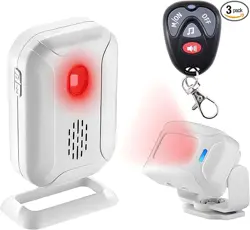
SF20R (Receiver) WLS10 (Infrared Curtain)
Instructions
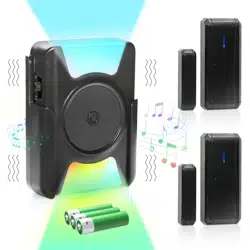
● Shop Keeper in day time, anti-thief in the night, welcome / doorbell /alarm /
color lights / lighting 5in1 multi-function.
● Remote transmission range up to 280M / 918ft in the open space.
● 8 channel music chip, 40mm big horn,16 chime melodies, remember your
last set melody and volume level once powered off.
● Colorful LED lights, adjustable brightness, distinguish multiple entrances
by different colors.
● 4 stages adjustable volume (Loud/High/Middle/Low ) from 113-25dB.
● Receiver can learn from up to 32 wireless sensors like PIR motion,
magnetic or vibration sensor as well as up to 8 remote controllers.
●
No require plug-in card & built-in U disk for DIY voice
or recording, use mini USB interface to connect the
computer to download
Features
113dB
alarm
280 meters
Dual Power
Supply
280M long
Wirelessrange
Detection Zone
in Different Colors
Built-in U-disk
for download
DIY synthesis or
download voice
5 Multi-
functions
2.3.4. Program accessories (infrared curtain, magnet sensor, vibration sensor etc.)
or remote control if add vibration, infrared, magnetic detector, or remote
control, do the program.
2.3.5 Delete all accessories: please be caution with this operation!
Note: Each color can be programmed with 8 wireless sensors, in total 32 by 4 colors. There is
no any relation between remote control and colors. Up to 8 remote control can be programmed,
if over certain amount, the latter will cover the former.
long press the [ ]
key for 3 seconds,
enter into learning mode,
release the [ ] key,
program starts .
Press[ ] key to turn
off the receiver,
4. Parameters
3. Low Battery Indication
4.1 Power Supply: 3* AA for Receiver or Micro USB
3*AAA alkaline for PIR Transmitter or Micro USB
4.2 Battery Lifespan: 5-7months (based on 30 times per day)
4.3 Working Frequency: 433.92 MHz
4.4 Working Temperature: Receiver : -10℃~ +60℃ Infrared curtain : 10℃~ +33℃
4.5 Operating Humidity: < 80%
4.6 Storage Temperature: -20℃~+70℃
Press [ ] key to switch area by
colors: light, red, green, blue. Then
test it by infrared curtain.
Press【 】to turn off the receiver
Waving hand in
front of the curtain
Separate magnetic sensor
from magnetic sticker
Press any key
on the remoter
Figure 6
Figure 7
If many detectors, distinguish the triggered
zone by LED color lights, easier
to find out what happens.
(If not, just skip this step).
3.1
Infrared curtain: It is in low battery if LED flashes once every 3 seconds. Please replace
the battery in time.
3.2 Receiver: If you hear the low battery indication sound when it is in application, Please
replace the battery in time, or all functions cannot be realized.
3.3 LED indicator gets darker or wireless range gets shorter,
please replace the battery in time.
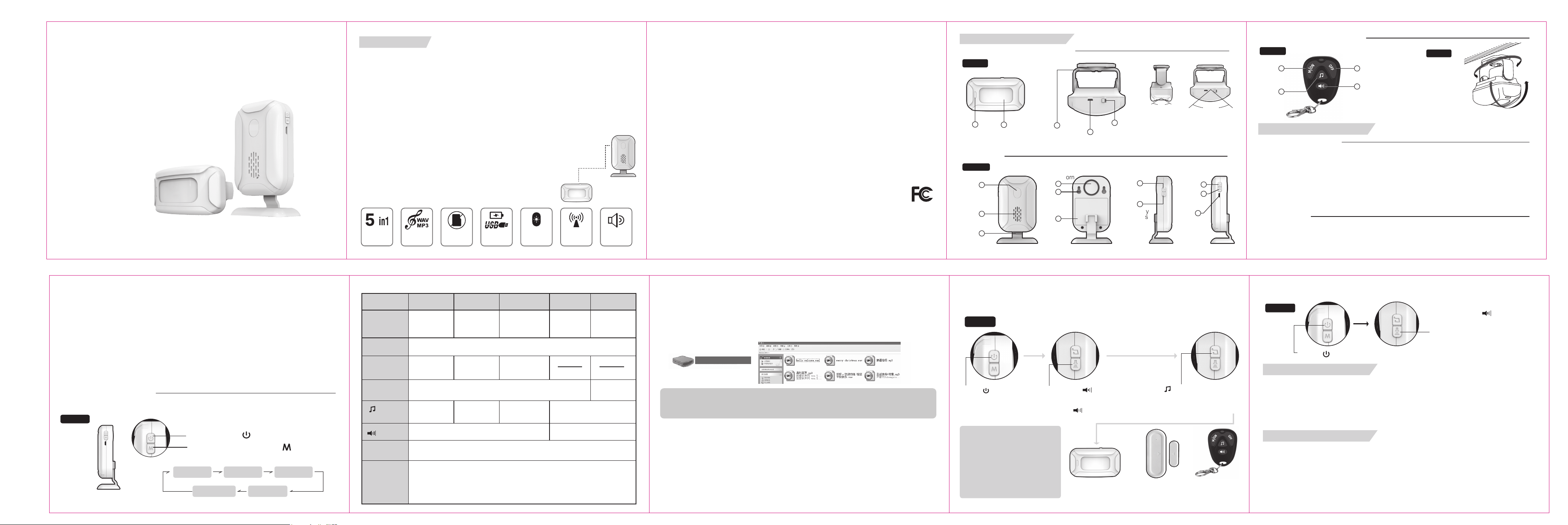
1.2 Receiver
Select
Songs key
Volume key
(brightness
key in
lighting
mode)
Desktop Base
Alarm Horn
Wall
Hanging
Hole
Battery
Cover
Speaker
Colorful LED
Flashing
Indicator
1. Description of Structure
1.1 Infrared Curtain (Transmitter)
4
3
1
1
8
7
9
10
11
2
4
5
6
3
5
Infrared
Motion Sensor
Micro USB
Power Interface
Micro USB
Power
Interface
360
o
rotating
adjustable
holder
ON/OFF
2
LED Light
Indicator
Horizontal 100
o
Vertical 15
o
Sensor angle: Horizontal 100
o
,
Vertical 15
o
Sensor range: 2 ~ 8M (varies from
occasions)
Figure 1
Figure 2
FCC WARNING
This device complies with part 15 of the FCC Rules. Operation is subject to the following
two conditions: (1) this device may not cause harmful interference, and (2) this device
must accept any interference received, including interference that may cause
undesired operation.
Any changes or modifications not expressly approved by the party responsible for
compliance
could void the user's authority to operate the equipment.
NOTE: This equipment has been tested and found to comply with the limits for a Class
B digital device, pursuant to Part 15 of the FCC Rules. These limits are designed to
provide reasonable protection against harmful interference in a residential installation.
This equipment generates, uses and can radiate radio frequency energy and, if not
installed and used in accordance with the instructions, may cause harmful interference
to radio communications. However, there is no guarantee that interference will not
occur in a particular installation.
If this equipment does cause harmful interference to radio or television reception,
which can be determined by turning the equipment off and on, the user is encouraged
to try to correct the interference by one or more of the following measures:
-- Reorient or relocate the receiving antenna.
-- Increase the separation between the equipment and receiver.
-- Connect the equipment into an outlet on a circuit different
from that to which the receiver is connected.
-- Consult the dealer or an experienced radio/TV technician for help.
To maintain compliance with FCC’s RF Exposure guidelines, This equipment should
be installed and operated with minimum distance between 20cm the radiator your
body: Use only the supplied antenna.
FCC ID: 2ANPS-KSSF20R
ON/OFF
Mode
switch key
1 3
2
4
1.3 Remote controller (optional)
Turn on/ mode
switch key
Turn off key
Select
songs key
Volume key
(brightness key in lighting mode)
Figure4
Figure3
360
o
rotating
adjustable
(Installation of infrared curtain)
180
o
rotating adjustable
2. Function Description
2.1 Batteries and Power
2.1.1 3*AAA alkaline batteries for PIR Transmitter, 3* AA for Receiver,
please note the negative and positive.
2.1.2 Receiver: For 1st time, it will turn on light and current mode indication sound
to enter power on
state; When the infrared curtain opens the power switch, the LED indicator will blinking at
5 times to indicate the battery is installed correctly.
2.1.3 Alkaline batteries are recommended, other types will shorten standby time and lower
the alarm volume. Micro USB is alternative for power supply; battery supply will be
automatically cut off if AC power,and can be standby power supply if power off.
2.2 Installation
2.2.1 Install the transmitter in the ceiling or aisle of the entrance where customers and
intruder go back and forth. Installation by screws will be more firm than double-sided
tap which requires tidy and smooth surface.
2.3 Operational Description
2.3.1 The transmitter and receiver have been programmed in factory.
Welcome
5 modes in cyclic shift: Press【 】 to select:
Doorbell Alarm
LightingColor Light
ON/OFF: Press【 】 to turn ON / OFF
Figure 5
2.3.3.1 Connect to the computer via Micro USB cable.
2.3.3.2 Wait for the computer to test the U disk, because of it is the software simulates the
U disk, please wait patiently. If the test is not successful after a long time, please refresh it
manually. After the test is successful, click on the "My Computer" icon and open the
removable disk icon. Shown in the following figure:
2.3.3.3 Copy the prepared WAV or MP3 format sound into the mobile disk. The storage
space of the mobile disk is 4~7MB. Please pay attention to the size of the sound file.
2.3.3.4 After the copy is completed, pop up the disk, unplug the USB cable, install the host
on the base, use select music key or remote to choose corre sponding voice.
Note: This product does not support hot drawing. After copying the files, please disconnect the USB
cable after using the system U disk pop-up function. Otherwise, it may damage the data, special
circumstances may damage the chip. ( If the data is damaged, please format it.)
2.3.3. Download voice:
2.3.2 5 Modes with 5 functions :
Welcome Doorbell Alarm Color light Lighting
Model reminder
Sound effect if
triggering the
transmitter
Light effect if
triggering transmitter
Instruction of
remote control
Disarm and
mute interrupt
function
Selected song
Alarm for
30 seconds;
LED lights colors vary depending on the programmed areas
white light will be
on for 2 minutes
No function
4 levels volume 4 levels brightness
4 buttons on remote control ,short press Turn- Off button to turn off the receiver
【 】Selection
songs key
【 】
Volume key
Disarm function: If in Alarm Mode, it will alarm for 30 seconds, press the receiver
power button, or short press remoter turn-off button to disarm or switch off.
Mute interrupt function: when triggering the alarm in Doorbell Mode and Lighting
Mode, it will play songs or LED lights will be lighting, short press any key (except
turn-off button on remote control) can end the corresponding mode.
* The transmitter detects the infrared signal range released from body surface temperature
of 34℃, please take the 1.3 (Figure 4) for installation adjustment reference.
* The transmitter is used for indoor only; please do not keep it exposed to the sun and rain.
Had better not install it in the areas of air-conditional, fan which change the environment
temperature.
2.2.2 Place the receiver with the desktop base on the desk, or fix it on the wall with the
screws.
2.2.3 After installation, press the receiver ON/OFF button to enter into welcome reminder
mode, test the wireless transmission distance, adjust angle of the transmitter. Try to ensure
that the people come in from different position can be detected by repeating tests.
Play Welcome
song, Color
lights flashing
Play current song,
Color lights
flashing
DiDiDi 3 times,
Red light
No sound
Color lights
flashing
No sound ,
LED lights are
on for 2 seconds
Option for ‘Alarm’
Trigger the accessory to be
paired and the receiver sounds
"Di Di" twice which indicates the
learning is successful and return
to the shutdown state. Can
learn one accessory at a time
only.
long press the【 】key of the
receiver for 10 seconds,
it will be
"du du du" and LED flashes in red
color for three times, all parts
which are paired will be removed.
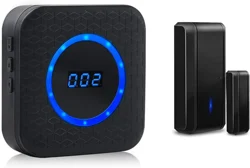
Split Custom Voice Sensing Doorbell
KS-SF20R Indoor Passive Infrared Detector
Removable USB drive