
bObsweep
OWNER’S MANUAL
Bob PetHair Appetite
™

Bob PetHair Appetite
OWNER’S MANUAL
Model APP220022
Manual Version 2022.1
™

Congratulations!
Congratulations on your new intelligent oor cleaner! Bob is now at
your service. To see Bob at his best, please read the Quick Start
Guide and this manual thoroughly.
Welcome to the bObsweep family and Happy Sweeping!
If you have any questions or concerns, feel free to contact our helpful support team at
[email protected] or 1-888-549-8847.
Business Hours:
• Monday – Friday, 9 a.m. – 5 p.m. Pacic Time

Table of
Contents
Getting Started
Who is Bob?
Navigating Difcult Obstacles
7
Bob’s First Clean
Install Side Brushes
Charge
Flip Bob’s Power Switch ON
Download the bObsweep App
9
bObsweep App
Home
Control
Shop
14
Troubleshooting
16
FAQs
15
Maintenance
Dustbin & Filters
Brushes
Sensors
Front Wheel
Battery
22
1
General
Safety Instructions
Declaration of Conformity
Warranty
Contact Us
3
Box Contents
4
Anatomy
Top View
Bottom View
Buttons & Indicators
Charging Station
Wet Mop Attachment
25
End User
License
Agreement
Accessories
Wet Mop Attachment
23

• Power Bob OFF and remove him from a
power source when you are not using him
and before conducting maintenance.
• Bob is not intended for use by persons
(including children) with reduced physical or
mental capabilities, or lack of experience and
knowledge, unless under the close supervision
of a person responsible for their safety.
• Leaks from the battery cells can occur under
extreme usage or temperature conditions. If
the liquid gets on the skin, wash quickly with
water. If the liquid gets into the eyes, ush
them immediately with clean water for a
minimum of 10 minutes, and seek medical
attention.
• Bob is composed of electronic components
that in rare and unintended cases can cause
hazards of heating, re, and other
malfunctions. Furthermore, because Bob
is capable of autonomous movement, his use
poses the risk of collision with property, pets,
and persons. Unintended removal of articles
— such as small valuables, jewelry, or hair of
persons or pets lying on the oor — may also
occur.
• If Bob or his charging station has been
damaged in any way, do not operate them.
Contact our support team for further
assistance.
• Do not handle Bob or his charging station with
wet hands; use only on dry surfaces.
• Do not pull or carry the charging station by the
cord, close a door on the cord, or pull the cord
around sharp edges or corners. Keep the cord
away from heated surfaces. To unplug the
cord, grasp the plug, not the cord.
Declaration of Conformity
This device complies with Part 15 of the FCC rules. Operation is subject to the following two conditions:
(1) this device may not cause harmful interference, and (2) this device must accept any interference
received, including interference that may cause undesired operation. The manufacturer is not responsible
for any radio or TV interference caused by unauthorized modications or changes to this equipment.
Such modications or changes could void the user’s authority to operate the equipment.
This equipment has been tested and found to comply with the limits for a Class B digital device, pursuant
to part 15 of the FCC Rules. These limits are designed to provide reasonable protection against
harmful interference in a residential installation. This equipment generates, uses, and can radiate radio
frequency energy and, if not installed and used in accordance with the instructions, may cause harmful
interference to radio communications. However, there is no guarantee that interference will not occur
in a particular installation. If this equipment does cause harmful interference to radio or television
reception, which can be determined by turning the equipment off and on, the user is encouraged to try
to correct the interference by one or more of the following measures:
• Reorient or relocate the receiving antenna.
• Increase the separation between the equipment and receiver.
• Connect the equipment to an outlet on a circuit different from that to which the receiver is connected.
• Consult the dealer or an experienced radio/TV technician for help.
Warranty
Every Bob PetHair Appetite purchased from
an authorized seller comes with our warranty
coverage:
• 60-Day Money Back Guarantee
• 2-Year Standard Warranty
• 5-Year Subsidized Repair Plan
• Lifetime of Customer Service
To claim your warranty, register your bot at
www.bobsweep.com/warranties.
Contact Us
If you have any questions or concerns, please
contact our helpful support team at
[email protected] or 1-888-549-8847.
Business Hours:
• Monday – Friday, 9 a.m. – 5 p.m. Pacic Time
Additional troubleshooting information and how-
to guides can be found on the bobsweep app
and at www.bobsweep.com/support.
Important Safety Instructions
• Do not expose Bob’s LiDAR to direct sun light
or infrared light.
• Do not let Bob drop. The impact from a drop can
damage the LiDAR.
• Do not look directly into the rotating transmitting part
(laser) of the LiDAR.
• For your safety, do not insert tools, ngers, or other
items into the rotating part of the LiDAR.
• Do not attempt to open the charging station.
Repairs on the station should only be carried
out by our qualied technicians.
Do not immerse any part of Bob into water or
other liquids.
• Do not mutilate or incinerate the battery, as it
will explode at high temperatures.
• Do not use Bob outdoors.
• Do not store Bob in a car.
• Do not expose Bob or his charging station
to temperatures higher than 104° F (40° C), lower than
32° F (0° C), or moisture or humidity.
• Do not dispose of Bob or his battery in re. Bob should
be taken apart and recycled, and old batteries should
be recycled safely through your local recycler.
• Do not let Bob pick up anything that is burning
or smoking, such as cigarettes, matches, or
hot ashes. Do not let Bob pick up broken glass or
sharp objects.
• Do not use a broken or damaged adapter.
2
1
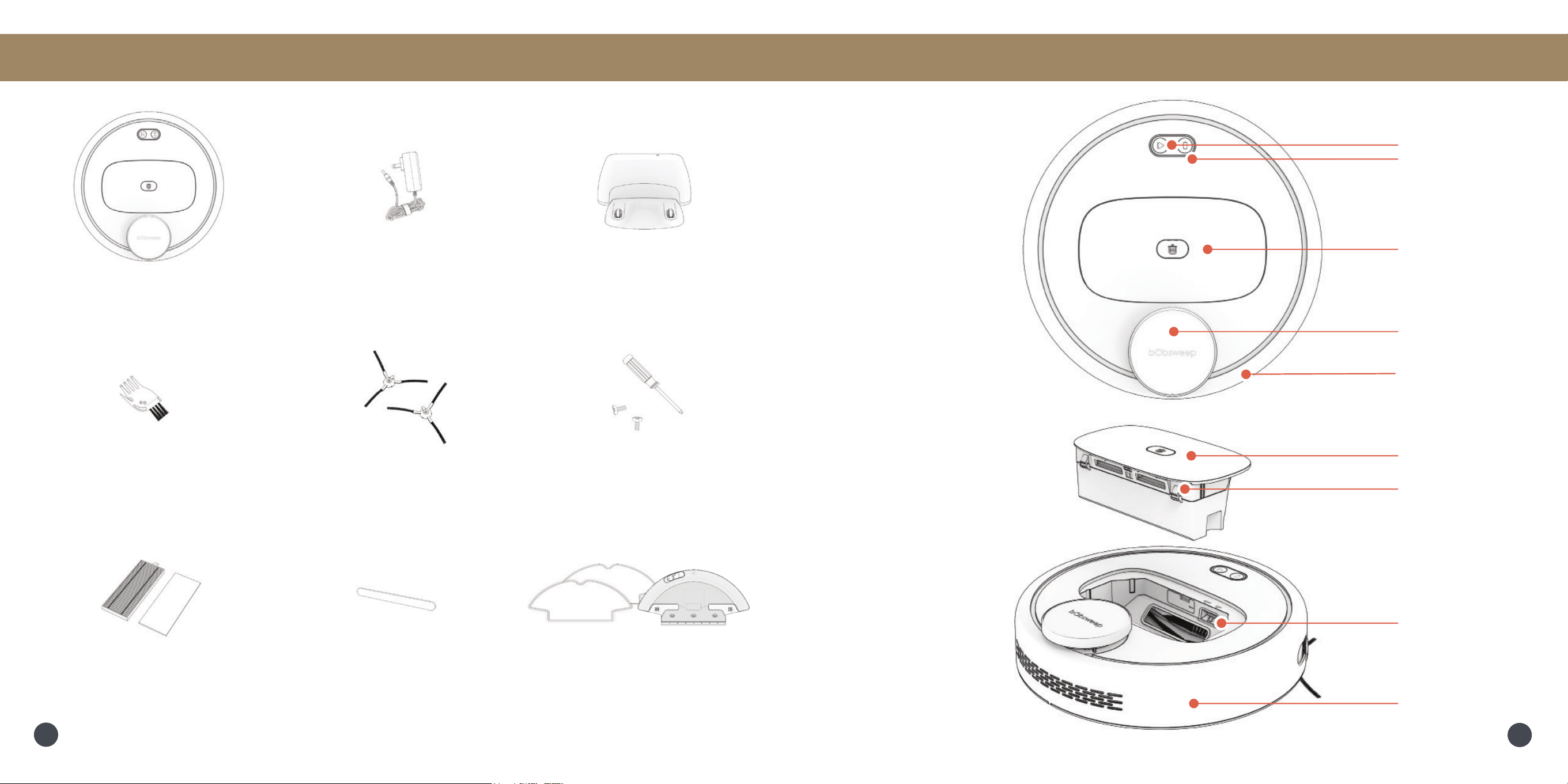
Box Contents
Top View
LiDAR
Buttons
Light Ring Indicator
Anatomy
Bob PetHair Appetite
™
Charging Station
Cleaning Tool Side Brushes (2) Screws (2) &
Screwdriver
Charging Adapter
Wet Mop Attachment &
Microber Mopping Cloths (2)
Dustbin
Power Switch
Dustbin
Filters
Bumper
Filters LiDAR Bumper
Sticker
Invisibumper
™
4
3
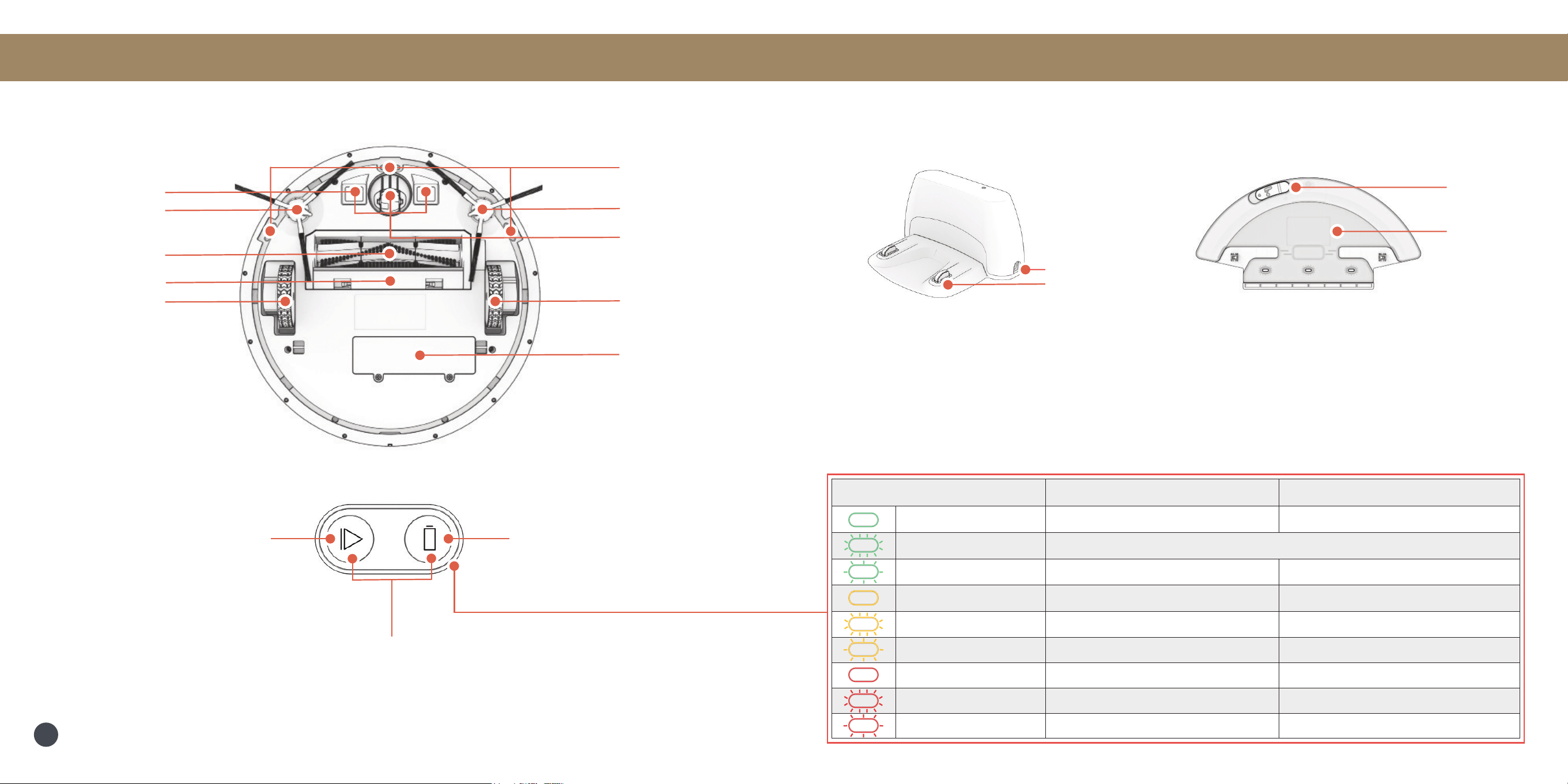
Light Status Bob on Charging Station Bob off Charging Station
Solid Green Fully charged & ready to clean. Cleaning.
Blinking Green In WiFi Pairing Mode and searching for WiFi.
Pulsing Green Charging. Looking for the charging station.
Solid Yellow Powering ON/OFF. Powering ON/OFF.
Blinking Yellow Battery critically low.
Pulsing Yellow Battery low & charging.
Solid Red Trouble detected.
Blinking Red Software update in progress. Software update in progress.
Pulsing Red Trouble detected & charging.
Anatomy
Wet Mop Attachment
Reservoir
Opening
Charging Nodes
Charging Station
Inlet
Anatomy
Bottom View
Left Side Brush
Right Side Brush
Main Brush
Left Wheel
Front Wheel
Right Wheel
Charging Plates
Edge Sensors
Battery
Main Brush Gate
Buttons
CHARGE
Short Press - Charge/Stop
Long Press - Home Checkup Test
PLAY
Short Press - Start/Stop
Long Press - Power On/Off
PLAY + CHARGE
WiFi Pairing Mode
Light Ring Indicator
5
Getting Started
Who is Bob?
Bob is an autonomous robotic vacuum cleaner, at your service! He can vacuum, sweep, and mop all at
the same time. Connect Bob to WiFi and use the bObsweep app to schedule a customized cleaning plan
for Bob to clean your home, your way.
Navigating Difcult Obstacles
Unique Furniture
Specialty furniture, such
as desk chairs with wheels
or stools with circular
bases, may confuse Bob
momentarily — or he may
get stuck on a ledge for
a few minutes, and then
decide to clean somewhere
else. As long as Bob
does not display a trouble
message, let him continue
cleaning and nd his own
way around. Take note of
the areas Bob nds most
challenging and, if possible,
adjust your furniture
accordingly.
Dark-Colored
Carpet
If Bob repeatedly backs
up or displays a trouble
message while cleaning
dark carpet, then you’ll
need to deactivate the edge
sensors. To do so, open the
bObsweep app and disable
edge detection under
Cleaning Preferences in Bot
Settings. Just remember
that while Bob’s edge
sensors are deactivated,
he will not be able to detect
edges or stairs!
Shag Carpet
Bob’s main brush is not
designed to clean shag
carpet or rugs with long
bers and fringes. If you’d
like Bob to clean shag
carpet or long-bered rugs,
you may remove his main
brush and allow him to
vacuum without it.
Getting Started
How does Bob nd his way
around?
Bob uses laser vision, a network of
reactionary sensors, and a state-of-the-
art mapping and localizing technology to
detect walls, furniture, and obstacles. As
Bob cleans, he simultaneusly creates a
map of the areas he is able to access and
clean. Areas where furniture and small
items are found are marked on the map.
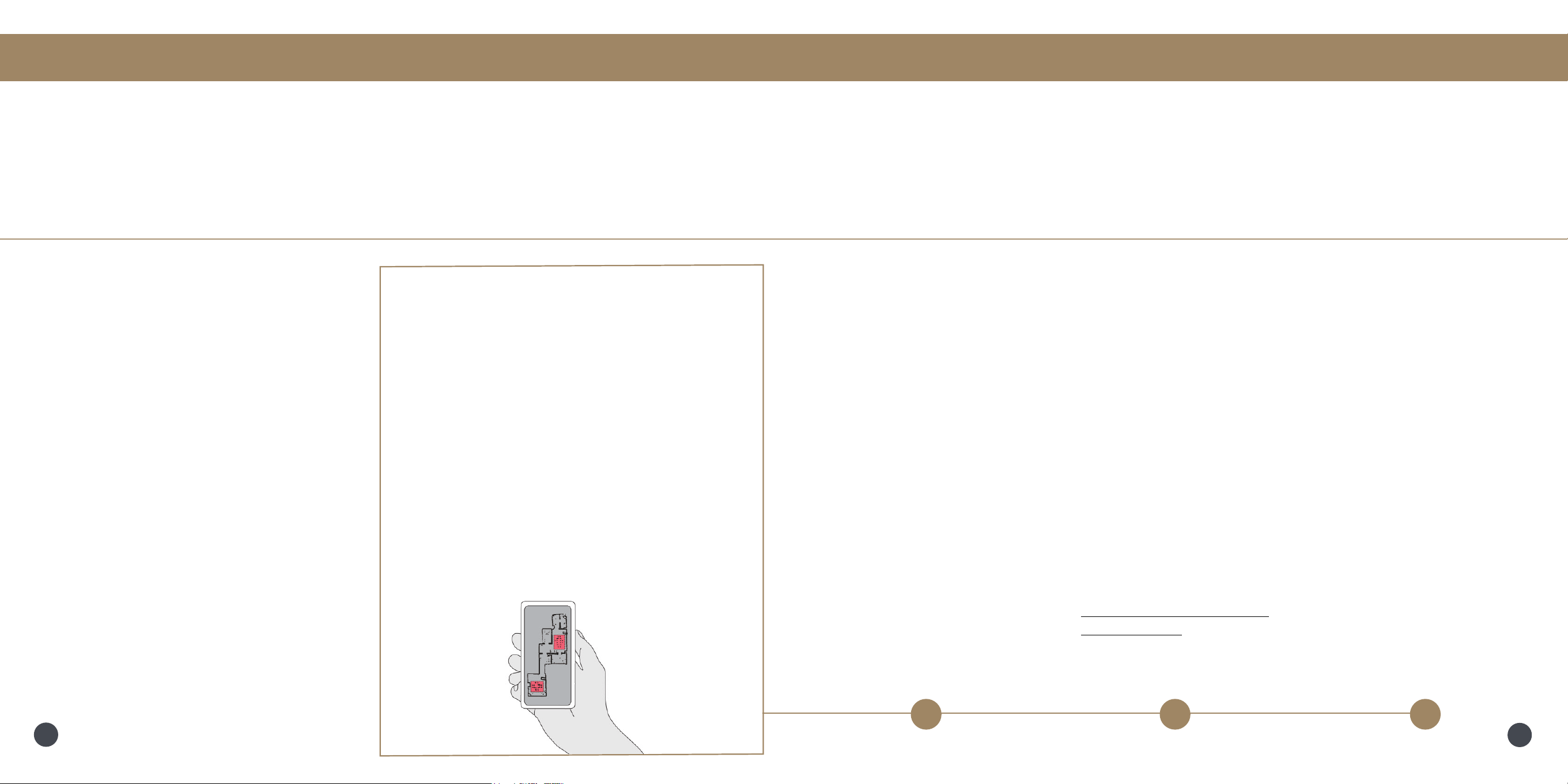
View the map by clicking the Map Icon
on the bObsweep App on your mobile
phone.
Using the map, and app’s customization
capabilities, Bob efciently cleans your
home over the course of a full cycle —
just check his map and his dustbin for the
evidence!
Easy Fix
Edit, Personalize, and
Customize Bob’s map, to
dene room types, cleaning
zones, NoSweep™ zones,
Room-to-Room™ cleaning,and
more. Keep Bob away from
areas he nds particularly
challenging, and create a smart
cleaning plan for your oor
plan.
8
7
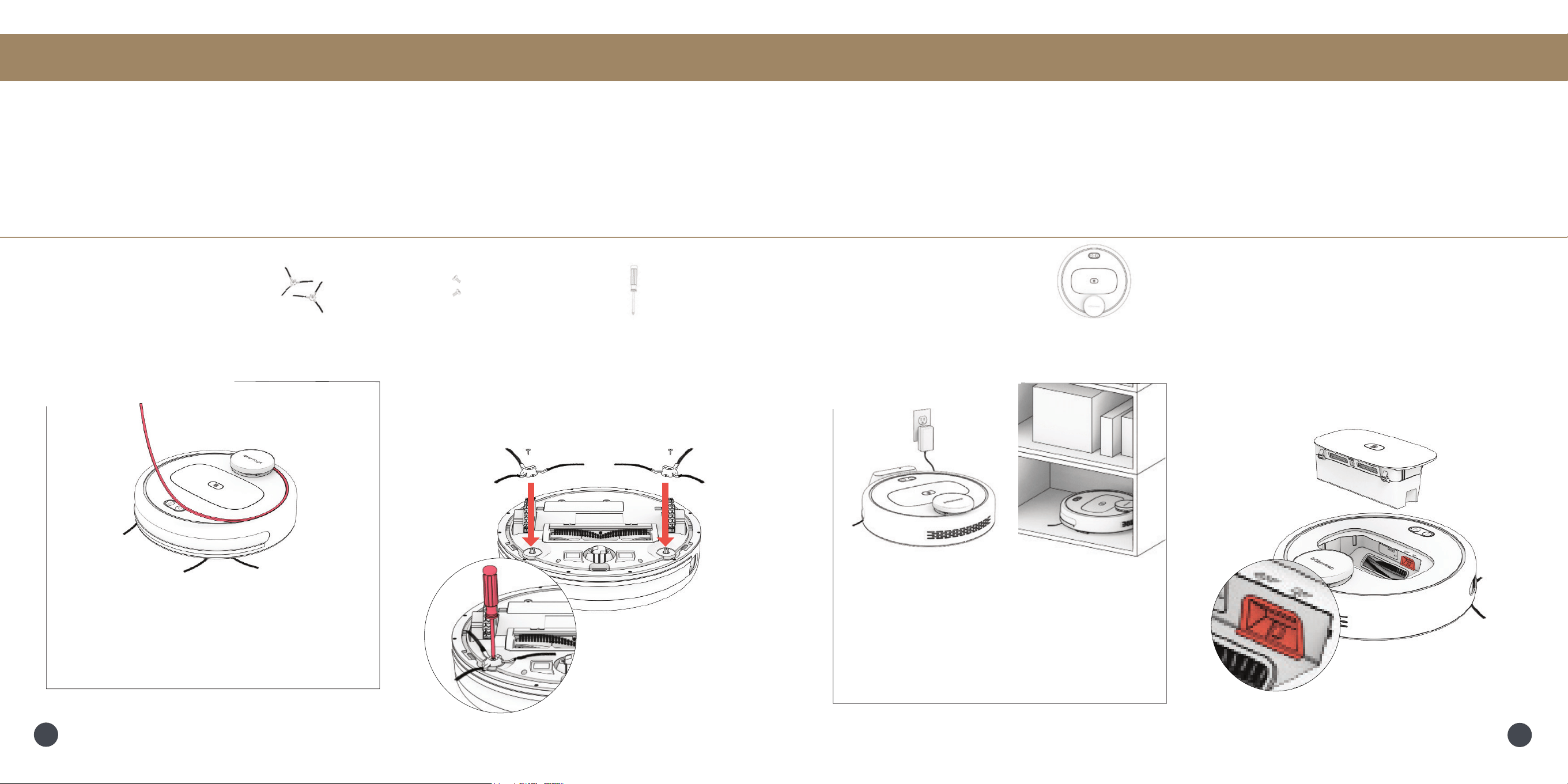
Place each side brush over the empty
socket on Bob and secure using the
philips head screwdriver and screw.
Bob’s First Clean Bob’s First Clean
Before Starting
Remove the protective piece from Bob’s
invisibumper
™
.
Step 1: Install Bob’s Side Brush
Install Bob’s side brush to help him reach the corners and edges of rooms.
Parts You’ll Need: Side Brushes Side Brush Screws Philips Head
x2 x2 Screwdriver
Step 2: Flip Bob’s Power Switch ON
Bob’s main power switch is located inside the dustbin container.
Remove Bob’s dustbin and ip the
power switch ON.
Storing Bob
If you are not using Bob for an extended
period of time, ip his power switch
OFF, remove his battery, and unplug his
charging station. Store everything in a dry,
room tempreture place away from direct
sunlight.
Parts You’ll Need: Bob
10
9
Bob’s First Clean Bob’s First Clean
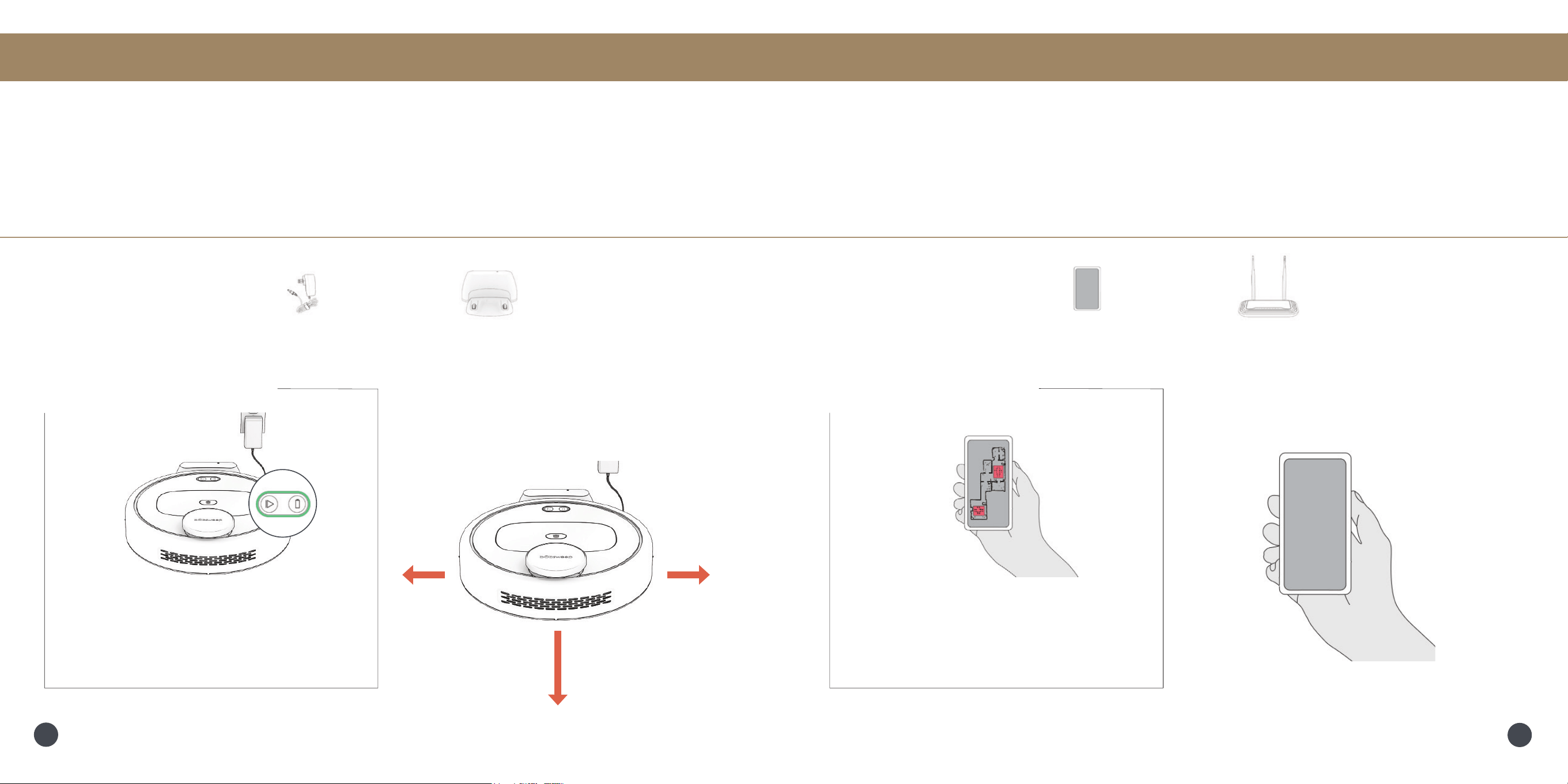
Open the bObsweep App, create your
account, and follow instructions to connect
your bot.
Step 3: Charge Bob
Place Bob on his station and allow him to charge completely.
Step 4: Download the bObsweep App
Download the bObsweep app for your iOS or Android device.
Items You’ll Need: Mobile Phone WiFi Connection
NoSweep
™
Zones
Shiny surfaces, cluttered areas, and some
uniquely shaped furniture can be hard to
navigate. Dene cleaning zones on the
bObsweep App.
Bob returns to his charging station after
cleaning. To help Bob return to his home,
place the charging station on a hard, at
surface, away from edges and stairs, with
plenty of room around it.
10 feet (3 m)
2 feet
(0.6 m)
Parts You’ll Need: Charging Adapter Charging Station
Charging Indicator
2 feet
(0.6 m)
Finding Station: Light ring pulses green.
Charging: Light ring pulses green.
Fully Charged: Light ring shines green.
Low Battery: Light ring blinks yellow.
12
11
Bob’s First Clean
Equipped with Room-to-Room
™
cleaning
technology, Bob automatically explores,
and cleans your home in straight lines,
avoiding furniture and obstacles along
his path. For best result, remove any
clutter before Bob starts his work.
Lifting & Moving
Do not pick up Bob while cleaning to avoid
distorting his map.
It’s also best not to change the location
of Bob’s charging station after he’s done
mapping the house.
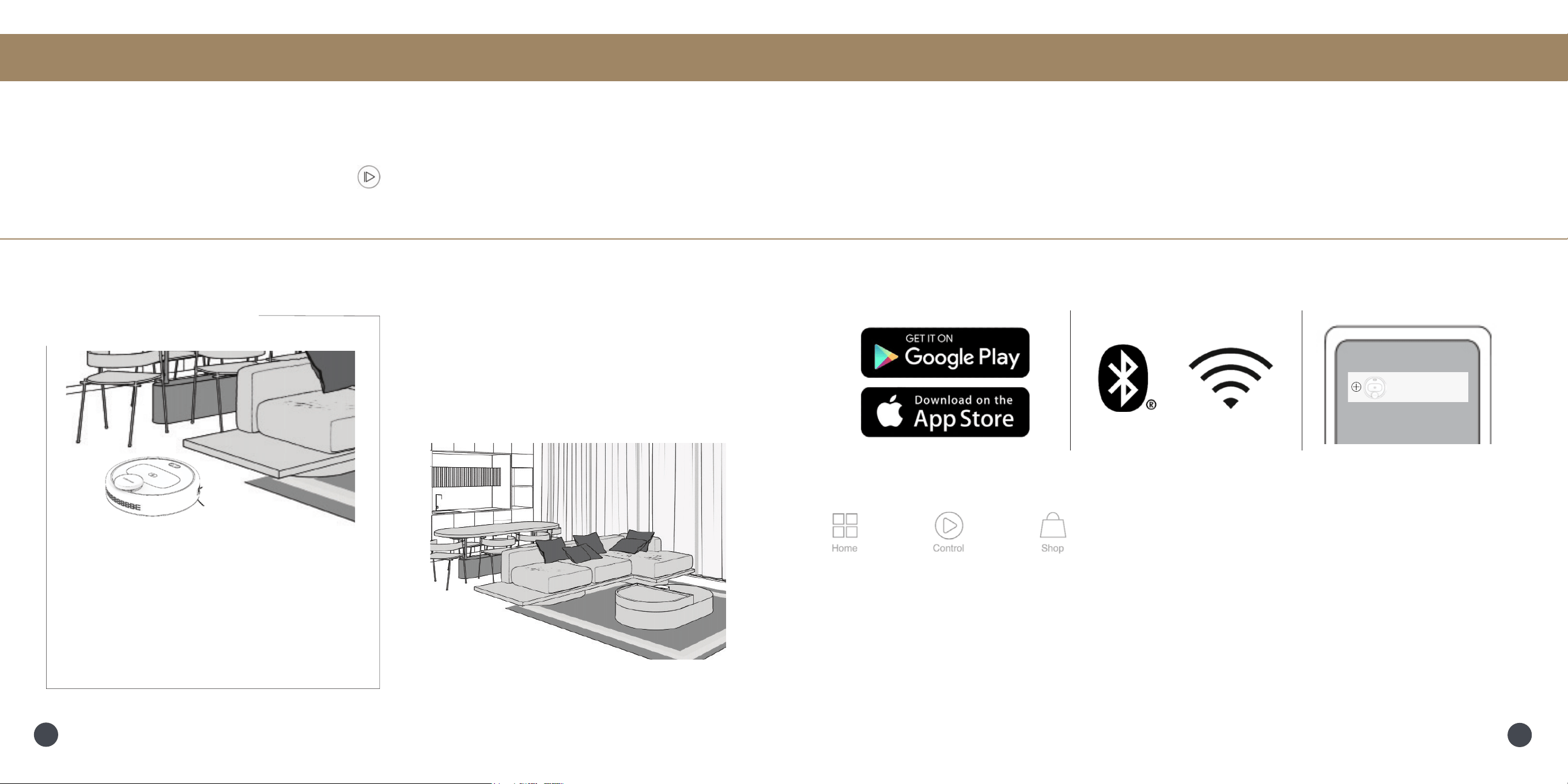
Step 5: Let Bob Sweep!
Clear away any clutter or wires and press the button on Bob or the bObsweep app.
App Controls
bObsweep App
Home
Add connected Bots, and access digital versions of Quick Start Guide and Owner’s Manual on the
Home page of the bObsweep app.
Control
Set Bob’s cleaning Schedule, send him to Clean or Charge, modify Bot Settings, and view or customize
your Map settings on the Control page of the bObsweep app.
Shop
Shop for parts, accessories, and coverage plans on the Shop page of the bObsweep app.
Connect your Bot
to your mobile device with bObsweep app and gain access to Bob’s full suite of features and important
software updates. Connect the app to your Amazon Alexa or Google Home device for voice control.
Download the
bObsweep app
Enable Bluetooth
and WiFi
Launch the app
and Add Model
My Bots
Add Model
......
14
13
Troubleshooting
Whenever Bob runs into trouble, he will stop and the light ring indicator turns red. Check the bObsweep
app for details about the trouble Bob is experiencing.
Maintenance
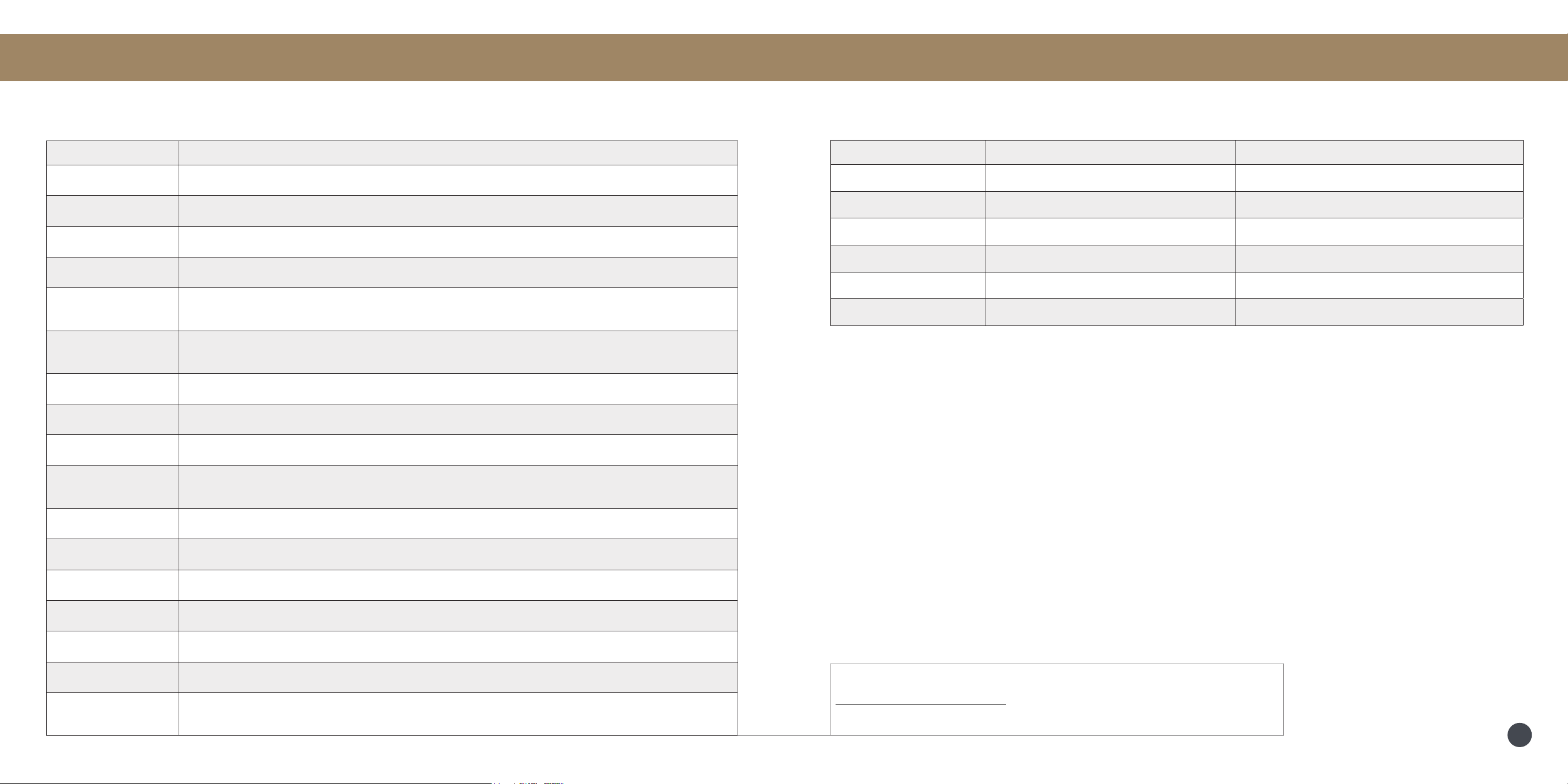
Trouble Solution
Battery Low or disconnected battery. Check connection. Reset, and charge Bob.
Left/Right Wheel Left/Right wheel is jammed. Check for obstruction and clean.
Main Brush Main brush is jammed. Remove and clean.
Side Brushes Side brushes are jammed. Remove and clean.
Dustbin
Dustbin is disconnected or not correctly put together. Reassemble and reinsert/
Vacuum Motor is jammed. Check for obstruction and clean.
Edge Sensors
Bob is stuck near a cliff, or the edge sensors are dirty. Move Bob to safety, and
clean the edge sensors.
Wall Sensors Wall sensors are dirty. Wipe around the invisibumper and wall sensors.
Bumper Touch sensor(s) are jammed. Check the invisibumper for obstruction and clean.
LiDAR Bumper LiDAR bumper is jammed. Check for obstruction and clean.
LiDAR
LiDAR is not clean/lost visibility. Clean the LiDAR and move Bob away from
mirrors/metallic surfaces and close to a wall.
Charging Station
Can’t locate the charging station. Replug the charging station and charge Bob.
User Interface Bob’s UI/USB port is not responding.Reset Bob & ensure the USB port is empty.
Electronic
Electronic component error. Reset Bob (Power Off and back On).
Stuck Bob is stuck. Clear away obstacles/clutter/wires & reset Bob.
Navigation
Bob is not able to navigate. Clear away any clutter/wires & reset Bob.
Mapping
Bob can’t self locate on map. Check map accuracy/erase map for remapping.
Settings
Current app room settings don’t match Bob’s. Change map congurations/
routines.
Part Maintenance Frequency Replacement Frequency
Dustbin Daily
Filter Weekly Every 6 months
Brushes Weekly Every 12 months
Sensors Monthly
Front Wheel Monthly
Battery Every 12 – 24 months
Quick Tips: Clear debris out of nooks and crannies around the brushes and wheels.
Use tweezers to remove congestion from the brush ends.
Use scissors or cleaning tool to cut hair wrapped around the brushes.
If the problems persist, please contact our helpful support team at
[email protected] or 1-888-549-8847. Our business hours
are Monday – Friday, 9 a.m. – 5 p.m. Pacic Time.
16
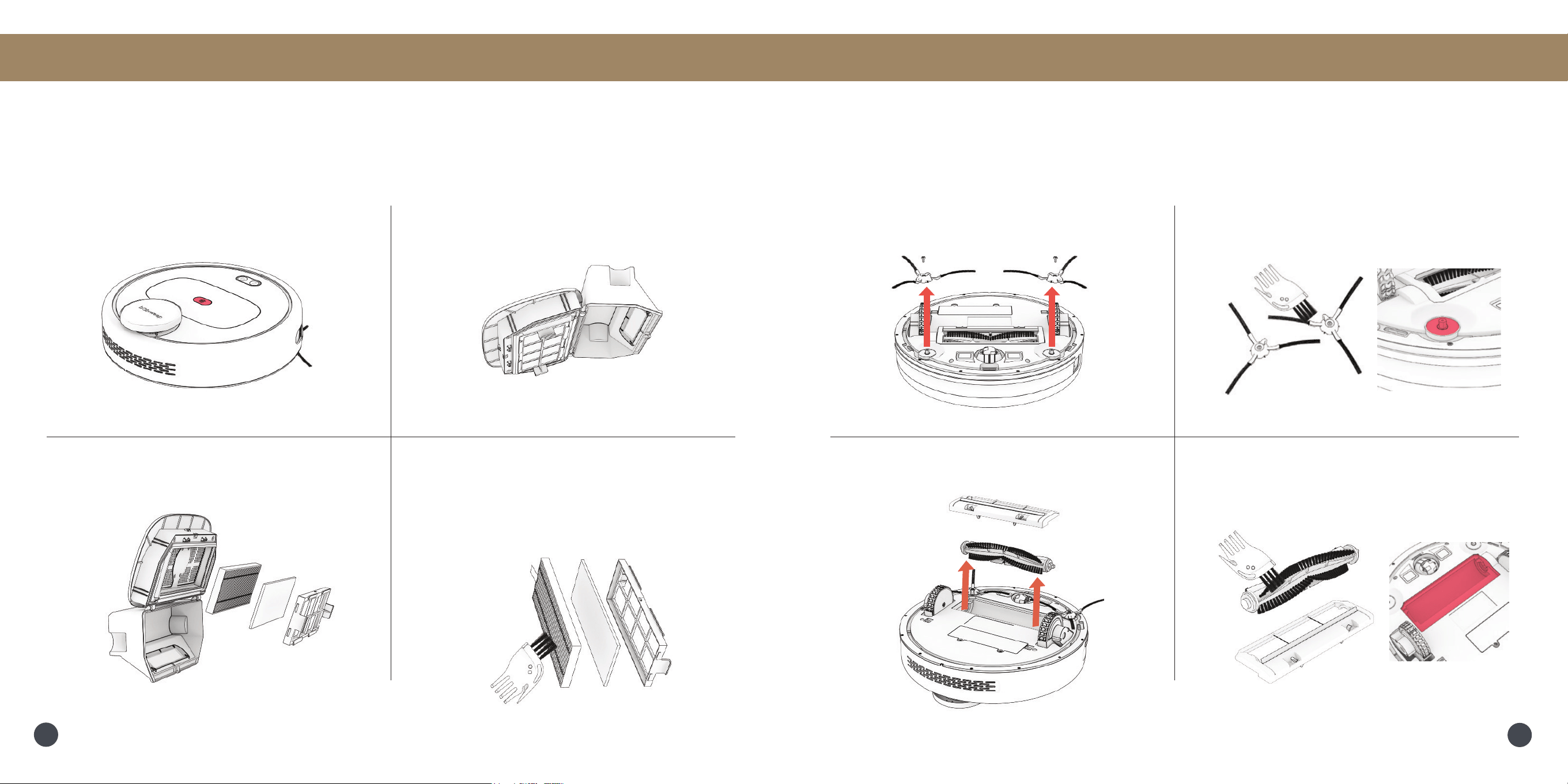
1. Remove the dustbin
4. Remove and dust the lters.
Wash or wipe the dustbin, and air dry
all parts completely before putting them
back together.
3. Open the lter container and remove
debris.
Dustbin & Filters
Maintenance
1. Use a philips head screwdriver to
remove the side brushes.
2. Remove debris from the brushes and
brush sockets.
4. Clean the main brush and all its
components, including the brush gate
and brush compartment.
3. Pinch the tabs on the main brush gate
and lift.
Brushes
Maintenance
2. Open the dustbin and dump its contents.
18
17
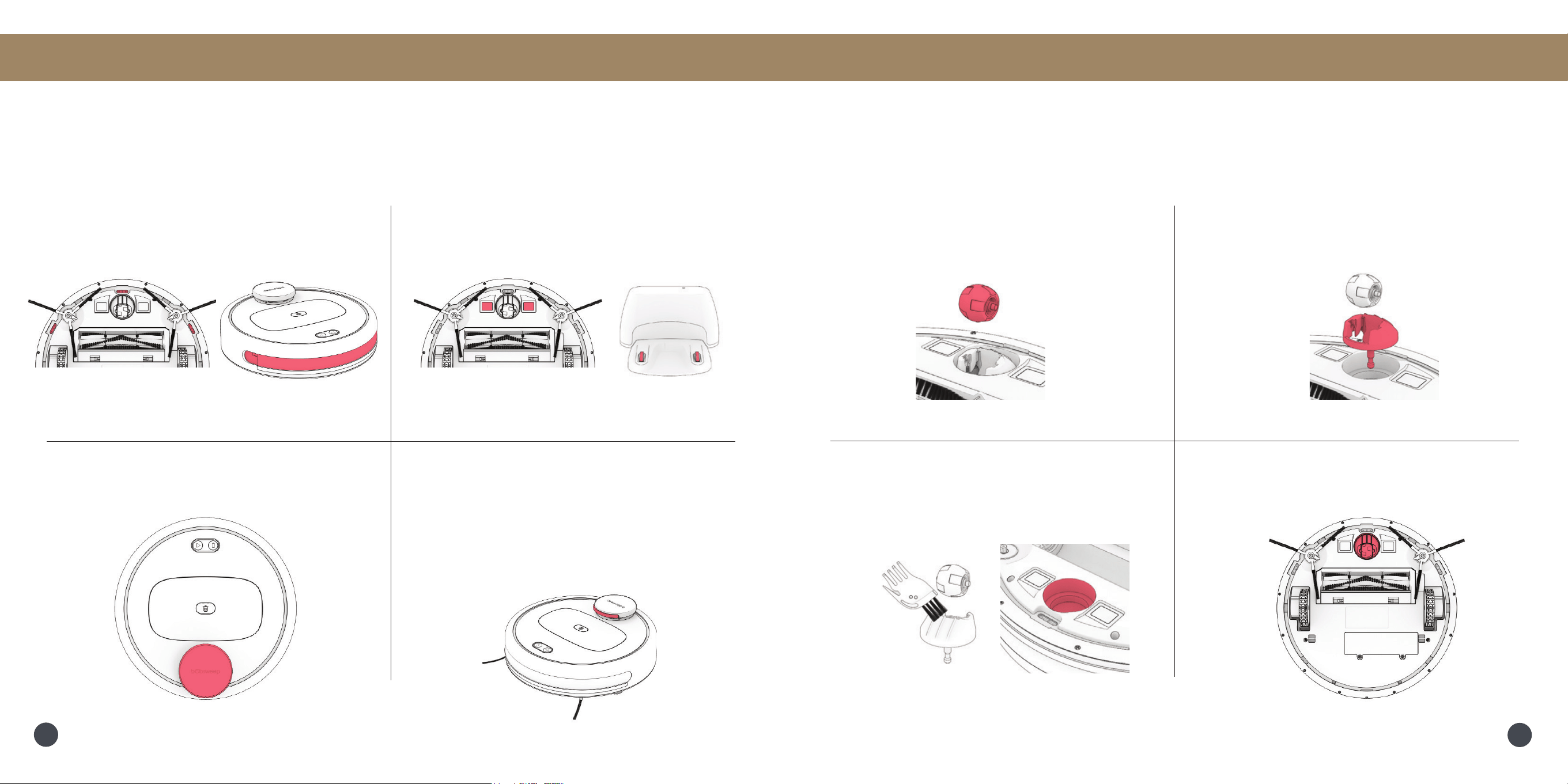
Sensors
1. Wipe the edge and wall sensors. 2. Wipe the charging plates on Bob and
the charging nodes on his station.
3. Wipe the top and the area around the
LiDAR sensor.
Important Note: Use a soft cotton cloth to wipe the sensors.
Maintenance
4. Bob’s LiDAR is a sensitive sensor.
Do not apply force, insert objects, or adjust
the LiDAR. Do not sit or place items on top
of Bob. Use the bumper sticker to protect
LiDAR’s bumper against furniture and
cabinets of the same height.
Front Wheel
Maintenance
1. Using a at head screwdriver for leverage,
grip the wheel rmly and pull.
2. Once the wheel is removed, use the
screwdriver to pry out the wheel assembly.
3. Clean the wheel and all its components,
including the assembly and wheel socket.
4. Replace both parts when done.
Push down to lock them into place.
20
19
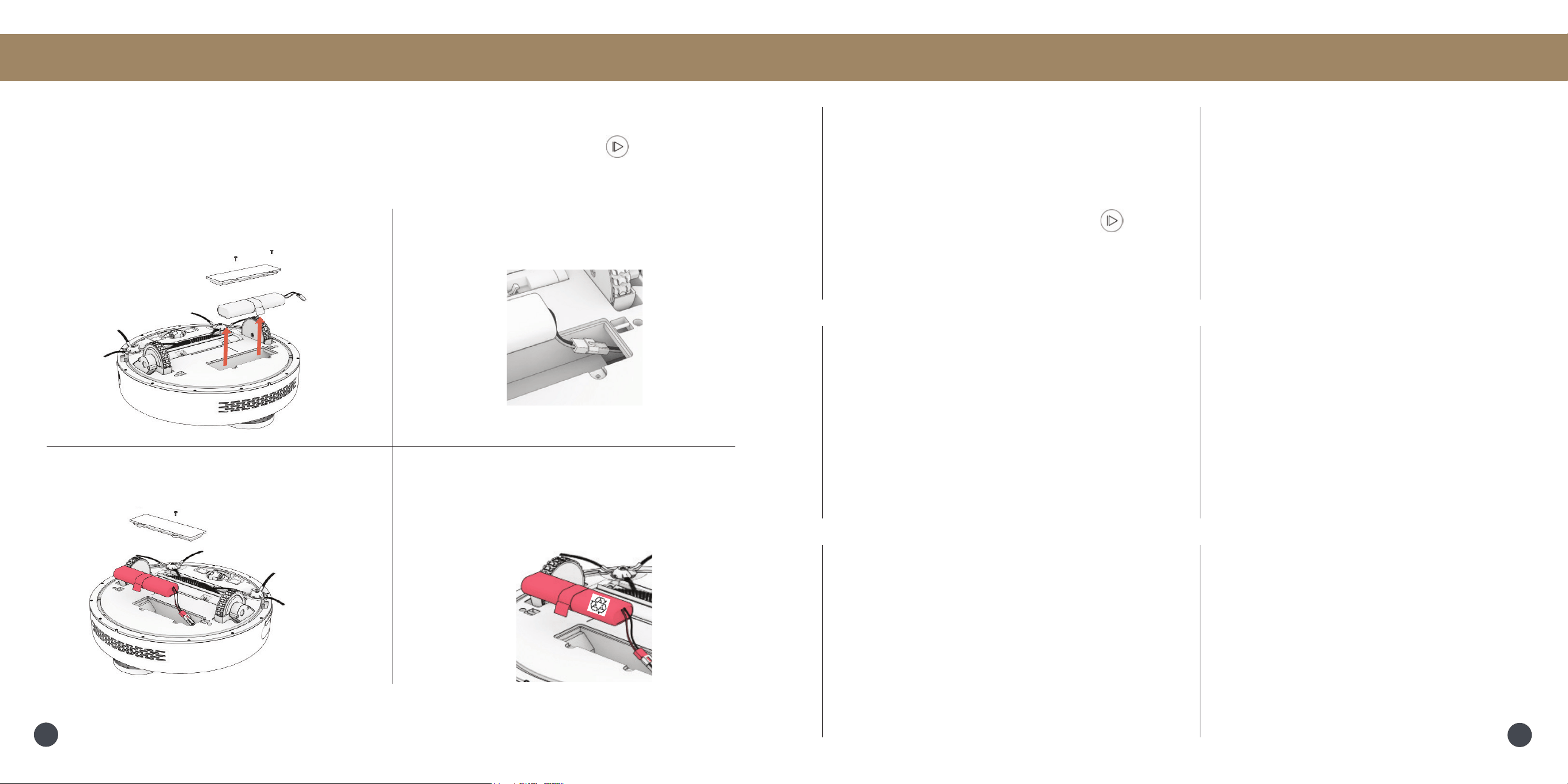
Battery
Important Note: Power OFF Bob before replacing the battery. Press and hold the button.
1. Use a Phillips head screwdriver to open
the battery compartment.
2. Unplug the old battery and plug in your
new one.
3. Slide the new battery into Bob.
Maintenance FAQs
How do I know that Bob is
fully charged and ready to
clean?
When Bob is charging, the light ring indicator
pulses green (yellow if Bob’s battery is drained
too low). When Bob is fully charged and ready
to clean, the light ring indicator shines green.
Bob won’t turn on no matter
what I do.
First, make sure Bob’s power switch is turned
ON. The power switch is located inside Bob’s
dustbin container. Press and hold the
button. If Bob is not responding to his buttons,
then his battery has likely drained too low for
him to operate. Place Bob on his charging
station and allow him to fully charge.
Bob’s having trouble nding
his station.
You may need to relocate the station to a
more accessible area. Make sure the station
is placed in a centralized area against the
wall on a hard, at surface away from stairs
or edges, with plenty of space around it.
I want to access Bob’s latest
features & keep him up-to-date
Check the App Store/Google Play Store and
update the bObsweep app to access the latest
features released on the bObsweep app.
Check the Bot Settings page on the bObsweep
app and update Bob’s software to access the
latest version of Bob’s operating system.
Bob stopped cleaning and the
light ring is ashing red.
When Bob is in trouble and needs your help,
he will stop during a clean cycle and his light
ring indicator blinks red. Open the bObsweep
app and nd the trouble details at the top of
the Control page.
Bob’s not picking up as much
as he used to.
Bob will have trouble cleaning if his dustbin
is full, or his main brush is clogged or tangled
with hair. Remove Bob’s main brush and
clean it thoroughly from end to end. Empty
Bob’s dustbin, and remove debris from Bob’s
dustbin container and brush compartments to
ensure smooth ow of air.
4. Do not dispose of old batteries.
Recycled safely through your local
recycler.
22
21
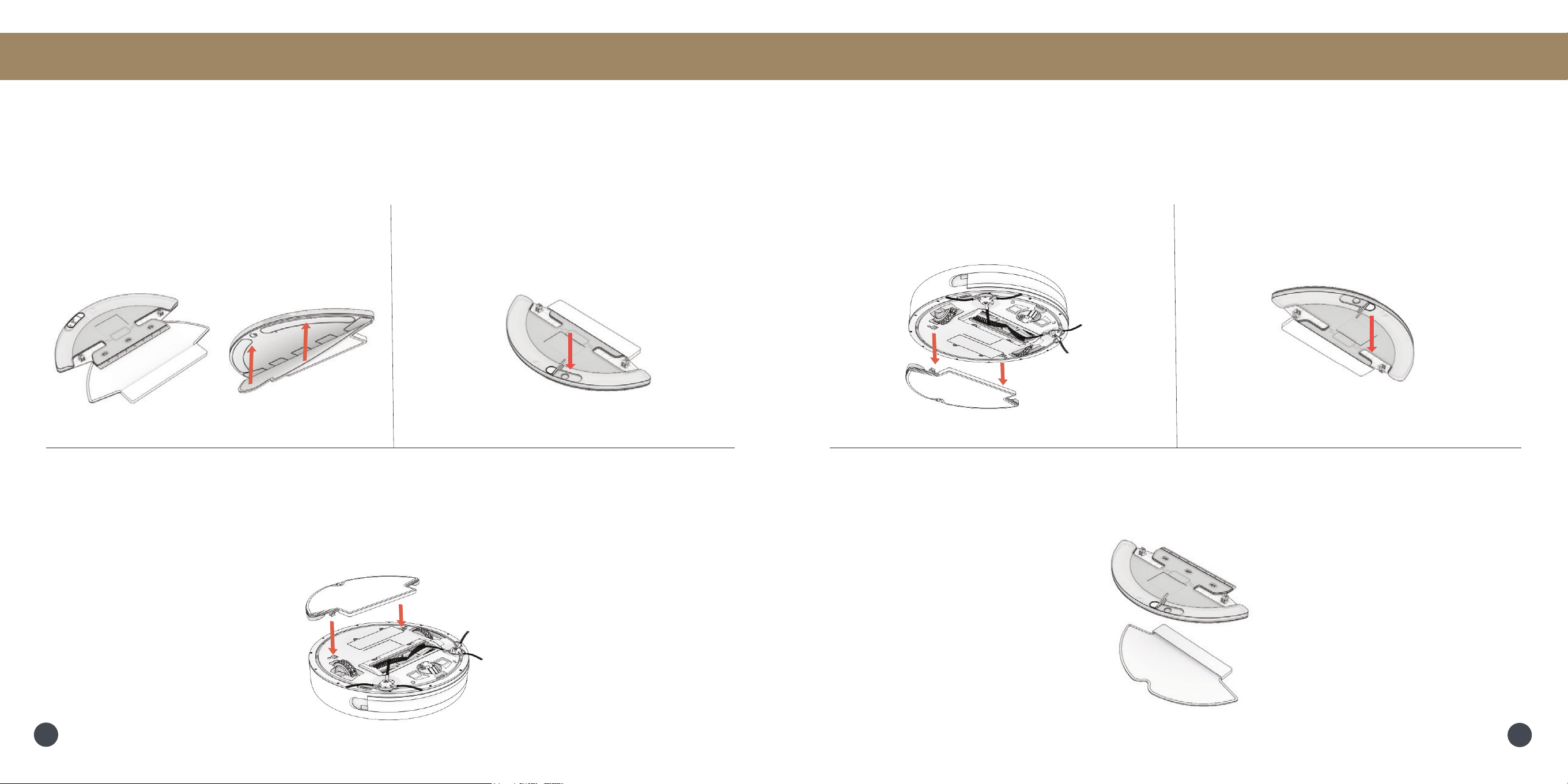
1. Remove the mop attachment. 2. Pull open the tab and empty the
reservoir.
3. Wash the mopping cloth. Air-dry all parts
when done.
Accessories
Wet Mop Attachment Maintenace
Important Note: The reservoir should be drained after use to avoid possible water damage.
1. Place the mopping cloth on the mop
attachment.
2. Open the tab and ll the reservoir with
water.
3. Align the prongs of the mop attachment
between Bob’s wheels and press down.
Accessories
Wet Mop Attachment
Important Note: Use distilled water when operating in hard water areas.
24
23

End User License Agreement
IMPORTANT - READ BEFORE USING. Do not use the robot (“Bobsweep”) accompanying this license agreement
(“Agreement”) until you have carefully read and agreed to the following terms and conditions.
By using the Bobsweep, you agree to the terms of this End User License Agreement (“EULA”) and any amendment or
addenda accompanying this Agreement. If you do not agree to the terms of this EULA, you may not use the Bobsweep.
The Bobsweep contains an electronic and software interface that allows you to control or modify its behavior, and remotely
monitor its sensors.
THIS IS A LEGAL AGREEMENT. BY ACCESSING AND USING THE PRODUCT AND PRODUCT SOFTWARE, YOU ARE
ACCEPTING AND AGREEING TO THIS EULA ON BEHALF OF YOURSELF OR THE ENTITY YOU REPRESENT IN
CONNECTION WITH THE ACCESS. YOU REPRESENT AND WARRANT THAT YOU HAVE THE RIGHT, AUTHORITY, AND
CAPACITY TO ACCEPT AND AGREE TO THIS EULA ON BEHALF OF YOURSELF OR THE ENTITY YOU REPRESENT.
YOU REPRESENT THAT YOU ARE OF SUFFICIENT LEGAL AGE IN YOUR JURISDICTION OR RESIDENCE TO USE
OR ACCESS THE PRODUCT SOFTWARE AND TO ENTER INTO THIS EULA. IF YOU DO NOT AGREE WITH ANY OF
THE PROVISIONS OF THESE TERMS, YOU SHOULD CEASE USING THE PRODUCT AND PRODUCT SOFTWARE.
Terms and Conditions
LICENSE: Subject to all of the terms of this Agreement, Bobsweep Inc. (“Bobsweep”) grants to you one (1) revocable,
royalty-free, personal, non-exclusive, non-transferable, non-assignable, non-commercial intellectual property license to use
the Bobsweep software contained on the Bobsweep (“Bobsweep Software”), including the protocol for communicating with
the Bobsweep Software, and to use the Bobsweep.
NONCOMMERCIAL LICENSE: You may use the Bobsweep Software and the Bobsweep only for personal, non-commercial,
educational, and research purposes. The Bobsweep Software and the Bobsweep may not be used for any other purpose,
whether “for prot” or “not for prot.” Any work performed or produced using the Bobsweep, including any software that
you create for your Bobsweep (“Your Software”), cannot be performed or produced for the benet of other parties for a fee,
compensation, or any other reimbursement or remuneration. A separate license is required for each additional use and/or
individual user in all other cases. If you are an entity, Bobsweep grants you the right to designate one individual within your
organization to have the sole right to use the Bobsweep Software and the Bobsweep in the manner provided above.
RESTRICTIONS: You agree not to: (i) use or copy the Bobsweep Software or the Bobsweep except as provided in this
Agreement; (ii) rent or lease the Bobsweep Software or the Bobsweep to any third party; (iii) assign this Agreement or
transfer the Bobsweep Software or the Bobsweep except as provided in this Agreement; (iv) modify, adapt, or translate
the Bobsweep Software or the Bobsweep in whole or in part except as expressly provided in this Agreement; (v) reverse
engineer, reverse compile, or disassemble the Bobsweep Software or the Bobsweep; or (vi) distribute, sublicense or transfer
the source code form of Your Software and derivatives thereof to any third party except as provided in this Agreement.
YOUR SOFTWARE : Your Software is also subject to the following limitations: You (i) shall be solely responsible for any
update or support obligation or other liability which may arise from your use or distribution, (ii) shall not make any statement
that Your Software is “certied,” or that its performance is guaranteed, by Bobsweep, (iii) shall not use Bobsweep’s name
or trademarks, (iv) shall prohibit disassembly and reverse engineering of the Bobsweep Software and the Bobsweep, (v)
shall not publish reviews of Bobsweep products designated as beta without written permission from Bobsweep, and (vi)
shall indemnify, hold harmless, and defend Bobsweep and its suppliers from and against any claims or lawsuits, including
attorney’s fees, that arise or result from Your Software, including your use and your distribution.
TITLE: Title to the Bobsweep Software remains with Bobsweep or its suppliers. The Bobsweep Software is licensed, not
sold. Except as expressly provided herein, Bobsweep does not grant any express or implied right to you under Bobsweep
patents, copyrights, trademarks, or trade secret information. You will not remove any copyright or patent notice from the
Bobsweep Software or the Bobsweep.
ONE-TIME TRANSFER: The initial user of the Bobsweep Software and the Bobsweep may make a one-time permanent
transfer of this Agreement, the Bobsweep Software, and the Bobsweep to another end user, provided that the initial user
retains no copies of the Bobsweep Software and the Bobsweep. This transfer must include the Bobsweep Software, the
Bobsweep, and all of the materials accompanying the Bobsweep (including all component parts and printed materials,
any upgrades, and this End User License Agreement document). The transfer may not be an indirect transfer, such as a
consignment. Prior to the transfer, the end user receiving the Bobsweep Software and the Bobsweep must agree to all the
terms of this Agreement.
NO WARRANTY AND LIMITED REPLACEMENT: EXCEPT AS STATED IN THE LIMITED WARRANTY TO THE ORIGINAL
PURCHASER, THE BOBSWEEP SOFTWARE AND THE BOBSWEEP ARE PROVIDED “AS IS” WITH NO WARRANTIES,
EXPRESS OR IMPLIED, INCLUDING BUT NOT LIMITED TO ANY IMPLIED WARRANTY OF MERCHANTABILITY,
FITNESS FOR A PARTICULAR PURPOSE, NON-INFRINGEMENT OF INTELLECTUAL PROPERTY RIGHTS, OR ANY
WARRANTY OTHERWISE ARISING OUT OF ANY PROPOSAL, SPECIFICATION, OR SAMPLE. NO ORAL OR WRITTEN
INFORMATION OR ADVICE GIVEN BY BOBSWEEP OR ITS AGENTS SHALL CREATE A WARRANTY.
If the Bobsweep Software or the Bobsweep is found to be defective in material or workmanship under normal use for a period
of one (1) year from the date of receipt, Bobsweep’s entire liability and your exclusive remedy shall be the replacement of
the Bobsweep Software or the Bobsweep. This offer is void if the defect results from accident, abuse, misapplication, or
software that you developed for your Bobsweep. Any updates or supplements to the Bobsweep Software or the Bobsweep
provided to you after the expiration of the one (1) year period are not covered by any warranty or condition, express, implied
or statutory.
SOME JURISDICTIONS DO NOT ALLOW THE EXCLUSION OF IMPLIED WARRANTIES, SO THE ABOVE EXCLUSION
MAY NOT APPLY TO YOU. LIMITATION OF LIABILITY: THE ABOVE REPLACEMENT PROVISION IS THE ONLY
WARRANTY OF ANY KIND. BOBSWEEP OFFERS NO OTHER WARRANTY EITHER EXPRESS OR IMPLIED
INCLUDING THOSE OF MERCHANTABILITY, NON INFRINGEMENT OF THIRD- PARTY INTELLECTUAL PROPERTY
OR FITNESS FOR A PARTICULAR PURPOSE. NEITHER BOBSWEEP NOR ITS SUPPLIERS SHALL BE LIABLE FOR
ANY DAMAGES WHATSOEVER (INCLUDING, WITHOUT LIMITATION, VICARIOUS LIABILITY, CONSEQUENTIAL
DAMAGES, INCIDENTAL DAMAGES, DAMAGES FOR LOSS OF BUSINESS PROFITS, BUSINESS INTERRUPTION,
LOSS OF BUSINESS INFORMATION, OR OTHER LOSS) ARISING OUT OF THE USE OF OR INABILITY TO USE THE
BOBSWEEP SOFTWARE, THE BOBSWEEP, OR SOFTWARE THAT YOU DEVELOPED FOR YOUR BOBSWEEP, EVEN
IF BOBSWEEP HAS BEEN ADVISED OF THE POSSIBILITY OF SUCH DAMAGES. BECAUSE SOME JURISDICTIONS

referred to in any proceeding concerning this Agreement. Further, no understanding contained in this Agreement shall be
modied, altered or amended, except by a writing signed by the party against whom enforcement is sought.
ARBITRATION: All disputes relating to this Agreement (excepting any dispute relating to intellectual property rights) shall
be subject to nal and binding arbitration, with the losing party paying all costs of arbitration. Any arbitration relating to this
Agreement shall be held in California, under the auspices of an arbiter selected by Bobsweep. Any litigation relating to this
Agreement shall be subject to exclusive venue and jurisdiction in the federal and state courts of California, with the losing
party responsible for costs, including without limitation, court costs and reasonable attorneys fees and expenses.
APPLICABLE LAWS: Any claim arising under or relating to this Agreement shall be governed by the internal substantive
laws of the Commonwealth of California, without regard to its principles of conict of laws. The application of the United
Nations Convention on Contracts for the International Sale of Goods is expressly excluded.
® and © bObsweep Inc. All rights reserved.
PROHIBIT THE EXCLUSION OR LIMITATION OF LIABILITY FOR CONSEQUENTIAL OR INCIDENTAL DAMAGES,
THE ABOVE LIMITATION MAY NOT APPLY TO YOU UNAUTHORIZED USE: THE BOBSWEEP SOFTWARE AND THE
BOBSWEEP ARE NOT DESIGNED, INTENDED, OR AUTHORIZED FOR USE IN ANY AERONAUTICAL, NUCLEAR,
MEDICAL, LIFE SAVING OR LIFE SUSTAINING SYSTEMS, OR FOR ANY OTHER APPLICATION IN WHICH THE USE
OF THE BOBSWEEP SOFTWARE OR THE BOBSWEEP COULD CREATE A SITUATION WHERE PERSONAL INJURY
OR DEATH MAY OCCUR.
Should you use the Bobsweep Software or Bobsweep for any such unintended or unauthorized use, you shall indemnify and
hold harmless Bobsweep and its ofcers, subsidiaries and afliates against all claims, costs, damages, and expenses, and
reasonable attorney fees arising out of, directly or indirectly, any claim of product liability, personal injury or death associated
with such unintended or unauthorized use, even if such claim alleges that Bobsweep was negligent regarding the design or
manufacture of the Bobsweep Software, the Bobsweep, or any part or portion thereof.
USER SUBMISSIONS: You agree that any material, information or other communication, including all data, images,
sounds, text, and other things embodied therein, that you transmit or post to a Bobsweep website or provide to Bobsweep
(“Communications”) will be considered non-condential. Bobsweep will have no condentiality obligations with respect to
the Communications. You agree that Bobsweep and its designees will be free to copy, modify, create derivative works,
publicly display, disclose, distribute, license and sublicense through multiple tiers of distribution and licensees, incorporate
and otherwise use the Communications, including derivative works thereof, for any and all commercial or non-commercial
purposes without the payment of any royalty to you, and that such license will survive the termination of this Agreement.
TERMINATION: This Agreement becomes effective on the date you accept this Agreement and will continue until terminated
as provided for in this Agreement. You may terminate this Agreement voluntarily at any time. Bobsweep may terminate this
Agreement at any time if you are in breach of any of its terms and conditions, and may refuse to license the Bobsweep
Software or the Bobsweep to you after termination. Upon termination by either party, you will immediately return to Bobsweep
or destroy the Bobsweep Software and the Bobsweep and all your copies thereof. Articles 5 and 7 through 17 of this
Agreement shall survive such termination. U.S. GOVERNMENT RESTRICTED RIGHTS: The Bobsweep Software and
the Bobsweep are provided with “RESTRICTED RIGHTS.” Use, duplication or disclosure by the Government is subject to
restrictions set forth in FAR52.227-14 and DFAR252.227-7013 et seq. or its successor. Use of the Bobsweep Software or
the Bobsweep by the Government constitutes acknowledgment of Bobsweep’s rights in them.
NO EXPORT: You may not export the Bobsweep Software or the Bobsweep in violation of applicable export laws.
INTERPRETATION PROVISION: The provisions of this Agreement are severable. If any provision of this Agreement is
held to be unenforceable, such provision shall be reformed only to the extent necessary to make it enforceable. Any law
or regulation which provides that the language of a contract shall be construed against the drafter shall not apply to this
Agreement.
INTEGRATION: This Agreement represents the complete agreement concerning the subject matter hereof, and any and all
understandings, conversations and communications, proposals, and counterproposals, oral and written (including any draft
of this Agreement) are merged into and superseded by this Agreement and shall be of no force or effect, except as expressly
provided herein. No such understandings, conversations, communications, proposals, counterproposals or drafts shall be
28