Copyright © 2024 Safeguard Europe Limited. All rights reserved
1
BUILT TO PROTECT
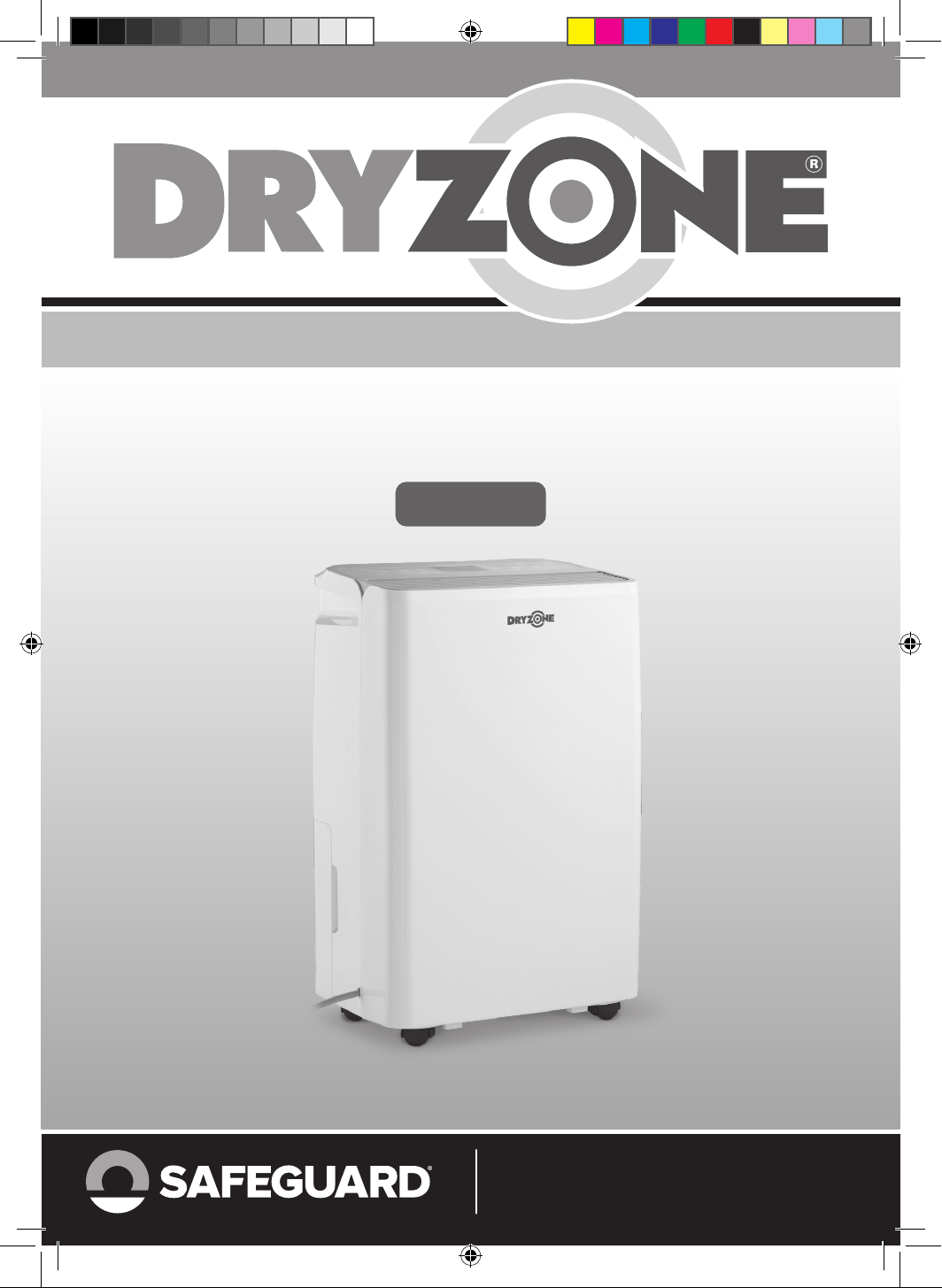
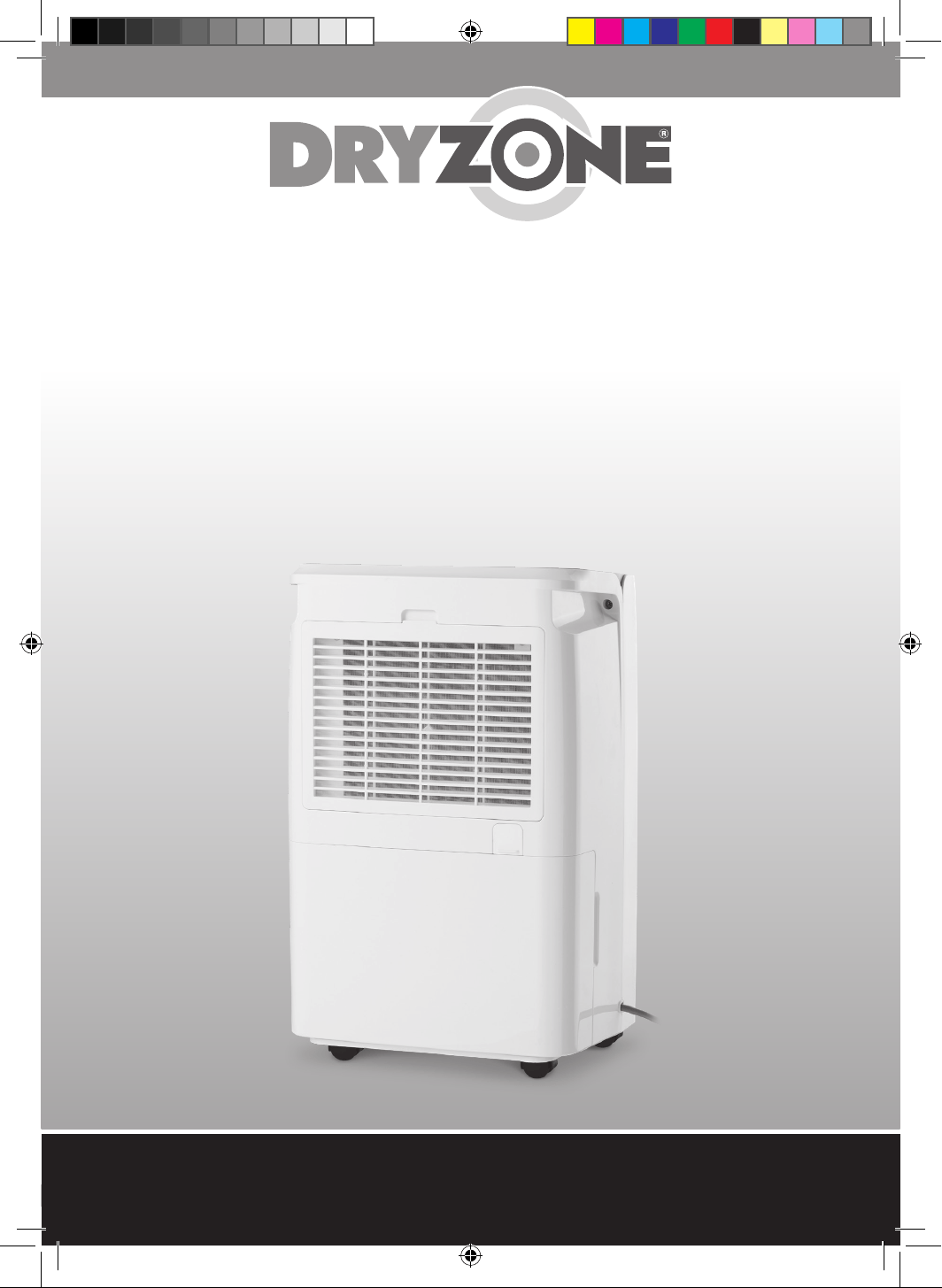
DEHUMIDIFIER & AIR PURIFIER
DEHUMIDIFIER & AIR PURIFIER
User Manual
Thank you for choosing Dryzone®.
Read all safety instructions before you use the device.
12 Litres
dryzone-dehimidifier-manual.indd 1dryzone-dehimidifier-manual.indd 1 31/10/2024 11:4631/10/2024 11:46
Copyright © 2024 Safeguard Europe Limited. All rights reserved
2
dryzone-dehimidifier-manual.indd 2dryzone-dehimidifier-manual.indd 2 31/10/2024 11:4631/10/2024 11:46
Copyright © 2024 Safeguard Europe Limited. All rights reserved
3
Contents
1. Glossary ........................................................................................................................................... 4
2. Product Overview
........................................................................................................................... 5
3. Product Features
............................................................................................................................ 6 – 7
Main Components
........................................................................................................................ 7
Control Panel
................................................................................................................................ 7
Drainage
........................................................................................................................................ 7
4. Safety Instructions
......................................................................................................................... 8
5. Prior to Operation
........................................................................................................................... 9
6. Operation Instructions
................................................................................................................... 10 – 14
Switch the Device ON and OFF
.................................................................................................... 10
Timer and Auto-Shut O
............................................................................................................... 10
Manual Dehumidifying
.................................................................................................................. 10
Fan Speed
..................................................................................................................................... 11
Auto Dehumidifying
...................................................................................................................... 11
Laundry Drying Mode
................................................................................................................... 12
Sleep Mode
................................................................................................................................... 12
Air Purifying Mode
........................................................................................................................ 12
Child Safety Lock
.......................................................................................................................... 13
Low Temperature Defrost Mode
................................................................................................... 13
Water Tank Full (Auto Shut O)
..................................................................................................... 13
Memory Function
.......................................................................................................................... 14
Continuous Drainage
.................................................................................................................... 14
7. Cleaning
........................................................................................................................................... 15
8. Storage
............................................................................................................................................. 16
9. Error Codes
...................................................................................................................................... 17
10. Troubleshooting
.............................................................................................................................. 18
11. Specifications
.................................................................................................................................. 19
dryzone-dehimidifier-manual.indd 3dryzone-dehimidifier-manual.indd 3 31/10/2024 11:4631/10/2024 11:46
Copyright © 2024 Safeguard Europe Limited. All rights reserved
4
1. Glossary
Ambient Temperature: the surrounding air temperature where the device is used.
Compressor: the part of a dehumidifier that removes moisture from the air by compressing refrigerant gas.
Dehumidifying: the process of reducing excess moisture in the air.
Fan Speed: controls how fast air circulates through the dehumidifier.
H13 HEPA Filter: High Efficiency Particulate Air filters fine particles like dust, pollen, and bacteria from
the air.
Humidity Set Point: the desired humidity level you set for the dehumidifier.
R290 Refrigerant: an eco-friendly refrigerant with low global warming potential.
Relative Humidity (RH%): the percentage of moisture in the air relative to the maximum it can hold at a
given temperature.
Standby Mode: a low-power state where the dehumidifier is ready but not operating.
Water Tank: the container that collects moisture removed from the air.
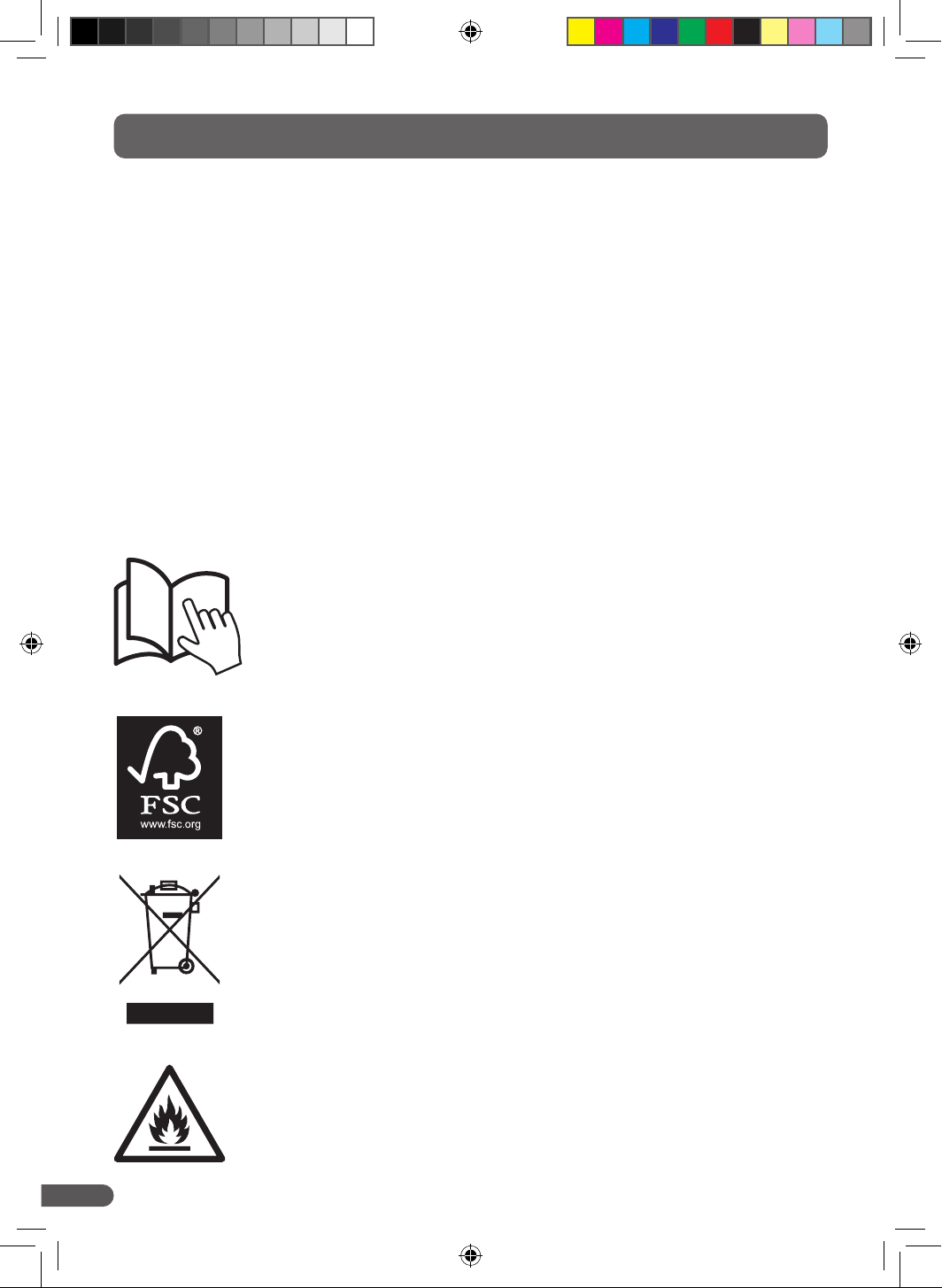
This device uses a flammable refrigerant. Please ensure that the
device does not come into contact with fire or heat as there is
risk of fire, serious injury or death.
This symbol indicates that used electrical and electronic devices should
not be disposed of with general household waste. Please take your device
to designated recycling points, where it will be accepted free of charge.
Alternatively, you may be able to return it to the retailer where you purchased
it. Contact your local authority for more information on recycling facilities.
Proper disposal helps conserve valuable resources and prevents potential
harm to human health and the environment from improper waste handling.
The FSC label is a stamp given to specific products by the Forest
Stewardship Council, indicating the materials used in production
are recyclable and sustainably sourced.
Read all safety instructions in this User Manual and on the device.
dryzone-dehimidifier-manual.indd 4dryzone-dehimidifier-manual.indd 4 31/10/2024 11:4631/10/2024 11:46
Copyright © 2024 Safeguard Europe Limited. All rights reserved
5
2. Product Overview
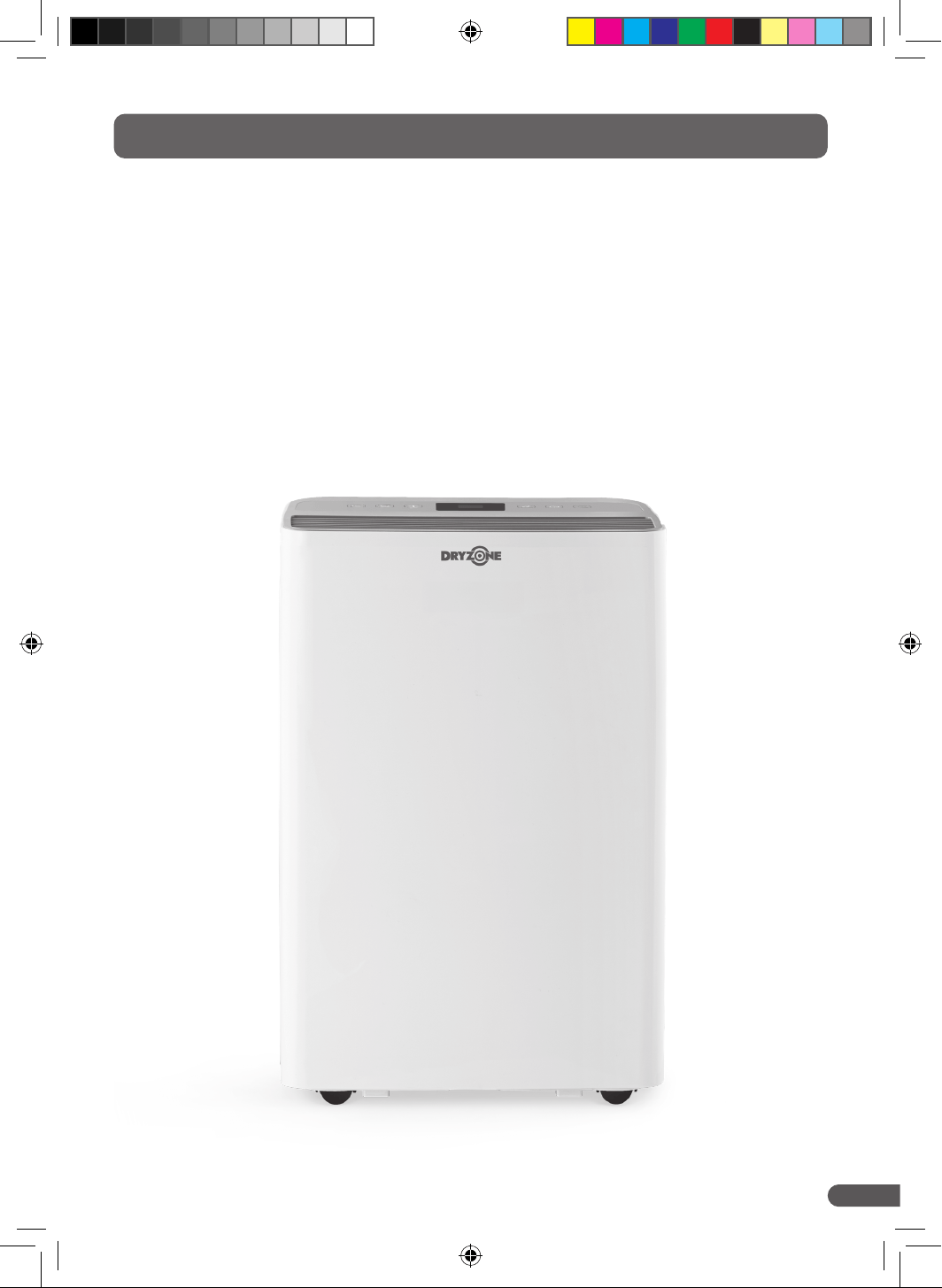
A dehumidifier is used to remove excessive moisture from the air.
The Dryzone® Dehumidifier & Air Purifier allows users to protect their homes from the adverse effects of
moisture-laden air, including mould and damp.
Whilst protecting our homes, it is also important to protect the environment. Therefore, we have selected
an environmentally friendly R290 as the refrigerant in this dehumidifier. R290 refrigerants have zero ozone
depletion potential (ODP), low global warming potential (GWP) and are compliant with European Directives
relating to refrigerants.
dryzone-dehimidifier-manual.indd 5dryzone-dehimidifier-manual.indd 5 31/10/2024 11:4631/10/2024 11:46
Copyright © 2024 Safeguard Europe Limited. All rights reserved
6
3. Product Features
MENU AUTO SPEED MANUAL TIMER POWER
11 13 14 15
23
16
24
17 18
25 26
19 20 21 2212
1
2
3
4
5
6
7
8
9
10
28
29
27
Figure 1
Figure 2
Figure 3
dryzone-dehimidifier-manual.indd 6dryzone-dehimidifier-manual.indd 6 31/10/2024 11:4631/10/2024 11:46
Copyright © 2024 Safeguard Europe Limited. All rights reserved
7
3. Product Features
Main Components
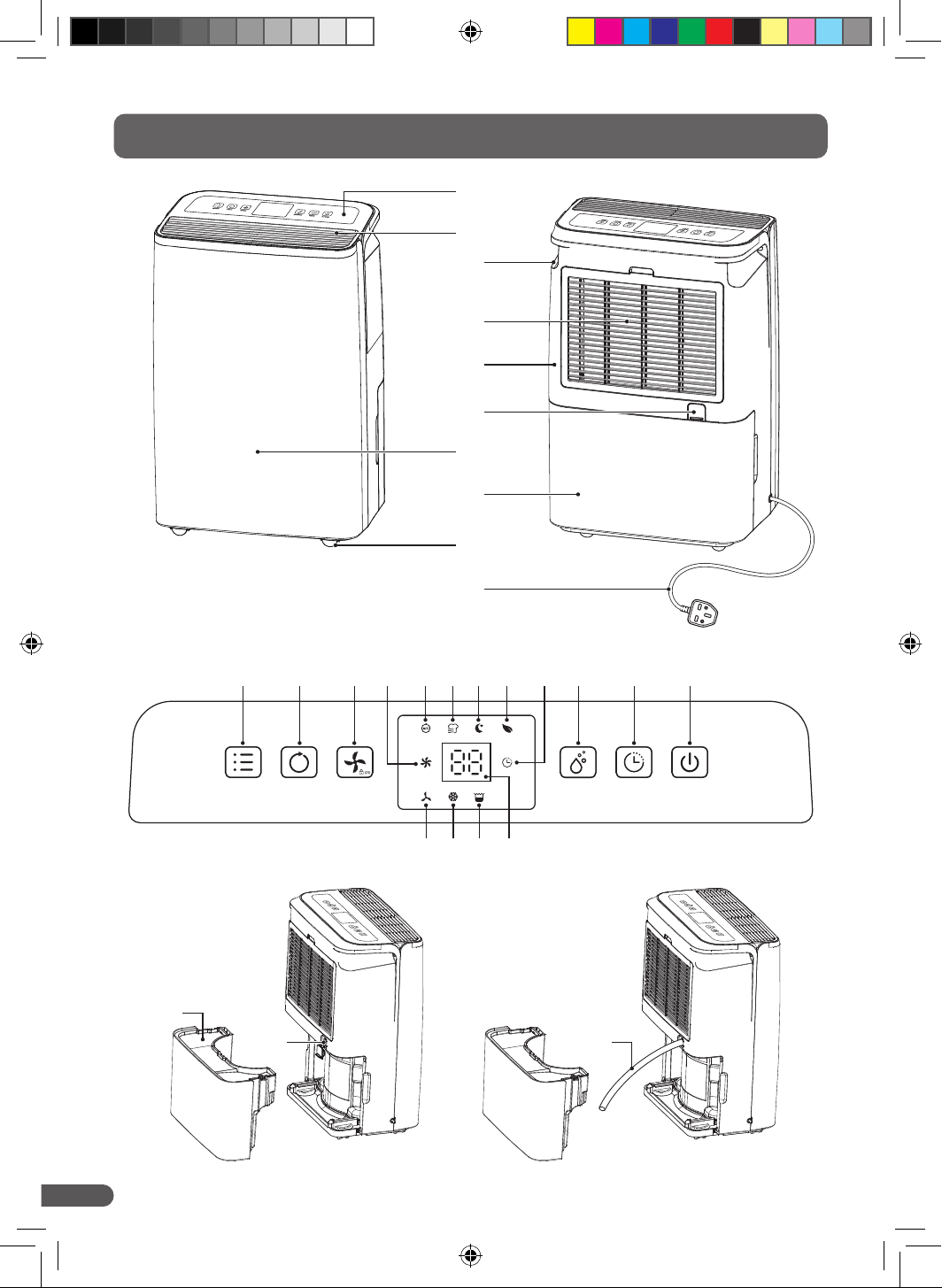
1. Control Panel
2. Air Outlet
3. Handle
4. Air Inlet Grille (H13 HEPA filter inside)
5. Rear Cover
6. Drainage Outlet
7. Front Cover
8. Water Tank
9. Castors
10. Power Cord
Control Panel
11. Menu Button
12. Auto Button
13. Fan Speed and Child Lock Button
14. High Fan Speed Indicator
15. Auto Indicator
16. Laundry Mode Indicator
17. Sleep Indicator
18. Air Purifying Indicator
19. Timer Indicator
20. Manual Dehumidifying Button
21. Timer Button
22. Power Button
23. Low Fan Speed Indicator
24. Defrost Indicator
25. Full Tank Indicator
26. Humidity Reading (%)
Drainage
27. Water tank lid
28. Drainage Outlet Plug
29. Drainage Pipe
dryzone-dehimidifier-manual.indd 7dryzone-dehimidifier-manual.indd 7 31/10/2024 11:4631/10/2024 11:46
Copyright © 2024 Safeguard Europe Limited. All rights reserved
8
4. Safety Instructions
• Do not use or store the device in cupboards or rooms that are smaller than 4 m2.
• Store the device in a location where it cannot be mechanically or physically damaged.
• Do not store or operate the device in rooms with ignition sources such as open flames, gas fires,
electric heaters, or gas hobs.
• The device must be in the upright position at all times.
• THIS DEVICE IS NOT INTENDED FOR USE BY CHILDREN. Keep away from small children and pets.
• This device is not intended for use by persons with reduced physical, sensory or reasoning capabilities
or lack of experience or knowledge unless they have been given supervision or instruction concerning
the use of the device by a person responsible for their safety.
• NEVER place containers with liquid or drinks on top of the device.
• Spilling liquids into it can damage the device and potentially cause electric shock or create a fire
hazard.
• Do not sit, stand, or place heavy objects on the device.
• This device is intended for household and indoor use only. Do not use outdoors.
• Only use the device after you have fully assembled.
• Only use this device with supplied accessories.
• Do not allow foreign objects to enter ventilation or exhaust opening as this may cause electric shock or
damage to the device. Do not block air outlets or intakes.
• Do not cover the device while in use.
• Always follow basic precautions when using the device to reduce the risk of fire, electric shock, and
personal injury.
• Ensure the plug socket used with the device is not loose or damaged. A poor electrical connection can
result in overheating and damage to the power cord.
• Before unplugging, ensure the device is powered off. Grip the plug firmly and pull it out of the socket.
NEVER pull on the cord to unplug the device.
• Do not use the device if the power cord or plug is damaged.
• Keep the power cord away from hot surfaces.
WARNING
• The device uses a refrigerant which is highly flammable and odourless.
• Failure to comply with these instructions could result in fire, damage to property, serious injury or
potentially death.
• The device is not user serviceable. Do not attempt to repair the product yourself. In the event of failure,
contact Customer Support.
dryzone-dehimidifier-manual.indd 8dryzone-dehimidifier-manual.indd 8 31/10/2024 11:4631/10/2024 11:46
Copyright © 2024 Safeguard Europe Limited. All rights reserved
9
5. Prior to Operating
• Ensure the dehumidifier has been left in an upright position for at least 6 hours after delivery to allow
the refrigerants to settle after transit.
• Only ever place the dehumidifier on the floor when in use. Do not place where it is likely to be bumped
or knocked over.
• Plug into a three-pin wall socket that is fit for purpose – not loose or damaged.
• Ensure the water tank is correctly fitted. If not, the "tank full" light will come on and the dehumidifier
will not work.
• Remove the packaging from the H13 HEPA filter and ensure it is properly fitted in the device.
• Power the device ON. A beep will sound, indicating that the device is in standby mode.
• Allow the dehumidifier to adjust to the environment for 10 minutes. The number displayed on screen is
the current humidity level in the room.
• Select your desired setting using the operating instructions (Section 6). The dehumidifier will power up
after three seconds.
• Where possible, place the dehumidifier in a central location in your home, such as a landing or hallway.
• When using the device to assist in drying laundry, place the dehumidifier near the hanging laundry, but
not directly under it. Water must not drip into the dehumidifier.
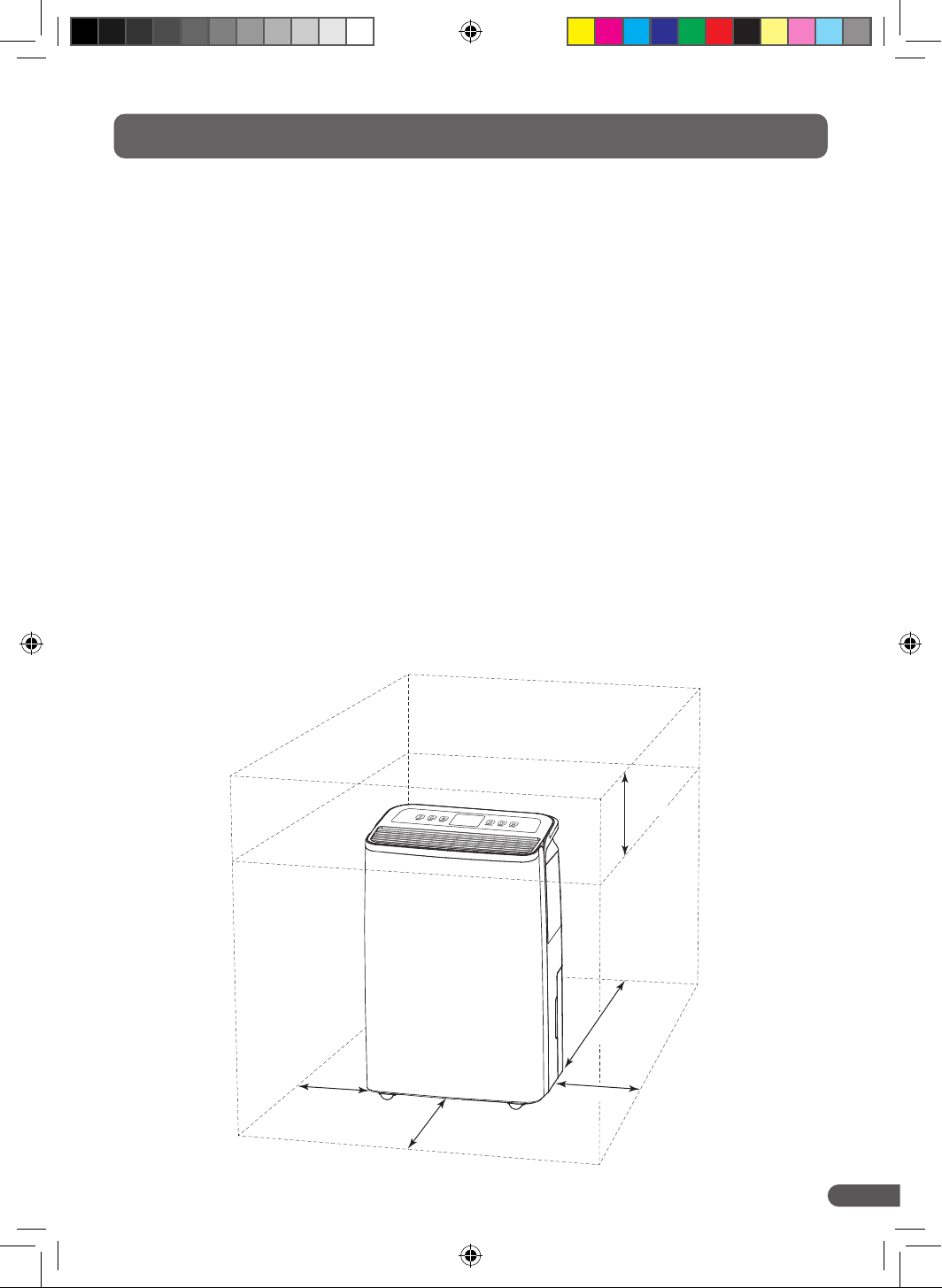
• For best performance, place the dehumidifier on the floor at least 50 cm from any walls, furniture or
other appliances to the rear of the device, and at least 20 cm for the front and sides of the device. Refer
to the diagram below as a guide.
≥50 cm
≥20 cm
≥20 cm
≥20 cm
≥20 cm
dryzone-dehimidifier-manual.indd 9dryzone-dehimidifier-manual.indd 9 31/10/2024 11:4631/10/2024 11:46
Copyright © 2024 Safeguard Europe Limited. All rights reserved
10
6. Operating Instructions
Switching the Device ON and OFF
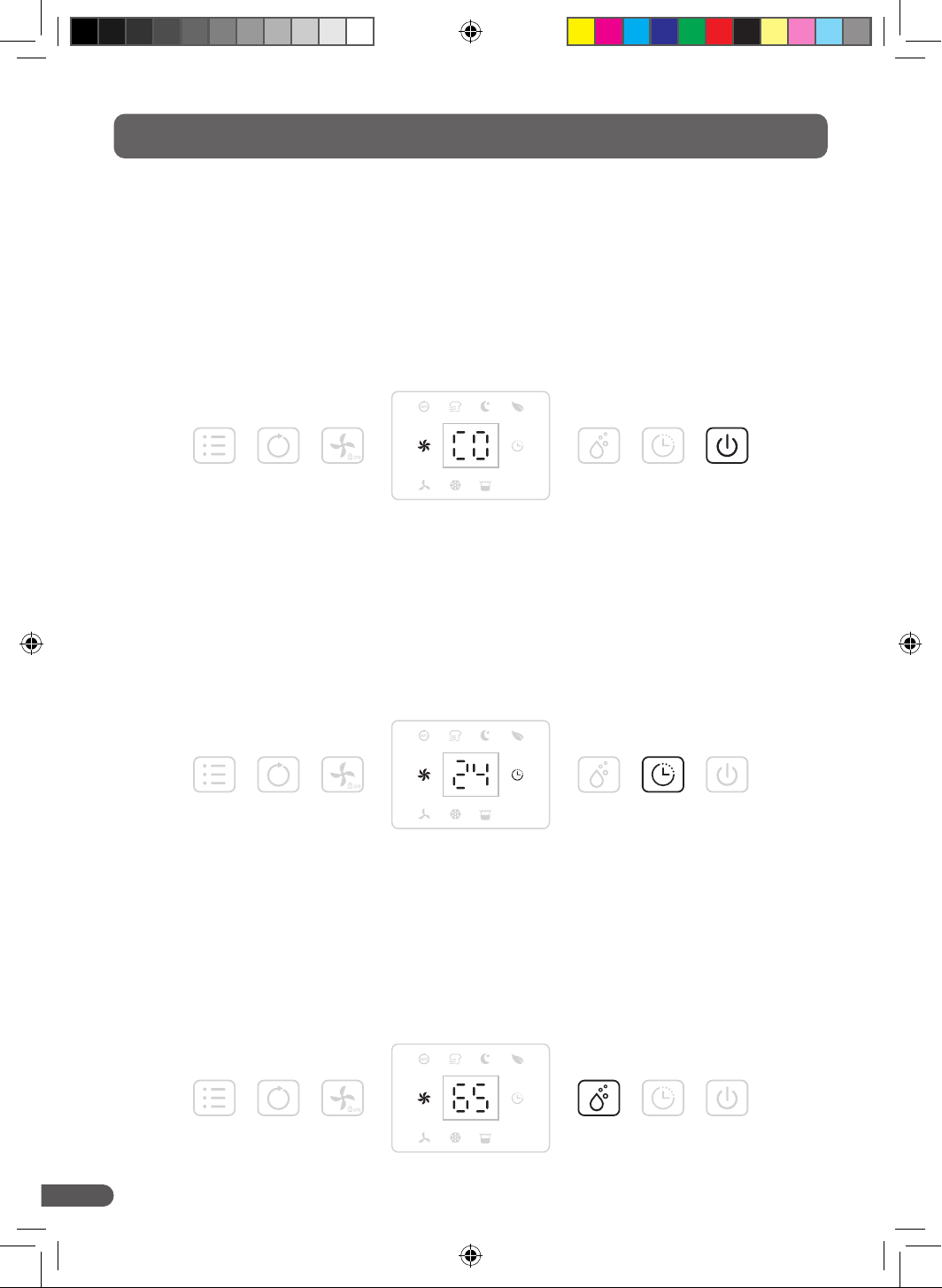
Press the POWER button to power on the device. By default, the device will run on manual
dehumidification at a high fan speed.
• Press the POWER button again to turn off the device. The device will turn off, but the fan will continue
to work for a few seconds to extract hot air from the device.
• Ensure you have read Section 5 before continuing with this Section.
Timer and Auto-Shut Off
Press the TIMER button to select your preferred runtime. The dehumidifier can be programmed to turn off
anywhere between 0hrs to 24hrs after turning on.
• Timer setting will be cancelled if the device is switched off and on again.
Manual Dehumidifying
Press the MANUAL button to select your preferred humidity from 30– 80% in 5% increments. "CO"
denotes continuous dehumidifying, regardless of ambient humidity.
• In manual mode, all buttons are enabled.
MENU AUTO SPEED MANUAL TIMER POWER
MENU AUTO SPEED MANUAL TIMER POWER
MENU AUTO SPEED MANUAL TIMER POWER
dryzone-dehimidifier-manual.indd 10dryzone-dehimidifier-manual.indd 10 31/10/2024 11:4631/10/2024 11:46
Copyright © 2024 Safeguard Europe Limited. All rights reserved
11
6. Operating Instructions
Fan Speed
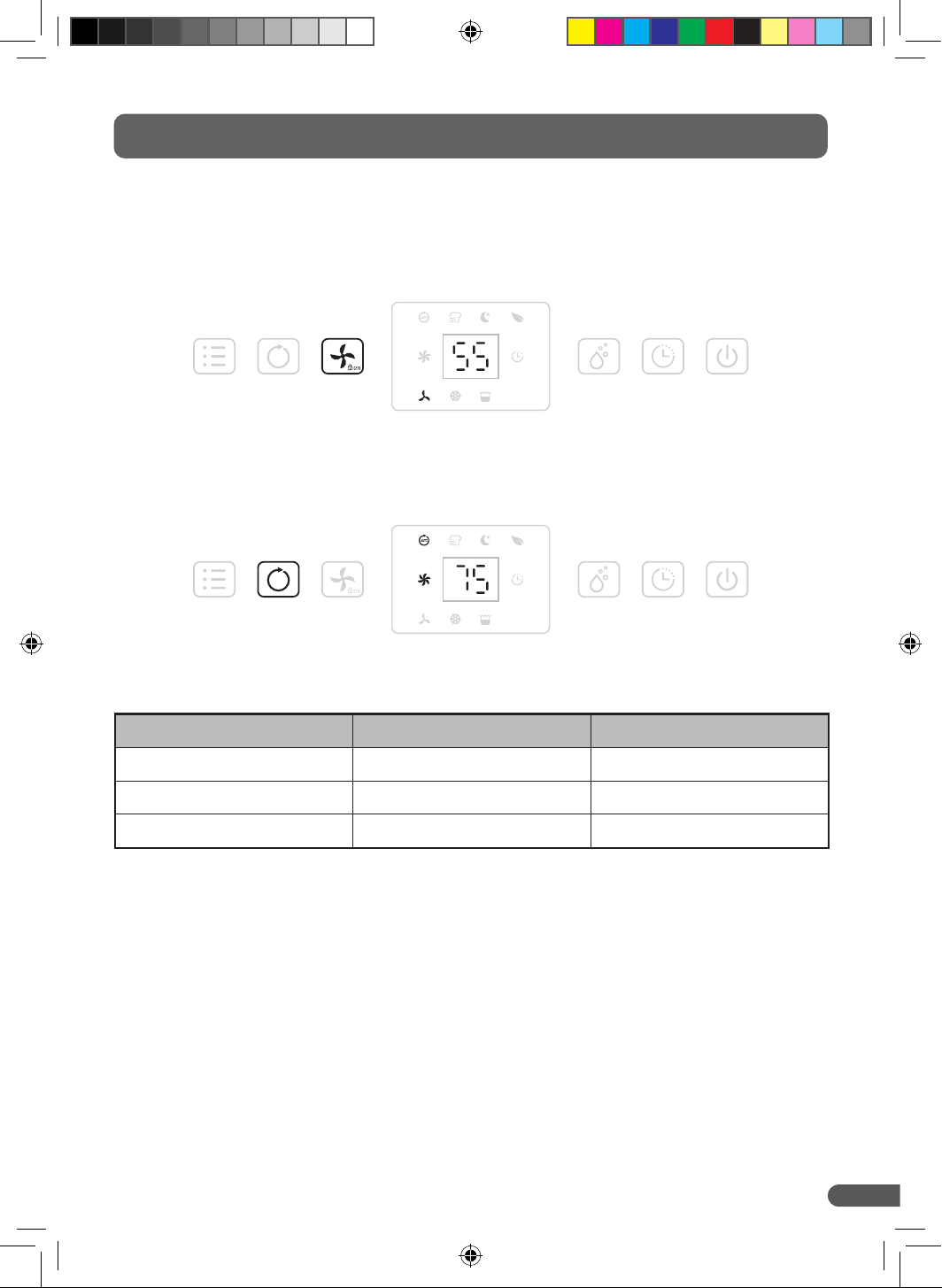
Press the SPEED button to select either low or high speeds.
• The fan speed button is disabled during Laundry Drying, Auto or Defrost modes.
Auto Dehumidifying
Press the AUTO button to enter the device into auto mode. It will run as detailed in the table below:
Ambient RH% Detected Compressor Fan Speed
RH% > 65% On High
55 ≤ RH% ≤ 65 On Low
RH% < 55% O Low
• Auto mode can help conserve energy by only dehumidifying when the room needs it, based on presets.
• The fan speed button will be disabled during Auto Dehumidifying.
MENU AUTO SPEED MANUAL TIMER POWER
MENU AUTO SPEED MANUAL TIMER POWER
dryzone-dehimidifier-manual.indd 11dryzone-dehimidifier-manual.indd 11 31/10/2024 11:4631/10/2024 11:46
Copyright © 2024 Safeguard Europe Limited. All rights reserved
12
6. Operating Instructions
Laundry Drying Mode
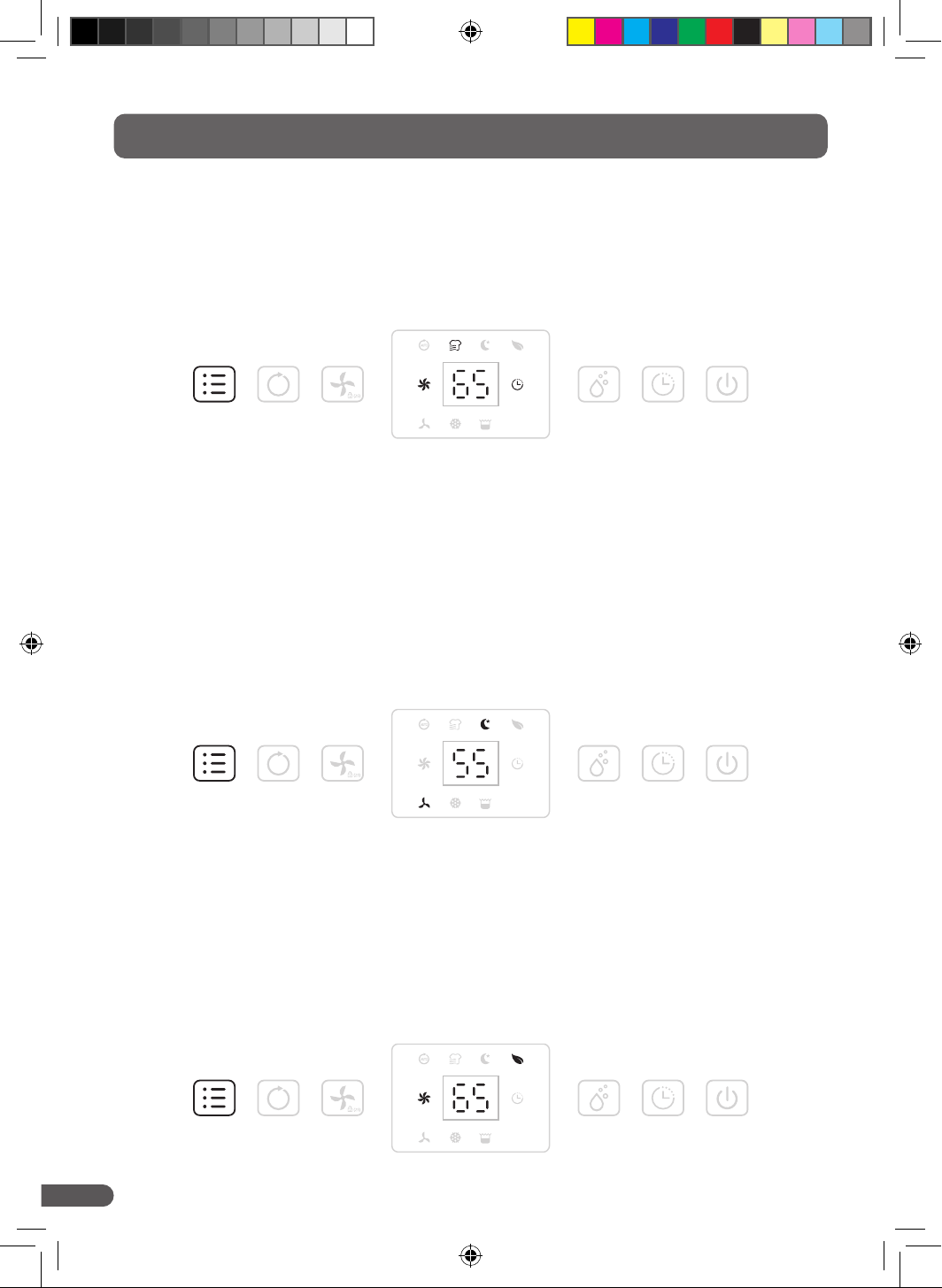
Press the MENU button once to select Laundry Drying Mode. The device will dehumidify continuously on
high fan speed for 6 hours and then switch off automatically.
• The fan speed button will be disabled during Laundry Drying Mode.
Sleep Mode
Press the MENU button twice to select Sleep Mode. The device will run at a preset humidity setting of 55 %
at a low fan speed. All LED lights will turn off after 5 seconds to ensure a peaceful, uninterrupted sleep. To
illuminate them, press any button.
• The fan speed button will still function during Sleep Mode.
• LED lights will turn off after 30 seconds of inactivity.
• If the water tank becomes full overnight, the indicator light will turn on.
Air Purifying Mode
Press the MENU button three times to select Air Purifying Mode. The device will run at a high fan speed
without dehumidifying.
• NOTE: in other modes, the dehumidifier will still purify the air due to the H13 HEPA filter fitted.
• The fan speed button will still function during Air Purifying Mode.
MENU AUTO SPEED MANUAL TIMER POWER
MENU AUTO SPEED MANUAL TIMER POWER
MENU AUTO SPEED MANUAL TIMER POWER
dryzone-dehimidifier-manual.indd 12dryzone-dehimidifier-manual.indd 12 31/10/2024 11:4631/10/2024 11:46
Copyright © 2024 Safeguard Europe Limited. All rights reserved
13
6. Operating Instructions
Child Safety Lock
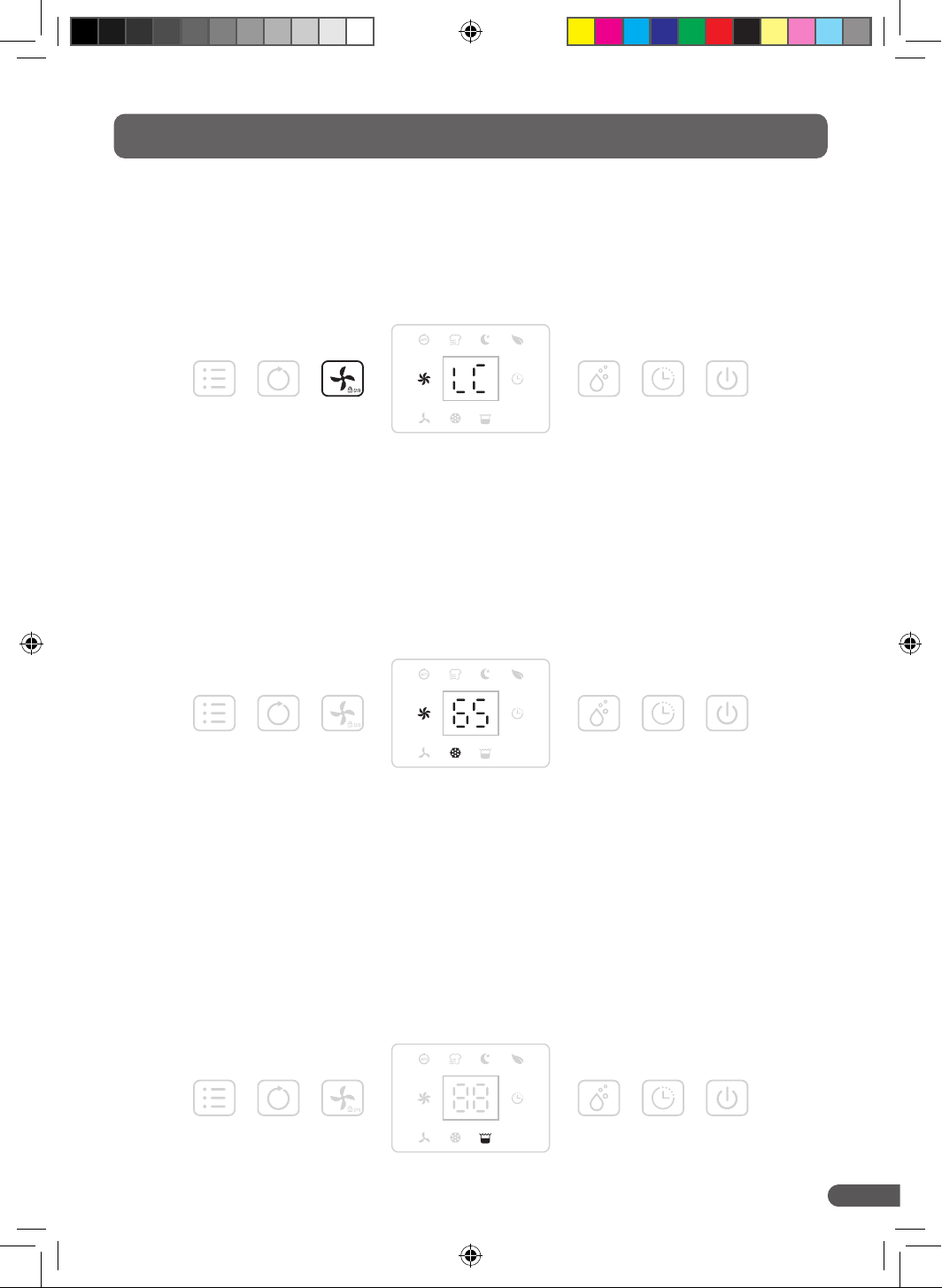
Press and hold the SPEED button for 2 seconds until a beep sounds. The same operation will unlock the
device.
• The child safety lock can be activated while the device is in standby or in use.
Water Tank Full (Auto Shut Off)
The device will automatically go into standby mode when the water tank is full or not installed properly.
To empty the tank, lightly press on the two handles either side of the water tank (No. 8 – Figure 1, page 6).
Unclip the clear cover and lift it directly upwards. Avoid touching the rectangular float – it may affect its
functionality. Dispose of the water down the drain, or water non-edible houseplants. After emptying the
tank and reinstalling it properly, the device will return to the previous mode being used.
• All buttons will be disabled (except the power button) when the water tank is full.
Low Temperature Defrost Mode
When the ambient temperature is too low, the device may ice up and will enter into defrost mode. The
device will run at a high fan speed and purify the air without dehumidifying it. R290 dehumidifiers are
designed to work in dwellings that are occupied and not in colder temperatures.
• The fan speed button will be disabled during Defrost Mode.
MENU AUTO SPEED MANUAL TIMER POWER
MENU AUTO SPEED MANUAL TIMER POWER
MENU AUTO SPEED MANUAL TIMER POWER
dryzone-dehimidifier-manual.indd 13dryzone-dehimidifier-manual.indd 13 31/10/2024 11:4631/10/2024 11:46
Copyright © 2024 Safeguard Europe Limited. All rights reserved
14
6. Operating Instructions
Memory Function
• When the power to the device is suddenly cut (either unplugging or during a power outage): once
the device is reconnected to power, the dehumidifier will return to running with the same mode it was
using prior to shutdown. If the timer setting was running, it will be resumed.
• Power the device ON or OFF using the POWER button: this will return the device to running on the
mode prior to shutdown, but will cancel the timer setting.
• Powering OFF the device using the POWER button and unplug the cord: reconnect to the power
supply and power ON the device. The device will return to the factory settings.
Continuous Drainage
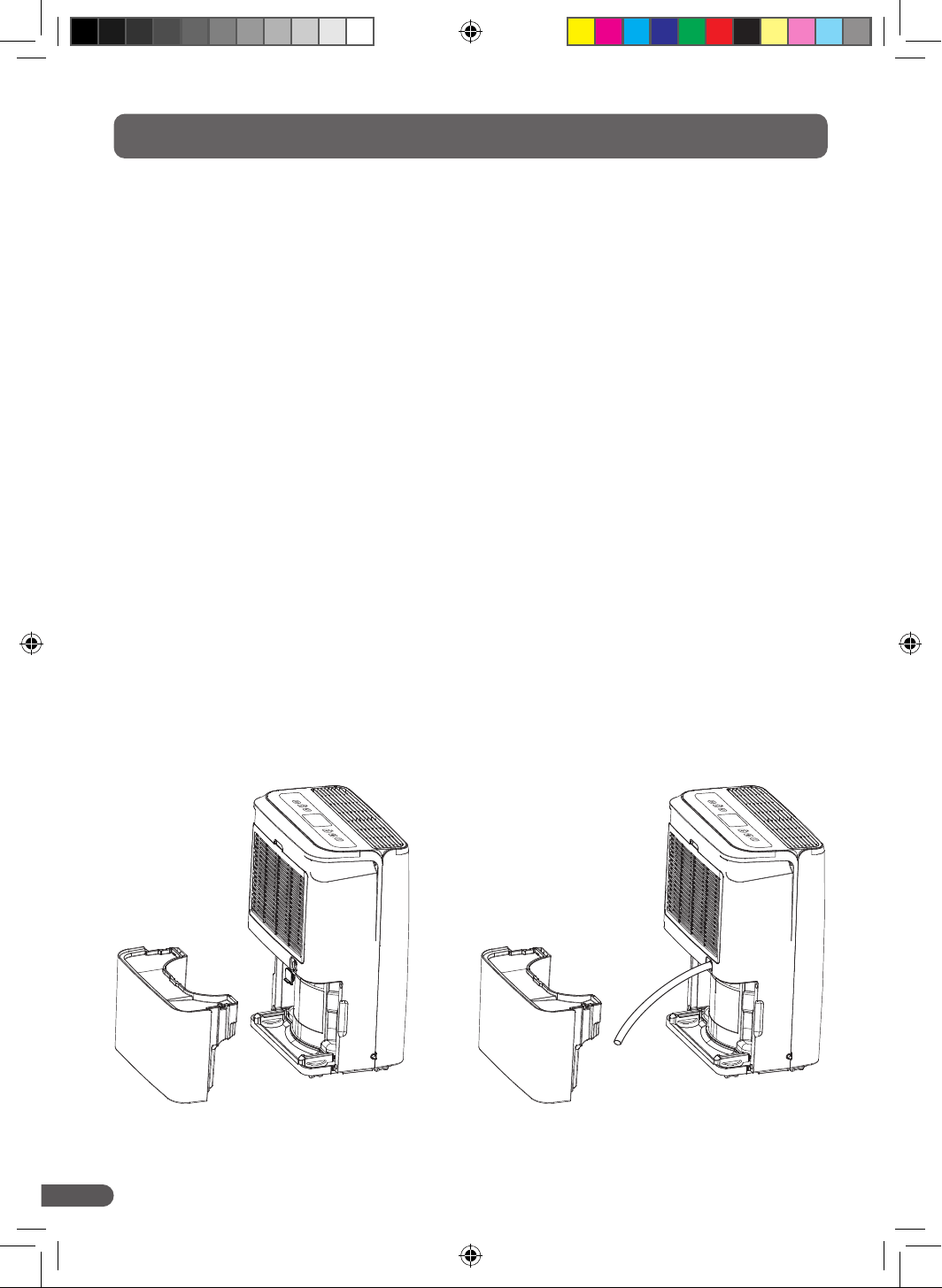
As standard, the device will collect water in the tank. You can adjust the device to continuously drain.
To do so, please follow the steps below:
• Remove the water tank
• Remove the drainage plug cover
• Insert a 14 mm rubber hose (internal diameter) onto the water outlet nozzle
Note: the drainage will be gravity fed, so ensure the hose is directed downwards into a suitable container
or drain. Also ensure the hose is not blocked or kinked. A hose is not supplied with the device. A 14 mm
rubber hose is not included with the device.
dryzone-dehimidifier-manual.indd 14dryzone-dehimidifier-manual.indd 14 31/10/2024 11:4631/10/2024 11:46
Copyright © 2024 Safeguard Europe Limited. All rights reserved
15
7. Cleaning
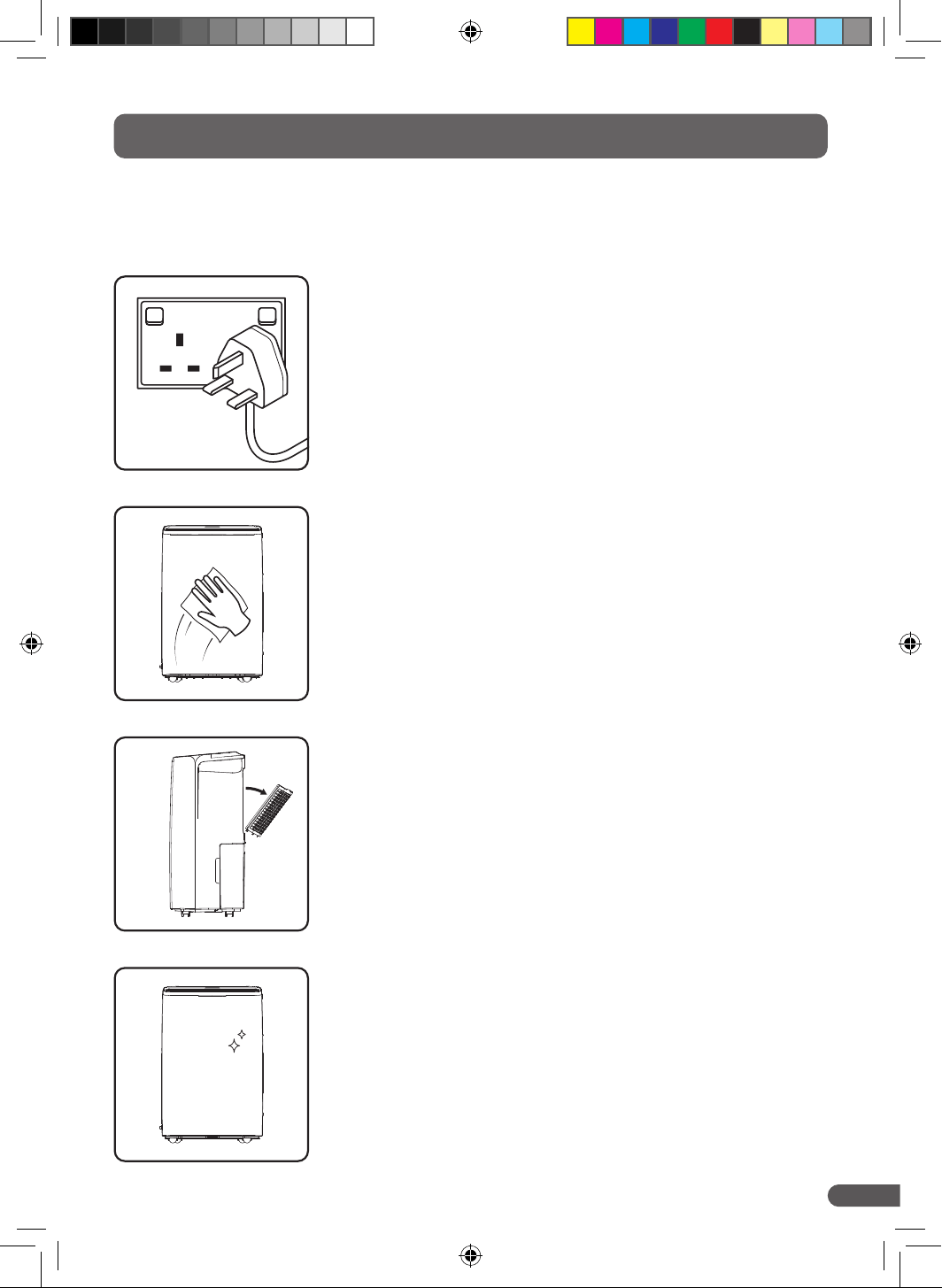
Power OFF the device using the POWER button and remove the plug
from the wall socket.
Wipe the plastic housing with soft, dry cloth. If the device is extremely
dirty, use a mild, non-abrasive cleaning agent. Wipe the dehumidifier
with a slightly damp cloth. Never spray the device with water.
Remove the H13 HEPA filter and clean carefully with a soft bristle brush
to remove any debris. For heavily soiled filters, use a vacuum cleaner.
Ensure you vacuum in the direction of the filter folds. DO NOT rinse the
filter with water or use compressed air.
Wipe down the interior, where the H13 HEPA filter is inserted, using a
soft, dry cloth. Fit the filter back into the device.
With regular use, the H13 HEPA filter collects dust and particles to keep the air clean. The filter should
be cleaned every two weeks to ensure optimum performance. Replacement H13 HEPA filters can be
purchased at www.safeguardeurope.com. Follow this cleaning routine:
dryzone-dehimidifier-manual.indd 15dryzone-dehimidifier-manual.indd 15 31/10/2024 11:4631/10/2024 11:46
Copyright © 2024 Safeguard Europe Limited. All rights reserved
16
If the dehumidifier is not going to be used for a long period of time, take the following steps:
• Power OFF the device and then switch off at the wall socket.
• Remove the plug from the socket.
• Empty the water tank and ensure that the tank and dehumidifier are completely dry. You can wipe down
with a clean, dry cloth. It is recommended that you also leave the dehumidifier to air dry for a couple of
days to ensure it is completely dry.
• Remove the H13 HEPA filter and clean with a soft brush to gently remove any debris. DO NOT rinse the
filter with water or use compressed air.
• Place the H13 HEPA filter back into the device.
• Check the device for any signs of physical damage, including cracks or dents. Do not store if any are
observed.
• Pack the device into suitable packaging – preferably the original box.
• Store the device in a dust-free environment, away from direct sunlight. Place upright on the floor with
no chance of damage from falling objects above. Cover in a sheet of plastic where possible. Do not
place any heavy items on top of the box.
8. Storage
dryzone-dehimidifier-manual.indd 16dryzone-dehimidifier-manual.indd 16 31/10/2024 11:4631/10/2024 11:46
Copyright © 2024 Safeguard Europe Limited. All rights reserved
17
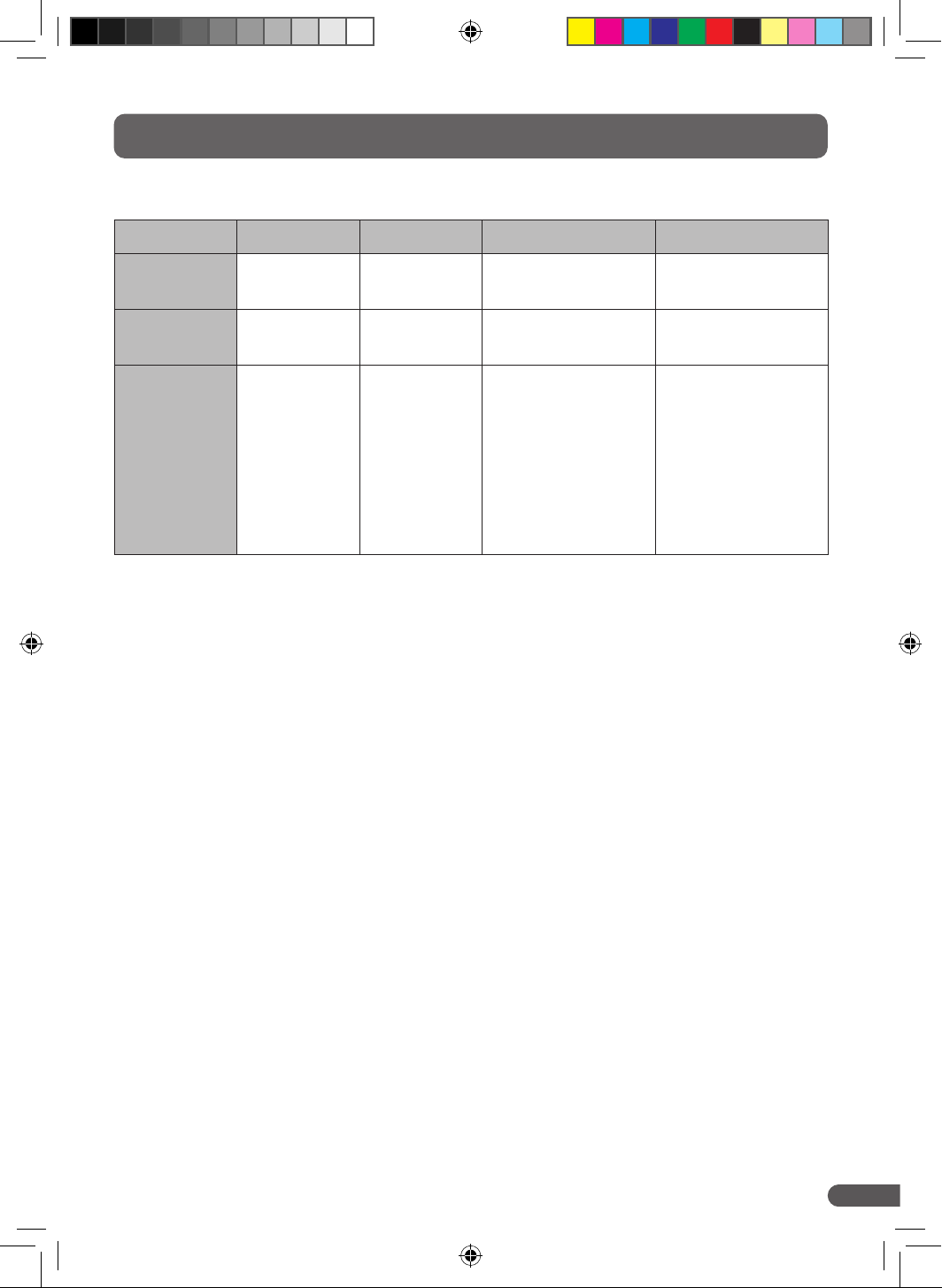
Please contact Customer Support if any of the following error codes appear:
DISPLAY CODE E1 E2 L3 L4
Error
Temperature
sensor error
Humidity
sensor error
Air temperature
is too high (>42 ºC)
Air temperature
is too low (<0 ºC)
Display
Flashing every
30 seconds
Flashing every
30 seconds
Slowly
flashing L3
Slowly
flashing L4
Action
Required
Ensure the
environment
is warmer
than 15 °C and
clean the H13
HEPA filter
Clean the
device and
H13 HEPA
filter
The room
temperature
is too high for
the device.
Reduce room
temperature to
below 40 °C.
The room
temperature
is too low for
the device.
Increase room
temperature to
above 2 °C.
9. Error Codes
dryzone-dehimidifier-manual.indd 17dryzone-dehimidifier-manual.indd 17 31/10/2024 11:4631/10/2024 11:46
Copyright © 2024 Safeguard Europe Limited. All rights reserved
18
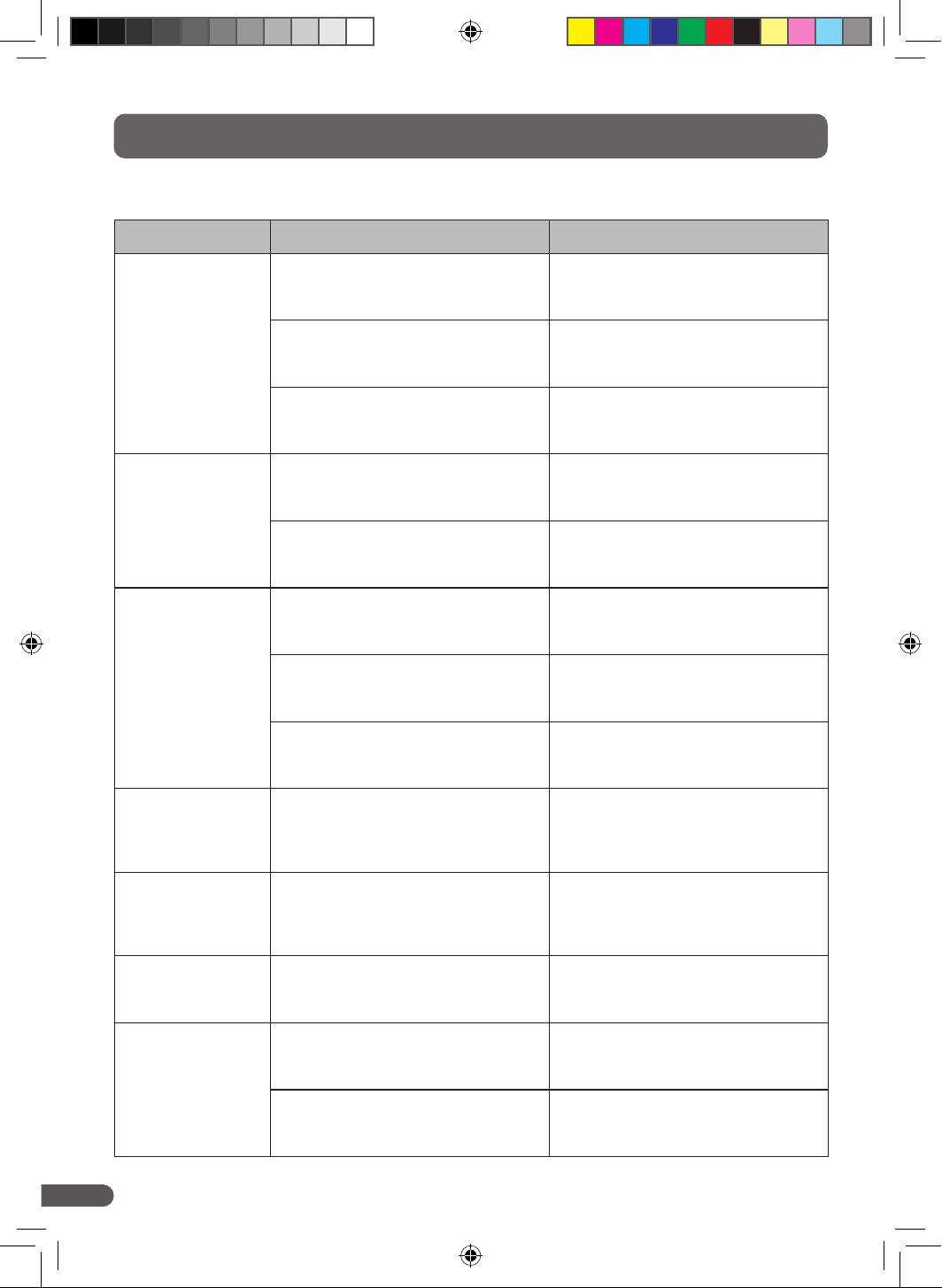
Please troubleshoot, using the table below, before contacting Customer Support:
PROBLEM POSSIBLE CAUSE SOLUTION
The device does not
work
The power is not connected Insert the plug into a wall socket that
you know works, power on the device
The water tank is full Empty the tank and return it to the
device
The tank has not been inserted
correctly
Reposition the tank correctly
The device doesn't
remove enough
water
Runtime is too short Be patient and wait
Ambient temperature or
humidity is too low
It is normal that the device does not
dehumidify in these conditions
The device works,
but doesn't reduce
the relative humidity
enough
There is too much ventilation Ensure internal doors are open and
external doors and windows are closed
The H13 HEPA filter is clogged Gently clean the H13 HEPA filter with a
soft brush to remove debris
Set humidity is higher than the ambient
humidity
Set the humidity lower than ambient
humidity
Device is blowing
out warm air
The dried air is passed over heating
coils before it is blown into the room as
part of the dehumidifying process
This is normal, a dehumidifier is not an
air cooler
The display is
not showing the
humidity set point
The display shows the room's relative
humidity (RH%), not the set point
The display shows the room's relative
humidity, not the set point
Water on floor There is residual water in the tank
which has accidentally spilt
Empty the tank and be careful when
moving the dehumidifier
The dehumidifier is
noisy
The H13 HEPA filter is blocked Clean the H13 HEPA filter using a soft
bristle brush to remove debris
The device is on an uneven surface Move the device to an even surface
10. Troubleshooting
dryzone-dehimidifier-manual.indd 18dryzone-dehimidifier-manual.indd 18 31/10/2024 11:4631/10/2024 11:46
Copyright © 2024 Safeguard Europe Limited. All rights reserved
19
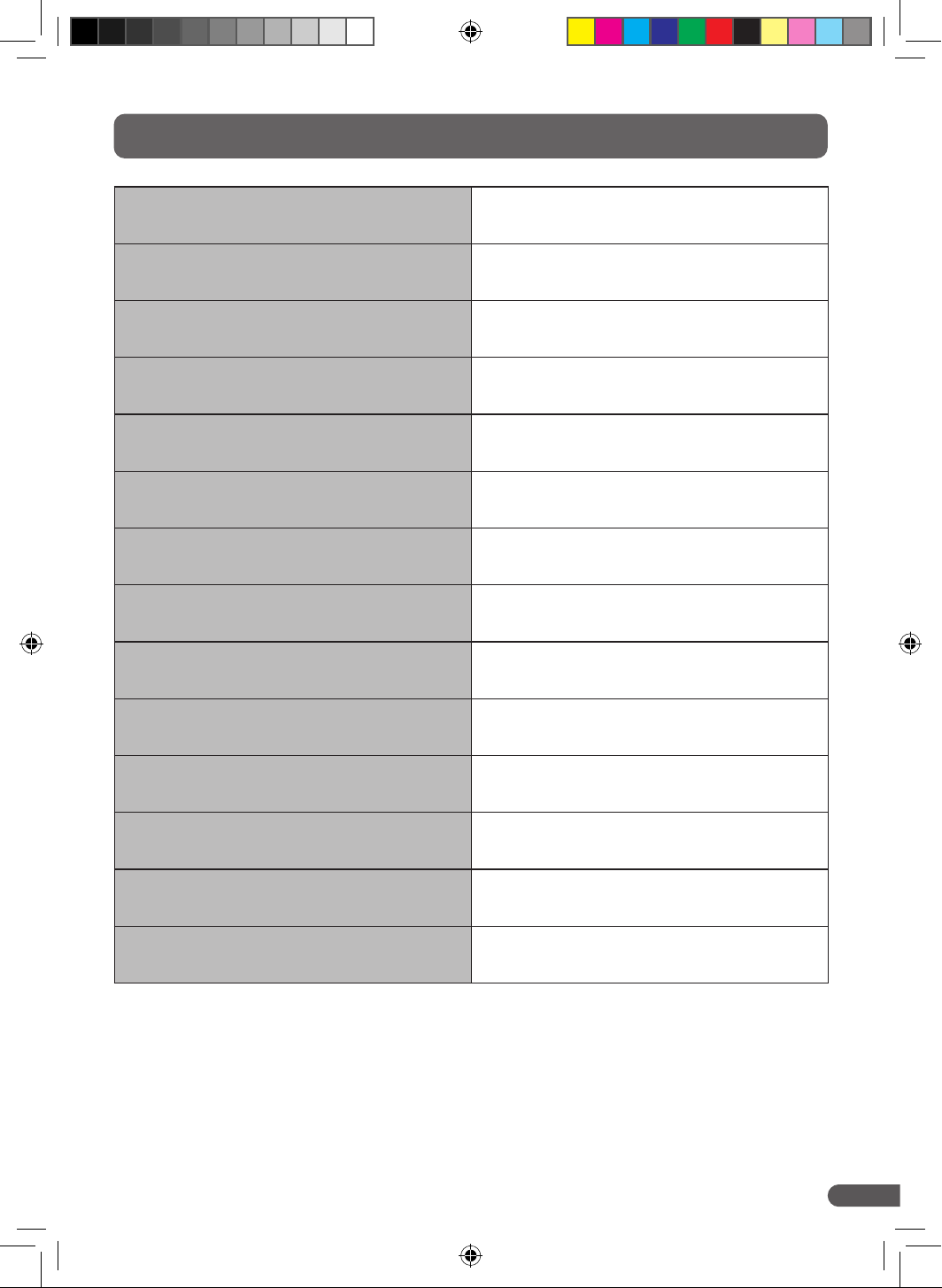
11. Specifications
Power Supply 220 – 240V ~50Hz
Dehumidifying Capacity
12 Litres per day
(at 30 °C RH80 %)
Power 175 W
Air Volume – High 95 m3/h
Air Volume – Low 80 m3/h
Noise Level – High 39 dB(A)
Noise Level – Low 36 dB(A)
Water Tank Capacity 2.2 Litres
Operating Temperature 5 – 35 °C
Refrigerant R290
Net Weight 10.1 kg
Gross Weight 11.1 kg
Device Dimensions
(W
×
D
×
H)
299
×
210
×
468 mm
Packaging Dimensions
(W
×
D
×
H)
360
×
270
×
530 mm
dryzone-dehimidifier-manual.indd 19dryzone-dehimidifier-manual.indd 19 31/10/2024 11:4631/10/2024 11:46
Copyright © 2024 Safeguard Europe Limited. All rights reserved
20
www.safeguardeurope.com
UK: Safeguard Europe Ltd.,
Redkiln Close, Horsham, West Sussex, RH13 5QL.
T +44 (0)1403 210204
F +44 (0)1403 217529
DE: Safeguard Europe GmbH,
Hamburger Straße 11, 22083 Hamburg, Deutschland.
T +49 40 87407563
F +49 4822 3657868
dryzone-dehimidifier-manual.indd 20dryzone-dehimidifier-manual.indd 20 31/10/2024 11:4631/10/2024 11:46

