产品介绍
感谢您购买本公司产品!本产品是一款带暖光灯的三合一磁吸
制冷无线充电器,可同时对手机、耳机和手表进行无线充电,
是一款方便使用的三合一无线充电产品。使用本产品前请认真
阅读本手册,并妥善保管,以备查阅。
中国制造
产品说明书
多功能制冷无线充电器
Thanks for choosing us!
Product Introduction
Product Manual
MADE IN CHINA
Multi-in-one cooling
wireless charger
本产品有三种功能:给设备进行无线充充电、给手机制冷、拥
有暖光灯模式
使用说明
连接电源
1
三种设备充电方式
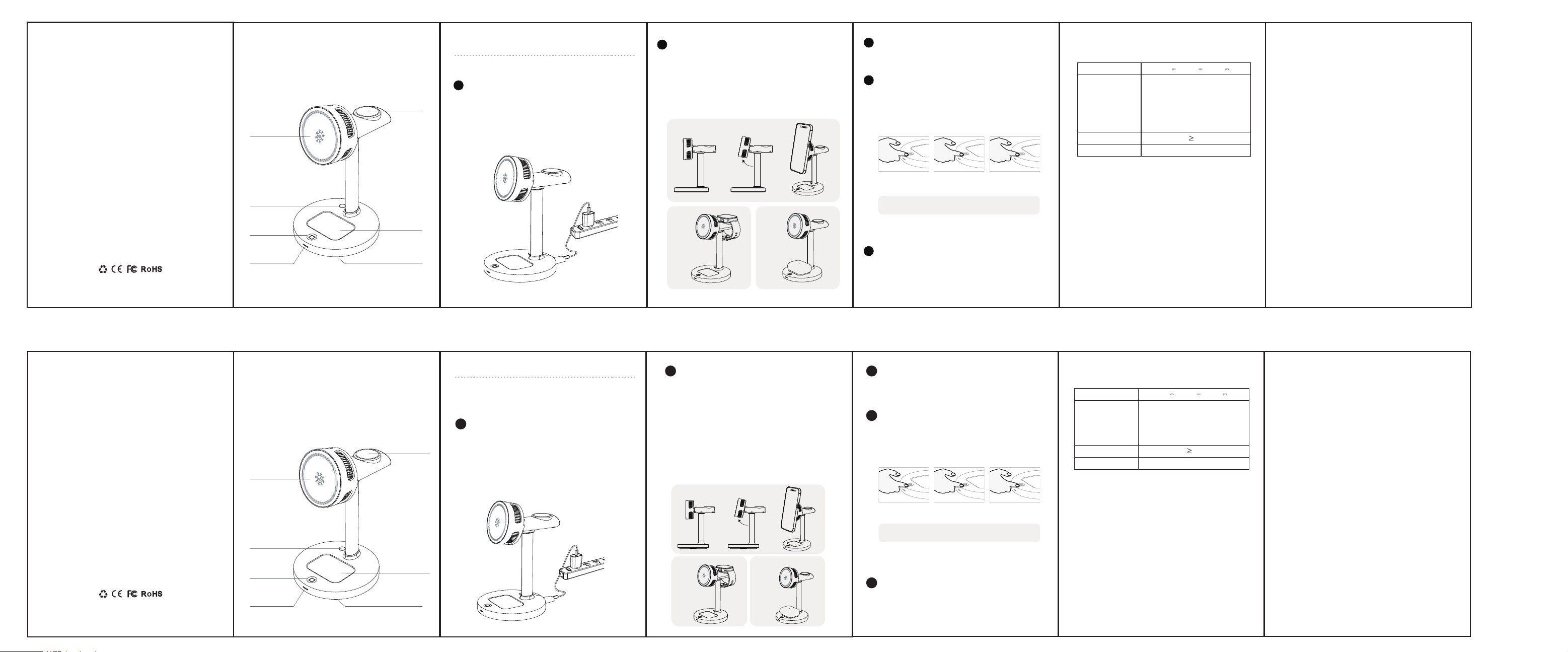
1.手机充电位置角度可以调节,用户可以根据舒适度选择自我调节。
将磁吸手机置于手机(磁吸)充电位后,手机自动吸附,产品充电并制
冷时指示灯为蓝灯常亮,手机充电制冷关闭时为绿灯常亮。拿开手机
后,制冷功能立即关闭,风扇等15秒后关闭;(如图1)
2.将三星/苹果手表放置于手表充电位置即可充电;(如图2)
3.将具有无线充功能的耳机放置于耳机充电位置后,耳机开始充电,
指示灯显示为绿灯亮3秒熄灭。(如图3)
2
手机制冷开关
3
暖光灯开关
1.灯光默认关闭,单击按键打开灯光弱光、再次单击按键灯光变为
强光,再单击按键关闭灯光。
2.灯为暖光灯,当光敏传感器检测到环境暗下来之后灯光、风扇以
及制冷功能5分钟之后关闭。
光敏传感器请不要遮挡,否则会影响产品正常功能注:
4
异物检测功能
当某个无线充区域感应到金属异物或者手机位置放偏,则会启动
FOD报警功能,其对应的指示灯显示为蓝灯持续闪烁;将充电设备位
置放正确或者取下金属异物后即可恢复正常充电状态。
人体接触产品USB口时,由于静电原因(触摸是静电式的),会关
掉灯光,重新触摸即可恢复灯光。
1.请勿对本产品撞击或投入火中水中,避免造成短路漏电。
2.请勿将本产品放置在灰尘多,温过高或过低的地方保存(温范
国-10*C-+40~C)
3.请保持植入医疗设备(心脏起搏器、植入性耳蜗等)与无线充电
器之间的距离至少为20cm,以避免对医疗设备造成潜在干扰
4.请将本产品放置于孩童不易接触的地方,以免发生意外。
5.请使用本产品标配附件,如果本产品由于使用非标配附件而造
成的损坏,不在保修范围内。
6.禁止私自拆卸产品,若导致产品损坏,不在保修范围内。
5
Phone Wireless
Charging Position
(charge horizontally
or vertically)
Watch Wireless
Charging Position
Click: Dim light Click again:
Strong light
Click again: Turn off
the lights
Earbuds(Case)
Wireless Charging
Position
Night light
button
Photosensitive sensor
Night light
Charging indicator
light
单击:灯光弱光 再次单击:灯光强光 再次单击:关闭灯光
This product is a 3-in-1 magnetic attraction with a warm light
Cooling wireless charger, capable of wirelessly charging phones,
Earbuds and watches simultaneously It is a convenient and
user-friendly three-in-one wireless charging product. Please be
careful before using this product.
1. Connect one end of the C-C data cable to the product's input port
and the other end to the power supply (it is recommended to use an
adapter of 60W or above). After that, the product enters standby mode.
At this point, the charging indicator light of the product will be blue and
turn off after 3 seconds. The warm light will also turn off after 3 seconds.
You can click the warm light button to turn on the weak light, click the
button again to turn on the strong light, and click the button again to
turn off the light.
1. The lights are off by default. Click the button to turn on the dim light,
click the button again to make the light strong, and click the button again
to turn off the light.
2. The lamp is a warm light. When the photosensitive sensor detects that
the environment has darkened, the light, fan and cooling function will be
turned off after 5 minutes.
When a person touches the product's USB port, the light will turn off due to
static electricity (touch is static-based). Touching it again will restore the
light.
When a certain wireless charging area detects a metal foreign object or the
mobile phone is placed off-center, the FOD alarm function will be activated,
and the corresponding indicator light will show a continuous flashing blue
light. After placing the charging device in the correct position or removing
the metal foreign object, the normal charging state can be restored.
1. Do not hit this product, throw it into fire or water to
avoid short
2. Do not place this product in a high or low tempera-
ture,or humidenvironment(temperature range
-10'C-+40°C)
3. Please keep wireless charger away from implanted
medical equipment (pacemaker,implantable cochlea, etc.)
at least 20cmto avoid potentialinterference to medical
equipment.
4. Please keep the product away from children reachment
to avoidaccidents.
5. Please use the standard accessories of this product. lf
this productis damaged due to the use of non-standard
accessories, it is notcovered by the warranty.
6. Do not disassemble the product without permission. lf
theproduct is damaged, it will not be covered by the
warranty
FCC Warning
This device complies with part 15 of the FCC Rules. Operation is subject to
the following two conditions:(1) This device may not cause harmful
interference, and (2) this device must accept any interference received,
including interference that may cause undesired operation.
Any Changes or modifications not expressly approved by the party
responsible for compliance could void the user's authority to operate the
equipment.
This equipment has been tested and found to comply with the limits for a
Class B digital device, pursuant to part 15 of the FCC Rules. These limits are
designed to provide reasonable protection against harmful interference in a
residential installation. This equipment generates uses and can radiate radio
frequency energy and, if not installed and used in accordance with the
instructions, may cause harmful interference to radio communications.
However, there is no guarantee that interference will not occur in a particular
installation. If this equipment does cause harmful interference to radio or
television reception, which can be determined by turning the equipment off
and on, the user is encouraged to try to correct the interference by one or
more of the following measures:
. Reorient or relocate the receiving antenna.
. Increase the separation between the equipment and receiver.
. Connect the equipment into an outlet on a circuit different from that to
which the receiver is connected.
. Consult the dealer or an experienced radio/TV technician for help.
FCC RF exposure statement:
The equipment complies with FCC radiation exposure limits set forth for an
uncontrolled environment. This equipment should be installed and operated
with minimum distance between 20cm the radiator your body.
FCC 警告
本设备符合美国联邦通信委员会(FCC)规则第 15 部分的要求。设备操
作需遵守以下两个条件:
本设备不得产生有害干扰;
本设备必须接受任何接收到的干扰,包括可能导致非预期操作的干扰。
未经合规责任方明确批准,任何更改或改装都可能导致用户操作该设备的
权限失效。
本设备已通过测试,并依据 FCC 规则第 15 部分,符合 B 类数字设备的
相关限值。这些限值旨在为住宅安装环境提供合理的有害干扰防护。本设
备会产生、使用并可能辐射射频能量,若未按照说明书安装和使用,可能
对无线电通信造成有害干扰。但无法保证在特定安装环境中不会发生干扰
。若本设备对无线电或电视接收造成有害干扰(可通过开关设备判断),
建议用户通过以下一种或多种方式消除干扰:
重新调整接收天线的方向或位置
增加本设备与接收器之间的距离
将本设备连接到与接收器不同电路的电源插座
咨询经销商或有经验的无线电 / 电视技术人员获取帮助
FCC 射频辐射暴露声明
本设备符合 FCC 针对非受控环境制定的辐射暴露限值。安装和操作本设
备时,辐射体与人体之间应至少保持20 厘米的最小距离。
This product has three functions: wireless charging
for devices, cooling for phones, and supporting There
is a warm light mode Read this manual and keep it
properly for future reference.
指示灯
小夜灯按键
耳机充电
手机充电
小夜灯
光敏传感器
手表充电
Note:
Please do not block the photosensitive sensor, otherwise
it will affect the normal function of the product.
1.将C-C数据线一端连接到产品输入口,一端连接到电源(建议搭
配60W以上适配器使用)后,产品进入待机状态。此时产品充电
指示灯为蓝灯亮3秒熄灭,暖光亮3秒熄灭,可单击暖光灯按键打开
灯光弱光、再次单击按键灯光变为强光,再单击按键关闭灯光。
1.手动制冷,长按按键3秒,制冷设备长期打开进入制冷模式,两小
时自动关闭制冷或长按3秒关闭制冷。
如图1
如图2 如图3
1
Connect the power supply
3
phone cooling switch
4
Warm light switch
5
Foreign object detection function
Using Instructions
风琴折 65x90mm 128g铜版纸
注意事项:
产品规格
工作频率
Coil 1 (Phone): 115-205kHz(5W,
7.5W,10W); 360kHz(15W, 25W)+
Coil 2 (Earbuds): 115-205kHz4Coil
3 (Watch): 115-205kHz(Samsung
Watch) & 300-350kHz(Apple
Watch)
Coil 1 (Phone): 115-205kHz(5W,
7.5W,10W); 360kHz(15W, 25W)+
Coil 2 (Earbuds): 115-205kHz4Coil
3 (Watch): 115-205kHz(Samsung
Watch) & 300-350kHz(Apple
Watch)
输入
15V 3A12V 3A 20V 3A
15V 3A12V 3A 20V 3A
工作效率
产品尺寸
80%
120.7*99.7*155.6mm
120.7*99.7*155.6mm
Note
Product Specification
80%
Input
Frequency
Efficiency
Product Size
1. The charging position Angle of the mobile phone can be adjusted,
and users can choose to self-adjust according to their comfort level.
After placing the magnetic phone in the phone (magnetic) charging
position, the phone will automatically attach. When the product is
charging and cooling, the indicator light is a blue light that remains
constantly on. When the phone is charging and cooling is turned off, the
indicator light is a green light that remains constantly on. After
removing the phone, the cooling function will be immediately turned
off, and the fan and other functions will be turned off after 15 seconds.
(As shown in Figure 1)
2. Place the Samsung/Apple watch in the charging position of the watch
to charge it. (As shown in Figure 2)
3. After placing the headphones with wireless charging function in the
charging position of the headphones, the headphones will start
charging. The indicator light will show a green light that stays on for 3
seconds and then goes off. (As shown in Figure 3)
Figure 1
Figure 2 Figure 3
2
Three charging methods for devices
1. Manual cooling: Press and hold the button for 3 seconds. The cooling
equipment will remain on for a long time and enter the cooling mode. It
will automatically turn off the cooling after 2 hours or press and hold for
3 seconds to turn off the cooling.

