RG 477V User Manual
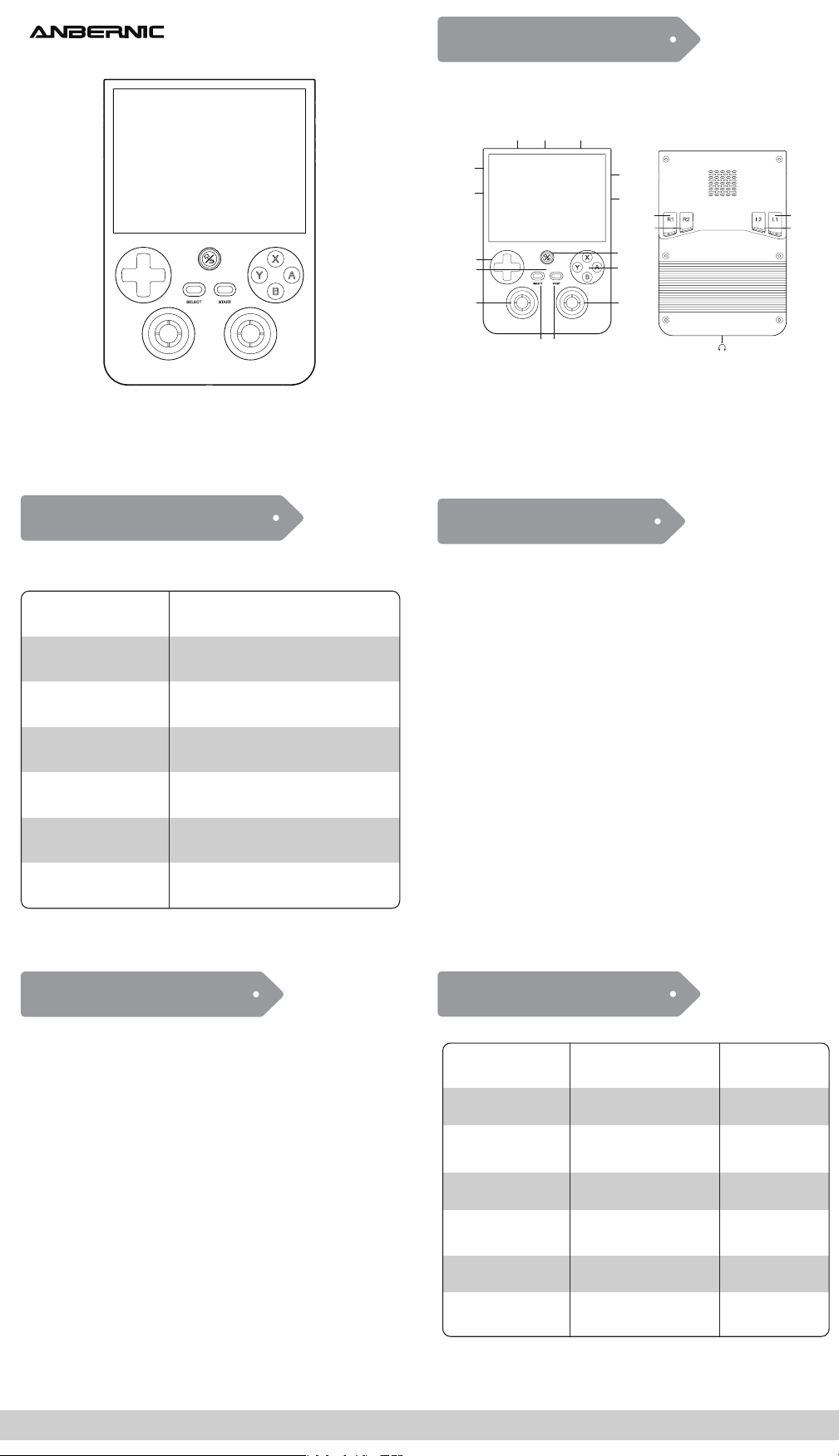
Android main UI:
D-pad and joystick
A key / START key
Y key / touch screen
SELECT key
B Key
Volume key +/-
Function key
Select application
Confirm/Enter the application
Open menu
Cancel /Close menu
Volume adjustment
Switch Android Front-end
Return key
Short press RETURN
Long press HOME
Button
A/Y
X
SELECT
B/F(Short press)
D-pad (joystick)
Confirm
Cancel (return)
Scan refresh game
Function and settings
Moving cursor
Confirm
Cancel (return)
Collect
Setting
Moving cursor
Main interface
of Emulator
Game List
Interface
Note: Long press Return key in the game running interface to return to the
Android front-end interface
START
Search Search
First Boot up
Key mapping
First Boot up can Select Language,Next need to wait for the
first boot configuration to complete.
Open the Key mapping for the Quick settings tile, the usagewindow will
pop up to the interface,For specific use,please refer to the application's
internal usage details page instructions.
Supports automatic speed adjustment mode and multi-mode speed control.
Fan
DP output
Supports external display devices via USB.
Joystick light
Indicator light and charging function
The machine packaging matches 5V/2A four-line charging data cable.Plug
in the charging cable and the machine will start charging.The status of the
device indicators is as follows:Red light on when charging,Green light on when
fully charged,Red light twinkling when battery is low.
16 million color RGB joystick lighting, support constant light, breath, rainbow,
marquee, chasing, gaming and other light effects, support customize the color
and adjust the brightness.
RG Android Front-end
Usage Instructions
RG Android Front-end
Button Description
Opening the Android Front-end
Emulator interface:
On Android, click the RG icon in Quick settings tile to open the front-end.
When you enter the front-end for the first time, Click to confirm
according to the prompt pop-up box,Pop up the RetroArch
decompression resource process Exit RetroArch after
decompression is complete,will return to the RG Front-end.
SELECT: Function and settings
START: Game search (full emulator)
Press X button: Scan and refresh games (after changing to a new TF card)
Game list interface:
SELECT: Game settings interface
START: Game search (single emulator)
X button: Game collection and cancel operation
Game Button and Port
Main Interface Operation
Function Description
https://win.anbernic.com Get technical support services
Left shoulder
button(L1)
Left shoulder
button(L2)
Right shoulder
button(R2)
Right shoulder
button(R1)
microphone
Left joystick
Right joystick
Air outlet
SELECT START
Indicator light
D-Pad
VOL-/+
power key
TF Card
Game keys
Function key
Return key
USB

FCC Warnning:
This equipment has been tested and found to comply with the limits for a Class B digital device,
pursuant to part 15 of the FCC Rules. These limits are designed to provide
reasonable
protection against harmful interference in a residential installation. This equipment generates,
uses and can radiate radio
frequency
energy
and,
if
not
installed
and
used
in
accordance
with
the
instructions,
may cause
harmful
interference
to
radio
communications.
However,
there
is
no
guarantee
that interference
will
not
occur
in
a
particular
installation.
If
this
equipment
does
cause
harmful interference to radio or television reception, which can be
determined by turning the equipment off
and
on,
the
user
is
encouraged
to
try
to
correct
the interference
by
one
or
more
of
the following measures:
•
Reorient or relocate the receiving antenna.
•
Increase the separation between the equipment and receiver.
•
Connect the equipment into an outlet on a circuit different from that to which the receiver is
connected.
• Consult the dealer or an experienced radio/TV technician for help.
Caution:
Any
changes
or
modifications
to
this
device
not
explicitly
approved
by
manufacturer
could void your authority to operate this equipment.
This
device
complies
with
part
15
of
the
FCC
Rules.
Operation
is
subject
to
the
following
two
conditions:
(1)This
device
may
not
cause
harmful
interference,
and
(2)
this
device
must
accept
any
interference received, including interference that may cause undesired operation.
This
equipment
complies
with
FCC
radiation
exposure
limits
set
forth
for
an
uncontrolled
environment.
This
equipment
should
be
installed
and
operated
with
minimum
distance
0cm
between the radiator and your body.