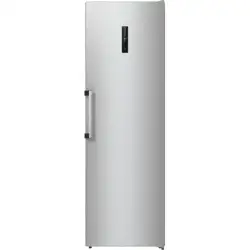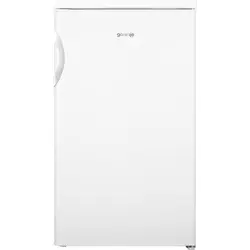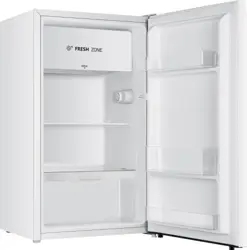
INSTRUCTIONS FOR USE
OF AN UPRIGHT FRIDGE
THANK YOU FOR WELCOMING OUR APPLIANCE INTO YOUR HOME
We are happy that you have chosen a Hisense appliance. Hisense is here to empower
you and all your adventures with our cutting-edge technology and modern home
appliances made of high-quality materials. Because we are working tirelessly on energy
efficiency, by purchasing our appliance, you too are contributing to more sustainable
future.
For full use of our services, warranty and other important information, please consider
to register your Hisense appliance online on our website:
https://www.hisense-europe.com
We hope our appliance will meet and exceed your expectations.
Link to the EU EPREL database
The QR code on the energy label supplied with the appliance provides a web link to
the registration of this appliance in the EU EPREL database. Keep the energy label for
reference together with the user manual and all other documents provided with this
appliance. It is possible to find information related to the performance of the product
in the EU EPREL database using the link https://eprel.ec.europa.eu and the model name
and product number that you can find on the rating plate of the appliance. For more
detailed information about the energy label, visit www.theenergylabel.eu.
The appliance is intended solely for household use.
The refrigerator is intended for storing fresh food at temperatures above 0°C.
The following symbols are used throughout the manual and they have the following meanings:
INFORMATION!
Information, advice, tip, or recommendation
WARNING!
Warning – general danger
ELECTRIC SHOCK!
Warning – danger of electric shock
DANGER OF FIRE!
Warning – danger of fire
Contents
4Important notes and precautions ..........................................................................................
4Before using the appliance for the first time .............................................................................
4Important safety instructions ....................................................................................................
7Important information on the use of appliance .........................................................................
8Environment protection ............................................................................................................
10Advice for saving power with refrigeration appliances .......................................................
11Installation and connection ....................................................................................................
11Appliance placement ................................................................................................................
13Leveling of appliance ................................................................................................................
17Changing the door opening direction ...................................................................................
22Description of the appliance ..................................................................................................
23Operating the appliance .........................................................................................................
23Power ........................................................................................................................................
23ECO ...........................................................................................................................................
23Super Cool ................................................................................................................................
24Fridge Compartment Temperature ...........................................................................................
24Alarm .........................................................................................................................................
25Demo mode ..............................................................................................................................
25Wi-Fi function ............................................................................................................................
27Appliance interior equipment ................................................................................................
27Door rack ..................................................................................................................................
27Storage shelves ........................................................................................................................
27Flexible wine rack .....................................................................................................................
27Drawers .....................................................................................................................................
28ZeroZone drawer ......................................................................................................................
28Crisper and humidity control ....................................................................................................
29Storing food in the refrigerator (depends of the model) .....................................................
29Avoid contamination of food .....................................................................................................
32Cleaning the appliance ...........................................................................................................
34Troubleshooting ......................................................................................................................
37Information about appliance noise .......................................................................................
38Spare parts ..............................................................................................................................
3
Important notes and precautions
Before using the appliance for the first time
Before connecting the appliance to the power mains, please read carefully the instructions for use
which describe the appliance and its correct and safe use. The instructions apply to several appliance
types/models; thus, settings or equipment may be described herein which is not available in your
appliance. We recommend saving this instruction manual for future reference and attach it to the
appliance if it is sold in the future.
Check for any damage or irregularities on your appliance. If you find your appliance is damaged, notify
the retailer from which you have purchased the appliance.
Before connecting the appliance to the power mains, let the appliance rest in a vertical position for a
minimum of 2 hours. This will reduce the possibility of operation faults due to the effect of transport
on the cooling system.
Important safety instructions
DANGER OF FIRE!
WARNING! Risk of fire/flammable materials.
The appliance must be connected to the power mains and
grounded in compliance with the effective standards and
regulations.
WARNING! Do not locate multiple portable socket-outlets or
portable power supplies at the rear of the appliance.
Before cleaning the appliance, unplug it from the power mains
(unplug the power cord from the wall outlet).
ELECTRIC SHOCK!
WARNING! If the supply cord is damaged, it must be
replaced by the manufacturer, its service agent or similarly
qualified persons in order to avoid a hazard.
4
ELECTRIC SHOCK!
WARNING! When positioning the appliance, ensure the
supply cord is not trapped or damaged.
ELECTRIC SHOCK!
If LED lighting does not work, call a service technician. Do
not attempt a repair of the LED lighting yourself, as there is
danger of contact with high voltage!
WARNING!
WARNING! Do not use electrical appliances inside the food
storage compartments of the appliance, unless they are of
the type recommended by the manufacturer.
WARNING!
WARNING! Do not use mechanical devices or other means
to accelerate the defrosting process, other than those
recommended by the manufacturer.
WARNING!
WARNING! To avoid any hazard resulting from poor stability
of the appliance, make sure it is installed as instructed.
Freeze burn hazard
To avoid freeze burn, never put frozen food in your mouth and
do not touch frozen food.
5
Safety of children and vulnerable persons
The appliance is not intended for use by persons (including
children) with reduced physical, sensory or mental capabilities,
or lack of experience and knowledge, unless they have been
given supervision or instruction concerning use of the appliance
by a person responsible for their safety.
Children should be supervised to ensure that they do not play
with the appliance.
Cleaning and user maintenance shall not be made by children
without supervision.
Remove the packaging intended to protect the appliance or
particular parts during transport and keep it outside the reach
of children. It presents danger of injury or suffocation.
When removing a used appliance, disconnect the power cord,
remove the door, and leave the shelves in the appliance. This
will prevent children from locking themselves in the appliance.
For European markets only
This appliance can be used by children aged from 8 years and
above and persons with reduced physical, sensory or mental
capabilities or lack of experience and knowledge if they have
been given supervision or instruction concerning use of the
appliance in a safe way and understand the hazards involved.
Children shall not play with the appliance.
Cleaning and user maintenance shall not be made by children
without supervision.
Children aged from 3 to 8 years are allowed to load and unload
refrigerating appliances.
6
Warning regarding the refrigerant
The appliance contains a small amount of an environmentally
friendly yet flammable gas R600a. Make sure that no parts of
the cooling system are damaged. A gas leak is not hazardous
to the environment, but it could cause eye injury or fire.
In case of a gas leak, ventilate the room thoroughly, disconnect
the appliance from the power mains, and call a service
technician.
Important information on the use of appliance
WARNING! This appliance is intended to be used in household
and similar applications such as:
•
staff kitchen areas in shops, offices and other working
environments;
•
farm houses and by clients in hotels, motels and other
residential type environments;
•
bed and breakfast type environments;
•
catering and similar non-retail applications.
WARNING!
WARNING! Keep ventilation openings, in the appliance
enclosure or in the built-in structure, clear of obstruction.
The appliance may not be used outdoors and it may not be
exposed to rain.
7
Do not store explosive substances such as aerosol cans with
a flammable propellant in this appliance.
If the appliance will be out of use for an extended period of
time, switch it off using the relevant button, and unplug it from
the power mains. Empty the appliance, defrost it, clean it, and
leave the door ajar.
In case of an error or power supply failure, do not open the
freezer compartment unless the freezer has not operated for
over 16 hours. After this period, use the frozen food or provide
sufficient cooling (e.g. a replacement appliance).
Technical information on the appliance
Rating plate can be found in the appliance interior. It indicates
data on voltage, gross and net volume, type and amount of
refrigerant, and information on the climate classes.
If the language on the rating plate is not the language of your
choice or the language of your country, replace it with the one
supplied.
WARNING!
WARNING! Do not damage the refrigerant circuit. This will
also prevent pollution.
Environment protection
Packaging is made of environmentally friendly materials that can be recycled, disposed of, or destroyed
without any hazard to the environment.
Removing an obsolete appliance
To protect the environment, take the obsolete appliance to an authorized home appliance collection
centre.
Before doing so, do the following:
• disconnect the appliance from the power mains;
• do not allow children to play with the appliance.
8
The symbol on the product or its packaging indicates that the product should not be treated as
normal household waste. The product should be taken to an authorized collection centre for waste
electric and electronic equipment processing. Correct disposal of the product will help prevent any
negative effects on the environment and health of people which could occur in case of incorrect
product removal. For detailed information on removal and processing of the product, please contact
the relevant municipal body in charge of waste management, your waste disposal service, or the store
where you bought the product.
9
Advice for saving power with refrigeration
appliances
• Install the appliance as specified in the instruction manual.
• Do not open the door more often than necessary.
• Occasionally make sure air circulation underneath the appliance is unobstructed.
• If the gasket is damaged or does not provide a perfect seal for any reason, have it replaced as
soon as possible.
• Store the food in tightly sealed containers or appropriate packaging.
• Before placing the food in the refrigerator, allow it to cool down to room temperature.
• Defrost frozen food in the refrigerator compartment.
• To make use of the entire freezer compartment interior volume, remove some of the drawers as
described in the instruction manual.
• Make sure the layout of shelves in the compartment is uniform and that the food is placed so that
the air can freely circulate in the appliance interior (observe the recommended placement of food
as described in the instructions).
• In appliances with a fan, do not block the fan slots or vents.
10
Installation and connection
Appliance placement
Before using the appliance for the first time, you should be aware of the following tips.
Ventilation of appliance
In order to improve efficiency of the cooling system and save energy, it is necessary to maintain good
ventilation around the appliance for the dissipation of heat. For this reason, sufficient clear space
should be available around the refrigerator.
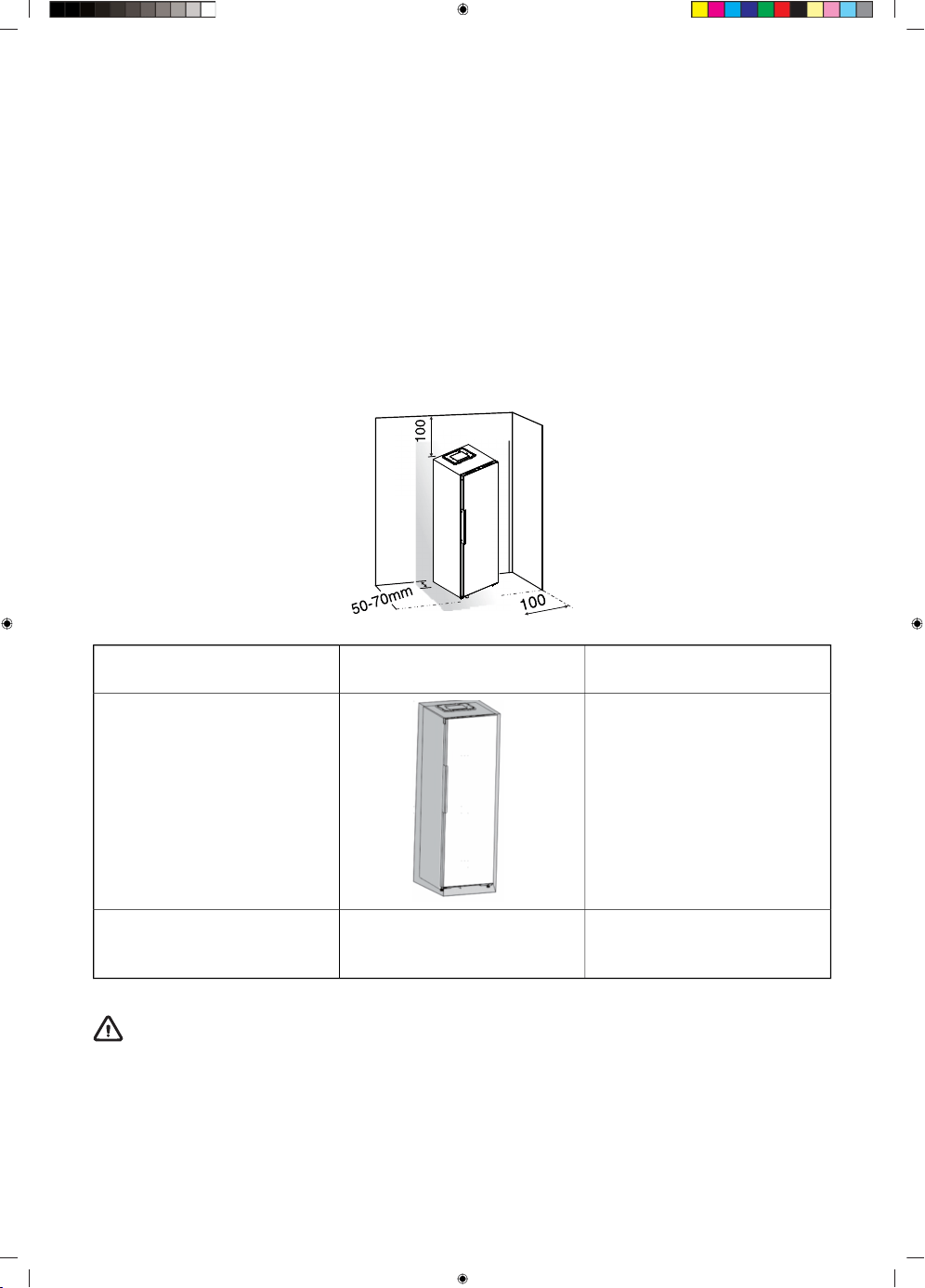
• Suggest: It is advisable for there to be 50-70mm of space from the back to the wall, at least 100mm
from its top, at least 100mm from its side to the wall and a clear space upfront to allow the
refrigerator door to open 105°. See in follow diagrams. Please refer to the diagrams below.
Reserve a gap of more than
5mm on the top side
Reserve a gap of more than
2.5mm on the right side
Reserve a gap of more than
2.5mm on the left side
Product size (mm) :
595*600*1856
In the built-in status
WARNING!
In the built-in status, energy consumption will increase significantly.
11
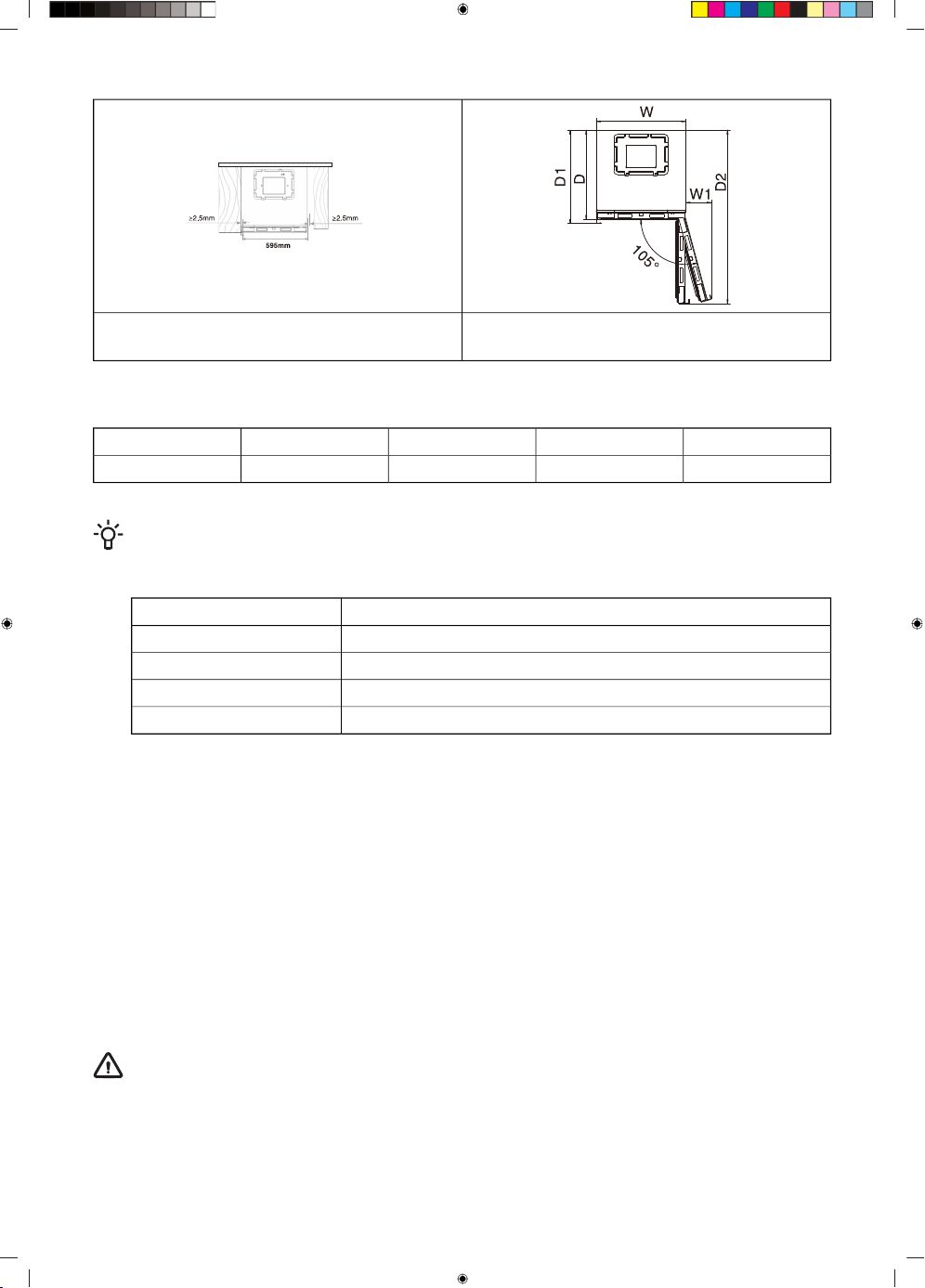
The total space required for the refrigerator to
fully open the door in the built-in status
Door closing status for refrigerator in the built-in
status
Relevant information (mm)
D2D1DW1W
1160627600170595
INFORMATION!
This appliance performs well in the climate class, please refer to nameplate. It may not work
properly if being left at a temperature above or below the indicated range for a long period.
Ambient temperature range °CClass
+10 to +32SN
+16 to +32N
+16 to +38ST
+16 to +43T
• Stand your appliance in a dry place to avoid damage moisure.
• Keep the appliance out of direct sunlight, rain or frost. Stand the appliance away from heat
sources such as stoves, fires or heaters.
Appliance setup
Level Refrigerator (if needed)
The refrigerator must be level to maintain optimal performance and appearance.
1. Turn the leveling feet on the bottom, front of the cabinet to raise or lower that side of the refrigerator
until the refrigerator is level side to-side.
2. Turn both feet, by the same amount, to slightly raise the front of the refrigerator. This will make it
easier for the doors to close.
WARNING!
Having someone push against the top of the refrigerator takes some weight off the leveling feet.
This makes it easier to turn the feet.
12
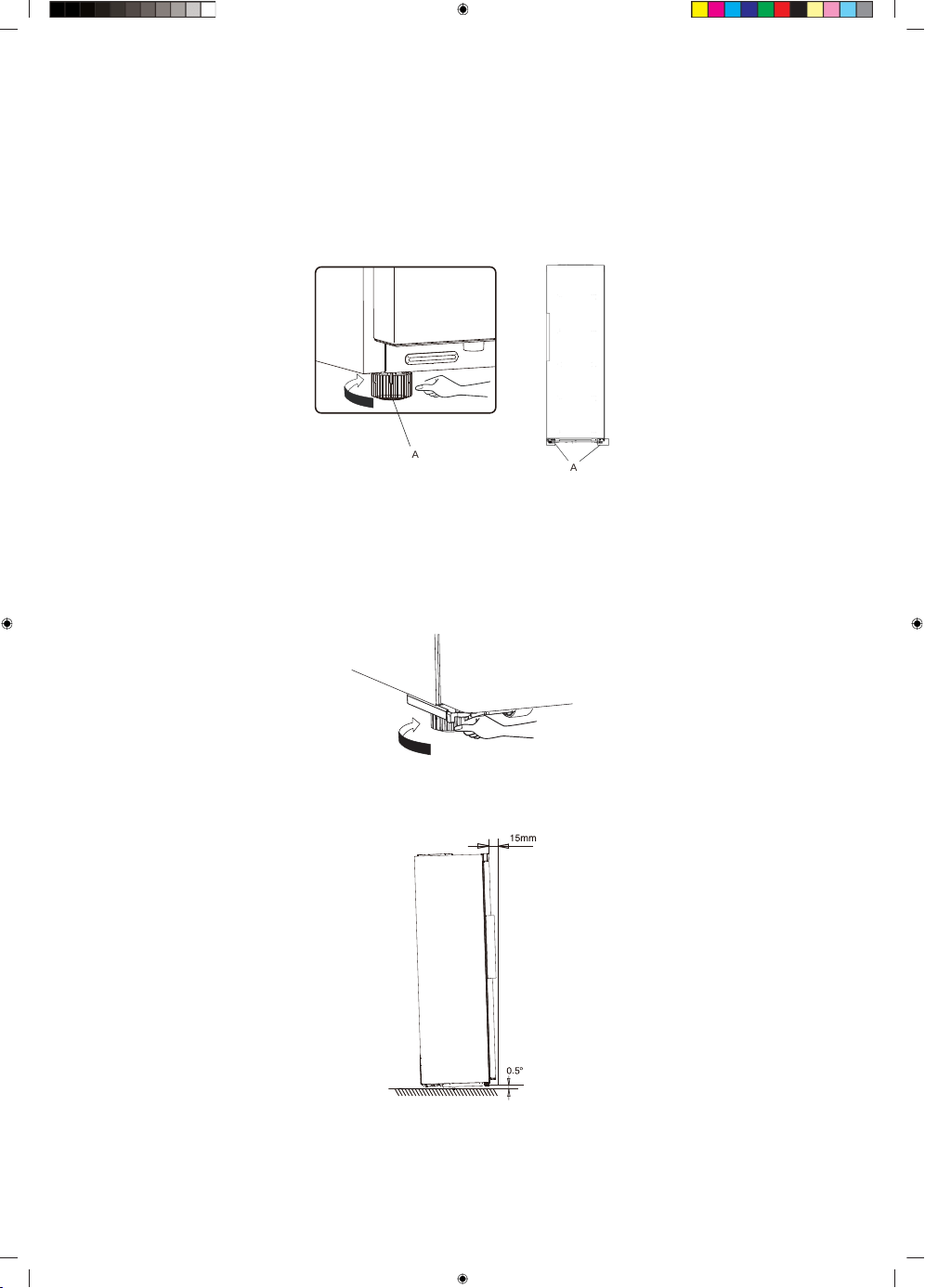
Rotate the adjustable feet clockwise to raise or raise counter-clockwise to lower your refrigerator. To
make sure that the doors close automatically, tilt the top of your refrigerator backward about 10mm
to 15mm. If necessary, use a spanner wrench to adjust the feet.
Align Doors (if needed)
Whenever you want to move the appliance, remember to turn the feet back up, so that the appliance
can roll freely. Reinstall the appliance when relocating.
A
A
A Adjustable bottom feet
Leveling of appliance
• For sufficient leveling and air circulating in the lower rear section of the appliance, the bottom feet
may need to be adjusted, You can adjust them by your fingers or a suitable spanner.
• To allow the doors to self-close, tilt back the top backwards at about 15mm or 0.5 by turning the
adjustable feet.
• Whenever you want to move the appliance, remember to turn the feet back up, so that the appliance
can roll freely. Reinstall the appliance when relocating.
13
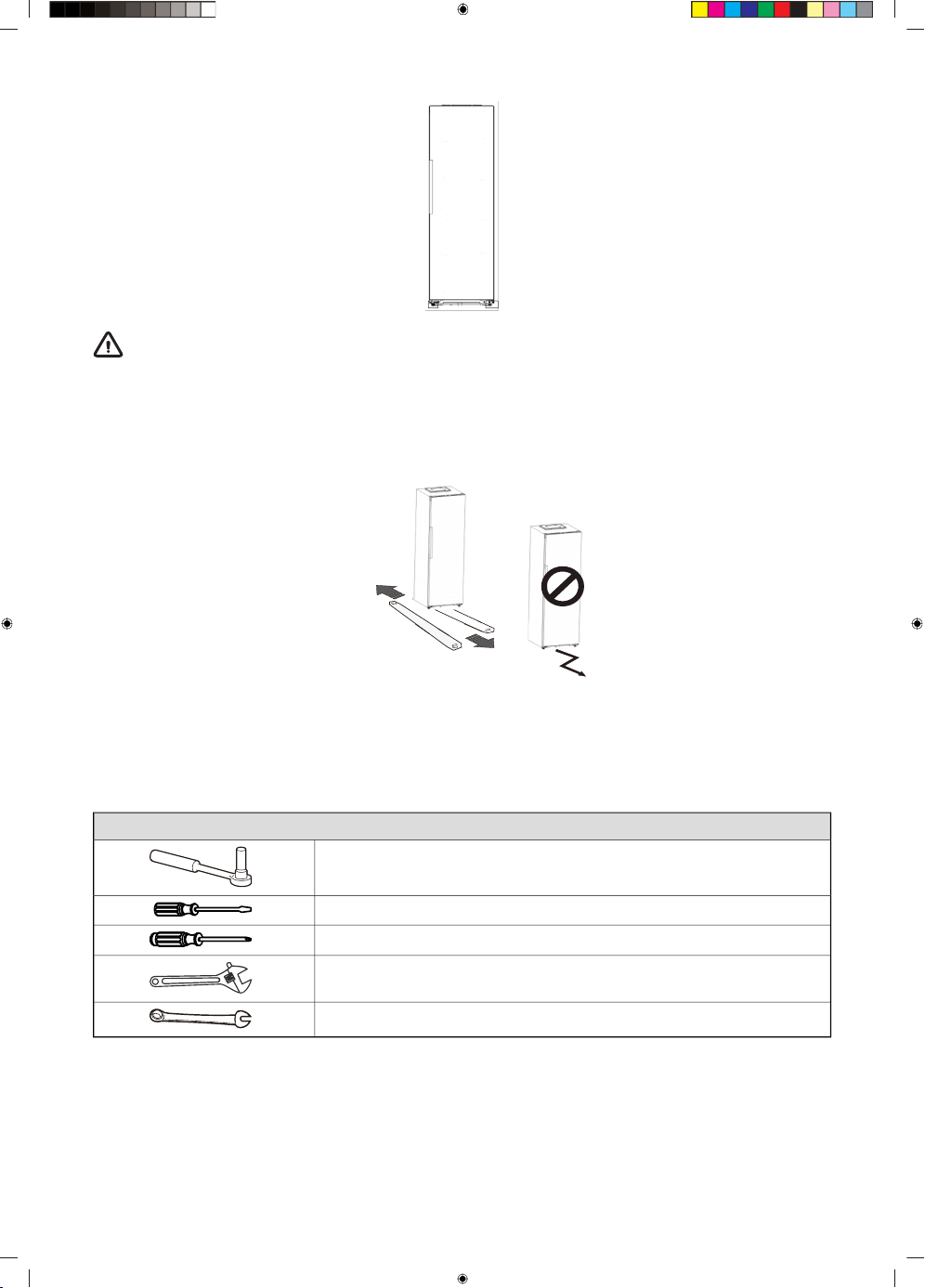
WARNING!
• For proper installation, this refrigerator must be placed on a level surface of hard material
that is the same height as the rest of the flooring, This surface should be strong enough to
support a fully loaded refrigerator.
• The rollers, which are not castors, should be only used for forward or backward movement.
Moving the refrigerator sideways may damage your floor and the rollers.
Tools you will need
The side at which the door opens can be changed, from the right side (as supplied) to the left side, if
the installation site requires. Warning! When reversing the door, the appliance must not be connected
to the mains. Ensure that the plug is removed from the mains socket
Tools you will need:
8mm socket wrench
Thin-blade screwdriver
Cross-shaped screwdriver
Monkey wrench
8mm wrench
Note:
• When required, tilt the refrigerator back in order to gain access to the base, you should rest the
appliance on soft foam packaging or similar material to avoid damaging the backboard of the
refrigerator. To reverse the door, the following steps are generally recommended.
14
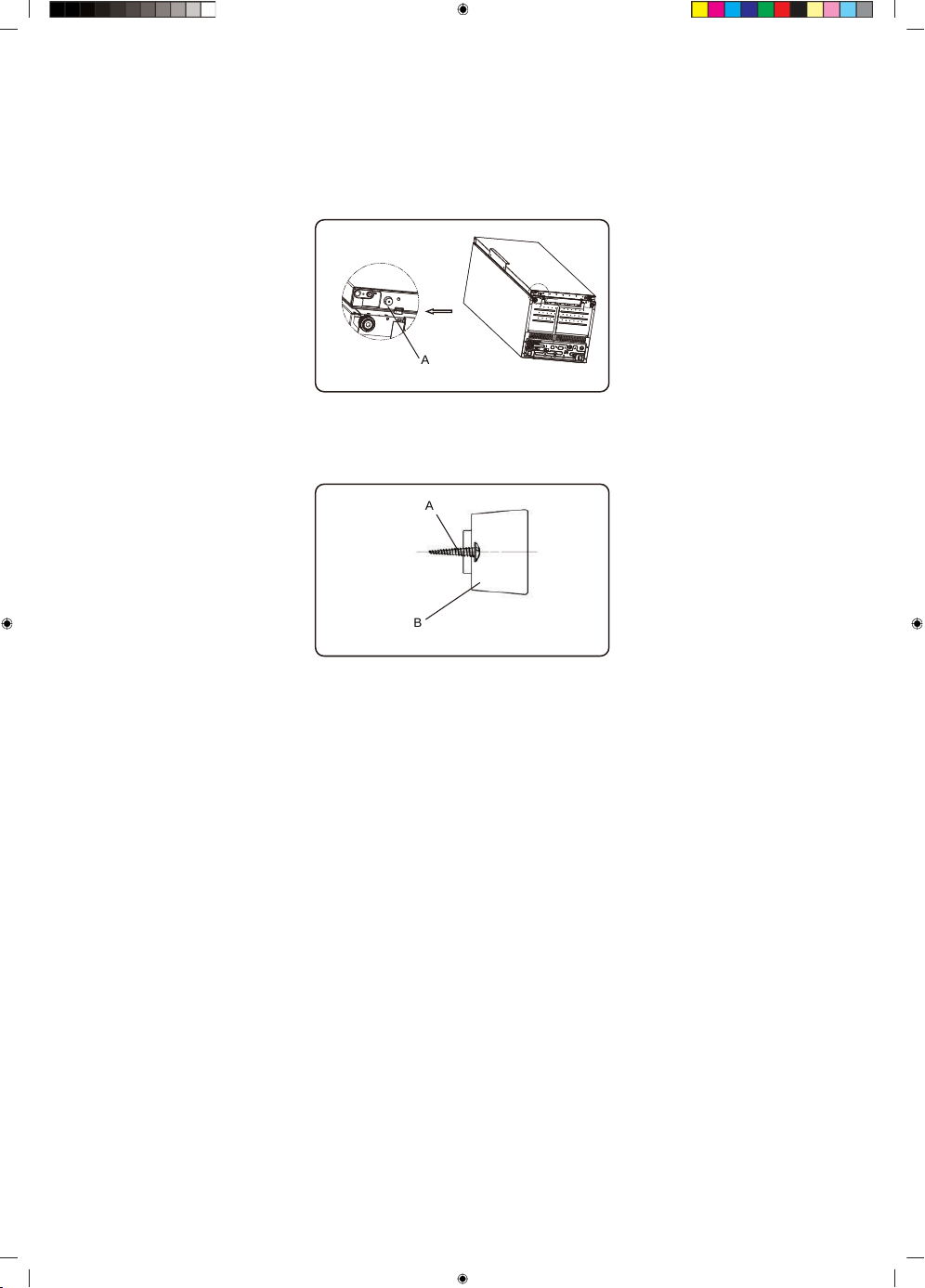
• There is no need to install these accessories under normal usage. Only under the extreme
circumstances, that is opening the door about 90 degree, this refrigerator may take risk of tipping.
Then supporting pad should be fastened to the lower base cover to steady this appliance.
1. Tilt appliance to find screw hole on the left of lower base cover.
A
A Lower base cover
2. Put screw in to the hole of the supporting pad.
A
B
A Screw
B Supporting pad
3. Make screw in alignment with the hole on lower base cover. Fasten supporting pad to the base
cover firmly by a cross screwdriver (self-provided).
15
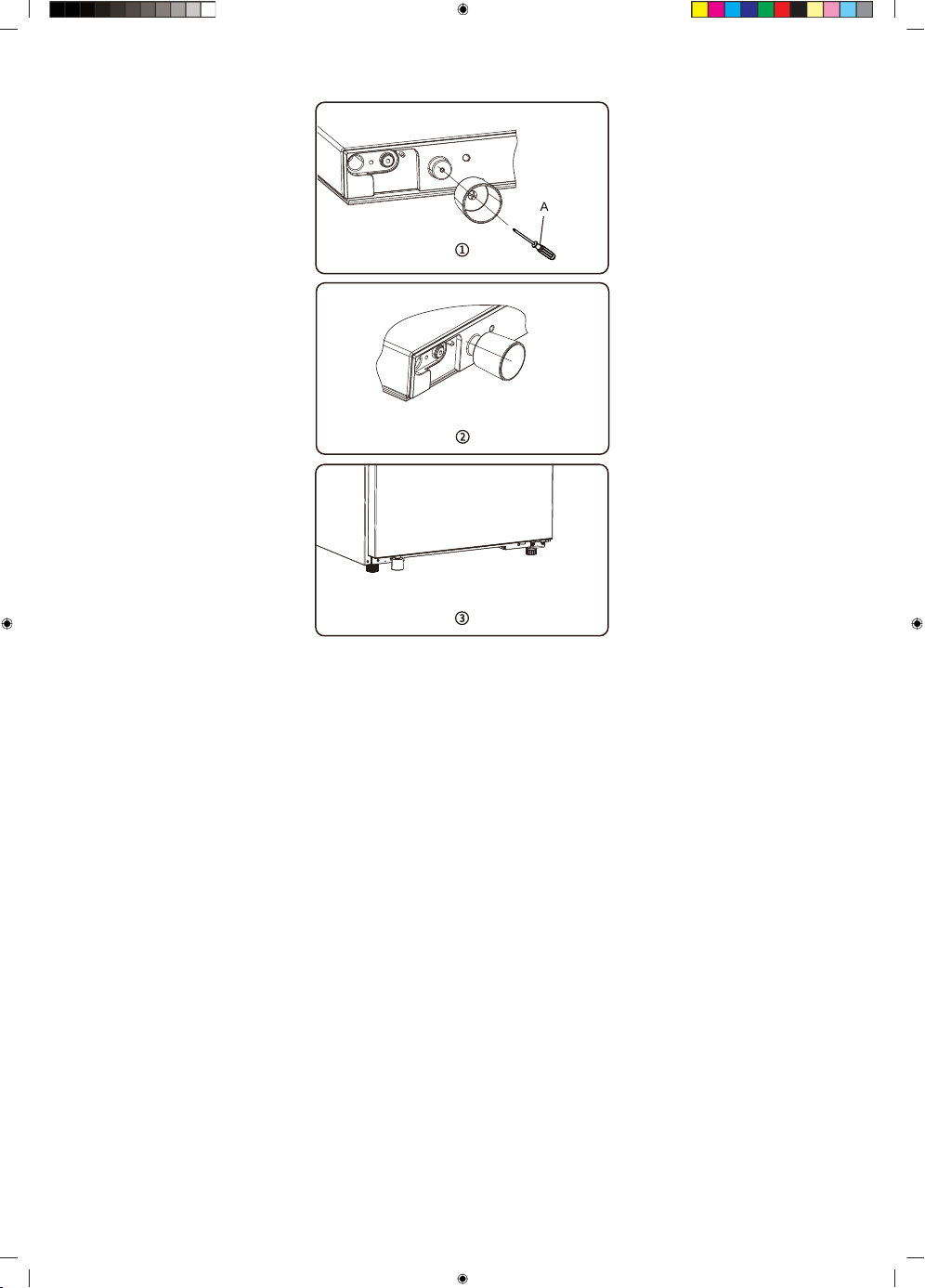
A
A Cross screwdriver
16
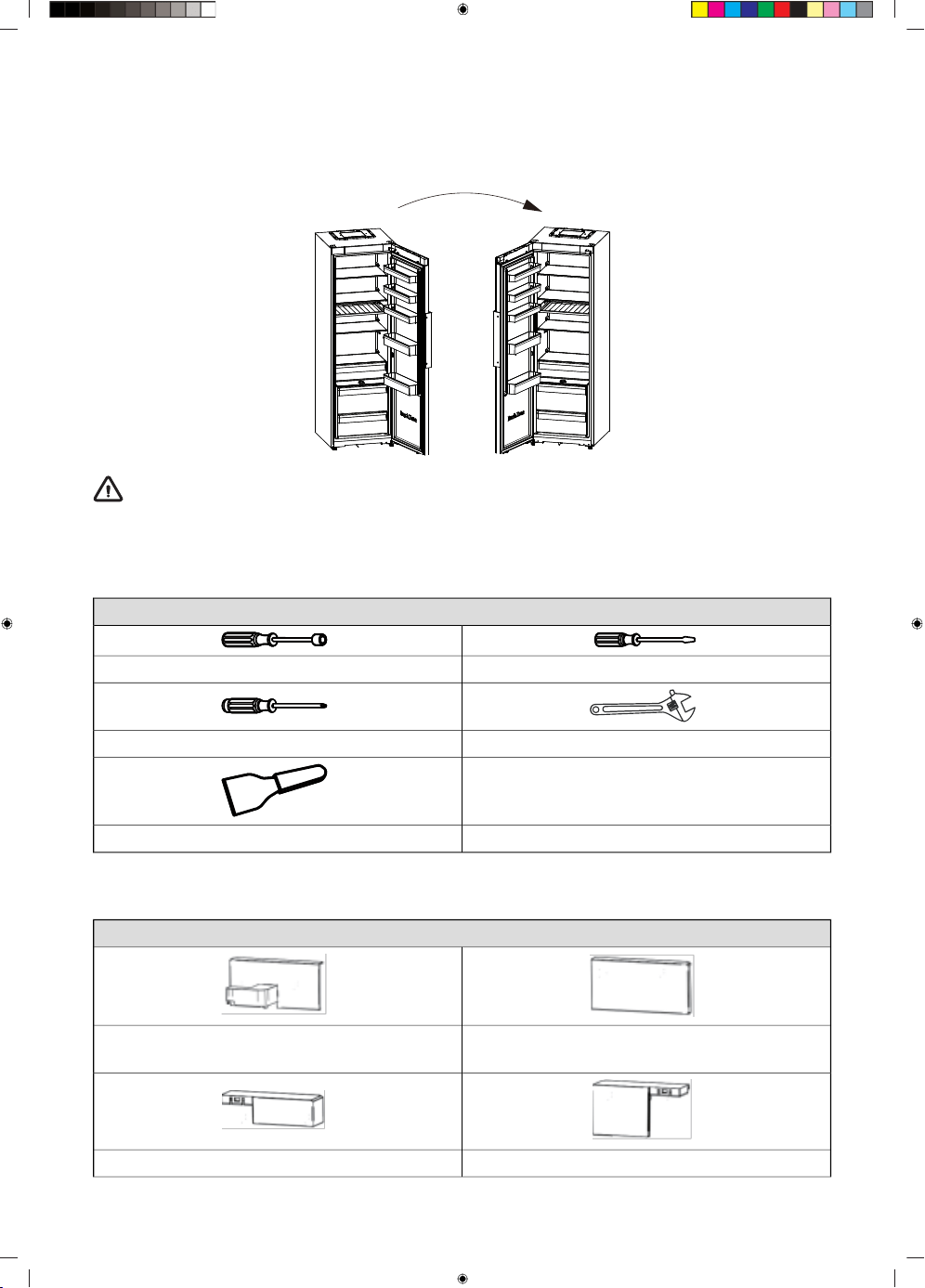
Changing the door opening direction
The side in which the door opens can be changed from the right side (as supplied) to the left side, if
the installation site allows for it.
WARNING!
When reversing the door, the appliance must not be connected to the mains. Ensure that the
plug is removed from the mains socket.
The tools you will need (Not provided):
Not provided
Thin-blade screwdriver8mm socket driver
Adjustable WrenchCross-shaped screwdriver
Putty knife
The parts you will need ( provided):
Provided
Case Corner Cover(right)Case Corner Cover( left)
11
Door Corner Cover(right)Door Corner Cover(left)
17
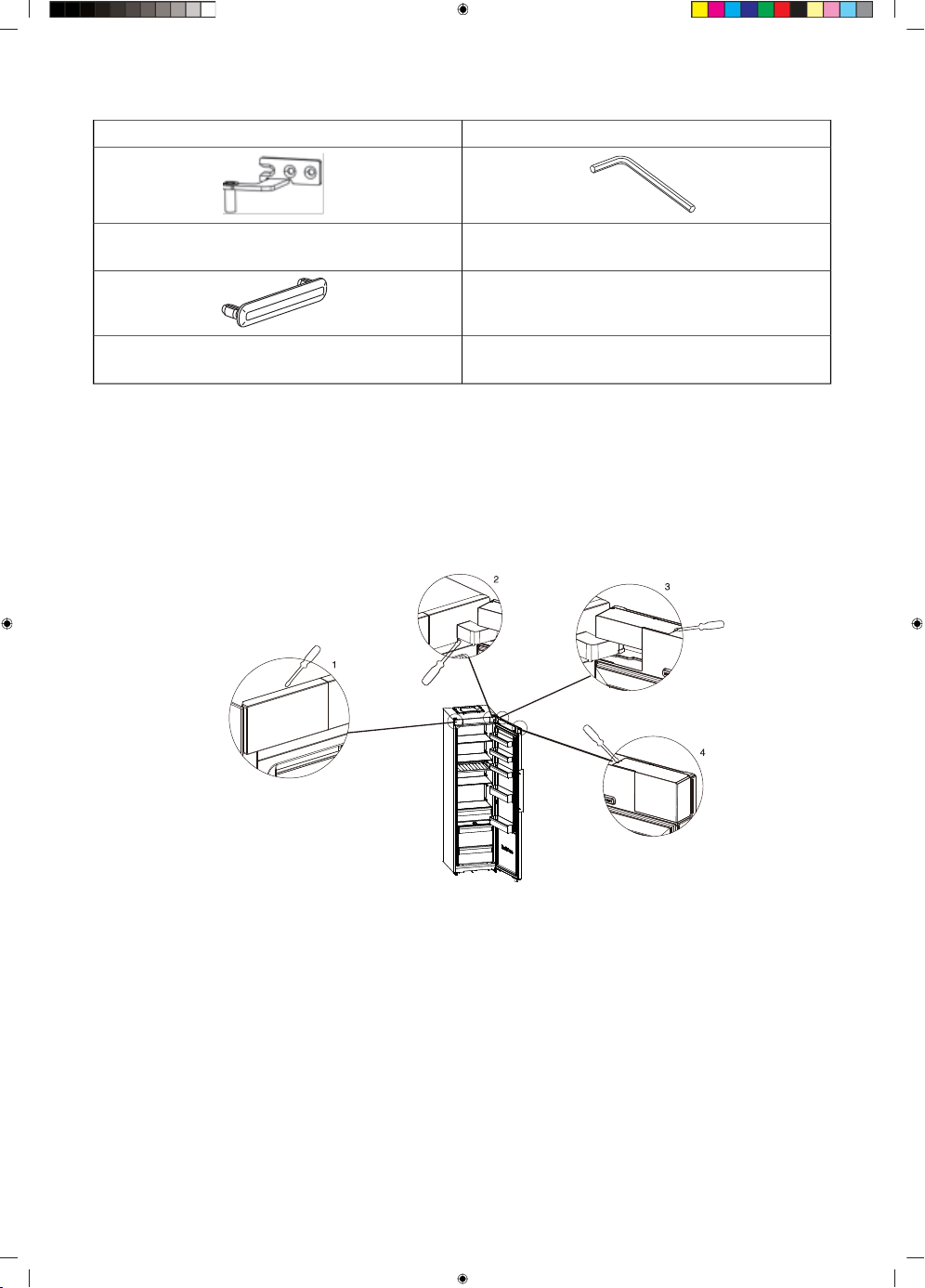
Table continued from last page
11
4mm Allen Wrenchleft upper hinge part
11
hole cover
1
Note:
• You should rest the appliance on soft foam packaging or similar materil to avoid damage. If required
you may lay the refrigerator on its back in order to gain access to the base.
1. Stand the refrigerator upright, open the door, use a thin-blade screwdriver to pry off the Door
Corner cover(right), the Door Corner cover(left),the Case cover(right) and the Case cover (left), and
then put the corner covers in the accessory bag for backup.
1 Case Corner Cover (Left)
2 Case Corner Cover (right)
3 Door Corner Cover (right)
4 Door Corner Cover (left)
18
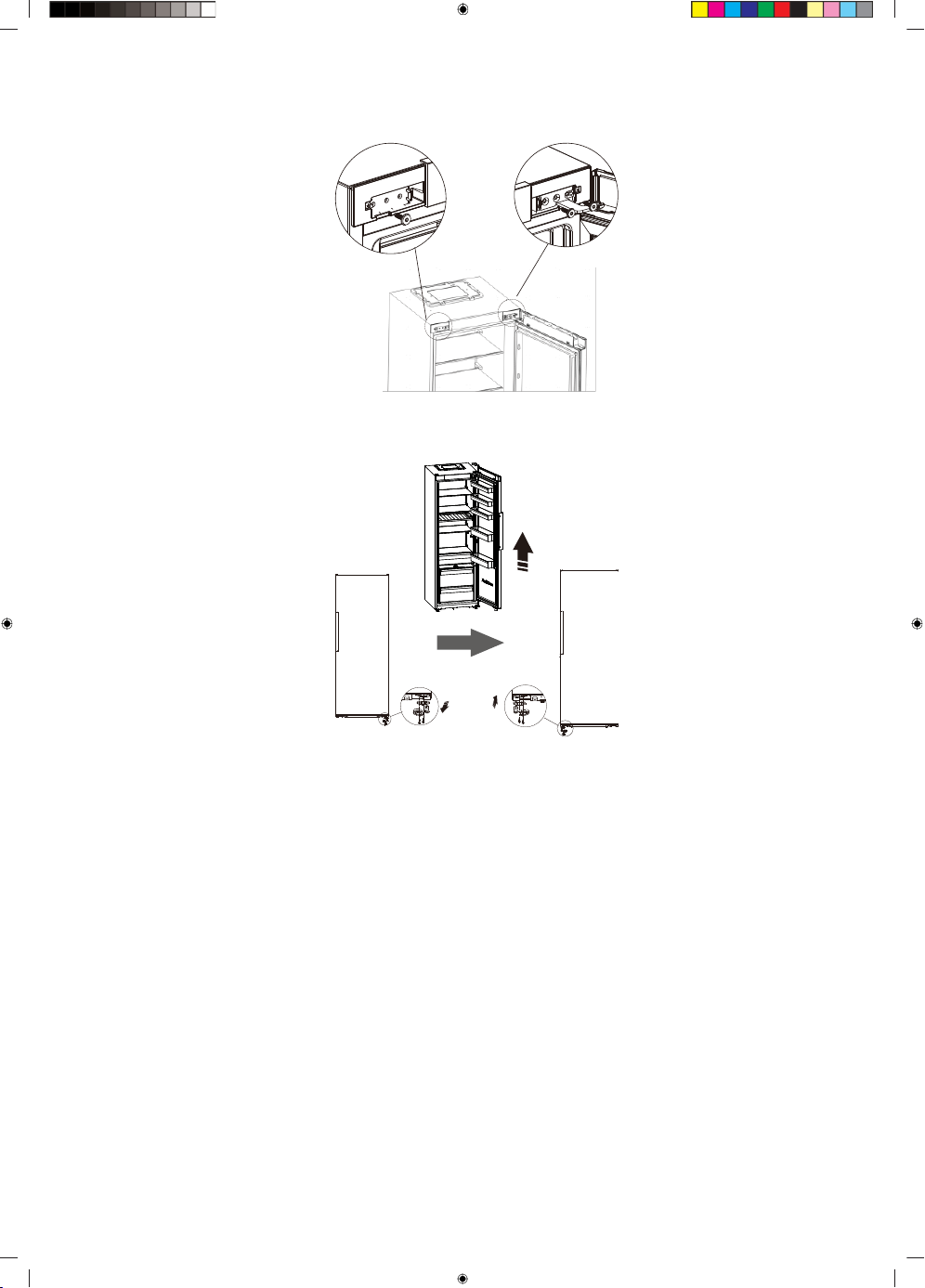
2. Using the 4mm Allen Wrench to remove the two screws on the right side that hold the right upper
hinge part in place and the screw on the left side.(Please support the door when you doing it.)
3. Remove the door and place it on a smooth surface with its panel upwards.Loose 2 self-tapping
screws , detach the stopper,the door backstop and the shaft sleeve, then install the stopper , the
door backstop and the shaft sleeve to the left side with 2 self-tapping screws .
4. Removing the handle cover and using a cross-shaped screwdriver to unscrew the screws on the
handle. And using a putty knife to remove the screw hole covers on the other side of the door .
Then install the screw hole covers to the left side of the door. Finally, using a cross-shaped
screwdriver to install the screws on the handle and install the handle cover.
19
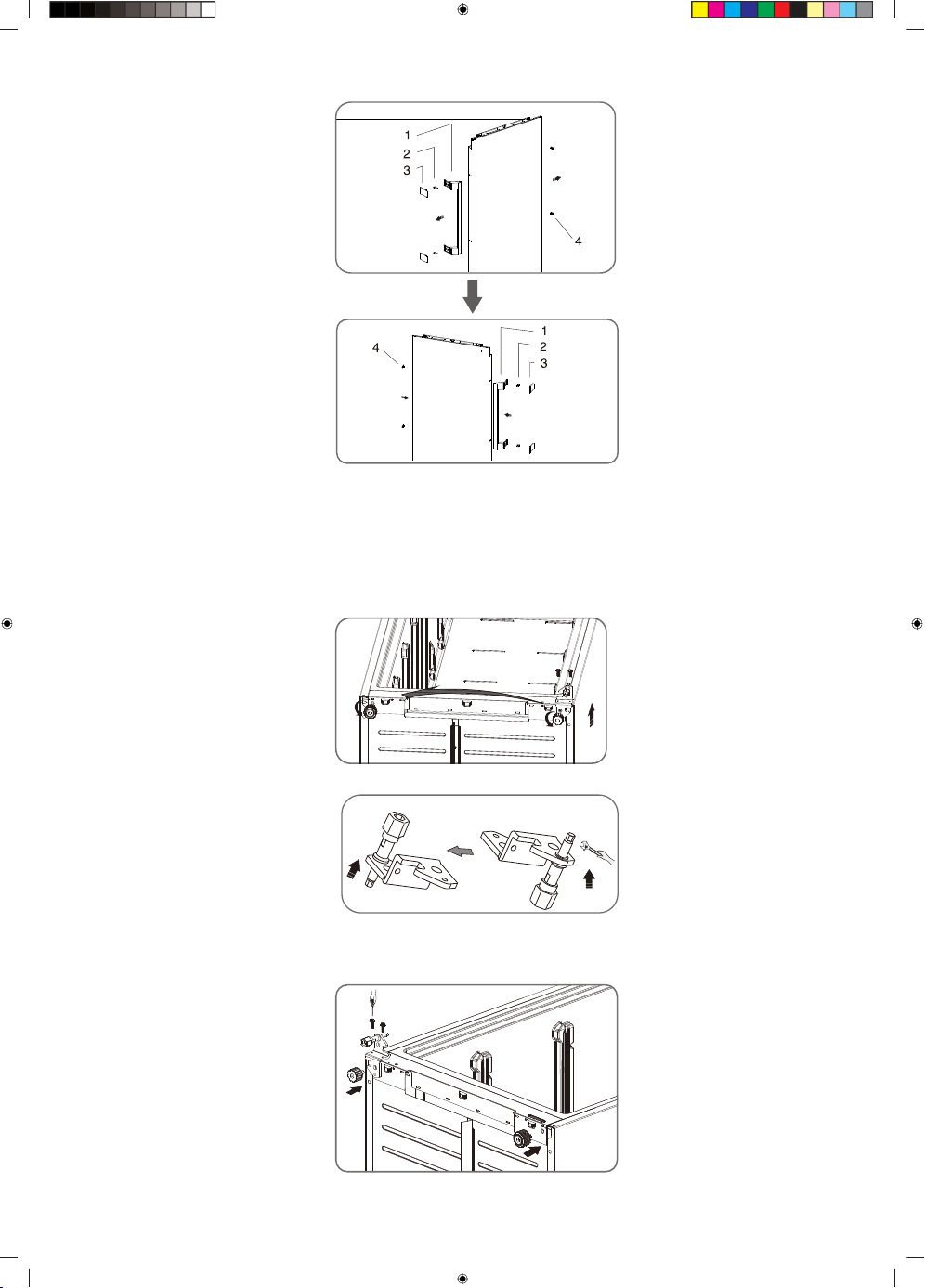
1 Handle
2 Screws
3 Handle covers
4 Screw hole covers
5. Lay the refrigerator on soft foam packaging or similar material. Remove the adjustable bottom
feet parts, then remove the lower hinge part by unscrewing the screws . Finally unscrew the bottom
hinge axis and remove it to the hole which is other side and screw it.
6. Replace the lower hinge part to the left side and fixing it with the special flange screws. Replace
the adjustable bottom feet part to another side and fixing it.
Install the hole cover(provided in the accessory bag) to hole of lower cover plate.
20
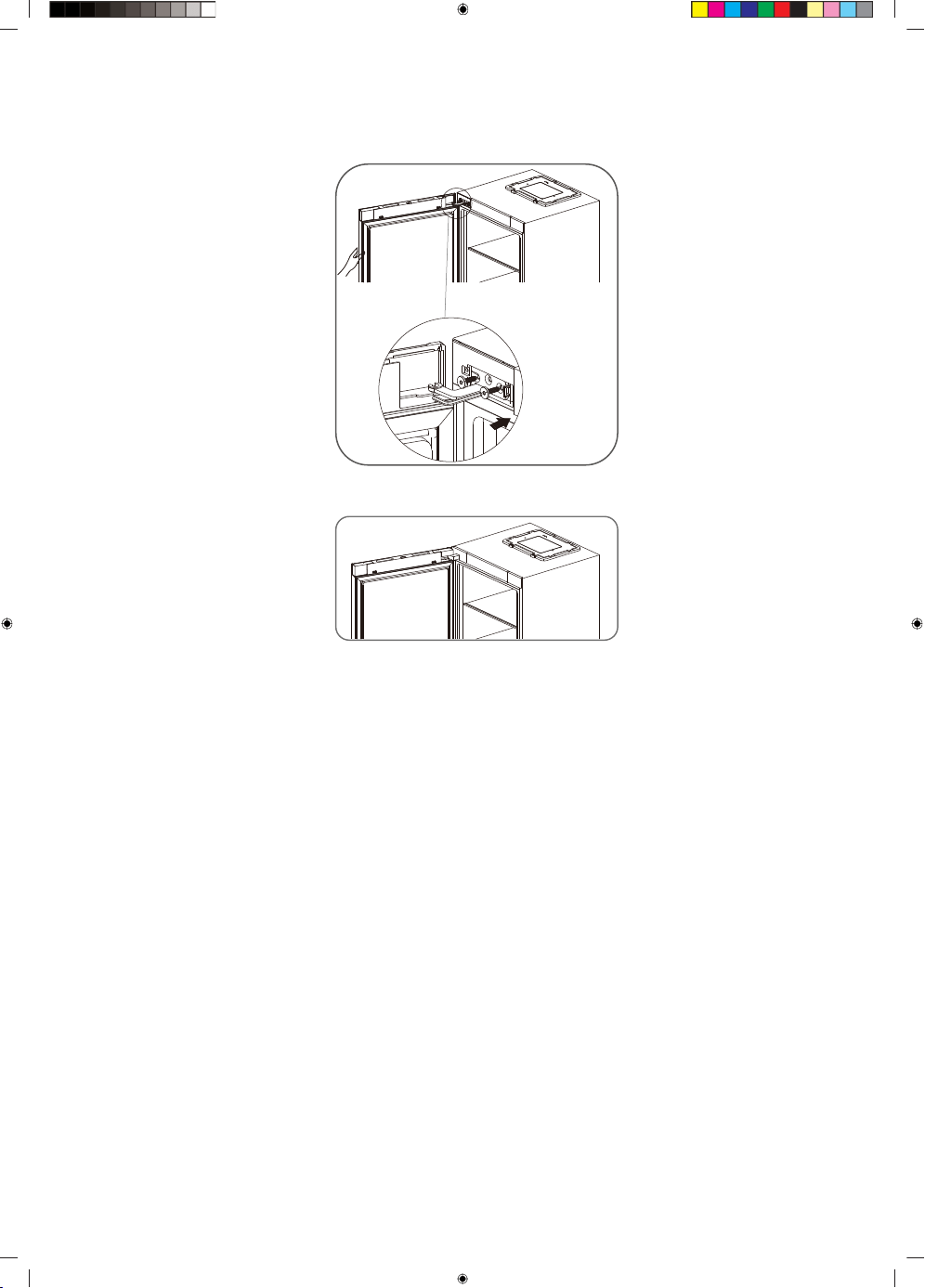
7. Transfer the door to appropriate position. Align the lower hole of the door with the upper hinge
shaft of the lower hinge,then align the upper hole of the door with the hinge shaft of the left upper
hinge. Finally adjust the left upper hinge to the appropriate position and then install it with 2 screws.
8. Reinstall the Door Corner cover ( right), the Door Corner cover ( left),the case corner cover(right)
and the case corner cover(left) which are taken from the accessory bag.
21
Description of the appliance
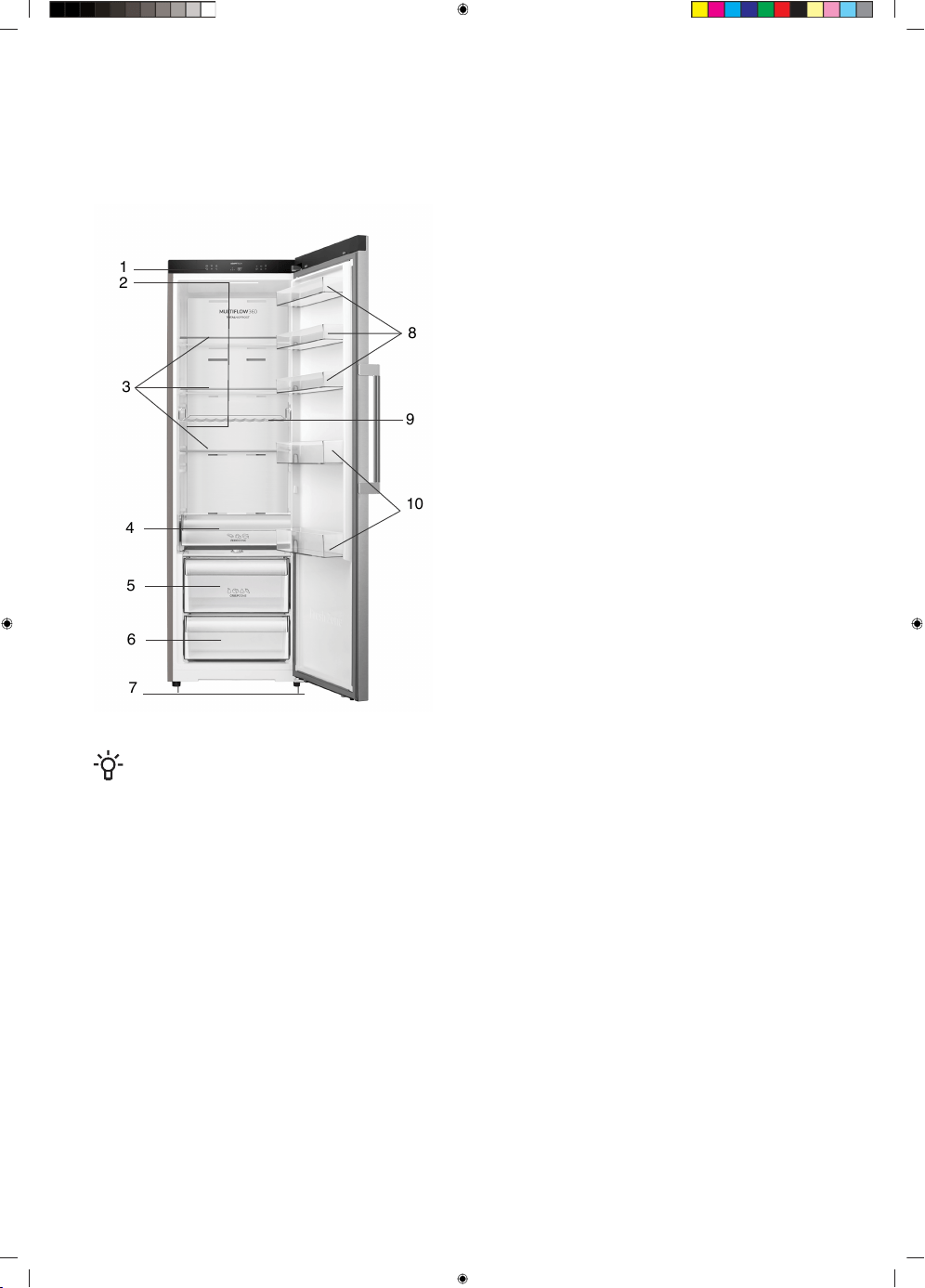
Appliance interior equipment may change according to the appliance model.
This product contains a light source of energy efficiency class G.
1
2
3
4
5
6
7
8
9
10
1. Control panel
2. LED light
3. Glass shelves
4. ZeroZone drawer
5. Upper Crisper with humidity control
6. Lower Crisper
7. Adjustable bottom feet
8. Low door racks
9. Bottle rack
10. High door shelves
NOTE!
• Due to unceasing modification of our products, your refrigerator may be slightly different
from this instruction manual, but its functions and using methods remain the same.
• To get the best energy efficiency of this product, please place all shelves, drawers on their
original position as the illustration above.
22
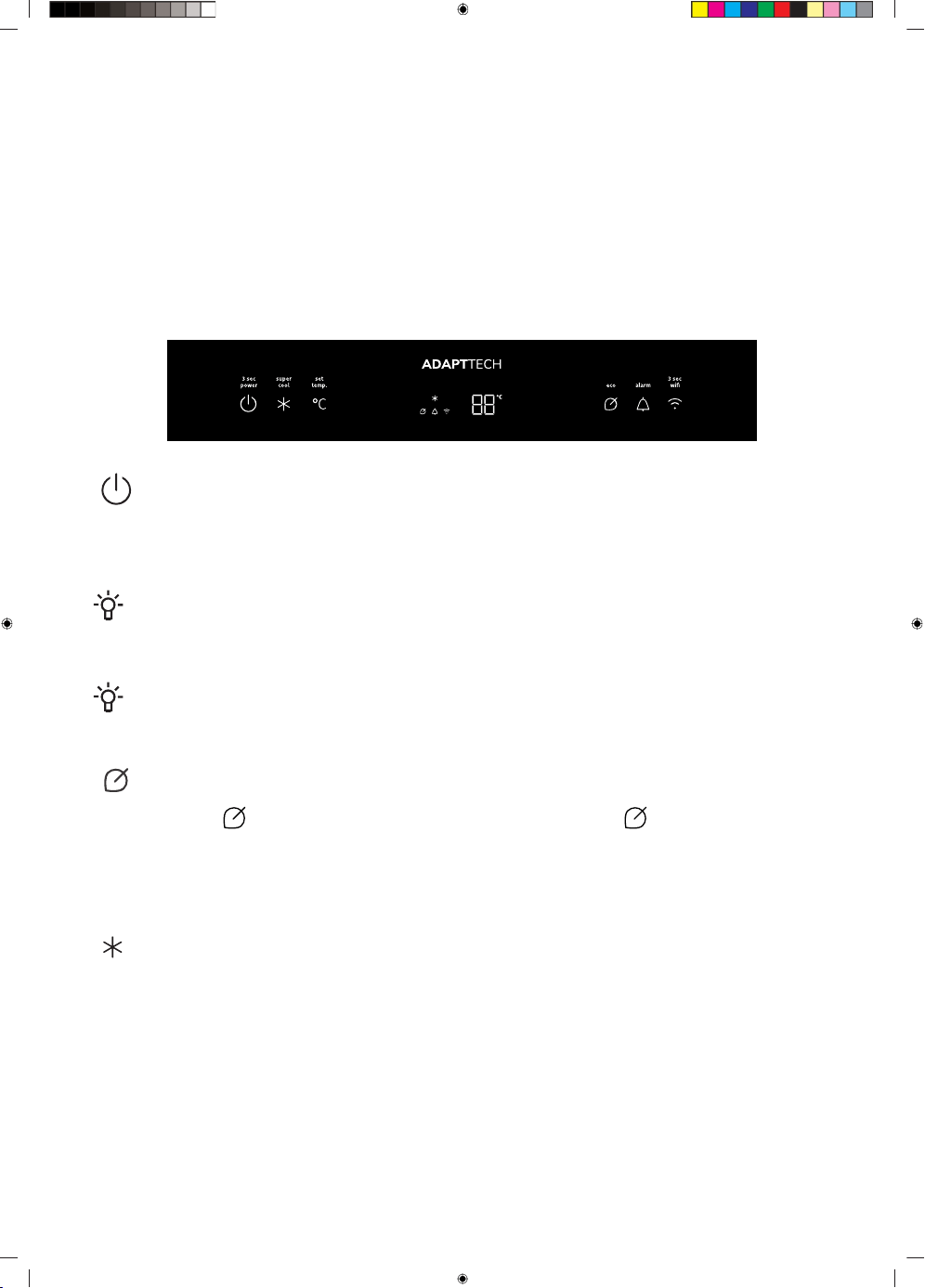
Operating the appliance
All functions and controls of the unit are accessible from a control panel conveniently located on the
roof of the cabinet. A display circuit board allows easy configuration of features and settings in a
simple and intuitive manner.
Display Controls
Use your appliance according to the following control regulations, your appliance has the corresponding
functions and models as the display panels showed in the pictures below. When the appliance is
powered on for the first time, the backlighting of the icons on display panel starts working. If no button
have been pressed and the doors are closed after one minute, the backlighting will turn off .
( ) Power
If you want to stop using it, you can turn the appliance off by pressing “Power” button for 3 seconds.
Press and hold “Power” button for 3 seconds to turn the standby function on or off. When the standby
function is on, the display panel will show “--”.
INFORMATION!
Do not store any food in the fridge during this time. If you will not use the refrigerator for a long
time, please pull the plug.
NOTE!
When the power function is on, the refrigerator stops cooling and the light is off.
( ) ECO
Press the “Eco” "( )" button to turn on the energy saving function, the "( )" icon will be illuminated.
When the Eco function is on, the temperature of the refrigerator is 6°C . When Eco function is on, you
can turn it off by pressing the “Temp” button or pressing the “Eco” button and the refrigerator
temperature setting will revert back to the previous setting.
( ) Super Cool
The Super Cool feature helps to keep food stored in the refrigerator at the setting temperature during
periods of high usage, large grocery loads, or temporarily warm room temperatures.
The Super Cool feature lowers the temperature in the fridge compartment.
1. Press the “Super Cool” button to activate this function. the fridge temperature indicator will display
2°C.
2. Super cool will automatically turn off after about 6 hours.
3. When super cool function is on, you can turn it off by pressing the ”Super Cool” button or pressing
the ”Temp” button. When the Super Cool function is manually turned off, the setting temperature
will revert back to the previous setting.
23
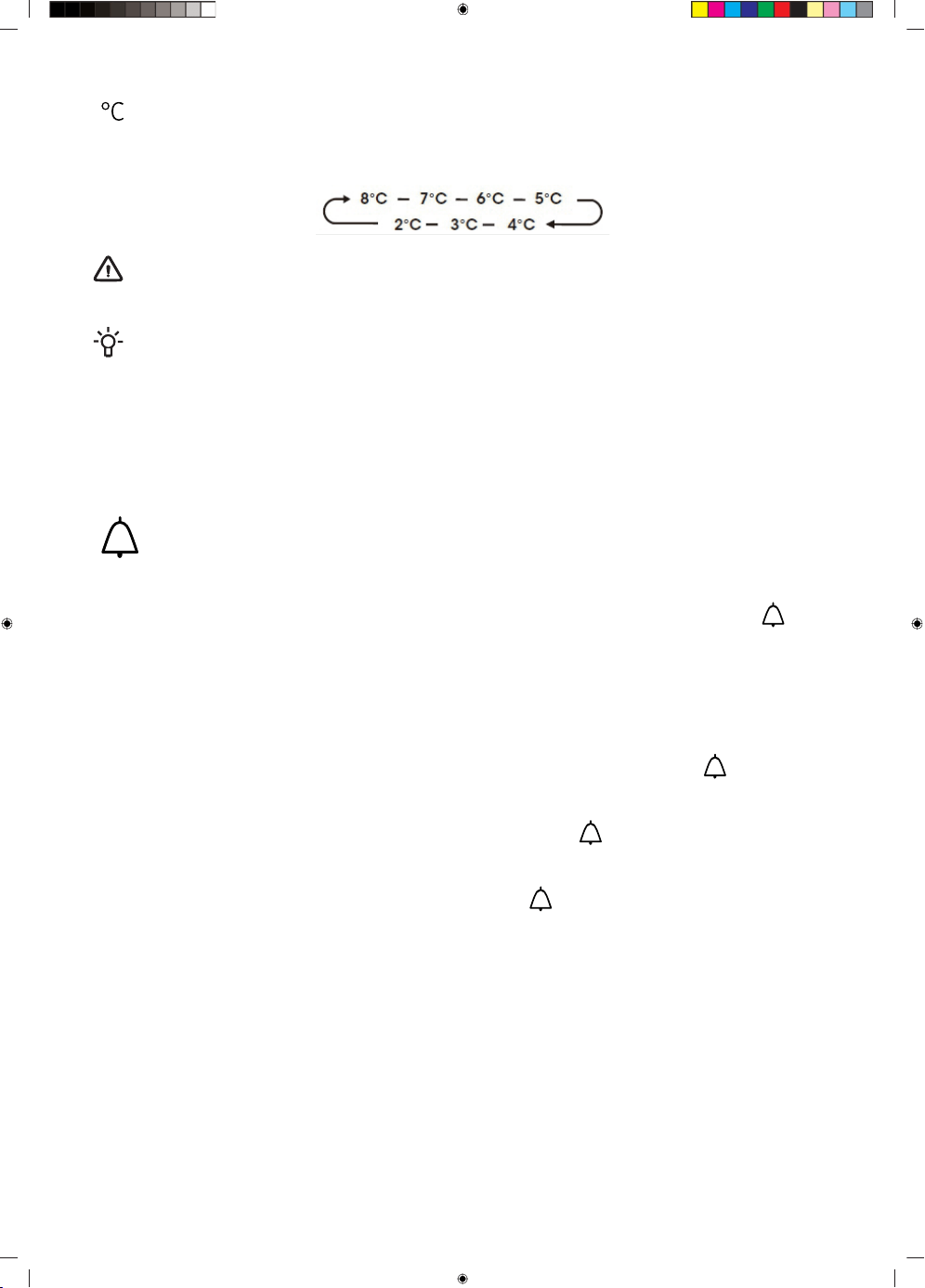
( ) Fridge Compartment Temperature
Press the “Temp” button repeatedly to cycle through the available temperature settings from 8°C to
2°C.
WARNING!
Each press of the button decrease the setting temperature by one degree.
NOTE!
Setting Compartment Temperatures: When you set a temperature, you are setting an average
temperature for the entire compartment.
The actual compartment temperatures may vary from the temperatures displayed depending on
the amount and placement of stored food, and the surrounding room temperature.
Recommended Temperature Settings Fridge Compartment: 4°C
( ) Alarm
High temperature alarm:
If the temperature inside the appliance is too high, an alarm will sound to alert you and the "( )" icon
will illuminated.
In non-standby function, the temperature inside the box is detected after 24 hours of powering on. If
the temperature remains too high for 4 hours, the high temperature alarm will be triggered.
Switching off the alarm:
If you want to switch off the acoustic alarm, briefly press the “Alarm” button. The "( )" icon will
remain illuminated until the actual temperature in the appliance drops below the alarm level.
When the appliance reaches an adequate temperature, then the "( )" icon will extinguished, high
temperature alarm cleared.
If you have not cancelled the high temperature alarm, the "( )" icon will remain illuminated, and the
buzzer will sound three times per minute. After more than 10 minutes, the alarm will stop.
Door Open Alarm:
If a door is open for longer than 1 minutes, an alarm will sound to alert you. The alarm will sound 5
times every minute in the first and second minutes. Starting from the third minute, the alarm will sound
once per second. If the alarm beeps for a long time, the buzzer will stop after 10 minutes of opening
the door.
To turn off the alarm, close all doors completely.
24
Demo mode
Demo mode is for store display, and it prevents the refrigerator from generating cool air. In this of
Cooling off Mode, the refrigerator may seem like it is working but it will not make cool air. If there is
no button operation for 10 seconds, it will keep display “OF”, otherwise it will display the set
temperature.
To switch off demo mode, press and hold “Power” and “ Wi-Fi” buttons at same time for three seconds
and the buzzer beeps 3 times.
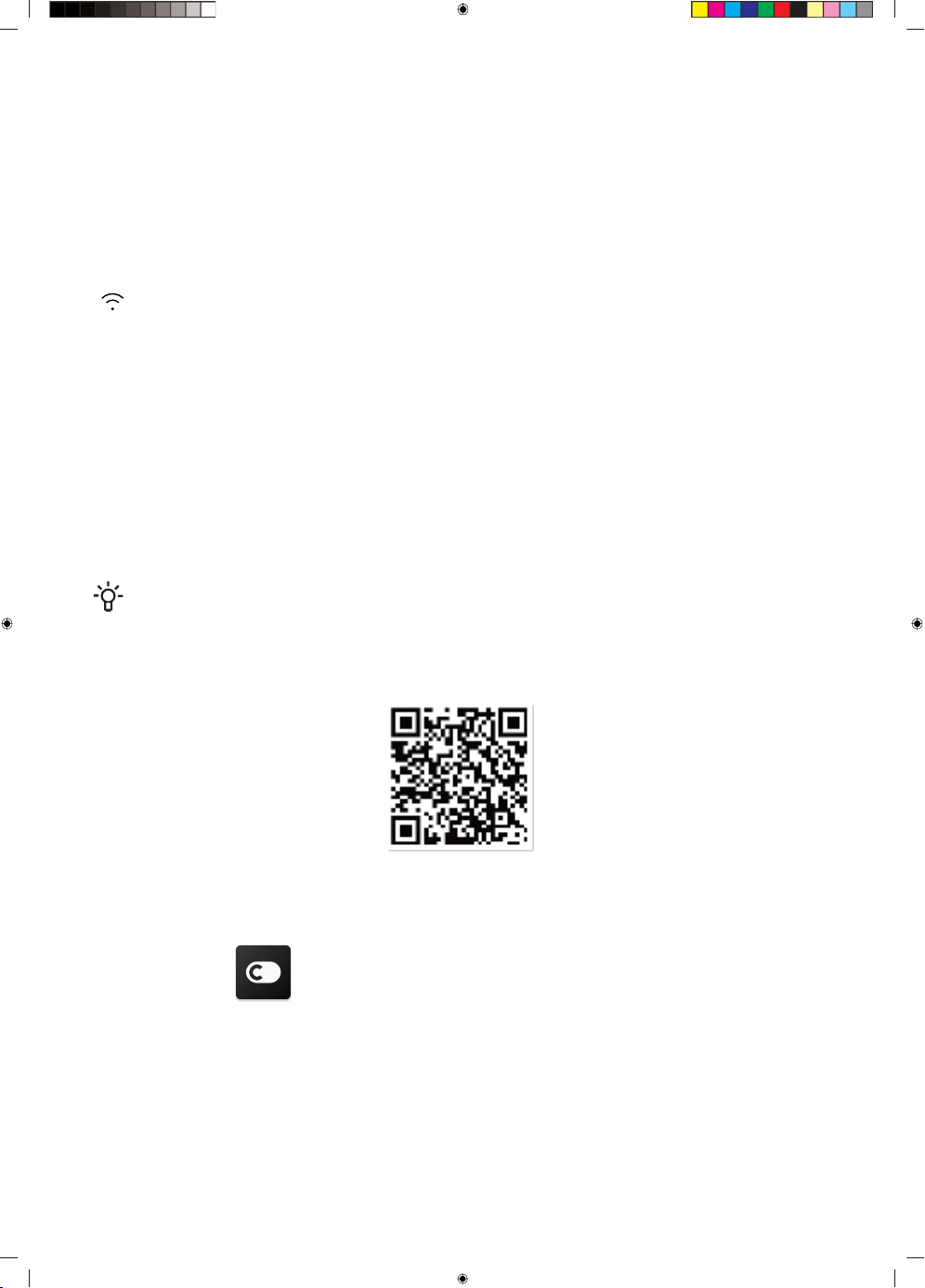
( ) Wi-Fi function
This appliance may be controlled remotely with a smart phone or a tablet computer.
If the appliance is not connected to the home network, it will function like a regular appliance.
What do you need to connect the appliance?
• Signal from the local wireless network (Wi-Fi) should be sufficiently strong in the spot where the
appliance is installed.
• Home network router has to be connected to the internet, and the Wi-Fi function on the appliance
should be activated.
• The smart phone/tablet computer has to be connected to the internet.
• Operating system on your smart phone/tablet computer should be compatible with the ConnectLife
app.
INFORMATION!
We recommend downloading and installing the mobile app and creating a ConnectLife account
before attempting to set up the connection with your appliance.
ConnectLife App
Installing the ConnectLife app
Go to the App Store (on Apple devices).
1. AppGallery (on Huawei devices) or Google
Play Store (on Android devices) on your
phone/tablet computer.
2. Search for “ConnectLife”.
3. Choose the ConnectLife app and install it
on your smart phone/tablet computer.
25
WARNING!
• The distance between your appliance and the Wi-Fi router can impact the performance. If
they are too far apart pairing your appliance might fail or take longer.
• The appliance supports 2.4 GHz Wi-Fi networks only. The Wi-Fi network SSID must be visible.
• The surrounding wireless environment (other connected devices) can affect the performance
of your network.
• Your appliance Wi-Fi connection may experience interruptions due to external factors such
as your home network environment or Internet service provider.
Connecting your refrigerator
After installing the Connectlife app, sign in or create an account and follow these steps:
1. Ensure the appliance is powered on and the display panel is active. You'll know it’s ready when
the panel lights up.
2. Press and hold the Wi-Fi button for 3 seconds until you hear a beep and see the "( )" light flashing
after it constantly on for a few seconds.
3. Ensure Bluetooth is enabled on your phone and open the ConnectLife app. Look for the pop-up
indicating that a new appliance has been found. Tap the button on the pop-up and follow the
instructions to proceed.
4. If a pop-up doesn't appear, tap the button called “ Add appliance” or “+” in the app.
5. Locate “Refrigerator” in the device list and select it.
6. Follow the instructions in the app to connect your refrigerator. Once the setup is complete, your
refrigerator will appear on your home screen.
WARNING!
• The appliance will remain in pairing mode for a maximum of 5 minutes.
• The factory reset your network settings, press and hold the Wi-Fi button for 6 seconds. You
will hear two beeps once the appliance is reset.
• After resetting, the appliance will automatically go into pairing mode.
• A solid Wi-Fi light indicates the appliance is successfully connected to the home network.
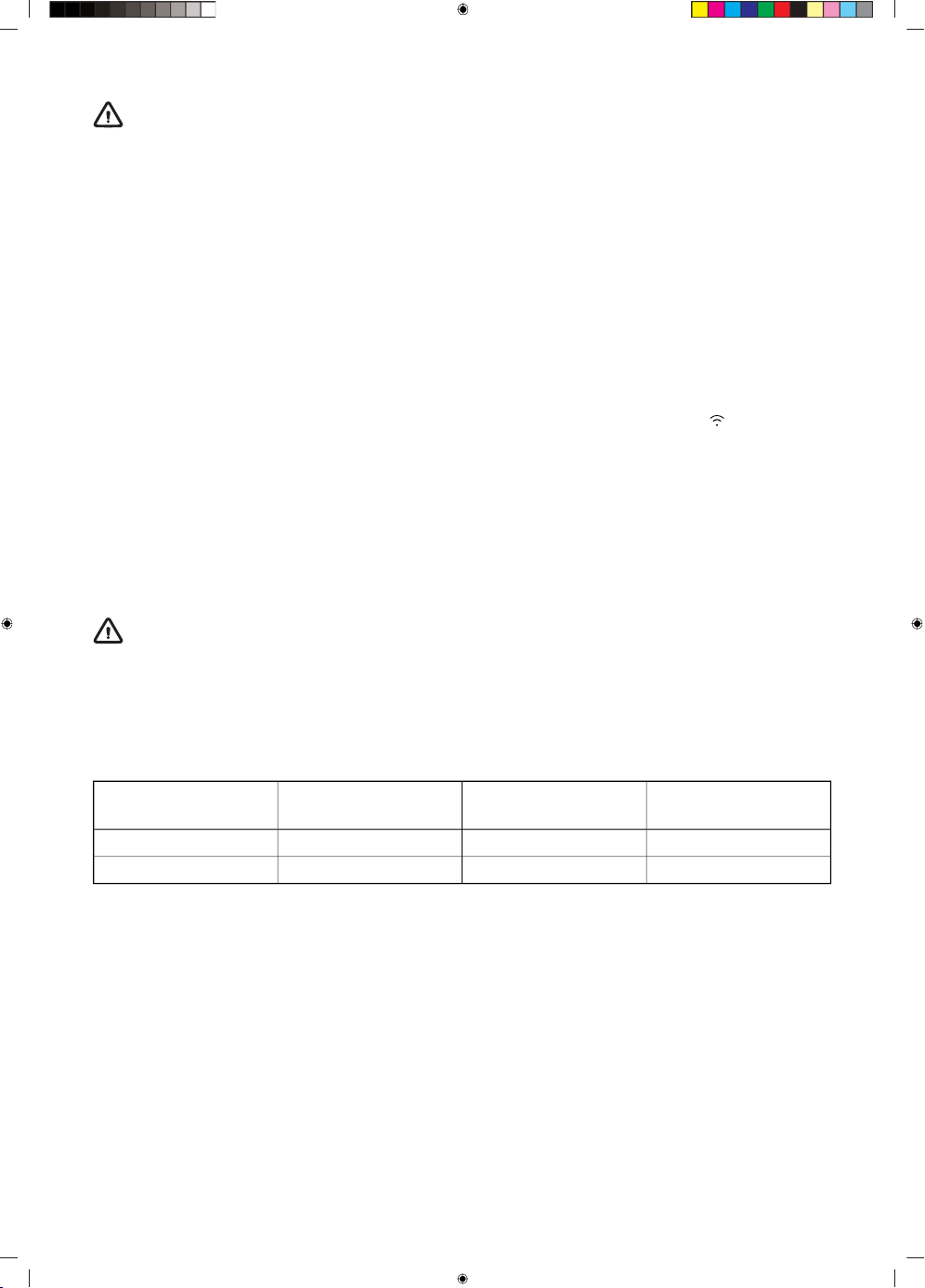
Radio equipment type
Maximum output
power
Frequency rangehead
MWB414C.2≤20 dBm2400-2483.5MHzWi-Fi
MW14S≤20 dBm2402-2480 MHzBluetooth
Maximum antenna gain: Gain: -1.53 dBi
26
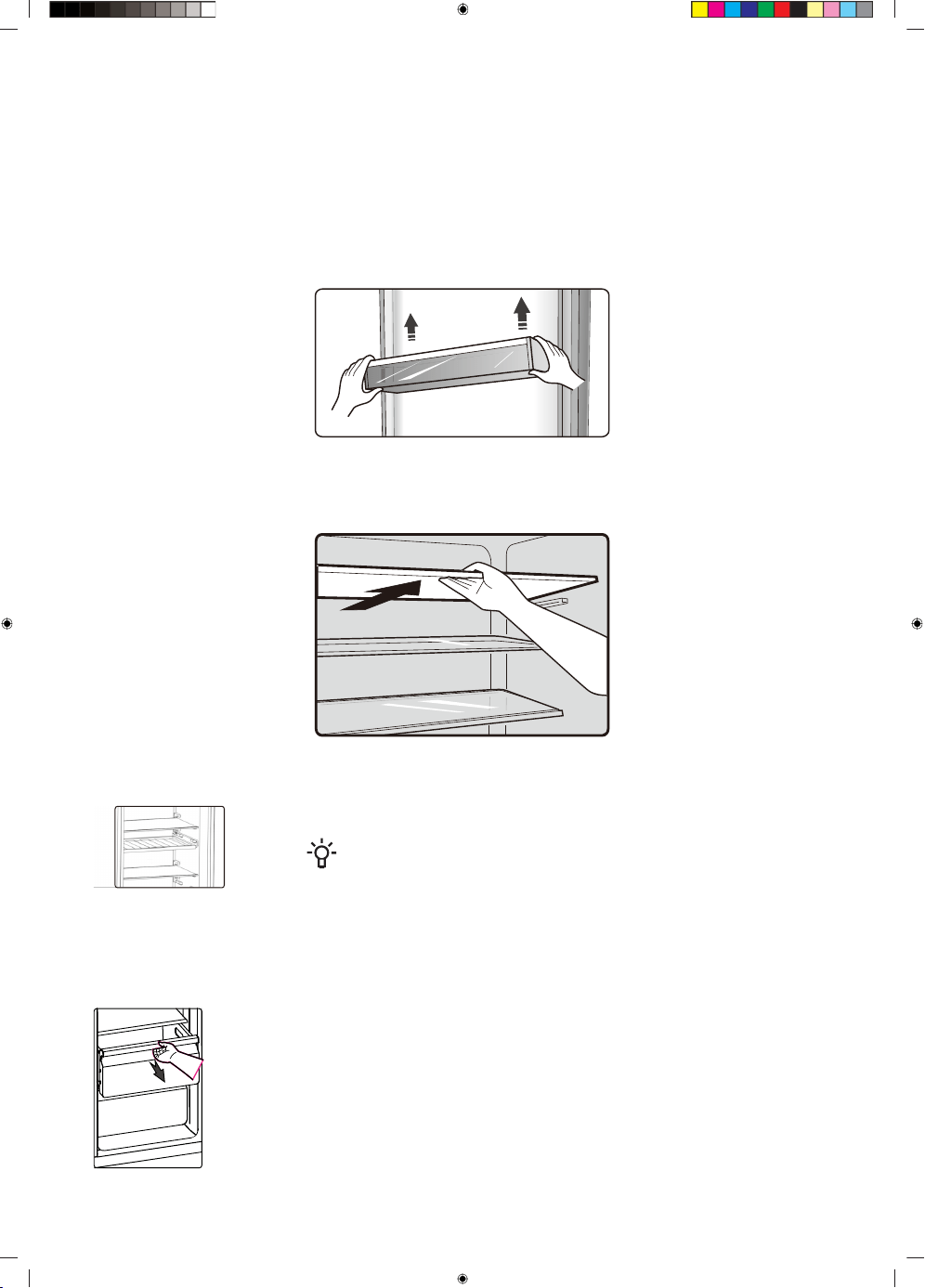
Appliance interior equipment
Your appliance is supplied with a number of accessories and this section describes how best to use
them.
Door rack
It is suitable for the storage of eggs, canned liquid, bottled drinks and packed food, etc. Do not place
too many heavy things in the racks.
Storage shelves
The storage shelves can be taken out to be cleaned.
Flexible wine rack
It is for storing bottled wine or drinks, and it can be taken out to clean.
INFORMATION!
Do not place the bottled wine or drinks directly in front of the air
outlet on the wind channel, which may cause it to freeze.
Drawers
These are suitable for storage of fruits and vegetable. And it can be taken
out to be cleaned.
27
ZeroZone drawer
In this drawer you can get a lower temperature to store fish, meat and other erodible food temporarily.
There are some commendations in the below table which you can consult.
Note: Due to the environment temperature and setting temperature both influence the temperature of
0℃ box (drawer), the actual temperature may change in a certain range. The temperature of this drawer
may lower than zero, so it is normal that liquid in this drawer was frozen.
Crisper and humidity control
You can rotate the knob on the crisper cover to keep different humidity
in the crisper. Push the knob to the left, you will keep a higher humidity
which can storage vegetable and fruit long and fresh, to the right will be
lower humidity. It is for controlling the temperature of the crisper and
avoiding the vegetable losing moisture.
28
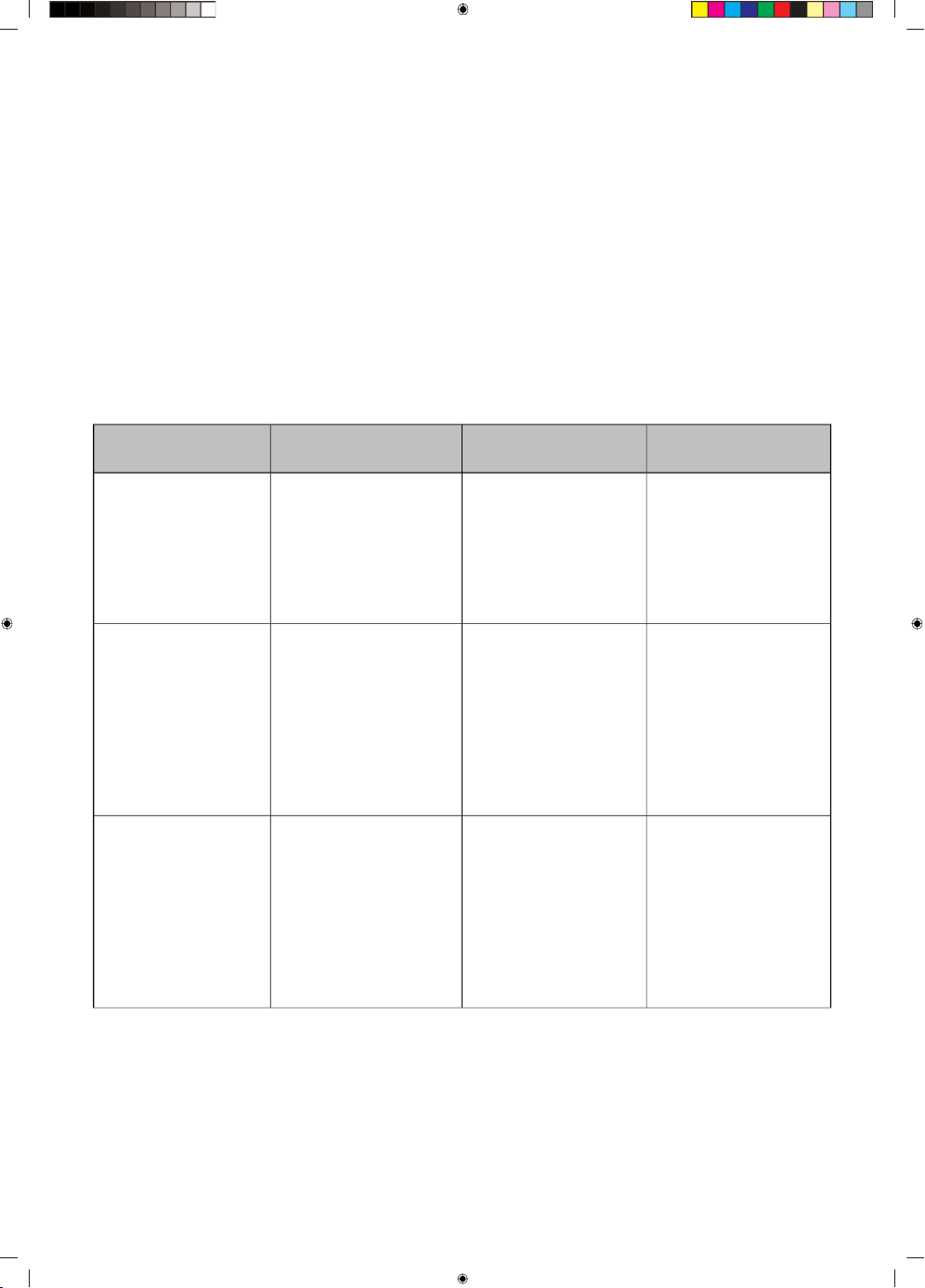
Storing food in the refrigerator (depends of the
model)
Avoid contamination of food
To avoid contamination of food, please respect the following instructions:
• Opening the door for long periods can cause a significant increase of the temperature in the
compartments of the appliance.
• Regularly clean surfaces that can come in contact with food and accessible drainage systems.
• Store raw meat and fish in suitable containers in the refrigerator, so that it is not in contact with
or drip onto other food.
• If the refrigerating appliance is left empty for long periods, switch off, defrost, clean, dry, and leave
the door open to prevent mould developing within the appliance.
Appropriate foodTarget storage tem-
perature [℃]
Compartments
TYPE
Order
Eggs, cooked food,
packaged food, fruits
and vegetables, dairy
products, cakes, Drinks
and other foods which
are not suitable for
freezing.
+2 ≤ +8Refrigerator1
Seafood (fish, shrimp,
shellfish), freshwater
aquatic products and
meat products (recom-
mended time is 3
months – nutrition val-
ues and taste decrease
with time), suitable for
frozen fresh food.
≤ -18(***)*-Freezer2
Seafood (fish, shrimp,
shellfish), freshwater
aquatic products and
meat products (recom-
mended time is 3
months – nutrition val-
ues and taste decrease
with time). Not suitable
for freezing fresh food.
≤ -18***-Freezer3
29
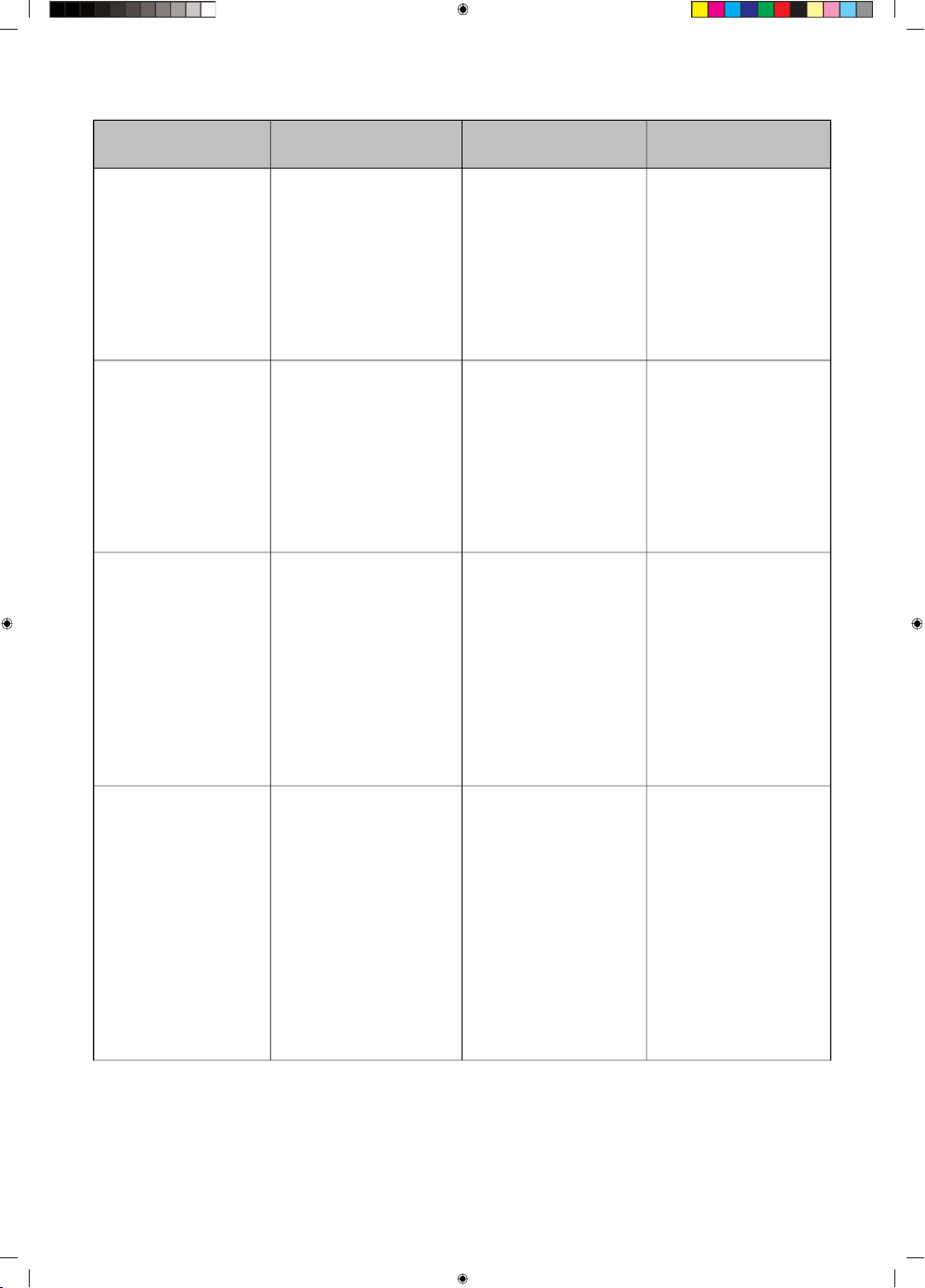
Table continued from last page
Appropriate foodTarget storage tem-
perature [℃]
Compartments
TYPE
Order
Seafood (fish, shrimp,
shellfish), freshwater
aquatic products and
meat products (recom-
mended time is 2
months – nutrition val-
ues and taste decrease
with time). Not suitable
for freeing fresh food.
≤ -12**-Freezer4
Seafood (fish, shrimp,
shellfish), freshwater
aquatic products and
meat products (recom-
mended time is 1
month – nutrition val-
ues and taste decrease
with time). Not suitable
for freeing fresh food.
≤ -6*-Freezer5
Fresh pork, beef, fish,
chicken, some pack-
aged processed foods,
etc. (Recommended to
eat within the same
day, preferably not later
than 3 days). Partially
packed/wrapped up
encapsulated pro-
cessed foods (non-
freezable foods)
-6 ≤ +00-star6
Fresh/frozen pork,
beef, chicken, freshwa-
ter aquatic products,
etc.(7 days below 0 ℃
and above 0 ℃ is re-
commended for con-
sumption within that
day, preferably no
more than 2 days).
Seafood (less than 0 for
15 days, it is not recom-
mended to store above
0 ℃)
-2 ≤ +3Chill7
30
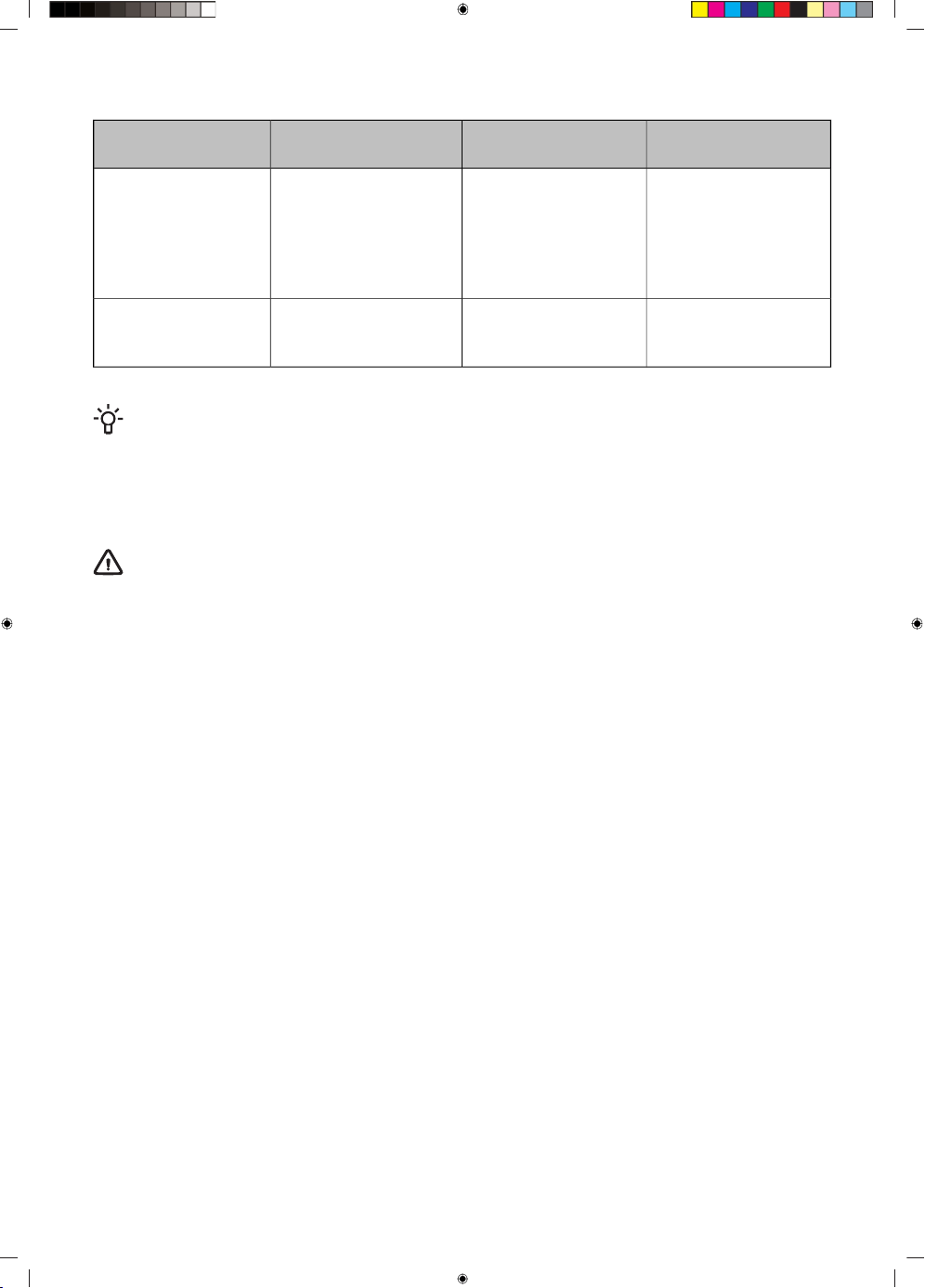
Table continued from last page
Appropriate foodTarget storage tem-
perature [℃]
Compartments
TYPE
Order
Fresh pork, beef, fish,
chicken, cooked food,
etc. (Recommended to
eat within the same
day, preferably no
more than 3 days)
0 ≤ +4Fresh Food8
Red wine,white
wine,sparkling wine
etc.
+5 ≤ +20Wine9
INFORMATION!
Please store different foods according to the compartments or target storage temperature of
your purchased products.
If the refrigerating appliance is left empty for long periods, switch off, defrost, clean, dry, and leave
the door open to prevent mould developing within the appliance.
WARNING!
Food needs to be packed in bags before putting into the refrigerator, and liquids need to be
packed in bottles or capped containers to avoid the problem that the product design structure
is not easy to clean.
31
Cleaning the appliance
For hygienic reasons the appliance (including exterior and interior accessories) should be cleaned
regularly (at least every two months).
WARNING!
The appliance must not be connected to the mains during cleaning. Danger of electrical shock!
Before cleaning switch the appliance off and remove the plug from the mains socket.
Exterior cleaning
To maintain good appearance of your appliance, you should clean it regularly.
• Wipe the digital panel and display panel with a clean, soft cloth.
• Spray water onto the cleaning cloth instead of spraying directly on the surface of the appliance.
This helps ensure an even distribution of moisture to the surface.
• Clean the doors, handles and cabinet surfaces with a mild detergent and then wiped dry with a
soft cloth.
WARNING!
• Do not use sharp objects as they are likely to scratch the surface.
• Do not use Thinner, Car detergent, Clorox, ethereal oil, abrasive cleansers or organic solvent
such as Benzene for cleaning. They may damage the surface of the appliance and may cause
fire.
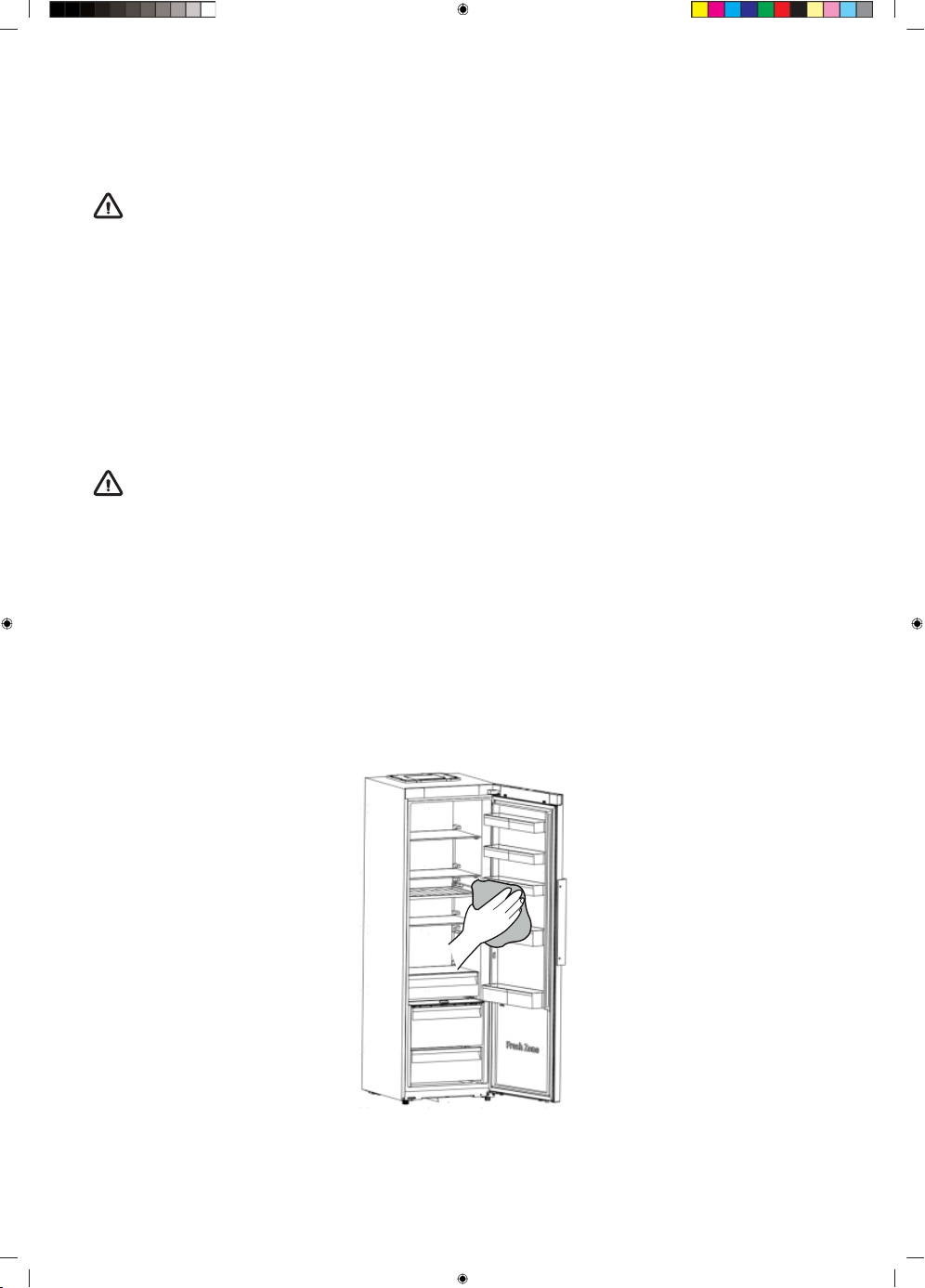
Interior cleaning
You should clean the appliance interior regularly. It will be easier to clean when food stocks are low.
You can remove the drawers and shelves for a more thorough clean. Wipe the inside of the freezer
with a weak solution of bicarbonate of soda, and then rinse with warm water using a wrung-out sponge
or cloth. Wipe completely dry before replacing the shelves and baskets. Thoroughly dry all surfaces
and removable parts before putting them back into place.
32
Although this appliance automatically defrosts, a layer of frost may occur on the freezer compartment’s
interior walls if the freezer door is opened frequently or kept open too long. If the frost is too thick,
choose a time when the freezer is nearly empty and proceed as follow:
1. Remove existing food and accessories baskets, unplug the appliance from the mains power and
leave the doors open. Ventilate the room thoroughly to accelerate the process.
2. When defrosting is completed, clean your freezer as described above.
WARNING!
Do not use sharp objects to remove frost from the freezer compartment. Only after the interior
is completely dry should the appliance be switched back on and plugged back into the mains
socket.
Door seals cleaning
Take care to keep door seals clean. Sticky food and drinks can cause seals to stick to the cabinet
and tear when you open the door. Wash the seals with a mild detergent and warm water. Rinse and
dry them thoroughly after cleaning.
Warning! Only after the door seals are completely dry should the appliance be powered on.
Replacing the LED light
WARNING!
The LED light must be replaced by a competent person.
33
Troubleshooting
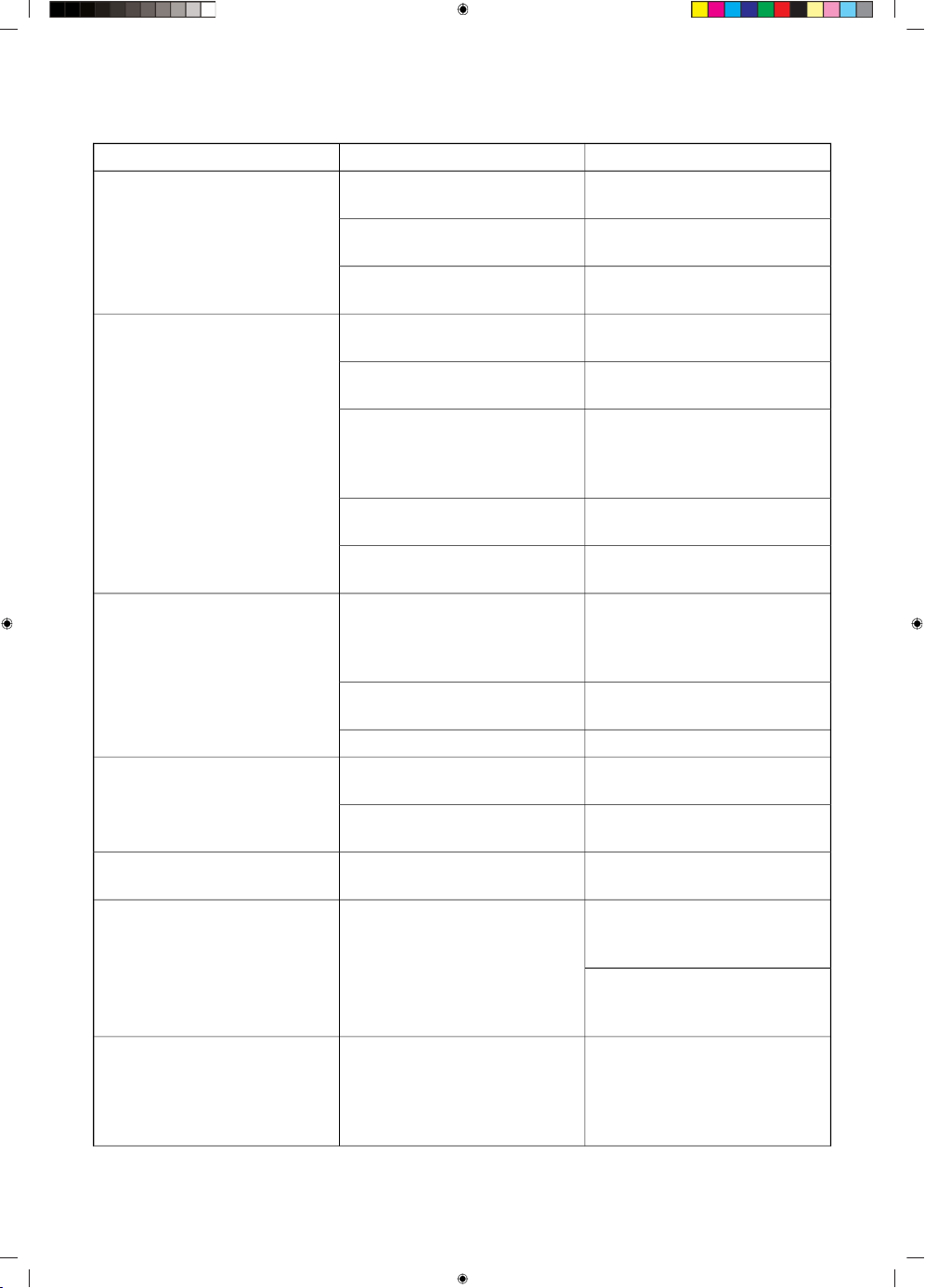
SolutionPossible cause(s)Problem:
Plug refrigerator into a groun-
ded 3 prong outlet.
Refrigerator is unplugged.Appliance is connected to the
power mains but it does not
work.
Reset/Turn on breaker or re-
place fuse.
Breaker is tripped or turned off,
or fuse is blown.
Wait for defrost cycle to end
and cooling system to restart.
Refrigerator is in defrost mode.
This is normal. Allow 24 hours
for the refrigerator to cool down.
Refrigerator is first plugged in.Refrigerator compressor runs
frequently or for long periods of
time
This is normal.Warm or large amounts of food
added.
Note: This refrigerator is de-
signed to run for longer periods
of time at a lower energy usage.
Check that an item is not pre-
venting door from closing. Level
the refrigerator. See “Level Re-
frigerator”.
Door is left open, or refrigerator
is not level.
This is normal.Hot weather or frequent open-
ings.
Adjust temperature to a warmer
setting.
Temperature control set to
coldest setting.
Reseal packaging. Place an
opened box of baking soda in
the refrigerator, replace every 3
months.
Food is not sealed or packaged
properly.
Refrigerator has an odor
Clean the interior. See “Clean-
ing”.
Interior needs to be cleaned.
Dispose of spoiled food.Food stored too long.
Plug refrigerator into a groun-
ded 3 prong outlet.
Refrigerator is unplugged.Light does not come on
Contact a qualified technician
to replace the burned out LED.
LED light is burned out.
See “Level Refrigerator”.Refrigerator is not resting firmly
on floor.
Vibration or rattling
Refrigerant flowing in the lines
will make this sound when the
compressor starts and stops.
It sounds like water is flowing
from the refrigerator.
Normal Sounds
The refrigerator has an automat-
ic defrosting system. The defros-
ted water will make this sound.
The compressor and fans used
for cold air circulation can make
this sound. If the refrigerator is
not level, the sound will be
louder.
Humming or buzzing soundsNormal Sounds
34
Table continued from last page
SolutionPossible cause(s)Problem:
The interior parts will make this
sound as they contract and ex-
pand in response to temperat-
ure changes.
Cracking or clicking sounds
May occur during automatic
defrosting.
Popping noise
Adjust the compartment to a
colder setting; allow 24 hours
for the temperature to adjust.
Temperature control is not set
cold enough.
Refrigerator or freezer is too
warm
Limit door openings to maintain
the internal temperature. Check
that an item is not preventing
door from closing.
Doors opened frequently or left
open.
Allow time for food and refriger-
ator to cool.
Warm food added recently.
Allow 5 cm space between the
back of the refrigerator and the
wall.
The space between the back of
the refrigerator and the wall is
too close.
Store items only inside the trim
of the glass shelves; don’t place
items against sides of the com-
partments or directly in front of
any vents.
Items against back of compart-
ments are blocking proper air-
flow.
Adjust temperature in the com-
partment to the next warmer
setting; allow 24 hours for tem-
perature to adjust.
Temperature control is set too
cold.
Refrigerator or freezer is too
cold
This is normal during times of
high humidity. Dry surface and
adjust temperature to a slightly
colder setting.
High humidityMoisture on exterior/interior of
refrigerator
Keep door closed. Check that
an item is not preventing the
door from closing. Level the re-
frigerator. See “Level Refrigerat-
or”.
Doors opened frequently or left
open.
Level the refrigerator. See
“Level Refrigerator”.
Refrigerator is not level.Frost or ice crystals on frozen
food
Move items away from rear wall.Items blocking freezer air vents
and preventing proper air flow.
Move items away from rear wall.Food placed too close to the air
vent.
Refrigerator or freezer is too
cold
The password for home Wi-Fi network was entered incorrectly.
Make sure the password is correct and connect again.
Unable to connect appliance to
WiFi network
35
Table continued from last page
SolutionPossible cause(s)Problem:
The home Wi-Fi router frequency is not 2.4GHz.The appliance
only supports 2.4GHz radio frequency . Set up a dedicated 2.4GHz
Wi-Fi SSID and connect the appliance to it.
The router and appliance kept far apart causing the poor network.
Consider either moving the router closer to the appliance or pur-
chasing Wi-Fi range extender and installing it.
If the above tips do not resolve your problem, call the nearest authorized service centre and state the
type, model, and serial number indicated on the appliance rating plate or label located in the appliance
interior.
36
Information about appliance noise
Cooling in refrigerator freezers is made possible by a cooling system that also includes a compressor
(and a fan with some appliances), which generates some noise. The level of noise depends on
installation, proper use, and age of the appliance.
• After connecting the appliance to the power mains, compressor operation, or the sound of flowing
liquid, may be somewhat louder. This is not a sign of malfunction and it will not affect the useful
life of the appliance. In time, appliance operation and this noise will become quieter.
• Sometimes, unusual or loud noises may appear during appliance operation; these are mostly the
result of improper installation:
- The appliance must stand level and stable on a solid base.
- The appliance may not be in contact with a wall or adjacent furniture.
- Make sure the interior equipment sits firmly in its place and that the noise is not caused by
rattling cans, bottles or other containers placed next to each other.
• Due to the higher workload on the cooling system when the door is opened more frequently or
for a longer time, when a large amount of fresh food is introduced or when intensive freezing or
cooling functions are activated, the appliance can temporarily generate more noise.
37
Spare parts
Functional spare parts for the purchased appliance will be available for at least 10 years from the date
the last unit of the model was placed on the market. During this time, original spare parts will be
available to ensure the correct operation of your appliance. A list of spare parts and repair tips in
accordance with the current Ecodesign Directive can be found by scanning the QR code included
with the appliance. Or on the following link: https://auid.connectlife.io.
38
Your notes
39
www.gorenje.com