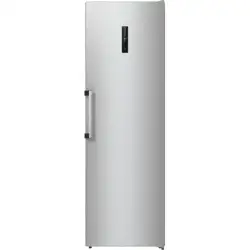
INSTRUCTIONS FOR USE
OF A REFRIGERATOR
We thank you for the trust you have shown by purchasing our appliance which is
designed to simplify your life. This instruction manual is supplied to make the use of
this product easier. The instructions should allow you to learn about your new appliance
as quickly as possible.
We wish you find a lot of pleasure in its use.
Please visit our website where you can enter your appliance model number, indicated
on the rating plate or the warranty sheet, to find detailed description of your appliance,
tips on use, troubleshooting, service information, instructions for use etc.
http://www.gorenje.com
Link to the EU EPREL database
The QR code on the energy label supplied with the appliance provides a web link to
the registration of this appliance in the EU EPREL database. Keep the energy label for
reference together with the user manual and all other documents provided with this
appliance. It is possible to find information related to the performance of the product
in the EU EPREL database using the link https://eprel.ec.europa.eu and the model name
and product number that you can find on the rating plate of the appliance. For more
detailed information about the energy label, visit www.theenergylabel.eu.
The appliance is intended solely for household use.
The refrigerator is intended for storing fresh food at temperatures above 0°C.
The following symbols are used throughout the manual and they have the following meanings:
INFORMATION!
Information, advice, tip, or recommendation
WARNING!
Warning – general danger
ELECTRIC SHOCK!
Warning – danger of electric shock
DANGER OF FIRE!
Warning – danger of fire

Contents
5Important notes and precautions ..........................................................................................
5Before using the appliance for the first time .............................................................................
5Important safety instructions ....................................................................................................
8Important information on the use of appliance .........................................................................
10Environment protection ............................................................................................................
10Advice for saving power with refrigeration appliances .......................................................
11Installation and connection ....................................................................................................
11Selecting the room ....................................................................................................................
12Appliance placement ................................................................................................................
13Connecting the appliance .........................................................................................................
14Reversing the door opening direction ..................................................................................
19Description of the appliance ..................................................................................................
20Operating the appliance .........................................................................................................
21Switching the appliance on/off .................................................................................................
21Adjusting the temperature in the appliance ..............................................................................
21Control unit/display standby mode ...........................................................................................
21Intensive cooling (super cool) ...................................................................................................
22Eco function ..............................................................................................................................
23Child lock ..................................................................................................................................
23High temperature alarm ............................................................................................................
23Open door alarm .......................................................................................................................
24Power outage/power supply failure alarm ................................................................................
25Appliance interior equipment ................................................................................................
25Shelf ..........................................................................................................................................
25Wire bottle rack * ......................................................................................................................
25Fruit and vegetables drawer with humidity control (CrispZone) * ............................................
25FreshZone drawer * ..................................................................................................................
26ZeroZone drawer * ...................................................................................................................
27Turning the ZeroZone drawer into a fruit and vegetables drawer * .........................................
27Fruit and vegetables drawer .....................................................................................................
28Door racks ................................................................................................................................
28Fan (DynamicAir) * ....................................................................................................................
28Air distribution system (MultiFlow) * .........................................................................................
29AdaptTech ................................................................................................................................
29Recommended distribution of food in the appliance ..........................................................
30Storing food in the refrigerator ..............................................................................................
30Important warnings regarding food storage .............................................................................
30Avoid contamination of food .....................................................................................................
30Defrosting the appliance ........................................................................................................
30Automatic refrigerator defrosting ..............................................................................................
31Cleaning the appliance ...........................................................................................................
32Troubleshooting ......................................................................................................................
3

Important notes and precautions
Before using the appliance for the first time
Before connecting the appliance to the power mains, please read carefully the instructions for use
which describe the appliance and its correct and safe use. The instructions apply to several appliance
types/models; thus, settings or equipment may be described herein which is not available in your
appliance. We recommend saving this instruction manual for future reference and attach it to the
appliance if it is sold in the future.
Check for any damage or irregularities on your appliance. If you find your appliance is damaged, notify
the retailer from which you have purchased the appliance.
Before connecting the appliance to the power mains, let the appliance rest in a vertical position for a
minimum of 2 hours. This will reduce the possibility of operation faults due to the effect of transport
on the cooling system.
Important safety instructions
DANGER OF FIRE!
WARNING! Risk of fire/flammable materials.
The appliance must be connected to the power mains and
grounded in compliance with the effective standards and
regulations.
WARNING! Do not locate multiple portable socket-outlets or
portable power supplies at the rear of the appliance.
Before cleaning the appliance, unplug it from the power mains
(unplug the power cord from the wall outlet).
ELECTRIC SHOCK!
WARNING! If the supply cord is damaged, it must be
replaced by the manufacturer, its service agent or similarly
qualified persons in order to avoid a hazard.
5
ELECTRIC SHOCK!
WARNING! When positioning the appliance, ensure the
supply cord is not trapped or damaged.
ELECTRIC SHOCK!
If LED lighting does not work, call a service technician. Do
not attempt a repair of the LED lighting yourself, as there is
danger of contact with high voltage!
WARNING!
WARNING! Do not use electrical appliances inside the food
storage compartments of the appliance, unless they are of
the type recommended by the manufacturer.
WARNING!
WARNING! Do not use mechanical devices or other means
to accelerate the defrosting process, other than those
recommended by the manufacturer.
WARNING!
WARNING! To avoid any hazard resulting from poor stability
of the appliance, make sure it is installed as instructed.
Freeze burn hazard
Never put frozen food in your mouth and avoid touching frozen
food as this may cause frostnip or frostbite.
6

Safety of children and vulnerable persons
The appliance is not intended for use by persons (including
children) with reduced physical, sensory or mental capabilities,
or lack of experience and knowledge, unless they have been
given supervision or instruction concerning use of the appliance
by a person responsible for their safety.
Children should be supervised to ensure that they do not play
with the appliance.
Cleaning and user maintenance shall not be made by children
without supervision.
Remove the packaging intended to protect the appliance or
particular parts during transport and keep it outside the reach
of children. It presents danger of injury or suffocation.
When removing a used appliance, disconnect the power cord,
remove the door, and leave the shelves in the appliance. This
will prevent children from locking themselves in the appliance.
For European markets only
This appliance can be used by children aged from 8 years and
above and persons with reduced physical, sensory or mental
capabilities or lack of experience and knowledge if they have
been given supervision or instruction concerning use of the
appliance in a safe way and understand the hazards involved.
Children shall not play with the appliance.
Cleaning and user maintenance shall not be made by children
without supervision.
7
Children aged from 3 to 8 years are allowed to load and unload
refrigerating appliances.
Warning regarding the refrigerant
The appliance contains a small amount of an environmentally
friendly yet flammable gas R600a. Make sure that no parts of
the cooling system are damaged. A gas leak is not hazardous
to the environment, but it could cause eye injury or fire.
In case of a gas leak, ventilate the room thoroughly, disconnect
the appliance from the power mains, and call a service
technician.
Important information on the use of appliance
WARNING! This appliance is intended to be used in household
and similar applications such as:
•
staff kitchen areas in shops, offices and other working
environments;
•
farm houses and by clients in hotels, motels and other
residential type environments;
•
bed and breakfast type environments;
•
catering and similar non-retail applications.
8
WARNING!
WARNING! Keep ventilation openings, in the appliance
enclosure or in the built-in structure, clear of obstruction.
The appliance may not be used outdoors and it may not be
exposed to rain.
Do not store explosive substances such as aerosol cans with
a flammable propellant in this appliance.
If the appliance will be out of use for an extended period of
time, switch it off using the relevant button, and unplug it from
the power mains. Empty the appliance, defrost it, clean it, and
leave the door ajar.
In case of an error or power supply failure, do not open the
freezer compartment unless the freezer has not operated for
over 16 hours. After this period, use the frozen food or provide
sufficient cooling (e.g. a replacement appliance).
Technical information on the appliance
Rating plate can be found in the appliance interior. It indicates
data on voltage, gross and net volume, type and amount of
refrigerant, and information on the climate classes.
If the language on the rating plate is not the language of your
choice or the language of your country, replace it with the one
supplied.
WARNING!
WARNING! Do not damage the refrigerant circuit. This will
also prevent pollution.
9
Environment protection
Packaging is made of environmentally friendly materials that can be recycled, disposed of, or destroyed
without any hazard to the environment.
Removing an obsolete appliance
To protect the environment, take the obsolete appliance to an authorized home appliance collection
centre.
Before doing so, do the following:
• disconnect the appliance from the power mains;
• do not allow children to play with the appliance.
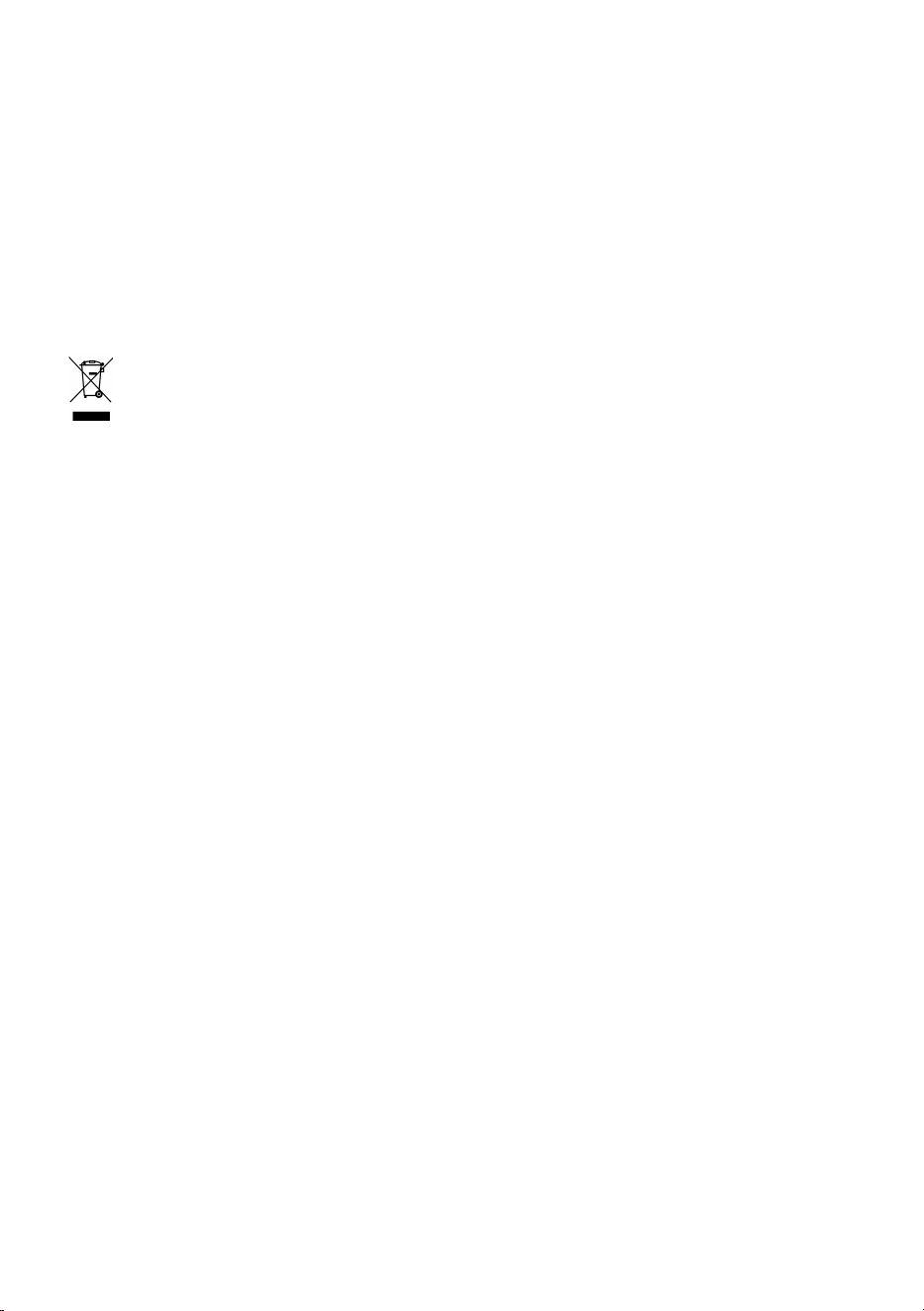
The symbol on the product or its packaging indicates that the product should not be treated
as normal household waste. The product should be taken to an authorized collection centre for waste
electric and electronic equipment processing. Correct disposal of the product will help prevent any
negative effects on the environment and health of people which could occur in case of incorrect
product removal. For detailed information on removal and processing of the product, please contact
the relevant municipal body in charge of waste management, your waste disposal service, or the store
where you bought the product.
Advice for saving power with refrigeration
appliances
• Install the appliance as specified in the instruction manual.
• Do not open the door more often than necessary.
• Occasionally make sure air circulation underneath the appliance is unobstructed.
• If the gasket is damaged or does not provide a perfect seal for any reason, have it replaced as
soon as possible.
• Store the food in tightly sealed containers or appropriate packaging.
• Before placing the food in the refrigerator, allow it to cool down to room temperature.
• Defrost frozen food in the refrigerator compartment.
• To make use of the entire freezer compartment interior volume, remove some of the drawers as
described in the instruction manual.
• Defrost your conventional freezer when an approximately 3–5 millimetre layer of frost or ice has
built up on the refrigerated surfaces.
• Make sure the layout of shelves in the compartment is uniform and that the food is placed so that
the air can freely circulate in the appliance interior (observe the recommended placement of food
as described in the instructions).
• In appliances with a fan, do not block the fan slots or vents.
• If you do not need the fan or the ionizer, switch them off to reduce power consumption.
10
Installation and connection
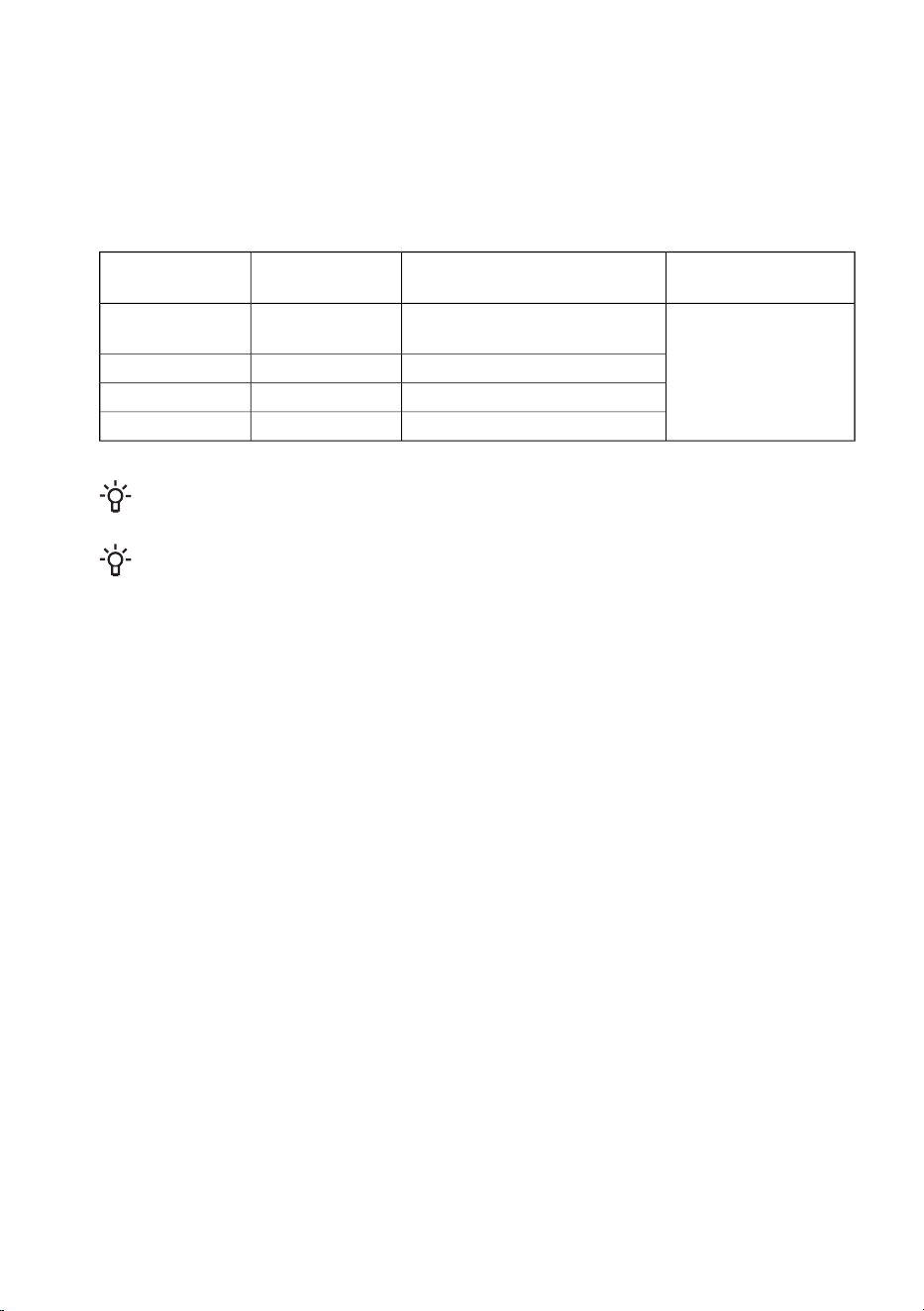
Selecting the room
• Install the appliance in a dry and well ventilated room. The appliance will operate correctly if the
environment temperature is in the interval specified in the table. The appliance class is indicated
on the rating plate / label with the basic information on the appliance.
Relative humidity
Ambient temperature range
°C
ClassDescription
≤75%
+10 to +32
SN
Extended
temperate
+16 to +32NTemperate
+16 to +38STSubtropical
+16 to +43TTropical
INFORMATION!
This appliance is not intended to be used as a build-in appliance.
INFORMATION!
Do not place an appliance in a room where temperature can drop to below 5 °C as this may
cause abnormal appliance operation or failure!
• After the installation, the appliance mains plug should be accessible!
• Do not place the appliance near appliances or devices radiating heat, such as a cooker, a stove,
a radiator, water heater etc., and do not expose it to direct sunlight. The appliance should stand
at least 3 cm away from an electric or gas cooker or at least 30 cm away from an oil or solid fuel
stove. If the distance between such source of heat and the appliance is smaller, use an insulating
panel.
Note: Place the appliance in a sufficiently large room. There should be at least 1 m
3
of space per 8
grams of refrigerant. Amount of refrigerant is indicated on the rating plate in the appliance interior.
11
Appliance placement
Appliance installation should be carried out by at least two persons to avoid any personal injury or
damage to the appliance.
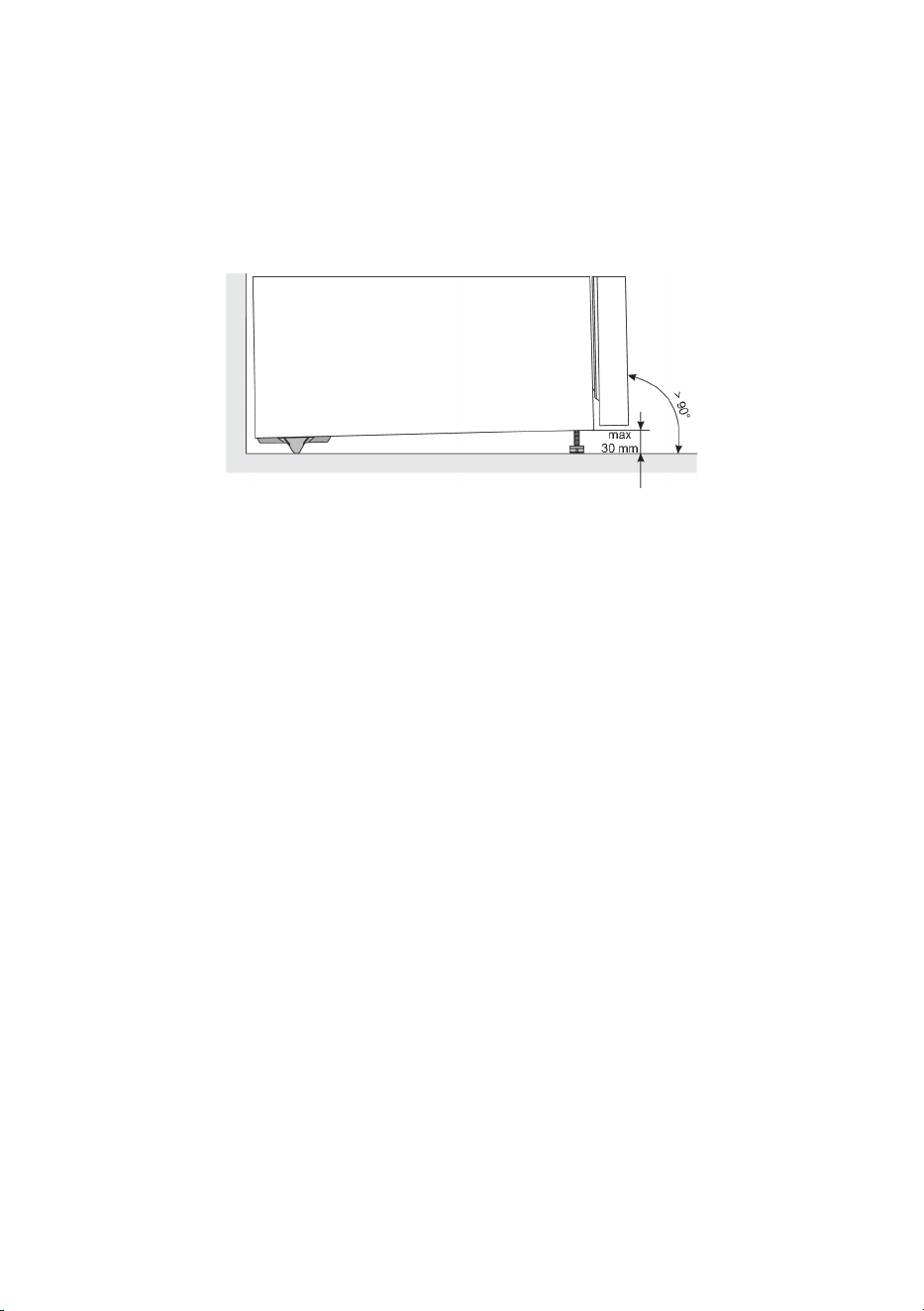
• The appliance must stand level or tilted slightly to the back. It should be stable and placed a solid
base. At the front, the appliance is fi tted with two adjustable feet that can be used to level the
appliance. At the rear side, casters allow for easier installation of the appliance (only with some
models).
• After you have levelled the appliance using the adjustable feet, adjust the additional foot for extra
stability of the appliance.
• Do not expose the appliance to direct sunlight and do not place it near sources of heat. If this
cannot be avoided, install an insulation panel.
• The appliance is intended for free-standing installation. To reach the rated/minimum power
consumption, always provide 50 mm of clearance between the wall and the back of the appliance,
and above the appliance. Also allow adequate air circulation on either side of the appliance and
above it.
• The appliance can also be placed adjacent to or between kitchen cabinets or cupboards, or
adjacent to a wall. In case of such placement, the appliance will operate flawlessly; however,
power consumption could increase. Observe the minimum clearance above and behind the
appliance, as indicated in the figure.
12
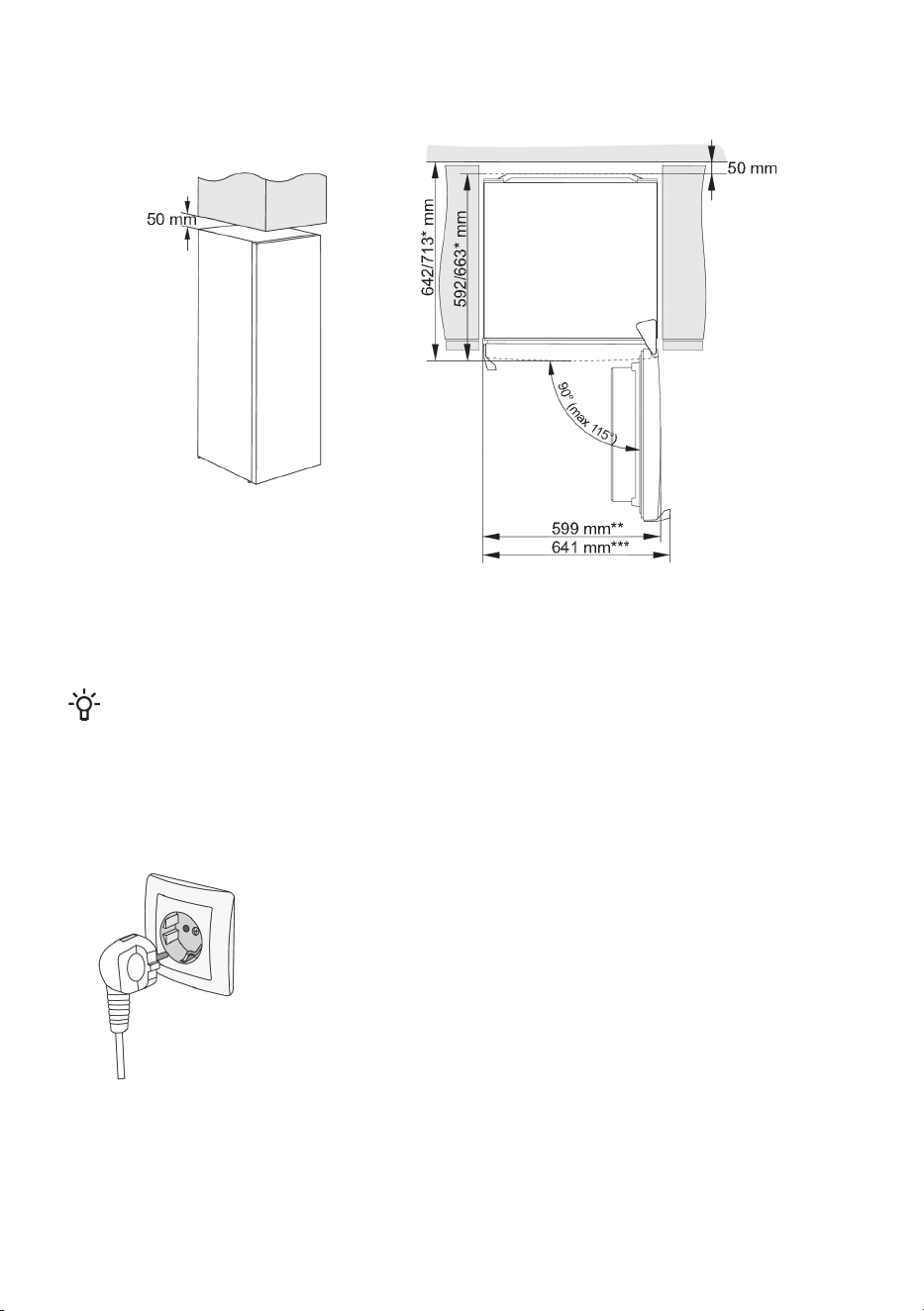
• Take into account the space or clearance required to open the appliance door, in order to allow
the drawers and shelves to be pulled out or removed (see installation diagram).
* depending on the model
** model with integrated handle
*** model with external/protruding handle
INFORMATION!
Note: When placing the appliance on a plinth with a depth of less than 625 mm, it is recommended
that you purchase and install a security kit.
Code for ordering the set: 890399.
Connecting the appliance
• Connect the appliance to the power mains using the power cord.
The wall outlet should be fitted with a ground contact (safety socket).
Nominal voltage and frequency are indicated on the rating plate/label
with basic information on the appliance.
• The appliance must be connected to the power mains and grounded
in compliance with the effective standards and regulations. The
appliance will withstand short-term deviations from the nominal
voltage, but not more than +/- 6%.
13
Reversing the door opening direction
The direction in which the appliance door opens can be reversed.
Note: Disconnect the appliance from the power mains before reversing the door opening direction.
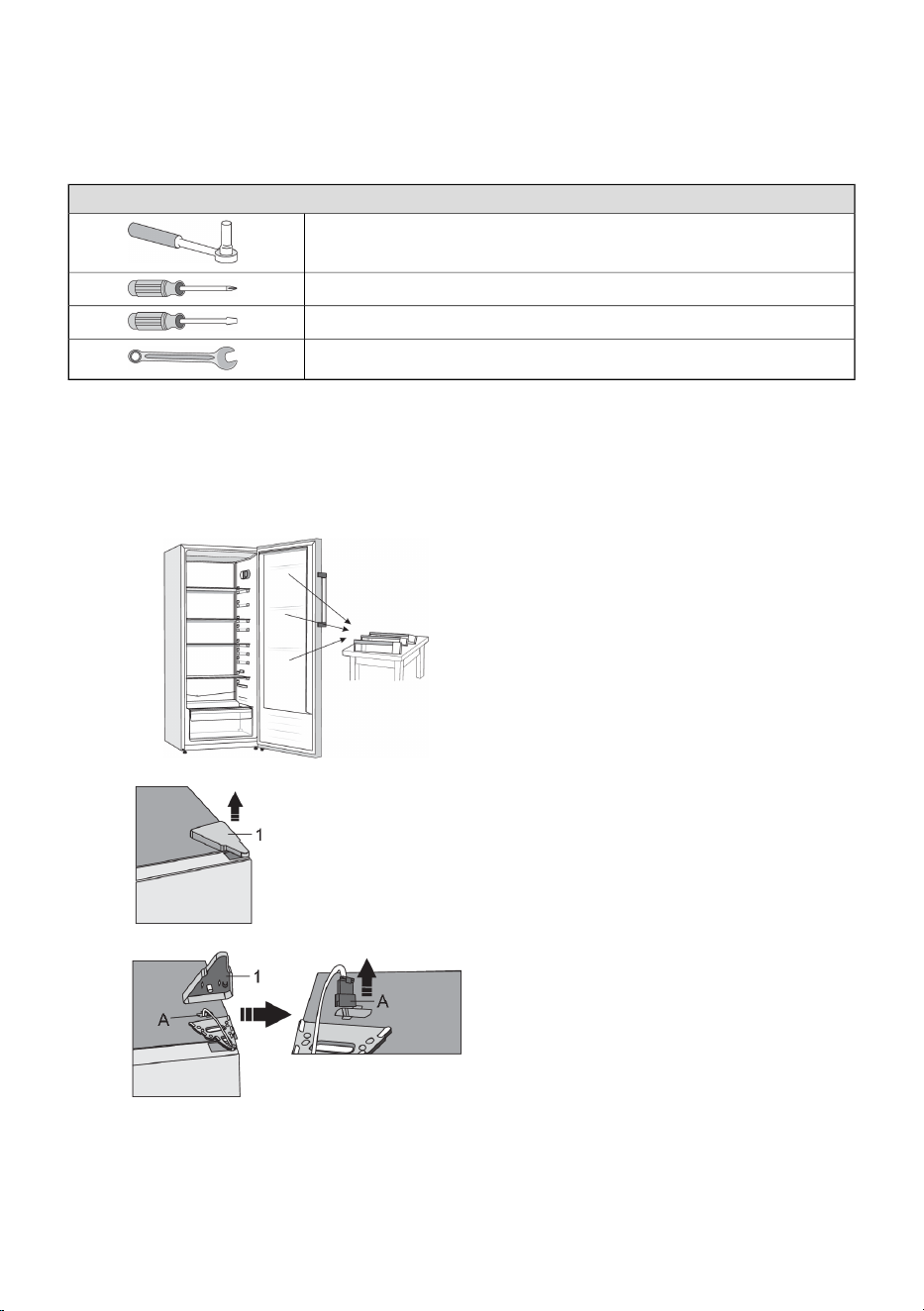
Tools required:
Socket wrench No. 8,
Cross-point screwdriver
Flat screwdriver
Spanner No. 8
Note:
• If the appliance has to be tilted to allow access to parts on the bottom, ask another person for
assistance or gently place the appliance on some soft padding to prevent damaging it. To reverse
the opening direction, proceed as follows.
1. Place the appliance in an upright position.
Open the door and remove the door racks
(to prevent damaging them during the
procedure). Then, close the door.
2. Remove the top hinge cap (1). Be
particularly careful not to damage the
connector (A). Unplug the connector (A).
14
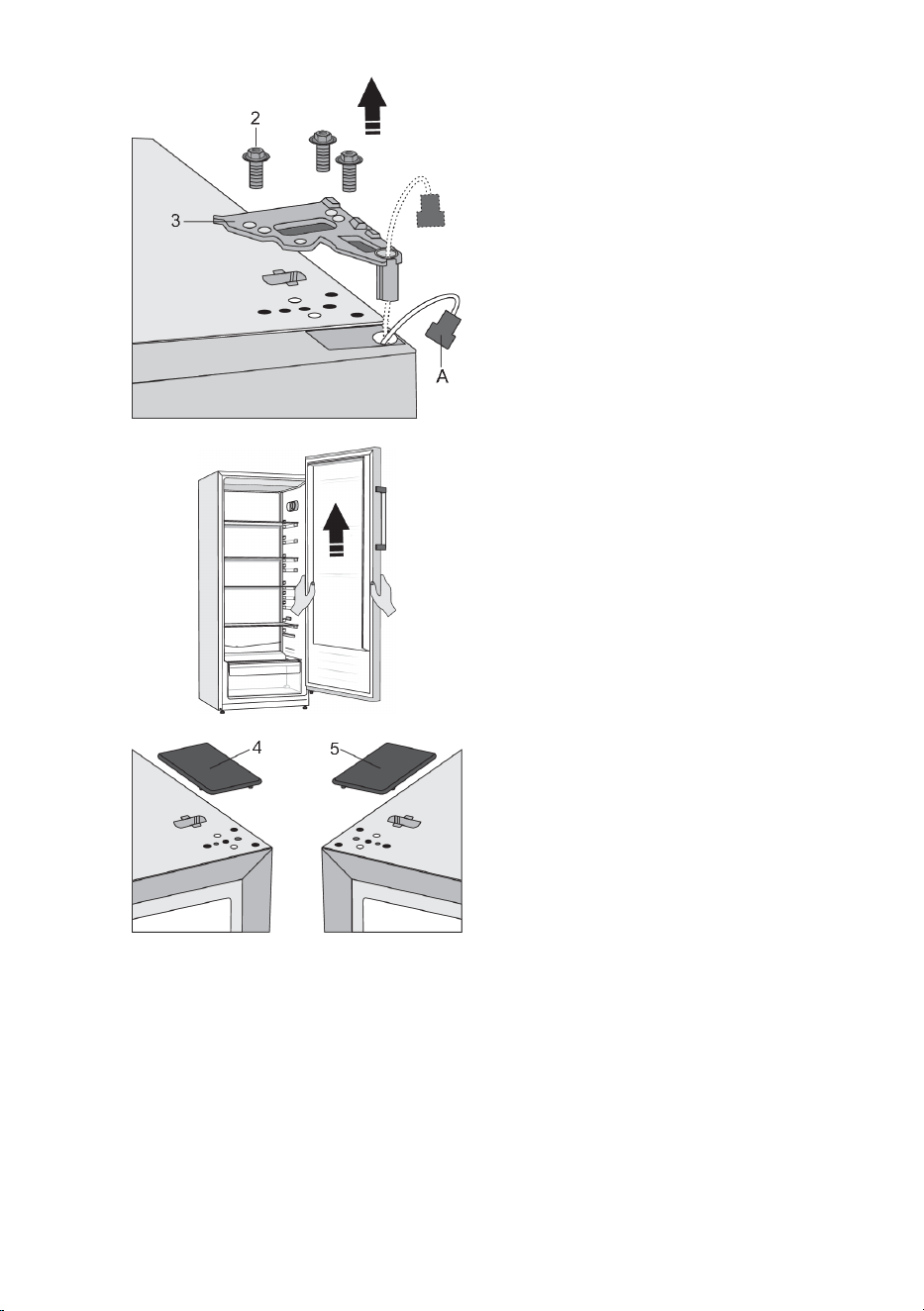
3. Undo the screws (2) and remove the hinge
(3). Run the connector (A) through the hole
in the hinge. Hold the door while doing this
to prevent it from falling.
4. Remove the door from the bottom hinge
by carefully lifting the door straight up. Lay
the door onto a smooth surface.
5. Take the (right) cap/cover (4) from the bag
and place it on the spot from which the top
hinge was removed. Remove and save the
cap/cover from the other side (5) to which
the hinge will be relocated.
15
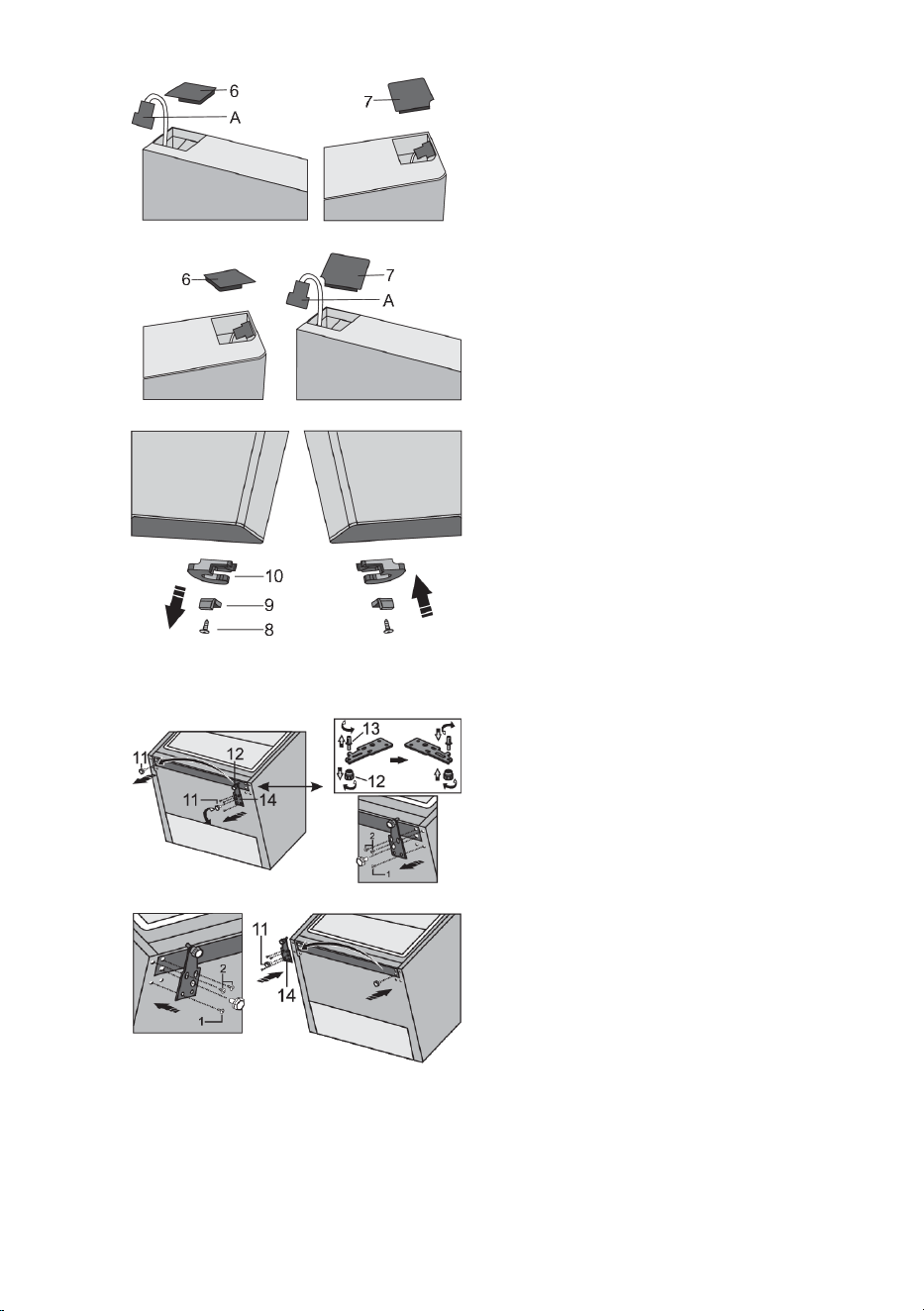
6. Remove the cap (6) from the left side of the
door and take the connector (A) from the
space underneath the cap. Then, remove
the cap (7) from the right side of the door.
Place the cap (7) on the left side of the door
and place the cap (6) on the right side of
the door.
7. Undo the screw (8) and remove the door
retainer (10) and the door stop (9). Then,
use a screw (8) to install the door retainer
supplied in the bag, and the door stop (9).
Keep the door retainer (10) in case you
need it later.
8. Tilt the appliance backwards and remove the adjustable foot (11).
9. Undo the three screws on the bottom hinge
(14) and remove it. Remove the extra foot
(12) from the bottom hinge pin (13).
Unscrew the pin (13) from the bottom hinge
and screw it onto the opposite side of the
hinge, complete with the extra foot (12).
10. Attach the hinge (14) onto the opposite side
using the screws. The screws should be
attached in the order shown in the figure
below. First, tighten the screw 1, followed
by screws 2. Then, screw on the adjustable
feet (11).
16
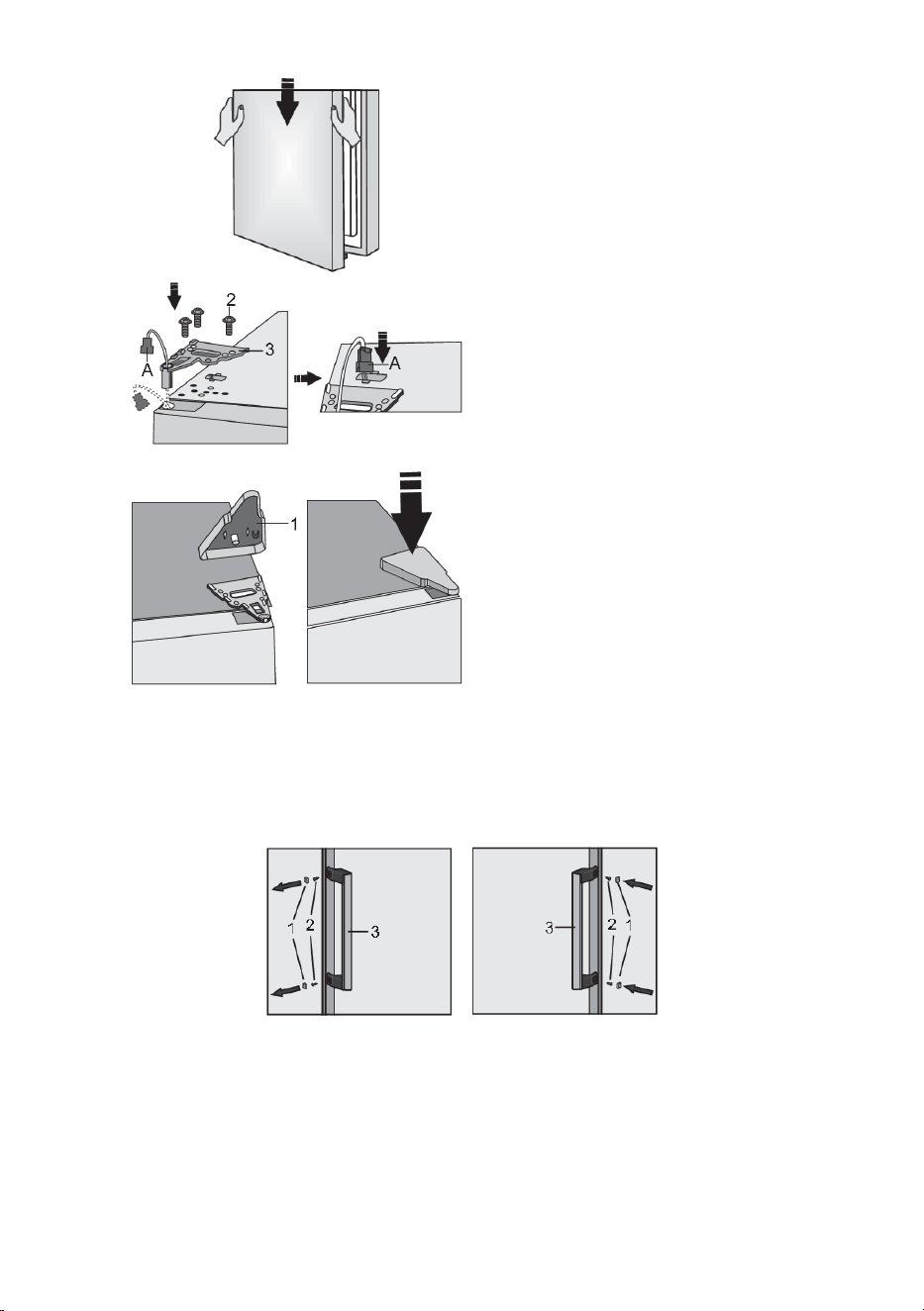
11. Correctly position the top door, run the
connector (A) through the hole in the top
hinge (3) and use the screws (2) to attach
it. Hold the door in place while positioning
it. Connect the connector (A).
12. Replace the upper hinge cap (1).
13. Open the door and replace the door racks/shelves. Close the door again.
Note: If your model has a handle, then move it to the opposite side by following the instructions below.
Remove the caps (1) and undo the two screws (2) as shown in the figure. Rotate the handle (3) by
180° and replace it on the opposite side. Then, fasten the screws (2) and replace the caps (1).
17
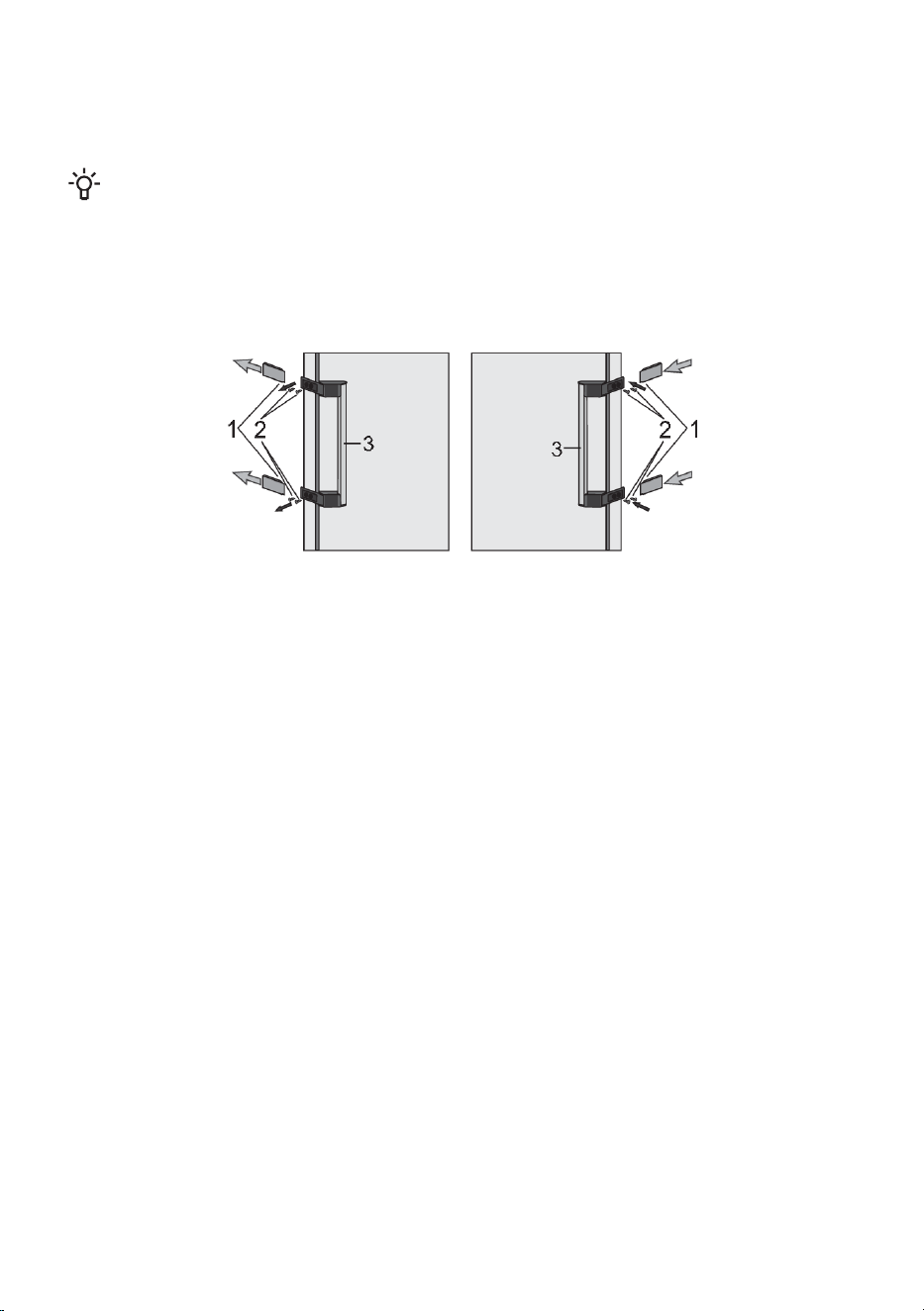
Replacement of the hinged handle (only with some models)
Note: If your model has a hinged handle, then move it to the opposite side by following the instructions
below:
INFORMATION!
To replace a hinged handle, the door must be open.
1. Remove the cover plates (1) as shown in the figure.
2. Undo the four screws (2).
3. Rotate the handle (3) by 180° and replace it on the opposite side. Then, fasten the screws (2) and
replace the cover plates (1).
18
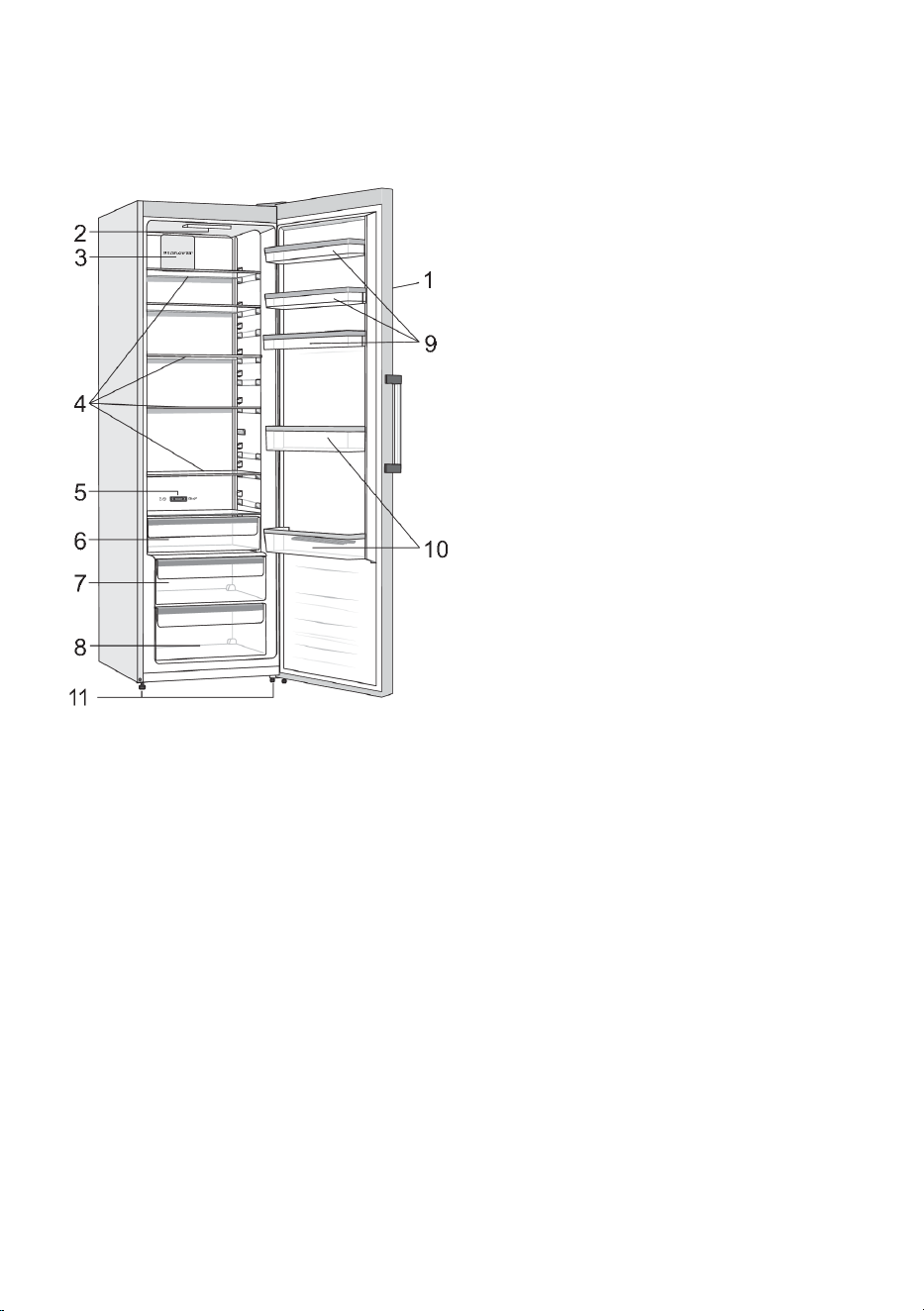
Description of the appliance
Appliance interior equipment may change according to the appliance model.
This product contains a light source of energy efficiency class G.
1. Control panel
2. LED lighting
3. Fan/MultiFlow *
4. Glass shelves
5. Slider for converting the ZeroZone drawer
into a fruit and vegetables bin *
6. Drawer FreshZone/ZeroZone *
7. Fruit and vegetables drawer CrispZone with
humidity control *
8. Fruit and vegetables drawer
9. Low door racks
10. Bottle shelf
11. Foot
• The drawers are fitted with a system that prevents them from being unintentionally pulled out. To
remove a drawer from the appliance, pull it out as far as it will go, then lift at the front and pull out
completely.
* Only in some models
19
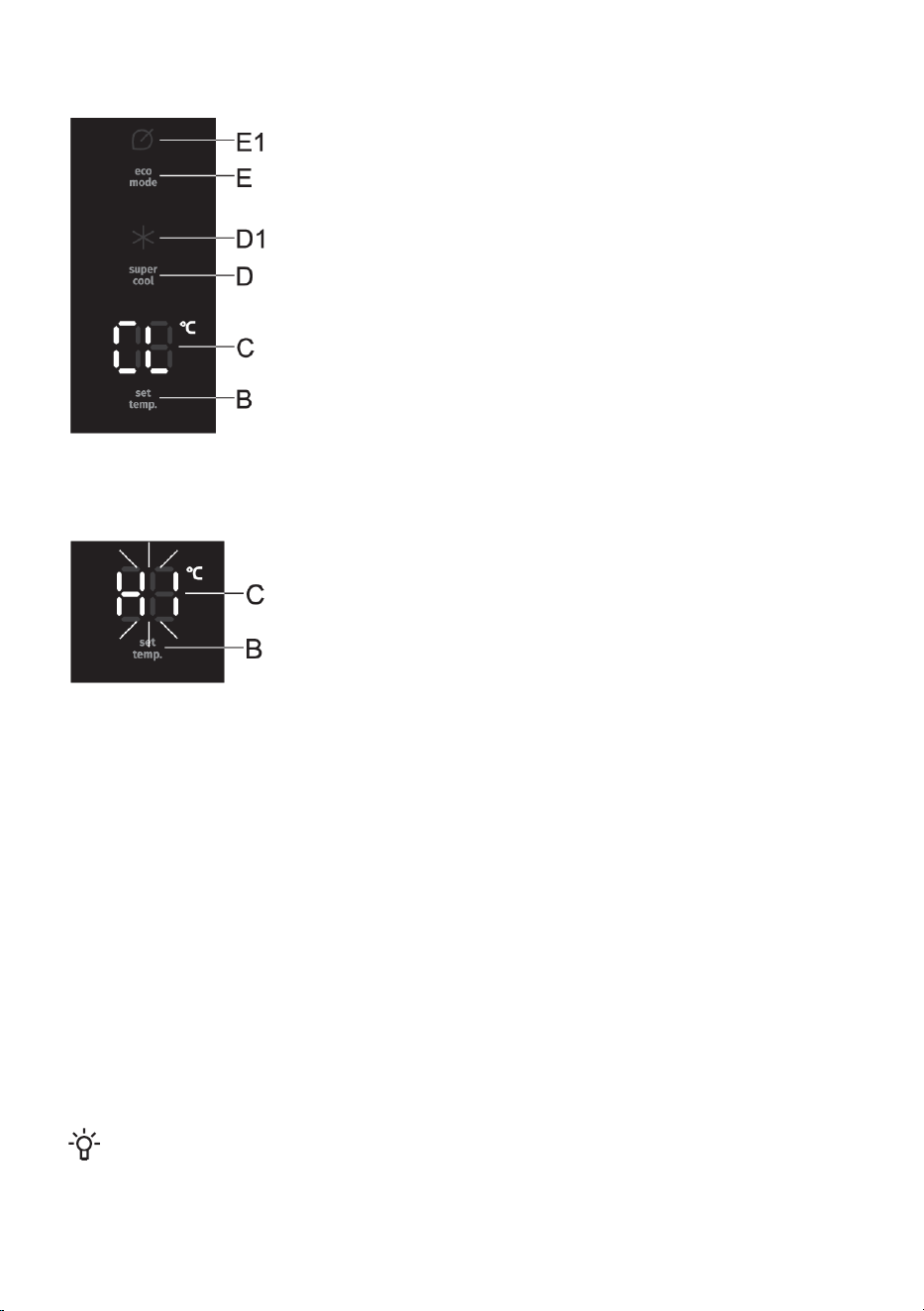
Operating the appliance
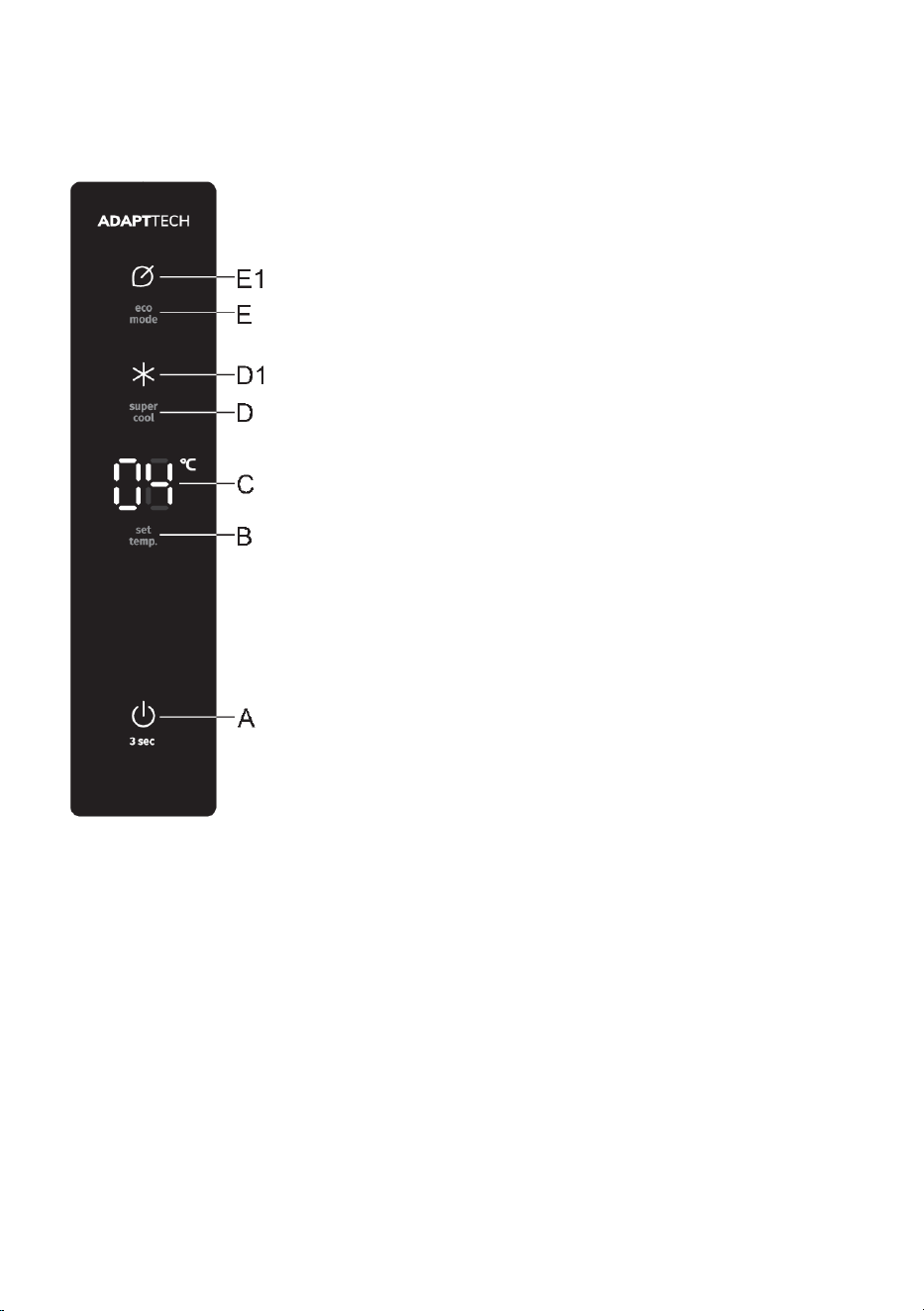
Appliance on/off keyA
Temperature setting keyB
Set temperature displayC
Intensive cooling (super cool) on/off keyD
Intensive cooling (super cool) function indicatorD1
Eco function on/off keyE
Eco function indicatorE1
20
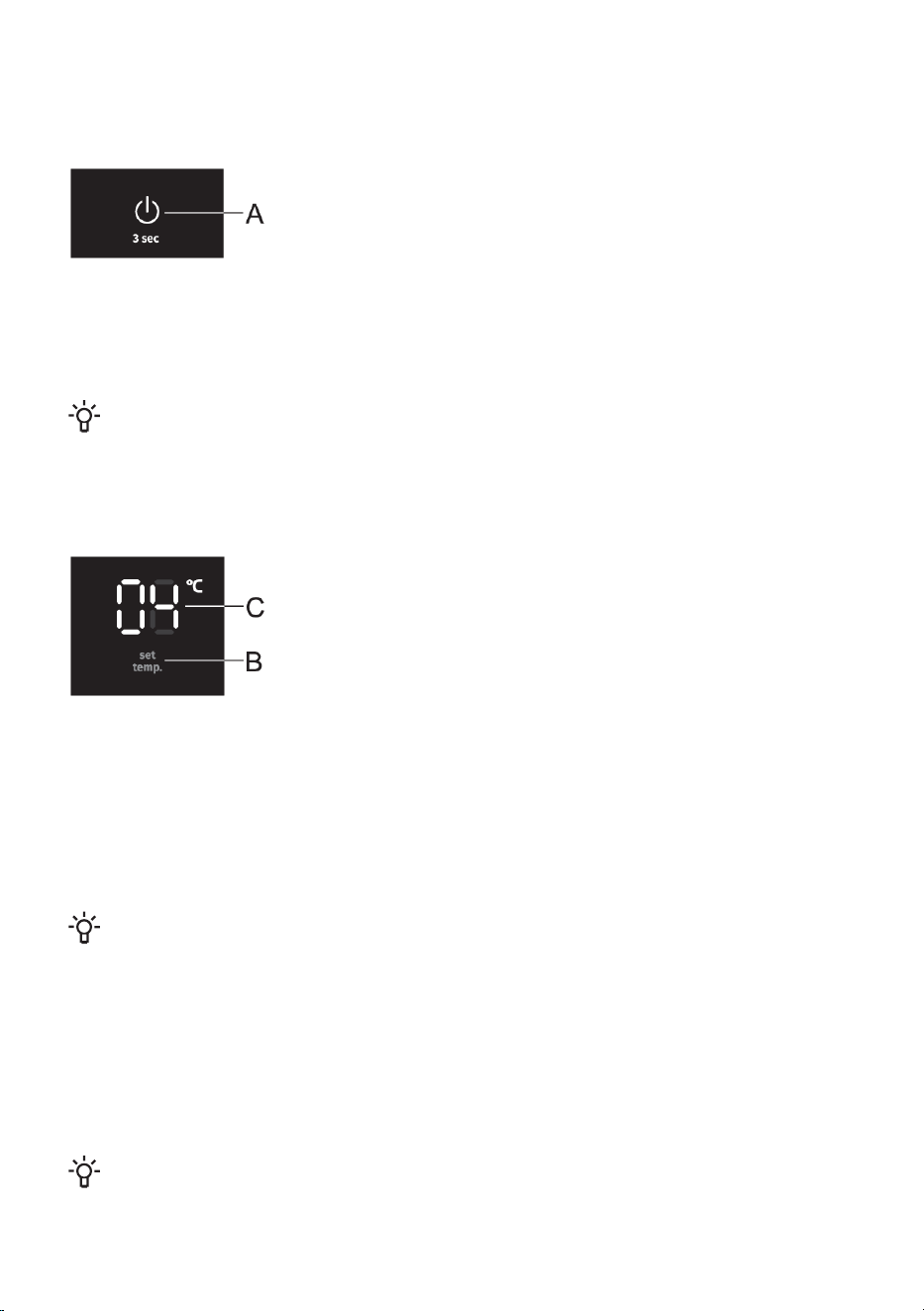
Switching the appliance on/off
When you connect the appliance to the power mains for the first time, the appliance will be in standby
mode (switched off, but powered).
Switching on the appliance: to switch on the appliance, press the A
key. A beep will be sounded, and temperature will be displayed on the
display unit C.
Switching off the appliance: switch off the appliance by pressing the
A key and holding it (for 3 seconds). The appliance will switch to standby
mode (it remains powered).
Adjusting the temperature in the appliance
INFORMATION!
• The factory default setting is the recommended temperature of 4 °C.
• After the appliance is switched on, it may take several hours until the set temperature is
reached. Do not place any food into the appliance before the temperature drops to the
selected setting.
Use the B key to set the temperature in the appliance.
• Temperature in the appliance can be set in the range from +1 °C to + 9 °C.
• Each time the B key is pressed, the temperature is increased by 1 °C. Three seconds after the
most recent key is pressed, the current setting is automatically stored as the most recent
temperature setting of the appliance.
• Recommended temperature setting is 4°C.
Control unit/display standby mode
INFORMATION!
30 seconds after the most recent key is pressed, the control unit/display switches to standby
mode. All indicators and displays on the control unit will be switched off. If any of the extra
functions is activated, its indicator will remain lit while the appliance is in standby mode, too.
To switch back from the standby mode: briefly press the A key or open the door. If any of the extra
functions are activated, you may also press the key for activating or deactivating that extra function
in order to wake up the appliance from the standby mode.
Intensive cooling (super cool)
INFORMATION!
Use this setting after switching on the appliance for the first time, before cleaning, or before
inserting a large amount of food.
21
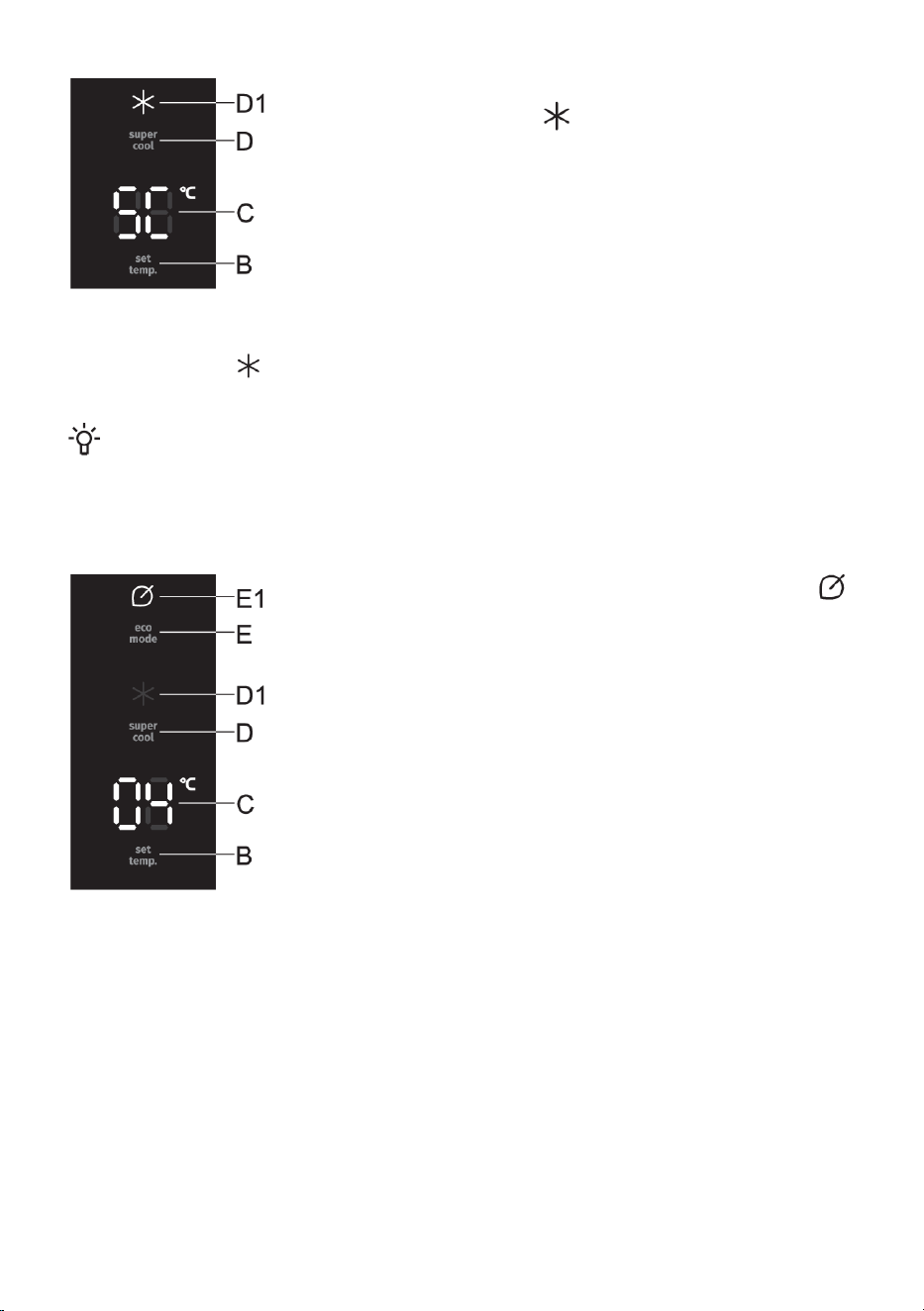
To activate: press the D key to activate the intensive cooling (super cool)
function. You will hear a beep, will light up on the display unit, and
SC will light up on the display unit C.
To deactivate: to deactivate the intensive cooling (super cool) function, press the D key again. You
will hear a beep and will no longer be lit up. If the function is not deactivated manually, it will be
deactivated automatically after approximately twelve hours.
INFORMATION!
When the intensive cooling (super cool) function is activated, the appliance will operate with
maximum power. During this time, operation may be temporarily somewhat louder.
Eco function
To activate: to activate the function eco, briefly press the E key.
will light up. When this function is activated, the appliance operates under
optimum settings.
To deactivate: to deactivate the Eco function, again briefly press the E key. The temperature will
return to the most recent setting.
The eco function will also be deactivated when you use the B key to change the temperature setting
or when you activate any of the other extra functions.
22
Child lock
To activate: to activate the child lock, press and hold (for 3 seconds)
the E key. A beep will be sounded, and CL will briefly appear on the B
display.
The function will lock all keys except the E key.
To deactivate: to deactivate the function, press the E key again.
In case of a power supply failure or outage, the function will be
reactivated.
High temperature alarm
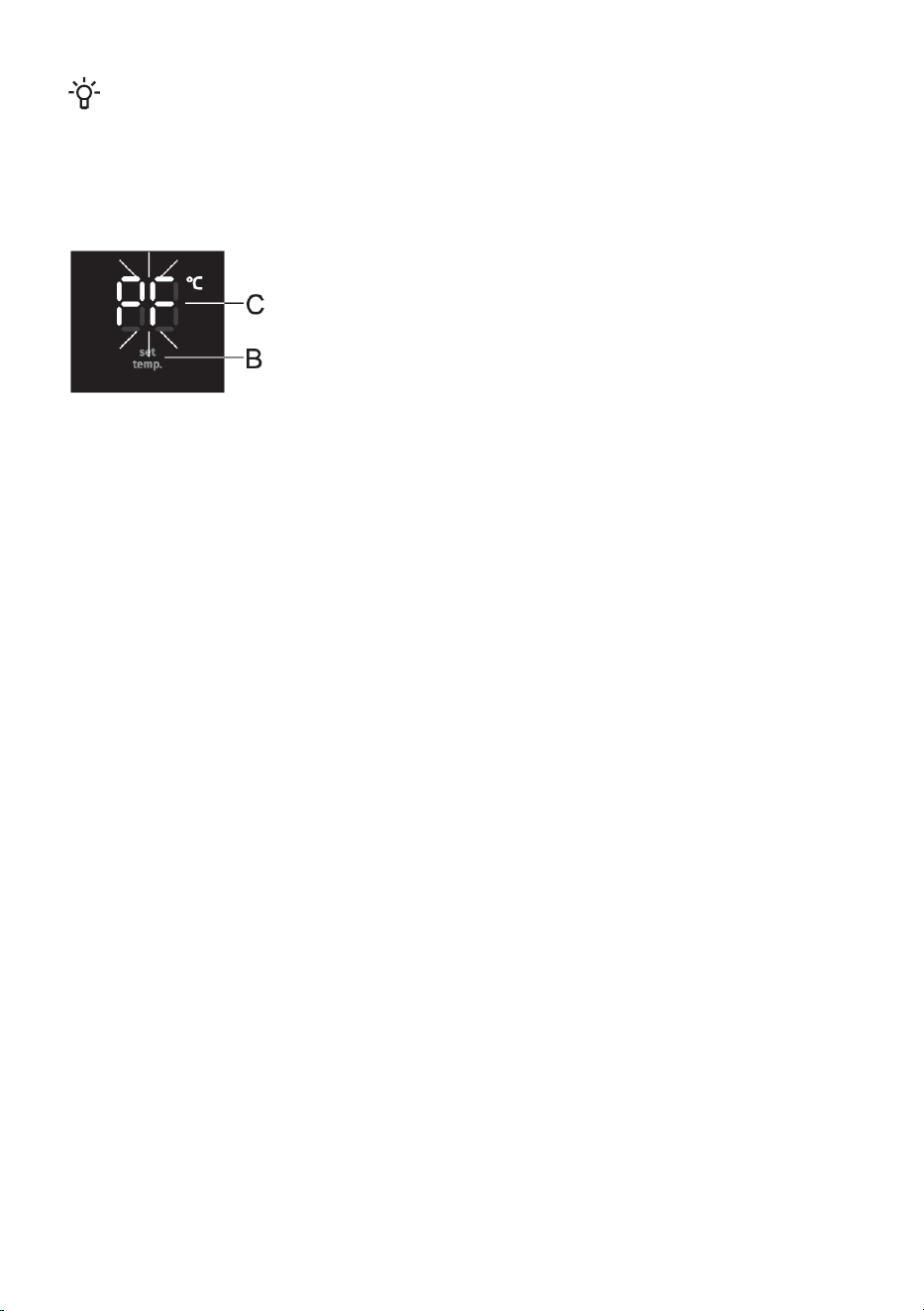
If the temperature inside the appliance is too high, acoustic alarm will
be activated (intermittent tone) and HI will flash on the display unit.
• Every time the appliance is switched on with the A key, there is a
24-hour delay in high temperature alarm operation. If the appliance
does not reach the sufficiently low temperature in this period, the
alarm will be activated.
Switching off the alarm:
• Acknowledge and turn off the acoustic alarm by pressing any key. As soon as you press any key,
the alarm will be silenced, and the highest measured temperature in the appliance will appear on
the display unit C. When you press a key the second time, the currently set temperature will flash
on the C display unit. The temperature indication will continue to flash until the actual temperature
in the appliance drops to below the alarm level.
• When the appliance reaches an adequate/sufficiently low temperature, then the temperature
display will stop flashing and it will be lit continuously.
• If you do not acknowledge and switch off the acoustic alarm, then it will be activated every hour
for approximately 15 minutes.
Open door alarm
If the door is open for too long, an acoustic alarm (repetitive beep) will be activated. If the alarm is not
switched off manually, it will be sounded for 10 minutes. After that, the appliance will continue to
operate as if the door was closed.
To switch off the alarm: to switch off the alarm, close the appliance door.
INFORMATION!
If you switch off the alarm by pressing any key, the alarm will be reactivated in 4 minutes if the
door is still open.
23
INFORMATION!
If you leave the door open for more than 10 minutes, the alarm will no longer be sounded.
Appliance operation will switch to safe mode in order to provide sufficient cooling and prevent
food spoilage despite the open door.
Power outage/power supply failure alarm
If the temperature in the appliance increased to alarm level during a
power outage (power supply failure), then the power failure alarm will be
activated when power supply is restored. Acoustic alarm will be sounded,
and PF will flash on the display unit C.
Acknowledge and turn off the acoustic alarm by pressing any key. The
highest measured temperature appears on the display unit C.
When you press any key again, the power failure (outage) alarm is finally deactivated, and the set
temperature will appear on the C display unit.
If the high temperature alarm is activated at the same time, it will operate as described in the chapter
High temperature alarm, after you have deactivated the power supply failure alarm.
24
Appliance interior equipment
( * Equipment depends on the model)
Shelf
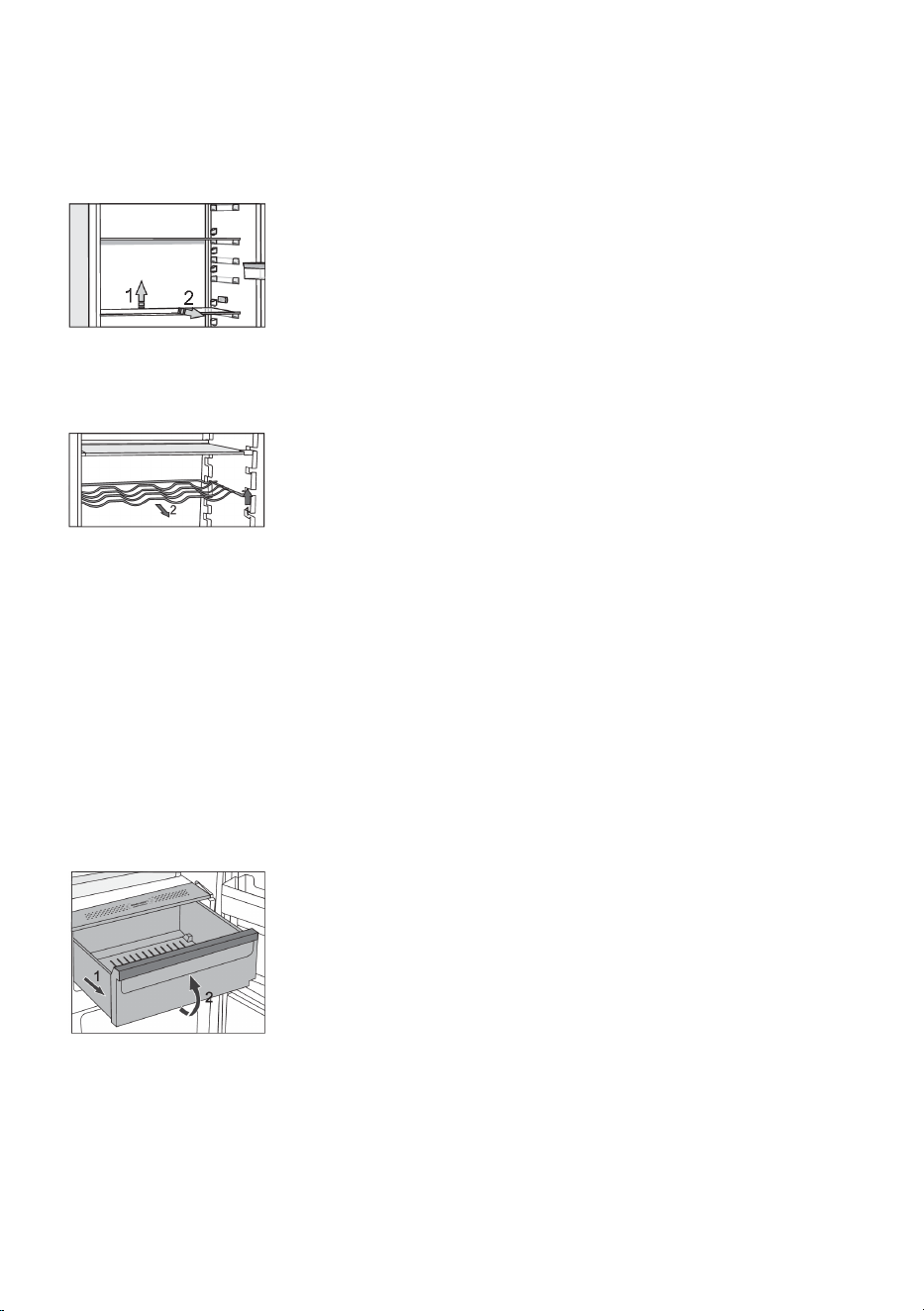
You can lay out the empty shelves to your liking across the guides in the
refrigerator interior without having to remove them from the refrigerator.
To move the shelf or take it out from the refrigerator, slightly lift it at the
back, pull it towards you, and then either move it or take it out of the
appliance. Store quickly perishable food at the back of the shelf where
the temperature is the lowest.
Wire bottle rack *
• Some models also feature a wire bottle holder. It is protected against
being inadvertently pulled out. It can only be pulled out when it is
empty. To pull it out, lift it slightly at the front and pull it towards you.
Place the bottle holder so that the length of the bottles does not
prevent proper closing of the door.
The holder can take a maximum load of nine 0.75-litre bottles or 13
kilograms of total weight – see label on the right side in the appliance
interior.
• Cans may also be placed on the bottle rack (lengthwise or crosswise).
Fruit and vegetables drawer with humidity control
(CrispZone) *
• The drawer at the bottom of the refrigerator is intended for storing fruit and vegetables. It provides
humidity and prevents the food from drying out.
• The humidity in the drawer is regulated automatically, depending on the type and amount of
inserted food.
• Pulling out the bin:
- Pull out the bin as far as it will go. Then, lift the front part and
pull it out completely.
FreshZone drawer *
(Only in some models)
In the FreshZone compartment, food stays fresh longer than in a conventional refrigerator, retaining
more flavour and nutrients.
25
Decay and loss of mass are slowed down; therefore, fruit and vegetables remain fresh and natural
longer. For optimum performance, the drawer should be fully closed.
• When buying food, make sure it is fresh as this will determine the quality of the food, as well as
how long it will keep in the fridge.
• Store the food in closed containers or appropriate packaging to prevent them from emitting or
receiving odours and humidity.
• Take the food from the drawer 30 to 60 minutes before use to allow the aroma and flavour develop
at room temperature.
• Food sensitive to low temperature and not appropriate for storage in the FreshZone drawer include
the following: pineapple, avocado, bananas, olives, potatoes, eggplant, cucumbers, beans, peppers
(capsicum), melons, watermelons, pumpkins, squash, zucchini etc.
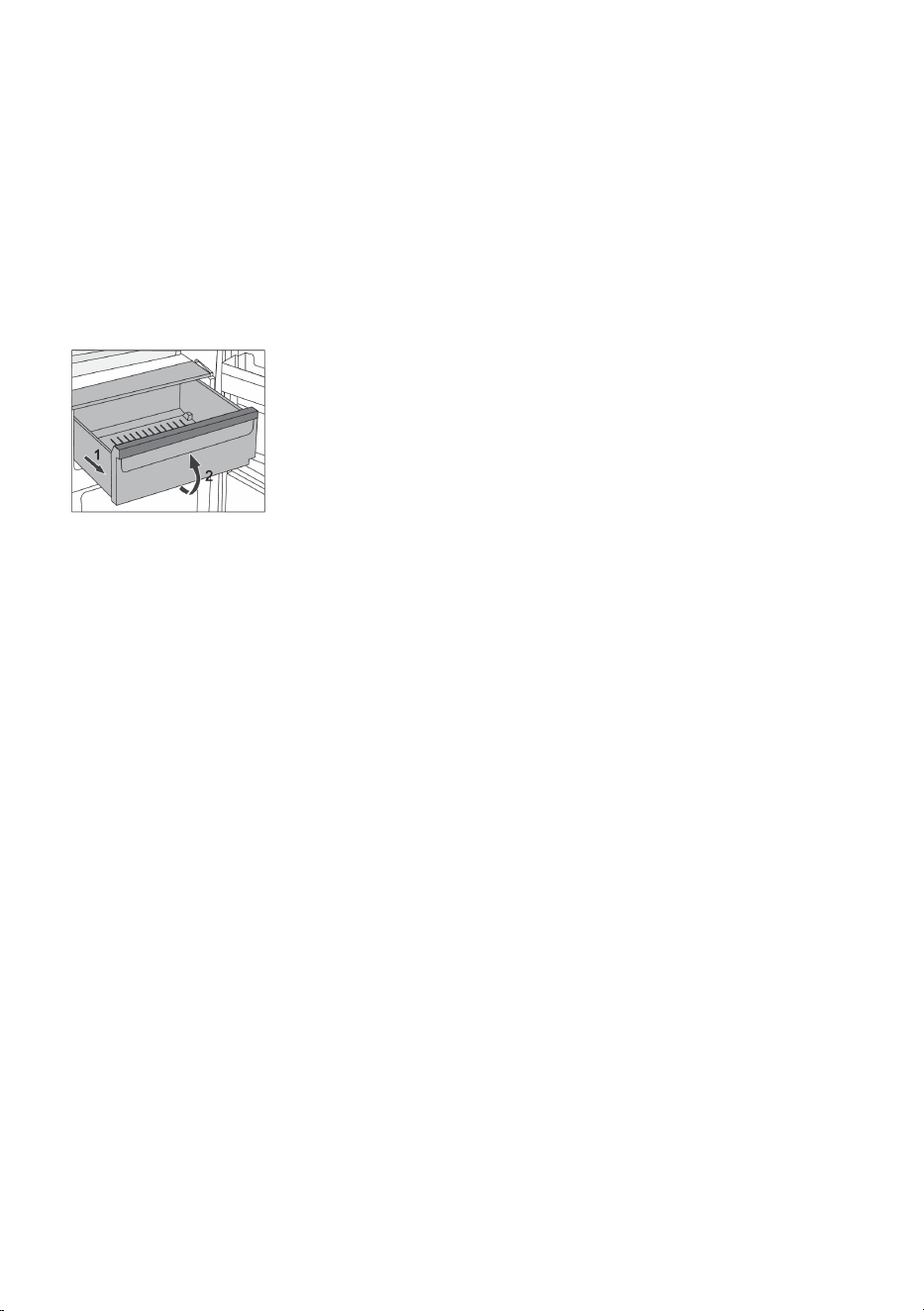
• To remove the drawer:
- Pull out the drawer until it is blocked.
- Lift it at the front and pull out completely.
ZeroZone drawer *
(Only in some models)
The ZeroZone compartment allows storing a wide variety of fresh food for up to three times longer
than in a conventional refrigerator. The food stays fresh longer, retaining the flavour and nutrients.
The temperature in this drawer depends on the temperature settings in the refrigerator compartment,
environment temperature, frequency of door opening, and amount of food placed in it.
For a temperature around 0 °C in the ZeroZone drawer, we recommend setting the refrigerator
compartment temperature to 4 °C or lower. Temperature in the ZeroZone drawer may fall below 0 °C.
Therefore, place the temperature-sensitive food in the upper parts of the refrigerator.
For optimum performance, the drawer should be fully closed.
• When buying food, make sure it is fresh as this will determine the quality of the food, as well as
how long it will keep in the fridge.
• Store the food in closed containers or appropriate packaging to prevent them from emitting or
receiving odours and humidity.
• Take the food from the drawer 30 to 60 minutes before use to allow the aroma and flavour develop
at room temperature.
• Food sensitive to low temperature and not appropriate for storage in the ZeroZone drawer include
the following: pineapple, avocado, bananas, olives, potatoes, eggplant, cucumbers, beans, peppers
(capsicum), melons, watermelons, pumpkins, squash, zucchini etc.
26
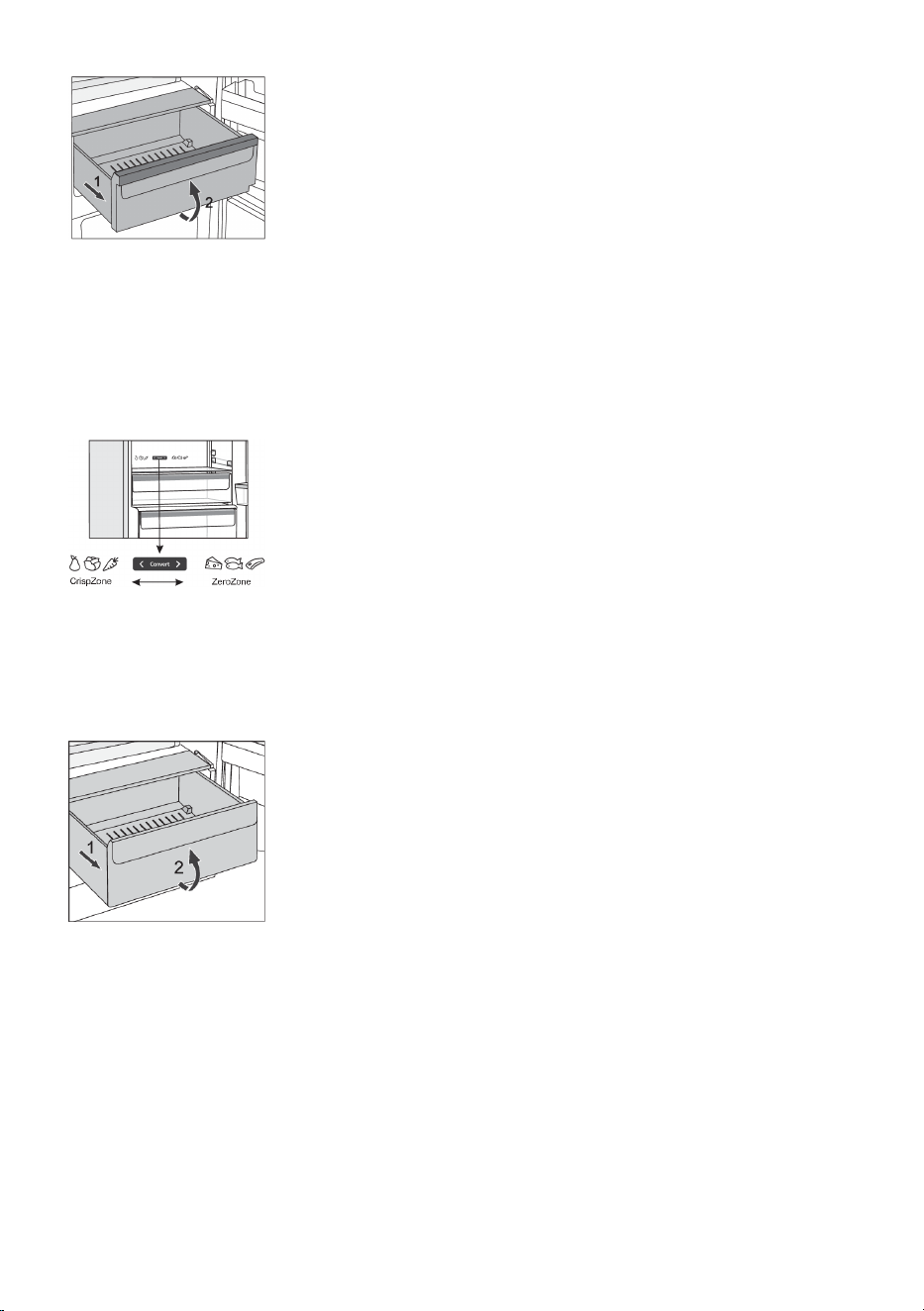
• To remove the drawer:
- Pull out the drawer until it is blocked.
- Lift it at the front and pull out completely.
Turning the ZeroZone drawer into a fruit and vegetables
drawer *
• If you find you need extra space for your fruit and vegetables, you can turn your ZeroZone drawer
into a fruit and vegetables drawer (CrispZone).
• To do this, use the slider as follows:
- To use the drawer as a ZeroZone: push the slider to the right.
- To use the drawer as a fruit and vegetables drawer
(CrispZone): move the slider to the left.
Fruit and vegetables drawer
The drawer at the bottom of the refrigerator is intended for storing fruit and vegetables. It provides
humidity and prevents the food from drying out.
• Pulling out the bin:
- Pull out the bin as far as it will go. Then, lift the front part and
pull it out completely.
27
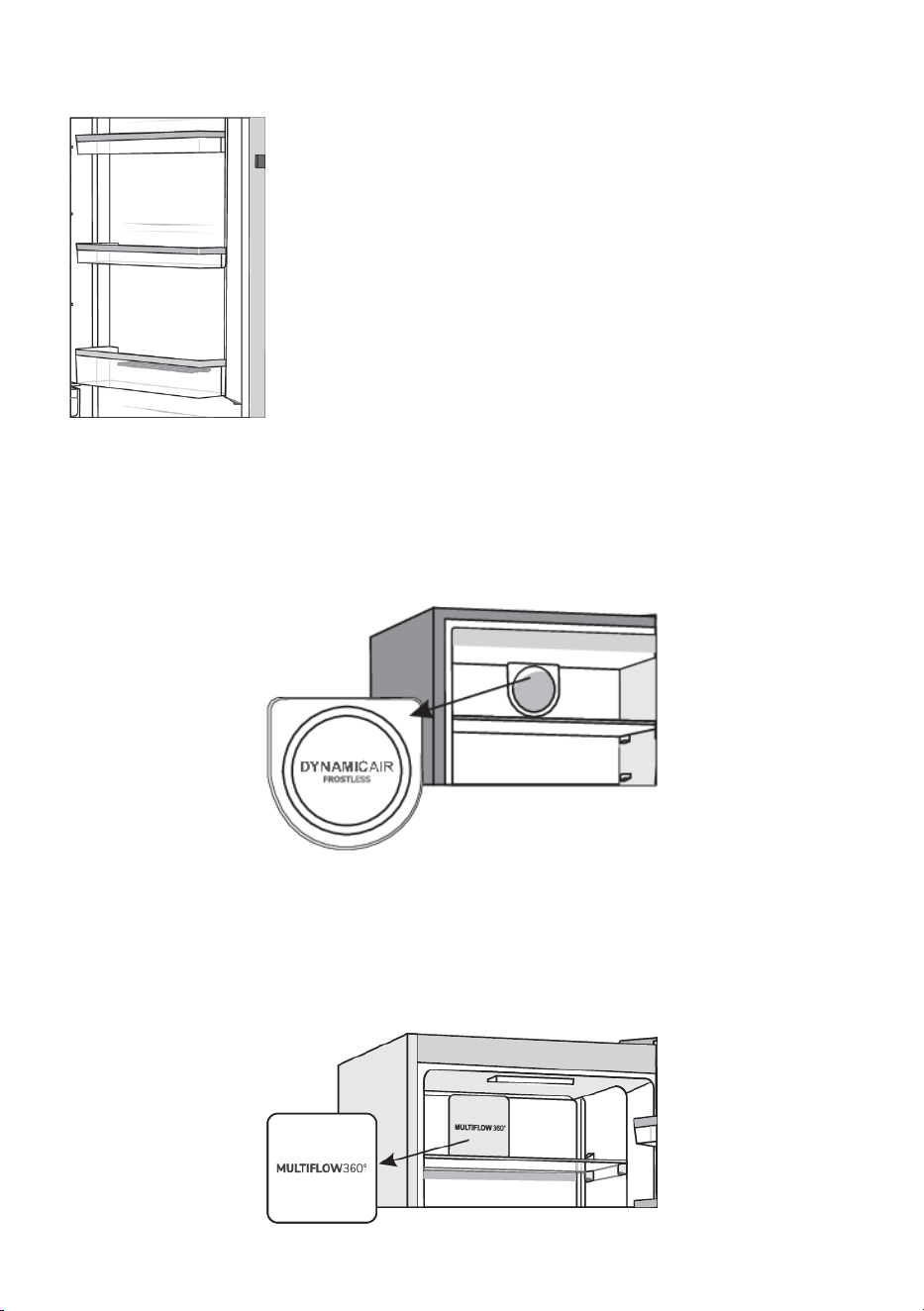
Door racks
Interior side of the refrigerator door is fitted with shelves intended for
storing cheese, butter, eggs, yoghurt, and other smaller packages, tubes,
cans etc.
You may lay out the racks as desired by lifting them slightly from the
grooves that hold them in place and moving them to the desired spot,
making sure to fit them in the grooves there.
The bottom rack is intended for storing bottles.
Maximum load on each door shelf is 5 kg.
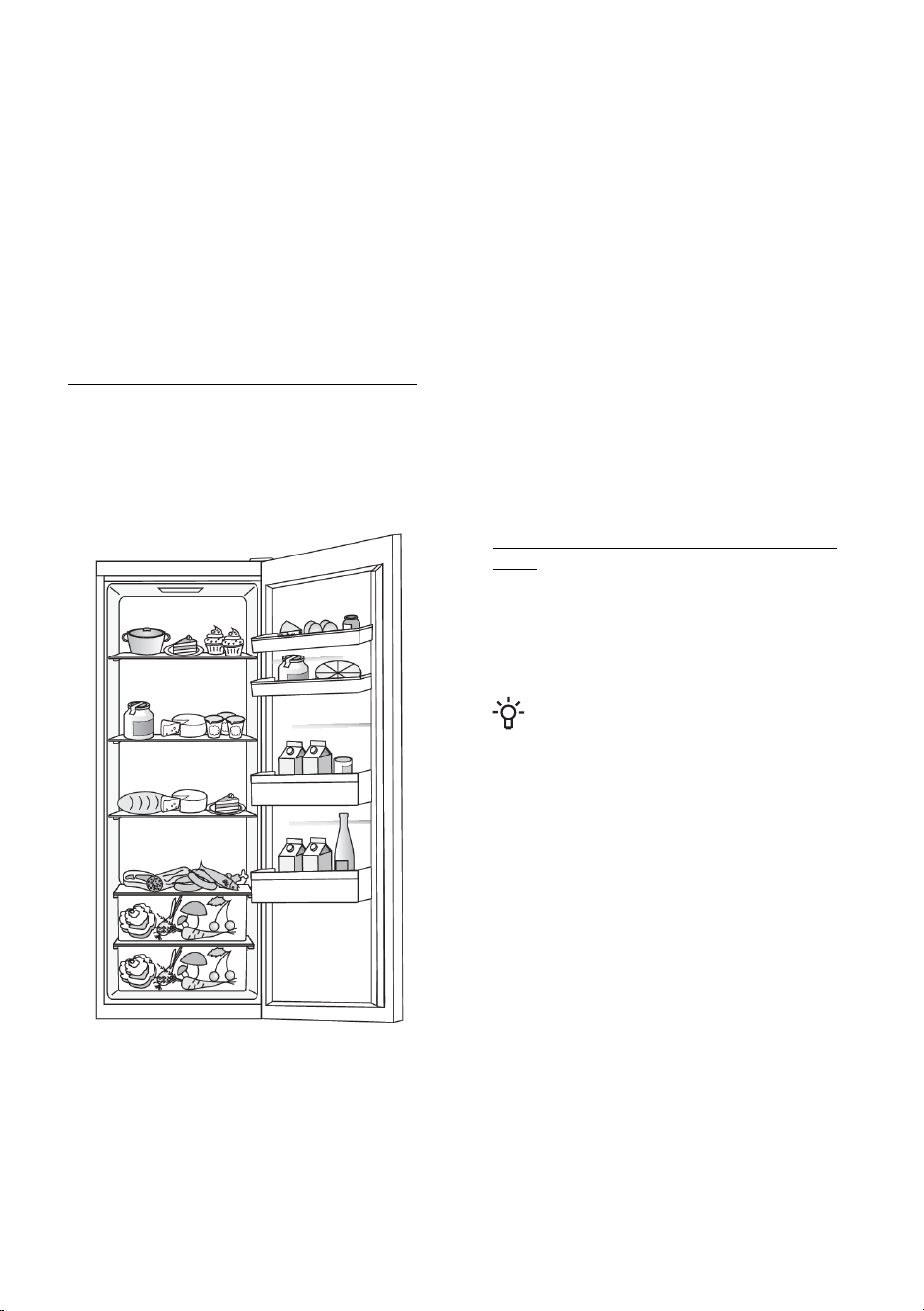
Fan (DynamicAir) *
• The fan placed under the refrigerator compartment ceiling will make sure the temperature is
distributed more evenly, and reduce condensation (dew) on the storage surfaces.
• It is activated automatically when there is need for more intensive cooling.
Air distribution system (MultiFlow) *
• Advanced fan system with dynamic cooling evenly distributes the air and equalizes the temperature
throughout the refrigerator. This system also allows placing any type of food on any shelf in the
fridge, as there are not temperature differences between them.
• It is activated automatically when there is need for more intensive cooling.
28
AdaptTech
Innovative sensor technology allows adjusting appliance operation to the user's habits or behaviour.
Adaptive intelligent system monitors, analyzes, and records on a daily and weekly basis the use of
appliance and adapts appliance operation to the perceived patterns. AdaptTech can anticipate
increased door opening frequency and automatically lower the temperature before such time to prevent
the increase of food temperature during the period of more frequent use of the appliance.
The appliance will also anticipate adding larger amounts of food into the refrigerator and adapt by
cooling more intensively.
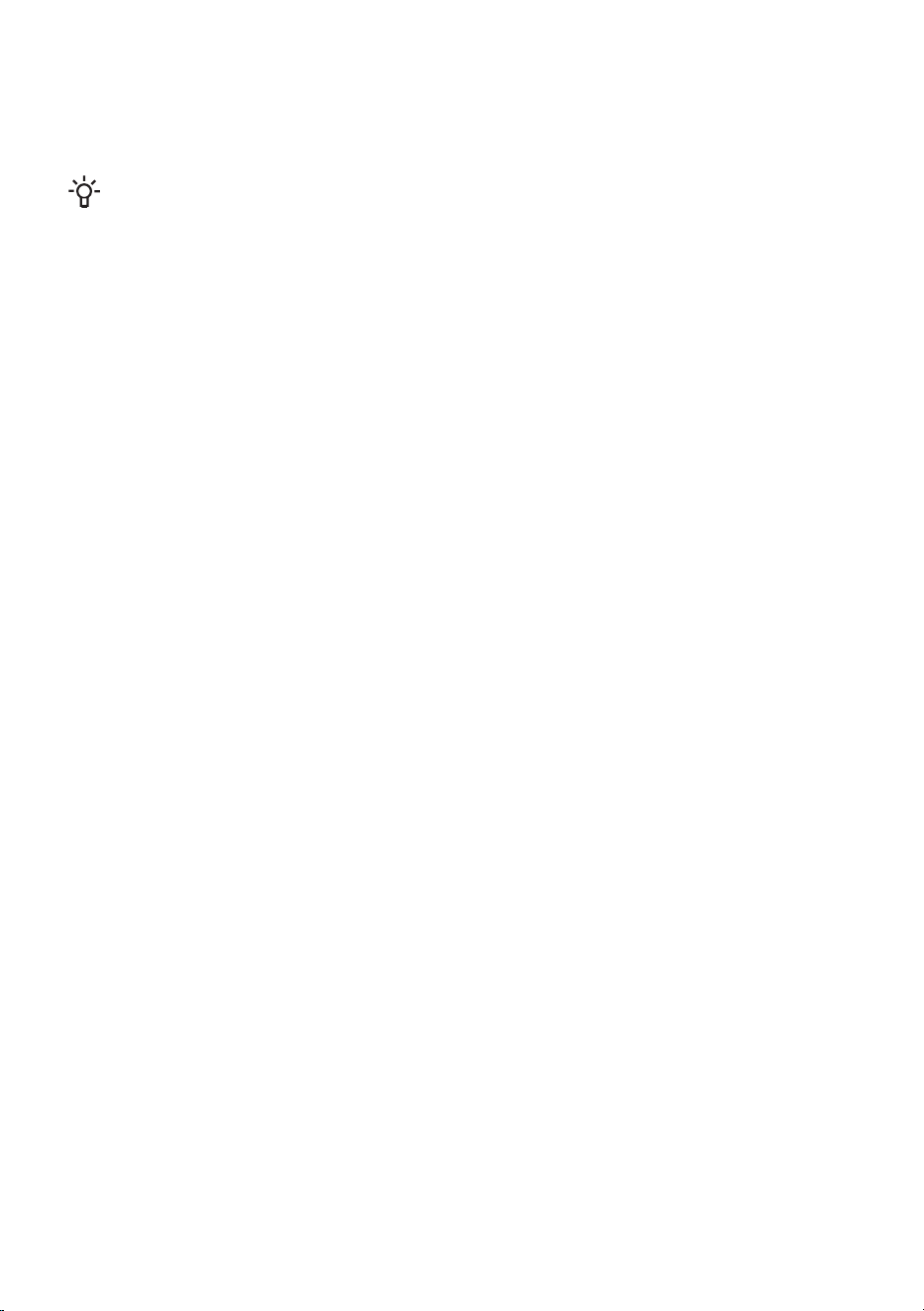
Recommended distribution of food in the
appliance
Sections in the refrigerator compartment:
• upper part: canned food, bread, wine, pastry, etc.
• middle part: dairy products, ready-made meals, desserts, soft drinks, beer, cooked food, etc.
• lower part: meat, meat produce, delicatessen, etc.
• Fruit and vegetable bin: fresh fruit, vegetables, salads, root vegetables, potatoes, onions, garlic,
tomatoes, sauerkraut, turnips, etc.
Sections in the refrigerator compartment
door:
• upper/middle door bins: eggs, butter,
cheese, etc.
• lower door bins: beverages, cans,
bottles, etc.
INFORMATION!
Do not store fruit (bananas, pineapples,
papaya, citruses) and vegetables
(zucchini, eggplant, cucumbers, bell
peppers, tomatoes, and potatoes)
sensitive to low temperatures in the
refrigerator.
29
Storing food in the refrigerator
Important warnings regarding food storage
INFORMATION!
Correct use of the appliance, appropriate packaging, maintaining the right temperature, and
observing the food hygiene standards have a decisive impact on the quality of food storage.
Observe the expiry dates for the food, indicated on the packaging.
Food stored in the refrigerator should be kept in closed containers or in appropriate packaging
to prevent it from emitting or receiving odours and humidity.
Do not store inflammable, volatile, and explosive substances in the refrigerator.
Bottles with high alcohol content should be tightly sealed and stored in an upright position.
Some organic solutions, essential oils in lemon and orange peel, butter acid, etc. may damage
the plastic surfaces in case of a prolonged contact, causing damage and premature ageing of
these materials.
Unpleasant odour warns of lacking cleanliness of the appliance or perished contents (see chapter
Cleaning the Appliance).
If you are leaving home for a longer period of time, remove perishables from the refrigerator.
Avoid contamination of food
To avoid contamination of food, please respect the following instructions:
• Opening the door for long periods can cause a significant increase of the temperature in the
compartments of the appliance.
• Regularly clean surfaces that can come in contact with food and accessible drainage systems.
• Store raw meat and fish in suitable containers in the refrigerator, so that it is not in contact with
or drip onto other food.
• If the refrigerating appliance is left empty for long periods, switch off, defrost, clean, dry, and leave
the door open to prevent mould developing within the appliance.
Defrosting the appliance
Automatic refrigerator defrosting
Refrigerator does not need defrosting because the ice on the back interior wall is thawed automatically.
Any accumulated ice will melt when the compressor unit is inactive. Drops will flow through an opening
in the refrigerator rear wall into a tray fitted above the compressor, from where they will evaporate.
Make sure the opening in the back wall in the refrigerator interior is never blocked by food or any other
object.
If an excessive layer of ice is formed on the rear wall of refrigerator interior (3–5 mm), switch off the
appliance and defrost the appliance manually.
30
Cleaning the appliance
WARNING!
Before cleaning, unplug the appliance from the power mains – switch off the appliance (see
chapter Switching the Appliance On/Off) and unplug the power cord from the wall outlet.
• Use a soft cloth to clean all surfaces. Cleaners that contain abrasive substances, acids, or solvents
are not suitable for cleaning as they may damage the surface.
Clean the appliance exterior with water or a mild solution of suds.
Lacquer-coated and aluminium surfaces may be cleaned with lukewarm water to which you have
added a mild detergent. Use of cleaners with low alcohol content is allowed (e.g. window cleaners).
Do not use cleaners containing alcohol for cleaning plastic materials.
Appliance interior can be cleaned with lukewarm water to which you can add some vinegar.
• Do not wash the parts of appliance interior equipment in a dishwasher as they may be damaged.
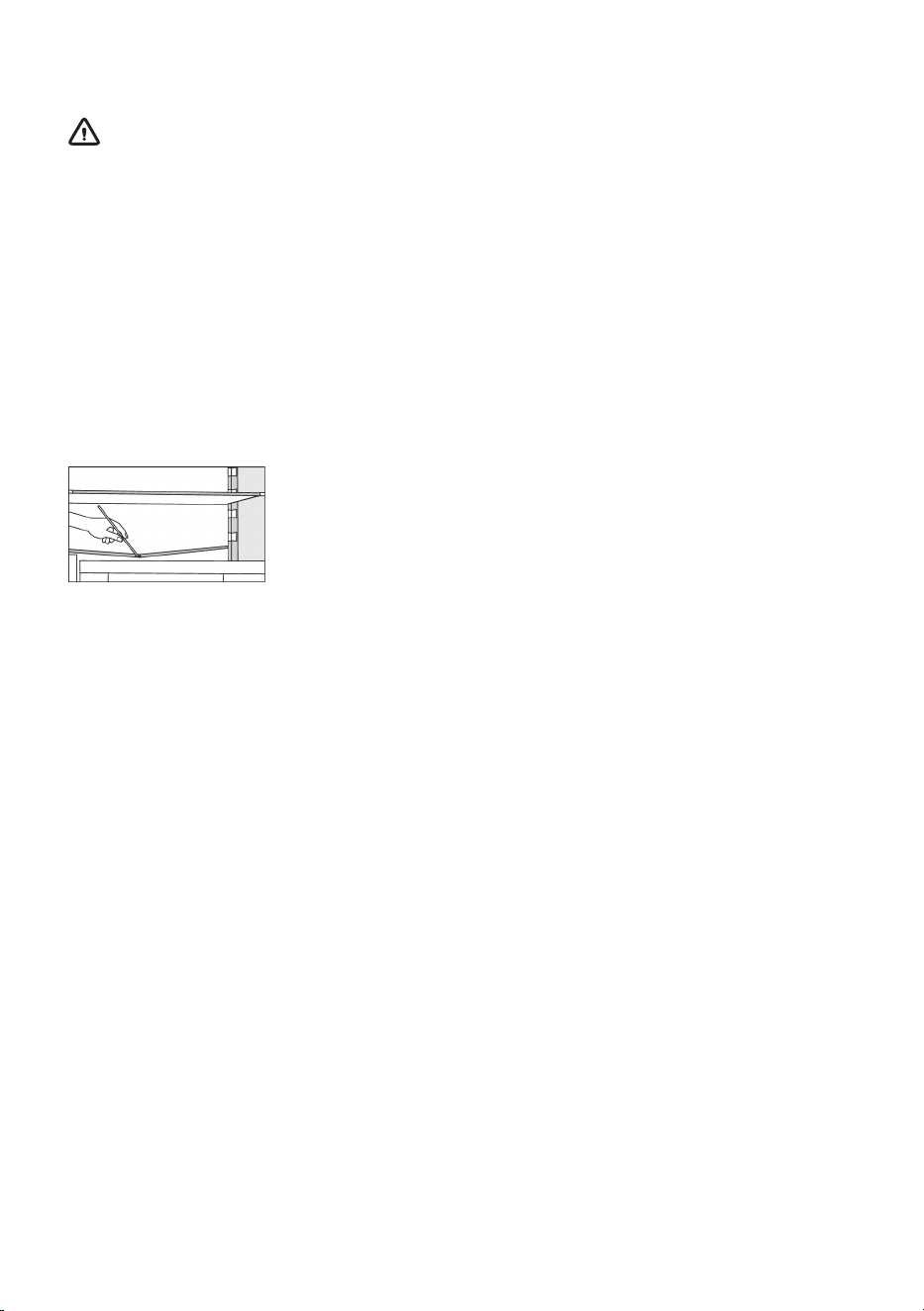
• A gutter and an opening for discharging the water from thawed frost
deposits are located underneath the cooling panel that cools the
refrigerator interior. The gutter and the opening may not be clogged.
Inspect them often and clean if necessary (e.g. with a plastic straw).
The condenser unit, located next to the compressor unit on the back of the appliance (only with some
models), has to be kept clean, free of dust or other impurities. Occasionally clean it using a soft
non-metal brush or a vacuum cleaner.
• After cleaning, switch the appliance back on and insert the food.
31
Troubleshooting
Cause or remedy:Problem:
Appliance is connected to the
power mains but it does not
work.
• Make sure there is voltage in the power outlet and that the
appliance is switched on.
Cooling system operates
continuously for a long period
of time:
• Too high environment temperature.
• Door opened too frequently or too long.
• Door not closed correctly (possible impurities on the seal,
misaligned door, damaged seal etc.).
• Too much fresh food inserted at once.
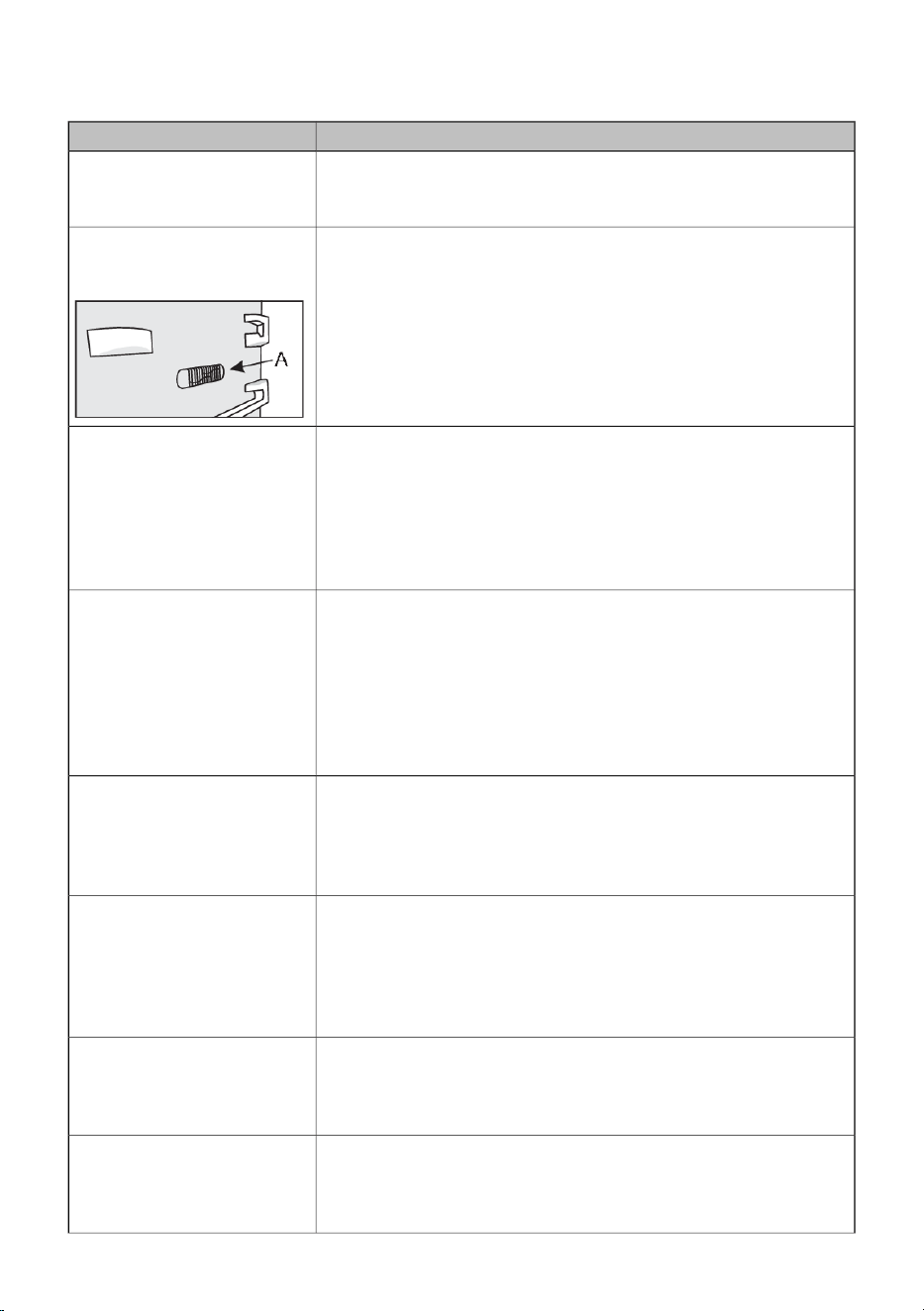
• Sensor in the refrigerator (A) blocked by fresh food. Make sure
the air can circulate around the sensor (only with some models).
Excessive build-up of ice on
the back wall of refrigerator
interior can be a result of the
following:
• door opened too frequently or too long.
• Warm food placed in the refrigerator.
• Food or containers in contact with the back interior wall of the
refrigerator.
• Poor door sealing.
• If the seal is dirty or damaged, clean or replace it.
Condensate (dew) on the shelf
above the drawers:
• This is transient phenomenon which cannot be entirely avoided
in periods of high environment temperature and humidity. It
subsides when temperature and humidity are normalized. We
recommend cleaning the drawers more frequently and wiping
the droplets occasionally.
• Open the humidity control slider.
• Put food in bags or other packaging with a good seal.
Droplets on the refrigerator
compartment back wall.
• This is normal. The refrigerator compartment is defrosted
automatically, which results in droplets of water that flows
through an opening in the refrigerator compartment back wall
into a tray above the compressor unit, from which it evaporates.
Water is dripping/leaking from
the refrigerator:
• Clogged water discharge opening or water dripping past the
water gutter.
• Clean the blocked opening, e.g. using a kunststof straw.
• If a thick layer of ice builds up, defrost the appliance manually
(see Defrosting the Appliance).
Appliance sides are warm:
• This is normal. There are pipes and tubes installed in the
appliance sides, which tend to heat up during appliance
operation.
LED lighting does not work:
• If LED lighting does not work, call a service technician.
• Do not attempt a repair of the LED lighting yourself, as there is
danger of contact with high voltage!
32
Table continued from last page
Cause or remedy:Problem:
HI will appear on the display
unit:
• Door opened too frequently or too long.
• Door not closed correctly (possible impurities on the seal,
misaligned door, damaged seal etc.).
• An extended power failure.
• Too much fresh food inserted at once.
PF will appear on the display
unit:
• An extended power failure.
E0 or E8 appears on the
display unit:
• Sensor keys are not responding. Call a service centre for repair.
• Until the appliance is repaired by a service technician, the
appliance will operate in safe mode. The appliance will
automatically maintain the most suitable temperature.
E2 will appear on the display
unit:
• Temperature sensor error or fault. Call a service centre for repair.
Until the appliance is repaired by a service technician, the
appliance will operate in safe mode. The appliance will
automatically maintain the most suitable temperature.
E4 appears on the display
unit:
• Compartment fan failure. Call a service centre for repair. The
appliance cannot operate normally. Transfer the food to a cool
place and switch off the appliance.
E9 appears on the display
unit:
• Door was open for too long. Close the door.
• If the door is not open, or if E9 is still displayed 10 minutes after
you have closed the door, then there is a door sensor failure.
Call a service centre to arrange a repair. The appliance will
operate in safe mode until it is repaired. The appliance will
automatically preserve the most suitable temperature for each
compartment.
If the above tips do not resolve your problem, call the nearest authorized service centre and state the
type, model, and serial number indicated on the appliance rating plate or label located in the appliance
interior.
33

Information about appliance noise
Cooling in refrigerator freezers is made possible by a cooling system that also includes a compressor
(and a fan with some appliances), which generates some noise. The level of noise depends on
installation, proper use, and age of the appliance.
• After connecting the appliance to the power mains, compressor operation, or the sound of flowing
liquid, may be somewhat louder. This is not a sign of malfunction and it will not affect the useful
life of the appliance. In time, appliance operation and this noise will become quieter.
• Sometimes, unusual or loud noises may appear during appliance operation; these are mostly the
result of improper installation:
- The appliance must stand level and stable on a solid base.
- The appliance may not be in contact with a wall or adjacent furniture.
- Make sure the interior equipment sits firmly in its place and that the noise is not caused by
rattling cans, bottles or other containers placed next to each other.
• Due to the higher workload on the cooling system when the door is opened more frequently or
for a longer time, when a large amount of fresh food is introduced or when intensive freezing or
cooling functions are activated, the appliance can temporarily generate more noise.
34
We reserve the right to changes that do not affect the appliance functionality.
GORENJE gospodinjski aparati, d.o.o. Address: Partizanska 12, 3320 Velenje, Slovenia
Phone: +386 (0)3 899 10 00 Fax: +386 (0)3 899 28 00 www.gorenje.com
879751-a4