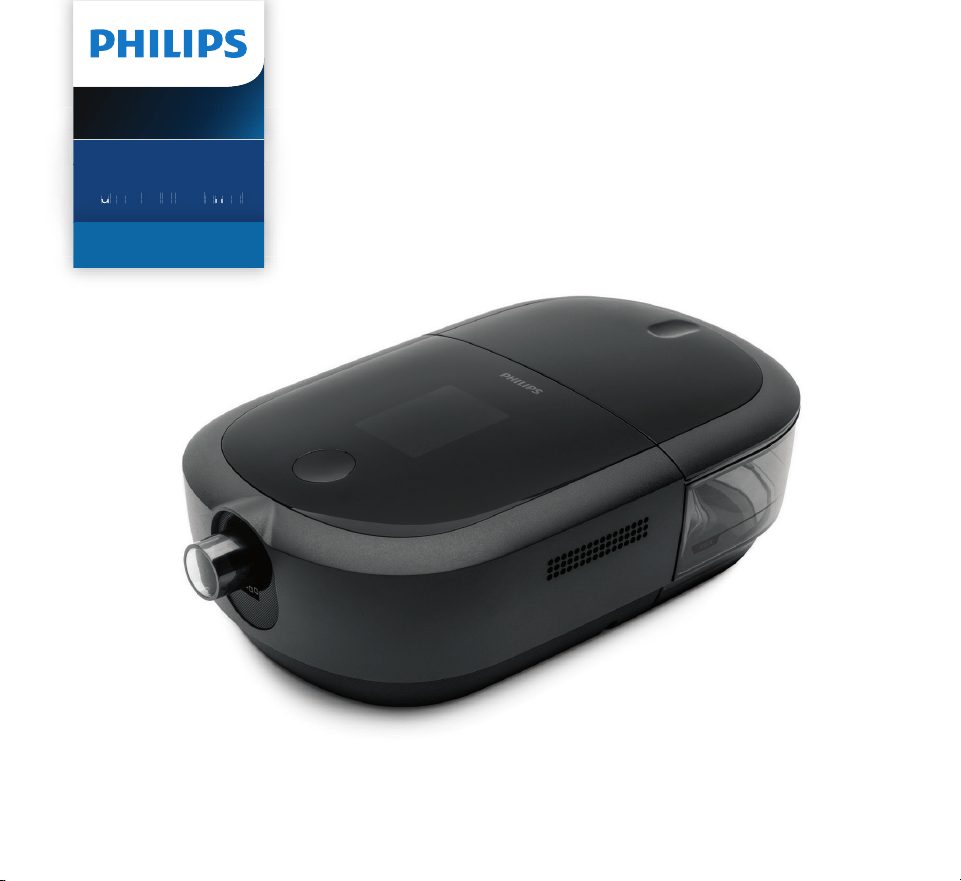
DreamStation 2
CPAP Advanced
Auto CPAP Advanced
A
u
t
o
C
P
A
P
A
dv
a
n
c
e
d
User manual

© Koninklijke Philips N.V., 2021. All rights reserved.

- i -
Contents
1. Safety information .................................................................................................................................................................... 1
Intended use .......................................................................................................................................................................... 1
Important ................................................................................................................................................................................ 1
Contraindications ................................................................................................................................................................. 1
Warnings .................................................................................................................................................................................2
Cautions ..................................................................................................................................................................................5
Symbols glossary .................................................................................................................................................................8
System contents .................................................................................................................................................................. 9
How to contact Philips Respironics ............................................................................................................................... 9
2. System overview .................................................................................................................................................................... 10
Device with integrated humidier ................................................................................................................................. 10
Humidier water tank ........................................................................................................................................................12
3. Device setup ............................................................................................................................................................................ 14
Where to place the device ............................................................................................................................................... 14
Supplying AC power to the device ................................................................................................................................ 14
Setting up the integrated humidier ............................................................................................................................ 16
Installing/replacing the air lters...................................................................................................................................20
Connecting the breathing circuit ...................................................................................................................................22
Starting the device .............................................................................................................................................................24
Performance check ............................................................................................................................................................25
Bluetooth wireless technology ......................................................................................................................................25
Pairing your therapy device to your Bluetooth-enabled mobile device............................................................25
Therapy On display ...........................................................................................................................................................26
Therapy O display ...........................................................................................................................................................30
Navigating the settings screens .....................................................................................................................................32
Settings screens .................................................................................................................................................................33
Modem call ..........................................................................................................................................................................35
4. Pop-up messages and troubleshooting .......................................................................................................................... 37
Pop-up messages .............................................................................................................................................................. 37
Status pop-up messages .................................................................................................................................................39
Reminder pop-up messages ..........................................................................................................................................40
Troubleshooting ................................................................................................................................................................. 41
5. Connectivity .............................................................................................................................................................................43
6. Accessories ..............................................................................................................................................................................44
SD card ..................................................................................................................................................................................44
Oximeter ...............................................................................................................................................................................45
Roll stand .............................................................................................................................................................................45
Supplemental oxygen .................................................................................................................................................................... 46
DC power .............................................................................................................................................................................. 47
Carrying case and airline travel ..................................................................................................................................... 47

- ii -
7. Cleaning and care ...................................................................................................................................................................48
Home cleaning: device exterior, heater plate, and humidier air inlet seal .....................................................48
Home cleaning: humidier water tank (lid, water tank base, and water tank seal) .......................................48
Home cleaning: tubing .....................................................................................................................................................50
Caring for the lters ...........................................................................................................................................................50
Service ....................................................................................................................................................................................51
8. Technical specications ........................................................................................................................................................51
Environmental .....................................................................................................................................................................51
Physical..................................................................................................................................................................................51
Service life .............................................................................................................................................................................51
Standards compliance .....................................................................................................................................................52
IEC 60601-1 classication ............................................................................................................................................... 52
Electrical ...............................................................................................................................................................................52
Water capacity ....................................................................................................................................................................52
Heater plate ......................................................................................................................................................................... 53
Humidity ...............................................................................................................................................................................53
Declared dual-number noise emissions values (in accordance with ISO 4871) ..............................................53
Pressure accuracy ..............................................................................................................................................................53
Maximum ow rate (typical) ...........................................................................................................................................54
ISO 80601-2-70 Pneumatic Diagram ..........................................................................................................................54
Wireless notices ..................................................................................................................................................................55
Radio Specications..........................................................................................................................................................56
Intake Port Filters ............................................................................................................................................................... 57
Heated Tubing Specications ......................................................................................................................................... 57
Disposal ................................................................................................................................................................................ 57
9. EMC information .................................................................................................................................................................... 57
Limited Warranty ........................................................................................................................................................................62

- 1 -
1. Safety information
Intended use
The DreamStation 2 CPAP/DreamStation 2 Auto CPAP system delivers positive airway
pressure therapy for the treatment of Obstructive Sleep Apnea in spontaneously breathing
patients weighing over 30 kg (66 lbs). It is for use in the home or hospital/institutional
environment.
Important
The device is to be used only on the instruction of a licensed physician. Your home care
provider will set the correct pressure settings and will provide accessories according to your
health care professional’s prescription.
Several accessories are available to make your OSA treatment with the DreamStation 2 system
as convenient and comfortable as possible. To ensure that you receive the safe, eective
therapy prescribed for you, use only Philips Respironics approved accessories.
Contraindications
When assessing the relative risks and benets of using this equipment, the clinician should
understand that this device can deliver pressures up to 20 cmH
2
O. In the event of certain fault
conditions, a maximum pressure of 40 cmH
2
O is possible. Studies have shown that the following
pre-existing conditions may contraindicate the use of CPAP therapy for some patients:
• Bullous Lung Disease
• Pathologically Low Blood Pressure
• Bypassed Upper Airway
• Pneumothorax
• Pneumocephalus has been reported in a patient using nasal Continuous Positive Airway
Pressure. Caution should be used when prescribing CPAP for susceptible patients such
as those with: cerebral spinal uid (CSF) leaks, abnormalities of the cribriform plate, prior
history of head trauma, and/or pneumocephalus. (Chest 1989; 96:1425-1426)
The use of positive airway pressure therapy may be temporarily contraindicated if you exhibit
signs of a sinus or middle ear infection. Not for use with patients whose upper airways are
bypassed. Contact your health care professional if you have any questions concerning your
therapy.

- 2 -
Warnings
A warning indicates the possibility of injury to the user or operator.
Device usage
This device is not intended for life support.
Contact your health care professional if symptoms of sleep apnea recur.
Personnel
qualifications
This manual serves as a reference. The instructions in this manual are not intended to
supersede your health care professional’s instructions regarding the use of the device.
The prescription and other device settings should only be changed on the order of the
supervising physician.
The operator should read and understand this entire manual before using the device.
Operating
temperature
Do not operate the device in direct sunlight or near a heating appliance because these
conditions can increase the temperature of the air coming out of the device.
Bacteria filter
If the device is used by multiple persons in a hospital environment (such as rental
devices), a low-resistance, main ow bacteria lter should be installed in-line between
the device and the circuit tubing to prevent contamination.
Humidication can increase the resistance of the bacteria lter and the operator must
monitor the bacteria lter frequently for increased resistance and blockage to ensure
the delivery of the therapeutic pressure.
Improperly
functioning
device
If you notice any unexplained changes in the performance of the device, if it is making
unusual sounds, if it has been dropped or mishandled, if water is spilled into the
enclosure, or if the enclosure is cracked or broken, discontinue use and contact your
home care service provider.
Power cord
Route the power cord to the outlet in a way that will prevent the cord from being
tripped over or interfered with by chairs or other furniture.
To avoid strangulation hazards, ensure that all cords connected to the device are
properly routed.
This device is activated when the power cord is connected.
Use only power cords supplied by Philips Respironics for this device. Use of power cords
not supplied by Philips Respironics may cause overheating or damage to the device.

- 3 -
Patient
circuits and
tubing
The device should only be used with compatible patient interfaces (e.g., masks, circuits
and exhalation ports). Proper operation of the device with other circuits has not been
veried by Philips Respironics and is the responsibility of the health care professional.
A mask should not be used unless the device is turned on and operating properly. The
exhalation port(s) associated with the mask should never be blocked.
Explanation of warning: The device is intended to be used with special masks or
connectors that have exhalation ports to allow continuous ow of air out of the mask.
When the device is turned on and functioning properly, new air from the device ushes
the exhaled air out through the mask exhalation port. However, when the device is
not operating, enough fresh air will not be provided through the mask, and exhaled
air may be rebreathed. Rebreathing of exhaled air can, in some circumstances, lead to
suocation.
If you are using a full face mask (a mask covering both your mouth and your nose), the
mask must be equipped with a safety (entrainment) valve.
An exhalation port is required. Do not block the exhalation port. This can reduce airow
and result in rebreathing of exhaled air.
At low expiratory pressures, the ow through the exhalation port may be inadequate to
clear all exhaled gas from the tubing – some rebreathing may occur.
Do not pull or stretch the tubing. This could result in circuit leaks.
Do not cover the tubing with a blanket or heat it in an incubator or with an overhead
heater. This can aect the quality of the therapy or injure the patient.
The device should only be used with a compatible Philips Respironics mask, as
prescribed by your Healthcare Provider.
Accessories
To ensure that you receive the safe, eective therapy prescribed for you, use only
Philips Respironics accessories. The use of accessories, transducers, and cables other
than those specied by Philips Respironics may result in increased emissions or
decreased immunity of the device.
Pulse
oximeter
Use only Philips Respironics recommended pulse oximeter and sensors. Use of
incompatible sensors can result in inaccurate pulse oximeter performance.
Do not use a damaged pulse oximeter or sensor.
Before use, carefully read these instructions and the instructions for use provided with
the pulse oximeter and sensor.

- 4 -
Integrated
humidifier
For safe operation when using the integrated humidier, the device must always be
positioned below the breathing circuit connection at the mask. The device must be level
for proper operation.
Allow the heater plate and water to cool down for approximately 15 minutes before
removing the humidier water tank. A burn may result from: touching the heater plate,
coming in contact with the heated water, or touching the humidier water tank pan.
Cleaning
To avoid electrical shock, always unplug the power cord from the wall outlet before
cleaning the device.
Do not immerse the device in any uids or spray the device with water or cleaners.
Clean the device with a cloth dampened with an approved cleaner.
Empty and clean the humidier water tank daily to prevent mold and bacteria growth.
Oxygen
When using oxygen with this system, the oxygen supply must comply with local
regulations for medical oxygen.
Do not connect the device to an unregulated or high pressure oxygen source.
When using oxygen with this system, a Philips Respironics pressure valve must be placed
in-line with the patient circuit between the device and the oxygen source. The pressure
valve helps to prevent the back ow of oxygen from the patient circuit into the device when
the unit is o. Failure to use the pressure valve could result in a re hazard.
Oxygen supports combustion. Oxygen should not be used while smoking or in the
presence of an open ame.
Do not use the device in the presence of a ammable anaesthetic mixture in
combination with oxygen or air, or in the presence of nitrous oxide..
Do not use the device near a source of toxic or harmful vapors.
When using oxygen with this system, turn the device on before turning on the oxygen.
Turn the oxygen o before turning the device o. This will prevent oxygen accumulation
in the device. Explanation of the Warning: When the device is not in operation and
the oxygen ow is left on, oxygen delivered into the tubing may accumulate within the
device’s enclosure. Oxygen accumulated in the device enclosure will create a risk of re.

- 5 -
EMC
Use of this equipment adjacent to or stacked with other equipment should be avoided
because it could result in improper operation. If such use is necessary, this equipment
and the other equipment should be observed to verify that they are operating normally
Portable and Mobile RF Communications Equipment can aect Medical Electrical
Equipment. See the EMC section of this manual for distances to observe between RF
Generators and the ventilator to avoid interference.
Do not use this device near active high frequency surgical equipment and the Radio
Frequency shielded room of a Medical Electrical system for magnetic resonance
imaging, where the intensity of electromagnetic disturbances is high.
The Health Industry Manufacturers Association recommends that a minimum
separation of six inches be maintained between a wireless phone and a pacemaker
to avoid potential interference with the pacemaker. The DreamStation 2 on-board
Bluetooth communication should be considered a wireless phone in this regard.
Maintenance
Never operate the device if any parts are damaged or if it is not working properly.
Replace damaged parts before continuing use.
Periodically inspect electrical cords, cables, tubing, and accessories for damage or signs
of wear. Discontinue use and replace if damaged.
Repairs and adjustments must be performed by Philips Respironics-authorized service
personnel only. Unauthorized service could cause injury, invalidate the warranty,
or result in costly device damage. Contact your home care service provider for
maintenance.
Do not use the device if the humidier water tank is leaking or damaged. Replace any
damaged parts before continuing use.
Cautions
A caution indicates the possibility of damage to the device.
US federal
law
Caution! US federal law restricts this device to use by or on the order of a physician

- 6 -
Electrostatic
Discharge
(ESD)
Do not use antistatic or conductive hoses or conductive patient tubing with the device.
Pins of connectors marked with the ESD warning symbol shall not be touched and
connections shall not be made without special precautions. Precautionary procedures
include methods to prevent build-up of electrostatic charge (e.g., air conditioning,
humidication, conductive oor coverings, non-synthetic clothing), discharging one’s
body to the frame of the equipment or system or to earth. It is recommended that all
individuals that will handle this device understand these precautionary procedures at
a minimum as part of their training.
Condensation
Condensation may damage the device. If the device has been exposed to either
very hot or very cold temperatures, allow it to adjust to room temperature (operating
temperature) for 24 hours before starting therapy. Do not operate the device outside
of the environmental operating ranges listed in the “Technical specications” section
later in this manual.
Filters
A properly installed, undamaged Philips Respironics reusable pollen lter is required
for proper operation.
Dirty inlet lters may cause high operating temperatures that may aect device
performance. Regularly examine the inlet lters as needed for integrity and
cleanliness.
Never install a wet lter into the device. You must ensure sucient drying time for the
cleaned lter.
Make sure the air inlet (slotted) area on the side of the device is not blocked by
bedding, curtains, or other items. Air must ow freely around the device for the system
to work properly.
Extension
cords
Do not use extension cords with this device.
DC power
Always ensure that the DC power cord securely ts into your therapy device prior to
use. Contact your home care service provider to determine if you have the appropriate
DC cord for your specic therapy device.
When DC power is obtained from a vehicle battery, the device should not be used while the
vehicle’s engine is running. Damage to the device may occur.
Only use a Philips Respironics DC power cord and battery adapter cable. Use of any other
system may cause damage to the device.

- 7 -
Tobacco use
Tobacco smoke may cause tar build up within the device.
Device
placement
Do not place the device in or on any container that can collect or hold water. Take
precautions to protect furniture from water damage.
Do not place the device directly onto carpet, fabric, or other ammable materials.
Do not plug the device into an outlet controlled by a wall switch.
Do not move the device while the humidier water tank has water in it.
Humidifier
water tank
Remove the humidier water tank, empty all water, and replace the empty humidier
water tank before transporting the device.
Do not ll the humidier water tank above the maximum ll line. If the humidier water
tank is overlled, water may leak into the therapy device, humidier, or onto your
furniture. Damage to the humidier or therapy device may occur.
Use only room temperature distilled water in the humidier water tank. Do not put
any chemicals or additives into the water. Possible airway irritation or damage to the
humidier water tank may result.
If using the integrated humidier, do not start therapy without the humidier water
tank installed.
Do not attempt to ll the humidier water tank while it is still connected to the device.
Cleaning
Do not immerse the device or allow any liquid to enter the enclosure or the inlet lter.
Do not steam autoclave the device. Doing so will destroy the device.
Do not use harsh detergents, abrasive cleaners, or brushes to clean the system.
Only the cleaning procedures listed in this manual are recommended by Philips
Respironics. Use of other cleaning processes, not specied by Philips Respironics,
may aect the performance of the product.
- 8 -
Symbols glossary
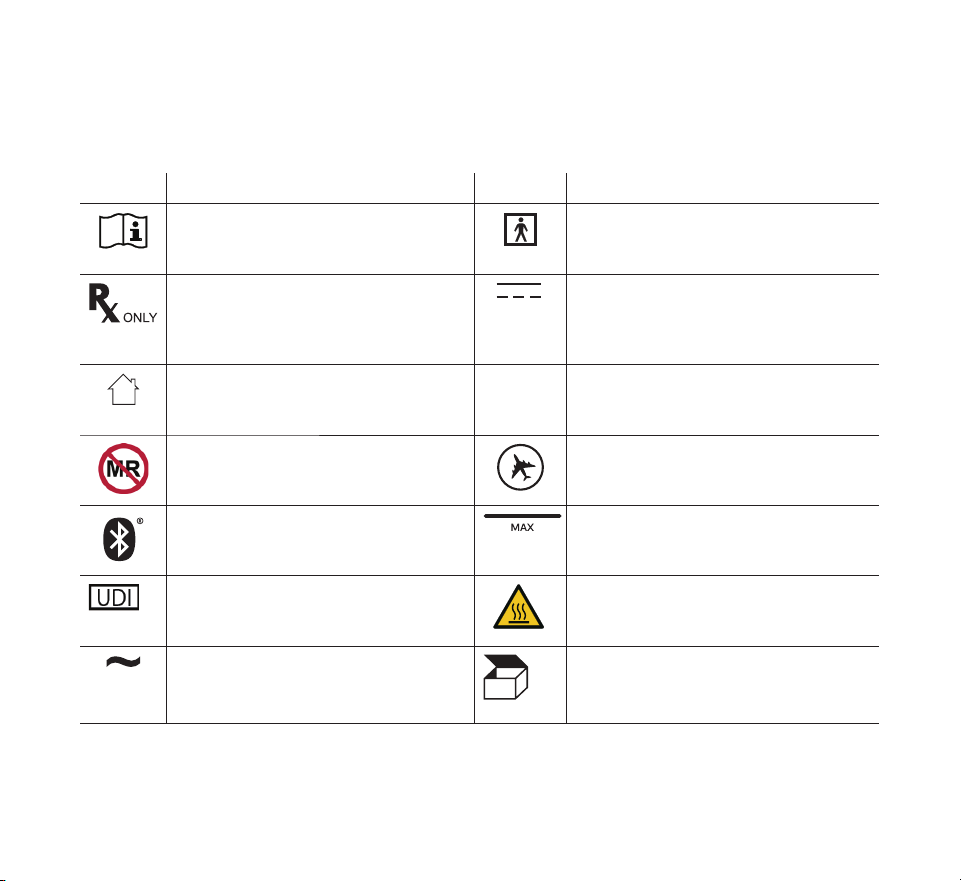
The following symbols may appear on the device, power supply, and accessories. For a full
list and description of the symbols used on the device and its packaging, see www.symbols.
philips.com.
Symbol Title and Meaning Symbol Title and Meaning
Consult instructions for use. Type BF applied part
To identify a type BF applied part
complying with IEC 60601-1.
Prescription device
Caution: U.S. federal law restricts
this device to sale by or on the order
of a physician.
DC power (Direct current)
For indoor use only
Equipment is designed primarily for
indoor use.
IP22
Drip proof equipment
MR unsafe
Do not use device in a Magnetic
Resonance (MR) environment.
Approved for airline use.
Bluetooth® symbol
Indicates the device has Bluetooth
capabilities.
Maximum ll line
Unique Device Identier
Indicates the Unique Device
Identier information.
Warning: Hot surface
AC power (Alternating current) Packaging unit
To indicate the number of pieces in
the package.
- 9 -
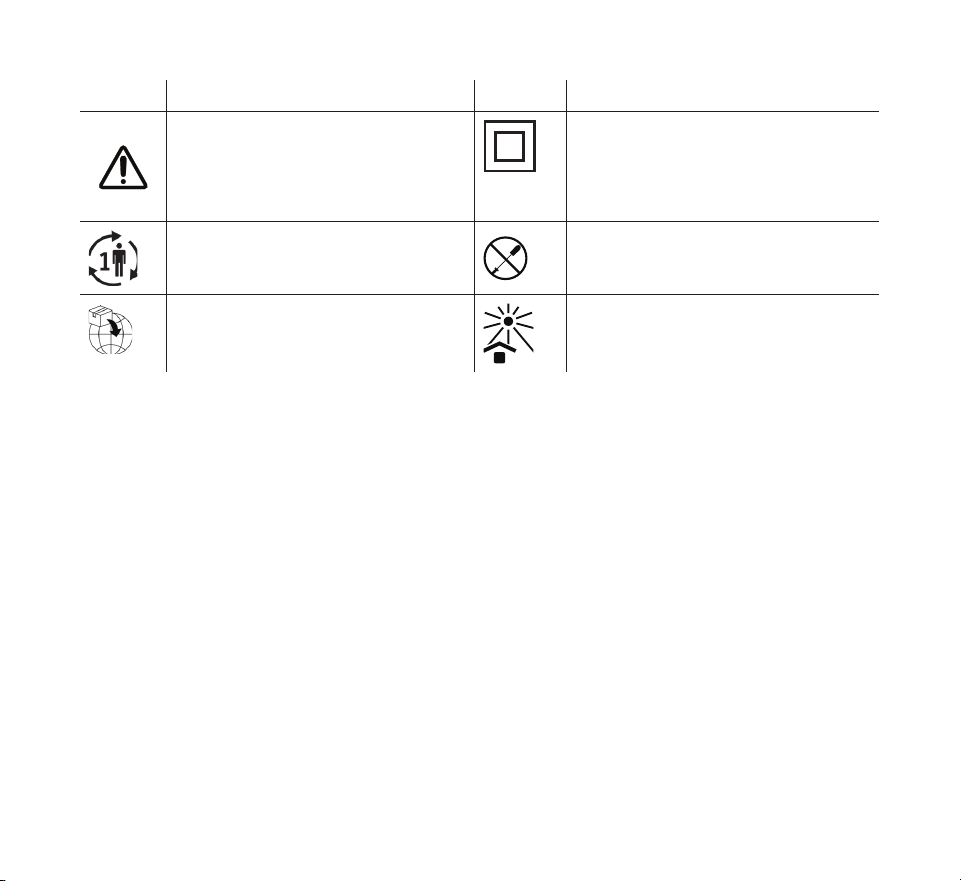
Symbol Title and Meaning Symbol Title and Meaning
Caution, consult accompanying
documents.
Class II equipment (Double
Insulated)
To identify equipment meeting the
safety requirements specied for
Class II equipment.
Single patient use
Indicates that the tubing is for single
patient use only.
Do not disassemble.
Importer
Indicates the entity importing the
medical device into the EU.
Keep away from sunlight
Indicates the medical device needs
protection from light sources.
System contents
Your system may include the following items:
• Device • Carrying case • Flexible Tubing
• Humidier water tank • SD Card • 6 ft. (1.83 m) power cord
• User manual • Reusable lter • Power supply
• Quick start guide • Disposable ultra-ne lter (optional)
How to contact Philips Respironics
Should you experience trouble with this equipment or require assistance setting up, using,
or maintaining the device or accessories, please contact your home care provider. If you
need to contact Philips Respironics directly, call the Philips Respironics Customer Service
department at 1-800-345-6443 or 1-724-387-4000. You can also use the following address:
Respironics, Inc.
1001 Murry Ridge Lane
Murrysville, PA 15668
- 10 -
2. System overview
The DreamStation 2 CPAP Advanced/DreamStation 2 Auto CPAP Advanced is a Continuous
Positive Airway Pressure therapy device designed for the treatment of Obstructive Sleep Apnea
(OSA).
The integrated humidier and optional heated tubing is designed to deliver humidication to
provide added comfort during therapy. This humidication level is controlled through the output
of the heated humidier as well as the temperature of the optional heated tubing. Use of the
integrated humidier with the heated tubing allows for a comfortable level of humidity to be
maintained at the mask.
Several accessories are also available for use with your device. Contact your home care provider
to purchase any accessories not included with your system.
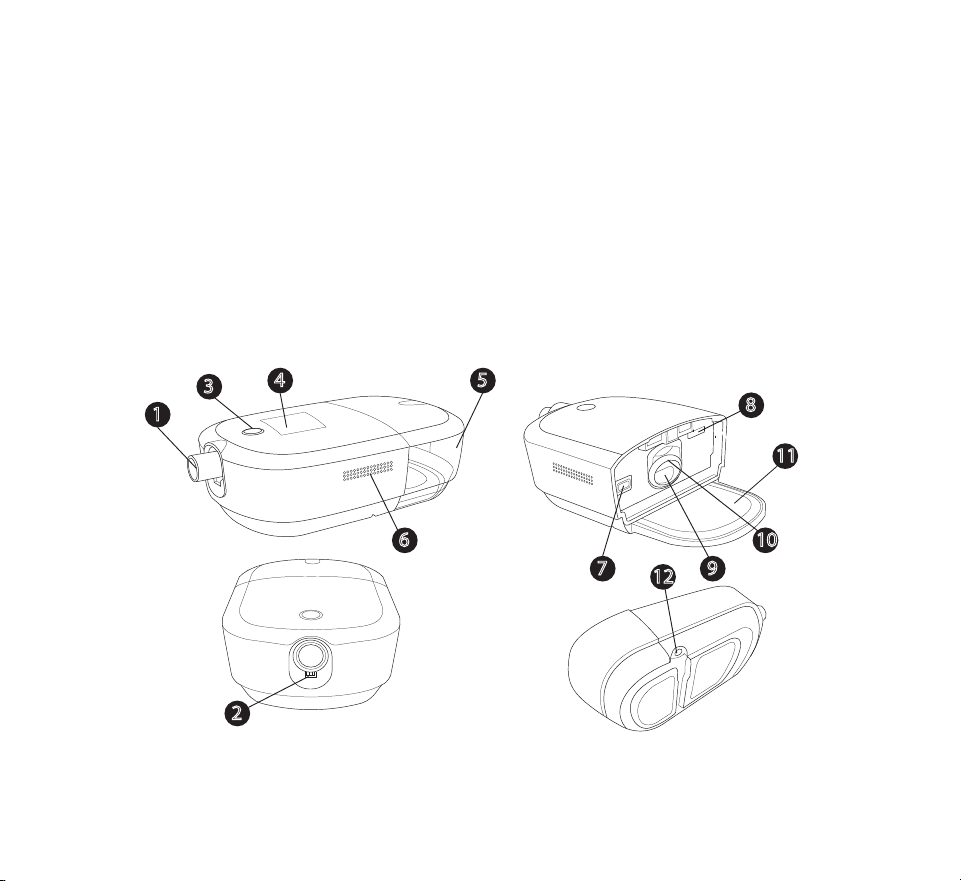
Device with integrated humidier
1
3
5
4
9
4
2
1
3
5
6
4
2
11
7
8
9
10
12

- 11 -
# Feature Description # Feature Description
1 Air outlet port Connect the exible
tubing here
7 Filter access Access the lter here.
2 Heated tubing
pin connector
Line up and connect the
heated tubing connector
here
8 SD card
access
Access the SD card here.
3 Therapy on/o
button
Starts and stops the
airow for therapy.
9 Air inlet for
the humidier
Connects to the
humidier water tank
4 Display screen This is the User Interface
for the therapy device.
10 Humidier air
inlet/outlet
seal
Provides a seal between
the device and the
humidier water tank.
5 Humidier
water tank
Removable water tank
that holds the water for
humidication (shown
installed)
11 Heater plate Warms the water in the
water tank
6 Air inlet Delivers air to the device 12 Power inlet Connect the power cord
here
- 12 -
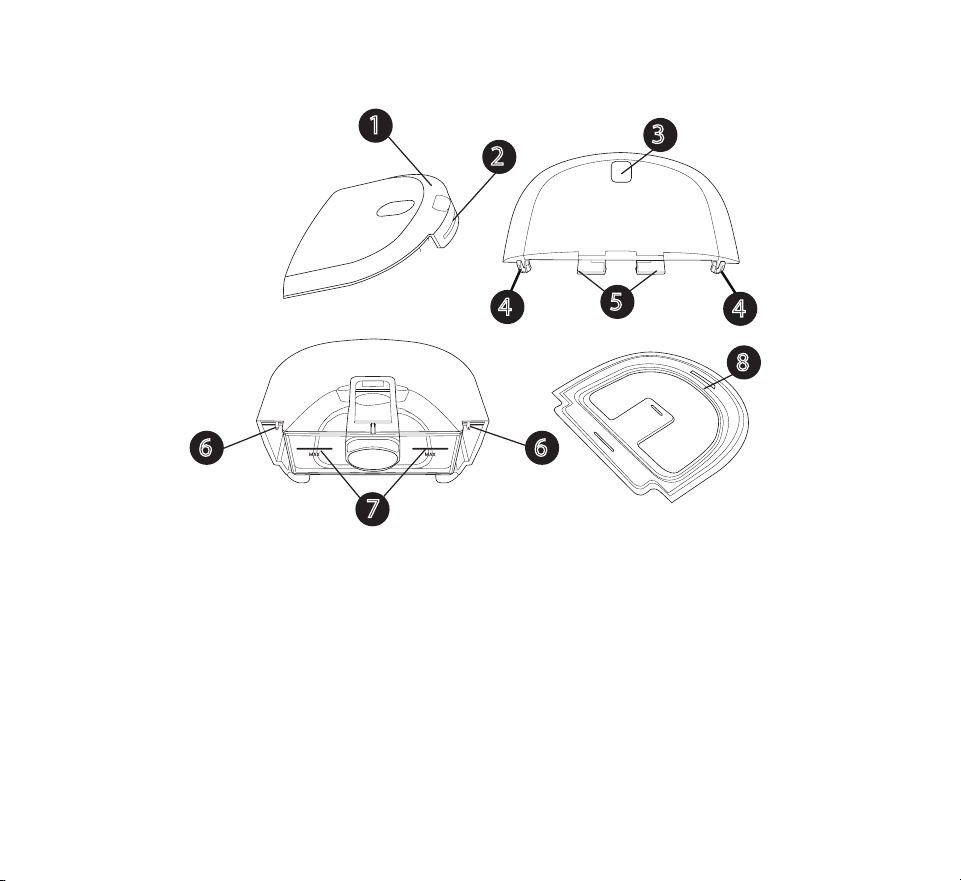
Humidier water tank
4
7
4
5
6 6
3
1
2
8

- 13 -
# Feature Description
1 Lid Removable to ll the water tank.
2 Lid front tab Remove lid from here
3 Water tank release
indent
Unlatches water tank from the device when pressed
4 Lid hooks Connect over water tank base tabs
5 Water tank latch Latches the water tank to the device
6 Water tank base tabs Connect water tank lid hooks here to attach the water tank lid
7 Maximum ll lines Indicate the maximum water level for safe operation. The ll
lines also appear on the sides of the water tank base.
8 Water tank seal Provides a seal between the water tank lid and base.
Removable for ease of cleaning.
9 Grip indent (not
shown)
Grip indent, located on the bottom of the water tank base, for
tank removal

- 14 -
3. Device setup
Where to place the device
Place the device on a rm, at surface somewhere within easy reach of where you will use it
at a level lower than your sleeping position. Make sure the device is away from any heating
or cooling equipment (e.g., forced air vents, radiators, air conditioners).
Note: When positioning the device, make sure that the power cable is accessible
because removing power is the only way to turn o the device.
Cautions
• Make sure the air inlet (slotted) area on the side of the device is not blocked by bedding,
curtains, or other items. Air must ow freely around the device for the system to work
properly.
• Do not place the device directly onto carpet, fabric, or other ammable materials.
• Do not place the device in or on any container that can collect or hold water.
Supplying AC power to the device
Warning: Periodically inspect electrical cords and cables for damage or signs of
wear. Discontinue use and replace if damaged.
Caution: Do not use extension cords with this device.
Complete the following steps to operate the device using AC power and refer to the
following images for guidance:
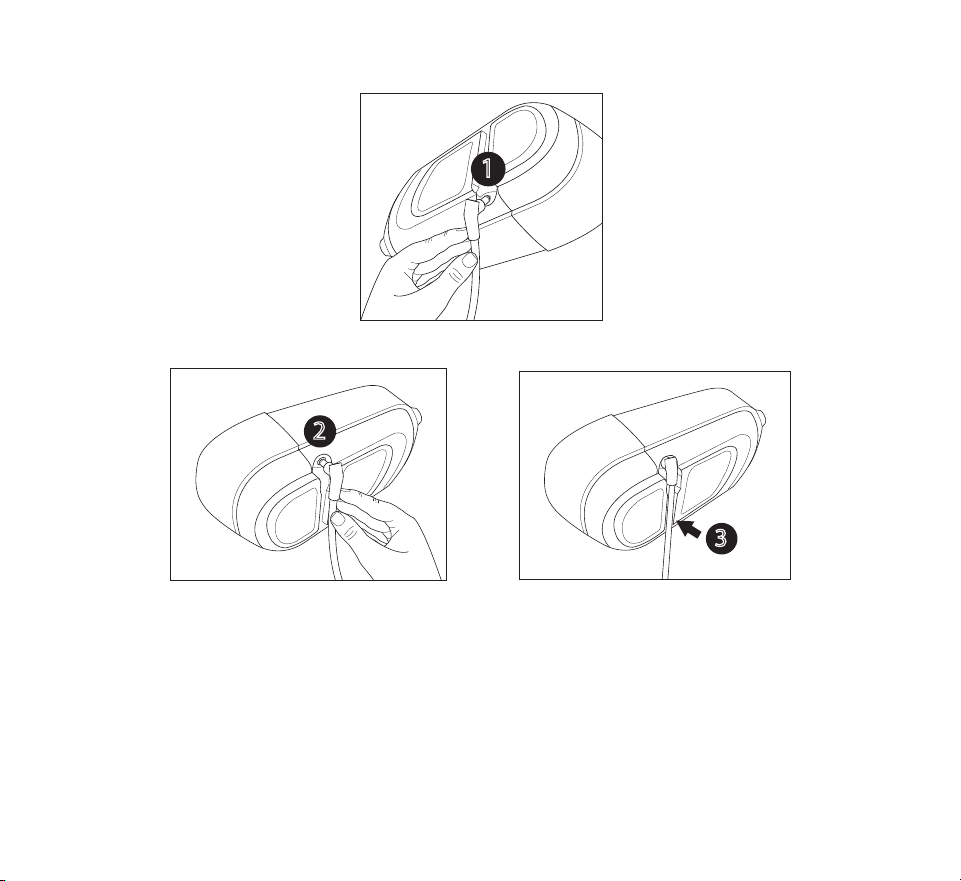
1. Ensure that the humidier tank is empty.
2. Plug the power supply cord’s connector into the power inlet on the bottom of the
device
1
or
2
.
For convenience, the power connection allows for the cord to connect and route in the
direction that works best for your setup.
An inset area on the bottom of the device allows the cord to be routed under the
device
3
.
- 15 -
1
OR
2
3
- 16 -
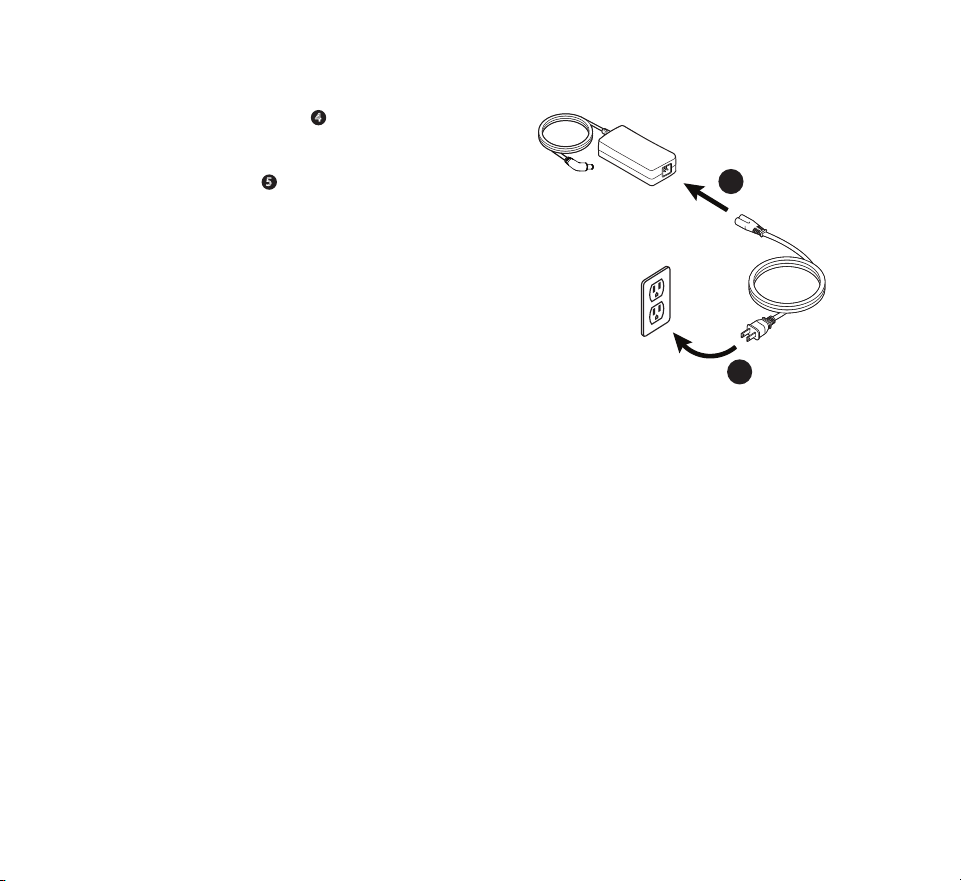
3. Plug the socket end of the AC power cord
into the power supply
4
.
4. Plug the pronged end of the AC power cord
into an electrical outlet that is not controlled
by a wall switch
5
.
5. Verify that the connections on the bottom
of the device, at the power supply, and at
the electrical outlet are fully inserted. This
will help to ensure that a secure, reliable
electrical connection has been made.
4
5
5
Important: To remove AC power, disconnect the power supply cord from the
electrical outlet.
Setting up the integrated humidier
Warning: Allow the heater plate and water to cool down for approximately 15
minutes before removing the water tank. A burn may result from: touching
the heater plate, coming in contact with the heated water, or touching the
tank pan.
Cautions
• Do not attempt to ll the humidier water tank while it is still attached to the device.
• Use only room temperature distilled water in the tank. Do not put any chemicals or
additives into the water. Possible airway irritation or damage to the water tank may
result.
• Do not ll the humidier water tank above the maximum ll line. If the humidier water
tank is overlled, water may leak into the therapy device, humidier, or onto your
furniture. Damage to the therapy device may occur.
Note: Clean the humidier water tank before rst use. Refer to the “Home cleaning:
humidier water tank” section in this manual.
- 17 -
Removing the humidier water tank
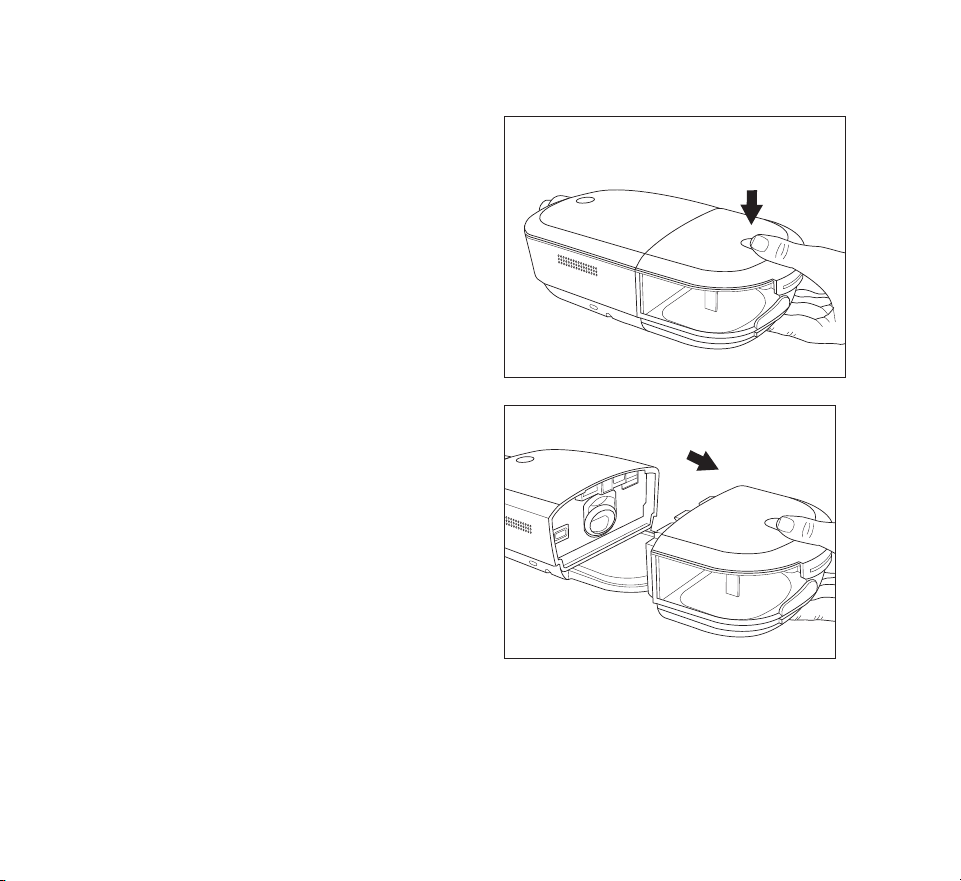
1. Gently press down on the indented area
on the top of the humidier water tank to
unlatch the tank from the device.
2. Grip the top and bottom of the humidier
water tank and slide it out away from the
device.
- 18 -
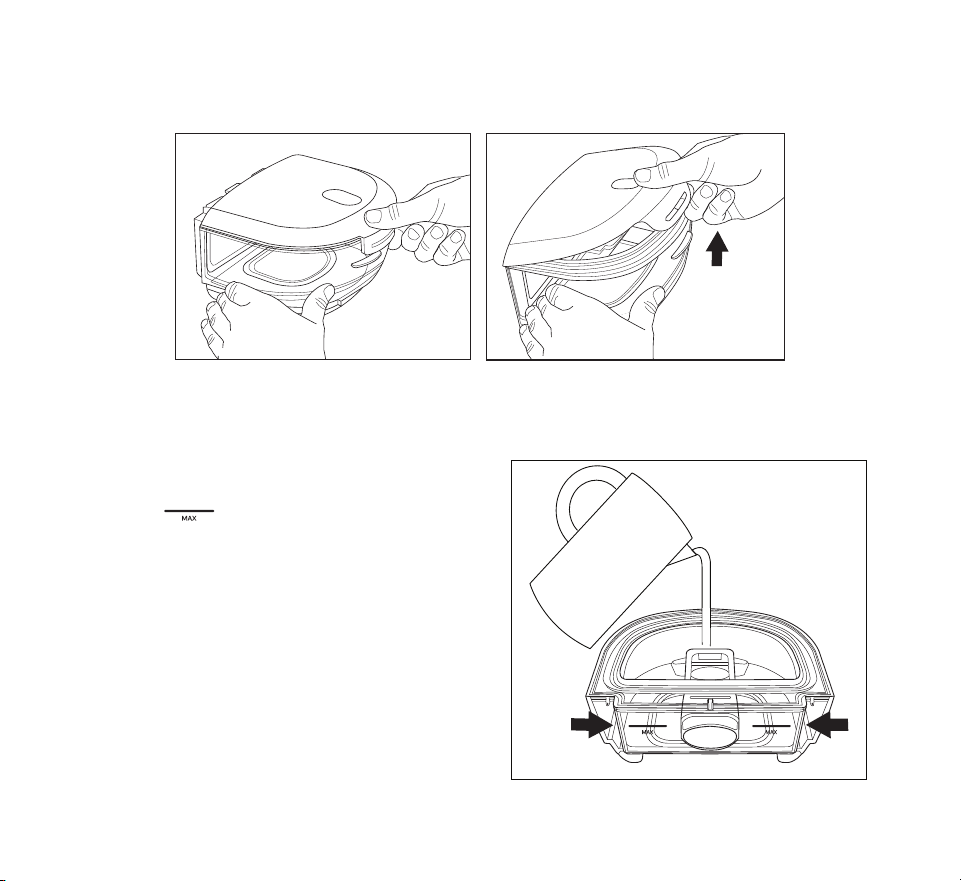
3. Remove the lid by pulling up on the lid tab while holding the water tank base.
4. Pour out any remaining water and rinse the water tank base.
Filling and connecting the water tank
1. Place the water tank base on a rm, at
surface. Fill the water tank with distilled
water no higher than the maximum ll
lines , which are located on the back
and sides of the water tank base.
- 19 -
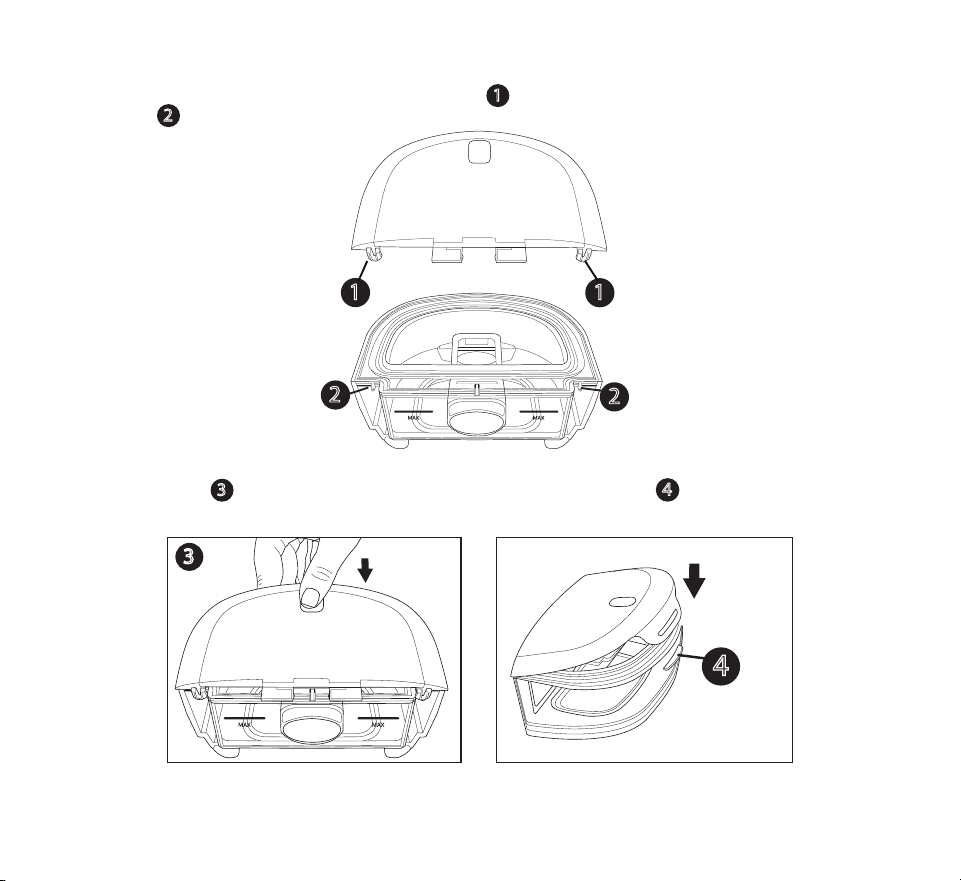
2. Reattach the lid. Place the hooks on the lid
1
over the small tabs on the water tank
base
2
.
1
1
2
2
3. Press down
3
until the lid snaps securely over the lid front tab
4
on the front of the
water tank base.
3
4
- 20 -
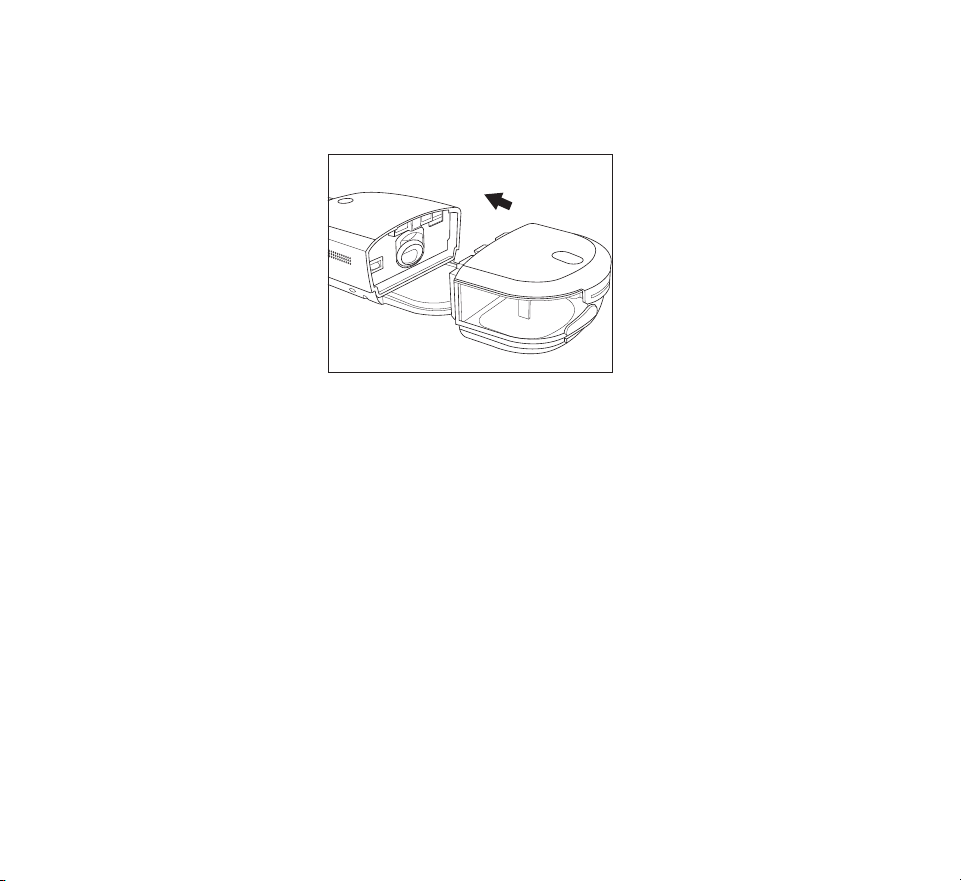
4. Slide the humidier water tank back into the device, using the tracks on the bottom of
the water tank base for proper alignment and connection. Ensure that it is latched into
place before proceeding.
Installing/replacing the air lters
Caution: A properly installed, undamaged Philips Respironics reusable pollen lter
is required for proper operation.
The device uses a grey reusable pollen lter that can be rinsed and a blue disposable ultra-
ne lter. The reusable lter screens out normal household dust and pollens, while the ultra-
ne lter provides more complete ltration of very ne particles. The reusable lter must be in
place at all times when the device is operating. The ultra-ne lter is recommended for people
who are sensitive to tobacco smoke or other small particles.
The grey reusable lter is supplied with the device. A disposable blue ultra-ne lter may
also be included. If a lter is not installed when you receive your device, you must at least
install the reusable lter before using the device.
1. Remove the humidier water tank from the device. See the “Removing the humidier
water tank” section later in this manual.
- 21 -
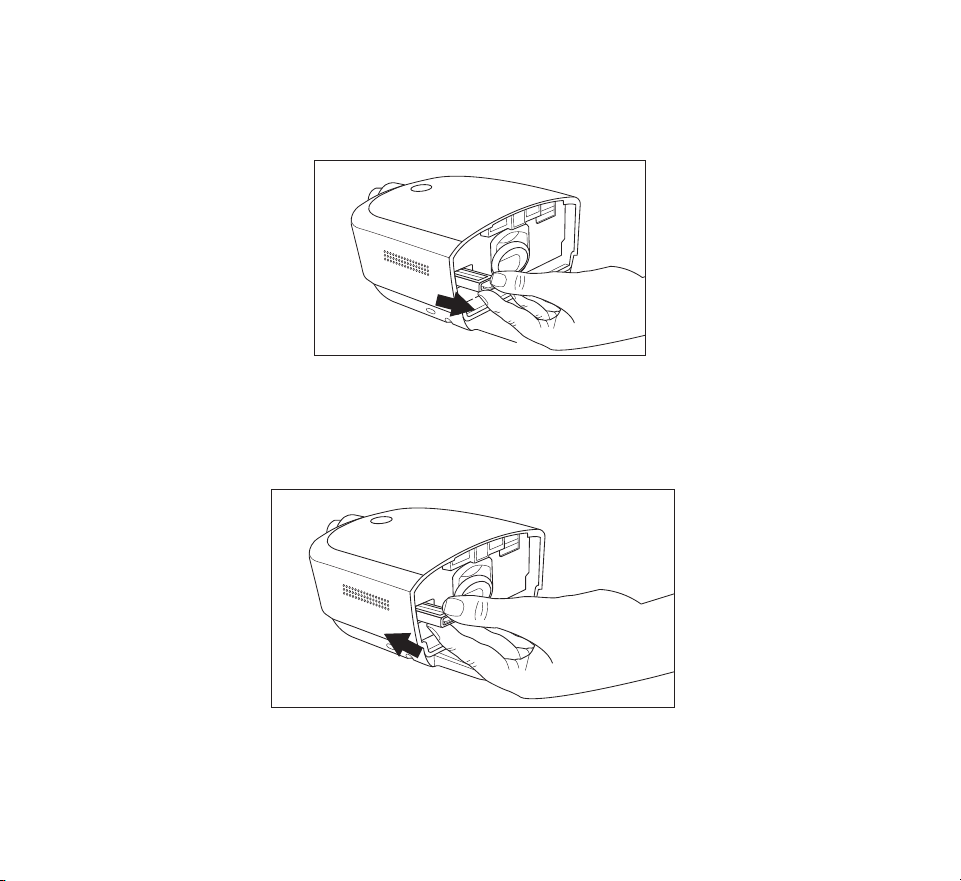
2. To remove an existing lter, pull the white tab on the end of the lter and pull the lter
out of the device
3. If applicable, place a dry, grey reusable pollen lter on top of a new, optional blue
disposable ultra-ne lter, align the arrows on both lters, and rmly snap them
together.
4. Place the lter into the therapy device.
5. Reinstall the humidier water tank.

- 22 -
Connecting the breathing circuit
To use the system, you will need the following accessories in order to assemble the
recommended breathing circuit:
• Philips Respironics interface (nasal mask or full face mask) with integrated exhalation
port, or Philips Respironics interface with a separate exhalation device (such as the
Whisper Swivel II)
• Philips Respironics exible tubing (12, 15, or 22 mm standard tubing or 12 or 15 mm
heated tubing), 1.83 m (6 ft.)
• Philips Respironics headgear (for the mask)
Warnings
• Do not pull or stretch the tubing. This could result in circuit leaks.
• Inspect the tubing for damage or wear. Discard and replace the tubing as necessary.
• If you are using a full face mask (a mask covering both your mouth and your nose), the
mask must be equipped with a safety (entrainment) valve.
• If the device is used by multiple persons (such as rental devices), a low-resistance, main
ow bacteria lter should be installed in-line between the device and the circuit tubing
to prevent contamination.
To connect your breathing circuit to the device, complete the following steps.
Note: If you are using the optional 12 mm (non-heated) performance tubing, an
adapter is required to connect to the therapy device.
Note: Tubing is identied on the cu with the tubing identier symbol: “12”, “15”,
“HT12”, or “HT15”. 22 mm tubing contains no symbol.
- 23 -
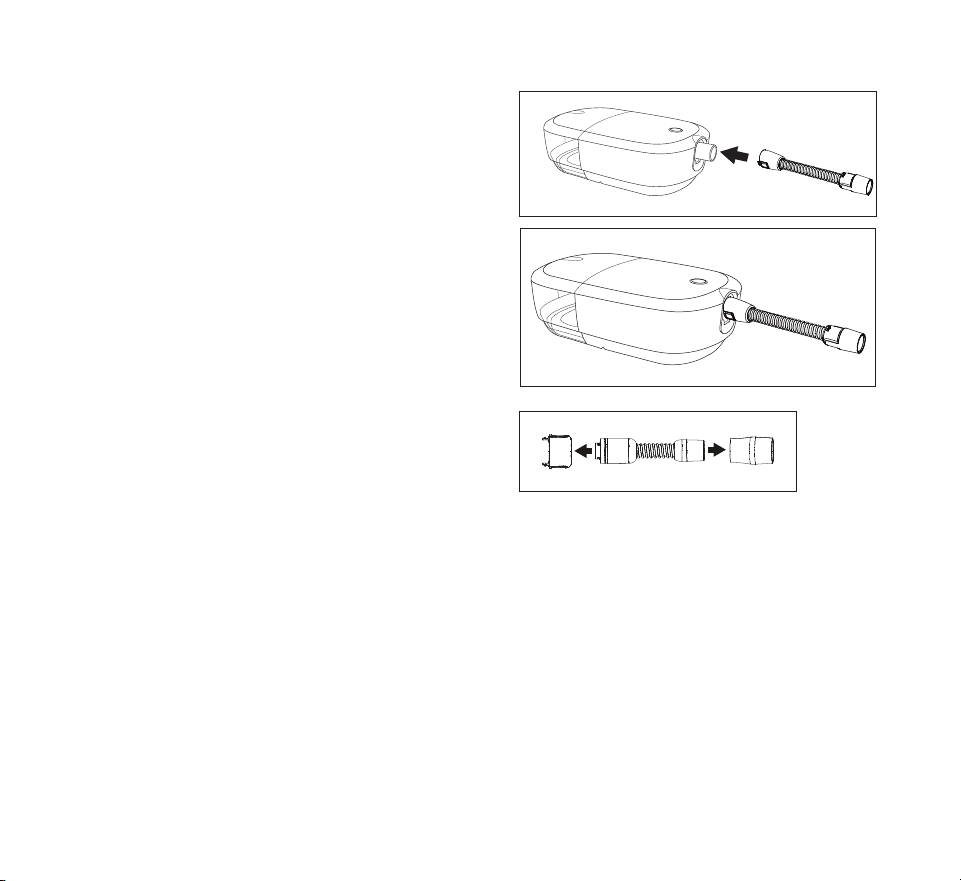
1. To connect heated tubing (shown), line up
the pin connectors on the heated tube with
the bottom of the air outlet port on the
device. The clips at the end of the tubing
should be aligned to the sides of the port
and will click into place.
If you are using standard tubing (not
shown), simply slide the tubing over the air
outlet port on the device.
2. If you are using the optional 12 mm heated
tubing or 12 mm performance tubing,
connect the provided mask adapter to the
mask connection end of the tubing. The
12mm performance tubing also requires
a device adapter. When connecting the
adapter to the CPAP, the clips should be
aligned to the sides with the slight bump
facing straight down.
3. Connect the tubing to the mask. For proper placement and positioning, refer to the
instructions that came with your mask.
4. Attach the headgear to the mask if necessary. Refer to the instructions that came
with your headgear.
- 24 -
Starting the device
1. Ensure power is supplied to the device as indicated by a white ring around the therapy
button. The rst screen to display will be the Philips logo, followed by the device model
screen, and then a screen that contains a summary of your therapy. See the “Therapy o
display” section later in this manual for a description of the User Interface (UI) screens.
Note: The device may prompt you to set the language and time. These settings
can always be adjusted from the device settings screen.
2. Put on your mask assembly. Refer to the instructions supplied with the mask.
A small amount of mask leak is normal and acceptable. Correct large amount of mask
leaks or eye irritation by adjusting your mask headgear.
Note: If you are using the device in a bed with a headboard, try placing the
tubing over the headboard. This may reduce tension on the mask.
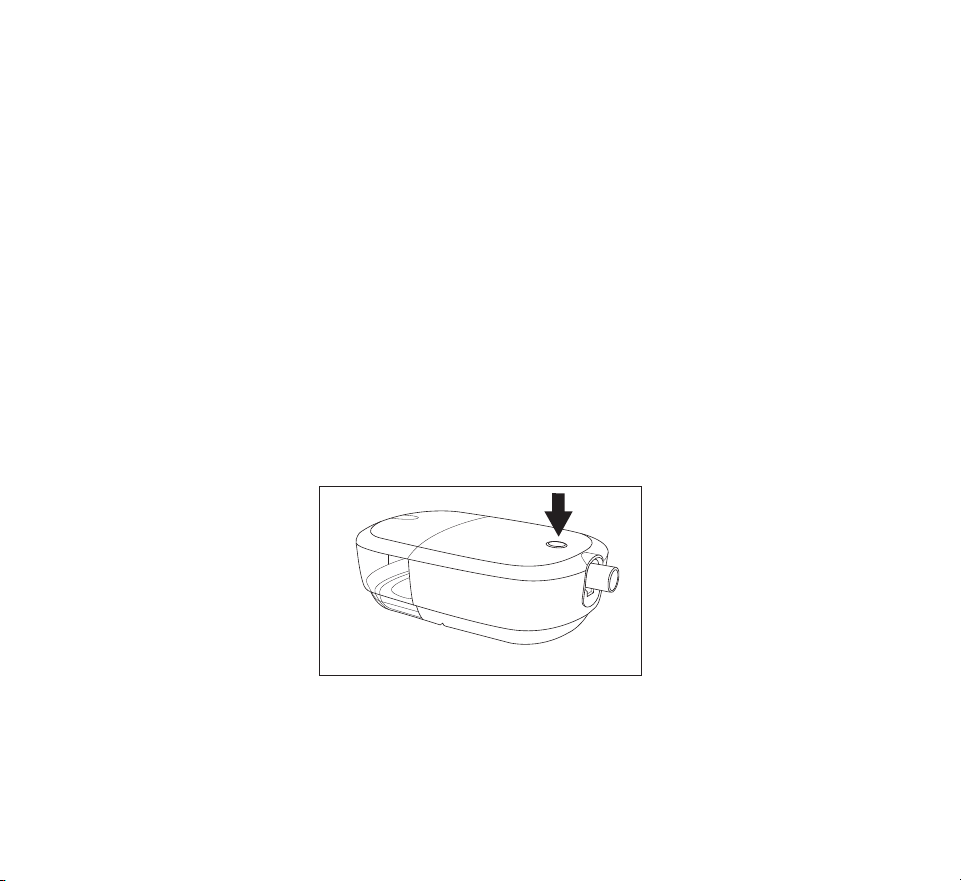
3. Press the Therapy button on top of the device to turn on airow and begin therapy. The
Therapy button ring will illuminate blue.
Note: If your home care provider has enabled the Automatic On feature, the
device will automatically turn the airow on when you put on your mask
and breathe.
4. Press the Therapy button again to turn o the therapy. The Therapy button ring will
illuminate white.
Note: If your home care provider has enabled the Automatic O feature, the
device will automatically turn the airow o when you take o your mask
and the device recognizes inactivity.

- 25 -
Performance check
To initiate a performance check, unplug the device and plug it back in. An error will appear
on the screen if a performance issue is detected.
Bluetooth wireless technology
Bluetooth wireless technology is one method by which you can transfer your therapy
device’s data to DreamMapper. DreamMapper is a mobile system designed to help
Obstructive Sleep Apnea (OSA) patients enhance their sleep therapy experience.
Pairing your therapy device to your Bluetooth-enabled mobile device
Note: The blower must be o to allow Bluetooth pairing.
Note: You can only pair your therapy device to one mobile device at any given time.
Note: Pairing works best when your therapy device and mobile device are in the
same room.
Note: The current version of DreamMapper will guide you through these instructions.
Note: After initiating pairing in DreamMapper, you will have 30 seconds to complete
the setup. After this time, it will be cancelled automatically.
Follow the steps below to manually pair to your mobile phone or tablet.
1. With your therapy device powered up, initiate Bluetooth Setup from the DreamMapper
mobile app.
Note: From DreamMapper you may need to select from a list of available Bluetooth
devices. The therapy device will appear as “PR BT XXXX” (XXXX will be the last four
digits of the serial number listed on your therapy device).
2. The pairing code will display on the device.
3. In DreamMapper, conrm the 6-digit pairing code displayed on the therapy device.
Note: When pairing from certain mobile devices you may need to enter the 6-digit
pairing code in DreamMapper. Once entered, pairing will automatically begin.
4. Tap “Pair” to complete pairing. The therapy device displays “Pairing to Device” and then
“Success Bluetooth Device is now Paired”.
- 26 -
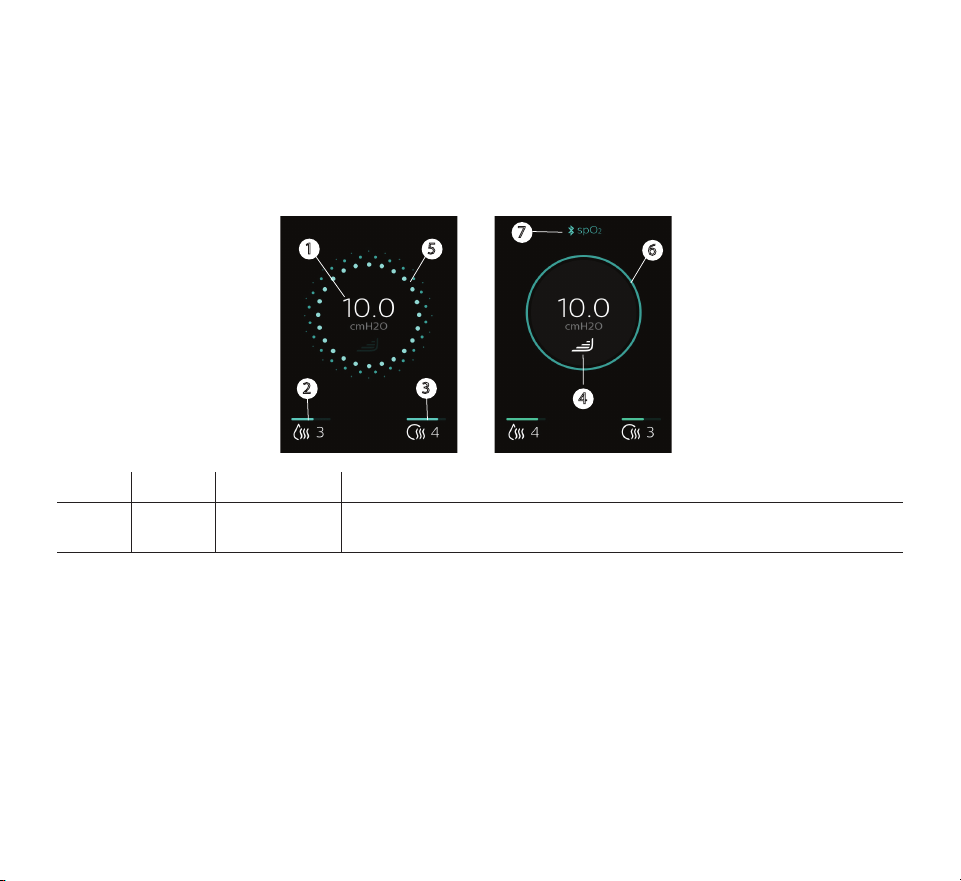
Therapy On display
The UI on this device allows you to adjust the device settings and view information about
your therapy. The UI consists of the display screen with touch capability.
While the device is delivering therapy, the pressure setting is displayed. You can also view
and adjust humidication, heated tube temperature, and RAMP PLUS settings.
1
2
3
5
6
4
7
# Symbol Feature Description
1
cmH2O
Therapy
pressure
Displays the prescription pressure setting. If RAMP PLUS is running,
the current delivered pressure is displayed.
- 27 -
# Symbol Feature Description
2
Adjustable
humidier
setting (if
available)
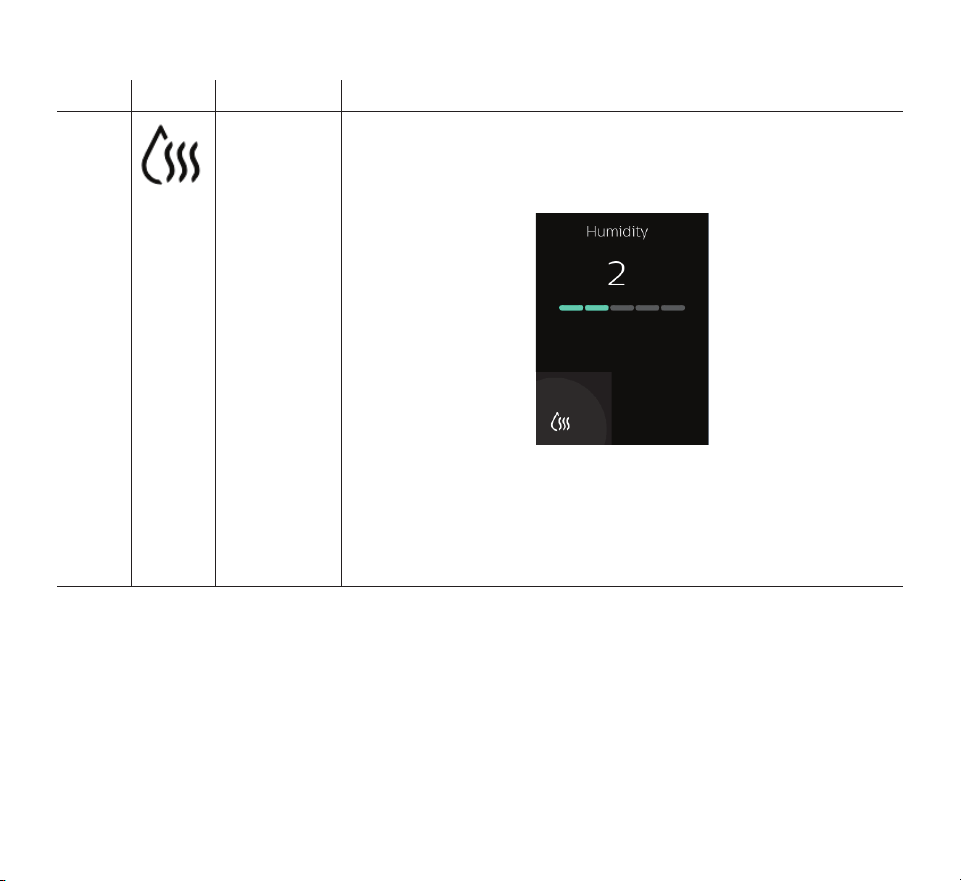
The icon only displays when humidication is enabled by
your home care provider. To change the setting, tap the
humidication icon. A settings screen displays your current
setting.
Continue to tap the humidication icon until the desired
setting is displayed. The available settings are O or 1-5, with
1 as the lowest humidity and 5 as the highest humidity. Once
humidication is set, the device will return to the therapy screen
after a few seconds and automatically activate the new setting
for current and future therapy settings.
- 28 -
# Symbol Feature Description
3
Heated tube
temperature
(if available)
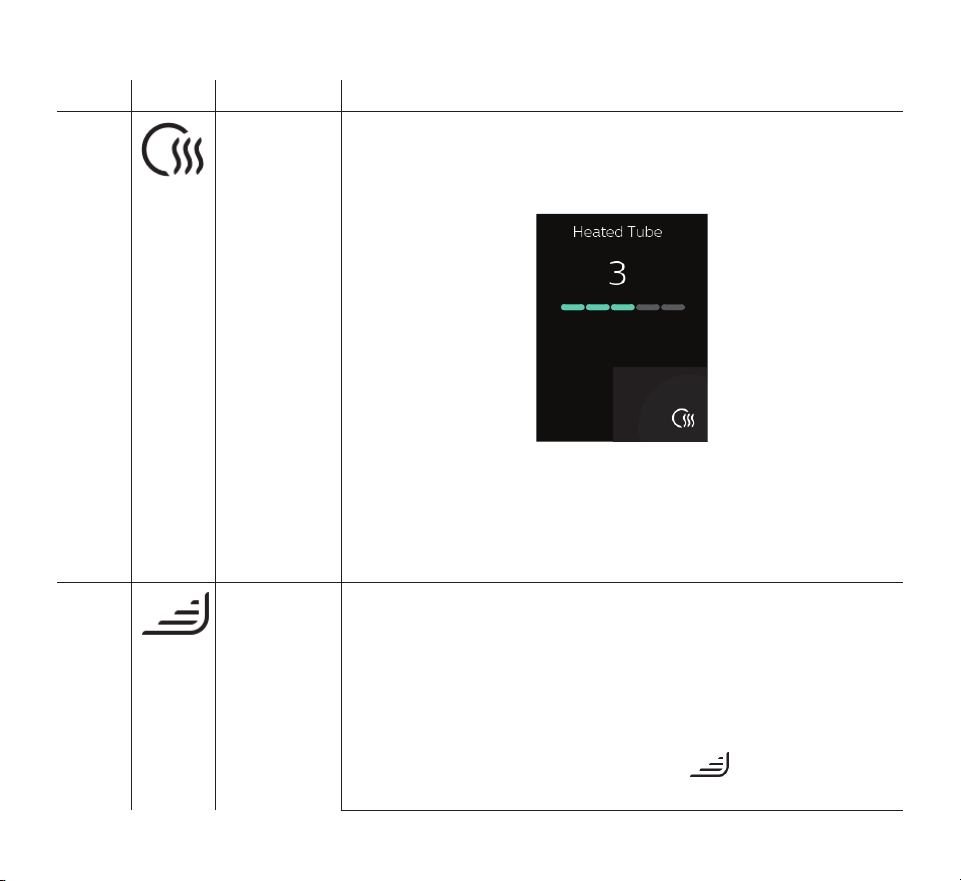
The icon only displays if enabled by your home care provider
when a heated tube is being used. To change the setting, tap
the heated tube icon. A settings screen displays your current
setting.
Continue to tap the heated tube icon until the desired setting
is displayed. The available settings are O or 1-5, with 1 as the
lowest temperature and 5 as the highest temperature. Once a
temperature is set, the device will return to the therapy screen
after a few seconds and automatically activate the new setting
for current and future therapy settings.
4 RAMP PLUS
(Ramp+)
The device is equipped with a RAMP PLUS feature that allows
you to adjust your starting pressure for a set period of time
(default of 30 minutes) for added comfort when you are trying
to fall asleep. During that set time, the air pressure will remain
at your set starting pressure unless the device detects an event
and identies the need to increase your pressure. When RAMP
PLUS has concluded, your prescribed therapy pressure will
resume.
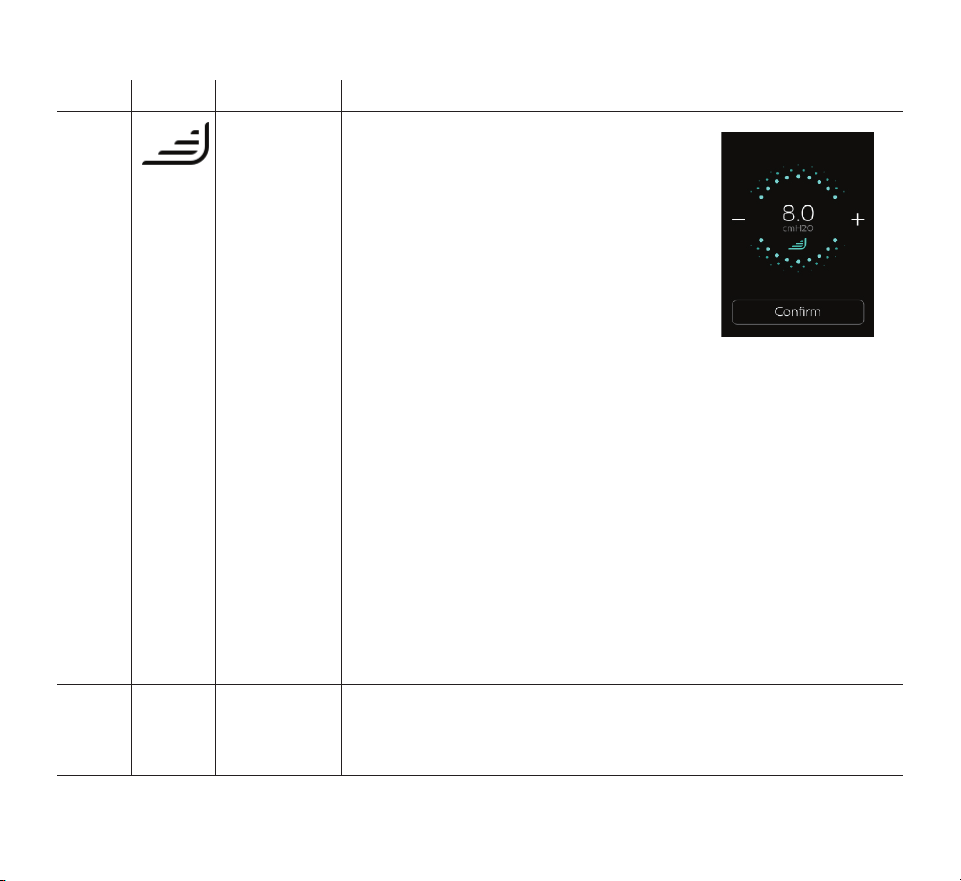
To activate the RAMP PLUS setting, tap . Tapping will also
simultaneously allow you to adjust the settings.
- 29 -
# Symbol Feature Description
4 RAMP PLUS
(Ramp+)
The rst time RAMP PLUS is activated,
the setting will default to 4. To change
the setting, tap the - or + icons until the
desired starting pressure is displayed.
For faster scrolling, hold the - or + icon
instead of tapping.
The RAMP PLUS pressures range from
4 cmH
2
O to 10 cmH
2
O in 1 cmH
2
O
increments. Tap conrm or wait 3
seconds to save your setting. The display
will then return to the therapy screen.
Every therapy session thereafter will automatically start RAMP
PLUS with the start of therapy.
Note: There is no need to tap the RAMP PLUS symbol again
unless you want to make a change to the RAMP PLUS pressure
or restart RAMP PLUS.
Note: RAMP PLUS pressure and time can also be adjusted in
the Settings Menu on your main screen if enabled by your home
care provider.
Note: The device goes dark after 60 seconds of inactivity. To
wake up the device, tap anywhere on the display. This will
simultaneously reactivate your RAMP PLUS pressure (if set), or
it will take you to your prescribed minimum pressure level and
continue to automatically adjust your delivered pressure as
needed (if in Auto CPAP mode). Once the display appears, you
can continue to adjust settings as desired.
5 and
6
N/A Ramp
indicator
The therapy on display indicates when ramp is active. The
circle around the therapy display is dotted blue (5) when ramp
is active and solid blue (6) when ramp is not active or therapy
pressure is achieved.
- 30 -
# Symbol Feature Description
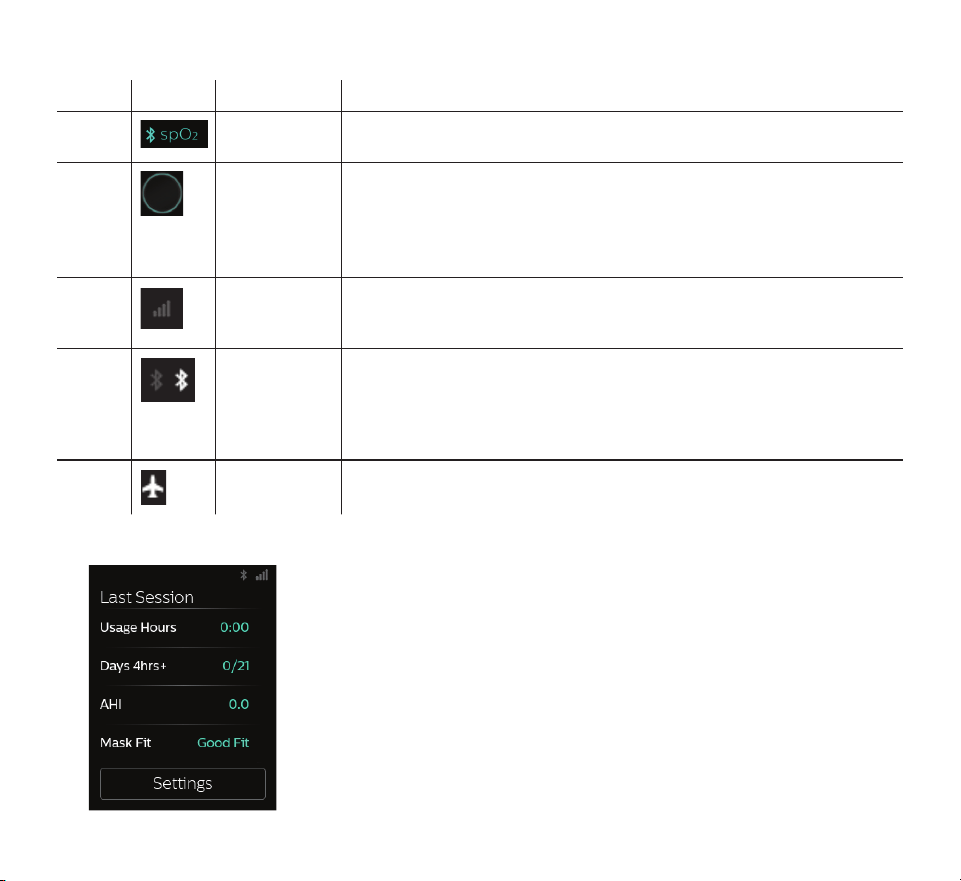
7 Oximetry
connection
This symbol displays during therapy when a pulse oximeter is
connected to the therapy device.
Not
shown
Therapy
button ring
The therapy button ring illuminates blue to indicate therapy is
turned on. The ring does not illuminate when therapy is on and
the screen has gone dark.
The ring illuminates white when the device is plugged in and
therapy is o.
Not
shown
Cell modem
signal
strength
Displays signal strength of cellular modem on devices that
have the cellular modem available except when in Airplane
Mode.
Not
shown
Bluetooth
Displays when the device has Bluetooth available. When the
symbol is grey, it indicates that Bluetooth is available. If the
device is connected to a Bluetooth client (phone, tablet, etc.) it
will appear white. This symbol does not appear when Airplane
Mode is enabled.
Not
shown
Airplane
mode
Displays when Airplane Mode is enabled. It will replace the
Cell and/or Bluetooth symbols when active.
Therapy O display
A summary of your therapy displays on the
UI when therapy is turned o. You can view
additional details about your therapy or
perform a mask t check. From here you can
tap “Settings” to adjust Comfort and Device
settings if enabled by your provider.

- 31 -
The following therapy results may appear on the Last Session screen. Tapping on the data
displayed in blue text will give more history and detail for each item.
Text Description
Usage hours Displays an overview of your last day/night of usage in hours and minutes.
Tapping the hours displayed in blue text shows your nightly usage for the last
3 sleep sessions.
Days 4hrs+ Displays the total number of 4+ hour nights that you have slept in the last 30
days. It provides a goal of sleeping at least 4 hours per night for 70% of the last
30 nights. Therefore the goal is 21 “good nights” of use. By tapping this section,
you will see a screen that tracks your progress. An indication of reaching
your goal will be displayed through a pop-up screen congratulating you.
Additionally, a display of “Complete” will appear on the Last Session screen.
AHI If enabled by your provider, this feature displays the nightly Apnea/Hypopnea
index (AHI) value for the most recent one day time frame.
Mask t This screen displays how your mask t during the most recent one day time
frame.
A display of “Good t” indicates that the leak found allows for optimal
performance of the device. A display of “Adjust t” indicates that the leak may
aect device performance, however, the device will remain functional and
deliver therapy. If “Adjust t” displays, adjust your mask to reduce the leak
before starting therapy again. By tapping on “Adjust t” or “Good t”, you can
choose to initiate a mask t check.
To run a mask t check, put on your mask assembly and tap “Start” to begin a
mask t check.

- 32 -
Navigating the settings screens
To adjust a setting:
1. Tap “Settings” from the Last Session screen.
2. Swipe up or down on the screen until you nd the setting you want to adjust. The
settings that can be changed appear in blue.
Note: If you see a series of dots on a setting, it indicates that there is more than one
screen for that setting.
3. Tap the setting you want to view or change.
4. Tap the screen to change or select the setting. The display returns to the previous menu
screen and the setting is saved.
Note: If you do not change a setting, tap “Back” on the top-left of the screen to exit
back to the Last Session screen.

- 33 -
Settings screens
When you tap “Settings”, you will be able to view the following Comfort and Device settings.
These screens will only display if they are available and enabled on your device through
your provider. Tap “Back” to exit to the Last Session screen.
Comfort settings
Symbol Meaning Description
RAMP PLUS
(Ramp+)
RAMP PLUS allows you to adjust your starting pressure and time for
added comfort when you are trying to fall asleep. In this setting you
can set the time to 15, 30, or 45 minutes. You can also set the pressure
to O or from 4 cmH
2
O to 10 cmH
2
O in 1 cmH
2
O increments.
During the set time, the air pressure will remain at your set starting
pressure unless the device detects an event and identies the need
to increase your pressure. When RAMP PLUS has concluded, your
prescribed therapy pressure will resume.
Note: RAMP PLUS pressure can also be adjusted on the display screen
during therapy.
Humidity
You can change the humidication level setting from 0 to 5. This
symbol only displays when humidication is enabled.
Heated tube
temperature
You can change this setting from 0 to 5. This symbol only displays
when optional heated tube is connected.
FLEX This allows you to adjust the level of air pressure relief that you feel
when you exhale during therapy. Your home care provider can enable
or disable this feature. When your provider enables Flex, a level will
already be set for you on the device. You change the setting between
O, 1, 2, and 3. The setting of “1” provides a small amount of pressure
relief, with ‘‘2’’ and ‘‘3’’ providing additional relief.

- 34 -
Device settings
Text Description
Airplane
Mode
This setting allows you to turn airplane mode on and o.
Note: Airplane mode will automatically turn o after three days.
Bluetooth This setting allows you to view or delete the Bluetooth connections on your
device.
Time This setting allows you to choose the time to display in a 12-hour or 24-hour
format and set the current time.
Language This setting allows you to choose which language to display on the UI.
Serial Displays the serial number of the device.
Software Displays the software version of the device.
Modem call Displays the date of the last modem call and a status code. See the Modem
Call section later in this manual for a description of the codes.
View reports If enabled by your provider, tapping “View Reports” will allow you to view the
past 1, 7, 30, 90, 180, or 365 days of therapy data. The remaining items in this
table are accessed through “View Reports”.
Report range Select the desired time period for the report (1, 7, 30, 90, 180, or 365 days).
Days used The number of days the device was used since the start of therapy or during
the selected period.
Days 4hrs+ The number of days the device was used for 4 hours or more since the start of
therapy or during the selected period.
Avg Usage The average amount of time the device was used since the start of therapy or
during the selected period
Total Usage The total number of hours the device was used during the selected period.

- 35 -
Text Description
Avg Mask Fit The average percentage of time there was a Good Mask Fit during the selected
period.
Avg AHI The average AHI for the days the device was used during the selected period.
90%
Pressure
The average 90% pressure for the days the device was used during the
selected period.
Modem call
The modem will automatically make a call and upload therapy data at predetermined times set by
your provider.
If a connection or upload attempt is successful or fails, a message will be displayed on the
device settings Modem call screen indicating the status number. The status numbers are
explained in the following table.
If an error code is displayed, contact your home care provider. They should check the Philips
Respironics proprietary compliance software for additional information.
Number Description
0-0
0-1
0-2
Connection is in progress.
0-3 Connection was made and call was successfully completed.
0-4 Connection is in progress.
1-0
1-1
1-2
1-3
1-4
1-5
Connection error
Try removing power from the therapy device, wait 10 seconds,
then plug the cord in again. If problem persists, contact your
home care provider.

- 36 -
Number Description
2-0
2-1
2-2
2-3
2-4
2-5
Internal communication error
3-0
3-1
3-2
Software conguration error
If problem persists, contact your home care provider. The provider
should check the Philips Respironics proprietary compliance
software for additional information.
4-0
4-1
4-2
4-3
Invalid Device Conguration Error
Modem Service Required

- 37 -
4. Pop-up messages and troubleshooting
Pop-up messages
Device pop-up messages may appear on your screen to alert you of a required action,
device status update, or reminder. When the pop-up message appears, follow any required
actions. See table below or the “Troubleshooting” section later in this manual for additional
solutions to problems you may be experiencing. Tap “Dismiss” to close the pop-up
message.
If you are unable to resolve the problem, contact your home care provider or Philips.
Message
type
Message Possible cause/additional action
Alert
Blocked air inlet
Remove any obstructions
from the inlet or lter. Clean or
replace lter as needed.
Blockage at device inlet
Alert
Low leak
Ensure mask and tube are
connected properly without
any obstruction.
Blockage at tube or mask
Check tube is not crushed or folded such that air
ow is restricted.
Alert
Contact support
There may be a problem with
your heated tube. Therapy will
run without heating the tube.
Heated tube may be overheated or damaged.
Turn o device.
Detach heated tube from humidier, make sure that
tube is not covered or obstructed, and then reattach
to humidier.
If alert continues, contact your provider.
Alert
Contact Support
There may be a problem with
your humidier. Therapy will
run without humidication.
Turn o device and disconnect from power. Visually
check that electrical contacts are clear, then
reconnect power cord. If alert continues, contact
your provider.

- 38 -
Message
type
Message Possible cause/additional action
Alert
SD Card
There was a problem reading
your SD card. Please remove
and reinsert.
Device cannot read the SD card. A problem may
exist with the SD card, it was removed during a
writing activity, or it was inserted incorrectly.
Remove and reinsert the SD card.
If alert continues, contact your provider.
Alert
SD Card
Your SD card is full. Please
refer to manual or contact your
provider.
Remove SD card and replace with a new card, or
contact your provider for a new SD card.
Safe State
Service Required
Please contact support.
(therapy button ring blinks
continuously}
Indicates an error which enters device into “Safe
State.” This allows power to remain on but airow is
disabled.
Disconnect device from power. Reattach power cord
to restore power. If the alert continues to occur,
contact your home care provider.
Notication
Notication
The attached power supply
is operating from a battery
and does not support
humidication.
Disconnect the battery pack and use a compatible
power supply or use the device without
humidication.
Check Power
(light blinks
continuously)
Indicates an
incompatible power supply is
attached.
Switch to a Philips-provided power supply that
is capable of supporting therapy. An 80W power
supply is required to support humidication.
Low Voltage
(light blinks
continuously)
Low voltage Conrm a compatible Philips Respironics power
supply is attached. Switch to compatible power
supply if needed. If battery is being used, ensure
battery is adequately charged.
Notication
SD Card
Your SD card has been
removed. Please reinsert to
record therapy data.
Indicates SD card has been removed from therapy
device and not reinserted before the start of the
current therapy session.
Reinsert the SD card to record therapy data.

- 39 -
Message
type
Message Possible cause/additional action
Notication
Notication
Your Auto Trial period has
concluded. Therapy pressure
has been updated.
No additional action required.
Notication
Device Update
A new software version is
available. Update now?
Tap “‘Update’’ to begin the software upgrade.
Or
Tap “Cancel’’ to cancel the update.
Notication
Notication
You will begin the next level of
EZ Start Pressure.
Displays when EZ-Start mode is enabled and device
is increasing therapy pressure setting for the next
session.
Status pop-up messages
Following the pop-up message required actions or tap ‘‘Dismiss’’ to clear the message.
Screen Text Description
Bluetooth
See the “Connectivity” section later in this manual for Bluetooth
information.
SD Card Activity
Do not remove SD card.
SD card read/write underway.
Update
Your prescription has been
updated.
A prescription update was successful.
Update
A prescription or setting
update was unsuccessful.
A prescription or setting update was unsuccessful. Contact your
home care provider.
SD Removed
Reinsert
Indicates SD card has been removed from therapy device and not
reinserted before the start of the current therapy session.
Reinsert the SD card to record therapy data.

- 40 -
Screen Text Description
Auto O
Your device has automatically
turned o due to inactivity.
This message appears when therapy ends due to automatic o
function.
Pulse Oximetry
Your pulse oximetry recording
was successful.
You have achieved at least 4 hours of therapy and oximetry use.
Pulse Oximetry
Minimum therapy hours not
met. Your pulse oximetry
recording was unsuccessful.
Minimum therapy hours not met. Your pulse oximetry recording was
unsuccessful.
Reminder pop-up messages
Reminder messages are messages from your home care provider reminding you of routine
actions, such as changing the device lters, mask replacement, or upcoming appointments.
The pop-up will automatically time out or you can click “Dismiss’’ to clear the message. If
you have questions about any of the reminder pop-ups, contact your home care provider.

- 41 -
Troubleshooting
Problem Why it happened What to do
Nothing
happens
when you
apply power
to the device.
There’s no power
at the outlet or
the device is
unplugged.
If you are using AC power, check the outlet and verify that
the device is properly plugged in. Make sure there is power
available at the outlet. Make sure the AC power cord is
connected correctly to the power supply and the power supply
cord is securely connected to the device’s power inlet. If the
problem continues to occur, contact your home care provider.
Return both the device and power supply to your provider, so
they can determine if the problem is with the device or power
supply.
If you are using DC power, make sure your DC power cord and
battery adapter cable connections are secure. Check your
battery. It may need recharged or replaced. If the problem
persists, check the DC cord’s fuse following the instructions
supplied with your DC cord. The fuse may need to be replaced.
If the problem still occurs, contact your home care provider.
The airow
does not turn
on.
There may be a
problem with the
blower.
Make sure the device is powered correctly. Press the Therapy
button on top of the device to start airow.
If the airow does not turn on, there may be a problem with your
device. Contact your home care provider for assistance.
The device’s
display is
erratic.
The device has
been dropped or
mishandled, or
the device is in an
area with high
Electromagnetic
Interference (EMI)
emissions.
Unplug the device. Reapply power to the device. If the problem
continues, relocate the device to an area with lower EMI
emissions (away from electronic equipment such as cellular
phones, cordless phones, computers, TVs, electronic games, hair
dryers, etc.). If the problem still occurs, contact your home care
provider for assistance.

- 42 -
Problem Why it happened What to do
The airow is
much warmer
than usual.
The air lters may
be dirty. The
device may be
operating in direct
sunlight or near a
heater.
Rinse or replace the reusable air lter or replace the disposable
ultra-ne lter.
The temperature of the air may vary somewhat based on your
room temperature.
Make sure that the device is properly ventilated. Keep the
device away from bedding or curtains that could block the ow
of air around the device. Make sure the device is away from
direct sunlight and heating equipment.
If the problem continues, contact your home care provider.
The water in
the humidier
water tank
runs out
before
morning.
Humidier water
tank was not
full at start of
session. Mask
leak is excessively
high. The ambient
conditions are
very dry/cool.
Under most conditions, a full humidier water tank should
last for a typical sleep session if the humidier tank is lled
to the maximum ll line at the beginning of the sleep session.
However, many factors impact water consumption, including:
your humidier or heated tube settings, the level of mask leak,
and the duration of your sleep session.
Make sure that the humidier water tank is lled to the
maximum ll line at the start of your sleep session. Check that
your mask is tted properly, and adjust as needed to reduce
mask leak to normal levels.
I hear a leak
or whistling
sound
coming from
my therapy
device (not
related to
mask leak).
The therapy
device air
inlet may be
obstructed. The
tube is not fully
connected.
The humidier
seals are not fully
seated or are
missing.
Check therapy device air inlet is not obstructed, and lters are
free of debris and properly inserted. Conrm that the device,
humidier water tank, and tube are connected properly and
not leaking. Conrm that the water tank lid seal is present and
properly seated.

- 43 -
5. Connectivity
QoS: Wireless Quality of Service (QoS) refers to the necessary level of service and
performance needed for the wireless functions of the device. It involves parameters such as
reliability of data transmission, eective transfer rate, error rate, and mechanisms to dene
priority levels for time-critical signals.
Bluetooth® QoS: Bluetooth uses frequency hopping, channel coding, and error correction
to address interference and is designed to operate with other devices that occupy the same
spectrum. In addition to the measures dened in the Bluetooth standard, the DreamStation
2 radio incorporates other methods to minimize likelihood of QoS problems. These include:
— Data sent between the CPAP and any external devices use an additional checksum
verication to ensure that data is correctly received without errors.
— For all Bluetooth applications except pulse oximeter: The CPAP is a portable device
and will not always be near the mobile device when the CPAP is ready to transfer
data. The mobile device attempts to reconnect until it successfully connects and the
data transfer is complete.
— For use with pulse oximeter: The radio receives pulse rate and O
2
level once per
second and stores that data along with the time stamp. The data from the pulse
oximeter is checked for validity and thrown away if not valid. This data is not
displayed locally but is logged, and after a minimum of 4 hours of data is collected
it is sent to the remote server. If the CPAP is not able to get 4 hours of good data it
alerts the patient, and the patient will need to use it again the next night. The data
is not used to diagnose the patient’s condition, and will continue to reconnect to
the pulse oximeter until a connection is achieved.
Cellular QoS
The Cellular modem is designed for use with select Philips Respironics therapy devices. It
automatically transfers data between the DreamStation 2 device and Philips Respironics
proprietary compliance software. The DreamStation 2 modem incorporates various
methods to minimize likelihood of QoS problems. These include:
— No real time data monitoring is used in this application. If the data transfer is
unsuccessful, the modem attempts to reconnect until it successfully connects and
the data transfer is complete.
— Data sent between the CPAP and any external devices uses an additional checksum
verication to ensure that data is correctly received without errors.
For information on Bluetooth use and pairing, see the “Bluetooth wireless technology” and
“Pairing your therapy device to your Bluetooth-enabled mobile device” sections of this
manual.
- 44 -
6. Accessories
There are several optional accessories available for your DreamStation 2 Advanced device.
For a full list of accessories that can be used with this device, see the DreamStation
2 accessory list at www.philips.com/IFU. Contact your home care service provider for
additional information on the available accessories. When using optional accessories,
always follow the instructions enclosed with the accessories.
SD card
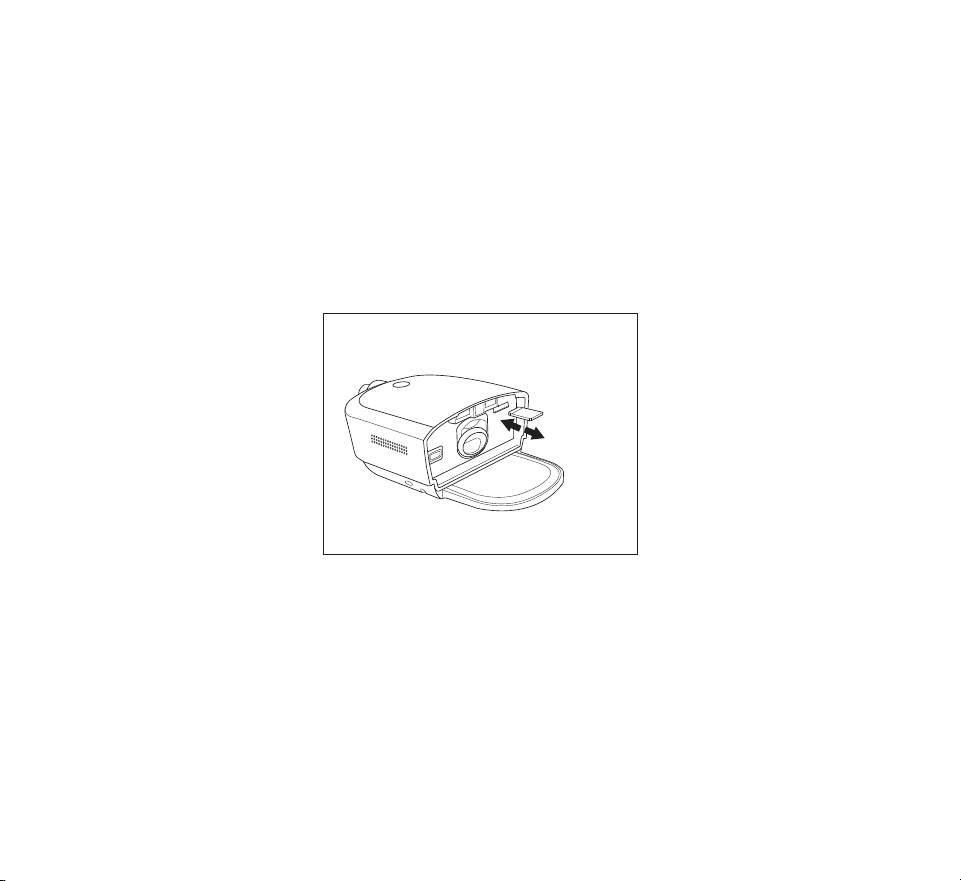
The device may come with an SD card inserted in the SD card slot behind the water tank.
The SD card stores information for the home care provider. Your home care provider may
ask you to periodically remove the SD card and send it to them for evaluation.
Updating software using an SD card
You can update the device software using an SD card. The software update must be done
when the therapy is o.
1. Connect the device to power.
2. Insert an SD card with the new software version into the device. After approximately 15
to 20 seconds, a pop-up screen appears displaying:
A new software version is
available. Update now?
Update
Cancel

- 45 -
3. Tap Update to continue with the software upgrade. To cancel the software upgrade, tap
Cancel.
4. When the update begins, the screen displays “Software Update Active” and the therapy
button ring ashes. The screen will then appear black or may display a progress bar until
the update is complete.
5. The device will restart when the upgrade is complete. Remove the SD card.
6. If an error occurs, contact Philips Respironics for a new SD card.
Oximeter
The DreamStation 2 Advanced device can pair to a Nonin BT Pulse Oximeter, using
Bluetooth, for measuring %SpO2 and pulse rate.
To use a pulse oximeter with your therapy device, follow these steps.
1. Follow the setup instructions provided with your pulse oximeter and nger sensor.
2. Attach the nger sensor to your forenger.
3. Press the Therapy button on your device to begin therapy.
4. Once the device detects a good connection with the pulse oximeter, both the Bluetooth
symbol and “SpO
2
” will display on the top of the display screen.
Note: It may take up to 30 seconds for the device to recognize the pulse oximeter.
When you have achieved at least 4 hours of therapy and oximetry use, a pop-up will appear
stating the pulse oxitmetry reading was successful. If you do not reach the minimum therapy
hours, a pop-up appears stating that the pulse oximetry reading was unsuccessful.
Roll stand
There is a roll stand available for use with your DreamStation 2 device. Please see the
instructions included with your roll stand for more information.

- 46 -
Supplemental oxygen
Oxygen can be added to the patient circuit. Please note the warnings listed below when using
oxygen with the device.
Warnings
• When using oxygen with this system, the oxygen supply must comply with local
regulations for medical oxygen.
• Oxygen supports combustion. Oxygen should not be used while smoking or in the
presence of an open ame.
• Do not use the device in the presence of a ammable anaesthetic mixture in combination with
oxygen or air, or in the presence of nitrous oxide..
• If supplemental oxygen is added at the exit of the ow generator or humidier, a Philips
Respironics Pressure Valve must be placed in-line with the patient circuit between the
device and the oxygen source. The pressure valve helps prevent the backow of oxygen
from the patient circuit into the device when the unit is o. Failure to use the pressure
valve could result in a re hazard.
• When using oxygen with this system, turn the device on before turning on the oxygen.
Turn the oxygen o before turning the device o. This will prevent oxygen accumulation
in the device.
• Do not connect the device to an unregulated or high pressure oxygen source.

- 47 -
DC power
A Philips Respironics DC power cord can be used to operate this device in a stationary
recreational vehicle, boat, or motor home. In addition, a Philips Respironics DC battery
adapter cable, when used with a DC power cord, allows the device to be operated from a 12
VDC free-standing battery.
Warning: Periodically inspect electrical cords and cables for damage or signs of
wear. Discontinue use and replace if damaged.
Cautions
• Always ensure that the DC power cord securely ts into your therapy device prior to use.
Contact your home care provider or Philips Respironics to determine if you have the
appropriate DC cord for your specic therapy device.
• When DC power is obtained from a vehicle battery, the device should not be used while
the vehicle’s engine is running. Damage to the device may occur.
• Only use a Philips Respironics DC Power Cord and Battery Adapter Cable. Use of any
other system may cause damage to the device.
Refer to the instructions supplied with the DC power cord and adapter cable for information
on how to operate the device using DC power.
Carrying case and airline travel
When traveling, the carrying case is for carry-on luggage only. The carrying case will not
protect the system if it is put through checked baggage. Do not travel with water in the
water tank.
The device is suitable for use on airlines when the device is operating from an AC or DC
power source.
For your convenience at security stations, there is a symbol on the bottom of the device
indicating that it is medical equipment and is suitable for airline use. It may be helpful to
bring this manual along with you to help security personnel understand the device.
If you are traveling to a country with a line voltage dierent than the one you are currently
using, a dierent power cord or an international plug adaptor may be required to make your
power cord compatible with the power outlets of the country to which you are traveling.
Contact your home care provider for additional information.

- 48 -
7. Cleaning and care
Warning: Allow the humidier heater plate and water to cool down for approx-
imately 15 minutes before removing the water tank. A burn may result
from: touching the heater plate, coming in contact with the heated water,
or touching the tank base.
Home cleaning: device exterior, heater plate, and humidier air inlet seal
Clean the device exterior surface weekly.
1. To avoid electrical shock, make sure that the device is disconnected from all outlets and
power sources. Remove any cables attached to the device or battery pack.
2. Remove the humidier tank from the device.
3. Use a lint-free cloth dampened (not dripping) with a liquid soap solution (1 teaspoon
of liquid dish soap per gallon of warm water) to clean the exterior of the device, heater
plate, and humidier air inlet seal.
4. Work the cloth into the areas around the therapy button, humidier air inlet/outlet seal,
and any other areas where soil may be dicult to remove. Ensure that you remove all
visible soil.
5. Use a lint-free cloth dampened (not dripping) with clean water to remove all detergent
residue.
6. Inspect the device for cleanliness. If necessary, repeat the cleaning steps until all
surfaces are visibly clean.
7. Allow the device to dry completely before reconnecting it to a power source.
8. Inspect the device and all circuit parts (lter, tube, and mask) for damage, such as cracks,
tears, or broken pieces. Replace any damaged parts.
Home cleaning: humidier water tank (lid, water tank base, and water tank seal)
Clean the humidier water tank before rst use. Hand wash daily. The humidier water tank
can also be washed in the dishwasher weekly.
1. Press the therapy button to stop the airow, and allow the heater plate and water to
cool.
2. Remove the water tank from the device and remove the lid and water tank seal from the
tank base.
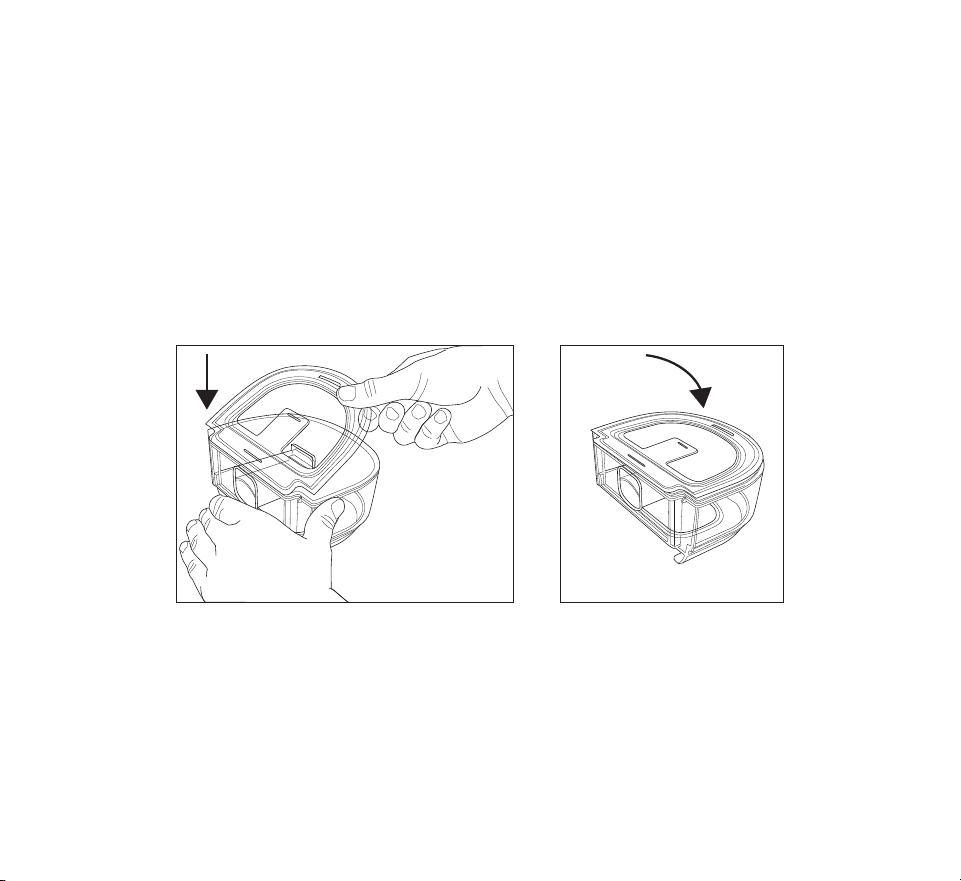
- 49 -
3. Wash the humidier water tank (lid, water tank base, and water tank seal) in the
dishwasher (top shelf only) or in a solution of warm potable water and a mild liquid
dishwashing detergent (1 teaspoon of liquid dish soap per gallon of warm water) using a
soft bristle brush to remove adhering substances.
Note: Pay close attention to all corners and crevices.
4. Fully immerse and rinse each item separately with potable water for one minute and
agitate vigorously.
5. Allow all parts to air dry.
6. Inspect the humidier water tank for damage. If any parts show signs of wear or damage,
contact your home care provider for a replacement.
7. Re-install the water tank seal. To install, insert the seal into the back of the tank base
and then press the seal down until it is fully seated into the water tank base.
8. Before reinstalling the humidier water tank, ll it with distilled water no higher than the
maximum ll line.

- 50 -
Home cleaning: tubing
Hand wash the tubing, mask adapter (if included), and connectors (if included) before rst
use and weekly. Discard and replace the tubing every 6 months.
1. Disconnect the exible tubing from the device.
2. Gently wash the tubing, including any adapters or connectors, in a solution of warm
water and a mild liquid dish soap solution to adequately remove adhering substances
from the tube, adapters, and connectors. Be sure to clean the entire inner surface of the
tube by ensuring it is fully immersed in the detergent solution during gentle agitation by
hand.
3. Rinse thoroughly to remove all soap residue from the tube, adapters, and connectors
with water and allow to air dry. Make sure all parts are dry before next use.
4. Visually inspect the tubing for cleanliness. Repeat the cleaning if not visually clean.
5. Inspect the tubing for damage or wear (cracking, tears, punctures, etc.). Discard and
replace if necessary.
Caring for the lters
Notes
• Only Philips supplied lters should be used as replacement lters.
• Replace the blue disposable, ultra-ne lter if it is damaged or has accumulated debris.
Under normal usage, you should rinse the grey reusable lter at least once every two weeks
and replace it with a new one every six months.
The disposable, ultra-ne lter should be replaced after 30 nights of use, or sooner, if it
appears clogged. DO NOT rinse the ultra-ne lter.
1. If the device is operating, press the Therapy button to stop the airow. Unplug the power
cord from the wall outlet.
2. Remove the water tank to access the lter area, then remove the lter from the device.
Refer to the “Install/replace the air lters” section earlier in this manual.
3. Take the reusable lter to a sink and run warm tap water through the white middle
portion of the lter to rinse away any debris.
4. Shake the lter to remove as much water as possible.
5. Allow the lter to air dry completely before reinstalling it. If the lter is damaged, replace
it.
6. Reinstall the lter into the lter access area on the device.

- 51 -
Service
The device does not require routine servicing.
Warning: If you notice any unexplained changes in the performance of this device,
if it is making unusual or harsh sounds, if it has been dropped or mishan-
dled, if water is spilled into the enclosure, or if the enclosure is broken,
disconnect the power cord and discontinue use. Contact your home care
provider.
8. Technical specications
Environmental
Operating Temperature Device: 5° to 35°C (41° to 95°F)
Storage Temperature -20° to 60°C (-4° to 140°F)
Relative Humidity (operating & storage) 15 to 95% (non-condensing)
Atmospheric Pressure: Device: 101 to 77 kPa (0 - 2286 m / 0 - 7500 ft)
Physical
Dimensions 273.81 mm L x 158.5 mm W x 84.83 mm H
(10.78 in L x 6.24 in W x 3.34 in H)
Weight (empty water tank without power supply) 1040 g (2.29 lbs)
Service life
The expected service life of the DreamStation 2 Advanced device is ve (5) years.
The expected service life of the DreamStation 2 Advanced humidier water tank is one (1)
year.
The expected service life of the DreamStation 2 humidier air inlet/outlet seal is one (1) year.

- 52 -
Standards compliance
This device is designed to conform to the following standards:
• IEC 60601-1 General Requirements for Basic Safety and Essential Performance of
Medical Electrical Equipment
• IEC 60601-1-11 General Requirements for Basic Safety and Essential Performance in the
Home Healthcare Environment
• IEC 60601-1-6 General Requirements for Safety - Usability
• IEC 62366 Application of Usability Engineering in Medical Devices
• IEC 62304 Medical Device Software – Software Life-cycle Processes
• ISO 80601-2-70 Sleep Apnea Breathing Therapy Equipment
• ISO 80601-2-74 Respiratory Humidifying Equipment
• EN 60601-1-2 Electromagnetic Compatibility
IEC 60601-1 classication
Type of Protection
Against Electric Shock
Class II Equipment
Degree of Protection
Against Electric Shock
Type BF Applied Part
Degree of Protection
Against Ingress of Water
Device: Drip Proof, IP22
First characteristic numeral - 2 - Protection against ingress of solid
foreign objects t 12.5 mm diameter.
Explanation: Protected against access to hazardous parts with a nger
and protected against solid foreign objects of 12.5 mm diameter and
greater.
Second characteristic numeral - 2 - Protection against ingress of water
with harmful eects dripping (15° tilted).
Explanation: Protected against vertically falling water drops when
enclosure tilted up to 15°.
Mode of Operation Continuous
Electrical AC Power Consumption: 100–240 VAC, 50/60 Hz, 2.0-1.0 A
Water capacity 325 ml (11 oz.) at recommended water level

- 53 -
Heater plate Max Temperature: 68°C (154°F)
Humidity Humidity
min
Output: t 12 mg H
2
O/L
Measured at expected leak across therapy pressures , 17 °C– 35°C,
15% RH for all compatible tubes.
Maximum delivered
gas temperature
<43°C (109.4°F)
Declared dual-number noise emissions values (in accordance with ISO 4871)
Tube Size Sound Pressure
Level
Uncertainty Sound Power
Level
Uncertainty
15 and 22 (mm)
tubing type
27 dB(A) 2 dB(A) 35 dB(A) 2 dB(A)
12 (mm) tubing
type
27 dB(A) 2 dB(A) 35 dB(A) 2 dB(A)
Pressure accuracy
Pressure Increments: 4-20 cmH
2
O (in 0.5 cmH
2
O increments)
Maximum static and dynamic pressure accuracy, according to ISO 80601-2-70:2015:
Tube Type Static Dynamic
4 to 20 cmH
2
O
15 and 22 (mm) tubing type ± 0.5 cmH
2
O ± 1.0 cmH
2
O
12 (mm) tubing type ± 1.0 cmH
2
O ± 2.0 cmH
2
O
Static pressure accuracy has a measurement uncertainty of 1.31%.
Dynamic pressure accuracy has a measurement uncertainty of 2.70%.
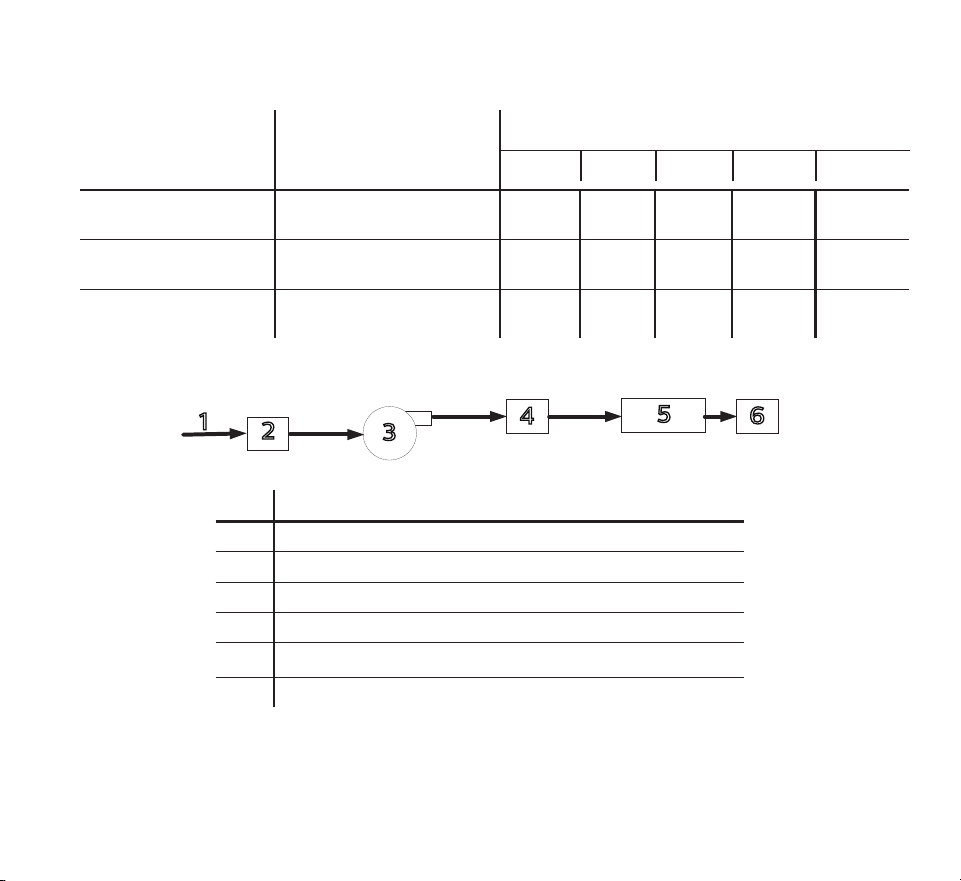
- 54 -
Maximum ow rate (typical)
Tube Type Flow
Test pressures (cmH
2
O)
4 8 12 16 20
12 (mm) tubing type
(heated or non-heated)
Average ow at the patient
connection port (l/min)
120 117 108 101 92
15 (mm) tubing type
(heated or non-heated)
Average ow at the patient
connection port (l/min)
121 135 125 116 107
22 (mm) tubing type Average ow at the patient
connection port (l/min)
122 141 131 122 112
ISO 80601-2-70 Pneumatic Diagram
1
2
3
4
5
6
# Feature
1Air
2 Filter & air inlet
3 Blower
4 Air outlet
5 6 ft. tubing
6Mask

- 55 -
Wireless notices
• The Bluetooth® word mark and logos are registered trademarks owned by Bluetooth SIG,
Inc. and any use of such marks by Philips Respironics is under license. Other trademarks
and trade names are those of their respective owners.
• The DreamStation 2 device is capable of transmitting data between the therapy device
and a mobile device. This connection between the therapy device and a mobile device is
encrypted.
• A small portion of the rmware that performs data encryption on the DreamStation 2
device is being utilized under the Apache 2.0 and Mozilla 2.0 licenses. These licenses are
available at:
www.apache.org/licenses/LICENSE-2.0 and https://www.mozilla.org/en-US/MPL/2.0/
• This product meets RF exposure requirements when it is positioned with a separation
distance of at least 20 cm away from the body.
• This device is a certied Bluetooth radio device with: FCC ID (USA): THO1141623
• Use of non-original manufacturer-approved accessories may violate your local RF
exposure guidelines and should be avoided.
• This device complies with part 15 of the FCC Rules. Operation is subject to the following
two conditions: (1) This device may not cause harmful interference, and (2) this device
must accept any interference received, including interference that may cause undesired
operation. This equipment has been tested and found to comply with the limits for a
Class B digital device, pursuant to Part 15 of the FCC Rules. These limits are designed to
provide reasonable protection against harmful interference in a residential installation.
This equipment generates, uses, and can radiate radio frequency energy and, if not
installed and used in accordance with the instructions, may cause harmful interference
to radio communications. However, there is no guarantee that interference will not occur
in a particular installation. If this equipment does cause harmful interference to radio,
TV reception, or other devices which can be determined by turning the equipment on
and o, the user is encouraged to try to correct the interference by one or more of the
following measures:
— Reorient or relocate the receiving antenna (on the radio, TV, or other device).
— Increase the separation between the equipment and receiver.
— Connect the equipment into an outlet on a circuit dierent from that to which the
receiver is connected.
— Consult the dealer of the device for help.

- 56 -
Radio Specications
Cellular
Operating Frequency Range Band 2:
1850 – 1910 MHz Transmit
1930 – 1990 MHz Receive
Band 4:
1710 – 1755 MHz Transmit
2110 – 2155 MHz Receive
Band 5:
824 – 849 MHz Transmit
869 – 894 MHz Receive
Band 12:
699 – 716 MHz Transmit
729 – 746 MHz Receive
Band 13:
746 - 756 MHz Receive
777 - 787 MHz Transmit
Maximum Output Power 25 dBm
Modulation OFDM/SC-FDMA
Bandwidth: 1.4 MHz
Bluetooth
Operating Frequency Range 2.4-2.4835 GHz
Maximum Output Power 0 dBm
Modulation GFSK
Bandwidth: 1 MHz

- 57 -
Intake Port Filters
Pollen Filter 100% Polyester
88% Ecient @ 7-10 micron size
Ultra-ne Filter Blended Synthetic Fiber
95% Ecient @ 0.5-0.7 micron size
Heated Tubing Specications
Maximum Recommended Pressure 20 cmH
2
O
Inner Diameter 15 mm (HT15)
12 mm (HT12)
Length 1.83 m (6 ft.)
Heated Tubing Temperature Range 16° to 30° C (60° to 86° F)
Heated Tubing Temperature Cut-out d 41° C (d 106° F)
Material Flexible plastic and electrical
components
Disposal
Dispose of this device in accordance with local regulations.
9. EMC information
Your unit has been designed to meet EMC standards throughout its Service Life without
additional maintenance. There is always an opportunity to relocate your DreamStation 2
Advanced Therapy Device within an environment that contains other devices with their own
unknown EMC behavior. If you believe your unit is aected by locating it closer to another
device, simply separate the devices to remove the condition.
- 58 -
Pressure and Flow Accuracy
If you suspect that the pressure and/or ow rate accuracy is aected by EMC interference
remove power and relocate the device to another area. If performance continues to be
aected discontinue use and contact your home care provider.
SpO
2
and Pulse Rate Accuracy
The DreamStation 2 therapy device is designed to capture the SpO
2
and pulse rate oximetry
data within the accuracy specication described in the sensor manufacturer’s instructions
for use. When 4 hours of successful oximetry data have been achieved the device indicates
this to the user by displaying “Your pulse oximetry recording was successful”. If you suspect
that your unit is aected by EMC interference, remove power and relocate the device to
another area. If performance continues to be aected discontinue use and contact your
home care provider.
Guidance and Manufacturer’s Declaration - Electromagnetic Emissions – This device is
intended for use in the electromagnetic environment specied below. The user of this
device should make sure it is used in such an environment.
EMISSIONS TEST COMPLIANCE ELECTROMAGNETIC ENVIRONMENT - GUIDANCE
RF emissions
CISPR 11
Group 1
The device uses RF energy only for its internal
function. Therefore, its RF emissions are very low
and are not likely to cause any interference in
nearby electronic equipment.
RF emissions
CISPR 11
Class B
The device is suitable for use in all
establishments, including domestic
establishments and those directly connected to
the public low-voltage power supply network.
Harmonic emissions
IEC 61000-3-2
Class A
Voltage uctuations/Flicker
emissions
IEC 61000-3-3
Complies
Emission of Radio Frequency
Energy
RTCA/DO-160G Section 21
Category M
This device is suitable for use onboard
commercial airplanes inside passenger cabin.

- 59 -
Guidance and Manufacturer’s Declaration - Electromagnetic Immunity – This device is
intended for use in the electromagnetic environment specied below. The user of this device
should make sure it is used in such an environment.
IMMUNITY TEST IEC 60601 TEST LEVEL COMPLIANCE LEVEL ELECTROMAGNETIC
ENVIRONMENT -
GUIDANCE
Electrostatic Discharge
(ESD)
IEC 61000-4-2
±8 kV contact
±2 kV, ±4 kV, ±8 kV, &
±15 kV air discharges
±8 kV contact
±2 kV, ±4 kV, ±8 kV, &
±15 kV air discharges
Floors should be wood,
concrete or ceramic
tile. If oors are
covered with synthetic
material, the relative
humidity should be at
least 35%.
Electrical fast Transient/
burst
IEC 61000-4-4
±2 kV for power supply
lines, 100 kHz repetition
rate
±2 kV for power supply
lines, 100 kHz repetition
rate
Mains power quality
should be that of
a typical home or
hospital environment.
±1 kV for input-output
lines; 100 kHz repetition
rate
N/A- Device does not
have user I/O lines that
are longer than 3m in
length.
Surge
IEC 61000-4-5
±1 kV dierential mode
±2 kV common mode
±1 kV dierential mode
N/A: Device is Class 2
and does not have earth
connection.
Mains power quality
should be that of
a typical home or
hospital environment.

- 60 -
IMMUNITY TEST IEC 60601 TEST LEVEL COMPLIANCE LEVEL ELECTROMAGNETIC
ENVIRONMENT -
GUIDANCE
Voltage dips, short
interruptions and
voltage variations on
power supply input lines
IEC 61000-4-11
<5% U
T
(>95% dip in U
T
)
for 0.5 cycle at 45 degree
increments
<5% UT (>95% dip in UT)
for 1 cycle
70% UT (30% dip in UT)
for 0.5 seconds
<5% UT (>95% dip in UT)
for 5 seconds
<5% U
T
(>95% dip in U
T
)
for 0.5 cycle at 45 degree
increments
<5% UT (>95% dip in UT)
for 1 cycle
70% UT (30% dip in UT)
for 0.5 seconds
<5% UT (>95% dip in UT)
for 5 seconds
Mains power quality
should be that of
a typical home or
hospital environment.
If the user of the device
requires continued
operation during power
mains interruptions, it
is recommended that
the device be powered
from an uninterruptible
power supply or a
battery.
Power frequency (50/60
Hz) magnetic eld
IEC 61000-4-8
30 A/m 30 A/m Power frequency
magnetic elds
should be at levels
characteristic of a
typical location in a
typical hospital or
home environment.
NOTE: U
T
is the a.c. mains voltage prior to application of the test level.
- 61 -
Guidance and Manufacturer’s Declaration - Electromagnetic Immunity – This device is
intended for use in the electromagnetic environment specied below. The user of this device
should make sure it is used in such an environment.
IMMUNITY TEST IEC 60601 TEST LEVEL COMPLIANCE LEVEL ELECTROMAGNETIC ENVIRONMENT
- GUIDANCE
Conducted RF
IEC 61000-4-6
Radiated RF
IEC 61000-4-3
3 Vrms
150 kHz to 80 MHz
6 Vrms
Amateur Radio & ISM
Bands between 150 kHz
and 80 MHz
10 V/m
80 MHz to 2.7 GHz
Telecommunication
frequencies as specied
in clause 8.10 of
IEC 60601-1-2:2014:
450, 810, 870, 930, 1720,
1845, 1970, and 2450
MHz at 28 V/m
385 MHz at 27 V/m
710, 745, 780, 5240, 5500,
and 5785 MHz at 9 V/m
3 Vrms
150 kHz to 80 MHz
6 Vrms
Amateur Radio & ISM
Bands between 150
kHz and 80 MHz
10 V/m
28 V/m
27 V/m
9 V/m
Portable and mobile RF
communications equipment
should be used no closer to any
part of the device, including
cables, than the recommended 30
cm (12 inches) separation distance.
Interference may occur in the
vicinity of equipment marked with
the following symbol:

- 62 -
Limited Warranty
Respironics, Inc., a Philips company (“Philips Respironics”) provides this non-transferable, limited
warranty for DreamStation 2 (“Product”) to the customer who originally purchased the Product directly
from Philips Respironics.
What this Warranty Covers: Philips Respironics warrants each new Product will be free from defects in
materials and workmanship and will perform in accordance with the Product specications under normal
and proper use and maintenance in accordance with applicable instructions, subject to the exclusions
below.
How Long does this Warranty Last: Two (2) years from the longer of the date of shipment to the
purchaser or date of setup by purchaser for the end user, except:
The warranty period for accessories, replacement parts, and disposables including, but not limited
to, tubing, lters, carrying case, and power cord is 90 days from the date of shipment to the original
purchaser.
What this Warranty does not cover: This warranty does not apply to any software included with the
Product as the software warranty is included in the software license. This warranty does not cover
damage or injury whether to the Products, personal property, or persons caused by accident, misuse,
abuse, Acts of God, water ingress, repair or alteration by anyone other than Philips Respironics or its
authorized service center, failure to operate in accordance with the terms of the operating manual and
instructions, lack of reasonable care, the discontinuance of a network (e.g. 2G, 3G, etc.) by a carrier
(e.g. ATT, Verizon, etc.), or other defects not related to material or workmanship. This warranty is not
transferable. If Philips Respironics nds that a Product returned for service or the issue raised is not
covered under this limited warranty, Philips Respironics may charge an evaluation fee and return
shipping.
What Philips Respironics will do: If a Product does not meet the warranty above in the rst 90 days
after the original shipment date, Philips Respironics will replace the device with a new Product.
Thereafter, if a Product fails to conform to the warranties set forth above during the applicable warranty
period, Philips Respironics will repair or replace the Product or refund the original purchase price, in
Philips Respironics sole discretion. Philips Respironics may use new or remanufactured assemblies,
components, and parts in repair and new or recertied refurbished devices for replacement. The balance
of the original warranty period will apply to any Product or component of a Product repaired or replaced
under this warranty.

- 63 -
Warranty Disclaimer; Limitation of Liability: EXCEPT AS SET FORTH IN THIS LIMITED WARRANTY,
PHILIPS RESPIRONICS MAKES NO WARRANTIES, EXPRESSED OR IMPLIED, STATUTORY OR
OTHERWISE, REGARDING THE PRODUCT OR ITS QUALITY OR PERFORMANCE. PHILIPS RESPIRONICS
SPECIFICALLY DISCLAIMS THE IMPLIED WARRANTY OF MERCHANTABILITY AND THE IMPLIED
WARRANTY OF FITNESS FOR A PARTICULAR PURPOSE. IN NO EVENT WILL PHILIPS RESPIRONICS
MAXIMUM LIABILITY UNDER THESE WARRANTIES EXCEED THE ORIGINAL PURCHASE PRICE OR
WILL PHILIPS RESPIRONICS BE LIABLE FOR ANY ECONOMIC LOSS, LOSS OF PROFITS, OVERHEAD,
OR SPECIAL, INCIDENTAL, OR CONSEQUENTIAL DAMAGES. Repair, replacement, or return of purchase
price by Philips Respironics is the original purchaser’s sole and exclusive remedy under this warranty.
This warranty gives you specic legal rights, and you may also have other rights that vary from state to
state. Some states do not allow the exclusion or limitation of incidental or consequential damages, so
the above exclusion and limitations may not apply to you.
How to get warranty support: Patients contact your local authorized Philips Respironics dealer and
dealers contact Respironics, Inc. at:
1001 Murry Ridge Lane
Murrysville, Pennsylvania 15668-8550
+1-724-387-4000
1143581 R02
ZL 01/27/2021
EN-DOM
1143581