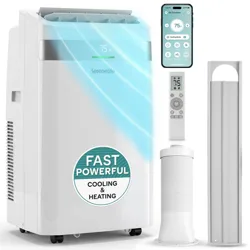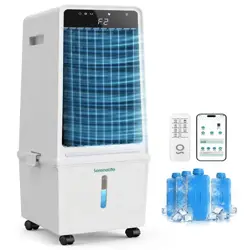
evaporative air cooler
SLACLW15

02
PLEASE KEEP THIS MANUAL CAREFULLY FOR FUTURE REFERENCE.
FOR HOUSEHOLD USE ONLY.
Working principle
The draught fan does a suction to make a subpressure, at the same time the
pump carries the water to the distribution instrument to make the wet curtain
moist. The hot air passes through the wet curtain, and the heat is absorbed by
the evaporating water, then the temperature comes down. The cool air is
blown out by the fan. The unevaporated water would drop to the water tank
and form a circulation.
Please open the window and the door when you are using this machine.
To keep fresh air circulating smoothly, the best way is to place it in front of the
ventilation corridors.
Safety rules
• Before any maintenance, make sure the machine is in the “off” state, and the
power is switched off. In order to avoid the electric shock, please connect
the grounding socket correctly, and guarantee the connection of the
grounding device with the function of automatic protection from faults.
• This machine cannot be used by children and people who lack relevant
knowledge or experience, or the people with impaired sensory or mental
disorders. Children should not be allowed to play with this machine.
• Please stop using the machine immediately if the power cord aged or the
plug damaged, it should be repaired by professional staffs.
• Do not use any corrosive or solvent detergent for cleaning. It is
recommended to use wet cloth to wipe the machine instead of flushing the
machine. Please avoid the machine exposed to direct sunlight.
• It is strictly prohibited to use this machine in a circumstance with
inflammable or explosive gas.
FCC Caution
This device complies with part 15 of the FCC Rules. Operation is subject to the
following two conditions: (1) This device may not cause harmful interference,
and (2) this device must accept any interference received, including
interference that may cause undesired operation.
Any Changes or modifications not expressly approved by the party
responsible for compliance could void the user's authority to operate the
equipment.
Note: This equipment has been tested and found to comply with the limits for
a Class B digital device, pursuant to part 15 of the FCC Rules. These limits are
designed to provide reasonable protection against harmful interference in a
residential installation. This equipment generates uses and can radiate radio
frequency energy and, if not, installed and used in accordance with the
instructions, may cause harmful interference to radio communications.
However, there is no guarantee that interference will not occur in a particular
installation. If this equipment does cause harmful interference to radio or
television reception, which can be determined by turning the equipment off
and on, the user is encouraged to try to correct the interference by one or
more of the following measures:
• Reorient or relocate the receiving antenna.
• Increase the separation between the equipment and receiver.
• Connect the equipment into an outlet on a circuit different from that to
which the receiver is connected.
• Consult the dealer or an experienced radio/TV technician for help.
RF warning for Mobile device:
This equipment complies with FCC radiation exposure limits set forth for an
uncontrolled environment. This equipment should be installed and operated
with minimum distance 20cm between the radiator & your body.
Operation Instructions
• Filling
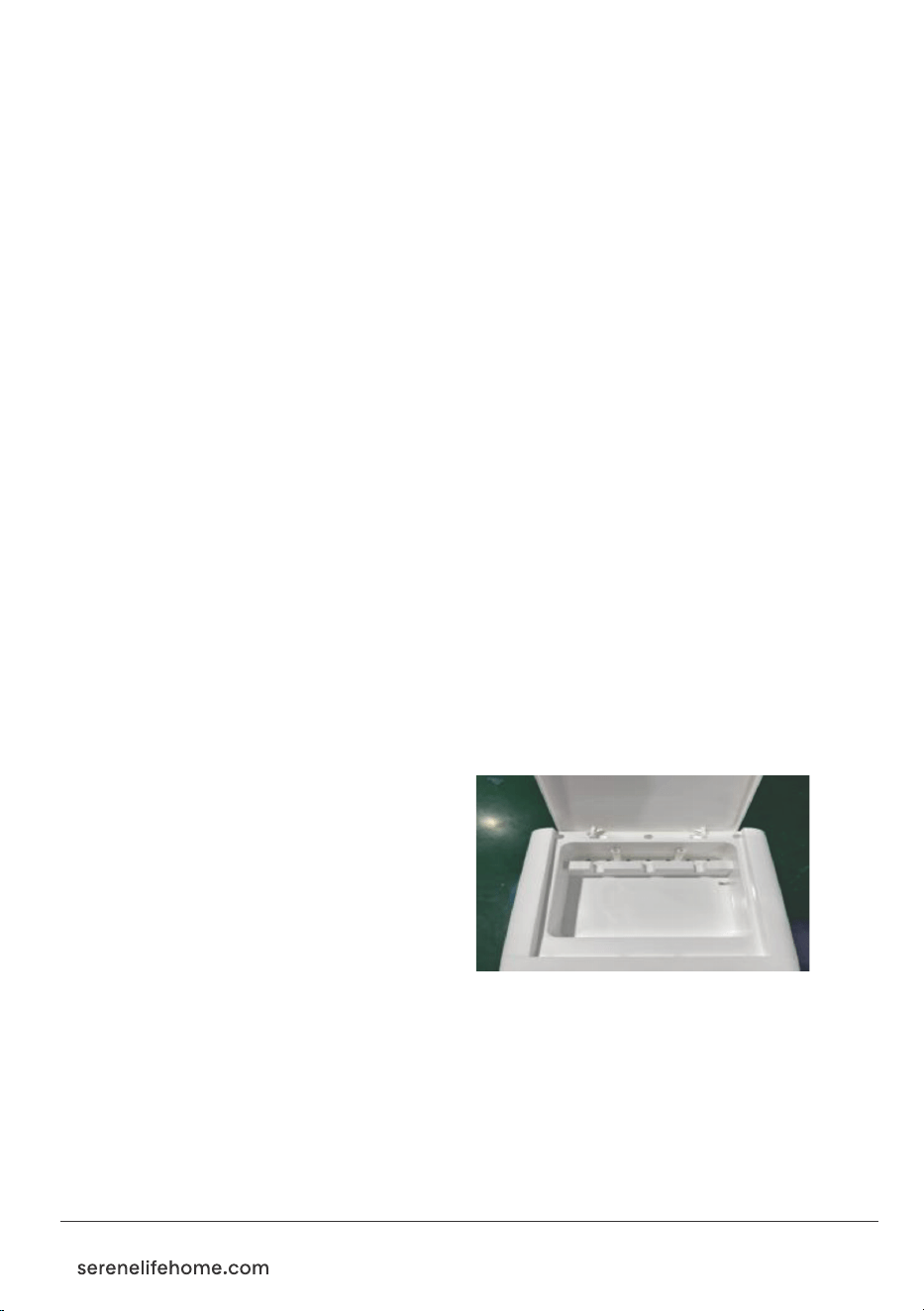
As shown in figure1, open up cover
plate, filling slowly with clean water.
The second way is to directly open
the tank and add the water.
• The usage of ice-box:
• If you use ice-box for the first time:
open the lid, inject water up to the
scale, then tighten the lid.
• Set aside for 30-40minutes, till the water and ice crystal mix completely.
• Put the icebox in the refrigerator's freezer room to stay for two hours.
• Take the icebox out and put it into the air cooler's ice container in
order to cool down the water temperature.
• After using it for a long time, the ice crystal turns to jelly, please put it in
the refrigerator again. It can be recycled and reused.
03
Figure1
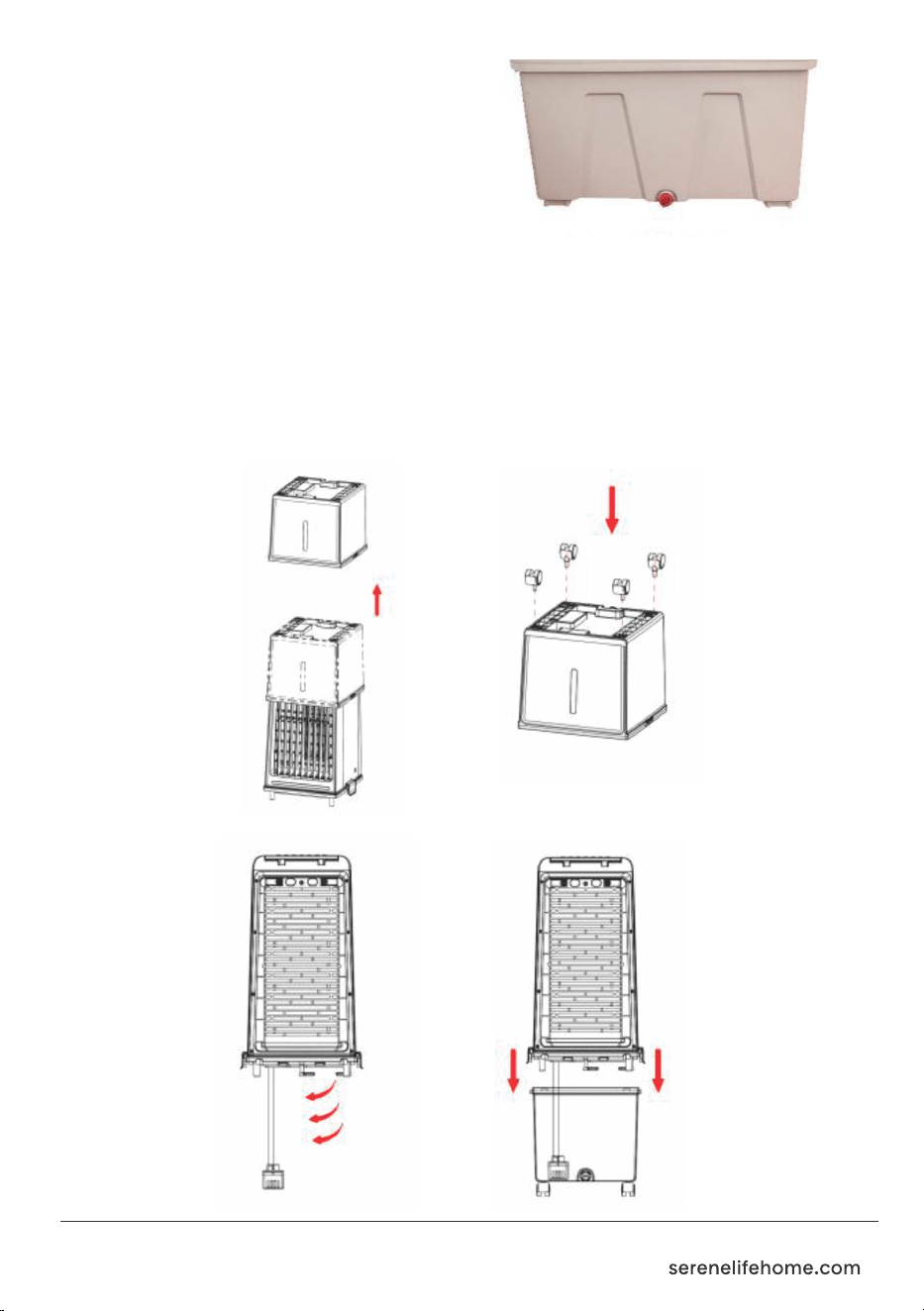
• The drain outlet is on the bottom,
as shown in Figure 2.
Loose the drain nut, and tilt the machine
body, the water tank can be completely
emptied. The machine should be regularly
drained and cleaned. If it will not be used
for a long time, please empty the water
tank.
Pump Assembly Instruction
When you take the machine out of the package, the water tank is upside
down on top of the machine. You can remove the water tank and then install
the water pump and water tank according to the instructions in the figure
below:
Figure 2
04
1. Take out the water tank
3. Put down the water pump
2. Insert the casters
4. Lock the water tank
Control Panel
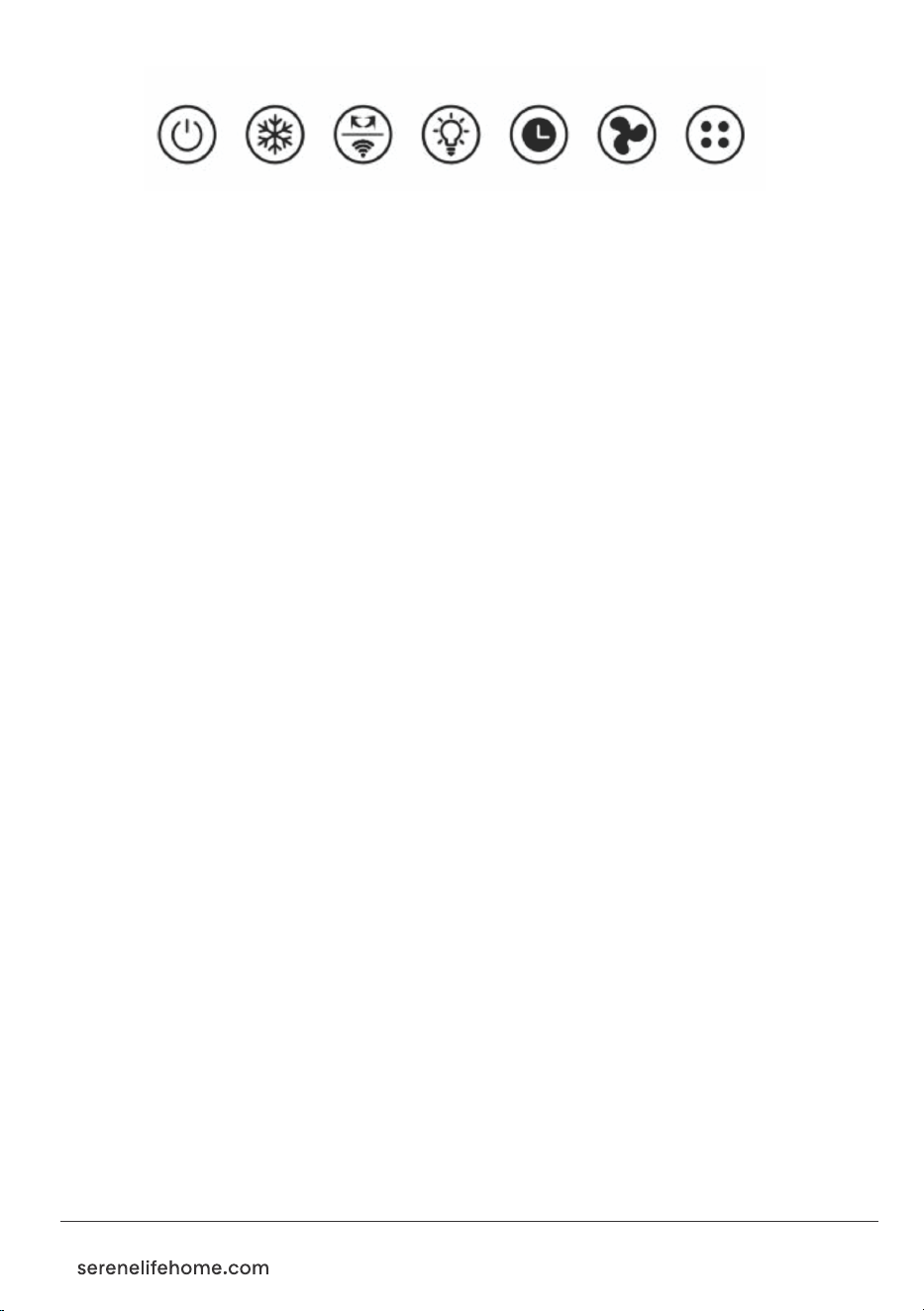
• On/Off: press this button to open the air cooler; press this button at any
state to stop the operation.
• Cooling: press to open or close the cooling system.
• Swing: control the left-right swing, press again to stop swinging.
• Light: press to turn the light on or off.
• Timer: press to set timing system. The timer range is from 1h-12h.
• Speed: set wind speed.
• Mode: press to change the wind type. Natural wind or normal wind or
sleeping mode.
• WiFi: when the product is powered on, the WiFi indicator light flashes
rapidly. lf the phone does not connect within 3 minutes, the WiFi light turns
off and stops flashing. lf the phone still fails to connect after the WiFi
indicator turns off (after 3 minutes), press and hold the WiFi buttons
simultaneously for 3 seconds to activate the WiFi function. The WiFi indicator
will then flash rapidly again, allowing the phone to reconnect. Once
connected, the WiFi light will remain steadily lit. To reset the WiFi or restart
the WiFi connection function, press and hold the WiFi buttons together for
3 seconds.
Notice: do not open the cooling system when the water tank is empty.
Cleaning and maintenance
Warm prompt: After long-time operation, dust accumulation on the pre-filters
and the wet curtain would affect the airflow and air purify. Please clean the
machine regularly.
• Clean pre-filter: Turn off the power, loose the screws, then pull out the
pre-filter, clean it with soft brush and mild detergent, rinse by water and dry
under the sunshine.
• Clean wet curtain: Turn off the power, loose the screws in the back-cover
plate, take out the back-cover plate. Loose the plastic nuts on the wet curtain,
the side of wet pad can be removed. clean it with soft brush and mild
detergent, rinse by water and dry under the sunshine, then install back to
the machine. If the dirt is hard to remove after long-term usage, please
change a new wet curtain.
• Clean the surface: Turn off the power, clean it with mild detergent and soft
cloth.
Notice: control panel shall not be touched by water.
05
06
Fault and maintenance
"Failure" phenomenon Possible results Solutions
For your safety concerns, please make sure to follow the
instructions above.
•
This appliance is not intended for use by persons (including children)
with reduced physical, sensory or mental capabilities, or lack of
experience and knowledge, unless they have been given supervision
or instruction concerning use of the appliance by a person
responsible for their safety.
• Children should be supervised to ensure that they do not play with
the appliance.
LED display is light off
Water pump
doesn't work
No wind or wind
speed is too slow
Motor is out of
control
Drain valve is leaking
1. The power cord is
unplugged or poor
contact.
2. LED screen is
damaged.
3. Circuit board error.
1. Water-pipe blockage.
2. Without long-term
water cooling.
3. Poor water quality to
produce scale make
central shaft stuck.
1. The fan blades are
stuck.
2. The filter is blocked.
3. Fan blade is not fixed.
4. Main control panel
error.
1. Main control panel
button is broken.
2. The wiring of the
motor and control
panel falls off.
1. Drain valve is broken.
2. Rubber band drop.
1. Plug in the power to
form a good
connection.
2. Replace LED screen.
3. Replace circuit board.
1. Use a small brush to
clean the pipe and
keep smooth water
flow.
2. Long time for cooling
without water cause
pump damaged, need
to replace a new
water-pump.
3. Remove the shaft,
clean the dirt on the
surface, add proper
lubricating oil insert it,
and debug the shaft.
1. Check the fan blade.
2. Clean or replace filter.
3. Replace fan blade.
4. Replace main control
panel.
1. Replace main control
panel.
2. Replace a new wire
to connect the motor
and control panel
1. Replace the drain valve.
2. Add a new rubber
band.
07
• If the supply cord is damaged, it must be replaced by manufacturer,
its service agent or similarly qualified persons in order to avoid a
hazard.
• Ensure that the fan is switched off from the supply mains before
removing the guard.
• This appliance can be used by children aged from 8 years and above
and persons with reduced physical, sensory or mental capabilities or
lack of experience and knowledge if they have been given supervision
or instruction concerning use of the appliance in a safe way and
understand the hazards involved. Children shall not play with the
appliance. Cleaning and user maintenance shall not be made by
children without supervision.
• Unplug the appliance during filling and cleaning.
WiFi Functio
n
Please download the “SereneLife: Smart Home Hub” app.
WiFi Connection Setup
• When the device is switched on, press and hold the button for 5 seconds.
• The WiFi indicator will start flashing, signaling that the device is ready for
setup via the app.
• If no connection is established within 3 minutes, the WiFi indicator turns off
automatically.
• To restart the connection process, press and hold the button again for
5 seconds.
Notice: Once the Wi-Fi is connected, the unit can be turned on or o
directly from the app.
Installing the SereneLife: Smart Home App
1. Go to Google Play Store or Apple App Store and search for Smart Home.
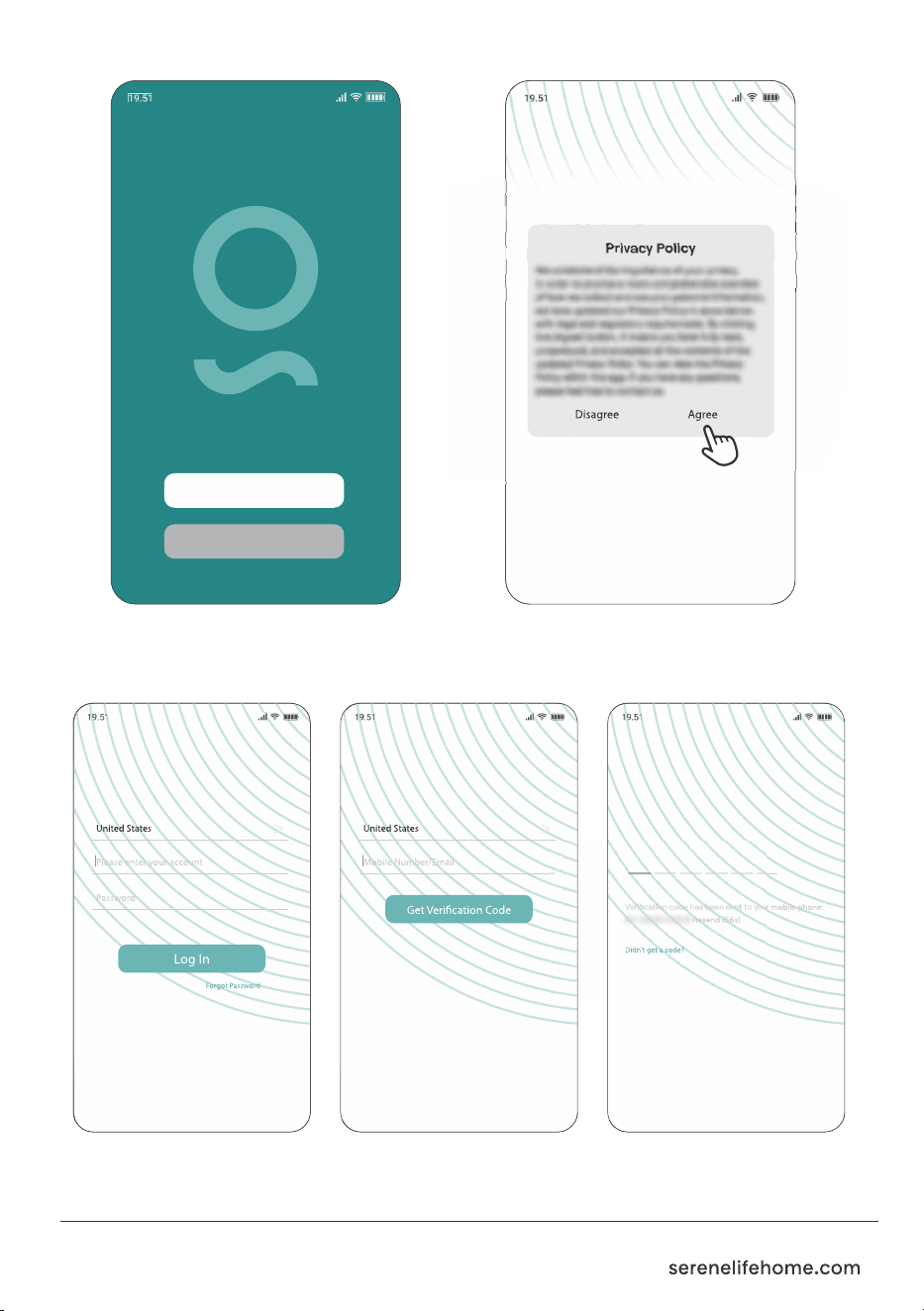
2. Open the app and register an account or log in.
• New users: Tap "Sign Up".
• Existing users: Log in with your Smart Home account credentials.
08
Tap on "Agree" to go to the
registration page.
Log In
Sign Up
Log In Register Enter
Verification Code
09
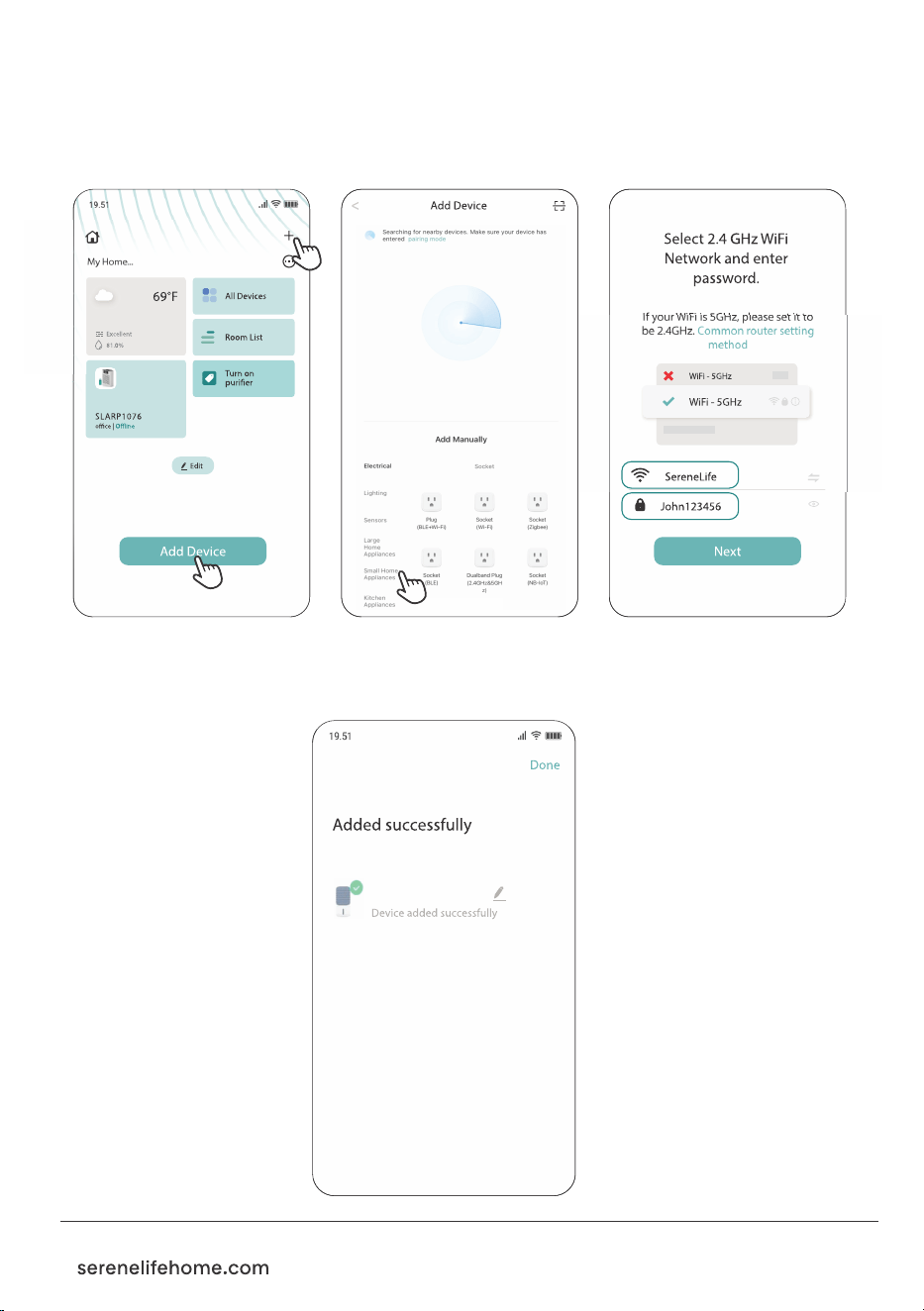
3. Follow the app instructions to connect your device:
• Open the Smart Home app and tap "Add Device" or the "+" symbol.
• Select your device and enter the WiFi password of the network your
smartphone is connected to.
• Once pairing is complete, the device will appear in the app, and
you can control it remotely.
SLACLW15
HOW TO
DISCONNECT
WIFI FUNCTION
After the network
has been successfully
configured, press and
hold the button for 5
seconds to reset the
network. The WiFi
indicator will blink
again. At this point,
the WiFi function will
be disconnected, and
the user will need to
reconfigure the
network.

Features:
• 2-in-1 Multi-Functional Air Cooler: Cooler and Fan
• Automatic Swing Oscillation for Even Air Distribution
• Adjustable Timer (1-12 hrs) and 3 Fan Speed Settings (High, Mid, Low)
• Energy-efficient Design with Low Power Consumption
• Water Tank Protection for Safety and Durability
• 15-liter Detachable Water Tank for Easy Filling and Cleaning
• Remote Control and Touch Panel Operation
• Water Shortage Alarm for Automatic Alerts
• Honeycomb cooling pad for efficient evaporation and easy maintenance
• Equipped with Rolling Wheels for Easy Portability
• Includes Four Ice Packs for Improved Cooling Performance
• Manual Water Filling or Use of Detachable Water Tank for Easy Setup
• Left-right Automatic Swing Adjustment for Customizable Airflow
• Water Pump Protection System for Longevity
• Detachable Water Tank for Hassle-free Maintenance
• Perfect for Home, Office, School, and Business Spaces
What’s in the Box:
• Air Cooler Unit • Remote Control • (4) Ice Packs
Technical Specs:
• Construction Material: ABS + PP + PC
• Power Supply: 120V/60Hz
• Power Output: 80W
• 3 Wind Mode: Normal / Natural / Sleeping
• Oscillation: 60° Rotation (Left to Right)
• Wind Speed: 20.1 mph
• Rated Evaporation 400 mL/h (Tested at 68 °F)
• Operating Modes: Cooler and Fan
• Noise Level: High ≤65dB
• Timer Range: 1–12 hours with Automatic Power-off Function
• Special Features: Remote Control, Fast Cooling,
Ice Pack Compatibility, Rolling Wheels and Water Shortage Alarm
• Color: White & Black
• Water Tank Capacity: 15 Liters
• Plug Type: US Plug
• Power Cable Length: 72.04 Inches
• Item Weight: 11.02 Lbs
• Product Dimension (L x W x H): 11.6 × 11.2 × 29.5 Inches
10
Register Product
Thank you for choosing SereneLife. By registering
your product, you ensure that you receive the full
benefits of our exclusive warranty and personalized
customer support. Complete the form to access
expert support and to keep your SereneLife
purchase in perfect condition.
SLACLW15
11