
F55 Introduction
V1.0
Feitian Technologies Co., Ltd.
www.FTsafe.com

Content
Chapter 1. F Product Introduction ............................................................................................................................. i
1.1 Product Introduction ........................................................................................................................................................... i
1.2 Product Appearance ........................................................................................................................................................... i
1.3 Specifications ........................................................................................................................................................................ ii
1.3.1 Dimensions ................................................................................................................................................................................................... ii
1.3.2 Screen ............................................................................................................................................................................................................ ii
1.3.3 Communication Interface ....................................................................................................................................................................... ii
1.3.4 Battery and Power Source ...................................................................................................................................................................... ii
1.3.5 Audio .............................................................................................................................................................................................................. ii
1.3.6 Camera ......................................................................................................................................................................................................... iii
1.3.7 SIM card ....................................................................................................................................................................................................... iii
1.3.8 PSAM card ................................................................................................................................................................................................... iii
1.3.9 Contact IC card Reader(DuoPOS only) ............................................................................................................................................. iii
1.3.10 Contactless IC Card Reader ................................................................................................................................................................ iv
1.3.11 Features ...................................................................................................................................................................................................... iv
1.4 Certifications ........................................................................................................................................................................ iv
1.5 Installation ............................................................................................................................................................................. v
1.6 FCC Statement ................................................................................................................................................................. viii
1.7 CE Statement .................................................................................................................................................................... viii
1.8 Warning: .......................................................................................................................................................................... viii
Chapter 1. F Product Introduction
1.1 Product Introduction
Feitian F55 is a smart mobile POS product with PCI certification. It has a stylish and smart design.
Connect with smart phone or tablet via Bluetooth interface, you can easily and quickly complete the
payment process. It can achieve payment progress anytime anywhere which provides end users with a new
experience of payment.
This product is developed based on Android 14 operating system, software including android
system and secure system, the function is simple and easy to use.
Both android system and secure system can be upgraded remotely or upgraded by TF card/OTG+U disk,
lower the following cost of development and maintenance.
The features of this product:
Portable
The appearance is portable, suitable for mobile use.
Powerful
Support contact card and contactless card. Support WiFi and Bluetooth.
Support 1* type C Port, support USB2.0 and OTG.
Certified
CE, PCI, EMV L1&L2, EMV CL L1, Amex, payWave, Paypass, Discover, JCB, Pure, qUICS, TQM(TBD)
certified.
Remote upgrading
Firmware can be upgraded remotely, reducing the cost of late development and maintenance.
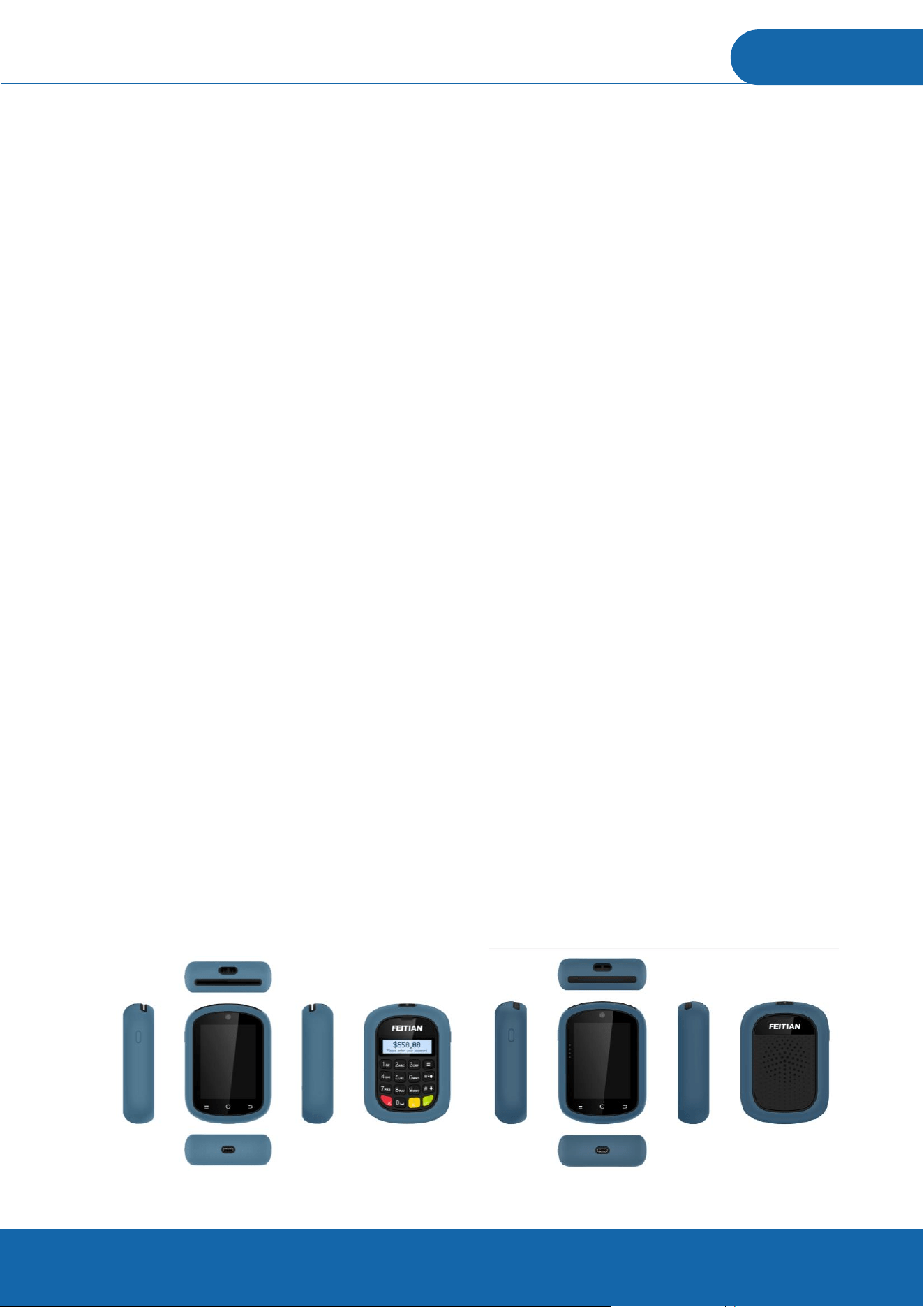
1.2 Product Appearance
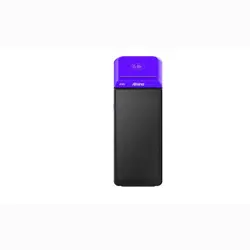
The F55 product appearance is shown as follows:

Figure 1 F55 appearance figure(Left:DuoPOS, Right:SoftPOS)
1.3 Specifications
1.3.1 Dimensions
Size:106×76.8×27.5 (mm)
1.3.2 Screen
Use a 3.2-inch screen with a resolution of 320*480 and capcit Capacitive Touch Panel.
1.3.3 Communication Interface
RF Band
4G:LTE-FDD:B2/4/5/12/13/66
Type-C USB port
When the device is connected to the host (for example, PC) through this interface, this interface
provides functions such as charging.
WiFi
This device can be connected to 2.4G network, support 802.11b/g/n20.
Bluetooth 3.0 & BLE (1 Mbps)
This device can be connected to smart phone or bluetooth headset through this interface.
GPS
This device supports BDS/GPS/GLONASS
NFC
NFC is a POS function, which supports 13.56MHz,ISO/IEC 14443,ISO18092, Type
A&B、Felica,
Mifare card.
1.3.4 Battery and Power Source
Non-Removable polymer lithium battery, 3.7V/2600mAh, with charge protection and RTC battery.
1.3.5 Audio
Speaker
This device can play audio through this interface.
Buzzer
Notify the user by beeping when needed.
1.3.6 Camera
Front Camera
A front camera: 0.3/2M,FF
1.3.7 SIM card
This device can insert into one sim card, and optional one ESIM integrated inside.
1.3.8 PSAM card
This device can insert into PSAM card.
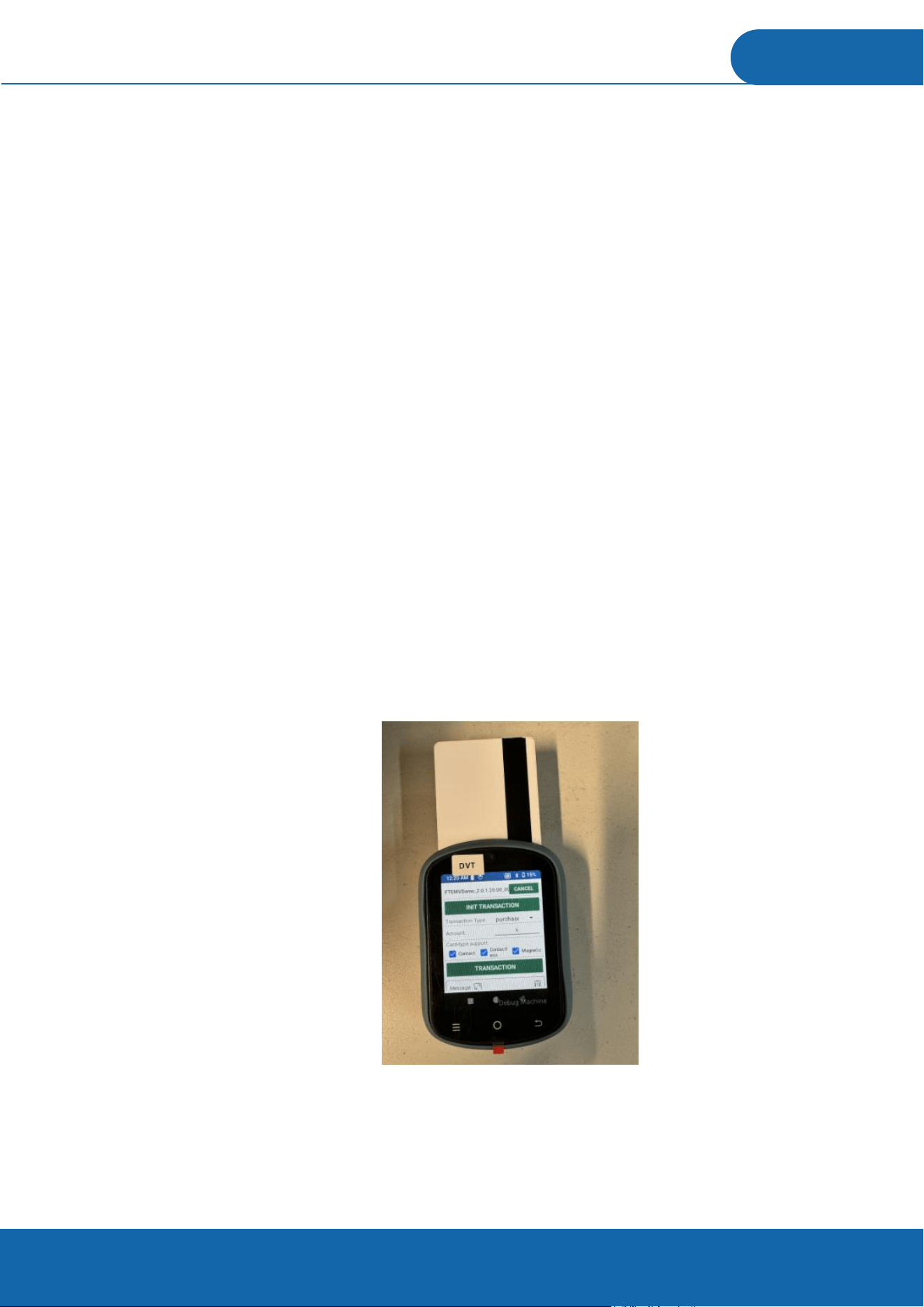
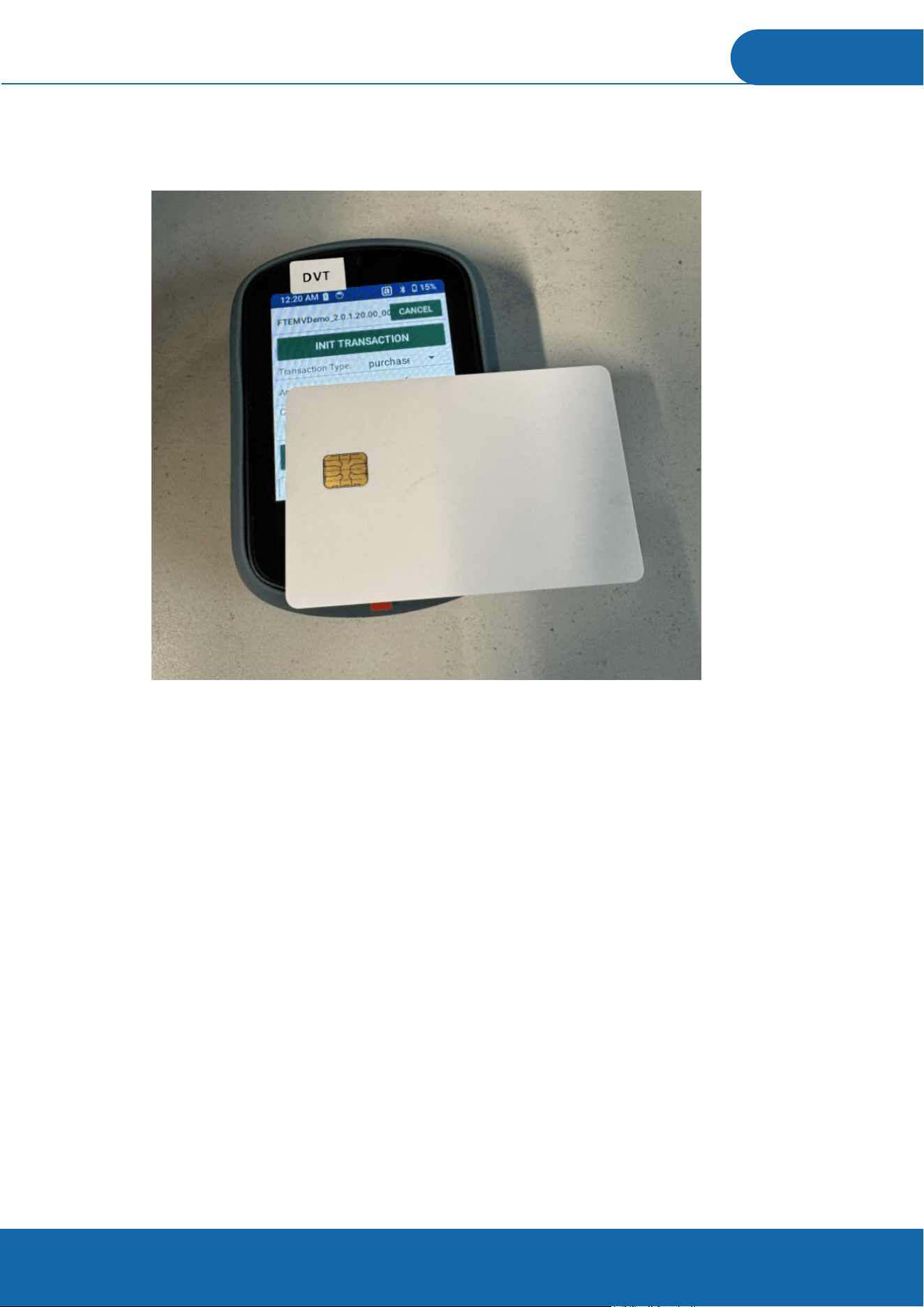
1.3.9 Contact IC card Reader(DuoPOS only)
Support contact IC card (ISO/IEC 7816-1/2/3/4 Chip Card), Type A/B/C. When inserting the IC card,
please let the chip side toward the side of the screen.
1.3.10 Contactless IC Card Reader
Support contactless IC card (ISO/IEC 14443 Type A, ISO/IEC 14443 Type B, working frequency 13.56MHz)
1.3.11 Features
Tamper-proof and anti-power-down protection
Support DUKPT key systems
RSA、AES、3DES、SHA-1、SHA-256;Support RSA, AES, 3DES, SHA-1, SHA-256
Support SM2, SM3, SM4
Physical tamper-proof has self-destruction function
Support redevelopment
1.4 Certifications
PCI PTS 7.x certified
EMV L1/L2
EMV Contactless L1
Amex
MasterCard PayPass

Visa PayWave
FCC
JCB
UN38.3
UL RoHS
Telec&JATE
QUICS
Discover
PURE
1.5 Installation
Step 1. Charging the device
• Insert the USB charging cable into the Type-C port on the down side of the device.
• Connect the other end of the USB charging cable into a powered USB socket.
• A charging symbol will appear over the battery symbol in the top right corner of the device during
charging.
• Charging of the battery will typically take between 1 and 3 hours, whilst not in use.
• Battery condition is indicated in the display when the device is switched on.
• The terminal is fitted with an internal rechargeable battery which can be removed or replaced. This
battery should be charged for at least 1 hours when using the terminal for the first time. It is recommended
that the battery is charged to at least 40% of its capacity every 4 months.
Step 2. Turning on the device
• Hold down the power button 2 seconds, the system will start.
• If required, remove the protective film from the display.
Step 3. Mobile payment application
Please follow the instructions provided by your bank or service provider to download the mobile
application onto this device.

Step 4. Performing a chip card sale transaction with PIN
• When prompted, insert the customer’s chip card into the slot at the right hand side of the device with
the chip facing upwards.
• Follow the instructions provided by your bank or service provider to complete the transaction.
Step 5. Performing a contactless transaction
• Transactions may be completed using a contactless card or enabled product. The contactless symbol is
printed on the back of the device.
• To read a contactless card it must be positioned in close proximity to the device over the contactless
symbol.
• Follow the instructions provided by your bank or service provider to complete the transaction.
Troubleshooting
In the unlikely event you experience issues with this product, please follow the guidelines below. If this
does not resolve the issue, please contact your solution provider for further assistance.
No display
• Charge the device with the supplied USB cable.
• Ensure the USB socket being used is powered.
Poor battery life
• Ensure the power is being supplied during charging.
• Check battery charge indicator is at maximum
• Charge for 3 hours to ensure a full charge whilst not in use.
Cannot read Cards
• Ensure the chip card has been inserted in the correct orientation.
• Ensure the contactless card has been placed at a distance of 0 to 4 cm from the device.

• Test with another card of the same type.
Caution and Safety Instructions
• Do not attempt to disassemble, modify, service or repair any part.
• Do not use if damaged or with signs of tampering.
• Only use the device with supplied or manufacturer-certified accessories.
• To avoid the potential hazard of electrical shock do not use in wet environments or during an electrical
storm.
• Do not use in proximity of potentially flammable gases or substances.
• Ensure cables used do not cause a trip hazard or risk the device being dropped on to a hard surface.
• Do not expose to excessive heat or cold. Only operate between -10 °C and 50 °C.
• Before cleaning, disconnect from the electrical outlet. Use only a dry or dampened soft cloth.
• Do not immerse, use liquids, sprays or aerosol cleaners. Clean all spillages quickly.
• This device is intended for handheld use only or in an approved cradle/stand.
• Dispose any part in an environmentally sound manner and in accordance with local laws.
• F55 product will not be held liable for any damage resulting from user operation that does not comply
with the above-stated guidance.
• If the device will be stored/unused for extended periods of time, then it is imperative that the battery
be recharged every six months or sooner to at least 30–40% of maximum charge while the terminal is in ‘OFF’
position.
Frequency bands and power
• Maximum radio frequency power transmitted in the frequency bands in which this equipment operates
is below the limit values specified in the corresponding Harmonized Standards.
•The frequency bands and power limits applicable to this equipment are: Bluetooth: 2402-2480 MHz
BLE(1 Mbps):2402-2480 MHz ; NFC: 13.56 MHz, Type-A/B,Felica.

1.6 FCC Statement
Any Changes or modifications not expressly approved by the party responsible for compliance could
void the user’s authority to operate the equipment.
This device complies with part 15 of the FCC Rules. Operation is subject to the following two conditions: (1)
This device may not cause harmful interference, and
(2) This device must accept any interference received, including interference that may cause undesired
operation.
Note: This equipment has been tested and found to comply with the limits for a Class B digital device,
pursuant to part 15 of the FCC Rules. These limits are designed to provide reasonable protection against
harmful interference in a residential installation. This equipment generates,uses and can radiate radio
frequency energy and, if not installed and used in accordance with the instructions, may cause harmful
interference to radio communications. However, there is no guarantee that interference will not occur in a
particular installation. If this equipment does cause harmful interfer-ence to radio or television reception,
which can be determined by turning the equipment off and on, the user is encouraged to try to correct the
interference by one or more of the following measures:
—Reorient or relocate the receiving antenna.
—Increase the separation between the equipment and receiver.
—Connect the equipment into an outlet on a circuit different from that to which the receiver is connected.
—Consult the dealer or an experienced radio/TV technician for help.
RF Exposure Information (SAR) :
This device meets the government's requirements for exposure to radio waves. This device is designed and
manufactured not to exceed the emission limits for exposure to radio frequency (RF) energy set by the
Federal Communications Commission of the U.S. Government.
The exposure standard for wireless devices employs a unit of measurement known as the Specific
Absorption Rate, or SAR. The SAR limit set by the FCC is 1.6 W/kg for body and 4.0W/kg for Limbs. *Tests
for SAR are conducted using standard operating positions accepted by the FCC with the device transmitting
at its highest certified power level in all tested frequency bands. Although the SAR is determined at the
highest certified power level, the actual SAR level of the device while operating can be well below the
maximum value. This is because the device is designed to operate at multiple power levels so as to use only
the poser required to reach the network. In general, the closer you are to a wireless base station antenna,
the lower the power output. The FCC has granted an Equipment Authorization for this device with all
reported SAR levels evaluated as in compliance with the FCC RF exposure guidelines. SAR information on
this device is on file with the FCC and can be found under the Display Grant section of http://
www.fcc.gov/oet/fccid after searching on FCC ID: ZD3FTF55 For body worn operation, this device has been
tested and meets the FCC RF exposure guidelines for use with an accessory that contains no metal and the
positions the device minimum of 10 mm from the body .