16
ASSISTANCE CENTRE
AUTHORIZED RETAILER
English
Ver. 001 Ed. 07/2021
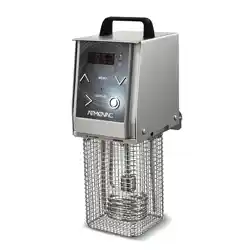
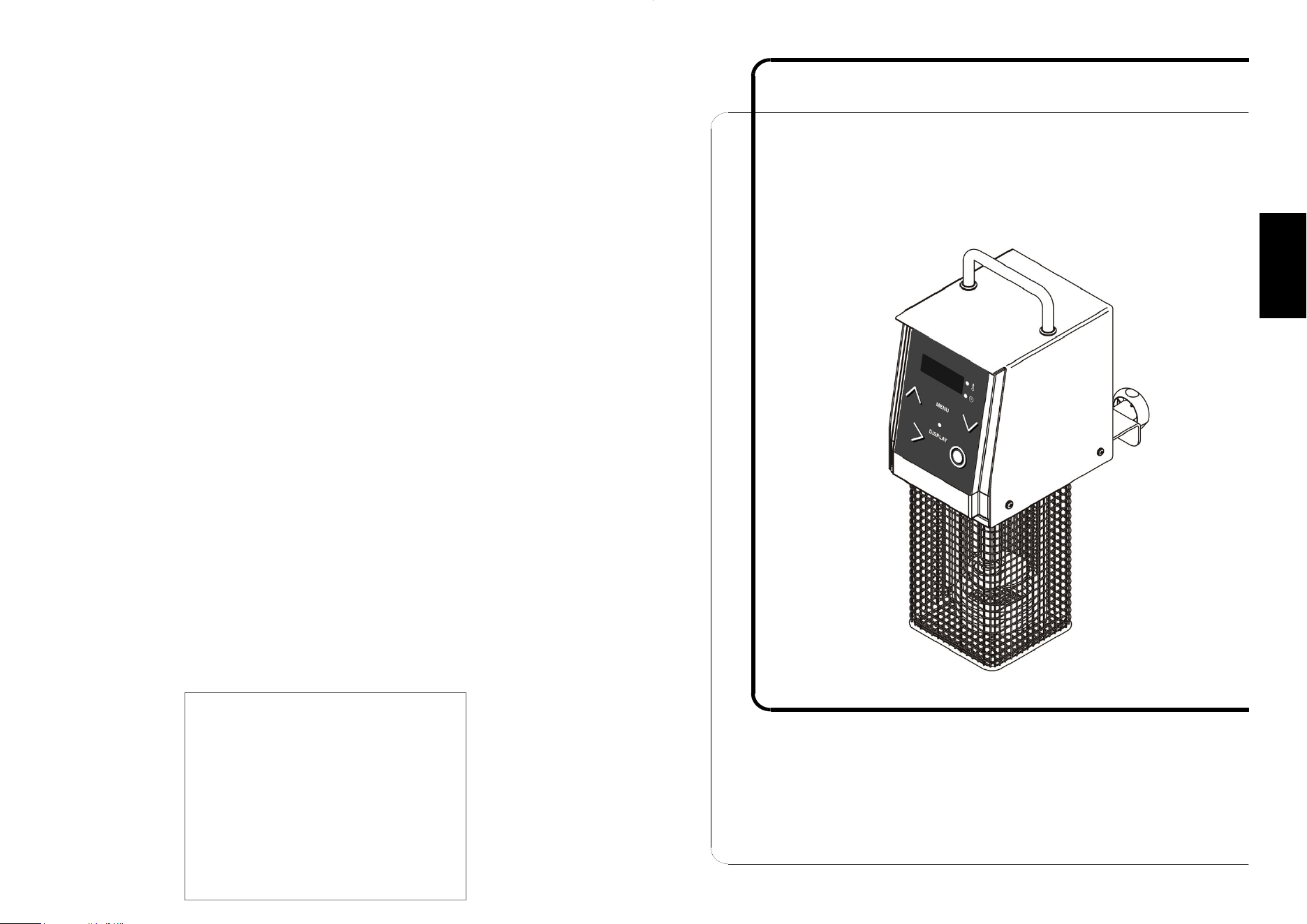
Softcooker XP
OPERATING AND MAINTENANCE
INSTRUCTIONS

2 15
English
PART 8 - DISMANTLING
8.1 - Putting out of service
Should you decide to put the machine out of service, make sure it cannot be used by
anyone: unplug the machine and disconnect all the electrical connections.
8.2 - Disposal
Once the machine has been put out of service, it can be eliminated in due course. To
dispose of the machine correctly, contact a waste disposal firm taking into account the
various materials that make up the various components.
8.3 - WEEE Waste electrical and electronic equipment
In conformity with article 13 of Legislative Decree no. 151 of 25 July 2005,
“Implementation of the Directives 2002/95/EC, 2002/96/EC and 2003/108/EC
concerning the reduction of the use of hazardous substances in
electrical and electronic equipment, and the disposal of waste”
The symbol of the crossed out wheelie bin on the equipment or packaging indicates
the product must be disposed of separately from other waste at the end of its useful
life.
The segregated collection of this equipment at the end of its useful life is organized
and arranged by the producer. The user wishing to dispose of the equipment
concerned must therefore contact the producer and follow the manufacturer’s
instructions regarding the segregated collection of the equipment at the end of its
useful life.
Suitable segregated collection of the equipment for subsequent recycling, treatment or
environmentally friendly disposal helps prevent damage to the environment and to
human health, and encourages the re-use and/or recycling of the materials that make
up the equipment.
Abusive disposal of the product by the user shall result in the application of fines in
accordance with the law in force.

14
PART 6 – CLEANING THE MACHINE
ATTENTION!
Always unplug the machine before cleaning it to ensure it is no
longer live.
6.1 – General point
- Clean the machine with a cloth soaked in a normal detergent at ambient
temperature.
- Clean thoroughly all parts of the machine that come in contact with the product.
- Do not use high-pressure water jet machine or pressurized water spray.
- Do not use tools, brushes or other that could damage the surface of the machine.
- Do not put any of the components in the dishwasher.
6.2 – Maintenance of the element
To protect the element and all the components that are immersed in the tank, you are
advised to add some vinegar in the tank with the water for each work cycle.
PART 7 - MAINTENANCE
7.1 - General point
Always unplug the machine before servicing it to ensure it is no longer live.
7.2 - Power cable
Check the cable regularly to ensure it is in good condition. Call the ASSISTANCE
CENTRE if the cable needs to be replaced.
3
English
FOREWORD
- This manual was drawn up to provide the Customer with information concerning the
machine and applicable standards, as well as instructions on operation and
maintenance to ensure the optimal use and durability of the device.
- This manual is intended for operators authorized to use the machine and execute
routine maintenance.
LIST OF CONTENTS
PART 1 - ABOUT THE MACHINE 4
1.1 - General precautions
1.2 - The machine’s safety devices
1.3 - Description of the machine
1.3.1 - Overview
1.3.2 - Structural characteristics
1.4 - Intended use
1.5 - Unintended use
1.6 - Master data
1.7 - Protective and safety devices
1.8 - Machine composition
PART 2 - TECHNICAL DATA 8
2.1 - Size, weight, properties...
PART 3 - RECEIPT OF THE MACHINE 9
3.1 - Delivery of the machine
3.2 - Checking the pack on receipt
3.3 - Disposal of the packaging
PART 4 - INSTALLATION 10
4.1 - Positioning of the machine
4.2 - Connection to the mains
4.3 - Wiring diagram
PART 5 - MACHINE USE 11
5.1 - Controls
5.2 - Controls function
5.3 - Using the machine
5.4 - Error messages
PART 6 - CLEANING THE MACHINE 14
6.1 - General point
6.2 - Maintenance of the element
PART 7 - MAINTENANCE 14
7.1 - General point
7.2 - Power cable
PART 8 - DISMANTLING 15
8.1 - Putting out of service
8.2 - Disposal
8.3 - WEEE Waste electrical and electronic equipment

4
PART 1 - ABOUT THE MACHINE
1.1 - GENERAL PRECAUTIONS
- The SOFTCOOKER must only ever be used by a trained operator who has read
and understood the safety instructions in this manual.
- In the case of shifts, make sure all the operators are suitably trained.
- Do not touch the heating elements with bare hands.
- Always unplug the machine before cleaning or maintenance.
- Always take the residual risks into account when servicing or cleaning the machine
(and therefore when removing the protective devices).
- Always focus on the work in hand when executing maintenance or cleaning.
- Check the condition of the power cable on a regular basis; a worn or damaged
cable can pose serious electrical risks.
- If there are any signs the machine is not working properly or you have reason to
believe it is malfunctioning, you are advised to not use it and to contact the
Assistance Centre immediately.
- Do not execute any repairs directly. Always contact an authorized repairman.
The user must never, for any reason, tamper with the machine. Always contact the
Manufacturer in the event of a fault. Any attempt by the user or unauthorized
operator to dismantle, change or tamper with a component of the machine shall
forfeit the
Declaration of Conformity drawn up in accordance with EEC Directive 2006/42
and invalidate the warranty. The Manufacturer Firm cannot assume liability for
damage due to tampering.
Moreover, the Manufacturer cannot be held liable for:
- Improper use or tampering with the machine by poorly trained operators;
- Poor or insufficient maintenance;
- Use of spare parts that are not original or type-approved;
- Failure to comply with some or all of the instructions in this manual;
- Treatment of the machine’s surfaces with unsuitable products.
1.2 - THE MACHINE’S SAFETY DEVICES
The electrical and mechanical safety devices conform to directives 2006/95 and
2006/42, and standard 60335-1.
The Softcooker protects against electrical and mechanical risks during operation as
well as cleaning and maintenance.
There are however some RESIDUAL RISKS that cannot be fully eliminated. These
are headed ATTENTION
and concern the risk of burns or bruises when loading and
unloading the product and cleaning the machine.
13
English
- To save the modified data, press and hold for 4 seconds the MENU button or wait
10 seconds and the data will be saved automatically.
Once the chosen temperature has been reached and at the end of each work
cycle, the machine emits a BEEP.
5.3 - Using the machine
It is good practice to first load the bags containing the product to be cooked and only
then complete filling of the tank with water, so as to avoid exceeding the maximum
allowed level.
Fill the water to no more than the maximum level, and add some vinegar to prevent
scale and deposits building up, to the amount of 1/2 cup per 40 litres of water. Change
the water in the tank at least once a day to prevent deposits, algae, etc. from forming
inside it.
The bags must be completely immersed in the water.
The bags should not occupy more than 30% of the tank’s capacity, to ensure there is
sufficient water to deliver heat uniformly to the product. Take care that the bags do not
hinder proper circulation of the water and hence uniform cooking.
Always use the cooking lid.
Check the water level regularly, since it can evaporate very quickly. If the water falls
below the minimum level, the machine will emit a few beeps and an error message
(ERR) will appear on the display.
WARNING!
Once the work cycle terminates, switch the machine off by pressing the O button and
then:
1. Move the main switch to OFF (Ref. 12 - Fig. 2).
2. Remove the plug from the power outlet.
3. Loosen the clamp and remove the machine from the tank.
4. Dry the machine.
5. Empty the tank.
5.4 - Error messages
The Softcooker will show an error message when:
- The water level in the container is too low (H2O); in this case, the machine will also
emit a BEEP.
- The electronic components inside the machine are overheating (ERR).
- The readings of the temperature sensors differ due to a fault in either of them
(ERR).

12
5.2 - Controls function
Warning: before switching the machine on, place it on the tank reserved for cooking,
secure it with the clamp (Ref. 9 - Fig. 5) then fill the tank with water, while taking care to
observe the minimum and maximum levels (Fig. 5).
A. Procedure
- Switch the machine on by shifting the switch (Ref. 12 - Fig. 2) to ON.
- Press the Ʌ or V button to select the desired processing programme.
- Press the > button to start the process.
- The impeller (Ref. 7 - Fig. 2) will activate and will start moving the water; it will remain
on until the set cooking cycle has terminated.
Modifying the temperature and/or time without stopping the machine:
- Press the DISPLAY button: the display will show the temperature relative to the
current programme and the corresponding LED will start flashing.
- Use the Ʌ and V buttons to modify the desired temperature.
- Press the DISPLAY button to switch to the time adjustment function: the display will
show the time relative to the current programme and the corresponding LED will start
flashing.
- Use the Ʌ and V buttons to select the desired time.
- The changes made are temporary and will last until the STOP.
B. Infinite-time programme
This programme entails the setting of the temperature while the time is infinite:
- Press the MENU button and then >.
- The impeller (Ref. 7 - Fig. 2) will activate and will start moving the water; it will remain
on until the set cooking cycle has terminated.
- Press the DISPLAY button to enter the desired temperature using the Ʌ and V
buttons: the set data will last until the STOP.
- The machine can be stopped at any time by pressing the O button.
C. Delayed start
- Choose the desired programme and then press the MENU button to set the start
delayed by 10 minutes to 24 hours with 10-minute steps, using the Ʌ and V buttons.
- The display will show the countdown to the start of the programme.
- The time and temperature LEDs will flash until the set time has expired.
D. Personalisation of the 25 pre-set programmes
- Switch the machine on by shifting the switch (Ref. 12 - Fig. 2) to ON.
- With the machine in STOP mode, select the desired programme using the Ʌ and V
buttons.
- Press the MENU button for 4 seconds.
- The temperature LED will flash, then the data can be modified using the Ʌ and V
buttons.
- To save the modified data, press and hold for 4 seconds the MENU button or wait 10
seconds and the data will be saved automatically.
- Press the DISPLAY button to switch to the time adjustment function.
- The time LED will flash, then the data can be modified using the Ʌ and V buttons.
5
English
1.3 - DESCRIPTION OF THE MACHINE
1.3.1 - Overview
Our firm designed and constructed the Softcooker to guarantee the following:
- the sturdiness and stability of all the components;
- easy handling, with a stainless steel handle so it can be carried with convenience;
- high precision heating control;
- a circulation fan for excellent mixing of the product;
- a max work depth of 16.5 cm;
- optimal operation up to 43 litres;
- an operating temperature of between 24 and 99°, at a precision of +/- 0.3°C.
The models stated in this manual are constructed in conformity with EEC Directive
2006/42 and subsequent amendments.
The manufacturer cannot assume any liability for accidents if the machine has been
changed, tampered with, used without its safety devices or put to a use for which it
was not intended.
1.3.2 - Structural characteristics
The Softcooker was made entirely of AISI 304 stainless steel to ensure hygiene and
resistance to acids and salts, as well as excellent resistance to oxidisation.
- The heating element consists of a electro-polished coated spiral element devised
especially for immersion in water.
- A stainless steel handle for convenient handling of the machine.
- A motor circuit breaker that detects overvoltage and overheating.
1.4 - Intended use
The Softcooker is designed for indirectly cooking food packed under vacuum in bags
and immersed in water at a controller temperature (vacuum-packed food).
It does not cook food in any other way or heat liquids other than water.
Use the Softcooker only with the appropriate Gastronorm tanks equipped with a cover.
If used with other containers, close the container with a suitably shaped cover so as to
limit the escape of water vapour as far as possible.
1.5 - Unintended use
The machine must be put to the sole use intended by the manufacturer; in particular:
- Do not use the machine unless it has been installed correctly and all the protective
devices are in good condition and properly fitted, in order to prevent the risk of
serious harm to yourself.
- Do not touch the electrical components without having first unplugged the machine:
risk of electrocution.
- Do not start up the machine when this is not working properly.
- Before using the machine, make sure the machine is perfectly safe and that any
dangerous conditions have been eliminated in an appropriate manner. If there are
any irregularities, stop the machine and request the assistance of a maintenance
technician.
- Do not allow unauthorized operators to use the machine.
Emergency action in the event of electrical accidents first of all, remove the victim from
the conductor (as he is likely to be unconscious). This operation is dangerous.
The victim in this case is a conductor: touching him is to risk electrocution.
6
It is advisable therefore to disconnect the contacts directly from the line supply valve,
or if this is not possible, move the victim away using insulation materials (pieces of
wood or PVC, cloth, leather, etc.).
The victim should be given immediate medical attention and taken to a
hospital.
1.6 - Master data
Please state the machine’s exact "Model", "Serial number" and "Year of
manufacture" when contacting our assistance service. This will help us give you a
quick and efficient response.
We will ask you to state the machine model and serial number whenever you contact
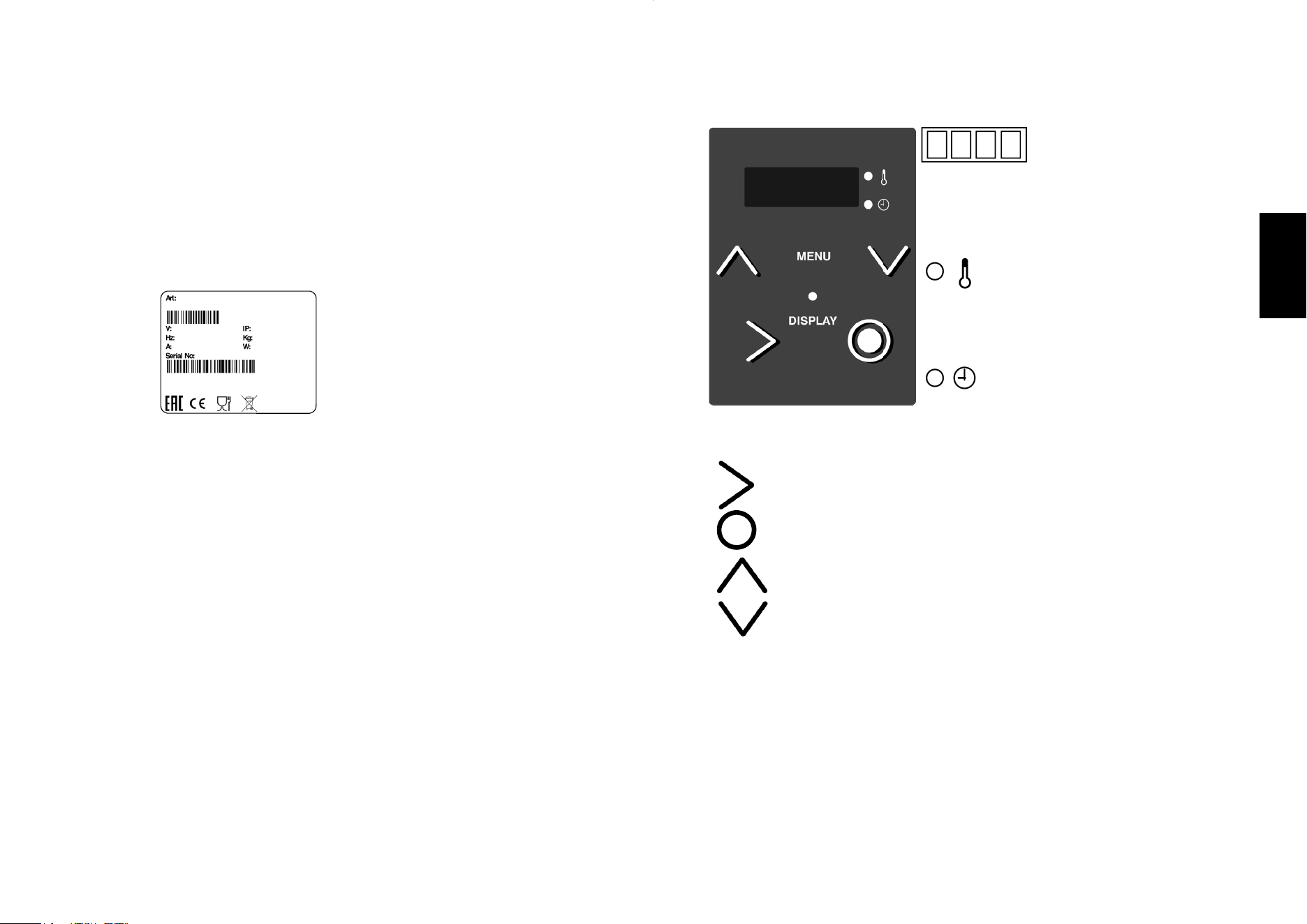
us, so make sure to check this on the data plate, pictured in fig. 1.
1.7 – Protective and safety devices
ATTENTION!
Make sure the safety devices are in good condition and correctly installed before using
the machine.
Check these before each work shift to ensure they are fitted and in order.
If they are not, you should inform the person responsible for maintenance.
- A Element protective cell: this prevents contact with the element and fan which can
seriously wound the operator.
- B Automatic protective device in the case of dry operation:
the machine stops and an error (H2O) message appears on the screen when the
level of the water falls below the minimum permitted (75 mm from the top of the
immersion tank).
- C Disabling device: the machine stops and an error (HIGH) message appears on
the screen when there is a fault with one of the probes and their temperature
readings are different.
Fig. n°1
LEGEND
(A) = Product code and name
(B) = Power supply
(C) = Motor frequency
(D) = Amperage
(E) = Serial number
(F) = Barcode
(G) = Manifacturer
(H) = International Protection
(I) = Weight
(L) = Power
(M) = Origin
(A)
(B)
(C)
(D)
(E)
(H)
(I)
(L)
(F)
(G)
(M)
11
English
PART 5 - MACHINE USE
5.1 - Controls
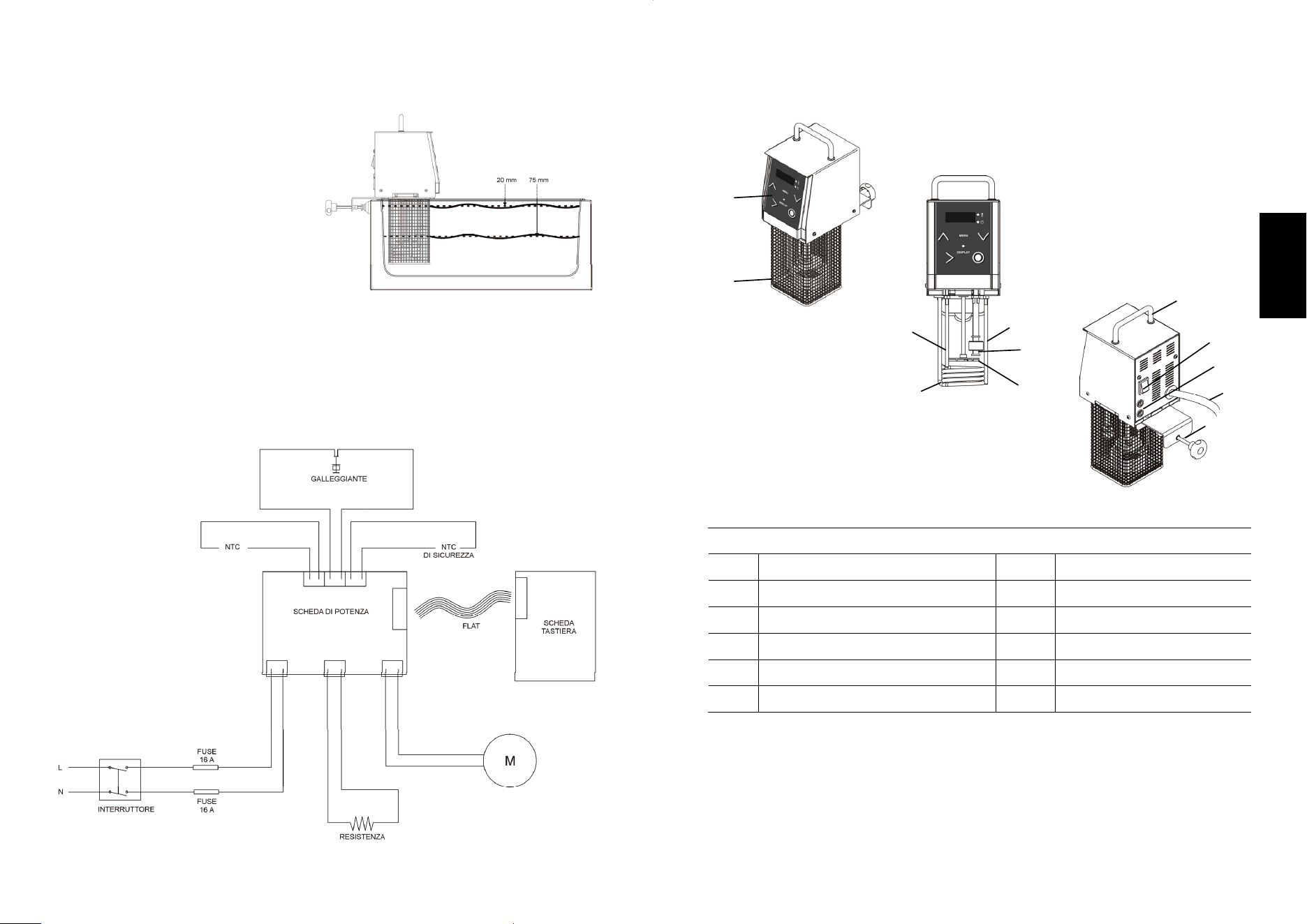
Display: four-digit, includes the temperature, time
and description of the various pre-set programmes.
After 10 seconds of non-use, without any programme
being selected, the display will show the STOP
status.
Temperature LED: located beside the
display, it lights up when, during the work
cycle, the display shows the operating
temperature.
It flashes while the temperature is being
modified.
Timer LED: located beside the display, it
lights up when, during the work cycle, the
display shows the processing time.
It flashes while the time is being modified.
START button: starts the cooking cycle.
OFF button: stops the work cycle.
MENU button
- Press it after selecting the processing programme for setting the desired time
and temperature.
- Press it after selecting the processing programme for delaying the start.
DISPLAY button
- Press it to change the mode on the display from time to temperature at any
time, both during the current programme and during the programme setting
phase.
- Shows in sequence: Set temperature / Actual temperature / Set time / Time
remaining of the current programme.
- Press and hold the DISPLAY button for 4 seconds to switch from °C to °F.
UP and DOWN (+/-) buttons
- They are used to set the temperature and time values.
- With the machine in “STOP” mode, pressing the Ʌ or V button allows for
directly accessing 25 custom programmes.
DISPLAY
MENU
10
PART 4 - INSTALLATION
4.1 - Positioning of the machine
Fill the water tank. Make sure you put in
more than the minimum amount
required for machine operation (75 mm
from the top of the tank) but do not
exceed the maximum level (20 mm
from the top of the tank).
Connect the Softcooker to the
immersion tank by means of the
connector behind the machine.
Make sure the liquid does not enter the
machine.
4.2 - Connection to the mains
The machine has a power cable (3x1.5 mm² x 2.5 m) and a 16A Shuko plug. Connect
the 230 V 50 Hz machine by installing a 10A ΔI = 0.03A residual-current device on the
line. Also check that the information on the machine's nameplate match the
specifications given in the delivery and shipping documents, and that both the master
switch and cable are easily accessible while the machine is in use.
4.3 - Wiring diagram
Fig. n°5
Fig. n°6
7
English
1.8 - Machine composition
LEGEND
1 Front 7 Rotor
2 Protective cell on element 8 Handle
3 Element 9 Terminal
4 Float 10 Fuses
5 Probe 11 Cable
6 Safety probe 12 ON-OFF switch
1
2
3
4
5
6
7
8
9
12
11
10
Fig. n°2
8
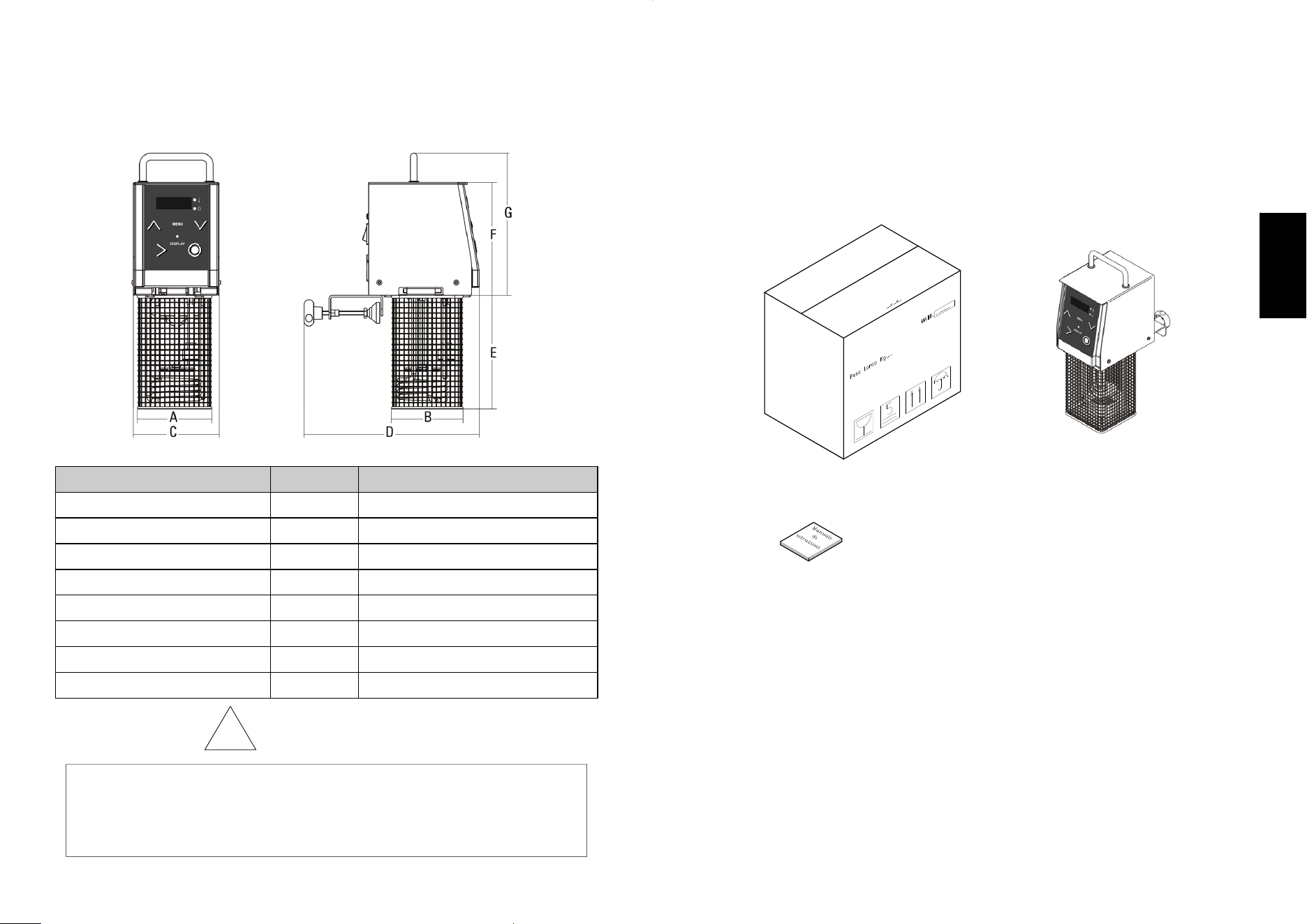
PART 2 - TECHNICAL DATA
2.1 - Size, weight, properties...
Fig.n°2 – Dimensions and max size of the machine
!
THE ELECTRICAL PROPERTIES OF THE MACHINE ARE STATED ON A
PLATE ON ITS BACK; BEFORE CONNECTING THE MACHINE, REFER TO THE
SECTION:
“ CONNECTION TO THE MAINS.”
ATTENTION
Model Measure Softcooker
Power
watt
2.000
Current
230V/50Hz
Temperature
°C
24 to 99
A x B
mm
110 x 105
C x D
mm
130 x 260
E / F / G
mm
170 / 170 / 210
Net weight
kg
4.5
Programs
n.
25
Fig. n°3
9
English
PART 3 - RECEIPT OF THE MACHINE
3.1 - Delivery of the machine (refer to Fig.n°3)
The machinery is carefully packed before it leaves our warehouses.
The pack contains:
- A sturdy cardboard box with inside padding;
- The machine;
- This manual.
3.2 – Checking the pack upon receipt
When you receive the pack containing the machine, check the packaging carefully for
any signs of damage it may have sustained during transport.
If the outer packaging looks as if it has been treated roughly, knocked or dropped,
within three days of the date of delivery, as stated in the documents, and write a
precise report on any damage the machine has sustained.
3.3 - Disposal of the packaging
All the packaging (cardboard, plastic support and polyurethane foam) is classified as
solid urban waste; it can be disposed of without difficulty.
If the machine is installed in a country where there are specific regulations, you should
dispose of the packaging in accordance with those regulations in force.
Fig. n°4