USER MANUAL
User Manual

USER MANUAL
Read the following instructions carefully. Keep the user
manual, assembly instructions, and the device datasheet in
a safe place for future reference.
Inspect the cooktop after unpacking. If the appliance
shows any signs of damage, DO NOT connect it. Contact
the technical department with a description of the error
and, if possible, include relevant photos. Note that
otherwise, any claim for compensation and/or warranty
may be forfeited. Send your complaint to info@invisacook-
eu.com.
The cooktop is to be installed according to the assembly
instructions.
The cooktop is intended exclusively for household use.
Operating the cooktop with an external timer or remote
control is NOT intended. Do not leave the cooktop
unattended during use. Exercise caution, especially when
children are nearby.
Note: The cooktop must not be operated by children under
8 years of age or by individuals with physical or motor
impairments without prior knowledge. It should only be
used under the supervision of a person responsible for
safety or after receiving prior instructions and safety
briefing.
Do not allow children to play with the appliance. Routine
cleaning should not be performed by children under 8
years old and should always be done under adult
supervision.
Keep children under 8 years old away from the appliance
and power plug. Invisacook is only suitable for installation
under all countertops made of 12 mm porcelain material.
Countertops made of Quartz, Corian, Hi-Mac, and laminate
coating are explicitly not recommended and are unsuitable
for use with Invisacook. Such usage will result in the
voiding of the warranty. Caution is advised for individuals
with pacemakers in the vicinity of induction cooktops, and
they should avoid standing too close to the cooktop during
use. Consult your doctor or the appliance manufacturer to
inquire about applicable standards and potential
incompatibilities.
Danger of Fire Damage: Exercise caution when handling
hot oil and grease, as they are highly flammable. In the
event of a grease or oil fire, NEVER attempt to extinguish it
with water. Turn off the appliance and smother the flames
with a fire blanket or similar.
Risk of Burns: Extended use of the cooktops can cause the
entire cooking area to become hot. This can also lead to
the surrounding countertop, pots, and pans, cooking
utensils, and other items becoming very hot. Be cautious
to avoid potential burns.
Invisacook LLC and all subsidiaries assume no liability for
any accidents or burns that may arise from the use of the
Invisacook device, regardless of whether it is used properly
or improperly.
Tips for safety
Do not touch the cooktops or the surrounding countertop
area!
The surface of the cooktops and the surrounding
countertop area can become very hot and cause burns,
even if they appear dark in color.
Do not touch the cooking area directly during or after use,
and do not place any flammable items on it (pot holders,
kitchen apron, cookbook, etc.) until the work area has
sufficiently cooled. The cooking area includes not only the
cooktops but also the surrounding countertop area. NEVER
leave the stove unattended at high heat. Boiling pots can
cause smoke, and the overflow of hot oil may potentially
ignite a fire.
Danger of Electric Shock: Improper repairs are dangerous.
Repair or replacement of defective power cables must only
be carried out by dealer-authorized and appropriately
trained personnel. In case of a defective appliance, unplug
the power cord from the outlet or disconnect the power
source.
A defective appliance can cause an electric shock. Never
connect a defective appliance. Disconnect the appliance
from the power source. Notify technical customer service.
Do not wait for the cooktop to turn off automatically.
Danger of Overheating: The cooktops are equipped with a
fan located in the lower part of the appliance. Small items
or papers should not be stored in the drawers under the
appliance, as they could damage or obstruct the fan. There
should always be approximately 2 cm of space between
the fan and the contents of the drawers.
Risk of Injury: In the case of a moist or wet cooktop
surface, it is possible for your pot or pan to suddenly
'slide.' Therefore, always ensure that the bottom of the pot
and the cooktop are dry and clean.
Avoiding Damage:
• NEVER use pots and pans without the InvisaMat!
• Never place hot cooking pots on the control panel or the
function display, as this can cause damage.
• Do not let hard or sharp objects fall onto the cooktop, as
this can cause damage.
• Never heat empty pots or pans, as this can cause
damage.
Understanding induction cooking and Instructions on
“How to Cook” properly:
Induction cooking differs from standard gas and electric
cooking methods. The pot/pan heats up very quickly, even
at the lowest power setting. Refer to the table on the next
page for power levels to protect the cookware from
overheating. The following 5 rules listed below must
always be observed during cooking to ensure that the
warranty is not compromised.

Maintenance and cleaning
5 Rules for Warranty Protection:
1. The InvisaMat must always be used when cooking,
NO exceptions!
2. Always use suitable cookware (see page 4).
3. The pot/pan must never be empty when the
appliance is turned on. If the cookware is empty, it
will heat up very quickly, potentially damaging the
countertop and Invisacook.
4. (P) Power Boost should ONLY be used when boiling
water. Power Boost automatically turns off after 10
minutes for safety reasons.
5. Cooking with oil or frying should ONLY be done with
Power Level 6; otherwise, the warranty on the
countertop will be void.
The following tips and warnings serve as guidance for the
proper cleaning and maintenance of the InvisaCook
countertop.
Cleaning:
Clean the cooking surface after every use. Allow the cooking
surface to cool down, and never clean the hot surface! Use a
cleaning agent suitable for the countertop. Check the
compatibility of the cleaning agent with your countertop or use
water and soap. For cleaning, use dishcloths or sponges,
ensuring they do not discolor.
Troubleshooting:
Malfunctions are usually attributed to minor details. Before
contacting technical support, check the following tips and hints.
If the issue persists, contact our technical support. NEVER place
hot cookware on the control panel!
SolutionDisplayed ErrorDisplay Indication
Check that its been
plugged in correctly
at the outlet and
the plug. If
hardwire make sure
this was done as
instructed in the
installation manual.
Abnormal voltage
for power supply,
or miss plug /
Hardwiring of the
system.
E7/E8
Verify the
connection
according to the
installation manual.
The cooktop was
not connected
properly.
U
Dry the control
unit.
Error in the
electronic system.
E3/E4
Dry the control unit
or remove the
object.
The control unit has
become moist or an
object is on the
cooktop.
Indicator lights are
blinking.
The cooking zone
indicators are
blinking.
Cooking table
Power LevelDishes
6-7Crepes
with lid4-5Fish
6-7Shrimp and crab
Baked fish
Vegetables
Peeled potatoes
Goulash
Meatloaf
turn regularlyBurgers
with lidDumplings with lid
Rice pudding
Breaded fillets
with lidPasta
Rice
Light sauces
turn regularlySchnitzel
Fried egg
Steak
Frozen products
Frozen vegetables
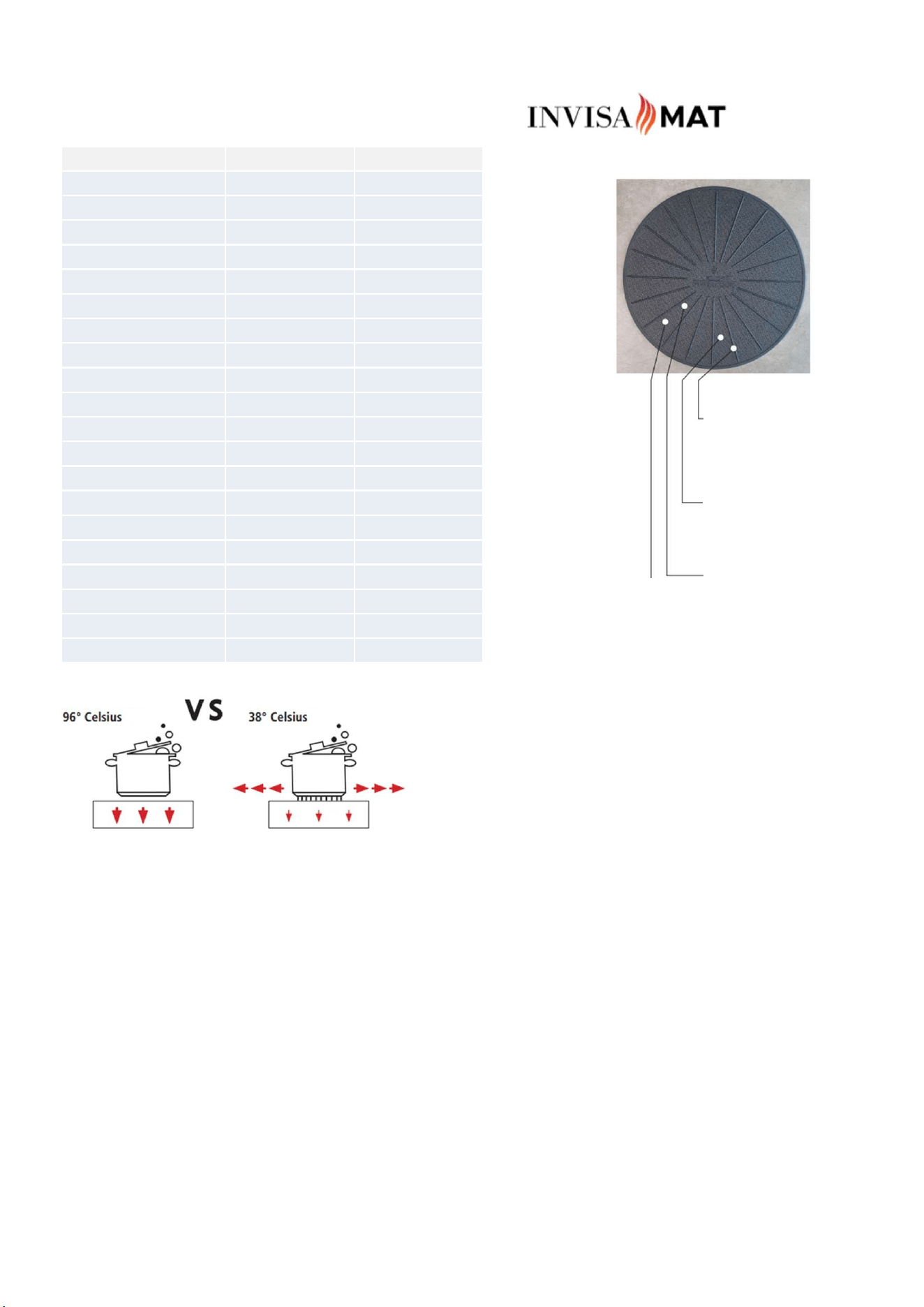
Heat conduction
Silicone ribs extend the lifespan
of the work surface through
heat conduction.
Safe cooking
The mat secures the cookware
against slipping during cooking.
Flexible and durable
A blend of silicone and
fiberglass prevents scratches
and scrapes on cookware and
work surface.
Easier cleaning
The coarse surface holds spills
back, thus protecting the work
surface.
Induction & anti-slip mat
Without InvisaMat With InvisaMat
Without the InvisaMat, the cookware reflects heat back onto
the work surface, unnecessarily heating it up. This, in turn,
shortens the lifespan of the work surface.
The silicone ribs extend the lifespan of the induction
cooktops by diverting the heat reflected by the cookware
away from the induction field.
Condition - 500 ml of water, 5 minutes, P9 (1800W)
Values may vary depending on the work surface and
cookware. To protect your work surface, the InvisaMat
should always be used while cooking.
Heat-absorbing cooking mat
Patented and FDA-approved material made of 100% silicone and fiberglass
that protects your work surface from heat, scratches, and scrapes. The
completely non-slip base is also suitable for use in the oven and microwave;
oven and dishwasher safe up to 260°C.
Warning
NEVER use on conventional electric or ceramic cooktops. The conductive
heat would melt the mat. Suitable for induction cooktops only. Use only
when the cooktop is regulated by wattage (e.g., levels 1-10). If your
cookware only has a thin induction-compatible layer, it may not be
recognized by the unit.
Product care - Care and usage instructions for the InvisaMat Use only with
induction cookware • Do not place empty cookware on top! • Clean the
mat as needed (dishwasher safe)

Compatible Cookware for Your Work Surface
Compatible Cookware for Your Work Surface
For best performance, we recommend pans and pots made of full stainless steel. If a magnet can adhere well to both the bottom and the
outer wall, induction heat develops optimally. Therefore, Invisacook recommends using full-layer stainless steel or triple-layer cookware in
combination with the InvisaMat.
Non-Compatible Cookware
Cookware made of aluminum, copper, or glass ceramic may not work unless the bottom has a core of magnetic material. Many
manufacturers have now integrated a thin magnetic layer into the bottom of their pots and pans, which allows for induction but is extremely
inefficient. Invisacook advises against using such cookware!
Do Not Use These Variants
Cast iron cookware is essentially suitable for induction cooking, but it emits an extreme amount of heat. This excessively heats the work
surface and results in significant heat loss.
Induction adapter plates (also known as induction disks or induction converter disks) are also energy-wasting and lead to rapid heating of
the work surface.
Child-Safe System
Invisacook has a child lock to prevent the device from being mistakenly turned on or off. You can find the child lock on the control panel. In
sleep mode, the child lock is automatically activated.
Turning On and Off
Your Invisacook device should always be turned off when not in use. To turn the device on and off, press the start button (in the middle) for
2-3 seconds. If nothing happens, lift your finger and repeat the process.
Normal operating noises
Induction Cooktops, which ensure that heat is generated directly in the cookware. Depending on its composition, the following noises or
"vibrations" may occur:
A deep humming like that of a transformer
This noise occurs when cooking at high levels. The large amount of energy transferred from the cooking plate to the cookware creates the
deep humming. The noise disappears once the cooking level is reduced.
A faint whistling
This noise occurs when the cookware is empty on the switched-on field. It disappears once the cookware is filled. Never place empty
cookware on the plates when the cooking field is turned on.
A crackling noise
This noise can occur with cookware composed of different layers of materials. It is caused by the different internal vibrations of the
materials. The volume of the noise depends on how the food is cooked.
A loud whistling
This noise mainly occurs with cookware composed of different layers of materials and placed on two cooking zones simultaneously at
maximum level. The noise disappears or decreases once the power level is reduced.
The noise of the fan
The Invisacook device is operated at a controlled temperature to ensure correct operation and reliability of the electrical system. Therefore,
the device is equipped with a fan that automatically turns on and off depending on the temperature. The fan may also start and run after the
device is turned off due to high residual heat.
Environmental Protection
Energy Saving Tips
• Always use the appropriate lid for your cookware.
• Use the InvisaMat and ensure a clean, level bottom of the
cookware, this saves energy.
• Cookware and cooktop should have the same diameter.
Manufacturers of induction cookware often indicate a larger
diameter than the bottom actually has.
• Match the cookware to the food being cooked. Oversized
pans or pots unnecessarily consume energy.
• Do not use more water than necessary when cooking. This
saves energy and preserves vitamins and minerals in
vegetables.
• Cooking at too high levels wastes energy.

Control Unit Touch Screen / Usage + Functions
Foreign Object Detection
INVISACOOK - Control Unit - The unit features a mechanism that detects foreign objects. If this occurs, the unit immediately shuts off,
indicated by the flashing LED on the control unit and an audible beep signal.
The INVISACOOK control unit is a self-contained system operated via touch screen.
• Fold-out drawer or under the wall cabinet
• Concealed in a drawer
• Mounted on the connecting wall
• Materials - depending on preference, this applies only to the installation of the control unit!
Features
• Easily recognizable touch screen
• Red light on black background
• Power Boost option for faster heating
Device Operation
Position your induction-compatible cookware in the center of the cooking zone. While the device checks the connection, the LED number on
the control panel will blink red. Once the connection is established, the LED number on the control panel will illuminate. If the cookware is
too far away from the induction coil, the LED will blink red, and a beep will sound (indicating a faulty connection).
To reset the device, it must be disconnected from the power for 10 seconds.
DisplayStatus
Off/InactiveOff
LED lights up on control panelPower on
LED number lights up on control panelConnected
LED blinks IC redNo connection LED blinks IC red
no connectionBeep sound
A letter followed by a number (e.g. H-8)Faulty connection
User interface
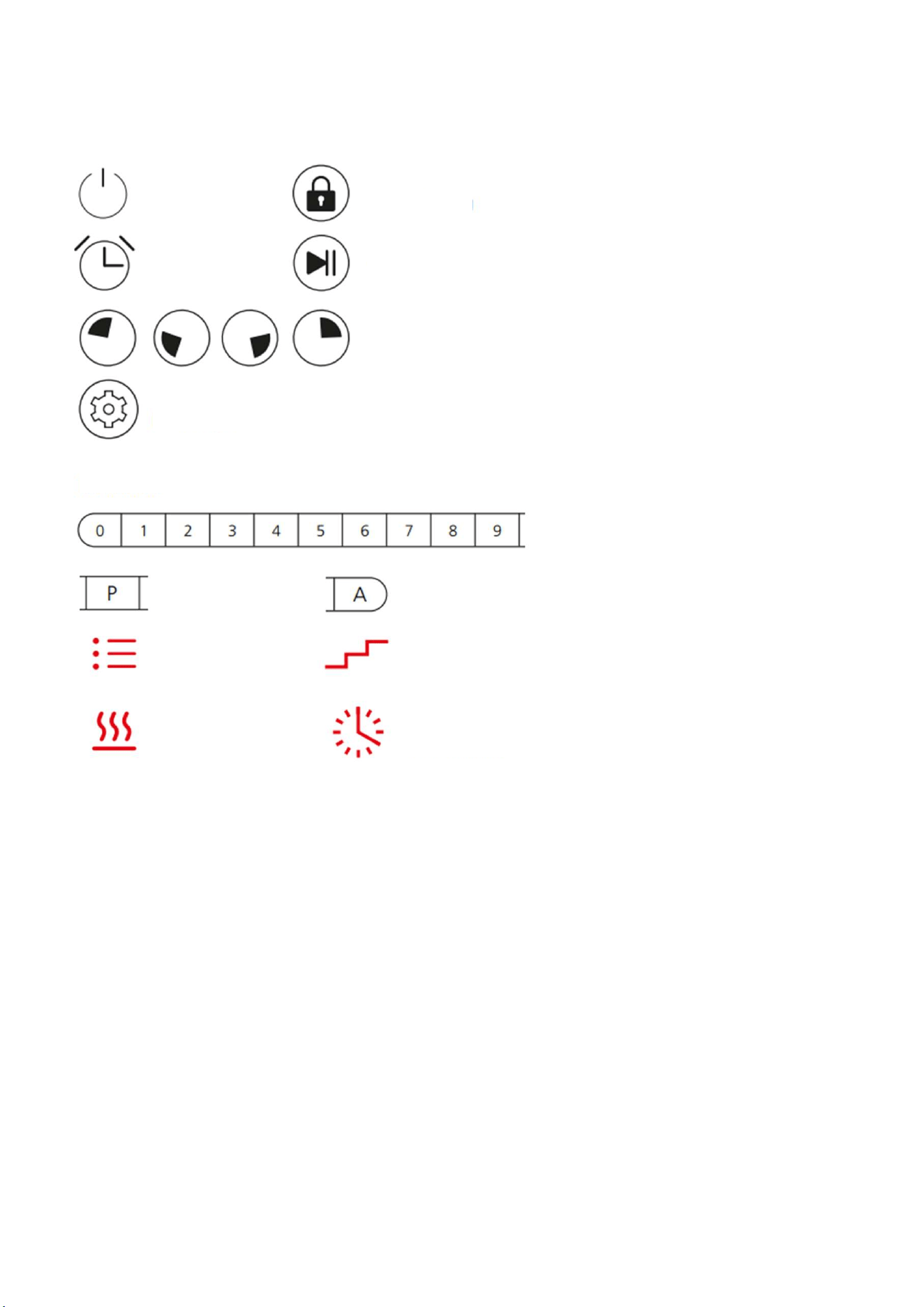
Buttons and layout Touch Screen
User interface
On/Off Child lock
Timer
Start/Stop
Cooking zone
selection
Settings
Cooking Levels
Booster
Menu number
Power intensity
Cooking level
Auto Funktion
Cooking time
Power On
When powered on, all LEDs light up for 1 sec + beep, then the beep ends. If the surface temperature exceeds 60°C, an "H" for Hot appears on
the selected cooking point display on the control unit. All other buttons are then invalid except ON/OFF and the child lock.
On/Off
Press the ON/OFF button - Standby mode, all LEDs briefly light up, a beep sounds. If the surface temperature exceeds 60°C, an "H" for Hot
appears on the selected cooking point display on the control unit; if not, the LED "-" will show, and the timer LED will show "--".
Manual Cooking Selection
After the unit is turned on, select your desired cooking point, then cooking level using levels 1-9 or Power Boost (B).
Child Lock
To prevent misuse and ensure the safety of your children, press the "Lock" button for 3s to activate the function. The display lights up, all
buttons except the child lock and power button are deactivated.
Power Boost (Faster Heating)
Activation of Power Boost = select your desired cooking zone, then select the desired cooking level, and then press "B". Deactivation of
Power Boost = press "B" again to end the Power Boost; the unit will then return to the previously selected cooking level.

Power Sharing and Numerical Equivalents
The Invisacook unit is a device with "shared" power supply. By dividing the power demand among the various burners, the Invisacook unit
remains highly efficient and requires less than 25 amperes when all cooking points are activated simultaneously. The Invisacook device
operates with the following selected power parameters:
Once you have activated the Power Boost on the left or right side of the device, you can use the 2nd cooking zone on the activated side with
a maximum setting of (8). Maximum power levels of 8 (eight) and 6 (six), without Power Boost, can be independently reached on each side,
allowing all four burners to be used simultaneously. The device automatically adjusts to the corresponding power levels when all four
burners are used simultaneously.
Timer
Press the "Clock" button to activate the timer (max 99 minutes), this only works when a cooking zone has already been selected, then select
from 0-9 to set the timer.
Smart Functions
"Recording" With the cooking point (2.3) activated, press and hold the setting knob , then the Invisacook will record your cooking time
and cooking level. Every time you choose a new cooking level, the device initiates a new recording, up to a maximum of 4 times. Press
to end the recording; if 4 recordings have been used, the device will automatically end the recording. To save your cooking levels, press the
Menu Timer button (no LED lights up), now select your cooking level from 0-9, then press and hold the setting button to save.
Saved cooking programs
In standby mode, press and hold the setting button for a long time to create or modify the cooking menu, then the number LED
blinks red. Press 1-9 to select the cooking menu, press to confirm the cooking menu. Then the cooking level button will
blink red. Press again briefly, then adjust the power and the cooking time (M:S), the cooking cycle can look like this:
From to to to etc.
Cooking step: all in 4 stages, cooking power can be 1-9, cooking time: max to 99s: 99s. When you're finished, press the setting button .
AutoMode
a) Automatic Cooking (preset):
In standby mode, press to activate the Auto Mode; now the cooking plates LED lights up and indicates "A," and the Menu
number will blink (if you have taken the previous step).
Press 1-9 to select a cooking menu, press to start the cooking menu, pressing the button again stops the selected menu. In the
bottom right corner, you will see on which cooking surface the menu is stored.
b) Preset for Menu:
In Auto Mode, when you select the Cooking Number, press to save it. Now the button blinks. Press 0-9 to select the desired
cooking time, maximum 99m:99s.
Press to start the preset menu; when the set time expires, the unit will shut off.
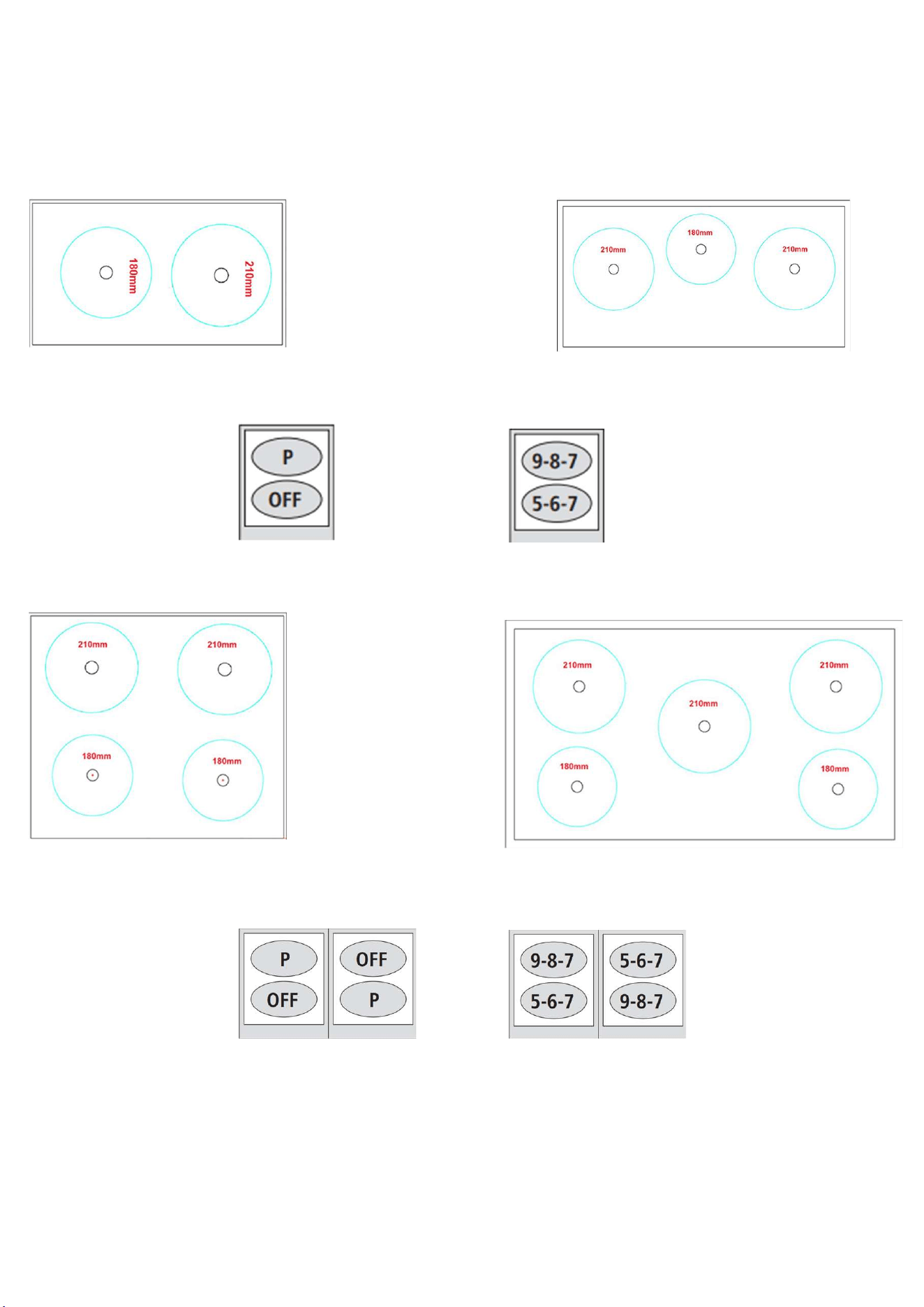
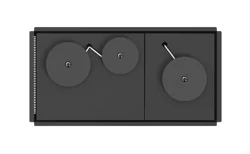
Induction through 12 mm ceramic
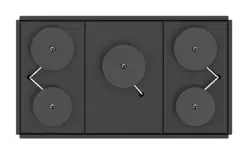
2 burner unit: 3 burner unit:
Shared Power
In the following examples, each 2-burner zone has a share of energy.
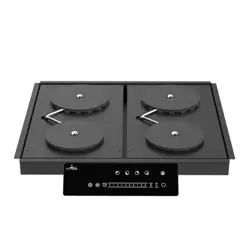
4 burner unit: 5 burner unit:
Shared Power
In the following examples, each 2-burner zone has a share of energy.

Warranty Terms
Each cooking surface comes with a comprehensive 2-year warranty. For a fee, the customer can extend the warranty for an additional 3
years. The unit must be registered with Invisacook Europe GmbH to receive the warranty.
Regulatory Requirements Intended Applications. This product is intended for indoor use.
Product Safety IEC60950-1 (International)
Product EMC Compliance - Class B Compliant Note: The product must comply with Class B emission requirements, as the end product is
configured for commercial use. The system shall have a minimum of 3db margin to the Class B limit.
CE-EMC
EN 55014-1:2017
EN 55014-2:2015+A1:2018
EN 61000-3-2:2019
EN 61000-3-3:2013+A1:2019
CE-LVD
EN 60335-1:2012+A11:2014+A13:2017+A1:2019+A2:2019+A14:2019
EN 60335-2-9: 2019
EN 62233:2008
Legal Disclaimer The information contained in this publication regarding equipment applications and similar is provided for your information
only and may be outdated due to updates. It is your responsibility to ensure that your application complies with your specifications.
"Typical" parameters specified in energy data sheets and/or specifications may vary in different applications, and actual performance may
change over time. All operating parameters, including "Typical", must be validated by your technical experts for your application.
INVISACOOK MAKES NO REPRESENTATIONS OR WARRANTIES OF ANY KIND, EXPRESS OR IMPLIED, INCLUDING, BUT NOT LIMITED TO, THE
CONDITION, QUALITY, PERFORMANCE, MERCHANTABILITY, OR FITNESS FOR A PARTICULAR PURPOSE OF THE INFORMATION. IF THE BUYER
PURCHASES OR USES INVISACOOK PRODUCTS FOR SUCH UNINTENDED OR UNAUTHORIZED APPLICATIONS, THE BUYER MUST INDEMNIFY
AND HOLD HARMLESS INVISACOOK LLC AND ITS OFFICERS, EMPLOYEES, SUBSIDIARIES, AFFILIATES, AND DISTRIBUTORS FROM AND AGAINST
ANY CLAIMS, COSTS, DAMAGES, AND EXPENSES, INCLUDING REASONABLE ATTORNEY'S FEES, ARISING DIRECTLY OR INDIRECTLY FROM ANY
CLAIM OF PERSONAL INJURY OR DEATH ASSOCIATED WITH SUCH UNINTENDED OR UNAUTHORIZED USE, EVEN IF SUCH CLAIM ALLEGES THAT
INVISACOOK LLC ET AL. WAS NEGLIGENT WITH RESPECT TO THE DESIGN OR MANUFACTURE OF THE SUBJECT UNIT OR CLAIM. NO LICENSES,
EXPRESS OR IMPLIED, BY ESTOPPEL OR OTHERWISE, ARE GRANTED UNDER ANY INTELLECTUAL PROPERTY RIGHTS OF INVISACOOK LLC.
Copyright© 2018 - INVISACOOK LLC
USER MANUAL
www.invisacook-eu.com