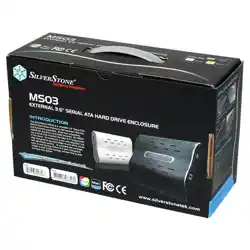
MS03
manual
This is a unique product, please read the following detailed
installation guide we have prepared meticulously for you.
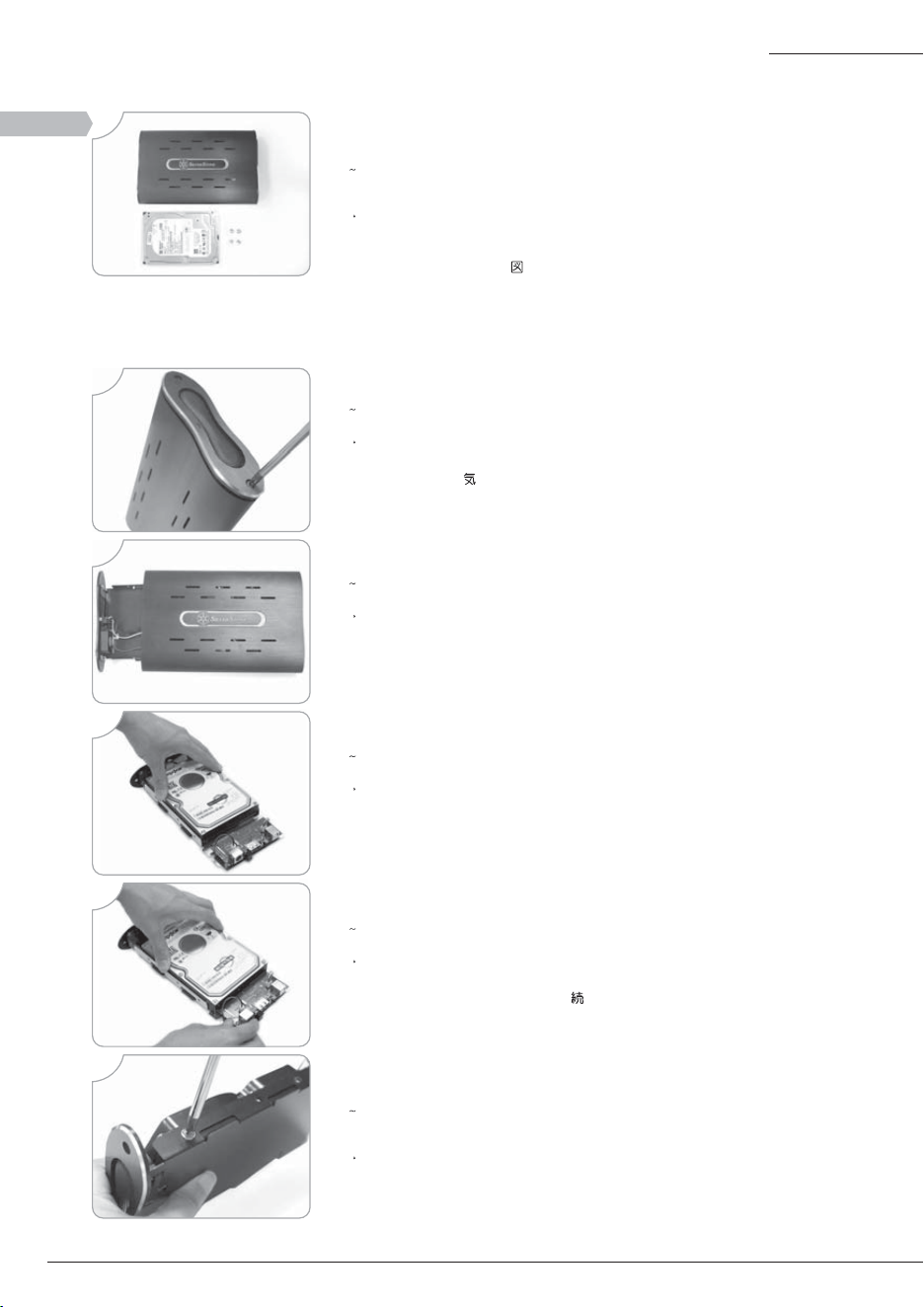
Secure the hard drive by inserting and tightening four screws on both sides of the tray.
Sichern Sie die Festplatte mit den beigefügten Schrauben auf beiden Seiten der.
Festplattenhalterung und ziehen Sie diese fest.
Fije el disco duro insertando y apretando cuatro tornillos en los dos lados de la
bandeja interna.
Fixez le disque dur en insérant et en serrant 4 vis de chaque côté du plateau.
Fissare l’hard disk avvitando le quattro viti su entrambi i lati del vassoio.
ᣴᥳᥱ᥍ᥣᥙᥳᦓ᥎ᦀ᥉ᥲᦖ᥎ᤥᤢ4ҏᤥᥢᤞھۡᤎᤵᤐȄ
װԜዺڍޟ4ᗻᖳ๛ᚇΰٮᚇھȄ
Prepare for installation. (3.5" hard drive shown must be purchased separately)
Bereiten Sie bitte die Installation vor. (eine 3,5” Festplatte muss separat gekauft
werden und ist nicht im Lieferumfang enthalten)
Prepare la instalación del MS03. ( el disco duro 3.5” que se muestra arriba no
está incluido)
Préparation pour l’installation. (le disque dur 3.5” doit être acheté séparément)
Preparare l’installazione dell’MS03. (l’hard disk 3.5”mostrato sopra, deve essere
acquistato separatamente).
᥎ᦝᥣᥲᣴᦕᤥྥര (ȁᤢҰᤌᤝ3.5" ᣴᥳᥱ᥍ᥣᥙᥳᦓ᥎ᦀᤦտഊᗊΣ
ᤐ҆ᤃᤵᤐȄ)
ྥരԊ၆ (3.5"ᆅሯѪѴᗊີ)
ENGLISH
DEUTSCH
ITALIANO
ESPANOL
FRANCAIS
Рġġҏġġᇭ
ϛȁġġġġМ
Remove two screws located on the side with the air mesh grille.
Entfernen Sie die zwei Schrauben an der Seite des MS03 mit dem Luftgitter.
Desatornille dos tornillos laderos para quitar la rejilla de ventilación.
Retirez les 2 vis situés sur le côté où il y a la grille d’aération.
Svitare le due viti situate lateralmente e rimuovere la mascherina di aerazione.
ᦋᥭᥡᦏᤥȁοᤥᤥᥢ2ҏ᥉ѴᤎᤵᤐȄ
װᎬߖᆩޟڍᗻᖳ๛ᚬήȄ
ENGLISH
DEUTSCH
ITALIANO
ESPANOL
FRANCAIS
Рġġҏġġᇭ
ϛȁġġġġМ
ENGLISH
DEUTSCH
ITALIANO
ESPANOL
FRANCAIS
Рġġҏġġᇭ
ϛȁġġġġМ
Pull and slide out the internal tray
Ziehen Sie die interne Festplattenhalterung heraus.
Saque la bandeja interna
Tirez et faîtes glisser le plateau vers l’extérieur.
Tirare per estrarre il vassoio interno
ϱᥲᦖ᥎᥉ЕᤄюᤎᤵᤐȄ
װϱԜዺܜю
Place SATA HDD in the drive bracket
Platzieren Sie die SATA Festplatte auf der Festplattenhalterung.
Coloque el disco duro SATA en su soporte.
Placez le disque dur SATA dans le casier.
Collocare l’hard disk SATA nel supporto
SATA HDD᥉ᥳᦓ᥎ᦀᦀᦓᥛᥭᥲᤢညᤄᤵᤐȄ
SATAᆅܹΣܴዺϛ
ENGLISH
DEUTSCH
ITALIANO
ESPANOL
FRANCAIS
Рġġҏġġᇭ
ϛȁġġġġМ
Push the HDD forward until it is mutually inserted.
Schieben Sie die Festplatte an die Anschlüsse bis Sie fest sitzt.
Empuje el disco duro hasta que se enganche con el soporte.
Poussez le disque dur en avant jusqu’à qu’il soit mutuellement inséré.
Spingere l’hard disk fino a farlo incastrare con il supporto.
HDD᥉அዺᤢܫᤎᤝᦝᤃȁᤌᤢᤎᤵᤐȄ
ᆅ܁ࠉ௰ᇄݖυޟᓞᄇඨȄ
ENGLISH
DEUTSCH
ITALIANO
ESPANOL
FRANCAIS
Рġġҏġġᇭ
ϛȁġġġġМ
ENGLISH
DEUTSCH
ITALIANO
ESPANOL
FRANCAIS
Рġġҏġġᇭ
ϛȁġġġġМ
1
2
3
6
Start
4
5
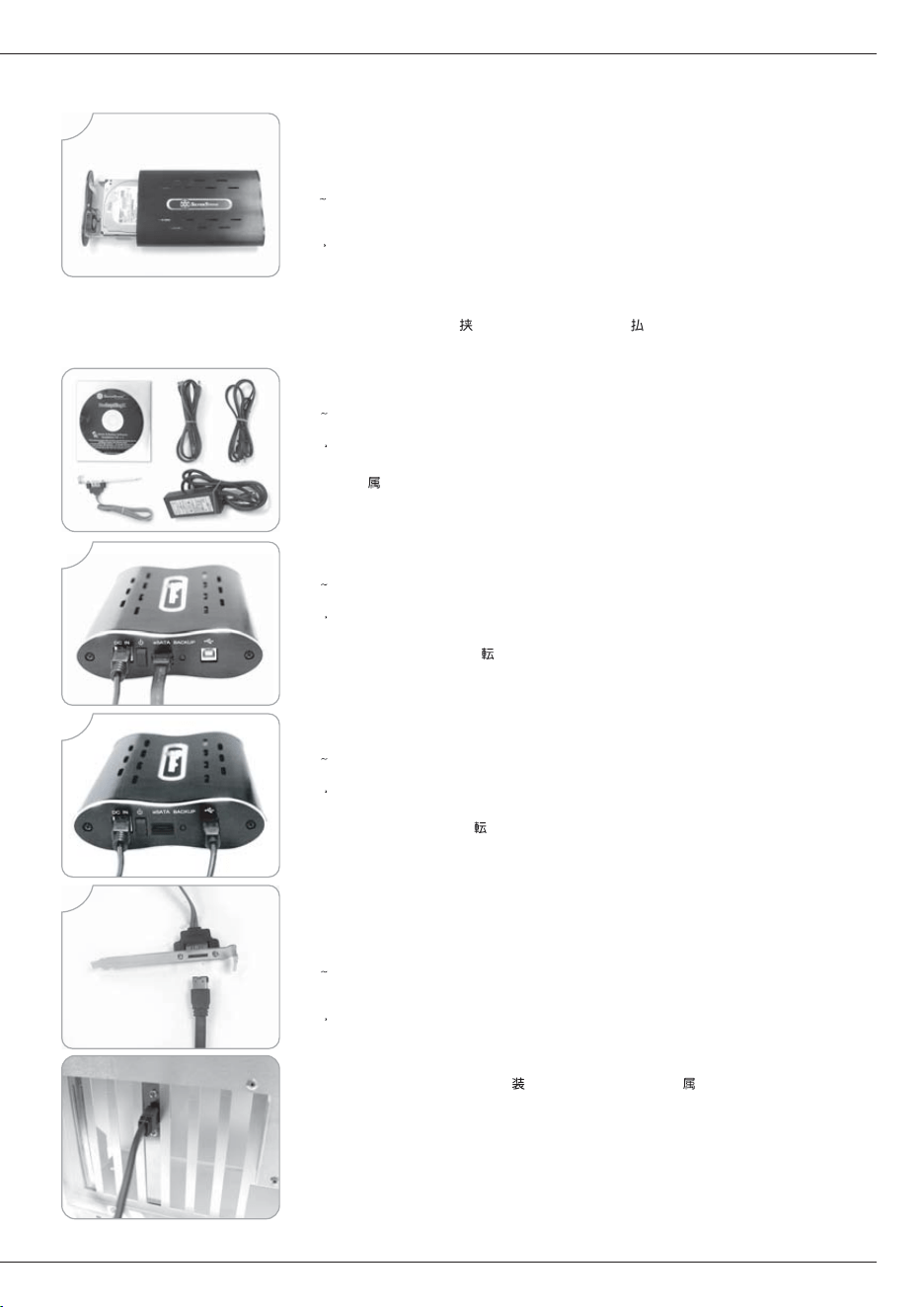
Slide the assembled tray back into the MS01 enclosure. Take great care to ensure
that no wires or cables are caught in between the enclosure and the tray.
Schieben Sie nun die Festplattenhalterung zurück in das Gehäuse. Achten Sie
hierbei bitte besonders darauf, dass keine Kabel und Anschlüsse zwischen
Gehäuse und Festplattenhalterung hängen bleiben oder sich verkanten.
Reintroduzca la bandeja montada, en la caja del MS03. Asegurese de que ningún
cable quede prendido entre caja y bandeja.
Faîtes glisser le plateau assemblé à l’intérieur du boîtier du MS01. Faîtes très
attention qu’aucun câbles ou fils ne se trouvent pincés entre le boîtier et le plateau.
Inserire il vassoio assemblato nella struttura dell’MS03. Assicurarsi che nessun
cavo rimanga incastrato tra la struttura esterna ed il vassoio interno.
ಢᤵᤖᥲᦖ᥎᥉MS03ᤥᥒᦝᥙᦗᣴᥢᦍᤢܙᤎᤵᤐȄᥛᣴᦀᦕᤃᥒᦝᥙᦗᣴᥢ
ᦍᥲᦖ᥎ᤥᤢȁᤵ᥀ᤡಠЖᤥݧཎ᥉ȁᤚᤝᤆᤗᤌȄ
װಢ၆ԁޟԜዺྤΣMS03Ѵ෦၇ȂωЖϚᡱӈդጣೝֶΣԜዺϞȄ
Transmitting using SATA cable
Übertragung mittels SATA Kabel.
Cable de emisión SATA
Transmission en utilisant un câble SATA
Cavo di trasmissione SATA
SATAᥛᣴᦀᦕᤢȁଚ
оSATAጣ༈ᒯ
Accessories
Zubehör
Accesorios
Accessoires
Accessori
пȁࠢ
Ӈ
Transmitting using USB cable
Übertragung mittels USB Kabel.
Cable de emisión USB
Transmission en utilisant un câble USB
Cavo di trasmissione USB
USBᥛᣴᦀᦕᤢȁଚ
оUSBጣ༈ᒯ
ENGLISH
DEUTSCH
ITALIANO
ESPANOL
FRANCAIS
Рġġҏġġᇭ
ϛȁġġġġМ
When the I/O ports does not contain SATA port, use this supplied cable and extend to
the back, use the I/O SLOT in the rear panel.
Sollten Sie keine I/O Anschlüsse für SATA haben, nutzen Sie bitte das mitgelieferte
Kabel und verbinden Sie es, um einen I/O Anschluss an der Rückseite Ihres Gehäuses
zu erhalten.
Si las puertas de entrada/salida no incluyen una puerta SATA, utilize este cable
proporcionado y las ranura de entrada/salida en el panel trasero.
Quand les ports E/S ne contiennent pas de port SATA, utilisez le câble avec l’équerre
SATA fournie en le plaçant à l’arrière du boîtier.
Se le porte d’entrata/uscita non includono una porta SATA, utilizzare questo
cavo(incluso) ed utilizzare gli slot d’entrata/uscita presenti sul pannello posteriore.
I/OᦇᣴᥲᤢSATAᦇᣴᥲᤃȁരᤌᤝᤡൟӫᤦȃпȁᤥᥛᣴᦀᦕᦀᦓᥛᥭᥲ᥉
ࡣഋᦕᤥI/OᥣᦗᥭᥲᤢھۡᤎᤵᤐȄ
࿋кᐠݖI/OؠԤSATAᓞȂџҢԪߣӇкᐠݖΰޟᓞ۽ժڗݖġSLOT I/O ޟ
ӴПȄ
ENGLISH
DEUTSCH
ITALIANO
ESPANOL
FRANCAIS
Рġġҏġġᇭ
ϛȁġġġġМ
7
8
9
10
ENGLISH
DEUTSCH
ITALIANO
ESPANOL
FRANCAIS
Рġġҏġġᇭ
ϛȁġġġġМ
ENGLISH
DEUTSCH
ITALIANO
ESPANOL
FRANCAIS
Рġġҏġġᇭ
ϛȁġġġġМ
ENGLISH
DEUTSCH
ITALIANO
ESPANOL
FRANCAIS
Рġġҏġġᇭ
ϛȁġġġġМ
December, 2006
Warranty Information
NO: G11203010