SAFETY | WARRANTY | TROUBLESHOOTING
© 2025 Shark Ninja Operating LLC. SHARK is a trademark of SharkNinja Operating LLC.
HT400
IMPORTANT SAFETY INSTRUCTIONS
When using electrical appliances with heat, especially when children are present, basic safety precautions should always be followed, including the following:
FOR HOUSEHOLD USE ONLY
READ ALL INSTRUCTIONS BEFORE USING—SAVE THESE INSTRUCTIONS
WARNINGS: KEEP AWAY FROM WATER
DANGER—As with most electrical appliances, electrical parts are electrically live
even when the switch is o.
WARNING
To reduce the risk of death by electric shock:
1. Always unplug the unit immediately after using.
2. Do not use while bathing.
3. Do not place or store appliance where it can fall or be pulled into a tub or sink.
4. Do not place in or drop into water or other liquid.
5. If an appliance falls into water, unplug the unit immediately. Do not reach into the water.
WARNING
To reduce the risk of burns, electrocution, fire, or injury to persons:
1. An appliance should never be left unattended when plugged in.
2. Close supervision is necessary when this appliance is used by, on, or near
children or individuals with certain disabilities.
3. Use this appliance only for its intended use as described in this manual. Do
not use attachments not recommended by the manufacturer.
4. Never operate this appliance if it has a damaged cord or plug, if it is not working
properly, or if it has been dropped, damaged, or dropped into water. If it has a
damaged cord or plug, contact Customer Service at 855-522-0912.
5. Keep the cord away from heated surfaces.
6. Do not wrap the cord around the appliance.
7. Never block the air openings of the appliance or place it on a soft surface, such as a
bed or couch, where the air openings may be blocked. Keep the air openings free of
lint, hair, and the like.
8. Never use while sleeping.
9. Never drop or insert any object into any opening.
10. Do not use outdoors or operate where aerosol (spray) products
are being used or where oxygen is being administered.
11. Do not use an extension cord with this appliance.
12. Do not direct hot air toward eyes or other heat-sensitive areas.
13. Attachments may be hot during use. Allow them to cool before handling.
14. Do not place appliance on any surface while it is operating.
15. While using the appliance, keep hair away from the air inlets.
16. Do not operate with a voltage converter.
17. Only use the appliance with the voltage, frequency and power shown on the
rating label on the product. For additional protection, use on outlets with GFCI. Ask
your electrician for advice.
18. Do not use this appliance on hair extensions or wigs unless recommended by the
hair extension or wig manufacturer.
19. If hair styling product is being used in conjunction with this appliance please read and
follow all of the hair styling product safety warnings and instructions before use.
20. In a double-insulated appliance, two systems of insulation are provided instead
of grounding. No grounding means is provided on a double-insulated appliance,
nor should a means for grounding be added to the appliance. Servicing a double-
insulated appliance requires extreme care and knowledge of the system, and should
be done only by qualified service personnel. Replacement parts for a double-
insulated appliance must be identical to the parts they replace. A double-insulated
appliance is marked with the words “DOUBLE INSULATION” or “DOUBLE INSULATED.”
The symbol (square within a square) may also be marked on the appliance.
SAVE THESE INSTRUCTIONSSAVE THESE INSTRUCTIONS
For replacement combs,
visit sharkclean.com/accessories
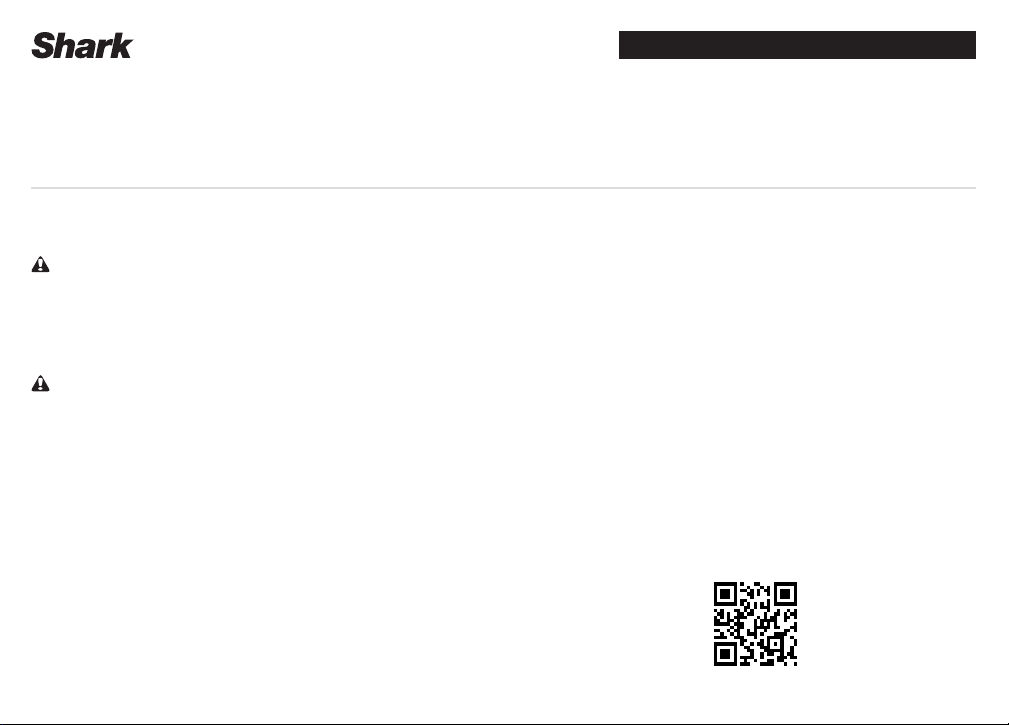
SCAN QR CODE FOR
FULL INSTRUCTIONS,
WARRANTY INFORMATION,
AND HOW-TOS
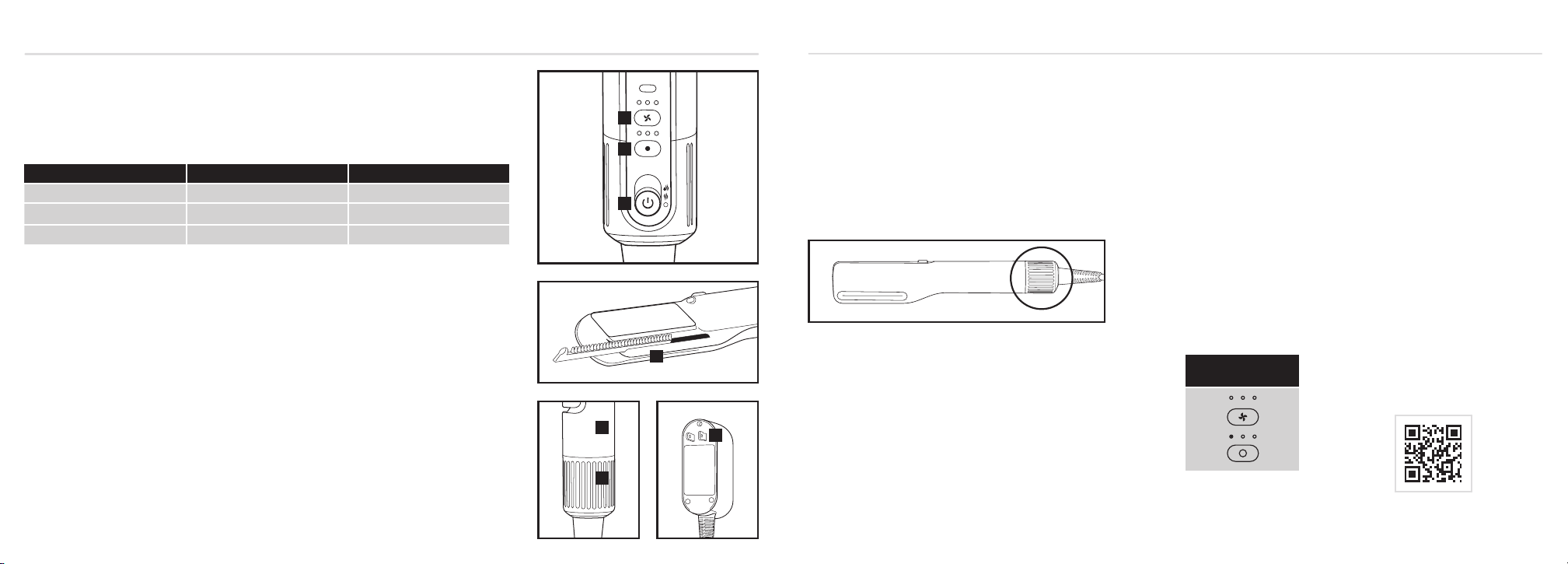
1. Turn the styler on and o by toggling the 3-position switch. Wet Hair drying and styling is at the top of the
toggle and Dry Hair styling is in the middle of the toggle.
2. Adjust the airflow. Pressing the button allows you to choose low, medium, or high airflow. In Dry Hair styling mode,
you can turn the airflow o entirely if desired by pressing the button until none of the LED lights are illuminated.
3. Adjust the temperature. Pressing the button allows you to choose no heat, low, medium, or high temperature.
4. To insert either the Wide Tooth Comb, Precision Comb, or the Gentle Comb into the styler, line it up with the
tracks next to the plates and gently push. The comb is properly attached when it clicks into place. To remove the
comb, use your thumb to pull the comb out of the tracks until it is released. Do not insert or remove the comb
when the plates are hot.
5. To remove the filter cover, slide it o the bottom of the styler. To attach the filter cover, slide it back onto the
bottom of the styler until it clicks in place.
6. Press the ALCI button to reset the styler. See Troubleshooting & Error Codes for more information.
7. Rating label location.
For further operating instructions,
scan the QR code on the cover of this booklet.
Storage, Cord Safety, and Maintenance/Cleaning:
• Ensure the cord is not knotted, twisted, or wrapped around any nearby objects when in use.
• Store the styler in a dry location away from water and other heat sources.
• Clean the filter at the bottom of the styler monthly. To clean the filter, first slide the filter cover o the bottom of the
styler. Then use a new toothbrush to brush o any dust or debris on the filter. Once the filter is clean, slide the filter
cover back on the styler until it clicks in place.
• Remove any hair from the comb after every use to help maintain performance.
• To maintain the styler’s performance, wipe the plates with a warm cloth to remove any hair-product residue. Do
not wipe when plates are hot.
OPERATING INSTRUCTIONS
TROUBLESHOOTING & ERROR CODES
5
1
2
3
7
Air + Plate Temperatures
TEMP WET MODE DRY MODE
HIGH 248°F / 120°C 428°F / 220°C
MEDIUM 230°F / 110°C 374°F / 190°C
LOW 212°F / 100°C 320°F / 160°C
MAINTENANCE/CLEANING
Before cleaning any part of the styler, turn o the device and unplug it.
Reduction in Airflow.
Make sure you are not covering the filter cover with your hand when operating
the styler. This will block the air inlet, which could cause a reduction in airflow. A
change in airflow or air power, airflow blockages, and/or visible buildup on the
inlet at the bottom of the unit could also indicate the unit needs to be cleaned. To
maintain performance, clean the filter at the bottom of the styler every month
using a new toothbrush.
Removing the Filter
1. Turn o the styler and unplug it. Slide the filter cover o the bottom.
Cleaning the Filter
1. Wipe the filter thoroughly with an alcohol pad, then allow it to air-dry
completely for 5 minutes before use.
2. To reinstall the filter cover, slide it back on to the bottom of the styler until it clicks
into place.
Cleaning the Combs
1. Remove any hair from the comb after every use to help maintain performance.
2. Use lukewarm water, a mild detergent, and a soft toothbrush to gently scrub
the comb.
3. Rinse thoroughly with fresh water and dry with a soft, microfiber cloth.
Cleaning the Plates
1. Unplug styler and allow to cool down. Use a soft cloth or paper towel to wipe
away any loose hair or product buildup from the plates after every use to
maintain performance.
2. Use a warm cloth to clean the plates, especially if there’s product buildup on them.
ALCI OPERATION
Electricity flickers or trips circuit breaker during use.
This unit is equipped with an Appliance Leakage Circuit Interrupter (ALCI), a safety
feature that renders it inoperable under abnormal conditions. Should the unit
turn o in use, press the red Reset button on the plug and the unit should function
normally. If the unit does not reset, please check your circuit breaker. If the issue
persists, ensure there are no other appliances plugged in within the room where
the unit is being used. Do not use the unit with a power strip.OVERHEATING
Styler is overheating or shuts o.
This unit is equipped with a temperature-protective thermostat. If for some reason
your unit overheats, the thermostat will automatically turn the unit o. To prevent
power-down recurrence, unplug the unit and set it aside to cool. Overheating may
result if the unit is powered on for a long duration, or can indicate a blockage or
dust buildup. To prevent overheating, clean the filter at the bottom of the unit every
month, using a new toothbrush. Make sure you are not covering the filter with your
hand when operating the unit, as this could also cause overheating. If overheating
continues to occur, contact Customer Service at 855-522-0912.
If you are experiencing a dierent error code, please
scan the QR code for additional troubleshooting or
contact Customer Service at 855-522-0912.
OVERHEATING
ERROR CODE
4
6
The Two (2) Year Limited Warranty applies to purchases made from authorized retailers of SharkNinja
Operating LLC. Warranty coverage applies to the original owner and to the original product only and
is not transferable.
SharkNinja warrants that the unit shall be free from defects in material and workmanship for a
period of two (2) years from the date of purchase when it is used under normal household conditions
and maintained according to the requirements outlined in the Owner’s Guide, subject to the
following conditions and exclusions:
*CALIFORNIA RESIDENTS ONLY: The Two (2) Year Limited Warranty period begins on the original date
of delivery or pickup.
What is covered by this warranty?
1. The original unit and/or non-wearable parts deemed defective, in SharkNinja’s sole discretion,
will be repaired or replaced up to two (2) years from the original purchase date.
2. In the event a replacement unit is issued, the warranty coverage ends six (6) months following
the receipt date of the replacement unit or the remainder of the existing warranty, whichever is
later. SharkNinja reserves the right to replace the unit with one of equal or greater value.
What is not covered by this warranty?
1. Normal wear and tear of wearable parts (such as accessories), which require regular
maintenance and/or replacement to ensure the proper functioning of your unit, are not covered
by this warranty. Replacement parts are available for purchase at sharkbeauty.com.
2. Any unit that has been tampered with or used for commercial purposes.
3. Damage caused by misuse, abuse, negligent handling, failure to perform required maintenance
(e.g., failure to keep the well of the motor base clear of food spills and other debris), or damage
due to mishandling in transit.
4. Consequential and incidental damages.
5. Defects caused by repair persons not authorized by SharkNinja. These defects include damages
caused in the process of shipping, altering, or repairing the SharkNinja product (or any of its
parts) when the repair is performed by a repair person not authorized by SharkNinja.
6. Products purchased, used, or operated outside North America.
How to get service
If your appliance fails to operate properly while in use under normal household conditions within
the warranty period, visit sharkbeauty.com for product care and maintenance self-help. Our
Customer Service Specialists are also available at 855-522-0912 to assist with product support and
warranty service options, including the possibility of upgrading to our VIP warranty service options
for select product categories. So we may better assist you, please register your product online at
registeryourshark.com and have the product on hand when you call.
SharkNinja will cover the cost for the customer to send in the unit to us for repair or replacement. A fee
of $20.95 (subject to change) will be charged when SharkNinja ships the repaired or replacement unit.
How to initiate a warranty claim
You must call 855-522-0912 to initiate a warranty claim. You will need the receipt as proof of
purchase. We also ask that you register your product online at registeryourshark.com and have
the product on hand when you call, so we may better assist you. A Customer Service Specialist will
provide you with return and packing instruction information.
How state law applies
This warranty gives you specific legal rights, and you also may have other rights that vary from
state to state. Some states do not permit the exclusion or limitation of incidental or consequential
damages, so the above may not apply to you.
FCC WARNINGS
This equipment has been tested and found to comply with the limits for a Class B digital
device, pursuant to parts 15 of the FCC Rules. These limits are designed to provide
reasonable protection against harmful interference in a residential installation.
This equipment generates, uses, and can radiate radio frequency energy and, if not installed
and accordance with the instructions, may cause harmful interference to radio communications.
However, there is no guarantee that interference will not occur in a particular installation. If
this equipment does cause harmful interference to radio or television reception, which can be
determined by turning the equipment o and on, the user is encouraged to try to correct the
interference by one or more of the following measures:
1.
Reorient or relocate the receiving antenna.
2.
Increase the separation between the equipment and receiver.
3.
Connect the equipment into an outlet on a circuit dierent from that to which the receiver is
connected.
4.
Consult the dealer or an experienced radio/TV technician for help.
This device complies with part 15 of the FCC rules.
Operation is subject to the following conditions:
1.
This device may not cause harmful interference.
2.
This device must accept any interference received, including interference that may cause
undesired operation.
Changes or modifications not expressly approved by the party responsible for compliance could
void the user’s authority to operate this device.
ISED Statement
This device complies with Industry Canada license-exempt RSS standard(s). Operation is subject to the
following two conditions: (1) this device may not cause interference, and (2) this device must accept any
interference, including interference that may cause undesired operation of the device.
TWO (2) YEAR LIMITED WARRANTY
HT400_Series_Warning_Insert_MP_Mv7