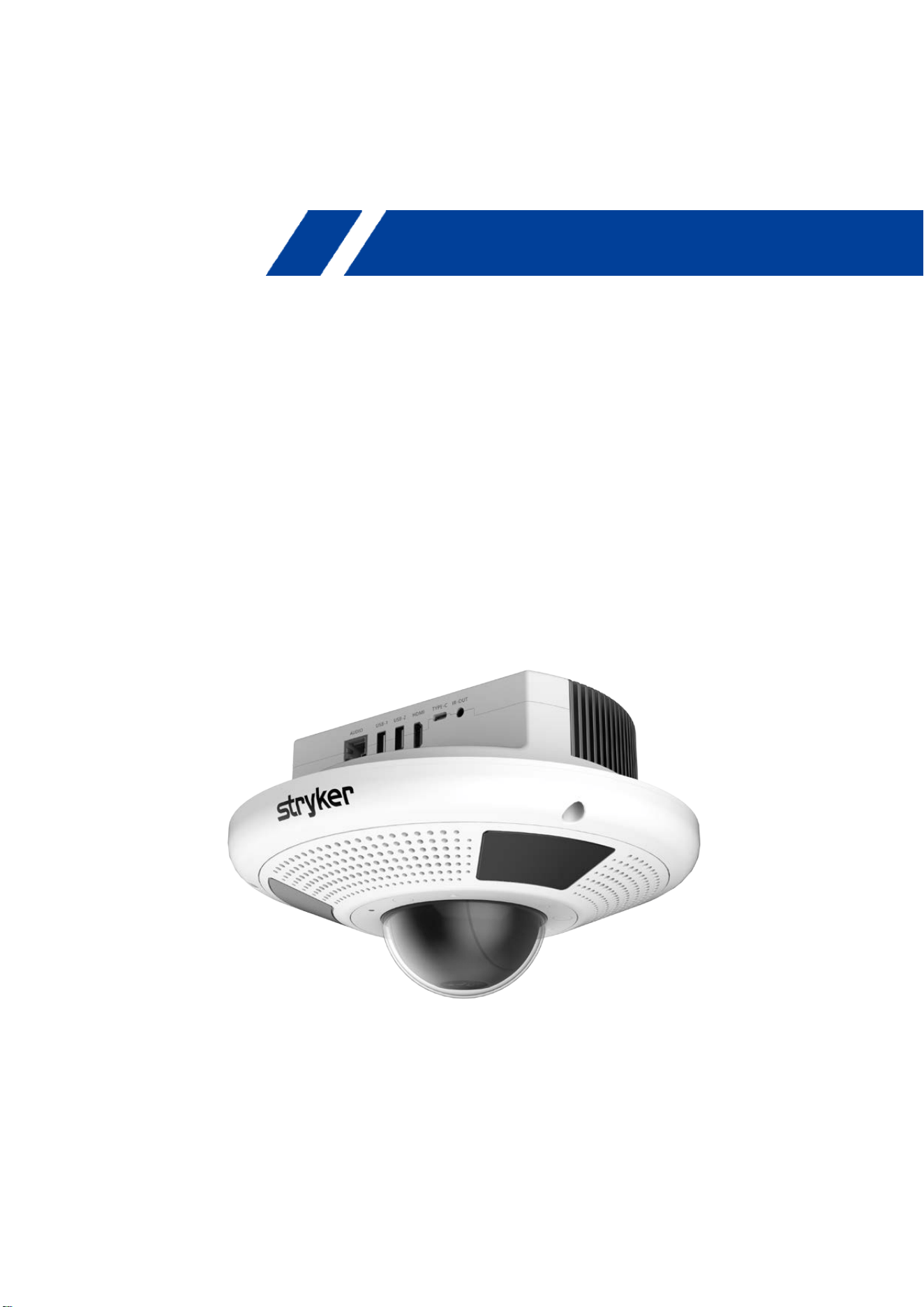
AMS-R2X Integrated Terminal
User Manual
(V1.0)
Integrated Terminal Series
AMS-R2X Integrated Terminal
i
Foreword
The objective of this section is to ensure that users can effectively utilize the product by
following the instructions in this manual, thereby preventing potential hazards or damage to
property during operation. Prior to using this product, we strongly advise reading this product
manual attentively and storing it securely for future reference.
Overview
This manual offers comprehensive guidance on operating and utilizing the AMS-R2X
Integrated Smart Terminal.
Symbol conventions
Symbol Function
Explanatory text, this type of text serves to supplement and elucidate
the main content. It provides additional information and clarification
to enhance understanding.
Cautionary text, this text serves as a reminder to users about critical
operations or potential risks of harm and property damage. Failure to
take precautions could result in accidents, equipment damage, or
business interruption. Exercise care to prevent any such occurrences.
Dangerous text, this text indicates a potential high-
risk situation.
Failure to take precautions could lead to significant danger, potentially
resulting in harm or loss of life. Extreme caution is advised to avoid
such risks.
Revision History
Version Revision Notes Editor Date
V1.0 Initial Release
Chester
Huang
2025/11/28

AMS-R2X Integrated Terminal
ii
Important Notes
This manual provides a comprehensive overview of the device's features, general principles,
and methods for installation and operation. It is essential for users to thoroughly read this
manual before proceeding with installation and use.
Usage Guidelines
To prevent damage to this product or any connected devices, it should only be used within the
specified range. Please adhere to the following guidelines:
1) Avoid Exposure to Rain or Moisture, do not expose the device to rain or moisture.
2) Electrical Safety: To prevent the risk of electric shock, do not open the casing. Installation
and maintenance should only be performed by qualified technicians.
3) Operating Conditions:
Use the product within the specified temperature, humidity, and power supply specifications.
4) Cleaning Instructions:
When cleaning the device lens, use a dry, soft cloth. For stubborn stains, use a mild, neutral
cleaner and gently wipe. Avoid using strong or corrosive cleaners to prevent scratches on the
lens, which may affect image quality.
Electrical Safety
Installation and use of this product must strictly adhere to local electrical safety standards.
Handle with Care during Transport
During transportation, storage, and installation, precautions should be taken to avoid heavy
pressure, severe vibrations, or immersion that may cause damage to the product.
No Unauthorized Disassembly
Users should refrain from disassembling the product, as there are no user-serviceable parts.
Damages resulting from user disassembly are not covered under warranty.
Magnetic Field Interference
At specific frequencies, electromagnetic fields may impact the device's image. This product is
classified as Class A. In a residential environment, it may cause radio interference, and users
should take appropriate measures.

AMS-R2X Integrated Terminal
iii
FCC Compliance Statements
FCC ID:Z7A-AMS-R2X
This device complies with Part 15 of the FCC Rules. Operation is subject to the following two
conditions: (1) this device may not cause harmful interference, and (2) this device must accept any
interference received, including interference that may cause undesired operation.
Caution: Changes or modifications not expressly approved by the party responsible for compliance
could void the user’s authority to operate the equipment.
NOTE: This equipment has been tested and found to comply with the limits for a Class A digital
device, pursuant to part 15 of the FCC Rules. These limits are designed to provide reasonable
protection against harmful interference when the equipment is operated in a commercial
environment. This equipment generates, uses, and can radiate radio frequency energy and, if not
installed and used in accordance with the instruction manual, may cause harmful interference to
radio communications. Operation of this equipment in a residential area is likely to cause harmful
interference in which case the user will be required to correct the interference at his own expense.
RF Exposure Compliance
This equipment complies with FCC radiation exposure limits set forth for an uncontrolled
environment. This equipment should be installed and operated with minimum distance 20cm
between the radiator and your body. This transmitter must not be co-located or operating in
conjunction with any other antenna or transmitter.
Note: During the testing process, certain functions were modified via software to meet the limit
requirements.

AMS-R2X Integrated Terminal
iv
Indoor Client 6XD statement
1. FCC regulations restrict the operation of this device to indoor use only.
2. The device will only associate and connect with a low-power indoor access point or subordinate
device and never directly connect to other client devices.
3. The device will always initiate transmission under the control of a low-power indoor AP or
subordinate except for brief transmissions before joining a network. These short messages will only
occur if the client has detected an indoor AP or subordinate operating on a channel. These brief
messages will have a time-out mechanism such that if it does not receive a response from an AP it
will not continually repeat the request.
4. Transmissions will be lower or equal to the power advertised by the indoor low-power access
point or subordinate and never above the maximum output power allowed by the FCC grant for
equipment class 6XD.
5. Prohibited for control of or communications with unmanned aircraft systems, including drones.
IC Wi-Fi 6E Statement:
Devices shall not be used for control of or communications with unmanned aircraft systems.
Low-power indoor access points and indoor subordinate devices shall bear statements
acknowledging both of the following restrictions in the user manual and, where feasible, in a
conspicuous location on the device.
Operation shall be limited to indoor use only.
Operation on oil platforms, automobiles, trains, maritime vessels and aircraft shall be prohibited
except for on large aircraft flying above 3,048 m (10,000 ft).
L'équipement ne doit pas être utilisé pour le contrôle ou la communication des systèmes d'aéronefs
sans pilote. Les points d'accès intérieurs de faible puissance et les accessoires intérieurs doivent
indiquer les restrictions suivantes dans le manuel de l'utilisateur et, si possible, à un endroit bien en
vue de l'appareil: Le fonctionnement doit être limité à un usage intérieur. Il est interdit de travailler
sur les plates - formes pétrolières, les voitures, les trains, les navires maritimes et les aéronefs, à
l'exception des gros aéronefs de plus de 3 048 mètres (10 000 pieds).

AMS-R2X Integrated Terminal
v
Contents
No table of contents entries found. .................................................................... Quick Installation Guide
6
1.1 Panel ................................................................................................................................... 6
1.2 Use of Device ...................................................................................................................... 7
1.3 Video Out ........................................................................................................................... 7
1.4 System Interface ................................................................................................................. 8
Product Description ................................................................................................................. 10
2.1 Product Description ......................................................................................................... 10
2.1.1 Dimension ............................................................................................................... 10
2.1.2 Accessories .............................................................................................................. 11
2.2 Features ............................................................................................................................ 11
Maintenance and troubleshooting .......................................................................................... 13
3.1 Product maintenance ....................................................................................................... 13
3.2 Troubleshooting ............................................................................................................... 13
PoE++ and DC........................................................................................................................... 14
AMS-R2X Integrated Terminal
6
Getting Started
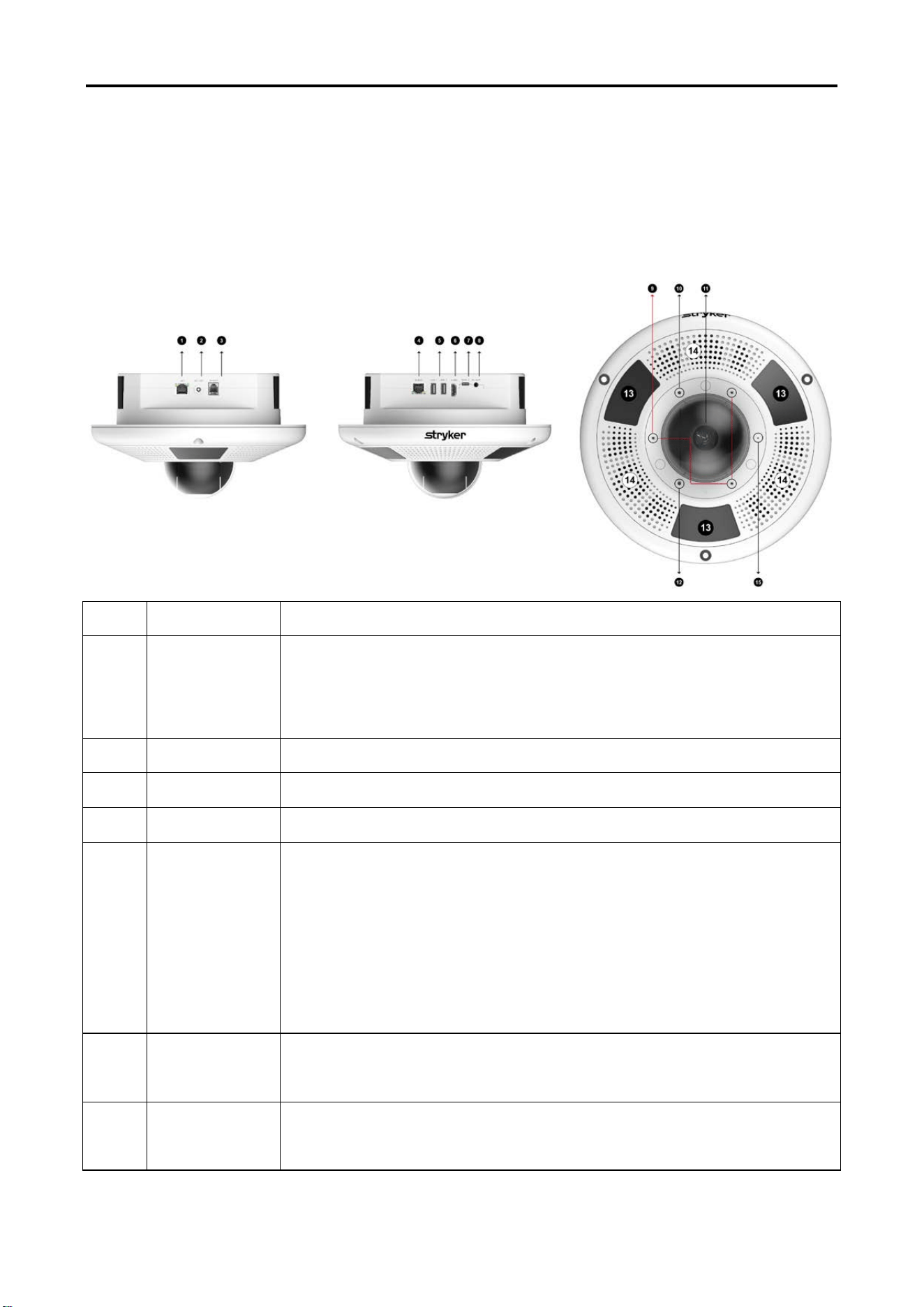
1.1 Panel
No.
Silkscreen
Remark
1 LAN
1 x RJ45 Port, for connecting with Ethernet,
10/100/1000 Base-T and PoE++
PoE ++ PD (IEEE 802.3bt Class 6(51W)) default configuration
2
DC 12V
1 x power port, DC12V, connector with locking Barrel Connector
3
SPIDER
1x RJ12 port, for serial communication.
4
AUDIO
1 x RJ45 Port, for connecting with audio extend module
5 USB
2 x USB-A, USB2.0
USB-1: 5V/500mA
USB-2: 5V/1500mA
For connecting with USB devices such as TV Control, mouse, keyboard
and microphone.
6 HDMI
1 x Female HDMI port to connect with HDMI display.
HDMI OUT 1 supports HDMI 1.4 and CEC, resolution up to 4K@30Hz
7 TYPE-C
1 x USB-C, USB 2.0, for Manufacturer device communication
AMS-R2X Integrated Terminal
7
8
IR OUT
1 x 3.5 mm port, for connecting with IR emitter for TV Control.
9
MIC
3 x Omnidirectional microphone
10
Indicator
1 x 3-color LED, for indicating unit status
11
Optical
Camera
1 x 3X optical zoom camera, supports to up to 4KP30
3X Digital Zoom
12
Light
1 x Light sensor, for assisting night vision
14
Speaker
3 x 3W speakers
13
IR LED
IR LED’s for assisting with night vision
15 Reset
Quick press: Reboot button;
Press and hold for 3 seconds to power on or off
Press and hold for more than 7 seconds to force a restart
1.2 Use of Device
1. Check the hardware packaging list to confirm that the packaging is complete and the
accessories are complete.
2. Connect each interface cable to the corresponding device.
3. After the correct connection, turn on the power of the host, press the power button, wait for
about 10 seconds,. After powering on, the terminal startup screen will be displayed on the TV
screen. (Note: Please switch the signal source input of the TV screen to HDMI input mode).
1.3 Video Out
HDMI output: Connect the device and monitor correctly through HDMI video cable, select
the correct input source on the monitor, and the terminal system interface will appear.
1.4 System Interface
AMS-R2X comes with Android 14, which is the native version of Android.
AMS-R2X Integrated Terminal
8
1.5 Product Description
The AMS-R2X is a high-performance all-in-one sensor that integrates high-definition audio and
video capture, intelligent interaction, and multi-scene adaptability. Powered by Android 14, the
device delivers robust AI processing capability and supports Wi-Fi 6E, Bluetooth 5.2, and dual-
mode power input via PoE++ or DC. For visual performance, the device supports video output up to
4K@30Hz resolution and is equipped with a 3x optical zoom lens featuring intelligent person
tracking. With an integrated light sensor and built-in fill light, it delivers exceptional image quality
even in low-light environments. For audio capabilities, it features 360° omnidirectional pickup and
high-fidelity speakers for an immersive audiovisual experience. Furthermore, it supports daisy-
chaining of audio modules to adapt to various room sizes and scenarios. . ,
Note: This unit is for indoor use only. The functions of Wireless Access Systems including Radio
Local Area Networks (WAS/RLANs) within the band 5150-5350 MHz for this device are restricted
to indoor use
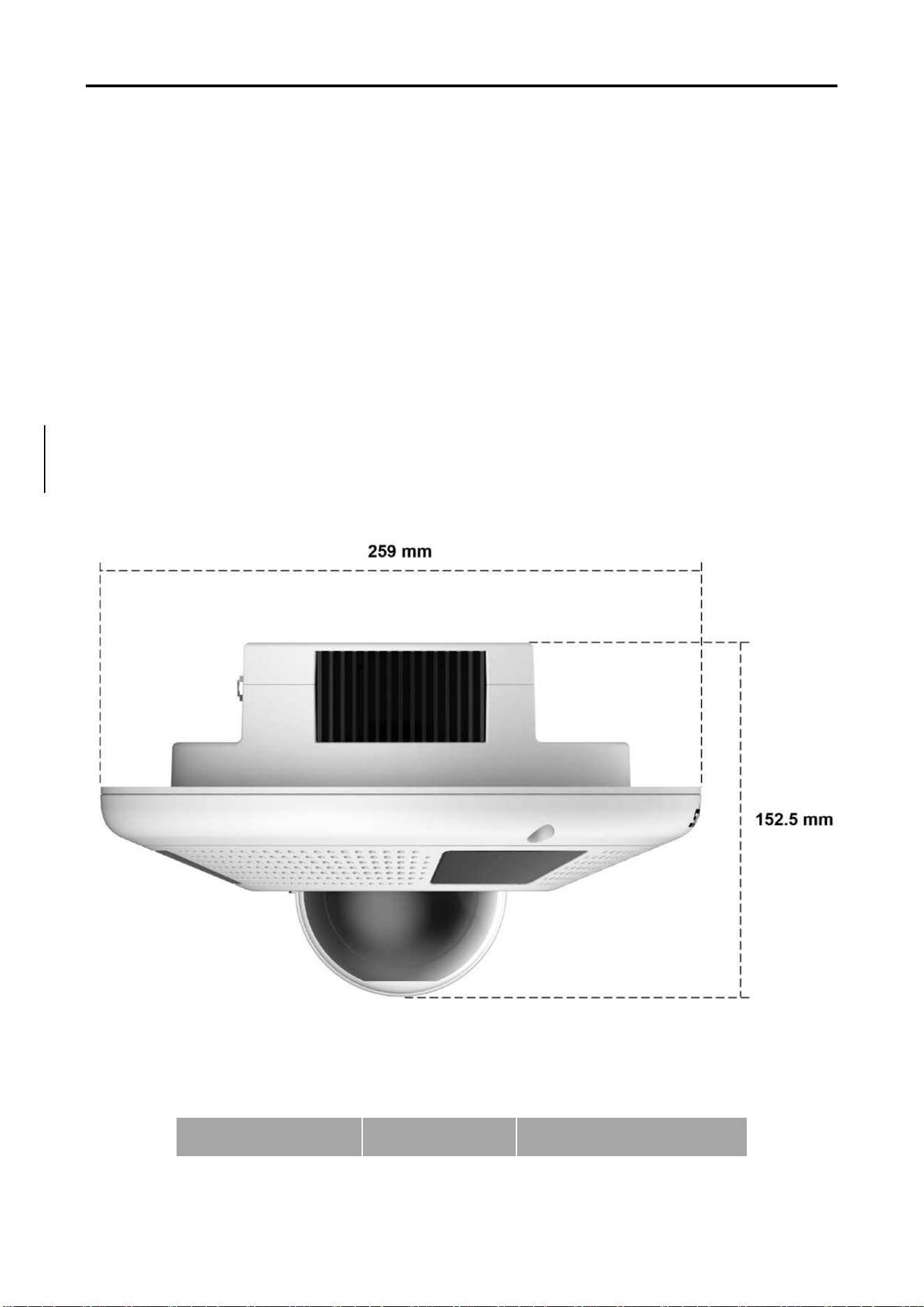
1.5.1 Dimension
1.5.2 Accessories
When opening the package, please check and confirm all the accessories that should be provided.
The accessories that come with the product are shown in Table 2-1:
Product Name
Quantity
●Standard ○Optional
AMS-R2X Integrated Terminal
9
AMS-R2X Sensor 1
●
Power Adapter 1
●
1.6 Features
Maintenance and troubleshooting
2.1 Product maintenance
1) If the equipment is not used for a long time, please turn off the power switch when not in
use, and disconnect the AC power adapter from the AC socket.
2) When removing dust from the device casing, please use soft cloth or tissue paper to avoid
scratches.
3) When cleaning the device lens, please use a dry soft cloth to wipe it. If the dirt is serious,
please use a neutral detergent to wipe it gently. Do not use strong or corrosive cleaners to
avoid scratching the lens and affecting the image quality. For example, can use an alcohol-
soaked cotton cloth to wipe it.
2.2 Troubleshooting
1) Video output has no picture
Solution:
a. Check whether the power supply of the device is connected properly and whether the power
indicator light is on.
c.
b. Check whether the video output and video monitor connection cables are normal.
2) The image sometimes disappears
Solution:
Check whether the video output and video monitor connection cables are normal
Who to contact with issues??
AMS-R2X Integrated Terminal
10
PoE++ and DC
DC and PoE power supply priority: DC>PoE
1) When PoE and DC are connected to R2X at the same time, R2X will take power from DC first
and not from PoE.
2) Due to the characteristics of the PoE chip, when R2Xis connected to a PoE switch, the PoE
module itself will generate a 2W load to maintain communication with the PoE switch in real time
3) There are the following 4 scenarios for PoE++ and DC power supply strategies.
Connect DC first and then POE, DC first
Work normal
Connect POE first and then DC, DC first,
power will be switched to DC
R2-X will restart and then work normal.
DC and POE are connected at the same
time removing POE
Work normal
DC and POE are connected at the same
time removing DC
R2-X restart and then work normal

Copyright Notice
The copyright of all contents in this manual belongs to our company and may not be
imitated, copied, copied or translated without our permission.
This manual does not contain any form of warranty, expression of position or other
implication. The product specifications and information mentioned in this manual are
for reference only, and the content will be updated at any time without prior notice.
All rights reserved. No reproduction allowed.
Stryker Medical
3800 E. Centre Avenue
Portage, MI 49002 USA
www.stryker.com