
www.PyleUSA.com
2
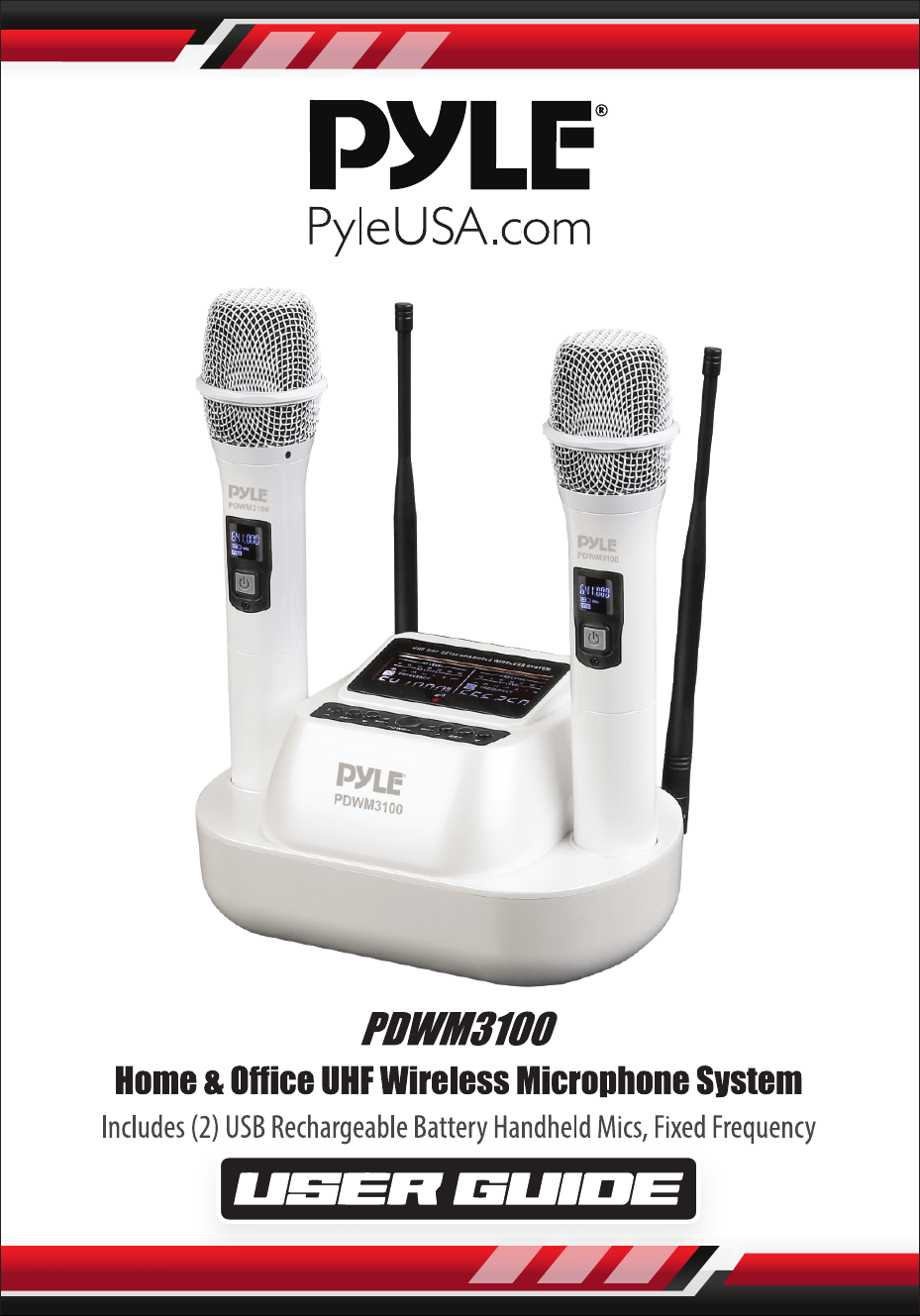
Please read this manual carefully before operating your PDWM3100
UHF Wireless Microphone System and retain it for future reference.
FEATURES:
•
UHF 2×100 Channel Receiver
• Digital Signal Processor
• High-delity Cartridge Module
• Infrared Carrier-frequency Synchronization
• Unique ID Address
• Super Anti-Jamming Circuit Design
• Super-low Background Noise
• Frequency Auto-Search (Search Non-Interference Frequency)
• Microphones Can be Use with Any Receiver
• Microphone High-Low Two Type Power Transmitter
• Scope of Application: Conference, High-Class KTV, Stage
• Provide with Perfect Switch Noise Deducted Circuit
• Includes (2) Handheld Mics
• Portable Rechargeable Battery Microphones
• Simple Plug-and-Play Operation
• Perfect for Professional Audio Stage & Studio Performances
• Directly Connects to Ampliers, Stereos, Audio Processors, DJ Mixers
• Used for Home Karaoke, Classroom, Oce & Business Applications
WHAT'S IN THE BOX:
•
Receiver
• (2) Handheld Microphone
• Power Adapter (DC 12V,1A)
• Connecting Line (39.37’’ -inches)
• (4) Rechargeable Batteries (NI-MH Battery)
• (2) Silicone Antiskid
• (2) Antenna

www.PyleUSA.com
3
TRANSMITTER SPECS:
•
Transmitter Power: 3-8mW
• Modulation Method: FM
• Sampling Ratio: 48KHz
• Delay Time of Audio Transmission: <3ms
• Battery Voltage: AA1.5V×2
• Frequency Response: 30 ~ 20 KHz
RECEIVER SPECS:
• Power Supply: AC100~240V/ 50/60Hz, DC12v
• Power Consumption: 200mW
• S/N Ratio: >96 dB,
• Frequency Response: 30 ~ 20 KHz
• RX Sensitivity: < -94dBm
• Balance Type: 0~±500mV
• Mix Type: 0~±300mV
TECHNICAL SPECS:
•
Frequency Range: UHF 510-560MHz
• Channel: 2 x 100
• Frequency Stabilization: <±30ppm
• Dynamic Range: >90dB
• Total Harmonic Distortion: <0.5%
• Frequency Response: 40Hz~20KHz ±3dB
• Cover Range: 164-262 ft.
• Battery Type: NI-MH Battery, 1200mAh (Rechargeable)
• Battery Life: more than 7 Hours
• Charging Time: 10 Hours
• Product Dimensions: 8.67'' x 5.31'' x 10.83'' -inches
www.PyleUSA.com
4
WAYS TO IMPROVE YOUR UHF WIRELESS MICROPHONE SYSTEM
PERFORMANCE
•
Aim the transmitter to the receiver to achieve a “direct visual contact”
between devices, without any interposed obstacle.
• Avoid placing the receiver near metal objects/surfaces or close to digital
equipment (CD players, computers, etc.).
• Place the receiver in such a way that is far from a wall and that is at least 1 meter
(about 3 feet) above the oor.
HAND-HELD TRANSMITTER
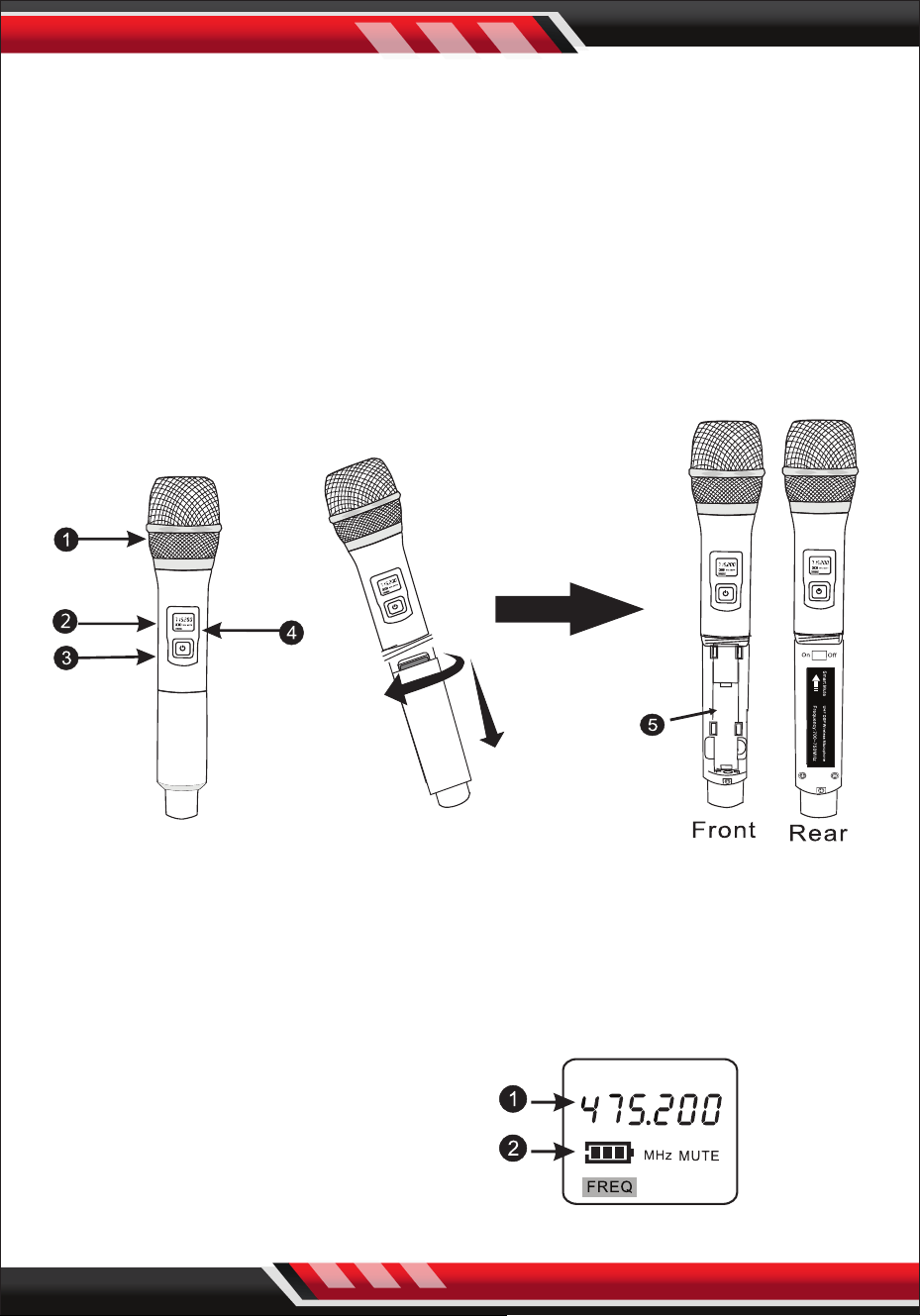
1. MAIN FUNCTIONS
1. Microphone head
2. LCD display window
3. Power Switch
4. Infrared receiving window
5. Battery house
2. TRASMITTER DISPLAY CONTENT
1. Handheld microphones
transmit frequency/
The number of channels
2. Battery indicator
www.PyleUSA.com
5
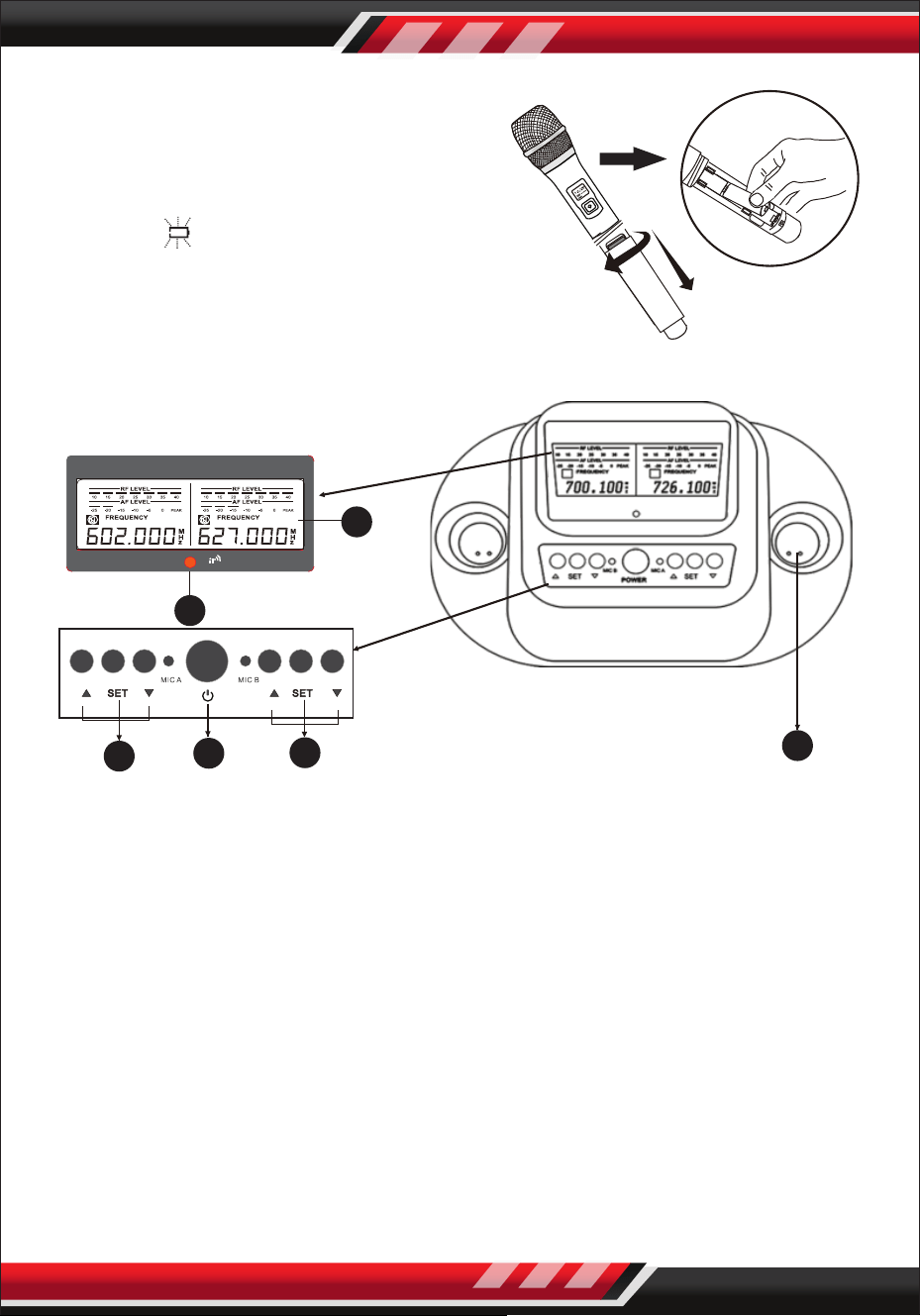
3. REPLACE THE BATTERY
Two polar battery life is about 8 hours,
but it may vary according to the usage
conditions. When the battery power
displays as empty and ashing,
you should replace the batteries at once.
2. RECEIVER FUNCTION
CONTROLS AND FUNCTIONS
FRONT PANEL:
1. POWER BUTTON: Press this button to turn ON/OFF the unit
2. MIC 1 SELECTOR BUTTONS (UP/SET/DOWN): Allows control of LCD screen
and functions for Microphone 1.
3. MIC 2 SELECTOR BUTTONS (UP/SET/DOWN): Allows control of LCD screen
and functions for Microphone 2.
4. LCD SCREEN: Displays system status.
5. IR PORT: lntrared port for wireless lntrared Auto Sync System.
Pointing the handheld microphone's infrared port at the receiver's infrared
port to allow communication.
6. Recharge port: Put in the microphone to recharge.
1
2
3
4
5
6
www.PyleUSA.com
6
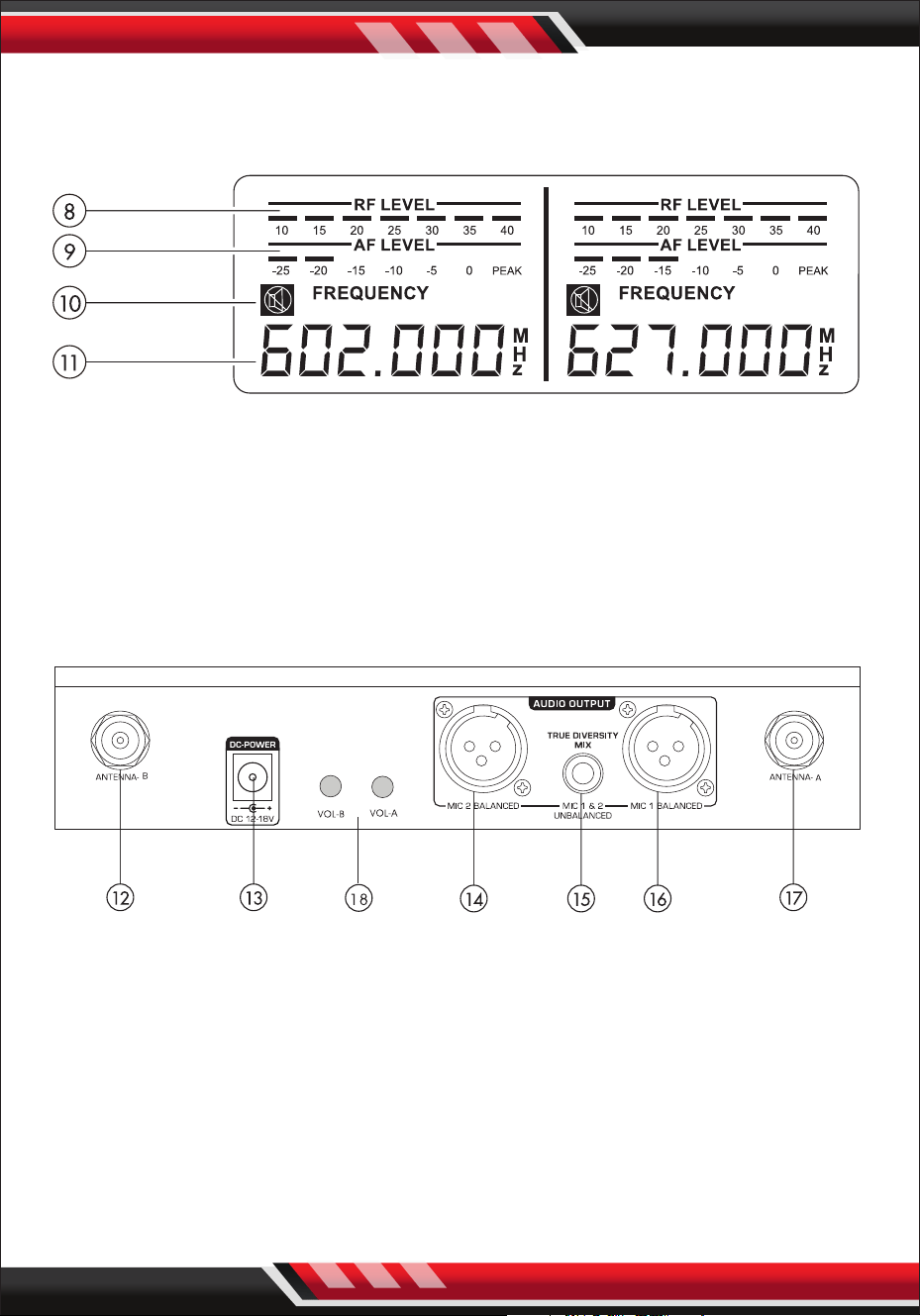
LCD PANEL:
After turning ON the “POWER”, LCD screen will display the following:
8. RADIO FREQUENCY LEVEL: Strength indicator of radio signal.
9. AUDIO FREQUENCY LEVEL: Strength indicator of incoming audio signal.
10. MUTE: Indicates if microphone is powered o.
11. FREQUENCY & CHANNEL: Displays current frequency and channel.
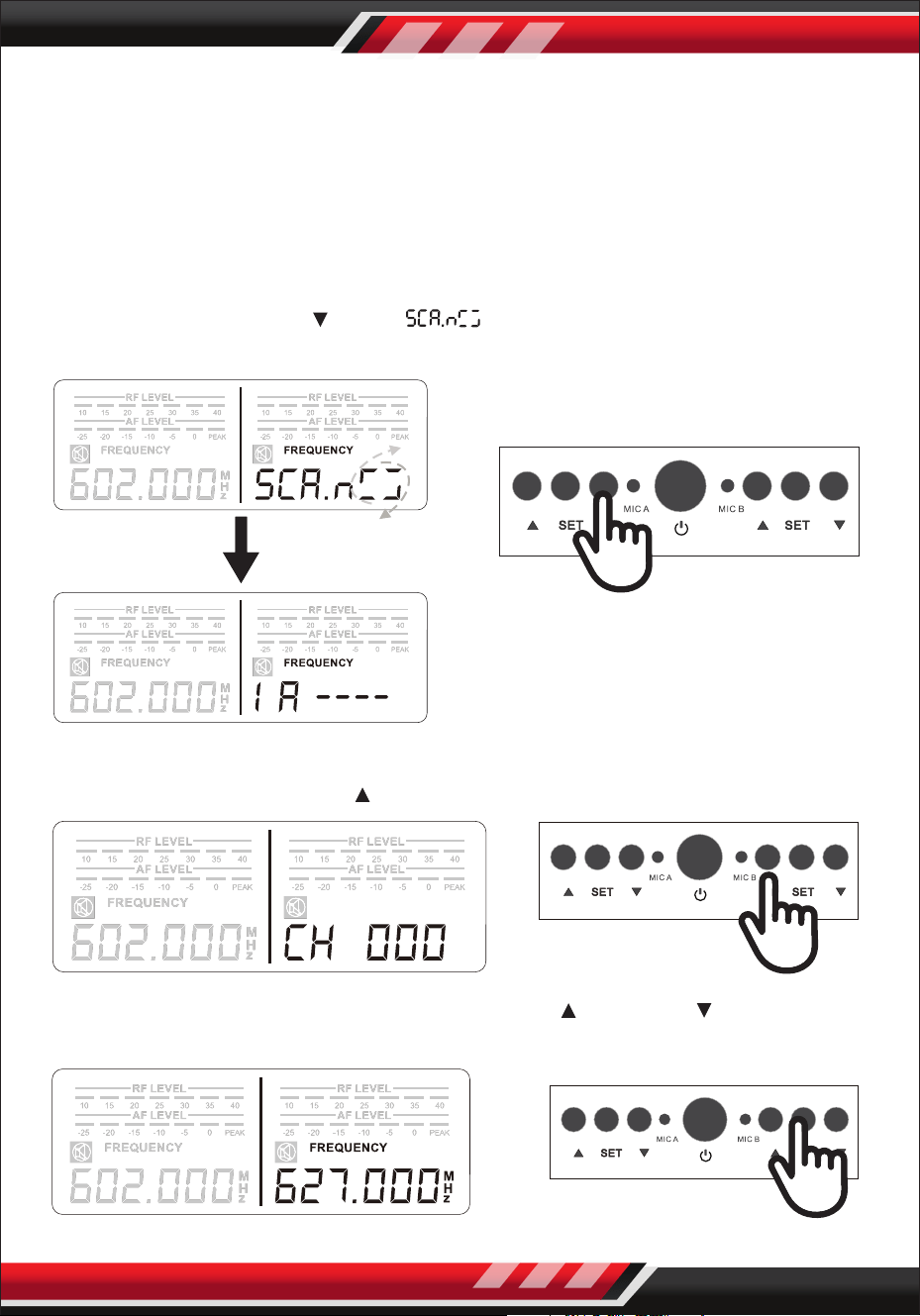
REAR PANEL:
12. ANTENNA-B: Connect the antenna to the BNC socket.
13. POWER SUPPLY: For power adapter with DC12~18V 500mA.
14. MIC 2 BALANCED OUTPUT: Balanced XLR audio output.
15. MIXED OUTPUT: Unbalanced 1/4" audio output for MIC 1 & MIC 2.
16. MIC 1 BALANCED OUTPUT: Balanced XLR audio output.
17. ANTENNA-A: Connect the antenne to the BNC socket.
18. VOL-A, VOL-B: Control the microphone- A or channel -B volume
www.PyleUSA.com
7
OPERATION
HOW TO SELECT FREQUENCIES/CHANNELS FOR THE RECEIVER
The 2-in-1 Base Module comes with two handheld microphones and each
microphone is preset with 5O frequency channels.
The frequency can be selected either automatically or manualy.
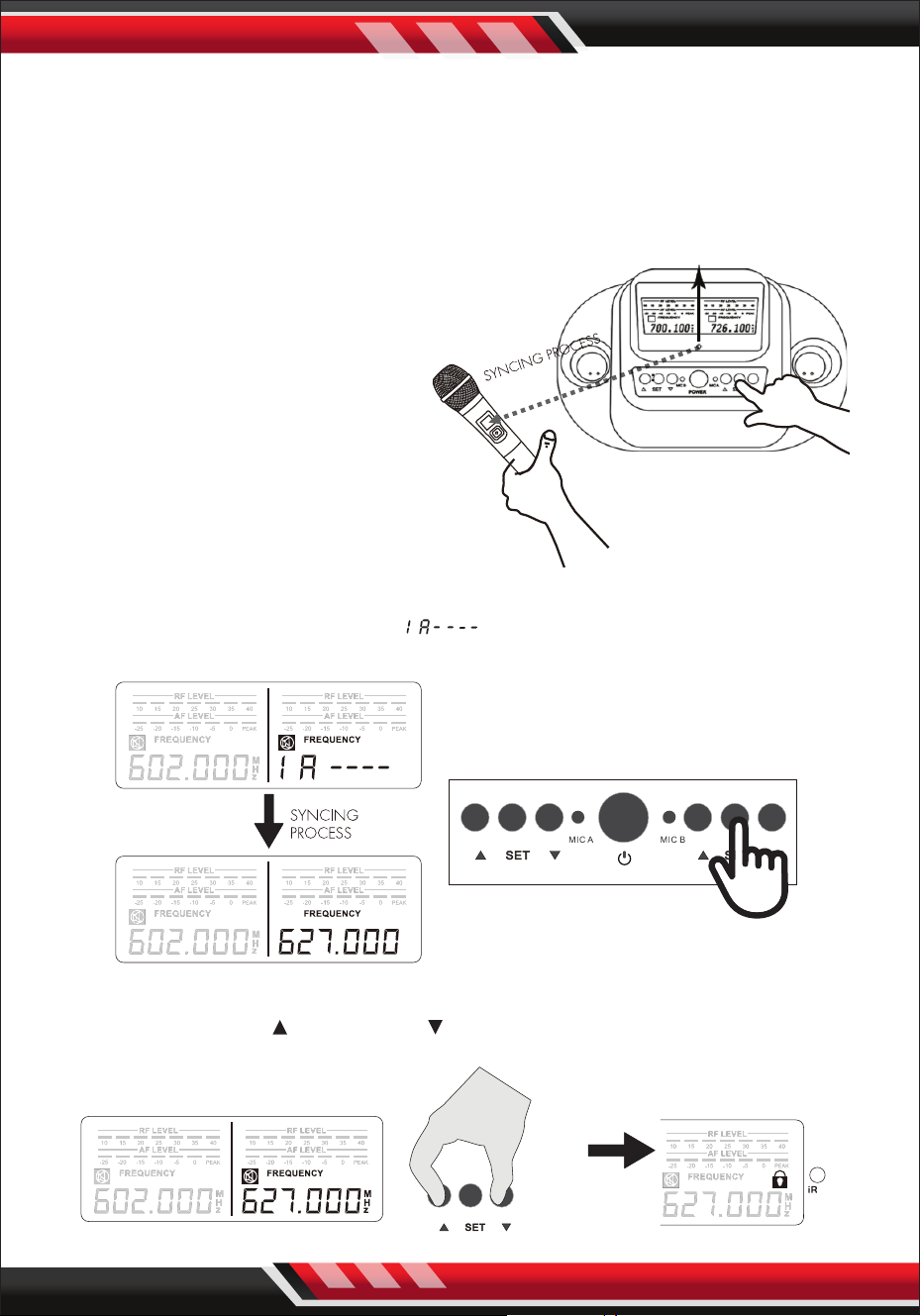
1. AUTOMATIC FREQUENCY/CHANNEL SELECT
Press and hold “DOWN “ until “ “ displays.
Then the best frequency will be selected.
2. MANUAL FREQUENCY/CHANNEL SELECT
STEP 1: Press and hold “UP ” on the receiver until the channel blinks.
STEP 2: While the channel is blinking, press “UP ” or “DOWN ” to select the
desired channel. Then press "SET" to conrm the channel.
www.PyleUSA.com
8
BODY PACK TRANSMITTER SETTING
3. HOW TO MATCH RECEIVER'S FREQUENCY WITH MICROPHONE
STEP 1: Turn ON the microphone, point the microphone infrared port (IR)
directly at the receiver's IR PORT.
STEP 2: Press and hold “SET” until “ ” displays. Once syncing is completed
the RF level bar appears and the "MUTE" icon disappears.
4. HOW TO LOCK/UNLOCK THE DISPLAY
Press and hold “UP ” and “DOWN “ at the same time to lock/unlock the
setting.
IR
Maximum Frequency
Matching Distance: 10 feet
NOTE: Please make sure that the
other handheld microphone is
powered o when adjusting the
frequency on one microphone.
Each unit is fully tested and qualied
by the manufacturer. However, due
to the nature of wireless connection,
interference may occur because of
local environments and/or radio
signals emitted by other wireless
devices within the household.

www.PyleUSA.com
9
TROUBLESHOOTING
PROBLEM STATUS SOLUTIONS
No sound
or
weak voice
The transmitter
LCD display o
Turn on the transmitter power.
Conrm that the + / - marks on the battery
match with the head joint of the transmitter.
Insert a new battery.
Conrm whether a head of the AC power
adapter is plugged into the power outlet
and whether the other end is inserted into
the DC power supply socket on the rear
panel of the receiver. Check whether the AC
power outlet is normal and conrm whether
the power supply voltage is normal.
Receiver LCD
display o
The display screen
of the receiver
shows that there is
RF signal.
Adjust higher the receiver’s volume control.
Check the cable connection between the
receiver and the amplier or mixer.
The display screen
of the receiver shows
that there is no RF
signal.
The transmitter and
receiver power
indicators light
Elongate vertically the receiver antenna.
Move the receiver away from side of the
metal objects.
Check if there are obstacles between the
transmitter and the receiver.
Move the transmitter closer to the receiver.
Check whether the receiver and transmitter
are used the same frequency.
Distortion
or excess
of burst
noise
The display screen of
the receiver shows
that there is RF signal
Remove the interference source nearby.
(Such as CD player, Computers, Digital device,
Earplugs monitoring system, etc).
Change the receiver and transmitter to
dierent frequency. Replace the transmitter
battery. If you use multiple system, you can
increase the frequency interval between
various systems.
The
transmitter
can’t be
opened.
Press the transmitter
switch and it doesn’t
work or open once &
closes automatically
Replace the transmitter battery.