Garmin ClearVü
™
Transducer Transom/
Trolling Motor Mount
Installation Instructions
Important Safety Information
WARNING
See the Important Safety and Product Information guide in the chartplotter or fishfinder product box for product
warnings and other important information.
You are responsible for the safe and prudent operation of your vessel. Sonar is a tool that enhances your
awareness of the water beneath your boat. It does not relieve you of the responsibility of observing the water
around your boat as you navigate.
CAUTION
Failure to install and maintain this equipment in accordance with these instructions could result in damage or
injury.
NOTICE
This equipment should be installed by a qualified marine installer.
To obtain the best performance and to avoid damage to your boat, you must install the Garmin
®
device
according to these instructions.
Read all installation instructions before proceeding with the installation. If you experience difficulty during the
installation, go to support.garmin.com for more information.
Tools Needed
• Number 2 Phillips screwdriver
Transom mount
• Drill
• Drill bits: 4 mm (
5
/
32
in.), 3.2 mm (
1
/
8
in.), 25mm (1in.)
• Masking tape
• Marine sealant
Trolling motor mount
• Waterproof tape
GUID-F1D9C2E0-28DA-49C0-978B-6864CA3CAC19 v6January 2024
Preparing the Transducer for Long-Term Exposure to Water
NOTICE
Do not use acetone or acetone-based products on the transducer. Acetone damages the plastic transducer
housing.
When you install a transducer on a boat that spends a significant amount of time in the water, you should coat
the transducer and mounting hardware with a water-based anti-fouling paint to prevent marine growth.
1 Lightly sand the transducer and mounting hardware with a fine-grit abrasive pad.
2 Wipe the transducer and mounting hardware with isopropyl alcohol.
3 Apply water-based anti-fouling paint to the transducer and mounting hardware.
Mounting Consideration
To ensure peak performance with the lowest noise and interference, you should route the transducer cable
away from ignition wires, house batteries and wires, trolling motor batteries and wires, and high-energy wires
such as radar, audio amplifier, and autopilot pump wires.
Installing the Transducer on a Transom
If necessary, to reduce spray from the transducer, you can install an optional heavy duty transom mount with a
spray shield (010-12006-11). Go to buy.garmin.com or contact your Garmin dealer for information.
Mounting Location Considerations
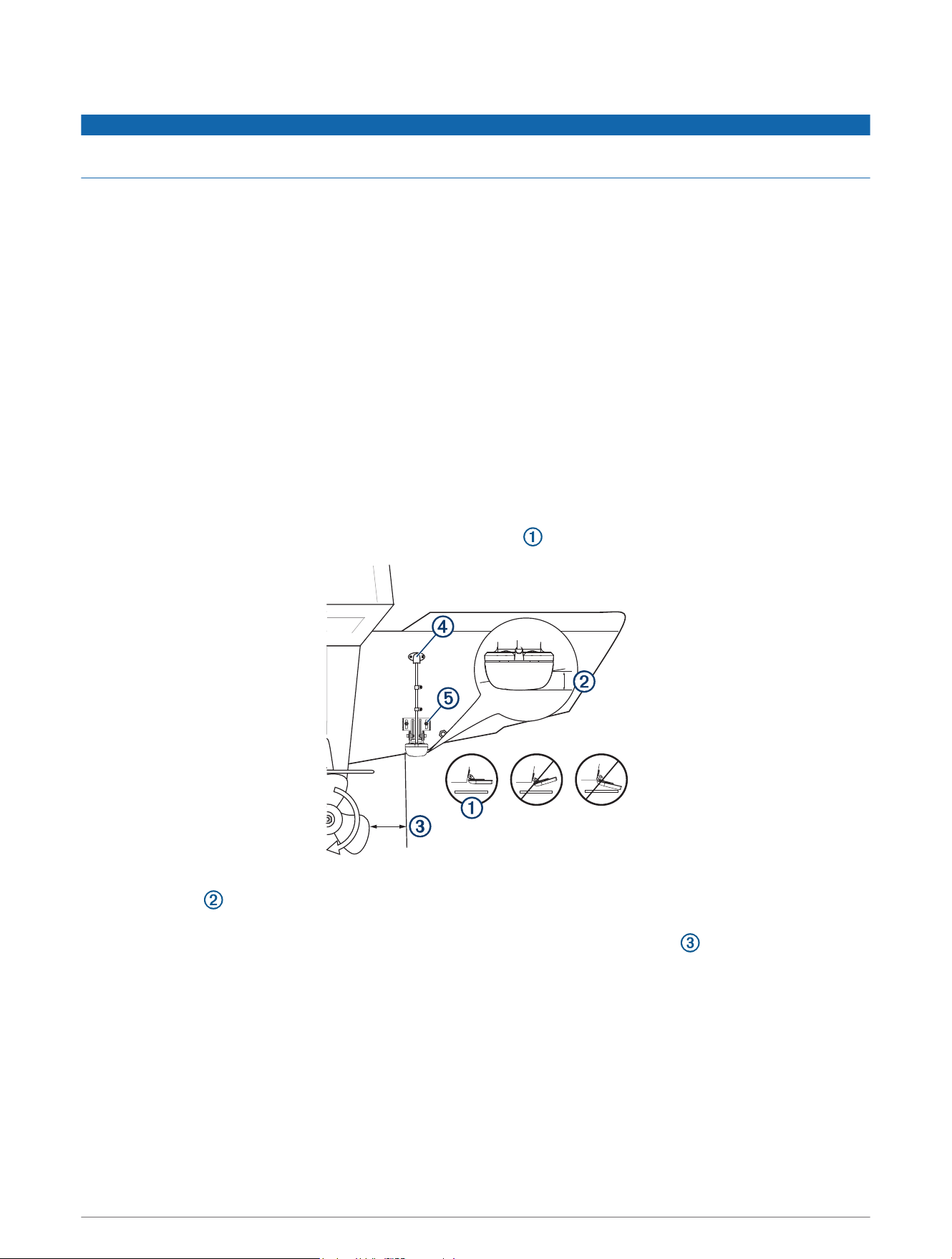
• The transducer should be mounted parallel to the water line .
• The transducer should extend 3.5 mm (0.125 in.) below a fiberglass hull or 10 mm (0.375 in.) below an
aluminum hull .
• On boats with outboard or inboard/outboard motors, the transducer should be mounted as close to the
centerline of the transom as possible but at least 38cm (15in.) from the propeller .
• If your propeller moves clockwise when the boat moves, the transducer should be mounted on the starboard
side (right side when facing forward).
• If your propeller moves counter-clockwise when the boat moves, the transducer should be mounted on the
port side (left side when facing forward).
• The transducer should not be mounted behind strakes, struts, fittings, water intake or discharge ports, or
anything that creates air bubbles or causes the water to become turbulent.
The transducer must be in clean (non-turbulent) water for optimal performance.
• On single-drive boats, the transducer must not be mounted in the path of the propeller.
The transducer can cause cavitation that can degrade the performance of the boat and damage the propeller.
2
• On twin-drive boats, the transducer should be mounted between the drives, if possible.
• Mount the transducer cable cover well above the water line .
• Apply marine sealant to all screw threads to prevent water from seeping into the transom .
• This transducer has an integrated spray guard, but if your transducer throws an excessive amount of
water spray, recheck these mounting considerations and adjust the position of the transducer as needed to
eliminate the spray.
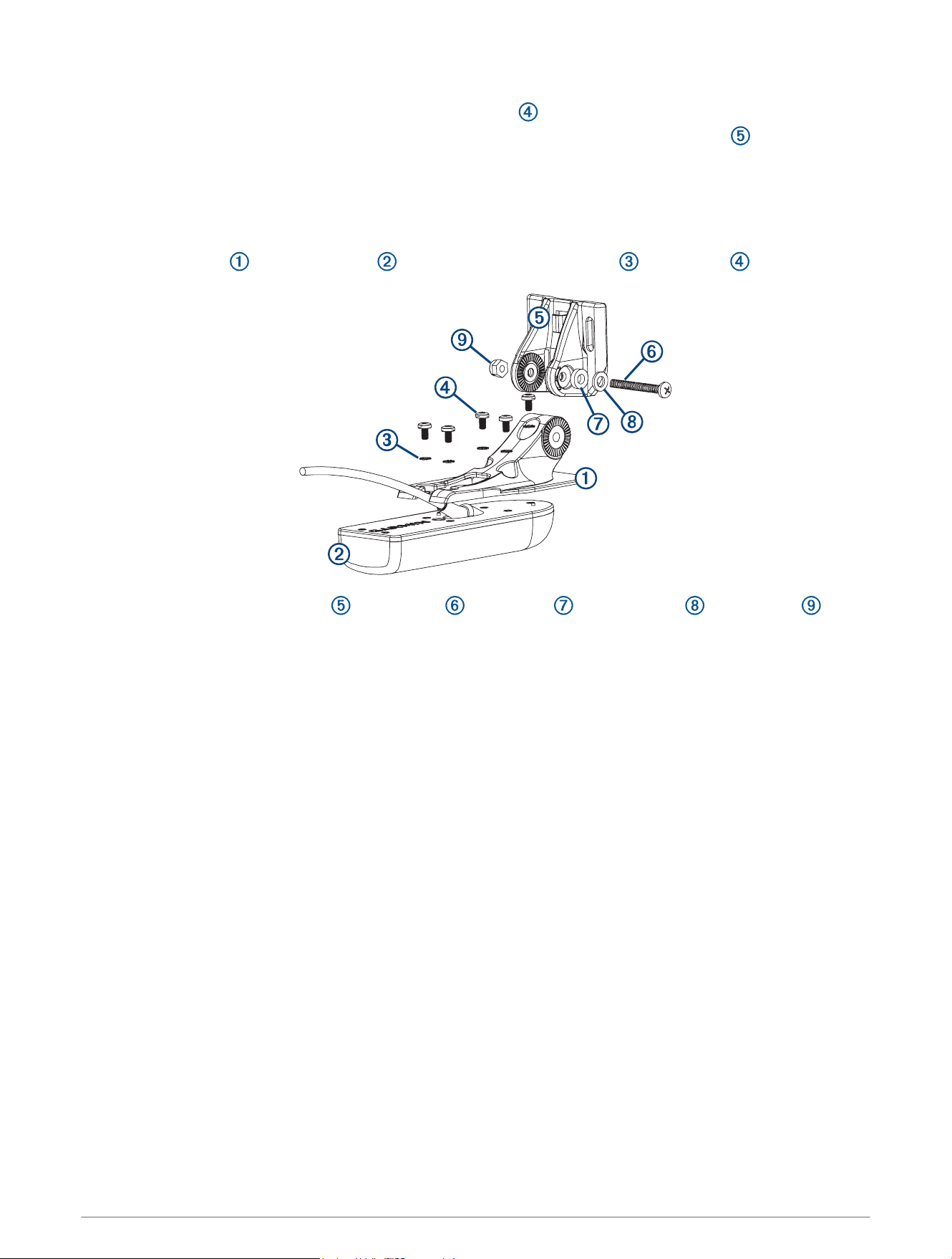
Assembling the Transducer with a Transom Mount Bracket
1 Attach the mount to the transducer with the included star washers , and screws .
2 Attach the mount to the bracket with the bolt , flat washer , rubber washer , and lock nut .
NOTE: The bolt should be tight enough to hold the transducer in place when the boat moves at high speed,
but loose enough to allow the transducer to pivot out of the way if the transducer hits an obstruction.
3
Installing the Transom-Mount Hardware
NOTICE
If you are mounting the bracket on fiberglass with screws, it is recommended to use a countersink bit to drill a
clearance counterbore through only the top gel-coat layer. This will help to avoid cracking in the gel-coat layer
when the screws are tightened.
The cables connected to the transducer should not be cut, because cutting the transducer cables voids your
warranty.
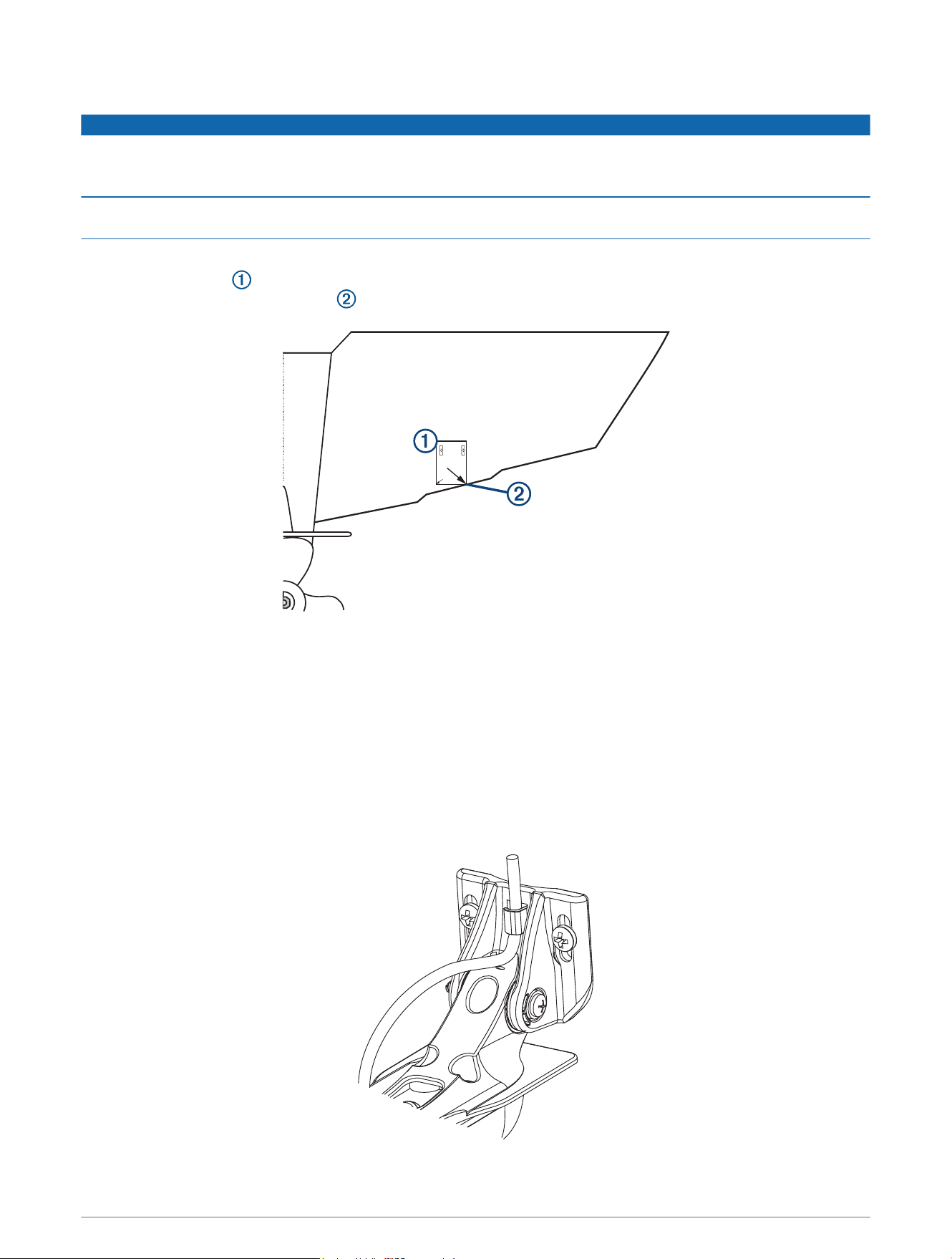
1 Cut out the template.
2 With the template aligned vertically on the transom at the installation location (Mounting Consideration,
page2), place the bottom corner of the template on the edge of the transom.
3 Mark the center location of the two holes of the template.
4 Remove the template from the transom.
5 Wrap a piece of tape around a 4mm (
5
/
32
in.) bit at 18mm (
7
/
10
in.) from the point of the bit, to avoid drilling
the pilot holes too deep.
6 If you are installing the bracket on fiberglass, place a piece of tape over the pilot-hole location to reduce
cracking of the gel coat.
7 Using the 4mm (
5
/
32
in.) bit, drill the pilot holes approximately 18mm (
7
/
10
in.) deep at the marked locations.
8 Apply marine sealant to the included 20mm screws, and attach the transducer assembly to the transom.
9 Route the cable under the transom mount cable hook.
4
10 If you must route the cable through the transom, choose a pilot-hole location well above the waterline and
mark it.
11 Place a cable clamp on the transducer cable, approximately halfway between the transducer and the top of
the transom or the pass-through pilot hole.
12 Mark the pilot-hole location for the cable clamp, and using a 3.2mm (
1
/
8
in.) bit, drill a pilot hole
approximately 10mm (
3
/
8
in.) deep.
13 Apply marine sealant to the included 12mm screw, and attach the cable clamp to the transom.
14 If you marked a pilot hole in step 7, choose the appropriate drill bit to drill a pass-through hole completely
through the transom:
• If you have the 4-pin cable, use a 16mm (
5
/
8
in.) drill bit.
• If you have the 8-pin or 12-pin cable, use a 25mm (1in.) drill bit.
15 Route the transducer cable to the sounder:
• If you are routing the cable using a pass-through hole, push it through the pass-through hole, and install
the cable-entry cover (Installing the Cable-Entry Cover, page5).
• If you are not routing the cable using a pass-through hole, route the cable up and over the top of the
transom.
You should avoid routing the cable close to electrical wires or other sources of electrical interference.
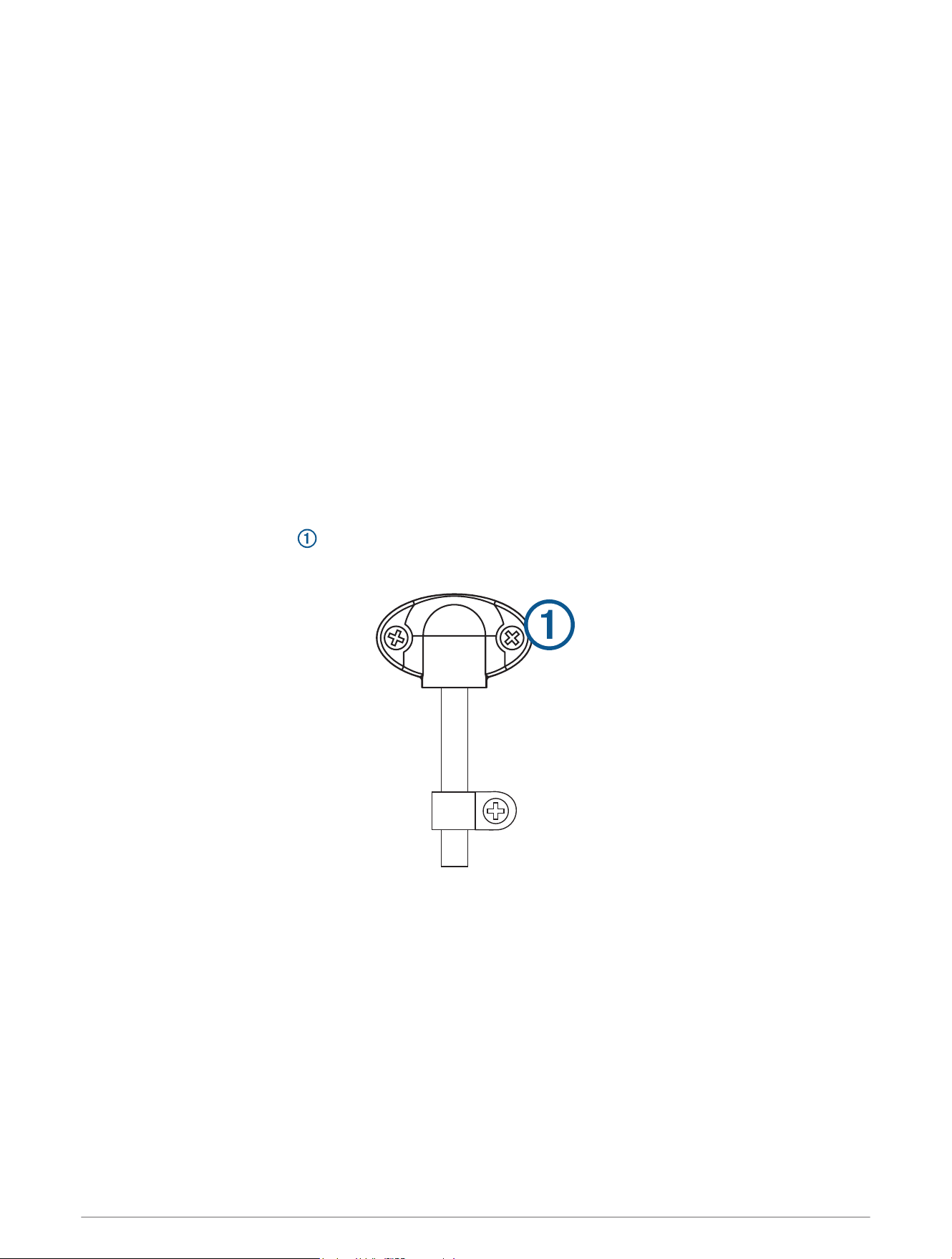
Installing the Cable-Entry Cover
If you routed the cable through the transom after you installed the transducer, you should install the cable-entry
cover to keep water from entering your boat.
1 Place the cable-entry cover over the hole and the cable, with the opening pointing downward, and mark
the location of the two pilot holes.
2 Remove the cable-entry cover, and, using a 3.2mm (
1
/
8
in.) bit, drill the pilot holes approximately 10mm
(
3
/
8
in.) deep.
3 Fill the pass-through hole with marine sealant so it covers the cable completely and there is excess sealant
around the hole and the cable.
4 Place the cable-entry cover over the hole and the cable, with the opening pointing downward.
5 Apply marine sealant to the included 12mm M4 screws, and attach the cable-entry cover to the transom.
6 Wipe away all excess marine sealant.
5

Testing the Installation
NOTICE
You should check your boat for leaks before you leave it in the water for an extended period of time.
Because water is necessary to carry the sonar signal, the transducer must be in the water to work properly. You
cannot get a depth or distance reading when out of the water. When you place your boat in the water, check for
leaks around any screw holes that were added below the water line.
Testing the Transom-Mount Transducer Installation
NOTICE
When adjusting the depth of the transducer, make the adjustments in small increments. Placing the transducer
too deep can adversely affect the performance of the boat and put the transducer at risk of striking underwater
objects.
Test the transom-mount transducer installation in open water free of obstacles. Pay attention to your
surroundings as you test the transducer.
1 With the boat in the water, turn on the chartplotter.
2 Drive the boat at a slow speed. If the chartplotter appears to be working properly, gradually increase speed
while observing the chartplotter.
3 If the sonar signal is suddenly lost or the bottom return is severely degraded, note the speed at which this
occurs.
4 Return the boat to the speed at which the signal was lost, and make moderate turns in both directions while
observing the chartplotter.
5 If the signal strength improves while turning, adjust the transducer so that it extends another
1
/
8
in. (3mm)
below the transom of the boat.
6 Repeat steps 2–4 until the degradation is eliminated.
7 If the signal does not improve, move the transducer to a different location on the transom, and repeat the
test.
6
Installing the Transducer on a Trolling Motor
Assembling the Trolling Motor Mount
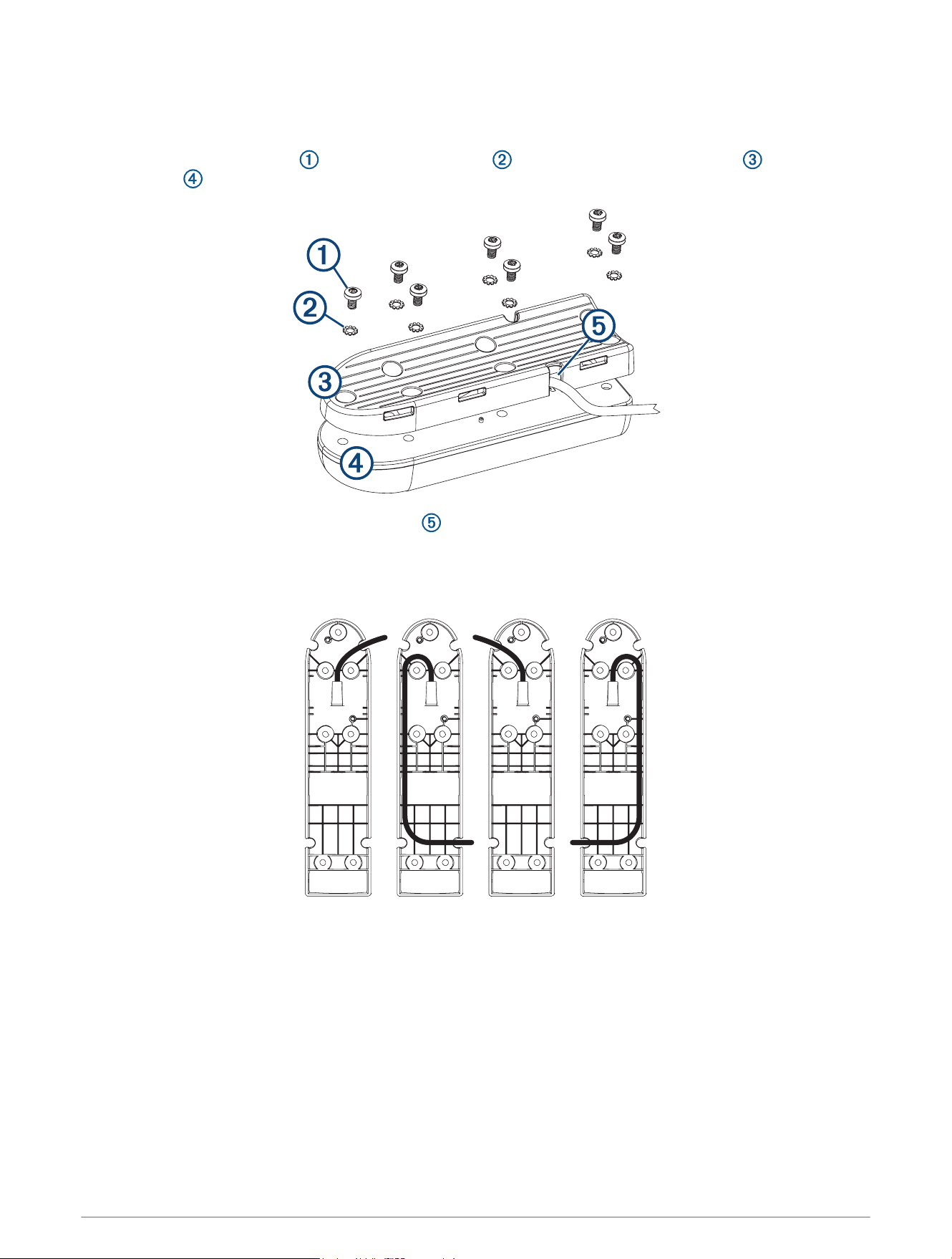
1 Using the 8mm M4 screws and 4mm star washers , attach the trolling motor mount to the
transducer .
2 Before tightening the screws, route the cable inside the mount to a cable exit.
The trolling motor mount is designed with multiple cable exits. You should use a cable exit that allows the
cable to be on the top side of the trolling motor housing when the motor is stowed. See the image below for
recommended cable routes.
You must avoid pinching the cable or bending it too tightly.
7
Attaching the Transducer to the Trolling Motor
NOTICE
Do not cut the transducer cable. Cutting the transducer cable will void your warranty.
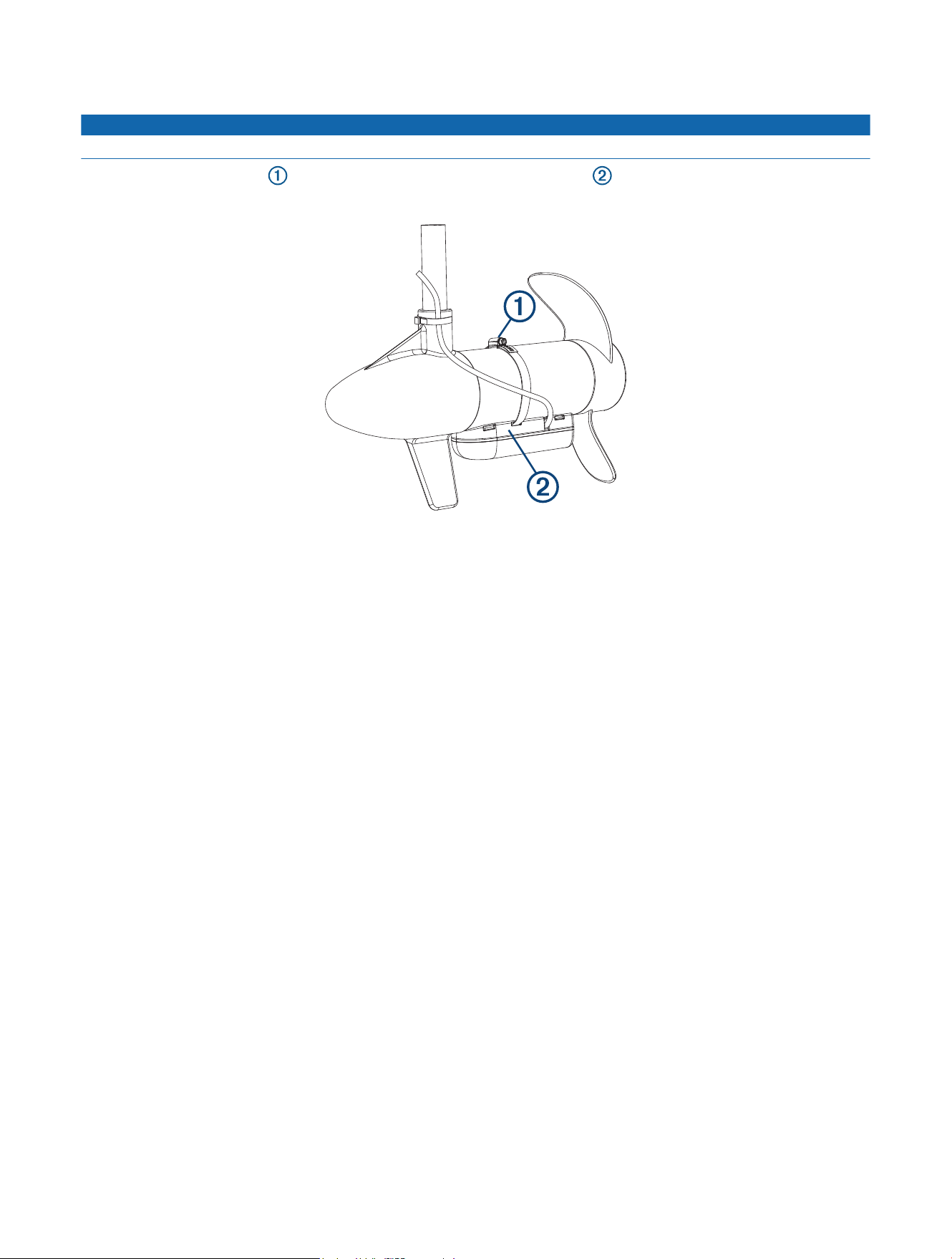
1 Insert the hose clamps through the slots on the transducer mount , until equal lengths extend on both
sides of the mount.
2 Place the transducer mount against the body of the trolling motor with the narrow end of the transducer
pointed away from the propeller.
3 Secure the hose clamps around the body of the trolling motor, and tighten the hose clamps.
4 Position the transducer so it is parallel to the bottom when in use.
5 Use waterproof tape (not included) to secure the transducer cable to the trolling motor shaft.
6 Route the transducer cable to the installation location of the chartplotter while taking these precautions.
• You should avoid routing the cable close to electrical wires or other sources of electrical interference.
• You must avoid routing the cable where it is pinched when the trolling motor is deployed or stowed.
Software Update
You must update the Garmin chartplotter software when you install this device. For instructions on updating the
software, see your chartplotter owner's manual at support.garmin.com.
Contacting Garmin Support
• Go to support.garmin.com for help and information, such as product manuals, frequently asked questions,
videos, and customer support.
• In the USA, call 913-397-8200 or 1-800-800-1020.
• In the UK, call 0808 238 0000.
• In Europe, call +44 (0) 870 850 1241.
© 2017 Garmin Ltd. or its subsidiaries
Garmin
®
and the Garmin logo are trademarks of Garmin Ltd. or its subsidiaries, registered in the USA and other countries. These trademarks may not be used without the
express permission of Garmin.
Windows
®
is a registered trademark of Microsoft Corporation in the United States and other countries.
© 2017 Garmin Ltd. or its subsidiaries
support.garmin.com