
SAFETY INFORMATION
Please read this information before using your radio. Failure to
do so could result in personal injury, death, and/or damage to
your radio, accessories and/or other property.
Radio Care
Caution
Do not disassemble or modify the radio for any reason.
Do not transmit while touching the antenna terminal or any
exposed metallic parts of the aerial as this my result in burn.
Please check and observe regulation in your country with
regards to use whilst driving.
End of Life Disposal
When your radio reaches the end of its useful life, please
ensure that the unit is disposed of in an environmentally friendly
way.
Battery Care
Precautions
Turn the radio OFF before charging.
Charge the battery pack before use.
Do not charge the radio and battery pack if they are wet.
The battery pack includes potentially hazardous components.
Please:
Do not disassemble or reconstruct battery.
Do not short-circuit the battery.
Do not incinerate or apply heat to the battery.
Do not immerse the battery in water or get it wet by other
means.

Do not charge the battery near fires or under direct sunlight.
Use only the specified charger and observe charging
requirements.
Do not pierce the battery with any object or strike it with an
instrument.
Do not use the battery pack if it is damaged in any way.
Do not reverse-charge or reverse-connect the battery.
Do not touch a ruptured or leaking battery.
If liquids from the battery get on your skin or into your eyes,
immediately:
Wash your eyes out with fresh water avoiding rubbing them.
Seek medical treatment.

FCC Statement
Any Changes or modifications not expressly approved by the
party responsible for compliance could void the user's authority
to operate the equipment.
This device complies with part 15 of the FCC Rules. Operation
is subject to the following two conditions:
1. This device may not cause harmful interference.
2. This device must accept any interference received, including
interference that may cause undesired operation.
Note:
This equipment has been tested and found to comply with the
limits for a Class B digital device, pursuant to part 15 of the
FCC Rules. These limits are designed to provide reasonable
protection against harmful interference in a residential
installation.
This equipment generates, uses and can radiate radio
frequency energy and, if not installed and used in accordance
with the instructions, may cause harmful interference to radio
communications. However, there is no guarantee that
interference will not occur in a particular installation. If this
equipment does cause harmful interference to radio or
television reception, which can be determined by turning the
equipment off and on, the user is encouraged to try to correct
the interference by one or more of the following measures:
- Reorient or relocate the receiving antenna.
- Increase the separation between the equipment and receiver.
- Connect the equipment into an outlet on a circuit different from
that to which the receiver is connected.
- Consult the dealer or an experienced radio / TV technician for
help.

ISED RSS Warning:
This device complies with Innovation, Science and Economic
Development Canada licence-exempt RSS standard(s).
Operation is subject to the following two conditions: (1) this
device may not cause interference, and (2) this device must
accept any interference, including interference that may cause
undesired operation of the device.
Le présent appareil est conforme aux CNR d'ISED applicables
aux appareils radio exempts de licence.
L'exploitation est autorisée aux deux conditions suivantes:
(1) l'appareil ne doit pas produire de brouillage, et.
(2) l'utilisateur de l'appareil doit accepter tout brouillage
radioélectrique subi, meme si le brouillage est susceptible d'en
compromettre le fonctionnement.
RF Exposure Information (SAR)
SAR NOTICE:
This device meets the FCC and ISED radiation exposure
requirements set forth for an uncontrolled environment.
The requirements set a SAR limit of 1.6 W/kg averaged over
one gram of tissue.
SAR tests are conducted using standard operating positions
accepted by the FCC/ISEDC with the device transmitting
certified power level, the actual SAR level of the device while
operating can be well below the maximum value.
For body worn operation, this device has been tested and
meets the FCC/ISEDC RF exposure guidelines when used
with for this product or when used with and accessory that
contains no metal.
To maintain compliance with the FCC/ISEDC's RF exposure
guidelines, hold the transmitter and antenna at least 1

inch(2.5 centimeters) from your face and speak in a normal
voice, with the antenna pointed up and away from the face.,
This equipment complies with FCC/ISEDC radiation axposure
limits set forth for an uncontrolled environment. In order
to comply with the FCC/ISEDC RF exposure requirements, the
antenna installation must comply with following:
Users must be fully aware of the hazards of the exposure and
able to exercise control over their RF exposure to
qualify for the higher exposure limits.
Your wireless hand-held portable transceiver contains a low
power transmitter. This product sends out radiot
Push-to-Talk (PTT) Button is pressed.
The device is authorized to operate at a duty factor not to
exceed 50%.
Les Les tests SAR sont effectués à l'aide d'une position de
fonctionnement standard acceptée par la isedc, où
l'équipement transmet à son niveau de puissance certifié le
plus élevé dans toutes les bandes de fréquences testées, et
bien que le SAR soit déterminé au niveau de puissance certifié
le plus élevé, le niveau de SAR réel de L'équipement en
fonctionnement peut être bien inférieur au maximum. Les
véhicules neufs doivent être testés et certifiés à l'isedc avant
d'être vendus au public et ne doivent pas dépasser les limites
d'exposition fixées par l'isedc. Les tests de chaque produit sont
effectués aux endroits et aux endroits requis par isedc.
Pour une utilisation sur le corps, l'appareil est testé et conforme
aux directives d'exposition aux RF de l'isedc lorsqu'il est utilisé
avec les accessoires spécifiés pour ce produit ou avec des
accessoires sans métal.
Pour rester en conformité avec les directives d’exposition aux
RF de l’isedc, maintenez l’émetteur et l’antenne à au moins 1
pouce (2,5 cm) du visage et parlez d’une voix normale,
l’antenne étant dirigée vers le haut et éloignée du visage.
L'appareil est conforme aux limites d'exposition aux
rayonnements spécifiées par l'isedc pour les environnements

non contrôlés. Pour être conforme aux exigences d'exposition
aux RF de l'isedc, l'installation de l'antenne doit répondre aux
exigences suivantes:
Les utilisateurs doivent être pleinement conscients des dangers
de l'exposition et être en mesure de contrôler leur exposition
aux RF afin de se conformer aux limites d'exposition plus
élevées.
Votre émetteur - récepteur portatif sans fil contient un émetteur
de faible puissance. Ce produit émet un signal de
radiofréquence (RF) Lorsque vous appuyez sur le bouton Push
to talk (PTT).
L'installation est autorisée à fonctionner avec un facteur
d'occupation ne dépassant pas 50%.
RADIO OVERVIEW
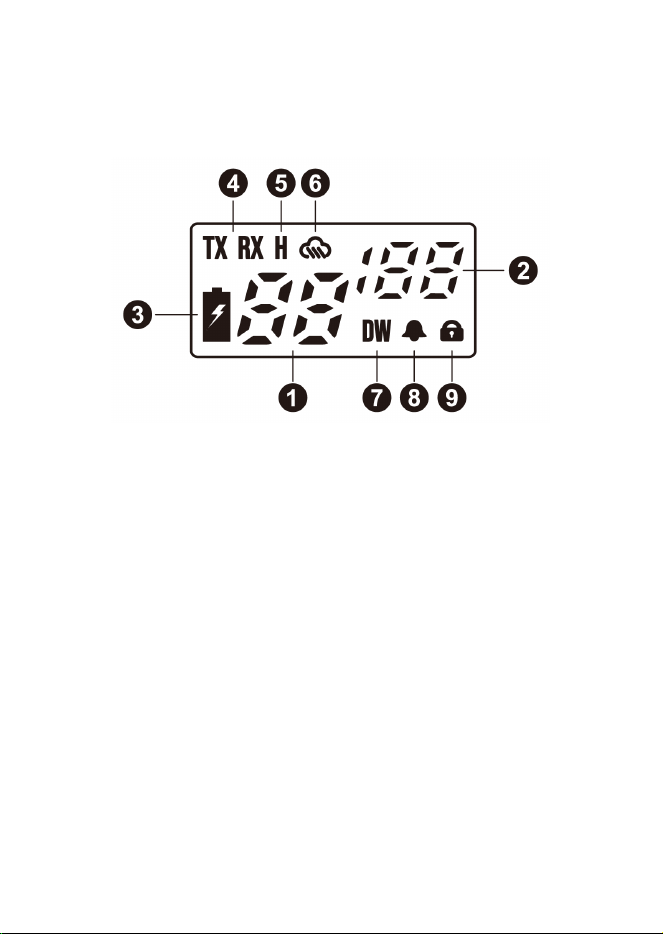
LCD Display
1. Selected channel
2. Selected privacy code (CTCSS: 1-38 / DCS: 39-121)
3. Battery status indicator
Green: high battery level
Orange: medium battery level
Red: low battery level
4. RX: radio in receive mode (busy)
TX: radio in transmission (PTT pressed)
5. Power channel selected (Channels 1-7, 15-22)
6. Weather mode activated
7. Dual channel watch activated
8. Roger beep activated
9. Keypad lock activated
1
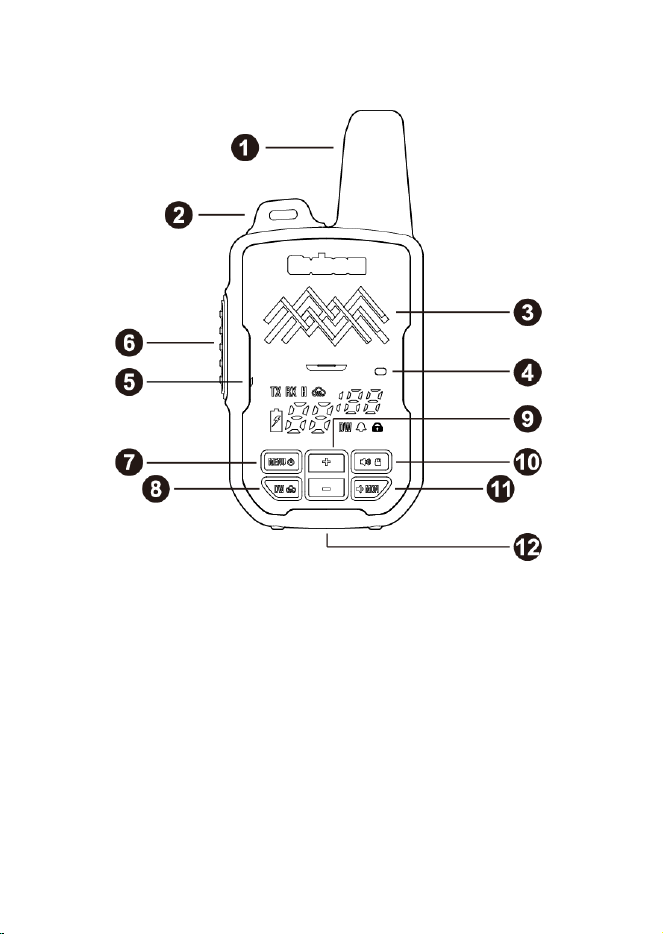
Radio Components
1 - Antenna
2 - Tether Loop
For attaching safety tether to backpack.
3 - Built-in Speaker
4 - LED Indicator
Indicates radio transmitting, receiving and battery charging
status.
5 - Built-in Speaker

6 - PTT (Push-To-Talk) Button
Press and hold down this button to transmit and talk, release it
to receive and listen.
7 - ON / OFF / MENU Button
Hold this button for approx. 3 seconds to power the radio on or
off. Press button again to enter the radio menu.
8 - DW /
Button
Press this button to activate dual channel watch function. Hold
the button for approx. 3 seconds to activate the weather mode.
9 - Channel Up / Down
Press these buttons up & down to change the channel. Hold
these buttons for approx. 3 seconds to change the channel
quickly.
10 - Volume Up / Keypad Lockout
Press this button to increase the radio volume. Hold the button
for approx. 3 seconds to activate the keypad lockout.
11 - Volume Down / MON
Press this button to decrease the radio volume. Hold the button
for approx. 3 seconds to activate monitor function that opens
the squelch (for weak signals).
12 - USB-C Charging Port

ADVANCED OPERATON
Monitor
The Monitor feature is for temporarily opening the squelch to
listen to signals that are too weak for the radio to receive on its
own. To activate the Monitor function, hold the MON button for
approx. 3 seconds. Repeat it again to exit this function.
NOAA Weather Channels
The radio features 11 NOAA weather channels to monitor the
weather conditions in your area. This can be crucial in the
backcountry, as having real time weather updates may inform
your decisions to push on, turn back, or seek shelter.
Hold the
button for approx. 3 seconds to activate weather
mode. The radio will automatically scan for active weather
channels in your region. When an active transmission is found,
the radio will pause scanning and stay on that weather channel.
The up / down channel buttons allow you to change the
direction of scanning (from lower channels to higher ones or
vice versa).
To exit weather mode, hold the
button for approx. 3
seconds again. The radio will then go back to the regular
channel and restore normal communication.
Dual Channel Watch (DW)
The Dual Channel Watch function allows you to monitor and
transmit on two different channels, referred to as current
channel A and watch channel B, at the same time. This mode
can be useful if you are trying to stay in touch with two parties
that are using different channels. It offers an easy way to listen
and transmit on both channels without having to switch
between two channels manually.

Press the DW button to activate the DW function, and the DW
icon will indicate at the bottom of the display. The radio works
on current channel A by default, however it is also continually
scanning both A and B for transmissions.
1. If a transmission is detected on A, the radio will transmit on A
when pressing the PTT button.
2. If a transmission is detected on B, the radio will automatically
display channel B number & its privacy code, and receive on
B until the transmission is complete. Now you have 6
seconds to transmit on B. During this period, pressing the
PTT button will respond to B only.
3. If there is no operation during these 6 seconds, the radio will
then return to display channel A number & privacy code again,
but still monitor both two channels.
To disable the DW function, press the DW button again and the
DW icon will disappear.
Note:
Dual Channel Watch mode will consume the radio battery about
25% faster when active, so it should be turned off when not in
use.
Keypad Lock
Hold the lock button for approx. 3 seconds to activate keypad
lock. Only the PTT button will remain active. Hold the lock
button again for approx. 3 seconds to exit this function.

MENU OPERATION
Privacy Code Selection
Privacy codes are used to keep group conversations private.
When a privacy code has been set, your radio will only receive
transmission when the other radios in the group are sending
that same privacy code. If someone’s radio is set to the same
“Channel”, but not using a privacy code, then they will be able
to receive transmissions from radios using privacy codes but
will not be able to send to radios that are using privacy codes.
To activate a privacy code:
1. Select the desired channel.
2. Press the MENU button once and the display shows "0"
blinking.
3. Push the + / - buttons to select the desired privacy code.
Press PTT or wait for approx. 5 seconds to exit and confirm
the selection.
4. Make sure everyone else in your group is on the same
channel with the same privacy code.
Roger Beep
When your transmission is finished (PTT released), the radio
gives a beep that indicates to the other party that they can start
talking. This function is disabled by default.
To activate Roger Beep:
1. Press the MENU button until the
icon appears on the
display and "OF” is blinking.
2. Use the + / - buttons to select "ON'.
3. Press PTT to confirm the activation and the
icon will stay
solid.
Dual Watch Channel Selection

You can select the channel you’d like as dual watch channel B
and set its privacy code in the menu. The channel B can be any
of the 22 channels.
To select the dual watch channel, follow these steps:
1. Press the MENU button until the DW icon appears on the
display and middle channel number is blinking.
2. Use the + / - buttons to select the channel you’d like to
monitor.
3. Press the MENU button again and the right top privacy code
is blinking.
4. Use the + / - buttons to select the desired privacy code.
5. Press PTT or wait for approx. 5 seconds to exit and confirm
the selection.
SPECIFICATIONS
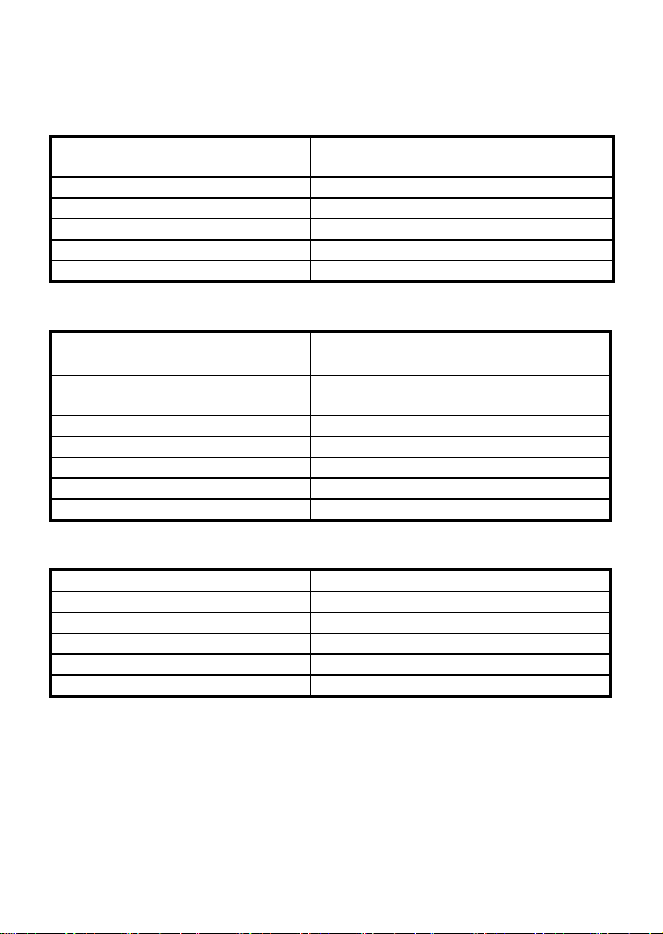
General
Frequency Range
TX/RX: 462.5500-462.7250MHz
467.5625-467.7125MHz
Channel Capacity
22 Channels | 121 Sub-channels
Channel Bandwidth
12.5kHz
Operating Voltage
3.7V DC
Dimensions (H x W x D)
110x52x25mm(not including Belt Clip)
Weight with battery
145g
Transmitter
RF Power
462.5500-462.7250MHz:31.85dBm
467.5625-467.7125MHz:26.95dBm
Spurious & Harmonics
-36dBm < 1GHz
-30dBm > 1GHz
FM Hum & Noise
≥ 36dB
Modulation Deviation
≤ 2.5kHz
Adjacent Channel Power
≥ 60dBC
Audio Frequency Response
+1 ~ -3dB
Audio Distortion
< 5%
Receiver
Sensitivity (12 dB SINAD)
≤ 0.3μV
Adjacent Channel Selectivity
≥ 60dBC
Audio Distortion
< 5%
Radiated Spurious Emissions
< -54dBm
Intermodulation Rejection
70dB
Audio Output
1W @ 8Ω
Weather Channel
Frequency (MHz)
1
162.550
2
162.400
3
162.475
4
162.425
5
162.450
6
162.500
7
162.525
8
161.650
9
161.775
10
161.750
11
162.000
CTCSS FREQUENCY CHART (Hz)
No.
Freq.
No.
Freq.
No.
Freq.
No.
Freq.
No.
Freq.
1
67.0
9
91.5
17
118.8
25
156.7
33
210.7
2
71.9
10
94.8
18
123.0
26
162.2
34
218.1
3
74.4
11
97.4
19
127.3
27
167.9
35
225.7
4
77.0
12
100.0
20
131.8
28
173.8
36
233.6
5
79.7
13
103.5
21
136.5
29
179.9
37
241.8
6
82.5
14
107.2
22
141.3
30
186.2
38
250.3
7
85.4
15
110.9
23
146.2
31
192.8
8
88.5
16
114.8
24
151.4
32
203.5
DCS CODE CHART
No.
Code
No.
Code
No.
Code
No.
Code
No.
Code
39
023
56
125
73
245
90
412
107
624
40
025
57
131
74
251
91
413
108
627
41
026
58
132
75
261
92
423
109
631
42
031
59
134
76
263
93
431
110
632
43
032
60
143
77
265
94
432
111
654
44
043
61
152
78
271
95
445
112
662
45
047
62
155
79
306
96
464
113
664
46
051
63
156
80
311
97
465
114
703
47
054
64
162
81
315
98
466
115
712
48
065
65
165
82
331
99
503
116
723
49
071
66
172
83
343
100
506
117
731
50
072
67
174
84
346
101
516
118
732
51
073
68
205
85
351
102
532
119
734
52
074
69
223
86
364
103
546
120
743
53
114
70
226
87
365
104
565
121
754
54
115
71
243
88
371
105
606
55
116
72
244
89
411
106
612
WARRANTY INFORMATION
Warranty Period
2 Years from date of purchase.
Note: Please retain your receipt, as your proof of purchase will
be required to validate warranty claim.
Warranty Exclusions
This warranty will not apply in relation to:
Failure to provide a proof of purchase.
Product has been modified, changed, or serial number has
been removed.
If any damage is caused by the use of non-approved
accessories.
Product that has been replaced by an unauthorized person.
Product failure due to customer misuse, abuse, or abnormal
use.
Failure by the customer to take reasonable care.
Failure due to not using the product in accordance with
instructions stated in the manufacture's user guide.
Product failure due to recommended installation procedures
not being followed as stated in the manufacture's user guide.
For more warranty information please visit
www.samtalkie.com/warranty.
Sam Radios Ltd.