5240 Willis Rd.
Theodore, AL 36582 USA
Toll Free: 1 (855) 223-2665
Tel: 1 (805) 933-9970
coolboss.com
Cool Boss™ Portable Evaporative Air Cooler
Installation and Operation Manual
Manual Revision A5 — January 2023 — Manual P/N 5900271
Models:
• CB-16L / H
• CB-28L / H
• CB-36L / H
⚠
DANGER
Read the
entire
contents of this manual
before
using this
product. Failure to follow the instructions and safety precautions in
this manual can result in serious injury or death. Make sure all other
operators also read this manual. Keep the manual near the product
for future reference.
By proceeding with setup and operation,
you agree that you fully understand the contents of this
manual and assume full responsibility for product use.
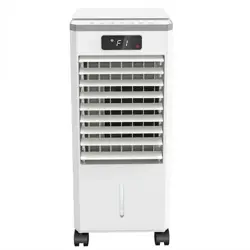
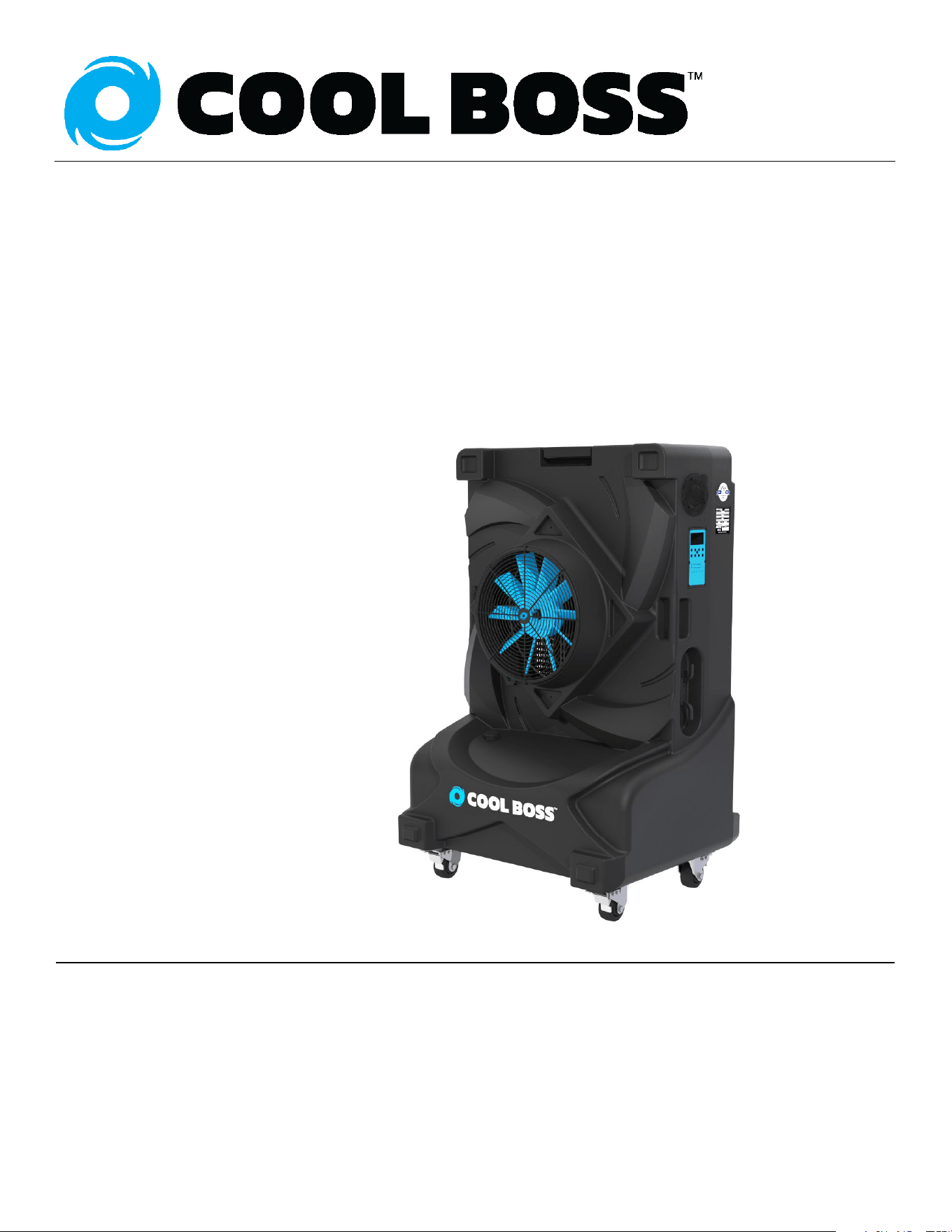
CB-16 Pictured above.
Manual. Cool Boss™ Portable Evaporative Air Cooler, Installation and Operation Manual, P/N 5900271, Manual
Revision A5, January 2023.
Copyright. Copyright © 2023 by BendPak Inc. All rights reserved. No part of this manual can be reproduced,
adapted, translated, or transmitted by any means, electronic or mechanical, for any purpose or in any form,
without prior written permission of BendPak Inc.
Trademarks. Cool Boss, the Cool Boss logo, and BendPak are trademarks of BendPak Inc. All other company,
product, and service names are used for identification only. All trademarks and registered trademarks mentioned
in this manual are the property of their respective owners.
Limitations. Every effort has been made to ensure complete and accurate instructions are included in this
manual. However, product updates, revisions, and/or changes may have occurred since this manual was
published. BendPak reserves the right to change any information in this manual without incurring any obligation for
equipment previously or subsequently sold. BendPak is not responsible for typographical errors in this manual.
Warranty. The Cool Boss warranty is more than a commitment to you: it is also a commitment to the value of
your new product. Visit www.coolboss.com/warranty for complete warranty information.
Safety. Your new product was designed and manufactured with safety in mind. Your safety also depends on
proper training and thoughtful operation. Do not set up, operate, maintain, or repair your Cool Boss without
reading and understanding this manual and the labels on the unit.
Owner Responsibility. In order to maintain your product properly and to ensure operator safety, it is the
responsibility of the product owner to read and follow these instructions:
• Follow all setup, operation, and maintenance instructions.
• Make sure product setup conforms to all applicable local, state, and federal codes, rules, and regulations,
such as state and federal OSHA regulations and electrical codes.
• Read and follow all safety instructions. Keep them readily available for operators.
• Make sure all operators are properly trained, know how to safely operate the unit, and are properly supervised.
• Do not operate the product until you are certain that all parts are in place and operating correctly.
• Carefully inspect the product on a regular basis and perform all maintenance as required.
• Service and maintain the unit only with approved replacement parts.
• Keep all instructions permanently with the product and make sure all labels are clean and visible.
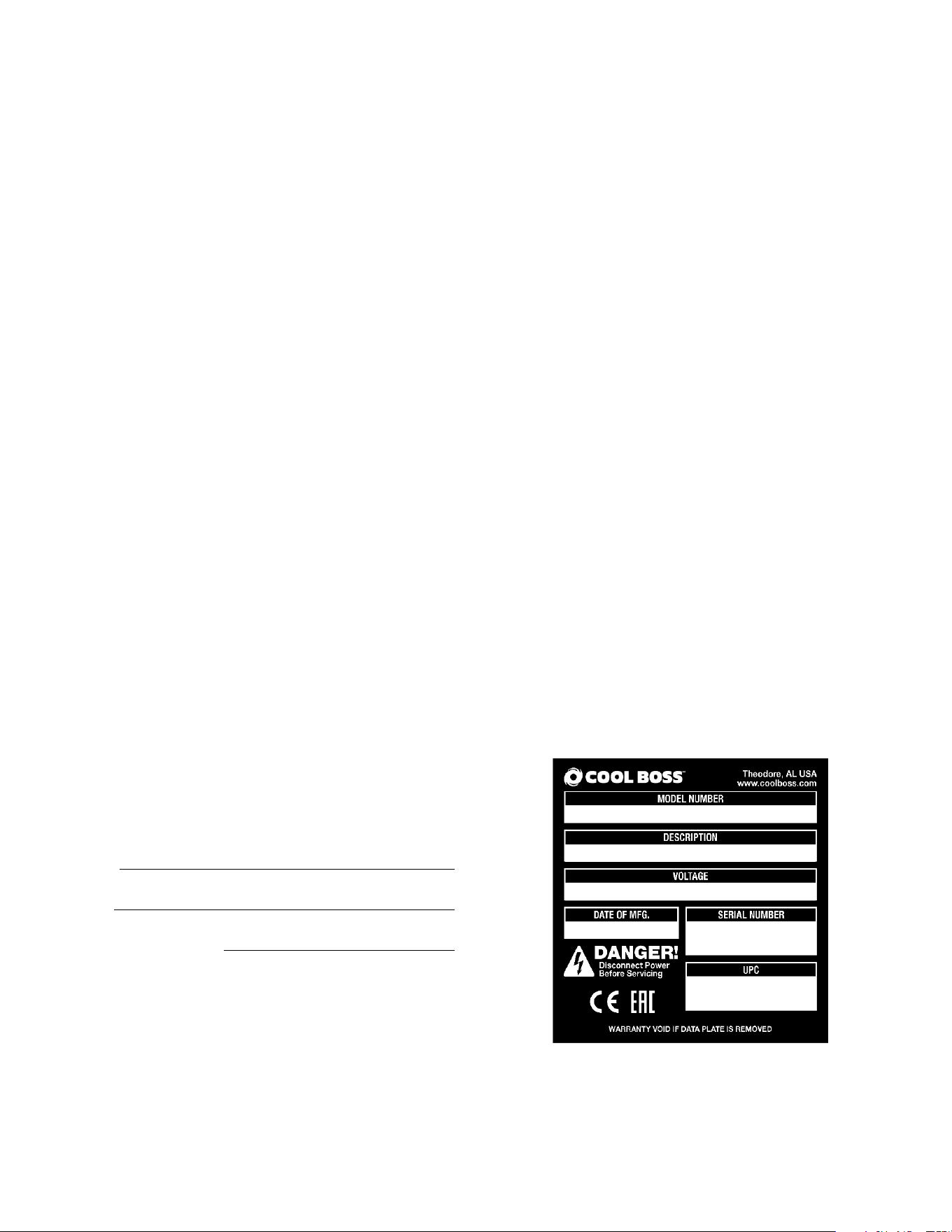
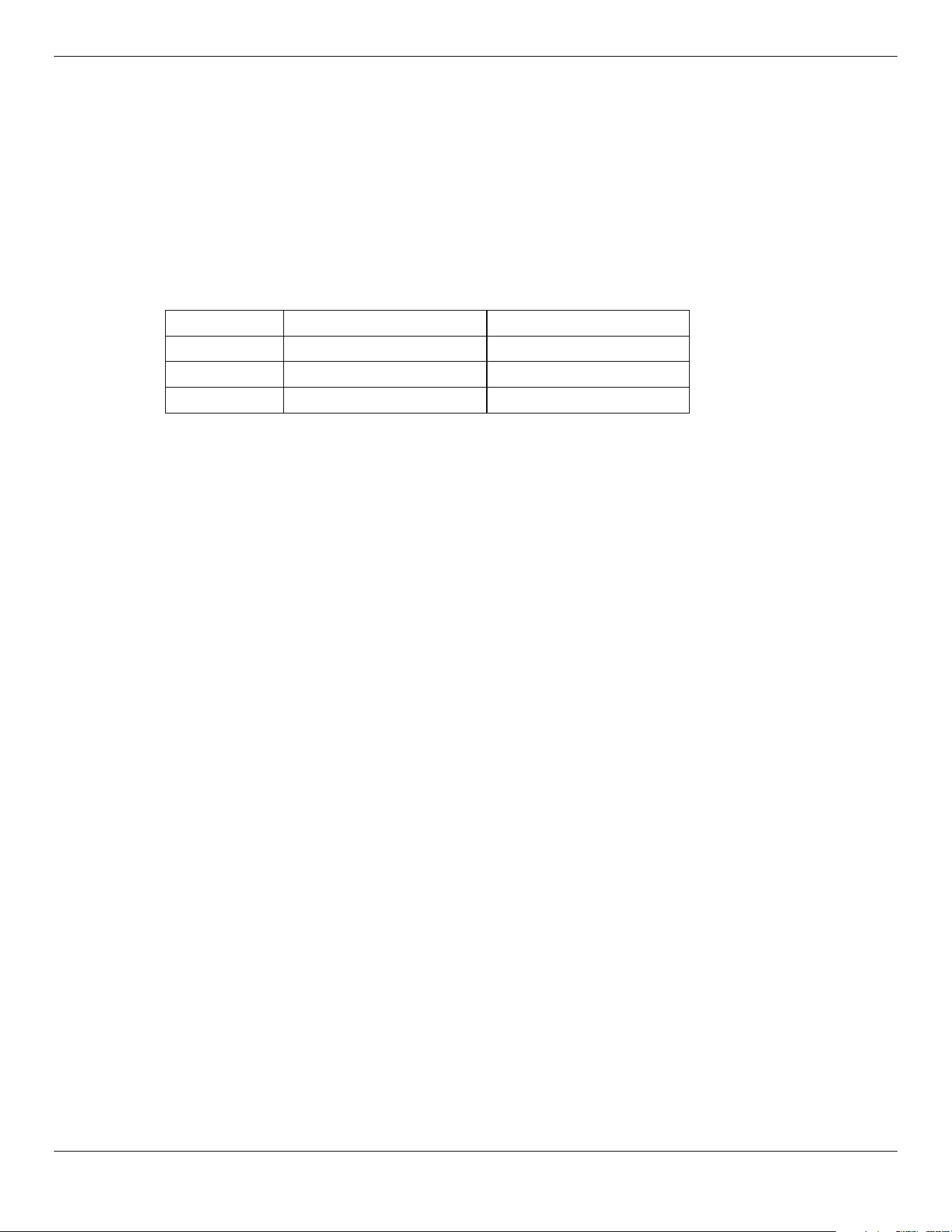
Unit Information. Enter the Model Number, Serial
Number, and Date of Manufacture from the label on
your unit. This information is required for part or
warranty issues.
Model:
Serial:
Date of Manufacture:

Cool Boss Evaporative Air Cooler 3 P/N 5900271 — January 2023 — Rev. A5
Table of Contents
Introduction 3 Operation 23
Shipping Information 4 Maintenance 28
Safety Considerations 4 Troubleshooting 31
Frequently Asked Questions 6 Parts Diagram 33
Specifications 7 Labels 36
Components 9 Maintenance Log 39
Setup 13
Introduction
This manual describes three models of the Cool Boss Portable Evaporative Air Cooler, which keeps
your shop or workplace cool and comfortable on even the hottest summer days.
The Cool Boss models described in this manual feature an amplified speaker pair with Bluetooth®
input for streaming audio from smart devices, a USB Port for charging portable devices and an Anion
Negative Ion Air Purifier.
Three models are detailed with fan diameters of 16, 28 and 36 inches. Each model may be ordered in
a 110 VAC or a 220 VAC version:
• CB-16L: 110 VAC, 60Hz, 1 Ph. Power
• CB-16H: 208–230 VAC, 50/60Hz, 1 Ph. Power
• CB-28L: 110 VAC, 60Hz, 1 Ph. Power
• CB-28H: 208–230 VAC, 50/60Hz, 1 Ph. Power
• CB-36L: 110 VAC, 60Hz, 1 Ph. Power
• CB-36H: 208–230 VAC, 50/60Hz, 1 Ph. Power
All three Cool Boss units described in this manual operate identically and will be referred to as Cool
Boss or cooler throughout this manual. Any differences based on the selected power supply or
function, will be called out in the text by the unit’s specific model number.
This manual is mandatory reading for all users of the Cool Boss, including anyone who sets up,
operates, maintains, or repairs it.
⚠ DANGER Be very careful when setting up, operating, maintaining, or repairing this equipment;
failure to do so correctly could result in property damage, product damage, injury,
or (in very rare cases) death. Make sure only authorized personnel operate this
equipment. All repairs must be performed by an authorized technician. Do not
make modifications to the unit; this voids the warranty and increases the chances
of injury or property damage. Make sure to read and follow the instructions on the
labels on the unit.

Cool Boss Evaporative Air Cooler 4 P/N 5900271 — January 2023 — Rev. A5
Keep this manual on or near the equipment so that anyone who uses or services the unit can read it.
Assistance with your Cool Boss is available from your dealer, by calling Cool Boss at (805) 933-
9970, or by emailing support@coolboss.com. You may also contact Cool Boss for parts
replacement (please have the serial number and model number of your unit available).
Shipping Information
Your equipment was carefully checked before shipping. Nevertheless, you should thoroughly inspect
the shipment
before
you sign to acknowledge that you received it.
When you sign the bill of lading, it tells the carrier the items on the invoice were received in good
condition.
Do not sign the bill of lading until after you have inspected the shipment.
If any of the
items listed on the bill of lading are missing or are damaged, do not accept the shipment until the
carrier makes a notation on the bill of lading that lists the missing and/or damaged goods.
If you discover missing or damaged goods
after
you receive the shipment and have signed the bill of
lading, notify the carrier at once and request the carrier to make an inspection. If the carrier will not
make an inspection, prepare a signed statement to the effect that you have notified the carrier (on a
specific date) and that the carrier has failed to comply with your request.
It is difficult to collect for loss or damage after you have given the carrier a signed bill of lading. If this
happens to you, file a claim with the carrier promptly. Support your claim with copies of the bill of
lading, freight bill, invoice, and photographs, if available. Our willingness to assist in helping you
process your claim does not make us responsible for collection of claims or replacement of lost or
damaged materials.
Safety Considerations
Read this manual carefully before using your new product.
Do not set up or operate
the product until you are familiar with all operating instructions and warnings. Do not allow anyone else
to operate the product until they are also familiar with all operating instructions and warnings.
⚠ WARNING California Proposition 65. This product can expose you to chemicals including
styrene and vinyl chloride which are on a list of over 900 chemicals identified by the
State of California to cause birth defects or reproductive harm. ALWAYS use this
product in accordance with Cool Boss or BendPak’s instructions. For more
information go to www.P65Warnings.ca.gov.
Safety Information
• The product is an air-cooling device. Use it only for its intended purpose.
• The product should only be operated by authorized personnel. Children should not be allowed
operate the Cool Boss. Make sure all operators read and understand the Warning labels and the
Installation and Operation Manual. Keep the manual near the device at all times.
• Never operate the Cool Boss with a damaged Power Cord or Plug.
• When the product is in use, keep all body parts away from it.
• Only use the product indoors in a well-ventilated area. Ensure a window or door is open to allow
adequate air flow.
• Do not make any modifications to the product. This voids the warranty and increases the chances
of injury or property damage.
Cool Boss Evaporative Air Cooler 5 P/N 5900271 — January 2023 — Rev. A5
• Avoid using an extension cord; they can overheat. If you must use an extension cord, make sure it
is a three conductor No. 14 AWG minimum with a three prong plug/receptacle and does not
exceed 50-feet in length. For 100-foot extensions cords use 12 AWG minimum.
• Do not spray the outside of the unit with water. Moisture can harm the motor and other parts of the
electrical system.
• Only connect the power cord to a grounded, three-prong GFCI protected receptacle.
• Lock at least two Casters before turning on the fan.
• Make a visual inspection of the product before using it. Check for damaged or missing parts.
Do
not use the product if you find problems with the unit
. Instead, remove it from service,
then contact your dealer, call Cool Boss at (805) 933-9970, or email Cool Boss at
support@coolboss.com.
• Do
not
operate the Cool Boss if the fan has cracked or damaged blades.
• Do
not
operate the Cool Boss unless the Media is securely in place.
• Do
not
operate the Cool Boss within 35-feet (10.6 m) of an open flame or spark.
• Do
not
operate the Cool Boss if the GFCI does not remove power as Test button is pressed.
•
Always
remove the plug from the electrical receptacle by pulling on the plug not the power cord.
• CoolBoss recommends making a thorough inspection of the product at least once a year. Replace
any damaged or severely worn parts, decals, or warning labels.
Save these instructions!
Symbols
⚠ DANGER Calls attention to an immediate hazard that will result in death or severe injury.
⚠ WARNING Calls attention to a hazard or unsafe practice that could result in death or severe
personal injury.
⚠ CAUTION Calls attention to a hazard or unsafe practice that could result in minor personal
injury, product, or property damage.
Tip Calls attention to information that can help you use your product better.
Liability Information
BendPak Inc. Cool Boss assumes no liability for damages resulting from:
• Use of the equipment for purposes other than those described in this manual.
• Modifications to the equipment without prior, written permission from BendPak Inc., Cool Boss
• Injury or death caused by modifying, disabling, overriding, or removing safety features.
• Damage to the equipment from external influences.
• Incorrect operation of the equipment.
Cool Boss Evaporative Air Cooler 6 P/N 5900271 — January 2023 — Rev. A5
Frequently Asked Questions
Question: Is the Cool Boss an air conditioner?
Answer: No. it is an evaporative air cooler, sometimes called a swamp cooler. The fan pulls in hot
outdoor air, a water drip spray system releases water into a Media, the water droplets evaporate when
they meet the hot air, lowering the air temperature by up to 26°F, and the fan blows the cooled air in
the desired direction.
Q: How much air does the Cool Boss cool?
A: Each unit can cool approximately:
Model
Airflow
Cooling Area
CB-16L / H
4,950 cfm / 140 cmm
1,125 ft
2
/ 104.5 m
2
CB-28L / H
9,020 cfm / 255 cmm
2,125 ft
2
/ 197 m
2
CB-36L / H
12,615 cfm / 357 cmm
3,125 ft
2
/ 290 m
2
Q: What’s the best way to set up my Cool Boss?
A: With the back of the unit facing a source of hot, dry air – which is what the Cool Boss will cool—and
the front facing the area you want to keep cool. It will need to be near a power source also. And
remember, it is portable. So you can move it to where you need it; it does not have to stay in the same
place the whole time.
Q: Does it require special water?
A: No. Clean, ordinary tap water.
Q: Is it hard to control the Cool Boss?
A: Not at all. There a few, easy-to-understand controls on the unit. It also comes with a remote
control, so that you can turn it on or off or change settings from wherever you happen to be.
Q: What about maintenance?
A: Very little. Basically, keep the Water Reservoir filled with clean tap water and clean the Media once
in a while. Dirt and other pollutants from the environment accumulate in the Media and the Reservoir,
so it is best to clean it every so often. Do not clean the Media by spraying it with high pressure water
while installed in the Cool Boss! Instead, remove the Media using the procedure in the Installing the
Media section, then clean it as per the procedure found there.
Q: Anything else I should know about my Cool Boss?
A: A ducting kit is available for the CB-16L/H only. This kit attaches to the Fan outlet, allowing you to
direct and concentrate the cooling to exactly the right spot.
Q: Can I charge my phone on the USB port?
A: Yes, the Cool Boss USB port is a charge only port. No data.
Q: Can I stream music from my phone to the Cool Boss speakers?
A: Yes, the Cool Boss will pair with smart devices via Bluetooth® as long as your device is compatible
with Bluetooth v5.0 and within ≈30 ft. / 9 m. Be aware that Bluetooth range may be reduced by
obstacles (e.g., walls, people, and machines.) Electromagnetic interference from equipment or other
Bluetooth devices will also negatively impact the actual Bluetooth range.
Cool Boss Evaporative Air Cooler 7 P/N 5900271 — January 2023 — Rev. A5
Specifications
Cool Boss Evaporative Air Cooler 8 P/N 5900271 — January 2023 — Rev. A5
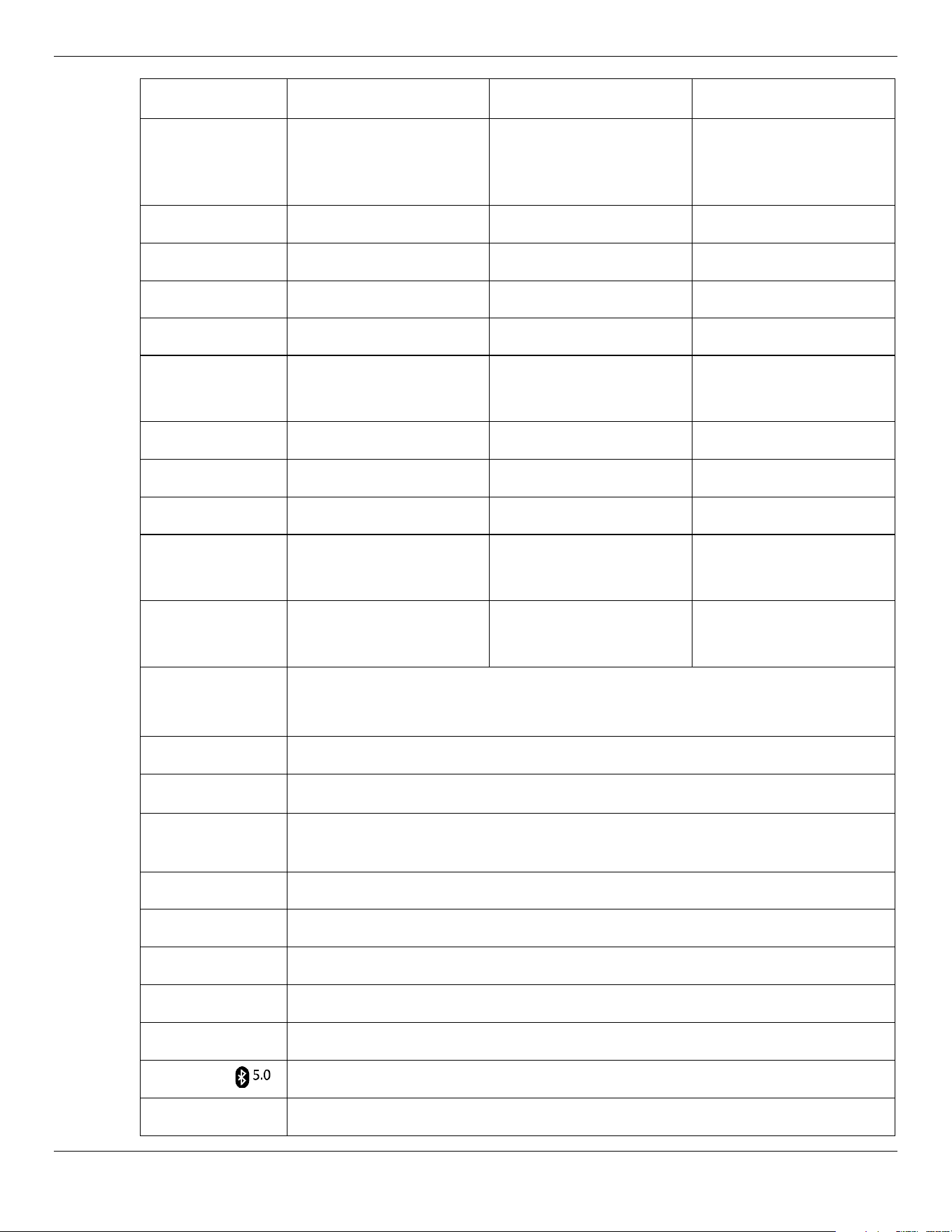
Model CB-16L / H CB-28L / H CB-36L / H
Dimensions
(A x B x C)
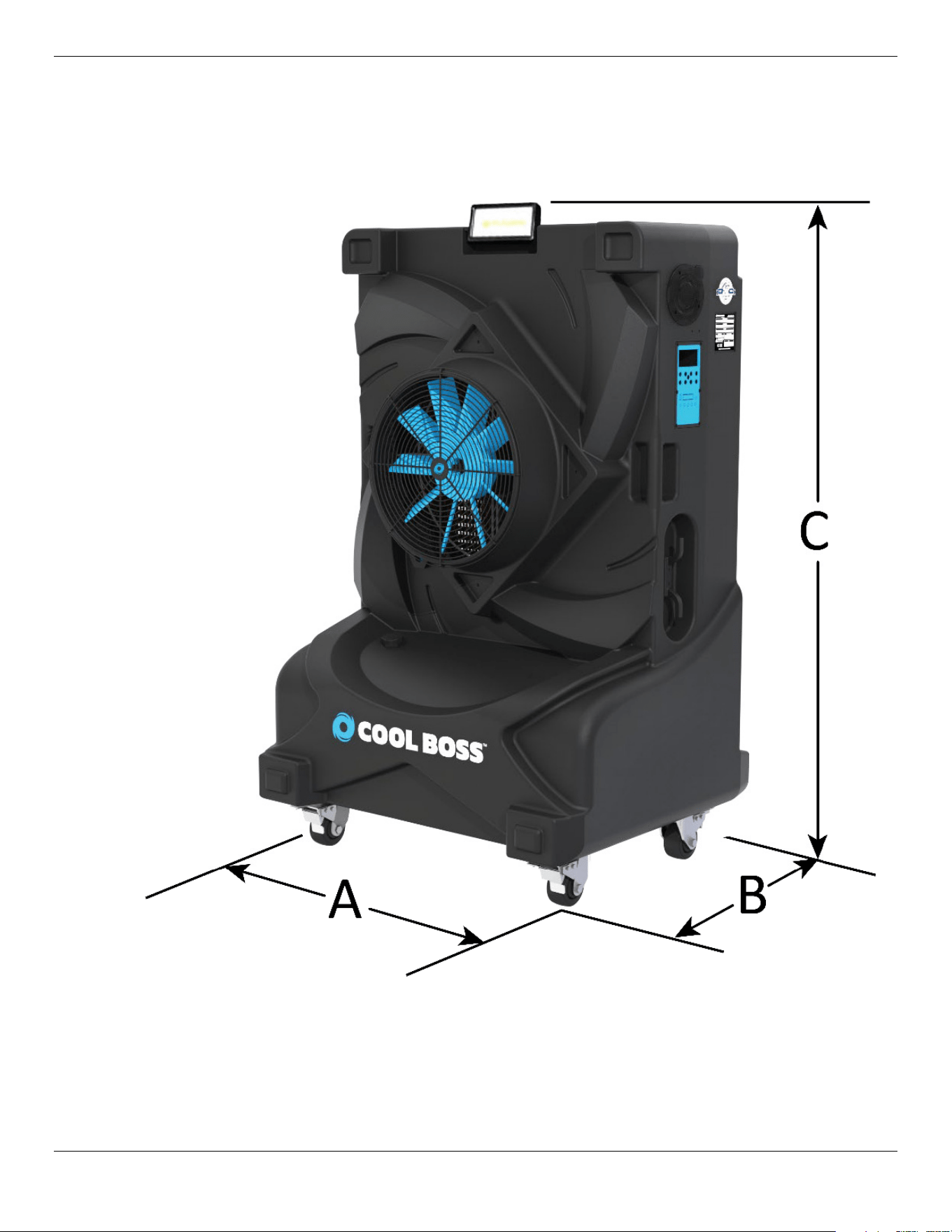
41in. x 34 in. x 66.5 in.
1,040 mm x 860 mm x
1,689 mm
52 in. x 37 in. x 76.5 in.
1,330 mm x 946 mm x
1,943 mm
65 in. x 44 in. x 85 in.
1,650 mm x 1,117 mm x
2,159 mm
Fan diameter 16" / 406 mm 28" / 711 mm 36" / 914 mm
Weight Empty 200 lbs. / 91 kg 275 lbs. / 125 kg 400 lbs. / 181 kg
Weight Full 698 lbs. / 317 kg 939 lbs. / 426 kg 1,355 lbs. / 615 kg
Water capacity 60 gal. / 227 liters 80 gal. / 303 liters 115 gal. / 435 liters
Maximum airflow 4,950 ft
3
/min.
140 m
3
/min.
9,020 ft
3
/min.
255 m
3
/min.
12,615 ft
3
/min.
357 m
3
/min.
Sound level 75 to 100 dB
60 to 100 dB
70 to 90 dB
UL
®
Certified Yes Yes Yes
Fan RPM 1,700 1,100 850
Maximum Power
Amperage/Watts
10.7A / 1,120W 10.1A / 1,088W 10.9A / 1,137W
Motor Power
Watts / Horse Pwr.
670W / 0.9HP 638W / 0.85HP 687W / 0.92HP
Power Source
L Models: 110 VAC, 60 Hz, 15A, single phase.
H Models: 208 to 230 VAC, 50-60 Hz, 15A, single phase.
Power Cord 15 feet / 4.5 m with GFCI
Inlet Water Press.
≈28 to 99.5 psi /
(2 to 7 kg/cm
2
) Max. Automatic Water Source Shutoff.
Water Source
Shutoff
The Cool Boss utilizes a Mechanical Float Valve to automatically shut off the Water
Source before exceeding maximum Fill.
Fan speed Variable in 10 speed increments
Fan type Axial
Controls
Manual pushbutton membrane panel with digital LED display or remote control.
LED Floodlight
80W, 4000 lumens
Housing
Antibacterial
Bluetooth
®
Compatible with Bluetooth® v5.0
USB
USB port is available for charging devices only. USB 2.0 specification .5 A at 5 V
Cool Boss Evaporative Air Cooler 9 P/N 5900271 — January 2023 — Rev. A5
Components
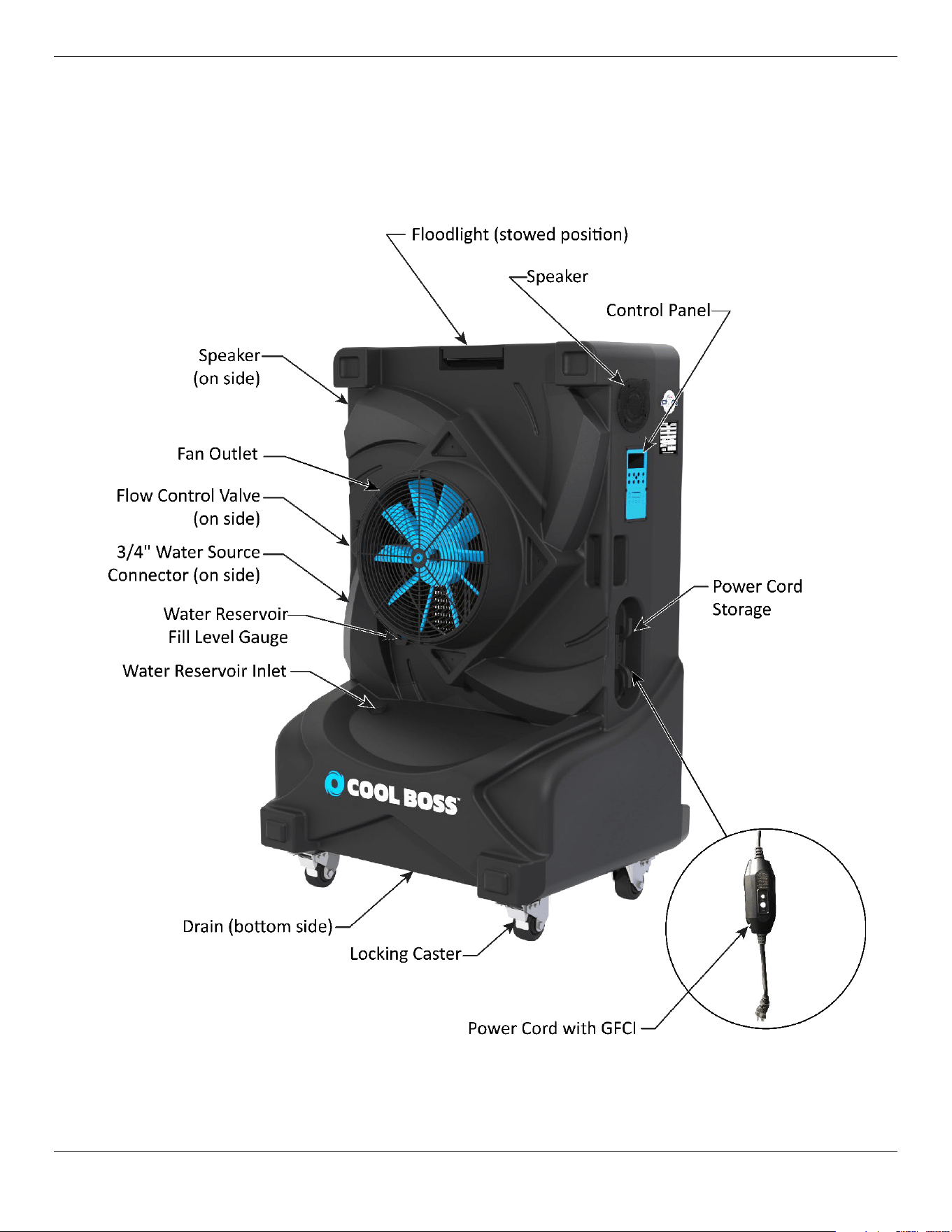
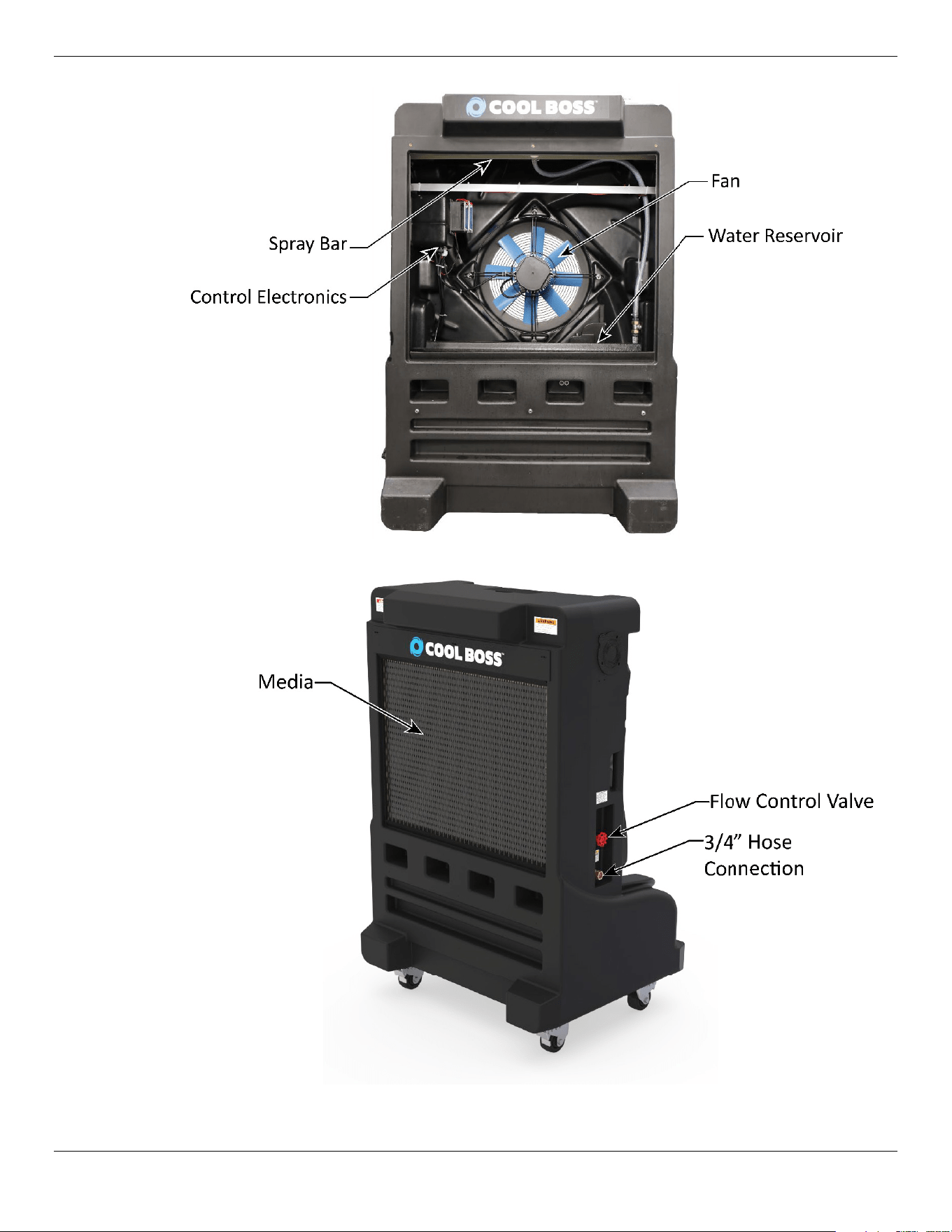
The Cool Boss Unit
CB-16 pictured below.
This figure below details the interior of the unit, from the back (intake side).
Cool Boss Evaporative Air Cooler 10 P/N 5900271 — January 2023 — Rev. A5
Cool Boss Evaporative Air Cooler 11 P/N 5900271 — January 2023 — Rev. A5
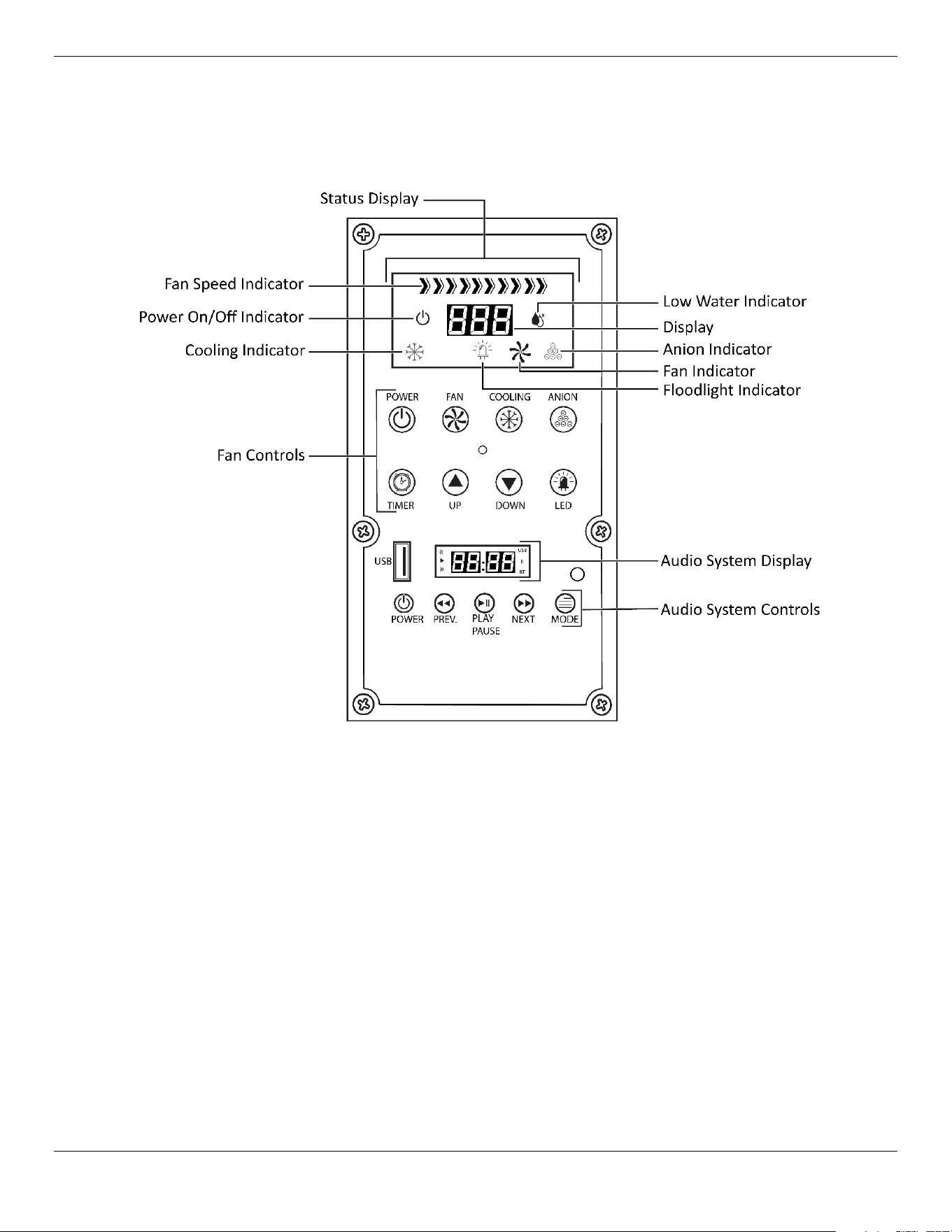
The Cool Boss Control Panel
The figure below details the Control Panel.
Status Display
The Control Panel’s Status Display provides the on-off status of the Cool Boss functions, the fan
power settings as a percentage, current temperature of the air in ˚F at the Cool Boss Fan, the timer
status and a low water warning.
Control Functions
Power – Push on-off. Applies power to the Cool Boss.
Fan – Push on-off. Applies power to the Fan.
Cooling – Push on-off. Applies power to the Pump which provides water to the Spray Bar over the
Media.
Anion Negative Ion Air Purifier – Push on-off. Applies power to the Anion Generator.
Timer – Push to scroll through preprogramed shutdown times. Allows the operator to select an
automatic shutdown time in 1 hour increments. Up to 12 Hours maximum.
Up – Push to increase the Fan speed.
Down – Push to decrease the Fan speed.
LED – Push on-off. Applies power to the LED Floodlight located the top of the Cool Boss.
Cool Boss Evaporative Air Cooler 12 P/N 5900271 — January 2023 — Rev. A5
⚠ CAUTION WARNING: Physical Damage from Sharp Objects to Control Panel or Remote
Control is NOT COVERED under warranty
Do Not push buttons on Control Panel or Remote Control with any Sharp Object.
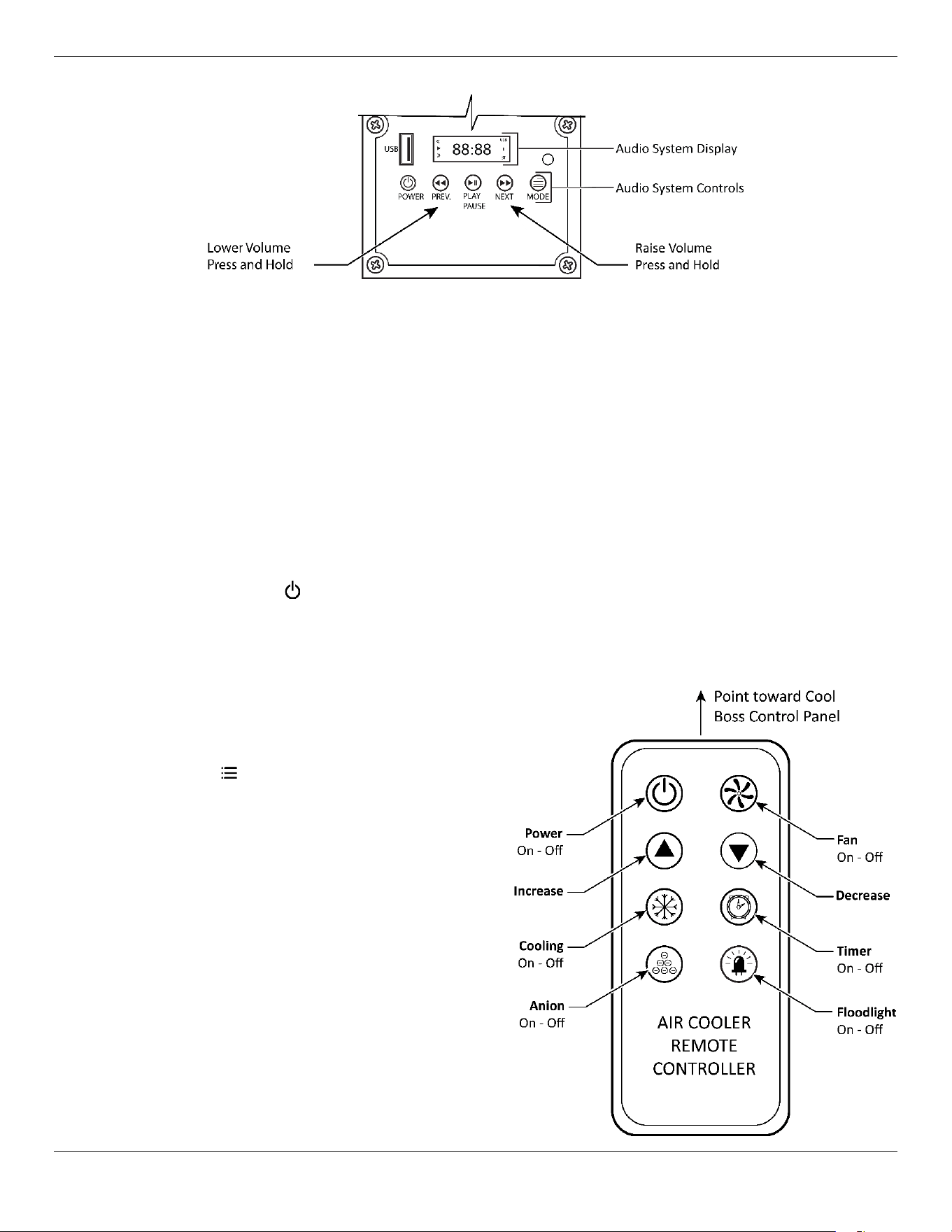
Audio System Display
The display explains audio input, active commands, and current audio file time.
Audio System Controls
Audio Power – Push on-off. Applies power to the Cool Boss Audio.
Play Pause – Push to begin playback or pause current audio file.
Prev. and Volume Down– Quickly Push-Skips back to the previous audio file. Push and Hold to
reduce speaker volume.
Next and Volume UP– Quickly Push-
Skips forward to the next audio file. Push
and Hold to increase speaker volume.
Mode – N/A.
Remote Control
The figure below details the remote control
and identifies the control functions as
defined above. The remote will be found in
the box with the Casters. The Remote
Control requires two (2) AAA 1.5 Volt
Batteries. (Batteries are not included with
the Cool Boss.)
Important
: The Remote utilizes infra-
red light to communicate
with the Cool Boss.
Remote must be within
32 ft. / 10 m and have a
direct line-of-sight to the
Control Panel.
Cool Boss Evaporative Air Cooler 13 P/N 5900271 — January 2023 — Rev. A5
Setup
There are six basic steps in the Cool Boss set up.
1. Unbox.
2. Install the Casters.
3. Install the Media.
4. Determine the Cool Boss location.
5. Fill the reservoir or connect to water.
6. Connect to power.
Tools required for Assembly:
• Hammer
• Pry Bar
• Phillips Screwdrivers
• Metric Open End Wrench Set
• Two (2) AAA 1.5 V Batteries
Unboxing the Cool Boss
The Cool Boss Cooler is carefully packaged to prevent damage. Exercise care in removing the Cooler
from its packaging.
⚠ WARNING Be careful not to injure yourself on sharp edges or fasteners.
⚠ WARNING You must wear the proper protective equipment at all times during setup and
assembly of this Cooler: leather gloves, steel-toed boots, and back belts.
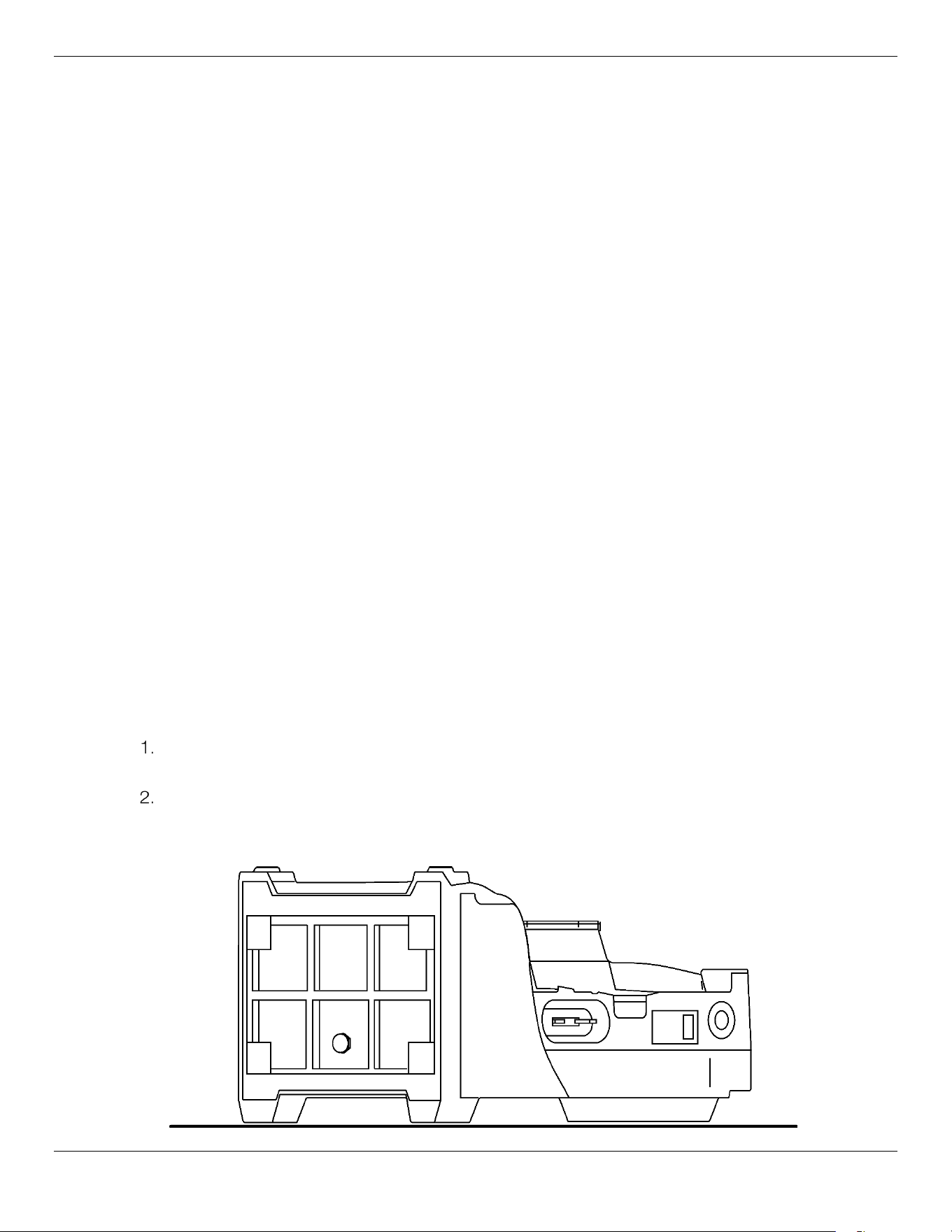
To unbox the Cooler:
Use a hammer and pry bar to carefully remove the shipping container from around the Cool
Boss.
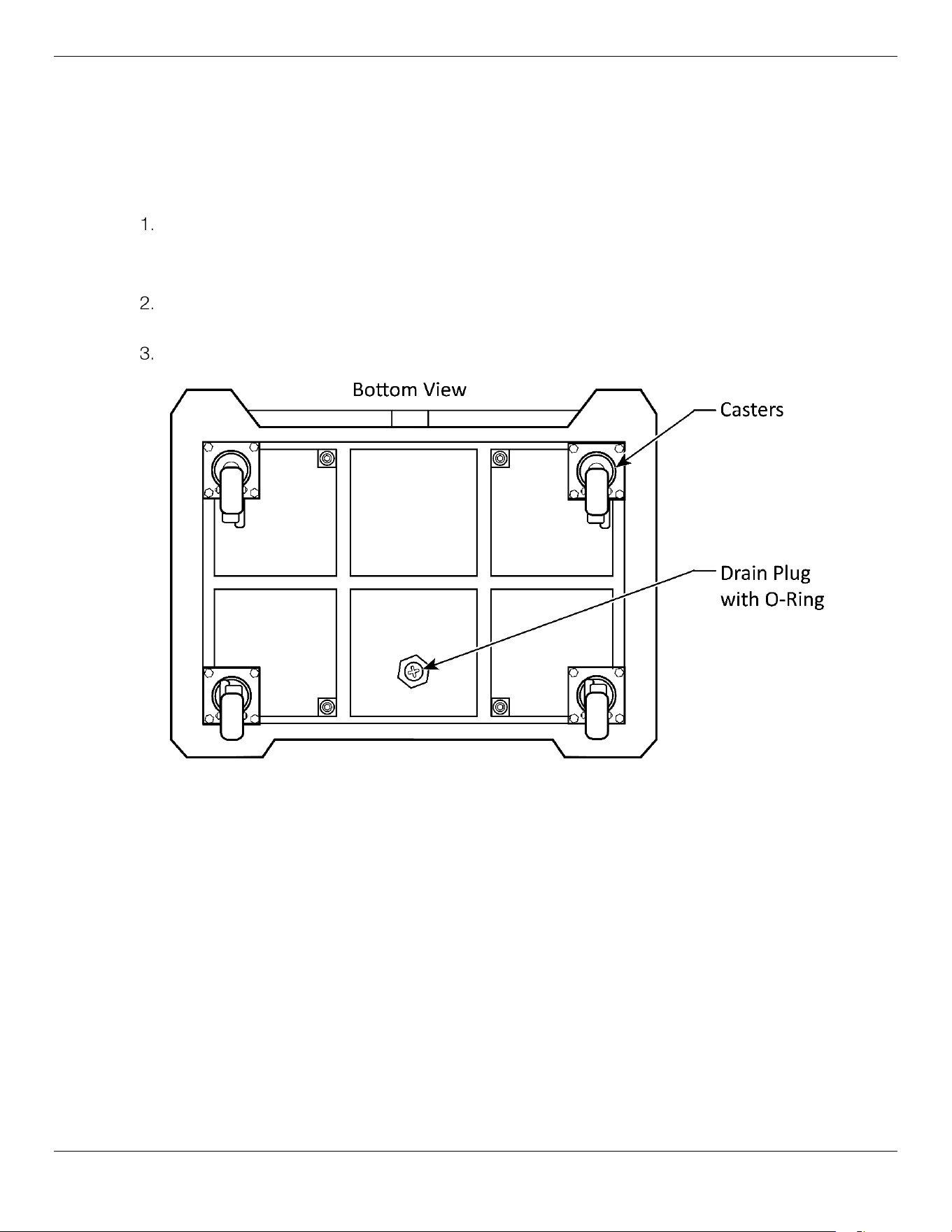
Position the Cooler with its back side down to provide access to the bottom of the unit. The back
of the shipping container may be used to provide a clear, clean area to work on the Cooler. See
figure below.
Cool Boss Evaporative Air Cooler 14 P/N 5900271 — January 2023 — Rev. A5
Installing the Casters
The Cool Boss is shipped with heavy-duty locking casters to both support and allow easy movement
of the cooler around your facility. The Casters are shipped in a separate box with the Remote Control.
Locate and Install the four swivel Casters using the four bolts and flat washers for each Caster. As
detailed in the figure below.
The Casters are shipped in a separate box with the Remote Control.
Lock the two rear Casters by pushing down on the larger pedal. Pushing down on the small caster
releases the lock.
Have an assistant help rotate the Cool Boss upright onto its Casters.
Cool Boss Evaporative Air Cooler 15 P/N 5900271 — January 2023 — Rev. A5
Installing the Media
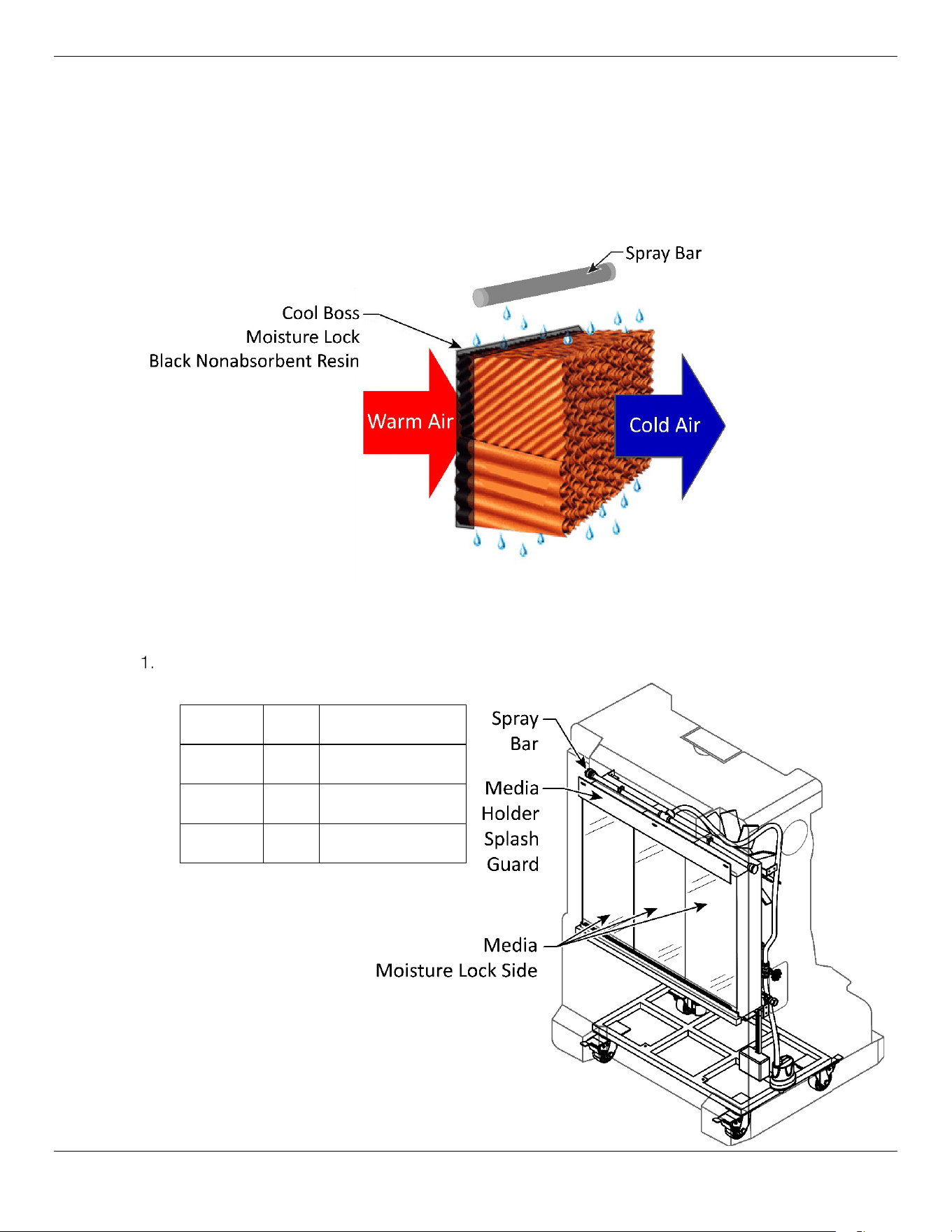
The Cooler pulls warm air through a Media saturated with water. This Media incorporates a Moisture
Lock on one side made of a black nonabsorbent resin which reduces evaporation and increases the
efficiency. Properly installed Media is critical to the Cool Boss operation. The black resin side must
always be installed toward the warm air side.
The internal channels within the media
should be oriented so that the water flows down and inward towards the fan.
Refer to
the figure below.
To install the Media:
Retrieve the Media for your specific Cool Boss model. Each Cool Boss model uses a different
number of Media sections. Refer to the table below.
Not to scale, some components removed for clarity.
Model Qty. Part Number
CB-16 3 5326296
CB-28 4 5326297
CB-36 5 5326298
Cool Boss Evaporative Air Cooler 16 P/N 5900271 — January 2023 — Rev. A5
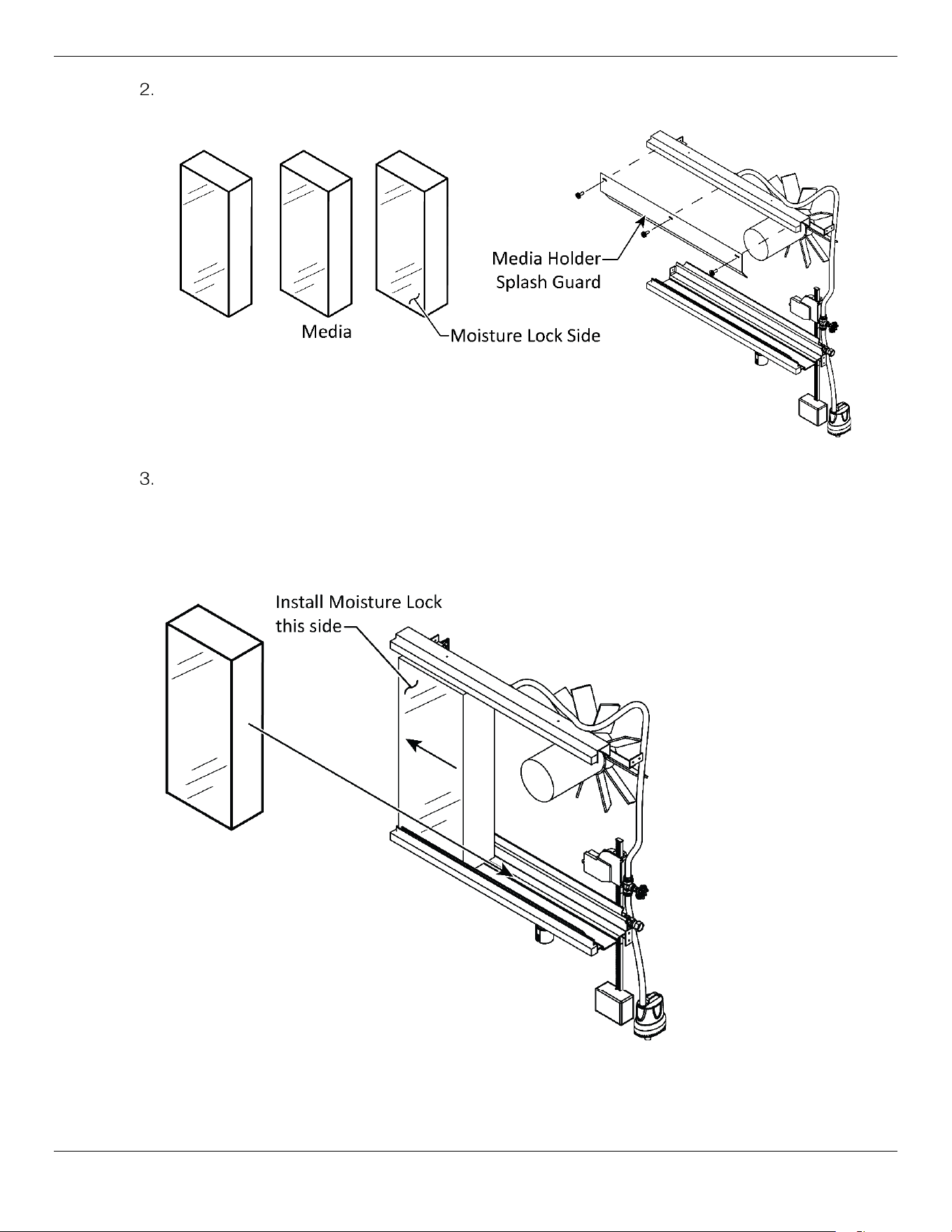
Remove and retain the three screws securing the Media Holder Splash Guard. Refer to the figure
below.
Not to scale, components removed for clarity.
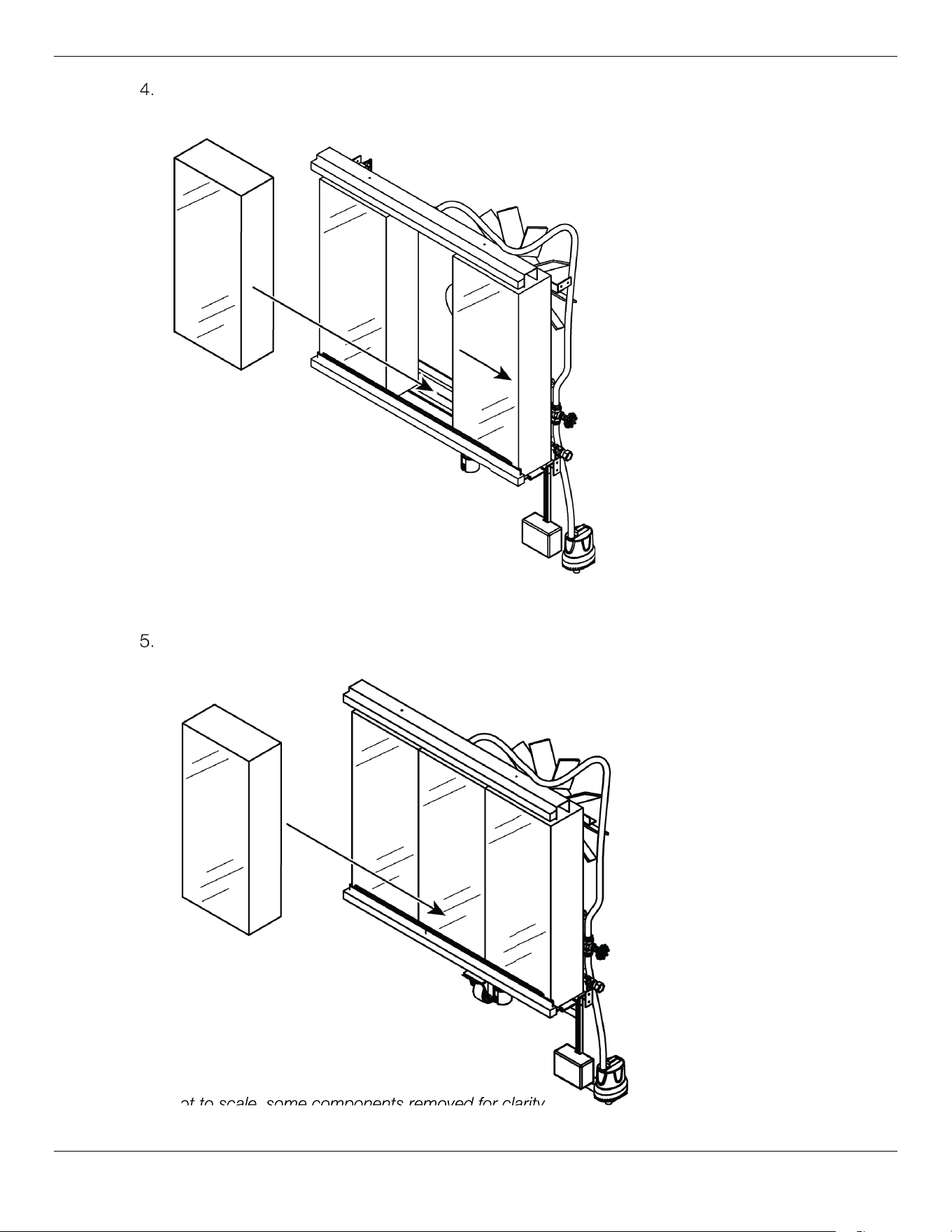
Insert one Media section into the Cool Boss. Verify the Moisture Lock Black Resin side of the
Media is oriented to the warm-air side. Channels in the Media are oriented to direct the water flow
downward and toward the Warm Air Intake side of the Cool Boss. Slide the first Media as
far left as possible. Refer to the figure below.
Not to scale, some components removed for clarity.
Cool Boss Evaporative Air Cooler 17 P/N 5900271 — January 2023 — Rev. A5
Install another section of Media and slide the new section of Media as far right as possible. Orient
the Media channels as in the previous step.
Not to scale, some components removed for clarity.
Install the last section of Media in the open middle section. Orient the Media channels as in the
previous step.
Not to scale, some components removed for clarity.
Not to scale,
some
components
removed for clarity
Cool Boss Evaporative Air Cooler 18 P/N 5900271 — January 2023 — Rev. A5
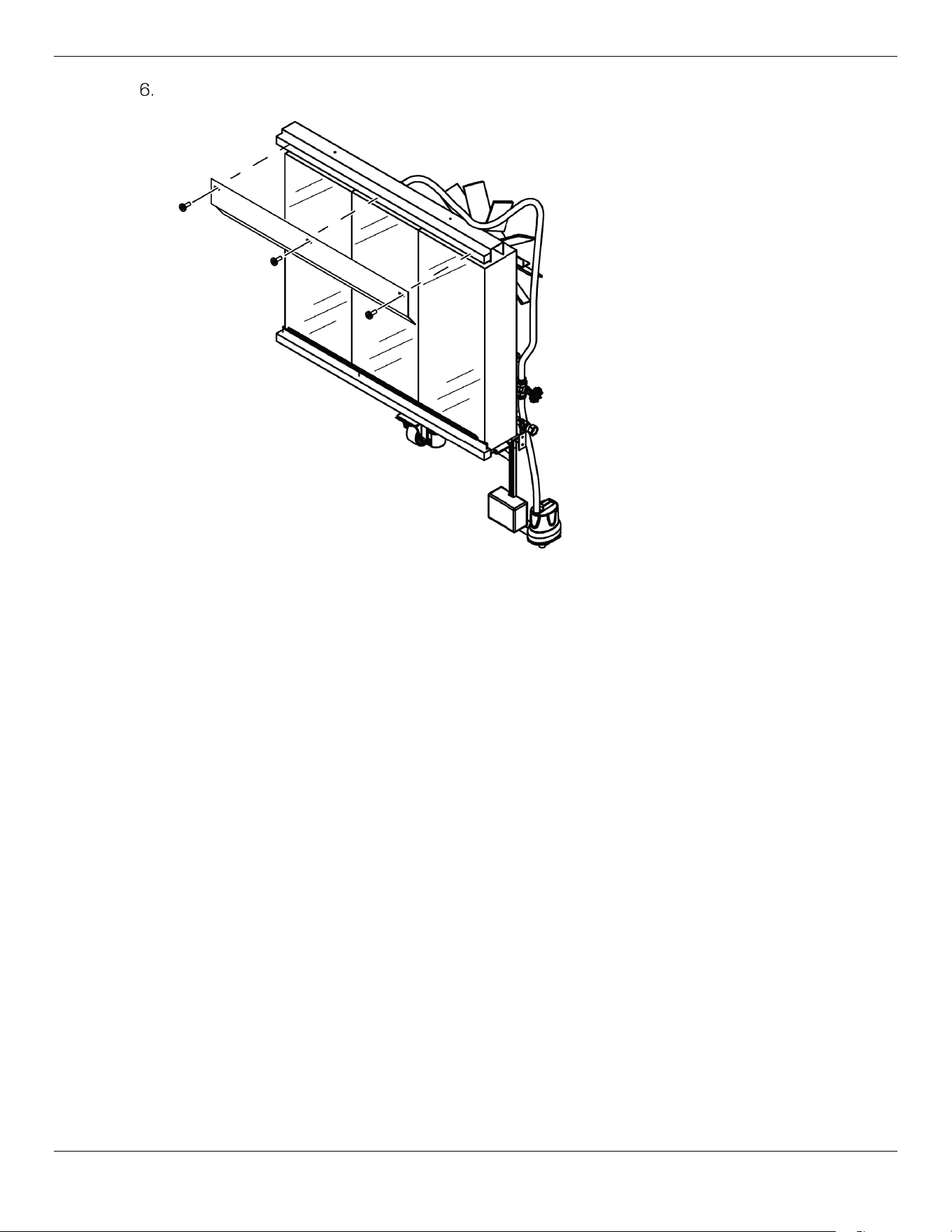
Install the Media Splash Guard using the three screws removed in step 1.
Not to scale, components removed for clarity.
Cool Boss Evaporative Air Cooler 19 P/N 5900271 — January 2023 — Rev. A5
Find a location for your Cool Boss
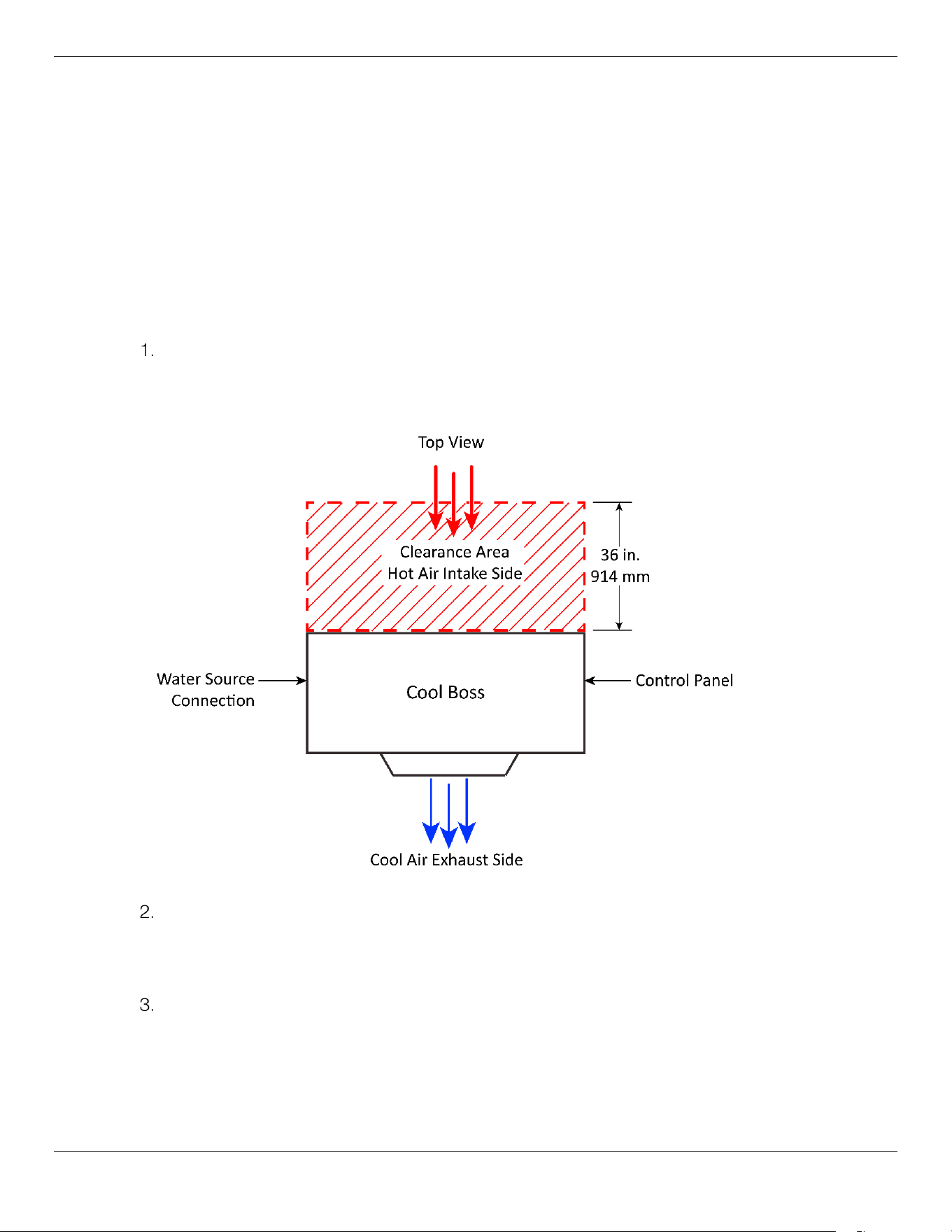
Find a suitable location for the Cool Boss (hot air to the rear, cooling area to the front). The Cool Boss
should be indoors, near an appropriate power and water source, and in a low-traffic and well-
ventilated area.
⚠ WARNING This equipment has internal arcing or sparking parts that should not be exposed to
flammable vapors. The unit must not be located in a recessed area or below floor level.
⚠ WARNING Verify the floor will support the weight of the Cool Boss with a
full
reservoir; is well
constructed and stable enough to prevent the Cooler from tipping over
.
To choose a location for the Cool Boss Cooler:
Unlock the Casters to roll the Cool Boss. Direct the Fan outlet toward the area to be cooled.
⚠ CAUTION To ensure efficient operation, the Cool Boss requires adequate air flow for intake
and exhaust. Verify a window or door is open.
Keep 36" / 914 mm minimum behind the Cool Boss open for air intake.
⚠ WARNING Verify the Power Cord and Water Supply Hose are routed to prevent a tripping
hazard and are not routed under carpets or across sharp edges.
Once you have determined and moved the Cool Boss into position, Lock a minimum of two
Casters
, by pressing down with your foot on the large pedal locking mechanism on each Caster.
To unlock the Casters, press down on the small pedal.
⚠ CAUTION Do not start the Cool Boss until you have locked a
minimum
of two Casters; this
ensures that unintended movement caused by the thrust of the Fan will not occur.
Cool Boss Evaporative Air Cooler 20 P/N 5900271 — January 2023 — Rev. A5
Fill the Water Reservoir
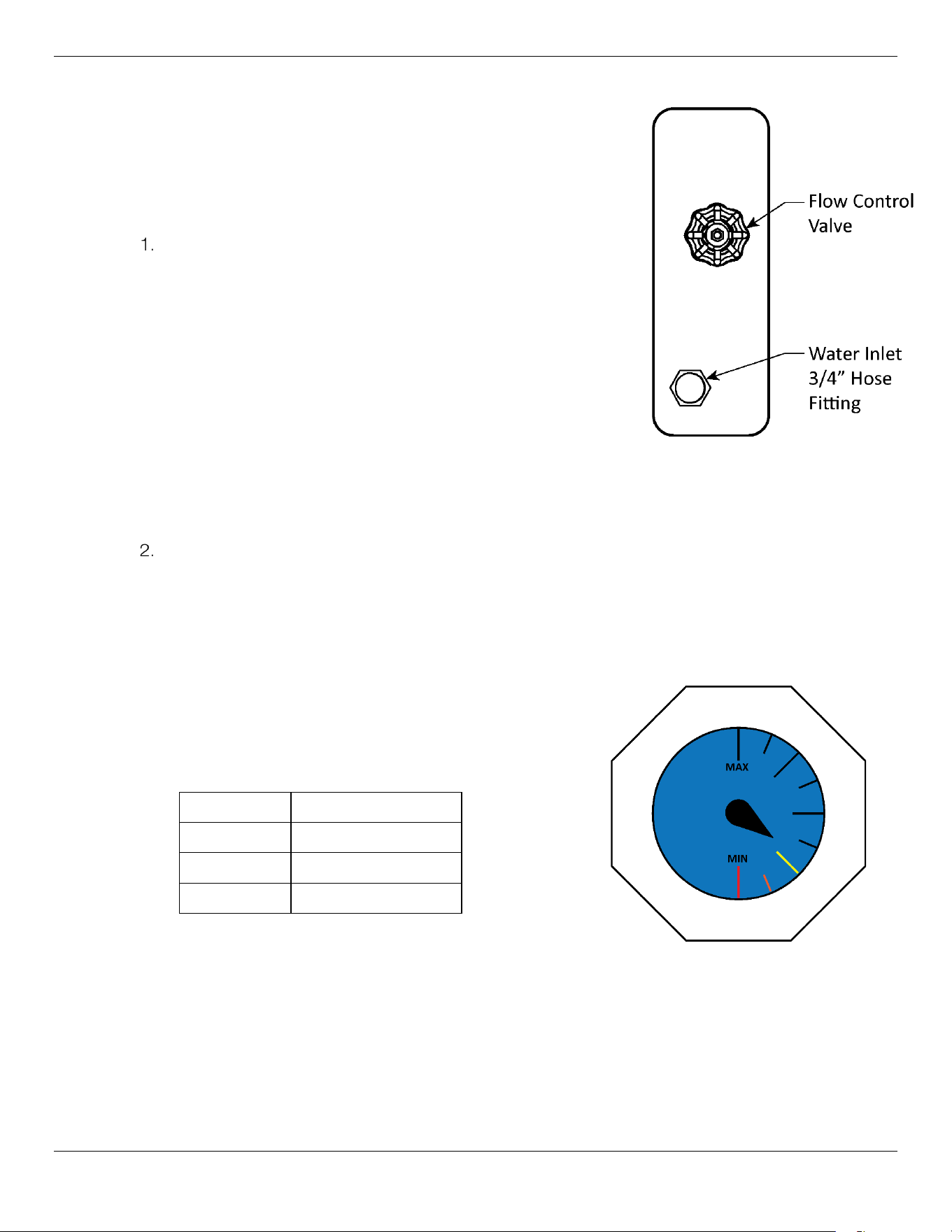
There are two options to fill the Reservoir, using a hose connected
to the 3/4 inch Water Inlet Connector with Float Valve, or manually
filling the Reservoir through the Reservoir Fill Inlet.
To fill the Reservoir:
You may connect to the Water Inlet Connector on the left side
of the unit using the standard 3/4 inch Hose fitting and a Hose
that is rated to 28 to 99.5psi / (2 to 7 kg/cm
2
) maximum water
pressure at your location. Turn on the water and verify there are
no leaks at the connection point. A Hose is not supplied with
the Cool Boss. See figure to the right.
If you are utilizing the 3/4 inch Water Inlet Connector, the
Reservoir Float Valve will shut off the water before the maximum
fill level is exceeded.
⚠
CAUTION Do not connect to a water source with a supply pressure in excess of ≈28 to
99.5psi / (2 to 7 kg/cm
2
).
Alternatively, you may manually fill the Reservoir using the Water Reservoir Inlet found below the
Reservoir Fill Level Gauge. Remove the threaded plug and fill.
Add
clean
water. Fill to the Max. fill level only, do not overfill. Monitor the Reservoir level using the
Fill Gauge located on the front of the Cool Boss. See the figure below. Water temperature must be
less than 113°F (45°C).
After filling, Replace the Threaded Plug, remove and dry any spilled water on the cool boss or floor
around the unit.
⚠ CAUTION Use only cold clean water to fill the
Cool Boss. No detergents or additives
of any kind.
Model Water Capacity
CB-16L / H ≈60 gal. / 230 liters
CB-28L / H ≈80 gal. / 300 liters
CB-36L / H ≈115 gal. / 440 liters
Cool Boss Evaporative Air Cooler 21 P/N 5900271 — January 2023 — Rev. A5
Connecting to Power
Before
connecting this unit to a power source, first verify the required voltage by studying the model
nameplate affixed to your machine. Any Cool Boss model number with an L suffix indicates 110 VAC
operation; model numbers with an H
suffix indicates 208 to 240 VAC operation (e.g. CB-16L for 110
VAC operation, CB-16H for 220 VAC operation).
It is recommended that a separate
electrical circuit servicing only the Cool Boss be provided.
If your Cool Boss is equipped with a plug not compatible with your current power source, you must
contact a licensed, certified Electrician. The Electrician will install a separate 15 Amp circuit protected
by a fuse or circuit breaker with an appropriately grounded power receptacle in accordance with all
national and local electrical codes
. Use an outlet that cannot be turned off by a switch.
No Electrician is required to use the Cool Boss with a 110 VAC power source as shipped from the
factory. Units operating at 110 VAC have the appropriate plug attached. Only units requiring 220 VAC
operation require an electrician to install the required 220 VAC plug.
⚠ DANGER
All
electrical work must be accomplished by a
licensed, certified Electrician
,
in accordance with national and local electrical codes. If you do not use a licensed,
certified Electrician, you void your warranty and put everyone who uses the cooler
in danger of injury or, in rare cases, death.
To connect the Cooler to a 220 VAC power source:
Verify the Cool Boss is
disconnected from the power source.
If it is connected, disconnect it. Do not begin to install a 220 VAC plug until you are
sure that power has been disconnected from the unit.
Verify the Cooler is configured for 220 VAC operation. Locate the Model/Serial Number plate near
the Cooler Display. The operating voltage is indicated on this data plate and should indicate 208 –
230 VAC operation. If this data plate indicates 110 VAC, then the unit cannot be run on 220 VAC.
Have a
licensed Electrician
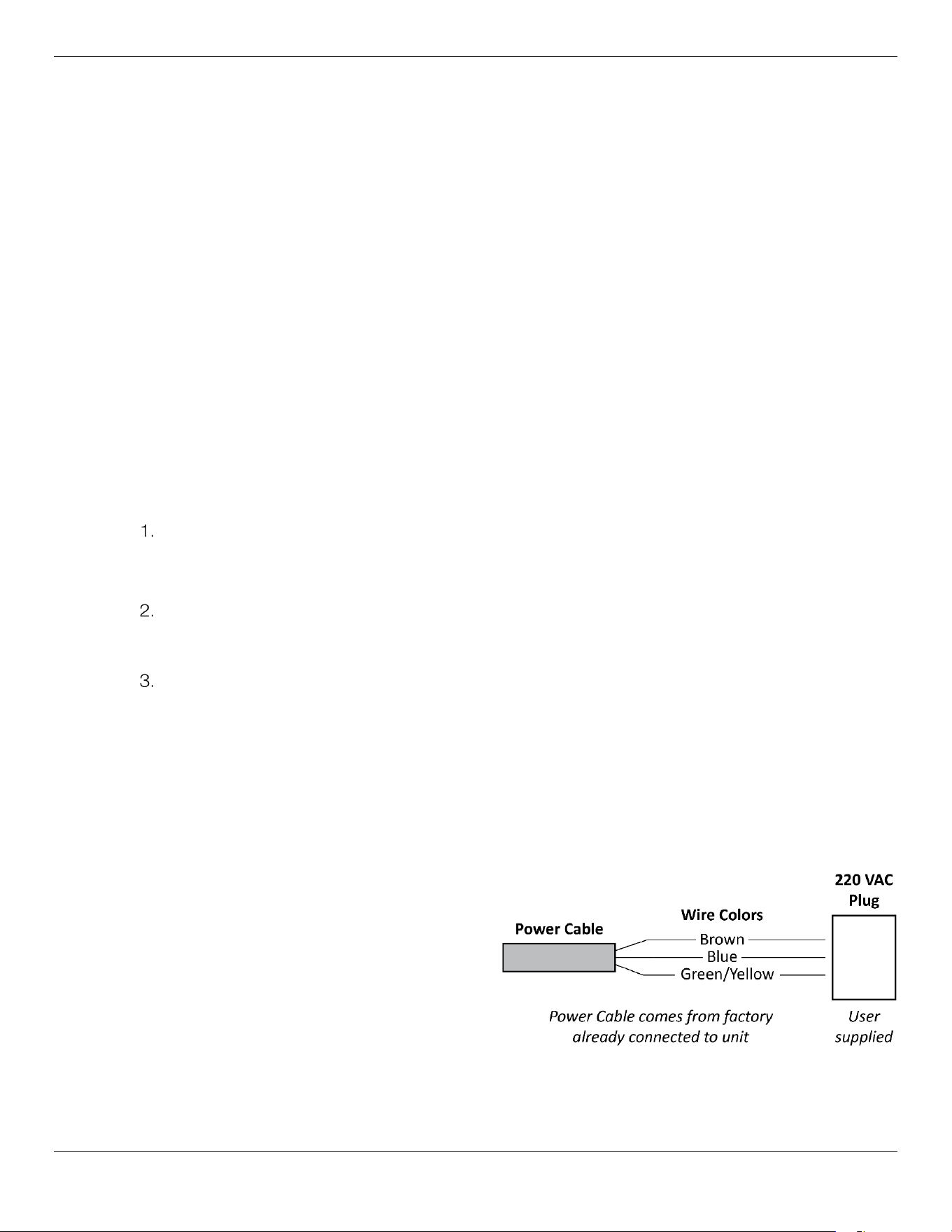
attach a 250 VAC NEMA 30A, 2-Pole, 3-Wire plug. This Plug is
not shipped with the Cool Boss. You must have the Electrician bring the correct plug.
The colors of the three exposed wires from the power cord are Brown, Blue, and Green/Yellow,
the European color code.
Important: To connect the three exposed wires to an appropriate Plug or to hard-wire them,
have your Electrician follow the electrical codes for the country and locality in which
you are using the unit.
For example, if you are using the unit for 220V in the United States, the color codes of the power
cord wiring on the Cooler correspond to:
Brown: Live
Blue: Live
Green/Yellow: Ground
If you were using the unit in a European
country, the color codes on the wiring that
comes with the Cooler correspond to:
Brown: Live
Blue: Neutral
Green/Yellow: Ground
Cool Boss Evaporative Air Cooler 22 P/N 5900271 — January 2023 — Rev. A5
Information about color code conventions in other regions and countries is available online. Make
sure your Electrician installs the Plug in accordance with all applicable national and local electrical
codes.
Plug the Cool Boss power cord into a 220 VAC outlet protected by an appropriate circuit breaker.
Test the unit to verify the Cooler is working normally.
Additional electrical information:
Damage caused by improper electrical installation (such as not grounding the unit) voids the
warranty.
⚠ WARNING Disconnect power before performing any troubleshooting or maintenance.
Make sure the unit cannot be re-energized until you are done.
⚠ WARNING Plug into a properly grounded electrical receptacle only.
⚠ WARNING Never remove the Ground Prong from the plug end of the Power Cord.
Ground Fault Circuit Interrupter (GFCI)
The Cool Boss incorporates a Ground Fault Circuit Interrupter. The GFCI acts as a Circuit Breaker
in the event of a Ground Fault. A Ground Fault occurs when the power conductor comes into
direct contact with the equipment’s frame or Ground. To test the GFCI see the Maintenance
Section.
⚠ WARNING The Cool Boss must connected to a properly grounded electrical outlet for the
GFCI to function. If the Outlet is not correctly grounded or if the Power Cord is
damaged preventing the Ground connection, the GFCI cannot protect you from
electrical shock.
Extension Cords
If an extension cord is required, use only cords with a polarized plug/receptacle no longer than 100
feet in length. Never use an extension cord that is not properly rated to handle the electrical load.
When making connections, ensure all local and national electrical codes are adhered to.
Minimum requirements for Extension Cords
25-50 Feet in length Minimum 14 AWG
Up to 100 Feet in length Minimum 12 AWG
⚠ WARNING For generator users and or areas with frequent brown-out
conditions.
Motor failure due to excessive high or low voltage is not covered under
warranty. If you plan to use the Cool Boss with a Generator or operate in an area with
frequent brown-outs, verify that the power source can provide the required current and
voltage. While voltage variations are common (±5%) both high and low voltage
episodes in excess of 15% to 20% can cause Electric Motor overheating and
premature Motor failure.
Low voltage will cause the Motor to draw more electrical current to deliver the same
amount of force to the Fan Blades. Excessive current overheats the Motor Windings,
eventually burning through the insulation and resulting in complete Motor failure.
High voltage episodes can cause premature failure of electrical and electronic
components due to overheating.

Cool Boss Evaporative Air Cooler 23 P/N 5900271 — January 2023 — Rev. A5
Operation
This section describes how to operate your Cool Boss Evaporative Cooler.
⚠ WARNING The Cool Boss should only be operated by authorized, trained personnel. This
includes reviewing and understanding the Operation Manual and safety Labels on
the Cool Boss. Do
not
allow children or impaired persons to operate Cool Boss.
⚠ WARNING
Never roll anything heavy or sharp over the power cord.
Find a location
where people will not be walking over the power cord, presenting a tripping hazard.
The product should only be operated by authorized, trained personnel.
⚠ WARNING Never operate the Cool Boss unless the Ground Fault Circuit Interrupter (GFCI) is
functioning.
⚠ WARNING Never remove the Ground Prong from the plug end of the Power Cord.
⚠ WARNING Do not run the Power Cord under a rug or other flammable material.
⚠ WARNING Use only in a well-ventilated open environment with a fresh air supply.
⚠ WARNING Do not use Cool Boss near airborne pollutants, flammable gases and
contaminates.
⚠ WARNING Ambient operating temperature must remain between 65 to 113˚F / 18 to 45˚C.
⚠ WARNING Never spray unit with water as moisture may harm the motor or other electrical
system components.
⚠ WARNING Do not operate near open containers of flammable liquids or gases.
⚠ WARNING Always maintain minimum 50 ft. / 15 meters from open flame or sparks.
⚠ WARNING The Cool Boss is not designed to be used by children or persons with reduced
physical, sensory, or mental capabilities or lack of experience and knowledge
unless they have been given supervision or instruction concerning use by a person
responsible for their safety.
⚠ WARNING Hearing protection required when Fan is operating at maximum and personnel
are closer than 10 ft. / 3 m for prolonged periods.
⚠ WARNING Never operate the Cool Boss unless all Media is securely in place.
⚠ WARNING Always dry the Media after use by turning off the Cooling and running the Fan
without circulating water. This may take from 15 to 45 minutes depending on
temperature and humidity.
Cool Boss Evaporative Air Cooler 24 P/N 5900271 — January 2023 — Rev. A5
To operate the Cool Boss for cooling:
Before starting the Cool Boss, verify that the Media Holder Splash Guard over the Media is
secured in place. This will reduce the chances of water splashing out of the Cool Boss and
creating a slipping hazard in front of the Media.
Open a Door or Window, if using the Cool Boss indoors. Sufficient airflow for intake and exhaust is
critical.
Verify that the Cool Boss is connected to a Water Source through the ¾” Hose Inlet or the Water
Reservoir is full.
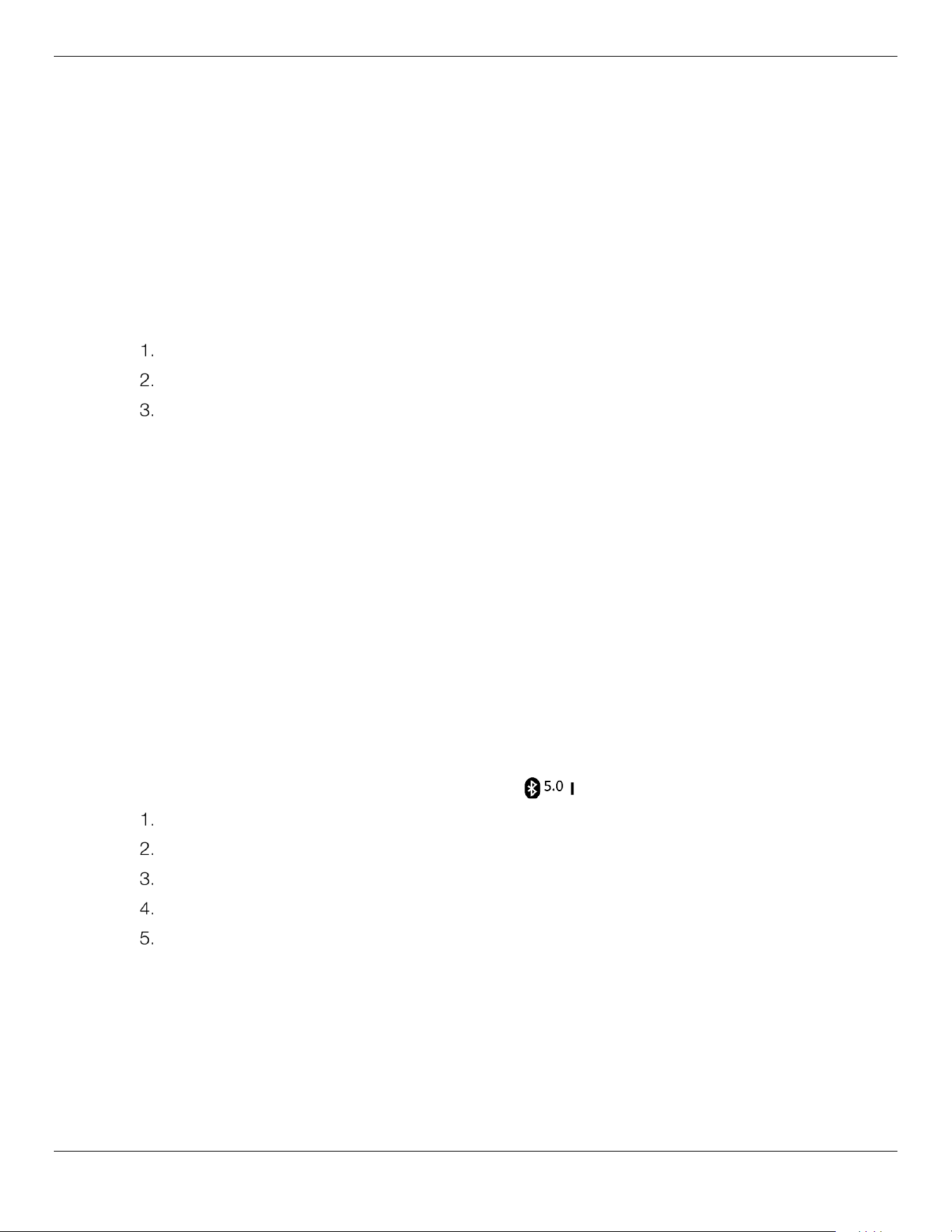
Close the Flow Control Valve (turn the Valve clockwise until it stops). See
figure to the right.
Verify at least two of the locking Casters are locked to prevent the Cool
Boss from moving with additional thrust from the Fan.
Plug-in the Cool Boss.
Press Power on the Cool Boss Fan Controls. Refer to the Status Display
on the Control Panel to determine current settings and air temperature at
the Fan.
Press the Fan button to supply power to the Fan. The Fan indicator will light
on the Status Display. Press Up
or Down to adjust the power setting
to 25% or less.
Verify the Low Water Indicator displays Green on the Status Display. If the
Low Water indictor displays Red , verify the water source is connected and providing water
under pressure. If filling manually, turn off the Cool Boss, unplug it from power and fill the
Reservoir.
If the Low Water Indicator is Green , Press the Cooling button once to turn on the Pump. The
Cooling indicator will light on the Status Display.
Slowly open the Flow Control Valve. Leave the Flow Control Valve on low until the top ≈30% of
the Media becomes saturated (30 seconds minimum). Once the top 30% of the Media is saturated
the Flow Valve may be slowly opened to increase the flow of water.
⚠ CAUTION Fully opening the Flow Control Valve onto dry Media will flood the Media faster than
it is capable of absorbing the water. Water will then be forced out of the Media onto
the floor and surrounding area. Carefully adjust the Flow Control to evenly saturate
the Media before increasing the flow of water onto the Media and before applying
more power to the Fan.
⚠ CAUTION Make sure there is water in the Water Reservoir before pressing Cool; if not, the
Pumps’ internal low-water switch will keep the Pump in the off condition.
⚠ WARNING Rotating Fan Blades! Keep hands, fingers, and loose clothing away from the Fan
when it is running.
Press Up or Down to adjust the Fan speed on the Control Panel or the Remote Control.
Increase the flow of water to increase cooling as the media becomes saturated.
Cool Boss Evaporative Air Cooler 25 P/N 5900271 — January 2023 — Rev. A5
To shut down the Cool Boss:
1. Close the Flow Control Valve and turn off the Pump by pressing the Cooling Button once.
2. If using the ¾ inch Water Source inlet, close the Valve supplying the water to the Cool Boss.
3. Run the Fan to dry the Media.
4. When the Media is dry press the Cool Boss power button to shut down the Cool Boss.
⚠ WARNING Always dry the Media after use by turning off the Cooling and running the Fan
without circulating water. This may take from 15 to 45 minutes depending on
temperature and humidity.
To shut down the Cool Boss using the Timer
:
Close the Flow Control Valve and turn off the Pump by pressing the Cooling Button once.
If using the ¾ inch Water Source inlet, close the Valve supplying the water to the Cool Boss.
Press the Timer button until the desired number of hours before shut-down are displayed.
The Cooler will shut down based on the time entered.
Anion Negative Ion Air Purifier Operation
The Cool Boss Anion Generator utilizes high voltage to electrically charge the air moving through the
Cool Boss. This electrical charge generates negative ions (Anions) in the air. Anions are highly effective
in removing particulates from the air.
To use the Anion Negative Ion Air Purifier function
:
Push the Anion button once on the Control Panel or the Remote Control and the Anion indicator will
illuminate on the Status Display indicating the Generator is in operation.
Push the Anion button once more to shut down the Anion generator.
Audio System Operation
The Cool Boss includes a Bluetooth v5.0 receiver that will stream audio files from your mobile device.
To use the Cool Boss Audio System with Bluetooth®:
Verify power is supplied to the Cool Boss.
Turn the Cool Boss Volume Control to a low level.
Press the Power button in the Cool Boss Audio section.
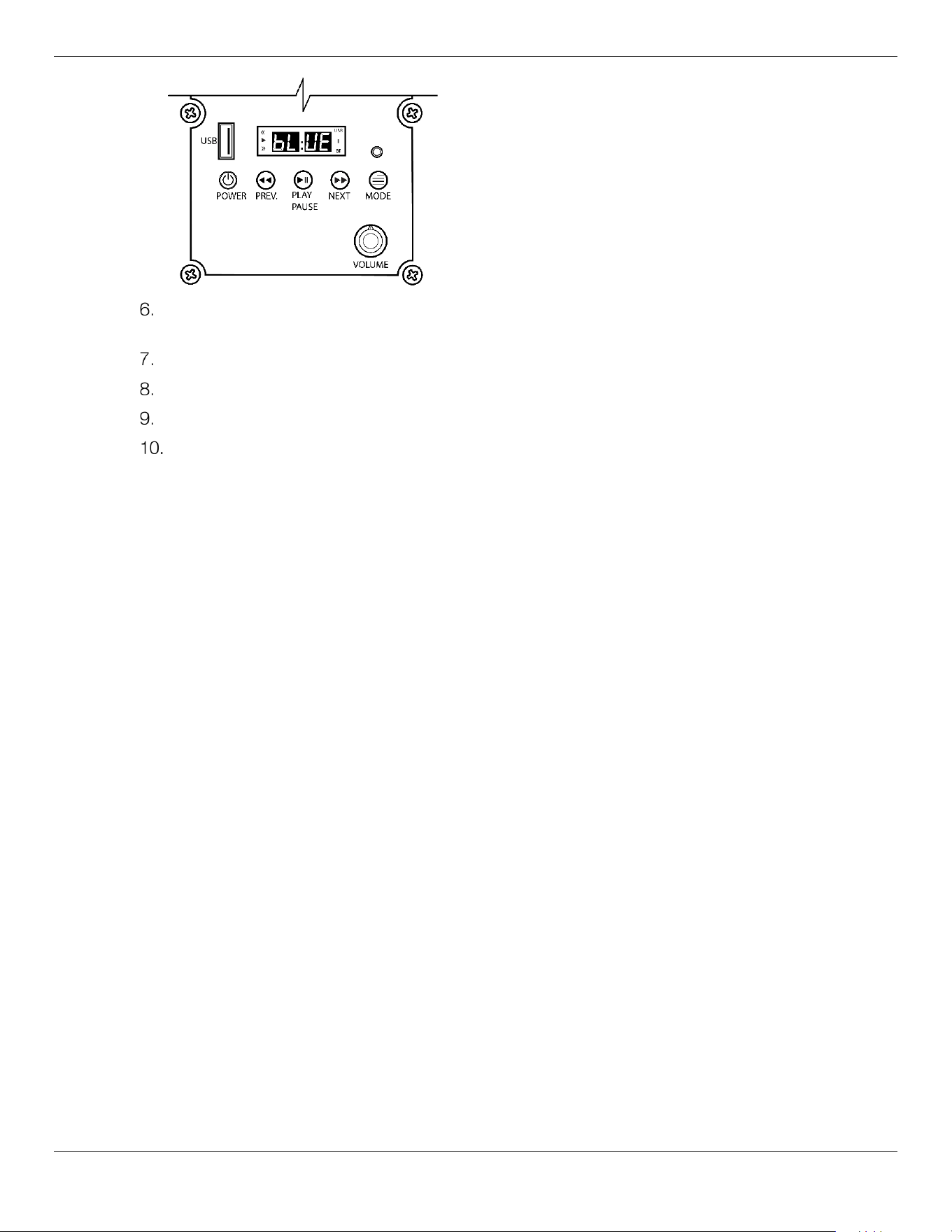
Press the Mode button until the BT is illuminated on the Audio Display section of the Cool Boss.
A chime will sound from the Cool Boss and bL:UE will appear on the audio display. Refer to the
figure below.
Bluetooth
Cool Boss Evaporative Air Cooler 26 P/N 5900271 — January 2023 — Rev. A5
Go to the Bluetooth settings on your mobile device and select XF-a from the list of available
Bluetooth devices to pair.
A chime will sound if your mobile device was successfully paired.
Select and play the desired media on your mobile device.
Adjust the volume to your desired level.
To shut down the Audio System simply press the Power Button once.
To charge your phone using the USB port:
The Cool Boss includes a USB port that will charge portable electronic devices conforming to the USB
2.0 specification, delivering up to 0.5 Amps at 5 Volts. The USB port is provided power anytime the
Cool Boss is in the on condition. The USB port will not play audio files through the Cool Boss.
⚠ CAUTION Contaminated, wet or damaged USB connectors may cause damage to the Cool
Boss Control. Always verify that the USB you are using is clean and dry before
plugging into the Cool Boss or your portable device.
1. Connect the Cool Boss to power.
2. Connect your phone to the USB connector on the Cool Boss Control Panel using an appropriate
USB cable. A USB Cable is
not
provided with the Cool Boss.
3. Press the Cool Boss Power button
not the Audio Section
power button.
4. Power should now be provided to the USB device.
Cool Boss Evaporative Air Cooler 27 P/N 5900271 — January 2023 — Rev. A5
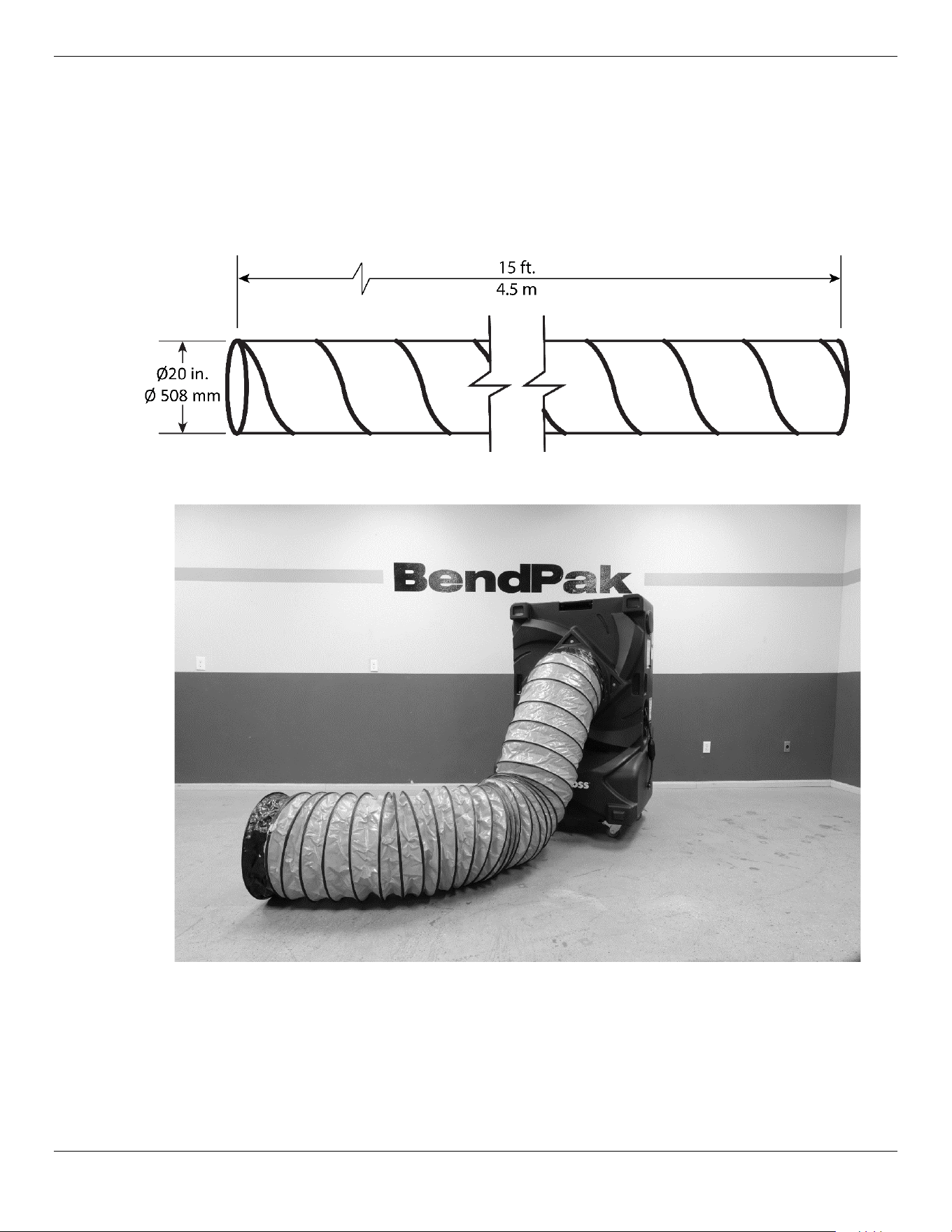
Cool Boss Accessories - Ducting Kit
A Ø20 in. / Ø 508 mm x 15 ft. / 4.5 m Reinforced Polyvinyl Flexible Ducting kit may be purchased as
an accessory for the for the CB-16L and H models only. (SKU 5150236) The Ducting Kit allows
cool air to be directed precisely where you need it. Find more information on the web at coolboss.com.
You can always find the latest information and Quick Start Guide for the Ducting kit on the Cool Boss
website.
Cool Boss Evaporative Air Cooler 28 P/N 5900271 — January 2023 — Rev. A5
Maintenance
⚠ DANGER Disconnect the unit from its power source
before
performing any maintenance!
Make sure the unit is locked out from power and cannot be energized while
maintenance is being performed. If your organization has Lockout/Tag out policies,
make sure to implement them before servicing the Cool Boss.
⚠ WARNING Rotating Fan Blades can cause serious injury! Keep hands and loose clothing clear!
⚠ WARNING Disconnect the Power Cord when cleaning the Cool Boss and exercise care to
avoid splashing water on the motor or internal electronics.
To maintain the Cool Boss:
• Daily
. Turn off the Cooling Pump and run the Fan to dry the Media and inhibit the growth of
bacteria, mold, and mildew. Typically, Media drying can take 15 to 60 minutes depending on the
current temperature and humidity.
• Weekly
. Change the Cool Boss Reservoir water when it gets dirty. Dirt and other pollutants from the
environment will get into the water and reservoir. Cool Boss recommends draining and cleaning
the Reservoir weekly or more often depending on the frequency of use and the cleanliness of the
environment.
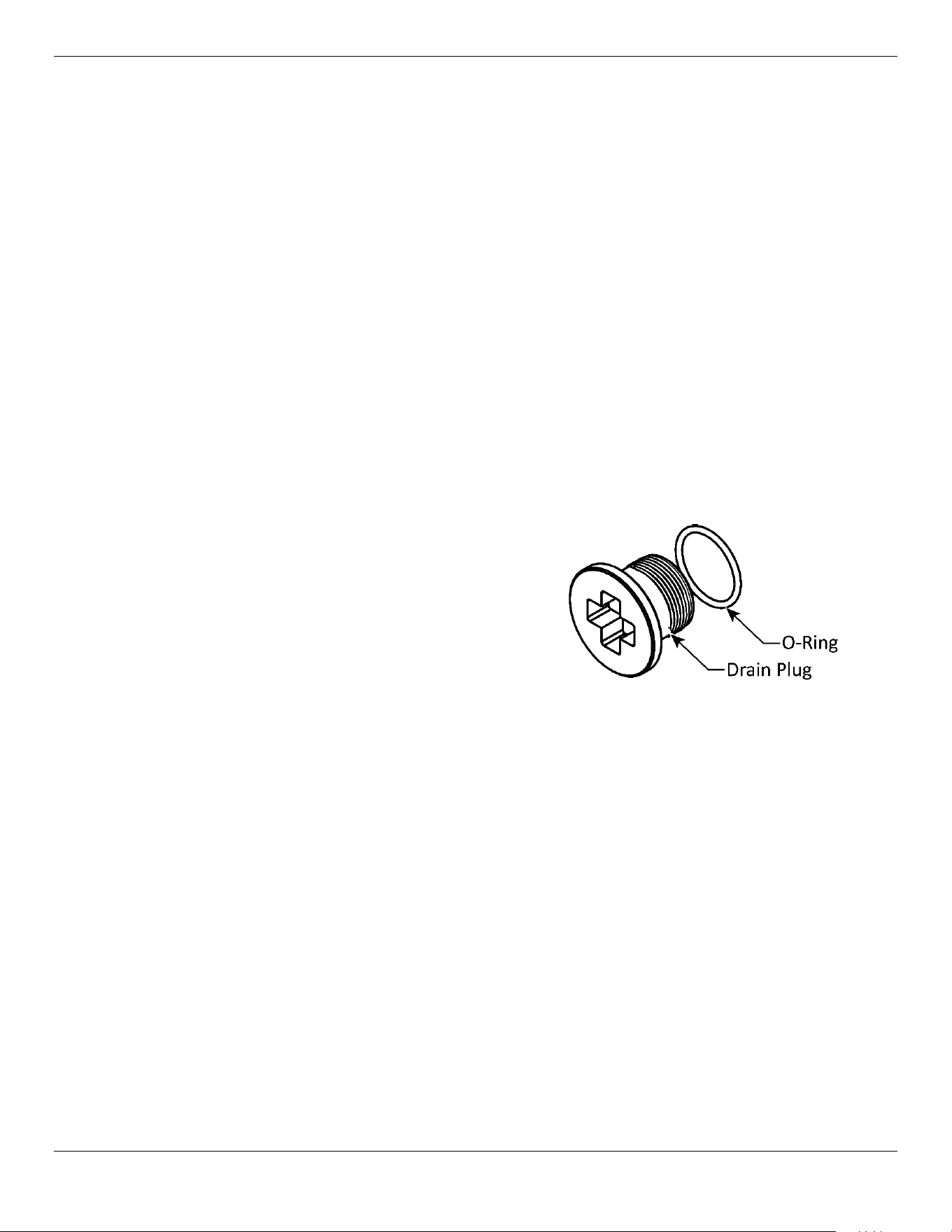
⚠ CAUTION Exercise care when removing the
Drain Plug on the bottom of the
Reservoir. There is a sealing O-Ring
on this plug that may stick to the
housing and later fall to the ground
and possibly become lost. See figure
to the right.
• Weekly
. Drain and clean the Cool Boss Water Reservoir. Dirt and other pollutants from the
environment can settle in the Cool Boss Water Reservoir. Regular cleaning can remove these
contaminants and reduce the build-up of minerals.
• Monthly
. Check the GFCI function monthly. Test the GFCI on the Cool Boss Power Cord once a
month to ensure it is working and protecting you from electric shock.
• Monthly
. Clean the outside of the unit. Use no harsh chemicals. Unplug the Cool Boss and wipe
down the outside of the unit with a damp cloth. The frequency of use and the cleanliness of the
environment will affect the frequency of cleaning required.
⚠ WARNING Do not spray the Cool Boss with water. The electronics are not sealed. Water can
damage the motor and/or other parts of the electrical system.
• Monthly
. Empty the Reservoir and clean it.
• Monthly
. Remove the Media and clean as detailed below. Dirt and other pollutants from the
environment will become caught in the Media. Clean it regularly to keep the air fresh and clean.
⚠ WARNING Do not operate your Cooler if you find maintenance issues; instead, remove it from
service. Assistance with your Evaporative Cooler is available from your dealer, by calling
Cool Boss at (805) 933-9970, or by emailing support@coolboss.com. You may
also contact Cool Boss for parts replacement (please have the serial number and model
number of your unit available).
Cool Boss Evaporative Air Cooler 29 P/N 5900271 — January 2023 — Rev. A5
To clean the Reservoir:
The Media must be dry before removing. If the Media is wet, run the Fan without running the
Cooling Pump until dry.
Turn off and then unplug the Cool Boss.
⚠ WARNING Disconnect the unit from its power source before performing any maintenance!
Make sure the unit is locked out from power and cannot be energized while
maintenance is being performed. If your organization has Lockout/Tag out policies,
make sure to implement them before servicing the Cool Boss.
Remove and retain the three Splash Guard Fasteners securing the Media Holder Splash Guard and
then remove the Splash Guard.
Remove the center Media first by pulling the top of the Media away from the Cool Boss. You may
need to apply a little pressure to get the Media out. Be careful not to damage the Media.
Remove the remaining Media in the same manner.
Remove the plug at the bottom of the Reservoir and drain into a container or appropriate drain.
⚠ CAUTION Take care to retain the O-Ring that provides a seal between the Plug and the
Reservoir.
Remove any residual water with rags or a wet dry vacuum.
Wipe with clean rags and remove any mineral deposits. Use no harsh chemicals.
Refill the Reservoir and replace the Media. The Cool boss is ready to use.
Tip
Cool Boss recommends wearing gloves when handling the Media.
To clean the Media:
The Media must be dry before removing. If the Pad is wet, run the Fan without running the Cooling
Pump until the Pad is dry.
Turn off and then unplug the Cool Boss.
⚠ WARNING Disconnect the unit from its power source before performing any maintenance!
Make sure the unit is locked out from power and cannot be energized while
maintenance is being performed. If your organization has Lockout/Tag out policies,
make sure to implement them before servicing the Cool Boss.
Remove and retain the three Splash Guard Fasteners securing the Media Holder Splash Guard and
then remove the Splash Guard.
Remove the center Media first by pulling the top of the Media away from the Cool Boss. You may
need to apply a little pressure to get the Media out. Be careful not to damage the Media.
Remove the remaining Media in the same manner.
Rinse the Media under running water to clean and use a soft brush or rag to gently remove
accumulated dirt. Do
not
use highly pressurized water or air to clean the Media.
Dry the Media before attempting to reinstall in the Cool Boss.
Put the Media back in place. Install the bottom first and then the top. You may need to apply
gentle pressure to get the top of the pad into place.
Cool Boss Evaporative Air Cooler 30 P/N 5900271 — January 2023 — Rev. A5
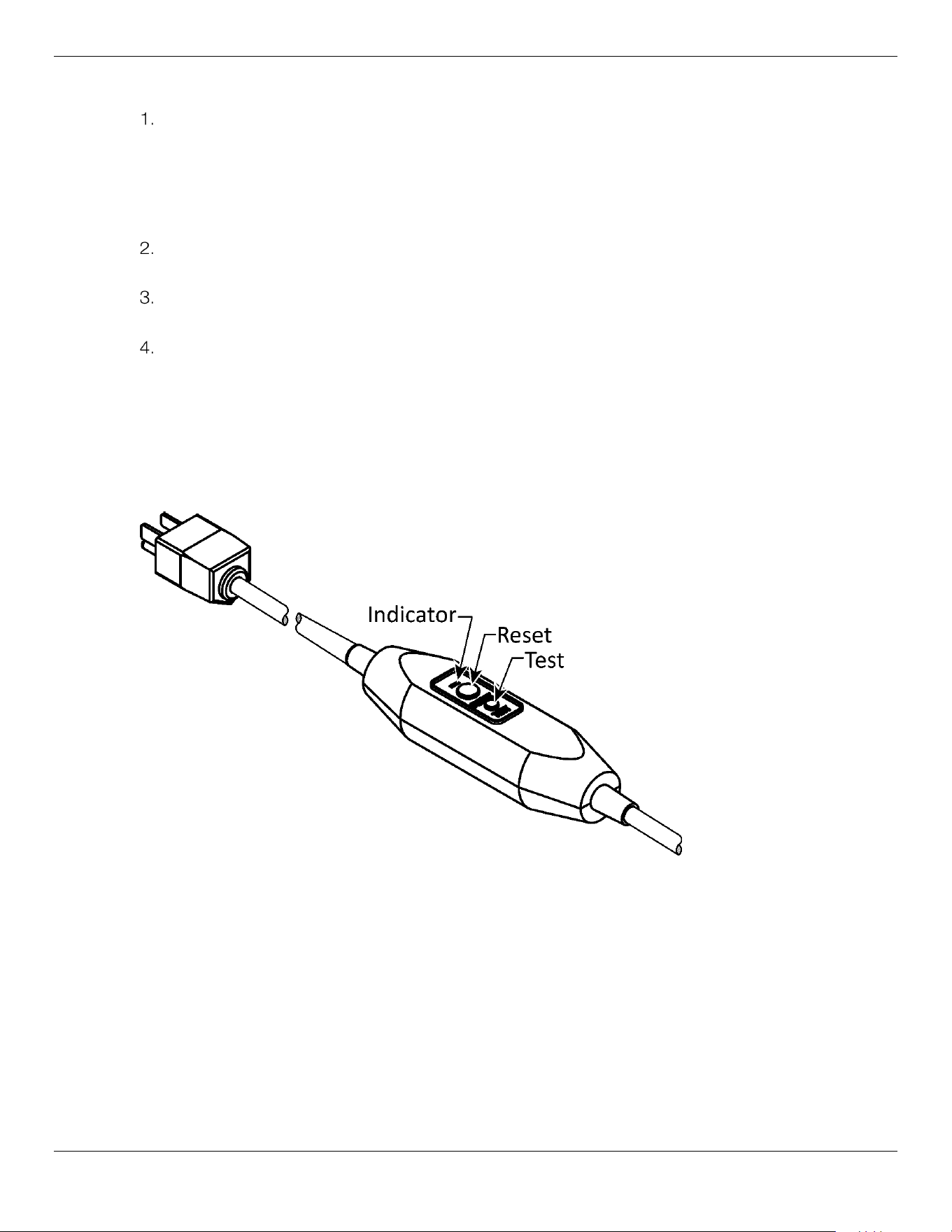
To test the GFCI incorporated into the Cool Boss Power Cord:
Plug the cord into a properly grounded wall outlet. The indicator should be illuminated. Refer to the
figure below.
a. If not, check the wall outlet for power.
b. If power is present at the outlet, the Power Cord or the GFCI is defective and requires
replacement.
Press the small Test button. The Indicator should go out and no power should be available at the
Cool Boss.
Press the Reset Button and the Indicator should be illuminated again. The Cool Boss should now
be provided power and is ready for use.
If the GFCI does not function, take the unit out of service, contact your dealer or Cool Boss
Support at coolboss.com/support, via email at support@coolboss.com, or by phone at
(800) 253-2363.
⚠ WARNING Do not use the Cool Boss if the GFCI fails this test.
⚠ WARNING The GFCI does not protect against electrical shock due to contact with both circuit
conductors or a fault in the wiring supplying the GFCI.
⚠ WARNING Do not operate your Cooler if you find maintenance issues; instead, remove it from
service, then Assistance with your Evaporative Cooler is available from your dealer,
by calling Cool Boss at (805) 933-9970, or by emailing
support@coolboss.com. You may also contact Cool Boss for parts
replacement (please have the serial number and model number of your unit
available).
To store the Cool Boss:
1. Drain the Reservoir and wipe clean and dry.
2. Secure the electrical cord.
3. Cover the Cool Boss Cooler to prevent dust build-up and store in a dry, protected area.
Cool Boss Evaporative Air Cooler 31 P/N 5900271 — January 2023 — Rev. A5
Troubleshooting
⚠ WARNING This Evaporative Cooler uses electrical energy; if your organization has
Lockout/Tagout policies, make sure to implement them before performing any
Troubleshooting.
Issue Probable Cause Action to Take
Control Panel
inoperative.
No power.
Circuit Breaker open.
Panel component failure.
– Check the power supply.
– Reset the circuit breaker.
– Replace the panel.
Unit not working. No power.
– Power cycle the unit on-off.
– Verify the power supply is
functional.
Fan not working or
moving slowly.
Fan is stuck.
Fan is broken.
Brown-out or low voltage.
– Check for blockage and remove.
– Repair fan.
– Correct voltage supply issue.
Motor not working. Control Panel is not working.
Motor failure
– Replace Control Panel.
– Replace motor.
Drain leaks. Drain Plug is not tight
Drain Plug is cross-threaded.
O-Ring is missing
– Tighten Drain Plug.
– Replace Plug, if thread is ruined.
– Replace O-Ring.
Fan dripping water.
Water tubing is disconnected or
leaking.
– Check internal water connections
and tubing.
Remote does not work. Battery is inoperative.
Something is obstructing
receiver or remote.
Remote is out of range of the
receiver.
– Replace both batteries (AAA 1.5 V).
– Clear the obstruction.
– The remote must be within 32-ft. /
10 m and have a direct line-of-sight
to the Cool Boss Control Panel.
The USB port will not
charge my phone.
Damaged cable or
connector(s).
– Replace the cable.
– Check for debris in the connector
– Check for bent or broken pins on
the connector(s).
The Cool Boss Audio
System is not playing
audio through the Aux.
Audio Jack.
Damaged cable or
connector(s).
– Replace the cable.
Cool Boss Evaporative Air Cooler 32 P/N 5900271 — January 2023 — Rev. A5
Issue Probable Cause Action to Take
My Bluetooth device is
not connecting.
Cool Boss Audio System not
on or not set to Bluetooth
operation.
Smart device not paired with
the Cool Boss.
Smart device is out of range.
Wireless signal interference.
Insufficient frequency available
due to the number of active
wireless devices in the
immediate area.
Interference from 4 GHz
cordless phone.
– Make sure the Cool Boss Audio
System is set to BT mode. BT should
be illuminated on the Cool Boss
audio panel.
– Verify your smart device is paired
with the Cool Boss Audio System
and the Bluetooth function is active.
– Perform the Bluetooth Pairing
procedure again.
– Place your Bluetooth device closer
to the Cool Boss – it may be out of
range.
– Move your Bluetooth device and
the Cool Boss away from wireless
sources – you may be experiencing
interference.
– Turn the Cool Boss Audio System
off then on again.
– If you have multiple Bluetooth
Devices, verify you are connected to
the correct device.
– In heavy Wi-Fi traffic areas, multiple
signals in close proximity to the Cool
Boss may take up a lot of the
frequency spectrum and the
Bluetooth may not have any available
spectrum to utilize.
– Move or replace the 4 GHz
cordless phone
Assistance with your Cool Boss is available from your dealer, by calling Cool Boss at (805) 933-
9970, or by emailing support@coolboss.com. You may also contact Cool Boss for parts
replacement (please have the serial number and model number of your unit available).
Cool Boss Evaporative Air Cooler 33 P/N 5900271 — January 2023 — Rev. A5
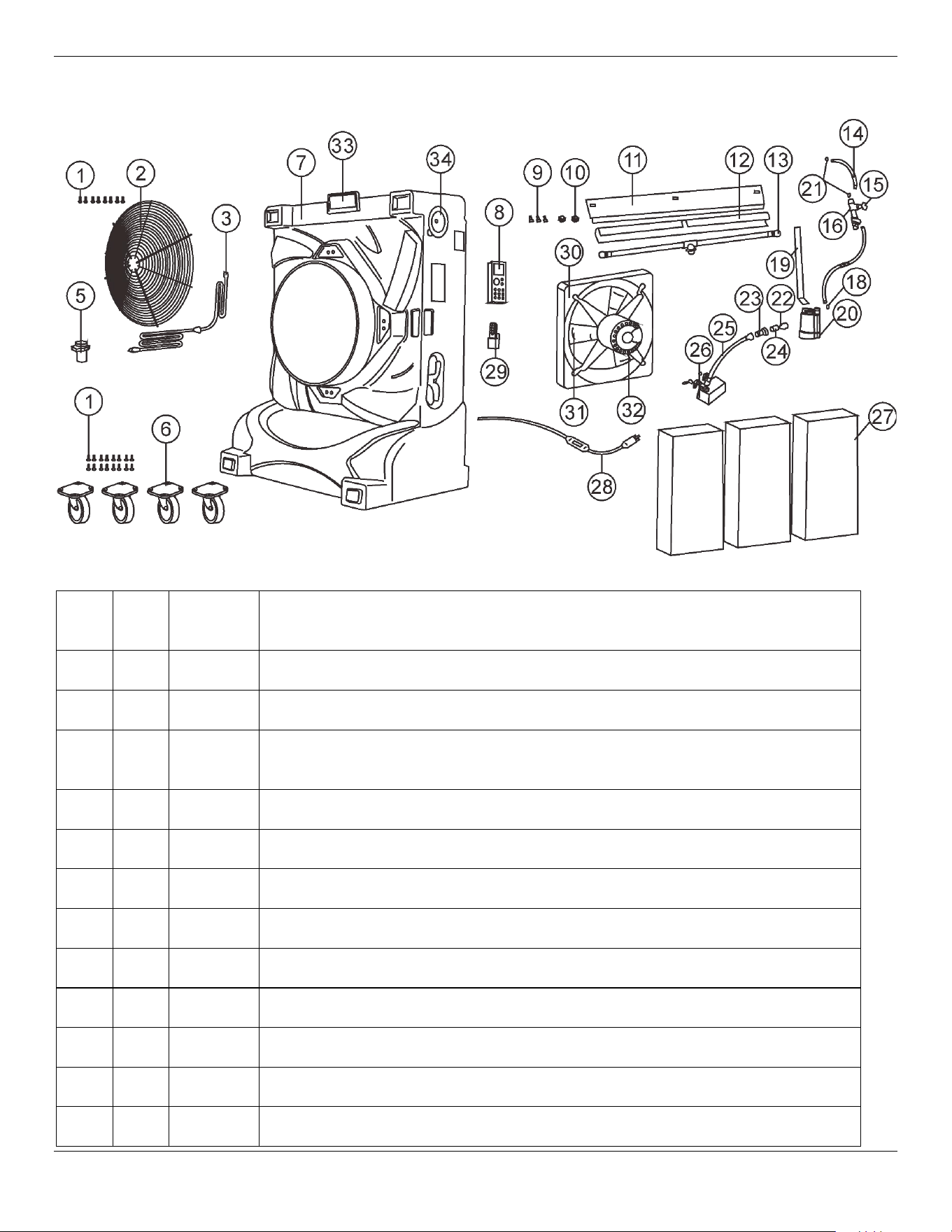
Parts Diagram
Item Qty.
Part
Number
Description
1 16 Screw
2 Grill, Protective Fan Blade
3 5326286
Electric Cord; CB-16, CB-28, CB-36 (used inside to connect electrical
components)
4
5 1 Outlet Pipe
6 1 set 5326293 Casters Set; CB-16L/CB-16H, CB-28 L/CB-28H (4-each/4" size specific)
6 1 set 5326294 Casters Set; CB-36L / CB-36H (4-each/5"; size specific)
7 1 Housing, Cooling Shell
8 1 5326288 Electronic Touch Pad Control Panel; CB-16, CB-28, CB-36 (all L/H models)
9 3 Fasteners (Splash Guard)
10 2 Switch Cover Plate
11 1 Media Holder Splash Guard
Cool Boss Evaporative Air Cooler 34 P/N 5900271 — January 2023 — Rev. A5
Item Qty. Part
Number
Description
12 1 Bonnet, Spray Bar
13 2 5326301 Spray Bar End-Cap; CB-16, CB-28, CB-36 (all L/H models) 2 per unit.
14 1 5326300
Clear Tubing; CB-16, CB-28, CB-36 (all L/H models; 3/4" inside diameter x 8'
for Constant Water Inlet Connection to Shut-off Valve and Submersible Pump
to the Spray Bar)
15 Valve, Flow Control
16 Mounting Bracket, Control Valve
17
18 Clamp, Wire Spring
19 1 Bracket, Submersible Pump Mount
20 1 5326283 Submersible Pump; CB-16L (110V)
20 1 5326284 Submersible Pump; CB-28L (110V)
20 1 5326285 Submersible Pump; CB-36L (110V)
21 2 Clamp, Wire Spring
22 1 Bolt, Float
23 1 Regulator, Inlet Water
24 1 Adapter, Hose
25 Hose, Float
26 5326295
Constant Water Inlet Shut-Off Valve; CB-16, CB-28, CB-36 (all L/H models)
(Float Valve)
27 3 5326296 Media Pads; With Black Resin Face; CB-16L / CB-16H (3-pads for each unit)
4 5326297 Media Pads; With Black Resin Face; CB-28L / CB-28H (4-pads for each unit)
5 5326298 Media Pads; With Black Resin Face; CB-6L / CB-36H (5-pads for each unit)
28 1 5326292
Electric Power Cord w/ GFCI; CB-16L, CB-28L, CB-36L (voltage specific with
110v plug attached)
29 5326299 Remote Control And Holder; CB-16, CB-28, CB-36 (all L/H models)
Cool Boss Evaporative Air Cooler 35 P/N 5900271 — January 2023 — Rev. A5
Item Qty.
Part
Number
Description
30 1 Fan Shroud (Venturi)
31 Blade, Fan
32 1 5326289 Variable Speed Fan Motor 110V; CB-16L (voltage specific)
1 5326290 Variable Speed Fan Motor 110V; CB-28L (voltage specific)
1 5326291 Variable Speed Fan Motor 110V; CB-36L (voltage specific)
33 1 Floodlight, LED
34 Speaker
35 Water Level Indicator Assy.
36 5326287
Spray Bar; CB-36L/CB-36H (size specific; distributes water to the top of the
media)
Spray Bar; CB-28L/CB-28H (size specific; distributes water to the top of the
media)
Spray Bar; CB-16L/CB-16H (size specific; distributes water to the top of the
media)
37 Anion Negative Ion Air Purifier
38 1 5326302 Fill Cap; CB-16, CB-28, CB-36 (all L/H models)
39 1 5326303 Protective Cover CB-16L /16H (size specific)
1 5326304 Protective Cover CB-28L /28H (size specific)
1 5326305 Protective Cover CB-36L /36H (size specific)
Cool Boss Evaporative Air Cooler 36 P/N 5900271 — January 2023 — Rev. A5
Labels
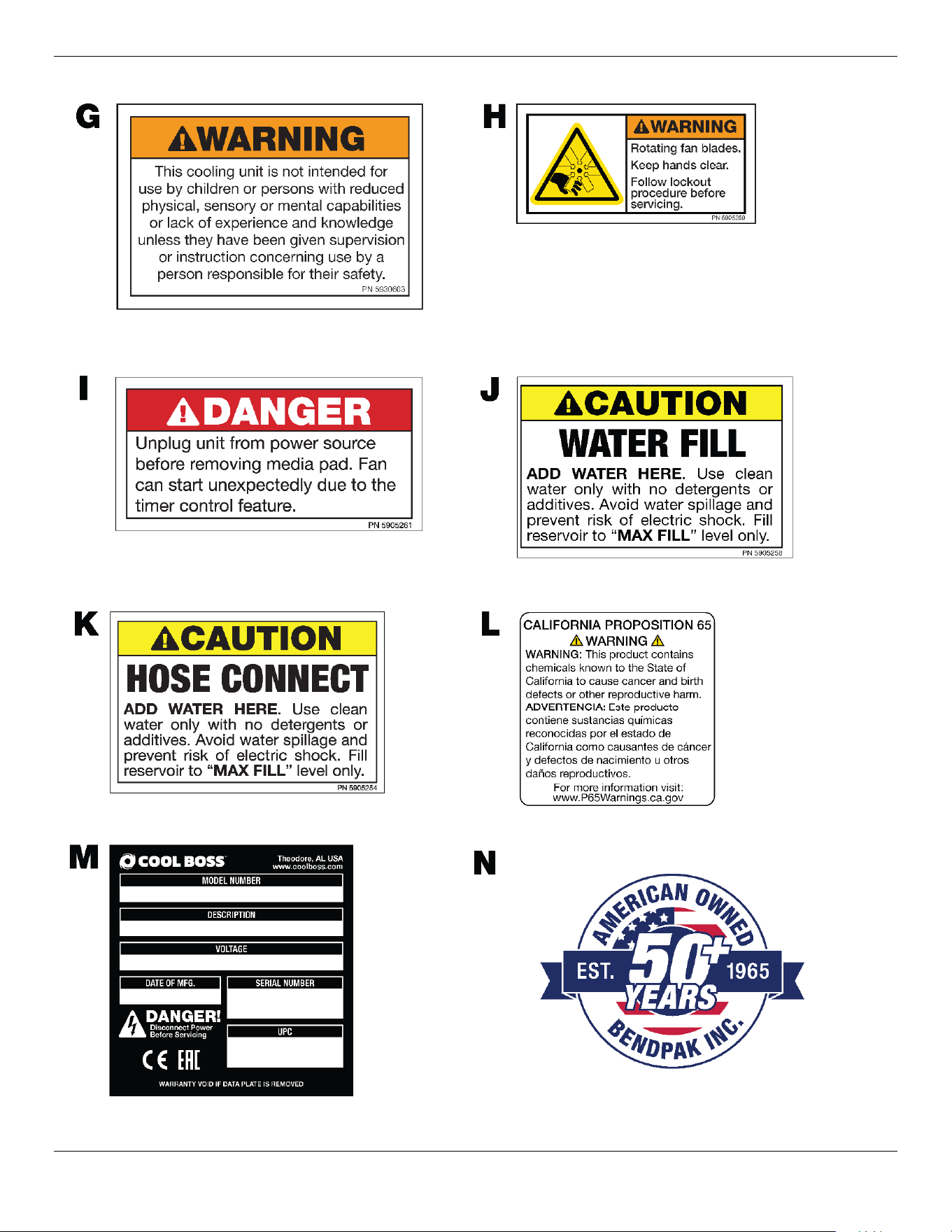
Cool Boss Evaporative Air Cooler 37 P/N 5900271 — January 2023 — Rev. A5
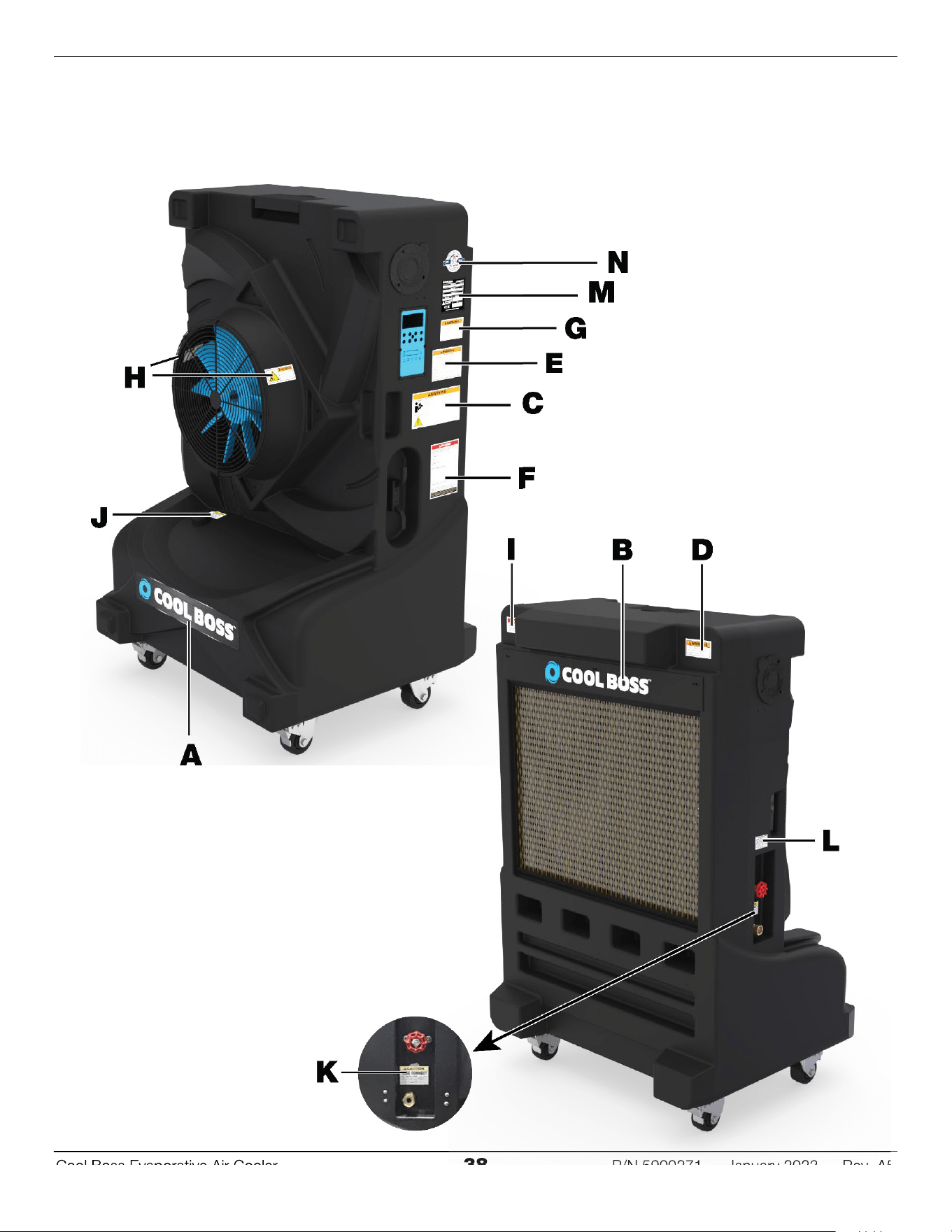
Cool Boss Evaporative Air Cooler 38 P/N 5900271 — January 2023 — Rev. A5
Cool Boss Evaporative Air Cooler
38
P/N 5900
271
January
202
3
Rev.
A
5
Cool Boss Evaporative Air Cooler 39 P/N 5900271 — January 2023 — Rev. A5
Maintenance Log