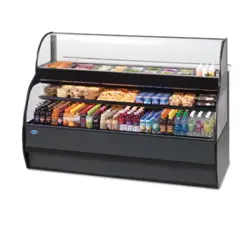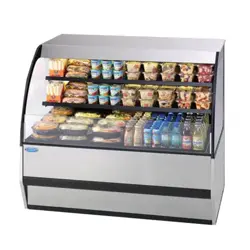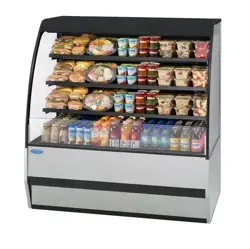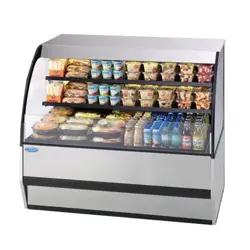
-
1
-
E2661
Rev.B Revised 06/01/25
INSTALLATION & OPERATIONS INSTRUCTIONS
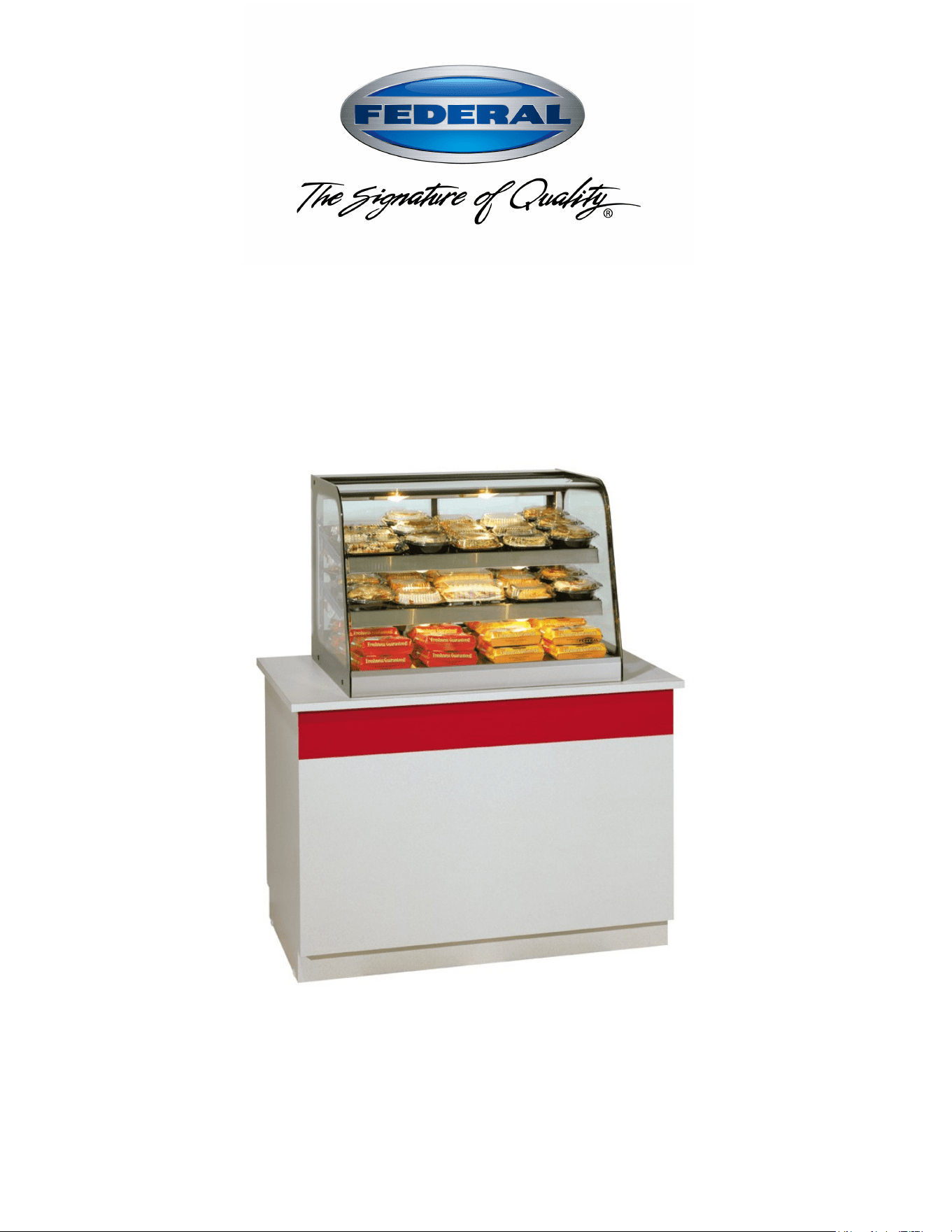
Hot Counter Displays
(Curved & Straight)
(Service & Self-Serve)
KEEP THIS MANUAL FOR FUTURE REFERENCE
Engineering and technical data are subject to change without notice.
FEDERAL INDUSTRIES 215 Federal Avenue Belleville, WI 53508
Toll Free 1(800) 356-4206 WI Phone (608) 424-3331 Fax: (608) 424-3234

-
2
-
CONTENTS
INTRODUCTION ....................................................................................................................................... 3
WARNING LABELS & SAFETY INSTRUCTIONS .............................................................................. 4
PRE-INSTALLATION PROCEDURES................................................................................................... 5
Inspection For Shipping Damage ................................................................................................ 5
GENERAL ELECTRICAL & GROUNDING ......................................................................................... 5
INSTALLATION INSTRUCTIONS ......................................................................................................... 5
General Display Case Location ................................................................................................... 5
Removing Case From Shipping Skid ...................................................................................... 5-6
Cleaning....................................................................................................................................... 6
Cabinet Preparation ..................................................................................................................... 6
Cord Options ............................................................................................................................... 7
Case Line Up Installation ............................................................................................................. 7
Top Joining Bracket .................................................................................................................... 8
Bottom Pedestal Joining .............................................................................................................. 9
END PANEL INSTALLATION .............................................................................................................. 10
SHELVING INSTALLATION & REMOVAL ...................................................................................... 11
Shelf Brackets & Shelves .......................................................................................................... 11
Shelves and shelf light quantity ................................................................................................. 11
DOOR REMOVAL INSTRUCTIONS .................................................................................................... 12
OPERATING INSTRUCTIONS ............................................................................................................. 13
Controls ..................................................................................................................................... 13
Shelves....................................................................................................................................... 13
Rear Package Shelf .................................................................................................................... 13
Initial Start Up ........................................................................................................................... 14
Placing Product Into Case ......................................................................................................... 14
Unit Shut Down ......................................................................................................................... 15
MAINTENANCE ...................................................................................................................................... 15
Water Pan Filling ....................................................................................................................... 16
Light Bulb Replacement ............................................................................................................ 16
CLEANING INSTRUCTIONS ................................................................................................................ 17
Acrylic Door & Top Cleaning ................................................................................................... 17
Daily Cleaning ........................................................................................................................... 17
Weekly Cleaning ....................................................................................................................... 18
Interior Cleaning ........................................................................................................................ 18
Exterior Cleaning ...................................................................................................................... 18
Water pan Cleaning ................................................................................................................... 19
SERVICE INFORMATION .................................................................................................................... 19
Pre-Service Checklist ................................................................................................................ 20
Special Service Situations ......................................................................................................... 20
SALE & DISPOSAL ................................................................................................................................. 21
Owner Responsibility ................................................................................................................ 21
ELECTRICAL DATA .............................................................................................................................. 21
WIRING DIAGRAMS .............................................................................................................................. 22
PARTS ........................................................................................................................................................ 23
-
3
-
INTRODUCTION
Thank you for purchasing a Federal Industries display case. This manual contains important instructions for
installing and servicing the Curved Glass Service and Self Serve. A repair parts list and wiring diagram are
also included in the manual. Read all of these documents carefully before installing or servicing your case.
NOTICE
Read this manual before installing your case. Keep this manual and refer to it before doing any
service on the equipment. Failure to do so could result in personal injury or damage to the case.
NOTICE
Installation and service of the electrical components in the case must be performed by a licensed
electrician.
The portions of this manual covering components contain technical instructions intended only for persons
qualified to perform electrical work.
DANGER
Improper or faulty hookup of electrical components in the case can result in severe injury or death.
All electrical wiring hookups must be done in accordance with all applicable local, regional, or
national standards.
SERIAL NUMBER
Record the model and serial numbers of the case for easy reference. Always refer to both model and serial
numbers in your correspondence regarding the case.
Case Model__________________________ Serial Number______________________
Condensing Unit Model________________ Serial Number______________________
This manual cannot cover every installation, use, or service situation. If you need additional information,
call or write us:
CUSTOMER SERVICE DEPARTMENT
Federal Industries
215 Federal AVE
Belleville, WI 53508
Toll Free (800) 356-4206 / WI Phone (608) 424-3331
-
4
-
WARNING LABELS & SAFETY
INSTRUCTIONS
This is the safety-alert symbol. When you see this symbol on your case or in the
manual, be alert to the potential for personal injury or damage to your equipment.
Be sure you understand all safety messages and always follow recommended precautions and safe
operating procedures.
NOTICE TO EMPLOYERS
You must make sure that everyone who installs, uses, or services your case is thoroughly
familiar with all safety information and procedures.
Important safety information is presented in this section and throughout the manual. The
Following signal words are used in the warning and safety messages:
DANGER: Severe injury or death will occur if you ignore the message.
WARNING: Severe injury or death can occur if you ignore the message.
CAUTION: Minor injury or damage to your case can occur if you ignore the message.
NOTICE: This is important installation, operation, or service information. If you ignore the
message, you may damage your case.
The warning and safety labels shown throughout this manual are placed on your Federal
Industries case at the factory. Follow all warning label instructions. If any warning or safety labels
become lost or damaged, call our customer service department at 1(800) 356-4206 for replacements.
This label is located on the back of the display case.
CAUTION: HOT
This label is located on shelves and floor of display case.
CAUTION
POWER BEFORE
RISK OF ELECTRIC
SHOCK DISCONNECT
91-12340
SERVICING UNIT.
-
5
-
PRE-INSTALLATION PROCEDURES
Inspection for Shipping Damage
You are responsible for filing all freight claims with the delivering truck line. Inspect all cartons
and crates for damage as soon as they arrive. If damage is noted to shipping crates, cartons, or if a
shortage is found, note this on the bill of lading (all copies) prior to signing.
If damage is discovered when the case is uncrated, immediately call the delivering truck line and
follow up the call with a written report indicating concealed damage to your shipment. Ask for an
immediate inspection of your concealed damage item. Crating material must be retained to show
the inspector from the truck line.
GENERAL ELECTRICAL & GROUNDING
DANGER: Improper or faulty hookup of electrical components in the
display case can result in severe injury or death.
-All models are supplied with a power cord that is properly sized to the amperage requirements of the case.
See the electrical data plate located on the rear left interior of the case for the proper circuit size for each
case.
- The cord is factory installed protruding from the bottom rear corner of the case (see the “Cord Options”
section of this manual for alternate location.). If factory installed cord must be relocated for desired
application the electrical work must be performed by a licensed electrician.
-A separate circuit for each display case is recommended to prevent other appliances on the same circuit
from overloading the circuit and causing malfunction.
-All electrical wiring hookups must be done in accordance with all applicable local, regional, or national
electrical standards
INSTALLATION INSTRUCTIONS
General Display Case Location
The case should be located where it is not subjected to the direct rays of the sun, heating ducts, grills,
radiator, or ceiling fans, nor should it be located near open doors or main door entrances. Also, avoid
locations where there are excessive air movement or air disturbances. Allow at least 6” of clearance from
end of case to any walls or partitions.
Removing Case From Shipping Skid & General Installation
CAUTION: Do not push against the top glass, front glass, end glass, doors or
door frames when removing the case from the skid or moving the case. Case
damage or glass breakage could result.
-
6
-
1. Remove crate top and sides and note missing or damaged items as explained in the pre-installation
procedures outlined above.
2. Move the case as near as possible to the final location and before removing it from the shipping skid.
3. Remove the (4) brackets that secure the case to the shipping skid. (brackets may either be screwed to
side of case or hooked into bottom of case frame)
4. Prepare cabinet according to instructions in this section that pertain to your model.
5. Lift the case off of skid and into required position. Only lift the case from the frame channels located on
each end of the case
6. Fasten each case to the cabinet top. From under the counter install the supplied (2) #12 self drilling
screws through the holes drilled shown in cabinet preparation section.
7. Rout electrical cord according to instructions in this section that pertain to your model.
8. Case must be sealed to the counter using a NSF listed sealant
9. Install end panels.
Cleaning
For initial setup, clean the case as outlined in the “Weekly Cleaning” section of this manual.
Cabinet Preparation
The CH models require (2) ½”dia. case fastening holes to be drilled through the counter top surface to
attach case to counter. Use the diagram below for hole placement location.
IMPORTANT: When placing cases in a line up the number of end panels used will be different. The cut
out and hole placement dimension will need to be adjusted for each particular line up circumstance. See
LINE UPS INTALLATION section of this manual.
CASE TOP VIEW
1/4" END
PANELS
(2) 1/2" DIA
MTG. HOLES
1-1/2" HOLE
FOR CORD
STANDARD OPT.1
11/16 DOOR HANDLE
CLEARANCE
1.53
2.76
3.03
35.0 (36" UNIT)
24.0 (24" UNIT)
47.0 (48" UNIT)
31.0 (36" UNIT)
20.0 (24" UNIT)
43.0 (48" UNIT)
FRONT
29.0
CUSTOMER SIDE
-
7
-
Countertop and floor mounted units must be sealed to the floor or counter using a NSF listed sealant. This
is to prevent liquid spillage on the adjacent surfaces of the floor or counter top from passing under
inaccessible portions of the equipment and allow for proper sanitary operation. The sealed surfaces should
be cleaned of any dirt, debris or oil and allowed to dry before sealant application.
CORD OPTIONS
Depending on how the case was ordered the power cord may shipped from the factory with the cord either
protruding out the bottom rear corner or out the back rear corner. In either case the cord can be moved to
desired location as described.
CORD OPTION1: An electrical cord connection hole is provided in the bottom rear corner of the case.
This allows the cord to protrude out the bottom of the case and down through the cabinet top into the
cabinet. A 1-1/2”dia. hole must be drilled through the counter for the power cord clearance. See diagram
above for hole placement location.
CORD OPTION 2: An electrical cord connection hole is provided in the rear control panel next to the
case’s controls. A 1-1/2”dia hole through the counter is not required for this option.
NOTE: Only a licensed electrician must perform the electrical work required to move the cord to this
optional position.
DANGER: Electric shock hazard. Do not operate unit with panels removed.
1. Remove the (8) screws holding the rear frame panel located under the door track. Remove the 7/8”
hole plug from either the bottom hole or the rear hole.
2. Disconnect the power cord connections and move the cord and cord strain relief from its present
location and move it to the desired location and reconnect the power cord. Plug open hole in frame
channel with the 7/8” hole plug removed previously.
3. Reinstall the rear frame panel.
Case Line Up Installation
Follow the “Case Installation” procedures in this manual for each display case that is going to be adjoined
in a lined up. Additional cases must be place directly next to the adjoining end of the first case
IMPORTANT: BEFORE CUTTING COUNTER TOP:
When placing cases in a line up the number of end panels used will be different. The cut out and hole
placement dimensions will need to be adjusted for each particular line up circumstance as listed below.
-REFRIGERATED TO REFRIGERATED: (1) 3/4" end panel attached to one of the cases. It does not
matter which case.
- REFRIGERATED TO DRY: (1) 3/4" end panel attached to the refrigerated case.
- REFRIGERATED TO HOT: (1) 1-1/2" end panel attached to the refrigerated case.
- DRY TO HOT: (1) 1-1/2" end panel attached to the refrigerated case.
Note: The end panel screws and plastic spacers are not used on the case that does not get an end panel
when being butted up to a case with an end panel. Remove them from case and discard.
Once the cases are placed together with proper end panel(s). They will need to be pushed together as close
as possible keeping the front of the cases in alignment. Once the adjoining case is in proper position
complete all of the procedures outlined in the “Case Installation” section in this manual before installing
the joining kit as outlined below.
-
8
-
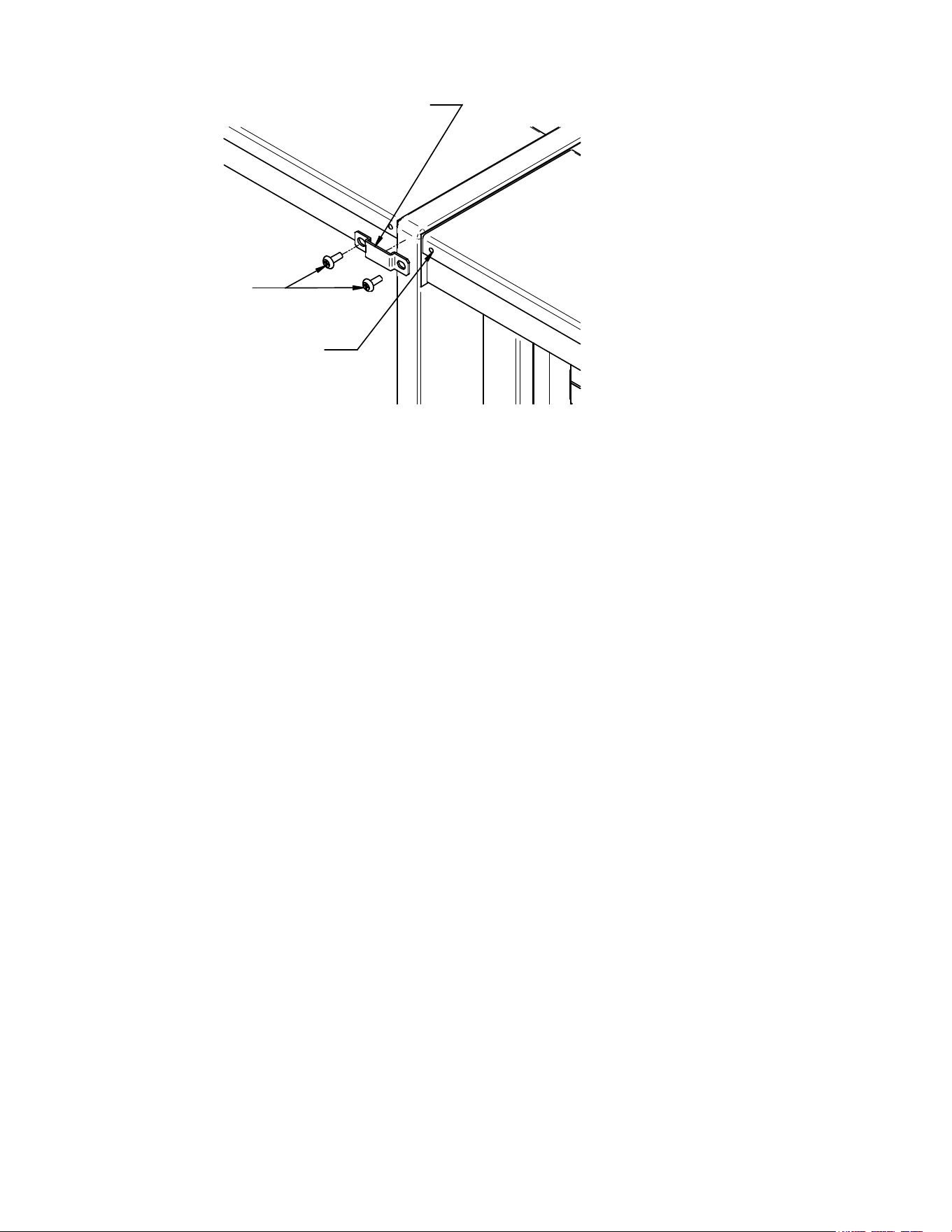
Top Joining Bracket
TOP REAR JOINING BRACKET
(2) #6 X 3/8 BLACK SCREW
BLACK PLASTIC PLUG
LOCATION
All cases joined together should have a top joining bracket installed to keep the top of the case tight
together. There are different brackets included with each case to cover most joining combination needs. If
no holes are provided, drill a 1/8”dia x ½” deep hole in location needed for bracket attachment.
1. Remove the black plug from the hole located on the upper rear corner of case.
2. Find the correct bracket shipped with case and place it over the end panel(s).
3. Hold the two cases together as much as possible to eliminate gap and fasten with screw.
-
9
-
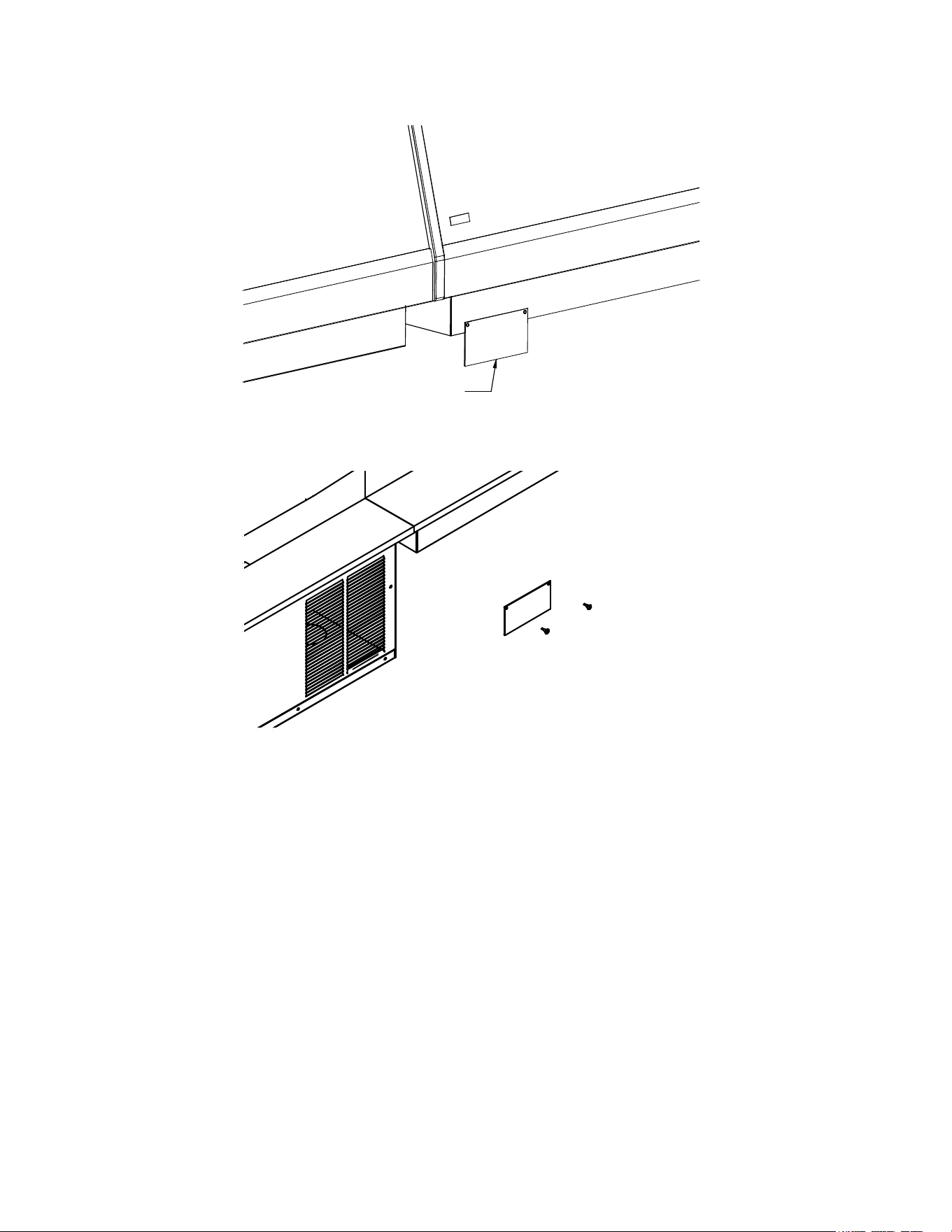
Bottom Pedestal Joining
FRONT
PEDESTAL JOINING PLATE
REAR
The CRR model cases and cases with optional pedestal have a 2-3/4” pedestal that sets on top the counter.
When these cases are joined To either a Hot or Dry case with an optional pedestal there is a gap between
the pedestals. Two joining plates are provided for these models.
The front plate is attached with self adhesive tape as follows:
1. Clean the front corner area on pedestal with rubbing alcohol.
2. Remove adhesive backing strips from pedestal joining plate.
3. Center plate over opening and press firmly into place.
The rear plate must be attached with provided screws as follows: (Screw removal will be required to access
condenser compartment so do not use adhesive backing.)
1. Center plate at top of condenser compartments directly below cutting boards.
2. Mark location of (2) screw holes in cover plate on to each condenser panel.
3. Attach cover plate with (2) self drilling screws.
-
10
-
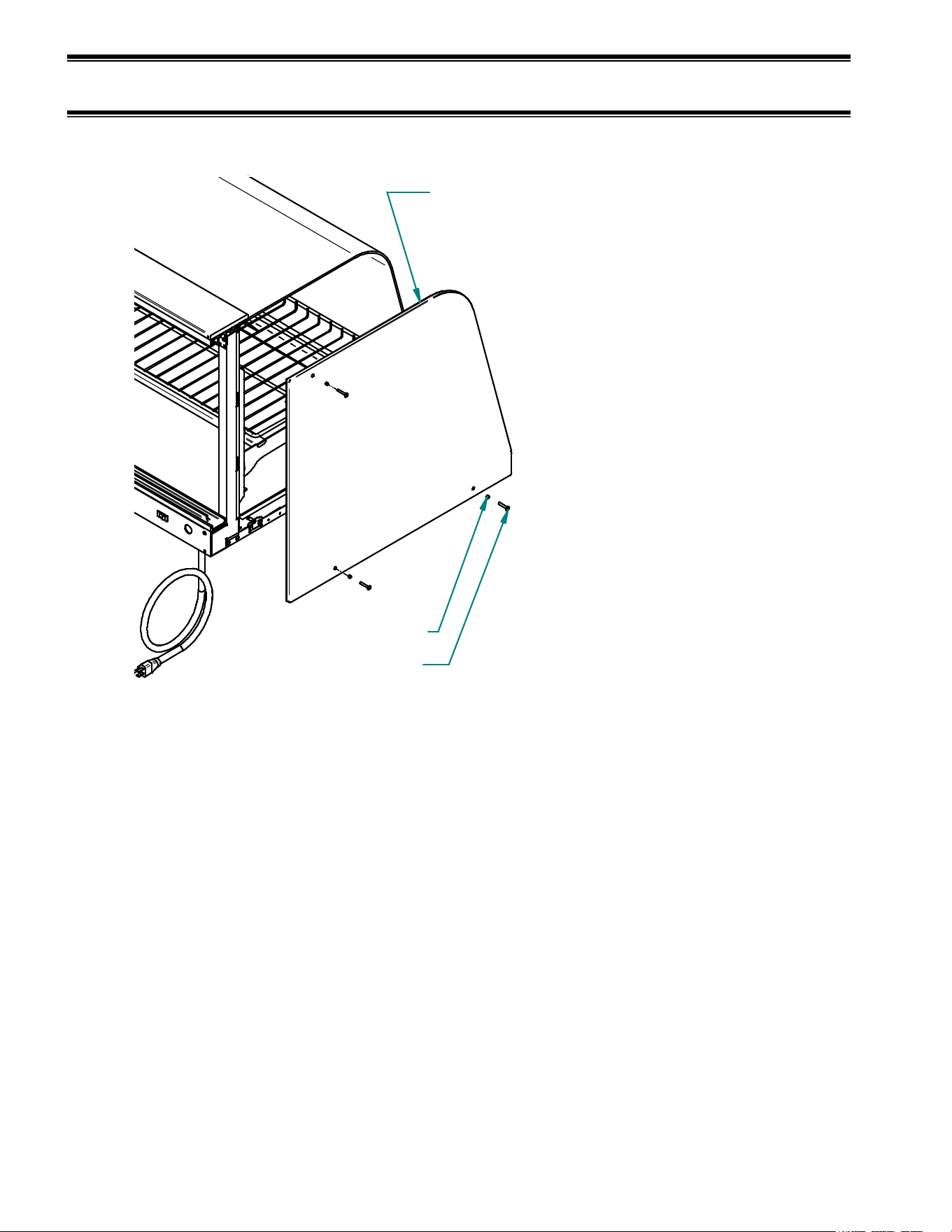
END PANEL INSTALLATION INSTRUCTION
CURVED GLASS MODELS ONLY
END GLASS
3/4" ON REFRIGERATED UNITS
1/4" ON DRY UNITS
1-1/2" BETWEEN HOT & DRY OR HOT & REFRIG
10-32 SCREW
PLASTIC SPACER
Curved Glass end panels are ordinarily shipped loose from the factory and need to be installed once the
case fastened to the counter. When placing cases in a line up the number of end panels and end panel type
will be different for each line up circumstance. See Case Line Up Installation section of this manual.
1. Place end panel on to the side of case and align holes.
2. Place a plastic spacer on to a screw and install the screw through the hole on end panel and into the
case. Do not tighten screws until all (3) screws are started and then snug screws up, but do not over
tighten or glass breakage may occur.
3. Repeat for all ends that require an end panel.
-
11
-
SHELVING INSTALLATION & REMOVAL
Shelf Brackets and Shelves
1. Turn the light switch and heat switch to the off position. Remove rear doors as described in the “Rear
Door Removal” section of this manual to allow access to interior of case.
2. Insert a longer bottom shelf bracket in the desired shelf standard slot on one side of case (bumper side
towards end glass). Follow the instructions in the illustration below. Place the additional longer
bottom shelf bracket in the same shelf standard slot on the opposite end of case. Repeat for shorter top
shelf tier.
NOTE: For best case operation the top hook of the top shelf bracket should be placed in the second slot
from the top of the shelf standard and the top hook of the bottom shelf bracket should be placed in the
fourth slot from the bottom of the shelf standard.
0v NOTCH
6v NOTCH
4
1
2
3
4
INSTALLATION
REMOVAL
2
3
1
TOP HOOK
BOTTOM TAB
SHELF BRACKET
SHELF STANDARD
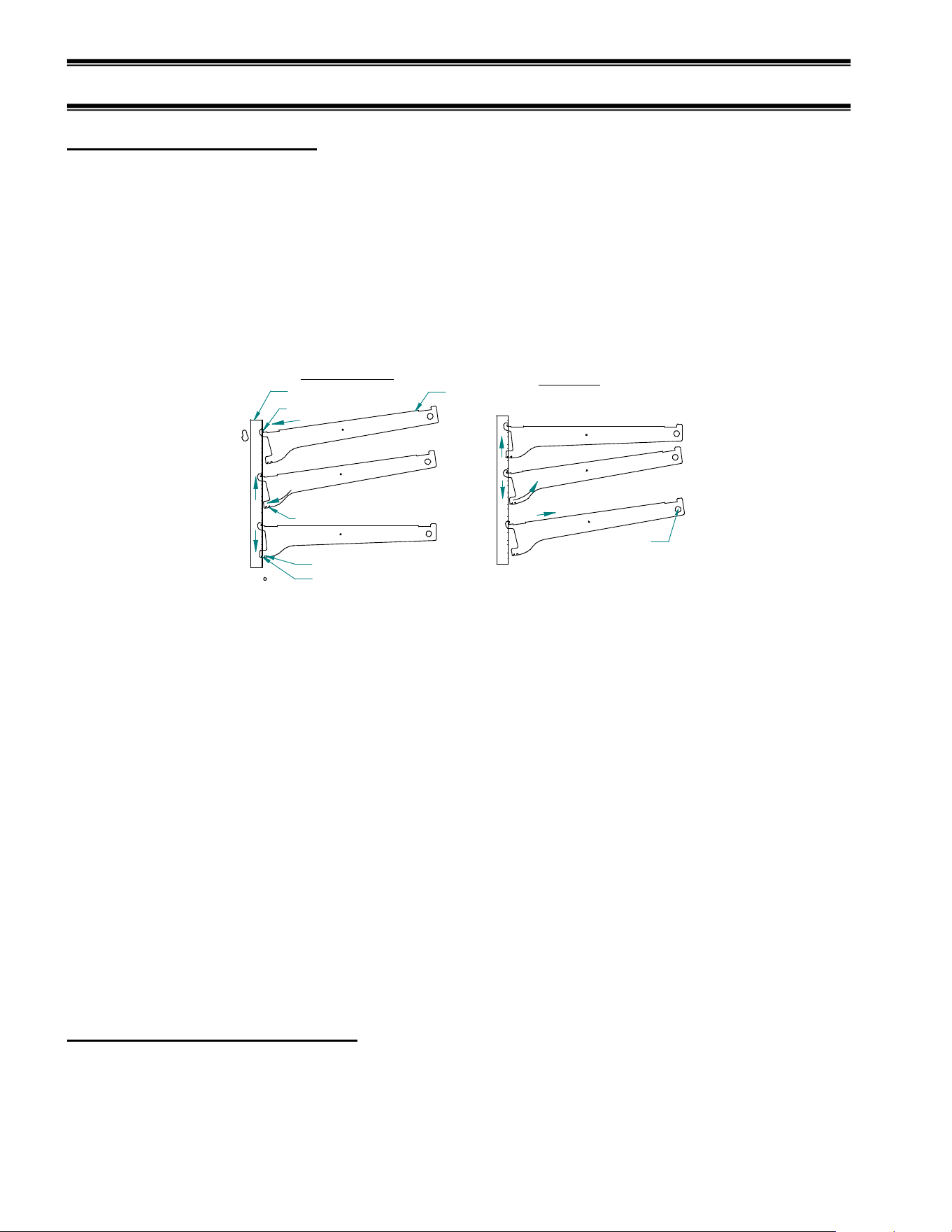
1. Place shelf bracket top hook into desired shelf
standard slot.
2. Lift shelf bracket top hook to allow shelf bracket
bottom tab to clear shelf standard slot.
3. Swing shelf bracketbottom tab into shelf standard
slot.
4. Place the desired shelf bracket notch of 0, 6, or 12
degrees onto bottom of shelf standard slot.
1. Lift shelf bracket up to allow shelf bracket notch
to clear the bottom of shelf standard slot.
2. Swing shelf bracket bottom tab out of shelf
standard slot.
3. Drop shelf bracket down to allow shelf bracket top
hook to clear top of shelf standard slot.
4. remove shelf bracket top from shelf standard slot.
CLEAR BUMPER
TOWARDS END PANEL
3. Hang one end of shelf on the shelf bracket and then the other end of shelf on the bracket on the opposite
end. The notch on the front of each side of the shelf must hook on to the tab on the front of each shelf
bracket. Repeat for additional shelf tiers. NOTE: The shelf must be slightly tilted to get through the
rear door opening. It may be easier to get both shelves into case and setting on floor before hooking
them to the shelf brackets.
IMPORTANT: On double shelf models there is a specific top and bottom shelf and each shelf is
labeled next to the shelf cord. For proper operation the top shelf must be on the top and the bottom
shelf on the bottom.
4. Plug in each shelf in by aligning the male pins on the appropriate shelf light cord plugs with the female
light sockets and push together. NOTE: Do not roll plug during insertion.
5. Re-install both rear doors by lifting top of door into top track and swinging bottom of door onto bottom
track. Install door labeled “inner door” first on inner track and door labeled “outer door” second on
outer track.
Shelves and shelf light quantity
The shelves that are supplied with the case must be used to supply proper heat to pass sanitation
requirements. Do not run case with shelves removed and replace bulbs as they burn out.
-
12
-
DOOR REMOVAL INSTRUCTIONS
ALL SERVICE CASES & SELF SERVE DRY
2. SWING BOTTOM OUT
1. LIFT UP
LOWER TRACK
UPPER TRACK
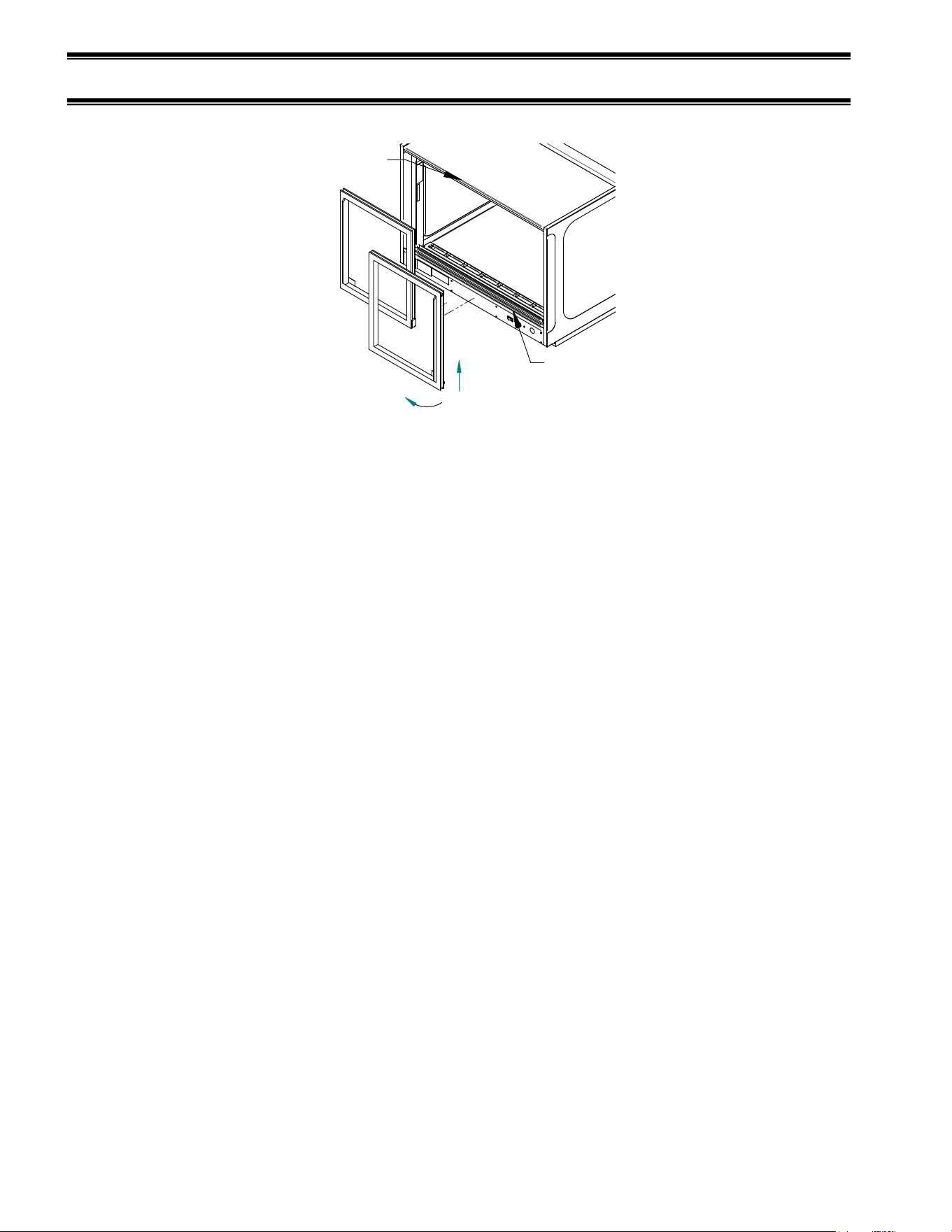
1. Start with the outer door and lift the door upward until the bottom edge of door clears the
lower track and then swing the bottom of the door outward and down out of upper track.
2. After the outer door is removed repeat the procedure for the inner door.
3. Reverse this procedure for door reinstallation. The doors are not interchangeable.
-
13
-
OPERATING INSTRUCTIONS
LIGHTS
LOW
HIGH
HEAT
OFF
ON
OFF
ON
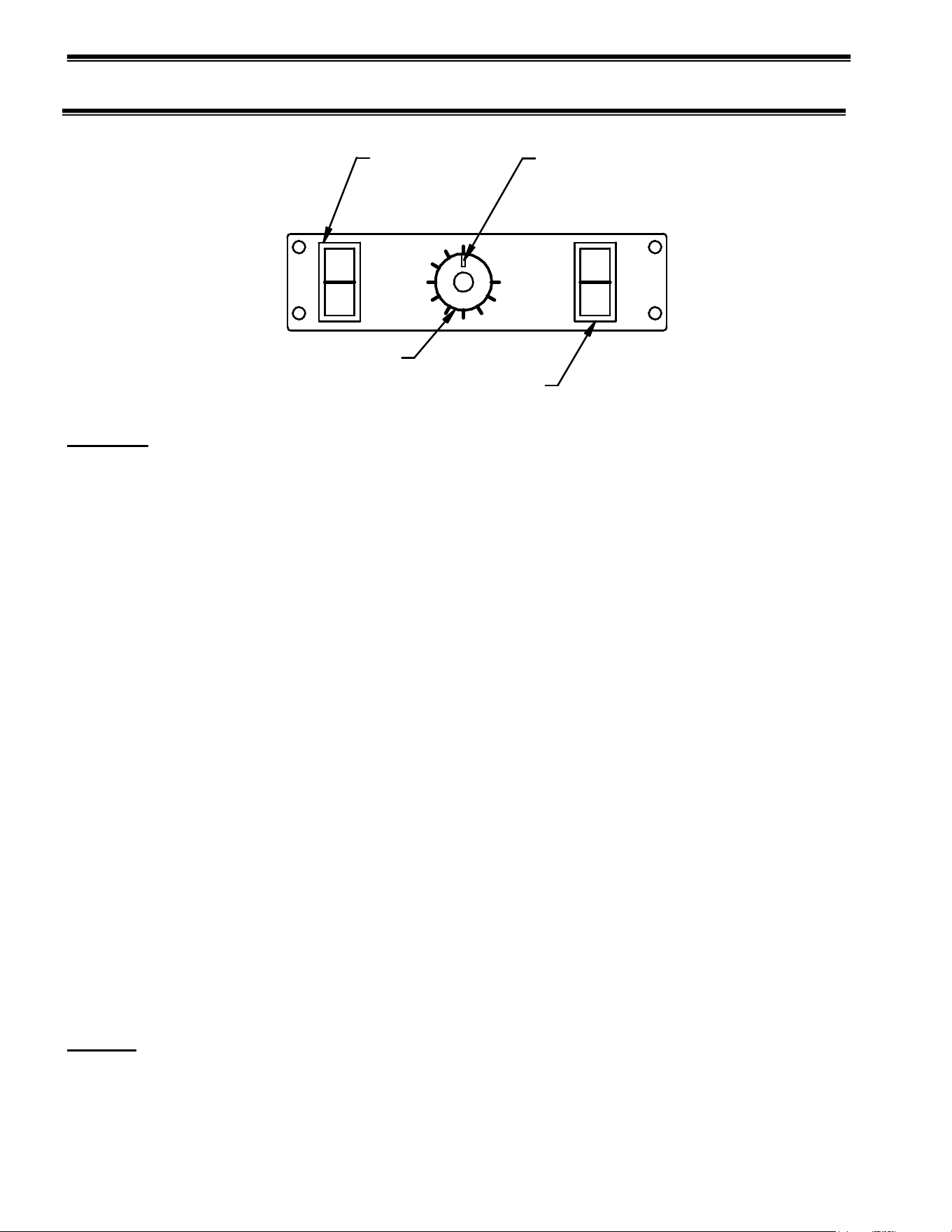
HEAT SWITCH
LIGHT SWITCH
HEAT TEMPERATURE
CONTROL KNOB
TEMPERATURE
POSITION
INDICATOR
Controls (located either in back of case or behind sliding door on front of case)
Heat Switch
This switch controls all heating and humidity functions of the unit. This switch is on when the red
portion of the switch is exposed. When this switch is on the deck and shelving heaters are on and their
temperature is controlled by the Temperature Control. The humidity pan heater is also on and will stay
on continuously.
Heat Temperature Control Knob
This control regulates the surface temperature of the deck and shelves that heat the product
and interior air of the case. Turn counter-clockwise to operate the case at lowest temperature setting.
The lowest setting will not allow the temperature to reach 140◦ F and should be used only for
non-perishable food. Turn clockwise to operate the case at the highest temperature setting. The highest
setting will allow the surface of the deck and shelves to reach temperatures in excess of 160◦ F and
should be used to initially heat the case. If necessary, decrease the temperature by turning the control
counter-clockwise no more than a quarter of a turn at a time. Allow 30 minutes for the heat in the case
to balance.
Thermometer (located either inside rear upper corner of case or on front of case)
The thermometer reads the interior air temperature of the case. This temperature reading
may be lower than actual product temperature due to higher surface temperature and the frequency
of door openings. Exact food temperatures will be obtained by probing the food with a calibrated
food thermometer with a range of at least 180◦ F.
Light Switch
This switch controls lights on the interior of the case. The switch is on when the red side of
the switch is exposed. The lights operate independently of the heat control. Lights provide
additional interior heat and should be used whenever the heat system is being used.
Water Pan (optional)
The water pan is located in the interior deck of the case and holds water to be used for humidifying
the case air. The water pan must be filled manually if humidity is desired.
Shelves
Each display is furnished with shelves that are adjustable up and down and can be tilted in two
angular positions. See “Shelving Installation & Removal” section of this manual for proper
installation, adjustment and removal of shelving.
-
14
-
Rear Package Shelf Pedestal(optional)
The rear package shelf is provided with the 2-3/4” pedestal option. It is not adjustable up and down.
And can be removed by loosening the retainer screws under the shelf and sliding out through key
hole slots.
Initial Start-Up
After unit has been located, sealed to counter, and plugged into proper voltage supply, you are now ready to
begin using your heated display case to serve your customers.
(Refer to Control Section in previous section for this instruction)
1. Clean the case thoroughly before proceeding as described in the “Weekly Cleaning Instruction” section
of this manual.
2. If optional humidity system is provided in your case fill water pan with fresh, clean water as described
in the “Water Pan Filling“ section of this manual. Using demonized water will minimize scale build-up.
3. Turn on heat switch.
4. Turn heat temperature control to clockwise to high position.
5. Turn on light switches to illuminate interior of case.
6. Allow time for case to reach proper temperature and stabilize. Place product in case once thermometer
reaches a 150 Deg F.
Adjust heat temperature control until temperature indicator reaches desired temperature. Adjust case in
small increments and allow 30 minutes for temperatures to equalize before making additional adjustments.
Full clockwise is Maximum Temperature (approx 160Deg F) Full counter clockwise is Minimum
Temperature (approx 110 Deg F with lights on). These temperatures will vary with ambient conditions
and case size..
CAUTION: Temperatures of many types of food must not drop below set levels. Check local
codes to determine minimum food temperature requirements in your area. The thermometer
provided in the case interior measures air temperature only and the heated floor and shelf surfaces
will be much hotter. Actual product temperature can only be monitored by occasionally probing
product with a thermometer probe.
Placing Product into Case
WARNING: Interior surfaces are hot. DO NOT TOUCH.
NOTICE: Packaged product containers must be able to withstand temperatures
of 200
o
F.
NOTICE: This case is designed to display preheated, precooked food products and is not
intended to be used to bring refrigerated or frozen food to serving temperature.
Food products being placed in case must be preheated to safe serving
temperature. Check local code requirements in your area.
1. Once temperature levels have stabilized to desired conditions, place prepackaged preheated product
into case. Allow enough spacing around product to allow proper circulation of heated air
throughout the case.
2. Adjust temperature during peak serving periods to maintain proper product temperature.
-
15
-
Unit Shutdown
1. Remove all product from the case.
WARNING: Interior surfaces of case are hot. DO NOT TOUCH.
2. Turn interior lights off by placing light switch to the off position.
3. Turn heat control to low position. Allow heaters to cool down. (Mark dial location so temperature
can be reset upon start-up.)
4. Turn heat switch off by placing heat switch to off position.
MAINTENANCE
CAUTION: Before any service work is performed on the case, make sure all power is disconnected
to the case.
NOTICE: Installation and service of the electrical components in the case must be performed by a
licensed electrician.
Service problems or request for repair parts from authorized service agencies, trained service personnel, or
owners should be referred to:
CUSTOMER SERVICE DEPARTMENT
Federal Industries
215 Federal AVE
Belleville, WI 53508
Toll Free: (800) 356-4206 / WI Phone (608) 424-3331
Fax: (608) 424-3234
-
16
-
WATER PAN FILLING (OPTIONAL)
Depending on the amount of usage your heated display case receives will determine the frequency the
water pan will need refilling. Water can be added at any time that is convenient for the operator. Refilling
at regular intervals will provide the most consistent humidity level in the case.
CAUTION: Water in water pan is extremely hot. Do not touch surface of pan face and
use caution when lifting water pan lid to avoid being burned from escaping
hot steam.
1. Find a clean container, preferably with a handle and a pouring spout. Note: An empty water pan
will hold approximately 1 gallon of water.
2. Fill a container with clean fresh water. Note: Using deionized water will minimize scale build-up on
water heater components. If unit is running it is best to use warm or hot water to prevent cooling of
case temperature and allowing less time for water to reach proper temperature.
3. Lift cover off of the water pan and slowly pour water into pan. Fill pan to top but do not allow water to
overflow.
CAUTION: If any water is spilled during filling procedure wipe it up immediately to
prevent a slippery floor condition.
CAUTION: Water pan cover is hot
4. Replace water pan cover and empty remaining water (if any) into sink or floor drain.
NOTICE: Water pan must be cleaned regularly to maintain proper performance and prevent
mechanical failures. (See “CLEANING WATER PAN” section in this manual)
LIGHT BULB REPLACEMENT
Light bulbs are removed by unscrewing counter clockwise. Install bulbs by screwing in clockwise.
Do not over tighten.
When replacing lights, use direct equivalent to the original bulbs. Bulbs must have protective
coating to prevent shattering if broken.
NOTICE: Lights in this case are an additional source of heat and allow unit to heat to its
maximum capacity. Replace burned out bulbs as soon as possible. Bulbs must have
protective coating to prevent shattering if broken.
-
17
-
CLEANING INSTRUCTIONS
Acrylic Doors & Top Cleaning
NOTICE: Black acrylic top panel and optional front clear acrylic lift up doors
require special washing procedures to prevent hazing and yellowing of
material.
NEVER use paper towels (wet or dry) for cleaning or drying and never use a dry towel.
NEVER use glass cleaner of any kind.
Lightly dust (not wipe) surface with a damp Micro Fiber towel or chamois. The surface can then be washed
using a small amount of dishwashing detergent such as Dawn or Joy and lukewarm water. Use a Micro
Fiber towel or chamois, applying only light pressure. The cloth or chamois must be kept free of grit by
frequently rinsing. Rinse surface with clear water and dry by blotting with a damp Micro Fiber towel or
chamois.
Daily Cleaning
The case should be cleaned thoroughly, as described in the weekly cleaning section, before it is
used for the first time.
NOTICE: Avoid splashing or soaking any electrical components with water to
prevent electrical damage to the case.
NOTICE: Shut off lights and power switches and remove all product from case.
Allow sufficient time for the unit to reach room temperature before
proceeding with cleaning.
NOTICE: Remove all products from case before proceeding with cleaning
procedure.
NOTICE: Black acrylic top panel and optional front clear lift up doors require
special washing procedures to prevent hazing and yellowing of material.
Read “Acrylic Doors & Top Cleaning” carefully.
Note: For major spills or foreign material buildup use the complete weekly cleaning instructions.
Note: Detergents are not recommended and do not use abrasive cleaners or pads to prevent
scratching of surfaces.
1. Clean all foreign materials from the door opening.
2. Wipe complete interior of case using a damp cloth.
3. Clean black acrylic plastic top as described in “Acrylic Doors & Top Cleaning” section of this
manual.
4. Clean end glass and glass front models using any common window cleaner.
Clean plastic lift up door models as described in “Acrylic Doors & Top Cleaning” section of
this manual.
5. The remaining exterior surface should be wiped down using any soapy warm water.
-
18
-
Weekly Cleaning
This procedure is recommended on a weekly basis. It may need to be performed more often if
necessary to maintain a clean, sanitary case. The case should be cleaned to this procedure before
using the first time.
NOTICE: Avoid splashing or soaking any electrical components with water to
prevent electrical damage to the case.
NOTICE: Shut off light and power switches and remove all product from case. Allow
sufficient time for the unit to reach room temperature before proceeding with
cleaning.
NOTICE: Black acrylic top panel and optional front clear lift up doors require
special washing procedures to prevent hazing and yellowing of material.
Read step 5 procedure carefully.
Interior Cleaning
Note: Detergents are not recommended and do not use abrasive cleaners or pads to prevent
scratching of surfaces.
1. Remove both rear doors as described in the “Door Removal” section of this manual.
2. Remove all interior shelving as described in the shelving installation and removal section of this
manual.
3. Remove both shelf standards from interior of case. First remove thumbscrew at bottom of shelf
standard and then slide shelf standard up to allow top key slot to clear.
4. Clean the entire interior of the case using warm soapy water. Wipe off all soapy water with a damp
cloth and allow to dry.
NOTE: Depending on the amount of usage and spillage of foreign material, some fasteners may have to be
removed and parts disassembled to allow proper cleaning of the unit.
5. Clean all shelves, shelf support bars, shelf light housings, shelf brackets, and display pans using
warm soapy water. Rinse thoroughly and allow to dry.
6. Clean all foreign material from inner and outer rear door tracks using warm soapy water. Apply a
light film of lubricant such as PAM to make the doors operate smoother.
7. Clean both sides of the doors and interior of the front glass using any common window cleaner.
8. Clean black acrylic plastic inner top as described in “Acrylic Doors & Top Cleaning” section of this
manual.
9. Clean interior of the end glass and glass front models using any common window cleaner.
Clean interior of the plastic lift up door models as described in “Acrylic Doors & Top Cleaning”
section of this manual.
10. Reassemble the case in reverse order starting with Step 6.
Exterior Cleaning
1. The exterior surfaces should be wiped down using any ammoniated cleansers or warm soapy water.
2. Clean black acrylic plastic outer top as described in “Acrylic Doors & Top Cleaning” section of this
manual.
3. Clean exterior of the end glass and glass front models using any common window cleaner.
Clean exterior of the plastic lift up door models as described in “Acrylic Doors & Top Cleaning”
section of this manual.
-
19
-
CLEANING WATER PAN (SERVICE CASE ONLY)
WARNING: Be sure water and heater temperatures have cooled sufficiently before
proceeding.
IMPORTANT: Water pan must be cleaned regularly to maintain proper performance and
prevent mechanical failures.
NOTE: Using deionized water will minimize scale build-up on water pan components.
1. Remove pan cover from water pan and remove remaining water from pan with a sponge or towel.
2. Wash entire inside of pan and cover using soapy warm water. A mild cleanser and plastic-scouring
pad may be required to clean water scale build-up. Rinse pan thoroughly after washing.
3. Reinstall cover.
SERVICE INFORMATION
Before any service work is performed
on the case, make sure all power is
disconnected to the case.
Service problems or request for repair parts from authorized service agencies, trained service personnel, or
owners should be referred to:
CUSTOMER SERVICE DEPARTMENT
Federal Industries
215 Federal AVE
Belleville, WI 53508
Toll Free: (800) 356-4206 / WI Phone (608) 424-3331
Fax: (608) 424-3234
CAUTION
RISK OF ELECTRIC SHOCK
DISCONNECT POWER
BEFORE SERVICING UNIT
-
20
-
Pre-Service Checklist
You may avoid the cost and inconvenience of an unnecessary service call by first reviewing this
checklist of frequently encountered situations that can cause unsatisfactory case performance. These
items are not covered under warranty.
CAUTION: Before servicing case turn off power at the main breaker of fuse
box.
CAUTION: Installation and service of the electrical components in the case
must be performed by a licensed electrician.
Case Does Not Operate
Check for disconnected power supply.
Check for tripped breaker or blown fuse.
Lights Do Not Operate
Check that light switch is on.
Be sure light is properly seated in the sockets.
Check that shelf cord(s) are tight in the sockets.
Floor And Shelves Do Not Heat
Check that heat switch is on.
Check that thermostat is on high.
Check that shelf cord(s) are tight in the sockets.
Be sure that the rear doors are closed and tightly sealed.
Humidity Pan Does Not Heat Or No Humidity (Service Models only)
Check that heat switch is on.
Check water level in pan
Special Service Situations
If moisture or liquid is observed around or under a Federal Industries case, an immediate
investigation should be made by qualified personnel to determine the source of the moisture or
liquid. The investigation made should determine if the case is malfunctioning or if there is a simple
housekeeping problem.
-
21
-
Moisture or liquid around or under a case is a potential slip/fall hazard for persons walking by or
working in the general area of the case. Any case malfunction or housekeeping problem that creates
a slip/fall hazard around or under a case should be corrected immediately.
SALE & DISPOSAL
Owner Responsibility
If you sell or give away your Federal Industries case you must make sure that all safety labels and
the Installation-Service Manual are included with it. If you need replacement labels or manuals,
Federal Industries will provide them free of charge. Contact the customer service department at
Federal Industries at (800) 356-4206.
The customer service department at Federal Industries should be contacted at the time of sale or
disposal of your case so records may be kept of its new location.
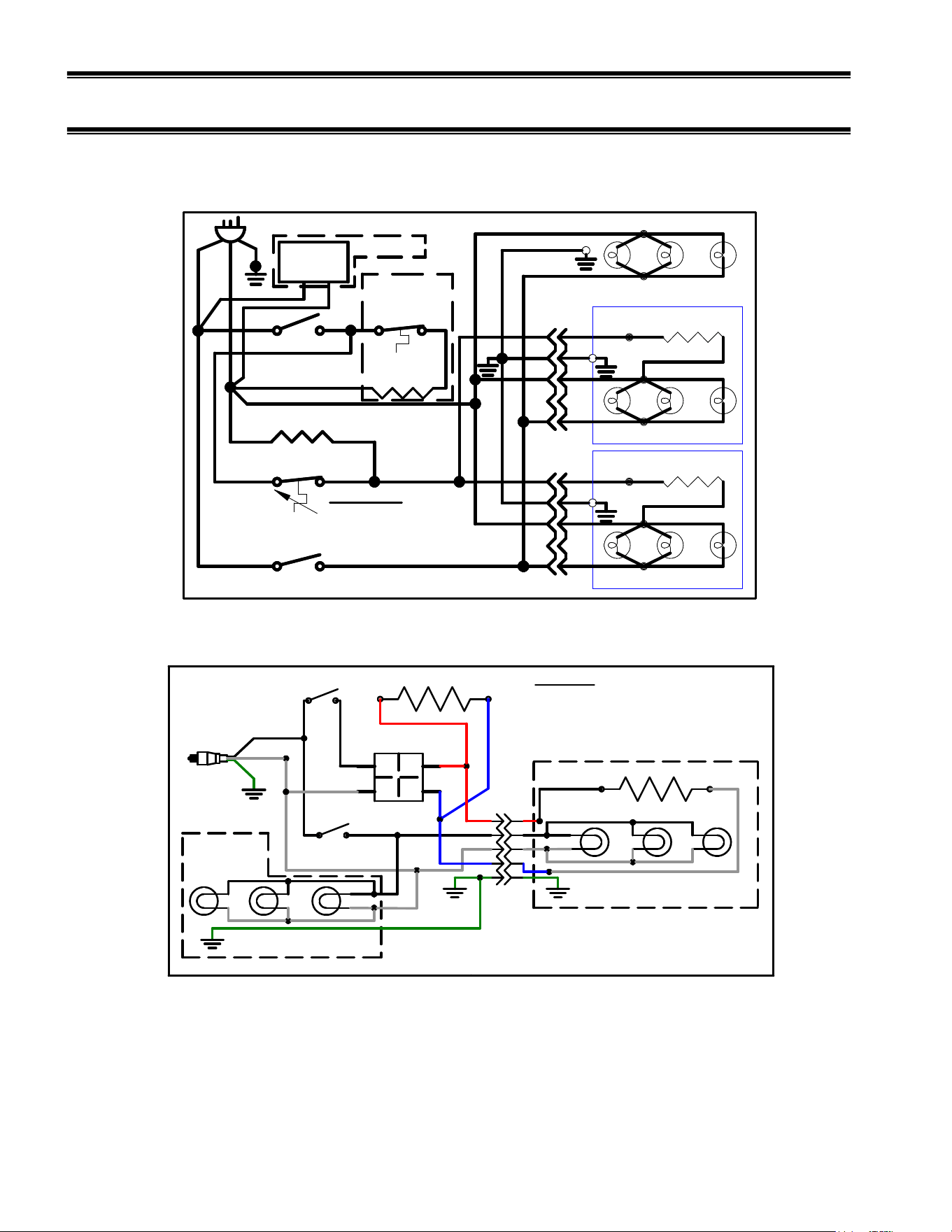
ELECTRICAL DATA
120 VOLT, 1PHASE, 60HERTZ
MODEL
TOTAL AMPS
24
28
7.
2
3628
8.5
4828 11.0
2428SSD
7.2
3628SSD
10
4828SSD
12.5
2428SSD
-
2
5.3
3628SSD
-
2
7.0
4828SSD
-
2
8.9
Refer to the data plate attached to inside of the case for electrical requirements.
-
22
-
MAIN WIRING DIAGRAMS
120 VOLT (120VOLT)
(BLK)
BLK (LIGHTS)
BLK
PLUG & CORD 120 V, 60 HZ, 1 PH
(W)
(G)
91-17147 03/20/09
G
BLK
W
TOP LIGHTS
(BLK)
(W)
HEATER
(BLK)
(W)
(W)
R
SHELF LIGHT&HEATER
G
BLK
W
(W)
HEATER
(BLK)
(W)
(W)
W
R
G
BLK
W
R
G
BLK
W
HEAT SWITCH
THERMOSTAT
FLOOR HEATER
HEATER
G
R
R
W
BLK
W
W
W
BLK
SWITCH
COLOR CODE
W = WHITE
R = RED
BLK = BLACK
G = GREEN
BLK
W
G
R
SHELF LIGHT&HEATER
LIGHT & SHELF QTY.MAY VARY BETWEEN MODELS
LIGHT BLACK WIRE TO GOLD SCREW
LIGHT SWITCH
BLK
HUMIDITY
HIGH TEMP.
(HEATERS)
OPTIONAL
DIGITAL
THERM.
BLK
W
OPTIONAL
L1
L2
H1
H2
INFINITE SWITCH
SHELF
TOP
LIGHTS
DECK HEATER
LIGHTS
HEAT
L1, BLK
N,W
GND, G
PLUG & CORD
120 V, 60 HZ, 1 PH
1
2
3
4
5
6
7
8
9
10
11
12
13
14
15
16
17
18
19
20
21
22
23
24
BLK
BLK
BLK
BLK
BLK
BLK
BLK
BLK
BLK
R
R
R
R
BLK
B
W
B
B
B
W
WW
W
W
W
W
W
G
G
G
TUBULAR HEATER
E3376 4/5/2011, JR
COLOR CODE
W = WHITE
R = REDBLK = BLACK
G = GREEN
LIGHT QTY.MAY VARY BETWEEN MODELS
LIGHT BLACK WIRE TO GOLD SCREW
25
CH__28SSD-2 MODELS
-
23
-
PARTS
SERVICE MODELS
SELF
-
SERVE MODELS
2428
3628
4828
2428SSD
3628SSD
4828SSD
Light Switch 41-11066
Heat Switch 41-11066
Thermostat 41-19317
Light Bulb 42-19089
Bulb Receptacle 42-13649
Thermometer 32-17181
Opt. Digital Therm. &
Bulb 32-18970
Heater Top Shelf 40-18964-2 40-16029-3 40-16029-4 40-18964-2 40-16029-3 40-16029-4
Heater Bottom Shelf 40-18964-1 40-16029-1 40-16029-2 40-18964-1 40-16029-1 40-16029-2
Heater Floor W/
Humidity Pan 40-18965-1 40-17214-1 40-17214-2 40-18965-1 40-17214-1 40-17214-2
Heater Floor No
Humidity Pan 40-18965 40-17214-3 40-17214-4 40-18965 40-17214-3 40-17214-4
Humidity Pan Heat 40-16027
Humidity pan
Thermostat Disk 41-17129
Shelf light Cord 43-17140
Shelf Receptacle
Harness 43-17141
Wiring Diagram 91-17147
Power Cord 43-11302
Shelf Bracket Top 67-16038-1A
Shelf Bracket Bottom 67-16038-2A
SERVICE MODELS
SELF
-
SERVE MODELS
CURVED GLASS
CH2428
CH3628
CH4828
CH2428SSD
CH3628SSD
CH4828SSD
Rear Door Inner Clear 53-17390-5 53-17390-1 53-17390-3 53-17390-5 53-17390-1 53-17390-3
Rear Door Inner
Reflective 53-17390-6 53-17390-2 53-17390-4 53-17390-6 53-17390-2 53-17390-4
Rear Door Outer Clear 53-17391-5 53-17391-1 53-17391-3 53-17391-5 53-17391-1 53-17391-3
Rear Door Outer
Reflective 53-17391-6 53-17391-2 53-17391-4 53-17391-6 53-17391-2 53-17391-4
End Panel Clear Left 51-17130-L 51-17130-L 51-17130-L 51-17130-L 51-17130-L 51-17130-L
End Panel Clear Right 51-17130-R 51-17130-R 51-17130-R 51-17130-R 51-17130-R 51-17130-R
End Panel Reflective
Left 51-17230-L 51-17230-L 51-17230-L 51-17230-L 51-17230-L 51-17230-L
End Panel Reflective
Right 51-17230-R 51-17230-R 51-17230-R 51-17230-R 51-17230-R 51-17230-R
End Panel Insulated SA4147 SA4147 SA4147 SA4147 SA4147 SA4147
Glass Front 50-16023-1 50-16023-2 50-16023-3
Door Front Top lift up 15-16036-3 15-16036-1 15-16036-2
Door Front Bottom lift up 15-16037-3 15-16037-1 15-16037-2
SERVICE MODELS
SELF
-
SERVE MODELS
STRAIGHT GLASS
EH2428
EH3628
EH4828
EH2428SSD
EH3628SSD
E
H
4828SSD
Rear Door Clear (2) 51-19173-1 51-19173-2 51-19173-3 51-19173-1 51-19173-2 51-19173-3
End Panel Clear Left 51-19175-L 51-19175-L 51-19175-L 51-19175-L 51-19175-L 51-19175-L
End Panel Clear Right 51-19175-R 51-19175-R 51-19175-R 51-19175-R 51-19175-R 51-19175-R
Glass Front 51-19174-5 51-19174-1 51-19174-3
Glass Top 51-19174-6 51-19174-2 51-19174-4
Door Front lift up 15-16037-3 15-16037-1 15-16037-2
-
24
-
SINGLE SHELF SELF
SERVICE MODELS
2428
SSD
-
2
3628SSD
-
2
4828SSD
-
2
Light Switch 41-11066
Heat Switch 41-11066
Infinite Control 41-10925
Light Bulb 42-19089
Bulb Receptacle 42-13649
Thermometer 32-17181
Heater Shelf 40-19314 40-19315 40-19316
Heater Floor 40-19309 40-19310 40-19311
Shelf light Cord 43-19330
Shelf Receptacle
Harness 43-19329
Wiring Diagram E3376
Power Cord 43-11302
Shelf Brackets 67-16038-1A
Rear Door Inner Clear 53-17390-5 53-17390-1 53-17390-3
Rear Door Inner
Reflective 53-17390-6 53-17390-2 53-17390-4
Rear Door Outer Clear 53-17391-5 53-17391-1 53-17391-3
Rear Door Outer
Reflective 53-17391-6 53-17391-2 53-17391-4
End Panel Clear Left 51-17130-L 51-17130-L 51-17130-L
End Panel Clear Right 51-17130-R 51-17130-R 51-17130-R
End Panel Reflective
Left 51-17230-L 51-17230-L 51-17230-L
End Panel Reflective
Right 51-17230-R 51-17230-R 51-17230-R
End Panel Insulated SA4147 SA4147 SA4147
Door Front Top lift up 15-19302-3 15-19302-1 15-19302-2
Door Front Bottom lift up 15-19303-3 15-19303-1 15-19303-2
California Residents Only.
WARNING
This product can expose you to chemicals including chromium which is known to the State of California to
cause cancer and birth defects or other reproductive harm. For more information go to
www.P65Warnings.ca.gov