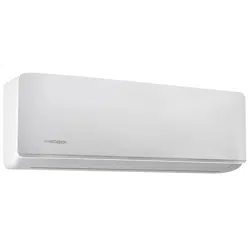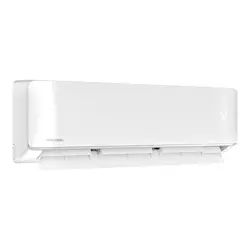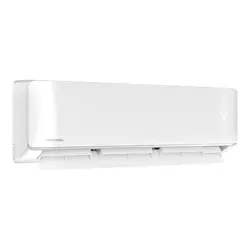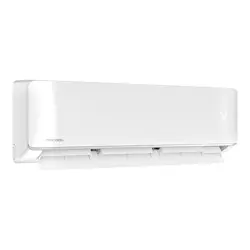
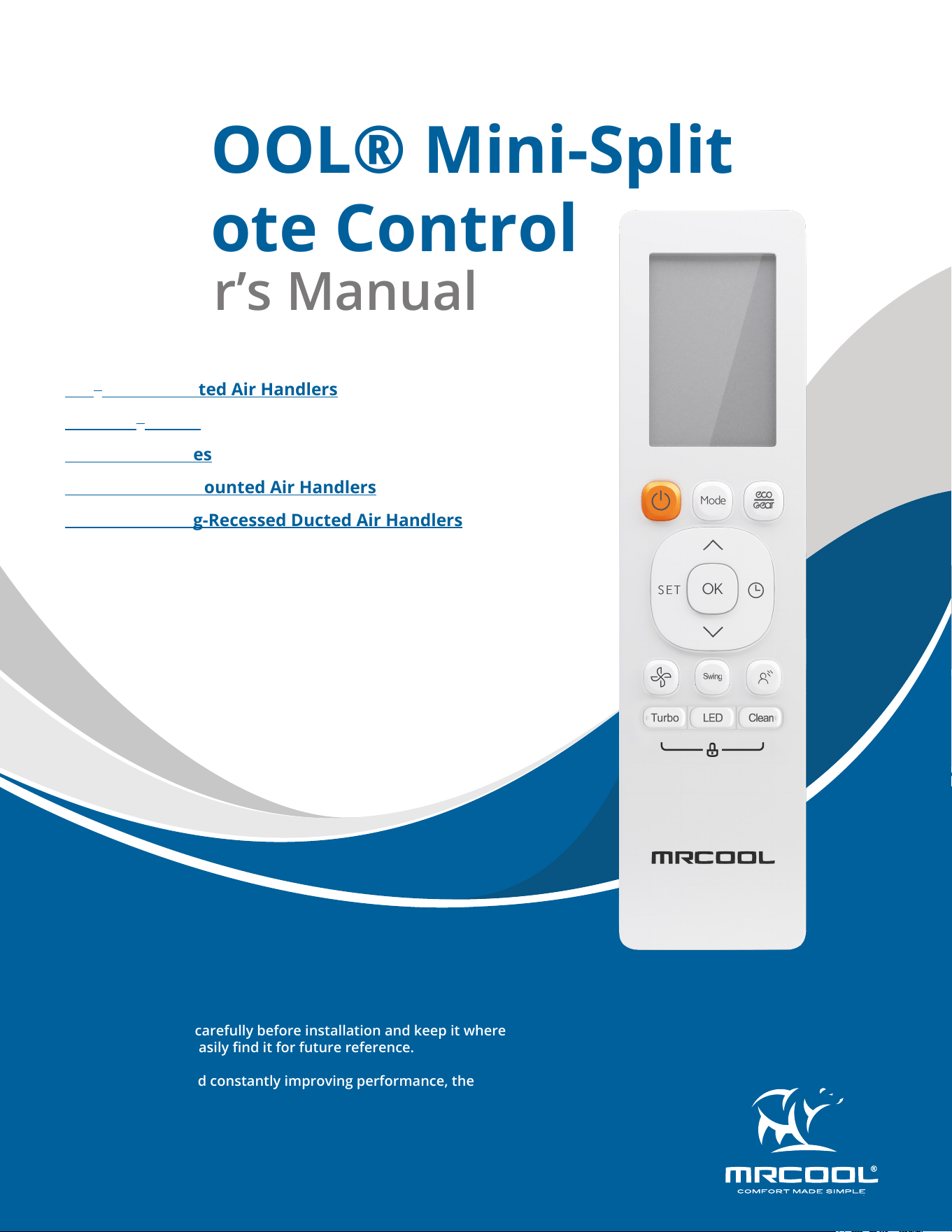
MRCOOL® Mini-Split
Remote Control
Owner’s Manual
MODELS:
Read this manual carefully before installation and keep it where
the operator can easily nd it for future reference.
Due to updates and constantly improving performance, the
information and instructions within this manual are subject to
change without notice.
Version Date: 12/20/2024
Please visit www.mrcool.com/documentation
to ensure you have the latest version of this manual.
DIY
®
Wall-Mounted Air Handlers
Easy Pro
®
Series
Advantage Series
Olympus Wall-Mounted Air Handlers
Olympus Ceiling-Recessed Ducted Air Handlers
mrcool.com1
CONTENTS
SPECIFICATIONS & COMPATIBILITY .......................................................... 2
QUICK-START GUIDE .................................................................................. 2
HANDLING .................................................................................................. 3
3.1 Inserting & Replacing Batteries .................................................... 3
3.2 Remote Interference ..................................................................... 3
BUTTONS & FUNCTIONS ........................................................................... 4
REMOTE SCREEN INDICATORS .................................................................. 5
BASIC FUNCTIONS ...................................................................................... 6
6.1 Auto Mode ...................................................................................... 6
6.2 Cool or Heat Mode ......................................................................... 6
6.3 Dry Mode ......................................................................................... 6
6.4 Fan Mode ......................................................................................... 6
6.5 Setting the Timer ............................................................................ 6
ADVANCED FUNCTIONS ............................................................................ 8
7.1 Swing Function ................................................................................ 8
7.2 Airow Direction ............................................................................. 8
7.3 LED Display ...................................................................................... 8
7.4 Silence Function .............................................................................. 8
7.5 ECO/GEAR Function ........................................................................ 9
7.6 FP Function ...................................................................................... 9
7.7 Lock Function .................................................................................. 9
7.8 Clean Function ................................................................................ 9
7.9 Turbo Function ............................................................................... 9
7.10 Super Heat Function .................................................................. 10
7.11 Set Function ................................................................................ 10
1
2
3
4
5
Contents
6
7
mrcool.com 2 2
SPECIFICATIONS
1
1 - Specications & Compatibility
Rated Voltage 3.0V (Dry Batteries R03/LR03x2)
Signal Receiving Range 26 ft (8m)
Environment 23°F~140°F (-5°C~60°C)
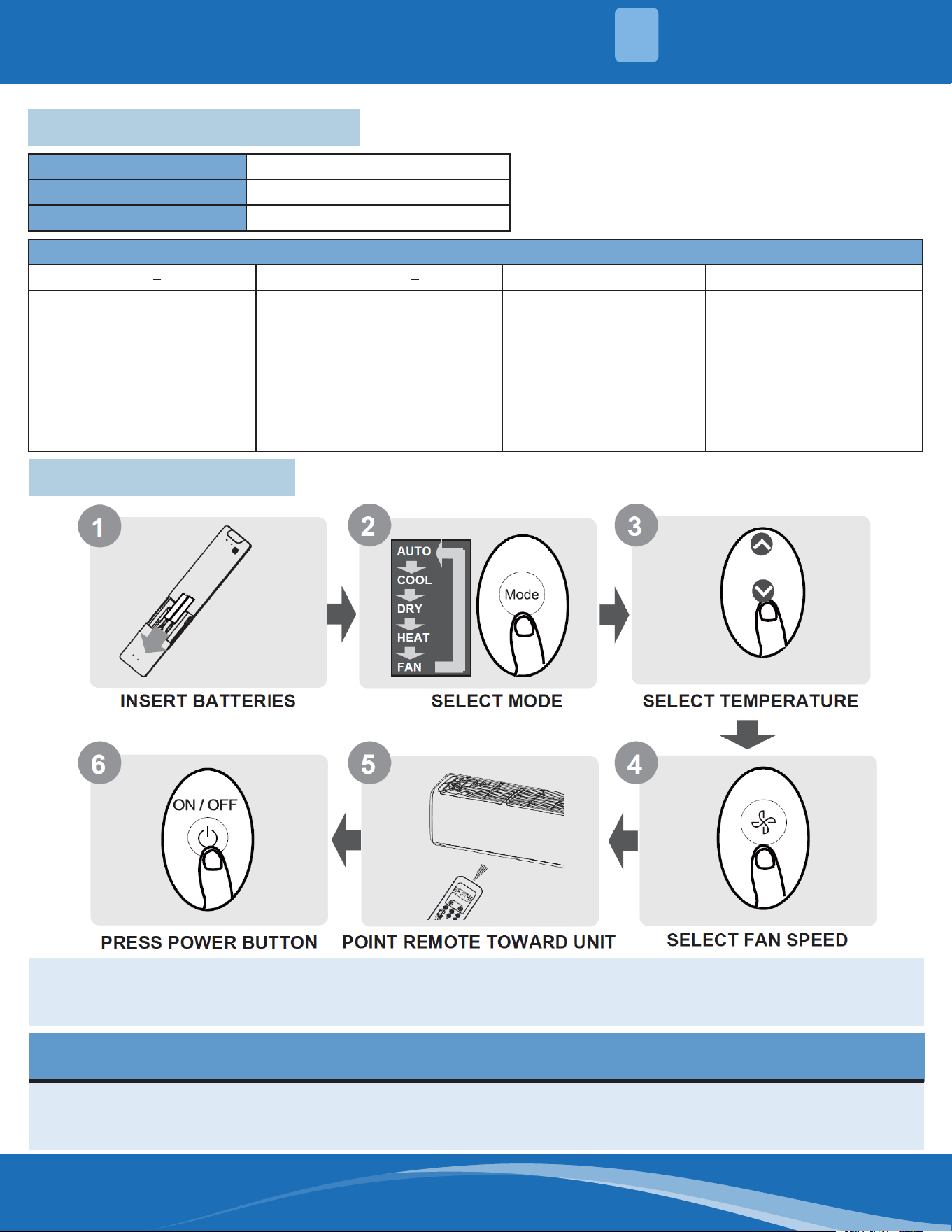
2 - Quick Start Guide
NOT SURE WHAT A FUNCTION DOES?
Refer to the "How to use Basic Functions" and "How to Use Advanced Functions" sections of this manual
for a detailed description of how to use the unit.
SPECIAL NOTE
• Button designs on your unit may dier slightly from the example shown.
• If the indoor unit does not have a particular function, pressing that function's button on the remote control
will have no eect.
Compatible Models:
DIY
®
Easy Pro
®
Olympus Advantage
DIY-09-HP-WMAH-115D25-O
DIY-12-HP-WMAH-115D25-O
DIY-06-HP-WMAH-230D25-O
DIY-09-HP-WMAH-230D25-O
DIY-12-HP-WMAH-230D25-O
DIY-18-HP-WMAH-230D25-O
DIY-24-HP-WMAH-230D25-O
DIY-36-HP-WMAH-230D25-O
EZPRO-09-HP-WMAH-115D-O
EZPRO-12-HP-WMAH-115D-O
EZPRO-18-HP-WMAH-230D-O
EZPRO-24-HP-WMAH-230D-O
O-09-HP-WMAH-230C-O
O-12-HP-WMAH-230C-O
O-18-HP-WMAH-230C-O
O-24-HP-WMAH-230C-O
DUCT-09HP-230B-O
DUCT-12HP-230B-O
DUCT-18HP-230B-O
DUCT-24HP-230B-O
A-09-HP-WMAH-115D-O
A-12-HP-WMAH-115D-O
A-09-HP-WMAH-230D-O
A-12-HP-WMAH-230D-O
A-18-HP-WMAH-230D-O
A-24-HP-WMAH-230D-O
A-36-HP-WMAH-230D-O
mrcool.com3
HANDLING
3
3.1 Inserting & Replacing Batteries
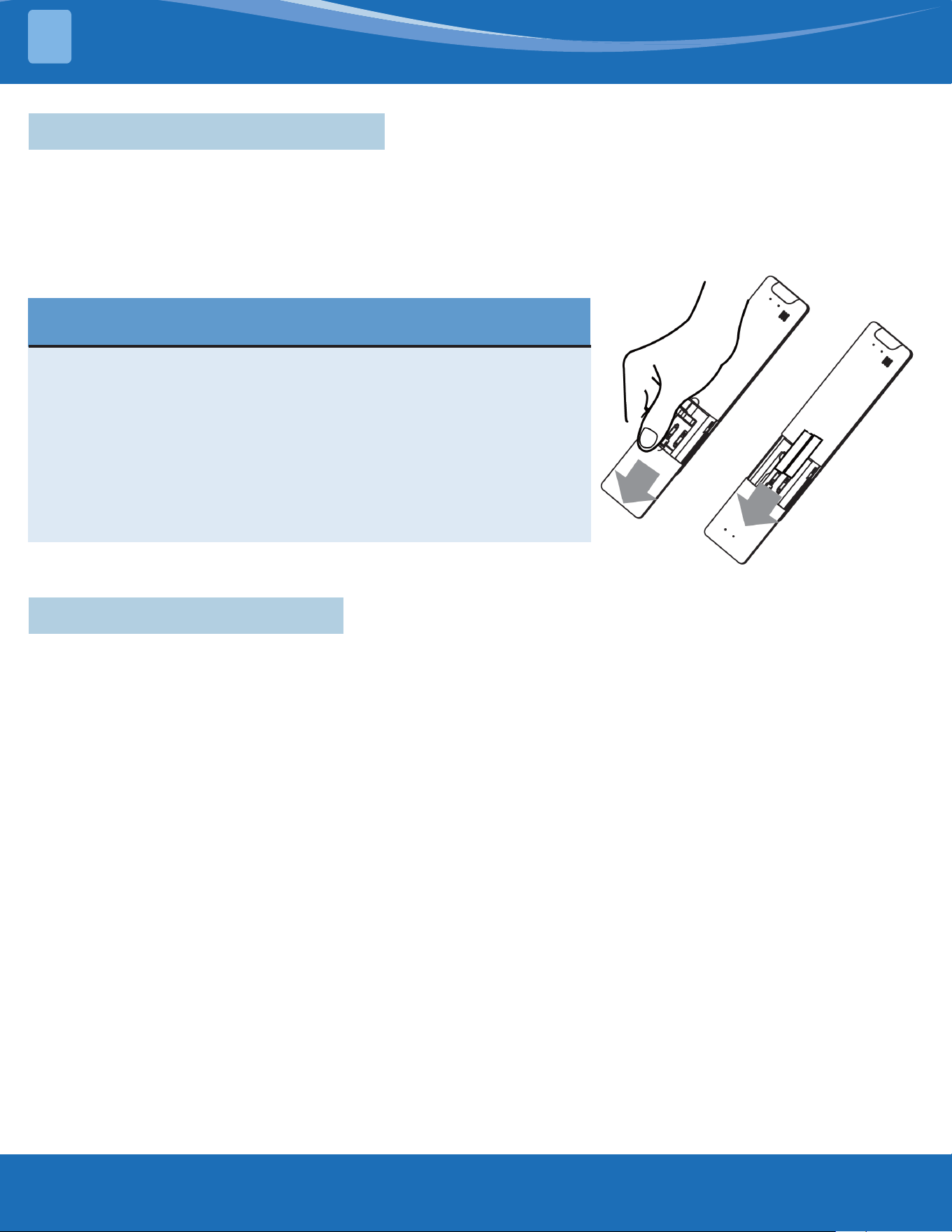
The unit includes two batteries. Put the batteries in the remote control before use.
1. Slide the back cover from the remote control downward, exposing the battery compartment.
2. Insert the batteries, paying attention to match up the (+) and (-) ends of the batteries with the symbols inside
the battery compartment.
3. Slide the battery cover back into place.
BATTERY NOTES & TIPS
For optimum product performance:
• Do not mix old and new batteries, or batteries of dierent types.
• Do not leave batteries in the remote control if you don't plan on
using the device for more than 2 months.
• Do not dispose of batteries as unsorted municipal waste. Refer to
local laws for proper disposal requirements of batteries.
• The remote control must be used within 26ft (8m) of the unit.
• The unit will beep when remote signal is received.
• Curtains, other materials, and direct sunlight can interfere with
the infrared signal receiver.
3.2 Remote Interference
The remote should comply with the local national regulations.
• In Canada, it should comply with CAN ICES-3(B)/NMB-3(B).
• In USA, this device complies with part 15 of the FCC Rules. Operation is subject to the following two conditions:
1. This device may not cause harmful interference
and
2. This device must accept any interference received, including interference that may cause undesired
operation.
This equipment has been tested and found to comply with the limits for a Class B digital device, pursuant to part
15 of the FCC Rules. These limits are designed to provide reasonable protection against harmful interference
in a residential installation. This equipment generates, uses, and can radiate radio frequency energy and, if not
installed and used in accordance with the instructions, may cause harmful interference to radio communications.
However, there is no guarantee that interference will not occur in a particular installation. If this equipment does
cause harmful interference to radio or television reception, which can be determined by turning the equipment
o and on, the user is encouraged to try to correct the interference by one or more of the following measures:
• Reorient or relocate the receiving antenna
• Increase the separation between the equipment and receiver
• Connect the equipment into an outlet on a circuit dierent from that to which the receiver is connected.
• Consult your dealer or an experienced radio/TV technician for help.
• Changes or modications not approved by the party responsible for compliance could void the user's authority
to operate the equipment.
mrcool.com 4
4
BUTTONS & FUNCTIONS
4
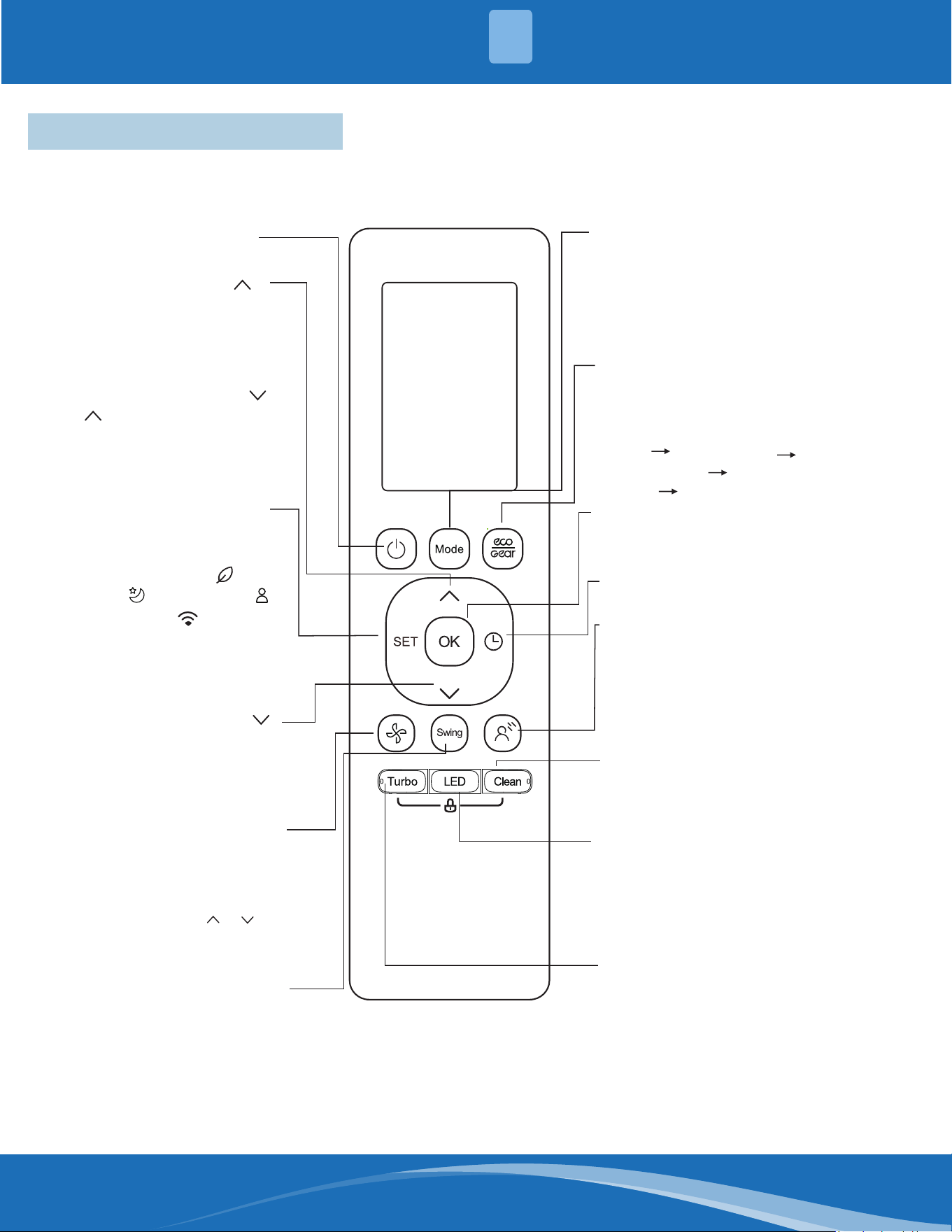
4 - Buttons & Functions
Before you begin using your new air conditioner, make sure to familiarize yourself with the remote control. The
following is a brief introduction to the remote control itself. For instructions on how to operate your air conditioner,
refer to the "How to Use Basic Functions" section of this manual.
ON/OFF
SET
Turns the unit on or off.
MODE
OK
TIMER
BREEZE AWAY
CLEAN
LED
Turbo
ECO/GEAR
Scrolls through operation modes
as follows:
AUTO
COOL
DRY
HEAT FAN
FAN SPEED
SWING
Increases temperature in
1°C (1°F) increments.
Max. temperature is
30°C (86°F).
Note:
Press together &
buttons at the same time
for 3 seconds will alternate
the temperature display
between the °C & °F.
TEMP
TEMP
Used to confirm the selected
functions
Decreases temperature
OO
in 1 C(1 F) increments.
Min. temperature is
OO
16 C(60 F).
Starts and stops the horizontal
louver movement. For the units
with vertical louver swing feature,
hold down for 2 seconds to initiate
vertical louver auto swing feature.
This feature avoids direct air flow
blowing on the body and makes
you feel indulging in silky coolness.
Note: This feature is available
under cool, Fan and Dry mode only
Set timer to turn unit on or off
Note: HEAT mode is not supported
by the cooling only appliance.
ECO GEAR(75%)
GEAR(50%)
mode ECO......
Selects fan speeds in the
following order:
AU
20%
60% 40% 80% 100%.
Press the TEMP or button
to increase/decrease the fan
speed in 1% increments.
Previous setting
Used to start/stop Active Clean
function.
Turns indoor unit’s LED display
and air conditioner buzzer on and
off (model dependent), which
create a comfortable and quiet
environment.
Press this button to enter the
energy efficient mode in a
sequence of following:
Scrolls through operation
functions as follows:
Fresh/UV-C lamp( )
Sleep( ) Follow Me( )
AP mode( )
The selected symbol will
flash on the display area,
press the OK button to
confirm.
Enables unit to reach present
temperature in shortest possible
time. Keep pressing this button
more than 5 seconds in heating
mode to active Super heat operation.
To stop this feature, keep pressing
this button more than 3 seconds.
mrcool.com5
REMOTE SCREEN INDICATORS
5
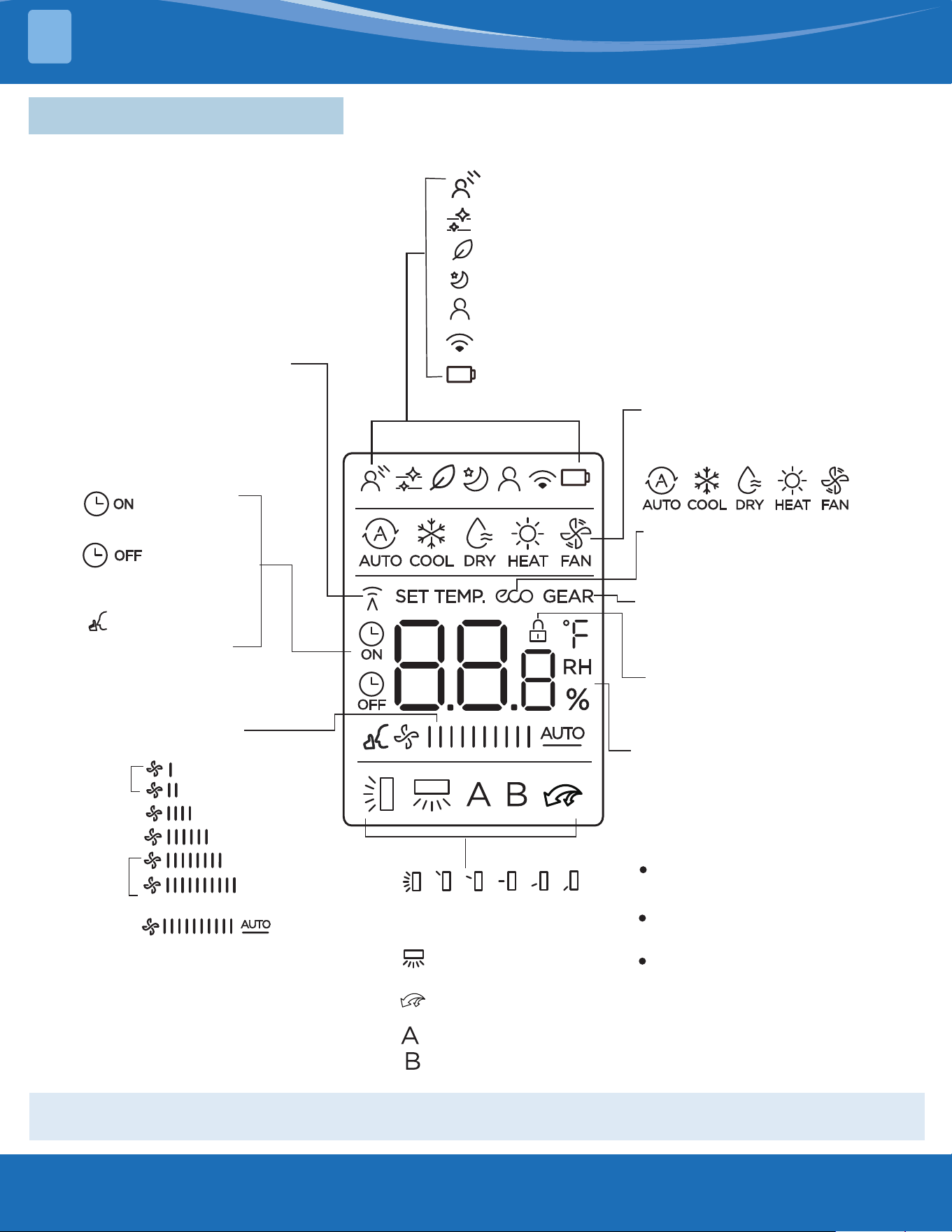
5 - Remote Screen Indicators
Information is displayed when the remote is powered on.
All indicators shown in the gure are for the purpose of clear presentation. But during the actual
operation, only the relative function signs are shown on the display window.
*
*
*
*
*
*
Breeze Away display
Transmission Indicator
MODE display
TIMER ON display
FAN SPEED display
TIMER OFF display
Silence feature
display
ECO display
GEAR display
LOCK display
Horizontal louver
swing display
Vertical louver auto
swing display
Turbo mode display
Not available for
this unit
Temperature/Timer/Fan speed
display
Active clean feature display
Fresh/UV-C lamp feature display
Sleep mode display
Follow me feature display
Wireless control feature display
Low battery detection display(If flashes)
Displays when LOCK feature
is activated.
Silence
LOW
MED
HIGH
AUTO
Lights up when remote
sends signal to indoor
unit
Displays selected fan speed:
Displays the current
including:
mode,
2%-20%
21%-40%
41%-60%
61%-80%
81%-100%
1%
This fan speed can not be
adjusted in AUTO or DRY
mode.
Displays when ECO
feature is activated
Displays when GEAR
feature is activated
Displays the set temperature
by default, or fan speed or
timer setting when using
TIMER ON/OFF functions.
Temperature range:
o
o
16-30 C.
60-86 F/
Timer setting range:
0-24 hours.
Fan speed setting range:
AU -100%.
This display is blank when
operating in FAN mode.
mrcool.com 6
6
BASIC FUNCTIONS
6
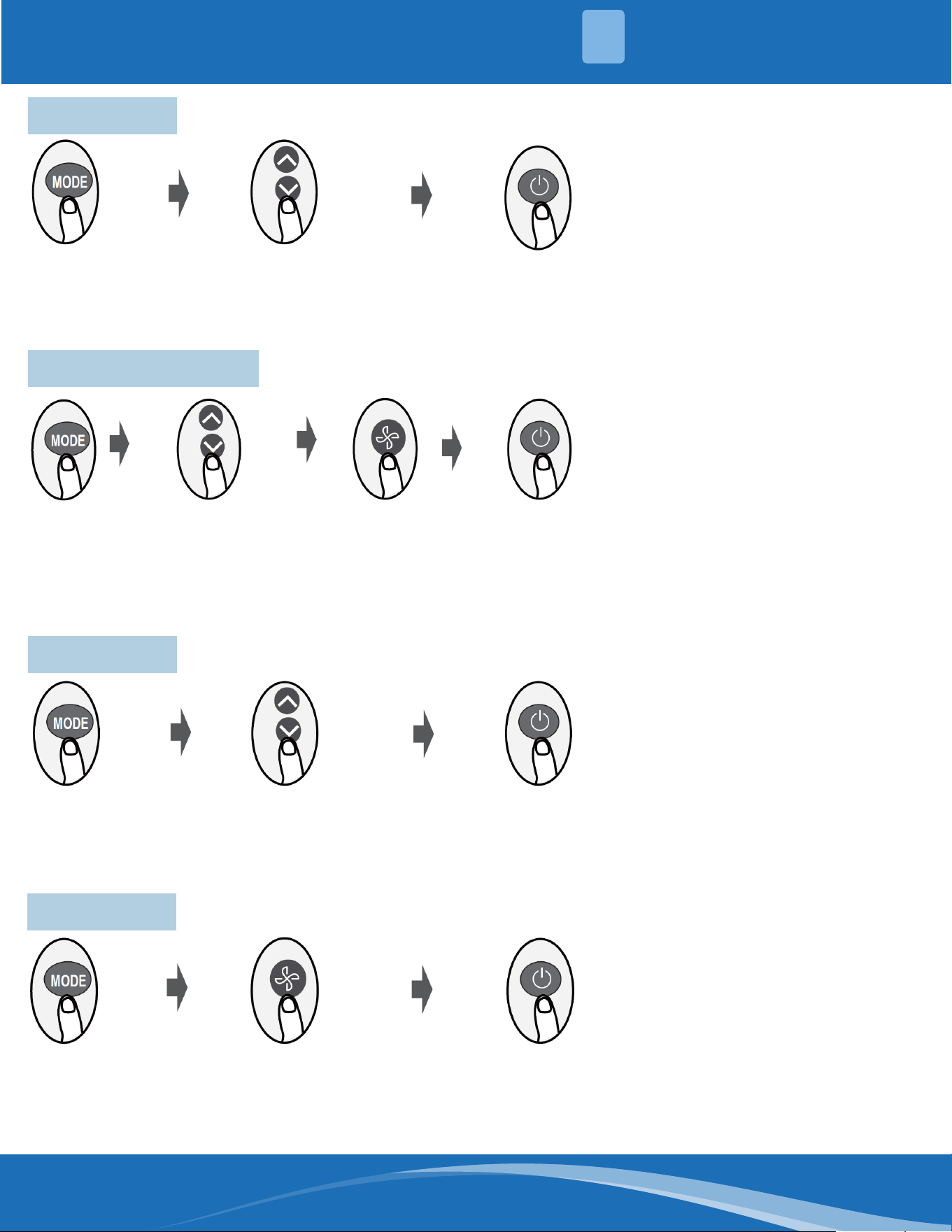
6.1 Auto Mode
1. Select Auto mode
2. Set your desired temperature
3. Turn on the unit.
6.2 Cool or Heat Mode
6.3 Dry Mode
1. Select Cool/Heat mode
2. Set the temperature
3. Set the fan speed
4. Turn on the unit.
1. Select Dry mode
2. Set your desired temperature
3. Turn on the unit.
6.4 Fan Mode
1. Select Dry mode
2. Set your desired temperature
3. Turn on the unit.
NOTE: In auto mode, the unit will automatically select the cool, fan, or
heat function based on the set temperature. The fan speed cannot be set
in auto mode.
NOTE: In dry mode, fan speed cannot be set since it is automatically
controlled.
NOTE: In fan mode, you cannot set the temperature. As a result, no
temperature will be displayed on the remote screen.
mrcool.com7
BASIC FUNCTIONS
6
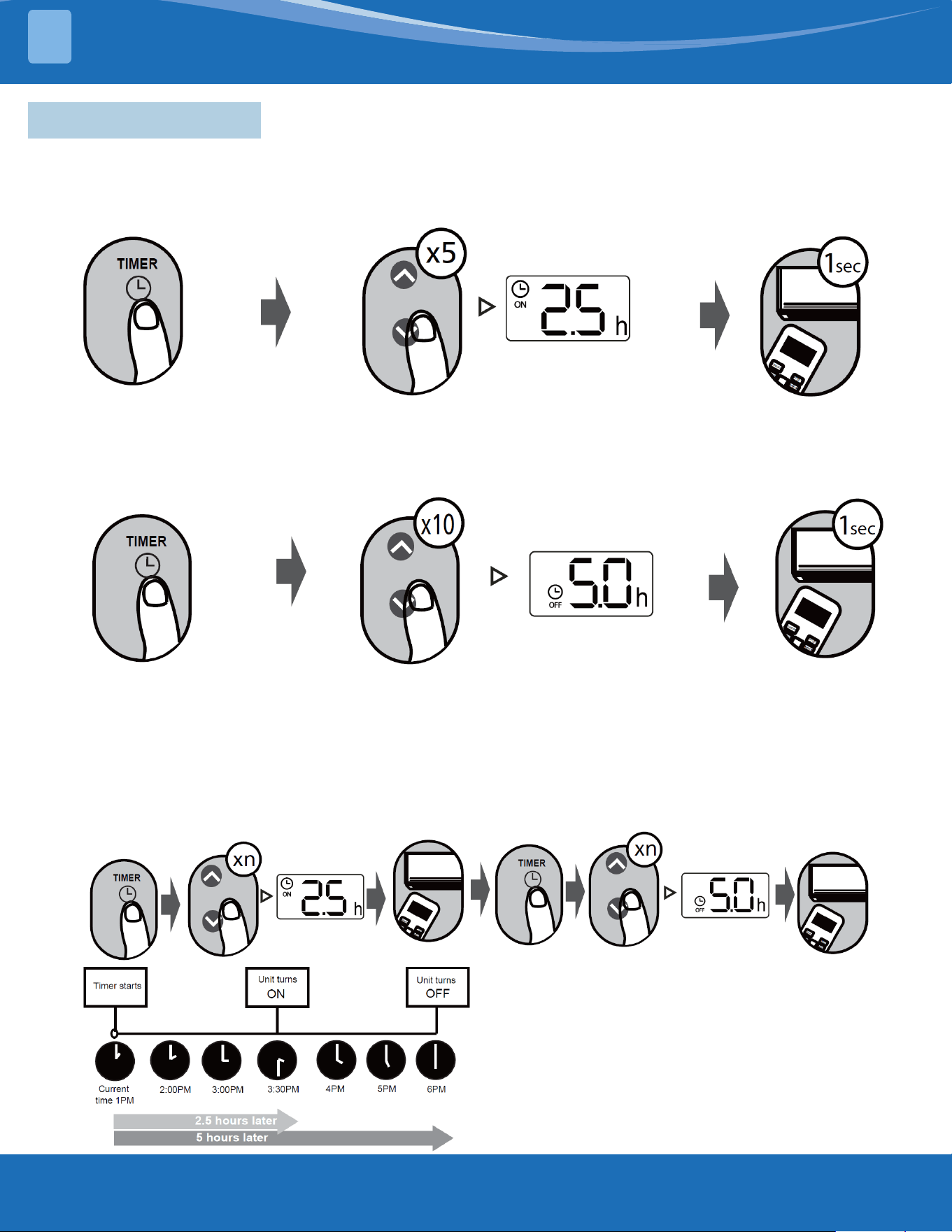
6.5 Setting the Timer
TIMER ON Setting:
Press the TIMER button to
initiate the ON time sequence.
Press the Temperature up or down
button ve times to set the desired
time to turn on the unit.
Point the remote at the unit
and wait 1 second. The TIMER
ON will be activated.
TIMER OFF Setting:
Press the TIMER button to
initiate the OFF time sequence.
Press the Temperature up or down
button ten times to set the desired
time to turn on the unit.
Point the remote at the
unit and wait 1 second. The
TIMER OFF will be activated.
NOTE:
1. When setting the TIMER ON or TIMER OFF, the time will increase by 30 minute increments with each press,
up to 10 hours. After 10 hours and up to 24, it will increase in 1 hour increments. (For example, press 5 times
to get to 2.5h, and press 10 times to get to 5h.) The timer will revert to 0.0 after 24.
2. Cancel either function by setting its timer to 0.0h.
TIMER ON & OFF Setting Example:
Keep in mind that the time periods you set for both functions refer to hours after the current time.
Example: If current time is 1:00pm, the unit will
turn on 2.5 hours later (3:30pm) and turn o at
6:00pm.
mrcool.com 8
8
ADVANCED FUNCTIONS
7
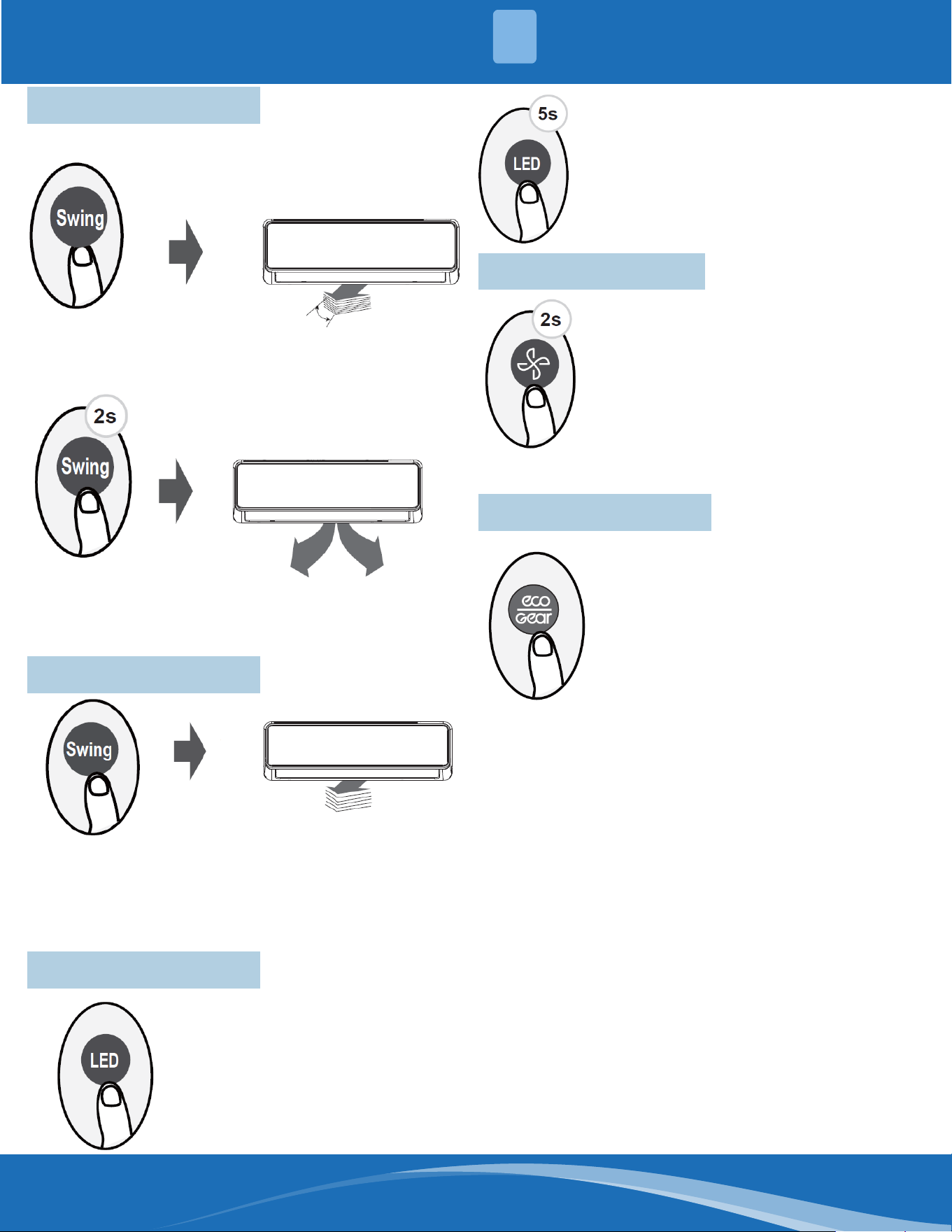
7.1 Swing Function
Press Swing button.
The horizontal louver will swing
up and down automatically when
pressing the Swing button. Press
again to make it stop.
7.2 Airow Direction
When the Swing button is continuously
pressed, ve dierent airow directions
can be set. The louver will move to a
dierent range each time the button
is pressed. Press the button until the
preferred direction is reached.
7.3 LED Display
Press the LED button to turn on
and turn o the display of the
indoor unit.
When this button is pressed for more
than 5 seconds, the indoor unit will
display the actual room temperature.
Pressing for more than 5 seconds
again will revert back to displaying the
setting temperature.
When this button is pressed for
more than 2 seconds, the vertical
louver swing function is activated.
7.4 Silence Function
When the fan button is pressed for more
than 2 seconds, the Silence function will
activate/deactivate.
Due to the compressor's low frequency
of operation, it may result in insucient
cooling or heating capacity. Press ON/
OFF, Mode, Turbo, or Clean buttons
while operating to cancel the silence
function.
7.5 ECO/GEAR Function
Press the ECO/GEAR button to enter the
energy-ecient mode in the following
sequence:
ECO > GEAR (75%) > Previous Setting
Mode > ECO...
(Note: Only available in COOL mode.)
ECO Operation:
Under cooling mode, press this button,
and the remote controller will adjust the temperature
automatically to 75°F/24°C, set fan speed to Auto
(when the set temperature is less than 75°F/24°C). If
the set temperature is above 75°F/24°C, press the ECO
button, the fan speed will change to Auto, and the set
temperature will remain unchanged.
Note: Pressing the ECO button, or modifying the
mode or adjusting the set temperature to less than
75°F/24°C will stop ECO operation. Under ECO
operation, the set temperature should be 75°F/24°C
or above, or it may result in insucient cooling. If
uncomfortable, press the ECO button again to stop it.
GEAR Operation:
Press the ECO/GEAR button to enter the GEAR
operation as following:
75% (up to 75% electrical energy consumption) > 50%
(up to 50% electrical energy consumption) > Previous
setting mode
Under GEAR operation, the setting temperature will
revert back in the display screen after 3 seconds after
the desired setting is selected.
mrcool.com9
ADVANCED FUNCTIONS
7
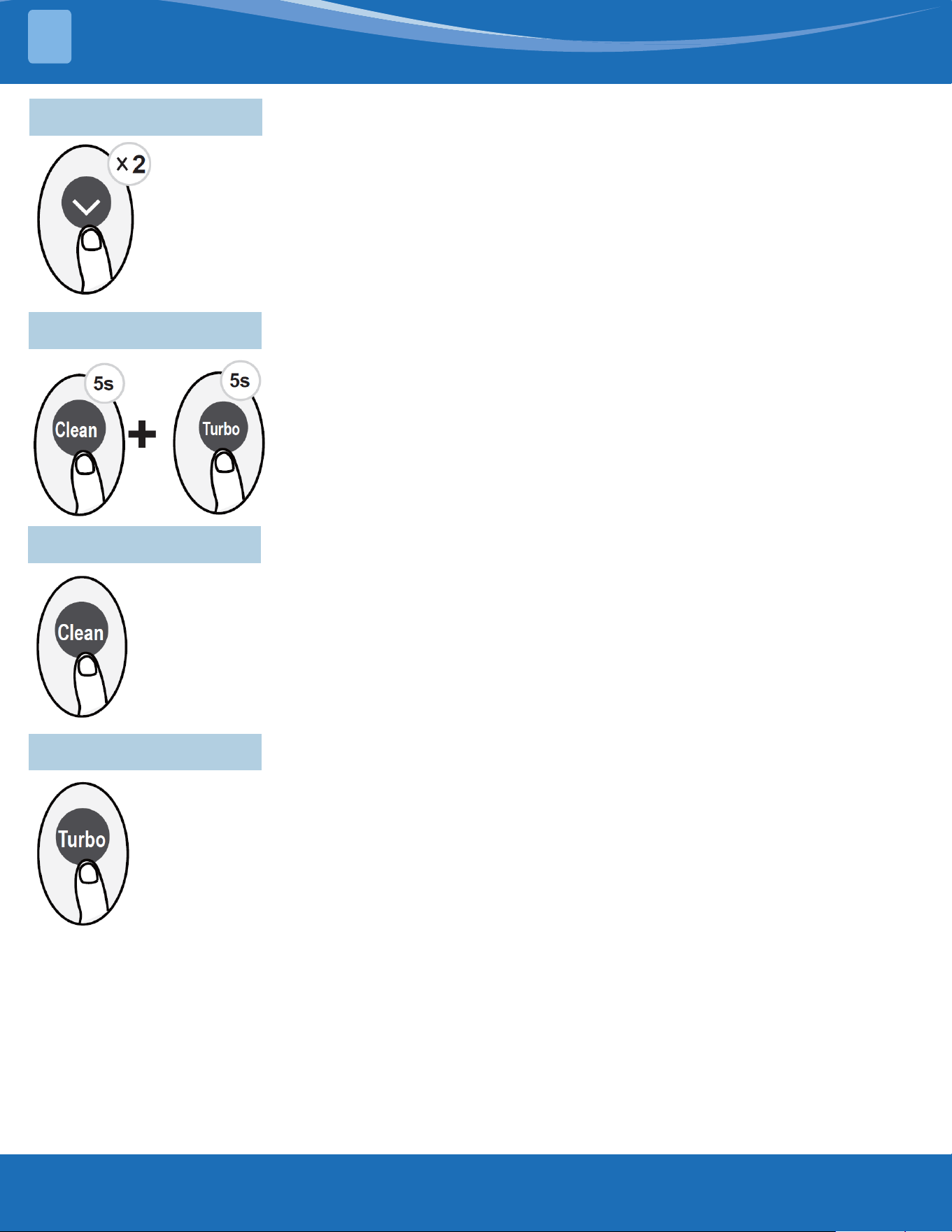
7.6 FP Function
The unit will operate at high fan speed (while compressor is on) with temperature set
automatically to 46°F/8°C.
Press this button two times in one section under HEAT mode and a set temperature of
60°F/16°C to activate FP function.
Press On/O, Mode, Fan, or Temperature button to cancel this function.
Note: This function is for heat pump air conditioner only.
7.7 Lock Function
Press the Clean button and Turbo button at the same time for more than 5
seconds to activate the Lock function.
All buttons will become non-responsive. Press these two buttons again for 2
seconds to disable the Lock function.
7.8 Clean Function
Press the Clean button to activate the clean function.
The Active Clean Technology washes away dust, mold, and grease that may cause odors when
it adheres to the heat exchanger by automatically freezing and then rapidly thawing the frost.
When this function is turned on, the indoor unit display window displays "CL". After 20-45
minutes, the unit will turn o automatically and cancel the clean function.
7.9 Turbo Function
When the Turbo feature is activated in COOL mode, the unit will blow cool air with the strongest
wind setting to jump-start the cooling process.
When the Turbo feature is activated in HEAT mode, the unit will blow warm air with the strongest
wind setting to jump-start the heating process (some units).
For units with electrical heating elements, the electrical heater will activate and jump-start the
heating process.
mrcool.com 10
10
ADVANCED FUNCTIONS
7
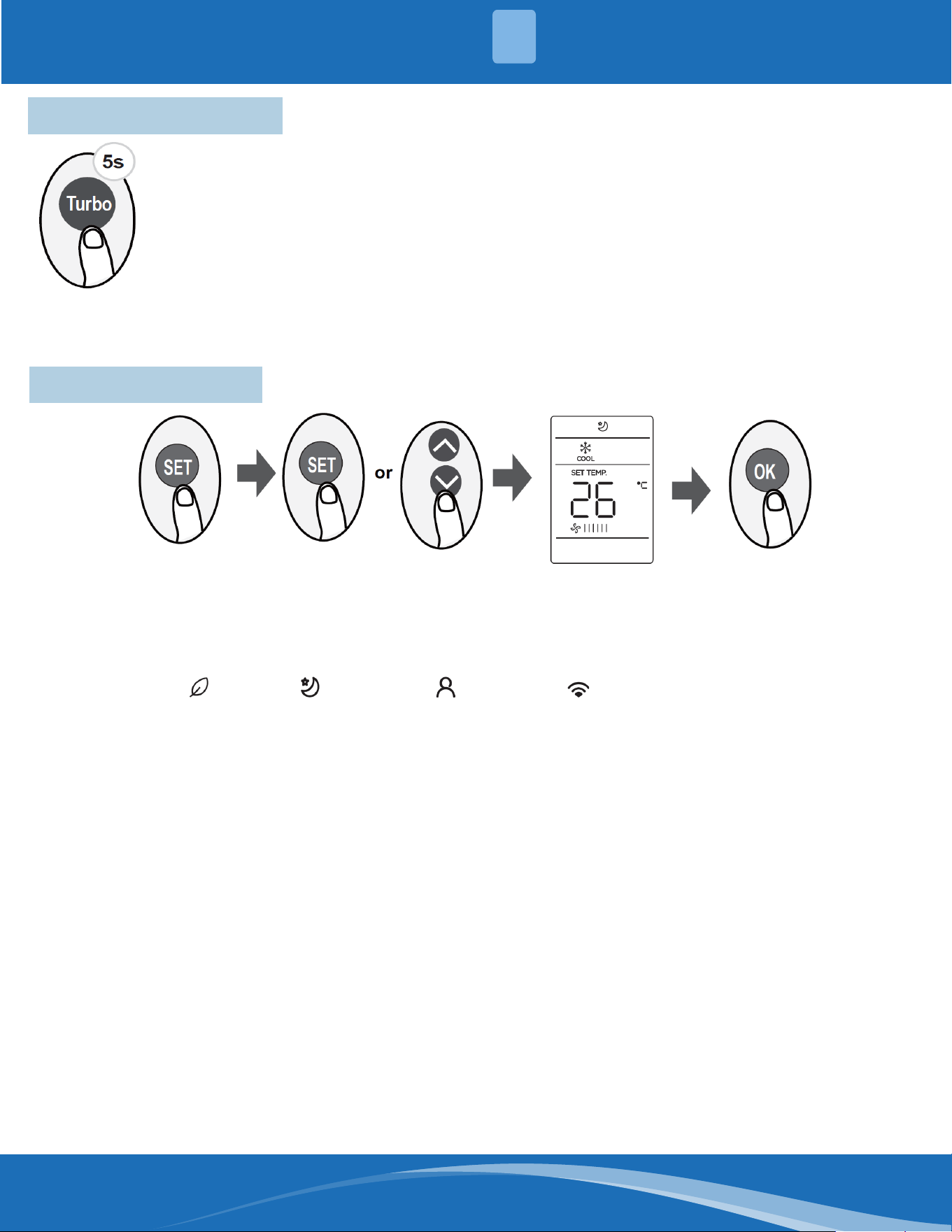
7.10 Super Heat Function
Press the Turbo button for 5 seconds while in Heating/Auto mode to initiate super heat function.
To stop this feature, press the button for 3 seconds. This function is mainly used to improve the
heating speed of the unit at low temperatures.
Under Super Heat mode, the louver will open to the maximum angle to enable unit to reach the
preset temperature in the shortest possible time.
Note: The anti-cold air feature is disabled 5 minutes after the compressor starts. This may result
in low air outlet temperature.
• If the Super Heat function is activated, "On" displays for 3 seconds on the indoor unit display window.
• If the Super Heat function is stopped, "OFF" displays for 3 seconds on the indoor unit display window.
• Change the mode or turn the unit o to stop the super heating operation.
7.11 Set Function
• Press the SET button to enter the function setting, then press the SET button or Temp Up or Temp Down
button to select the desired function. The selected symbol will ash on the display area. Press the OK button
to conrm.
• To cancel the selected function, perform the same procedures as above.
• Press the SET button to scroll through operation functions as follows:
Fresh/UV-C Lamp* ( ) > Sleep* ( ) > Follow Me ( ) -> AP Mode ( )
[*]: If your remote has Fresh and Sleep buttons, you cannot use the SET button to select the Fresh/UV-C lamp and
Sleep feature.
FRESH/UV-C Lamp Function (some units):
When this function is selected, the ionizer or UV-C
lamp (model dependent) will be activated. If the unit
has both features, these two features will be activated
at the same time. This function will help to purify the
air in the room.
Sleep Function:
The sleep function is used to decrease energy use
while you sleep (and don't need the same temperature
settings to stay comfortable). This function can only be
activated via remote control.
Note: The sleep function is not available in FAN or DRY
mode.
AP Function:
Choose AP mode to complete wireless network
conguration. For some units, it doesn't work
by pressing the SET button. To enter AP mode,
continuously press the LED button seven times within
ten seconds.
Follow Me Function:
The Follow Me function enables the remote control
to measure the temperature at its current location
and send this signal to the unit at an interval of every
3 minutes. When using AUTO, COOL, or HEAT modes,
measuring ambient temperature from the remote
control (instead of from the indoor unit itself) will
enable the unit to optimize the temperature around
you and ensure maximum comfort.
Note: Press the Set buttno to select the Follow Me
function, then press the OK button to conrm. Pressing
the OK button for 3 seconds will start/stop the memory
feature of the Follow Me function.
• If the memory feature is activated, "On" displays for
3 seconds on the screen.
• If the memory feature is stopped, "OFF" displays for
3 seconds on the screen.
• While the memory feature is activated, pressing
the ON/OFF button, switching the mode, or power
failure will not cancel the Follow Me function.
Contents
mrcool.com 11
MRCOOL
®
Mini-Split
Remote Control
The design and specications of this product and/or manual are subject to change without prior notice.
Consult with the sales agency or manufacturer for details.