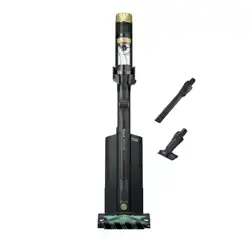
ASSEMB LY
MODES EXPLAINED
Please be sure to read and save the warnings on other side prior to using your unit.
QUICK START GUIDE
How to set up and use the IP3000 Series Shark® POWERDETECT™ Clean & Empty Vacuum.
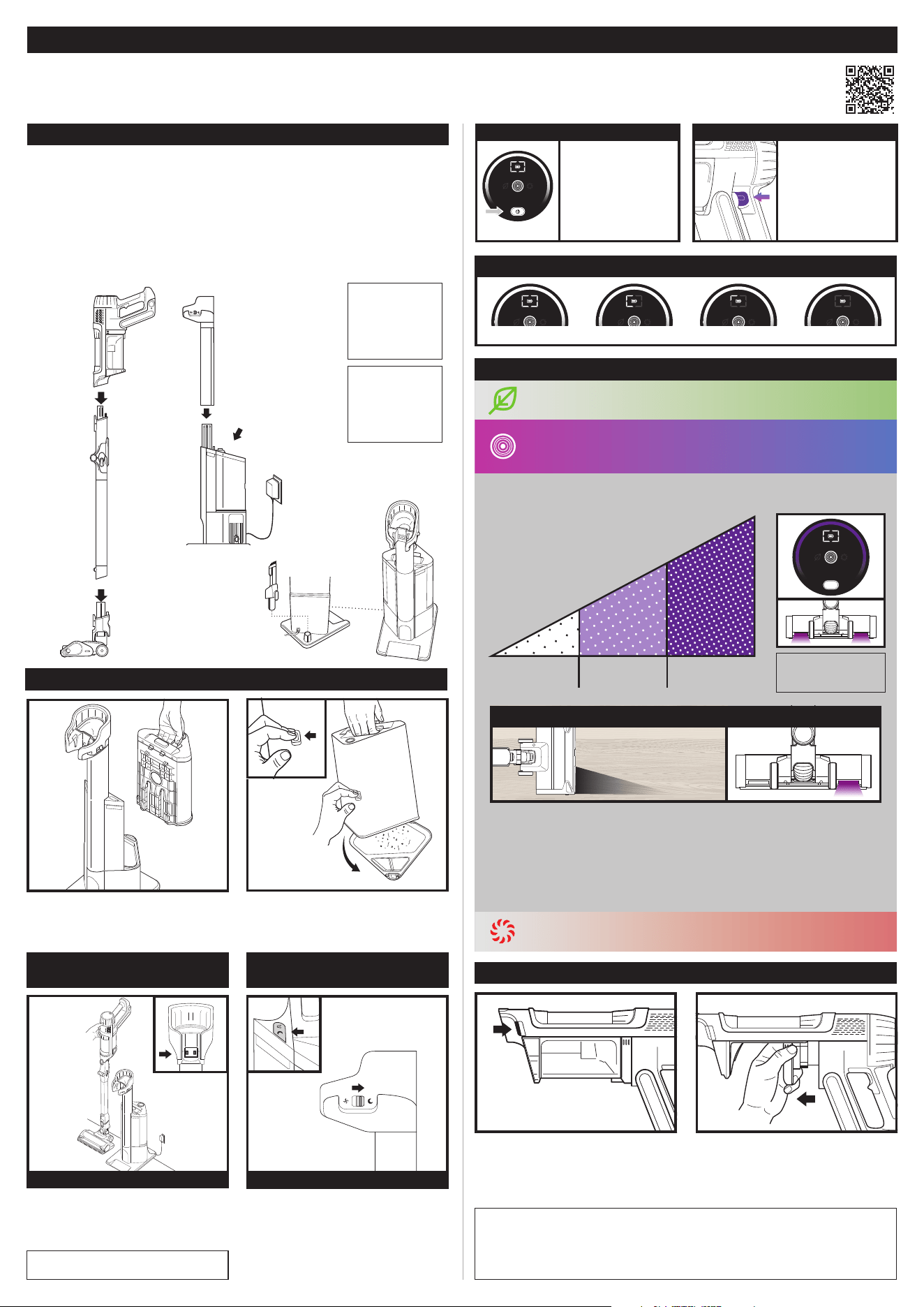
1. Slide the Wand onto the neck of the Floor Nozzle until it clicks into place.
2. Align the Hand Vacuum nozzle opening with the top of the wand and slide
it on until it clicks into place.
3. Make sure the Dock is facing upright. Slide the Charging Post over the
mount on front of dock until it clicks.
4. Place the dock on the floor near a wall outlet. Plug the Power Cord into the
outlet, then connect the cord to the port on the back of the charging post.
5. Store the crevice tool accessory on the mount on the dock.
6. Flip up the dial handle on the Odor Neutralizer Technology cartridge, align
the teal arrows, then insert the cartridge into the dock.
4.
Power
Cord
3.
Charging Post
5.
Accessory
Storage
6.
Odor
Neutralizer
Technology
Cartridge
To charge the vacuum on the dock,
make sure the dock is plugged into
the wall and place the vacuum on
the dock cradle.
Detect technology is ONLY activated in Detect mode and is activated automatically
when the unit is in use.
Handheld
Vacuum
Floor Nozzle
MultiFLEX®
Wand
Dock
2.
(Click)
1.
(Click)
CHARGING ON DOCK
1. To access the HEPA filter, press
the dust cup empty button to
release the dust cup.
2. Grip the filter by the tab and slide
it out of the hand vac.
3. After the filter has been rinsed
and air-dried completely, slide it
back into the hand vacuum.
EMPTYING THE DOCK DUST BIN
AUTO-EMPTY DOCK
CHARGING
QUIET MODE
ACTIVATION
IMPORTANT: FILTER CLEANING
NOTE: Rinse the HEPA filter at least once a month to maintain suction power. More frequent
cleaning may be necessary with heavy use. To clean the filter, rinse it with water only and
allow it to air-dry completely for up to 48 hours before reinstalling. Tap o loose dirt between
washes when needed.
IMPORTANT: DO NOT use soap when cleaning the filters. Use water only. The vacuum will not
have suction if the post-motor filter is not installed. Ensure that all filters are installed before using.
NOTE: Hand Vacuum
UI and Nozzle Lights
are Synched.
To empty the bin, hold it over the
trash and press the release button
on the side. The bottom will open to
release the debris.
NOTE: For proper
operation, ensure
all components are
completely
connected and
clicked into place.
NOTE: You may
purchase an extra
battery and charger
for your vacuum
cleaner from
sharkclean.com
To remove the bin, press the dust
bin release button and lift the bin
out by the handle.
Use Quiet mode to dock and charge
the vacuum without automatic
evacuation. To activate Quiet mode,
move the slider to the right. To
deactivate, move the slider to the
left. Do not activate Quiet mode
when the vacuum is evacuating.
Press the On/
O button on the
handle to turn on
power. To turn o
power, press the
button again.
To toggle
between ECO,
DETECT, and
BOOST modes,
press the mode
selection trigger.
POWER ON/OFF MODE SELECTION TRIGGER
SENSES YOUR ENVIRONMENT TO
OPTIMIZE YOUR CLEANING EXPERIENCE.
Clean Floor
Low Suction
Medium Dirt
Medium Suction
Heavy Dirt
High Suction
Edge Detect: Dynamically detects edges and corners while
maximizing suction power to remove stubborn dirt.
Floor Detect
™
: The brushroll responds to surface changes and
automatically adjusts to optimize your clean.
Light Detect
™
: Senses low-light situations and automatically
illuminates dark areas to help you spot debris.
EDGE DETECT
Dirt Detect: Identifies
dirtier high-trac areas and
automatically boosts suction
power to pull in hidden dirt.
QUIET MODE SWITCH
DETECT MODE
ECO MODE Maximizes runtime
BOOST MODE Maximizes suction
NOTE: Vacuum battery does not come fully
charged. Please charge battery before use.
BATTERY CHARGING INFORMATION
Full Charge Half Charge Low Charge No Charge
Shark
®
POWERDETECT™ Clean & Empty Vacuum IP3000 Series
IMPORTANT SAFETY INSTRUCTIONS
WARNING: TO REDUCE THE RISK OF INJURY, USER MUST READ INSTRUCTION MANUAL • HOUSEHOLD USE ONLY
WARNING
When using an electrical appliance, to reduce the risk of fire, electric shock, injury, or
property damage, basic precautions should always be followed, including the following:
READ AND SAVE THESE INSTRUCTIONS
VISIT qr.sharkclean.com/IP3000seriesmanual OR
SCAN HERE
FOR FULL INSTRUCTIONS & REPLACEMENT PARTS
© 2024 SharkNinja Operating LLC. MULTIFLEX and SHARK are registered trademarks of SharkNinja Operating LLC.
FLOOR DETECT, LIGHT DETECT, and POWERDETECT are trademarks of SharkNinja Operating LLC.
IP3000Series_QSG_MP_Mv12
1. This vacuum consists of a motorized nozzle, wand, and handheld
vacuum. These components contain electrical connections, electrical
wiring, and moving parts that potentially present risk to the user.
2. Before each use, carefully inspect all parts for any damage. If a
part is damaged, discontinue use.
3. Use only identical replacement parts.
4. This vacuum contains no serviceable parts.
5. Use only as described in this manual. DO NOT use the vacuum for
any purpose other than those described in this manual.
6. With the exception of the filters and dust cup, DO NOT expose any
parts of the vacuum to water or other liquids.
7. Keep the appliance and its cord out of reach of children. DO NOT
allow the appliance to be used by children. DO NOT allow to be used
as a toy. Close supervision is necessary when used near children.
GENERAL USE
8. This appliance can be used by persons with reduced physical,
sensory, or mental capabilities or lack of experience and knowledge
if they have been given supervision or instruction concerning use of
the appliance in a safe way and understand the hazards involved.
Cleaning and user maintenance shall not be made by children.
9. Always turn o the vacuum before connecting or disconnecting any
current carrying hoses, motorized nozzles, chargers, batteries, or
other electrical or mechanical parts.
10. DO NOT handle plug or vacuum with wet hands.
11. DO NOT use without dust cup, HEPA and pre-motor filters, and
brushroll in place.
12. Only use Shark® branded filters and accessories. Failure to do so
will void the warranty.
13. DO NOT put any objects into nozzle or accessory openings. DO
NOT use with any opening blocked; keep free of dust, lint, hair, and
anything that may reduce airflow.
14. DO NOT use if nozzle or accessory airflow is restricted. If the air paths
or the motorized floor nozzle become blocked, turn the vacuum o.
Remove all obstructions before you turn on the unit again.
15. Keep nozzle and all vacuum openings away from hair, face, fingers,
uncovered feet, or loose clothing.
16. DO NOT use if vacuum is not working as it should, or has been
dropped, damaged, left outdoors, or dropped into water.
17. Use extra care when cleaning on stairs.
18. DO NOT leave the vacuum unattended while powered on.
19. When powered on, keep the vacuum moving over the carpet
surface at all times to avoid damaging the carpet fibers.
20. DO NOT place vacuum on unstable surfaces such as chairs or tables.
21. DO NOT use to pick up:
a) Liquids
b) Large objects
c) Hard or sharp objects (glass, nails, screws, or coins)
d) Large quantities of dust (including drywall, fireplace ash,
or embers). DO NOT use as an attachment to power tools
for dust collection.
e) Smoking or burning objects (hot coals, cigarette butts,
or matches)
f) Flammable or combustible materials (lighter fluid, gasoline,
or kerosene)
g) Toxic materials (chlorine bleach, ammonia, or drain cleaner)
22. DO NOT use in the following areas:
a) Poorly lit areas
b) Wet or damp surfaces
c) Outdoor areas
d) Spaces that are enclosed and may contain explosive or toxic fumes
or vapors (lighter fluid, gasoline, kerosene, paint, paint thinners,
mothproofing substances, or flammable dust)
23. Turn o the vacuum before plugging in or unplugging the charger.
24. Turn o the vacuum before any adjustment, cleaning, maintenance
or troubleshooting.
25. During cleaning or routine maintenance, DO NOT cut anything other
than hair, fibers, or string wrapped around the brushrolls.
26. Allow all filters to air-dry completely before replacing in the vacuum
to prevent liquid from being drawn into electric parts.
27. DO NOT modify or attempt to repair the vacuum or the battery
yourself, except as indicated in this manual. DO NOT use the battery
or vacuum if it has been modified or damaged. Damaged or modified
batteries may exhibit unpredictable behavior resulting in fire,
explosion, or risk of injury.
28. Always turn o this appliance before connecting or disconnecting
motorized nozzle or hand tool.
BATTERY PACK
29. The battery is the power source for the vacuum. Carefully read and
follow all charging instructions.
30. To prevent unintentional starting, ensure it is powered o before
picking up or carrying the vacuum. DO NOT carry the appliance
with your finger on the power switch.
31. Use only the XDCKIP3000 charging dock. Use of incorrect charger
may result in no charging and/or unsafe conditions.
32. Keep the battery away from all metal objects such as paper clips,
coins, keys, nails, or screws. Shorting the battery terminals
increases the risk of fire or burns.
33. Under abusive conditions, liquid may be ejected from the battery. Avoid
contact with this liquid, as it may cause irritation or burns. If contact
occurs, flush with water. If liquid contacts eyes, seek medical help.
34. Battery should not be stored at temperatures below 3°C (37.4°F)
or above 104°F (40°C) to maintain long-term battery life.
35. DO NOT charge battery at temperatures below 5°C (40°F) or above
104°C (104°F). Charging improperly or at temperatures outside of the
specified range may damage the battery and increase the risk of fire.
36. Store the appliance indoors. DO NOT use or store it below 3°C (37.4°F).
Ensure the appliance is at room temperature before operating.
37. DO NOT expose the battery to fire or temperatures above 265°F
(130°C) as it may cause explosion.
38. Use appliances only with specifically designated battery packs. Use
of any other battery packs may create a risk of injury and fire.
39. Disconnect the battery pack from the appliance before making
any adjustments, changing accessories, or storing appliance.
Such preventive safety measures reduce the risk of starting the
appliance accidentally.
40. For IP3000 Series use only with Shark battery pack XBATR640US.
41. If the charging cord plug does not fit fully into the outlet, reverse
the plug. If it still does not fit, contact a qualified electrician.
DO NOT force into outlet or try to modify to fit.
42. To reduce the risk of shock and unintended operation, turn o
power and remove the Li-Ion battery before servicing.
ODOR NEUTRALIZER TECHNOLOGY CARTRIDGE
43. Observe the following when interacting with the Odor Neutralizer
Technology cartridge:
a) DO NOT attempt to disassemble the cartridge.
b) Avoid direct contact with the fragrance pod in the cartridge.
c) DO NOT directly inhale from the cartridge.
d) Keep away from children and pets.
e) Keep away from heat, sparks, and open flame.
f) DO NOT place in direct sunlight.
ODOR CARTRIDGE FIRST AID
a) Avoid contact with fabrics and finished surfaces.
b) Eye contact: Remove contact lenses if present. Rinse
continuously with water for several minutes.
c) Skin contact: Wash hands thoroughly after handling. If
irritation or rash develops, seek medical advice/attention.
d) Inhalation: Move person to fresh air if they are experiencing
any respiratory symptoms. If symptoms persist, seek medical
advice/attention.
e) Ingestion: DO NOT induce vomiting. Seek medical
advice/attention.

