Quick Start
1
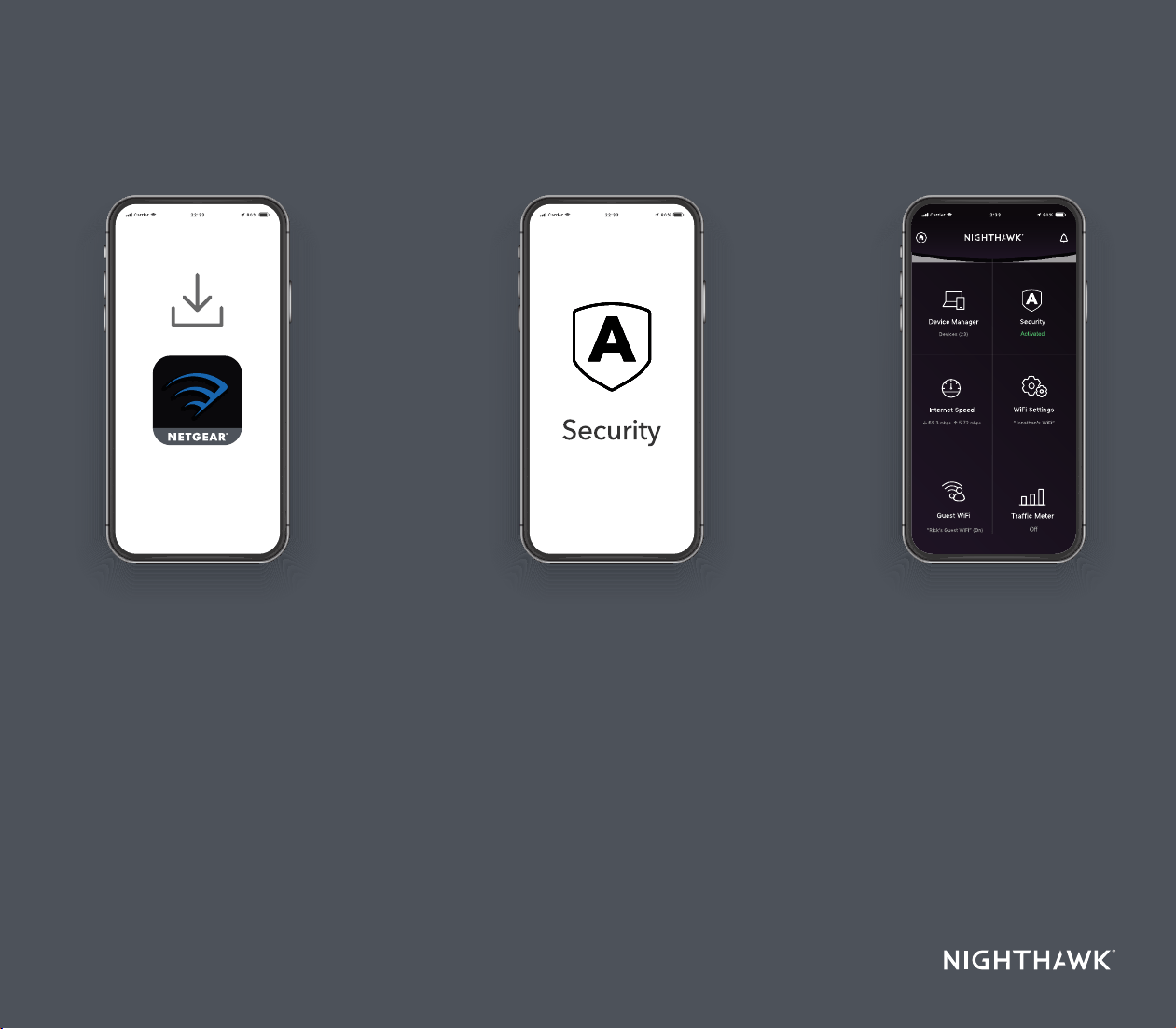
On your mobile phone, download
the Nighthawk app and follow the
setup instructions.
Tap the Security icon in your
Nighthawk app to verify that
NETGEAR Armor™ is activated.
Your Nighthawk comes with
NETGEAR Armor cybersecurity.
Armor blocks online threats like
hackers and phishing attempts on
your devices.
Check out everything you
can do on the Nighthawk
app! Run a speed test,
pause the Internet, see all
the connected devices, and
more.
2
Download the
Nighthawk app to
install your router
Secure your
devices with
NETGEAR Armor
3
Do more
with the app
Contents
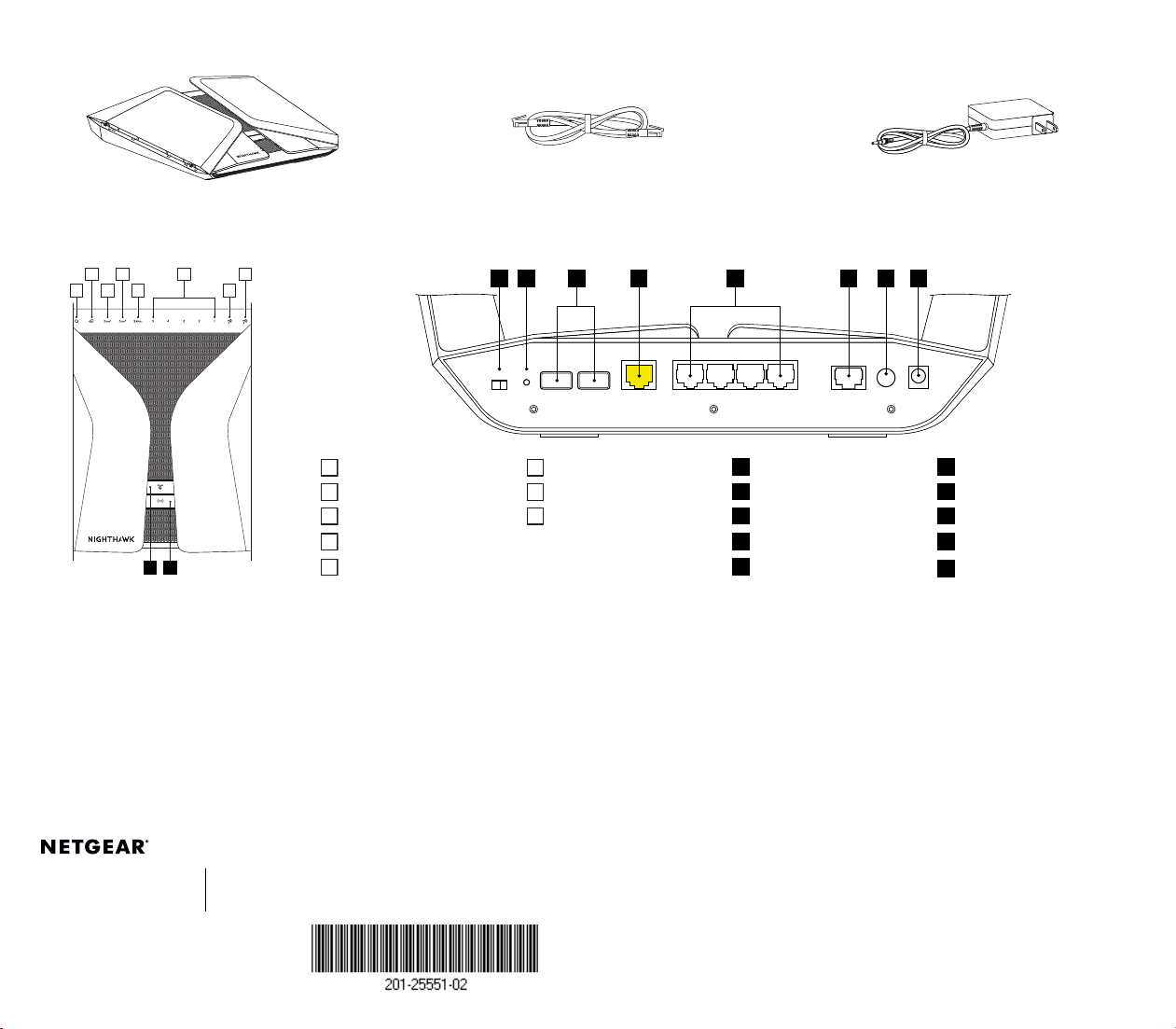
Overview
Router Ethernet Cable
Power Adapter
(varies by region)
1
Power LED
6
Ethernet Ports 1–5 LEDs
A
WPS Button with LED
F
Internet Port
2
Internet LED
7
USB 1 LED
B
WiFi On/Off Button with LED
G
Ethernet Ports 1–4
3
5 GHz 1 WiFI LED
8
USB 2 LED
C
LED On/Off Switch
H
Multi-Git Ethernet Port 5
4
5 GHz 2 WiFi LED
D
Reset Button
I
Power On/Off Button
5
2.4 GHz WiFi LED
E
USB Ports 1 and 2
J
Power Connector
C E HFD I JG
Support and Community
Visit netgear.com/support to get your questions answered and access the latest
downloads.
You can also check out our NETGEAR Community for helpful advice at
community.netgear.com.
NETGEAR, Inc.
350 East Plumeria Drive
San Jose, CA 95134, USA
© NETGEAR, Inc., NETGEAR and the NETGEAR Logo
are trademarks of NETGEAR, Inc. Any non‑NETGEAR
trademarks are used for reference purposes only.
NETGEAR INTERNATIONAL LTD
Floor 1, Building 3,
University Technology Centre
Curraheen Road, Cork,
T12EF21, Ireland
May 2020
Si ce produit est vendu au Canada, vous pouvez accéder à ce document en
français canadien à https://www.netgear.com/support/download/.
(If this product is sold in Canada, you can access this document in Canadian French
at https://www.netgear.com/support/download/.)
For regulatory compliance information including the EU Declaration of Conformity,
visit https://www.netgear.com/about/regulatory/.
See the regulatory compliance document before connecting the power supply.
For NETGEAR’s Privacy Policy, visit https://www.netgear.com/about/privacy-policy.
By using this device, you are agreeing to NETGEAR’s Terms and Conditions at
https://www.netgear.com/about/terms-and-conditions. If you do not agree, return
the device to your place of purchase within your return period.
Regulatory and Legal
Troubleshooting
If you’re having problems with the installation, try one of the following:
• Turn off your modem and router and disconnect them. Reboot your
modem. Reconnect your router to your modem, and try installing with
the Nighthawk app again.
• If you’re still unable to install your router using the Nighthawk app,
manually install it using the router web interface.
Visit http://www.routerlogin.net to access the router web interface.
For more information, visit https://kb.netgear.com/000061614/.
B
A
1
2
3 5 7
4 86