
FAQ
Backspace
Backspace
Q3: Can the keypad buttons be programmed?
A: No.
Q4: Can the keypad and mouse combo work on
MacBook?
Q5: Can the wireless keypad and mouse combo
work on Chromebook?
A: No. The wireless keypad mouse combo is NOT compatible
with Chromebook.
Q6: Can the keypad mouse combo connect via
Bluetooth?
A: No, it is connected by the wireless USB receiver.
Q7:Does this work for an ipad
A: No, this keypad and mouse combo requires a USB port.
Q8: Lost the USB dongle receiver. Is there any
way l can get a replacement receiver?
Q9: Is the number pad backlit?
A: No
Q10: How do I use the arrow keys on the keypad?
Q1: Where is the USB Receiver/USB Dongle?
A: The USB Receiver is inserted into the battery compartment
of the mouse. The keypad and mouse share ONE USB receiver.
NOTE: The USB Receiver is inserted in the battery
compartment of the mouse. The keypad and mouse share ONE
USB receiver.
Product Description :
Streamline curve, simple and beautiful.
Rubber roller, soft touch.
Ergonomic appearance design, comfortable hand.
reduce hand fatigue.
Lightweight and ultra-slim.
Accurate positioning.
maximum acceleration:10G.
Highest retum:125Hz.
Supports NumLock, ESC, Tab, Delete etc. With a shortcut key
that can open the computer calculator directly. The Multi-
Function wireless external number keypad for laptops is more
unique than most keyboards.
Wireless Mouse Specification:
Connectivity: wireless 2.4GHz
Working distance:10meters
Number of buttons:3
Lifespan:3 Million keystrokes.
Button strength:65+/-5g
DPI:1200
Power supply: one AA Battery (not included).
Product weight:52g
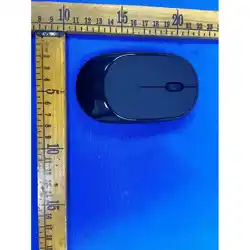
Product size:108(L)*6o(w)*26(H) mm
Rated voltage and current: DC1.5V/<15mA
Operating platform: Windows XP/Linux/Mac/Vista/7/8/10.
Numeric Keypad Specification:
Connectivity: wireless 2.4GHz.
Working distance:10meters
Power supply: Two AAA Batteries (not included).
Rated voltage and current:DC'3.0v/<5mA
Operating platform: Windows XP/Linux/Mac/Vista/7/8/10.
Q2: Why can't I find the USB receiver in the mouse?
If you couldn't find the usb receiver in the mouse, please check
to see if there's a USB receiver in the battery compartment of the
keypad. The keypad and mouse share ONE USB receiver.
A: The keypad and mouse combo are not fully compatible with
MacBook. On the Macbook OS system, the calculator key and
function keys can not work but other number and symbol keys
ESC, Tab work well.
A: Yes, we can provide an alternative USB receiver.
A: In general, this USB numeric keypad can switch the numeric
function to the directional function by pressing the "Num Lock"
key.
Q11: This mouse jump, lag or it doesn't work
anymore.
A: 1. Please check if the battery is out of power first, because
the low battery will affect the performance.
2. Please check if it can work on another device or not?
3. If you have already replaced the mouse with new batteries,
please restore the factory settings as the following steps:
Restore mouse setting:
-Re-insert the USB receiver into ANOTHER USB port of the
computer
-Turn on the power switch again
-Press and hold the left button, right button, and middle button
(scrolling wheel) on the mouse, and keep holding the buttons for
three more seconds then release the buttons.
Q12: This keypad doesn't work anymore.
A: 1. Please check if the battery is out of power first, because
the low battery will affect the performance.
2. Please check if it can work on another device or not?
3. If you have already replaced the keypad with new batteries,
please pair the keypad to your device again as the following
steps:
1) Insert 2 New AAA batteries,
2) Re-insert the USB receiver into another USB port,
3) Switch the ON/OFF button to power the keypad again.
Package Included:
1 x Wireless Number Pad
1 x Wireless Mouse
1 x Wireless USB receiver (The USB dongle at the bottom of
the mouse)
1 x User Manual
FCC Caution.
This device complies with part 15 of the FCC Rules. Operation is
subject to the following two conditions: (1) This device may not
cause harmful interference, and (2) this device must accept any
interference received, including interference that may cause undesired
operation.
Any Changes or modifications not expressly approved by the party
responsible for compliance could void the user's authority to operate
the equipment.
Note: This equipment has been tested and found to comply with the
limits for a Class B digital device, pursuant to part 15 of the FCC Rules.
These limits are designed to provide reasonable protection against
harmful interference in a residential installation. This equipment
generates uses and can radiate radio frequency energy and, if not
installed and used in accordance with the instructions, may cause
harmful interference to radio communications. However, there is no
guarantee that interference will not occur in a particular installation.
If this equipment does cause harmful interference to radio or television
reception, which can be determined by turning the equipment off and
on, the user is encouraged to try to correct the interference by one or
more of the following measures:
-Reorient or relocate the receiving antenna.
-Increase the separation between the equipment and receiver.
-Connect the equipment into an outlet on a circuit different from that
to which the receiver is connected.
-Consult the dealer or an experienced radio/TV technician for help.
RF warning for Portable device:
The device has been evaluated to meet general RF exposure
requirement. The device can be used in portable exposure condition
without restriction.

