MODEL: GRZ-LINK
INSTRUCTION MANUAL
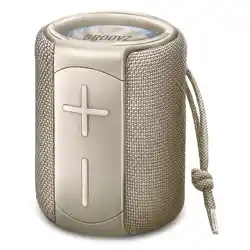
GROOVZ LINK SPEAKER
Enjoy music anywhere anytime
SPECIFICATION
FUNCTION
Wireless Version:5.2
BT protocol:Support L2CAP / A2DP(AVCTP / AVDTP / AVRCP)
Wireless transmission distance:> 10M
Audio noise ratio: ≥95dB
Battery Capacity: 1200 mAh
Built-in voltage:3.7V
Play Time: 4‒6 hours (depending on volume and usage)
Horn size:52mm
Horn Power:4Ω/ 6W
Frequency response range:120Hz-18KHz
Product size:115*86*86mm
Speaker net weight :415g
Charging Input: 5V, 500mA (use included Type-C cable)
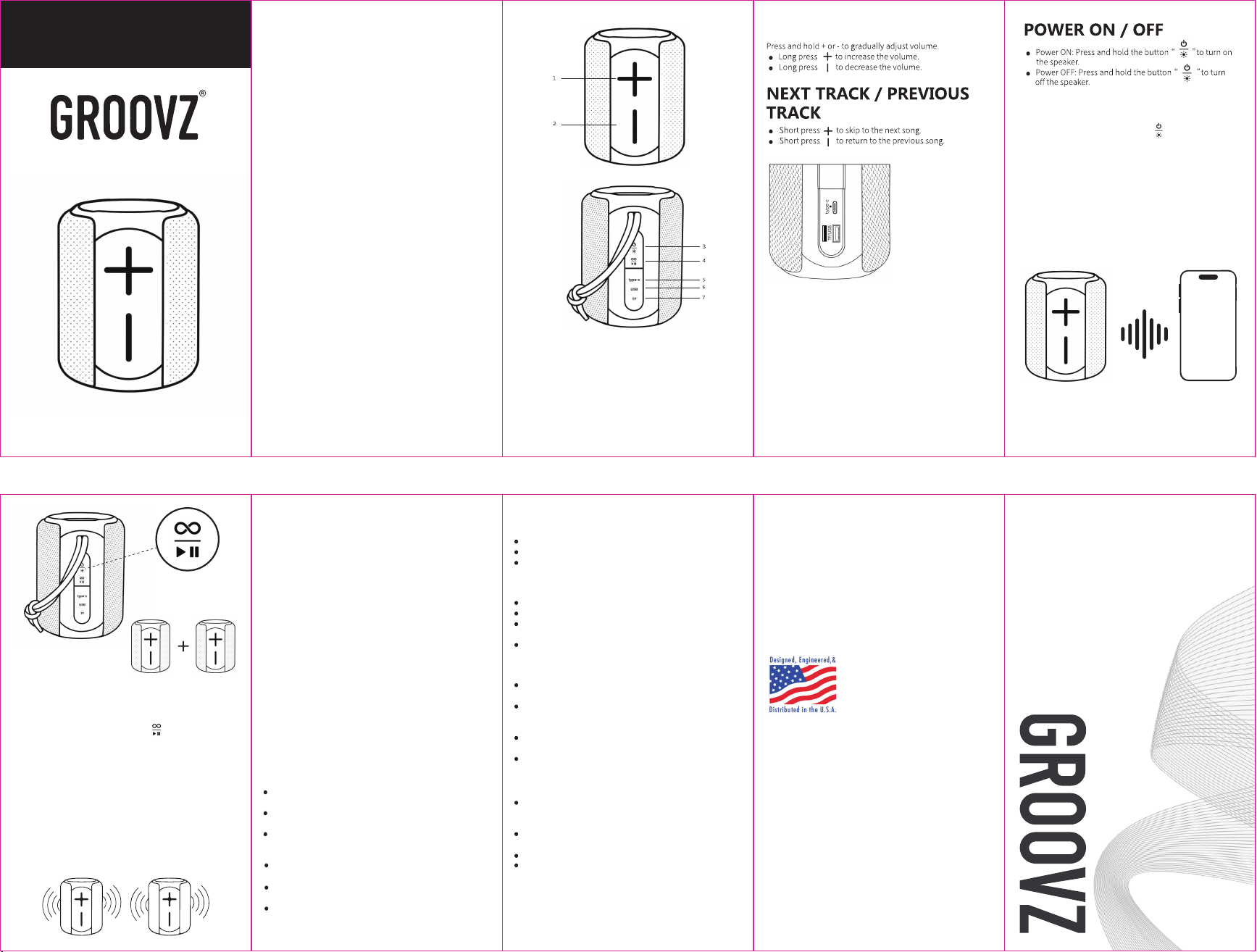
1. Next Track / Volume Up
2. Previous Track / Volume Down
3. Power On / Off / Light Button
4. TWS / Play / Pause / Mode Button
5. Type-C (DC 5V IN)
6. USB
7. Micro SD (TF) Card
1. Wireless Bluetooth connection
2. Built-in microphone for hands-free calling
3. USB, MicroSD card playback
4. High-fidelity speakers for rich, detailed sound
5. Waterproof rating: IPX5
6. Resume playback memory function
7. TWS pairing (1+1 sync)
8. Supports MP3 / WAV formats
VOLUME +/-
TWS STEREO MODE
(Pair 2 Speakers Wirelessly)
CHARGING
1. Power on both Groovz Link speakers.
2. On either speaker, double-press the on one speaker to
enter pairing mode. Do not connect both speakers to your
device — only connect to one. You’ll hear “The Bluetooth
device is paired”Once the speakers connect to each other.
3. On your phone or other device, open Bluetooth settings and
connect to “GROOVZ Speaker”.
4. You only need to connect to one speaker — audio will
automatically play through both in perfect sync.
5. If the speakers don’t pair on the first attempt, repeat Step 2
on the second speaker until you hear the confirmation sound.
⚠Note: TWS pairing works only with two Groovz Link speakers.
Once paired, they’ll remember each other for next time.
INPUTS
Type-C port: For charging only (DC 5V).
USB & MicroSD card ports: For music playback from MP3 or
WAV files.
1. Insert your USB drive or MicroSD card into the speaker’s
corresponding port on the speaker
2. The speaker will automatically detect and switch to
USB/MicroSD mode.
3. Music files (MP3/WAV) will begin playing automatically.
4. Use the buttons to skip, pause, or adjust volume as needed.
⚠Note: Make sure your files are properly saved on the drive
before inserting.
1. Press and hold the Power button for 3 seconds.
You’ll hear “Bluetooth mode, the Bluetooth device is
ready to pair”
2. Open Bluetooth settings on your phone or device.
3. Tap “GROOVZ Speaker” to connect.
4. Once paired, you’ll hear “ The Bluetooth device is paired.”
You’re now ready to stream music wirelessly!
WIRELESS CONNECTION
LED LIGHTS
Once speaker is ON, short press the LED light button
For every short press, you should get a different LED mode:
.Ambient ‒ slow fade between colors
.Flashing ‒ fast color transitions
.Stable Mode ‒ single solid color
.Motion ‒ reactive/dynamic lighting
.Off Mode ‒ turns lights off
1. Please use a DC 5V charger and USB-A to USB-C cable to
charge the device. Battery life varies depending on the
volume level and environment during use.
2. A "Low power" voice alert will sound when the battery is
running low. Recharge immediately to avoid automatic
shutdown.
3. The power indicator light turns red when charging, and
turns off when fully charged.
4. lf the device is not used for an extended period, ensure to
charge it at least twice a month to protect the battery and
extend its lifespan.
SAFETY PRECAUTION
VOLUME CAUTION
The speaker supports IPX5 waterproof, it’s safe for
splashes/rain, but not submersion.
Do not subject the device or battery to strong impacts or
vibrations to prevent damage or malfunction.
Avoid placing the speaker or battery in areas with
excessively high or low temperatures, as this may cause
malfunction.
NEED HELP?WARRANTY INFORMATION
Groovz Link speakers come with a 1-Year Limited
Warranty from the date of purchase. The warranty
covers defects in materials and workmanship. It does
not cover accidental damage, misuse, or unauthorized
repairs.Should your product become defective during
the warranty period, we will repair or replace (at our
option) your product.
To register your warranty or report any defects, please
contact customer support at
support@groovzaudio.com
Visit https://groovzaudio.com/pages/user-manuals
or email us at support@groovzaudio.com.
www.groovzaudio.com
West Chester, PA
To prevent hearing damage, do not listen at high volume
levels for extended periods.Use the 60/60 rule: Do not
exceed 60% volume for more than 60 minutes at a time.
Keep the volume at a moderate level in environments
where awareness of surroundings is required.
Children should use this device under adult supervision.
Avoid maximum volume settings for extended periods, as
this may overheat components or damage speakers.
TROUBLESHOOTING
1. Bluetooth keeps disconnecting
Keep the speaker within 10 meters (33 feet) of your device.
Avoid obstacles like walls or metal objects.
Restart your phone/tablet and the speaker.
2. Speakers can't pair with each other
(TWS mode)
Restart the speakers.
Ensure both speakers are fully charged.
Move away from other electronic devices to
avoid interference.
Do not connect both speakers to your device — only
connect to one.
3. Sound is distorted or crackling
Reduce volume on your device and speaker (high volume
may cause clipping).
Ensure the speaker isn’t near Wi-Fi routers or microwaves.
4. Speakers can't turn on
Charge for at least 30 minutes before use (a fully drained
battery may need time to activate).
Try a different cable/power adapter.
Do not hit, throw, puncture, or expose the product to
impacts, drops, compression, or bending.
Do not disassemble the device on your own, as it will void
the warranty provided by our company.
To ensure smooth connection, it is recommended that the
distance between the mobile phone and the speakers
be within 10 meters.
GROOVZ is a registered trademark of JTB Products
Made in China
Imported by QVC, London, UK, W4 5XU
LLC, West Chester, PA. Designed and Engineered in
the USA.