-4432
CURRENTBACKYARD.COM2
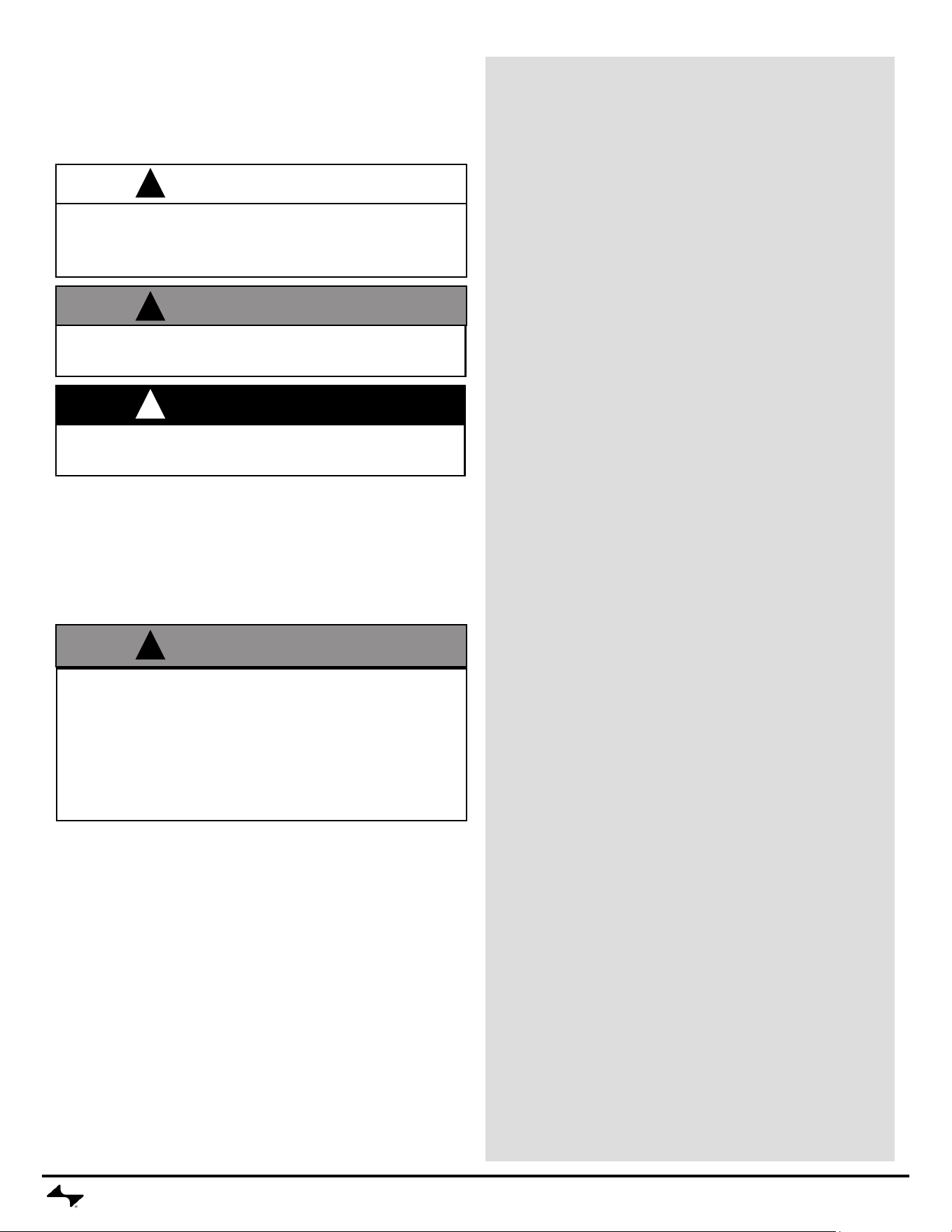
WARNING
Failure to follow all manufacturer’s instructions could
result in serious personal injury and/or property
damage.
• Read and follow all the information and safeguards in
this product guide before attempting to assemble or
operate this pizza oven.
FOR INDOOR/OUTDOOR USE
Keep this manual for future reference.
This instruction manual contains important information
necessary for the safe use of the appliance.
SAFETY SYMBOLS
The symbols and boxes shown below explain what each
heading means. Read and follow all of the messages
found throughout the manual.
IMPORTANT SAFEGUARDS
Follow these IMPORTANT SAFEGUARDS for Safe Use
of Your appliance and to Avoid Serious Injury:
When using electrical appliances, basic safety precau-
tions should always be followed including the following:
READ ALL INSTRUCTIONS
1. Do not touch hot surfaces. Use handles or knobs provid-
ed for operation.
a. This appliance will be hot during and after use. Use
insulated oven mitts or gloves and long-handled
utensils for protection from hot surfaces.
2. To protect against electrical shock, do not immerse cord,
plugs, or any portion of the appliance in water or any
other liquid.
3. Store product indoors when not in use – out of the reach
of children.
4. Close supervision is necessary when appliance is used
near children.
5. Keep children and pets away from the appliance at all
times.
6. Unplug from outlet when not in use and before moving
or cleaning. Allow to cool before putting on or taking off
parts.
7. Do not operate any appliance with a damaged cord or
plug or after the appliance malfunctions or has been
damaged in any manner.
8. Replace damaged part(s) only with Current Backyard
replacement parts. Do not attempt to repair damaged
parts.
9. The use of accessory attachments not recommended by
the appliance manufacturer may cause injuries.
10. Do not let cord touch hot surfaces. Do not let cord hang
over edge of tabletop or other items where it can be
pulled by children or tripped over.
11. Do not place on or near a hot gas or electric burner, or in
a heated oven.
12. Do not move the appliance when in use.
13. Extreme caution must be used when moving an appli-
ance containing hot oil or other hot liquids.
14. Do not use appliance for other than intended use. This
appliance is not intended for and should never be used
as a heater
15. Do not use for commercial cooking.
16. The use of alcohol, prescription or non-prescription drugs
may impair the consumer’s ability to properly assemble
or safely operate the appliance.
17. When cooking, the appliance must be on a level, stable
surface in an area clear of combustible material. Do
not use or store gasoline, kerosene or other ammable
liquids within 20 feet of this appliance when in use.
18. Do not leave appliance unattended when ON
19. To prevent appliance from being splashed or falling into
water, do not use within 10 feet of a pool, pond or other
body of water.
20. If using outdoors, always unplug cord from outlet when
done cooking.
21. To disconnect, turn any control to “off”, then remove plug
from wall outlet.
WARNING
WARNING: Indicates a potentially hazardous situation which,
if not avoided, could result in death or serious injury.
CAUTION
CAUTION: Indicates a potentially hazardous situation or unsafe
practice which, if not avoided, may result in minor or moderate
injury.
DANGER
DANGER: Indicates an imminently hazardous situation which,
if not avoided, will result in death or serious injury.
!
!
!
!
CURRENTBACKYARD.COM3
USE AND CARE
To prevent power loss:
• To prevent household circuit breakers or GFI outlets from tripping,
keep electric controller dry and do not use other electrical
products on the same circuit.
• Unplug any other electrical devices, like patio lights, powered by
the outlet/circuit breaker before plugging in your oven.
If power is lost during use:
• Identify and unplug any other electrical devices that lost power at
the same time and reset the breaker.
• If your circuit breaker continues to trip during use, consult a
qualied electrician.
• Try using a different electrical outlet, if available. Follow the
guidelines in “Extension Cord Use and Safety.”
Extension Cord Use and Safety
For best oven performance, use of extension cord is not recommended.
If you must use an extension cord, for your safety, care shall be
exercised in the use of extension cord:
• Use only outdoor type with 3 prong grounding plug, rated for 15
amperes or more, approved by UL, marked with a W and a tag
stating “Suitable for Use with Outdoor Appliance”.
• The cord should be arranged so that it will not drape over the
countertop or tabletop where it can be pulled on by children or
tripped over unintentionally.
• The connection to an extension cord should be kept dry and off the
ground.
• Use the shortest length extension cord required. Do not connect 2
or more extension cords together. A 12 or 14 gauge extension cord
of 50 ft. or less is acceptable.
Use only with GFI (Ground Fault Interrupter) protected
circuit. We recommend using a 20-amp breaker and 20-amp
GFCI for best performance. Running it on a lower current outlet/
circuit breaker may cause the circuit to trip. IF OUTLET IS NOT
15-AMP OR HIGHER, PLEASE HAVE AN ELECTRICIAN
REPLACE THE OUTLET.
Since 1971, the National Electric Code (NEC) has required
Ground Fault Interrupter devices on all outdoor circuits. If
your residence was built before 1971, check with a qualied
electrician to determine if a Ground Fault Interrupter
protector exists.
DANGER
In case of re, unplug oven from outlet and allow re
to burn out. Do not use water to put out a re in this
or any electrical appliance.
Do not operate in the rain. Keep electric plugs
off ground and dry. Store pizza oven in weather
protected area or under accessory cover when not in
use.
DANGER
Use only on properly grounded outlet. Never remove
grounding plug or use with an adapter to two prongs.
Do not use this appliance if the circuit does not have
GFI protection.
!
!
Electrical Requirements and Safety
WARNING
Do not use 16 or 18 gauge extension cords. Damage
to household wiring and/or re could result.
!
22. Oversize foods or metal utensils must not be inserted in an
oven as they may create a re or risk of electric shock.
23. A re may occur if the oven is covered or touching amma-
ble material, including curtains, draperies, walls, and the
like, when in operation. Do not store any item on top of the
appliance when in operation.
24. Extreme caution should be exercised when using contain-
ers constructed of other than metal or glass.
25. Do not store any materials, other than manufacturers rec-
ommended accessories, in this oven when not in use.
26. Do not place any of the following materials in the oven:
paper, cardboard, plastic, and the like.
27. Do not cover any part of the oven with metal foil. This will
cause overheating of the oven.
28. Do not clean this product with a water spray or the like.
Since 1996, the National Electric Code (NEC) has required
Ground Fault Interrupter devices on all kitchen countertop
receptacles. If your residence was built before 1996, or you
are using an outlet not located above a kitchen countertop,
check with a qualied electrician to determine if a Ground
Fault Interrupter protector exists.
CURRENTBACKYARD.COM4
USE AND CARE
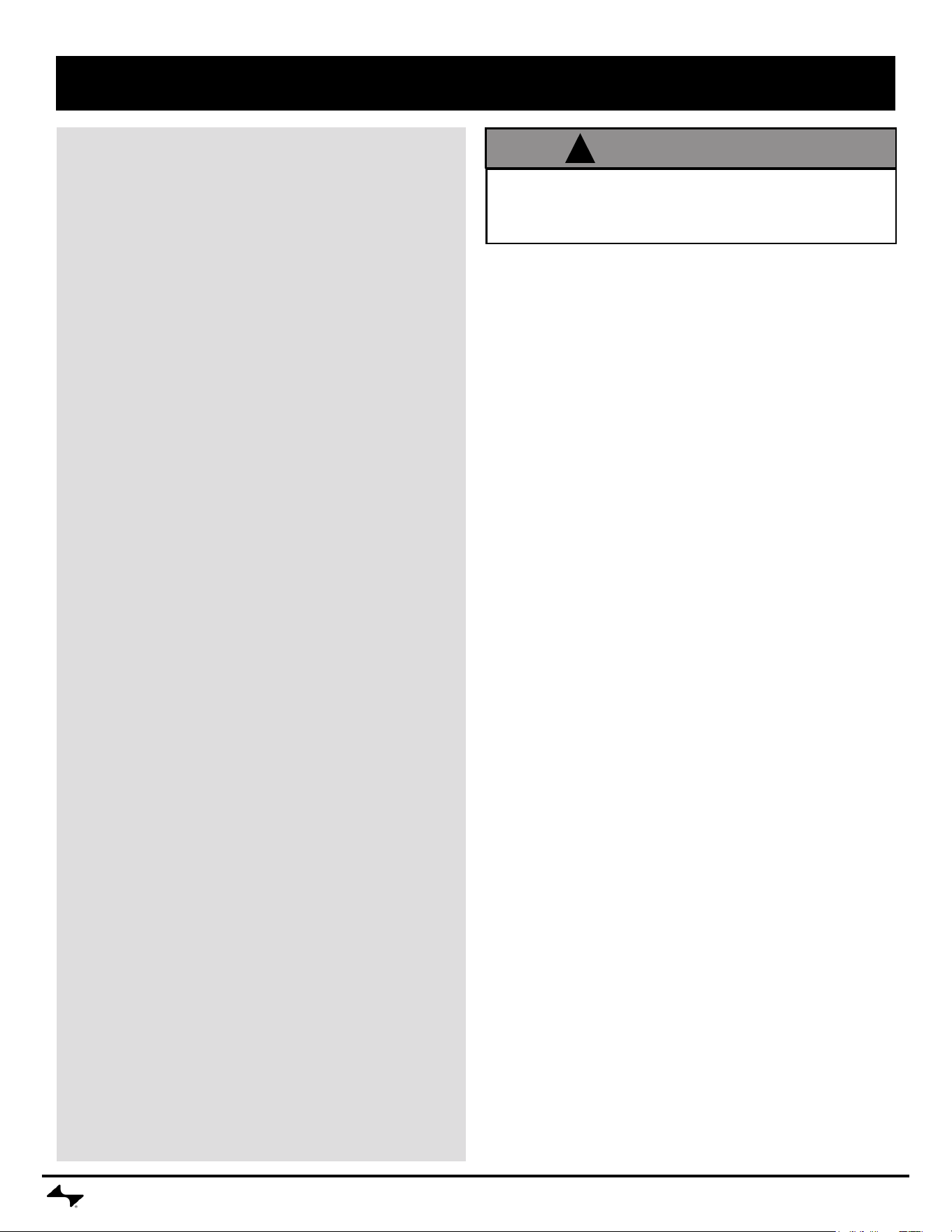
TIME DISPLAY TEMPERATURE
DISPLAY
TIMER BUTTON
POWER BUTTONINFORMATION DISPLAYLIGHT RING
WIFI
STATUS
CONTROL KNOB
CONTROLLER FUNCTIONALITY
POWER BUTTON – Quick press to turn appliance on. Press
and hold to turn off.
CONTROL KNOB – Rotate control knob to select cook setting,
or to adjust time or temperature. Press to conrm selection.
TIMER BUTTON – After the cook has been selected and the
preheat is complete, press the time button then rotate the knob
to adjust the length of the cook.
INFORMATION DISPLAY – Displays the status of the oven, or
what is needed next for the cook.
TEMPERATURE DISPLAY – Alternates between the set (or
target) temperature and the actual temperature during preheat.
After selecting the cook mode and beginning the preheat
process, the control knob can be rotated to adjust the set
temperature up or down as desired.
TEMPERATURE UNITS – A quick press of the power button
and timer button while the unit is in standby mode will toggle
the temperature units.
TIME DISPLAY – Countdown timer for individual cooks.
LIGHT RING – Visual indicator of oven status. Blue indicates
standby. Red indicates cook mode is active. Orange indicates
an error.
ERROR CODES – an orange light ring and a displayed code
of E01, E02, E03, or E04 indicate a temperature sensor
fault. Please unplug unit, allow to cool, and then repeat cook
procedure. If error persists, please contact customer service at
1-866-CURRENT.
Before rst use of oven:
Remove all packaging and sale labels from the oven. Do not
use sharp tools to remove stickers.
Place baking rack in oven and insert pizza stone as shown.
Turn oven on and preheat to the Neapolitan cook setting. This will
remove any residue inside the cooking chamber.
WARNING
Your oven should be placed four inches away from
walls or any objects on the countertop. DO NOT
PLACE OBJECTS ON TOP OF THE OVEN OR AGAINST
SIDE WALLS WHEN OVEN IS IN USE. THE EXTERIOR
WALLS, DOOR, AND WINDOW GET VERY HOT.
!
CURRENTBACKYARD.COM5
USE AND CARE
COOKING
DO NOT OPERATE pizza oven without pizza stone or sizzle
plate (sold separately) in place.
PIZZA (Neapolitan, New York, Thin Crust, Frozen)
1. Ensure food particles and cheese or any other residue
has been removed from the stone and that the stone is
completely dry.
2. Place stone in baking rack.
3. Plug power cord into a properly grounded, GFI protected
outlet. If extension cord must be used, refer to “Extension
Cord Use and Safety” on page 3.
4. Press power button to turn the oven on. The light ring will
turn blue indicating the controller is ready for use.
5. Rotate control knob to select pizza type. Press knob to
conrm and start preheat.
a. During preheat, you may adjust your temperature up
or down as needed. Rotate the knob to the desired
temperature and press to conrm.
6. Sections of the light ring will pulse red and gradually
illuminate to show the progress of the preheat cycle. Once
the SET temperature is reached, the light ring will be solid
red. During the preheat cycle, the temperature display will
alternate between SET and ACTUAL temperature until
SET temperature is reached.
BROIL
1. Place sizzle plate (sold separately) on pizza stone.
2. Plug power cord into a properly grounded, GFI protected
outlet. If extension cord must be used, refer to “Extension
Cord Use and Safety” on page 3.
3. Press power button to turn the oven on. The light ring will
turn blue indicating the controller is ready for use.
4. Rotate control knob to select the BROIL setting. Press
knob to conrm and start preheat.
a. During preheat, you may adjust your temperature up
or down as needed. Rotate the knob to the desired
temperature and press to conrm.
5. Sections of the light ring will pulse red and gradually
illuminate to show the progress of the preheat cycle. Once
the SET temperature is reached, the light ring will be solid
red. During the preheat cycle, the temperature display will
alternate between SET and ACTUAL temperature until
SET temperature is reached.
If you have an appliance problem see the “Troubleshooting
Section”.
Oven Auto Shutoff
• If no cooking prole is selected, the oven will automatically
turn off after 15 minutes of inactivity.
• If a cooking prole has been selected and the preheat
temperature is reached, a warning will appear after 15
minutes of no user interaction.
• After the warning, the oven will turn off completely after
an additional 5 minutes, for a total of 20 minutes from the
initial 15-minute inactivity period.
WARNING
Use extreme caution when removing sizzle plates
(sold separately) or disposing of hot grease.
!
CURRENTBACKYARD.COM6
USE AND CARE
General Cleaning
• Use damp, soapy cloth to clean outside surfaces and inner
walls of the unit.
• Use damp non-metallic, non-scratch scouring pads to
clean window.
• DO NOT clean heating tubes at top of oven.
• Do not clean with metal scouring pads. Pieces can break
off the pad and touch electrical parts, creating a risk of
electric shock. (UL1026 for Broiler-Ovens)
SAVE THESE INSTRUCTIONS
STORING
• Clean pizza stone or sizzle plates (sold separately).
• Store oven indoors, or in weather protected area or under
accessory cover when not in use.
• Always unplug your oven prior to storage.
Replacement Parts
To order additional parts or accessories, please visit
currentbackyard.com or contact our Customer Service team at
1-866-CURRENT. For the fastest service, please register your
product using one of the methods below prior to calling.
CLEANING
It is recommended to clean your pizza stone after each use.
To clean the stone:
• Allow stone to cool completely before removing from the
oven.
• Use nylon bristle brush to remove food particles.
• Using a plastic spatula or bench scraper, scrape off any
baked on cheese or food residue
• Use a damp cloth to wipe all remaining residue from the
stone.
• Air dry the stone prior to returning it to the oven.
• DO NOT PLACE STONE IN DISHWASHER.
• DO NOT USE SOAP ON STONE.
• Do not soak or submerge stone in water or other liquid. The
stone’s pores will hold the liquid and will affect your next
cook, and could result in the stone cracking.
• Do not use sharp or pointed tools to clean the pizza stone
or any part of the oven.
• Do not use abrasive oven cleaners, steel wool or metal
brushes to clean the pizza stone or oven body. They will
cause damage.
To clean the controller display:
• Wipe controller display with a soft, dry cloth.
To clean the window:
• Use damp non-metallic, non-scratch scouring pads to
clean window.
DANGER
To avoid the possibility of serious burns, be sure
pizza oven is cool before cleaning the pizza stone or
any part of the appliance. Allow oven and stone to
cool completely before moving, cleaning or storing.
!
CAUTION
If a bristle brush is used to clean the stone, ensure no loose
bristles remain on the stone prior to cooking.
!
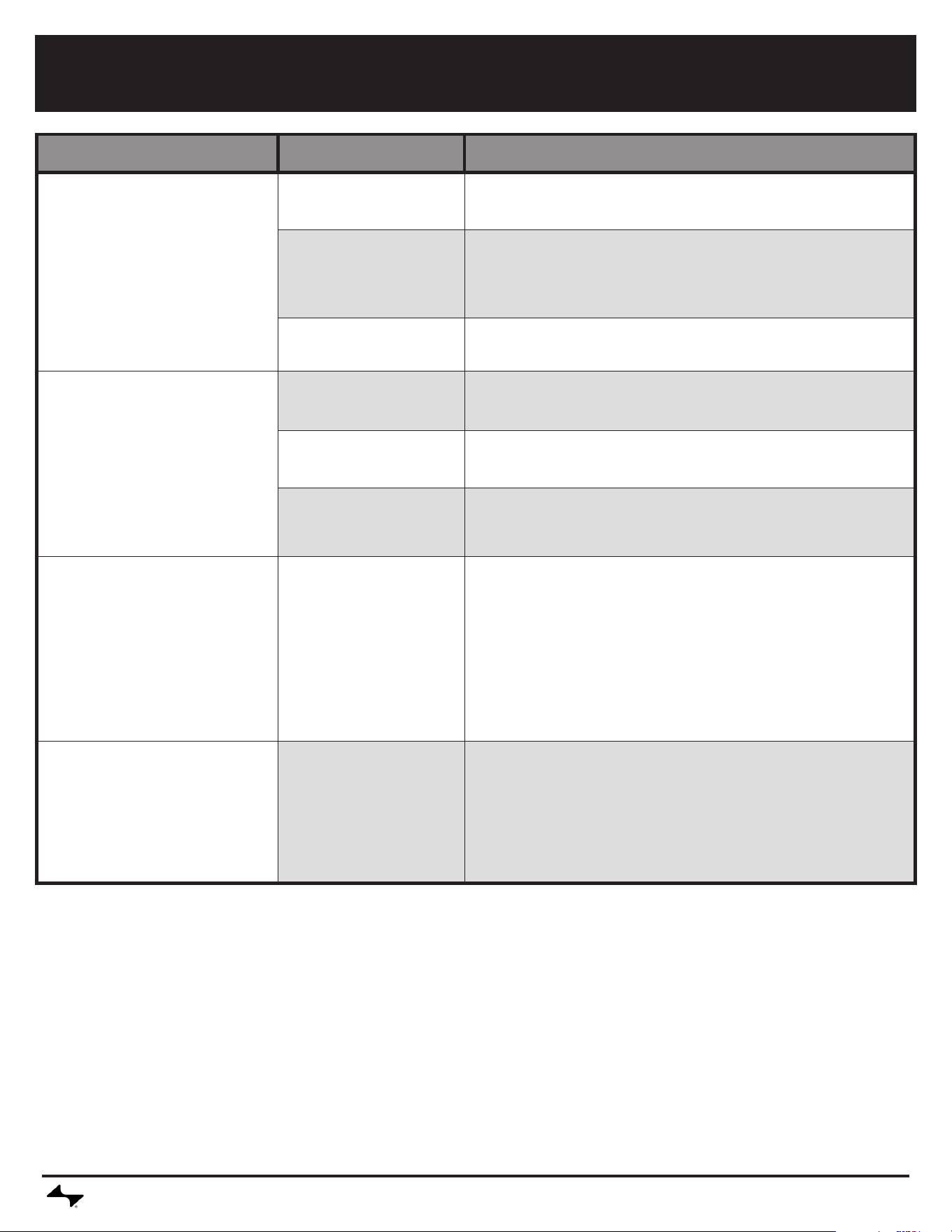
TROUBLESHOOTING
CURRENTBACKYARD.COM7
Problem Possible Cause Prevention/Solution
Oven does not power on
• Oven is not plugged in. • If the CURRENT logo and power button are not illuminated, verify
the unit is plugged in.
• No power to the outlet. • If the CURRENT logo and power button are not illuminated, plug
another device into the outlet to determine if power is available.
If no power, reset GFI or breaker. If still no power, consult a local
electrician.
• Controller error. • Contact customer service at 1-866-CURRENT.
Oven does not heat, or takes too
long to heat up.
• Door left open. • When the door is left open, the heating elements do not function.
Close door and allow the oven to complete the preheat cycle.
• Cold weather affects the
heat up time.
• If cooking outside during cold weather, heat up times will be several
minutes longer than usual.
• Heating element or
temperature sensor
defective.
• Contact customer service at 1-866-CURRENT.
Oven turns off on its own. • Auto-shutoff time
reached.
• If no cooking prole is selected, the oven will automatically turn off
after 15 minutes of inactivity.
• If a cooking prole has been selected and the preheat tempera-
ture is reached, a warning will appear after 15 minutes of no user
interaction.
• After the warning, the oven will turn off completely after an addi-
tional 5 minutes, for a total of 20 minutes from the initial 15-minute
inactivity period.
Water found below oven after
cooking
• Moisture from cooking
chamber condenses and
leaks out.
• It is natural to have some water below the unit when cooking foods
with high moisture content.
• If pizza stone has been rinsed or submerged in water, excess
water will evaporate and then condense around oven base. Follow
instructions in product guide for cleaning with limited water contact.
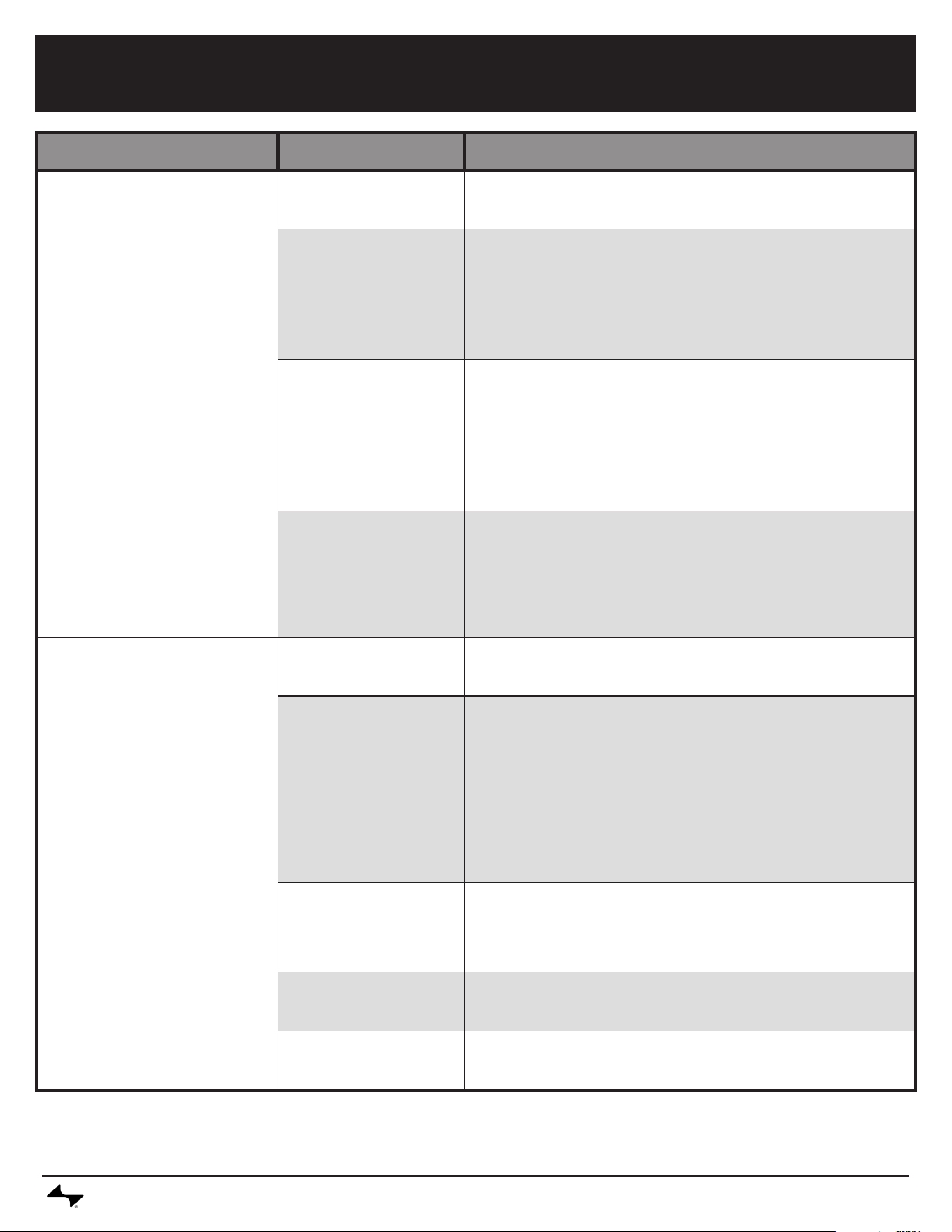
TROUBLESHOOTING
CURRENTBACKYARD.COM8
Problem Possible Cause Prevention/Solution
Product won't connect to Bluetooth • Product is too far away
from phone
• Complete pairing process with device within 5 ft of phone.
• Phone Bluetooth turned
off or on Airplane Mode
• In your mobile device settings, make sure Bluetooth is turned on
and airplane mode is disabled. For Android devices, make sure that
location services are turned on and that the application is permitted
to use location services. This will enable Bluetooth to be used in the
application. For iPhone devices, check that Bluetooth is enabled for
the application in the operating system settings.
• Product is already paired
to another phone
• Use the original mobile device paired to the product or reset the
grill's connections. If resetting the grill connection, rst remove the
product from the mobile device Bluetooth settings. Alternatively,
turn off bluetooth on the previous mobile device while performing
the pairing process. To reset grill connection, press and hold the
control knob for 10 seconds. A beep will sound indicating reset is
complete. Now go through the paring process for Bluetooth on the
device.
• Product is already paired
to the same phone
• Turn the product off and close the application. Turn product back
on and re-open the application. If product is still not connected by
Bluetooth, remove the product from the mobile phone operating
system Bluetooth device settings. On the oven, press and hold the
control knob until it beeps to clear the oven's Bluetooth settings and
restart the pairing process.
Product won't connect to WiFi • Incorrect router pass-
word
• Check password and try wi connection process again.
• No internet • Verify internet access on other devices.
• If other devices have internet:
• Unplug oven for 30 seconds and plug back in. Check for connec-
tion.
• Unplug router for 30 seconds and plug back in. Check for con-
nection. Perform WiFi setup in the application again - if the WiFi
network does not appear in the scan list, the product may be too far
from the router.
• Router is too far away
from oven
• Perform WiFi setup in the application again - if the WiFi network
does not appear in the scan list, the product may be too far from
the router. With a mobile device in the area where the oven is locat-
ed, check that there is internet access.
• Obstacles between
router and oven
• Position oven such that the number of walls and objects between
the oven and the router is minimized.
• No 2.4GHz wi • Oven only supports 2.4G WiFi networks. An alternate router is
required.
CURRENTBACKYARD.COM9
This warranty only applies to units purchased from an authorized retailer. Manufacturer warrants to the original consumer-purchaser only that this
product shall be free from defects in workmanship and materials after correct assembly and under normal and reasonable home use for the periods
indicated below beginning on the date of purchase*. The manufacturer reserves the right to require that defective parts be returned, postage and or
freight pre-paid by the consumer for review and examination.
*Note: A dated sales receipt WILL be required for warranty service.
The original consumer-purchaser will be responsible for all shipping charges for parts replaced under the terms of this limited warranty.
This limited warranty is applicable in the United States and Canada only, is only available to the original owner of the product and is not transferable.
Manufacturer requires proof of your date of purchase. Therefore, you should retain your sales slip or invoice. Registering your product is not a
substitute for proof of purchase and the manufacturer is not responsible for or required to retain proof of purchase records. This limited warranty applies
to the functionality of the product ONLY and does not cover cosmetic issues such as scratches, dents, corrosions or discoloring by heat, abrasive and
chemical cleaners or any tools used in the assembly or installation of the appliance, surface rust, or the discoloration of stainless steel surfaces. Paint is
not warranted and will require touch up. RUST is not considered a manufacturing or materials defect.
This limited warranty will not reimburse you for the cost of any inconvenience, food, personal injury or property damage.
ITEMS MANUFACTURER WILL NOT PAY FOR:
1. Shipping cost, standard or expedited, for warranty and replacement parts.
2. Service calls to your home.
3. Repairs when your product is used for other than normal, single-family household or residential use.
4. Damage, failures, or operating difculties resulting from accident, alteration, careless handling, misuse, abuse, re, ood, acts of God, improper
installation or maintenance, installation not in accordance with electrical or plumbing codes, or use of products not approved by the manufacturer.
5. Any food loss due to product failures or operating difculties.
6. Replacement parts or repair labor costs for units operated outside the United States or Canada.
7. Pickup and delivery of your product.
8. Repairs to parts or systems resulting from unauthorized modications made to the product.
9. The removal and/or reinstallation of your product.
DISCLAIMER OF IMPLIED WARRANTIES and LIMITATION OF REMEDIES
Repair or replacement of defective parts is your exclusive remedy under the terms of this limited warranty. In the event of parts availability issues, the
manufacturer reserves the right to substitute like or similar parts that are equally functional. Manufacturer will not be responsible for any consequential or
incidental damages arising from the breach of either this limited warranty or any applicable implied warranty, or for failure or damage resulting from acts
of God, improper care and maintenance, grease re, accident, alteration,replacement of parts by anyone other than Manufacturer, misuse, transportation,
commercial use, abuse, hostile environments (inclement weather, acts of nature, animal tampering), improper installation or installation not in accordance
with local codes or printed manufacturer instructions.
THIS LIMITED WARRANTY IS THE SOLE EXPRESS WARRANTY GIVEN BY THE MANUFACTURER. NO PRODUCT PERFORMANCE SPECIFI-
CATION OR DESCRIPTION WHEREVER APPEARING IS WARRANTED BY MANUFACTURER EXCEPT TO THE EXTENT SET FORTH IN THIS
LIMITED WARRANTY. ANY IMPLIED WARRANTY PROTECTION ARISING UNDER THE LAWS OF ANY STATE, INCLUDING IMPLIED WARRANTY
OF MERCHANTABILITY OR FITNESS FOR A PARTICULAR PURPOSE OR USE, IS HEREBY LIMITED IN DURATION TO THE DURATION OF THIS
LIMITED WARRANTY.
Neither dealers nor the retail establishment selling this product has any authority to make any additional warranties or to promise remedies in addition to
or inconsistent with those stated above. Manufacturer’s maximum liability, in any event, shall not exceed the purchase price of the product paid by the
original consumer. NOTE: Some states do not allow an exclusion or limitation of incidental or consequential damages, so some of the above limitations or
exclusions may not apply to you. This limited warranty gives you specic legal rights as set forth herein. You may also have other rights which vary from
state to state. In the state of California only, if renishing or replacement of the product is not commercially practicable, the retailer selling this product or
the Manufacturer will refund the purchase price paid for the product, less the amount directly attributable to use by the original consumer-purchaser prior
to discovery of the nonconformity. In addition, in the state of California only, you may take the product to the retail establishment selling this product in
order to obtain perforMance under this limited warranty. If you wish to obtain performance of any obligation under this limited warranty, you should write to:
Consumer Relations
P. O. Box 1240
Columbus, GA 31902-1240
Consumer returns will not be accepted unless a valid Return Authorization is rst acquired. Authorized returns are clearly marked on the outside of the
package with an RA number and the package is shipped freight/postage pre-paid. Consumer returns that do not meet these standards will be refused.
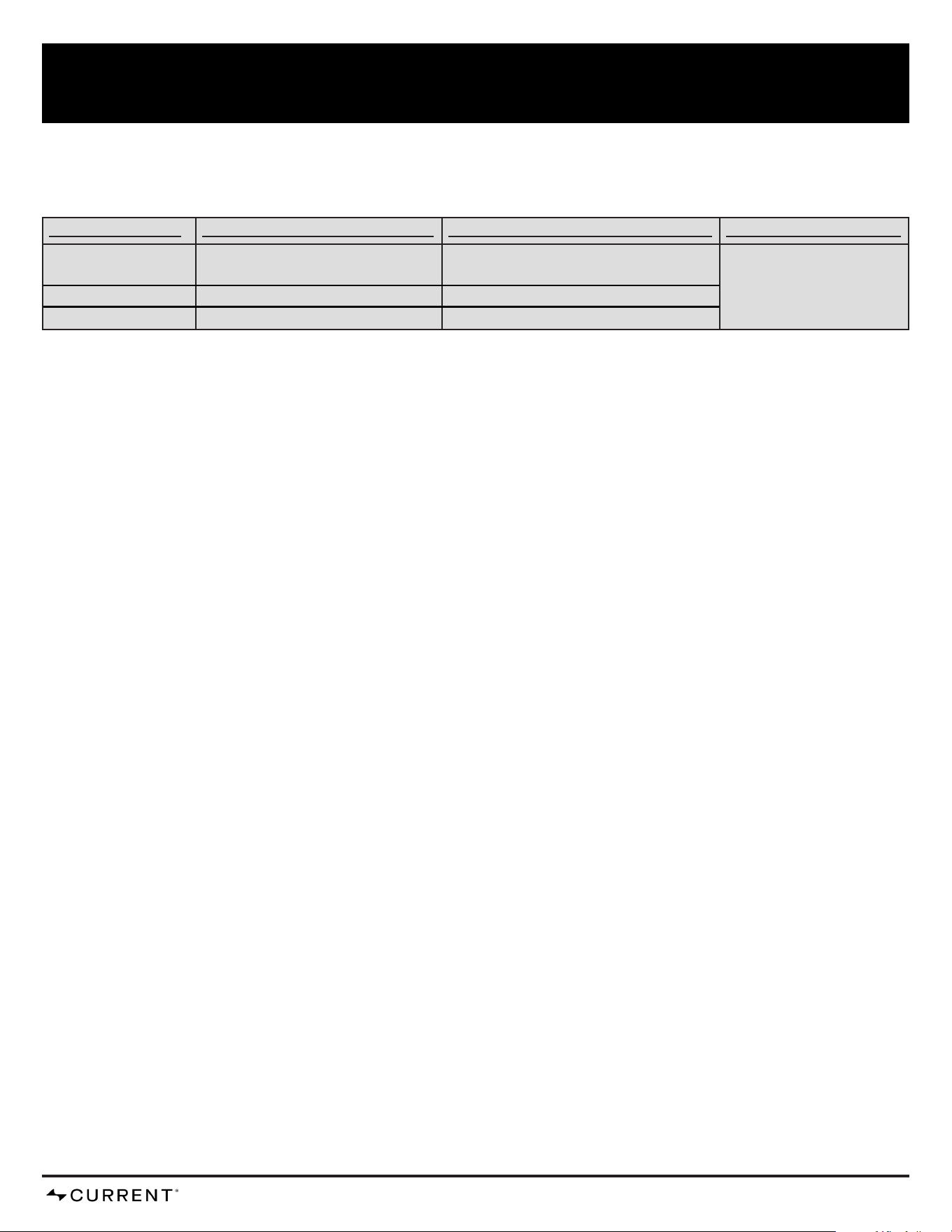
LIMITED WARRANTY
SCOPE OF COVERAGE PERIOD OF COVERAGE with Registration PERIOD OF COVERAGE WITHOUT Registration TYPE OF FAILURE COVERAGE
Stainless Steel Cooking
Chamber Liner
10 years from date of purchase* 5 years from date of purchase* PERFORATION, MANUFACTURING,
AND MATERIAL DEFECTS ONLY
Electronics and Pizza Stone 2 year from date of purchase* 1 year from date of purchase*
All Other Parts 5 years from date of purchase*
3 years from date of purchase*

CURRENTBACKYARD.COM10
PRODUCT REGISTRATION
Scan the QR code or visit currentbackyard.com to register your product,
double your warranty and learn tips and tricks to maintain your
CURRENT Pizza Oven.
CAUTION: The user is cautioned that changes or modications not expressly approved by the party responsible for compliance could
void the user’s authority to operate the equipment.
This device complies with Part 15 of the FCC Rules. Operation is subject to the following two conditions: (1) this device may not cause
harmful interference, and (2) this device must accept any interference received, including interference that may cause undesired
operation.
NOTE: This equipment has been tested and found to comply with the limits for a Class B digital device, pursuant to Part 15 of the
FCC Rules. These limits are designed to provide reasonable protection against harmful interference in a residential installation. This
equipment generates, uses and can radiate radio frequency energy and, if not installed and used in accordance with the instructions,
may cause harmful interference to radio communications. However, there is no guarantee that interference will not occur in a particular
installation. If this equipment does cause harmful interference to radio or television reception, which can be determined by turning the
equipment off and on, the user is encouraged to try to correct the interference by one or more of the following measures:
• Reorient or relocate the receiving antenna.
• Increase the separation between the equipment and receiver.
• Connect the equipment into an outlet on a circuit different from that to which the receiver is connected.
• Consult the dealer or an experienced radio/TV technician for help.
FCC Radiation Exposure Statement
This equipment complies with FCC radiation exposure limits set forth for an uncontrolled environment. This equipment should be
installed and operated with a minimum distance of 20cm between the radiator and your body. This transmitter must not be co-located
or operating in conjunction with any other antenna or transmitter.

CURRENTBACKYARD.COM11

-4432
PN: 80033034 • 01.02.2025