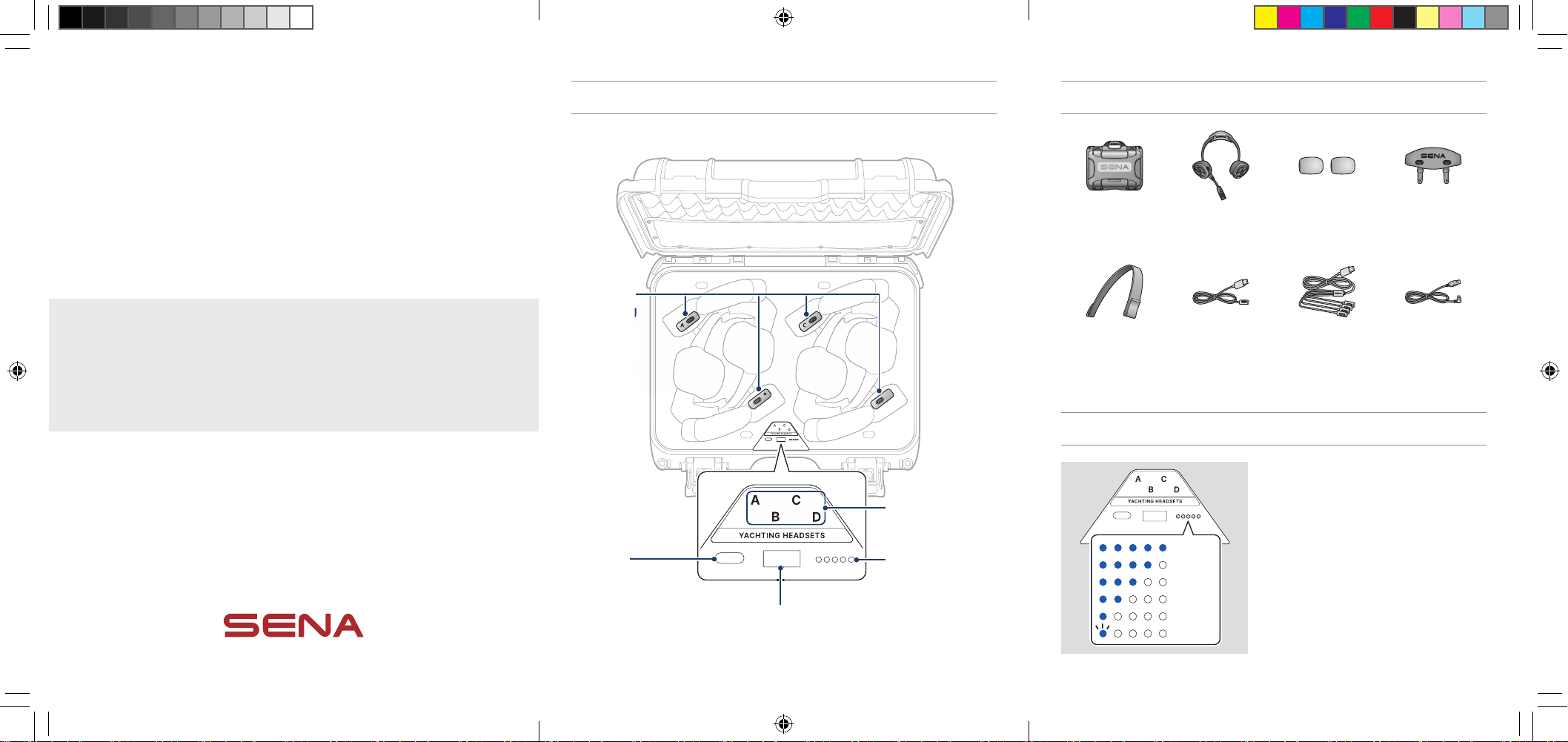
Package Contents
Charging Case NAUTITALK BOSUN
x 4
Microphone
Sponges x 4
Floating Marker
Buoy x 4
Headband Strap
x 4
Magnetic Charging
Cable x 3
4 in 1 Magnetic
Charging Cable
USB Power Cable for
Charging Case
Battery Level
80
~
100%
60~80%
40~60%
20~40%
5~20%
1~5%
The battery LED shows the battery level of
the charging case.
If the battery LED is off, tap the power
button to check the battery level.
Product Details
C
C
D
D
A
A
B
B
C
D
A
B
Headset
Charging LED
Battery LED
Battery
Charging Port
Power Button
Headset
Charging
Port
C
A
B
Charging
CHARGING CASE
FOR NAUTITALK BOSUN
QUICK START GUIDE
ENGLISH
QuickStartGuide_NAUTITALK_BOSUN_ChargingCase_EN(315X138).indd 1-3QuickStartGuide_NAUTITALK_BOSUN_ChargingCase_EN(315X138).indd 1-3 2024-09-04 오후 1:50:082024-09-04 오후 1:50:08
Specications
Capacity 20000 mAh / 74 Wh
Input 5 V / 3 A
Output Total: 15 W (Max)
Dimension
391 mm x 310 mm x 173 mm
(15.4” x 12.2” x 6.8”)
Weight 2900 g (102.29 oz)
IP Rating IP67 Waterproof
Operating
Temperature
0 °C – 45 °C (32 °F – 113 °F)
The charging case is IP67-rated waterproof when the case is closed.
Ensure that no water enters the case. If it becomes wet, wipe it dry with a clean,
and soft cloth.
If the charging terminals get wet, the product may not charge properly or could
be damaged.
Sleep Mode
If all headsets are fully charged or there is no headset in headset charging port,
the charging case will switch to sleep mode after approximately 40 seconds, and
all LEDs will turn off.
Troubleshooting
C
C
D
D
A
A
B
B
C
D
A
B
YACHTING HEADSETS
Fault Reset
If the charging case is not working
properly, press the power button and then
a fault reset will be performed.
Short Circuit Detection
If a short circuit is detected between
the headset and the charging port, the
headset charging LED will blink purple
with a buzzing sound. Remove the
headset from the charging case, clean the
magnetic ports and replace the headset in
the charging case.
Charging the Charging Case
C
C
D
D
A
A
B
B
DB
B
100%
80~99%
60~80%
40~60%
20~40%
0~20%
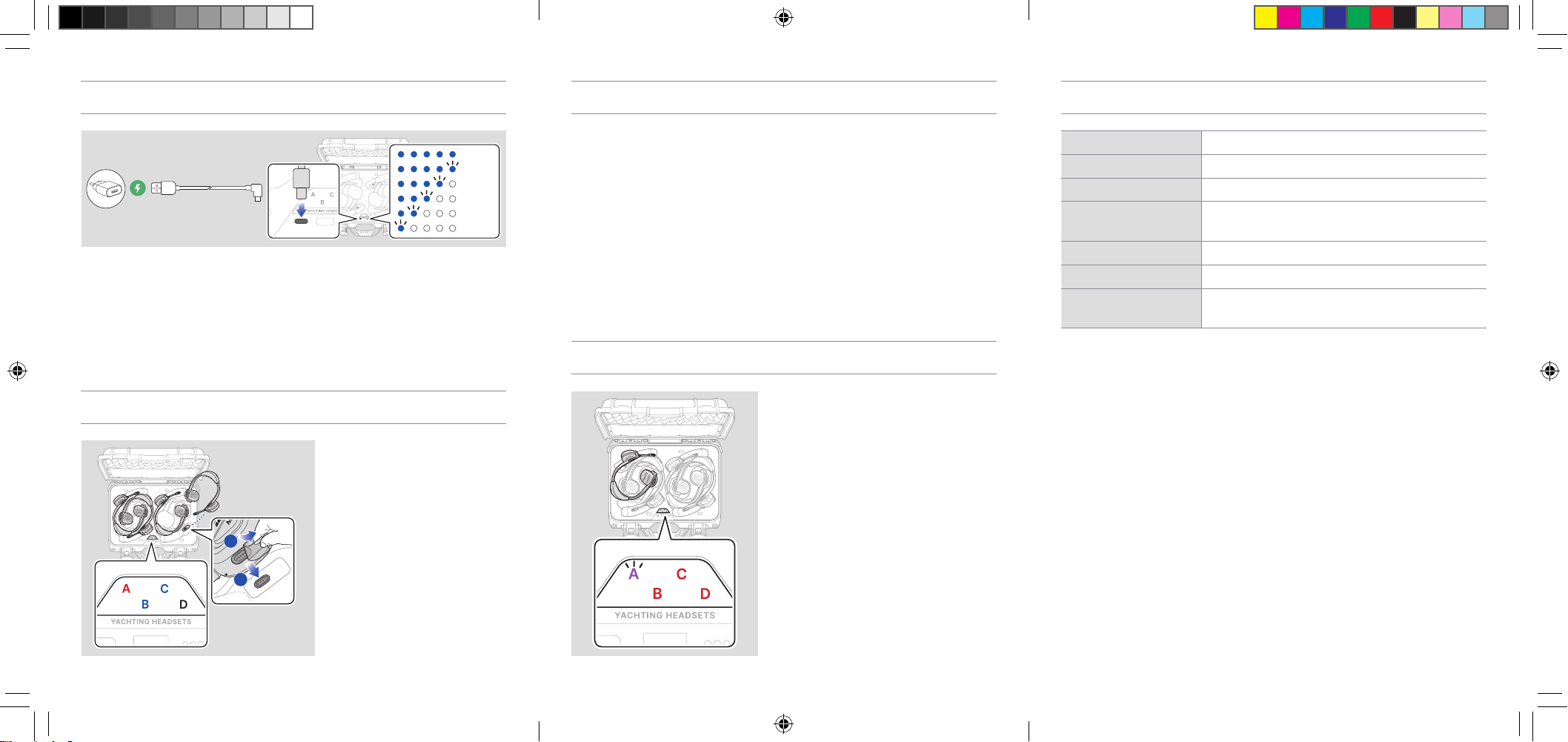
It takes 10 hours to fully charge.
Any 3rd party USB charger (5V/3A) can be used with the charging case if it is
approved by the FCC, CE, IC, or other locally approved agencies.
Using a non-approved charger may cause re, explosion, leakage, and other
hazards, which may also reduce the lifetime or performance of the battery.
Charging the Headset
C
C
D
D
A
A
B
B
C
D
A
B
D
D
D
1
2
1
Charging : A
Full Charged : B
1. Please remove the plastic tape
from the charging port of the
headset before charging.
2. Place the headset in any
empty headset charging
port and make sure that
the corresponding headset
charging LED is illuminated red
or blue.
It takes 2.5 hours to fully charge.
1.1.0_September2024
QuickStartGuide_NAUTITALK_BOSUN_ChargingCase_EN(315X138).indd 4-6QuickStartGuide_NAUTITALK_BOSUN_ChargingCase_EN(315X138).indd 4-6 2024-09-04 오후 1:50:092024-09-04 오후 1:50:09