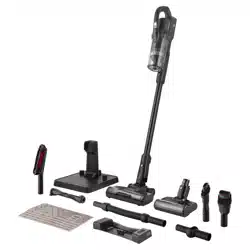
EN
4-IN-1 CORDLESS VACUUM CLEANER
Translation of the original manual
SVC 9879BK
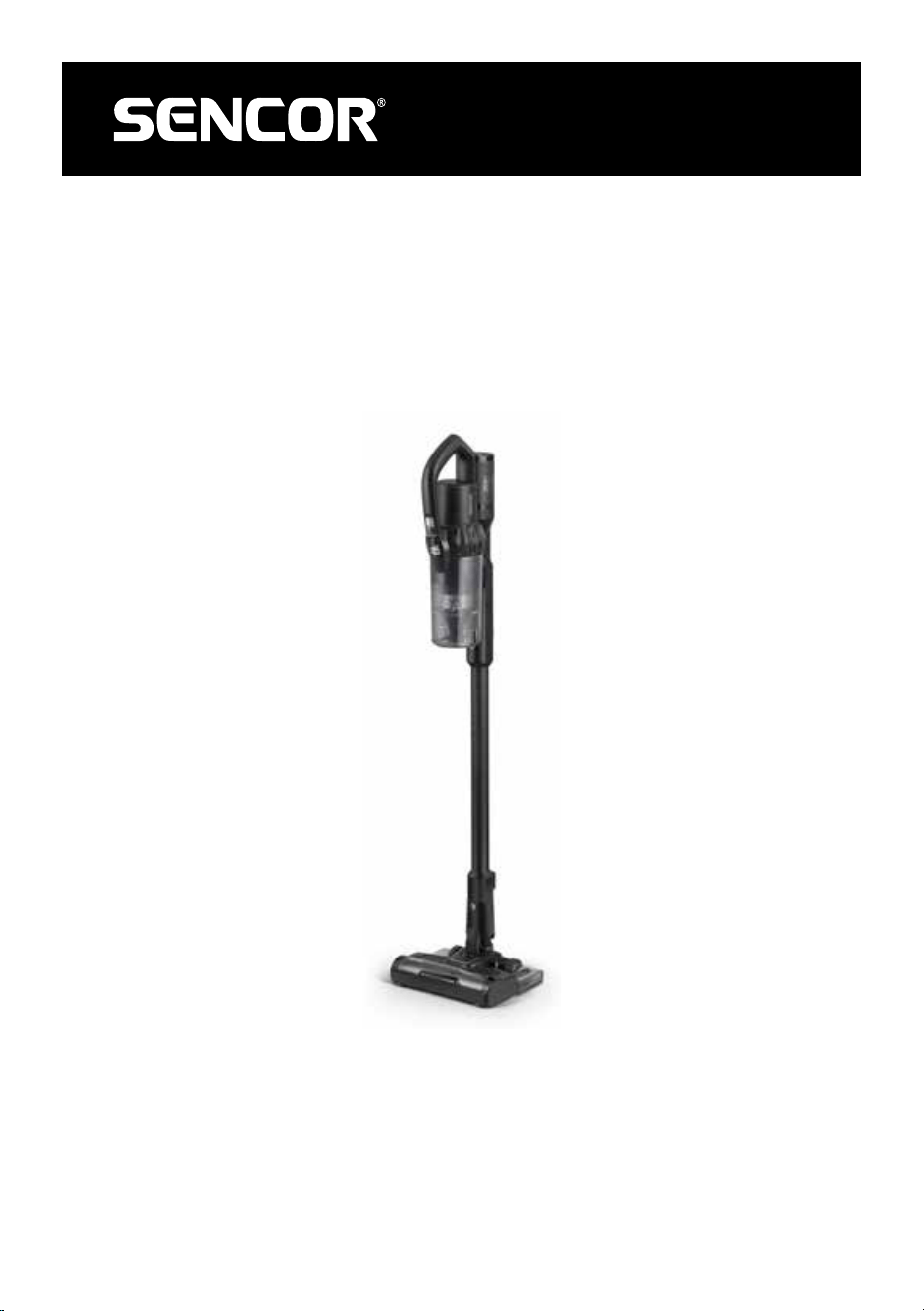
SVC 9879BK
A
12
11
10
9
8
7
6
5
4
3
2
1
13
14
15
16
17A
17B
A
18
19
20
21
22
23
28
30
27
24
25
26
29
C
D
E1
E2
F
G
- 1 -
03/2023
2023, .
EN 4-in-1 Cordless vacuum cleaner
Important safety instructions
READ CAREFULLY AND STORE FOR FUTURE USE.
• This vacuum cleaner may be used by children 8 years of
age and older and by persons with physical, sensory or
mental impairments or by inexperienced persons, if they
are properly supervised or have been informed about
how to use this vacuum cleaner in asafe manner and
understand the potential dangers.
• Children must not play with the appliance. Cleaning
and maintenance performed by the user must not be
performed by unsupervised children.
WARNING:
This appliance contains a UV-C light. Do not look
into the light of the UV-C lamp and do not point the
UV-C lamp at eyes.
• In the event that the power adapter is damaged, it must be
replaced with an original type. For areplacement power
adapter, please contact an authorised service centre. It is
forbidden to use the appliance if it has adamaged power
adapter.

- 2 -
03/2023
2023, .
WARNING:
Avoid coming into contact with the rotating parts of
the vacuum cleaner'shand accessories. There is
arisk of getting caught on these parts and possible
injury.
Only use the vacuum cleaner with the original
power adapter, charging base and accessories that
were supplied with it.
• This vacuum cleaner is designed for use in households, offices and similar types of areas. Do not use in industrial surroundings.
• Do not expose the vacuum cleaner to direct sunlight and do not place it near an open fire or appliances that are asource of heat.
• Before connecting the adapter to apower socket, check that the technical details on its rating label match the electrical voltage in the power socket.
• Make sure the adapter power cord is not touching ahot surface or sharp objects. Position the adapter power cord so that it will not be tripped over.
• Never submerge the vacuum cleaner, the charging base or the power adapter in water or any other liquid and do not wash it under running water.
• Before turning on the vacuum cleaner, make sure that it is correctly assembled and that all inflow and outflow filters are installed in their place.
• When the vacuum cleaner is running, ensure that the air outlets and the suction opening are not blocked.
• Do not use the vacuum cleaner to vacuum the following items:
- smouldering cigarettes, burning items, matches or embers;
- water and other liquids;
- flammable or volatile materials;
- sharp items, e.g. broken glass, needles, pins, etc.;
- flour, wall plaster, cement and other building materials;
- larger pieces of paper or plastic bags, which can easily block the suction hole.
• Vacuuming of some types of floors or floor surfaces can create an electrostatic discharge, which presents no danger to the user.
• Always turn off the vacuum cleaner when leaving it without supervision, after finishing using it and before cleaning it.
• Disconnect the power adapter from the power socket before cleaning it and after it has finished charging.
• Disconnect the power adapter from the power socket by pulling on the plug, never pulling on the power cord. Otherwise, this could damage the
power adapter or the socket.
• If the power adapter is damaged, it must be replaced with an original type. For areplacement power adapter, please contact an authorised service
centre.
• Do not use the vacuum cleaner if it is not working correctly, if it has been damaged or has been submerged in water.
• Do not repair the vacuum cleaner yourself or make any adjustments to it. Have all repairs or adjustments performed at an authorised service centre.
By tampering with the appliance, you risk voiding your legal rights arising from unsatisfactory performance or quality warranty.

- 3 -
03/2023
2023, .
• Thank you for purchasing aSENCOR brand product and we hope that
you will be happy with it.
• Prior to using this appliance, please read the user'smanual
thoroughly, even in cases, when one has already familiarised
themselves with previous use of similar types of appliances. Only use
the appliance in the manner described in this user’smanual. Keep
this user'smanual in asafe place where it can be easily retrieved for
future use.
• We recommend saving the original cardboard box, packaging
material, purchase receipt and responsibility statement of the vendor
or warranty card for at least the duration of the legal liability for
unsatisfactory performance or quality. In the event of transportation,
we recommend that you pack the appliance in the original box from
the manufacturer.
. . . . . . . . . . . . . . . . . . . . . . . . . . . . . . . . . . . . . . . . . . . . . . . . . . . . . . . . . . . . . . . . . . . .
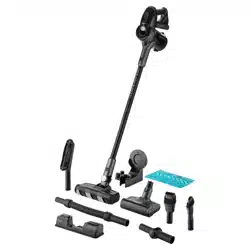
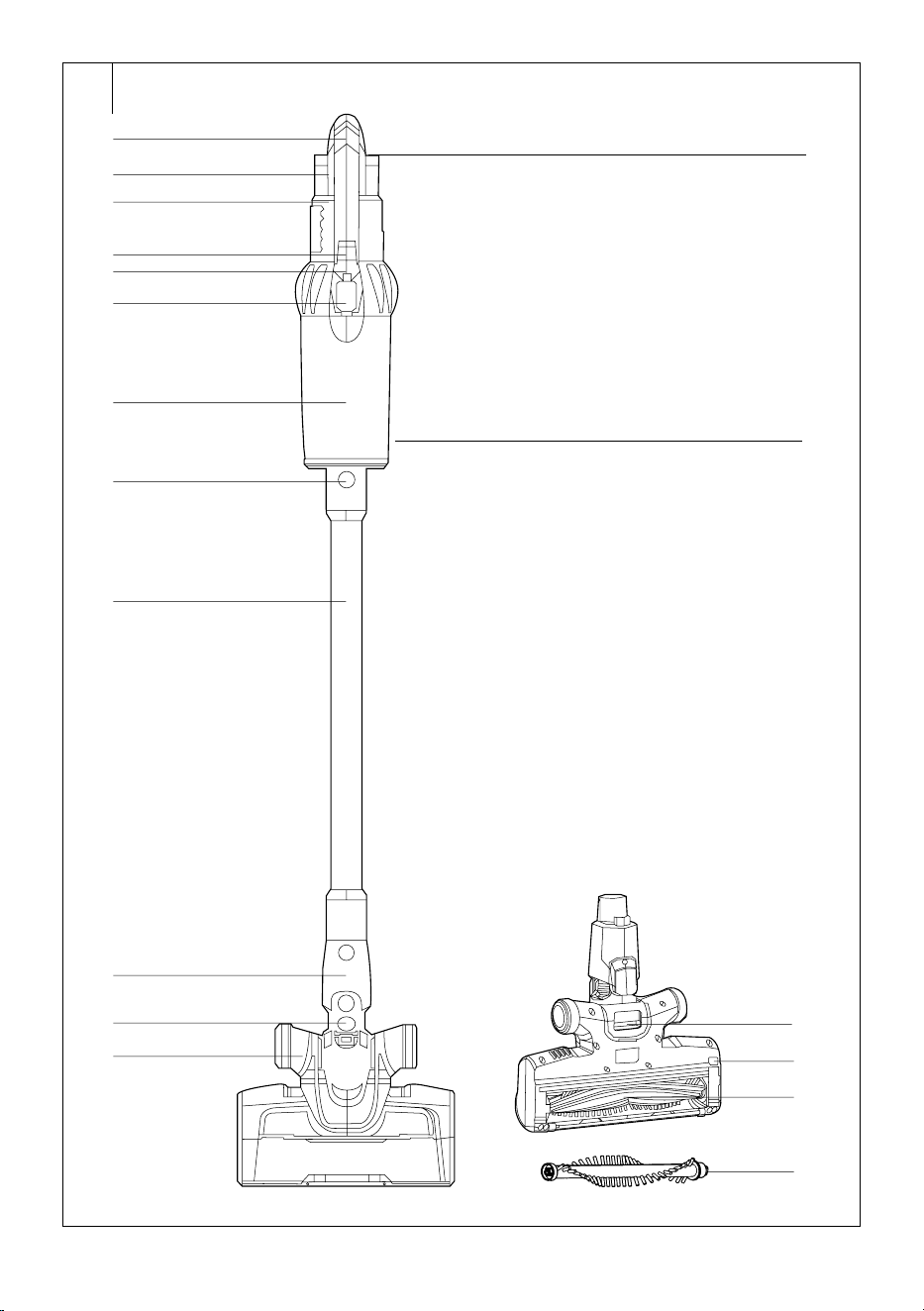
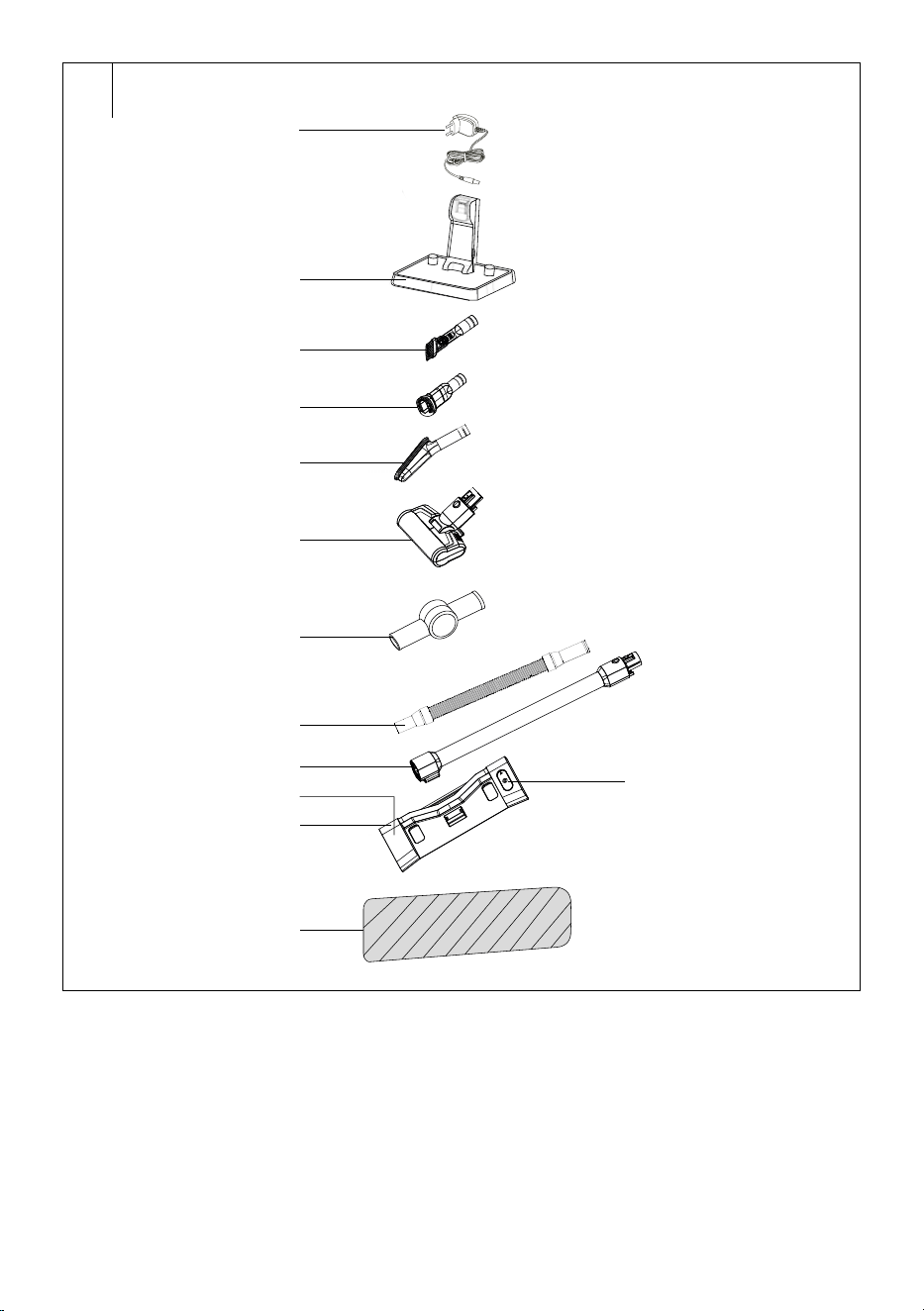
DESCRIPTION OF THE VACUUM CLEANER
A1 Handle
A2 Battery
A3 Motor unit
A4 On/Off button
A5 Power level button
A6 Display
A7 Dust container
A8 Metal tube release clip
A9 Metal tube
A10 Floor nozzle release clip
A11 Floor nozzle
A12 Travel wheels
A13 Battery release button
A14 Button for releasing the
bottom of the dust container
for fast emptying of dust and
dirt
A15 Hole with magnet for the
wiping attachment
A16 Rotary brush release button
A17A All-Floor Roller Brush
A17B Carpet Roller Brush
A18 Power adapter
A19 Stand
A20 Combination nozzle for
upholstery andfurniture
A21 Combination crevice nozzle
A22 Soft brush
A23 "Cat&Dog Mini" nozzle with
an electric rotary brush
A24 Hinged coupler
A25 Telescopic tube
A26 Hinged tube
A27 Wiping attachment
A28 Water tank
A29 Water tank lid
A30 Wiping sleeve
. . . . . . . . . . . . . . . . . . . . . . . . . . . . . . . . . . . . . . . . . . . . . . . . . . . . . . . . . . . . . . . . . . . .
ASSEMBLING AND DISASSEMBLING THE VACUUM CLEANER
1. ASSEMBLING AND DISASSEMBLING THE CORDLESS VACUUM
CLEANER
• Place the floor nozzle on an even, dry and stable surface. Put the tube
on to the floor nozzle in such away that the connectors in the rear
part of the floor nozzle align with the opening inside the tube. Push the
tube in until you hear aclick.
• Insert the outlet hole of the motor unit into the tube in such away that
the connectors in the rear part of the nozzle align with the opening
inside the outlet hole.
• If you need to disassemble the cordless vacuum cleaner, press the
motor unit release clip on the metal tube. Then press the floor nozzle
release clip to release the floor nozzle.
2. ASSEMBLING AND DISASSEMBLING THE WIPING ADAPTER
• Assemble the cordless vacuum cleaner – see preceding part of this
user'smanual.
• Put the sleeve on to the bottom part of the attachment and stand the
attachment on the floor.
• Place the vacuum cleaner on to the wiping attachment so that the
tab on the attachment is aligned with the hole on the underside of the
floor nozzle. Place the vacuum cleaner on to the attachment. This is
attached to the underside of the floor nozzle by means of the built-in
magnets.
• If you need to take the attachment off the vacuum cleaner, hold down
the attachment carefully with one hand and pull the vacuum cleaner
upwards until the floor nozzle is released from the attachment.
3. ASSEMBLING AND DISASSEMBLING THE VACUUM CLEANER WITH
ACCESSORIES
• In order to perfectly clean your home, you can attach some of the
supplied accessories to the motor unit outlet. Simply remove the
accessory by pulling it out of the motor unit outlet. On the rotary
brush, first press its release clip.
1. "Cat&Dog Mini" rotary brush with independent motor and UV-C light
• The "Cat&Dog" rotary brush is the suitable for removing animal fur,
hair, etc., while at the same time being suitable for vacuuming hard-
to-reach places. Its use is not limited to the home, and can be used
for vacuuming the car. It quickly and effectively removes hair, animal
fur and other materials from car seats, upholstery, pillows and other
textile surfaces.
2. Combination crevice nozzle
• It is suitable for vacuuming hard to reach places (e.g. windows,
corners, book shelves, areas between mattresses, upholstery, etc.).
Press and hold down the button and slide out the brush by moving
it forward. Retract the brush by pressing the button and moving it
backwards.
3. Combination nozzle for upholstery andfurniture
• This attachment is suitable for vacuuming surfaces such as furniture
or upholstery. Press and hold down the button and slide out the
brush by moving it forward. Thanks to its fine bristles, it is suitable for
removing dust and dirt from fine surfaces such as curtains, drapes, etc.
Retract the brush by pressing the button and moving it backwards.
4. Soft brush
• It is suitable for vacuuming dust and dirt from fragile items, from book
shelves, walls, blinds, etc.
5. Hinged coupler, telescopic tube, hinged tube
• Connect the hinged coupler, telescopic tube or the hinged tube to the
outlet on the motor unit, if you need to extend the range of the used
accessories, e.g. if you need to vacuum dust from behind awardrobe.
Carpet roller brush
• The carpet roller brush is specially designed for thorough vacuuming
and removing hair and pet hair from carpets, rugs, runners, etc. When
replacing, proceed as follows:
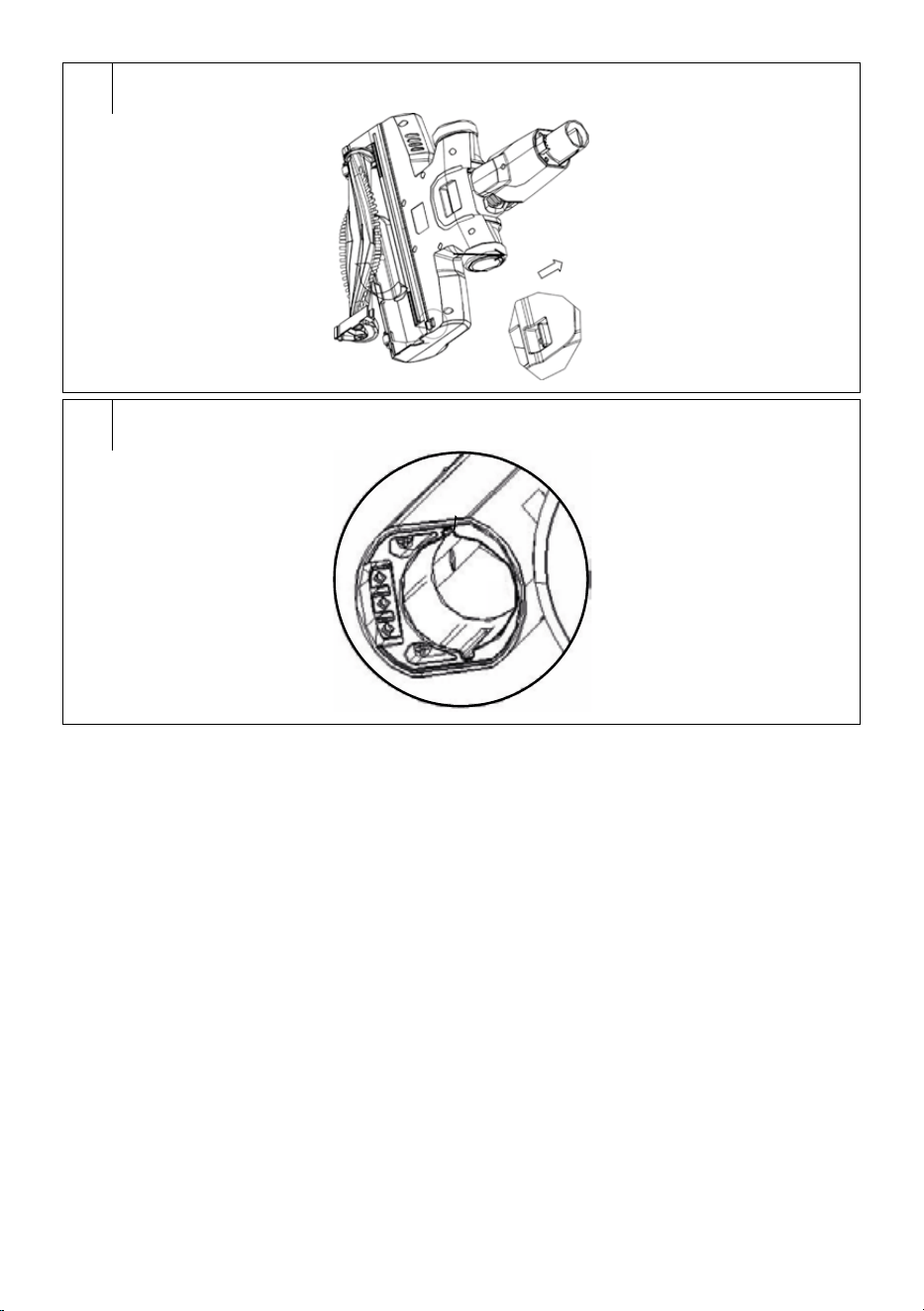
1. Take the floor nozzle off the vacuum cleaner and turn it upside down.
2. Press the all-floor roller brush clip to release the side cover – see
figure F.
3. Carefully take out the all-floor roller brush.
4. Insert the carpet roller brush back into the floor nozzle. Correct
attachment is indicated by a click.
Note:
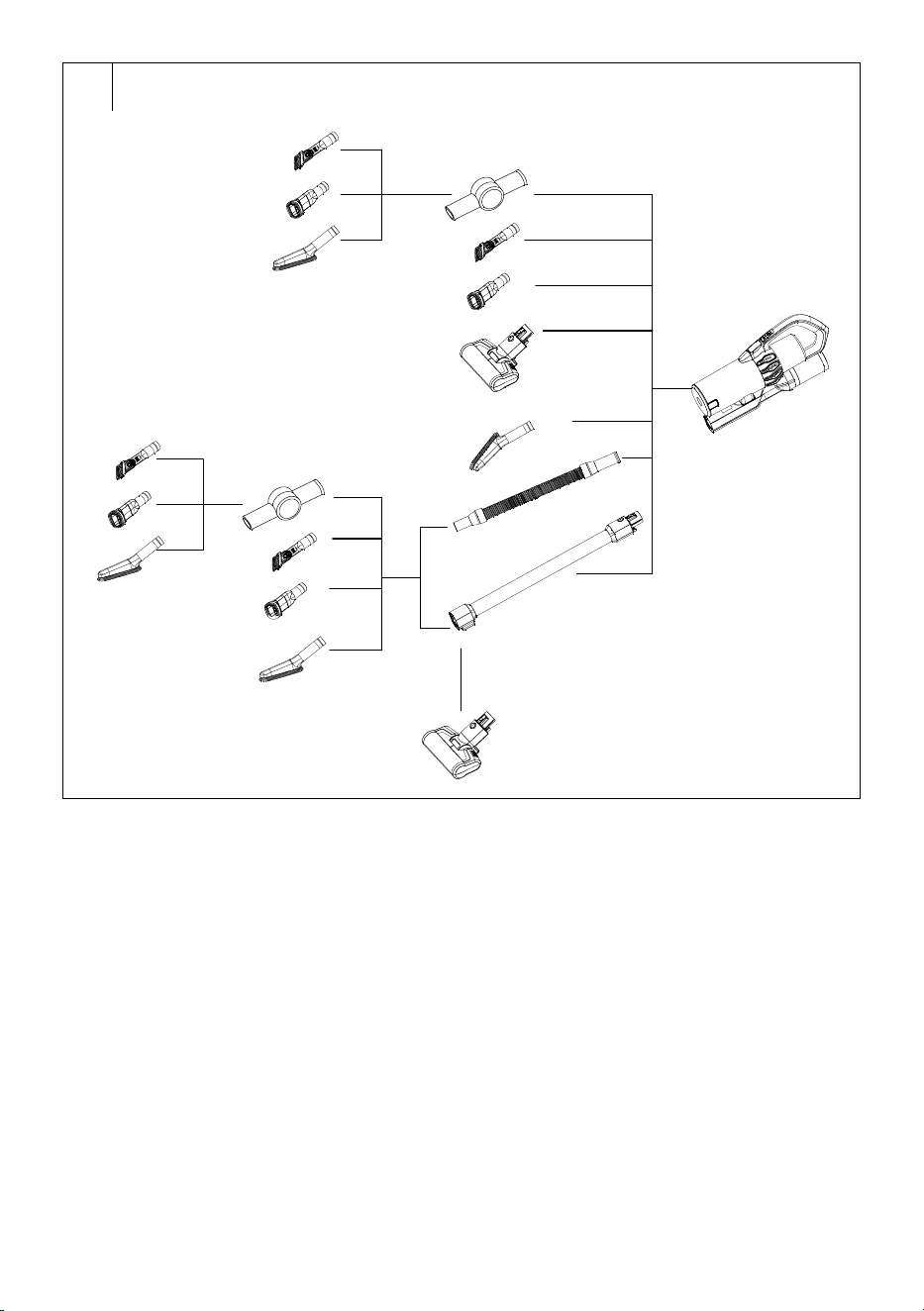
The various options for combining the accessories are
shown in figure C.
. . . . . . . . . . . . . . . . . . . . . . . . . . . . . . . . . . . . . . . . . . . . . . . . . . . . . . . . . . . . . . . . . . . .
CHARGING THE BATTERY
• The battery is partially charged from the factory and it needs to be
charge to full capacity.
• Place the stand in an even, stable and dry location at asufficient
distance from the power socket. Connect the connector of the power
adapter into the socket on the side of the stand and the power adapter
plug into apower socket.
• Insert the assembled vacuum cleaner into the stand so that the
contacts on the rear part of the floor nozzle slide into the contacts on
the stand.
• The display will show abattery status indicator that is lit red and the
charging status as apercentage. As arule, the charging process takes
3 hours.
EN
4-in-1 cordless vacuum cleaner
User'smanual
- 4 -
03/2023
2023, .
• When you finish cleaning and have cleaned out the appliance, place it
back into the stand so that the battery can recharge.
• Keep the charging adapter plugged in permanently. The electronics
in the appliance control the battery charging process and ensure that
it is always optimally charged. When the battery is fully charged,
the electronics interrupt the charging process and resume it when it
is necessary to charge the battery again. There is no need to worry
about wasting electricity.
• Disconnect the charging adapter from the power socket only in the
event of a long term absence. When you return, plug it back into the
socket so that the vacuum cleaner is again ready for use.
• Then disconnect the connector from the socket of the power adapter
and pull the plug out of the power socket.
• Before first use, allow the battery to charge for up to 12 hours and
allow it to fully discharge before charging it again. We recommend
repeating this procedure three times in total. This will ensure the long
operational lifetime of the battery.
• The display shows the battery charge level. If the charge level falls
below 20%, the vacuum cleaner will automatically switch from the
high power level to the medium/low power level. It will not be possible
to set the high power level. The display will show ared battery
symbol, which indicates that it is necessary to charge the battery.
• When the battery is almost flat, the vacuum cleaner will stop running
in order to prevent the battery from discharging fully.
. . . . . . . . . . . . . . . . . . . . . . . . . . . . . . . . . . . . . . . . . . . . . . . . . . . . . . . . . . . . . . . . . . . .
INSERTING AND REMOVING THE BATTERY
1. Inserting the battery: Hold the vacuum cleaner with one hand and
insert the battery into the vacuum cleaner with the other so that the
grooves on the motor unit slide into the slots in the battery. Push on
the battery in until you hear aclick. The battery can only be inserted
in one way.
Warning:
Never insert the battery in reverse or by using
excessive force. This could damage it.
2. Removing the battery: If you need to remove the battery, press the
button on the top part of the battery to release it. Hold the button
pushed down and carefully pull the battery from the motor unit.
Warning:
When not using the vacuum cleaner for an extended
period of time, take the battery out of it and store it in
acool, dry location. Regularly recharge the battery.
Store it away from metal objects to prevent excessive
discharging from occurring.
. . . . . . . . . . . . . . . . . . . . . . . . . . . . . . . . . . . . . . . . . . . . . . . . . . . . . . . . . . . . . . . . . . . .
USING THE CORDLESS VACUUM CLEANER
1. Assemble the cordless vacuum cleaner according to the instructions
in section "ASSEMBLING AND DISASSEMBLING THE
CORDLESS VACUUM CLEANER".
2. Press the On/Off button and the vacuum cleaner will start at the
default low power level. "ECO" will appear on the screen.
3. Press the power level button again to set the desired power level:
Low power: the display will show "ECO" and the bar will be lit to 1/3;
Medium power: the display will show "MID" and the bar will be lit to
2/3;
High power: the display will show "MAX" and the bar will be fully lit;
Automatic mode: the display will show "AUTO" and the bar will be
lit based on the power output. In automatic mode the power output
level is adjusted based on the detected level of soiling and type
of the floor. If the floor is heavily soiled, the vacuum cleaner will
automatically set ahigh power level and vice versa.
4. When you have finished vacuuming, turn the vacuum cleaner off by
pressing the On/Off button, the vacuum cleaner will turn off and the
display will turn off.
Note:
The electric rotary brush will stop automatically in the event
that it is blocked, e.g. by aforeign object or alarge amount
of hair or fur. This is asafety feature that protects the brush
against damage. If this happens, turn the vacuum cleaner
off by pressing the On/Off button and remove the jammed
object or hair from the brush.
If the charge level falls below 20%, the vacuum cleaner
will automatically switch from the high power level to
the medium/low power level. It will not be possible to set
the high power level. The display will show ared battery
symbol, which indicates that it is necessary to charge the
battery.
. . . . . . . . . . . . . . . . . . . . . . . . . . . . . . . . . . . . . . . . . . . . . . . . . . . . . . . . . . . . . . . . . . . .
USING THE VACUUM CLEANER WITH THE WIPING ATTACHMENT
• Place the wiping attachment with the attached sleeve on the floor.
Remove the lid and pour water or acleaning agent solution into the
tank. Put the lid back on.
• We recommend that you wet the wiping sleeve before attaching it to
the attachment. This will speed up the wiping process, which will be
more effective from the very beginning.
Note:
Always use aneutral cleaning agent with alow foaming
effect. Do not use cleaning agents with ableaching effect,
chlorine-based cleaning agents, disinfection cleaning
agents, etc. Before using the cleaning agent, check that it is
suitable for your type of floor covering.
Put the vacuum cleaner on to the attachment. Water will
start to slowly flow into the sleeve. Turn on the vacuum
cleaner, and while vacuuming you will also wipe the floor
at the same time.
Note:
Regularly check the water/solution level in the water tank,
and fill it up as necessary.
When no longer using the wiping attachment, turn off the
vacuum cleaner and remove the wiping attachment from
the vacuum cleaner.
. . . . . . . . . . . . . . . . . . . . . . . . . . . . . . . . . . . . . . . . . . . . . . . . . . . . . . . . . . . . . . . . . . . .
CLEANING AND MAINTENANCE
• Always make sure that the vacuum cleaner is turned off before
cleaning it. Remove the battery from the motor unit.
. . . . . . . . . . . . . . . . . . . . . . . . . . . . . . . . . . . . . . . . . . . . . . . . . . . . . . . . . . . . . . . . . . . .
CLEANING THE MOTOR UNIT AND ACCESSORIES
• To clean the outer parts of the vacuum cleaner, use asoft cloth dipped
in lukewarm water. Do not use aggressive cleaning agents, paint
thinners or solvents. Using these solutions could damage the surface
of the appliance.
. . . . . . . . . . . . . . . . . . . . . . . . . . . . . . . . . . . . . . . . . . . . . . . . . . . . . . . . . . . . . . . . . . . .
CLEANING THE CORDLESS VACUUM CLEANER
Emptying the dust container
• It is recommended to always empty out the dust container after every
use. If, however, the level of dust and dirt reaches the MAX mark, it is
necessary to immediately dump out the dust container.
1. Remove the attached accessory from the motor unit.
2. Take the motor unit over to agarbage bin so that the bottom of the
dust container points downwards.
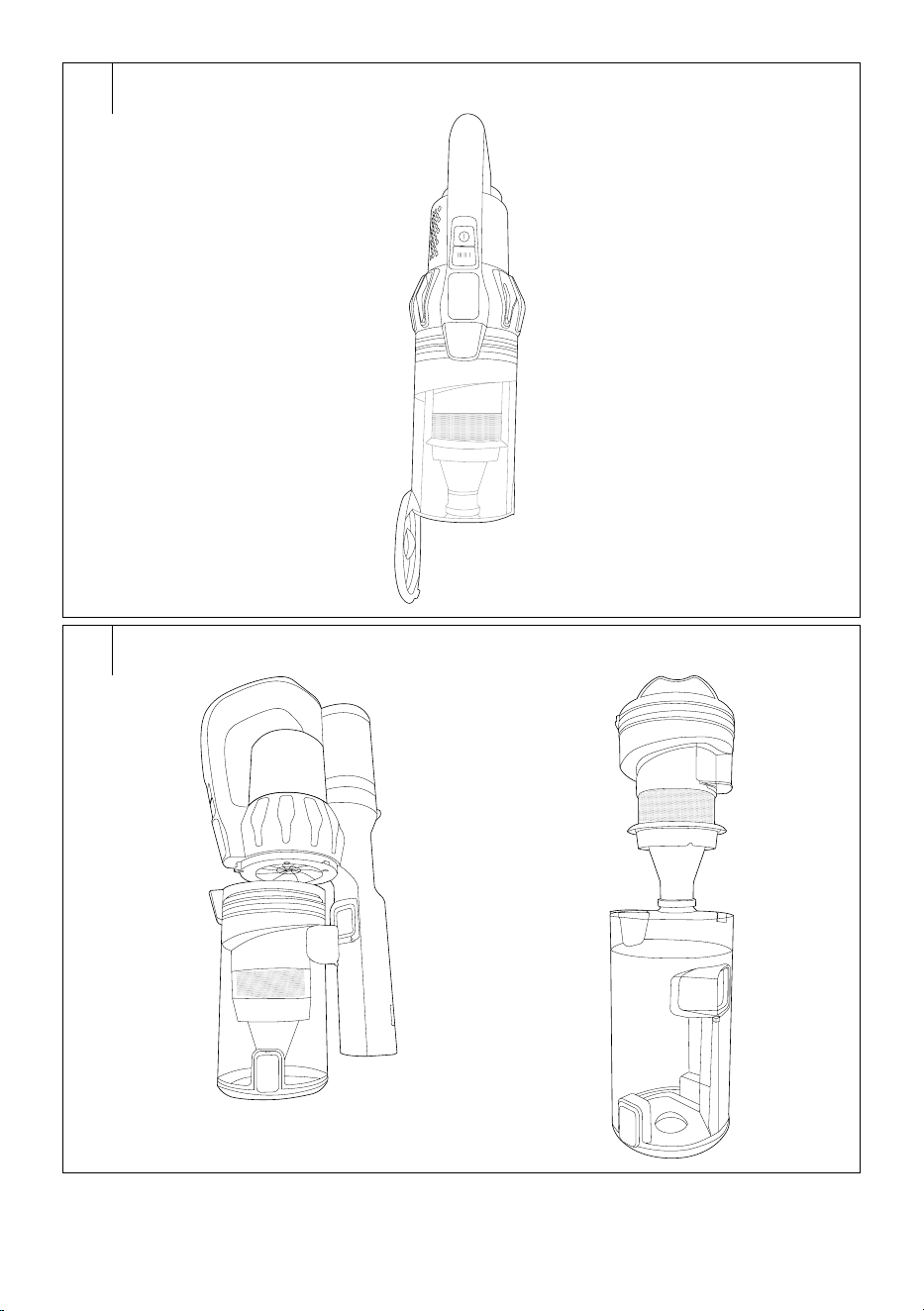
3. Press the dust container release button. This will release and open
it – see figure D.
4. In this way, you will dump the contents of the container directly into
the garbage bin.
5. Use your hand to close the bottom of the container. The bottom of
the dust container is securely locked in place when you hear aclick.
- 5 -
03/2023
2023, .
Note:
For hygiene reasons, we recommend that you dump out
the container away from living areas.
Cleaning the dust container
• Regularly clean the dust container to prevent unpleasant odours from
being created.
1. Remove the attached accessories from the motor unit and dump out
the dust container according to the above mentioned instructions.
2. Turn the container clockwise to the
symbol and carefully
remove it from the motor unit – see figure E1.
3. Grasp the entire filtration unit by the handle and take it out of the
container – see figure E2.
4. Turn the HEPA filter anticlockwise to release it, and take it out.
5. Remove dust and dirt from the tubular filter. If necessary, you can
rinse it under clean running water. Then wipe them dry using aclean
wiping cloth.
6. Remove the foam filter from the underside of the HEPA filter. Tap
it out over agarbage bin. Do not squeeze the foam into water or
vacuum it using avacuum cleaner. This risks its irreparable damage.
7. Tap out the HEPA filter and remove the dirt and dust from it using
afine brush or soft wiping cloth. In the event of heavy soiling, you
can vacuum it out using adifferent vacuum cleaner with an attached
brush nozzle. Do not wash the HEPA filter in water. This could
damage it. In the event that the HEPA filter is already heavily soiled
or deformed, replace it with anew one. We recommend replacing
the HEPA filter based on the frequency of use, at least once every
six months.
8. Wipe the inside walls of the dust container using asoft lightly
dampened sponge. Wipe dry using aclean wiping cloth.
Warning:
Never install the filters if they are wet or damp. Make
sure that they are completely dry before installing
them.
9. Put the foam filter on to the bottom of the HEPA filter and then place
it on the tubular filter so that the “line” on the filter points to the
“
” symbol on the filter unit. Turn it clockwise to the “ ”
symbol to secure it in place.
10. Insert the assembled filtration unit into the dust container so that the
cut-out and the notch fit together and the entire filter unit is pushed
all the way to the bottom of the container.
11. Put the dust container against the motor unit so that the tab on the
front part of the motor unit is aligned with the opening in the top part
of the container. Then turn it anticlockwise to the
symbol until
you hear aclick.
Cleaning the floor nozzle
• It is necessary to regularly clean the floor nozzle to ensure the
required level of continuous suction power.
1. Take the floor nozzle off the vacuum cleaner and turn it upside down.
2. Press the all-floor roller brush clip to release the side cover – see
figure F.
3. Carefully take out the all-floor roller brush..
4. Remove any wound on hair, fur and other dirt from the all-floor roller
brush.. To speed up the removal of wound on hair or fur, you can use
scissors.
5. Wipe out the internal area of the floor nozzle using adry wiping
cloth.
6. Insert the clean all-floor roller brush back into the floor nozzle.
Correct attachment is indicated by aclick.
Follow the same steps when cleaning the carpet roller brush..
. . . . . . . . . . . . . . . . . . . . . . . . . . . . . . . . . . . . . . . . . . . . . . . . . . . . . . . . . . . . . . . . . . . .
CLEANING THE WIPING ATTACHMENT
• Always empty out the tank after every use of the attachment. Wipe
the attachment with asoft sponge lightly dampened in warm water.
Wipe dry using aclean wiping cloth.
• Remove the sleeve and hand wash it in clean water with asmall
amount of washing powder for delicate laundry at atemperature of
30° to 40°. Do not use washing agents containing bleach, with an
extra bleaching effect or highly alkaline washing agents. Allow the
sleeve to dry naturally. Do not use adryer, fan or other electrical
appliances for drying.
• We recommend regularly inspecting the sleeve and replacing it
with anew one based on the frequency of use. Despite regular and
rigorous maintenance, it is possible that over time remains of dirt and
dust accumulate in the sleeve, which may clog it and thus negatively
affect ability of water to flow through the sleeve and the effectiveness
of wiping.
Warning:
Under no circumstances submerge or wash the
attachment in water or any other liquid.
Storage
• When not using the vacuum cleaner, clean it according to the
aforementioned instructions and take the battery off the motor unit.
• Before storing it, check that the vacuum cleaner and all its accessories
are thoroughly clean and dry.
• Store the appliance in adry, clean and well-ventilated location not
exposed to extreme temperatures and out of children'sreach.
• We recommend that you regularly recharge batteries, i.e. every 6
months.
. . . . . . . . . . . . . . . . . . . . . . . . . . . . . . . . . . . . . . . . . . . . . . . . . . . . . . . . . . . . . . . . . . . .
TROUBLESHOOTING
• Before you decide to contact an authorised service centre, please read
through the following table:
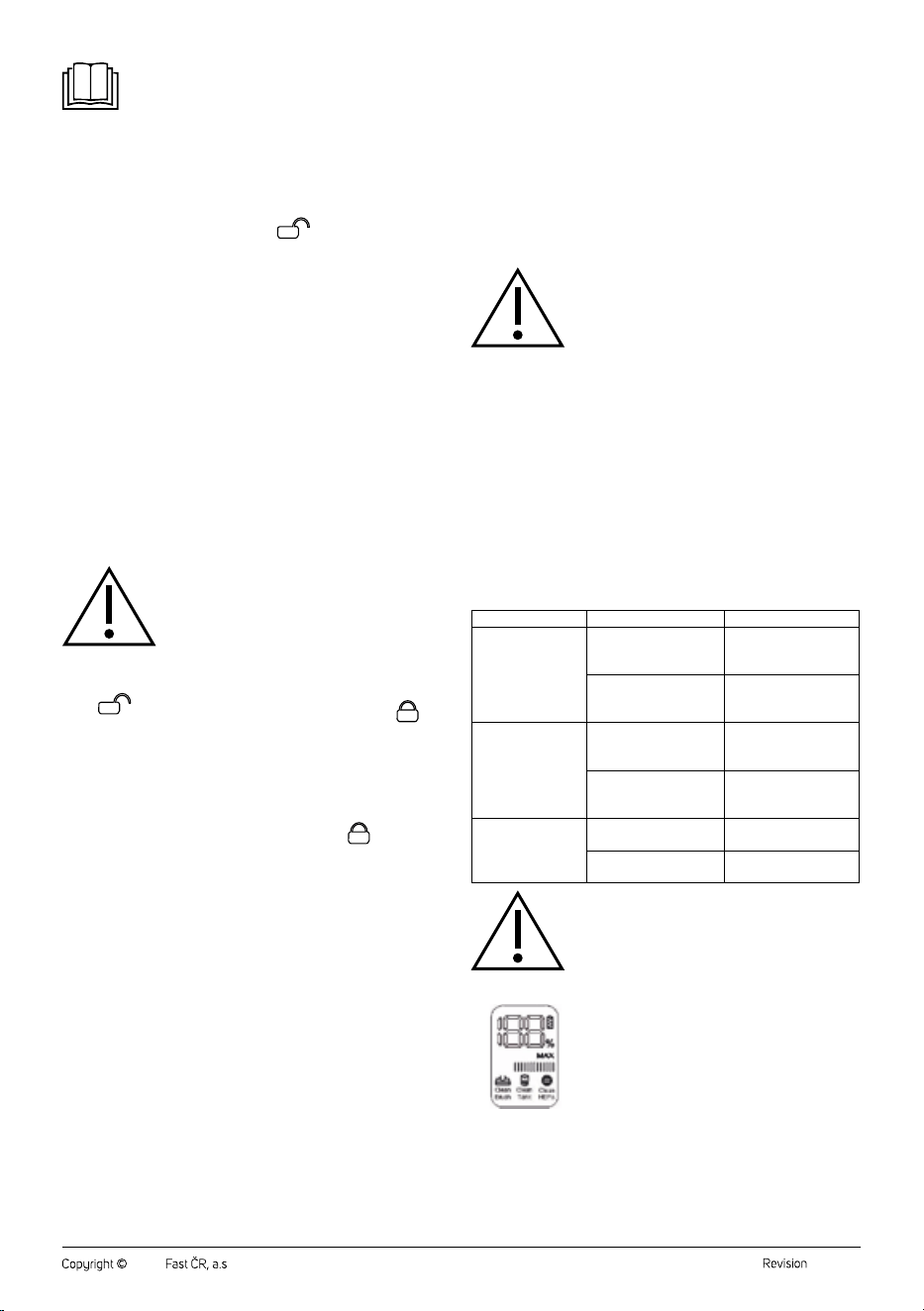
Problem Possible cause Solution
The vacuum cleaner
will not turn on.
The battery is flat.
Recharge the battery
before using the
vacuum cleaner.
The vacuum cleaner is
not properly assembled.
Check that all the
components are
properly assembled.
Suction power is
weak
The dust container is full
or the filters are dirty.
Empty out the dust
container and clean
the filters.
There is alarge amount
of hair and fur wound on
to the rotary brush.
Clean the rotary brush.
The battery has
ashort lifetime.
The battery is not fully
charged.
Recharge the battery.
The battery is at the end
of its lifetime.
Purchase anew battery.
Attention:
If you problem is not specified in the above table
or the specified problem continues to persist, stop
using the vacuum cleaner, turn it off and contact an
authorised service centre.
Malfunction icons
•
If the suction hole is blocked or full of dust, the icons of
the floor nozzle, dust container and the HEPA filter will
gradually light up on the display, one after the other in
1-second intervals. This indicates that it is necessary to
check one after the other, whilst the power level and the
power bar are displayed. After removing the blockage,
the icons on the display will turn off.
• If you turn on the vacuum cleaner with the automatic power level set
and the red indicator is lit on the display, it is possible that the dust
detection sensor may be clogged. The dust volume detector is located
on the bottom part of the inlet into the motor unit – see figure G.
- 6 -
03/2023
2023, .
Error messages
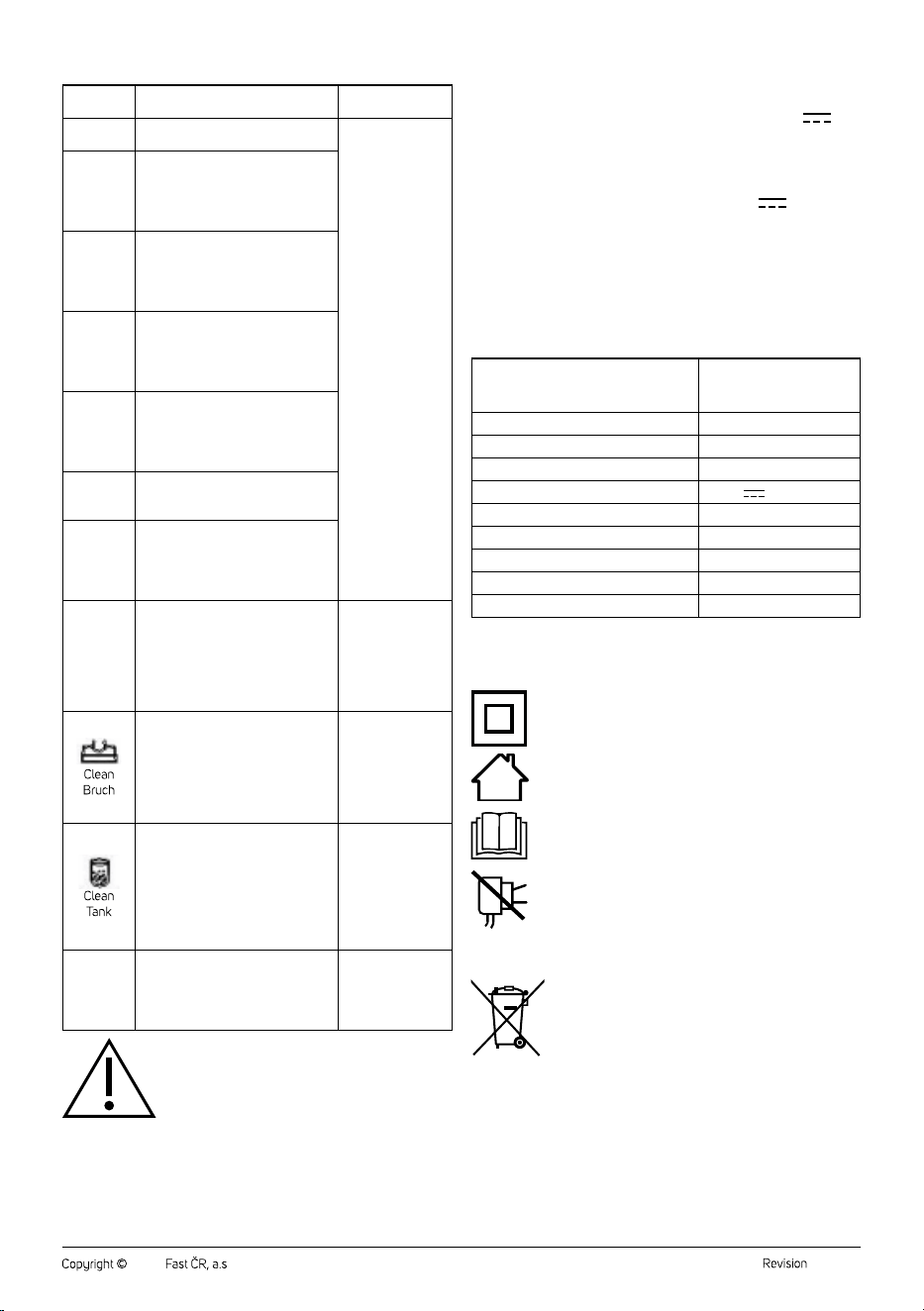
Error
message
Meaning Solution
E1
Disconnection error, the battery is
not charging. It is damaged.
Contact an
authorised service
centre.
E2
Voltage is too high (> 36.3 V). It is
not possible to charge the vacuum
cleaner. The adapter is damaged /
adifferent adapter is used / battery
is damaged.
E3
Short circuit on the main motor
when using the vacuum cleaner.
The vacuum cleaner will turn itself
off automatically. The motor or the
battery is damaged.
E5
Secondary excessive current
in the motor unit during the use
of the vacuum cleaner. The
vacuum cleaner will turn itself off
automatically.
E6
Protection against overvoltage
on the motor unit during the
use of the vacuum cleaner. The
vacuum cleaner will turn itself off
automatically.
E7
Error of the serial communications
port, it is not possible to turn off the
vacuum cleaner.
E8
Thermistor error (faulty circuit,
disconnection). The vacuum cleaner
will turn itself off automatically.
Battery temperature sensor is
damaged.
E9
Operation during high or low
temperature. The vacuum cleaner
will turn itself off automatically.
Wait until the
vacuum cleaner
heats up (low
temperature) or
cools down (high
temperature) to
room temperature.
Brush damage protection was
activated because brush stopped
moving during operation. The brush
is blocked.
Eliminate the cause
of the blockage and
clean out the floor
nozzle according to
the instructions in
section "Cleaning
and maintenance".
Suction hole protection was
activated. The suction hole is
blocked by aforeign object.
Eliminate the cause
of the blockage
and clean out
the suction hole
according to the
instructions in
section "Cleaning
and maintenance".
The vacuum cleaner will
automatically turn off after 5
seconds. The operating current is
<1 A. The motor unit or battery is
damaged.
Contact an
authorised service
centre.
Attention:
If the error message is not specified in the above
table or continues to persist, stop using the vacuum
cleaner, turn it off and contact an authorised service
centre.
TECHNICAL SPECIFICATIONS
Power adapter
Input ..........................................................................100−240 V~, 50/60 Hz, 1.5 A
Output ............................................................................................. 34.2 V
, 1.2 A
Vacuum cleaner
Power input ......................................................................................................... 550 W
Electric rotary brush ............................................................................................. 50 W
Electric Cat&Dog rotary brush ..........................................................................20 W
Battery ............................................................. Li-ion / 28.8 V
/ 3 000 mAh
Time required for charging to full capacity ..................approximately 3 hours
Noise level .....................................................................................................≤ 83 dB(A)
Dust container capacity ........................................................................................ 0.5 l
Water tank capacity .............................................................................................. 0.3 l
The declared noise emission level of the appliance is ≤ 83 dB(A), which
represents alevel Aof acoustic power with respect to areference acoustic
power of 1 pW.
Name of manufacturer FAST ČR, a.s.
U Sanitasu 1621
CZ-251 01 Říčany
Model identification number Adapter for SVC 9879BK
Input voltage 100–240 V~
Input frequency 50/60 Hz
Output voltage 34.2 V
Output current 1.2 A
Output power 41.04 W
Average efficiency in the active mode 91.29 %
Efficiency at low load (10 %) 89.45 %
Power consumption without load 0.054 W
Changes to text and technical parameters reserved.
Double insulation symbol
Safety class for electrical shock protection:
Class II – Electrical shock protection is provided by double
or heavy-duty insulation.
House symbol (domestic use)
The product is intended for household use only. The
product is not intended for outdoor use.
Read user'smanual symbol
Thoroughly read the all the instructions before using the
product.
This symbol indicates that the appliance must not be used
if the power plug is damaged.
. . . . . . . . . . . . . . . . . . . . . . . . . . . . . . . . . . . . . . . . . . . . . . . . . . . . . . . . . . . . . . . . . . . .
DISPOSAL OF BATTERIES
Prior to disposing of the product or handing it over at
aspecialised collection facility, it is necessary to ensure
that the battery is removed. Before removing the battery, it
is necessary to start the vacuum cleaner and wait until it is
completely flat. The battery contains environmentally
damaging substances and therefore does not belong in
standard household waste. Their correct disposal will be performed by the
respective collection facility.
. . . . . . . . . . . . . . . . . . . . . . . . . . . . . . . . . . . . . . . . . . . . . . . . . . . . . . . . . . . . . . . . . . . .
- 7 -
03/2023
2023, .
INSTRUCTIONS AND INFORMATION REGARDING THE DISPOSAL OF
USED PACKAGING MATERIALS
Dispose of used packaging material at asite designated for waste in your
municipality.
DISPOSAL OF USED ELECTRICAL AND ELECTRONIC EQUIPMENT
This symbol on products or original documents means that
used electric or electronic products must not be added to
ordinary municipal waste. For proper disposal, renewal and
recycling, hand these appliances over to determined
collection points. Alternatively, in some European Union
states or other European countries you may return your
appliances to the local retailer when buying an equivalent
new appliance. Correct disposal of this product helps save
valuable natural resources and prevents potential negative effects on the
environment and human health, which could result from improper waste
disposal. Ask your local authorities or collection facility for more details. In
accordance with national regulations penalties may be imposed for the
incorrect disposal of this type of waste.
For business entities in European Union states
If you want to dispose of electrical or electronic equipment, ask your
retailer or supplier for the necessary information.
Disposal in other countries outside the European Union.
This symbol is valid in the European Union. If you wish to dispose of this
product, request the necessary information about the correct disposal
method from the local council or from your retailer.
This product meets all the basic requirements of EU
directives related to it.

FAST ČR, a.s.
U Sanitasu 1621
CZ-251 01 Říčany
www.sencor.eu