User Manual
BRITAIN'S MOST FAMOUS LOUDSPEAKERS
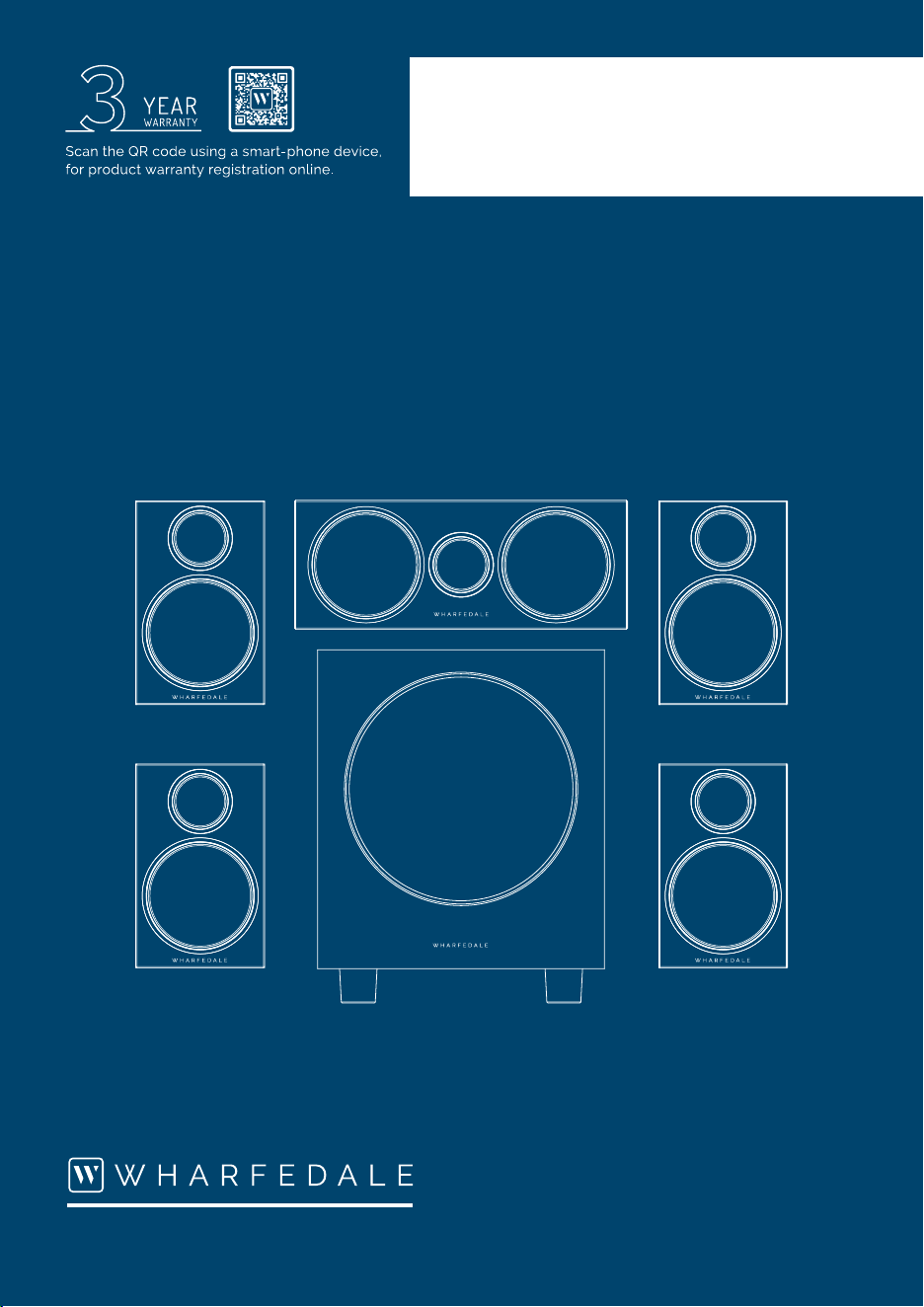
DX-3
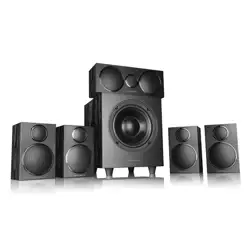
5.1 Home Cinema Packages
DX-3 Satellites
DX-3 Centre
DX-3 Subwoofer
USER INSTRUCTIONS: DX-3
Power
Connections
Important Safety
Information
Introduction
Positioning Your
Loudspeakers
Wall Mounting
Positions
Standard System
Connections
OperationTroubleshootingWarranty CoverageSpecifications
Power
Connections
Important Safety
Information
Introduction
Positioning Your
Loudspeakers
Wall Mounting
Positions
Standard System
Connections
OperationTroubleshootingWarranty CoverageSpecifications
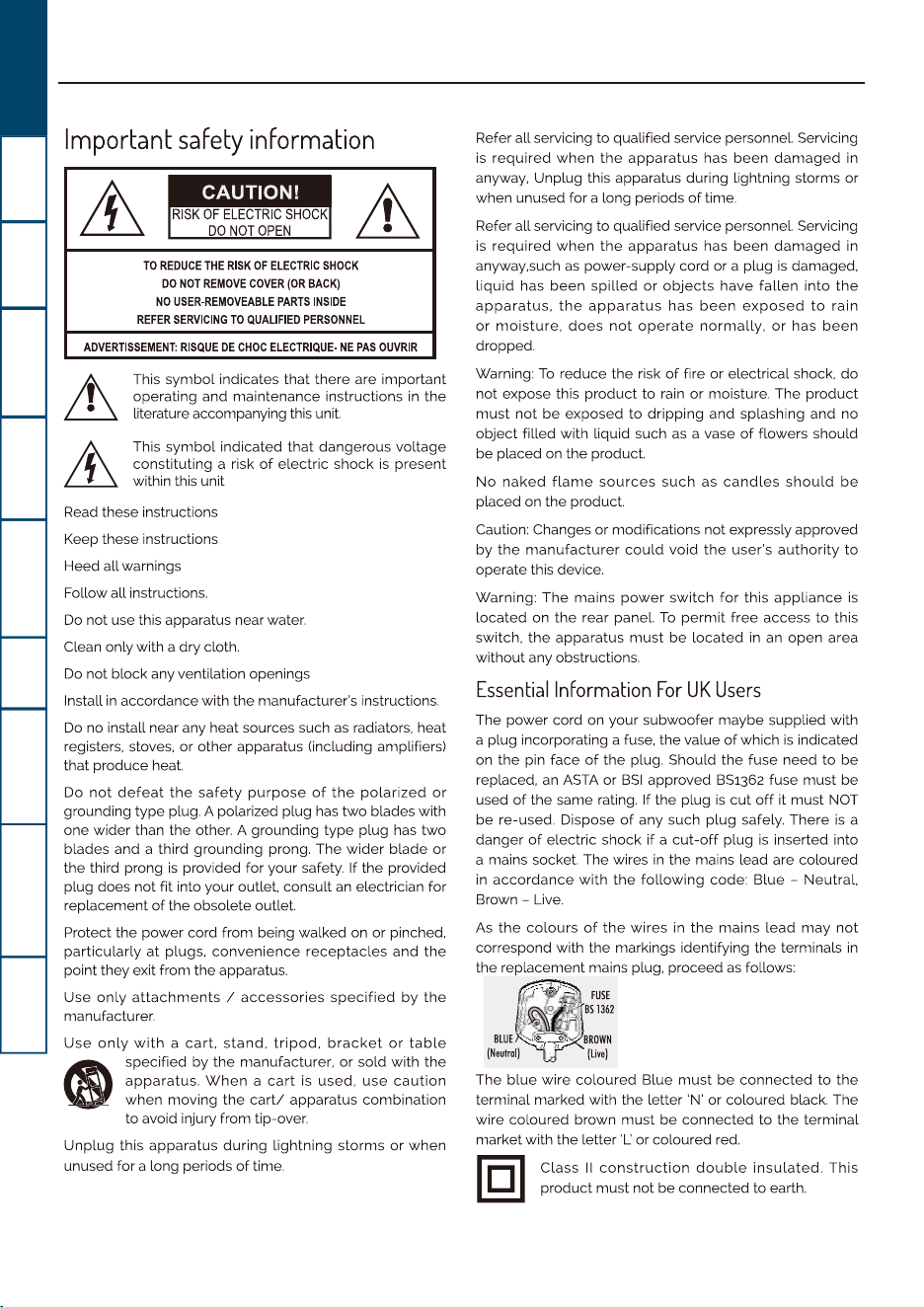
Important
safety
information
~
Lh
TO
REDUCE
THE
RISK
OF
ELECTRIC
SHOCK
DO
NOT
REMOVE
COVER
(OR
BACK)
NO
USER-REMOVEABLE
PARTS
INSIDE
REFER
SERVICING
TO
QUALIFIED
PERSONNEL
ADVERTISSEMENT:
RISQUE
DE
CHOC
ELECTRIQUE-
NE
PAS
OUVRIR
This
symbol
indicates that there are important
operating and maintenance instructions
in
the
literature accompanying this
unit.
This
symbol
indicated
that
dangerous voltage
constituting a risk
of
electric
shock
is
present
within this unit
Read these instructions
Keep these instructions
Heed all warnings
Follow all instructions.
Do
not use this apparatus near water.
Clean only with a
dry
cloth.
Do
not block any ventilation openings
Install
in
accordance with the manufacturer's instructions.
Do
no install near any heat sources such
as
radiators. heat
registers. stoves.
or
other apparatus (including amplifiers)
that produce heat.
Do
not
defeat
the
safety
purpose
of
the
polarized
or
grounding
type
plug. A polarized plug has
two
blades with
one wider than the other. A grounding
type
plug has
two
blades and a third grounding prong.
The
wider
blade
or
the third prong
is
provided for your safety.
If
the provided
plug does not fit into your outlet. consult
an
electrician for
replacement
of
the obsolete outlet.
Protect the power cord from being walked on
or
pinched.
particularly
at
plugs.
convenience
receptacles
and
the
point they exit from the apparatus.
Use
only
attachments
I
accessories
specified
by
the
manufacturer.
Use
only
with
a
cart.
stand.
tripod.
bracket
or
table
(I
specified by the manufacturer.
or
sold with the
apparatus.
When
a
cart
is used.
use
caution
when moving the
cart/
apparatus combination
to avoid injury from tip-over.
Unplug
this apparatus during lightning storms
or
when
unused for a long periods
of
time.
Refer all servicing to qualified service personnel Servicing
is
required
when
the
apparatus
has been
damaged
in
anyway. Unplug this apparatus during lightning storms
or
when unused for a long periods
of
time.
Refer all servicing to qualified service personnel. Servicing
is
required
when
the
apparatus
has been
damaged
in
anyway.such
as
power-supply cord
or
a plug
is
damaged.
liquid
has
been
spilled
or
objects
have
fallen
into
the
apparatus.
the
apparatus
has
been
exposed
to
rain
or
moisture.
does
not
operate
normally.
or
has
been
dropped.
Warning:
To
reduce the risk
of
fire or electrical shock.
do
not expose this
product
to
rain
or
moisture. The
product
must
not
be
exposed
to
dripping
and splashing and no
object filled with liquid such
as
a vase
of
flowers should
be placed on the product.
No
naked
flame
sources
such
as
candles
should
be
placed on the product.
Caution: Changes
or
modifications not expressly approved
by
the
manufacturer
could
void
the
user's
authority
to
operate this device.
Warning:
The
mains
power
switch
for
this
appliance
is
located on
the
rear panel.
To
permit
free
access
to
this
switch.
the
apparatus
must
be
located
in
an open area
without any obstructions.
Essential
Information
For
UK
Users
The power cord on your subwoofer maybe supplied with
a plug incorporating a fuse. the value
of
which
is
indicated
on
the
pin face
of
the plug. Should the fuse need
to
be
replaced. an
ASTA
or
851
approved 851362 fuse must
be
used
of
the same rating.
If
the plug
is
cut
off
it must NOT
be re-used. Dispose
of
any such
plug
safely. There
is
a
danger
of
electric shock
if
a
cut-off
plug
is
inserted into
a mains socket. The wires
in
the mains lead are coloured
in
accordance
with
the
following
code: Blue - Neutral.
Brown - Live.
As
the
colours
of
the
wires
in
the
mains lead
may
not
correspond with the markings identifying the terminals
in
the replacement mains plug. proceed
as
follows:
FUSE
S1362
The blue wire
coloured
Blue
must
be
connected
to
the
terminal marked with the letter 'N'
or
coloured black. The
wire coloured brown
must
be
connected
to
the terminal
market with the letter
'I..:
or coloured red.
r.=i'l
Class
II
construction
double
insulated.
This
l.!::::::!J
product must not
be
connected
to
earth.
USER INSTRUCTIONS: DX-3
1
DX-3
DX-3 DX-3
DX-3
DX-3 DX-3
DX-3
DX-3
DX-3
DX-3
Power
Connections
Important Safety
Information
Introduction
Positioning Your
Loudspeakers
Wall Mounting
Positions
Standard System
Connections
OperationTroubleshootingWarranty CoverageSpecifications
Before installing this product read all the instructions!
Lh
Before making any connections, switch all the units
in
your system
off
at the mains.
Make sure all connecting cables are safely routed. Do not run cables over unprotected floor areas, route
them around room boundaries
if
necessary.
Set the volume control at minimum when you switch on your system
or
change sources, and turn the level
up
gradually.
DO
NOT use your amplifier at
full
volume.
Ensure that all loudspeakers
in
the system are correctly wired.
DO
NOT subject your loudspeakers
to
excessive cold. heat. humidity
or
sunlight.
DO
NOT place heavy objects on top
of
loudspeakers.
DO
NOT connect speaker terminals
to
the mains supply.
DO
NOT dismantle the loudspeaker. There are no user serviceable parts inside and you
will
void the warranty.
Introduction
There
are
three
Packages Available:
5.1
System: 4 x Satellite Speakers, 1 x Centre Speaker, 1 x Active Subwoofer
5.0
System: 4 x Satellite Speakers, 1 x Centre Speaker
Satellite
Pack:
2 x Satellite Speakers
(can
be purchased additionally
to
create a
71
system)
Unpac~ngthespeake~
Carefully remove each loudspeaker from its packing carton.
Be
especially careful when removing the polythene bag.
DO
NOT
attempt
to
lift the loudspeaker by the polythene bag. When lifting the subwoofer from the carton, support it from the
bottom. The unit
is
heavy:
if
you cannot manage
it
easily,
get
someone to assist you.
Check each unit and
in
the event
of
damage contact your dealer.
Retain the packing for
future
use.
If
you
decide
to
dispose
of
the packing, please
do
so with regard
to
any recycling
regulations
in
your area.
Retain the instructions. If you pass a product
to
a third party, please include the instructions.
The DX-2
is
compatible with
most
modern audio-visual equipment -
but
a loudspeaker
is
only
as
good
as
the signal it
gets. Your amplifier should have ample reserves
of
power - a low powered amplifier could easily run
out
of
steam and
the resulting distortion
is
unpleasant
to
listen to and could damage your speakers.
A larger amplifier
will
usually sound better and enhance the reliability and performance
of
your loudspeakers. Always turn
down
the
volume
if
the music starts
to
sound distorted.
T
he DX-3 is compatible with most modern audio-visual equipment - but a loudspeaker is only as good as the signal it
USER INSTRUCTIONS:DX-3
2
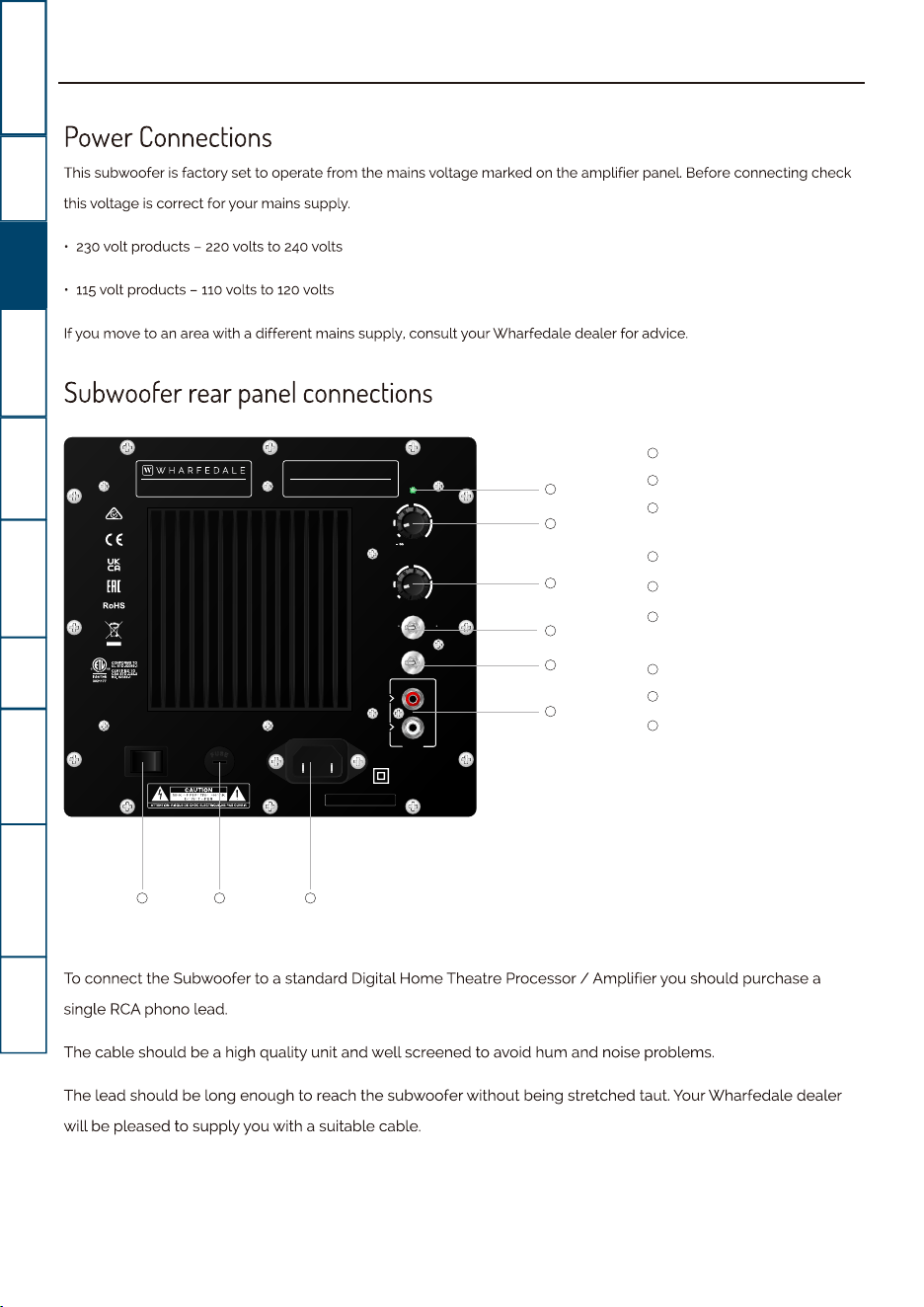
Power Indicator
Volume Control
Crossover Frequency
Contol
Phase Switch
Auto Power Switch
Line Level Inputs/
Input
IEC Mains Input Socket
Mains Power Fuse
Mains Power Switch
WHARFEDALE INTERNATIONAL LTD,
HUNTINGDON, UNITED KINGDOM
CROSSOVER
PHASE
40Hz 150Hz
AUTO SENSE
MAX
POWER
POWER
VOLUME
ON OFF
ON OFF
FUSE T1.6AL 250V
AC INPUT
SERIAL NO.:
INPUT
LFE/R
L
220-240~50/60Hz 250W
0 180
ACTIVE SUBWOOFER
MODEL:DX-3
Made in China
1
2
3
4
5
6
7
8
9
1
2
3
4
5
6
7
8
9
Power
Connections
Important Safety
Information
Introduction
Positioning Your
Loudspeakers
Wall Mounting
Positions
Standard System
Connections
OperationTroubleshootingWarranty CoverageSpecifications
Power
Connections
This
subwoofer
is
factory set to operate from the mains voltage marked
on
the amplifier panel. Before connecting check
this voltage
is
correct for your mains supply.
•
230
volt products -
220
volts to
240
volts
• 115 volt products -
110
volts to
120
volts
If you move to
an
area
with a different mains supply, consult your Wharfedale dealer for advice.
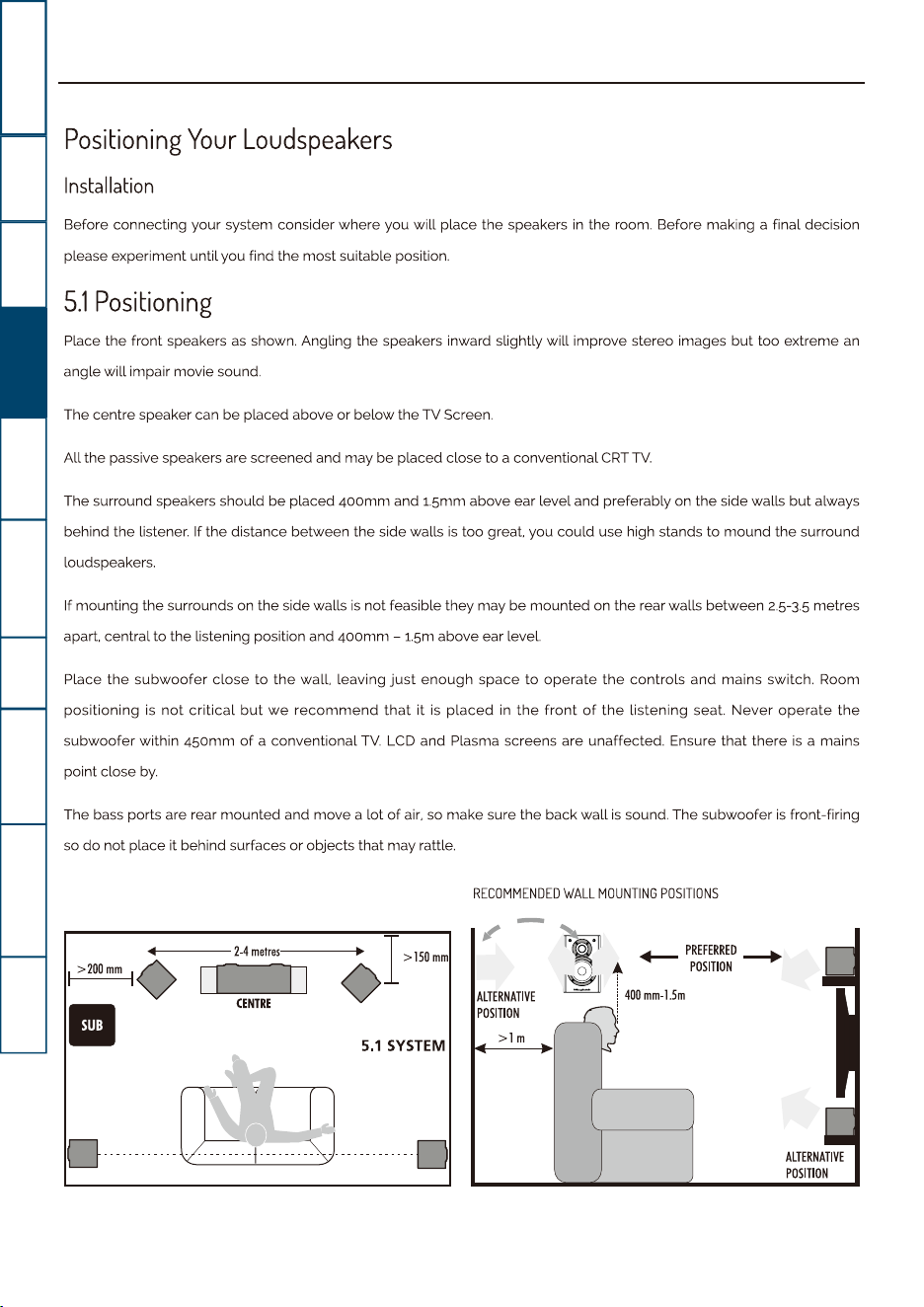
Subwoofer
rear
panel
connections
To
connect
the
Subwoofer
to
a standard Digital
Home
Theatre Processor I
Amplifier
you
should
purchase a
single
RCA
phono
lead.
The
cable
should
be
a high
quality
unit and
well
screened
to
avoid
hum
and noise problems.
The lead should
be
long
enough
to
reach
the
subwoofer
without
being stretched taut. Your
Wharfedale
dealer
will
be
pleased
to
supply
you
with
a suitable cable.
USER INSTRUCTIONS: DX-3
3
Power
Connections
Important Safety
Information
Introduction
Positioning Your
Loudspeakers
Wall Mounting
Positions
Standard System
Connections
OperationTroubleshootingWarranty CoverageSpecifications
Positioning
Your
Loudspeakers
Installation
Before connecting your system consider where you
will
place the speakers
in
the room. Before making a final decision
please experiment until you find the most suitable position.
5.1
Positioning
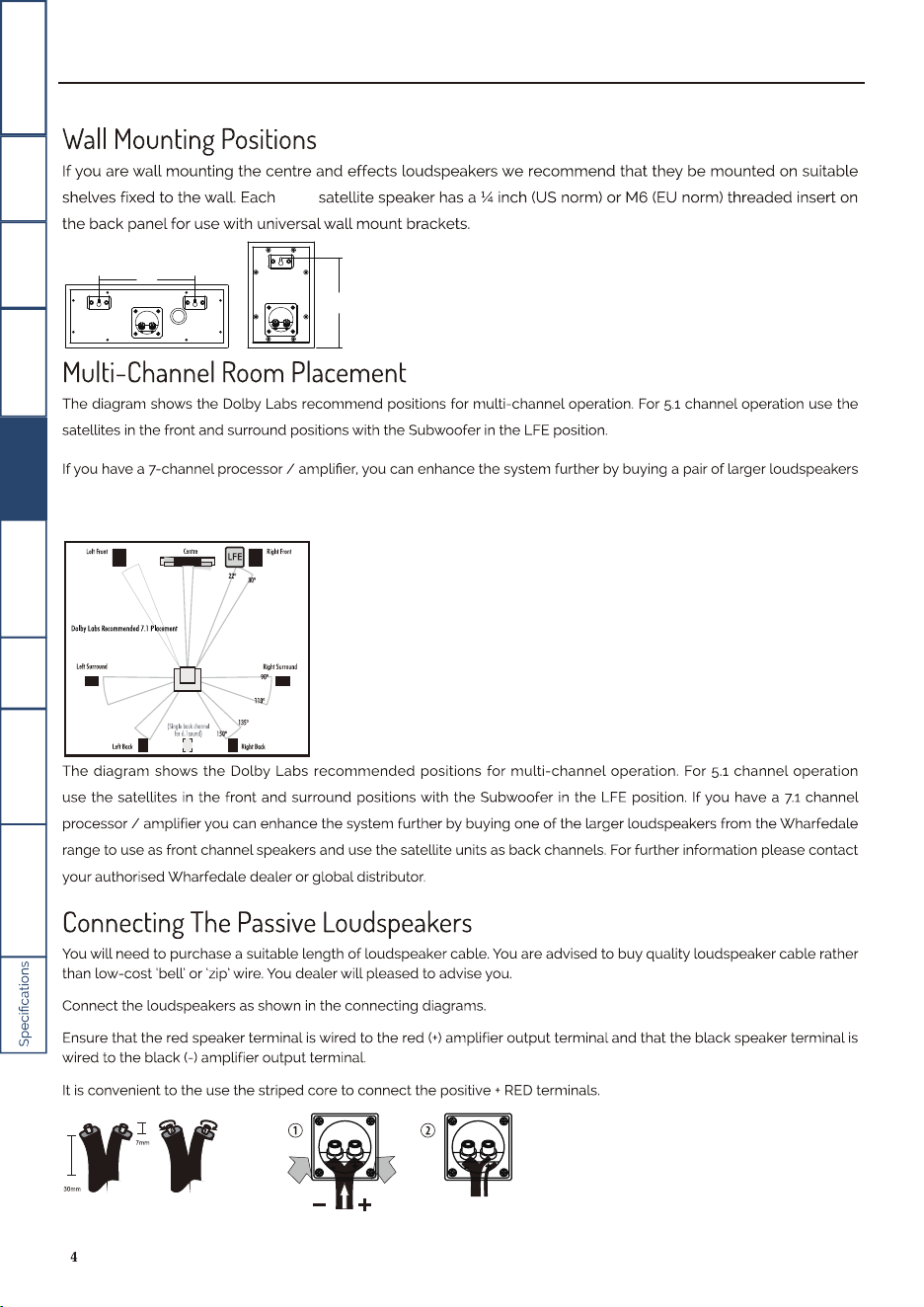
Place the front speakers
as
shown. Angling the speakers inward slightly
will
improve stereo images
but
too extreme an
angle
will
impair movie sound.
The centre speaker can be placed above
or
below the TV Screen.
All the passive speakers are screened and may be placed close
to
a conventional
CRT
TV.
The surround speakers should be placed
400mm
and 1.5mm above ear level and preferably on the side walls
but
always
behind the listener. If the distance between the side walls
is
too great. you could use high stands
to
mound the surround
loudspeakers.
If mounting the surrounds on the side walls
is
not feasible they may be mounted on the rear walls between
2-5-3.5
metres
apart. central to the listening position and
400mm
-
1.5m
above ear level.
Place
the
subwoofer
close
to
the
wall. leaving
just
enough space
to
operate
the
controls and mains switch. Room
positioning
is
not
critical
but
we
recommend
that
it
is
placed
in
the
front
of
the
listening seat.
Never
operate
the
subwoofer within 450mm
of
a conventional
TV.
LCD
and Plasma screens are unaffected. Ensure
that
there
is
a mains
point close
by.
The bass ports are rear mounted and move a lot
of
air.
so make sure the back
wall
is
sound. The subwoofer
is
front-firing
so
do
not place it behind surfaces
or
objects that may rattle.
+-----2.4
metres----◊....
I>
150mm
I
>200mm
10
IT
n
CENTRE
■
5.1
SYSTEM
0~
O············
·············O
RECOMMENDED
WALL
MOUNTING
POSITIONS
~
ALTERNATIVE
POSITION
>lm
+--
PREFERRED
--+
t
POSITION
'
i
400
mm•l5m
!
ALTERNATIVE
POSITION
USER INSTRUCTIONS: DX-3
DX-3
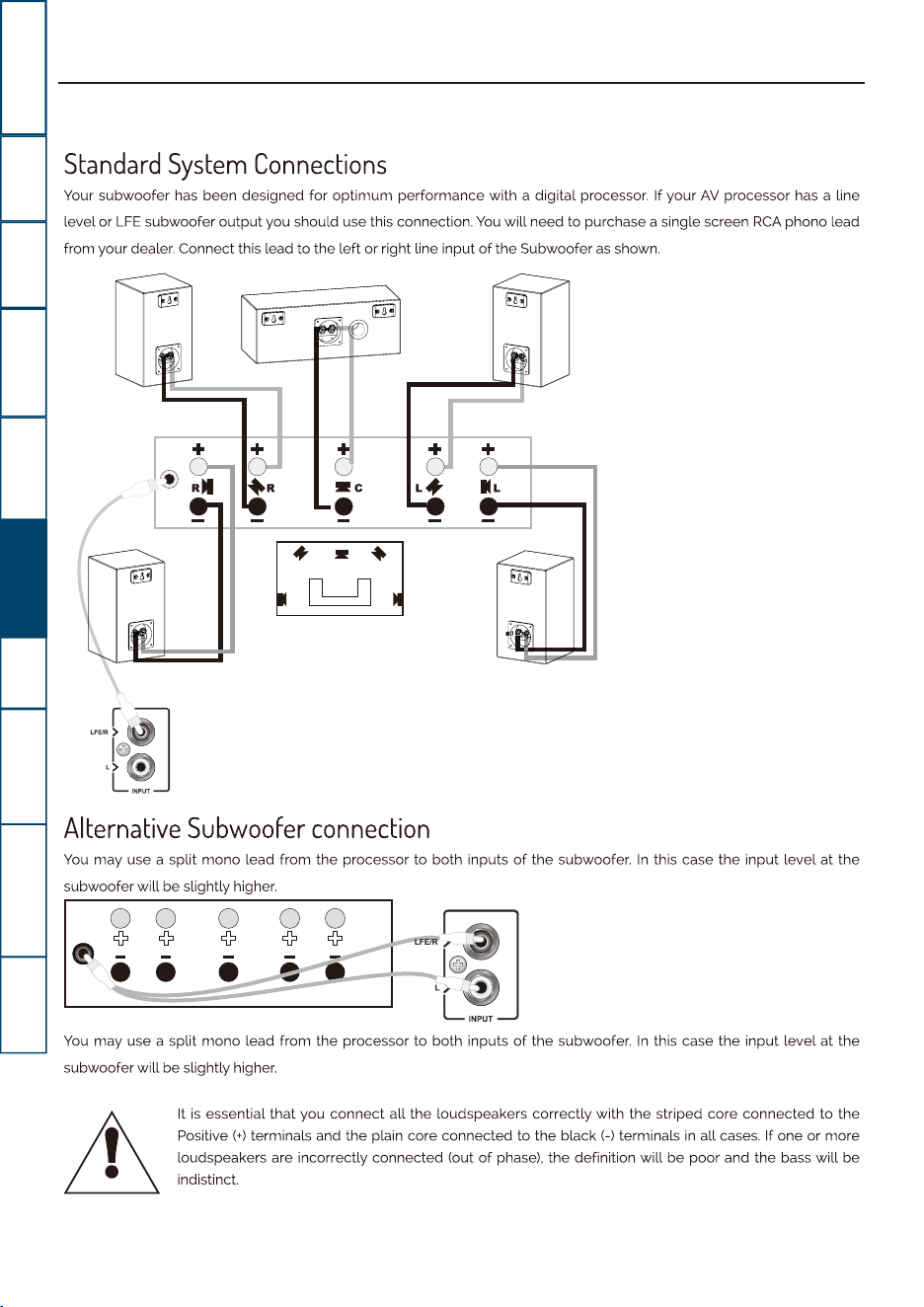
from the Wharfedale range to use as front-channel speakers and use the DX-3 satellite units as back / surround channels.
Your Wharfedale dealer will be pleased to advise you.
Power
Connections
Important Safety
Information
Introduction
Positioning Your
Loudspeakers
Wall Mounting
Positions
Standard System
Connections
OperationTroubleshooting
Warranty Coverage
USER INSTRUCTIONS: DX-3
5
Power
Connections
Important Safety
Information
Introduction
Positioning Your
Loudspeakers
Wall Mounting
Positions
Standard System
Connections
OperationTroubleshootingWarranty CoverageSpecifications
Standard
System
Connections
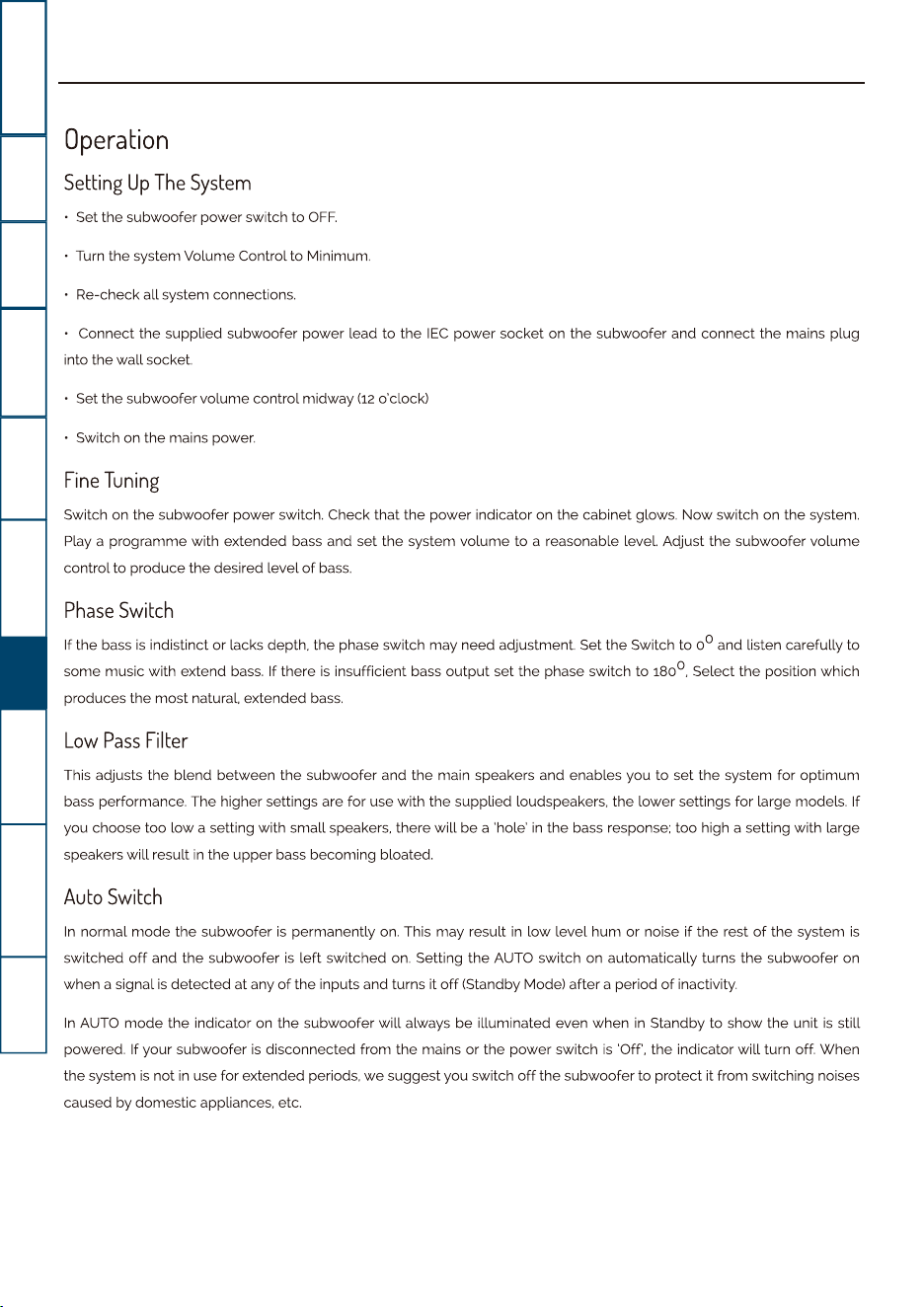
Your subwoofer has been designed for
optimum
performance with a digital processor. If your
AV
processor has a line
level or
LFE
subwoofer
output
you should use this connection.
You
will
need to purchase a single screen
RCA
phone lead
from your dealer. Connect this lead
to
the left
or
right line input
of
the Subwoofer
as
shown.
+
'
--1---
..
~•n
•
n•J
Alternative
Subwoofer
connection
You
may use a split
mono
lead from the processor to both inputs
of
the subwoofer.
In
this case the input level
at
the
subwoofer
will
be slightly higher.
You
may use a split
mono
lead from the processor to both inputs
of
the subwoofer.
In
this case the input level
at
the
subwoofer
will
be slightly higher.
~
It
is
essential
that
you
connect
all the loudspeakers correctly with the striped core connected
to
the
Positive
(+) terminals and the plain core connected
to
the
black(-)
terminals
in
all cases.
If
one
or
more
loudspeakers are incorrectly connected (out
of
phase). the definition will be poor and the bass
will
be
indistinct.
USER INSTRUCTIONS:DX-3
6
Power
Connections
Important Safety
Information
Introduction
Positioning Your
Loudspeakers
Wall Mounting
Positions
Standard System
Connections
OperationTroubleshootingWarranty CoverageSpecifications
Operation
Setting
Up
The
System
• Set the subwoofer power switch
to
OFF.
• Turn the system Volume Control
to
Minirnurn.
Re-check all system connections.
Connect the supplied subwoofer power lead
to
the
IEC
power socket on the subwoofer and connect the mains plug
into the
wall
socket.
• Set the subwoofer volume control midway
(12
o'clock)
• Switch on the mains power.
Fine
Tuning
Switch on the subwoofer power switch. Check that the power indicator on the cabinet glows.
Now
switch on the
system
Play a programme with extended bass and set the system
volume
to
a reasonable level. Adjust the subwoofer
volume
control
to
produce the desired level
of
bass.
Phase
Switch
If the bass
is
indistinct or lacks depth, the phase switch may need adjustment. Set the Switch
to
o
0
and listen carefully to
some music with extend
bass.
If there
is
insufficient bass
output
set the phase switch
to
180°, Select the position which
produces the most natural. extended
bass.
Low
Pass
Filter
This adjusts the blend between the subwoofer and the main speakers and enables you
to
set the system for optimum
bass performance. The higher settings are for use with the supplied loudspeakers, the lower settings for large models. If
you choose too
low
a setting with small speakers, there
will
be
a 'hole'
in
the bass response; too high a setting with large
speakers
will
result
in
the upper bass becoming bloated.
Auto
Switch
In
normal
mode
the subwoofer
is
permanently
on.
This may result
in
low
level hum
or
noise
if
the rest
of
the system
is
switched
off
and the subwoofer
is
left
switched
on.
Setting the AUTO switch on automatically turns the subwoofer on
when a signal
is
detected at any
of
the inputs and turns it
off
(Standby Mode) after a period
of
inactivity.
In
AUTO
mode
the indicator on the subwoofer
will
always be illuminated even when
in
Standby
to
show the unit
is
still
powered. If your subwoofer
is
disconnected from the mains or the power switch
is
'Off, the indicator
will
turn off. When
the system
is
not
in
use for extended periods,
we
suggest you switch
off
the subwoofer
to
protect it from switching noises
caused by domestic appliances, etc.
USER INSTRUCTIONS: DX-3
7
Power
Connections
Important Safety
Information
Introduction
Positioning Your
Loudspeakers
Wall Mounting
Positions
Standard System
Connections
OperationTroubleshootingWarranty CoverageSpecifications
Home
Theatre
Topics
As the ear
is
unable
to
detect
the direction from which
deep
bass originates, this allows
freedom
in
positioning
the
subwoofer. Varying the distance from the
wall
alters the amount
of
bass.
Some prefer
to
place the subwoofer against a
room corner. This arrangement gives more bass at the possible expense
of
clarity.
Loudspeaker
Sizes
Many digital
AV
processers require you
to
specify the size
of
speakers
in
the various channels. These are usually 'Large'
or
'Small'.
We
recommend that you set the front centre and surround speakers
to
'Small'. This
will
direct all the bass
in
the
system to the subwoofer and provide a clean, deep and louder
bass.
Set the 'Subwoofer' option on the processor to 'On'
or
'Yes'.
Setting
Levels
Once
the
loudspeaker
settings
have been finalised.
put
the
AV
amplifier
into its 'Test'
mode
(see
your
processor
instructions). Adjust the levels until all channels are equally loud.
You
may need to adjust the subwoofer
output
level. Avoid setting too high a level
or
you
will
swamp the sound with bass
which
is
tiring to listen
to
and may limit the subwoofer's ability to respond
to
large bass transients. Set a sensible level
going into the subwoofer. The subwoofer volume control should be between
12
o'clock and 3 o'clock.
LFE
The Low Frequency Effects channel was designed
as
an
additional bass channel with its own dedicated subwoofer.
In
practice however,
if
all the speakers are set to small. the
LFE
channel
will
be combined with the bass from other channels
and all this feeds into the subwoofer. When you set the
LFE
level from your
AV
processor, use care with this setting
as
the
LFE
channel may contain
powerful
low
frequencies which, although normal
in
a cinema, may overload a domestic
subwoofer.
If,
during a programme. you hear popping
or
thumping
noises coming from
the
subwoofer,
immediately
turn
the
AV
Processor's volume level down and then reduce the
LFE
level.
If
this does not cure the problem, reduce the volume level
at the subwoofer.
Please read the relevant sections
of
your
AV
amplifier manual and familiarise yourself with the various issues. If you are
unsure, consult your dealer or global distributor for advice.
USER INSTRUCTIONS:DX-3
8
Looking After Your Loudspeaker
DO NOT open the speakers, there are no user serviceable parts inside.·
Avoid getting any liquid behind the grille. If you spill liquid on your loudspeakers, take them to your dealer for attention before
using them again.
·
We advise that you do not place anything on your loudspeakers to prevent damage to the cabinet surface.
·
We advise that you do not use a vacuum cleaner to clean loudspeaker grilles.·
Occasionally, remove the loudspeaker grilles and brush them gently with a soft brush before replacing them carefully.·
If you play the speakers with the grilles off exercise great care. NEVER operate speakers with the grilles off if there are
children or pets in the house.
·
Your loudspeakers use special hardwearing sealed finish. They should not be waxed or treated with spray polishes which
will smear and dim the finish. Occasionally polish them with a dry or barely moist cloth to remove dust and finger marks, etc.
·
· NEVER touch the drive units either with an object or your hands.
Sound lacks bass content Bass
reproduction indistinct
Power
Connections
Important Safety
Information
Introduction
Positioning Your
Loudspeakers
Wall Mounting
Positions
Standard System
Connections
OperationTroubleshootingWarranty CoverageSpecifications
Troubleshooting
Before
investigating
a
problem.
always
switch
off
the
system
at
the
mains.
Symptom
Possible
cause
No Sound
System
not
switched
on: Speaker cables shorting
out
terminals:
Wrong
source
selected
Front
loudspeakers
out
of
phase.
Check
all
system
connections
and
rectify.
Subwoofer
not
switched
on;
Subwoofer
phase incorrect;
Subwoofer
crossover
control too low.
Excessive
bass
distortion at low volumes Subwoofer level set too high:
LFE
level set too high: Subwoofer incorrectly wired
Excessive or distorted bass at high levels
System
level
set
too high; bass control set too high; Speakers too close
to
room
corners
Distorted/
rattLing
sounds at high levels
System level set too high; Objects on speakers I subwoofer; Objects too close
to
subwoofer
Popping or thumping from the subwoofer System level set high: Subwoofer level set too high:
LFE
level set too high
Indistinct sound;
Poor
localisation
of
effects.
One
or
more
loudspeakers are
out
of
phase. Check
all
system connections and
Poor
localisation of dialogue
rectify. (Refer
to
the manual
for
the correct wiring procedure.
USER INSTRUCTIONS: DX-3
9
Warranty Coverage
Online Registration
Your loudspeakers have been constructed to the highest standards. From top grade furniture construction and finish to
carefully designed and selected acoustic components, Wharfedale speakers are built to provide a lifetime of sonic pleasure.
We hope you will derive many years of good service from our products.
Wharfedale warrants its products, subject to the following terms and conditions below, to be free from defects in materials
and workmanship.
The three (3) year extended warranty is applicable to items purchased from Jan 1st 2021, onwards. Items purchased prior
to this date are not eligible for this extended warranty service but are subject to statutory warranty claims and all
applicable consumer rights.
To qualify for the extended 3 year warranty, you must register your product within ninety (90) calendar days from
the date of purchase. Visit to complete your online registration.
Items not registered online will have a Limited Warranty for one (1) year, or for the period of your country’s statutory
warranty, whichever is longer.
Warranty can only be offered to products registered with proof of purchase with date, model and details of the
authorised dealer clearly stated on the receipt/invoice. Please keep the original receipt/invoice in case it is required for
a warranty claim.
This Limited Warranty is non-transferable and is offered exclusively to the original owner.
This Limited Warranty is valid only in the original country of purchase.
Repairs or replacements are provided under this warranty are the exclusive remedy of the consumer. Wharfedale shall
not be liable for any incidental or consequential damages for breach of any expenses or implied warranty with any
product. Except to the extent prohibited by law, this warranty is exclusive and in lieu of all other warranties whatsoever,
both expressed and implied, including but not limited to the warrant of merchantability and fitness for practical purpose.
This warranty provides benefits that are additional to and do not affect your statutory consumer rights.
This Limited Warranty offer is subject to correct information being submitted in your application. Incorrect dates or
mismatched purchase receipt dates that are outside of the warranty terms will immediately invalidate any warranty
claim.
wharfedale.co.uk/warranty-registration/
*Please check with your dealer local distributor for further information.
Power
Connections
Important Safety
Information
Introduction
Positioning Your
Loudspeakers
Wall Mounting
Positions
Standard System
Connections
OperationTroubleshootingWarranty CoverageSpecifications
YEAR
WARRANTY
Scan
the
OR
code
using a
smart-phone
device,
for
product
warranty
registration online.
USER INSTRUCTIONS:DX-3
10
Exclusions
- Normal wear and tear and cosmetic damage (including but not limited to any wear from reasonable use,
environmental deterioration or neglect)
- Products on which the serial number has been removed, altered or otherwise made illegible.
- Products not purchased from an authorised Wharfedale dealer.
- Products that were not new at the time of original purchase.
- Products sold ‘as is’, ‘as seen’ or ‘with faults’.
- Product not purchased from an Authorised Dealer/Distributor within the region of the claim (ie parallel imports or grey
market products)
- Accidental damage or faults caused by commercial use, acts of God, incorrect installation, incorrect connection,
incorrect packaging, misuse or careless operation or handling which is not in accordance with the user instructions.
- Equipment that has been operated in conjunction with unsuitable, inappropriate or faulty apparatus.
- Repairs, alterations or modifications carried out by parties other than Wharfedale or its authorised service partners.
The following items are excluded from the Wharfedale warranty:
- Damage in transit that cannot be attributable to the fault of Wharfedale, the authorised distributor or dealer (ie. claims
otherwise covered by transit insurance.)
- Faults relating to abnormal or inappropriate power supply voltage or power surges.
- Faults relating to extremities in temperature, exposure to heat, water or other liquids, insects, excessive moisture,
sand, chemicals, battery leakage or any other contaminants.
- Any force majeure events, including but not limited to any acts of God, fire, lightning, typhoon, storm, earthquake,
hurricane, natural disaster, tsunami, flood, war, riot, public disturbance.
- Any other causes beyond the reasonable control of either Wharfedale and its Authorised Distributor.
Please note items purchased before 1st Jan 2021 are not eligible for the extended warranty claim.
How to Claim
To obtain warranty service please contact the authorised dealer from which you purchased this product and present
the limited warranty certificate offered upon registration of your product’s extended warranty offer.
Do not dispatch goods without the prior agreement of the dealer distributor or authorised service centre.
If asked to return products for inspection and or repair, please pack carefully preferably in the original carton or
packaging affording an equal degree of protection and returned via insured, trackable courier service.
The authorised dealer or distributor will offer full return details and instructions. However, please note if unsuitable
packaging is used the warranty may be deemed void due to improper action in return.
Wharfedale or the authorised distributor, dealer or service centre may make a charge for the supply of new packaging
for the return of the repaired item. Please note, insurance is recommended as goods are returned at the owner’s risk.
Authorised distributors or service centres can not be held liable for loss or damage in transit. insurance and freight
charges on the return journey will be paid for by Wharfedale, authorised dealer, distributor or service centre if
corrective work proves to be necessary.
In the event of ‘no-fault found’ or ‘no repair necessary’, the return shipping charge will be the responsibility of the owner.
Power
Connections
Important Safety
Information
Introduction
Positioning Your
Loudspeakers
Wall Mounting
Positions
Standard System
Connections
OperationTroubleshootingWarranty CoverageSpecifications
USER INSTRUCTIONS:DX-3
11
Service Centre Address
Repairs
All repairs will be carried out by the appointed distributor (or locally appointed service centre). Repairs handled or
processed without authorisation or approval of the appointed representative will be excluded from this limited
warranty. Please note, Wharfedale is not able to supply parts or replacement items to any other entity than the official
distributor or authorised service centre.
Other than the warranty and services set out in this warranty, to the fullest extent permitted by law, Wharfedale shall
not be liable to you and/or any third party or entity whatsoever for:
Any loss, damages and/or malfunction caused to any product(s) which is/are connected to any of the products
covered by this warranty.
Any damages, loss and liability, whether direct, indirect, incidental, consequential special, punitive or otherwise,
howsoever caused by, arising out of or otherwise, in relation to the installation, delivery, use, service, repair,
replacement and/or maintenance of the product.
Any damages, loss and liability under this warranty in respect of any act, omission, or negligence of any of their
technicians, employees, agents, representatives or independent contractors relating to the actual or purported
performance of any of the obligations under this warranty.
-
-
-
For technical support, servicing or product queries and information please contact either your local retailer or the office
below.
IAG Service Dept., 13/14 Glebe Road, Huntingdon, Cambridgeshire,
PE29 7DL, UK.
Tel: +44(0)1480 452561
Email: [email protected]
For information on other authorised service centres worldwide contact Wharfedale International, UK.
A world-wide distributors list is available on the Wharfedale website: www.wharfedale.co.uk
Power
Connections
Important Safety
Information
Introduction
Positioning Your
Loudspeakers
Wall Mounting
Positions
Standard System
Connections
OperationTroubleshootingWarranty CoverageSpecifications
USER INSTRUCTIONS: DX-3
12
DX-3 Satellite
DX-3 Subwoofer
DX-3
Black oak / Walnut Black oak / Walnut
Black oak / Walnut
Power
Connections
Important Safety
Information
Introduction
Positioning Your
Loudspeakers
Wall Mounting
Positions
Standard System
Connections
OperationTroubleshootingWarranty CoverageSpecifications
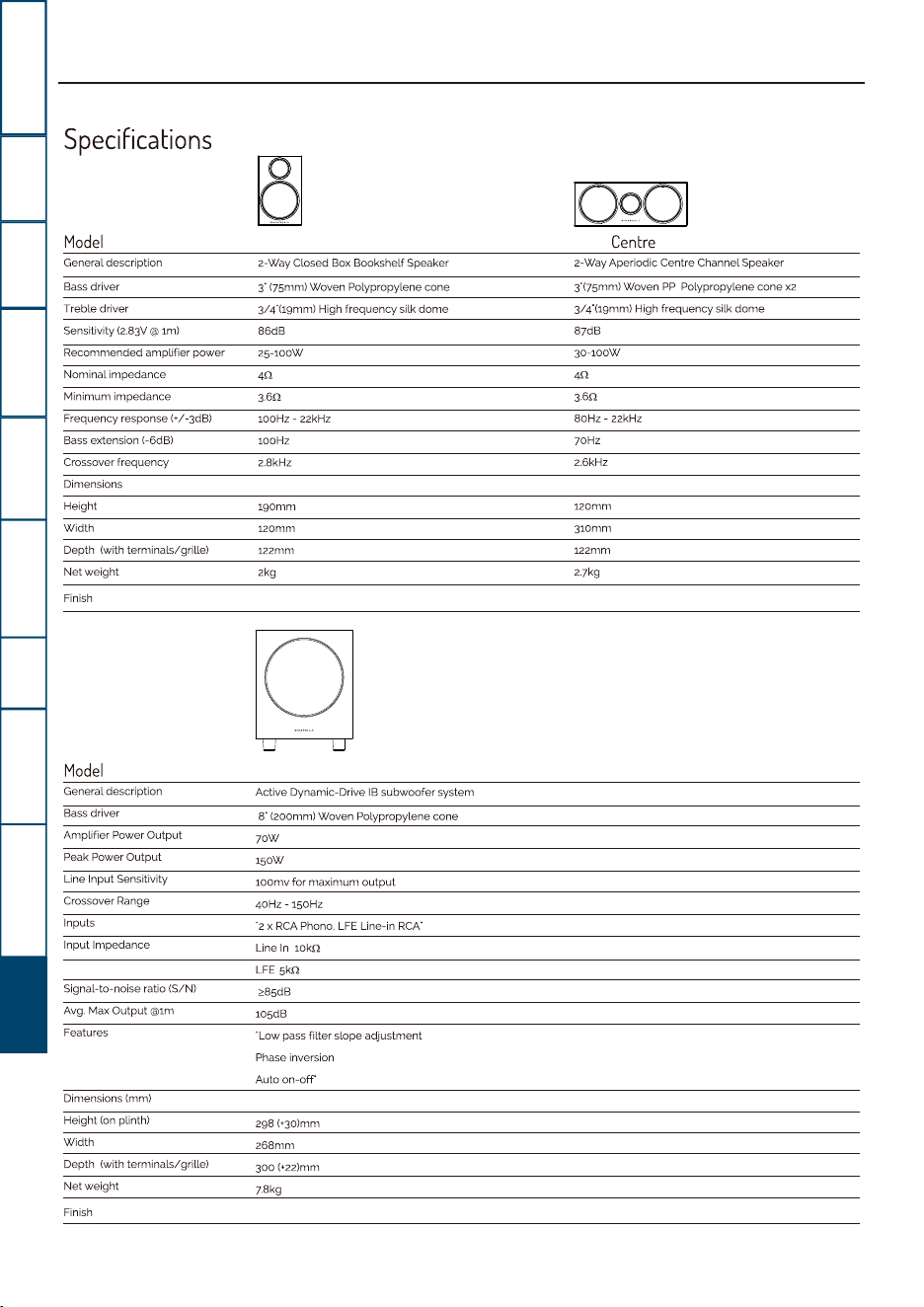
Specifications
Model
General
description
Bass
driver
Treble
driver
Sensitivity (2.83V @
1ml
Recommended
amplifier
power
Nominal
impedance
Minimum
impedance
Frequency
response
(+/-3dB)
Bass extension
{-6dB)
Crossover
frequency
Dimensions
Height
Width
Depth (with
terminals/grille)
Net weight
Finish
Model
General
description
Bass
driver
Amplifier
Power
Output
Peak
Power
Output
Line
Input
Sensitivity
Crossover Range
Inputs
Input
Impedance
Signal-to-noise
ratio
(S/N)
Avg.
Max
Output
@lm
Features
Dimensions (mm)
Height
(on plinth)
Width
Depth
(with
terminals/grille)
Net
weight
Finish
2-Way
Closed
Box
Bookshelf
Speaker
3·
(75mm)
Woven
Polypropylene
cone
3/4
"(19mm) High
frequency
silk
dome
86dB
25-10ow
3.6'1
100HZ
-
22kHz
100Hz
2.BkHz
190mm
120mm
122mm
2kg
Active
Dynamic-Drive
1B
subwoofer
system
a·
(200mm)
Woven
Polypropylene
cone
70W
150W
1oomv
for
maximum
output
40Hz
-150Hz
·2 x RCA Phono, LFE Line-in
RCA"
Line In
1okn
LFE Skn
105dB
"Low
pass
filter
slope
adjustment
Phase inversion
Auto
on-off
298(+3o)mm
268mm
300
(+22)mm
78kg
Centre
2-Way
Aperiodic
Centre
Channel
Speaker
3"(75mm)
Woven
PP
Polypropylene
cone
xz
3/4"(1gmm) High
frequency
silk
dome
87dB
30-10ow
4fl
3.6n
BoHz - 22kHz
70Hz
2.6kHz
120mm
310mm
122mm
2.7kg


IAG House, 13/14 Glebe Road, Huntingdon, Cambridgeshire, PE29 7DL, UK
Tel: +44(0)1480 452561 Email: [email protected] http://www.wharfedale.co.uk
IAG reserves the right to alter the design and specifications without notice. All rights reserved IAG Group Ltd.
Wharfedale is a member of the International Audio Group. CODE: WH14-MNL005a