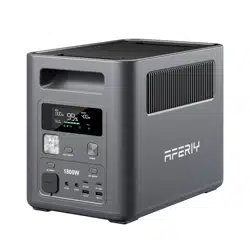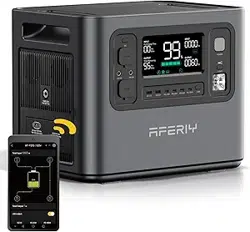
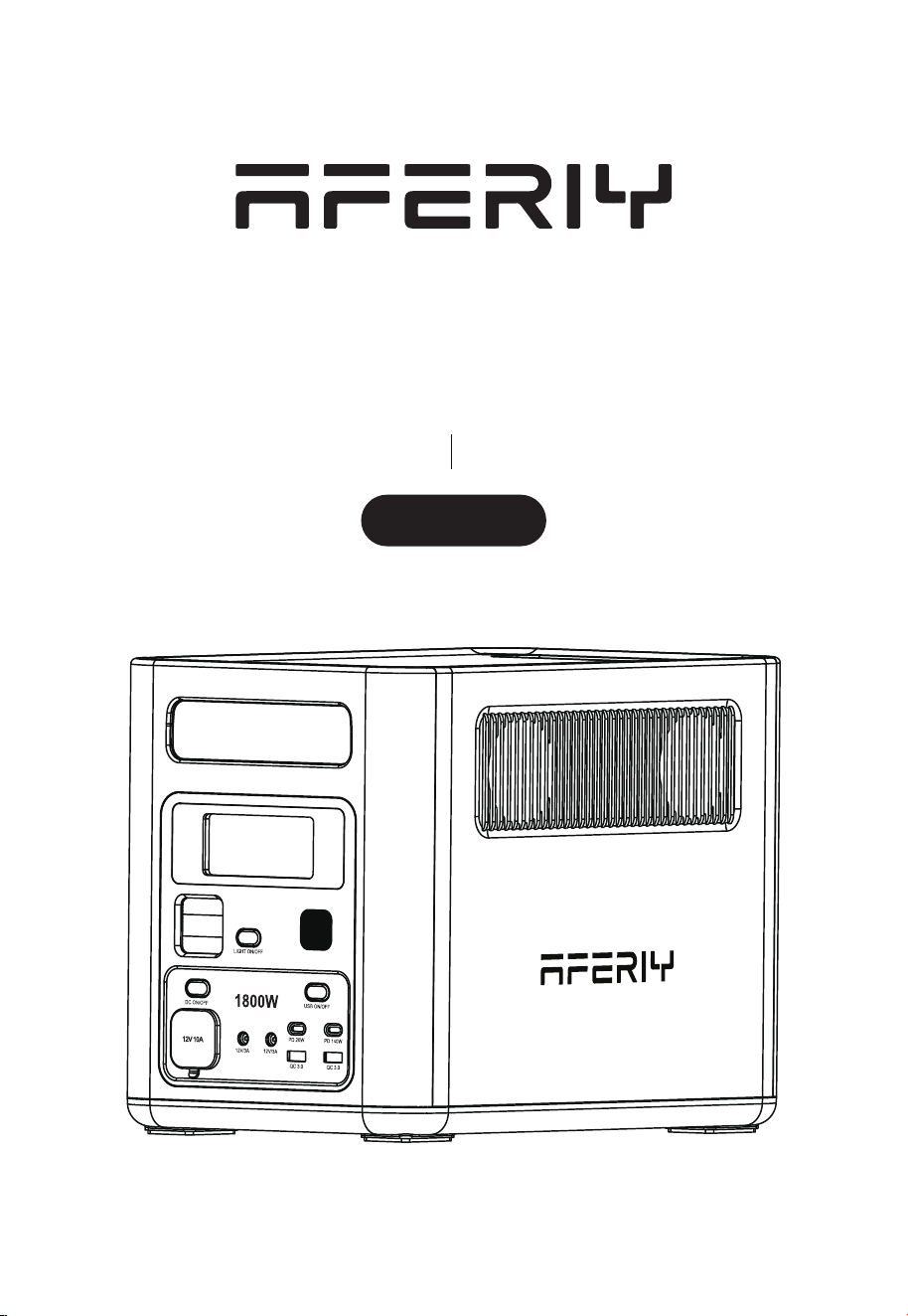
Portable Power Station
Nomad1800 Pro
AF-P180PRO User Manual
1800W
Hi dear, thank you very much for purchasing and experiencing the Nomad1800 Pro portable
power station. Before operating this product, please carefully read the user manual for
proper operation.
% when it leaves the factory.
Please fully charge the product after unpacking it to start the experience tour of Nomad1800 Pro.
1. Please avoid long-term storage and use of this product in environments with
high temperature and humidity or direct sunlight to avoid shortened
and other failures. The product should not be close to the fire source, otherwise
it may cause a major fire or accident.
2. This product must not be disassembled or modified. Improper operation may
cause product malfunction or even fire.
3. Be careful not to drop or drop the product from a high place, so as not to
damage the product.
4. Please store or use this product out of the reach of children, otherwise the
product may be dropped or collided and may cause bodily injury to children.
5. Please use our original accessories, and AFERIY will not guarantee the defec-
tive products caused by the use of non-original accessories.
6. Please directly plug in the wall socket to charge the product, do not
use exten-
sion cords or cable taps, otherwise there is a risk of damage to the extension
cords and cable taps or even a fire; If the extension socket is plugged in to
charge this product, please do not connect other electrical appliances to this
socket, otherwise the household meter may trip.
power
cable. If it needs to be idle for a long time, please consume the product from
a fully charged state to an uncharged state, then recharge it to about 50% of the
the product, please take
three months as a cycle, operate and keep it in this way.
8. If the product reaches scrap conditions, please discard or recycle the
product in accordance with local laws.
Precautions For Use
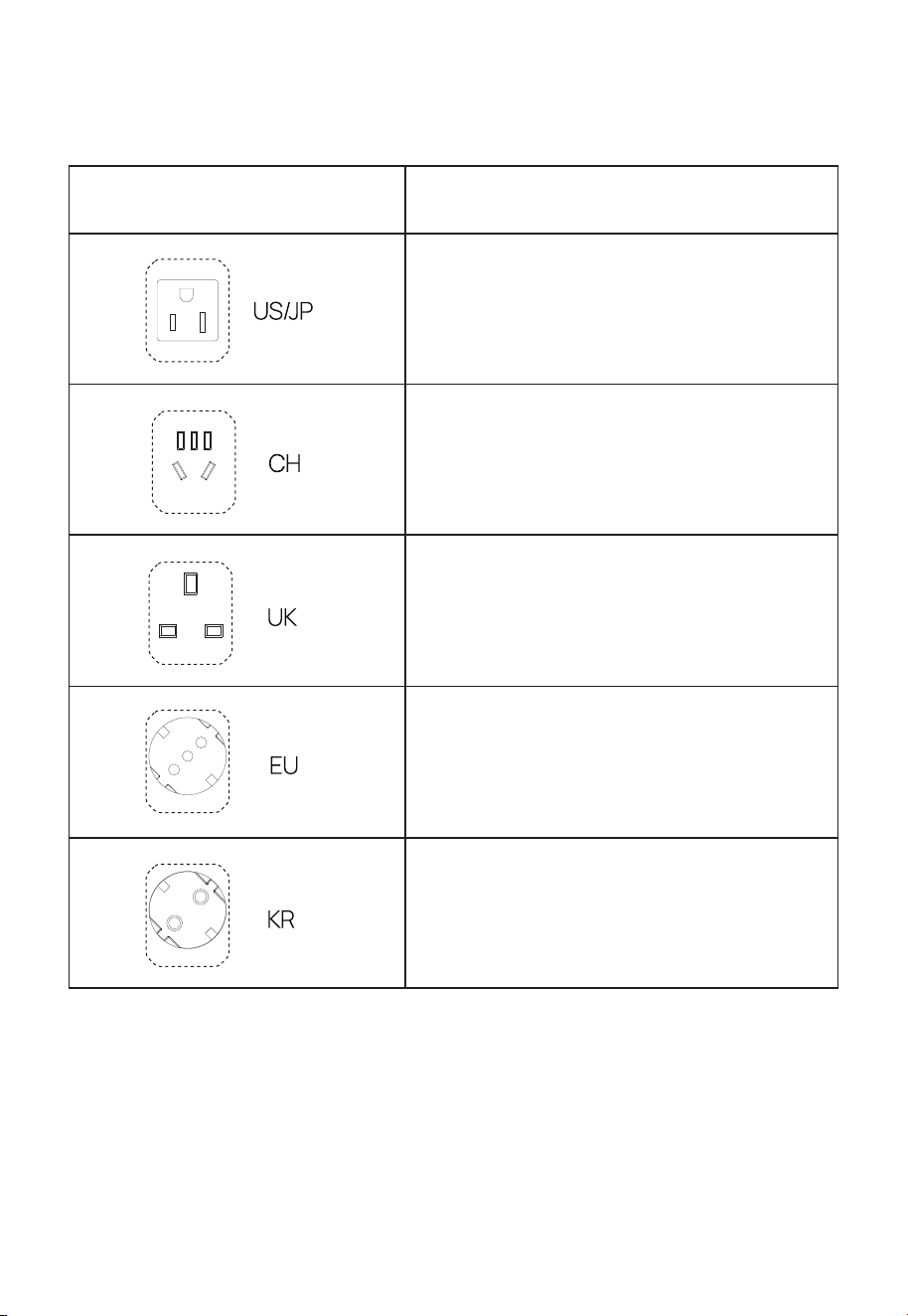
AC Output Parameter
100-120 V 50/60 z
220 V 50 z
220-240V 50/60 z
220-240V 50/60 z
220 V 60 z
AC outputType of AC port
Contents
Packing List
Product Introduction
Introduction of Display Interface
Troubleshooting Sheet
UPS Mode
Connection of Solar Panels
Car/Vehicle Charging
Product Specifications
Compliance Declaration & Safety Precautions
Disclaimer
Warranty Card
01
01
02
05
06
07
08
09
10
11
11
12
13
14
1
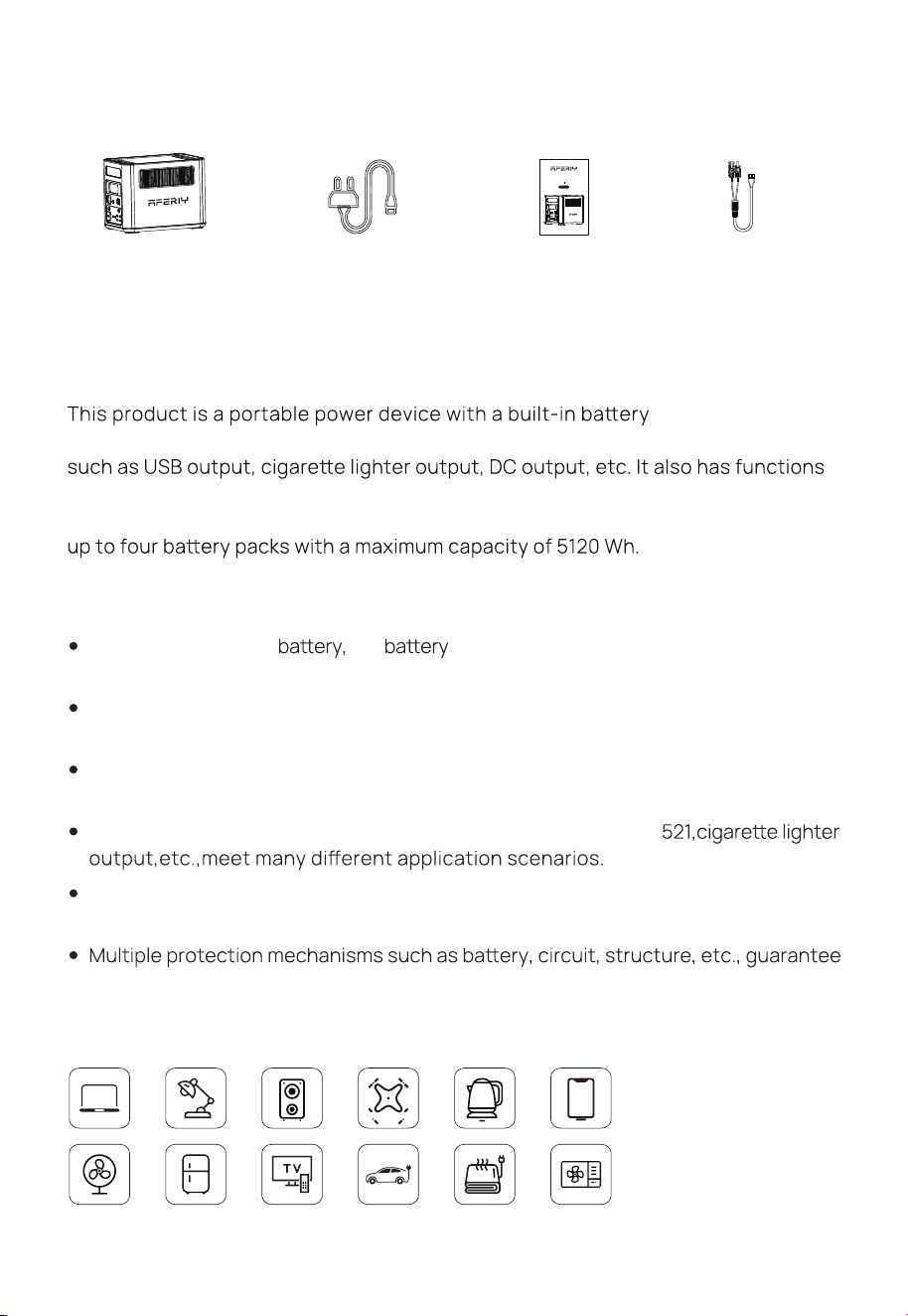
Packing List
Product Introduction
pack with charge/
discharge function. It includes both AC output interface and DC output interface
such as display, interface control, protection, and alarm. Moreover, this product
can be charged by mains AC, solar panels and vehicle charging. lt can be used with
The following are the main features of this product:
Equiped with LiFePO₄
the energy is up to 1024 Wh, and after the safety
level is extremely high.
Pure sine wave AC output can meet almost all daily electronic equipment and
small household appliances.
Two-way fast charging technology is adopted to fully charge the product within
1.2 hours.
A great variety of output interfaces such as USB-A,Type-C, DC 5
In UPS mode, the switchover time is less than 10 ms which is truly seamless
switching.
the product safety.
AC Charging Cable
MC4-XT 60
Portable Power
Station
User Manual
Port able Po wer Stat ion
Nomad1800 Pro
1800W
AF-P180 PRO Us er Man ual
2
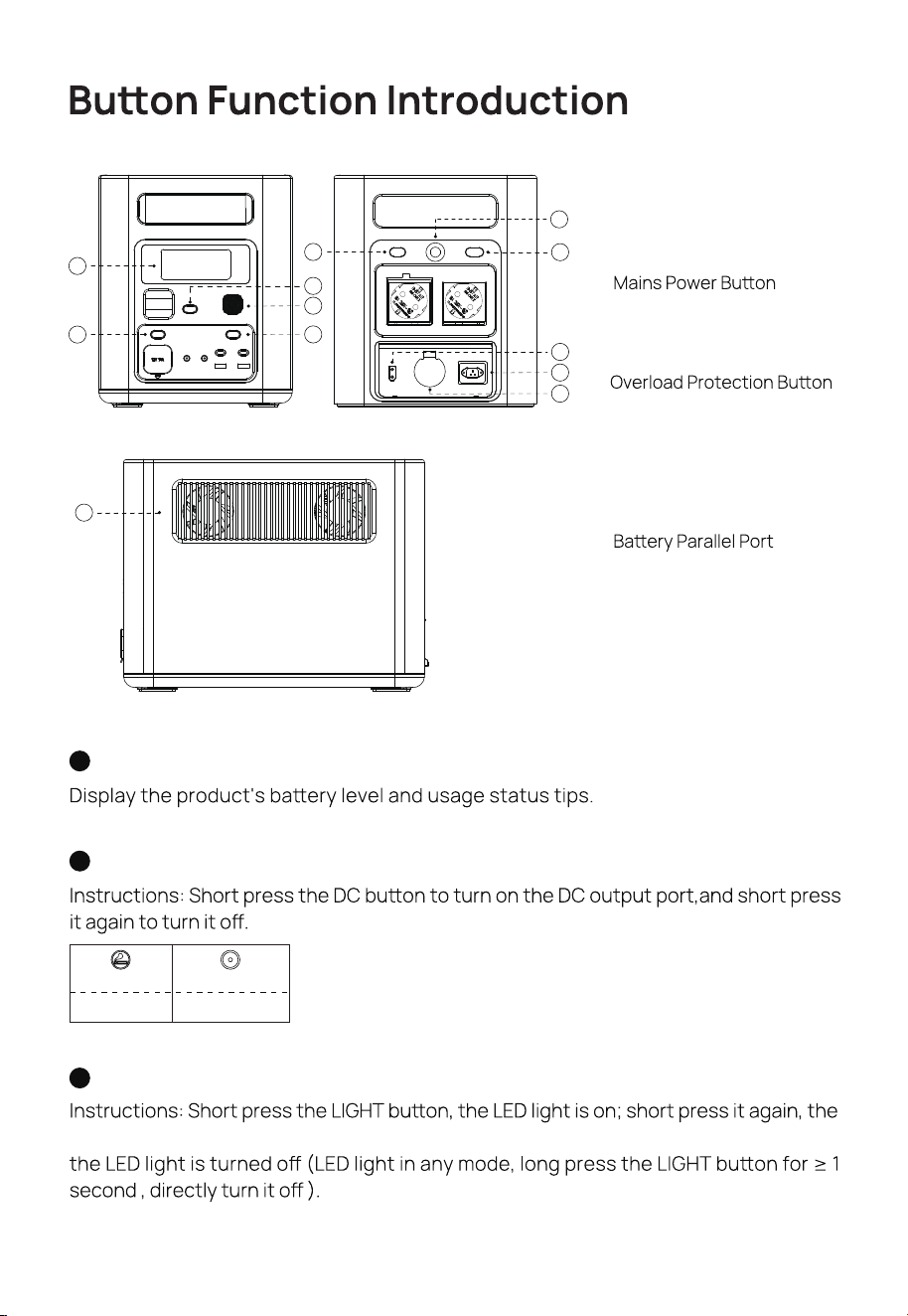
LCD Screen
1
DC Switch
2
LED light enters the SOS mode, short press in turn,enters the strobe mode, and finally
Light Switch
3
① LCD Screen
② DC Switch
③ Light Switch
④
⑤ USB Switch
⑥ AC Switch
⑦
⑧ AC Input Regulator
⑨ XT60 Input
(Solar Panel and Car Charging)
⑪
⑫ Cooling Fans
12
1
2
3
4
5
6
9
10
8
7
11
Cigare port X 1
DC 5521 X 2
12 V⎓ 3 A12 V⎓ 10 A
⑩ AC Charging Port
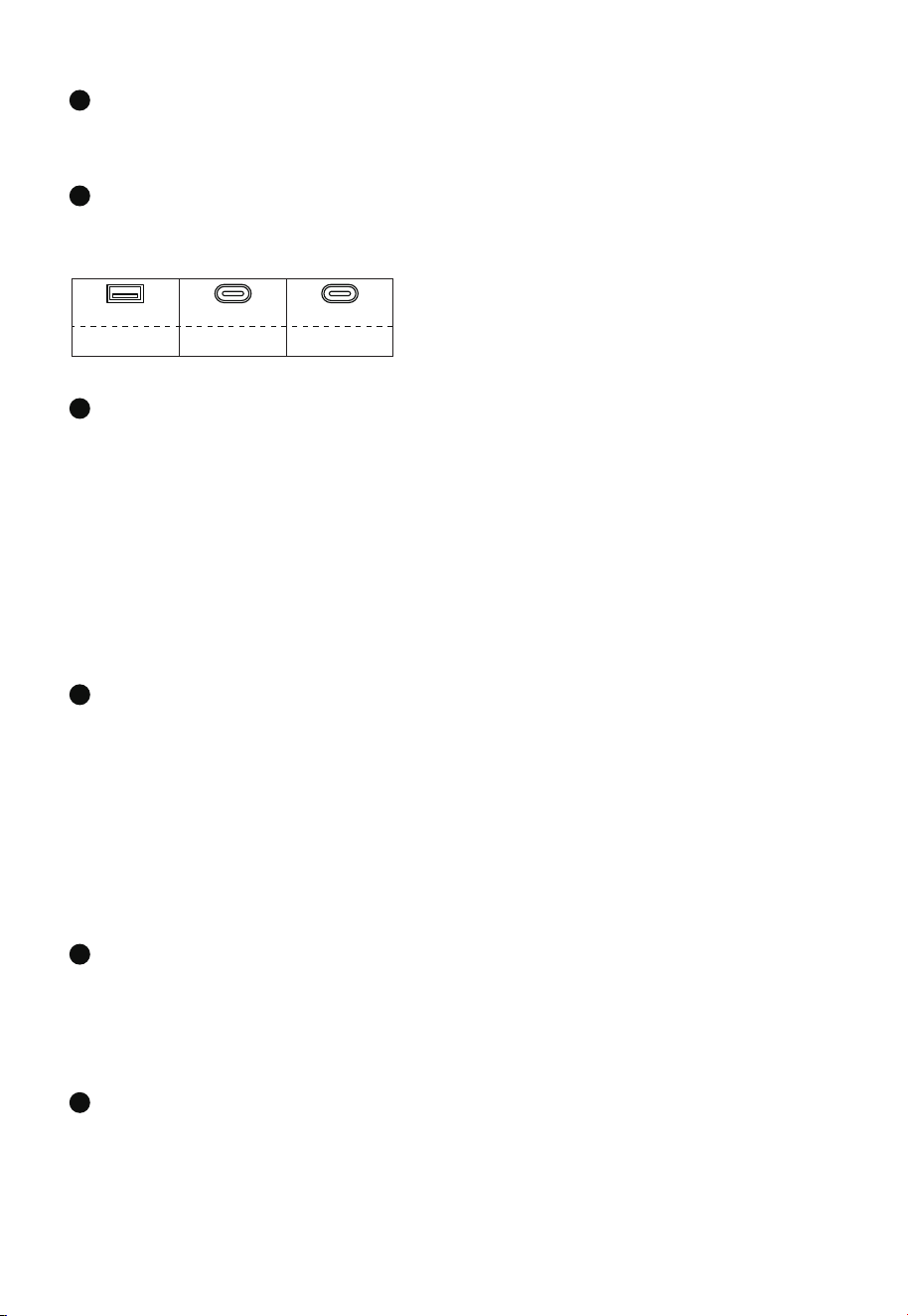
QC 3.0 PD-20 W PD-140 W
TYPE-C X 1USB-A X 2 TYPE-C X 1
3
Instructions: Short press the USB buon to turn on the USB output Port and short press
it again to turn it o.
USB Switch
AC Switch
Tap the AC buon to enable the AC output function. Since there may be dierences
in the AC output frequency and voltage in dierent regions, if you need to switch the
frequency and voltage, the operations are as follows:
1) Press and hold the AC buon for 3 seconds to enter the frequency switching mode,
the 50 z or 60 z icon will flash on the display, short press the AC buon again to
select 50 z or 60 z; when the icon stops flashing and displays 50 z or 60 z, it
indicates the switch is successful.
2) Quickly press the AC buon for 10 times to select voltage.
verload Protection Buon
AC Input Regulator
When you slide the switch to the left, it implies that the maximum AC input power is
limited to 500 W. On the other hand, when you slide the switch to the right, the maximum
AC input power at this time will be 1000 W.
ains Poer Buon
Instructions: Press and hold the power buon for 3 S to turn on/o the whole system.
XT 60 Input(Solar Panel and Car Charging)
This interface supports solar panel input or car charger input. For details, please refer
to"Solar Panel Connection" and "Car/Vehicle Charging" of this manual.
4
5
6
7
8
9
When the power supply voltage is unstable due to lightning or other reasons, and there is a
large voltage input at the AC Input, in order to protect the product, the overload protection
function (safety circuit breaker) will activate and cut o the AC input port.
Please follow the steps below to restore the AC input function:
1) Turn o the power buon and unplug all ports.
2) After confirming that there is no abnormality in each part, turn on the power buon.
3) Press the overload protection buon, connect the AC Cable to restore the AC input.
4
AC Charging Port
To charge the product by a household socket can achieve 1000 W fast charging.lt
only takes 1.2 hours to fully charge from 0 to 100 %. When charging in this wayplease
pay aention to the following points:
10
Baer Parallel Port
Use a parallel cable to connect the Portable Power Station and Extra Baery Pack in
parallel, so as to achieve capacity expansion.
11
※ Please directly plug in the wall socket to charge the product, do not use extension
cords or cable taps, otherwise there is a risk of damage to the extension cords and cable
taps or even a fire.
※ lf the extension socket is plugged in to charge this product, please do not connect
other electrical appliances to this socket, otherwise the household meter may trip.
Download Method
Method 1:
Scan the QR code on the right.
Method 2:
Search for "BrightEMS" in the App Store (iOS)
or in other mobile app stores.
Method 3:
Open a browser and search for the website:
"hps://www.abisda.com/support/download"
Cooling Fans
When the product reaches the temperature threshold set by the system, the
cooling fan will automatically run, accompanied by a certain fan noise (fan noise
below 60 dB is normal). Do not block the cooling suction/ exhaust port during use
of this product, and do not place any object within the range of 30 CM.
12
5
Introduction of Display Interface
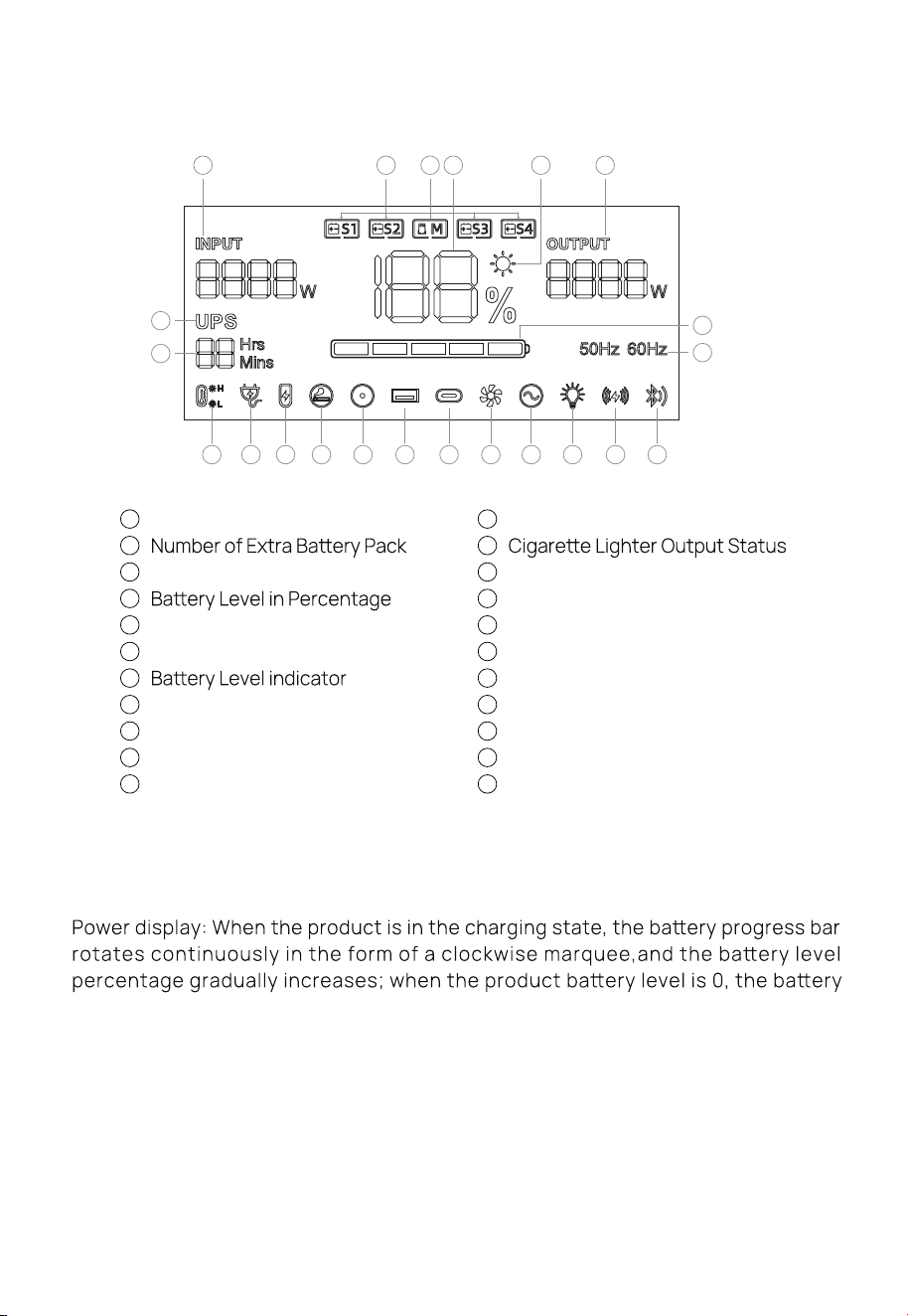
Screen Display Description
level percentage icon flashes.
Input and output status: When the product is working, the total input power, total
output power and the cursor corresponding to the working area will be displayed
on the screen.
Alarm prompt: See the following troubleshooting table for details.
1 2
3
4
5
6
10 11 12 13 14 15 16 17 18 19 20 21
7
22
8
9
Total Input Power
Power Station Icon
Always-On Mode Status
Total Output Power
UPS Status
Remaining Usage Time
High/low Temperature Warning
Mains Connection
1
2
3
4
5
6
7
8
9
10
11
XT60 PV Input Status
DC 5521 Output Status
USB-A Output Status
USB-C Output Status
Fan Status
AC Output Status
LED Light Status
Wi-Fi
Bluetooth
Currently Set Frequency
12
13
14
15
16
17
18
19
20
21
22
Troubleshooting Sheet
6
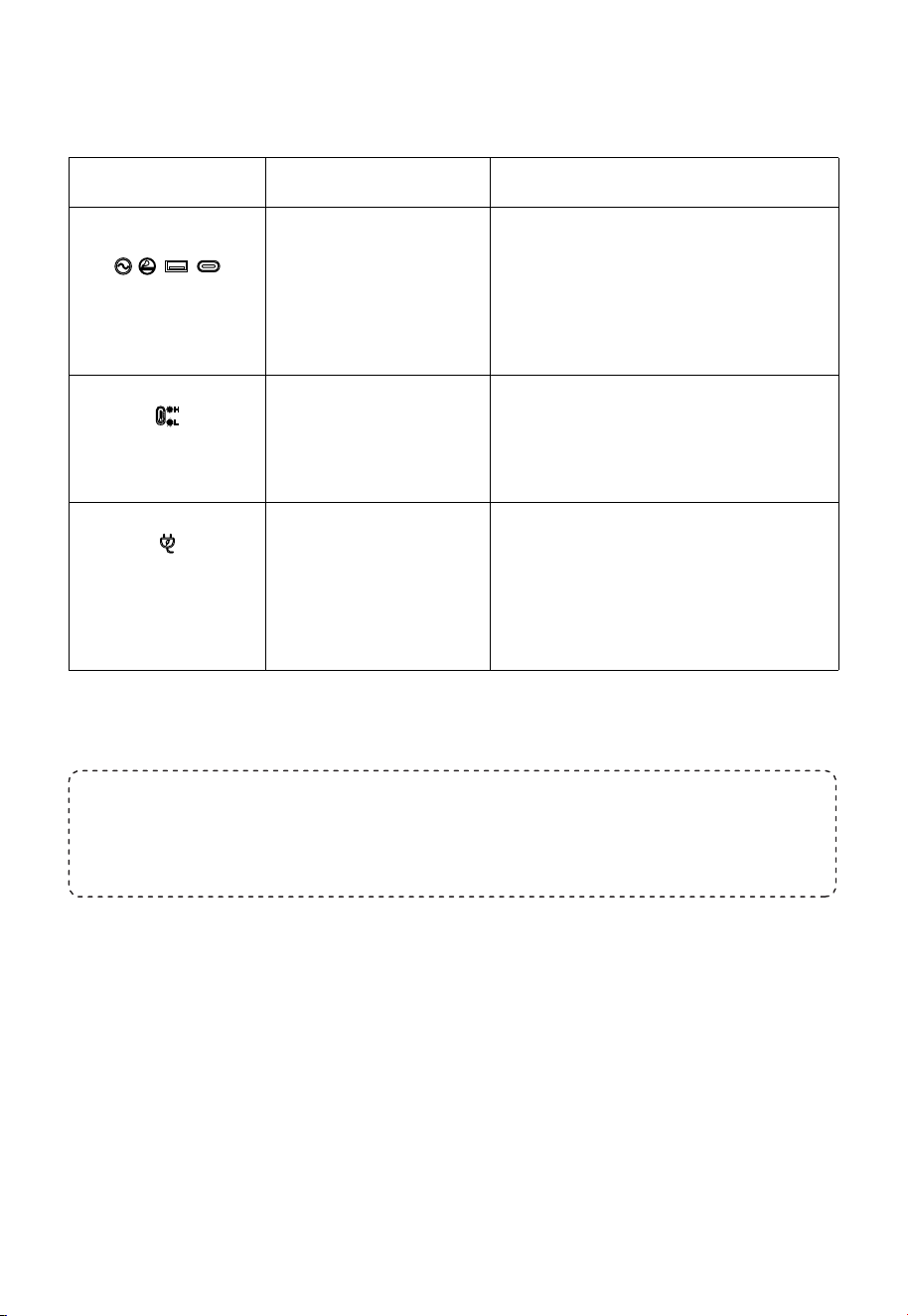
The above output icon
flashes and beeps.
CausePhenomenon Processing method
The output exceeds the
standard and it's short-
circuited.
1.Disconnect the device and restart the
product.
2.Replace dierent electrical equipment to
test the machine.
The temperature warning
icon flashes and beeps.
The icon of connecting to
the AC mains flashes and
the product cannot be
charged.
The charging cable is poorly
connected.
Check the connection status of the cable and
the power supply of the power supply.
The temperature of the
productis too high or too low.
Remove the device and turn the power OFF
Wait for the device to reach the appropriate
temperature.
If you have any questions, please feel free to contact us.
Email address: supportaferiy.com.
Sincerely.
7
UPS Mode
UPS Feature
This product has the function of backup uninterruptible power supply.The usage and
operation precautions are as follows:
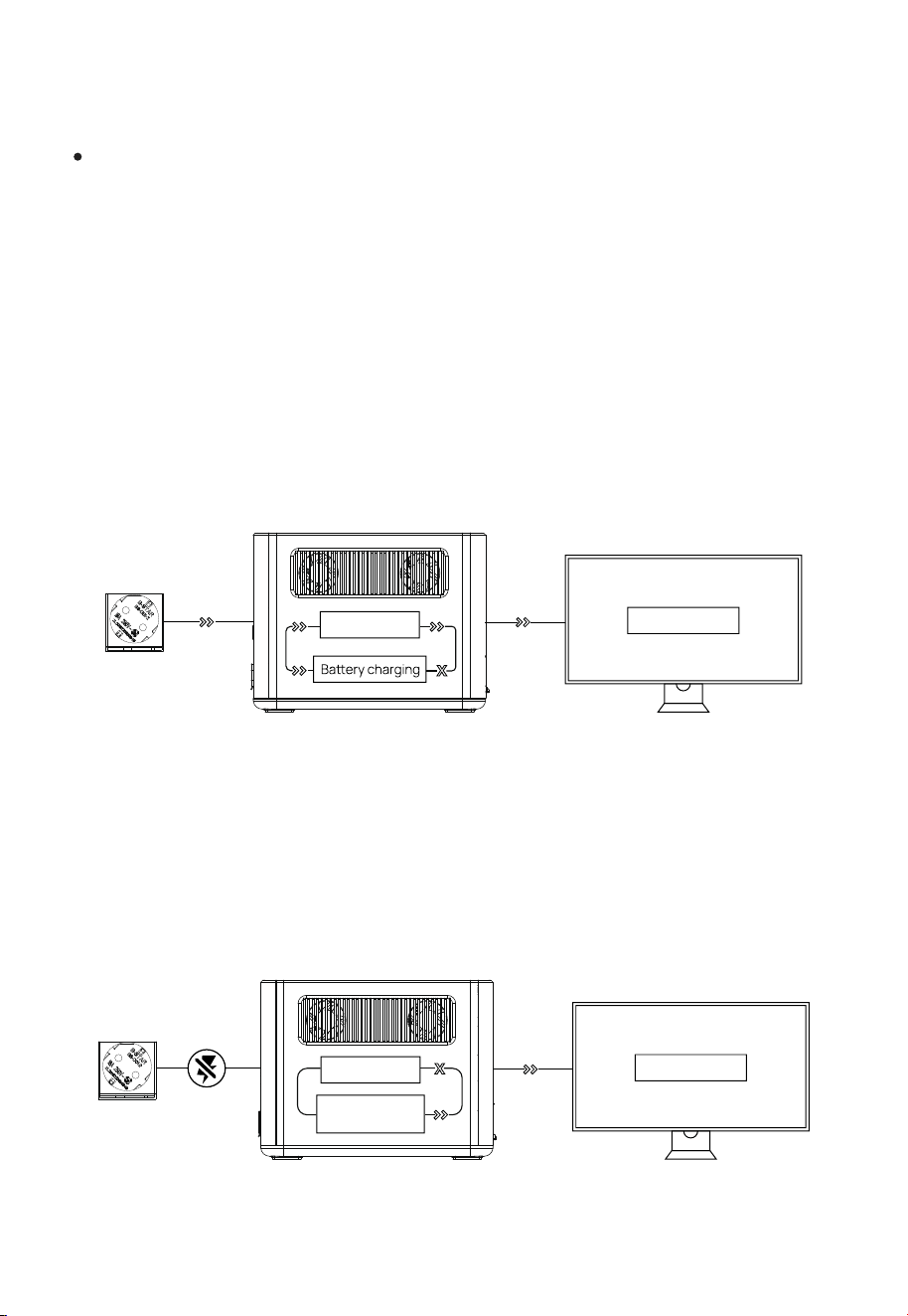
As shown in Pic1 below, when the product is connected between the wall socket and
the electrical appliance, and the power supply and AC switch of the product are in the
ON state, the product enters the UPS working mode. The AC mains in the socket
supplies power to the electrical appliance through the bypass circuit, and also charges
the product. In this working state:
1.The rated power of the electrical appliance must be lower than 1200 W(only100-120 V)
otherwise overload protection may be triggered.
2.The rated power of the electrical appliance must be lower than 1800 W(only220-240 V)
otherwise overload protection may be triggered.
As shown in Pic2 below, when the AC mains at the socket end is disconnected, the
bypass output inside the product stops working, the product switches to a bidirectional
inverter circuit within 10ms, and
the circuit outputs supply power to the electrical
appliance to ensure that the electrical appliance is uninterrupted and works normally
during the process.
(Pic 1)
Load/Equipment
Bypass circuit
(Pic 2)
Bidirectional
inverter circuit
Load/Equipment
Bypass circuit
8
Precautions
Please do not make the parallel connection ports short-circuited.2.
Please do not plug and unplug the connecting cable when the product is under use.
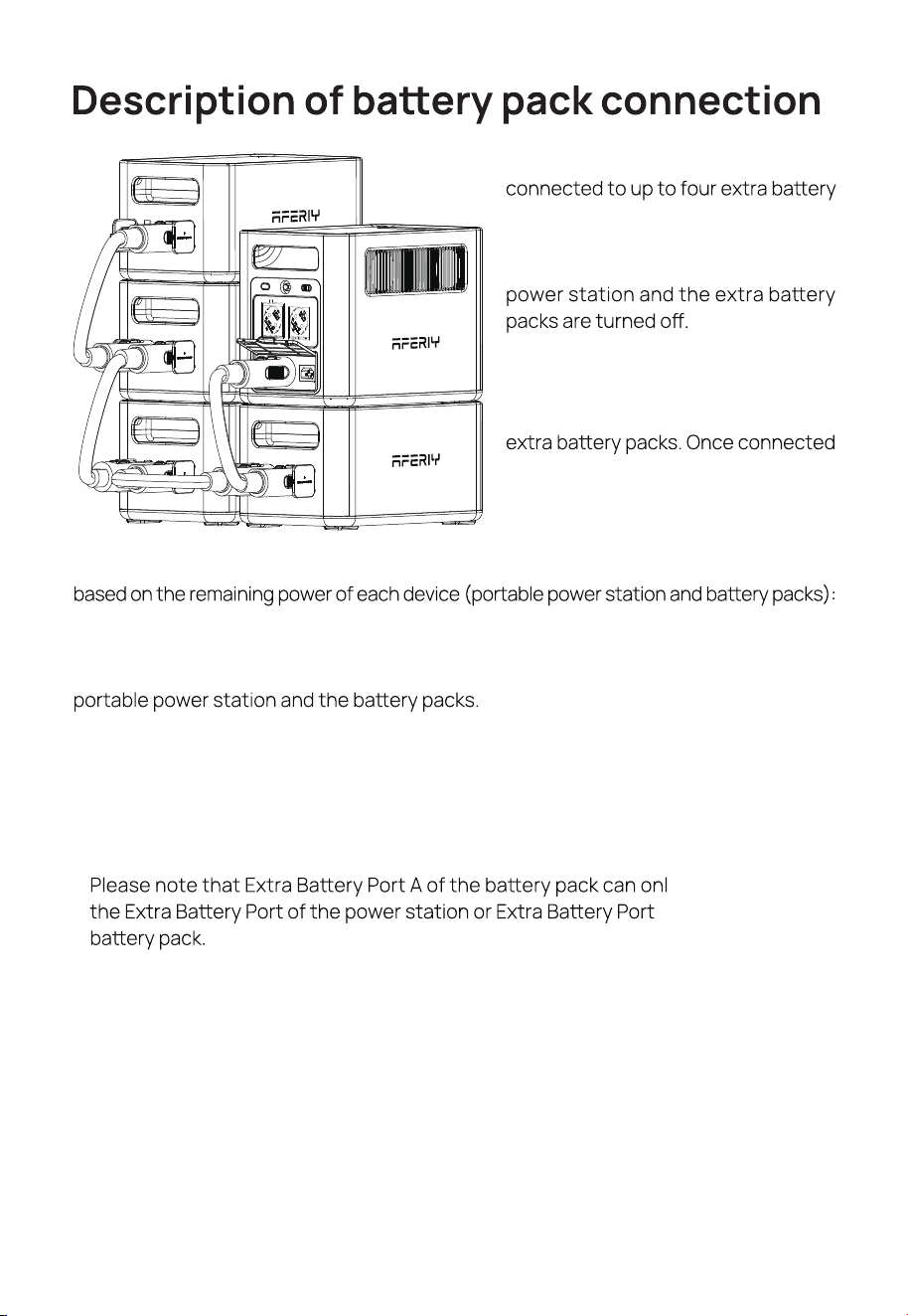
y be connected to
B of the upper-level
1.
The portable power station can be
packs via parallel cables, with a maximum
total capacity of 5120 Wh. Please make
the connection when both the portable
After the connection is completed,
an icon will appear on the screen
showing the number of connected
successfully, the system can start
charging or discharging.
During the charging and discharging process after connection, power will be distributed
During charging, devices with lower remaining power will have higher charging power;
during discharging, devices with higher remaining power will have higher discharge
power. If there is no external charging input, energy exchange may occur between the
When the remaining power of all devices is close, the energy exchange process will stop.
Noted that:
The stacking method shown on this page is for reference only. Given that excessively
high vertical stacking may easily lead to product falling risks, it is recommended to
prioritize placing the product against the wall and adopt the combined stacking method
of "horizontal stacking + vertical stacking" during operation.
9
Connection of Solar Panels
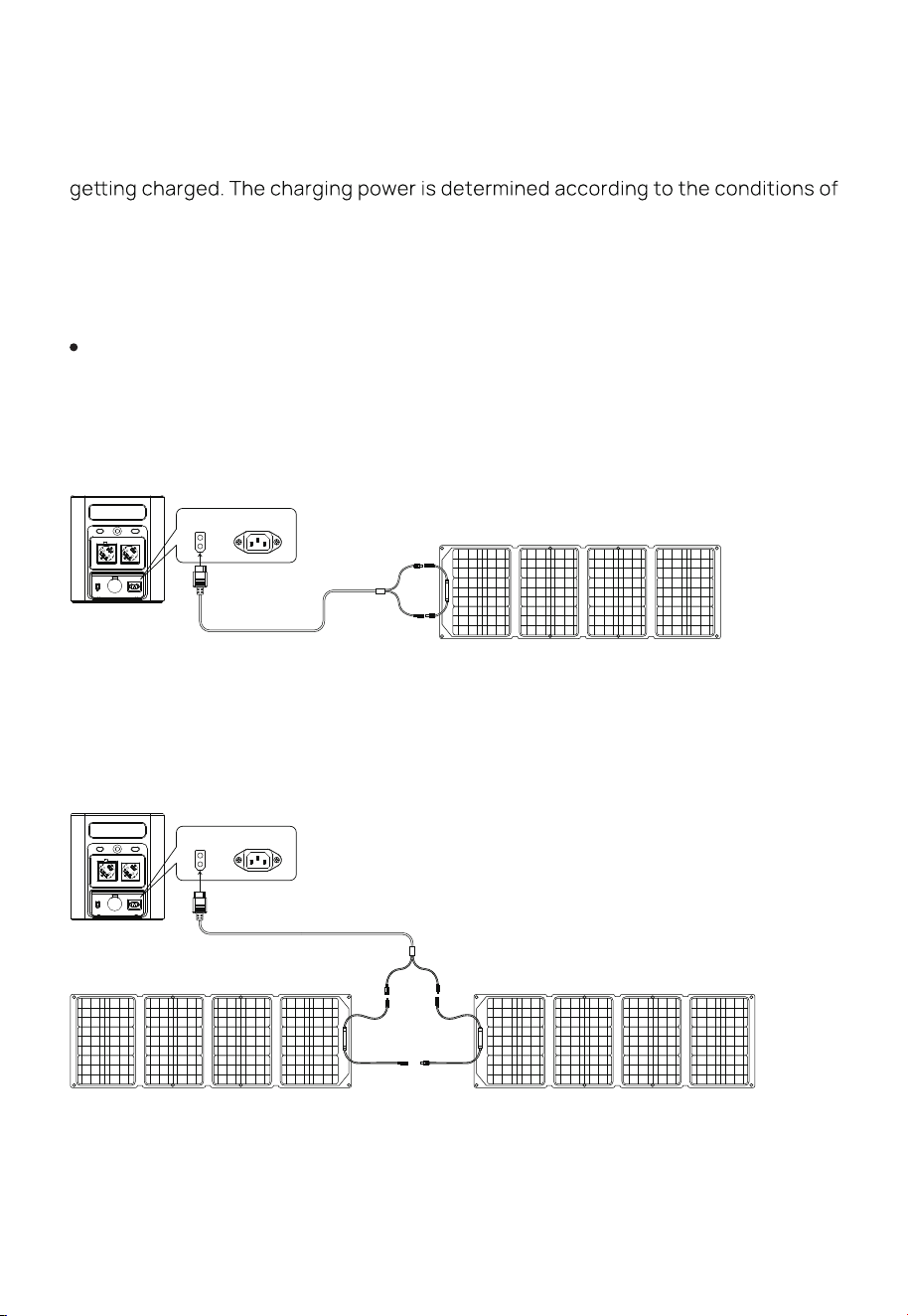
We recommend the following two charging schemes:
Scheme One
Portable Power Station Charging Area
Under the condition of light, this product can be connected to the solar panel and
light and weather.
In this charging mode, we support solar panel input within 500 W, and the input
voltage cannot exceed 55 V, otherwise the product abnor-mality caused by it will not
be covered by the warranty.
Scheme Two
Portable Power Station Charging Area
MC4 to XT60
Solar Panel (Not in accessories)
Portable Power
Station
XT60
MC4 to XT60
Solar Panel ②
(Not in accessories)
Solar Panel ①
(Not included in accessories)
Portable Power
Station
XT60
10
Car Charging
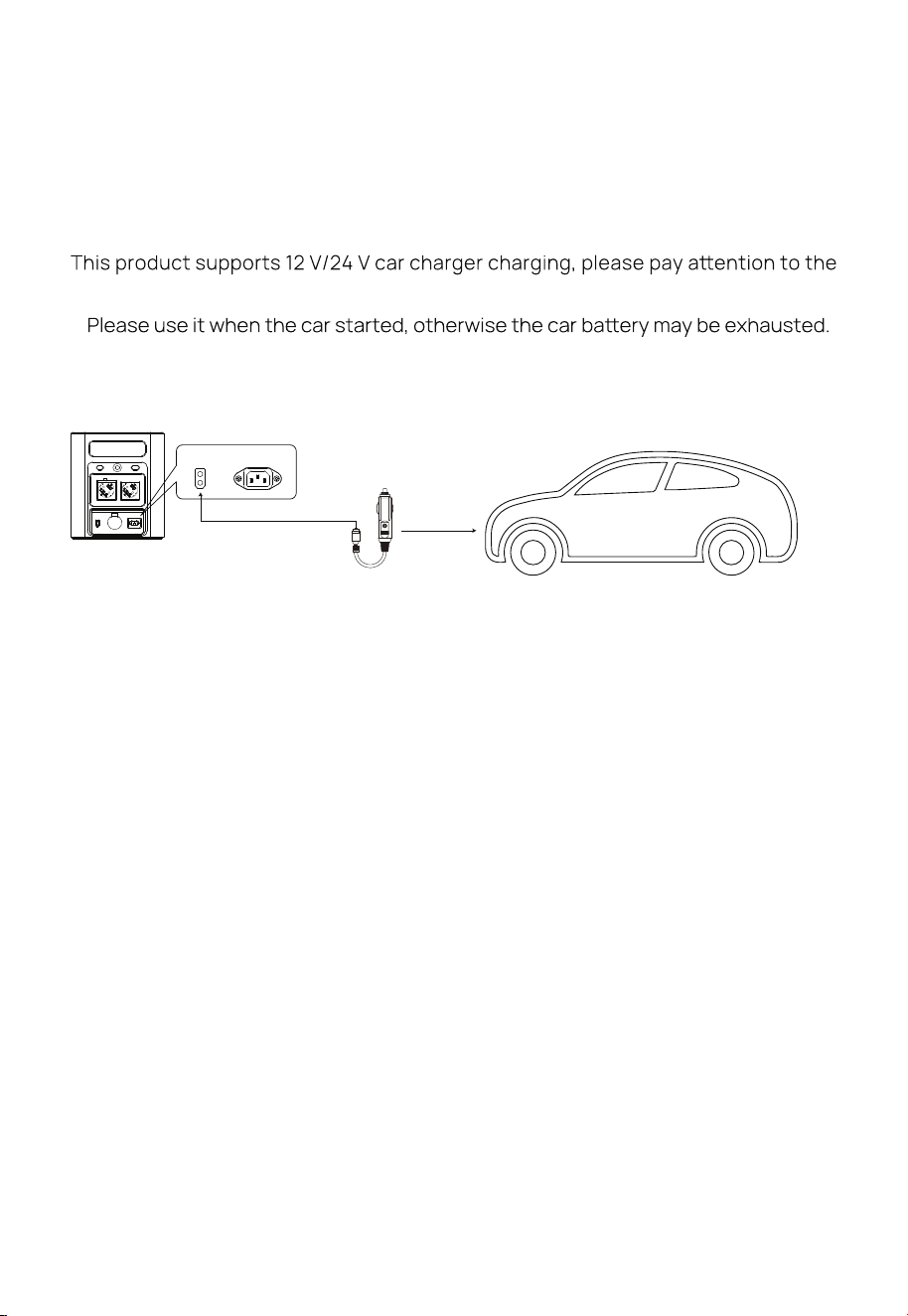
When the car is in the process of starting, connect the car charging port on the car
and the product through the car charging cable to charge the product. The
connection method is shown in the picture below:
following two points when using this method to charge:
Vehicle charging power is usually in the range of 90-120 W, and the charging
time is long.If fast charging is required, the AC mains charging is recommended.
※
※
Car Charging Cable
Portable Power
Station
XT60
(Not included in accessories)
11
Baer Specications
Product Parameter
Cell type
Rated voltage of single baery
Rated capacity of single baery
Rated voltage of baery pack
Output voltage range of the baery pack
Rated capacity of baery pack
Product Name
Dimension
Weight
Capacity
AC Charging
XT 60 Input
AC Output
USB-A Outout
Type-C Output
DC 5521 Output
Shutdown Current
Working Temperature
Environment umidity
Type-C Output
Cycle Times
Car Charging Output
1800 W Portable Power Station
1000 W
11.5-55 V 500 W max
1800 W
(QC3.0 18 W) X2
(PD20 W) X1
> 4000 times
(PD140 W) X1
11.64 kg
L X W X 350 X 220 X 263 mm
1024 Wh
12 V/10 A
(12 V/3 A) X2
500 A
0 % R
-10 -40
40135 LiFePO₄
20 Ah
1024 Wh
43.2-58.4 V
51.2 V
3.2 V

12

13
Before use, please read the user manual of this product to ensure full understanding
and correct use. After reading, keep the user manual properly for future reference. If
you do not operate this product correct-ly, you could cause serious injury to yourself
or others, or result in damage to the product and property. Once you use this product,
you are deemed to have understood, recognized and accepted all terms and content
of this document. Users undertake to be responsible for their own actions and all
consequences arising therefrom. AFERIY is not responsible for all losses caused by the
user's failure to use the product in accordance with the User Manual.
In compliance with the law, the company has the final right to interpret this document
and all related documents of the product. If it is updated, revised or terminated without
prior notice, please visit the AFERIY oicial website for thelatest product information.
Disclaimer
14
arrant Card
Name
Address
Tel
Mail
Brand、Order number
Buying date
Fill in the date
Please fill in all the above items.
Warrant Card
This product provides a -onth arrant service fro the date of purchase
If there is a quality problem within the range of normal use, we provide warranty service.
Damage caused by use beyond the normal range of use is not covered by the warranty service.
The content of the warranty scope shall be subject to the content recognized by the company.
Sometimes the specifications and functions of the product will be updated without prior notice.
In the case where the warranty is damaged or altered,and no stamp of the sales store on the
warranty, the warranty service may not be provided.
After purchasing our company’s products, please keep this product together with invoices and
other items. When maintenance services are needed, please provide information according to
our company’s request.
Even within the scope of the warranty, sometimes it will be exchanged for products with the
same function. The shipping and repair fees for products outside the warranty range shall be
paid by the customer.
What is the product failure