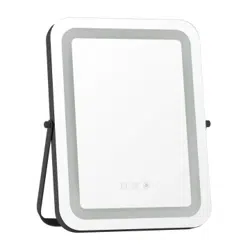
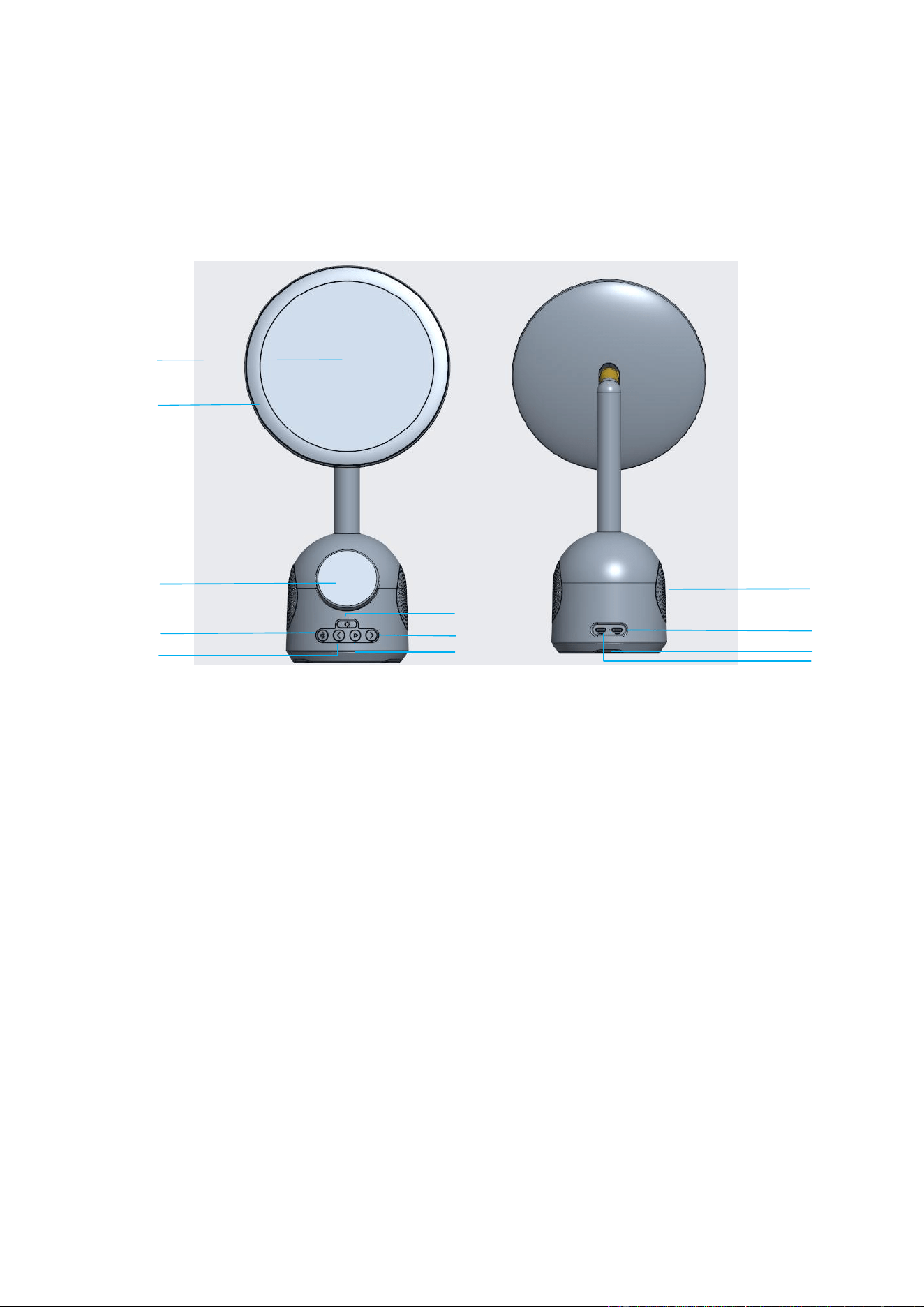
Multifunctional LED makeup mirror wireless charger
Model: SY-W02250
Function Buttons:
Operation manual:
1.Power Connection:
Plug the USB end of the charging cable into the power adapter, plug the Type-C port into the product, and blink the
indicator twice to turn off the indicator and enter the standby mode.
2.Charging indicator:
Charging – Blue light stays on
FOD – light flashes
3.Output power:
3.1 Magnetic phone wireless charging output: 15W (Max)。
3.2 USB-C output: 5W (Max)
4.Bluetooth function:
4.1 Button function: 5 buttons, bluetooth button, pause/play, up button, down button, makeup lamp button.
4.2 Press the Bluetooth button to enter Bluetooth mode. Bluetooth name for the first pairing: W02250, a prompt tone is
played after the pairing is successful.
4.3 Press Pause/play to switch between pause/play
4.4 Press the up button to play the up song,hold press the up button to reduce the volume
4.5 Press the down button to play the down song,hold press the down button to increase the volume
Phone magnetic charging area
Type-C input
Makeup lamp button
makeup lamp
make-up mirror
Charging indicator
speaker
Type-C output
Up button
Pause/play
Bluetooth button
Down button

5. Light control:
5.1 Press the Makeup lamp button to turn on and adjust the light brightness in 4 levels (Max/Mid/Min/Off).Long press
Makeup lamp button to turn off the lights.
6.Notes:
Special attention: If require Bluetooth, wireless charger, Makeup lamp work at the same time, please be sure to use
PD30W or above power adapter; When the 5V voltage is supplied, the wireless charger only supports 5W load and
Makeup lamp work.
6.1 Do not squeeze or collide.
6.2 Do not disassemble or put into the fire, water, to avoid short-circuit leakage.
6.3 Do not use wireless chargers in severe high temperature, humidity or corrosive environments to avoid leakage of
damaged circuits.
6.4 Do not place it too close to magnetic cards (ID cards, bank cards, etc.) with magnetic strips or chips to avoid
magnetic card failure.
6.5 Keep more than 20cm between the implanted medical device (pacemaker, implantable cochlea, etc.) and the
wireless charger to avoid potential disruption to medical devices.
6.6 Keep children from the product in case they play the wireless charger as a toy to avoid accidents.
6.7 Keep the wireless charger and receiver device away from water and other liquids.
6.8 To clean the charger, make sure the power supply is disconnected.
6.9 Usage temperature: 0-45℃.
6.10 Usage humidity: 20-85% (40℃)
* The pictures involved in this manual are all illustration. Final product is subject to the actual object.
* Inside package including: Mirror wireless charger, charging cable, User manual.
* Power adapter is not included.Please purchase otherwise or use conforming adapter
FCC Statement
1. This device complies with Part 15 of the FCC Rules. Operation is subject to the following
two conditions:
(1)This device may not cause harmful interference.
(2)This device must accept any interference received, including interference that may
cause undesired operation.
2. Changes or modifications not expressly approved by the party responsible for
compliance could void the user’s authority to operate the equipment.
Note: This equipment has been tested and found to comply with the limits for a class B
digital device, pursuant to Part 15 of the FCC Rules. These limits are designed to provide
reasonable protection against harmful interference in a residential installation.
This equipment generates uses and can radiate radio frequency energy and, if not
installed and used in accordance with the instructions, may cause harmful interference to
radio communications. However, there is no guarantee that interference will not occur in a
particular installation. If this equipment does cause harmful interference to radio or
television reception, which can be determined by turning the equipment off and on, the
user is encouraged to try to correct the interference by one or more of the following

measures:
• Reorient or relocate the receiving antenna.
• Increase the separation between the equipment and receiver.
• Connect the equipment into an outlet on a circuit different from that to which the
receiver is connected.
• Consult the dealer or an experienced radio/TV technician for help.
The device has been evaluated to meet general RF exposure requirement. This equipment
should be installed and operated with a minimum distance of 20 cm between the radiator
and your body
三.Specification:
Input:5V 4A/9V 4A/12V 3A
Output 1:Phone 15W(MAX)
Output 2:USB-C 5W(MAX)
Charging efficiency:≥73%
Charging distance:2-5mm
Wireless charger work frequency:110-205KHz
Speaker Power:1*5W
Product size:366*190*119mm