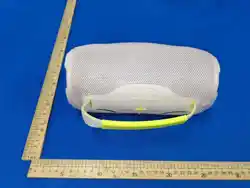

Wireless Speaker with FM Radio
USER MANUAL
(Read before proceeding)
Press the “power” button on the top to turn ON/OFF the unit.
The item should come with enough power be powered on. If you are having trouble on pairing or powering-on it,
please make sure it is fully charged.
Use the USB charge cable connecting to the item from its type-C charging socket to your computer or charger. The
charging input power is 5V 500mA.
The red light will turn off when power charging completes.
Short press light button to change LED light mode or turn it on/off. Long press light button to turn on/off the LED light.
Music Playing:
Bluetooth Mode
1. Once power on, the unit turns default into Bluetooth mode.
2. The unit will automatically connect to the last Bluetooth device firstly. If no found, it will enter pairing mode
and wait for a new Bluetooth device to connect.
3. On the Bluetooth device, switch on Bluetooth setting and search for “Blastin GO speaker”. For the first-time
connection, select “Blastin GO speaker” to start connection. If necessary, enter the pass code 0000 or 1234. There is a
warning tone once connected successfully.
4. To disconnect the unit from current Bluetooth device, choose to “Disconnect” or “Forget this device” from its
connected Bluetooth device.
5. Press one time the “ > ” button to play or pause the music.
6. Press one time the “+” or “ -” button to switch forwards or backwards to skip songs,
7. Press and hold the “+” or “ -” button to adjust the volume.
8. Once connected,you can listen to music from the unit wirelessly (<33feet). The music streaming may be
interrupted by obstacles between the device and the speaker, such as walls, metallic casing that covers the device, or
other devices nearby that operate in the same frequency.
TWS Mode:
1. Turn on 2pcs units and ensure they are in Bluetooth mode.
2.
Before using TWS function, please make sure there is no any Bluetooth connection on both two units.
3. Press and hold the “M” button on one of the unit to connect or disconnect with each other.
4. Once the 2pcs units connected, follow the above step to connect it with your Bluetooth enable devices.
TF card/USB drive Mode:
1. Once a TF card/USB drive is inserted, the unit will turn into music play mode and play music automatically. Press
one time the “>” button to play or pause the music.
2.
Press one time the “+” or “ -” button to switch forwards or backwards to skip songs.
3. Long press the “+” or “ -” button to adjust the volume.
FM radio
1. Short press the “ M ” button to enter FM radio mode. LED light will turn off in radio mode.
2. Insert the provided USB charging cable. This acts as an antenna.
3. Press one time the “>” button to search through FM channels automatically. When searching finishes it will
save all available stations.
4. Press one time the “+” or “ -” button to switch between channels.
Press and hold the “+” or “ -” button to adjust the volume.

This device complies with Part 15 of the FCC Rules. Operation is subject to the following two conditions:
(1) this device may not cause harmful interference, and
(2) this device must accept any interference received, including interference that may cause undesired operation
This device has been tested and found to comply with the limits for a Class B digital device, pursuant to Part 15 of the FCC
Rules. These limits are designed to provide reasonable protection against harmful interference in a residential installation.
This device generates, uses and can radiate radio frequency energy and, if not installed and used in accordance with the
instructions, may cause harmful interference to radio communications.
However, there is no guarantee that interference will not occur in a particular installation. If this device does cause harmful
interference to radio or television reception, which can be determined by turning the device off and on, the user is
encouraged to try to correct the interference by one or more of the following measures:
--Reorient or relocate the receiving antenna.
--Increase the separation between the device and receiver.
--Connect the device into an outlet on a circuit different from that to which the receiver is connected.
--Consult the dealer or an experienced radio/TV technician for help
Changes or modifications not expressly approved by the party responsible for compliance could void the user's authority to
operate the equipment
RF warning for portable device:
The device has been evaluated to meet general RF exposure requirement. The device can be used in portable exposure
condition without restriction.