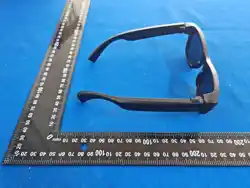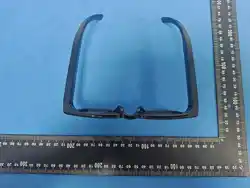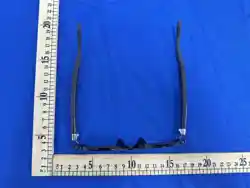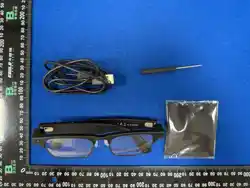
SMART GLASSES
使用说明书 CN
1. 可 在Google Paly或App Store搜索"HeyCyan"进行下载。
2. 可扫描上方二维码,下载"HeyCyan"。
进入APP 首页,点击连接设备,选择设备名称G2 PRO 进
行配对
① 机 / 关 机
长按A1按键2S开机,长按5S关机;也可通过充电开机。
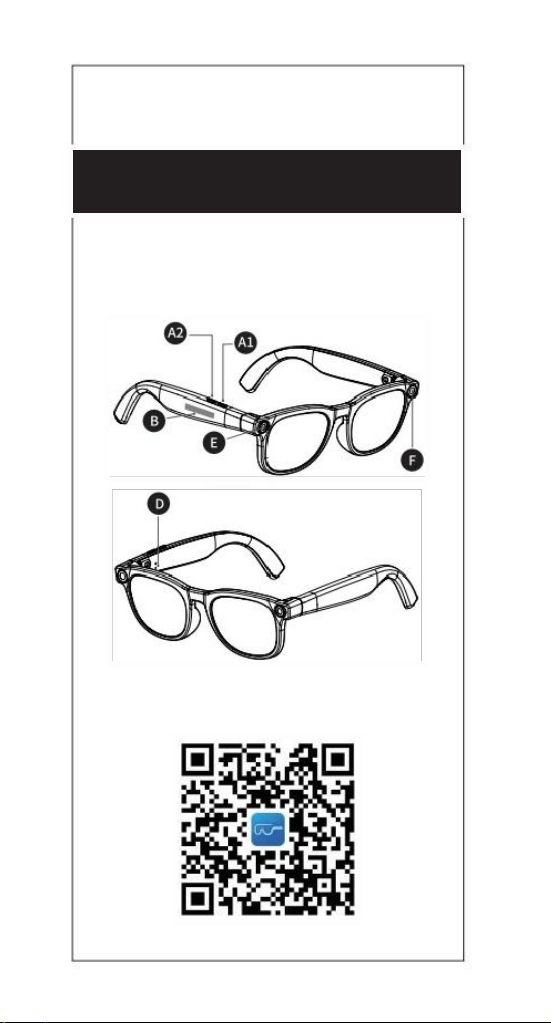
②触控板操作 一 (如上图B位置)
双击可播放/暂停音乐;前后滑动可调节音量;
长按可切换下一首;三击可切换上一首。
③ 拍 照
位置E是摄像头,短按A1 按键,同时拍照指示灯F会亮一次。
④ 录 音
长按A2按键;录音中,拍照指示灯F会闪烁;
短按退出录音并保持。
⑤ 录 像
双击A1按键;录像中,拍照指示灯F 常亮;
短按退出录像并保存。
⑥ 通 话
来电时,单击A1按键接听,长按A1按键2秒拒接;通话中,
单击A1 按键可挂断。
⑦ 恢 复 出 厂 设 置
长按A1 按键10S。恢复出厂设置后会清除眼镜储存所有内容。
⑧ 佩 戴 检 查
在出厂设置状态下,眼镜的佩戴检测功能默认开启。摘下
眼镜时,音乐会自动暂停。戴上眼镜后,点击“播放”按钮继
续播放音乐。
⑨ W I F I 功 能
确保手机的WIFI已开启;进入APP相册界面点击导入,
手机会自动连接眼镜wifi,wifi连接后会陆续导入;导入
完成后,可在APP端看到照片、视频和录音,也可以保存
到手机相册。
⑩ 充 电
充电中D处亮红灯,充电完成亮蓝灯。
三 、 AI语 音 助 手
①唤醒
语音唤醒:说出“你好小橙”或“Hey Cyan”,可唤醒Al语音
助手;
按键唤醒:短按A2按键。
②对话
唤醒AI语音助手后,可直接提问
③ 识 图
1)唤醒AI语音助手后,可对准物体,问“我眼前是什么?”
眼镜会先拍照-再识别-最后回答。
2)也可双击A2键快速AI识图
④拍照
唤醒AI语音助手后,可对准所要拍摄位置,说“拍照”,
听到拍照提示音说明已拍照成功
四 、 翻译
支持1对1和同声翻译,点击“Al翻译”,说出你要翻译的
内容。支持26国语言。
二 、基础操作
一 、APP 下 载
1、APP Download
1)Search for "HeyCyan"on Google Play or App Store
to download.
2)Scan the QR code in the first page,download and
install"HeyCyan"app Then click "Connect Device",
select G2 PRO to connect and pair.
2、Basic Operations
① Power On/Off
Long press A1 button for 2 seconds to power on,ong
press for 5 seconds to power off.The device can also
be powered on by charging.
②Touch pad Operations (position B inimage above)
●Play/Pause music:Double-tap.
●Adjust volume:Slide forward/backward.
·Switch to next song:Long press.
●Switch to previous song:Triple-tap.
③ Take a Photo
Position E is the camera.Short press A1 button to take
a photo,and the shooting indicator light(F in image
above)will flash once.
④ Record Voice
Long-tap A2 button to start voice recording.During
recording,the shooting indicator light flashes white.
Short press the button to exit and save the recording.
⑤ Record Video
Double-press A1 button to start video recording.
During recording,the shooting indicator light stays on.
Short press the button to exit and save the video.
⑥ Phone Calls
When incoming calls:Click A1 button to answer,and
long press for 2 seconds to reject.
During a call:Click A1 button to hang up.
⑦Factory Reset
Long press A1 button for 10 seconds for factory
reset.AIl files stored in the glasses wil be deared.
Wear detection function is enabled by default.When
removing glasses,music will pause automatically.
After wear glasses back,click "Play"button to
continue music play.
⑨ WiFi Function
●Ensure phone's WiFi is enabled.Click "Import"in APP
album interface.The files willbe imported one by one.
●After importing is finished,photos,videos,and audio
files can be viewed in the APP and saved to the phone's
album.
⑩ Charging
●Red light:Charging in progress.
●Blue light:Charging completed.
3、AI Voice Assistant
① Wake Up
●Voice wake-up:Say "Hey Cyan"to wake upAl
voice assistant.
●Button wake-up:Short press A2 button
② Conversation
After waking upAl voice assistant,you can
ask questions.
③ Object Recognition
●After waking upAl voice assistant,face an object and
ask "What is in front of me?"Al will take a photo,
recognize the object,and then reply.
●You can also double-click Al button for quick AI Object
Recognition.
④ Photography
After waking upAl voice assistant,face the target
position and say "Take a photo".After hearing the
shutter sound,photo has been taken.
4、Translation
Support 1-on-1 and simultaneous translation.Click
"Al translation"and say the content you want to
translate.Supports 26 languages.
USER MANUAL
EN
⑧ Wear Detection
FCC Warning
15.19 Labeling requirements.
This device complies with part 15 of the FCC Rules. Operation is subject to the following
two conditions: (1) This device may not cause harmful interference, and (2) this device
must accept any interference received, including interference that may cause undesired
operation.
15.21 Information to user.
Any Changes or modifications not expressly approved by the party responsible for
compliance could void the user's authority to operate the equipment.
15.105 Information to the user.
Note: This equipment has been tested and found to comply with the limits for a Class B
digital device, pursuant to part 15 of the FCC Rules. These limits are designed to provide
reasonable protection against harmful interference in a residential installation. This
equipment generates uses and can radiate radio frequency energy and, if not installed
and used in accordance with the instructions, may cause harmful interference to radio
communications. However, there is no guarantee that interference will not occur in a
particular installation. If this equipment does cause harmful interference to radio or
television reception, which can be determined by turning the equipment off and on, the
user is encouraged to try to correct the interference by one or more of the following
measures:
-Reorient or relocate the receiving antenna.
-Increase the separation between the equipment and receiver.
-Connect the equipment into an outlet on a circuit different from that to which the receiver
is connected.
-Consult the dealer or an experienced radio/TV technician for help.
Absorption Rate (SAR) information:
This device meets the government's requirements for exposure to radio waves. The
guidelines are based on standards that were developed by independent scientific
organizations through periodic and thorough evaluation of scientific studies. The
standards include a substantial safety margin designed to assure the safety of all
persons
regardless of age or health.
FCC RF Exposure Information and Statement
The SAR limit of USA (FCC) is 1.6 W/kg averaged over one gram of tissue. This device
was tested for typical body-worn operations with the back of the device kept 0mm from
the body and 0mm from the head.To maintain compliance with FCC RF exposure
requirements, use accessories that maintain a appropriate separation distance between
the user's body and the back of the device. The use of belt clips, holsters and similar
accessories should not contain metallic components in its assembly. The use of
accessories that do not satisfy these requirements may not comply with FCC RF
exposure requirements, and should be avoided.