LED-MM-B
User's manual
I I I
Indoor use only
Scan this QR code to download
the APP and control the lights
For instructions on the APP,
Please refer to the "Help" Of the software.
Caution: The user is cautioned that changes or modifications not express-
ly approved by the party responsible for compliance could void the user's
authority to operate the equipment.
This device complies with Part 15 of the FCC Rules. Operation is subject
to the following two conditions: (1) this device may not cause harmful in-
terference, and (2) this device must accept any interference received, in-
cluding interference that may cause undesired operation.
NOTE: This equipment has been tested and found to comply with the
limits for a Class B digital device, pursuant to Part 15 of the FCC Rules.
These limits are designed to provide reasonable protection against harm-
ful interference in a residential installation. This equipment generates,
uses and can radiate radio frequency energy and, if not installed and used
in accordance with the instructions, may cause harmful interference to
radio communications. However, there is no guarantee that interference
will not occur in a particular installation.
If this equipment does cause harmful interference to radio or television re-
ception, which can be determined by turning the equipment off and on, the
user is encouraged to try to correct the interference by one or more of the
following measures:
-- Reorient or relocate the receiving antenna.
-- Increase the separation between the equipment and receiver.
-- Connect the equipment into an outlet on a circuit different from that to
which the receiver is connected.
-- Consult the dealer or an experienced radio/TV technician for help.
FCC Radiation Exposure Statement:
This equipment complies with FCC radiation exposure limits set forth for
an uncontrolled environment. This transmitter must not be co-located or
operating in conjunction with any other antenna or transmitter.
This equipment should be installed and operated with a minimum distance
of 20cm between the radiator and your body.
“Information to User”
- Operating Frequency Band: ****–**** MHz
- Maximum Radio-Frequency Power: *** dBm

This device contains licence-exempt transmitter(s)/receiver(s) that comply
with Innovation, Science and Economic Development Canada’s
licence-exempt RSS(s). Operation is subject to the following two condi-
tions:
(1) This device may not cause interference.
(2) This device must accept any interference, including interference that
may cause undesired operation of the device.
Le présent appareil est conforme aux CNR d’Industrie Canada applicables
aux appareils radio exempts de licence. L’exploitation est autorisée aux
deux conditions suivantes :
(1) l’appareil ne doit pas produire de brouillage, et
(2) l’utilisateur de l’appareil doit accepter tout brouillage radioélectrique
subi, même si le brouillage est susceptible d’en compromettre le
fonctionnement.
IC Radiation Exposure Statement:
This equipment complies with Canada radiation exposure limits set forth
for an uncontrolled environment.
This transmitter must not be co-located or operating in conjunction with
any other antenna or transmitter.
Déclaration d’IC sur l’exposition aux radiations:
Cet équipement est conforme aux limites d’exposition aux radiations
définies par le Canada pour des environnements non contrôlés.
Cet émetteur ne doit pas être installé au même endroit ni utilisé avec une
autre antenne ou un autre émetteur.
This equipment should be installed and operated with a minimum distance
of 20cm between the radiator and your body.
Cet équipement doit être installé et utilisé à une distance minimum de 20
cm entre l’antenne et votre corps.
HVIN: LED-MM-B CAN RSS-216/CNR-216 CAN RSS-GEN/CNR-GEN
English/英语
User's manual
Thank you for choosing our products. Please read the instructions carefully before using this
product. Its strongly recommended that you keep this user manual for reference.
1. Product Information
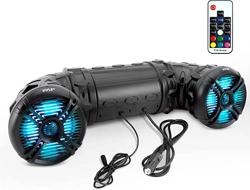
• Product Name: Audio With LED Lights
• Model Number: LED-MM-B
• Manufacturer Name: Shenzhen Bojia Electronic Technology Co., LTD
• Address: 2nd Floor, Building 5, Tongfuyu Xufa Science Park, Shangcun Village, Gongming Street,
Guangming District, Shenzhen City, Guangdong, China
• Manufacturer Contact Information: [email protected]
• Intended Use/Product Function: For decoration
• EU Authorized Representative Name & Address
ELING ITALIA S.R.L. E-mail: [email protected]
ITALY Milano (MI) - Via Del Lauro 9 CAP 20121 LEXIA AVVOCATI
EC
REP
ELINGEN LTD E-mail: [email protected]
2 Frederick Street, Kings Cross, London, WC1X 0ND, UK
REP
UK
TTT Representative LLC E-mail: [email protected]
2450 Colorado Avenue, Suite 100E, Santa Monica, CA 90404, United States
REP
US
REP
TUR
TTT REPRESENTATIVE DANISMANLIK LIMITED SIRKETI E-mail: [email protected]
ESENTEPE MAH. BUYUKDERE CAD. LOFT RESIDANCE NO:201 IC KAPI
NO:40 SISLI /ISTANBUL
• UK Authorized Representative Name & Address
• US Authorized Representative Name & Address
• TUR Authorized Representative Name & Address
2. Security Information
• This product is not a toy. Keep out of reach of infants and children.
• For indoor use only.
• This product is for decorative purposes only and is not suitable for general household lighting.
• Do not put this product into fire or place it in an excessively hot environment.
• If you do not use this product for a long time, please cut off the power.
• Please use a standard safety power supply to power this product. Do not use fast charging.
• Clean the product with a dry, soft cloth only.
• Disconnect the power supply or remove batteries before cleaning or maintenance.
• This product uses 2 AAA batteries for remote control, and the remote control does not come with a battery.
3. Maintenance and upkeep
5. Installation Instructions
• Do not dispose of discarded electronic products with household waste.
• Please recycle them at locations with recycling facilities.
• For recycling advice, please consult your local authorities or retailers.
4. Recycling Instructions
6. Troubleshooting instructions
problem Possible Cause Solution
The light is not on Power not connected
Check the power connection
Remote control faulty
Lights flashing
Some lights faulty
The battery is dead
Loose connection
Product damage
Replacement battery
Ensure all connections are secure
Stop using and dispose of properly
Color mismatch with app
RGB color order error
Adjust line sequence in app settings
W
ON
R G B
OFF
1H
2H
2 3
4
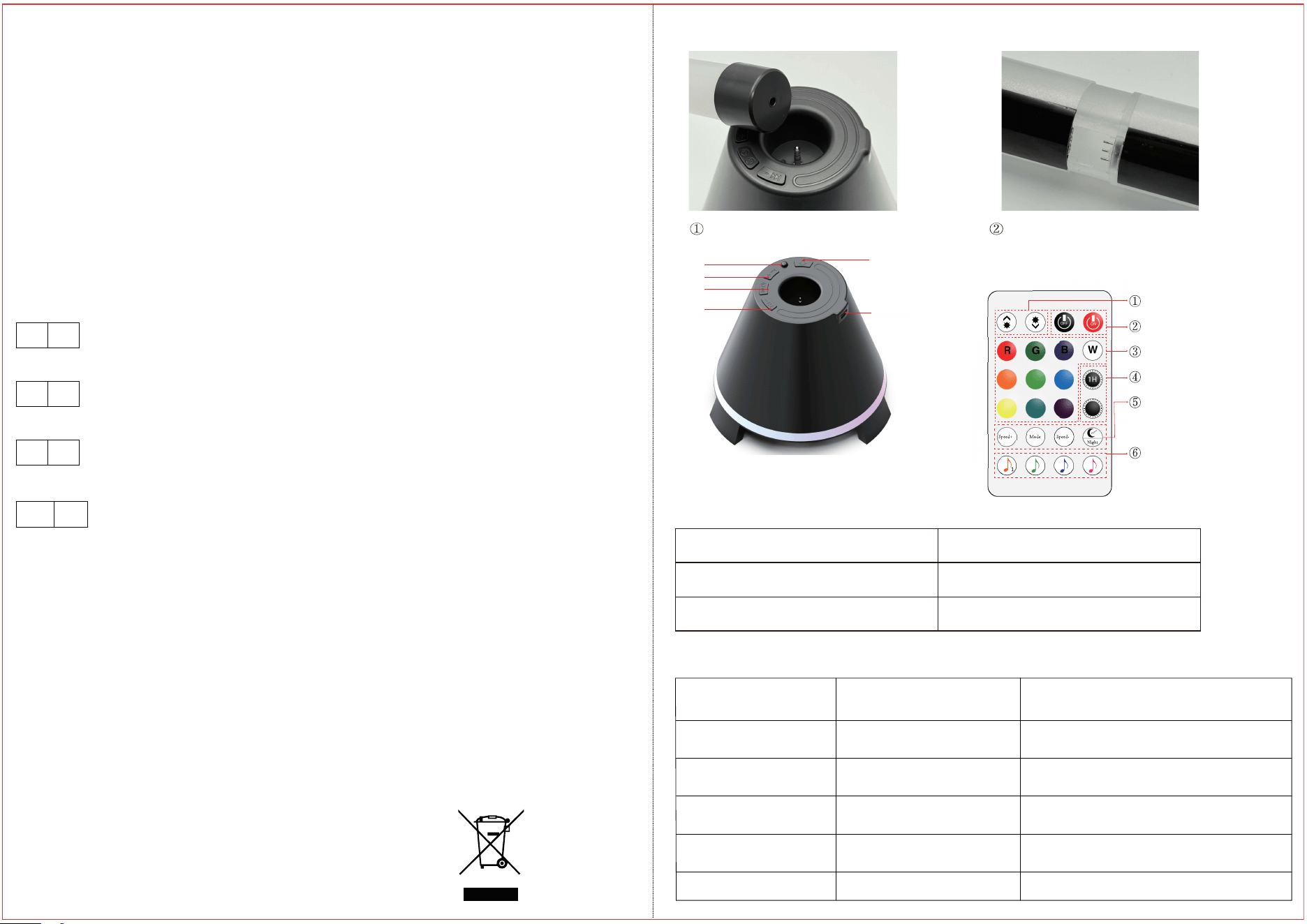
Brightness +/-
On/ Off
Static Mode
Timming
Dynamic mode adjustment
Music sync color change
Insert the lamp body into the base. Insert the two light tubes aligned and
until you hear a "click," indicating they are
properly installed.
1
6
3
4
5
2
1. Tap to change the light modes Long
press to turn off the light.
2.Infrared Sensor
3. Tap to switch to the next song;
long press to increase the volume.
4. Press once to pause music
Long press to turn off music.
5. Tap to switch to the previous song;
long press to turn the volume down.
6. Power port
Turn on Bluetooth and search for the device
named "BT_BOX". Once connected, you can
control the speaker.