
DXAEPIP2W
Power Inverter
Inversor de la energía
INSTRUCTION MANUAL
MANUAL DE INSTRUCCIONES
If you have questions or comments, contact us.
Si tiene dudas o comentarios, contáctenos.
1-888-394-3392
RD030425
Leave us a review!
¡Déjanos una reseña!

ADVERTENCIA: Lea todas las instrucciones antes de utilizar
el producto. No seguir todas las instrucciones que aparecen a
continuación pueden provocar descargas eléctricas, incendios
y/o lesiones graves.
ADVERTENCIA: Este producto o su cable de alimentación contiene
plomo, una sustancia química reconocida por el Estado de California
como causante de cáncer, defectos de nacimiento u otros problemas
reproductivos. Lávese las manos después de utilizarlo. Para más
información, visite www.P65Warnings.ca.gov.
WARNING: Read all instructions before operating product.
Failure to follow all instructions listed below may result in electric
shock, fire and/or serious injury.
WARNING: This product or its power cord contains lead, a chemical
known to the State of California to cause cancer and birth defect or
other reproductive harm. Wash hands after handling. For more
information go to www.P65Warnings.ca.gov.
English
3
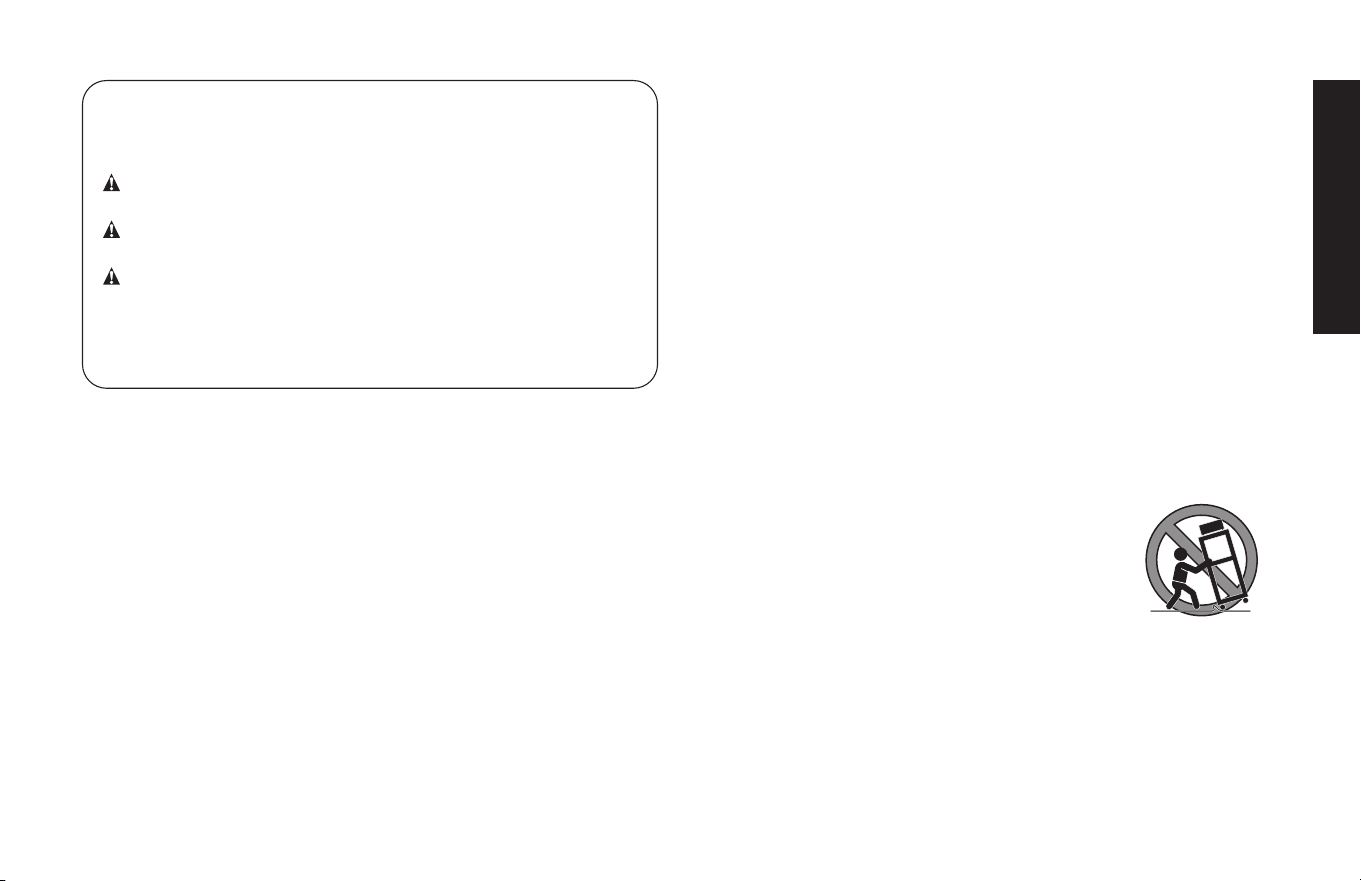
Definitions: Safety Guidelines
The definitions below describe the level of severity for each signal
word. Please read the manual and pay attention to these symbols.
DANGER: Indicates an imminently hazardous situation which,
if not avoided, will result in death or serious injury.
WARNING: Indicates a potentially hazardous situation which,
if not avoided, could result in death or serious injury.
CAUTION: Indicates a potentially hazardous situation which,
if not avoided, may result in injury.
NOTICE: Indicates a practice not related to personal injury
which, if not avoided, may result in property damage.
IF YOU HAVE ANY QUESTIONS OR COMMENTS ABOUT THIS
D
eWALT TOOL, CALL US TOLL FREE AT: 1-888-394-3392.
2-Way 200 Watt Power Inverter
The DXAEPIP2W 2 Way 200 Watt Power Inverter is a DeWALT 200W
power inverter configured to supply continuous power in the form of
one 120 volt AC Outlet, one USA-C and one USB-A power ports to
run most household or electronic appliances.
Important Safety
Instructions
1. Keep these instructions.
2. Heed all warnings.
3. Follow all instructions.
4. Avoid dangerous environments. Don’t use the inverter in damp or
wet locations. Don’t use the inverter in the rain or snow.
5. DO NOT EXPOSE CHARGER TO RAIN OR SNOW.
6. Clean only with a dry cloth.
7. Keep the inverter away from children. This is not a toy!
8. Store indoors. When not in use, inverters should be stored indoors
in dry, and high or locked-up places – out of the reach of children.
9. Stay alert. Use common sense. Do not operate this equipment
when you are tired or impaired.
10. Always turn the inverter off by pressing the on/off button, then
disconnecting it from the DC source when not in use.
11.
Only use attachments/accessories specified
by the manufacturer
.
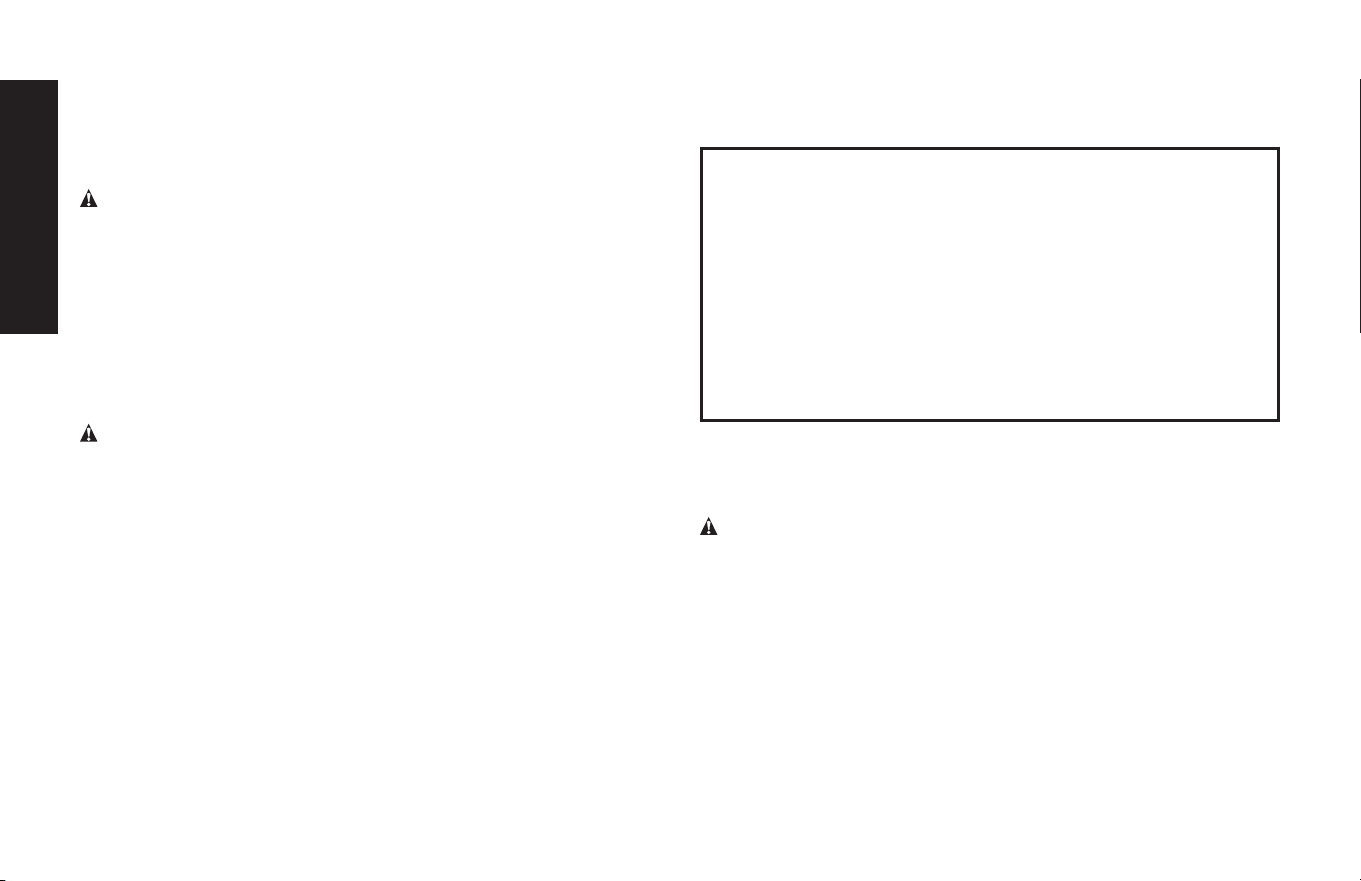
12. Use only on a flat, level surface. If a cart is
used, use caution when moving the cart/
apparatus combination to avoid injury from
tip-over.
13. To reduce risk of electric shock, disconnect
the unit from all power supply before attempting maintenance
or cleaning. Turning off controls without disconnecting will not
reduce this risk.
14. Check for damaged parts. Do not use if damaged in any way.
15. Unit shall not be exposed to dripping or splashing and no objects
filled with liquids shall be placed on the apparatus.
English
4
16. Proper cooling is essential when operating the inverter. Do not
place the unit near the vehicle’s heat vent or in direct sunlight.
17. Do not operate this unit near flammable liquids or in gaseous or
explosive atmospheres. Motors in these tools normally spark,
and the sparks might ignite fumes.
WARNING: RISK OF EXPLOSIVE GAS MIXTURE
• Do not overcharge the battery – See the instruction manual.
• Never smoke or allow a spark or flame in vicinity of vehicle battery,
engine or battery charger.
• Do not operate this apparatus in a closed area or restrict
ventilation in any way.
READ ALL INSTRUCTIONS
Specific Safety Instructions for Inverters
WARNING – To reduce the risk of electric shock:
• Do not connect to AC distribution wiring.
• Do not make any electrical connections or disconnections in areas
designated as IGNITION PROTECTED. This includes DC cigarette
lighter type plug connection. This unit is NOT approved for ignition
protected areas.
• NEVER immerse the unit in water or any other liquid, or use when
wet or if the unit has become wet.
• Do not insert foreign objects into the inverter’s outlets.
• Do not attach USB hubs or more than one personal electronic device
to each USB Port.
• Extension cords. Make sure your extension cord is in good
condition. When using an extension cord, be sure to use one heavy
enough to carry the current your product will draw. An undersized
cord will cause a drop in line voltage resulting in loss of power
and overheating. The following table shows the correct size to use
depending on cord length and nameplate ampere rating. If in doubt,
use the next heavier gauge. The smaller the gauge number, the
heavier the cord.
MINIMUM GAGE FOR CORD SETS
Volts Total Length of Cord in Feet
120V 0-25 26-50 51-100 101-150
(0-7.6m) (7.6-15.2m) (15.2-30.4m) (30.4-45.7m)
240V 0-50 51-100 101-200 201-300
(0-15.2m) (15.2-30.4m) (30.4-60.9m) (60.9-91.4m)
Ampere Rating Extension Cord Length
More Not more
0’-25’ 26’-50’ 51 ’-100 ’ 101’ -150 ’
Than Than American Wire Gage (AWG)
0 - 6 18 16 16 14
6 - 10 18 16 14 12
10 - 12 16 16 14 12
12 - 16 14 12 Not Recommended
Outdoor use extension cords. When an appliance plugged into
this unit is used outdoors, use only extension cords intended for use
outdoors and so marked. Note that this inverter is not intended
to be used outdoors.
WARNING – To reduce the risk of fire:
• Do not operate near flammable materials, fumes or gases.
• Do not expose to extreme heat or flames.
• If the vehicle accessory outlet fuse opens (blows) when plugging in
this inverter, do not use this inverter with this vehicle accessory outlet:
–Do not repeatedly replace the fuse.
–Do not replace the vehicle accessory outlet fuse with one of a higher
amperage rating.
–Never attempt to patch the fuse with tin foil or wire.
Any of these actions may cause serious electrical damage and/or a fire.
This inverter is rated to draw 12 amperes from a 12V vehicle outlet.
Ensure that the engine system in your vehicle can supply sufficient

English
5
energy to the inverter without causing the vehicle accessory outlet
fuse to open.
The fuse must be rated higher than 12 amps. Information on the vehicle
accessory fuse ratings are typically found in the vehicle operator’s
manual.
CAUTION – To reduce the risk of injury or property damage:
• When using this unit in a vehicle, check the vehicle owner’s manual
for maximum power rating and recommended output.
• It is not necessary (or desirable) to turn your vehicle on to operate
this inverter powered by the 12VDC adapter plug. Simply turn the
engine switch to the accessory position (usually the second position,
just before “engine start”). Or turn on the running lights (the small
lights that surround the car). This is generally the first button on the
light switch, depending on the make of vehicle.
• If the inverter shuts down repeatedly, the car battery voltage may be
low. Discontinue inverter use to avoid draining the battery.
• Disconnect appliance plug from inverter outlet before working on
the appliance.
• Do not attempt to connect or set up the inverter or its components
while operating your vehicle. Not paying attention to the road may
result in a serious accident.
• Always use the inverter where there is adequate ventilation. Do not
block ventilation slots.
• Always turn the inverter off by disconnecting it from the power source
when not in use.
• Make sure the nominal powering voltage is 12 volts DC when using
the 12VDC adapter plug to power the unit.
• Do not use with positive ground electrical systems when the unit is
powered by the supplied 12VDC adapter plug.
* Reverse polarity connection will result in a blown fuse and may
cause permanent damage to the inverter and will void warranty.
* The majority of modern automobiles, RVs and trucks are
negative ground.
• Reverse polarity connection may result in a blown fuse and may
cause permanent damage to the inverter. Connecting the device
with reverse polarity will void your warranty.
• Keep in mind that this inverter will not operate high wattage appliances
or equipment that produces heat, such as coffee makers, hair dryers,
microwave ovens and toasters.
• Do not open the inverter — there are no user-serviceable parts inside.
Opening the inverter will void manufacturer’s warranty.
• Do not use this inverter with medical devices. It is not tested for
medical applications.
• Do not use this inverter on a watercraft. It is not qualified for marine
applications.
• Do NOT touch the metal part of the supplied 12VDC adapter plug
after use as its surface may be quite hot after extensive operation.
• Follow these instructions and those published by battery manufacturer
and the manufacturer of any equipment you intend to use with this
unit. Review cautionary markings on these products and on the
engine.
• Operate the inverter only as described in this Instruction Manual.
CAUTION – To reduce the risk of property damage:
• When using the 12DC adapter plug to power the unit, the
Power Inverter must be connected only to batteries with a
nominal output voltage of 12 volts. The unit will not operate
from a 6 volt battery and will sustain permanent damage if
connected to a 24 volt battery.
English
6
• Always connect the inverter to the 12 volt DC power source or
DeWALT® 20V Lithium-Ion Battery Pack before plugging any devices
into the unit.
• The standard North American 120 volt AC and USB outlets
allow simultaneous operation of multiple devices. Simply plug the
equipment into the unit and operate normally.
• Ensure that the wattage of all equipment simultaneously plugged
into the inverter does not exceed 115 watts continuous through the
supplied 12VDC adapter plug and 200 watts continuous through a
DeWALT® 20V Battery Pack (not included) or the unit may overload
and shut down.
CAUTION – Rechargeable devices
• Certain rechargeable devices are designed to be charged by plugging
them directly into an AC receptacle. These devices may damage the
inverter or the charging circuit.
• When using a rechargeable device, monitor its temperature for the
initial ten minutes of use to determine if it produces excessive heat.
• If excessive heat is produced, this indicates the device should not
be used with this inverter.
• This problem does not occur with most of the battery-operated
equipment. Most of these devices use a separate charger or
transformer that is plugged into an AC receptacle.
• The inverter is capable of running most chargers and transformers.
CAUTION – Incompatible products: Certain products contain power
supplies or circuits that are not compatible with an inverter using a
modified sine wave output (such as this inverter) and may be damaged
by using this inverter.
If your product requires pure sine wave AC input power to function
properly, the instruction manual for your product could state this. If in
doubt, you should contact your product manufacturer PRIOR TO USE.
Some products must be powered from a pure sine wave power source,
such as standard household power, or a “pure sine wave” inverter in
order to function properly.
Your product could be damaged by this inverter if it contains:
• Microwave ovens;
• Transformerless battery chargers
• Capacitive coupled power supplies
If an incompatible product is used with this inverter:
• The product might not operate at all, with no indication of failure. The
product fuse might open as a result of trying to use it with the inverter.
• The product might exhibit unusual operation (such as, intermittent
operation, buzzing, and the like.)
NOTES:
A. Some laptop computers may not operate with this inverter.
B. Some USB-powered household electronics will not operate
with these USB Ports. Check the manual of the corresponding
electronic device to confirm that it can be used with this type of
USB Port.
WARNING: If the product does not operate normally, to
reduce the risk of injury or property damage, turn the product
off immediately and unplug it from the inverter.
Specific Safety Instructions for DeWALT®
20V Lithium-Ion Battery Packs (not
included)
WARNING: To reduce the risk of fire, electric shock, burst hazard,
or injury to persons or property:
Lithium-ion batteries must be used and charged properly. Improper
use can result in serious injury, fire, or death.
• Lithium-ion batteries can explode in the presence of a source of
ignition. Do not use the product in the presence of an open flame.
• Do not place this lithium-ion battery powered unit in fire or apply
heat to it.
• Do not subject this lithium-ion battery powered unit to strong impacts
or shocks. The battery in this unit contains safety and protection
English
7
devices which, if damaged, may cause the battery to generate heat,
rupture or ignite.
• Do not expose this lithium-ion battery powered unit to water or salt
water, allow the battery to get wet, or allow the unit to get wet.
• Avoid storing this lithium-ion battery powered unit in the basement,
bathroom or other areas of the house that are or may become wet or
humid or where moisture may concentrate.
• Do not leave this lithium-ion battery powered unit in direct sunlight,
or use or store the unit inside cars in hot weather. Doing so may cause
the battery to generate heat, rupture, or ignite. Using the battery in
this manner may also result in a loss of performance and a shortened
life expectancy.
• Never charge this unit near heat or flammable objects.
WARNING: NEVER THROW WATER ON A BURNING LI-ION
BATTERY! If a lithium-ion battery does catch on fire, it will burn even
more violently if it comes in contact with water or even moisture in the
air. A fire extinguisher must be used.
WARNING – DO NOT expose the power pack to fire or excessive
temperature. Exposure to fire or temperature above 130°C (265°F)
may cause explosion.
The RBRC™ Seal
The RBRC™ (Rechargeable Battery Recycling Corporation) Seal on
the nickel cadmium, nickel metal hydride or lithium ion batteries (or
battery packs) indicate that the costs to recycle these batteries (or
battery packs) at the end of their useful life have already been paid by
DeWALT. In some areas, it is illegal to place spent
nickel cadmium, nickel metal hydride or lithium ion
batteries in the trash or municipal solid waste stream
and the RBRC program provides an environmentally
conscious alternative.
RBRC™, in cooperation with DeWALT and other battery users, has
established programs in the United States and Canada to facilitate the
collection of spent nickel cadmium, nickel metal hydride or lithium ion
batteries. Help protect our environment and conserve natural resources
by returning the spent nickel cadmium, nickel metal hydride or lithium
ion batteries to an authorized DeWALT service center or to your local
retailer for recycling. You may also contact your local recycling center
for information on where to drop off the spent battery.
RBRC™ is a registered trademark of the Rechargeable Battery
Recycling Corporation.
Important Safety Instructions for All
D
eWA LT
®
20V Battery Pack Chargers
(optional accessory)
IMPORTANT: Before using the charger, read all instructions and
warnings included with the charger and the battery pack.
WARNING: Shock hazard: Do not allow any liquid to get inside
the charger. Electric shock may result.
CAUTION: Burn hazard: To reduce the risk of injury, charge only
DeWALT rechargeable battery packs. Other types of batteries may
overheat and burst resulting in personal injury and property damage.
NOTICE: Always unplug the charger from the power supply when
there is no battery pack in the cavity. Unplug the charger before
attempting to clean.
• DO NOT attempt to charge the battery pack with any chargers other
than the ones in this manual. The charger and battery pack are
specifically designed to work together.
• These chargers are not intended for any uses other than charging
DeWALT rechargeable batteries. Any other uses may result in risk of
fire, electric shock or electrocution.
• Do not expose the charger to rain or snow.
• Pull by the plug rather than the cord when disconnecting the charger
to reduce the risk of damage to the electric plug and cord.
English
8
• Make sure that the cord is located so that it will not be stepped on,
tripped over or otherwise subjected to damage or stress.
• Do not use an extension cord unless it is absolutely necessary. Use
of improper extension cord could result in risk of fire, electric shock
or electrocution.
• When operating a charger outdoors, always provide a dry location
and use an extension cord suitable for outdoor use.
• An extension cord must have adequate wire size (AWG) for safety.
The smaller the gauge number of the wire, the greater the capacity
of the cable, that is, 16 gauge has more capacity than 18 gauge. An
undersized cord will cause a drop in line voltage resulting in loss of
power and overheating. The following table shows the correct size
to use depending on cord length and nameplate ampere rating. If
in doubt, use the next heavier gauge. The lower the gauge number,
the heavier the cord.
MINIMUM GAGE FOR CORD SETS
Volts Total Length of Cord in Feet
120V 0-25 26-50 51-100 101-150
(0-7.6m) (7.6-15.2m) (15.2-30.4m) (30.4-45.7m)
240V 0-50 51-100 101-200 201-300
(0-15.2m) (15.2-30.4m) (30.4-60.9m) (60.9-91.4m)
Ampere Rating Extension Cord Length
More Not more
0’-25’ 26’-50’ 51 ’-100 ’ 101’ -150 ’
Than Than American Wire Gage (AWG)
0 - 6 18 16 16 14
6 - 10 18 16 14 12
10 - 12 16 16 14 12
12 - 16 14 12 Not Recommended
• Do not place any object on top of the charger or place the charger
on a soft surface that might block the ventilation slots and result in
excessive internal heat. Place the charger in a position away from
any heat source.
• Do not operate the charger with a damaged cord or plug.
• Do not operate the charger if it has received a sharp blow, been
dropped or otherwise damaged in any way.
• Do not disassemble the charger. Incorrect reassembly may result in
a risk of electric shock, electrocution or fire.
• Disconnect the charger from the outlet before attempting any
cleaning. This will reduce the risk of electric shock. Removing the
battery pack will not reduce this risk.
• NEVER attempt to connect two chargers together.
• The charger is designed to operate on standard 120V household
electrical power. Do not attempt to use it on any other voltage.
Personal Precautions
• Consider having someone close enough by to come to your aid when
you work near a lead-acid battery.
• Wear complete eye protection and clothing protection. Avoid touching
eyes while working near battery.
• Have plenty of fresh water and soap nearby in case battery acid
contacts skin, clothing, or eyes.
• Remove personal metal items such as rings, bracelets, necklaces and
watches when working with a lead acid battery. A lead acid battery
can produce a short circuit current high enough to weld a ring, or
similar metal object, to skin causing a severe burn.
• If battery acid contacts skin or clothing, wash immediately with soap
and water. If acid enters eye, immediately flood eye with running cold
water for at least 10 minutes and get medical attention immediately.
• NEVER smoke or allow a spark or flame in vicinity of battery or engine.
• Be extra cautious to reduce risk of dropping a metal tool onto battery.
It might spark or short-circuit battery or other electrical part that may
cause explosion.
CAUTION: First aid:

English
9
• Skin: if battery acid comes in contact with skin, rinse immediately
with water, then wash thoroughly with soap and water. If redness,
pain, or irritation occurs, seek immediate medical attention.
• Eyes: If battery acid comes in contact with eyes, flush eyes
immediately, for a minimum of 15 minutes and seek immediate
medical attention.
SAVE THESE
INSTRUCTIONS
FOR FUTURE USE
English
10
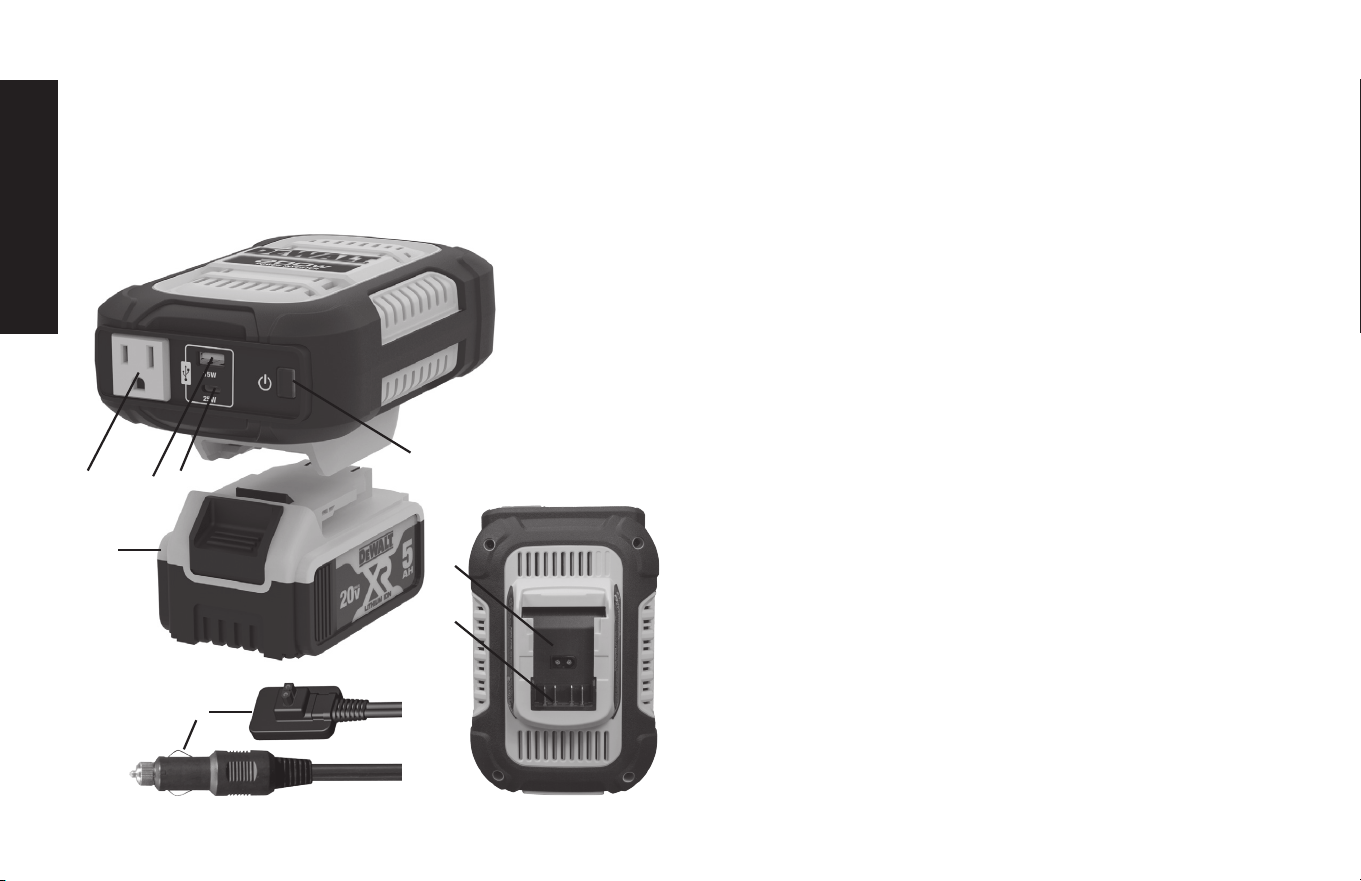
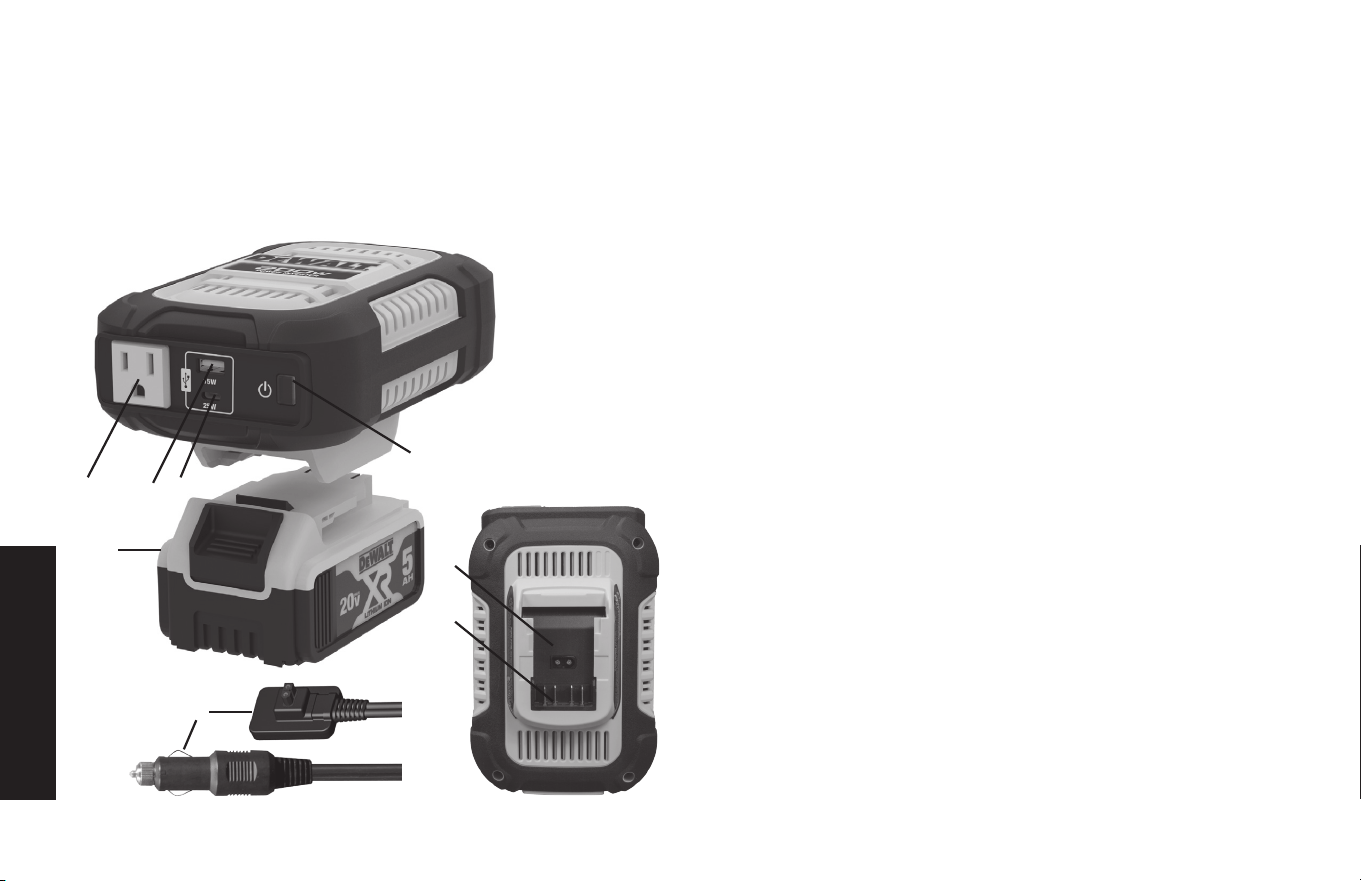
Components (Figure 1)
A. Three-Prong 120V AC Outlet
B. USB-A Port
C. USB-C Port
D. Power Button
E. Battery Pack Terminal Connector
F. 12VDC Adapter Plug Input Port
G. DEWALT 20V Lithium Battery
Pack (Not Included)
H. 12VDC Adapter Plug
How This Inverter Works
This inverter is an electronic device that converts low voltage DC (direct
current) electricity from a battery to 120 volts AC (alternating current)
household power. It converts power in two stages. The first stage is
a DC-to-DC conversion process that raises the low voltage DC at the
inverter input to 145 volts DC. The second stage is a MOSFET bridge
stage that converts the high voltage DC into 120 volts, 60 Hz AC.
Power Inverter Output Waveform
The AC output waveform of this inverter is known as a modified sine
wave. It is a stepped waveform that has characteristics similar to the
sine wave shape of utility power. This type of waveform is suitable for
most AC loads, including linear and switching power supplies used in
electronic equipment, transformers, and small motors.
Rated Versus Actual Current Draw of
Equipment
Most electrical tools, appliances, electronic devices and audio/visual
equipment have labels that indicate the power consumption in amps or
watts. Be sure that the power consumption of the item to be operated
is below rated power using different power source input. If the power
consumption is rated in amps AC, simply multiply by the AC volts (120)
to determine the wattage.
Resistive loads are the easiest for the inverter to run; however, it will
not run larger resistive loads (such as electric stoves and heaters),
which require far more wattage than the inverter can deliver. Inductive
loads (such as TVs and stereos) require more current to operate than
do resistive loads of the same wattage rating.
G
C
F
H
E
B
D
A
C
English
11
Power Source Requirements
Power by the supplied 12VDC adapter plug.
Your inverter will operate from input voltages between 11 and 15 volts
DC. If the input voltage drops below 10.5 volts DC, the inverter will
shut down. This feature protects the battery from being completely
discharged.
CAUTIONS
• Exceeding recommended voltage limits will void manufacturer’s
warranty.
• The Power Inverter must be connected only to batteries with a
nominal output voltage of 12 volts when power by the supplied
12VDC adapter plug. The unit will not operate from a 6 volt battery
and will sustain permanent damage if connected to a 24 volt battery.
• Reverse polarity connection will result in a blown fuse and may cause
permanent damage to the inverter.
Power by the DeWALT® 20V Battery Pack (not included):
This unit can be powered by the DeWALT® 20V Battery Pack (not
included) as well. It must be fully recharged via the compatible
DeWALT® dedicated Battery Charger (not included). Refer to the
corresponding instructions included with the Battery Pack and Charger.
In order to operate the unit, the fully charged DeWALT® 20V Battery
Pack must be properly installed into the 20V battery terminal connector
on the bottom of the unit. Make sure the DeWALT® 20V Battery Pack
is properly locked into the battery pack terminal connector (E) (as
shown in Figure 1).
Chargers
• DeWALT® 20V Battery Packs use DeWALT chargers. Be sure to
read all safety instructions before using the charger.
• Consult the chart at the end of this manual for compatibility of
chargers and DeWALT® 20V battery packs.
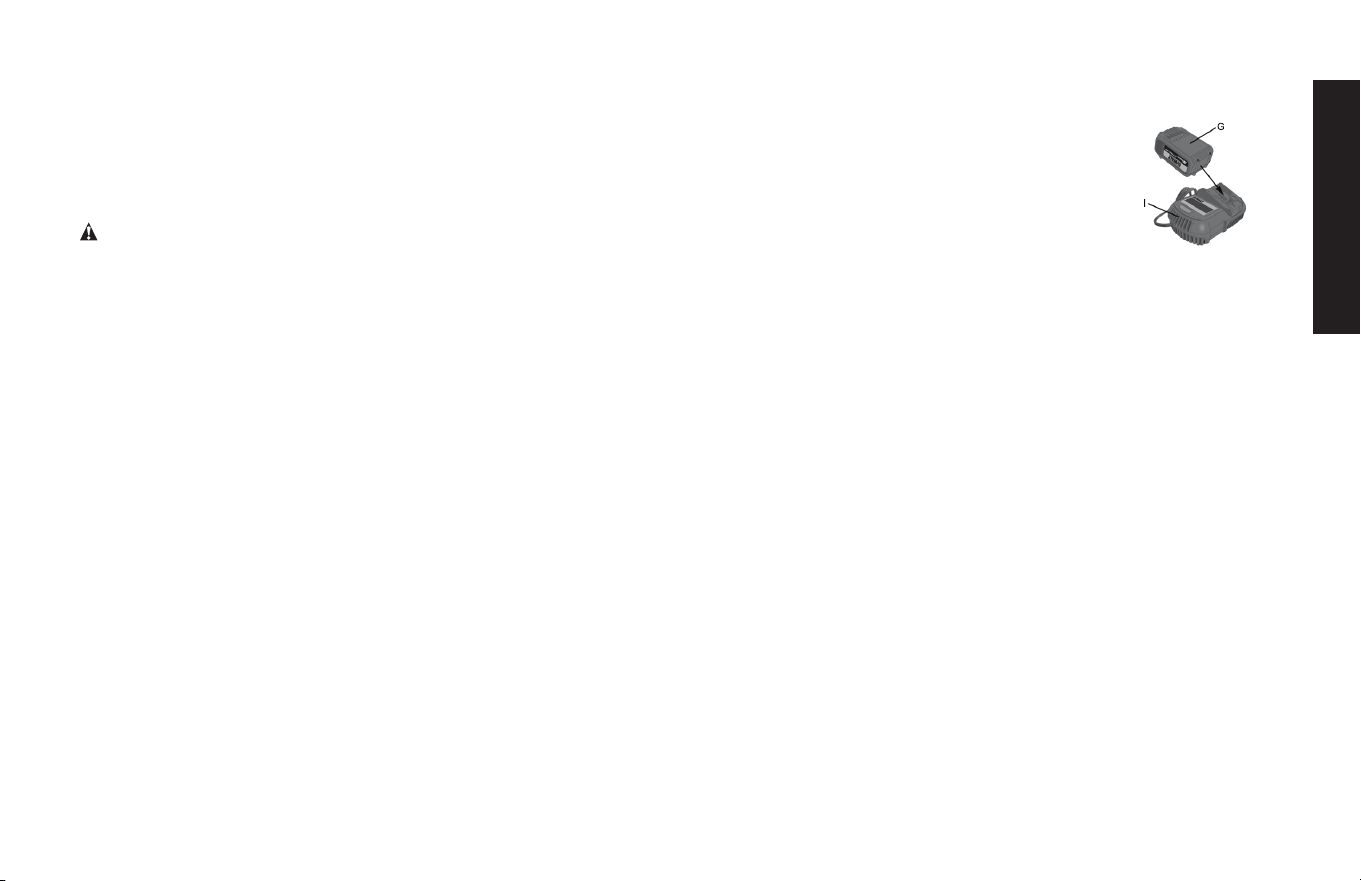
CHARGING PROCEDURE
1. Plug the charger into an appropriate outlet
before inserting the DeWALT® 20V battery pack.
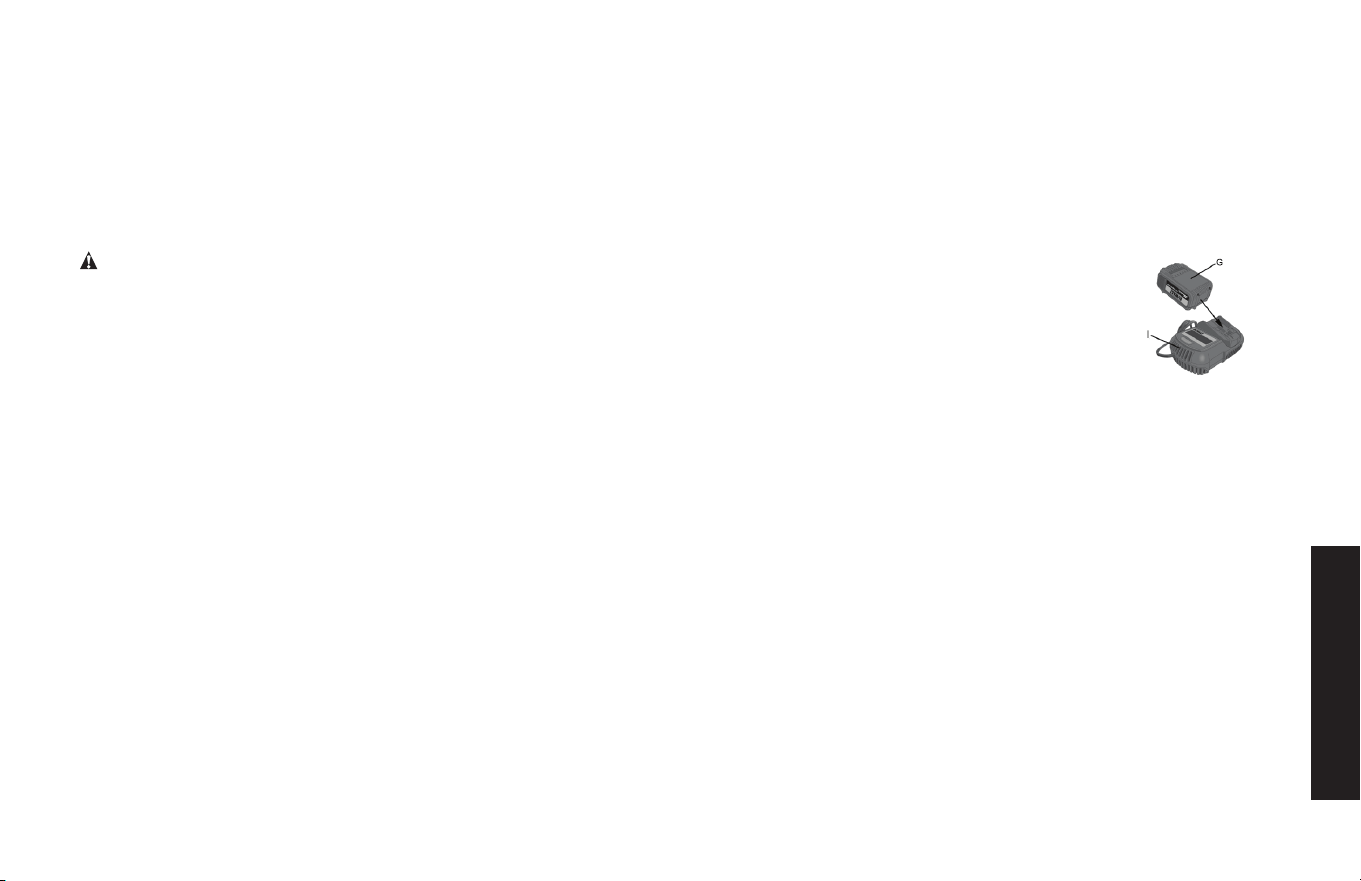
2. Insert the battery pack (G) into the charger (I),
as shown in Figure 2, making sure the pack is
fully seated in charger. The red (charging) light
will blink, indicating that the charging
process has started.
3. The completion of charge will be indicated by the red light remaining
ON continuously. The pack is fully charged and may be used at this
time or left in the charger.
Your inverter is engineered to have standard electrical and electronic
equipment directly connected to it in the manner described in this
Instruction Manual. Do not connect the inverter to household or RV AC
distribution wiring. Do not connect the inverter to any AC load circuit
in which the neutral conductor is connected to ground (earth) or to
the negative of the DC (battery) power source.
Inductive loads, such as TVs and stereos, require more current to
operate than resistive loads of the same wattage rating. Induction
motors, as well as some TVs, may require two to six times their rated
wattage to start up. Because these inverters have a peak watt power
rating, many such appliances and tools may be safely operated. The
equipment that needs the highest starting wattage are pumps and
compressors that start under load. This equipment can be safely tested.
If an overload is detected, the inverter will simply shut down until the
overload situation is corrected. Use the power button to turn off the
inverter, then on again to reset it.
Protective Features
The inverter monitors the following conditions:
Input voltage Too low when the unit is powered by the 12VDC
adapter plug: This condition is not harmful to the inverter, but could
Figure 3
G
I
Figure 2

English
12
damage the power source, so the inverter will automatically shut down
when input voltage drops below 10.5 ± 0.5 volts DC.
Thermal Shutdown Protection: The inverter will automatically shut
down when the unit becomes overheated.
Overload/Short Circuit Protection: The inverter will automatically
shut down when an overload or short circuit occurs.
To restart the unit, simply unplug the device plugged into the inverter;
disconnect the inverter from any power source; then reconnect the
inverter BEFORE plugging the appliance back in.
The DeWALT® 20V Battery Pack is overheated or is too cold: The
inverter will automatically shut down when the DeWALT® 20V Battery
Pack is overheated or is too cold.
Installation
Your inverter will provide you with continuous electrical power when
powered by a reliable 12 volt DC source, such as a vehicle battery or
a multiple battery configuration, or a DeWALT® 20V Battery Pack. This
manual does not describe all of the possible configurations.
Operating Environment
For best operating results, your inverter should be placed on a flat
surface, such as the ground, car floor or seat, or other solid surface
to help diffuse the heat that is generated. Position the inverter as close
to the DC power source as possible.
The inverter should only be operated in locations that meet the following
criteria:
DRY – Do not allow water and/or other liquids to come into contact
with the inverter.
COOL – Surrounding air temperature should ideally be 50-68°F (10-
20°C). Do not place the inverter on or near a heating vent or any piece
of equipment that is generating heat above room temperature. Keep
the inverter out of direct sunlight.
VENTILATED – Allow at least three inches of clearance from other
objects to ensure free air circulation around the inverter. Never place
items on or over the inverter during operation.
SAFE – Do not locate inverters in an area, room or compartment
where explosives or flammable fumes might be present, such as
engine rooms, engine compartments, and boats or small, unvented
battery compartments.
Connecting the Inverter
The inverter must be connected only to batteries with a nominal output
voltage of 12 volts when it is powered through the 12VDC adapter
plug. The unit will not operate from a 6 volt battery and will sustain
permanent damage if connected to a 24 volt battery.
The inverter also can be powered through a DeWALT® 20V Battery
Pack.
The standard North American 120 volt AC Outlet and USB charging
ports allow simultaneous operation of multiple devices. Simply plug the
equipment into the unit and operate normally. Ensure that the wattage
of all equipment simultaneously plugged into the unit does not exceed
140 watts continuous through the supplied 12VDC adapter plug (up
to 115W for the AC outlets and up to PD 25W for the USB ports),
and 225 watts through a DeWALT® 20V Battery Pack (not included)
(up to 200W for the AC outlet and up to PD 25W for the USB ports).
CAUTION – To avoid the risk of property damage: Always connect
the unit to the power source before plugging any devices into the unit.
Connection to Power Source
The Power Inverter comes equipped 12VDC Adapter Plug for
connection to a power source.
The unit also has battery pack terminal connector for DeWALT® 20V
Battery Pack.

English
13
Connecting to a Power Source Using a
DeWALT® 20V battery pack (not included)
(up to 225W only)
1. Make sure no 12 Volt DC Adapter Plug is connected to the unit.
2. Insert the DeWALT® 20V battery pack to the Battery Pack Terminal
Connector on the unit.
3. Press the power button to turn the inverter on. The LED indicator
inside the power button will light green to indicate the inverter is
operating properly and the 120 volt AC Outlet is ready to power
appliances that draw up to 200W continuous. The USB outlets are
turned on as well.
Notes:
• If a fault occurs, refer to the “Protective Features” section and the
“Troubleshooting” section of this manual.
• Ensure that the wattage of the equipment plugged into the inverter
does not exceed 200 watts continuous.
IMPORTANT NOTES:
• If the voltage of the DeWALT® 20V Battery Pack is low or it has
insufficient output power, the AC Outlet and the USB Ports will
automatically shuts down. Refer to the “Troubleshooting” section.
• If the DeWALT® 20V Battery Pack is overheated or is too cold, the
AC Outlet and the USB Ports will automatically shut down. Refer to
the “Troubleshooting” section.
Connecting to a Power Source Using the
supplied 12 Volt DC Adapter Plug (up to
140W only)
The 12VDC Adapter Plug is suitable for operating the inverter at power
outlet up to 115 watts.
1. Make sure no DeWALT® 20V battery pack is connected to the unit.
2. Insert the double barrel connector on the 12VDC adapter plug to
the 12VDC Adapter Plug Input Port on the unit.
3. Connect the 12VDC adapter plug to a vehicle’s accessory outlet or
other 12 volt DC power source. Make sure there is adequate space
for proper ventilation of the inverter.
4. Rotate the plug slightly to make sure there is good contact.
5. Press the power button to turn the inverter on. The LED indicator
inside the power button will light green to indicate the inverter is
operating properly and the 120 volt AC Outlet is ready to power an
appliance that draws up to 115W continuous. The USB outlets are
turned on as well.
Notes:
• If a fault occurs, refer to the “Protective Features” section and the
“Troubleshooting” section of this manual.
• If the inverter does not work when using the vehicle accessory
outlet, make sure the ignition/accessory switch is actually powering
the accessory outlet. Some vehicles require the ignition switch to be
turned on.
• Ensure that the wattage of the equipment plugged into the inverter
does not exceed 115 watts continuous.
• Most vehicle accessory outlet circuits have fuses rated at 15 to 20
amps or greater.
CAUTIONS – TO REDUCE THE RISK OF PROPERTY DAMAGE:
• Connect directly to power source using a DeWALT® 20V battery
pack when operating above 115 watts.
• Do not use with positive ground electrical systems.
• Reverse polarity connection will result in a blown fuse and may cause
permanent damage to the inverter.

English
14
Connection To Load
The Power Inverter is equipped with one standard North American
three-prong type outlet. Plug the cord from the equipment you wish
to operate into the AC receptacle. Make sure the load requirement of
your equipment does not exceed maximum continuous power.
The Power Inverter is engineered to be connected directly to standard
electrical and electronic equipment in the manner described above.
Do not connect the Power Inverter to household or RV AC distribution
wiring. Do not connect the Power Inverter to any AC load circuit in
which the neutral conductor is connected to ground (earth) or to the
negative of the DC (battery) source.
WARNING: Do not connect to AC distribution wiring!
Operating Instructions
120 Volt AC Power Outlets
The standard North American 120 volt AC Outlet, the USB-C port and
the USB-A port are ready to use once the inverter is properly connected
to a functioning power source and the power button is pressed to turn
the unit on. They allow simultaneous operation of multiple devices.
Simply plug the 110/120 volt AC appliance into the inverter’s three-
prong AC Outlet and operate normally. The LED indicator inside the
power button will light green.
Notes:
• Press the power button again to turn the unit off.
Important Notes Concerning the AC Power Outlet
• The unit provides a total power draw of up to 200W for the AC
Outlet and up to 25W for the USB Ports when the unit is powered by
a DeWALT® 20V battery pack (not included); or 140W when the unit
is
powered by the supplied 12VDC adapter plug (up to 115W for the AC Outlet
and up to 25W for the USB Ports).
• If you want to change the input power source, disconnect the appliances
first, turn the unit off and then disconnect the current power source. Wait for
one minute before change to another input power source.
• If the unit is at overload condition, the AC Outlet and the USB Ports shut
down automatically. Turn the unit off and disconnect the load from AC outlet.
Turn the unit on and the USB ports may operate normally.
When the AC Power Outlet are in use, the unit will monitor for the following
fault conditions: thermal fault, low battery voltage fault, overload and short
circuit (refer to the “Protective Features” section).
When these faults occur, the AC Outlet and the USB Ports will shut down
automatically. When low battery voltage occurs, the LED indicator inside the
power button flashes red for three minutes before the unit turn off automatically.
The LED indicator inside the power button flashes red continuously for the
other fault.
When the fault is corrected, press the Power Button to reset the unit.
If the DeWALT® 20V Battery Pack is overheated or too cold, the AC Power
Outlet and the USB Ports will shut down automatically.
Should any of the above fault conditions occur:
1. Disconnect the appliance from the unit.
2. Press the Power Button to turn the unit off.
3. Allow the unit to cool down for several minutes.
4. Make sure the rating of the appliance plugged into the AC Power Outlet
does not exceed the maximum rating and that the appliance’s cord and plug
are not damaged.
5. Ensure there is adequate ventilation around the unit before proceeding.
Remember to turn the unit off and disconnect it from any power source
when it is not in use. Also remember to turn off the accessory outlet
switch to avoid draining the vehicle’s battery.

English
15
USB Ports
The USB ports are controlled by the power button.
Important Notes Concerning the USB Ports
1. The USB-A Port provides up to 15W output power. The USB-C
Port provides up to PD 25W output power. The total output is up to
5V/15W when the USB-C and USB-A used simultaneously.
2. When the USB Ports are in use, the unit will monitor for the following
USB fault conditions on all the USB Ports: low voltage fault, overload
and short circuit. In any of these cases, the USB Ports will automatically
shut down. Should this occur:
a. Disconnect the USB-powered device and press the Power Button
to turn the USB Ports off immediately.
b. Make sure there is sufficient power level of the power source.
c. Allow the unit to cool down for several minutes before attempting
to use the USB Ports again.
d. If a fault occurs again, make sure that draw of the USB devices
plugged into the USB Ports do not exceed the maximum rating.
e. If an individual USB device is within specifications and the fault
occurs, have the USB device checked for malfunction and do not
continue to use it with these USB Ports.
3. This unit’s USB Ports do not support data communication. They
only provide power to external USB-powered devices.
4. Some household USB-powered electronics will not operate with
this unit.
Important notes:
* If any fault occurs the USB ports only, the unit turn off the USB ports
only. The inverter operates normally.
* The USB Ports will automatically shut down when the DeWALT®
20V Battery Pack is overheated or is too cold.
USING THE USB PORTS
1. Press the Power Button to turn all of the USB Ports on (the AC Outlet turns
on as well). The LED indicator inside the power button will light green.
2. Plug the USB-powered device(s) into the USB Ports and operate normally.
3. Press the Power Button again to turn the unit off.
Remember to turn the unit off and disconnect it from any power source when
it is not in use. Also remember to turn off the accessory outlet switch to avoid
draining the vehicle’s battery.
Fuse Replacement (in the 12VDC
Adapter Plug)
1. Unscrew the flange of the plug (counterclockwise).
2. Remove the end contact, flange and fuse.
3. Inspect the fuse to see if it is good or blown.
4. Replace with a new 15 amp fuse, if needed.
5. Carefully reassemble the fuse, end contact and flange. Do not
overtighten the flange (clockwise).
Care and Maintenance
STORAGE
1. Idealstoragetemperaturerangeis0-35°C (32-104°F).
2. Store and use the inverter in a cool, dry place with adequate ventilation
for all-around air circulation.
3. Avoid locations that are exposed to heating units, radiators, direct sunlight,
or excessive humidity or dampness.
English
16
Troubleshooting
Specific AC Outlet Problems
When the 120V AC Outlet is in use, the unit will monitor for the following fault
conditions: thermal fault, low battery voltage fault, overload and short circuit
(refer to the “Protective Features” section).
If a fault condition exists
in the AC Outlet, the
LED indicator inside the
power button will flash
red and the AC Outlet
and the USB Ports will
automatically shut down.
Should this occur:
A. Disconnect all appliances from
the unit and and press the Power
Button again to turn off the unit
immediately.
B. Allow the unit to cool down for
several minutes.
C. Make sure the rating of the
appliance plugged into the inverter
does not exceed the maximum
output rating depending on the
input source connected.
D. The voltage of the DeWALT®
20V Battery Pack may be low.
Recharge if necessary.
E. The DeWALT® 20V Battery Pack
may be overheated or is too cold.
Allow the Battery Pack to cool
down or warm up for several
minutes.
F. Make sure the appliance cord and
plug are not damaged.
G. Assure there is adequate
ventilation around the unit before
proceeding.
Specific USB Power Port Problems
When the USB ports are in use, the unit will monitor for the following
USB fault conditions on all the USB ports: low battery voltage fault,
overload and short circuit.
Problem Possible Solution
If a fault condition exists
in either of the USB
ports, the USB ports will
automatically shut down.
Should this occur:
A. Disconnect the USB-powered device
and press the Power Button again to
turn off the unit immediately.
B. Allow the unit to cool down for several
minutes before attempting to use the
USB ports again.
C. Make sure that the USB device plugged
into the USB-A port does not exceed
15W; the USB device plugged into
USB-C port does not exceed PD 25W;
or the total drained power of the USB-A
port and USB-C port do not exceed
15W when they are used simultaneously.
D. The voltage of the DeWALT® 20V
Battery Pack may be low. Recharge if
necessary.
E. The DeWALT® 20V Battery Pack may
be overheated or is too cold. Allow the
Battery Pack to cool down or warm up
for several minutes.
F. Some USB-powered household
electronics will not operate with this USB
charging/power Port. Check the manual
of the corresponding electronic device to
confirm that it can be used with this type
of USB charging/power Port.
G. If an individual USB device is within
specifications and the fault occurs, have
the USB device checked for malfunction
and do not continue to use it with these
USB ports.
English
17
Common Audio Problems
Problem Possible Solution
Buzzing Sound In
Audio Systems
Some inexpensive stereo systems and
boom boxes make a buzzing sound
when operated from the inverter,
because the power supply in the
electronic device does not properly filter
the modified sine wave produced by the
inverter. The only solution to this problem
is to use a sound system that has a
higher quality power supply.
Television
Interference
The inverter is shielded to minimize
interference with TV signals. However,
in some instances, some interference
may still be visible, especially when the
TV signal is weak. Try the following to
improve the picture:
1. Move the inverter as far away
as possible from the TV set, the
antenna, and the antenna cables.
Use a short AC extension cord, if
necessary.
2. Adjust the orientation of the antenna
cables, and the TV power cord to
minimize interference.
3. Make sure that the antenna feeding
the TV provides an adequate (snow-
free) signal and that high quality,
shielded antenna cable is used.
Common Power Output Problems
Problem Possible Solution
Input voltage is low Check power sources.
Equipment being
operated draws too
much power
Reduce load to 225W (up to 200W for
the AC Outlet and up to 25W for the USB
Ports) using a DeWALT® 20V battery pack
(not included); or 140W using the supplied
12VDC adapter plug (up to 115W for the
AC Outlet and up to 25W for the USB
Ports).
Inverter in thermal
shutdown condition
Allow inverter to cool down. Ensure there
is adequate ventilation around the unit.
AC output is
shorted
Unplug the AC appliance. Disconnect the
unit from any power source. Check the
appliance cord.
Accessories
WARNING: Since accessories, other than those offered by DeWALT,
have not been tested with this product, use of such accessories with
this unit could be hazardous. To reduce the risk of injury, only DeWALT
recommended accessories should be used with this product.
If you need assistance regarding accessories, please contact the
manufacturer at 1-888-394-3392 or CustomerService@dewalt12volt.
com.
Technical Assistance
For Customer Service or Technical Assistance, contact the manufacturer
at 1-888-394-3392 or [email protected].
English
18
One-Year Limited Manufacturer’s
Warranty
The manufacturer, Baccus Global LLC, warrants this product against
defects in materials and workmanship for a period of ONE (1) YEAR
commencing from the date of retail purchase by the original end-user
purchaser or from the date of delivery of the good, whichever occurs
later (“Warranty Period”).
If there is a defect and a valid claim is received by the manufacturer
within the Warranty Period, the defective product can be replaced
in the following ways: (1) Return the product to the manufacturer for
replacement. Proof of purchase may be required by manufacturer. (2)
Return the product to the retailer where product was purchased for an
exchange (provided that the store is a participating retailer). Returns to
retailer should be made within the time period of the retailer’s return
policy for exchanges only. Proof of purchase may be required. Please
check with the retailer for their specific return policy regarding returns
that are beyond the time set for exchanges.
This manufacturer’s warranty does not apply to accessories, bulbs, fuses
and batteries; defects resulting from normal wear and tear, accidents;
damages sustained during shipping; alterations; unauthorized use;
neglect, misuse, abuse; and failure to follow instructions for care and
maintenance for the product.
This manufacturer’s warranty gives you, the original retail purchaser,
specific legal rights and you may have other rights which vary from
state to state or province to province. This product is not intended
for commercial use. To register your product with the manufacturer,
please visit www.BaccusGlobal.com.
The photos in this manual may differ from the actual unit.
Specifications
Maximum Power 225W continuous via DeWALT® 20V battery
pack (not included) (up to 200W for the AC
Outlet and up to PD 25W for the USB Ports)
140W continuous via the supplied 12VDC
Adapter Plug (up to 115W for the AC Outlet
and up to PD 25W for the USB Ports)
Input 20V DC via DeWALT® 20V Battery Pack (not
included)
13.8V DC, 12A via the supplied 12VDC
Adapter Plug
AC Output 120 volts AC, 60Hz
Output Waveform Modified Sine Wave
USB-C Output 5VDC 3A / 9VDC 2.77A (PD 25W Max.)
USB-A Output 5VDC, 15W Max.
USB-C & USB-A Output
Simultaneously
5VDC, 15W Max.
DC Plug Fuse 15A
Manufactured and Imported by Baccus Global LLC,
225 NE Mizner Blvd., Suite 301, Boca Raton, FL 33432
www.dewalt12volt.com 1-888-394-3392
Made in China
Copyright © 2025 Baccus Global, LLC. D
eWALT
®
and the DeWALT Logo
are trademarks of the DeWALT Industrial Tool Co., or an affiliate thereof and
are used under license. The yellow/black color scheme is a trademark for
DeWALT power tools & accessories.
Español
19
Definiciones: Directrices de Seguridad
Las definiciones que aparecen a continuación describen el nivel
de gravedad de cada palabra de advertencia. Por favor lea el
manual y preste atención a estos símbolos.
PELIGRO: Indica una situación de peligro inminente que, si
no se evita, provocará la muerte o lesiones graves.
ADVERTENCIA: Indica una situación potencialmente
peligrosa que, si no se evita, podría provocar la muerte o lesiones
graves.
PRECAUCIÓN: Indica una situación potencialmente peligrosa
que, si no se evita, puede provocar lesiones.
AVISO: Indica una práctica no relacionada con lesiones
personales que, si no se evita, puede provocar daños a la
propiedad.
SI TIENE ALGUNA PREGUNTA O COMENTARIO SOBRE ESTA HERRAMIENTA
DEWALT, LLÁMENOS SIN CARGO AL: 1-888-394-3392.
Inversor de Corriente de 200 Vatios y 2 Vías
El Inversor de Corriente de 200 Vatios y 2 Vías DXAEPIP2W de DeWALT
está configurado para suministrar corriente continua mediante una
Toma de CA de 120 voltios, un puerto de alimentación USB-C y un
USB-A para hacer funcionar la mayoría de los electrodomésticos o
aparatos electrónicos.
Importantes Instrucciones
de Seguridad
1. Conserve estas instrucciones.
2. Preste atención a todas las advertencias.
3. Siga todas las instrucciones.
4. Evite entornos peligrosos. No utilice el inversor en lugares
húmedos o mojados. No utilice el inversor bajo la lluvia o la nieve.
5. NO EXPONGA EL CARGADOR A LA LLUVIA O LA NIEVE.
6. Límpielo únicamente con un paño seco.
7. Mantenga el inversor fuera del alcance de los niños. ¡No es un
juguete!
8. Guárdelo en interiores. Cuando no se utilicen, los inversores
deben almacenarse bajo techo en lugares secos, altos o
cerrados, fuera del alcance de los niños.
9. Manténgase alerta. No opere este equipo si no está capacitado
o cuando esté cansado.
10. Apague siempre el inversor pulsando el botón de encendido/
apagado y luego desconéctelo de la fuente de CC cuando no
esté en uso.
11. Utilice únicamente los accesorios especificados por el fabricante.
12. Úselo sólo en superficies planas y niveladas. Si
usa una carretilla, tenga cuidado cuando mueva
la carretilla y el aparato juntos para evitar lesiones
por volcamiento.
13. Para reducir el riesgo de descarga eléctrica,
desconecte la unidad de toda fuente de alimentación antes de
darle mantenimiento. Apagar solo los controles sin desconectarla
no reducirá este riesgo.
Español
20
14. Compruebe si hay piezas dañadas. No utilice el equipo si presenta
algún daño.
15. No exponga la unidad a goteos ni salpicaduras y no coloque
objetos llenos de líquido sobre el aparato.
16. Es esencial que el inversor se enfríe adecuadamente. No coloque
la unidad cerca de la salida de aire caliente del vehículo ni
exponga a la luz solar directa.
17. No utilice esta unidad cerca de líquidos inflamables o en
atmósferas gaseosas explosivas. Los motores de estas
herramientas normalmente producen chispas que pueden
encender los humos.
ADVERTENCIA: RIESGO DE MEZCLA DE GAS EXPLOSIVA
• No sobrecargue la batería. Consulte el manual de instrucciones.
• Nunca fume ni permita que se produzcan chispas o llamas cerca
de la batería del vehículo, el motor o el cargador de batería.
• No utilice este aparato en un área cerrada ni restrinja la ventilación
de ninguna manera.
LEA TODAS LAS INSTRUCCIONES
Instrucciones de Seguridad Específicas
para Inversores
ADVERTENCIA – Para reducir el riesgo de descarga eléctrica:
• No conectar al cableado de distribución de CA.
• No realice ninguna conexión o desconexión eléctrica en áreas
designadas como PROTEGIDAS CONTRA IGNICIÓN. Esto incluye la
conexión al enchufe CC tipo encendedor de cigarrillos. Esta unidad
NO está aprobada para usarse en áreas protegidas contra ignición.
• NUNCA sumerja la unidad en agua ni en ningún otro líquido, ni la
use si está mojada o se ha mojado.
• No inserte objetos extraños en las salidas del inversor.
• No conecte concentradores USB ni más de un dispositivo electrónico
a cada puerto USB.
• Cables de extensión. Asegúrese de que el cable de extensión
esté en buenas condiciones. Cuando use un cable de extensión,
asegúrese de utilizar uno lo suficientemente robusto como para
soportar la corriente que consumirá su producto. Un cable de tamaño
inferior provocará una caída de tensión en la línea, lo que provocará
una pérdida de potencia y sobrecalentamiento. La siguiente tabla
muestra el tamaño correcto que se debe utilizar según la longitud
del cable y la clasificación de amperios de la placa de identificación.
En caso de duda, utilice el calibre inmediatamente superior. Cuanto
menor sea el número de calibre, más robusto será el cable.
CALIBRE MÍNIMO PARA SETS DE CABLES
Voltios Longitud Total del Cable en Pies
120V 0-25 26-50 51-100 101-150
(0-7.6m) (7.6-15.2m) (15.2-30.4m) (30.4-45.7m)
240V 0-50 51-100 101-200 201-300
(0-15.2m) (15.2-30.4m) (30.4-60.9m) (60.9-91.4m)
Calificación de Amperios Longitud del Cable de Extensión
Más No Más
0’-25’ 26’-50’ 51 ’-100 ’ 101’ -150 ’
que que Calibre del Cable Americano (AWG)
0 - 6 18 16 16 14
6 - 10 18 16 14 12
10 - 12 16 16 14 12
12 - 16 14 12 No Recomendado
Cables de extensión para uso en exteriores. Si un aparato
enchufado a esta unidad se usa en exteriores, utilice sólo cables de
extensión destinados para uso en exteriores y marcados como tales.
Considere que este inversor no está destinado a utilizarse en
exteriores.
ADVERTENCIA – Para reducir el riesgo de incendio:

Español
21
• No lo utilice cerca de materiales, humos o gases inflamables.
• No lo exponga a calor extremo ni llamas.
• Si el fusible de la toma de accesorios del vehículo se funde al enchufar
este inversor, no utilice este inversor con esta toma de accesorios:
– No reemplace el fusible repetidamente.
– No reemplace el fusible de la toma de accesorios del vehículo por
uno de mayor amperaje.
– Nunca intente reparar el fusible con papel de aluminio o alambre.
Cualquiera de estas acciones puede provocar daños eléctricos graves
o un incendio. Este inversor está clasificado para consumir 12 amperios
de una toma de 12V del vehículo. Asegúrese de que el sistema del
motor de su vehículo pueda suministrar suficiente energía al inversor
sin fundir el fusible de la toma de accesorios del vehículo.
El fusible debe tener una capacidad nominal superior a 12 amperios.
La información sobre las capacidades nominales de los fusibles de
los accesorios del vehículo normalmente se encuentra en el manual
del usuario del vehículo.
PRECAUCIÓN – Para reducir el riesgo de lesiones o daños a la
propiedad:
• Cuando utilice esta unidad en un vehículo, consulte el manual del
usuario del vehículo para conocer la potencia nominal máxima y la
salida recomendada.
• No es necesario (ni deseable) encender el vehículo para operar este
inversor alimentado por el enchufe adaptador de 12V CC. Sólo
gire el switch de encendido del motor a la posición de accesorios
(generalmente es la segunda posición antes de “arranque del motor”)
o encienda las pequeñas luces de posición que rodean al vehículo
(generalmente es el primer botón del interruptor de luces).
• Si el inversor se apaga repetidamente, el voltaje de la batería del
automóvil puede estar bajo. Deje de usar el inversor para evitar
descargar la batería.
• No intente conectar o configurar el inversor o sus componentes
mientras conduce su vehículo. No prestar atención al camino puede
provocar un accidente grave.
• No intente conectar ni configurar el inversor ni sus componentes
mientras conduce su vehículo. No prestar atención a la carretera
puede provocar un accidente grave
• Use siempre el inversor en lugares con ventilación adecuada. No
bloquee las ranuras de ventilación.
• Apague siempre el inversor desconectándolo de la fuente de
alimentación cuando no esté en uso.
• Asegúrese de que el voltaje de alimentación nominal sea de 12
voltios CC cuando utilice el enchufe adaptador de 12V CC para
alimentar la unidad.
• No utilice con sistemas eléctricos con conexión a tierra positiva
cuando la unidad esté alimentada por el enchufe adaptador
suministrado de 12V CC.
* La conexión de polaridad inversa puede provocar que se funda un
fusible y causar daños permanentes al inversor anulando su garantía.
*La mayoría de los automóviles, RV y camiones modernos tienen
conexión a tierra negativa.
• La conexión de polaridad inversa puede provocar que se funda un
fusible y causar daños permanentes al inversor anulando su garantía.
• Tenga en cuenta que este inversor no hará funcionar aparatos de alto
voltaje ni equipos que produzcan calor, como cafeteras, secadores
de pelo, hornos microondas y tostadoras.
• No abra el inversor. En su interior no hay piezas que el usuario pueda
reparar. Si abre el inversor, anulará la garantía del fabricante.
• No utilice este inversor con dispositivos médicos. No está probado
para aplicaciones médicas.
• No utilice este inversor en una embarcación. No está calificado para
aplicaciones marinas.
Español
22
• NO toque la parte metálica del enchufe adaptador de 12V CC
suministrado después de usarlo ya que su superficie puede estar
muy caliente luego de un uso prolongado.
• Siga estas instrucciones y las publicadas por el fabricante de la
batería y el fabricante de cualquier equipo que desee utilizar con esta
unidad. Revise las indicaciones de precaución en estos productos
y en el motor.
• Utilice el inversor únicamente como se describe en este Manual de
Instrucciones.
PRECAUCIÓN – Para reducir el riesgo de daños a la propiedad:
• Cuando utilice el enchufe adaptador de 12V CC para alimentar
la unidad, el Inversor de Corriente debe conectarse sólo a
baterías con un voltaje de salida nominal de 12 voltios. La
unidad no funcionará con una batería de 6 voltios y sufrirá
daños permanentes si se conecta a una batería de 24 voltios.
• Conecte siempre el inversor a la fuente de alimentación de 12V CC
o al Paquete de Baterías DeWALT® de Iones de Litio de 20V antes
de enchufar cualquier dispositivo a la unidad.
• Las tomas de corriente estándar CA y USB de 120V de Norteamérica
permiten el funcionamiento simultáneo de varios dispositivos. Sólo
conecte el equipo a la unidad y opere normalmente.
• Asegúrese de que la potencia de todos los equipos conectados
simultáneamente al inversor no supere los 115 vatios continuos a
través del enchufe adaptador de 12V CC suministrado y los 200
vatios continuos a través de un Paquete de Baterías DeWALT®
de 20V (no incluido) o la unidad podría sobrecargarse y apagarse.
PRECAUCION – Dispositivos recargable
• Algunos dispositivos recargables están diseñados para cargarse
enchufándolos directamente a un tomacorriente de CA. Estos
dispositivos pueden dañar el inversor o el circuito de carga.
• Cuando utilice un dispositivo recargable, revise su temperatura
durante los primeros diez minutos de uso para determinar si produce
calor excesivo.
• Si se produce calor excesivo, eso indica que el dispositivo no debe
usarse con este inversor.
• Este problema no ocurre con la mayoría de los equipos que funcionan
con baterías. La mayoría de estos dispositivos utilizan un cargador
o transformador independiente que se enchufa a un tomacorriente
de CA.
• El inversor puede hacer funcionar la mayoría de los cargadores y
transformadores.
PRECAUCIÓN – Productos incompatibles: Algunos productos
contienen fuentes de alimentación o circuitos que no son compatibles
con un inversor que utiliza una salida de onda sinusoidal modificada
(como este inversor) y pueden resultar dañados si se utiliza este
inversor.
Si su producto requiere una entrada de CA de onda sinusoidal
pura para funcionar correctamente, el Manual de Instrucciones de
su producto podría indicarlo. Si duda, contacte al fabricante de su
producto ANTES DE USARLO. Para funcionar correctamente, algunos
productos deben ser alimentados a través de una fuente de onda
sinusoidal pura, como la de la alimentación estándar doméstica o la
de un inversor de “onda sinusoidal pura”.
Su producto podría resultar dañado por este inversor si requiere este
tipo de entrada:
• Hornos microondas
• Cargadores de batería sin transformador
• Fuentes de alimentación acopladas capacitivamente
Si se utiliza un producto incompatible con este inversor:
• Es posible que el producto no funcione en absoluto, sin ninguna
indicación de falla. El fusible del producto podría fundirse como
resultado de intentar usarlo con el inversor.
Español
23
• El producto puede presentar un funcionamiento inusual (como
funcionamiento intermitente, zumbidos y similares).
NOTAS:
A. Algunas laptops pueden no funcionar con este inverso.
B. Algunos dispositivos electrónicos domésticos alimentados
por USB no funcionarán con estos Puertos USB. Consulte
el manual del dispositivo electrónico correspondiente para
confirmar que se puede utilizar con este tipo de Puerto USB.
ADVERTENCIA: Si el producto no funciona normalmente,
para reducir el riesgo de lesiones o daños a la propiedad,
apague el producto inmediatamente y desconéctelo del
inversor.
Instrucciones de Seguridad Específicas
para los Paquetes de Baterías de Iones
de Litio de 20V de DeWALT® (no incluidos)
ADVERTENCIA: Para reducir el riesgo de incendio, descarga
eléctrica, explosión o lesiones a personas o propiedades:
Las baterías de iones de litio deben usarse y cargarse correctamente. El
uso inadecuado puede provocar lesiones graves, incendio o la muerte.
• Las baterías de iones de litio pueden explotar en presencia de una
fuente de ignición. No use el producto en presencia del fuego.
• No coloque esta unidad alimentada por batería de iones de litio en
el fuego ni le aplique calor.
• No someta esta unidad alimentada por batería de iones de litio
a impactos o golpes fuertes. La batería de esta unidad contiene
dispositivos de seguridad y protección que, si se dañan, pueden hacer
que la batería genere calor, se rompa o se incendie.
• No exponga esta unidad alimentada por batería de iones de litio al
agua dulce o salada, ni permita que la unidad o la batería se mojen.
• Evite almacenar esta unidad alimentada por batería de iones de litio
en el sótano, el baño u otras áreas de la casa que estén o puedan
estar mojadas o húmedas o donde pueda concentrarse la humedad.
• No deje esta unidad alimentada por batería de iones de litio a la luz
directa del sol, ni la use o almacene dentro de automóviles en clima
cálido. Hacerlo puede causar que la batería genere calor, se rompa o
se incendie. Usar la batería de esta manera también puede provocar
una pérdida de rendimiento y una reducción en su vida útil.
• Nunca cargue esta unidad cerca de objetos calientes o inflamables.
ADVERTENCIA: ¡NUNCA ARROJE AGUA SOBRE UNA BATERÍA
DE IONES DE LITIO EN LLAMAS! Si una batería de iones de litio se
incendia, arderá más violentamente si entra en contacto con agua o
incluso con la humedad del aire. Se debe utilizar un extintor de
incendios.
ADVERTENCIA – NO exponga la unidad de alimentación al fuego
ni a temperaturas superiores a 130 °C (265 °F) ya que puede provocar
una explosión.
El Sello RBRC™
El Sello RBRC™ (siglas en inglés de Corporación de
Reciclaje de Baterías Recargables) en las baterías
(o paquetes de baterías) de níquel-cadmio, hidruro
de níquel o de iones de litio indica que DEWALT ya
ha pagado los costos de reciclaje de estas baterías (o paquetes de
baterías) al final de su vida útil. En algunas áreas, es ilegal arrojar este
tipo de baterías usadas a la basura o al flujo de desechos sólidos
municipales y el programa RBRC ofrece una alternativa respetuosa
con el medio ambiente.
RBRC™, en cooperación con DeWALT y otros usuarios de baterías,
ha establecido programas en los Estados Unidos y Canadá para
facilitar la recolección de baterías de níquel-cadmio, de hidruro de
níquel o de iones de litio usadas. Ayude a proteger nuestro medio
ambiente y a conservar los recursos naturales devolviendo este tipo
Español
24
de baterías usadas a un centro de servicio autorizado de DeWALT o
a su distribuidor local para reciclarlas. También puede comunicarse
con su centro de reciclaje local para obtener información sobre dónde
dejar la batería usada.
RBRC™ es una marca registrada de la Rechargeable Battery Recycling
Corporation (Corporación de Reciclaje de Baterías Recargables).
Importantes Instrucciones de Seguridad
para Todos los Cargadores de Baterías
DEWALT® de 20V (accesorio opcional)
IMPORTANTE: Antes de utilizar el cargador, lea todas las instrucciones
y advertencias incluidas con el cargador y la batería.
ADVERTENCIA: Riesgo de descarga eléctrica: No permita que
ningún líquido ingrese al cargador porque podría producirse una
peligrosa descarga eléctrica.
PRECAUCIÓN: Riesgo de quemaduras: Para reducir el riesgo
de quemaduras o heridas, cargue únicamente paquetes de baterías
recargables de DEWALT. Otros tipos de baterías pueden
sobrecalentarse y explotar, provocando lesiones personales y daños
a la propiedad.
AVISO: Siempre desenchufe el cargador de la fuente de alimentación
antes de intentar limpiarlo o cuando no haya baterías en el
compartimiento.
• NO intente cargar la batería con otros cargadores que no sean los que
se indican en este manual. El cargador y la batería están diseñados
específicamente para funcionar juntos.
• Estos cargadores no están destinados a ningún otro uso que no sea
cargar baterías recargables de DEWALT. Cualquier otro uso puede
resultar en riesgo de incendio, descarga eléctrica o electrocución.
• No exponga el cargador a la lluvia ni a la nieve.
• Para desconectar el cargador, tire del enchufe en lugar de tirar del
cable para reducir el riesgo de daños al enchufe eléctrico y al cable.
• Asegúrese de que el cable esté ubicado de manera que nadie lo
pise, tropiece con él o sea sometido a daños o tensiones.
• No utilice un cable de extensión a menos que sea absolutamente
necesario. Usar un cable de extensión inadecuado puede provocar
riesgo de incendio, descarga eléctrica o electrocución.
• Cuando utilice un cargador al aire libre, procure siempre un lugar
seco y utilice un cable de extensión adecuado para uso en exteriores.
• Un cable de extensión debe tener un adecuado calibre (AWG) para
su seguridad. Cuanto menor sea el calibre del cable, mayor será
su capacidad; es decir, el calibre 16 tiene más capacidad que el
calibre 18. Un cable de tamaño inferior provocará una caída de
tensión en la línea, lo que provocará una pérdida de potencia y
sobrecalentamiento. La siguiente tabla muestra el tamaño correcto
que se debe utilizar según la longitud del cable y la clasificación de
amperios de la placa de identificación. En caso de duda, utilice el
calibre inmediatamente superior. Cuanto menor sea el número de
calibre, más robusto será el cable.
CALIBRE MÍNIMO PARA SETS DE CABLES
Voltios Longitud Total del Cable en Pies
120V 0-25 26-50 51-100 101-150
(0-7.6m) (7.6-15.2m) (15.2-30.4m) (30.4-45.7m)
240V 0-50 51-100 101-200 201-300
(0-15.2m) (15.2-30.4m) (30.4-60.9m) (60.9-91.4m)
Calificación de Amperios Longitud del Cable de Extensión
Más No Más
0’-25’ 26’-50’ 51 ’-100 ’ 101’ -150 ’
Que Que Calibre del Cable Americano (AWG)
0 - 6 18 16 16 14
6 - 10 18 16 14 12
10 - 12 16 16 14 12
12 - 16 14 12 No Recomendado
• No coloque ningún objeto sobre el cargador. No instale el cargador
sobre una superficie blanda que pueda bloquear las ranuras de

Español
25
ventilación y provocar un calor interno excesivo. Ubique el cargador
en un lugar alejado de cualquier fuente de calor.
• No utilice el cargador con un cable o enchufe dañado.
• No utilice el cargador si ha recibido un golpe fuerte, si se ha caído o
ha sufrido algún daño.
• No desarme el cargador. Un reensamblaje incorrecto puede provocar
un riesgo de descarga eléctrica, electrocución o incendio.
• Desconecte el cargador del tomacorriente antes de intentar limpiarlo.
Esto reducirá el riesgo de descarga eléctrica. Quitar la batería no
reducirá este riesgo.
• NUNCA intente conectar dos cargadores juntos.
• El cargador está diseñado para funcionar con una corriente eléctrica
doméstica estándar de 120V. No intente utilizarlo con ningún otro
voltaje.
Precauciones Personales
• Procure tener a alguien lo suficientemente cerca para que le ayude
cuando trabaje cerca de una batería de plomo-ácido.
• Use protección ocular y ropa de seguridad completa. Evite tocarse
los ojos mientras trabaja cerca de la batería.
• Tenga cerca abundante agua fresca y jabón en caso de que el ácido
de la batería toque su piel, su ropa o sus ojos.
• Quítese los artículos personales de metal como anillos, pulseras,
collares y relojes, cuando trabaje con una batería de plomo-ácido ya
que se puede producir una corriente de cortocircuito suficientemente
alta como para derretir un anillo u objeto metálico similar en la piel y
causar quemaduras graves.
• Si el ácido de la batería entra en contacto con su piel o su ropa, lávese
inmediatamente con agua y jabón. Si el ácido entra en contacto con
sus ojos, lávelos inmediatamente con agua corriente fría durante al
menos 10 minutos y busque atención médica de inmediato.
• NUNCA fume ni permita que se produzcan chispas o llamas cerca
de la batería o el motor.
• Tenga mucho cuidado y reduzca el riesgo de dejar caer una
herramienta de metal sobre la batería. Podrían generarse chispas
o un cortocircuito en la batería u otra pieza eléctrica que pudieran
causar una explosión.
PRECAUCIÓN: Primeros Auxilios:
• Piel: si el ácido de la batería entra en contacto con la piel, enjuáguela
inmediatamente con agua y luego lávela bien con agua y jabón. Si se
produce enrojecimiento, dolor o irritación, busque atención médica
de inmediato.
• Ojos: si el ácido de la batería entra en contacto con los ojos,
enjuáguelos inmediatamente durante un mínimo de 15 minutos y
busque atención médica de inmediato.
CONSERVE ESTAS
INSTRUCCIONES PARA
FUTURAS CONSULTAS
Español
26
Componentes (Figura 1)
A. Tomacorriente de Tres Clavijas
de 120V CA
B. Puerto USB-A
C. Puerto USB-C
D. Botón de Encendido
E. Conector de Terminal del
Paquete de Baterías
F. Puerto de Entrada del Enchufe
Adaptador de 12V CC
G. Paquete de Baterías de Litio
DEWALT de 20V (no incluido)
H. Enchufe Adaptador de 12VCC
Cómo Funciona Este Inversor
Este inversor es un dispositivo electrónico que convierte la electricidad
de CC (corriente continua) de bajo voltaje de una batería a corriente
doméstica de CA (corriente alterna) de 120 voltios. Convierte la
corriente en dos etapas. La primera etapa es un proceso de conversión
de CC a CC que eleva la CC de bajo voltaje en la entrada del inversor a
145 voltios de CC. La segunda etapa es una etapa de puente MOSFET
que convierte la CC de alto voltaje en 120 voltios, 60 Hz de CA.
Forma de Onda de Salida del Inversor de Corriente
La forma de onda de salida de CA de este inversor se llama onda
sinusoidal modificada. Es una forma de onda escalonada con
características similares a la forma de onda sinusoidal de la corriente
de la red eléctrica y es adecuada para la mayoría de las cargas de CA,
incluidas las fuentes de alimentación lineales y conmutadas que se
utilizan en equipos electrónicos, transformadores y motores pequeños.
Comparación del Consumo de Corriente
Nominal y el Real del Equipo
La mayoría de las herramientas eléctricas, electrodomésticos,
dispositivos electrónicos y equipos audiovisuales tienen etiquetas que
indican el consumo de electricidad en amperios o vatios. Asegúrese de
que el consumo de electricidad del aparato que se va a usar sea inferior
a la potencia nominal utilizando una entrada de fuente de alimentación
diferente. Si el consumo de electricidad está en amperios de CA,
simplemente multiplíquelo por los voltios de CA (120) para determinar
la potencia. Las cargas resistivas son las más fáciles de manejar para
el inversor; sin embargo, no funcionará con cargas resistivas más
grandes (como estufas y calentadores eléctricos), que requieren una
potencia mucho mayor de la que el inversor puede proporcionar. Las
cargas inductivas (como televisores y equipos de música) requieren
más corriente para funcionar que las cargas resistivas de la misma
potencia nominal.
G
F
H
E
B
D
A
C
Español
27
Requisitos de la Fuente de
Alimentación
Alimentación mediante el enchufe adaptador de 12V CC suministrado.
Su inversor funcionará con voltajes de entrada de entre 11 y 15 voltios
de CC. Si el voltaje de entrada cae por debajo de los 10,5 voltios de
CC, el inversor se apagará. Esta función protege la batería para que
no se descargue por completo.
PRECAUCION
• Exceder los límites de voltaje recomendados anulará la garantía del
fabricante.
• El Inversor de Corriente debe conectarse únicamente a baterías
con un voltaje de salida nominal de 12 voltios cuando se alimenta
mediante el enchufe adaptador de 12V CC suministrado. La
unidad no funcionará con una batería de 6 voltios y sufrirá daños
permanentes si se conecta a una batería de 24 voltio.
• La conexión con polaridad inversa provocará que se funda el fusible
y puede causar daños permanentes al inversor.
Alimentación mediante el Paquete de Baterías DeWALT® de 20V (no
incluido):
Esta unidad también puede alimentarse con el Paquete de Baterías
DeWALT® de 20V (no incluido). Debe recargarse por completo a
través del cargador de baterías compatible exclusivo de DeWALT®
(no incluido). Consulte las instrucciones correspondientes incluidas con
la Batería y el cargador. Para que la unidad funcione, el Paquete de
Baterías DeWALT® de 20V completamente cargado debe instalarse
correctamente en el conector de terminal de batería de 20V en la parte
inferior de la unidad. Asegúrese de que la batería DeWALT® 20V esté
correctamente acoplada al conector del terminal de la batería (E) (como
se muestra en la Figura 1).
Cargadores
• Los Paquetes de Baterías DeWALT® de 20V utilizan cargadores
DeWALT. Asegúrese de leer todas las instrucciones de seguridad
antes de usar el cargador.
• Consulte la tabla al final de este manual para conocer la compatibilidad
de los cargadores y los paquetes de baterías DeWALT® de 20V.
PROCEDIMIENTO DE CARGA
1. Enchufe el cargador en un tomacorriente
adecuado antes de insertar el paquete de
baterías DeWALT® de 20V.
2. Inserte el paquete de baterías (G) en el
cargador (I), como se muestra en la Figura 2,
asegurándose de que el paquete esté
completamente acoplado al cargador. La luz roja (de carga)
parpadeará, lo que indica que el proceso de carga ha comenzado.
3. La finalización de la carga se indicará mediante la luz roja que
permanecerá encendida (ON) de forma continua. El paquete está
completamente cargado y se puede usar en este momento o dejarlo
en el cargador.
Su inversor está diseñado para tener equipos eléctricos y electrónicos
estándar conectados directamente a él de la manera descrita en
este Manual de Instrucciones. No conecte el inversor al cableado de
distribución de CA de la casa o del RV. No conecte el inversor a ningún
circuito de carga de CA en el que el conductor neutro esté conectado
a tierra o al negativo de la fuente de alimentación de CC (batería).
Las cargas inductivas, como las de los televisores y equipos de música,
requieren más corriente para funcionar que las cargas resistivas de la
misma potencia nominal. Los motores de inducción, así como algunos
televisores, pueden requerir de dos a seis veces su potencia nominal
para arrancar. Debido a que estos inversores tienen una potencia
nominal máxima, muchos de estos aparatos y herramientas pueden
funcionar de forma segura. Los equipos que necesitan la mayor
Figure 3
G
I
Figure 2

Español
28
potencia de arranque son las bombas y los compresores que arrancan
bajo carga. Estos equipos se pueden probar de forma segura. Si se
detecta una sobrecarga, el inversor simplemente se apagará hasta que
se corrija la situación de sobrecarga. Utilice el botón de encendido
para apagar el inversor y, a continuación, vuelva a encenderlo para
restablecerlo.
Características de Protección
El inversor monitorea las siguientes condiciones:
Voltaje de entrada demasiado bajo cuando la unidad se alimenta
con el enchufe adaptador de 12V CC: esta condición no es
perjudicial para el inversor, pero podría dañar la fuente de alimentación,
por lo que el inversor se apagará automáticamente cuando el voltaje
de entrada caiga por debajo de 10.5 ± 0.5 voltios CC.
Protección de Apagado Térmico: el inversor se apagará
automáticamente cuando la unidad se sobrecaliente.
Protección contra Sobrecarga/Cortocircuito: el inversor se
apagará automáticamente cuando se produzca una sobrecarga o un
cortocircuito.
Para reiniciar la unidad, simplemente desconecte el dispositivo
enchufado al inversor; desconecte el inversor de cualquier fuente de
alimentación; luego reconecte el inversor ANTES de volver a enchufar
el aparato.
El Paquete de Baterías DeWALT® de 20V se sobrecalienta o está
demasiado frío: el inversor se apagará automáticamente cuando
el Paquete de Baterías DeWALT® de 20V se sobrecaliente o esté
demasiado frío.
Instalación
Su inversor le proporcionará energía eléctrica continua cuando esté
alimentado por una fuente de CC confiable de 12 voltios, como una
batería de vehículo o una configuración de varias baterías, o un Paquete
de Baterías DeWALT® de 20V. Este manual no describe todas las
configuraciones posibles.
Entorno Operativo
Para obtener los mejores resultados operativos, su inversor debe
colocarse sobre una superficie plana, como el suelo, el piso o el
asiento del automóvil u otra superficie sólida para ayudar a disipar el
calor que se genera. Coloque el inversor lo más cerca posible de la
fuente de alimentación de CC.
El inversor solo debe utilizarse en lugares que cumplan con los
siguientes criterios:
SECO – No permita que el agua u otros líquidos entren en contacto
con el inversor.
FRESCO – La temperatura del aire circundante idealmente debe ser
de 50 a 68 °F (10 a 20 °C). No coloque el inversor sobre o cerca de
un respiradero de calefacción o cualquier equipo que genere calor por
encima de la temperatura ambiente. Mantenga el inversor alejado de
la luz solar directa.
VENTILADO – Deje al menos tres pulgadas de espacio libre entre
el inversor y otros objetos para asegurar la libre circulación de aire
alrededor del inversor. Nunca coloque objetos sobre el inversor durante
su funcionamiento.
SEGURO – No coloque los inversores en un área, habitación o
compartimento donde pueda haber explosivos o gases inflamables,
como salas de máquinas, compartimentos de motores, embarcaciones
o compartimentos de baterías pequeños y sin ventilación.
Conexión del Inversor
El inversor debe conectarse únicamente a baterías con un voltaje de
salida nominal de 12 voltios cuando se alimenta a través del enchufe
adaptador de 12 VCC. La unidad no funcionará con una batería de
6 voltios y sufrirá daños permanentes si se conecta a una batería de
24 voltios.

Español
29
El inversor también puede ser alimentado usando un Paquete de
Baterías DeWALT® de 20V.
TEl tomacorriente estándar de Norteamérica de CA de 120 voltios y
los puertos de carga USB permiten el funcionamiento simultáneo de
varios dispositivos. Simplemente conecte el equipo a la unidad y opere
normalmente. Asegúrese de que la potencia de todos los equipos
conectados simultáneamente a la unidad no supere los 140 vatios
continuos a través del enchufe adaptador de 12V CC suministrado
(hasta 115W para los tomacorrientes de CA y hasta 25W PD para
los puertos USB) y los 225 vatios a través de un Paquete de Baterías
DeWALT® de 20V (no incluido) (hasta 200W para el tomacorriente de
CA y hasta 25W PD para los puertos USB).
PRECAUCIÓN – Para evitar el riesgo de daños materiales: siempre
conecte la unidad a la fuente de alimentación antes de enchufar
cualquier dispositivo a la unidad.
Conexión a la Fuente de Alimentación
El Inversor de Corriente viene equipado con un enchufe adaptador de
12V CC para la conexión a una fuente de alimentación.
La unidad también tiene un conector de terminal de batería para la
batería DeWALT® 20V.
Conexión a una Fuente de Alimentación
Usando un paquete de baterías
DeWALT® 20V (no incluido) (hasta 225W
únicamente)
1. Asegúrese de que no haya ningún enchufe adaptador de CC de
12 voltios conectado a la unidad.
2. Inserte el paquete de baterías DeWALT® de 20V en el Conector
del Terminal del Paquete Baterías de la unidad.
3. Presione el botón de encendido para encender el inversor. El
indicador LED dentro del botón de encendido se iluminará en verde
para indicar que el inversor está funcionando correctamente y que
la toma de CA de 120 voltios está lista para alimentar aparatos que
consuman hasta 200W continuos. Las tomas USB también están
encendidas.
Notas:
• Si ocurre una falla, consulte la sección “Características de Protección”
y la sección “Solución de Problemas” de este manual.
• Asegúrese de que la potencia del equipo enchufado al inversor no
supere los 200 vatios continuos.
NOTAS IMPORTANTES:
• Si el voltaje de la batería DeWALT® de 20V es bajo o no tiene
suficiente potencia de salida, la Toma de CA y los Puertos USB
se apagarán automáticamente. Consulte la sección “Solución de
Problemas”.
• Si el Paquete de Baterías DeWALT® de 20V se sobrecalienta o
está demasiado frío, la toma de CA y los puertos USB se apagarán
automáticamente. Consulte la sección “Solución de Problemas”.
Conexión a una Fuente de Alimentación
usando el Enchufe Adaptador de CC
de 12 voltios provisto (hasta 140 W
solamente)
El Enchufe Adaptador de 12V CC es adecuado para operar el inversor
en un tomacorriente de hasta 115 vatios.
1. Asegúrese de que no haya ningún paquete de baterías DeWALT®
de 20V conectado a la unidad.
2. Inserte el conector de doble cañón del enchufe adaptador de 12V
CC al Puerto de Entrada del Enchufe Adaptador de 12V CC de la
unidad.
3. Conecte el enchufe adaptador de 12V CC a la toma de accesorios
de un vehículo o a otra fuente de alimentación de CC de 12 voltios.
Asegúrese de que haya suficiente espacio para una ventilación
adecuada del inversor.
Español
30
4. Gire el enchufe ligeramente para asegurarse de que haya un buen contacto.
5. Presione el botón de encendido para encender el inversor. El indicador
LED dentro del botón de encendido se iluminará en verde para indicar que el
inversor está funcionando correctamente y que la toma de CA de 120 voltios
está lista para alimentar un aparato que consuma hasta 115W continuos. Las
tomas USB también están encendidas.
Notas:
• Si ocurre una falla, consulte la sección “Características de Protección” y la
sección “Solución de Problemas” de este manual.
• Si el inversor no funciona cuando se utiliza la toma de accesorios del vehículo,
asegúrese de que el interruptor de encendido/accesorios esté realmente
alimentando la toma de accesorios. Algunos vehículos requieren que el switch
de arranque esté encendido.
• Asegúrese de que la potencia del equipo enchufado al inversor no supere
los 115 vatios continuos.
• La mayoría de los circuitos de tomas de accesorios del vehículo tienen
fusibles con una capacidad nominal de entre 15 y 20 amperios o más.
PRECAUCIONES – PARA REDUCIR EL RIESGO DE DAÑOS MATERIALES:
• Conecte directamente a la fuente de alimentación utilizando un paquete de
baterías DeWALT® de 20V cuando funcione a más de 115 vatios.
• No utilice con sistemas eléctricos con conexión a tierra positiva.
• La conexión con polaridad inversa provocará que se funda un fusible y puede
causar daños permanentes al inversor.
Conexión para Cargar
El Inversor de Corriente está equipado con un tomacorriente de
tres clavijas estándar de Norteamérica. Conecte el cable del equipo
que desea operar en el receptáculo de CA. Asegúrese de que el
requerimiento de carga de su equipo no exceda la potencia continua máxima.
El Inversor de Corriente está diseñado para conectarse directamente a equipos
eléctricos y electrónicos estándar de la manera descrita anteriormente. No
conecte el Inversor de Corriente al cableado de distribución de CA del hogar
o de un RV. No conecte el Inversor de Corriente a ningún circuito de carga
de CA en el que el conductor neutro esté conectado a tierra o al negativo de
la fuente de CC (batería).
ADVERTENCIA: ¡No conectar al cableado de distribución de CA!
Instrucciones de Funcionamiento
Tomas de Corriente de CA de 120 voltios
El Tomacorriente estándar de Norteamérica de 120 voltios de CA, el puerto
USB-C y el puerto USB-A están listos para usarse una vez que el inversor esté
conectado correctamente a una fuente de alimentación en funcionamiento y
se presione el botón de encendido para encender la unidad. Estos permiten
el funcionamiento simultáneo de varios dispositivos. Simplemente conecte
el dispositivo de CA de 110/120 voltios a la toma de CA de tres clavijas del
inversor y opere normalmente. El indicador LED dentro del botón de encendido
se iluminará en verde.
Notas:
• Presione el botón de encendido nuevamente para apagar la unidad.
Notas Importantes sobre el Tomacorriente de CA
• La unidad proporciona un consumo de energía total de hasta 200W
para la Toma de CA y hasta 25W para los Puertos USB cuando la
unidad está alimentada por un paquete baterías DeWALT® de 20V
(no incluido); o 140W cuando la unidad está alimentada por el enchufe
adaptador de 12V CC suministrado (hasta 115W para la Toma de CA
y hasta 25W para los Puertos USB)
.
• Si desea cambiar la fuente de alimentación de entrada, desconecte primero
los aparatos, apague la unidad y luego desconecte la fuente de alimentación
en uso. Espere un minuto antes de cambiar a otra fuente de alimentación
de entrada.
• Si la unidad se encuentra en estado de sobrecarga, la Toma de CA y los
Puertos USB se apagarán automáticamente. Apague la unidad y desconecte
la carga de la toma de CA. Encienda la unidad y los puertos USB podrán
funcionar normalmente.

Español
31
Cuando se utiliza el Tomacorriente de CA, la unidad monitorea las siguientes
condiciones de falla: falla térmica, falla por bajo voltaje de la batería, sobrecarga
y cortocircuito (consulte la sección “Características de Protección”).
Cuando se produzcan estas fallas, la Toma de CA y los Puertos USB se
apagarán automáticamente. Cuando se produzca una baja de voltaje de la
batería, el indicador LED dentro del botón de encendido parpadeará en rojo
durante tres minutos antes de que la unidad se apague automáticamente. El
indicador LED dentro del botón de encendido también parpadeará en rojo
continuamente para otra falla.
Cuando se corrija la falla, presione el Botón de Encendido para reiniciar la
unidad.
Si el Paquete de Baterías DeWALT® de 20V se sobrecalienta o se enfría
demasiado, el Tomacorriente de CA y los puertos USB se apagarán
automáticamente.
Si se produce alguna de las condiciones de falla anteriores:
1. Desconecte el aparato de la unidad.
2. Presione el Botón de Encendido para apagar la unidad.
3. Deje que la unidad se enfríe durante varios minutos.
4. Asegúrese de que la potencia nominal del aparato enchufado al
Tomacorriente de CA no supere la potencia nominal máxima y de que el cable
y el enchufe del aparato no estén dañados.
5. Asegúrese de que haya una ventilación adecuada alrededor de la unidad
antes de continuar. Recuerde apagar la unidad y desconectarla de cualquier
fuente de alimentación cuando no esté en uso. Recuerde también apagar
el switch de la toma de accesorios para evitar agotar la batería del vehículo
Puertos USB
Los puertos USB se controlan mediante el botón de encendido.
Notas Importantes Sobre los Puertos USB
1. El Puerto USB-A proporciona una potencia de salida de hasta 15W.
El Puerto USB-C proporciona una potencia de salida de hasta 25W PD.
La salida total es de hasta 5V/15 W cuando se utilizan simultáneamente
USB-C y USB-A.
2. Cuando los Puertos USB están en uso, la unidad monitorea las
siguientes condiciones de falla USB en todos los puertos USB: falla
de bajo voltaje, sobrecarga y cortocircuito. En cualquiera de estos
casos, los Puertos USB se apagarán automáticamente. Si esto ocurre:
a. Desconecte el dispositivo alimentado por USB y presione el Botón
de Encendido para apagar los Puertos USB inmediatamente.
b. Asegúrese de que haya suficiente nivel de electricidad en la fuente
de alimentación.
c. Deje que la unidad se enfríe durante varios minutos antes de intentar
usar los Puertos USB nuevamente.
d. Si ocurre una falla nuevamente, asegúrese de que el consumo de
los dispositivos USB conectados a los Puertos USB no exceda la
capacidad máxima.
e. Si un dispositivo USB individual está dentro de las especificaciones
y ocurre la falla, haga que lo revisen para ver si funciona mal y no
continúe usándolo con estos Puertos USB.
3. Los Puertos USB de esta unidad no admiten la comunicación de
datos. Solo proporcionan energía a dispositivos externos alimentados
por USB.
4. Algunos dispositivos electrónicos domésticos alimentados por USB
no funcionarán con esta unidad.
Notas Importantes:
* Si ocurre alguna falla en los Puertos USB únicamente, la unidad
apagará solo los Puertos USB. El inversor funciona normalmente.
* Los Puertos USB se apagarán automáticamente cuando el Paquete
de Baterías DeWALT® 20V se sobrecaliente o esté demasiado frio.
USO DE LOS PUERTOS USB
1. Presione el Botón de Encendido para encender todos los Puertos USB
(también se enciende la Toma de CA). El indicador LED dentro del botón de
encendido se iluminará en verde.
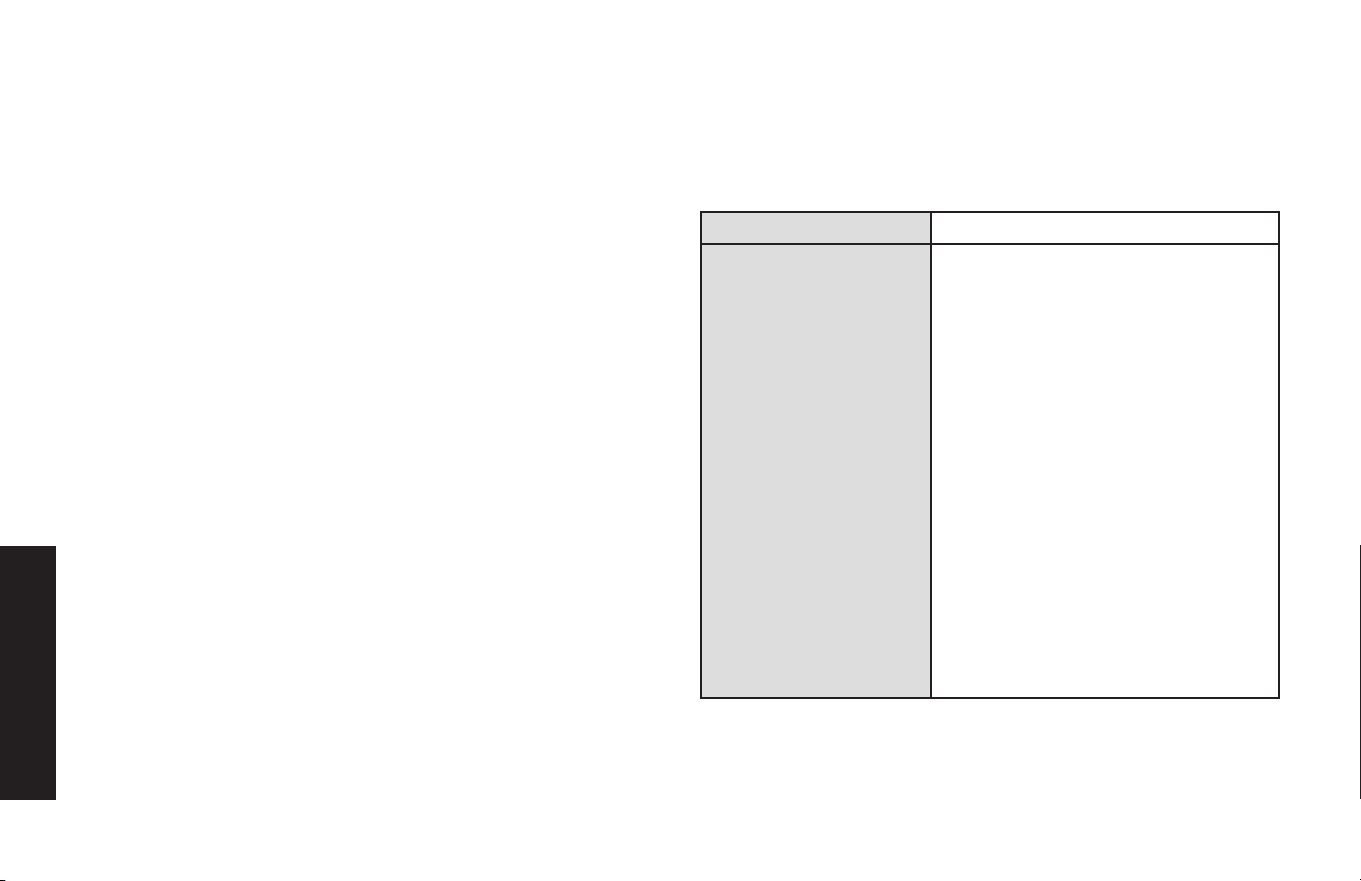
Español
32
2. Conecte el dispositivo o dispositivos alimentados por USB a los Puertos
USB y opere normalmente.
3. Presione el Botón de Encendido nuevamente para apagar la unidad.
Recuerde apagar la unidad y desconectarla de cualquier fuente de energía
cuando no esté en uso. Recuerde también apagar el switch de la toma de
accesorios para evitar descargar la batería del vehículo.
Reemplazo del Fusible (en el
Enchufe Adaptador de 12V CC)
1. Desenrosque la brida del enchufe (en sentido antihorario).
2. Retire el contacto final, la brida y el fusible.
3. Inspeccione el fusible para ver si está en buenas condiciones o fundido.
4. Reemplácelo con un fusible nuevo de 15 amperios, si es necesario.
5. Vuelva a ensamblar con cuidado el fusible, el contacto final y la brida. No
ajuste demasiado la brida (en el sentido de las agujas del reloj).
Cuidado y Mantenimiento
ALMACENAMIENTO
1. La temperatura ideal de almacenamiento es de 0 a 35 °C (32 a 104 °F).
2. Almacene y use el inversor en un lugar fresco y seco con ventilación
adecuada para una circulación de aire alrededor.
3. Evite lugares expuestos a unidades de calefacción, radiadores, luz solar
directa o humedad excesiva.
Solución de Problemas
Problemas Específicos de la Toma de CA
Cuando se utiliza la Toma de CA de 120V, la unidad monitorea las siguientes
condiciones de falla: falla térmica, falla por bajo voltaje de la batería, sobrecarga
y cortocircuito (consulte la sección “Características de Protección”).
Problema Posible Solución
Si existe una condición de
falla en la Toma de CA,
el indicador LED dentro
del botón de encendido
parpadeará en rojo y la Toma
de CA y los Puertos USB se
apagarán automáticamente.
Si esto ocurre:
A. Desconecte todos los aparatos de
la unidad y presione el Botón de
Encendido nuevamente para apagar la
unidad de inmediato.
B. Deje que la unidad se enfríe durante
varios minutos.
C. Asegúrese de que la potencia nominal
del aparato enchufado al inversor no
supere la potencia nominal máxima
de salida según la fuente de entrada
conectada.
D. El voltaje del Paquete de Baterías
DeWALT® de 20V puede estar bajo.
Recargar si es necesario.
E. El Paquete de Baterías DeWALT® de
20V puede estar sobrecalentado o
demasiado frío. Deje que el Paquete
de Baterías se enfríe o se caliente
durante varios minutos.
F. Asegúrese de que el cable y el enchufe
del aparato no estén dañados.
G. Asegúrese de que haya una ventilación
adecuada alrededor de la unidad antes
de continuar.
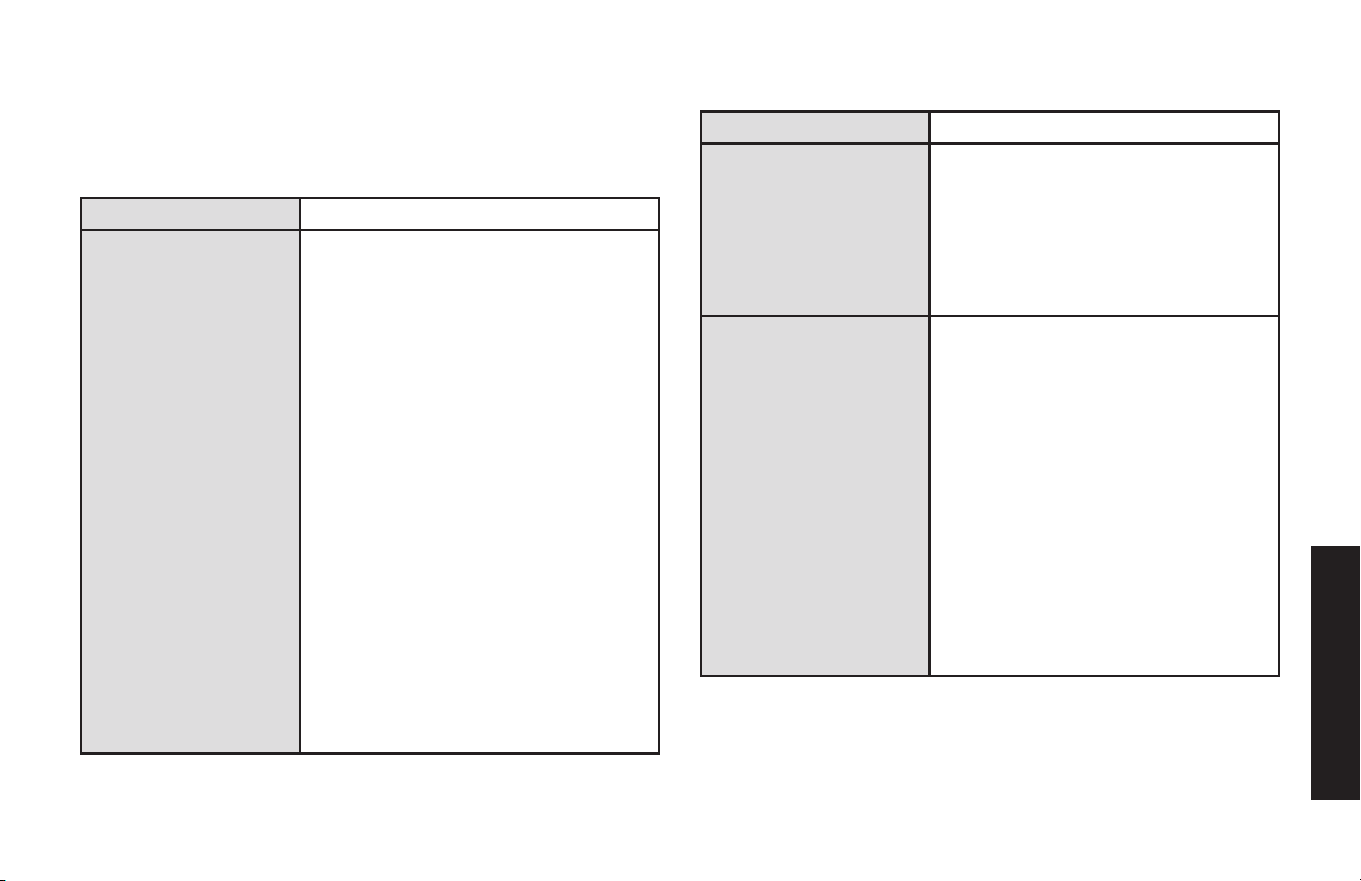
Español
33
Problemas Específicos del Puerto de
Alimentación USB
Cuando los puertos USB están en uso, la unidad monitorea las siguientes
condiciones de falla USB en todos los puertos USB: falla de voltaje de batería
bajo, sobrecarga y cortocircuito.
Problema Posible Solución
Si existe una condición
de falla en cualquiera
de los puertos USB, los
puertos USB se apagarán
automáticamente. Si esto
ocurre:
A. Desconecte el dispositivo alimentado por USB y
presione el Botón de Encendido nuevamente para
apagar la unidad de inmediato.
B. Deje que la unidad se enfríe durante varios
minutos antes de intentar usar los puertos USB
nuevamente.
C. Asegúrese de que el dispositivo USB conectado
al puerto USB-A no exceda los 15W; el dispositivo
USB conectado al puerto USB-C no exceda los
25W PD; o que la energía total consumida del
puerto USB-A y el puerto USB-C no exceda los
15W cuando se usan simultáneamente.
D. El voltaje del Paquete de Baterías DeWALT® de
20V puede estar bajo. Recargar si es necesario.
E. El Paquete de Baterías DeWALT® de 20V puede
estar sobrecalentado o demasiado frío. Deje que
la batería se enfríe o se caliente durante varios
minutos.
F. Algunos dispositivos electrónicos domésticos
alimentados por USB no funcionarán con este
puerto de carga/alimentación USB. Consulte el
manual del dispositivo electrónico correspondiente
para confirmar que se puede usar con este tipo de
puerto de carga/alimentación USB.
G. Si un dispositivo USB individual está dentro de
las especificaciones y ocurre la falla, haga que
lo revisen para ver si funciona mal y no continúe
usándolo con estos puertos USB.
Problemas de Audio Comunes
Problema Posible Solución
Zumbido en los Sistemas
de Audio
Algunos sistemas estéreo y equipos de
música económicos producen un zumbido
cuando funcionan con el inversor, porque
la fuente de alimentación del dispositivo
electrónico no filtra adecuadamente la onda
sinusoidal modificada producida por el
inversor. La única solución a este problema
es utilizar un sistema de sonido que tenga
una fuente de alimentación de mayor calidad.
Interferencia en la
Televisión
El inversor está protegido para minimizar la
interferencia con las señales de TV. Sin
embargo, en algunos casos, es posible
que aún se vean algunas interferencias,
especialmente cuando la señal de
televisión es débil. Pruebe lo siguiente
para mejorar la imagen:
1. Aleje el inversor lo más posible de la
televisión, la antena y los cables de
antena. Utilice un cable de extensión de
CA corto, si es necesario.
2. Ajuste la orientación de los cables de
antena y del cable de alimentación de la
TV para minimizar la interferencia.
3. Asegúrese de que la antena que alimenta
la TV proporcione una señal adecuada
(sin nieve) y de que se utilice un cable de
antena blindado de alta calidad.
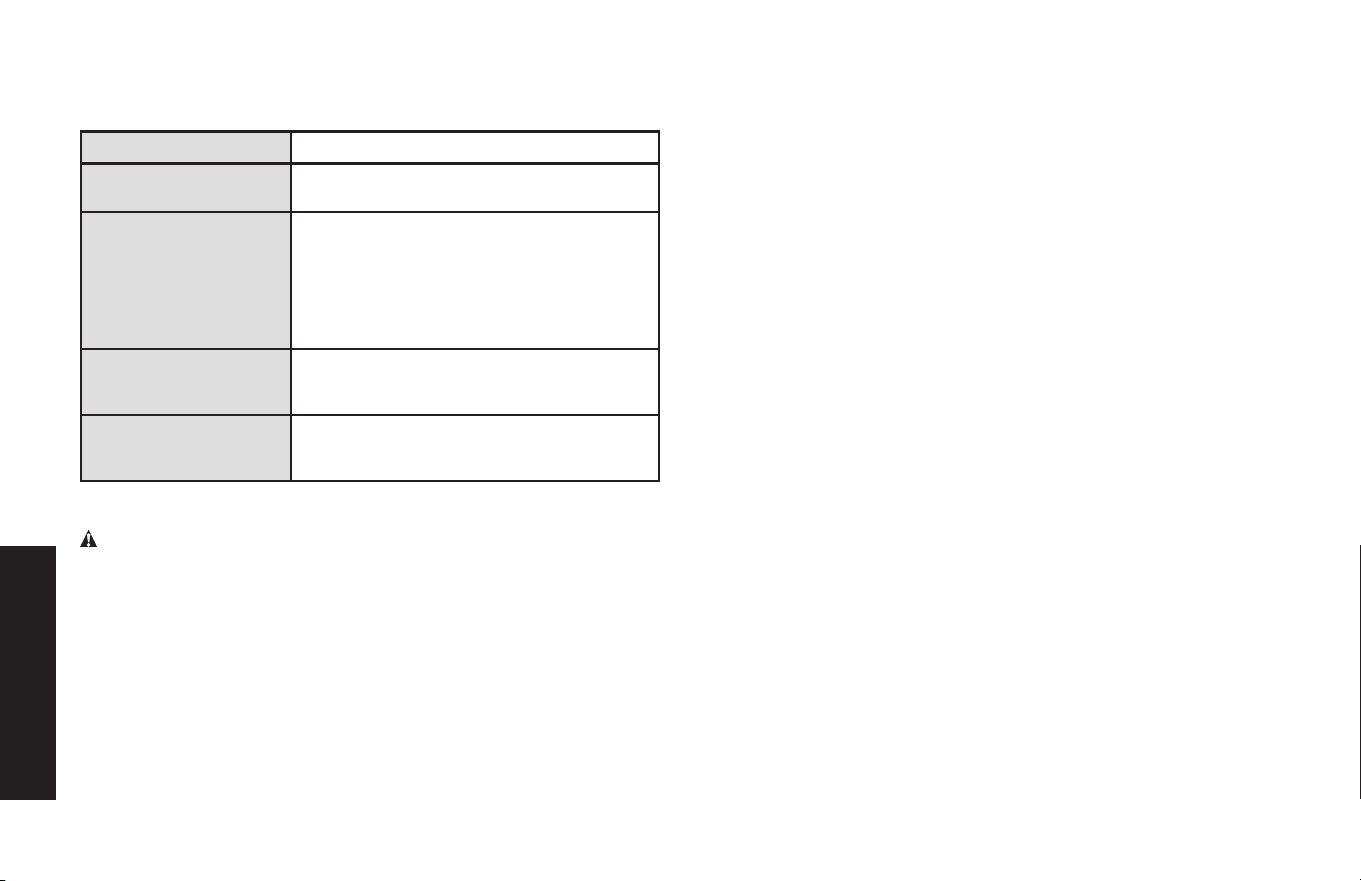
Español
34
Problemas Comunes en la Salida de
Energía
Problema Posible Solución
El voltaje de entrada
es bajo
Verifique las fuentes de alimentación.
El equipo que se está
utilizando consume
demasiada energía
Reduzca la carga a 225W (hasta 200W para la
Toma de CA y hasta 25W para los Puertos USB)
utilizando un Paquete de Baterías DeWALT® de
20V (no incluido); o 140W utilizando el enchufe
adaptador de 12V CC suministrado (hasta
115W para la Toma de CA y hasta 25W para
los Puertos USB).
El inversor está en
estado de apagado
térmico
Deje que el inversor se enfríe. Asegúrese de
que haya una ventilación adecuada alrededor
de la unidad.
La salida de CA está
en cortocircuito
Desconecte el aparato de CA. Desconecte la
unidad de cualquier fuente de alimentación.
Verifique el cable del aparato.
Accesorios
ADVERTENCIA: Dado que los accesorios, distintos de los ofrecidos
por DeWALT, no han sido probados con este producto, el uso de
dichos accesorios con esta unidad podría ser peligroso. Para reducir el
riesgo de lesiones, solo se deben utilizar los accesorios recomendados
por DeWALT con este producto.
Si necesita ayuda con respecto a los accesorios, comuníquese con el
fabricante al 1-888-394-3392 o [email protected].
Asistencia Técnica
Para obtener Servicio al Cliente o Asistencia Técnica, comuníquese
con el fabricante al 1-888-394-3392 o CustomerService@dewalt12volt.
com.
Garantía Limitada del Fabricante
por un Año
El fabricante, Baccus Global LLC, garantiza este producto contra
defectos de materiales y mano de obra durante un período de UN (1)
AÑO a partir de la fecha de compra minorista por parte del comprador
final original o desde la fecha de entrega del producto, lo que ocurra
más tarde (“Período de Garantía”).
Si hay un defecto y el fabricante recibe un reclamo válido dentro del
Período de Garantía, el producto defectuoso se puede reemplazar de
las siguientes maneras: (1) Devuelva el producto al fabricante para su
reemplazo. El fabricante puede requerir un comprobante de compra.
(2) Devuelva el producto al minorista donde lo compró para un cambio
(siempre que la tienda sea un minorista participante). Las devoluciones
al minorista deben realizarse dentro del período de tiempo de la política
de devolución del minorista para cambios únicamente. Es posible que
se requiera un comprobante de compra. Consulte con el minorista su
política de devolución específica con respecto a las devoluciones que
superen el tiempo establecido para los cambios.
Esta garantía del fabricante no se aplica a accesorios, bombillas,
fusibles y baterías; defectos esultantes del uso y desgaste normal,
accidentes; daños sufridos durante el envío; alteraciones; uso no
autorizado; negligencia, mal uso, abuso; y no seguir las instrucciones
de cuidado y mantenimiento del producto.
Esta garantía del fabricante le otorga a usted, el comprador minorista
original, derechos legales específicos y puede tener otros derechos que
varían de un estado a otro o de una provincia a otra. Este producto
no está destinado a uso comercial. Para registrar su producto con el
fabricante, visite www.BaccusGlobal.com.
Las fotografías de este manual pueden diferir de la unidad real.
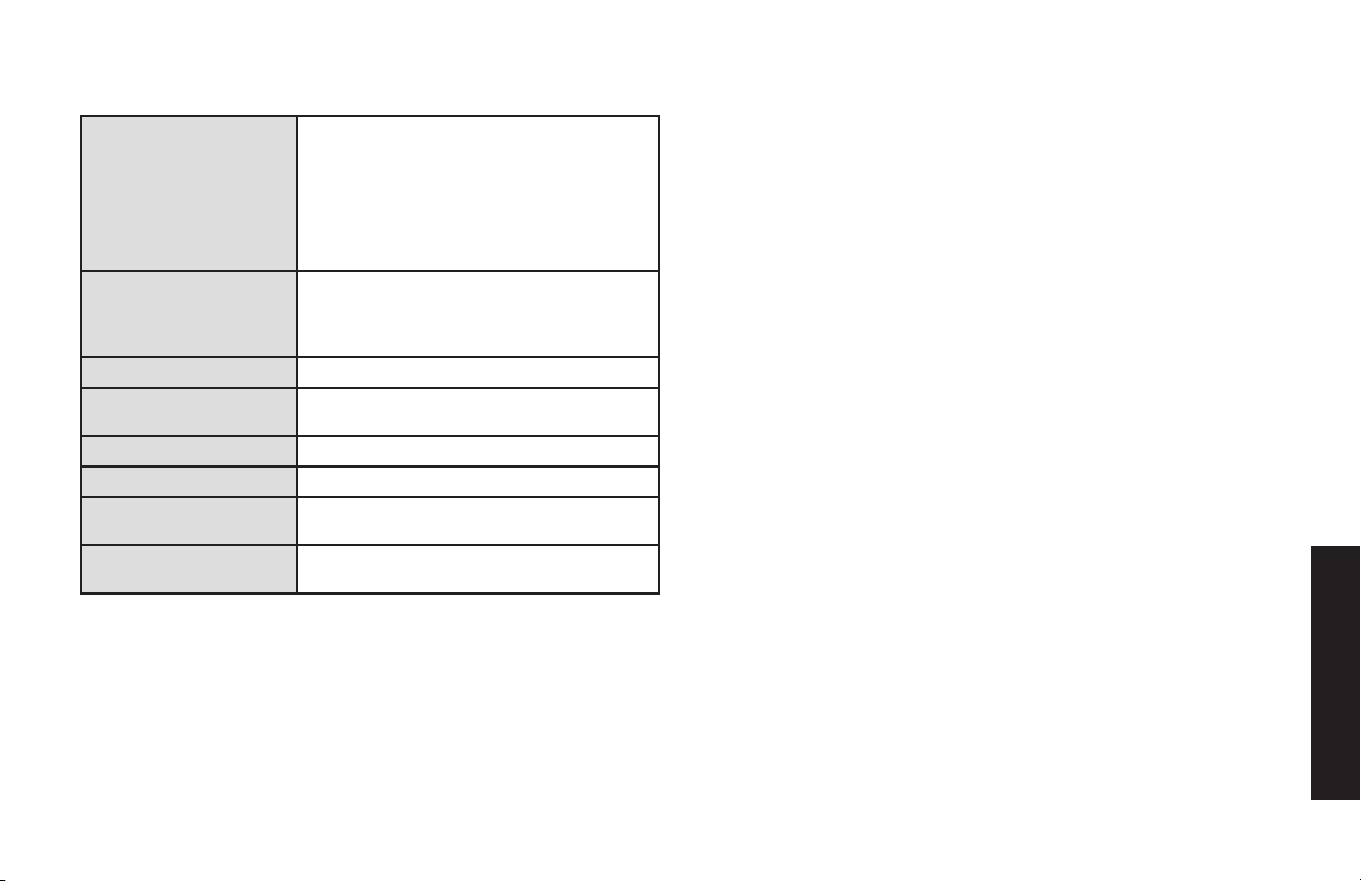
Español
35
Especificaciones
Potencia Máxima 225W continuos a través del paquete de
baterías DeWALT® de 20V (no incluida)
(hasta 200 W para la toma de CA y hasta
25W de descarga para los puertos USB)
140W continuos a través del enchufe
adaptador de 12V CC suministrado (hasta
115W para la toma de CA y hasta 25W de
descarga para los puertos USB)
Entrada 20V CC a través de la batería DeWALT® de
20 V (no incluida)
13,8V CC, 12A a través del enchufe
adaptador de 12V CC suministrado
Salida de CA 120 voltios CA, 60 Hz
Forma de Onda de
Salida
Onda Sinusoidal Modificada
Salida USB-C 5V CC 3A / 9V CC 2,77A (25W PD)
Salida USB-A 5V CC, 15W Máx.
Salida USB-C y USB-A
Simultáneamente
5V CC, 15 W Máx.
Fusible de Enchufe de
CC
15A
Fabricado e Importado por Baccus Global LLC, 225 NE Mizner Blvd., Suite
301, Boca Raton, FL 33432 www.dewalt12volt.com 1-888-394-3392
Hecho en China
Copyright © 2025 Baccus Global, LLC. DEWALT® y el Logotipo de
DEWALT son marcas comerciales de DEWALT Industrial Tool Co., o de una
filial de la misma, y se utilizan bajo licencia. El esquema de color amarillo/
negro es una marca registrada de las herramientas eléctricas y accesorios
DEWALT.

Español
36