Remote Control Instruction Manual
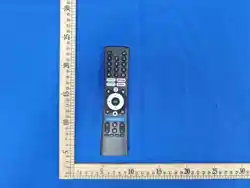
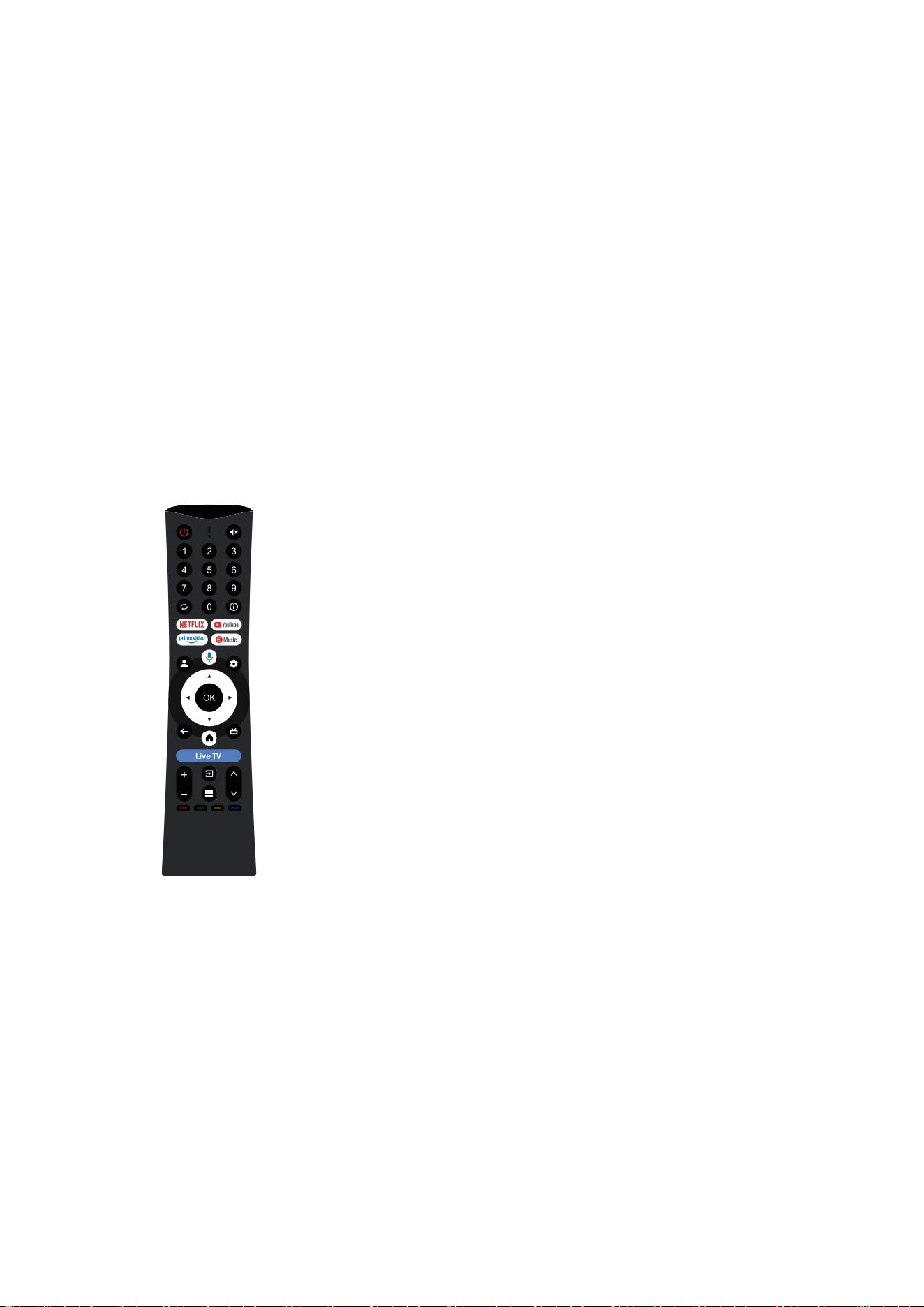
Product Name: Remote Control Product Model: RC-51
External dimensions: Communication method: Bluetooth
a basic accessory for modern TVs and plays an indispensable role in TVs . When using
it, you need to pay attention to some basic operations. The following is a detailed
instruction manual for using a Bluetooth voice remote control.
Button function introduction:
遥控器功能说明(Software Function Description):
1.蓝牙逻辑要求(Bluetooth logic requirements): 1.1,配对(pair): 同时按住遥控器
上的[主页]键和[返回]键约 3 秒工作指示灯闪烁,表示进入配对模式。 打开主机蓝牙--
点击主机蓝牙--搜索设备--连接"RC-51"设备名并连接。几秒钟后 停止闪烁表示配对成

功,若一直无法配对, 30 秒后快闪 2 次并熄灭并退出配对模式。 Simultaneously press
and hold the [Home] and [Return] keys on the remote control for about 3 seconds, and
the work indicator light will flash, indicating that pairing mode has been entered. Open
the host Bluetooth - click on the host Bluetooth - search for devices - connect to the
"RC-51" device name and connect. Stopping flashing after a few seconds indicates
successful pairing. If pairing is still not possible, it will flash twice after 30 seconds, turn
off, and exit pairing mode. 蓝牙设备名称(Bluetooth device name):RC-51 蓝牙设备
ID 和识别码(Bluetooth device ID and identification code): VID = 0x0B7A ; PID =
0x0001。 1.2,回连(Back to Link): 在有配对信息的的情况下,按任意键,发送回连广
播 5s (POWER 键和组合键不发送回连广播)。在 4m 处遥控器和投影仪保持连接至少
2h,不出现断连;在 6m 处遥控器和投影仪保持连接至少 1h,不出现断连。With pairing
information available, press any key to send a 5-second reconnection (POWER key and
combination key do not send back to the broadcast). broadcast Keep the remote
control and projector connected for at least 2 hours at a distance of 4 meters without
any disconnection; Keep the remote control and projector connected for at least 1 hour
at a distance of 6 meters without any disconnection. 1.3, 休 眠 和 唤 醒 (Sleep and
wake-up): 蓝牙连接时,当遥控器无操作 1H 后,遥控器进入休眠状态。在休眠模式下,
遥控器按键 操作可唤醒系统进入正常工作状态。 When connected via Bluetooth, the
remote control enters sleep mode after 1 hour of inactivity. In sleep mode, remote
control button operation can wake up the system to enter normal working state.2.支持
OTA (Support OTA): 要求与电视端完成遥控器的软件升级。在电视机启动时,检测
遥控器升级文件,若 存在升级文件,则进行 OTA 升级,LED 指示灯呈呼吸灯闪烁,此

时遥控器任何按键无 作用,升级成功后,指示灯停止闪烁,遥控器正常可用。OTA 失
败则退回旧版本正常使用, 指示灯停止闪烁,待下次开机再检测升级。Request to
complete the software upgrade of the remote control with the TV end. When the TV is
started, check the remote control upgrade file. If there is an upgrade file, perform OTA
upgrade. The LED indicator light will flash as a breathing light, and any buttons on the
remote control will not work. After the upgrade is successful, the indicator light will
stop flashing and the remote control will be the available normally. If OTA fails, it will be
returned to the old version for normal use, and indicator light will stop flashing. The
upgrade will be checked again when the next power is turned on. 3.状态指示要求
(Status indication requirements): 3.1,低电报警(Low power alarm): 当电池电压
低于 2.4V 时,每次用户按键,灯以 1Hz 闪烁 3S。When the battery voltage is below 2.4V,
the light flashes for 3 seconds at 1Hz every time the user presses a button. 3.2、指示灯
要求:要求内置 LED 指示灯,支持通过指示灯显示以下按键状态: Indicator light
requirements: It is required to have a built-in LED indicator light that supports
displaying the following button statuses through the indicator light: 3.3 蓝牙配对:蓝
牙配对过程中的指示灯闪烁,如配对成功,指示灯长亮 3 秒;如 30 秒后配对 失败,指
示灯熄灭;Bluetooth pairing: The indicator light flashes during the Bluetooth pairing
process. If the pairing is successful, the indicator light stays on for 3seconds; If pairing
fails after 30 seconds, the indicator light will turn off; 3.4.蓝牙回连:回连成功,指示灯
闪烁或长亮 3 秒; Bluetooth reconnection: successful reconnection, indicator light
flashes or stays on for 3 seconds;

FCC Statement
Changes or modifications not expressly approved by the party responsible for compliance
could void the user's authority to operate the equipment.
This equipment has been tested and found to comply with the limits for a Class B digital
device, pursuant to Part 15 of the FCC Rules. These limits are designed to provide
reasonable protection against harmful interference in a residential installation. This
equipment generates uses and can radiate radio frequency energy and, if not installed
and used in accordance with the instructions, may cause harmful interference to radio
communications. However, there is no guarantee that interference will not occur in a
particular installation. If this equipment does cause harmful interference to radio or
television reception, which can be determined by turning the equipment off and on, the
user is encouraged to try to correct the interference by one or more of the following
measures:
-- Reorient or relocate the receiving antenna.
-- Increase the separation between the equipment and receiver.
-- Connect the equipment into an outlet on a circuit different from that to which the receiver
is connected.
-- Consult the dealer or an experienced radio/TV technician for help
This device complies with part 15 of the FCC rules. Operation is subject to the following
two conditions (1)this device may not cause harmful interference, and (2) this device must
accept any interference received, including interference that may cause undesired

operation.
FCC RF Exposure Warning Statement:
This equipment complies with FCC radiation exposure limits set forth for an uncontrolled
environment. This equipment can be used in portable exposure conditions.

