Visit Our Website
SCAN ME
PyleUSA.com
USER GUIDE
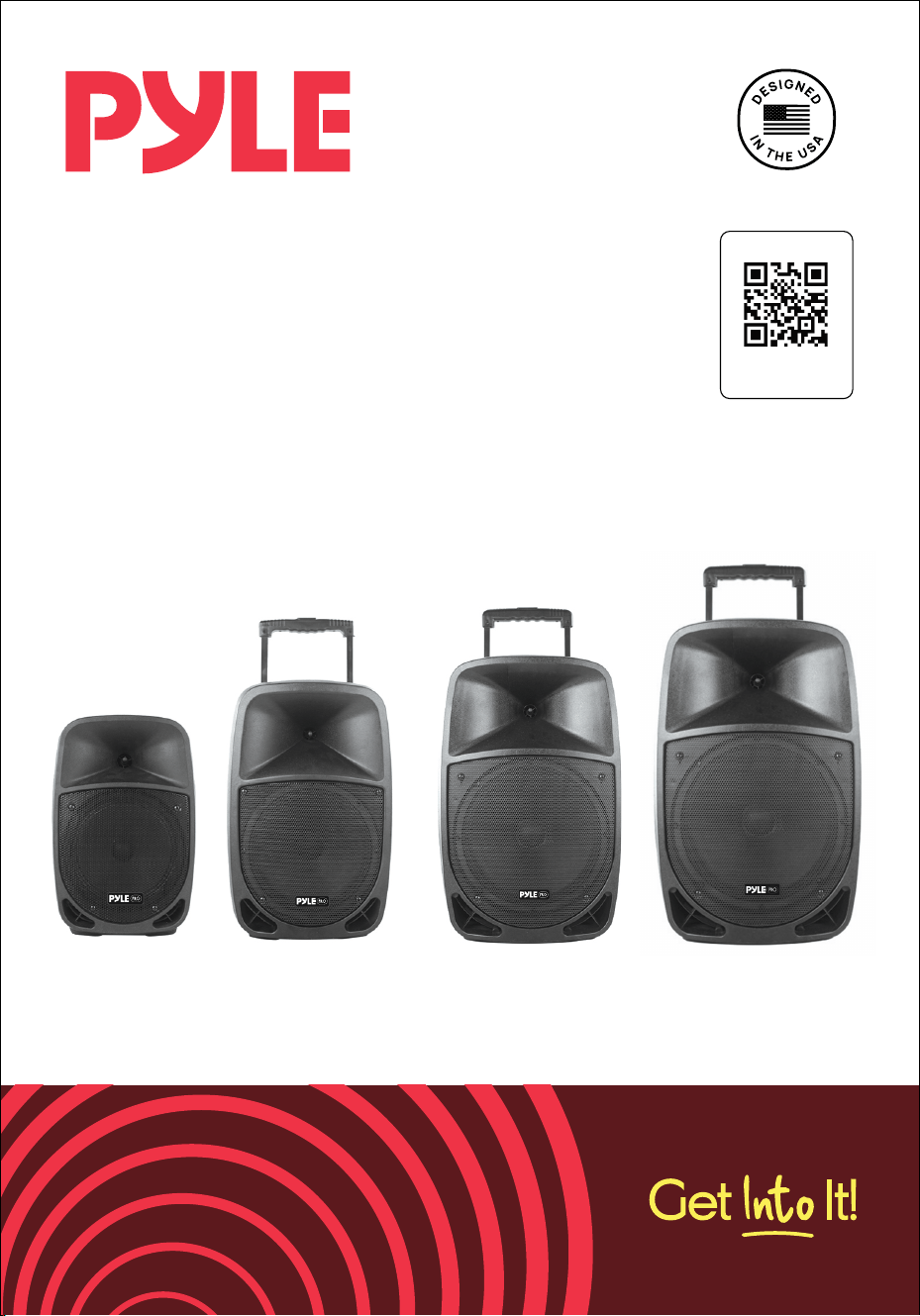
PSBT85A - PSBT105A - PSBT125A - PSBT155A
Bluetooth PA Speaker with Wireless Microphone

Read all instructions carefully before using this product.
Retain this owner’s manual for future reference.
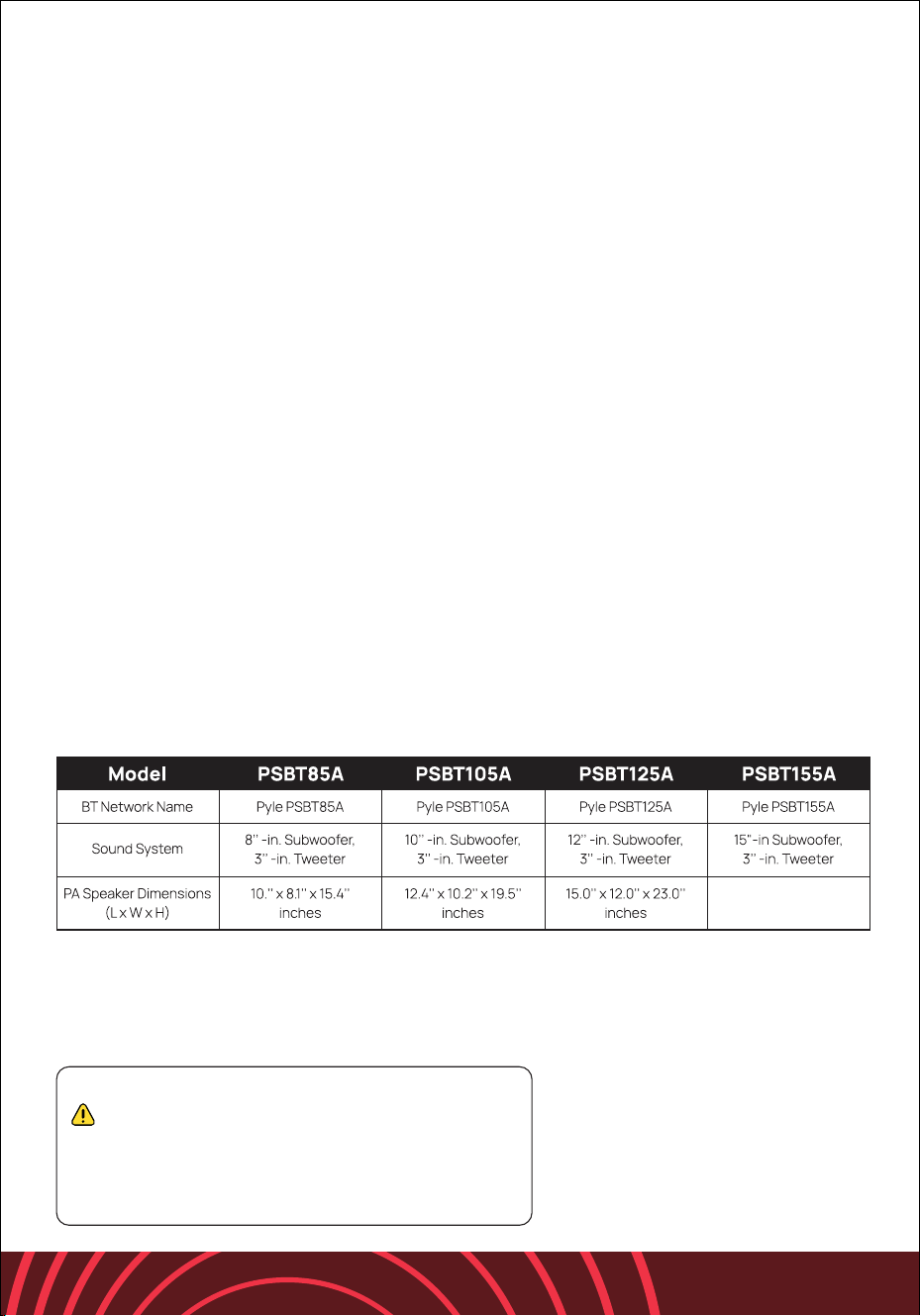
PSBT85A - PSBT105A - PSBT125A
Features:
• Compact & Portable PA Speaker System
• Karaoke Style Microphone Priority Talkover
• Bluetooth Music Streaming Ability
• Built-in Rechargeable Baery
• Includes UHF Wireless Handheld Microphone
• Unique Audio Record Function
• Full Range Stereo Sound Reproduction
• Impressive Bass Response
• MP3 Digital Audio File Playback
• USB Flash Drive Memory Reader
• Micro SD Memory Card Reader
• 1/4’’ -inch Microphone Input
• Aux (3.5mm) Audio Jack
• Rear Panel Buon Control Center
• Rotary Audio Configuration Adjustment
• LED Baery Indicator Lights
• Convenient Carry Handles for Portability
• Optional Powered Externally via 12V Power Input
• Used for Home & Backyard Karaoke, Public Events, Crowd Control
What's in the Box:
• Portable PA Speaker
• Wireless Microphone
• Remote Control
• Power Adaptor
Bluetooth Wireless Streaming:
• Hassle-Free Bluetooth Pairing Setup
• Instantly Receives Wireless Music Streaming
• Works with all of Today’s Latest Devices (Smartphones, Tablets, Laptops,
Computers, etc.)
• Bluetooth Version: 5.0
• Wireless Range: Up to 33’+ ft.
2
Recording Function:
• Simple Buon Activated Sound Recording
• Records via USB Flash or SD Memory Card Slots
• Easy Transfer to PC & Mac
• Filetype Saved: WAV
• Only Records Audio via Microphone
Technical Specs:
• Wireless Frequency Mode: UHF
• Frequency Response: 55Hz-20kHz
• Sensitivity: 92dB (+/-2dB)
• Impedance: 4 Ohm
• S/N Ratio: >80dB
• T.H.D.: <1%
• Digital Audio File Playback Support: MP3, WMA, WAV
• USB / SD Memory Support: Up to 32GB
• Construction Material: Engineered ABS Molded Speaker Cabinet
• Baery Powered Remote Control, Requires (1) x ‘CR-2025’, Included
• PA Speaker Rechargeable Baery: 7.4V, 3600mAh, Li-Ion
• Optional External Power Supply: 12V
• Power Supply: 110/220 (9V Power Adapter)
3
California Prop 65 Warning
WARNING:
This product may expose you to chemicals, which is known to
the state of California to cause cancer, birth defects and other
reproductive harm. Do not ingest.
For more info go to: www.P65warnings.ca.gov
26.77” x 16.93” x 14.17”
Inches
4
FCC INFORMATION
WARNING:
Changes or modifications not expressly approved by the party responsible for compliance could void
the user’s authority to operate the equipment.
NOTE:
This equipment has been tested and found to comply with the limits for a Class B digital device,
pursuant to Part 15 of the FCC Rules. These limits are designed to provide reasonable protection
against harmful interference in a residential installation. This unit generates, uses, and can radiate
radio frequency energy, and if not installed and used in accordance with the instructions, may cause
harmful interference to radio communications. However, there is no guarantee that interference will not
occur in a particular installation. If this equipment does cause harmful interference to radio or television
reception, which can be determined by turning the equipment o and on, the user is encouraged to try
and correct the interference by one or more of the following measures:
• Reorient or relocate the receiving antenna.
• Increase the separation between the equipment and receiver.
• Connect the equipment to an outlet on a circuit dierent from that to which the receiver is connected.
• Consult the dealer or an experienced radio/TV technician for help.
• Remove and immediately recycle or dispose of used baeries according to
This device complies with Part 15 of the FCC Rules. Operation is subject to the following two conditions:
1. This device may not cause harmful interference.
2. This device must accept any interference received, including interference that may cause
undesired operation.
Note:This warning is only for the speaker PSBT155A
local regulations and keep away from children. Do NOT dispose of baeries in
household trash or incinerate.
• Even used baeries may cause severe injury or death.
• Call a local poison control center for treatment information.
• Non-rechargeable baeries are not to be recharged.
• Do not force discharge, recharge, disassemble, heat above (manufacturer’s
specified temperature rating) or incinerate. Doing so may result in injury due
to venting, leakage or explosion resulting in chemical burns.
• The type of baery that the product uses. (CR2025)
• The voltage of the baery. (3V)
• Ensure the baeries are installed correctly according to polarity (+ and -).
• Do not mix old and new baeries, dierent brands or types of baeries, such
as alkaline, carbon-zinc, or rechargeable baeries.
• Remove and immediately recycle or dispose of baeries from equipment not
used for an extended period of time according to local regulations.
• Always completely secure the baery compartment.
• If the baery compartment does not close securely, stop using the product,
remove the baeries, and keep them away from children.
WARNING!
FOR OUTDOOR USE:
To reduce the risk of fire or electric shock, do not expose this apparatus to rain or
moisture.
UNDER WET CONDITIONS:
The apparatus should not be exposed to dripping or splashing, and no objects
filled with liquids—such as vases—should be placed on the apparatus.
SERVICE INSTRUCTIONS:
CAUTION: These servicing instructions are for use by qualified service personnel
only. To reduce the risk of electric shock, do not perform any servicing other than
that contained in the operating instructions unless you are qualified to do so.
5
This symbol indicates that dangerous voltage constituting a risk of electric shock is
present within this unit.
This symbol indicates that there are important operation and maintenance
instructions in the literature accompanying this unit.

6
IMPORTANT SAFETY INSTRUCTIONS
1. Read and keep these instructions.
2. Heed all warnings.
3. Follow all instructions.
4. Do not use this apparatus near water.
5. Clean only with a dry cloth.
6. Do not block any ventilation openings. Install in accordance with the
manufacturer’s instructions.
7. Do not install near any heat sources such as radiators, heat registers, stoves,
or other apparatuses (including amplifiers) that produce heat.
8. Do not defeat the safety purpose of the polarized or grounding plug:
A polarized plug has two blades with one wider than the other. The wide blade
is provided for your safety. If the provided plug does not fit into your outlet,
consult an electrician for replacement of the obsolete outlet.
9. Protect the power cord from being walked on or pinched, particularly at plugs,
convenience receptacles, and the point where they exit from the apparatus.
10. Only use aachments/accessories specified by the manufacturer.
11. Use only with a cart, stand, tripod, bracket, or table specified by the
manufacturer or sold with the apparatus. When a cart is used, use
caution when moving the cart/apparatus combination to avoid injury from
tip-over.
12. Unplug this apparatus during lightning storms or when unused for long
periods of time.
13. Refer all servicing to qualified service personnel. Servicing is required when
the apparatus has been damaged in any way—such as if the power supply
cord or plug is damaged, liquid has been spilled, objects have fallen into the
apparatus, the apparatus has been exposed to rain or moisture, does not
operate normally, or has been dropped.
14. To reduce the risk of fire or electric shock, do not expose this apparatus to
rain or moisture.
15. The apparatus should not be exposed to dripping or splashing, and no objects
filled with liquids should be placed on the apparatus.
16. Use only with the baery specified by the manufacturer.
17. The power supply cord set is to be the main disconnecting device.
TIPS TO PROLONG THE LIFE OF RECHARGEABLE BATTERIES
1. Store the portable system with baeries in a fully charged condition.
It takes 8–10 hours to fully charge.
2. The baery performs beer with partial rather than full discharges.
Partial discharge reduces stress and prolongs baery life.
3. Avoid frequent full discharges, as this puts additional strain on the baery.
4. Avoid keeping the baery fully charged in high-temperature environments.
5. Fully charge the system at least once every 3 to 6 months. The baery may not
charge properly if left uncharged for prolonged periods.
6. Do not freeze the baery. Store it in a cool, dry place away from heat, as
elevated temperatures reduce baery lifespan.
7. Rechargeable baeries have a limited number of charge cycles and may
eventually need to be replaced. Baery life and the number of charge cycles
vary by usage and seings.
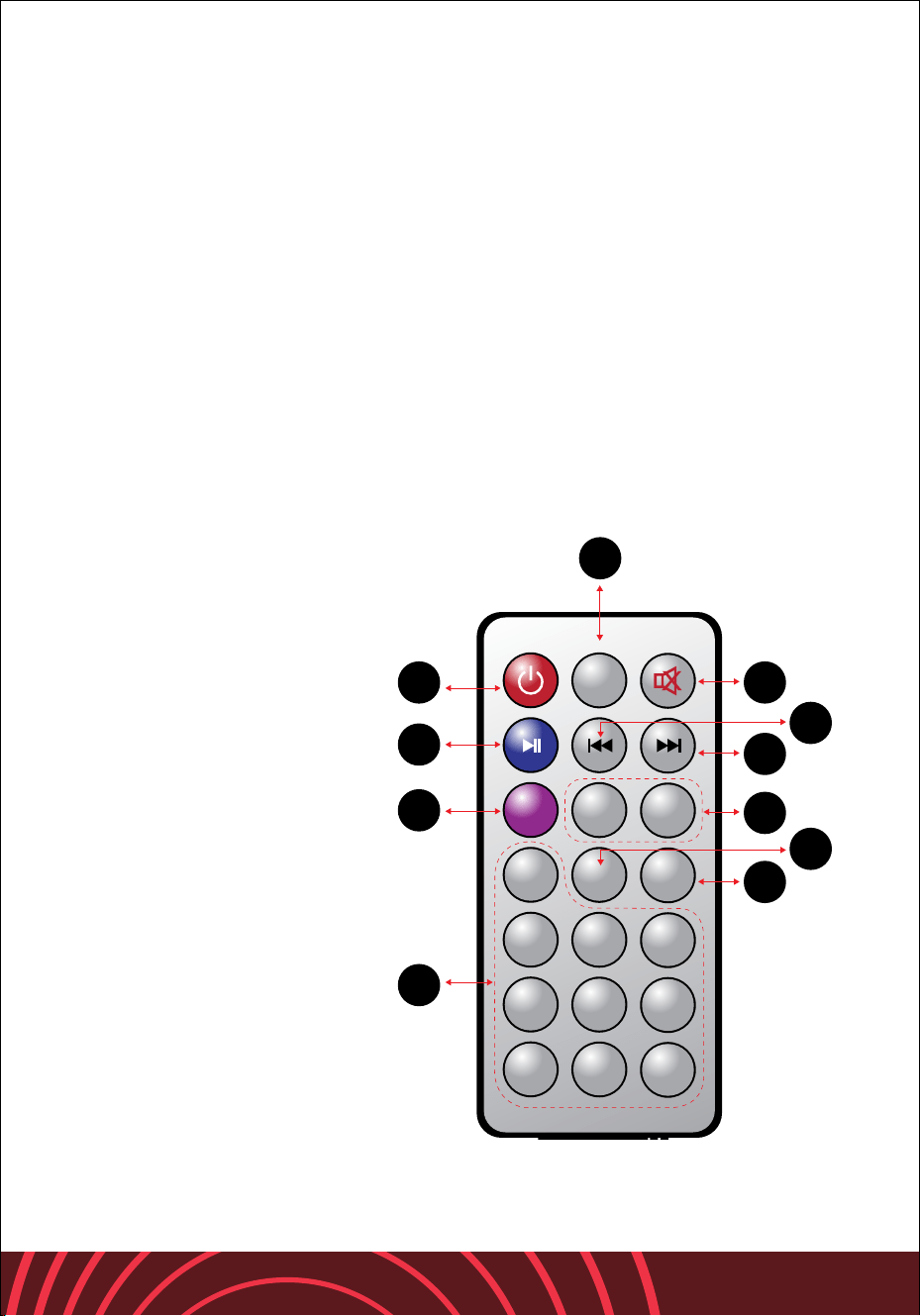
REMOTE CONTROLLER
1. Input Mode switch
3. Cycling mode
4. Previous song
5. Pause and play
6. Next song
8. Power ON/OFF
13. Music volume control
18. Preset EQ Mode
19. Mute
20. USB/SD Card Switch
21. Select song by number
7
19
1
Mode
VOL-
RPT
2
5
8
3
6
9
1
0
4
7
U/SD
VOL+
EQ
SCN
6
3
4
20
13
8
5
18
21
8
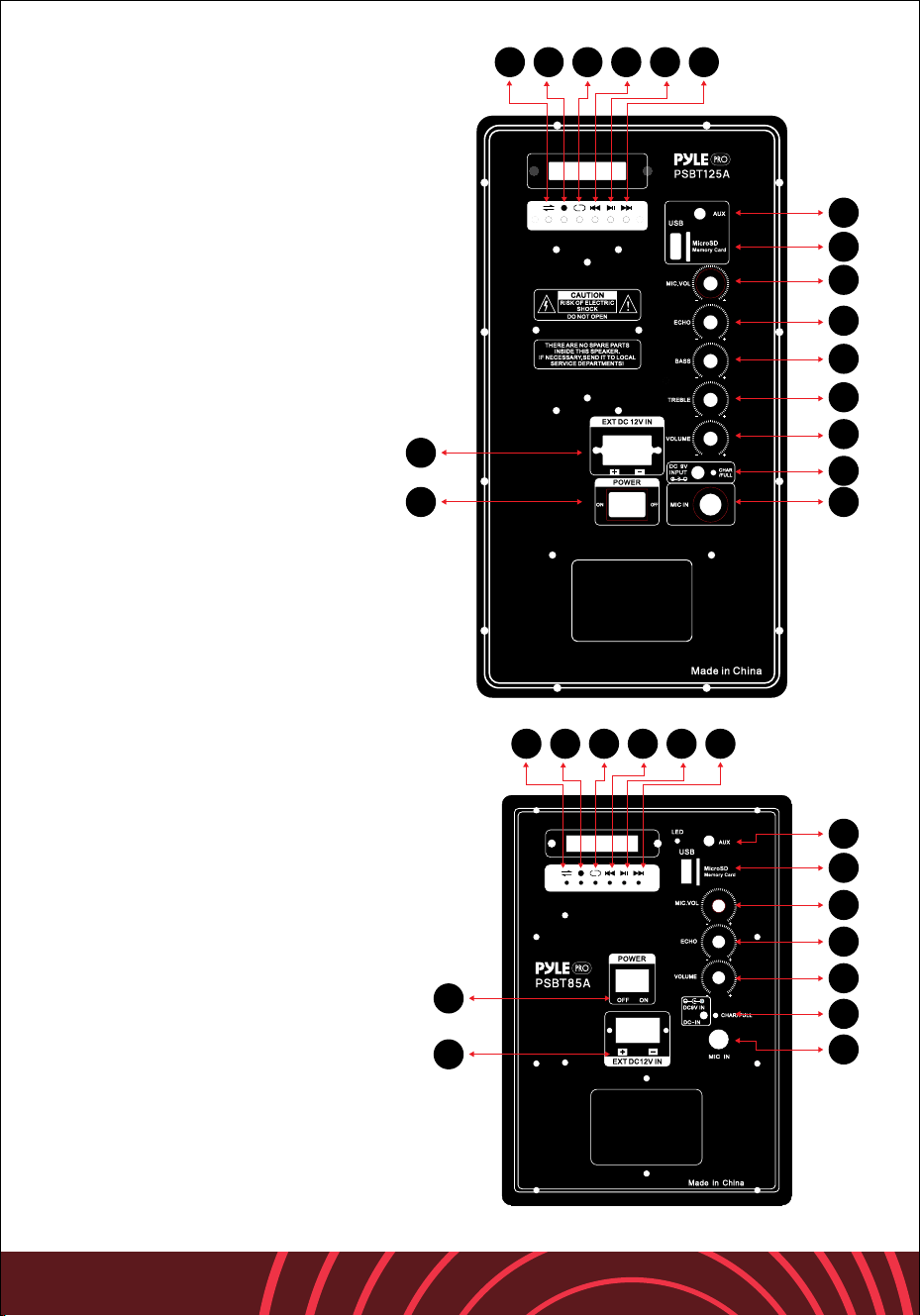
PSBT125A
1. Input Mode switch
2. Record
3. Cycling mode
4. Previous song
5. Pause and play
6. Next song
7. External baery input
8. Power ON/OFF
9. AUX input
10. USB/MicroSD card input
11. Mic volume control
12. Mic echo control
13. Music volume control
14. Power input
15. Mic input
16. Bass control
17. Treble control
PSBT85A/PSBT105A
1. Input Mode switch
2. Record
3. Cycling mode
4. Previous song
5. Pause and play
6. Next song
7. External baery input
8. Power ON/OFF
9. AUX input
10. USB/MicroSD card input
11. Mic volume control
12. Mic echo control
13. Music volume control
14. Power input
15. Mic input
9
1 2 3 4 5 6
10
11
12
16
17
13
14
158
7
9
10
11
12
13
14
15
1 2 3 4 5 6
7
8
9
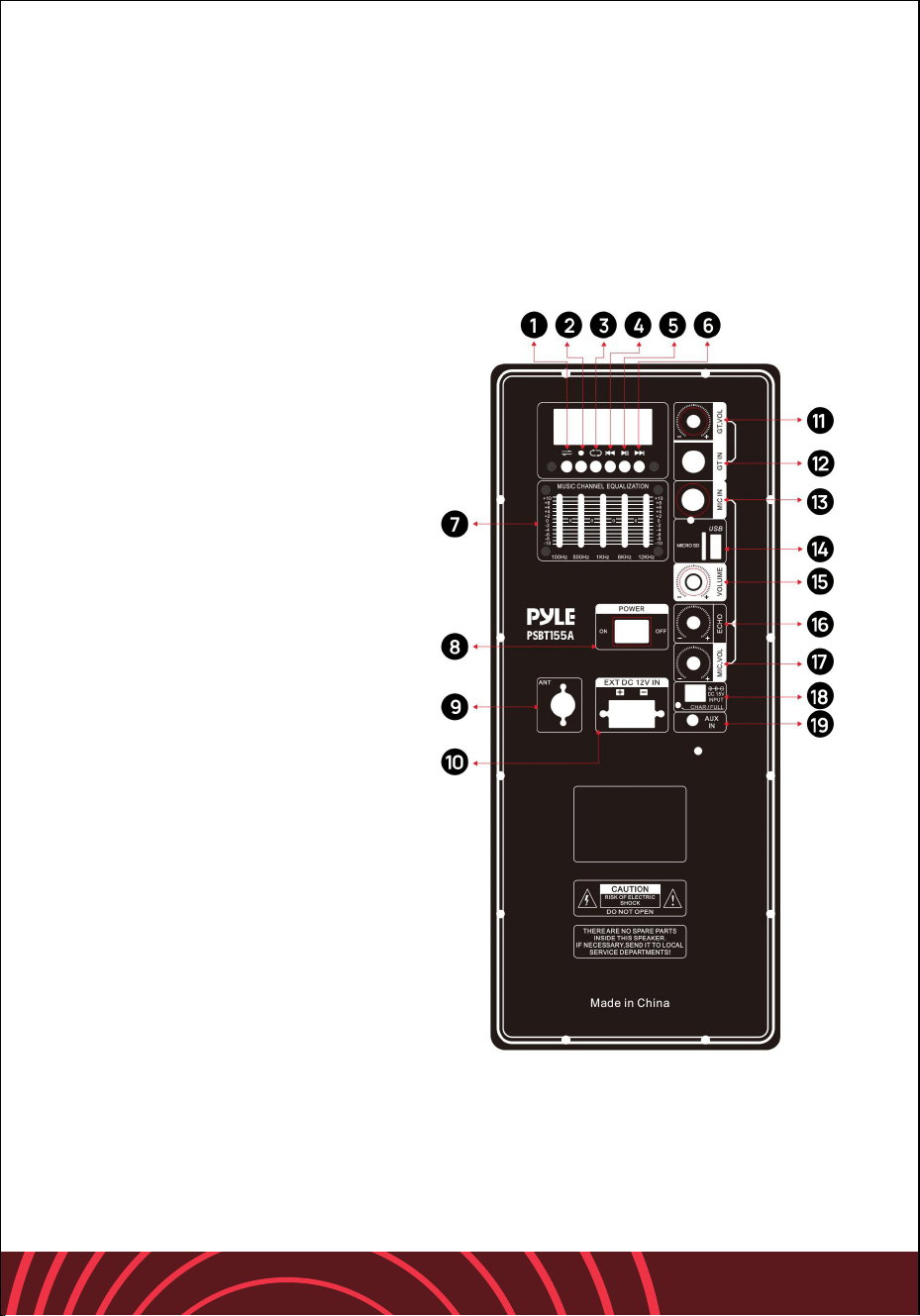
PSBT155A
1. Mode: Input selection
2. Record: Record to the USB or Micro SD card.
3. Repeat: loop mode (loop one song or loop all songs)
4. Previous: Previous song
5. Play/Pause: Control playback
6. Next: Next song / TWS (long press 2–3s)
7. Equalizer: 5-band EQ adjustment
8. Power Switch: ON/OFF
9. Antenna: FM Antenna
10. EXT DC 12V: External baery input
11. GT VOL: Adjust guitar volume
12. GT IN: Guitar input
13. MIC IN: Microphone input
14. USB & Micro SD Reader:
play the music files stored in the
USB drive or Micro SD card
15. Master Volume: Main volume
16. Echo: Adjust the microphone
echo eect
17. Mic Volume: Adjust the
microphone volume
18. DC 15V Input: Connect with
external power adaptor for
charging
19. AUX IN: External audio input
TWS Function
TWS allows two speakers to pair
wirelessly for stereo sound.
1. Turn on both speakers and switch
to Bluetooth mode.
2. Press and hold the NEXT buon
(6) on one of the speakers for
2–3 seconds.
3. Speakers will pair automatically.
4. Connect your phone to one speaker.
5. Long press NEXT again to disconnect.
Note: TWS works only with identical models.

10
PSBT155A
Features:
• Compact & Portable PA Speaker
System
• Powerful Loudspeaker Sound
Projection
• Karaoke Style Microphone Priority
Talkover
• Bluetooth Music Streaming
• Built-in Rechargeable Baery
• Includes UHF Wireless Handheld
Microphone
• Unique Audio Record Function
• Full Range Stereo Sound Reproduction
• Impressive Bass Response
• MP3 Digital Audio File Playback
• USB Flash Drive & Micro SD Memory
Readers
• ¼ Inch Microphone Input
• Aux (3.5mm) Audio Jack
• Rear Panel Buon Control Center
• Rotary Audio Configuration Adjustment
• LED Baery Indicator Lights
• Convenient Carry Handles
• Powered Externally via 12V Power Input
• Ideal for Home, Backyard Karaoke and
Public Events
What's in the Box:
• Portable PA Speaker
• Wireless Microphone
• Remote Control
Bluetooth Wireless Streaming:
• Hassle-Free Bluetooth Pairing
• Works with Smartphones, Tablets, Laptops
• Bluetooth Version: 5.0
• Wireless Range: Up to 33ft
• Bluetooth Network Name: ‘PYLE PSBT155A’
Recording Function:
• Buon-Activated Audio Recording
• Records via USB Flash
or SD Memory Card
• Filetype: MP3
• Easy Transfer to PC & Mac
Technical Specs:
• Construction Material:
Engineered ABS Molded Speaker
Cabinet
• Power Output: 1500W MAX
• Wireless Frequency: UHF
• Sound System: 15" Subwoofer,
3" Tweeter
• Response: 55Hz-20kHz
• Sensitivity: 92dB (+/-2dB)
• Impedance: 4 Ohm
• S/N Ratio: >80dB
• T.H.D.: <1%
• Digital Audio File Playback Support:
MP3, WMA, WAV
• USB / SD Memory Support:
Up to 32GB
• Baery Powered Remote Control,
Requires (1) x ‘CR-2025’ (Included)
• Baery Powered Microphone,
Requires (2) x ‘AA’ Baeries
(Not Included)
• Speaker Rechargeable Baery:
12V, 4.5Ah, Lead Acid
• Power Supply:
110/220 (15V Power Adapter)

Register Product
Thank you for choosing PyleUSA. By registering your product, you
ensure that you receive the full benefits of our exclusive warranty
and personalized customer support.
Complete the form to access expert support and to keep your
PyleUSA purchase in perfect condition.
Start Here
Model Number:
PSBT85A
PyleUSA.com/pages/register
TROUBLESHOOTING
You can try these simple steps to fix common problems.
If the issue continues, please contact Customer Service for help.
• If you don’t hear any sound or the sound is very low, check if the volume is
turned up. Make sure the power switch is turned on.
• If the power indicator light is not on, the power might be o, the baery might
be empty, or the baery could be worn out. Try plugging the unit into an AC
outlet to charge. If that doesn’t work, the baery may need to be replaced.
• If the sound is distorted or unclear, the volume may be too high.
Turn the volume down.
• If you hear popping sounds or wind noise when using a microphone, try
using a windscreen on both wired and wireless microphones.
• If the input signal is too strong, adjust the input levels to fix the sound.
• If there’s a loud screeching or feedback noise, the microphone might be too
close to the speaker. Move the microphone farther away.
• If the sound is weak or distorted and the power light is blinking, the baery
may be low or the volume is set too high. Recharge the speaker.
• If the microphone is far from the person speaking, the speaker may be too
quiet. Speak closer to the microphone or move it closer to the sound source.
• If you hear a humming or buzzing sound, the input cable may not be shielded.
Try using a shielded cable.
• If the baery doesn’t last long, it might be old or hasn’t been charged in a
while. Recharge or replace the baery.
• If the baery charge light doesn’t flicker when plugged in, the baery could
be dead or not charged for more than 3 to 4 months. Recharge or replace the
baery.
11

Questions? Comments?
We are here to help!
Phone: (1) 718-535-1800
PyleUSA.com/ContactUs