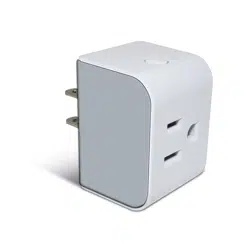
Smart Plug T20-S4AM
User Manual

QUICK START GUIDE
Preparation
1. Ensure a Thread network with a Thread Matter hub.
2. Reset T20 Smart Plug by long-pressing the upper button for 10 seconds
until LED blinks slowly.
3. Place T20 within your phone’s Bluetooth range and the Thread network coverage.
Setup in Ecosystem App
1. Open your ecosystem app (Apple Home, Google Home, Alexa or SmartThings)
2. Tap +, scan the Matter QR code on the device or user manual, or enter
the setup code manually. Name the T20 and assign it to a room.
Control & Advanced Features
1. Control On/Off via the ecosystem app or voice assistant.
2. View power meter data directly in the Samsung SmartThings App and
Onvis Home App (iOS).
3. Custom features like firmware timers, countdown on/off, logs&stats and
overload protection can be accessed via Onvis Service in Onvis App. Please
pair Onvis service like an independent ecosystem from your primary ecosystem.
Tips
1. The Matter QR/setup code can be used in the FIRST ecosystem Only.
2. To add T20 to another Thread Matter ecosystem, turn on Pairing Mode and
generate a new QR/setup code in the previously linked ecosystem app.
3. Create schedules, automations and scenes via the ecosystem app.
4. Use the ecosystem cloud to control T20 away from home.
5. After setup, T20 will act as a Thread router to extend your Thread network.
6. Thread network may be unstable after adding new devicess. It may take
up to 24 hours for the network to self-heal and adapt to new structure.
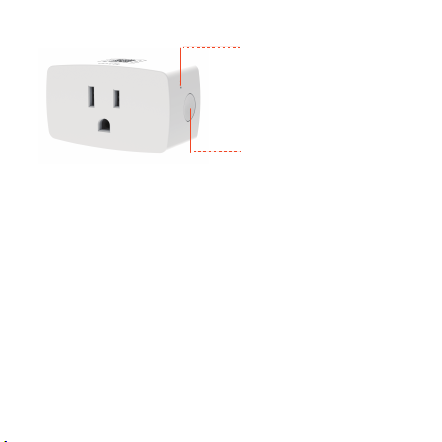
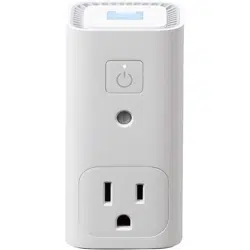
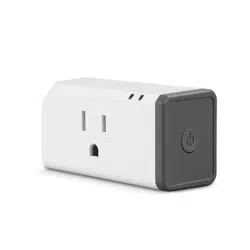
Onvis Smart Plug T20-S4AM Overview
LED Indication
• To be commissioned: Slow blinking
• Disconnected: Fast blinking
• Identify: Flashing twice
• Connected On: Solid On
• Connected Off: Solid Off
Power Button
• Long press to reset
For Apple Home:
1. Apple Thread Matter hubs include: HomePod mini, HomePod(2nd Gen), Apple TV 4K
(2nd gen), Apple TV 4K (3rd gen, 128 GB).
2. The use of an Apple Home accessory needs the follow permissions:
a. Settings>iCloud>iCloud Drive>Turn On
b. Settings>iCloud>Keychain>Turn On
For Google Home:
Google Thread Matter hubs are: Nest Hub (2nd gen), Nest Hub Max, Nest Wifi Pro(Wi-Fi
6E), Chromecast with Google TV (4K) (Also acts as a hub).
For Alexa:
Alexa Thread Matter hubs are: Echo (4th gen), Echo Hub, Echo Show 8 (3rd gen), Echo
Show 11, Echo Show 15 (2nd gen), Echo Show 21, Echo Studio, eero 6, eero 6+, eero Pro 6,
eero Pro 6E, eero Max 7.
For Samsung SmartThings:
SmartThings Thread Matter hubs are: SmartThings Hub v3, SmartThings Station.
Thread Matter hubs

Specifications
Model: T20-S4AM
Input: AC 120V~, 60Hz
Output: Max. 15A / 1800W
Wireless Connection: 802.15.4 (Thread)
Commission: Bluetooth
Dimension: 65*39*51 mm
FAQ
1. Why did I fail to set up my Onvis T20-S4AM smart plug ?
(1) Make sure Bluetooth is enabled in your iOS device.
(2) Make sure the T20 is within Bluetooth range of your iOS device.
(3) Make sure your Thread network is in place and working, and the T20 is within Thread
coverage.
(4) Input the correct MATTER setup code.
(5) Make sure the ecosystem app and hub supports Thread and Matter commissioning.
An Android device and app are required to commission to Google, Alexa and Smart-
Things hubs(as of Jan 2023).
2. No Response
(1) If the connection of T20 and the Thread network is too weak due to long distance, try
deploying a Thread router device to expand Thread network.
(2) When used in multi-ecosystems simultaneously, there might be delays or even failures.
Net Weight: 65g
Material: V0 Fire-resistant PC
Operating Temperature: 0-40℃(32°F–104°F)
Operating Humidity: 5%-95% RH
Usage: Indoor use only

Warnings
•
Indoor use only.
• Keep children away from the smart plug.
• Remove smart plug from power outlet before cleaning.
• Plug in power outlet directly. No extension power cord.
• Do NOT clean with liquid.
• Do NOT use over the electrical ratings.
• Do NOT attempt to repair the smart plug.
• Do NOT use in wet or damp areas.
• Do NOT use with devices that should not be operated unattended.
IC: 29830-S4AM
-English: This device complies with Industry Canada licence-exempt RSS standard(s).
Operation is subject to the following two conditions:
(1) This device may not cause interference, and (2) This device must accept any interference,
including interference that may cause undesired operation of the device.
To maintain compliance with RSS-102 RF Exposure guidelines, this equipment should be installed
and operated with minimum 20cm distance between the radiator and your body. Use only the
supplied antenna.
-French: Le présent appareil est conforme aux CNR d' Industrie Canada applicables aux appareils
radio exempts de licence. L'exploitation est autorisée aux deux conditions suivantes:
(1) l'appareil ne doit pas produire de brouillage, et (2) l' utilisateur de l'appareildoit accepter tout
brouillage radioélectrique subi, même si le brouillage est susceptible d'encompromettre le
fonctionnement.
Pour être conforme aux lignes directrices d’exposition RF RSS-102, cet équipement doit être
installé et exploité à une distance minimale de 20cm entre le radiateur et votre corps: n’utilisez
que l’antenne fournie.

Federal Communications Commission (FCC) compliance statement:
This device complies with part 15 of the FCC Rules. Operation is subject to the following two
conditions:
(1) This device may not cause harmful interference.
(2) This device must accept any interference received, including interference that may cause
undesired operation.
Any changes or modifications not expressly approved by the party responsible for compliance
could void the user's authority to operate the equipment.
NOTE: This equipment has been tested and found to comply with the limits for a Class B digital
device, pursuant to Part 15 of the FCC Rules. These limits are designed to provide reasonable
protection against harmful interference in a residential installation. This equipment generates,
uses and can radiate radio frequency energy and, if not installed and used in accordance with
the instructions, may cause harmful interference to radio communications. However, there is
no guarantee that interference will not occur in a particular installation.
If this equipment does cause harmful interference to radio or television reception, which can
be determined by turning the equipment off and on, the user is encouraged to try to correct
the interference by one or more of the following measures:
-Reorient or relocate the receiving antenna.
-Increase the separation between the equipment and receiver.
-Connect the equipment into an outlet on a circuit different from that to which the receiver
is connected.
-Consult the dealer or an experienced radio/TV technician for help.
To maintain compliance with FCC’s RF Exposure guidelines, this equipment should be installed
and operated with minimum 20cm distance between the radiator and your body. Use only the
FCC ID: 2ARJH-T20S4AM
supplied antenna.