User Guide
fridge with BioFresh
20220502
7088308 - 00
(S)KB(es) 43..
Contents
1 Appliance at a glance............................................ 2
1.1 Overview of the appliance and its equipment........... 2
1.2 Appliance range of use............................................. 2
1.3 Conformity................................................................ 3
1.4 Installation dimensions............................................. 3
1.5 Saving energy.......................................................... 3
1.6 Example of contents arrangement............................ 4
1.7 Smart device ........................................................... 4
2 General safety information................................... 4
3 Controls and displays........................................... 5
3.1 Home screen............................................................ 5
3.2 Operating structure................................................... 5
3.3 Navigation................................................................ 5
3.4 Display symbols....................................................... 6
3.5 Appliance options..................................................... 6
4 Putting into operation............................................ 6
4.1 Transporting the appliance....................................... 6
4.2 Installing the appliance............................................. 6
4.3 Reversing the door................................................... 7
4.4 Sliding into the row of units....................................... 12
4.5 Disposing of packaging............................................ 12
4.6 Connecting the appliance......................................... 12
4.7 Switching on the appliance....................................... 13
4.8 SmartDevice box...................................................... 13
4.9 Inserting the FreshAir filter. ...................................... 14
4.10 Setting the clean ventilation grid timer...................... 14
5 Control.................................................................... 14
5.1 Changing the temperature unit................................. 14
5.2 Child proofing........................................................... 14
5.3 SabbathMode........................................................... 15
5.4 Refrigerator compartment........................................ 15
5.5 BioFresh compartment............................................. 18
6 Maintenance........................................................... 20
6.1 Change the FreshAir filter......................................... 20
6.2 Defrosting................................................................. 20
6.3 Cleaning the ventilation grid..................................... 20
6.4 Cleaning the appliance............................................. 20
6.5 Customer service..................................................... 21
7 Malfunctions........................................................... 22
8 Messages................................................................ 23
9 Decommissioning.................................................. 23
9.1 Switching the appliance off....................................... 23
9.2 Taking the appliance out of service........................... 23
10 Disposal.................................................................. 23
10 Preparing appliance for disposal......................... 23
10 Disposing of the appliance in an environmen-
tally friendly manner.............................................. 24
The manufacturer works constantly on the further development
of all the types and models. Therefore please understand that
we have to reserve the right to make design, equipment and
technical modifications.
To get to know all the benefits of your new appliance, please
read the information contained in these instructions carefully.
The instructions apply to several models. Differences may
occur. Text relating only to specific appliances is marked with
an asterisk (*).
Instructions are marked with a , and results are marked
with a .
1 Appliance at a glance
1.1 Overview of the appliance and its
equipment
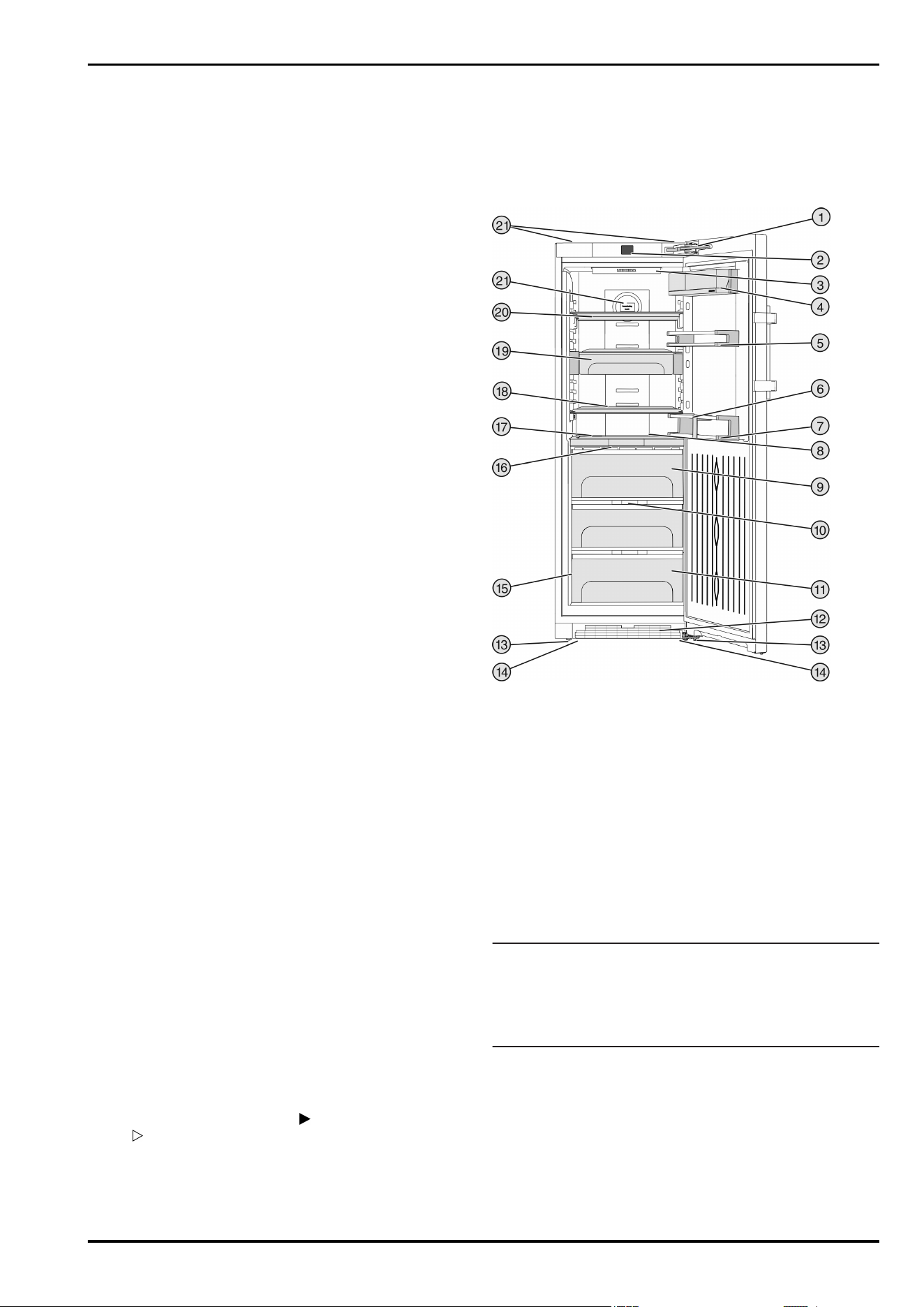
Exemplary illustration of the appliance model
Fig. 1
(1) Closing damper (12) Ventilation grid
(2) Operating and control
elements
(13) Adjusting feet
(3) LED interior lighting (14) Front transport handles,
rear transport castors
(4) Box shelf (15) Rating plate
(5) Can rack (16) BioFresh compartment
LED lighting
(6) Bottle rack (17) Adjustable bottle shelf
(7) Bottle shelf (18) Shelf
(8) LED interior lighting (19) VarioSafe
(9) Biofresh compartment,
Drysafe
(20) Shelf, can be split
(10) Fruit & Vegetable safe
cover
(21) Retainer for fresh air filter
(11) Fruit & Vegetable safe (22) Rear transport handles
Note
u
Shelves, drawers and baskets are arranged for optimum
energy efficiency when the appliance is delivered. Changing
how the shelves, for example, are inserted in the fridge
compartment does not have any impact on energy
consumption.
1.2 Appliance range of use
Intended use
The appliance is only suitable for cooling food
products in a domestic or household-like envi-
ronment. This includes, for example, use:
-
in staff kitchens, bed and breakfast establish-
ments,
Appliance at a glance
2 * Depending on model and options
-
by guests in country houses, hotels, motels
and other accommodation,
-
for catering and similar services in the whole-
sale trade.
The appliance is not suitable for freezing food;
The appliance is not suitable as a built-in unit.
All other types of use are not permitted.
Foreseeable misuse
The following applications are expressly
forbidden:
-
Storing and refrigerating medicines, blood
plasma, laboratory preparations or similar
substances and products based on the
Medical Device Directive 2007/47/EC
-
Use in outdoor areas with very high humidity
-
Use in areas at risk of explosions
Misusing the appliance may lead to damage to
the goods stored or they may spoil.
Climate classifications
Depending on the climate classification the
appliance is designed to operate in restricted
ambient temperatures. The climate classifica-
tion applying to your appliance is printed on the
rating plate.
Note
u
Keep to the specified ambient temperatures
in order to guarantee that the appliance works
properly.
Climate classi-
fication
for ambient temperatures of
SN 10 °C to 32 °C
N 16 °C to 32 °C
ST 16 °C to 38 °C
T 16 °C to 43 °C
1.3 Conformity
The refrigerant circuit has been tested for leaks. This
device complies with the applicable safety regulations and
with the directives 2014/35/EU, 2014/30/EU, 2009/125/EC,
2011/65/EU, 2010/30/EU and 2014/53/EU.
The full text of the EU Declaration of Conformity is available on
the following website: www.Liebherr.com
The BioFresh compartment meets the requirements of a cold
storage compartment as set out in DIN EN 62552:2020.
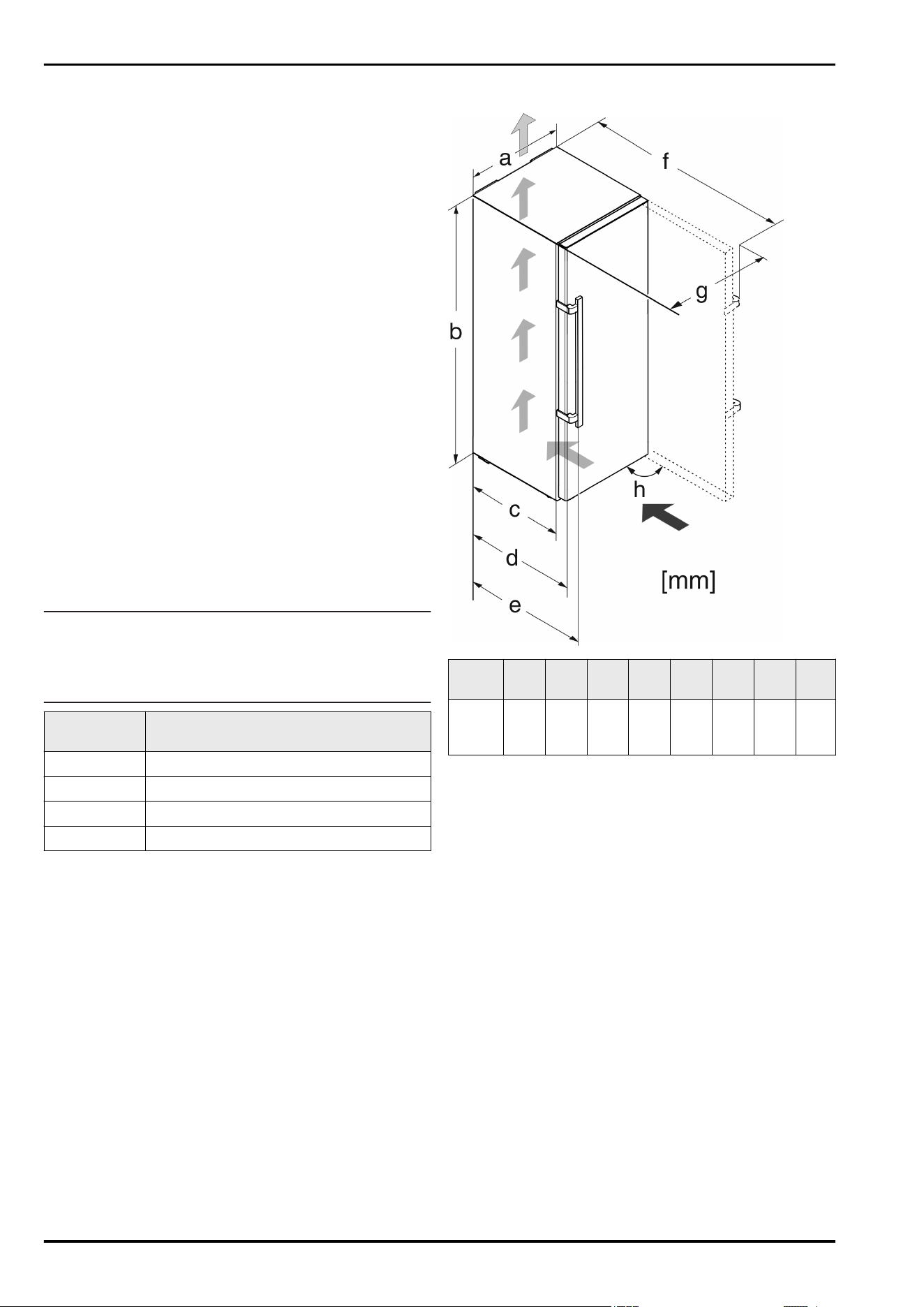
1.4 Installation dimensions
Fig. 2
Model a
[mm]
b
[mm]
c
[mm]
d
[mm]
e
[mm]
f
[mm]
g
[mm]
h [°]
(S)KB(
es)
43..
600 1850
600
x
665
x
709
x
1223
x
640 90
x
When using wall spacers, the dimensions increase by 15 mm
(see 4.2 Installing the appliance) .
1.5 Saving energy
-
Pay attention to good ventilation. Do not cover ventilation
holes or grids.
-
Always keep the fan air slits clear.
-
Do not install the appliance in direct sunlight, next to an
oven, radiator or similar.
-
Energy consumption depends on the installation conditions,
e.g. the ambient temperature (see 1.2 Appliance range of
use) . A warmer ambient temperature can increase the
energy consumption.
-
Open the appliance for as short a time as possible.
-
The lower the temperature is set the higher the energy
consumption.
-
Sort your food: home.liebherr.com/food.
-
Keep all food properly packed and covered. This prevents
frost from forming.
-
Only take food out for as long as necessary so that it doesn’t
warm up too much.
-
Inserting warm food: allow to cool down to room temperature
first.
-
Use the holiday function if you intend to be away for an
extended period (see 5.4.4 Holiday mode) .
Appliance at a glance
* Depending on model and options 3
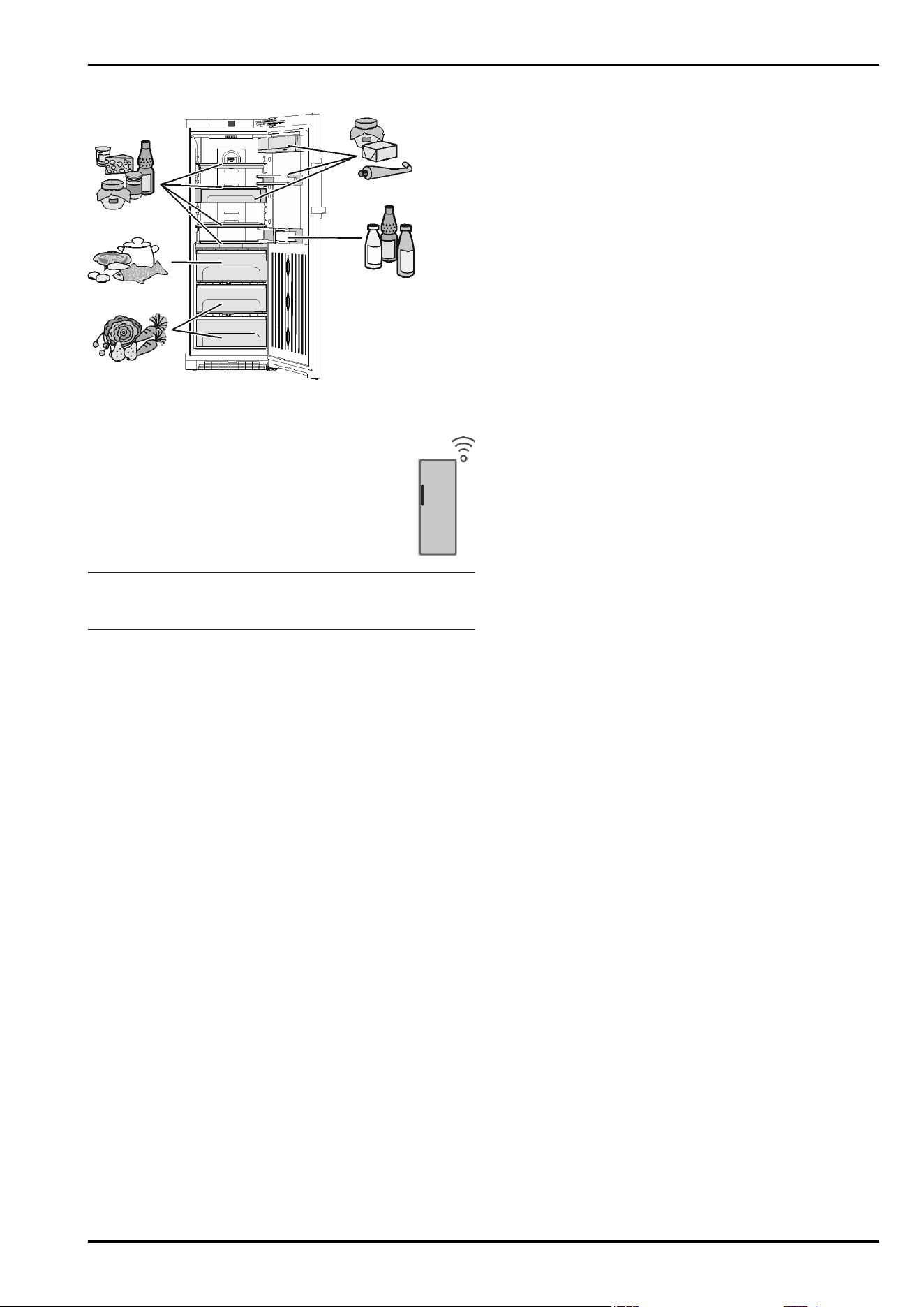
1.6 Example of contents arrangement
Fig. 3
1.7 Smart device
The appliance is ready for integration into a smart
home and for extended services. With a SmartDe-
vice Box, you can activate this and other options.
This is activated via the MyLiebherr customer
portal.
Note
The SmartDevice Box is available for purchase from the
Liebherr Household Store (home.liebherr.com).
You will find more information about availability and prerequi-
sites and the individual options on the website, www.smartde-
vice.liebherr.com.
2 General safety information
Danger for the user:
-
This device can be used by children and
people with impaired physical, sensory or
mental abilities or with a lack of experi-
ence and knowledge provided that they are
supervised or have received instruction in
the safe use of this device, and about the
resulting hazards. Children must not play
with this appliance. Cleaning and user main-
tenance work must not be carried out by chil-
dren without adult supervision. Children aged
between 3 and 8 are allowed to load and
unload the appliance. Children below the age
of 3 must be kept away from the appliance
unless they are under continuous adult super-
vision.
-
When disconnecting the appliance from the
supply, always take hold of the plug. Do not
pull the cable.
-
In the event of a fault pull out the mains plug
or deactivate the fuse.
-
Do not damage the mains power cable. Do
not operate the appliance with a defective
mains power cable.
-
Only customer service or other specially
trained staff may repair or perform other oper-
ations on the appliance.
-
Only assemble, connect and dispose of the
appliance according to the instructions.
-
Please keep these instructions in a safe place
and pass them on to any subsequent owners.
Fire hazard:
-
The coolant used (information on the model
plate) is eco-friendly but also flammable. Any
leaking coolant may ignite.
•
Do not damage the refrigerant circuit pipes.
•
Do not handle ignition sources inside the
appliance.
•
Do not use electrical appliances inside the
appliance (e.g. steam cleaners, heaters, ice
cream makers, etc.).
•
If the refrigerant leaks: remove any naked
flames or ignition sources from the vicinity
of the leakage point. Properly air the room.
Inform customer services.
-
Do not store explosives or sprays using
combustible propellants such as butane,
propane, pentane, etc. in the appliance. To
identify these spray cans, look for the list
of contents printed on the can, or a flame
symbol. Gases possibly escaping may ignite
due to electrical components.
-
Keep burning candles, lamps and other items
with naked flames away from the appliance so
that they do not set the appliance on fire.
-
Please be sure to store alcoholic drinks or
other packaging containing alcohol in tightly
closed containers. Any alcohol that leaks out
may be ignited by electrical components.
Danger of tipping and falling:
-
Do not misuse the plinth, drawers, doors etc.
as a step or for support. This applies particu-
larly to children.
Danger of food poisoning:
-
Do not consume food which has been stored
too long.
Danger of frostbite, numbness and pain:
-
Avoid prolonged skin contact with cold
surfaces or refrigerated/frozen goods or take
protective measures, e.g wear use gloves.
Danger of injury and damage:
General safety information
4 * Depending on model and options
-
Hot steam can lead to injury. Do not use elec-
trical heating or steam cleaning equipment,
open flames or defrosting sprays to defrost.
-
Do not use sharp implements to remove the
ice.
Risk of crushing:
-
Do not hold the hinge when opening and
closing the door. Fingers may get caught.
Symbols on the appliance:
The symbol can be located on the
compressor. It refers to the oil in the
compressor and indicates the following
danger: Swallowing or inhaling can be fatal.
This is only relevant for recycling. There is no
danger in normal operation.
This symbol is found on the compressor and
indicates the danger of flammable materials.
Do not remove the sticker.
A sticker to this effect may be applied to
the rear of the appliance. It refers to the
foam-padded panels in the door and/or the
housing. This is only relevant for recycling. Do
not remove the sticker.
Please observe the specific information in
the other sections:
DANGER identifies a situation involving direct
danger which, if not obviated, may
result in death or severe bodily
injury.
WARNING identifies a dangerous situation
which, if not obviated, may result in
death or severe bodily injury.
CAUTION identifies a dangerous situation
which, if not obviated, may result in
minor or medium bodily injury.
NOTICE identifies a dangerous situation
which, if not obviated, may result in
damage to property.
Note It contains useful instructions and
tips.
3 Controls and displays
3.1 Home screen
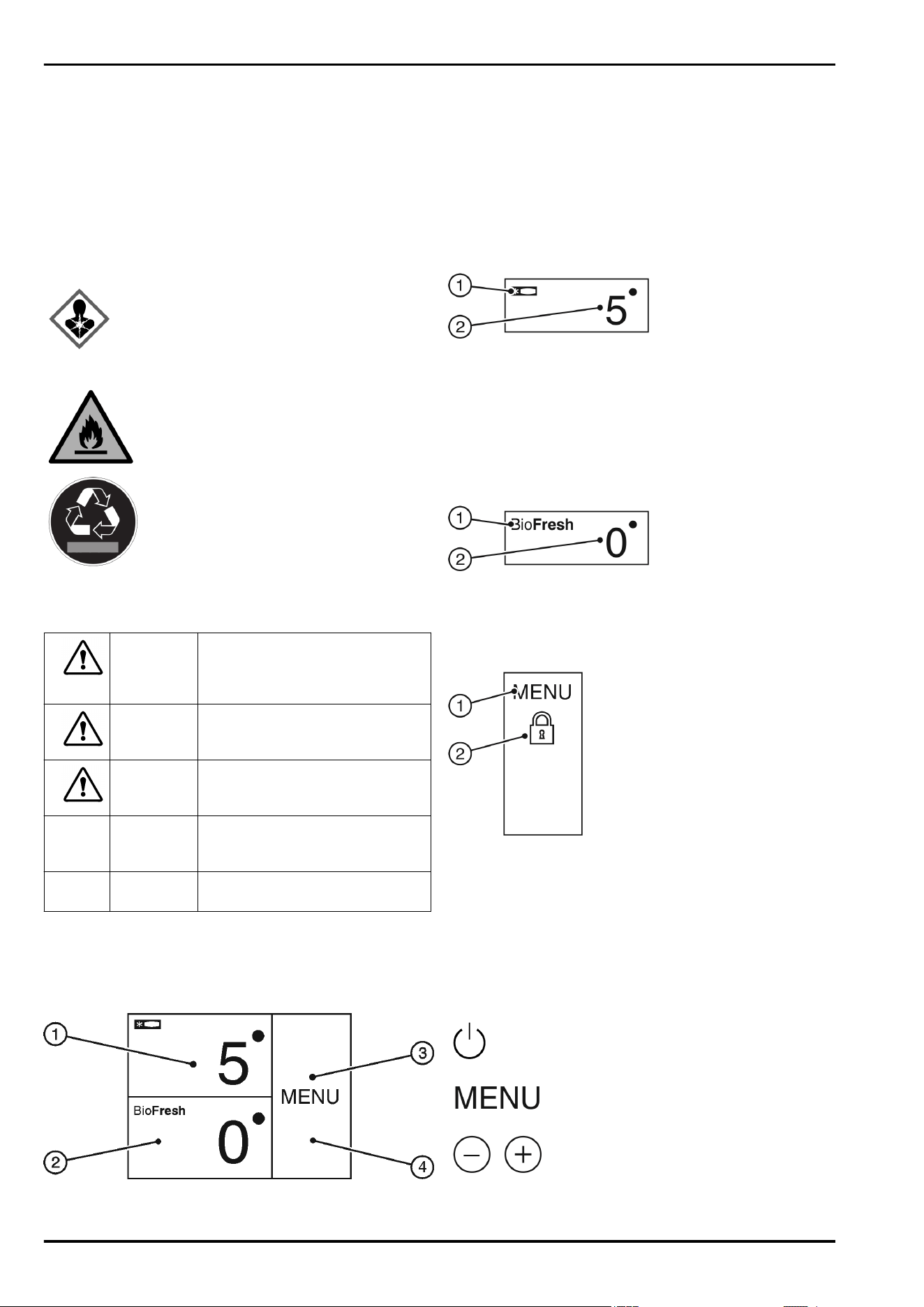
Fig. 4
(1) Fridge compartment
field
(3) Menu field
(2) BioFresh field (4) Screen
The home screen is the first screen the user sees. All settings
can be made from there.
All functions can be called up by touching the screen and
values can be changed.
3.2 Operating structure
Fridge compartment field
Fig. 5
(1) Fridge compartment
symbol
(2) Fridge compartment
temperature display
The fridge compartment temperature is displayed in the fridge
compartment field.
The following settings can be entered:
-
Temperature settings
-
Switch off appliance. Screen remains functional.
BioFresh field
Fig. 6
(1) BioFresh symbol (2) BioFresh temperature
display
Setting the Biofresh temperature
(see 5.5 BioFresh compartment) .
Menu field
Fig. 7
(1) Main menu (2) Option selected
The menu field gives access to the appliance options and
settings. Selected options are also displayed.
3.3 Navigation
Touch the menu to access the individual options. An audible
signal sounds after confirming an option or a setting. The
display switches to the home screen.
The appliance is operated using the following symbols:
Standby:
Switches the appliance or tempera-
ture zone on.
Menu:
Calls up options.
Minus / Plus:
Changing settings (e.g. adjusting
temperatures).
Controls and displays
* Depending on model and options 5
Left/right navigation arrow:
Selects options and navigates
through the menu.
You can scroll through the individual
options using the navigation arrows.
The first option is displayed again
after the last one.
Back:
Cancels the selection.
The display switches to the next
higher level or to the home screen
OK:
Confirms the selection.
After confirmation the display
switches to the home screen.
ON / OFF, START / STOP
Starts/ stops options.
After selecting or cancelling an option
the display switches to the home
screen.
RESET:
Resets timer.
Access to customer service
Note
If no selection is made after 1 minute the display switches to
the home screen.
3.4 Display symbols
Display symbols provide information on the current appliance
status:
Up arrows:
The temperature increases.
Down arrows:
The temperature reduces.
Standby:
The appliance or temperature zone is
switched off.
Messages:
There are active error messages and
reminders.
3.5 Appliance options
You can select or set the following options; explanations and
setting options, (see 5 Control) :
Symbol Option
SuperCool
x
SabbathMode
Child safety device
x
Holiday function
Temperature unit
BioFresh
x
If the option is selected, the relevant symbol is displayed in
the menu field.
The symbol disappears if the option ends or is disabled.
4 Putting into operation
4.1 Transporting the appliance
u
Transport the appliance only in suitable packaging.
u
Transport the appliance upright.
u
Do not transport the appliance on your own.
4.2 Installing the appliance
WARNING
Fire hazard due to dampness!
If live parts or the mains lead become damp this may cause
short circuits.
u
The appliance is designed for use in enclosed areas. Do
not operate the appliance outdoors or in areas where it is
exposed to splash water or damp conditions.
WARNING
Improper use!
Fire. If a mains cable/plug comes into contact with the back
of the appliance, the mains cable/plug can be damaged by
appliance vibrations and this may result in a short circuit.
u
Stand the appliance so that it is not touched by connectors
or main cables.
u
Do not connect any appliances to sockets in the area of the
back of the appliance.
u
Multi-sockets/power distributors and other electronic appli-
ances (such as halogen transformers) may not be placed
and operated at the back of appliances.
WARNING
Leaking coolant and oil!
Fire. The coolant contained in the appliance is eco-friendly,
but also flammable. The oil contained in the appliance is flam-
mable. Escaping coolant and oil can ignite if the concentration
is high enough and in contact with an external heat source.
u
Do not damage the pipelines of the coolant circuit and the
compressor.
WARNING
Fire hazard and danger of damage!
u
Do not place appliances emitting heat e.g. microwaves,
toasters etc. on the appliance!
Putting into operation
6 * Depending on model and options
NOTICE
Covered vents!
Damage. Appliance can overheat, which can reduce the
service life of various parts of the appliance and lead to opera-
tional impairments.
u
Always make sure there is good ventilation.
u
Always keep vents or ventilation grids in the appliance
housing and in the kitchen furniture (fully integrated appli-
ance) unobstructed.
u
Always keep the fan air vents unobstructed.
If your appliance is not a side-by-side (SBS) appliance:*
NOTICE
Risk of damage due to condensate!*
u
Do not install the appliance directly alongside a further
refrigerator/freezer.
Note
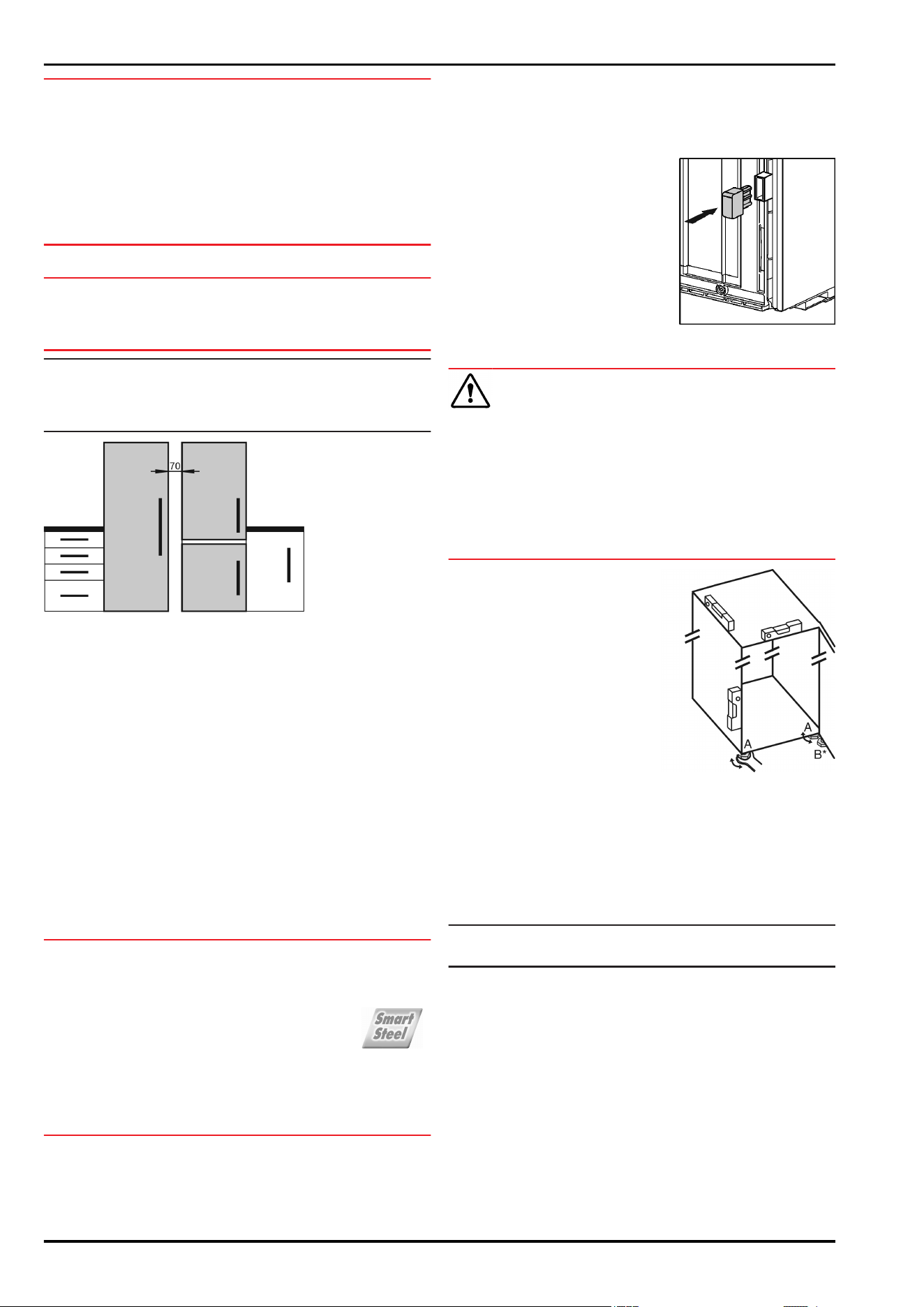
If you have several appliances next to one another, leave a
gap of 70mm between appliances. Otherwise condensation will
build up between the units.*
Fig. 8
*
q
Before you connect the appliance, report any damage imme-
diately to the delivery company.
q
The floor of the installation site must be horizontal and even.
q
Do not install the appliance in direct sunlight, next to an
oven, radiator or similar.
q
Install the appliance with the rear panel up against the wall
and always use the supplied wall spacers (see below).
q
Only ever move the appliance when it is empty.
q
The surface supporting the appliance must be at the same
level as the surrounding floor.
q
Do not install the appliance on your own.
q
The more coolant there is in the appliance, the larger the
room in which the appliance is installed must be. If the room
is too small, any leak may create a flammable mixture of gas
and air. For each 8 g of coolant the installation space must
be at least 1 m
3
. Information on the coolant is on the model
plate inside the appliance.
u
Remove the protective film from the outside of the appli-
ance.*
NOTICE
Risk of damage from stainless steel care products!
The stainless steel doors and stainless steel side panels
are treated with a premium surface finish.
Stainless steel care products attack these surfaces.
u
Only use a soft, clean cloth to wipe down finished door
and side panel surfaces and painted door and side
panel surfaces. To remove heavy dirt, use a little water
or neutral detergent. Alternatively, you can use a micro-fibre
cloth.
u
Remove the protective film from the decorative trims.
u
Remove all transit supports.
Spacers must be used to achieve the declared energy
consumption and to prevent condensation in the event of high
surrounding humidity. This increases the appliance depth by
about 15 mm. The appliance will work perfectly well without the
spacers but will have a slightly higher energy consumption.
u
If your appliance comes with wall
spacers, mount these on the
back of the appliance, bottom left
and right.
u
Dispose of packaging material (see 4.5 Disposing of pack-
aging) .
CAUTION
Risk of injury or damage from the appliance tipping or the door
falling open!
If the additional adjustable foot on the base support is not
correctly positioned on the floor, there is a risk of the door
falling open or the appliance tipping. This can lead to injury or
property damage.
u
Unscrew the additional adjustable foot on the support until it
reaches the floor.
u
Then turn it another 90°.
u
Align the appliance so that
it stands firmly and on a
level by applying the accom-
panying spanner to the adjust-
able-height feet (A) and using
a spirit level.
u
Then support the door: Use saddle wrench SW10 to
unscrew the base on mounting block (B) until it makes
contact with the ground, then continue turning it for a further
90°.
When a Side-by-Side appliance (S…) is fitted together with
a second appliance (as a SBS combination):*
u
Proceed according to the Side-by-Side combined fridge-
freezer installation instructions. (Accessories bag of the SBS
freezer/appliance with freezer compartment)*
Note
u
Clean the appliance (see 6.4 Cleaning the appliance) .
If the appliance is installed in a very damp environment,
condensate may form on the outside of the appliance.
u
Always see to good ventilation at the installation site.
4.3 Reversing the door
If necessary, you can change the way the door opens:
Ensure that the following tools are available:
q
Torx® 25 (T25)
q
Torx® 15 (T15)
q
Slotted screwdriver
q
Open-ended wrench SW10
q
Spirit level
Putting into operation
* Depending on model and options 7
q
Open-ended wrench supplied with the T25 tool
q
If necessary, a cordless screwdriver
q
Get a stepladder if necessary
q
If necessary, a second person for assembly
NOTICE
Risk of condensation damage for Side-by-Side appliances!*
Certain appliances can be set up as Side-by-Side combina-
tions (two appliances next to each other).
If your appliance is a Side-by-Side (SBS) appliance:
u
Set up the SBS combination in accordance with the
enclosed document.
If the positioning of the devices is stipulated:
u
Do not change the door hinges over.
4.3.1 Remove the soft stop mechanism
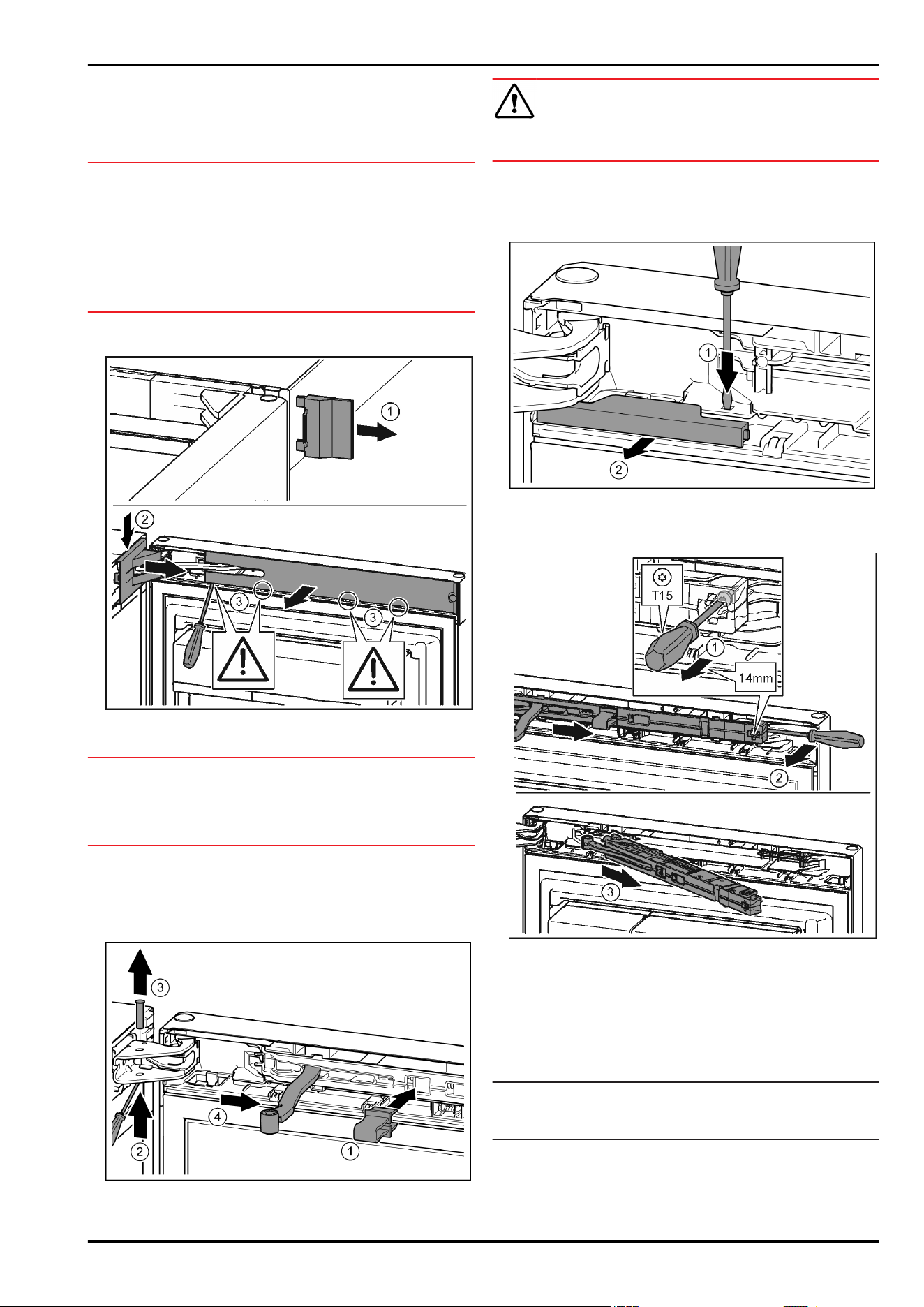
Fig. 9
u
Open the door.
NOTICE
Risk of damage!
If the door seal is damaged, the door may fail to close properly
and the cooling will be inadequate.
u
Do not damage the door seal with the screwdriver!
u
Remove the outer cover.
Fig. 9 (1)
u
Disengage and release the bearing bracket cover. Remove
the bearing bracket cover.
Fig. 9 (2)
u
Unlatch the panel with a slotted screwdriver and swivel it to
one side.
Fig. 9 (3)
Fig. 10
CAUTION
Crushing hazard by joint folding up!
u
Engage safety device.
u
Engage the locking device in the opening.
Fig. 10 (1)
u
Unscrew the bolt with a screwdriver.
Fig. 10 (2)
u
Remove the bolt in an upward direction.
Fig. 10 (3)
u
Turn the hinge in the direction of the door.
Fig. 10 (4)
Fig. 11
u
Press the tab with the slotted screwdriver.
Fig. 11 (1)
u
Pull cover out of the catch mechanism.
Fig. 11 (2)
Fig. 12
u
Undo the soft stop mechanism screw with a T15 screwdriver
approx. 14 mm.
Fig. 12 (1)
u
Insert a screwdriver behind the soft stop mechanism on the
handle side and rotate forwards.
Fig. 12 (2)
u
Remove the soft stop mechanism.
Fig. 12 (3)
4.3.2 Remove the door
Note
u
Remove any food from the door racks before removing the
door, so that no food falls out.
Putting into operation
8 * Depending on model and options
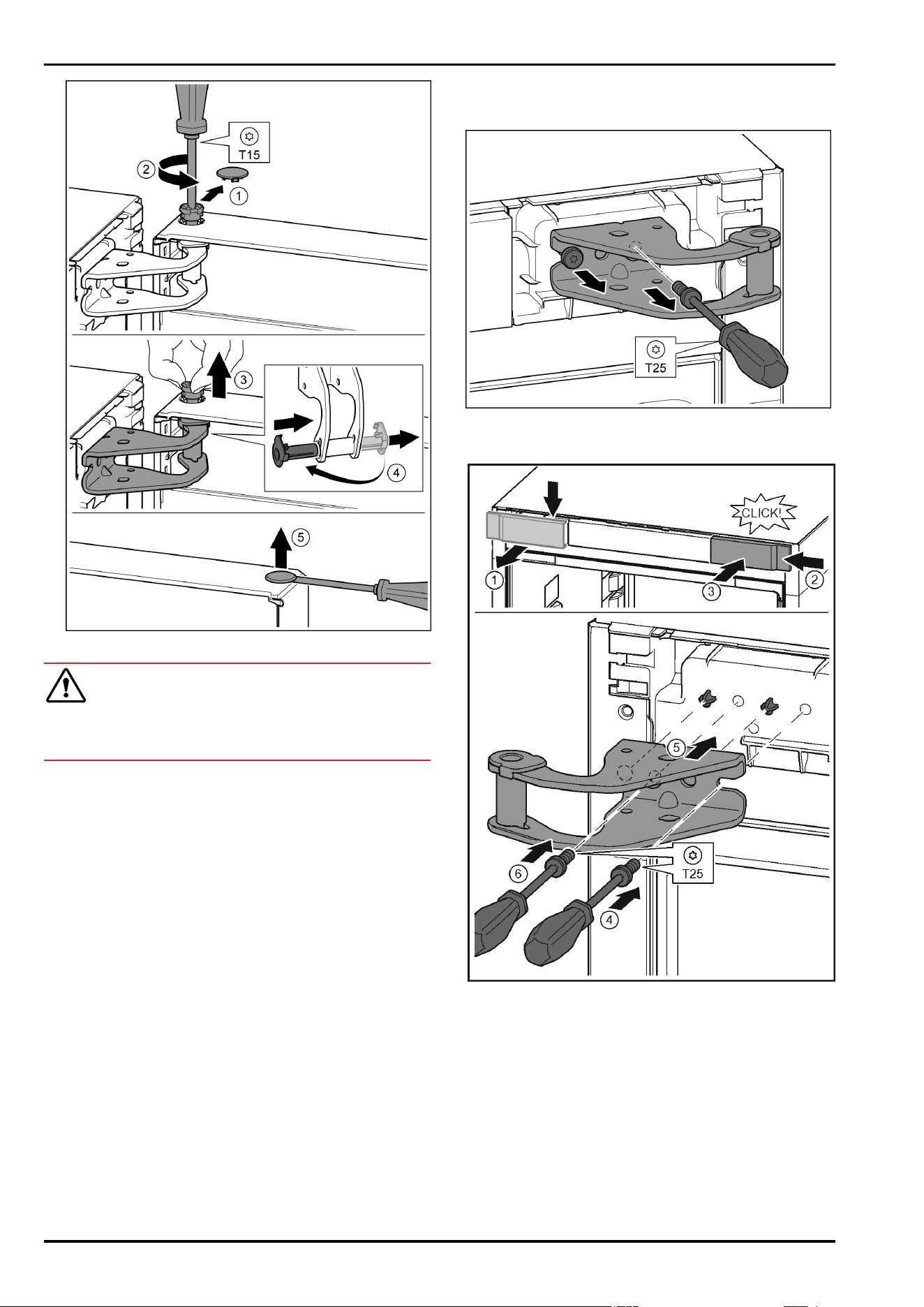
Fig. 13
CAUTION
Risk of injury if the door tips!
u
Take good hold of the door.
u
Set down the door carefully.
u
Carefully remove the protective cover.
Fig. 13 (1)
u
Undo the bolt a little with a T15 screwdriver.
Fig. 13 (2)
u
Hold the door and remove the bolts with your fingers.
Fig. 13 (3)
u
Pull the bearing bush out of the guide. Insert from the other
side and click into place.
Fig. 13 (4)
u
Lift the door and set it aside.
u
Carefully lift the plugs out of the door bearing bush with a
slotted screwdriver and remove.
Fig. 13 (5)
4.3.3 Moving the upper bearing parts to the
other side
Fig. 14
u
Remove both screws with the T25 screwdriver.
u
Lift and remove the bearing bracket.
Fig. 15
u
Release the cover and remove from the side.
Fig. 15 (1)
u
Rotate the cover 180° and clip onto the other side from the
right.
Fig. 15 (2)
u
Click the cover into place.
Fig. 15 (3)
u
Position the screw with a T25 screwdriver.
Fig. 15 (4)
u
Position the upper bearing bracket.
Fig. 15 (5)
w
Place the pins in the provided screw holes.
u
Tighten the screw.
Fig. 15 (4)
u
Insert the screw with a T25 screwdriver and tighten.
Fig. 15 (6)
Putting into operation
* Depending on model and options 9
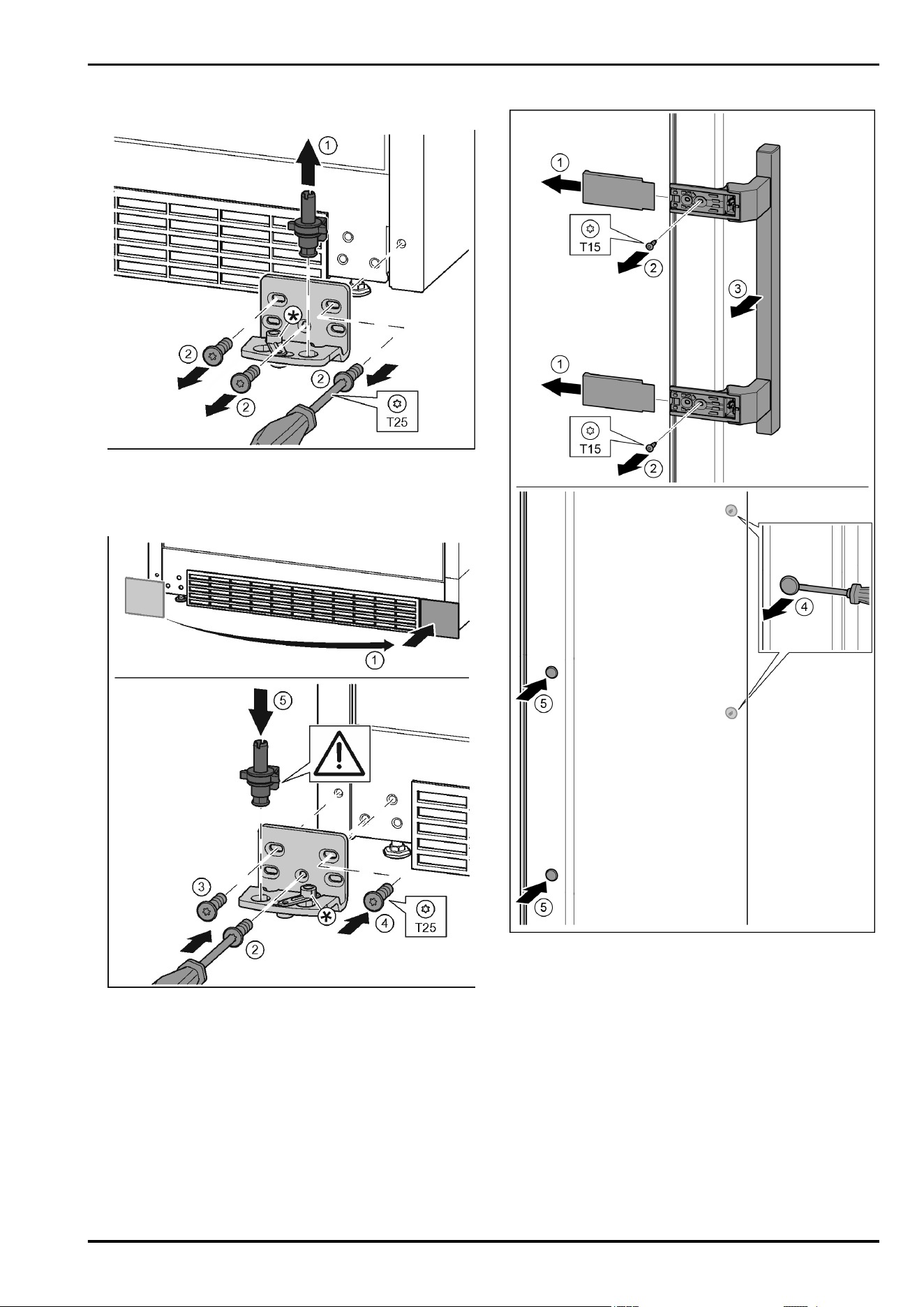
4.3.4 Moving the lower bearing parts to the
other side
Fig. 16
u
Lift the bearing pin completely upward and remove.
Fig. 16 (1)
u
Undo the screws with a T25 screwdriver and remove the
bearing bracket
Fig. 16 (2)
Fig. 17
u
Remove the cover and fix it on the other side.
Fig. 17 (1)
u
Place the bearing bracket on the other side and screw in
with the aid of a T25 screwdriver. Start with screw 2 at the
bottom in the middle.
Fig. 17 (2)
u
Screw in screws 3 and 4.
Fig. 17 (3, 4)
u
Insert the bearing pin completely. Make sure that the catch
mechanism is pointing to the rear.
Fig. 17 (5)
4.3.5 Moving the handles to the other side
Fig. 18
u
Pull off the cover.
Fig. 18 (1)
u
Remove the screws with the T15 screwdriver.
Fig. 18 (2)
u
Remove the handle.
Fig. 18 (3)
u
Carefully lift up the side plugs with a slotted screwdriver and
pull them out.
Fig. 18 (4)
u
Insert the plugs again on the other side.
Fig. 18 (5)
Putting into operation
10 * Depending on model and options
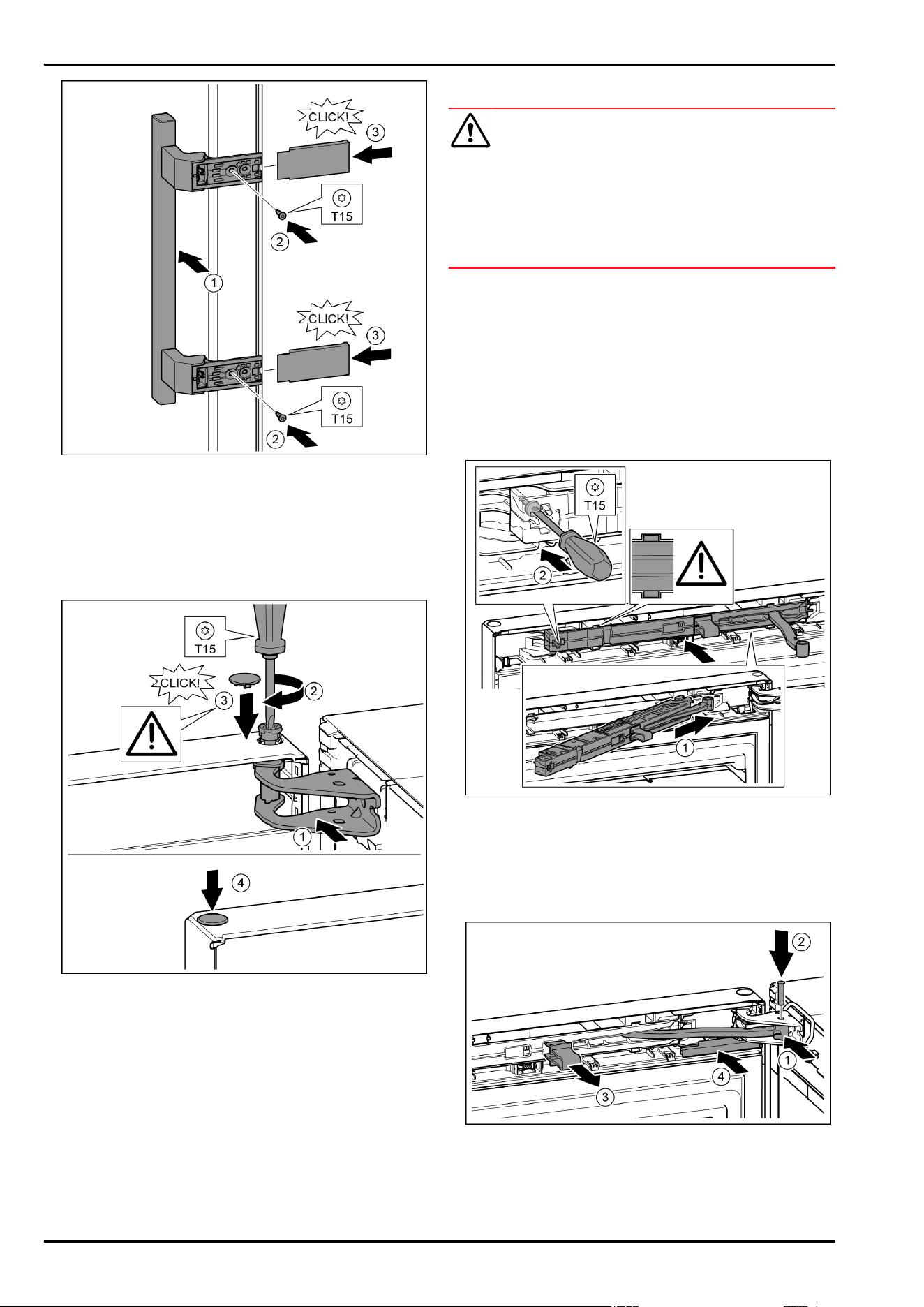
Fig. 19
u
Position the handle on the other side.
Fig. 19 (1)
w
The screw holes must be exactly above each other.
u
Tighten the screws with the T15 screwdriver.
Fig. 19 (2)
u
Position the covers on the side and push in.
Fig. 19 (3)
w
Ensure that it clicks into place.
4.3.6 Fitting the door
Fig. 20
u
Place the door on the lower bearing pins.
u
Align the top of the door with opening in the bearing bracket.
Fig. 20 (1)
u
Insert the bolt and tighten with a T15 screwdriver.
Fig. 20 (2)
u
Fit the protective cover to protect the door: Insert the protec-
tive cover and check that it is attached to the door. If not,
insert the bolt fully.
Fig. 20 (3)
u
Insert the plugs.
Fig. 20 (4)
4.3.7 Aligning the door
WARNING
Risk of injury due to the door dropping out!
If the bearing parts are not screwed into place firmly enough,
the door may drop out. This may lead to severe injuries. What is
more, the door may not close and therefore the appliance may
fail to cool properly.
u
Screw the turn hinges firmly into place with 4 Nm.
u
Check all of the screws and retighten if necessary.
u
Align the doors flush with the appliance housing using the
two oblong holes in the lower bearing bracket if needed. To
do this undo the middle screw in the bottom bearing bracket
with the T25 tool supplied. Undo the remaining screws a
little with the T25 tool or with a T25 screwdriver and align
using the slotted holes.
u
Support the door: Take off the adjustable foot on the bearing
bracket using the open-ended wrench SW10 until it comes
into contact with the floor, then turn an additional 90°.
4.3.8 Fit the soft stop mechanism
Fig. 21
u
Slide the soft stop mechanism on the bearing bracket side at
an angle into the slot as far as the limit stop.
Fig. 21 (1)
u
Slide the unit in fully.
w
The unit is positioned correctly when the rib on the soft stop
mechanism is in the guide in the housing.
u
Tighten the screw with the T15 screwdriver.
Fig. 21 (2)
Fig. 22
The door is open 90°.
u
Turn the hinge in the bearing bracket.
Fig. 22 (1)
u
Insert the bolt in the bearing bracket and hinge. Make sure
that the catch mechanism is sitting correctly in the groove.
Fig. 22 (2)
Putting into operation
* Depending on model and options 11
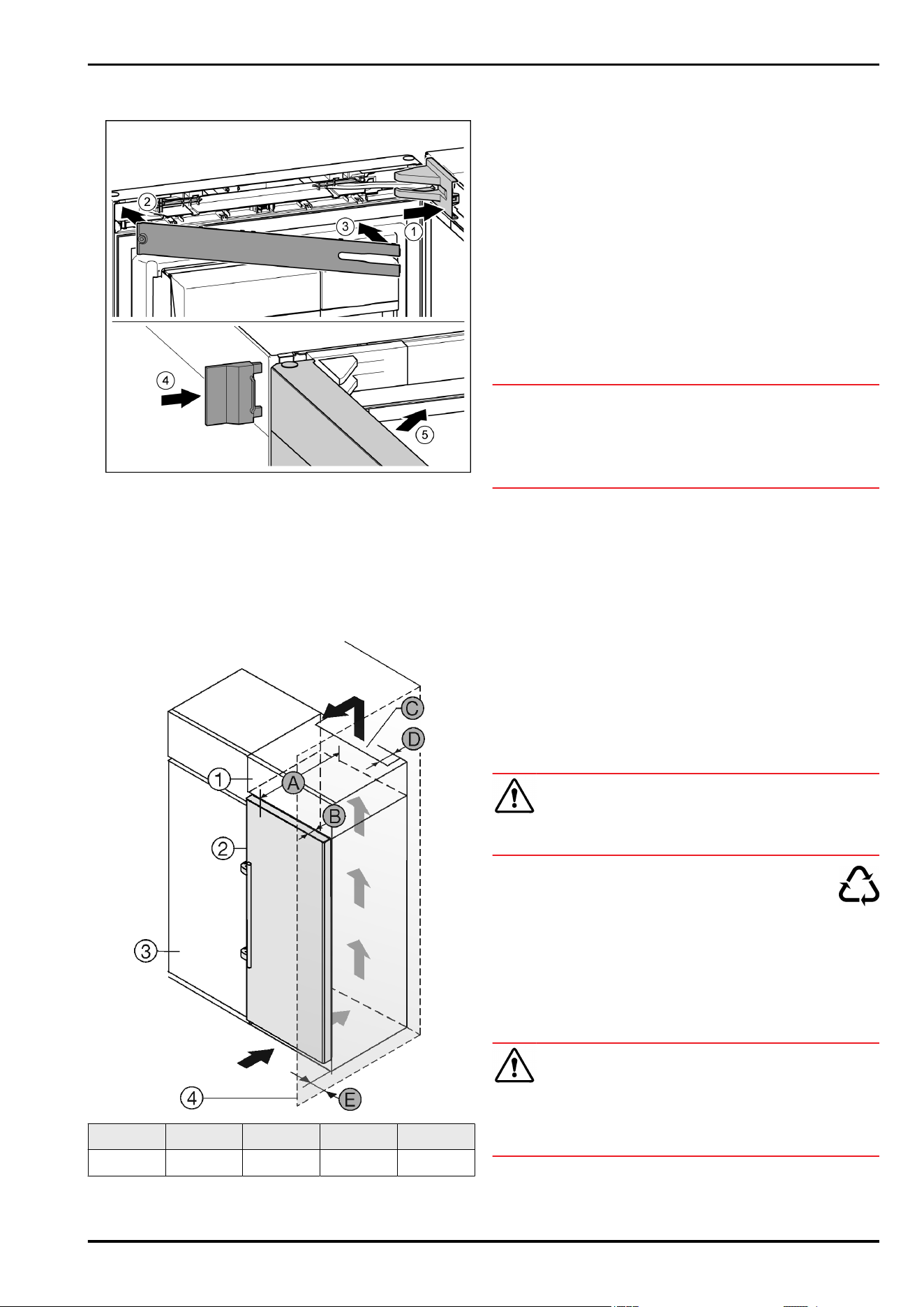
u
Remove the locking device.
Fig. 22 (3)
u
Slide on the cover.
Fig. 22 (4)
Fig. 23
u
Position the bearing bracket and engage. If necessary push
apart carefully.
Fig. 23 (1)
u
Position the panel.
Fig. 23 (2)
u
Swing in the panel and click into place.
Fig. 23 (3)
u
Slide on the external cover.
Fig. 23 (4)
u
Close the upper door.
Fig. 23 (5)
4.4 Sliding into the row of units
Fig. 24
A [mm] B [mm]
C [cm
2
]
D [mm] E [mm]
665
x
65 min. 300 min. 50 min. 46
x
If using wall spacers, add 15 mm (see 4.2 Installing the appli-
ance) .
These dimensions apply to an opening angle of 90 °. Clear-
ances vary depending on the opening angle.
Please contact Customer Services to purchase a kit to limit
the door opening angle to 90° for appliances with soft-closing
devices.
The appliance can be built into kitchen units. A top cupboard
Fig. 24 (2)
can be added above the appliance in order to bring
the appliance
Fig. 24 (1)
up to the height of the fitted kitchen
units.
When inserting the appliance into the kitchen unit, there must
be a circumferential distance of at least 5cm.
If the appliance is positioned directly next to a kitchen cabinet
Fig. 24 (3)
, a distance of at least 5 cm from the appliance
is necessary. The appliance must protrude by the depth
Fig. 24 (B)
from the front of the cabinet so that the doors can be
opened fully. The appliance may protrude further depending on
the depth of the kitchen cabinets and whether wall spacers are
used.
NOTICE
Danger of overheating due to insufficient air ventilation!
The compressor may be damaged if there is insufficient air
ventilation.
u
Take care to ensure adequate air ventilation.
u
Observe the ventilation requirements.
Ventilation requirements:
-
There are spacer fins at the back of the appliance to provide
adequate ventilation. Make sure these do not end up in
recesses or openings.
-
At the back of the top cabinet, there must be an air outlet
shaft with depth
Fig. 24 (D)
, spanning the entire width.
-
The ventilation shaft
Fig. 24 (C)
must be observed under the
ceiling.
-
The wider the ventilation clearance, the more efficiently the
appliance will run.
If the appliance is installed with the hinges next to a wall
Fig. 24 (4)
, the distance
Fig. 24 (E)
between the appliance and
the wall must be observed. This is how far the handle protrudes
when the door is open.
4.5 Disposing of packaging
WARNING
Danger of suffocation due to packing material and plastic film!
u
Do not allow children to play with packing material.
The packaging is made of recyclable materials:
-
corrugated board/cardboard
-
expanded polystyrene parts
-
polythene bags and sheets
-
polypropylene straps
-
nailed wooden frame with polyethylene panel*
u
Take the packaging material to an official collecting point.
4.6 Connecting the appliance
WARNING
Failure to connect properly
Fire hazard.
u
Do not use an extension cable.
u
Do not use distributor blocks.
Putting into operation
12 * Depending on model and options
NOTICE
Failure to connect properly
Damage to the electronics.
u
Do not connect the appliance to a stand-alone inverter, e.g.
solar power systems and petrol generators.
u
Do not use an energy saving plug.
Note
Only use the power connection lead supplied.
u
A longer power connection lead can be ordered from
Customer Service.
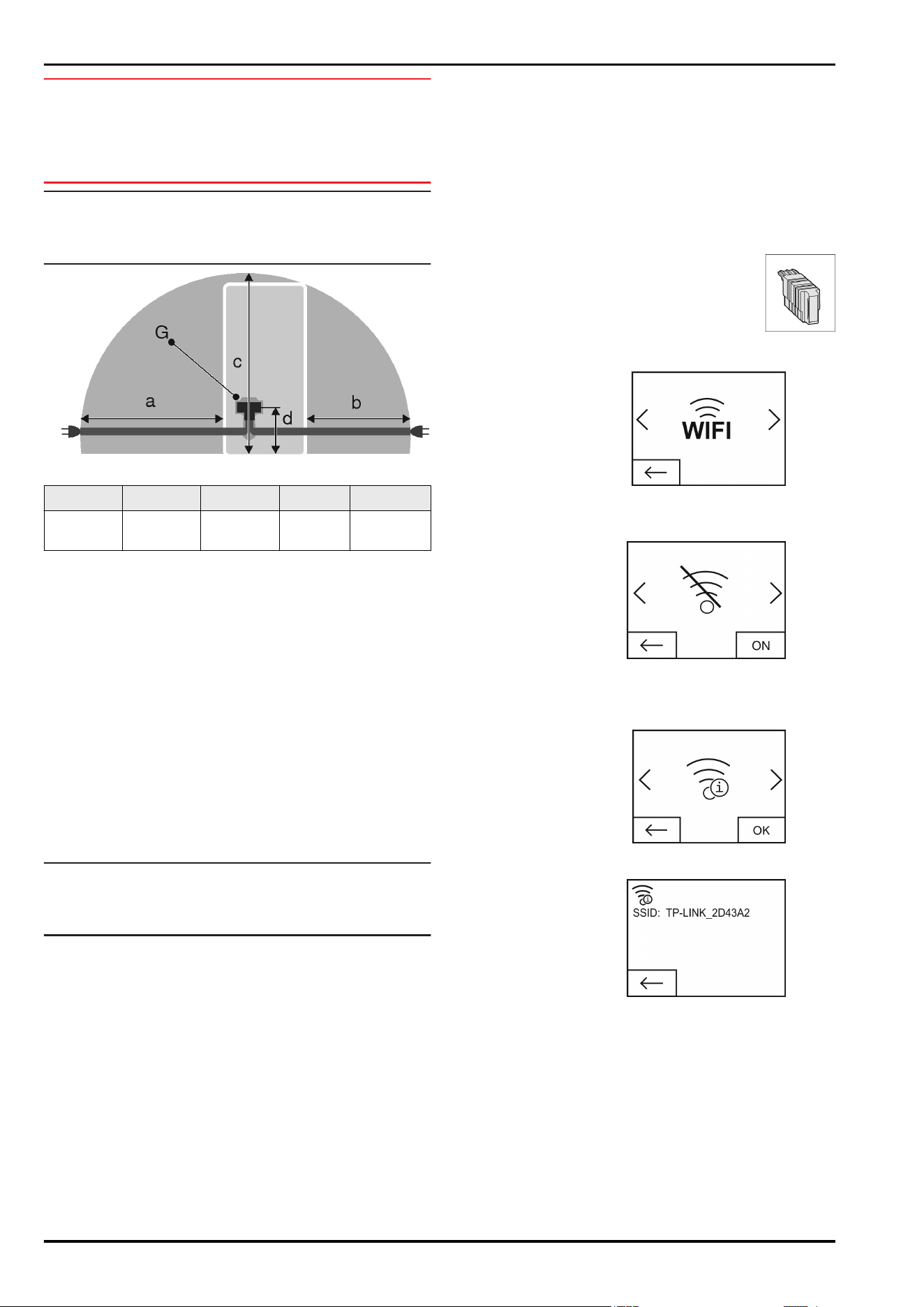
Fig. 25
a b c d G
~ 1800 mm ~ 1400 mm ~ 2100 mm ~ 200 mm Appliance
plugs
Ensure that the following conditions are met:
- The type of current and voltage at the installation site corre-
spond to the information on the model plate (see 1 Appli-
ance at a glance) .
- The socket is earthed according to the regulations and
fused.
- The fuse tripping current is between 10 and 16 A.
- The socket is easily accessible.
- The socket is outside the back of the appliance area in the
specified area
Fig. 25 (a, b, c)
.
u
Check the electrical connection.
u
Insert the appliance plug
Fig. 25 (G)
into the back of the
appliance. Ensure that it clicks into place.
u
Connect the power plug to the power supply.
w
The Liebherr logo appears on the screen.
w
The display switches to the standby symbol.
4.7 Switching on the appliance
Note
If the appliance is in demo mode, DEMO appears on the home-
screen.
u
Disable demo mode (see 7 Malfunctions) .
Connect and switch on appliance approx. 10 hours before
loading it for the first time.
4.7.1 Switch on appliance
If the standby symbol is displayed over the whole screen:
u
Press the standby symbol.
w
The appliance is switched on. The display switches to the
home screen.
w
The appliance sets itself to the displayed temperature. This
is shown by down arrows.
If the standby symbol is displayed in the fridge compart-
ment and biofresh field:
u
Press the standby symbol.
w
The appliance is switched on.
w
The appliance sets itself to the displayed temperature. This
is shown by down arrows.
If the screen is black:
u
Touch the screen.
w
The standby symbol appears on the whole screen.
u
Press the standby symbol.
w
The appliance is switched on. The display switches to the
home screen.
w
The appliance sets itself to the displayed temperature. This
is shown by down arrows.
4.8 SmartDevice box
SmartDevice box: Start-up instruc-
tionswww.smartdevice.liebherr.com/install
If the SmartDevice box (SDB) is inserted correctly the menu
below appears. The device is supplied with WLAN activated.
To use more WiFi options,
open the WIFI menu.
Fig. 26
u
Press WIFI.
w
The WIFI menu opens.
Turning on/off WiFi
Fig. 27
u
Use the slider at the bottom right to turn on/off WIFI
w
Slider to OFF = WIFIis disabled.
w
Slider to ON = WIFIis enabled.
WIFI INFO
Call up the status of the
SmartDevice box.
Fig. 28
u
Press the OK button.
w
The WIFI INFO screen opens.
w
The following statuses
can be displayed:
Fig. 29
w
SSID: ***WPS*** = The SmartDevice box is in WPS mode
for 3 minutes. An automatic connection to the SmartDevice
box can be established via the router.
w
SSID: LHSDB_xxxxxxxxx = the SmartDevice box is in
manual connection mode for 30 minutes. The SmartDe-
vice box transmits a private network to which you can
connect to send WLAN data.
w
SSID: empty = The SmartDevice box is in sleep mode.
Please reset the WIFI and connect your SmartDevice box
to the home network.
w
SSID: TP-LINK_2D43A2 or Fritz!Box7069 = The SmartDe-
vice box is connected to the home network.
WIFI RESET
Putting into operation
* Depending on model and options 13
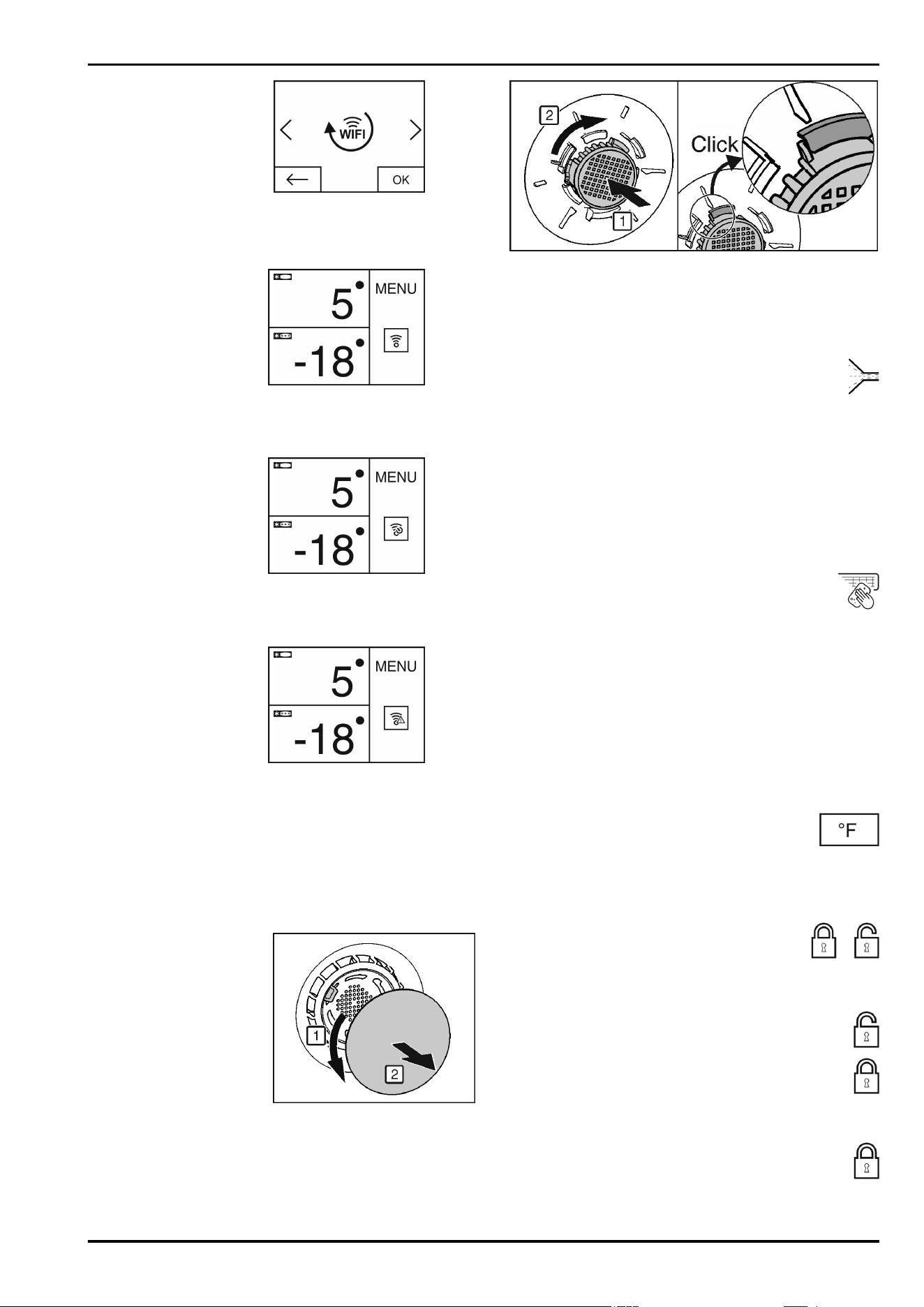
Resetting the SmartDevice
box to the default settings.
Fig. 30
u
Confirm with OK.
w
The SmartDevice box is reset to the default settings.
Showing the WiFi status on the Home screen
Status: WiFi on & connected
Fig. 31
u
The WiFi indicator is white.
w
WiFi is on.
w
The home network and the Liebherr server are connected.
Status: WiFi on & connecting
u
The WiFi display shows
a clock.
Fig. 32
w
WiFi is on.
w
There is no connection to the home network and/or the
Liebherr server.
Status: WiFi on & disconnected
u
The WiFi display shows
a warning sign.
Fig. 33
w
WiFi is on.
w
The SmartDevice box is either not connected to a network
or the SmartDevice box is connected to a network but the
network cannot be found, e.g. switched off at night.
4.9 Inserting the FreshAir filter.
The supplied FreshAir filter can be used for optimum air quality.
The intake is located at the top of the appliance, (see 1 Appli-
ance at a glance)
u
Remove cover.
Fig. 34
u
FreshAir-Insert the filter in the cover and turn it clockwise.
u
Ensure that the filter clicks into place.
u
Replace the cover again.
Setting the timer
u
Press menu.
u
Press the navigation arrows until the FreshAir filter is
displayed.
u
Press the FreshAir filter symbol.
u
Press ON.
w
The timer is set. After the interval has expired a message
prompts you to change the FreshAir filter.
4.10 Setting the clean ventilation grid
timer
The ventilation grid must be cleaned at least once a year for
sufficient ventilation. The timer can be set as a reminder.
u
Press menu.
u
Press the navigation arrows until the ventilation grid
is displayed.
u
Press the ventilation grid symbol.
u
Press ON.
w
The timer is set. After the interval has expired a message
prompts you to clean the ventilation grid.
5 Control
5.1 Changing the temperature unit
The temperature display can be switched from °C to °F.
u
Press menu.
u
Press the navigation arrow until °C is displayed.
u
Press °F.
w
The temperature is displayed in °F.
Switch from °F to °C in the same way.
5.2 Child proofing
The child-proofing function enables you to make
sure that the appliance is not inadvertently
switched off by playing children.
5.2.1 Switching on the child safety device
u
Press menu.
u
Press the navigation arrows until the child safety
device is displayed.
u
Press ON.
w
The child safety device is switched on.
5.2.2 Switching the child safety device off
u
Press menu.
u
Press the navigation arrows until the child safety
device is displayed.
u
Press OFF.
w
The child safety device is switched off.
Control
14 * Depending on model and options
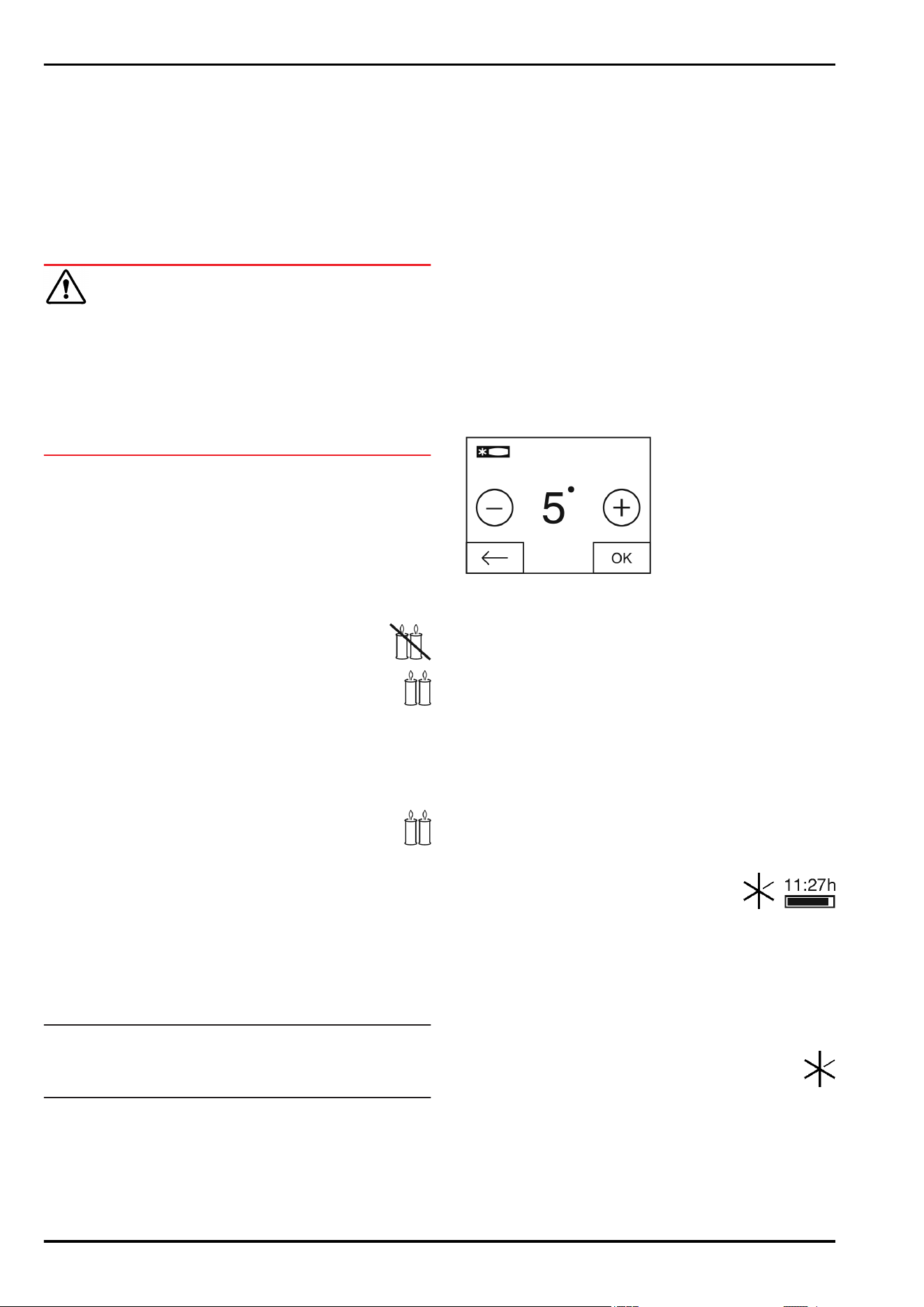
5.3 SabbathMode
This function meets the religious requirements on the Sabbath
or Jewish festivals. Turn on SabbathMode to switch off certain
controls. After setting up SabbathMode, you no longer need to
worry about indicator lights, figures, symbols, displays, alarms
or fans. The thawing cycle only works for the specified time
without taking account of fridge use. After a power cut the
appliance automatically returns to SabbathMode.
There is a list of Star-K certified appliances at www.star-k.org/
appliances.
WARNING
Danger of food poisoning.
If there is a power cut while the appliance is in SabbathMode,
this message is not saved. Once power is restored, the appli-
ance continues in SabbathMode. When this mode is over no
message about the power cut is displayed on the temperature
display.
If there was a power cut during SabbathMode:
u
Check the food for quality. Do not eat the food if it has
thawed.
-
All functions are locked until SabbathMode is switched off.
-
If functions such as SuperFrost, SuperCool, Ventilation, etc.
are activated when SabbathMode is on, they remain active.
-
No audible signals are emitted and the temperature display
does not indicate any warnings or settings (such as a
temperature alarm or door alarm).
-
The internal light is off.
5.3.1 Switching SabbathMode on.
u
Press menu.
u
Press the navigation arrow until SabbathMode is
displayed.
u
Press ON.
w
SabbathMode is switched on. Only the SabbathMode
symbol appears on the screen.
SabbathMode switches off automatically after 120 hours if
it has not already been switched off manually. The display
switches to the home screen.
5.3.2 Switch off the SabbathMode
u
Touch the screen.
u
Press OFF.
w
SabbathMode is switched off.
5.4 Refrigerator compartment
Different temperature ranges are set in the fridge compartment
because of the natural air circulation. The coldest area is
directly above the separating plate between the fridge compart-
ment and the Biofresh area. The warmest area is at the top
front and in the door.
5.4.1 Refrigerating food
Note
The energy consumption increases and the cooling perform-
ance decreases if the ventilation is inadequate.
u
Always keep the air slits of the fan free.
u
Place butter and preserves in the top area and in the door.
(see 1 Appliance at a glance)
u
Use reuseable plastic, metal, aluminium, glass containers
and foil wrap to store food.
u
Always store raw meat and fish in clean, sealed containers
on the bottom shelf of the refrigerator, to prevent them
coming into contact with or dripping onto other foods.
u
Foods that easily absorb or give off smell or taste, as well as
liquids, should be stored in sealed containers or covered.
u
Use the front area of the base shelf only to temporarily set
down refrigerated foods, for example while rearranging or
sorting the contents. Remember not to leave refrigerated
foods here as they could shift to the back or tip over when
you close the door.
u
Do not pack foods too closely together, as the air needs to
circulate.
5.4.2 Setting the temperature
The temperature depends on the following factors:
-
the frequency of opening the door
-
how long the door is open for
-
the room temperature of the installation location
-
the type, temperature and quantity of the food
The temperature can be set from 9 °C to 2 °C.
Recommended temperature setting: 5 °C
u
Press the fridge compartment field.
w
The following screen is displayed:
Fig. 35
Setting a higher temperature:
u
Press plus.
Setting a lower temperature:
u
Press minus.
The minus symbol is greyed out when the coldest temperature
is selected.
The plus symbol is greyed out if it is pressed again after
selecting the hottest temperature. The standby symbol is
displayed on the screen.
u
Confirm the required temperature with OK.
w
The display switches to the home screen.
w
The selected temperature is displayed.
w
Up or down arrows indicate the change in temperature.
The arrows are greyed out when the target temperature is
reached.
5.4.3 SuperCool
With SuperCool you switch to the highest
cooling performance to reach lower cooling
temperatures. Use SuperCool, to rapidly cool
large amounts of food.
When SuperCool is activated, the fan* may run. The appliance
operates with maximum cooling performance, which means
that the noise of the refrigeration unit may be temporarily
louder.
The SuperCool function uses slightly more energy.
Switching on SuperCool
u
Press menu.
u
Press the navigation arrow until SuperCool is
displayed.
u
Press the SuperCool symbol.
w
The following screen is displayed:
Control
* Depending on model and options 15
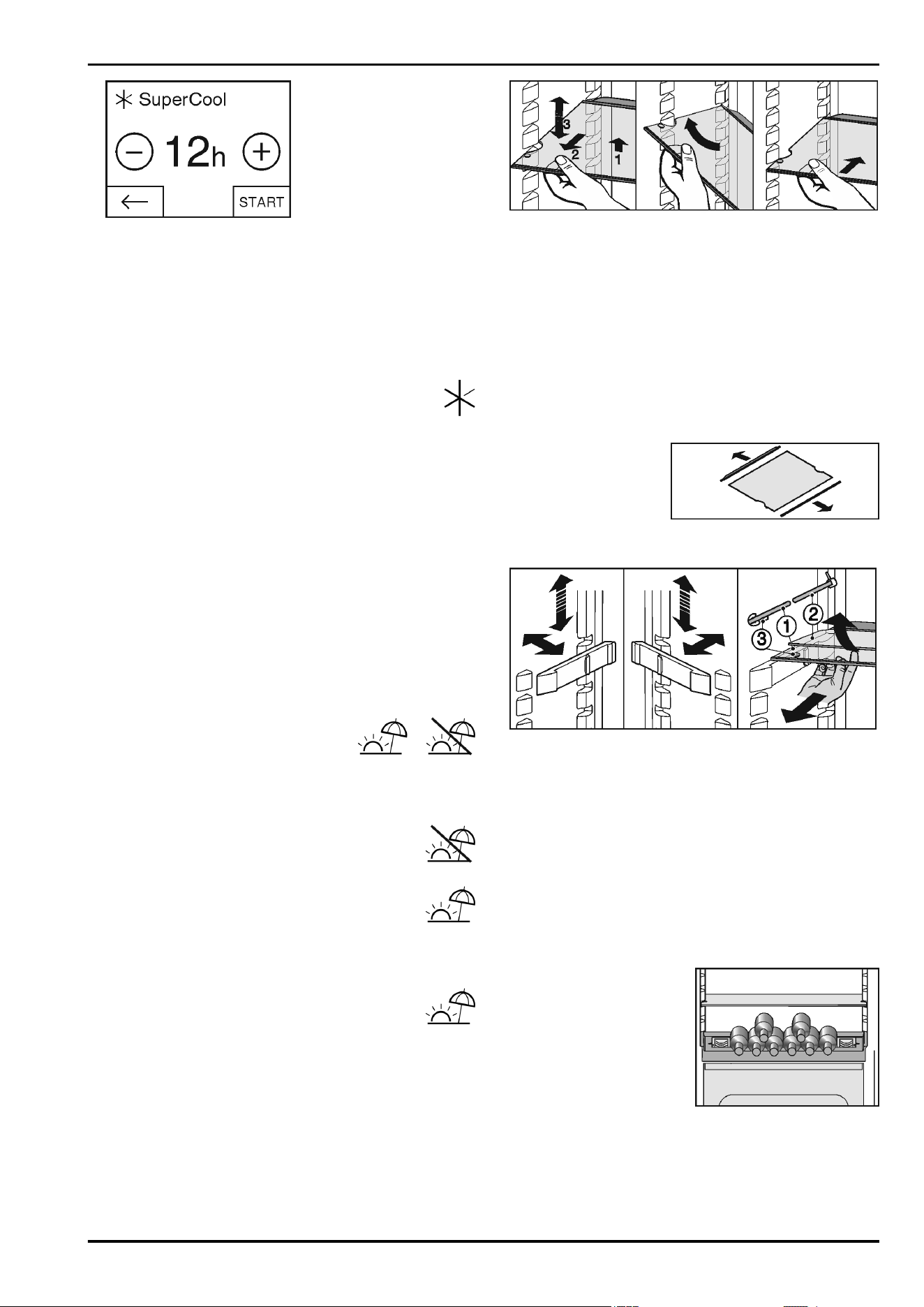
Fig. 36
The running time can be set to four levels.
Setting the running time:
u
Press plus or minus.
The minus symbol is greyed out when the lowest level is
selected.
The plus symbol is greyed out when the highest level is
selected.
u
Confirm the required running time with START.
w
The display switches to the home screen.
w
SuperCool is selected.
w
The remaining running time and the SuperCool
symbol are displayed in the fridge compartment field.
w
The lowered temperature is shown by the down
arrows.
w
After the remaining running time has elapsed the
appliance returns to normal mode. The temperature
is set to the preset value again. Up arrows show the
temperature increase.
Switching SuperCool off ahead of schedule
u
Press menu.
u
Press the navigation arrow until SuperCool and the
remaining running time are displayed.
u
Press on the remaining running time.
u
Press STOP.
w
SuperCool is switched off.
w
The temperature is set to the preset value again. Up arrows
show the temperature increase.
5.4.4 Holiday mode
The holiday mode saves energy and
prevents odour from occurring when the
door of the refrigerator compartment stays
closed for a lengthy period.
Switching on the Holiday function
u
Remove all food as otherwise it will spoil.
u
Press menu.
u
Press the navigation arrow until you see the
Holiday function.
u
Press ON.
w
The Holiday function is on.
w
The Holiday function symbol appears in the fridge compart-
ment field and the biofresh field.
Switching off the Holiday function
u
In the fridge compartment field, press the Holiday
function symbol.
w
The Holiday function is off.
w
The temperature is set to the preset value again.
Down arrows show the temperature reduction.
5.4.5 Shelves
Moving or removing shelves
The shelves are prevented from being pulled out accidentally
by pull out stops.
Fig. 37
u
Lift the shelf and pull forward a little.
u
Adjust the height of the shelf. To do this move the slots along
the supports.
u
In order to remove the shelf fully, place it at a slant and pull
out towards the front.
u
Insert shelf with the raised edge pointing upwards at the
back.
w
The food does not freeze onto the rear wall.
w
Food is prevented from falling out.
When storing and removing food on the top shelf, please pay
attention to the fold-out interior lighting.
Dismantling shelves
u
The shelves can be
dismantled for cleaning.
5.4.6 Using the sectioned shelf
Fig. 38
Adjusting the height:
u
Pull the glass plates out forwards one by one.
u
Remove the support from the catch mechanism and click
into place at the required height.
Using both shelves:
u
Lift the top glass plate and pull the bottom glass plate
forwards.
w
The glass plate (1) with the pull out stops must be at the
front so that the stops (3) point downward.
5.4.7 Using adjustable bottle shelf
At the base of the refrigerator compartment, the integrated
bottle shelf or alternatively the glass shelf can be used:
u
Using the bottle shelf: to
save space, store the glass
shelf under the bottle shelf.
u
Place the bottles with the
base pointing backwards
facing the rear wall.
If the bottles project beyond
the bottle shelf:
u
set the lower door rack one
position higher.
5.4.8 VarioSafe
The VarioSafe provides space for small items of food and pack-
ages, tubes and jars.
Control
16 * Depending on model and options
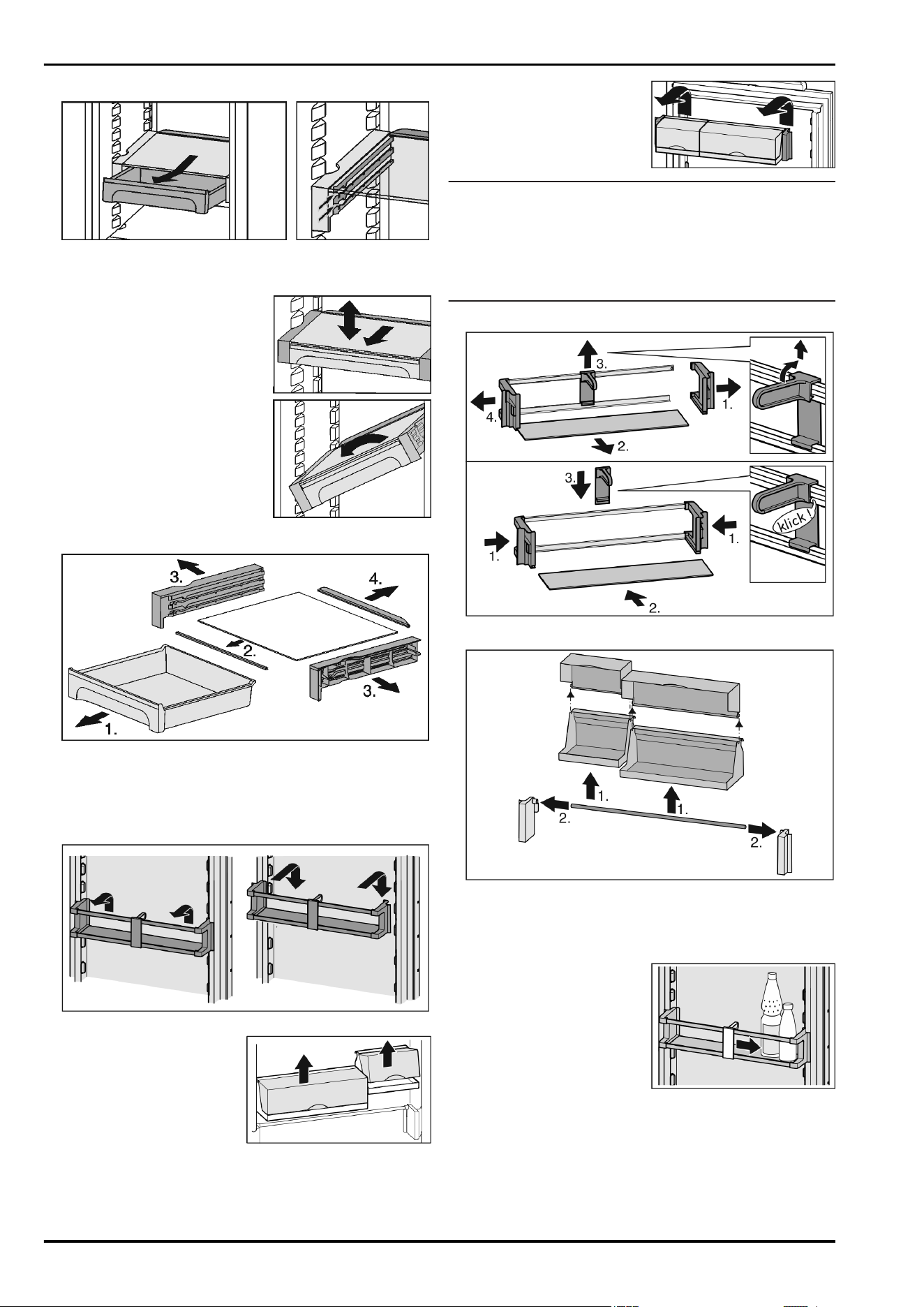
Using VarioSafe
Fig. 39
u
The VarioSafe drawer can be taken out and pushed in at two
different heights.
u
The VarioSafe can also be
height-adjusted as a whole.
u
To remove them completely,
set them at an angle and pull
towards you.
Dismantling VarioSafe
Fig. 40
u
The VarioSafe can be dismantled for cleaning.
5.4.9 Door racks
Moving the storage rack
Fig. 41
The boxes can be removed and
placed on the table as a single
unit.
Either one or both the boxes can be used. If particularly tall
bottles are to be stored, hang only a single box above the bottle
rack.
u
Re-positioning the boxes:
Lift them for removal and re-
position them as required.
Note
Food items in the upper door area that are too tall can lead to
contact with the interior lighting.
When closing the door, take care to ensure
u
that the lid of the package rack is closed, or
u
that when food is stored on the upper door rack a distance
of 30 mm to the appliance ceiling is maintained.
Dismantling door racks
Fig. 42
Fig. 43
u
The door racks can be dismantled for cleaning.
5.4.10 Using the bottle holder
u
To avoid the bottles tipping
over, push the bottle holder
along.
5.4.11 Butter dish
Opening/closing the butter dish
Control
* Depending on model and options 17
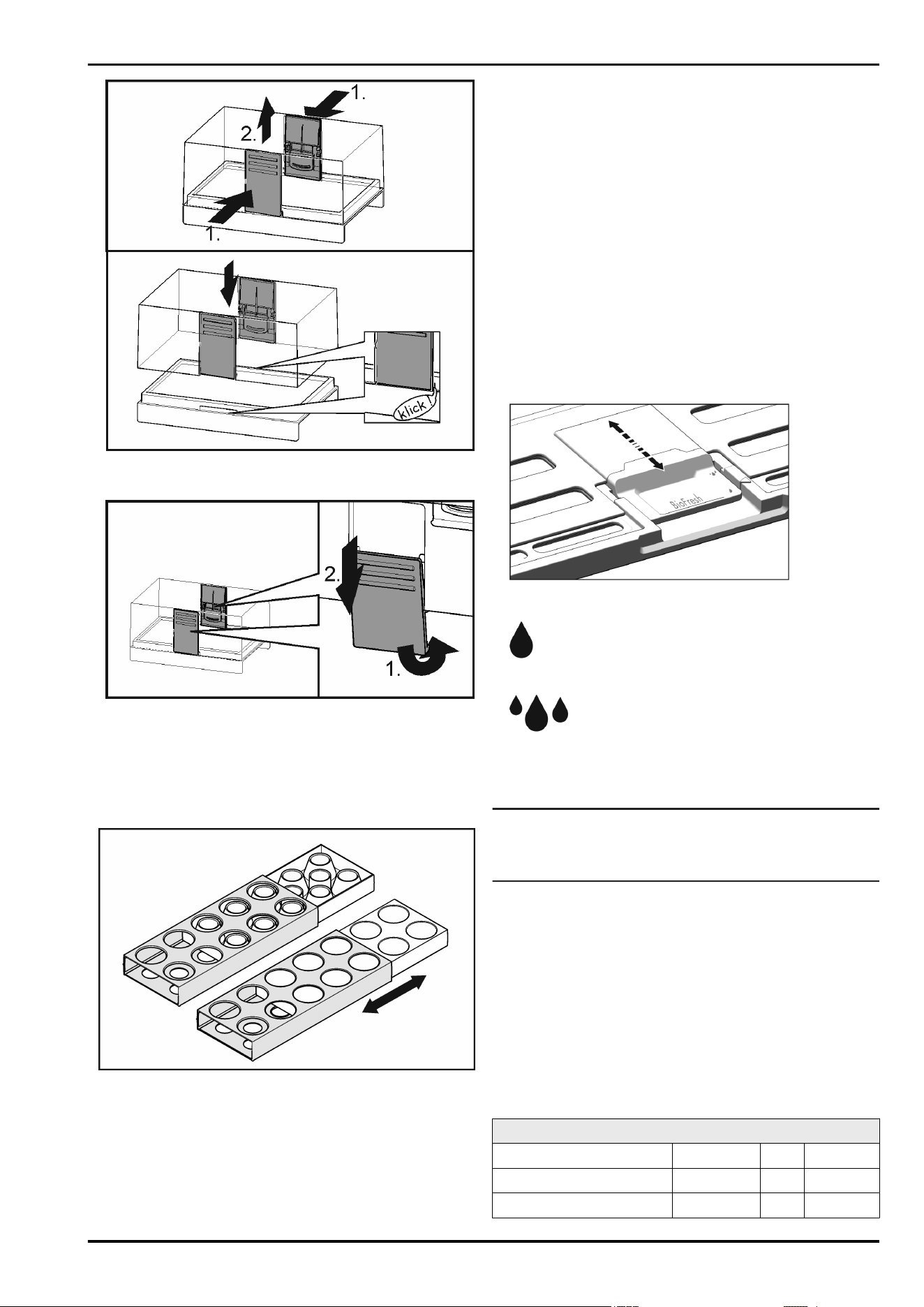
Fig. 44
Dismantling the butter dish
Fig. 45
u
You can take the butter dish apart for cleaning.
5.4.12 Egg tray
You can take out and rotate the egg tray. You can use the
two parts of the egg tray to mark different use-by dates, for
example.
u
Use the top part to store e.g. chicken eggs.
u
Use the bottom part to store quails' eggs.
5.5 BioFresh compartment
In the BioFresh section, certain fresh foods can be kept fresh
for longer compared to conventional cooling methods.
For food with an indicated best before date, the date specified
on the packaging always applies.
If the temperature falls below 0 °C, foodstuffs can freeze.
5.5.1 DrySafe
The DrySafe is suitable for storing dry or wrapped food (e.g.
dairy products, meat, fish, sausages). A relatively dry storage
climate is established here.
5.5.2 Fruit & Vegetable safe
The humidity in the Fruit & Vegetable safe depends on the
moisture content of the items being stored and the number of
times the door is opened. You can set the humidity yourself.
On the high moisture setting, the Fruit & Vegetable safe is
suitable for storing loose salad, vegetables and fruit with a high
moisture content. A well-stocked drawer is stored in absolute
freshness.
5.5.3 Setting the moisture level in the Fruit &
Vegetable safe
Fig. 46
You can choose any moisture setting for the Fruit & Vegetable
safe.
u
Low humidity: Slide the slide bar backwards.
w
The openings in the cover are partially or fully open. The
moisture levels drop in the Fruit & Vegetable safe.
u
High humidity: Slide the slide bar forwards.
w
The openings in the cover are partially or fully closed. The
moisture levels rise in the Fruit & Vegetable safe.
5.5.4 Storing food
Note
u
Do not put the following in the BioFresh section: cold-sensi-
tive vegetables including cucumbers, aubergines, tomatoes,
courgettes and any cold-sensitive tropical fruits.
u
To prevent food spoilage due to transfer of germs: Store
unwrapped animal and vegetable products separate from
one another in the drawers. This also applies to different
sorts of meat.
If food has to be stored together due to lack of space:
u
wrap the food.
u
Storing high-moisture content foods: shake off the moisture
beforehand.
If there is too much moisture in the compartment:
u
select the low moisture setting.
-or-
u
Remove any excess moisture with a cloth.
5.5.5 Storage times
Guideline for the shelf-life with low air humidity at 0 °C
Butter up to 90 days
Hard cheese up to 110 days
Milk up to 12 days
Control
18 * Depending on model and options
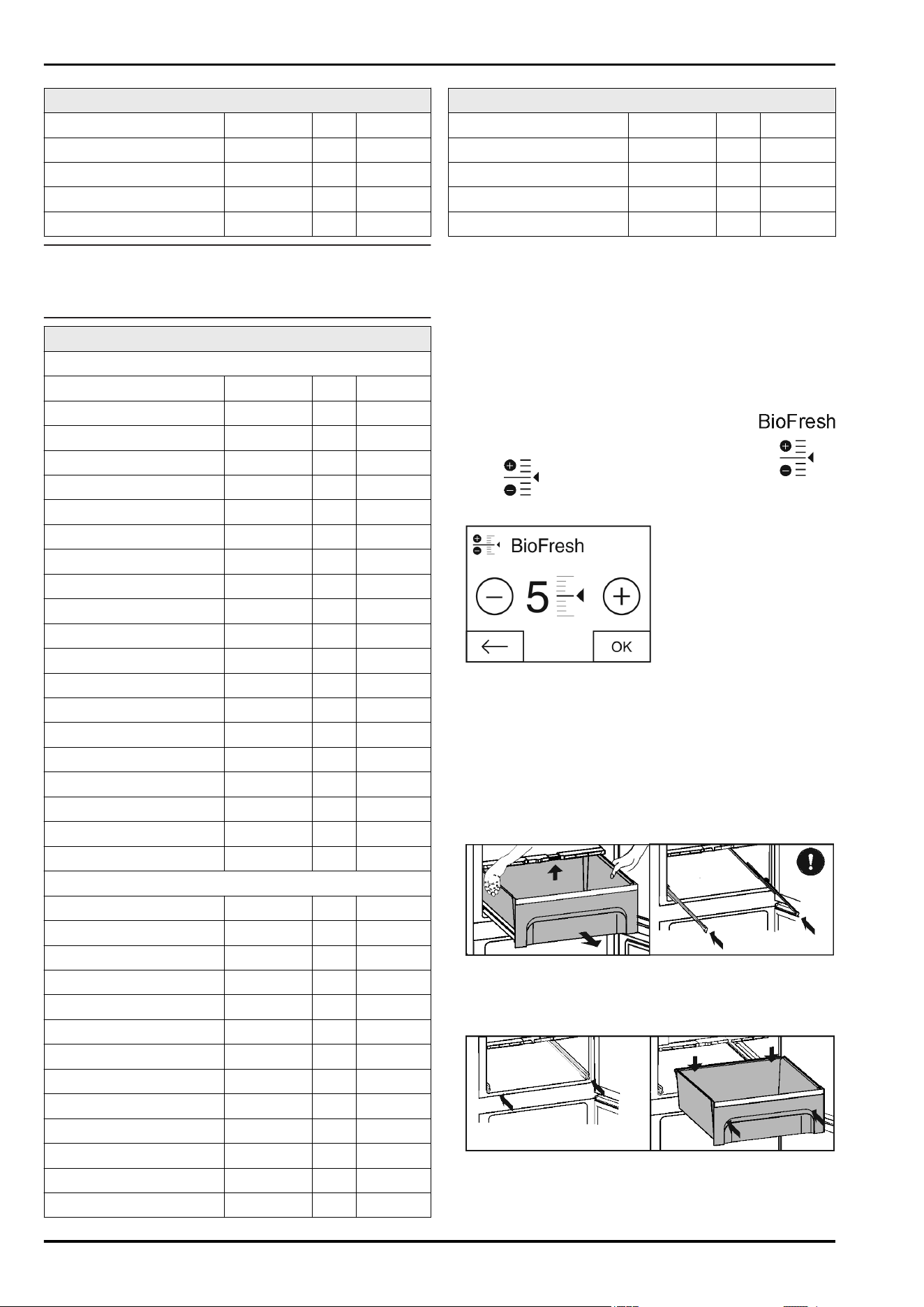
Guideline for the shelf-life with low air humidity at 0 °C
Cold meats up to 9 days
Poultry up to 6 days
Pork up to 7 days
Beef up to 7 days
Game up to 7 days
Note
u
Please note that protein-rich food deteriorates faster, i.e.
shellfish and crustaceans deteriorate faster than fish, fish
faster than meat.
Guideline for the shelf-life with high air humidity at 0 °C
Vegetables, salads
Artichokes up to 14 days
Celery up to 28 days
Cauliflower up to 21 days
Broccoli up to 13 days
Chicory up to 27 days
Leaf lettuce up to 19 days
Peas up to 14 days
Kale up to 14 days
Carrots up to 80 days
Garlic up to 160 days
Cabbage up to 55 days
Round lettuce up to 13 days
Herbs up to 13 days
Leeks up to 29 days
Mushrooms up to 7 days
Radishes up to 10 days
Sprouts up to 20 days
Asparagus up to 18 days
Spinach up to 13 days
Savoy cabbage up to 20 days
Fruit
Apricots up to 13 days
Apples up to 80 days
Pears up to 55 days
Blackberries up to 3 days
Dates up to 180 days
Strawberries up to 7 days
Figs up to 7 days
Blueberries up to 9 days
Raspberries up to 3 days
Red currants up to 7 days
Cherries, sweet up to 14 days
Kiwis up to 80 days
Peaches up to 13 days
Guideline for the shelf-life with high air humidity at 0 °C
Plums up to 20 days
Cranberries up to 60 days
Rhubarb up to 13 days
Gooseberries up to 13 days
Grapes up to 29 days
5.5.6 Setting the temperature in the BioFresh
compartment.
Recommended refrigerator setting: 5 °C. The BioFresh temper-
ature is controlled automatically and is between 0 °C and 3 °C.
The temperature can be set slightly colder or slightly warmer.
The temperature can be set from level 1 (lowest temperature)
to level 9 (highest temperature). The default setting is level 5.
With levels 1 - 4 the temperature can drop to below 0 °C so that
the food can freeze.
u
Press menu.
u
Press the navigation arrow until BioFresh is
displayed.
u
Press .
w
The following screen is displayed:
Fig. 47
u
Setting the level: Press plus or minus.
The minus symbol is greyed out when the lowest level is
selected.
The plus symbol is greyed out when the highest level is
selected.
u
Confirm the required level with OK.
w
The display switches to the home screen.
w
The BioFresh temperature is changed to the new value.
5.5.7 Drawers with cushioners
Fig. 48
u
Pull out the drawer, lift it at the back and draw it forwards for
removal.
u
Push the rails in again!
Fig. 49
u
Push the rails in.
u
Attach the drawer and push it in until it engages audibly at
the back.
Control
* Depending on model and options 19
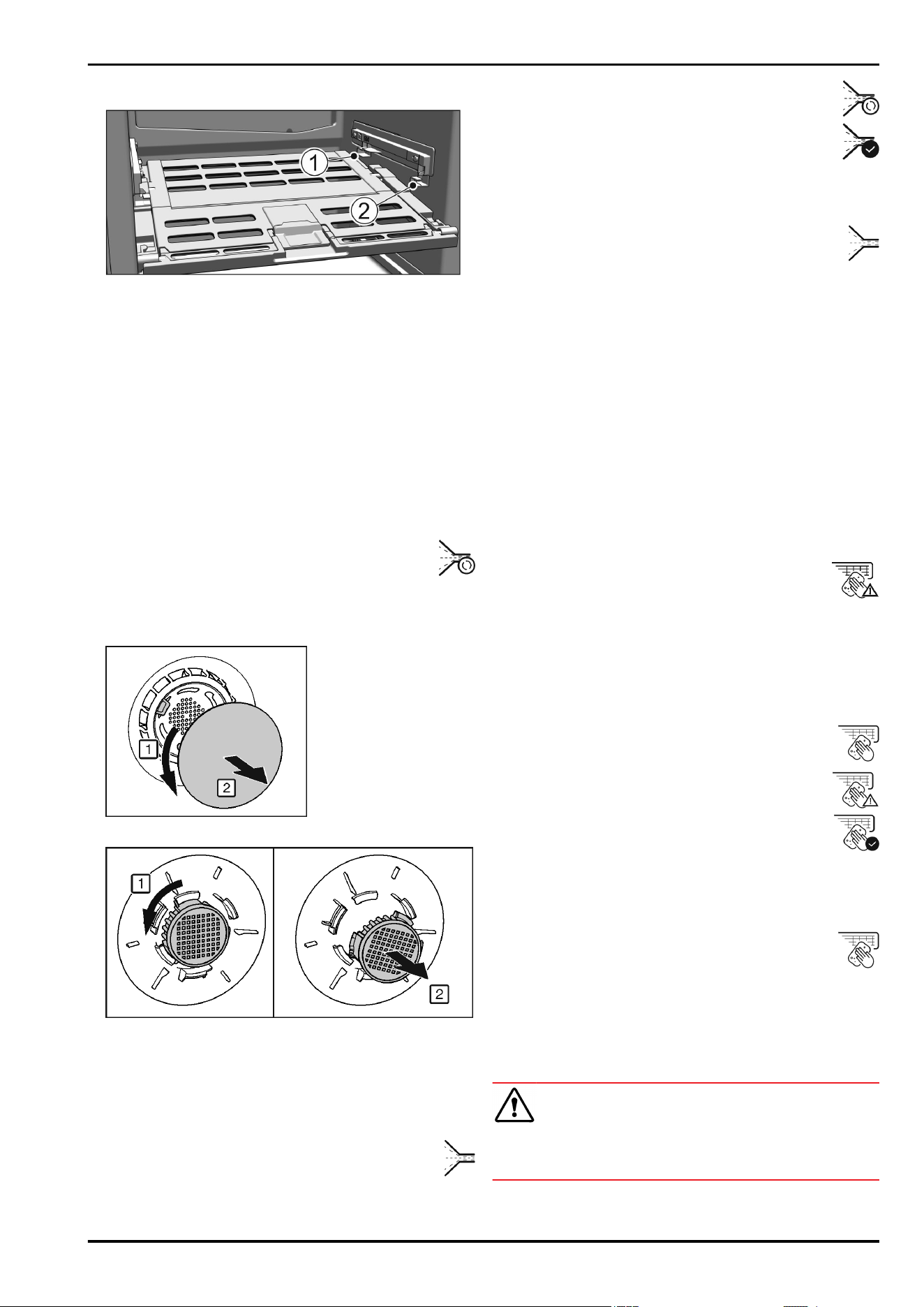
5.5.8 Fruit & Vegetable safe cover
Fig. 50
u
Removing the Fruit & Vegetable safe cover: After pulling out
the drawers, carefully pull the cover towards you and down.
u
Replacing the Fruit & Vegetable safe cover: Guide the ridges
on the cover into the rear brackets
Fig. 50 (1)
and click it into
the front bracket
Fig. 50 (2)
.
6 Maintenance
6.1 Change the FreshAir filter.
The FreshAir filter guarantees optimum air quality. It should be
changed every 12 months. When the timer is set a message on
the display prompts you to change it. The FreshAir filter can be
ordered from the specialist dealer.
Change FreshAir filter is displayed.
u
Press the change FreshAir filter symbol
w
The display switches to the home screen.
The message can be displayed again by pressing on the
menu field until the filter has been changed and confirmed.
(see 8 Messages) .
Fig. 51
u
Remove cover.
Fig. 52
u
Remove the FreshAir filter.
u
Insert the new filter in the reverse order.
u
Ensure that the filter clicks into place.
u
Replace the cover again.
Confirming the filter change
u
Press menu.
u
Press the navigation arrows until the FreshAir filter is
displayed.
u
Press the FreshAir filter symbol.
u
Press the navigation arrows until change FreshAir
filter is displayed.
u
Press RESET.
w
The timer is reset. The change interval starts all over
again.
Turning the timer off
If a new FreshAir filter is not inserted the timer can be turned off
u
Press menu.
u
Press the navigation arrows until the FreshAir filter is
displayed.
u
Press the FreshAir filter symbol.
u
Press OFF.
w
The timer is turned off.
6.2 Defrosting
6.2.1 Defrosting refrigerator compartment
The fridge compartment defrosts automatically. The defrosted
water will evaporate. Water drops or a thin layer of frost or ice
can form on the back wall; this is a completely normal part of
the machine’s function.
6.3 Cleaning the ventilation grid
The ventilation grid ensures that the appliance works properly
due to optimum aeration and ventilation.
u
Clean the ventilation grid regularly with a vacuum cleaner.
u
Remove stubborn stains with a soft cloth.
When the timer is set a message on the display
prompts you to clean it. The clean ventilation grid
symbol appears on the screen.
u
Press the clean ventilation grid symbol.
w
The display switches to the home screen.
The message can be displayed again by pressing the menu
field until it has been cleaned and this has been confirmed.
(see 8 Messages) .
Confirming that the ventilation grid has been cleaned
u
Press menu.
u
Press the navigation arrows until the ventilation grid
is displayed.
u
Press the ventilation grid symbol.
u
Press the navigation arrows until clean ventilation
grid is displayed.
u
Press RESET.
w
The timer is reset. The cleaning interval starts all
over again.
Turning the timer off
If the reminder function is to be switched off the timer can be
turned off.
u
Press menu.
u
Press the navigation arrows until the ventilation grid
is displayed.
u
Press the ventilation grid symbol.
u
Press OFF.
w
The timer is turned off.
6.4 Cleaning the appliance
Clean the appliance regularly.
WARNING
Risk of injury and damage as a result of hot steam!
Hot steam can lead to burns and can damage the surfaces.
u
Do not use any steam cleaners!
Maintenance
20 * Depending on model and options
NOTICE
Incorrect cleaning damages the appliance!
u
Do not use cleaning agents in concentrated form.
u
Do not use any scouring or abrasive sponges or steel wool.
u
Do not use any sharp or abrasive cleaning agents, nor any
that contain sand, chloride or acid.
u
Do not use chemical solvents.
u
Do not damage or remove the type plate on the inside of the
appliance. It is important for the customer service.
u
Do not pull off, bend or damage cables or other compo-
nents.
u
Do not allow any cleaning water to enter the drain channel,
ventilation grille or electrical parts.
u
Please use soft cleaning cloths and a universal pH-neutral
cleaning agent.
u
Please use cleaning and care products suitable for contact
with foodstuffs in the appliance interior.
u
Empty appliance.
u
Pull out the power plug.
u
Clean plastic outer and inner surfaces with lukewarm
water and a little washing-up liquid.
u
Only use a soft clean cloth to wipe side walls with a paint
finish. In the case of heavy soiling, use lukewarm water with
neutral cleaning agent.*
NOTICE
Risk of damage from stainless steel care products!
The stainless steel doors and stainless steel side panels
are treated with a premium surface finish.
Stainless steel care products attack these surfaces.
u
Only use a soft, clean cloth to wipe down finished door
and side panel surfaces and painted door and side
panel surfaces. To remove heavy dirt, use a little water
or neutral detergent. Alternatively, you can use a micro-fibre
cloth.
Do not treat the lettering on the painted door surfaces with
harsh, abrasive agents. Wipe off any dirt with a soft cloth and
some water or neutral cleaner.*
u
Most of the parts can be dismantled for cleaning: see the
relevant chapter.
u
Clean drawers by hand with lukewarm water and a little
washing up liquid.
u
Clean the Fruit & Vegetable safe cover by hand using
lukewarm water and a small amount of detergent.
u
All the other fittings can be put in the dishwasher.
u
Only use a damp cloth to clean the telescopic rails. The
grease in the runners is for lubrication purposes and must
not be removed.
After cleaning:
u
Wipe dry the appliance and items of equipment.
u
Connect the appliance and switch it on again.
When the temperature is sufficiently cold:
u
Put the food back inside.
6.5 Customer service
WARNING
Unprofessional repair!
Injuries.
u
Have any repairs and action - not expressly specified -
on the appliance and mains cable carried out by service
personnel only. (see 6 Maintenance)
u
A damaged mains cable may only be replaced by the manu-
facturer, the manufacturer’s Customer Service or a similarly
qualified person.
u
In the case of appliances with an IEC connector, the change
may be made by the customer.
Call up the appliance designation (model and index),
service no. (service), serial no. (s-no.) as well as the
expanded functions on the screen:
u
Press menu.
u
Press the navigation arrows until the appliance infor-
mation symbol is displayed.
u
Press the appliance information symbol.
w
The appliance information is displayed.
u
Note down the appliance
information.
u
To return to the home screen
press the Back symbol.
u
To access the customer menu, press it until the key symbol
appears.
u
Enter the numerical code 151 to select the customer menu.
Customer menu
The following functions can be called up in the customer menu:
- Self diagnostics
The appliance carries out self diagnostics and checks all
electrical components.
- RESET
The appliance is reset to the factory settings.
u
Close the door.
u
Contact customer service and give them the required appli-
ance information.
w
This will help us to provide you with a faster, more accurate
service.
u
Follow any further instructions given by Customer Services.
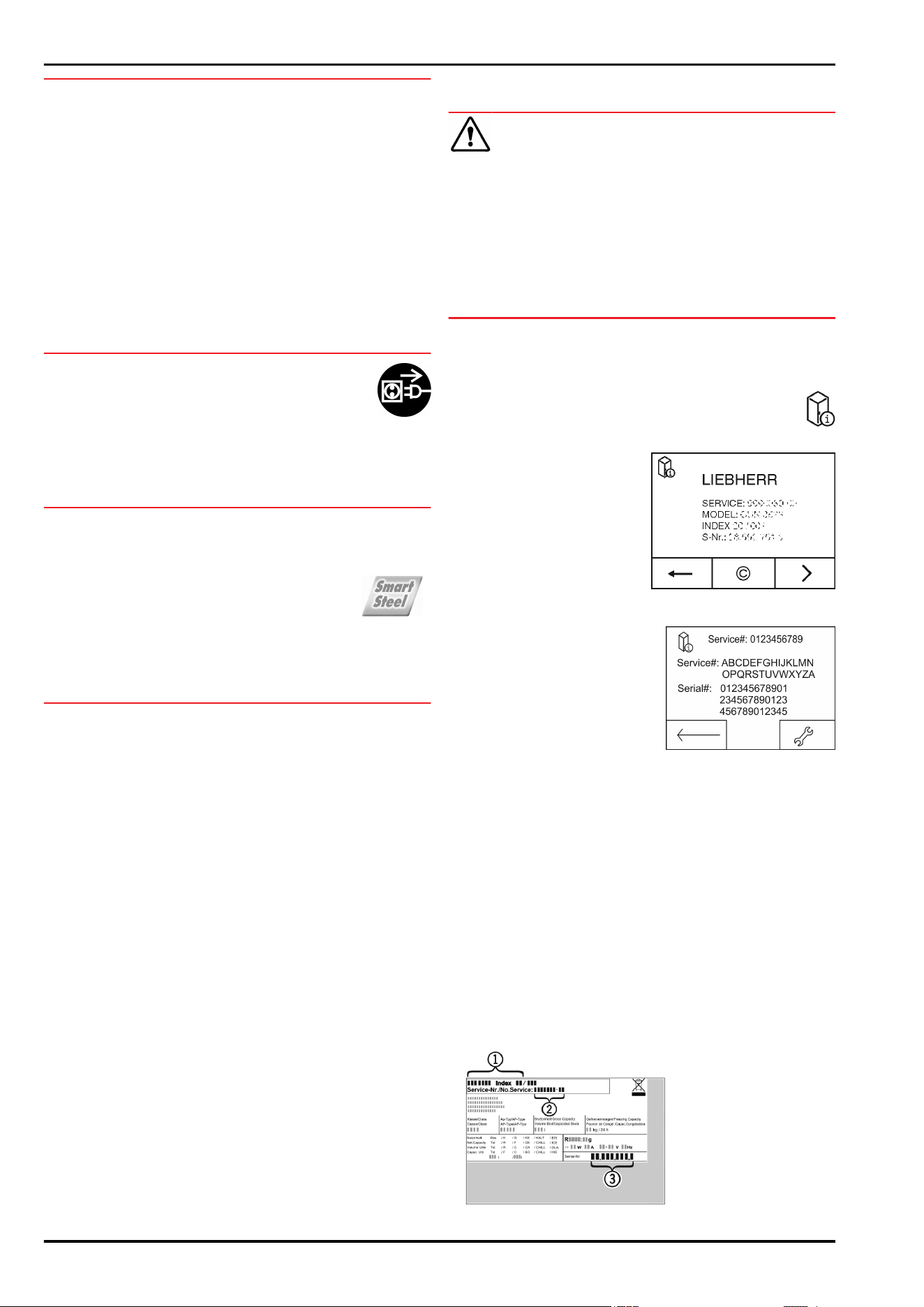
Alternatively you can read off the appliance information
from the model plate:
The model plate is inside the appliance on the left-hand side.
Fig. 53
(1) Appliance description (3) Serial no.
Maintenance
* Depending on model and options 21
(2) Service no.
Licence agreements:
Licences used can be viewed at ©.
u
Press ©.
7 Malfunctions
Your appliance is designed and manufactured for a long life
span and reliable operation. If a malfunction nonetheless
occurs during operation, check whether it is due to a handling
error. In this case you will have to be charged for the costs
incurred, even during the warranty period. You may be able to
rectify the following faults yourself:
Appliance does not work.
→
The appliance is not switched on.
u
Switching on the appliance.
→
The power plug is not properly inserted in the wall socket.
u
Check power plug.
→
The fuse of the wall socket is not in order.
u
Check fuse.
→
The appliance plug does not fit the appliance properly.
u
Check the appliance plug.
The compressor runs for a long time.
→
The compressor switches to a low speed when little cold is
needed. Although the running time is increased as a result,
energy is saved.
u
This is normal in energy-saving models.
→
SuperCool is activated.
u
The compressor runs for longer in order to rapidly cool the
food. This is normal.
Excessive noise.
→
Due to the various speed steps, speed-regulated* compres-
sors can generate different running noises.
u
The sound is normal.
A bubbling and gurgling noise.
→
This noise comes from the refrigerant flowing in the refriger-
ation circuit.
u
The sound is normal.
A quiet clicking noise.
→
The noise is produced whenever the refrigeration unit
(motor) automatically switches on or off.
u
The sound is normal.
A hum. It is briefly a little louder when the refrigeration
unit (the motor) switches on.
→
The refrigeration increases automatically when the
SuperCool function is activated, fresh food has just been
placed in the appliance or the door has been left open for a
while.
u
The sound is normal.
→
The ambient temperature is too high.
u
Solution: (see 1.2 Appliance range of use)
A low hum.
→
The sound is produced by air flow noise of the fan.
u
The sound is normal.
Vibration noises
→
The appliance is not standing firmly on the floor. As a result
objects and adjacent units start to vibrate when the refriger-
ator is running.
u
Align the appliance using the adjustable feet.
u
Keep bottles and jars apart.
Flow sound at the soft stop mechanism.
→
The noise is produced when the door is opened and
closed.
u
The sound is normal.
The DEMO symbol appears on the screen. In addition
some time elapses.
→
DEMO mode is activated.
u
OFF Press .
DEMO is displayed in the top right corner of the screen.
→
DEMO mode is activated.
u
Unplug the appliance.
u
Plug the appliance in again.
w
The DEMO symbol appears on the screen. In addition some
time elapses.
u
OFF Press .
The outer surfaces of the appliance are warm*.
→
The heat of the refrigeration circuit is used to prevent
condensate from forming.
u
This is normal.
The temperature is not cold enough.
→
The door of the appliance is not properly closed.
u
Close the door of the appliance.
→
Insufficient ventilation.
u
Keep ventilation grille clear, and clean it.
→
The ambient temperature is too high.
u
Solution: (see 1.2 Appliance range of use) .
→
The appliance was opened too frequently or for too long.
u
Wait to see whether the appliance reaches the required
temperature by itself. If not, please contact the after sales
service (see 6 Maintenance) .
→
The temperature is incorrectly set.
u
Set the temperature to a colder setting and check after 24
hours.
→
The appliance is too close to a source of heat (stove, heater
etc).
u
Change the position of the appliance or the source of heat.
The internal light does not come on.
→
The appliance is not switched on.
u
Switch the appliance on.
→
The door was open for longer than 15 minutes.
u
The internal light switches itself off automatically after about
15 minutes if the door is open.
→
The LED illumination is faulty or the cover is damaged:
WARNING
Risk of injury due to electric shock!
There are live electrical parts under the cover.
u
Only ever have the inside LED light replaced or repaired by
customer service or trained personnel.
WARNING
Risk of injury from LED bulb!
The light intensity of the LED light corresponds to hazard group
RG 2.
If the cover is defective:
u
Do not look directly into the light from close range. It cause
injury to the eyes.
The door seal is defective or needs to be replaced for
another reason.
→
The door seal can be replaced. It can be replaced without
the need for special tools.
u
Contact Customer Service (see 6 Maintenance) :
The unit has iced up or condensation has formed.
→
The door seal may have also slipped out of its groove.
u
Check to ensure that the door seal is seated properly in the
groove.
Malfunctions
22 * Depending on model and options
8 Messages
Error messages and reminders are displayed by an
audible signal and a message on the screen. The
audible signal gets louder and louder when error
messages appear. It only stops when the message is
confirmed. Highest priority messages are displayed first
if several occur at the same time. Each message must
be cleared separately.
The message stays in the menu field as long as it is active or
the fault is not eliminated.
Note
Details on the message can be displayed again via the menu
field.
u
Press menu.
u
Press the message symbol.
u
The display switches to the next message when you press
one. After the last active message the display switches to
the home screen.
Door alarm
An audible warning sounds if the door is open for
longer than 60 seconds. The door alarm symbol
appears on the display. The audible warning stops
automatically when the door is closed.
The audible warning can be switched off when the
door is open. The audible alarm is switched off while
the door is open.
u
Press the door alarm symbol.
w
The door alarm stops.
w
The display switches to the home screen.
u
Close the door.
Appliance faults
An audible warning sounds. The appliance fault
symbol appears on the display with the relevant error
code.
An appliance component indicates a fault.
u
Open the door.
u
Note down the fault code.
u
Press the appliance fault symbol.
w
The audible signal stops. The display switches to the home
screen.
u
Close the door.
u
Contact Customer Services (see 6 Maintenance) .
Other messages
FreshAirChange filter (see 6 Maintenance)
Clean the ventilation grille (see 6 Mainte-
nance)
9 Decommissioning
9.1 Switching the appliance off
Note
If the appliance cannot be switched off, the child safety device
is enabled.
u
Switch the child safety device off (see 5.2.2 Switching the
child safety device off) .
9.1.1 Switch off the appliance from the menu
The whole appliance is switched off. The screen goes black.
u
Press menu.
u
Press the navigation arrows until the standby symbol
is displayed.
u
Press OK.
w
The standby symbol flashes on the whole screen. The whole
appliance is switched off.
w
After 10 minutes the standby symbol goes out.
9.1.2 Switching the appliance off via the fridge
compartment field.
The biofresh compartment automatically switches off when the
fridge compartment is turned off. The screen remains on.
The screen remains on.
u
Press the fridge compartment field.
u
Press plus.
w
The plus symbol is greyed out if it is pressed again after
selecting the hottest temperature. The standby symbol is
displayed on the screen.
u
Press OK.
w
The standby symbol is displayed in the fridge compartment
and BioFresh compartment fields.
w
The appliance is switched off and the screen remains
switched on
9.2 Taking the appliance out of service
u
Empty the appliance.
u
Switch off the appliance (see 9 Decommissioning) .
u
Remove mains connector.
u
Remove appliance connector if required: Remove
and move from left to right at the same time.
u
Clean the appliance (see 6.4 Cleaning the appli-
ance) .
u
Leave the door open to prevent odour.
10 Disposal
10 Preparing appliance for
disposal
Liebherr uses batteries in some of its appliances.
In the EU, for environmental reasons, legislation
obliges the end user to remove these batteries
before disposing of old appliances. If your appli-
ance contains batteries, a corresponding notice is
attached.
Lamps If you can remove the lamps yourself without
destroying them, also remove these before
disposal.
u
Take the appliance out of operation. (see 9.2 Taking the
appliance out of service)
u
Appliances with batteries: remove the batteries. For descrip-
tion, see Maintenance chapter.
u
If possible: remove lamps without destroying them.
Messages
* Depending on model and options 23
10 Disposing of the appliance
in an environmentally friendly
manner
The appliance still contains
valuable materials and must
be disposed of separately from
unsorted municipal waste.
Dispose of batteries separately
from the old appliance. To do this,
you can return the batteries free
of charge to retailers as well as
recycling centres and collection
centres for recyclable materials.
Lamps Dispose of removed lamps via the
respective collection systems.
WARNING
Leaking coolant and oil!
Fire. The coolant contained in the appliance is eco-friendly,
but also flammable. The oil contained in the appliance is flam-
mable. Escaping coolant and oil can ignite if the concentration
is high enough and in contact with an external heat source.
u
Do not damage the pipelines of the coolant circuit and the
compressor.
u
Transport the appliance without damaging it.
u
Dispose of batteries, lamps and the appliance according to
the above specifications.
Disposing of the appliance in an environmentally friendly manner
24 * Depending on model and options

Disposing of the appliance in an environmentally friendly manner
* Depending on model and options 25
Liebherr-Hausgeräte Ochsenhausen GmbH
Memminger Straße 77-79
88416 Ochsenhausen
Deutschland
home.liebherr.com