Introduction
2
Introduction
Introduction
Warm tips
How to use
1
1. The RCA output is pre-amplified, its output level and the speaker
jacks output are controlled by the main volume synchronously.
2. Default comes with 32V/5A power adapter, if you want higher power
output please replace another larger power adapter with high-quality.
3. There are two sensitivity adjustments of the VU meters on the bottom of
H7 PRO, one is responsible for the left channel and the is for the right.
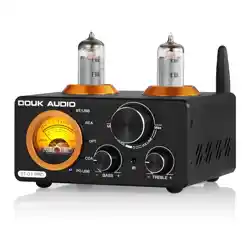
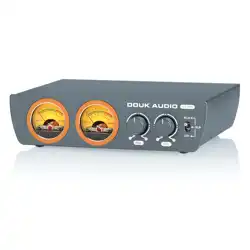
H7 PRO is a mini digital amplifier designed by Douk Audio, combining
a compact design with exceptional performance. Adopting a TPA3255
amp chip, the power output up to 300W for each channel can effortlessly
drive 4-8Ω speakers, delivering impressive sound quality. With
single-ended RCA and balanced XLR inputs, preamp RCA output
besides speaker jacks output, easily to build multi-channel systems.
Two VU meters are added with pointer swinging in real-time with audio
signal changes, to get both auditory and visual enjoyment.
3
Power output table of H7 PRO
4
1. Correctly connect your passive speakers to the speaker jacks of
H7 PRO. The RCA output also supports to be connected to another
amplifier, active subwoofer or speakers to build multi-channel system.
2. Connect the audio source to the RCA or XLR input of H7PRO via
high-quality cable.
3. Connect the power cord to the power interface of H7PRO and then
plug the power cable to the wall socket. Toggle the switch to
corresponding input position to turn H7PRO on.
Brand
Model
Audio input
Audio output
Max output power
Matched speaker impedance
Frequency response
Input sensitivity
Max output level of RCA
THD
SNR
Working voltage
Dimensions(W*D*H)
Package dimensions(W*D*H)
Net weight
Package weight
Packing List
Douk Audio
H7 PRO
Single-ended RCA / balanced XLR
Banana speaker jacks / stereo RCA
300Wx2 (@4Ω)
4-8Ω
20Hz-20KHz (±0.8dB)
2V
2V
0.008%
≥110dB
DC 24-48V
167*126*42mm / 6.57*4.96*1.65in
310*240*70mm / 12.20*9.45*2.76in
803g / 1.77lb
1.42kg / 3.13lb
1×H7PRO Amplifier
1×DC 32V Power Adapter
1×User Manual
Parameters
H7 PRO
Q: Why are all cables connected but there is no sound?
A: 1. Please check whether the VU meters light on, and the toggle
switch is on the correct position or not.
2. Please check whether the volume knob is at the left-most end
and the volume is adjusted to the minimum. If yes, please
clockwise rotate the volume knob to turn it up.
3. If all is fine, please check whether the audio source is muted,
paused or the volume is too low.
Q: Why is the sound distorted?
A: Maybe the amplitude of input signal is too large. If the volume of
audio source and the H7PRO both are turned to maximum, it is easy
to cause distortion. Please turn down the volume of audio source or
H7 PRO.
Q: Why does the volume of the H7PRO remain unchanged, but the
output volume is different when different audio sources are
connected (such as CD player and mobile phone)?
A: Different audio devices outputs different signal amplitudes, for
example, the phone usually outputs 0.35V, while CD player outputs
1V. So it is normal that the output volume of CD player is louder than
mobile phone.
Q: Why is there a loud current sound or buzzing sound from the speaker?
A: 1. Please use the original power supply. Many power supplies in the
market have interference, which will cause current sound.
2. When an unshielded signal line is used without load, there will be
interface signals. Please use the shielded signal cable or unplug it.
3. If there is still noise after the above two points are eliminated,
please confirm whether it is external noise or internal noise from
H7 PRO. Disconnect all inputs and only retain power supply and
power cable. If the noise disappears, it is from audio input; if the
noise is still there, it is possibly caused by power supply or the
internal of H7PRO.
Q: Why there is no sound or very lttle sound after the amplifier is
connected to the speaker?
A: 1. Please check the audio source has been turned on and the
volume is not at the minimum.
2. Please confirm whether the speaker and amplifier match
( For example, the speaker is fixed resistance or fixed voltage, the
power of speaker is too much over the power of the amplifier etc).
Q: What are the reasons and troubleshooting methods for the
unbalanced volume between the left and right speakers?
A: 1. For a normal power amplifier, the volume on the left and right sides
should be consistent. If there is an imbalance, please check it from
the sound source, input cable, volume potentiometer, speaker
cables, speakers (whether the placement of the speakers is
symmetrical) etc.
2. H7 PRO with balance adjustment, please adjust the knob until you
feel both channel is balanced.
Q: Why is there a thumping sound when switching on/off?
A: Please confirm the on-off sequence is correct, normally it follows the
order of signal transmission when turn on: audio source→preamp /
DAC→amplifier→speaker. (The sequence is reversed when switching
1. Please do not open the shell without permission, improper operation
may cause a risk of electric shock.
2. If you want to change other power adapters, please use the ones
produced by a regular manufacturer, otherwise there is a risk of
damaging the H7PRO.
3. Please don't operate H7PRO in a high temperature or humidity
environment.
5 6
Website: www.doukaudio.com
Email: nobsound@doukaudio.com
WeChat/Whatsapp: +86-17704028602
Address: Room 1329, Wang Cheng Building, Long Guan East Road,
Long Hua District, Shen Zhen, Guang Dong, China, 518000
Contact information
Warning
7
Introduction
① VU Meter (L)
② VU Meter (R)
③ L/R balance adjustment knob
④ Main volume knob
⑤ Power on/off / input channel selection
⑥ Balanced XLR input
⑦ RCA input (White/Left, Red/Right)
⑧ RCA output
⑨ Speaker jacks (Red/Positive,Black/Negative)
⑩ Power interface (DC 24-48V)
⑪ Sensitivity adjustment of VU Meter (L)
⑫ Sensitivity adjustment of VU Meter (R)
Introduction
H7 PRO front & back panel
Introduction
FAQ
4. The two VU meters will light on, please play music on your audio
source and adjust the volume to get the best auditory and visual
enjoyment.
5. If you feel the volume of left and right channel are not consistent
please adjust the balance knob to fix. If you feel that the pointer
swing of the VU meter is not obvious enough, please adjust the
sensitivity of two VU meters via the button on the bottom.
6. After use, please toggle the switch to OFF position to turn H7PRO
off first and then disconnect the power adapter.
24V / 5A
32V / 5A
36V / 6A
48V / 5A
48V / 10A
4Ω
6Ω
8Ω
4Ω
6Ω
8Ω
4Ω
6Ω
8Ω
4Ω
6Ω
8Ω
4Ω
6Ω
8Ω
68W*2
61W*2
55W*2
78W*2
71W*2
65W*2
107W*2
100W*2
94W*2
120W*2
110W*2
102W*2
250W*2
210W*2
185W*2
Speaker Impedance Output PowerPower Supply
off. As the internal capacitors will be discharged for a while atfter
shutdown. If turn off the preamp firstly and then turn off amplifier,
impact sound will be easily caused which may damage the amplifier
or speaker in severe cases).
Q: What is the function of VU meter? What is the difference among
VU meter, voltmeter and ammeter?
A: VU meters, voltmeters, and ammeters all refer to instruments that
indicate level, but some indicate voltage, some indicate decibels,
and some indicate current (we use a VU meter on H7PRO to indicate
the amplitude of the audio signal).