
-MORE THAN JUST MUSIC-
Starry M3 Movable Stereo Bluetooth Speaker
USER MANUAL
Part Name
Harmful Substance
Enclosure
PCB and
components
Power
adaptor
Speaker
TABLE OF HAZARDOUS SUBSTANCES
Lead
(Pb)
Mercury
(Hg)
Cadmium
(Cd)
Hexavalent
chromium
(Cr(VI)
Polybrominated
biphenyls
(PBB)
Polybrominated
diphenyl ethers
(PBDE)
O O O O O O
× O O O O O
× O O O O O
× O O O O O
This form is prepared in accordance with SJ/T 11364
— 0: indicates that the content of the hazardous substance in all homogeneous materials of
the part is below the limit requirements specified in GB/T 26572.
— : indicates that the concentration of the hazardous substance in at least one homogeneous
material of the part exceeds the limit requirements specified inGB/T26572.
This mark refers to the period (ten years), that is, the harmful substances inelectronic
and electrical products will not leak or mutate under normal conditions ofuse, or the user will
not use the electronic and electrical products will not cause serious pollution to the enviro-
nment or serious damage to their personal life and property.
This prdduct meets ROHS environmental requirements: At present, there is no mature techn
ology in the world to replace or reduce lead content in electronic, ceramics, optical glass, steel
and copper alloy.
×
Enforce Standards
:GB 4943.1-2022 / GB/T 4028-2017
Manufacturer
:
Lingke Audio Technology(Guangdong) Co., Ltd
TECHNICAL SPECIFICATIONS
Frequency Response
40Hz-20KHz(-3dB)
Max SPL
93dB@1M
Output Power
60W
Power Input
15V/2 A
Bluetooth Version
6.0
Battery Capacity
7.4V/7500mAh
Standby Power
<0.5W
Speaker Units
20mm Dome Tweeter x1 \ 3.5" Woofer x1
2" Full-Range Driver x1 \ Passive Radiator x1
INDICATOR LIGHT GUIDE
1.Top Status Light (3-color):Shows the core operating mode.
Blue: Bluetooth mode.
White: AUX input mode.
Red: Standby mode (only when connected to power).
2.Top Battery Level Indicators (4 blue LEDs): Visually display
remaining battery.
The 4 lights indicate approximately 25%, 50%, 75%,
and 76-100% charge levels respectively.
Tip: The battery indicators will automatically
turn o after 1 minute of inactivity. Press any
button to view them again.
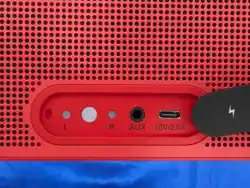
3.Rear Function Indicators:
Auracast Status Light (White): Located on the back, indicates
the Auracast function On/O state.
Left Channel Indicator (White): Located on the back, lights up
when the speaker is set as the Left channel in Auracast mode.
Right Channel Indicator (White): Located on the back, lights up
when the speaker is set as the Right channel in Auracast mode.
BASIC OPERATION GUIDE BASIC OPERATION GUIDE
BATTERY MANAGEMENT
— Press and hold for 3 seconds to power on. A dedicated startup sound will play.
— Press and hold for 3 seconds to power o. All indicator lights will turn o.
— After powering on, the speaker will automatically attempt to reconnect to the last successfully
paired Bluetooth device for up to 10 minutes.
— Other devices can also actively search for and connect to the speaker within this 10-minute window.
— On battery power, if no device connects within 10 minutes of powering on, the speaker will autom-
atically shut down. It will also shut down automatically 10 minutes after the connected device sto-
ps sending an audio signal.
1
.
Power Button
— After powering on, search for and select"Lingke Starry M3"in your phone's Bluetooth settings.
A dedicated prompt tonesounds upon successful connection, and the top status light turns
solid blue.
— You can disconnect Bluetooth from your phone, or simultaneously press and hold the Volume
+ and Volume- buttons on the speaker for over 2 seconds to disconnect the current Blueto-
oth and search for a new device.
Bluetooth Connection
— Short press Volume +/- : Adjusts volume step by step.
— Press and holdVolume +/- : Continuously adjusts volume to max/min.
— Indicator: The status light (blue/white) blinks once per short press. It blinks rapidly during
hold, returning to solid when released.
— A maximum volume prompt tone sounds at peak volume.
Bluetooth Mode: Speaker volume is synchronized with the phone volume.
AUX Mode: Speaker volume is not synchronized with the connected device volume.
Volume Adjustment
— Battery ≤ 10%: Low battery alert tone sounds for 3 seconds.
— Battery ≤ 5%: Low battery alert tone sounds for 6 seconds, once every five minutes.
— Battery ≤ 20%: The first battery indicator light turns red.
Low Battery Alert
— When battery is below 5%, it will automatically shut down.
Low Battery Shutdown
— Connect to a power source to begin charging automatically. A 30W charger is recommended.
— While charging, the 4 blue battery indicators flash sequentially in a slow chase pattern.
When fully charged (100%), all 4 lights remain solidly lit.
Charging the Speaker
— Set Master Speaker: With the first speaker connected to your phone,press and hold its rear
Auracast button for 3 seconds.Its Auracast status light will glow solid white
— Set Slave Speaker(s): For each additional speaker to be paired,press and hold its rear Aur-
acast button for 3 seconds.Their Auracast status lights will also glow solid white.
Creating a Stereo Group
— Short press the Auracast button to cycle through: Left Channel (L) → Right Channel (R) → Stereo
— Stereo Mode: Only the Auracast light is on (L/R channel lights are o). The speaker plays full stereo
sound. (This is the default mode for a single speaker, and L/R channels cannot be selected individually)
— Left Channel Mode: Auracast light and Left Channel indicator are on (Right Channel light is o).
The speaker plays only the left channel audio.
— Right Channel Mode: Auracast light and Right Channel indicator are on (Left Channel light is o).
The speaker plays only the right channel audio.
Channel Setting (on speakers with Auracast activated)
— Adjusting the Master speaker's volume changes the volumesynchronously for all speakersin
the group
— Adjusting a Slave speaker's volume changes only that specific speaker's volume.
— Resynchronize Volume:If Slave speaker volumes become inconsistent, adjust the Master sp-
eaker's volume to maximum and press Volume+ once more, OR adjust to minimum and press
Volume- once more. All speakers' volumes will resynchronize.
Group Volume Control
— Use only the dedicated power adapter supplied with this product (or an adapter of the
manufacturer-specified specifications). Using an incompatible adapter may cause fire,
electric shock, or product damage.
— Do not charge the speaker in wet environments (e.g., bathroom, poolside) to prevent el-
ectric shock risk.
— Do not disassemble, modify, or repair this product yourself. Any unauthorized operation
will void the warranty and may create safety hazards.
Electrical Safety
— Note your product model and purchase date.
— Describe the specific problem and the troubleshooting steps you have already tried.
— Contact our Customer Service Center or visit an authorized service center for inspection.
— Warranty:Please refer to the warranty certificate provided with the product. During the
warranty period, free repair service will be provided for faults not caused by human factors.
If the above steps do not resolve your issue, please:
— This product features an IPX5 water resistance rating, meaning it can withstand waterjets
from any direction.However, it is not fully waterproof.Water resistance may degrade with normal
wear.Do not intentionally submerge the speaker for prolonged periods or rinse it directly unde
a strong water stream unless explicitly permitted by the product specifications.
— Before charging, ensure the charging port is completely dry. After use in a damp environment,
dry the speaker with a soft cloth.
Water and Dust Resistance
— Place the speaker on a stable, flat surface. Avoid dropping it from heights.
— Keep away from heat sources like heaters or open flames, as high temperatures may cause
bcasing deformation or fire.
— Avoid use in excessively dusty environments, areas with strong vibration, or where strong m-
agnetic interference is present.
Placement and Environment
— The built-in battery is a consumable component; its capacity will gradually decrease with
time and charge cycles.
— To extend battery life:
Avoid using or charging the speaker in extreme temperatures (very high or low).
For long-term storage, maintain the charge level around 50% and perform a full charge-dis-
charge cycle every three months.
Avoid deep discharge (using until it powers o automatically). It is not necessary to charge
to 100% every time.
Battery Use
— On any speaker with Auracast enabled,press and hold its Auracast button for 3 seconds to
deactivate the function for that speaker.
— Deactivating Auracast on the Master speaker disbands the entire group. All Slave speakers
will also have their Auracast function automatically turned o.
Turning O Auracast
— Connect your playback device using a 3.5mm audio cable. During normal playback, the to
status light is solid white. If no music is playing, the light remains solid white; the speaker will
auto-shutdown after 10 minutes of no signal.
— Disconnecting the AUX cable switches the speaker back to the Bluetooth channel. If a Blue-
tooth device is connected, the top status light turns solid blue. If not, the light blinks slowly
(searching), and the speaker will auto-shutdown after 10 minutes without a connection.
AUX Connection
— Play/Pause
Press the Play/Pause button on the speaker or your connected device during playback.
— Bluetooth Mode: The blue status light is solid.
— AUX Mode: The white status light is solid. Pressing Pause on the speaker only mutes the sp-
eaker; the playback device continues playing. The top status light blinks white slowly. Press
the Volume+, Volume-, or Play/Pause button to unmute, and the light returns to solid white.
Playback Control
— The speaker operates dierently when powered by an adapter versus battery, mainly regarding
its state after inactivity.
— Connected to Power: Enters Standby mode (red light on), consuming minimal power.
— Battery Power: Will automatically power o to conserve battery.
Important Note
— When connected to power, the speaker enters Standby mode 10 minutes after audio input stops
— In Standby, the current Bluetooth connection is disconnected, but other Bluetooth devices can still
search for and connect to the speaker.
— The status light glows solid red when in Standby with noinput.
— When an audio signal is detected, the speaker wakes up. The status light changes to solid blue
(Bluetooth) or solid white (AUX).
2
.
Standby Mode
SAFETY INSTRUCTIONS (IMPORTANT!)
TROUBLESHOOTING
TROUBLESHOOTING
Tip: Volume levels are synchronized with your phone:Phone Volume Level * 2 = Speaker Volume Level. Pressing Volume+ on the speaker
twice increases the phone's volume by one step. The speaker has 32 levels (0 to max),while the phone has 16 levels (0 to max).
This feature allows you to combine multiple Auracast-enabled speakers (any brand) into a stereo system.
AURACAST PAIRING FUNCTION GUIDE
AURACAST PAIRING FUNCTION GUIDE
Symptom
1. Cannot power on
Possible Causes
1. Battery is completely depleted.
2. Power outlet has no electricity.
1. Connect the speaker to power and charge for at least 30
minutes before attempting to power on.
2. Try a dierent power outlet.
1. Speaker not in pairing mode.
2. Distance too far or obstacles present.
3. Memory interference from previous
connections.
4. Strong wireless interference nearby.
1. Ensure the speaker is in pairing mode after power on (blue
light flashing rapidly).
2. Move the playback device closer (within 3 meters recomm-
ended) and remove obstacles.
3. Delete "Lingke Starry M3" from your device's Bluetooth pa-
ired list, then search and pair again.
4. Move away from other wireless devices (microwave, router).
Restart both the speaker and your playback device.
1. Volume is too low or muted.
2. Unstable Bluetooth connection.
1. Increase the volume on both the speaker and your playback device.
2. Ensure Bluetooth connection is stable (see point 2).
3. Try playing a dierent song or video to test.
1. Poor quality audio file.
2. Resonance from the speaker cabinet.
3. Damaged speaker driver.
1. Loose connection of cable or adapter.
2. Use of an incompatible power adapter.
3. Dirty or damaged charging port.
4. End of battery life.
1. Prolonged high-volume use in a hot
environment.
2. High-volume playback while chargin
simultaneously.
1. Try playing a high-quality audio file (e.g., 320kbps).
2. Place the speaker on a solid, stable surface, avoiding contact with
loose objects.
3. Contact after-sales service for repair.
1. Check all connections are secure.
2. Use only the provided or manufacturer-certified power adapter
and cable.
3. Gently clean the charging port with a dry, soft cloth or appropriate
tool. Do not use metal objects.
4. If there is no response after prolonged charging and the speaker is
unusable, the battery may be damaged. Contact after-sales service.
1. This can be normal, but to prevent overheating, move the speaker
to a cooler location and reduce the volume.
2. To protect the battery and circuitry, avoid high-volume playback
while charging.
2. Bluetooth fails or
is unstable
4. Poor sound quality
3. No sound or
intermittent sound
5. Won't charge /
Charging light o
6. Speaker becomes
unusually hot during use
Solutions
If you encounter the following issues, please try the corresponding solutions first. If the prob-
lem persists, please contact our after-sales service center.
Important:Before troubleshooting, first try powering the speaker o and on again, and ensure
the battery is adequately charged or the speaker is connected to a power source.
L R AUX 15V/2.0A
Left
Channel
Indicator
Auracast
Status Light
AUX input
Right
Channel
Indicator
AC Power
ON/OFF
Status Light
VOL-
Battery Level
Indicators
Play/Pause
VOL+
- Reorient or relocate the receiving antenna.
- Increase the separation between the equipment and receiver
- Connect the equipment into an outlet on a circuit dierent from that to which the receiver is
connected.
- Consult the dealer or an experienced radio/TV technician for help.
- The device has been evaluated to meet general RF exposure requirement. The device can be used
in portable exposure condition without restriction.
This device complies with Part 15 of the FCC Rules. Operation is subject to the following two con-
ditions: (1) this device may not cause harmful interference, and (2) this device must accept any in-
terference received, including interference that may cause undesired operation.
Changes or modifications not expressly approved by the party responsible for compliance could
void the user's authority to operate the equipment.
NOTE: This equipment has been tested and found to comply with the limits for a Class B digital
device, pursuant to Part 15 of the FCC Rules. These limits are designed to provide reasonable
protection against harmful interference in a residential installation. This equipment generates,
uses and can radiate radio frequency energy and, if not installed and used in accordance with
the instructions, may cause harmful interference to radio communications. However. there is no
guarantee that interference will not occur in a particular installation.
If this equipment does cause harmful interference to radio or television reception which can be
determined by turning the equipment o and on, the user is encouraged to try to correct the
interference by one or more of the following measures:
RF Exposure Statement
WARNING