Sofa User Manual(TG-BLM-3-A1)
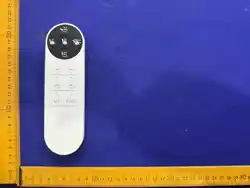
Note: When using the sofa for the first time, you need to successfully pair the remote control with the sofa, and then
perform an initial reset on the sofa to ensure it functions properly.
1. Pairing function:
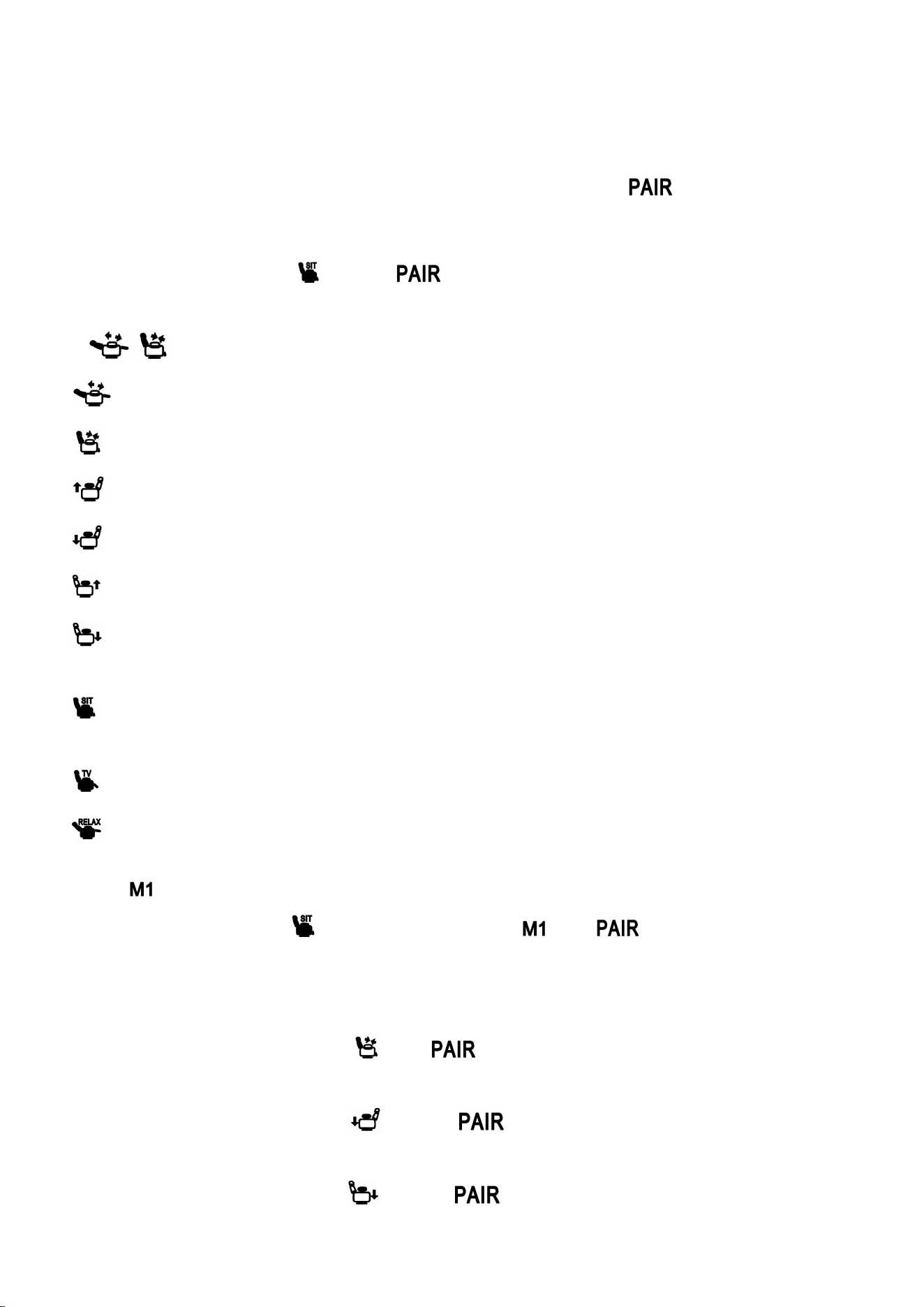
Pairing Mode: Within 30 seconds after the sofa is powered on, press and hold the “ ” for 10 seconds to enter the
remote control's automatic pairing mode. The control box light will flash while waiting for pairing, and will turn off once
pairing is successful.
Unpair: Press and hold both the “ ” and the “ ” for 10 seconds to enter the unpairing mode. The lights on the
remote control panel will flash, indicating that unpairing is successful.
2. / Sofa posture control:
: Tap for single movement, long press for continuous movement, controls the sand art display.
。
: Tap for a short movement, long press for continuous movement, controls the sofa contraction。
: Tap for a small movement, long press for continuous movement, controls the elevation of the left armrest。
: Tap for a short move, press and hold for continuous movement, controls lowering the left armrest。
button:Tap to move inch by inch, long press to continue moving, control the right armrest to raise.
button:
Tap for a short movement, long press for continuous movement, control the right armrest to lower
。
3. Shortcut key:
:When pressed, the sofa moves to the sitting position, and the left and right armrests retract to the lowest position.
This position cannot be changed.。
:After pressing, the sofa moves to the TV position; this position cannot be changed.。
:
Press to move the sofa to the lounging position; this position cannot be changed.
。
4. Memory function:
Press the “ ”,When the corresponding backlight turns on, the sofa armrest will move to the posture set by the user,
with the initial position being the “ ” position.Press and hold the “ ” and “ ” for 10 seconds. When the panel
light on the remote control flashes, it indicates that the memory has been successfully saved, and the sofa will remember
the current position.
5. Reset Function:
At the same time, press and hold the “ ” and “ ” buttons for 10 seconds, toggle the main control lever to
reset. Once the reset is complete, the remote control panel lights will flash.
At the same time, press and hold the “ ” key and “ ” key for 10 seconds. The left armrest lever will reset,
and once the reset is complete, the lights on the remote control panel will flash.
At the same time, press and hold the “ ” key and “ ” key for 10 seconds. The right armrest lever will reset,
and once the reset is complete, the lights on the remote control panel will flash.

This device complies with part 15 of the FCC Rules. Operation is subject to the following two conditions: (1) This
device may not cause harmful interference, and (2) this device must accept any interference received, including
interference that may cause undesired operation.
Any changes or modifications not expressly approved by the party responsible for compliance could void the user's
authority to operate the equipment.
NOTE: This equipment has been tested and found to comply with the limits for a Class B digital device, pursuant to
Part 15 of the FCC Rules. These limits are designed to provide reasonable protection against harmful interference in a
residential installation. This equipment generates, uses and can radiate radio frequency energy and, if not installed and
used in accordance with the instructions, may cause harmful interference to radio communications. However, there is no
guarantee that interference will not occur in a particular installation.
If this equipment does cause harmful interference to radio or television reception,
which can be determined by turning the equipment off and on, the user is encouraged to try to correct the
interference by one or more of the following measures:
-- Reorient or relocate the receiving antenna.
-- Increase the separation between the equipment and receiver.
-- Connect the equipment into an outlet on a circuit different
from that to which the receiver is connected.
-- Consult the dealer or an experienced radio/TV technician for help.
The device has been evaluated to meet general RF exposure requirement. The device can be used in portable
exposure condition without restriction.