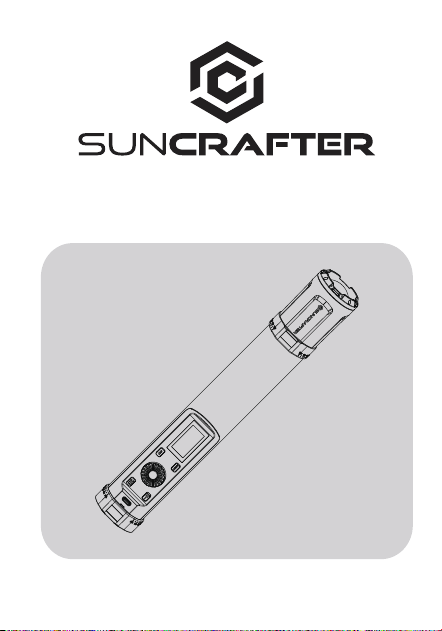
TL30 Tube Light
User Manual
Contents
Thank you for choosing SunCrafter. This manual contains
important user information for the TL30 Tube Light. We
recommend reading it carefully before using the equipment and
keeping it in a safe place for future reference.
TL30 Tube Light: Advanced RGBWW mixing technology for versatile
colors. Revolutionary design seamlessly integrates point and
surface light sources. Reshape your imagination of light with 360°
hue color adjustment, brightness adjustment, HSI, and special
effects. Connect via the app for presets and customization. Its
portable magnetic design ensures convenience everywhere you
go. Unleash your creative light show with ease. Suitable for both
studio and location video and photography recording.
Features 1
Component Description
2
Power Management
4
Features Introduction
5-9
Mode Selection 10-11
Operation Description
3
Function Setting
12-13
Bluetooth Connection
14
APP Introduction
15
List of Items
16
Product Specifications
17
Illuminance Test Data
18
Notes
19
Maintenance
20
FCC Warning
21

Features
1. Innovative patented technology with integrated point and surface light
source design, allowing dual-purpose use with one-touch switching.
2. Advanced RGBWW Technology: Five-color mixing for incredibly even colors.
3. Telescopic Focusing Technology: Provides endless possibilities for light
ambiance.
4. Adjustable Focus Ring: Allows flexible angle control with 45° adjustments.
5. Uniform Lighting: Milky white PC diffuser for a softer lighting effect.
6. The magnetic rear means that the light can be quickly and safely placed
on any metal object.
7. Dual Type-C power supply, further extended by using a power bank and the
ability to run and charge at the same time.
8. The TL30 is convenient, compact and portable - small enough to fit in your
pocket.
9. The TL30 offers 20 different special lighting effects designed to suite various
scenarios.
10. Colour temperature range of 2700K-10000K. CRI RA value of ≥96 when
colour temperature is between 2700K and 7500K.
11. Comes with colour temperature, HSI and special effects control and can be
connected to a mobile device via the APP which provides RGBW, colour
co-ordinates XY, colour paper GEL, music mode, preset, multi-lamp control
and other useful modes.
12. Connecting to the App via Bluetooth will provide further functions such as
preset, multi-lamp control and music mode.
13. Preset and sequence dimming are entirely customizable and can be set
according to user preferences.
Precautions:
1. Do not expose to water or other liquids. This product is not dustproof
or waterproof.
2. Low Power Warning: Flashing battery icon indicates the need for
immediate charging.
3. For long-term storage, discharge and recharge to at least 60% to
preserve battery life.
4. Use a charger with at least 18W output and follow the recommended
voltage, current, and temperature limits for safe and efficient charging.
5. Charging while the device is on is slow. It is recommended to charge
when the device is turned off.
6. Please ensure that you do not apply pressure to the OLED screen as this
may result in permanent screen damage.
7. Do not look directly at the LED tube in use from a close distance, as it
may cause damage to your eyesight.
-1-
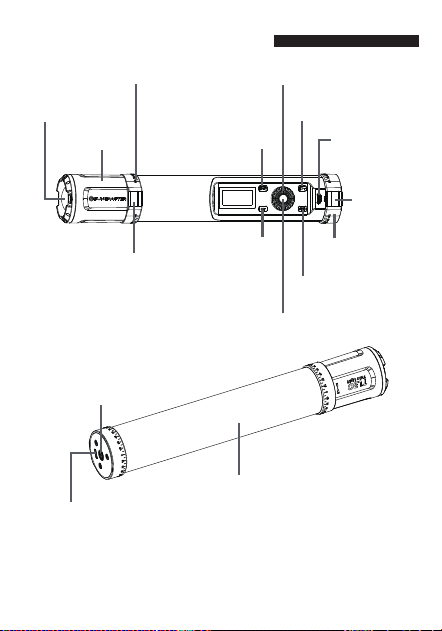
Component Description
Focus Ring
Point Light Source
Back Magnet
Dial
MENU Button
CCT Button
On / Off Button
Type-C
Charge Port
Type-C Charge Port
1/4'' Thread
Surface Light Source
Point & Surface Light
Source Button
Confirm Button
Back Magnet
-2-
Adjustable Focus Ring
Adjustable
Focus Ring
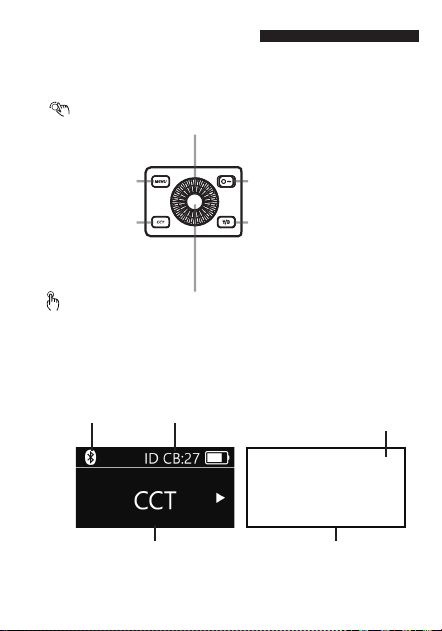
Operation Description
■Button Introduction
■Menu Screen
Rotary Dial: select up or down options / toggle different modes /
adjust parameter values
Press Confirm Button once:move cursor/confirm current selection
CCT Button:
Short press: select CCT
MENU Button:
Press: color temp./HSI/
special effects/settings
Press: switch from surface source to
point source
Long press: temporarily turn the
light Off/ON
On / Off Button:
To Left: Off,To Right: ON
Point & Surface Light Source Button:
Bluetooth connected
Device ID#
Battery icon
(Low Power Flashing)
Parameter interface
Main Interface
-3-
-4-
Power Management
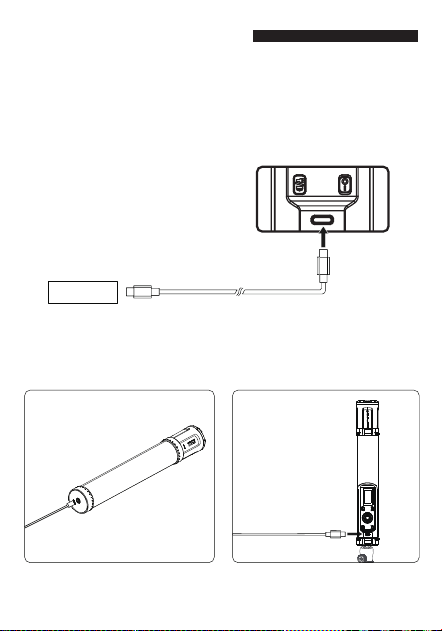
The TL30 has two Type-C power supply ports, allowing flexible
power options. Note that the light body may become hot when
used while charging, and it is not recommended to use it this
way for long periods.
■Type-C Charging
18W charger or portable power bank charging.
1. After the light is attached to the
wall, you can charge it using the
right-side Type-C port.
2. Use the Type-C port on the control
panel for charging when the light
is attached to a 1/4 '' screw.
12V /1.5A
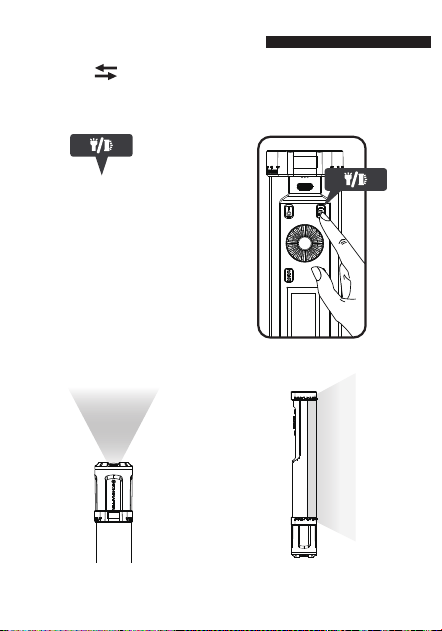
Surface Light SourcesPoint Light Sources
■Point Surface Light Source : One-touch Switch
APP Control
Manual Control
Features Introduction
-5-
Via Lumin APP or manual control can switch between point
and surface light sources.
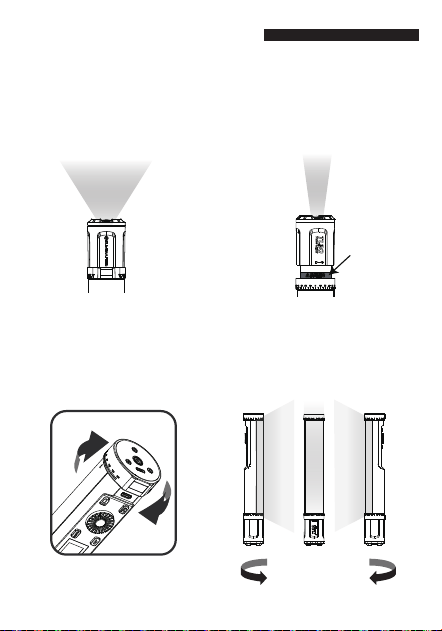
Extended:
The light beam narrows and colors
become stronger.
Retracted:
The light beam grows larger
and colors lighten.
The magnetic rings on both ends allow for 45-degree adjustments.
Once the light fixture is mounted on the wall, you can easily change
the light angle to suit your needs
Features Introduction
■ Adjustable Focus
■Tick-Tock Rotation, Control Light Effortlessly.
Tick-Tock ~
Adjustable
Beam Angle
-6-
Aim the arrow at the scale for
precise angle adjustment.
Metal Part
Equipped with innovative telescopic focusing, it offers unlimited
possibilities for light atmosphere. Simply rotate the focus ring to
transition from a tightly focused bright spot to a wide, warm
ambient light.
* Reminder: The metal parts inside the focus ring can become hot after
prolonged use of the point light source. Please avoid touching them
with your hands.
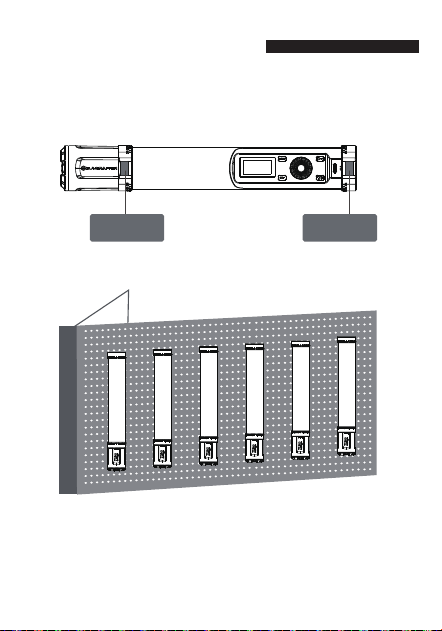
Magnets have been located on the back so that the lights can be
securely attached to metal objects.
Eg: Metal shelving
Metal surface Metal surface
■Versatile Installation, Easy to Use
Features Introduction
-7-
* The product contains magnets. Please keep it away from items
susceptible to magnetization: floppy disks, credit cards, computer
monitors, watches, mobile phones, medical devices (pacemakers), etc.
* Do not adhere the magnet to surfaces exceeding 80-degree to reduce
the risk of magnetic field degradation.
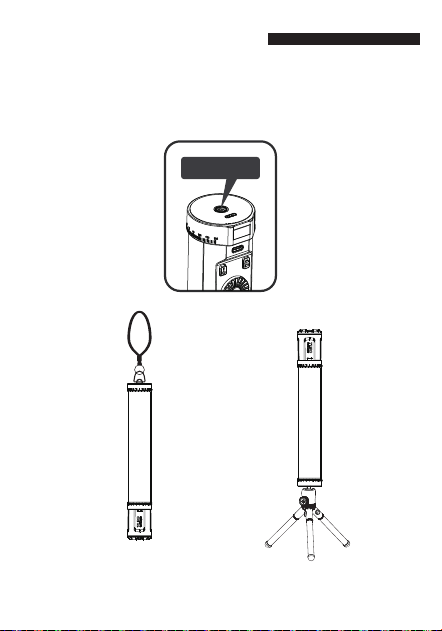
The base has a 1/4" thread, fitting most photography gear with
1/4" screws. It's compatible with
Lanyard, light stands, and more.
Lanyard
Timberpod
(Sold separately)
■ 1/4'' Thread
1/4'' Thread
Features Introduction
-8-
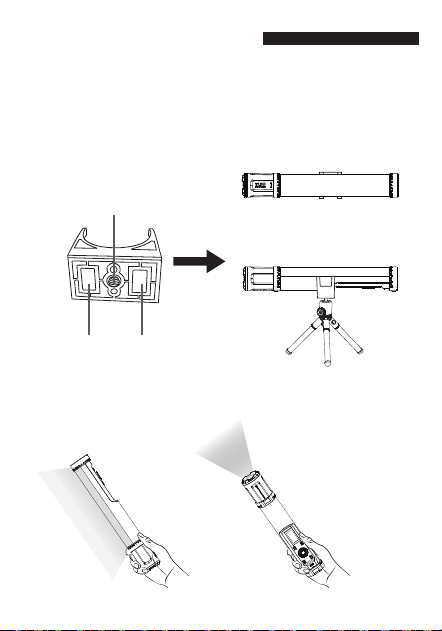
Back Magnet
The clamp has a 1/4" thread and a magnet on the bottom, making it
compatible with most photography tripods that have a 1/4" screw.
It can also be attached to small metal surfaces using the magnet on
the clamp, making it easy to install and remove.
■How to Use Pipe Clamp
■ Handheld shooting
Features Introduction
-9-
②Use the 1/4" screw hole on the
clamp to horizontally mount the
tube light on a timberpod.
①Use the magnet on the clamp
to attach the tube light to small
metal surfaces.
Back Magnet
1/4'' Thread
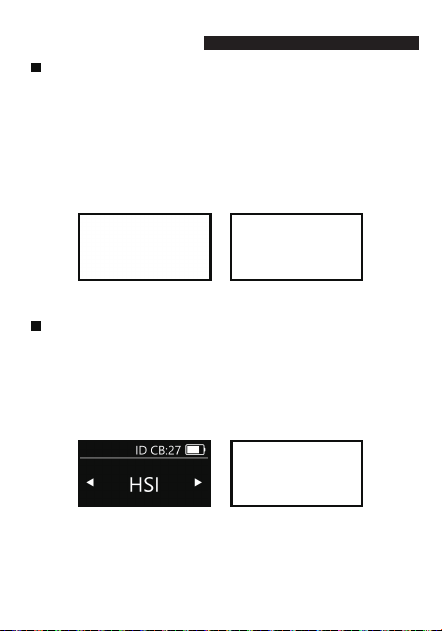
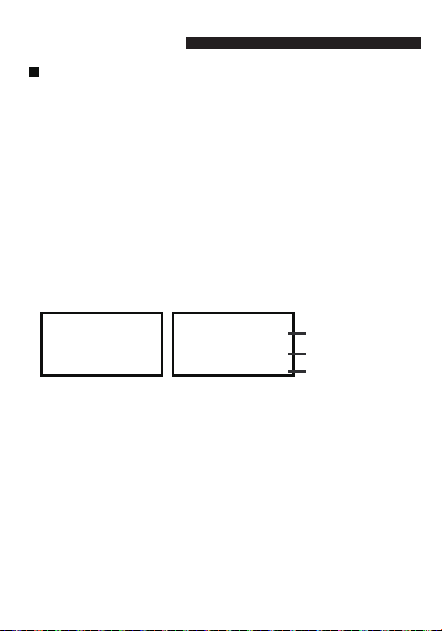
CCT Mode
The adjustable parameters within colour temperature mode are:
colour temperature range of 2700K ~ 10000K. Brightness range
of 0% ~ 100% and a green/magenta range of -1 ~ +1.
Press the CCT button to use the colour temperature mode and
adjust the colour temperature by rotating the Dial button.
Press the 'Confirm' button to select color temperature/brighness
/green/magenta.
Adjust the corresponding parameter by rotating the Dial button.
Mode Selection
HSI Mode
The adjustable parameters of the HSI mode are: HSI range 0°~ 360°,
saturation range 0% ~100% and brightness 0% ~100%.
Press the 'MENU' button, select HSI, and press the 'Confirm' button to
enter HSI mode.
Press the 'Confirm' button once to choose hue/saturation/brightness,
and adjust the corresponding parameter by rotating the Dial.
-10-
Mode Selection
Special Effects Mode
There are 20 different special effects including, Fireworks, Flashing,
CCT Cycle, SOS, Rainbow, Lightning, TV, Pulsing, Fire, Emergency
vehicle, Party, Strobe light, Welding light, Broken light bulb, Candle,
Clouds, Nightclub, Strobe light, Explosion and Strobe fluorescent
flicker.
Press 'MENU' , select ' Special Effects' , and press ' Confirm' to enter
Special Effects mode.
Brightness adjustment range is from 0% - 100%.
Rotate the Dial to select the effect, corresponding to the parameter
size change.
Press the 'Confirm' button to select effect type, brightness, speed,
frequency and decay, color temperature, etc.
-11-
Special effects
Brightness parameters
Speed parameters
Function Setting
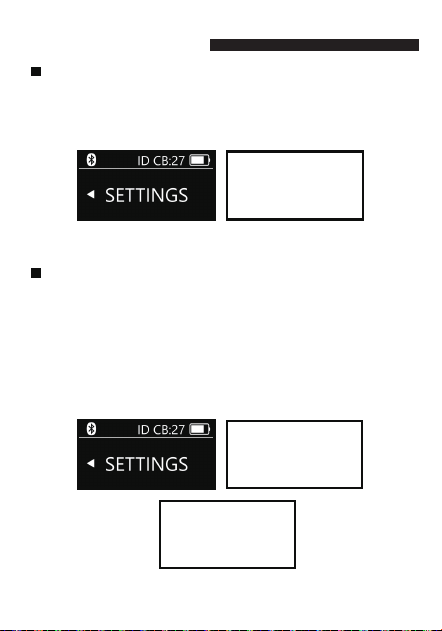
Language selection
Press 'MENU' button, selected 'Settings', press the 'Confirm'
button to enter the settings mode;
Rotate the Dial so the cursor is on 'Language', then press the
'Confirm' button to switch between Chinese and English.
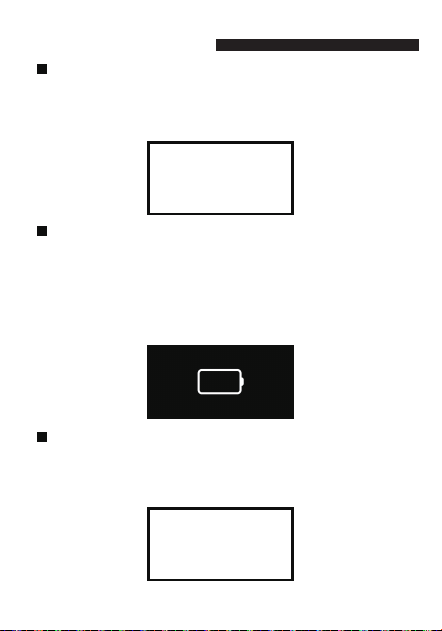
Restore Factory Settings
Press the 'MENU' button, select 'Settings', and press the 'Confirm'
button to enter the settings mode;
Rotate the Dial to select 'Restore Factory Settings', and press the
'Confirm' button to enter factory reset;
Rotate the Dial to choose 'Yes/No'. Press 'Yes' to confirm the
restoration to factory settings, or press 'No' to exit the restoration
interface.
Restoring factory settings will delete user-configured data. Use
this function with caution.
-12-
Function Setting
Temporary Lamp Shut-Off
Long press the Point & Surface Light Source button to turn the light
off, and short press the power button again to turn the light on.
Temporary light shut-off is a low-power mode. When the product is
not in use, please check to make sure the product is fully shut down.
Device is off without battery power
In the power-off state with no battery power – the device cannot be
turned on.
Note: Due to the discharge characteristics of the lithium battery and
the power requirements of the TL30, please check if the battery
indicator on the display is flashing when using the product. If the
battery is low, the indicator will flash, indicating that you should
charge it using the Type-C external power supply.
Slow Charging While Powered On
Slow charging while powered on - The screen will show: 'Please use
Fast Charger!'
Note: When charging and using at a time, it is essential to use an
18W or above charger or a power bank for optimal performance.
-13-
■Bluetooth Settings
Bluetooth Connection
1. To set up the Bluetooth connection, download the Lumin+ App to your
mobile device (smartphone or tablet) and register. Then, open the
Lumin+ App and create a new project. Once in the project, search for
available devices and select the appropriate device using its name or code
to establish the Bluetooth connection. A successful connection will be
indicated by the light blinking three times. From the project device list,
you can choose to control a single device or multiple devices. The
Bluetooth icon will appear on the status bar, allowing you to adjust the
internal lighting values. If the APP displays a Bluetooth connection failure,
make sure your mobile device has Bluetooth enabled or reset Bluetooth
on the product and try to reconnect.
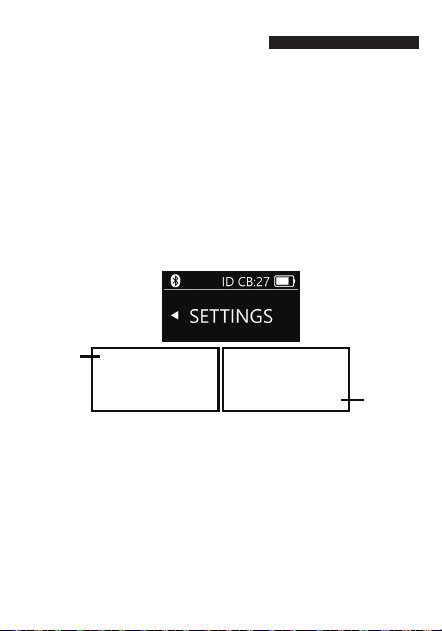
2. Bluetooth reset: Press 'MENU', go to 'Settings', then 'Confirm' to enter
settings. Use the Dial to select 'Bluetooth Reset' and 'Confirm'. Choose
'Yes' to reset or 'No' to exit the Bluetooth reset screen.
Note:
1. Please reset the Bluetooth on the device first, otherwise the device will
not be found.
2. The TL30 and mobile device connection use Bluetooth BLE5.1
technology. Prior to opening the App to connect please ensure that
Bluetooth has been enabled on your device. lf using Android, you will
need to enable Bluetooth on the APP also.
3. The Lumin+ App currently supports iOS 12.0 and above. It also supports
mobile devices with Android 8.0 and above.
4. After connecting the device to the Lumin App via Bluetooth please
ensure that, when prompted to make a firmware update, the battery
power for all devices is sufficient to support the duration of the update.
Bluetooth
connected
Bluetooth
reset
-14-
APP Introduction
■Lumin App Overview
Lumin+
App QR Code
The Lumin+ App has multi-light control, Preset and music mode. For
additional modes please download the Lumin+ App or visit www.suncrafter.
com to access a detailed App user guide. To download the APP, please scan
the QR code or search for Lumin+ App. For more information please visit
www.suncrafter.com after registering you can operate the product using the
APP, however should you change to another mobile device, the product will
be reset via Bluetooth, after which you can use the APP connection.
-15-
■Multi-light Control
Within the App's project device list, you can choose to add multiple lights
to a project. By setting preset on each light you can create a multiple light
sequence.
■Music mode
Music mode has a variety of ambient colours that react and change
according to the music.
■Special Effects
The Lumin+ APP has 20 internal effects, and more parameters can be
set in the APP according to your lighting needs.
■Preset and sequences
Within the Lumin+ APP, you can adjust the preset settings
which can then be added to any sequence. By setting a flashing sequence
layout, cycle mode, fade time, duration, etc. you can then switch
between scenes and control and play the lighting effects wirelessly.
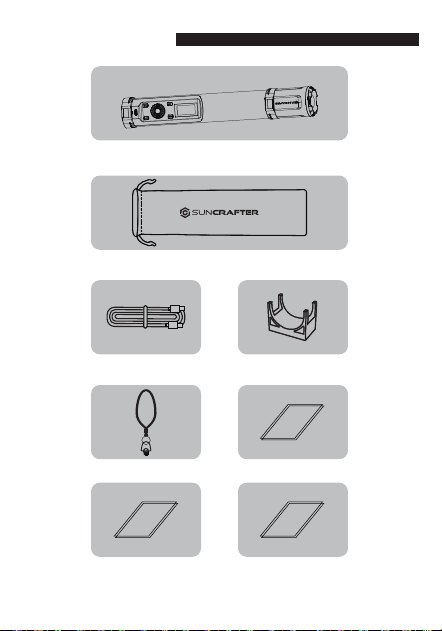
List of Items
TL30 Main Light Body
Type-C Charging Cable Pipe Clamp
Carry Case
1/4” Lanyard
Warranty Card
User Manual
Certificate
-16
-17-
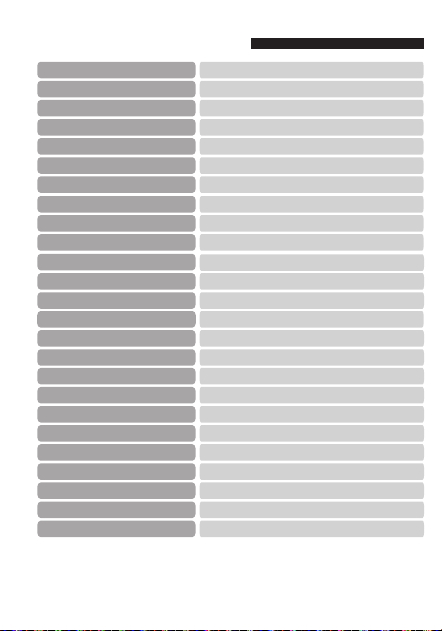
Product Specifications
*Note: The above data is based on SunCrafter Lab tests and there may be some variation in
values with data marked with an asterick .
Working Temperature
SunCrafter TL30 Tube Light
TL30
10W
Type-C
12V /1.5A
3.7V 5000mAh/18.2Wh
90 minutes
Battery Capacity
Power
Charging port
Weight
Charging
Product Name
Model
Material
Size
Run Time
Rf 95 Rg 102
74
88
SSI CIE-D55*
IES TM-30*
SSI CIE-D27*
15 meters (no interference)
Bluetooth transmission distance
2.4GHz
2700K-10000K
0%~100%
1/4" thread, Magnet
Brightness Range
≈190 LUX (Bare Lamp , Distance 1 meter)
100% Illuminance (5600K)
TLCI *
Wireless Frequency
Display Type
Colour temperature*
CQS *
CRI *
Mounting Method
Monochrome OLED
Aluminium alloy, PC, Magnets
∅ 48x312mm
0.5 kg
0℃~40℃
Bluetooth APP control, manual button controlControl Method
96
96
99
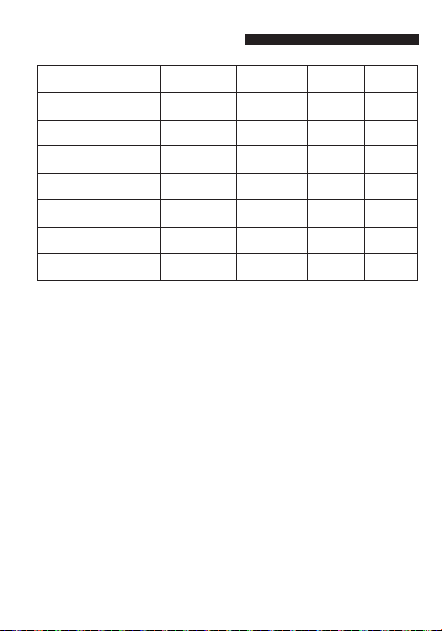
Illuminance Test Data
-18-
2700K
3200K
4300K
5600K
6500K
7500K
10000K
Distance
Bare Lamp
Bare Lamp
Bare Lamp
Bare Lamp
Bare Lamp
Bare Lamp
Bare Lamp
0.5m(Lux)
680
700
730
740
740
740
700
1m(Lux)
175
180
185
190
195
190
185
2m(Lux)
40
45
45
45
46
45
40
Colour temperature*

Notes
1. In order to avoid equipment failure, please do not expose this product to
moisture or use in wet or rainy, sandy or dusty environments.
2. Do not disassemble or modify the product. Mishandling, including dropping
the product, may result in permanent damage.
3. Keep this product and its parts out of the reach of children and animals.
4. Please ensure that the product is always free from moisture and is stored
safely. Water and other liquids may contain minerals that can corrode the
internal electronic circuits.
5. Avoid using or placing the product in high temperature environments,
including direct strong, sunlight, as this may shorten the life of electronic
parts, damage the battery or distort plastic parts or casings.
6. Avoid using the product in very low temperature environments as internal
condensation or water particles may damage electronic circuitry as the
temperature rises.
7. Avoid using or storing the product in dirty or dusty environments as this may
damage components.
8. Avoid placing the product on or near hot surfaces or sources of heat such as
lit cigarettes, naked flames or heating systems.
9. Do not disassemble the product by yourself. Inappropriate or unprofessional
treatment may result in damage to the product.
10. Do not drop, knock or shake the product. Rough handling may damage the
internal circuit board.
11. During use do not cover the light head with flammable materials.
12. To avoid burns, please do not handle the light if it is hot.
13.
This product's battery contains potentially harmful materials and needs to
be disposed of appropriately. Please follow your local waste management
guidelines when recycling or disposing of the battery.
-19-

Maintenance
1. To prevent the accumulation of dust particles affecting the performance of
the product, please carefully wipe the exterior of the product with a clean,
soft, dry cloth at regular intervals.
2. The TL30 is covered by a 1-year warranty from the date of original purchase.
3. Product damage or failure to operate caused by inappropriate or irregular
operation is not covered by the warranty.
4. Unauthorized repair or attempting repair will make the warranty void and
any authorised repair will then be subject to charges.
5. If the product fails to function or is subjected to water or moisture please
ensure it is professionally examined and repaired prior to using it.
6. Always use a clean, dry soft cloth to clean the lens on the product. Do not use
harmful chemicals, cleaning agents or liquids to clean the product.
7. In the unlikely event that the product is found to be faulty please contact our
Customer Service team who will be happy to assist you: [email protected].
-20-
*The timberpod, metal shelving featured and referenced in this manual
are not included with this product but can be purchased separately.

FCC Warning
This device complies with part 15 of the FCC Rules. Operation is subject to the
following two conditions: (1) This device may not cause harmful interference,
and (2) this device must accept any interference received, including interference
that may cause undesired operation.
Note: This equipment has been tested and found to comply with the limits for a
Class B digital device, pursuant to part 15 of the FCC Rules. These limits are
designed to provide reasonable protection against harmful interference in a
residential installation. This equipment generates, uses and can radiate radio
frequency energy and, if not installed and used in accordance with the
instructions, may cause harmful interference to radio communications. However,
there is no guarantee that interference will not occur in a particular installation. If
this equipment does cause harmful interference to radio or television reception,
which can be determined by turning the equipment off and on, the user is
encouraged to try to correct the interference by one or more of the following
measures:
—Reorient or relocate the receiving antenna.
—Increase the separation between the equipment and receiver.
—Connect the equipment into an outlet on a circuit different from that to which
the receiver is connected.
—Consult the dealer or an experienced radio/TV technician for help.
Note: The Grantee is not responsible for any changes or modifications not
expressly approved by the party responsible for compliance. such modifications
could void the user's authority to operate the equipment.
The device has been evaluated to meet general RF exposure requirement.
This equipment complies with FCC's RF radiation exposure limits set forth for an
uncontrolled environment. This device and its antenna(s) must not be co-located
or conjunction with any other antenna or transmitter.
-21-
Lumin+
APP QR Code
Statement
SunCrafter reserves the right to modify or correct all hardware and software
specifications without prior notice. In the event of any discrepancy between
the instruction manual and the actual product, please refer to the product
itself. SunCrafter and its affiliates shall not be held liable for any direct,
indirect, punitive, incidental, special, consequential, or property damage, or
any harm to life resulting from the use or misuse of any SunCrafter product.
The user assumes all risks associated with using this product, and this
disclaimer does not affect your legal rights.
Manufacturer's Information
Origin: China
Website: www.suncrafter.com
US Design & Made in China
9meanders Inc
To download the Lumin+ App, please scan
the QR code or visit our website. For more
information on operation modes please
visit our website www.suncrafter.com